key FORD FOCUS ELECTRIC 2014 3.G Owner's Manual
[x] Cancel search | Manufacturer: FORD, Model Year: 2014, Model line: FOCUS ELECTRIC, Model: FORD FOCUS ELECTRIC 2014 3.GPages: 403, PDF Size: 6.42 MB
Page 96 of 403
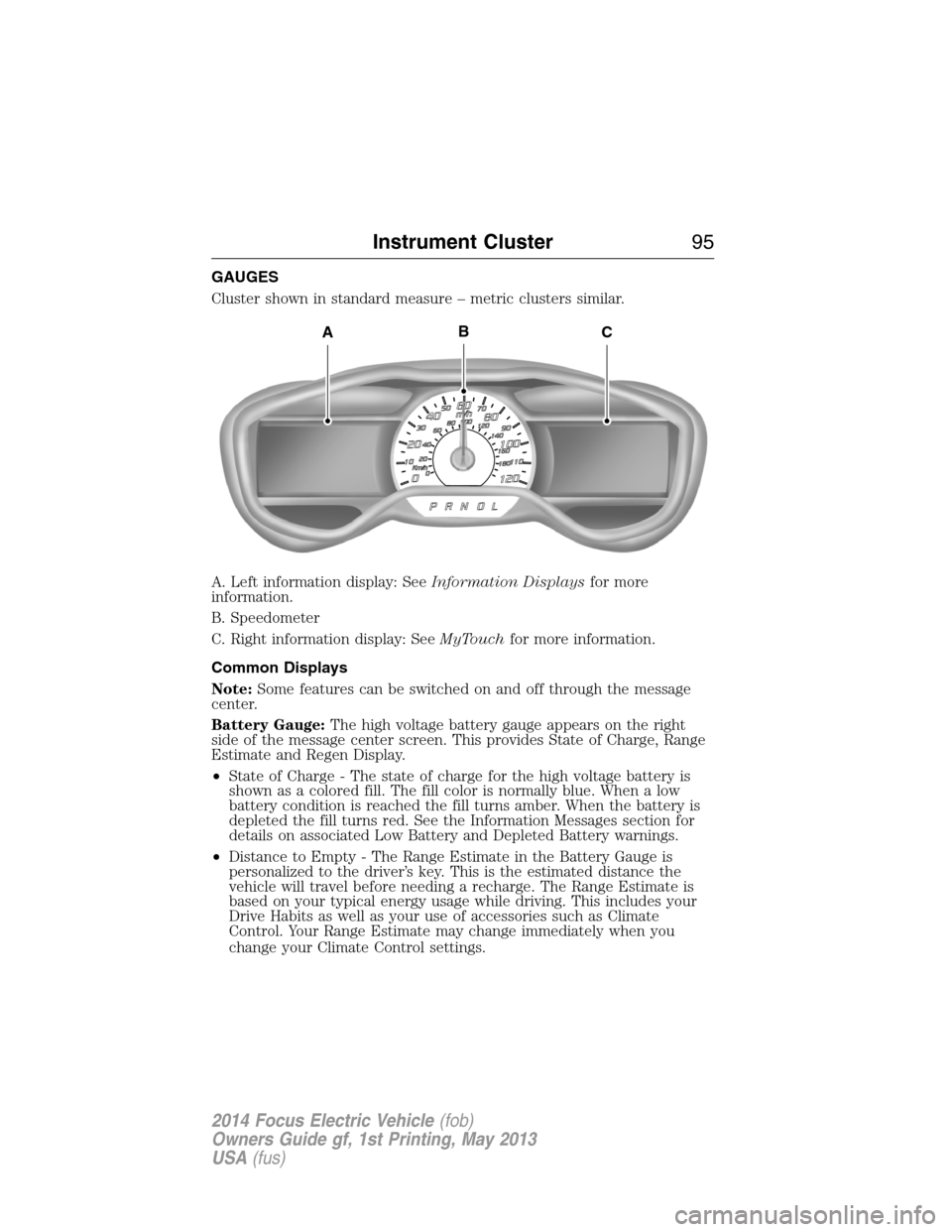
GAUGES
Cluster shown in standard measure – metric clusters similar.
A. Left information display: SeeInformation Displaysfor more
information.
B. Speedometer
C. Right information display: SeeMyTouchfor more information.
Common Displays
Note:Some features can be switched on and off through the message
center.
Battery Gauge:The high voltage battery gauge appears on the right
side of the message center screen. This provides State of Charge, Range
Estimate and Regen Display.
•State of Charge - The state of charge for the high voltage battery is
shown as a colored fill. The fill color is normally blue. When a low
battery condition is reached the fill turns amber. When the battery is
depleted the fill turns red. See the Information Messages section for
details on associated Low Battery and Depleted Battery warnings.
•Distance to Empty - The Range Estimate in the Battery Gauge is
personalized to the driver’s key. This is the estimated distance the
vehicle will travel before needing a recharge. The Range Estimate is
based on your typical energy usage while driving. This includes your
Drive Habits as well as your use of accessories such as Climate
Control. Your Range Estimate may change immediately when you
change your Climate Control settings.
ACB
Instrument Cluster95
2014 Focus Electric Vehicle(fob)
Owners Guide gf, 1st Printing, May 2013
USA(fus)
Page 97 of 403
•Regen Display-Acirculararrowsymbol appears in the center
of the Battery Gauge when energy is being recaptured through the
regenerative braking system.
Brake Coach Display:The Brake Coach appears after the vehicle has
come to a stop. It coaches you to brake in a manner which maximizes
the amount of energy returned through the regenerative braking system.
The percent displayed is an indication of the regenerative braking
efficiency with 100% representing the maximum amount of energy
recovery. If desired, this feature can be disabled in the Display section
of the Settings menu.
Trip Summary and Lifetime Summary:These will be displayed upon
shutting off the vehicle. Trip Summary will appear first, then Lifetime
Summary will be displayed. You can toggle between these displays using
the up and down arrow keys on the left hand steering wheel controls.
Trip Summary data is from the last power cycle, while Lifetime Summary
data is cumulative from the last Lifetime Summary reset done through
the Settings menu in the message center.
Trip Summary:
•Distance - The total distance travelled, and regen distance are
displayed. Regen distance is the estimated range gained from energy
recaptured through regenerative braking.
•Energy Used - The total kilowatt hours and average watt hours per
unit of distance are displayed. The average watt hours per mi (km)
will be shown in blue if less than (better than) the lifetime average
watt hours per mi (km).
•Brake Score - The percentage of braking energy recaptured and
returned to the high voltage battery through regenerative braking.
The brake score will be shown in blue if greater than (better than)
the lifetime brake score.
Lifetime Summary:
•Distance - The total regen distance, which is the estimated range
gained from energy recaptured through regenerative braking.
•Energy Used - The average watt hours per mi (km).
•Brake Score - The average percentage of braking energy recaptured
and returned to the high voltage battery through regenerative braking.
96Instrument Cluster
2014 Focus Electric Vehicle(fob)
Owners Guide gf, 1st Printing, May 2013
USA(fus)
Page 102 of 403
AUDIBLE WARNINGS AND INDICATORS
Key In Ignition Warning Chime
Sounds when the key is left in the ignition in the off or accessory
position and the driver’s door is opened.
Keyless Warning Alert (If Equipped)
Sounds when the keyless vehicle is in RUN and the driver’s door is
opened.
Headlamps On Warning Chime
Sounds when the headlamps or parking lamps are on, the ignition is off
(the key is not in the ignition) and the driver’s door is opened.
Parking Brake On Warning Chime
Sounds when you have left the parking brake on and drive your vehicle.
If the warning chime remains on after you have released the parking
brake, have the system checked by your authorized dealer immediately.
Instrument Cluster101
2014 Focus Electric Vehicle(fob)
Owners Guide gf, 1st Printing, May 2013
USA(fus)
Page 104 of 403
Main menu
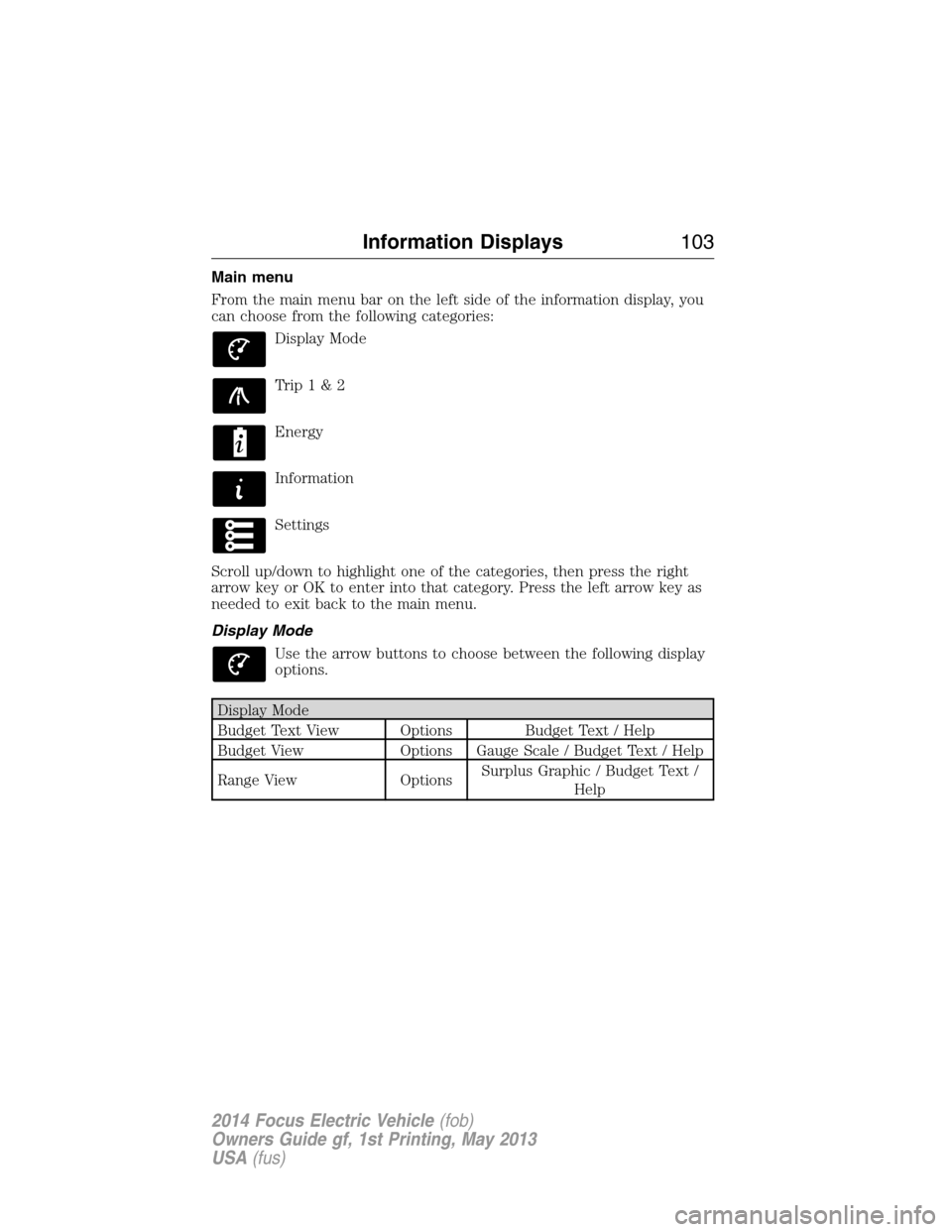
From the main menu bar on the left side of the information display, you
can choose from the following categories:
Display Mode
Trip1&2
Energy
Information
Settings
Scroll up/down to highlight one of the categories, then press the right
arrow key or OK to enter into that category. Press the left arrow key as
needed to exit back to the main menu.
Display Mode
Use the arrow buttons to choose between the following display
options.
Display Mode
Budget Text View Options Budget Text / Help
Budget View Options Gauge Scale / Budget Text / Help
Range View OptionsSurplus Graphic / Budget Text /
Help
Information Displays103
2014 Focus Electric Vehicle(fob)
Owners Guide gf, 1st Printing, May 2013
USA(fus)
Page 106 of 403
•Budget view: helps you manage your energy use.
Your current Energy Use is the white line that moves up and down in
the Budget Gauge. A higher line means you are using more energy
(lower is better). Your energy use includes input from the accelerator
pedal as well as the accessories, such as Climate Control.
The Budget is shown by the blue cup shape around the Budget Gauge.
As long as your current Energy Use is within the cup, you are staying
within your budget. Your Budget represents the maximum energy usage
you can maintain in order to achieve your vehicle range estimate, or
reach your intended charge point. Driving for extended periods outside
of the Budget Cup reduces your budget and could put you at risk of not
reaching your intended charge point.
•Range view: shows your range relative to your charge point as well as
performance to your budget.
A blue charge point icon means you have a Surplus. If an E appears to
the left of an amber charge point icon, then you are projected to run
out of charge prior to reaching your charge point.
Current performance to your budget is represented by the glow of the car
icon: more Blue = better performance to budget, more Amber = worse.
The optional Surplus Graphic displays available range beyond your
charge point.
If you didn’t enter your charge point through the Navigation system,
your budget will be set to the range estimate at the start of your trip.
The gauge will show your estimated distance to E (empty) along with
your current performance to budget. The optional Surplus Graphic is
not available in this case.
•MyView: You can choose what to display in this view. Selecting Change
MyView in the options menu allows you to use the right and left
arrows to scroll through two columns of content choices. Once you
have your desired content showing in each column, press OK to save.
The content you select is saved to the current driver’s key as MyView.
Accessory Power: Indicates electrical power demands from your
vehicle’s accessory systems. The gauge separately displays power
demand in kilowatts (kW) for climate and other accessories.
Information Displays105
2014 Focus Electric Vehicle(fob)
Owners Guide gf, 1st Printing, May 2013
USA(fus)
Page 109 of 403
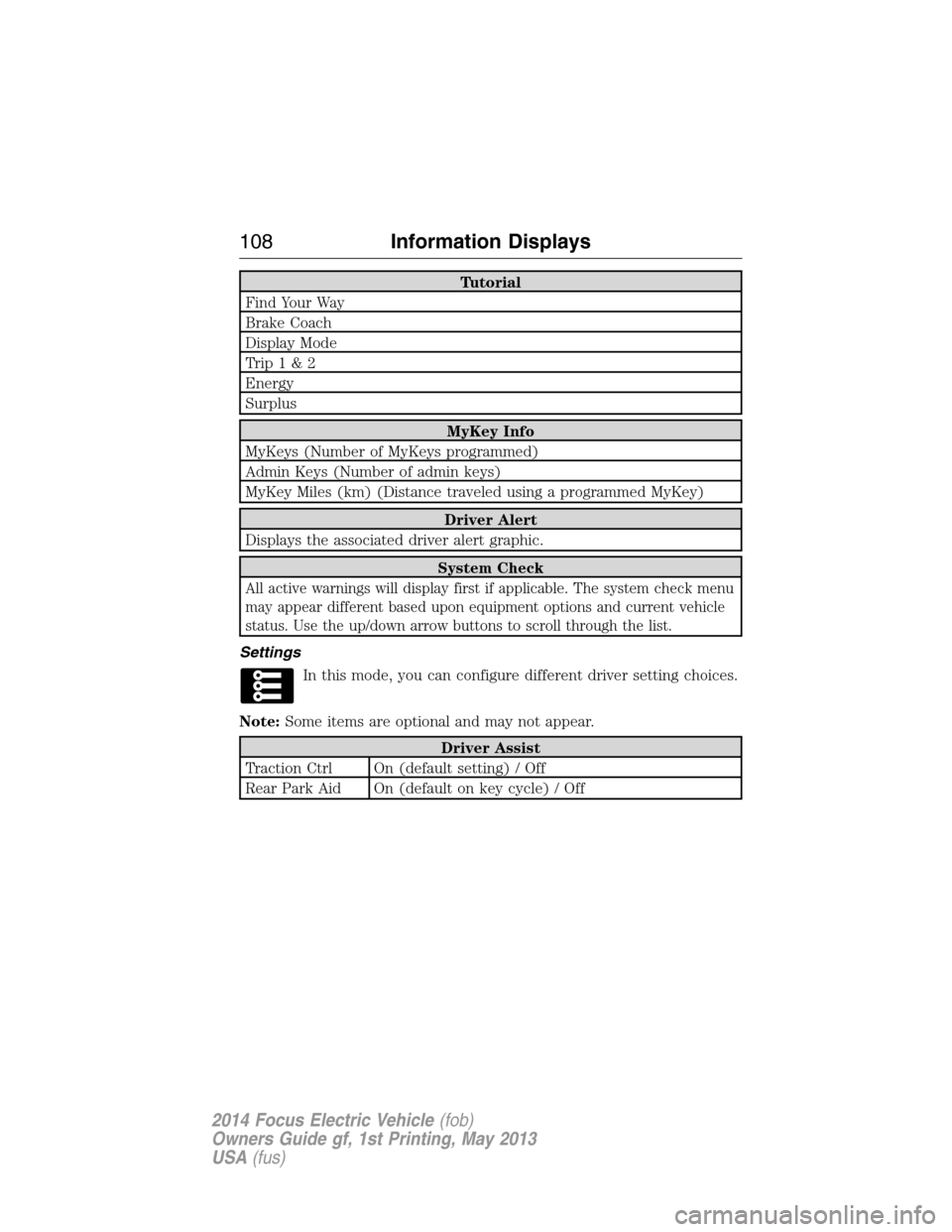
Tutorial
Find Your Way
Brake Coach
Display Mode
Trip1&2
Energy
Surplus
MyKey Info
MyKeys (Number of MyKeys programmed)
Admin Keys (Number of admin keys)
MyKey Miles (km) (Distance traveled using a programmed MyKey)
Driver Alert
Displays the associated driver alert graphic.
System Check
All active warnings will display first if applicable. The system check menu
may appear different based upon equipment options and current vehicle
status. Use the up/down arrow buttons to scroll through the list.
Settings
In this mode, you can configure different driver setting choices.
Note:Some items are optional and may not appear.
Driver Assist
Traction Ctrl On (default setting) / Off
Rear Park Aid On (default on key cycle) / Off
108Information Displays
2014 Focus Electric Vehicle(fob)
Owners Guide gf, 1st Printing, May 2013
USA(fus)
Page 110 of 403
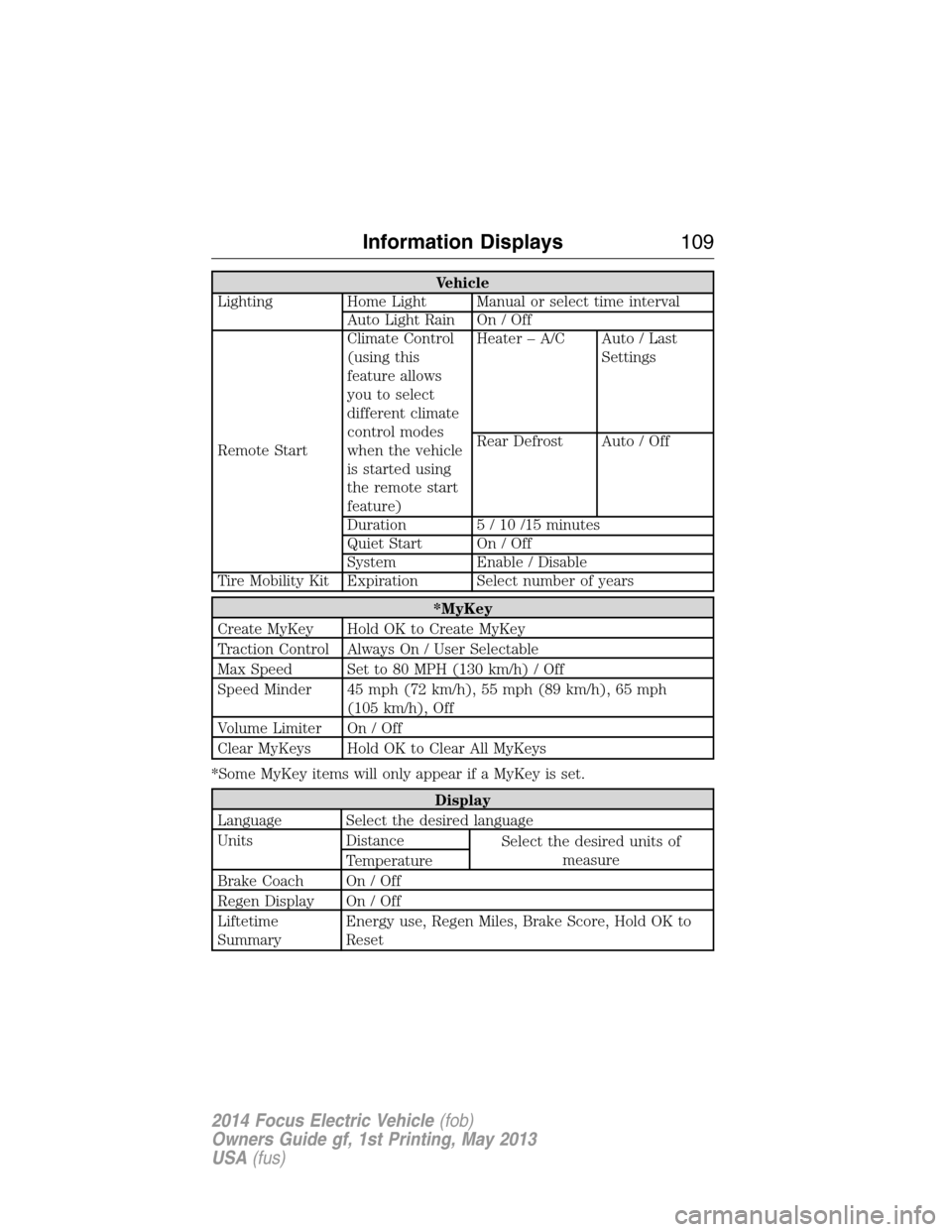
Vehicle
Lighting Home Light Manual or select time interval
Auto Light Rain On / Off
Remote StartClimate Control
(using this
feature allows
you to select
different climate
control modes
when the vehicle
is started using
the remote start
feature)Heater – A/C Auto / Last
Settings
Rear Defrost Auto / Off
Duration 5 / 10 /15 minutes
Quiet Start On / Off
System Enable / Disable
Tire Mobility Kit Expiration Select number of years
*MyKey
Create MyKey Hold OK to Create MyKey
Traction Control Always On / User Selectable
Max Speed Set to 80 MPH (130 km/h) / Off
Speed Minder 45 mph (72 km/h), 55 mph (89 km/h), 65 mph
(105 km/h), Off
Volume Limiter On / Off
Clear MyKeys Hold OK to Clear All MyKeys
*Some MyKey items will only appear if a MyKey is set.
Display
Language Select the desired language
Units Distance
Select the desired units of
measure
Temperature
Brake Coach On / Off
Regen Display On / Off
Liftetime
SummaryEnergy use, Regen Miles, Brake Score, Hold OK to
Reset
Information Displays109
2014 Focus Electric Vehicle(fob)
Owners Guide gf, 1st Printing, May 2013
USA(fus)
Page 112 of 403

Brake System Message Action / Description
Park Brake Engaged Displayed when the parking brake
is set, the vehicle is in ready to
drive and the vehicle is driven
more than 3 mph (5 km/h). If the
warning stays on after the parking
brake is released, contact your
authorized dealer as soon as
possible.
Charging and Electrical System
MessageAction / Description
Elec system overvoltage Stop
safelyStop your vehicle as soon as it is
safetodosoandswitchoffthe
ignition. Contact your authorized
dealer.
Battery low Check handbook Displays to warn of a low 12–volt
battery condition. Turn off all
unneeded electrical accessories.
Contact your authorized dealer.
Low Battery Displays when the estimated range
is 10 mi (16 km) or 15 mi (24 km)
for MyKey. The vehicle needs to
be charged soon.
Low Battery Reduce climate use
for more rangeDisplays when the estimated range
is 10 mi (16 km) or 15 mi (24 km)
for MyKey and the climate system
is in use. Turn off unneeded
climate system operation to
increase vehicle range.
Depleted Battery Stop safely now Displays when the estimated range
is 0 mi (0 km). Stop the vehicle in
a safe place. The vehicle must be
charged.
Information Displays111
2014 Focus Electric Vehicle(fob)
Owners Guide gf, 1st Printing, May 2013
USA(fus)
Page 115 of 403
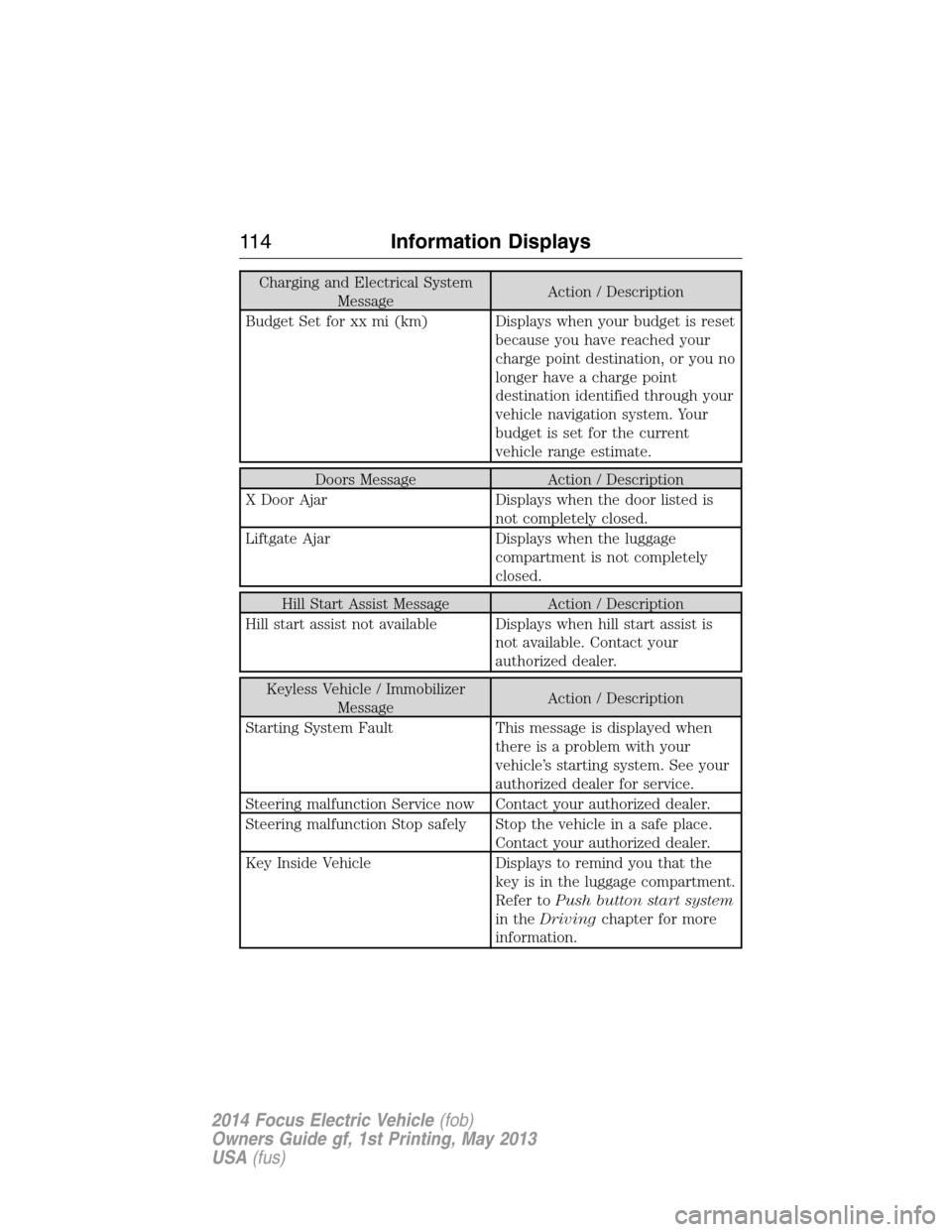
Charging and Electrical System
MessageAction / Description
Budget Set for xx mi (km) Displays when your budget is reset
because you have reached your
charge point destination, or you no
longer have a charge point
destination identified through your
vehicle navigation system. Your
budget is set for the current
vehicle range estimate.
Doors Message Action / Description
X Door Ajar Displays when the door listed is
not completely closed.
Liftgate Ajar Displays when the luggage
compartment is not completely
closed.
Hill Start Assist Message Action / Description
Hill start assist not available Displays when hill start assist is
not available. Contact your
authorized dealer.
Keyless Vehicle / Immobilizer
MessageAction / Description
Starting System Fault This message is displayed when
there is a problem with your
vehicle’s starting system. See your
authorized dealer for service.
Steering malfunction Service now Contact your authorized dealer.
Steering malfunction Stop safely Stop the vehicle in a safe place.
Contact your authorized dealer.
Key Inside Vehicle Displays to remind you that the
key is in the luggage compartment.
Refer toPush button start system
in theDrivingchapter for more
information.
11 4Information Displays
2014 Focus Electric Vehicle(fob)
Owners Guide gf, 1st Printing, May 2013
USA(fus)
Page 116 of 403
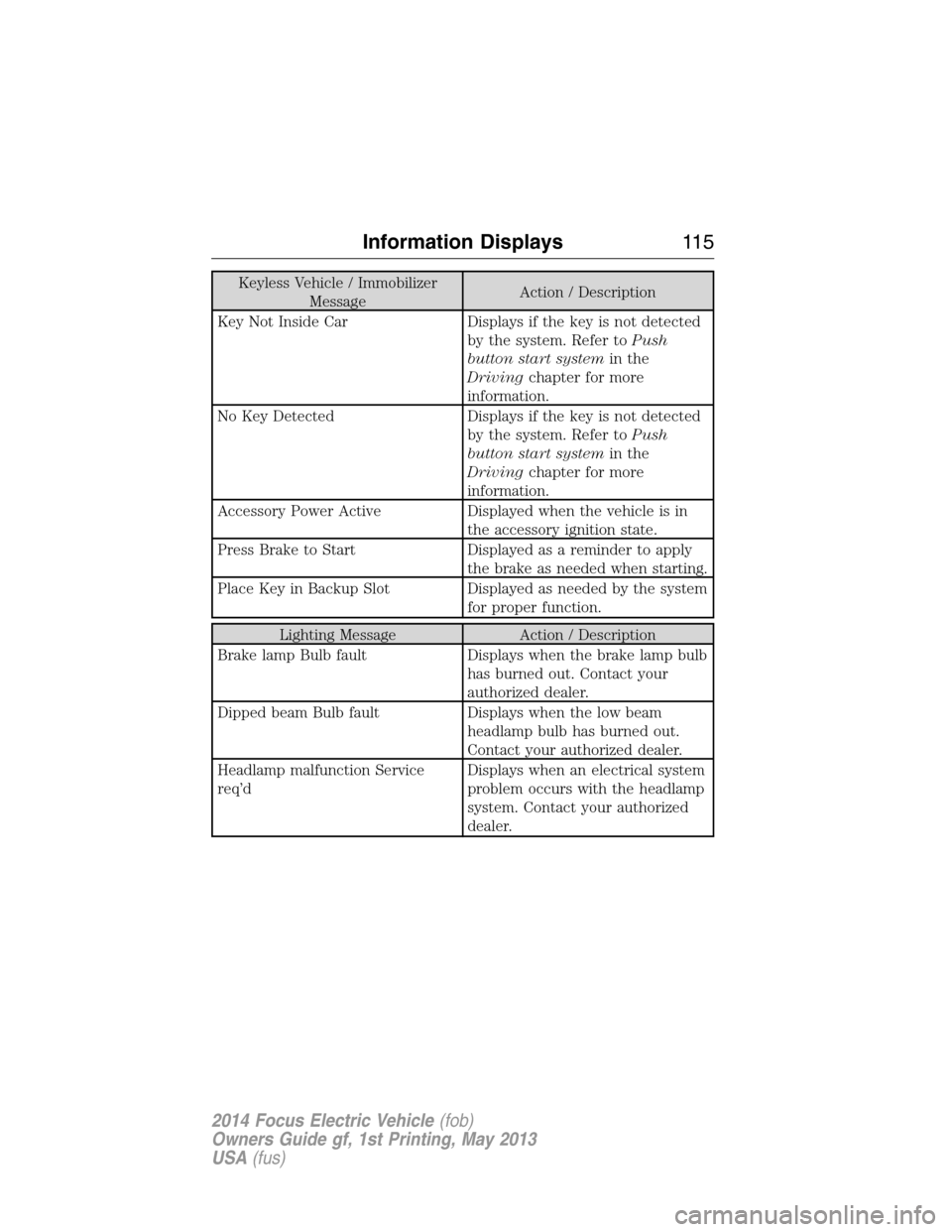
Keyless Vehicle / Immobilizer
MessageAction / Description
Key Not Inside Car Displays if the key is not detected
by the system. Refer toPush
button start systemin the
Drivingchapter for more
information.
No Key Detected Displays if the key is not detected
by the system. Refer toPush
button start systemin the
Drivingchapter for more
information.
Accessory Power Active Displayed when the vehicle is in
the accessory ignition state.
Press Brake to Start Displayed as a reminder to apply
the brake as needed when starting.
Place Key in Backup Slot Displayed as needed by the system
for proper function.
Lighting Message Action / Description
Brake lamp Bulb fault Displays when the brake lamp bulb
has burned out. Contact your
authorized dealer.
Dipped beam Bulb fault Displays when the low beam
headlamp bulb has burned out.
Contact your authorized dealer.
Headlamp malfunction Service
req’dDisplays when an electrical system
problem occurs with the headlamp
system. Contact your authorized
dealer.
Information Displays11 5
2014 Focus Electric Vehicle(fob)
Owners Guide gf, 1st Printing, May 2013
USA(fus)