reset FORD FOCUS ELECTRIC 2016 3.G Owners Manual
[x] Cancel search | Manufacturer: FORD, Model Year: 2016, Model line: FOCUS ELECTRIC, Model: FORD FOCUS ELECTRIC 2016 3.GPages: 276, PDF Size: 4.31 MB
Page 9 of 276
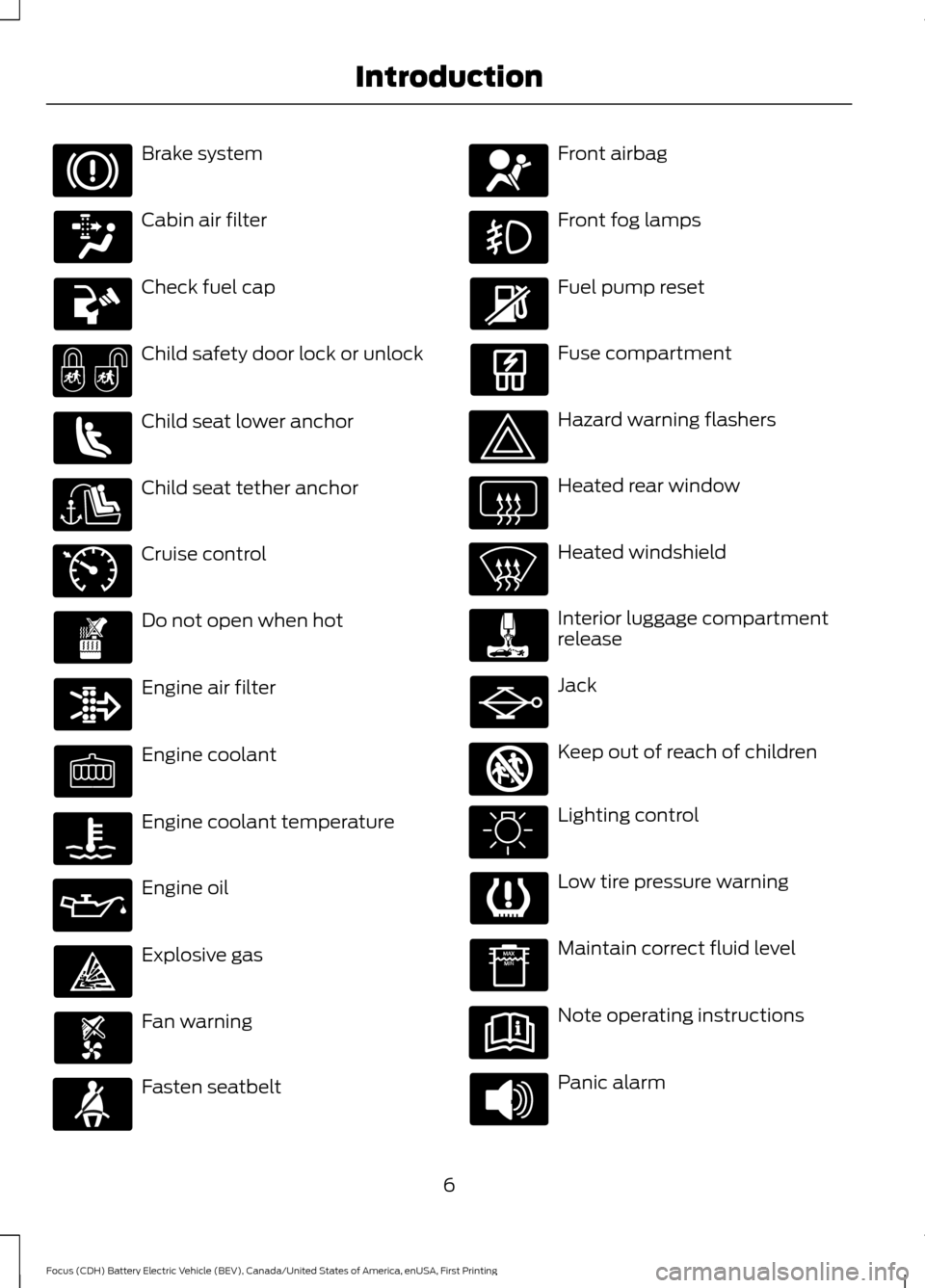
Brake system
Cabin air filter
Check fuel cap
Child safety door lock or unlock
Child seat lower anchor
Child seat tether anchor
Cruise control
Do not open when hot
Engine air filter
Engine coolant
Engine coolant temperature
Engine oil
Explosive gas
Fan warning
Fasten seatbelt Front airbag
Front fog lamps
Fuel pump reset
Fuse compartment
Hazard warning flashers
Heated rear window
Heated windshield
Interior luggage compartment
release
Jack
Keep out of reach of children
Lighting control
Low tire pressure warning
Maintain correct fluid level
Note operating instructions
Panic alarm
6
Focus (CDH) Battery Electric Vehicle (BEV), Canada/United States of America, enUSA, First Printing Introduction E71340 E161353
Page 60 of 276
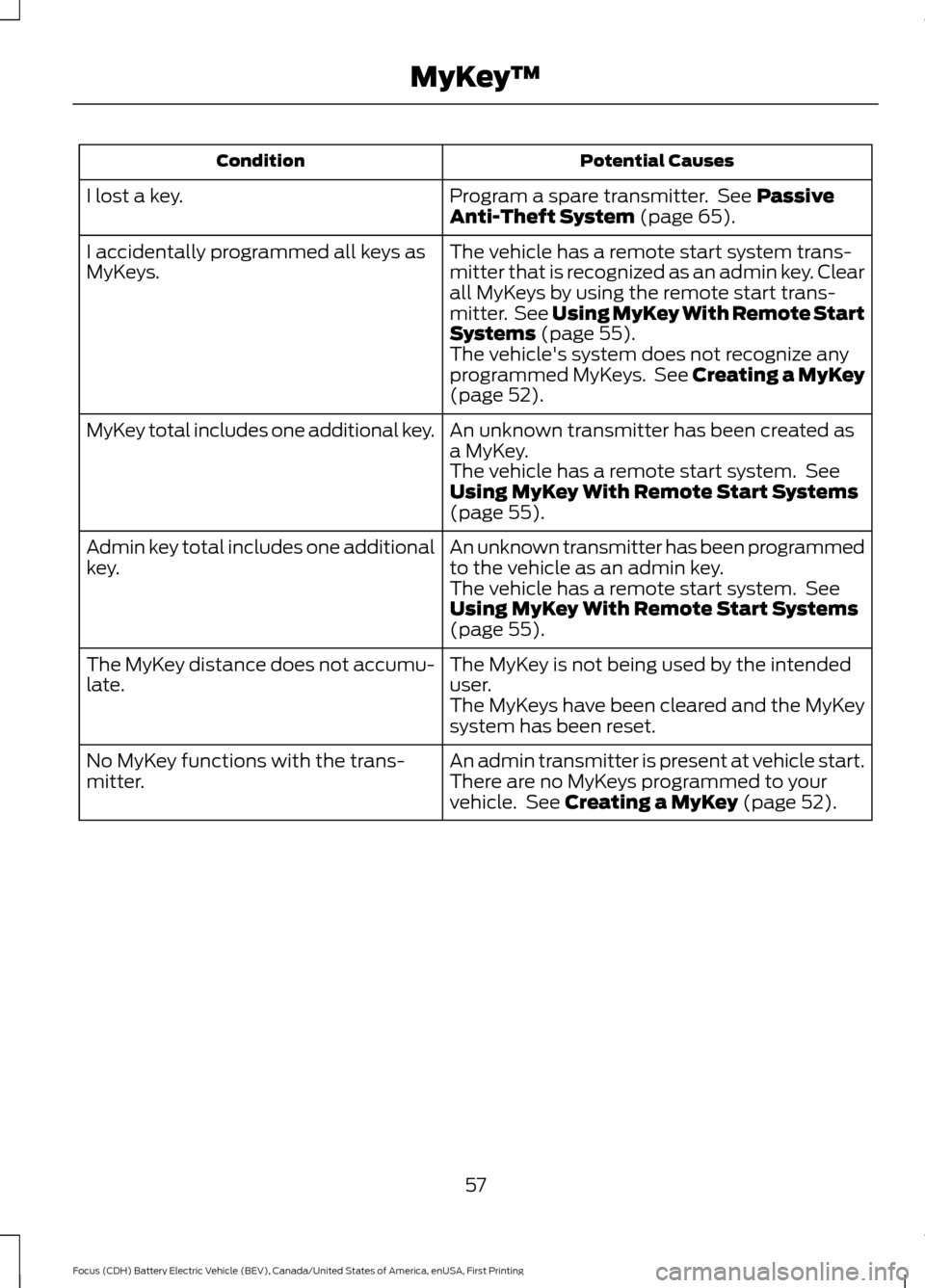
Potential Causes
Condition
Program a spare transmitter. See Passive
Anti-Theft System (page 65).
I lost a key.
The vehicle has a remote start system trans-
mitter that is recognized as an admin key. Clear
all MyKeys by using the remote start trans-
mitter. See
Using MyKey With Remote Start
Systems (page 55).
I accidentally programmed all keys as
MyKeys.
The vehicle's system does not recognize any
programmed MyKeys. See Creating a MyKey
(page
52).
An unknown transmitter has been created as
a MyKey.
MyKey total includes one additional key.
The vehicle has a remote start system. See
Using MyKey With Remote Start Systems
(page
55).
An unknown transmitter has been programmed
to the vehicle as an admin key.
Admin key total includes one additional
key.
The vehicle has a remote start system. See
Using MyKey With Remote Start Systems
(page
55).
The MyKey is not being used by the intended
user.
The MyKey distance does not accumu-
late.
The MyKeys have been cleared and the MyKey
system has been reset.
An admin transmitter is present at vehicle start.
No MyKey functions with the trans-
mitter. There are no MyKeys programmed to your
vehicle. See
Creating a MyKey (page 52).
57
Focus (CDH) Battery Electric Vehicle (BEV), Canada/United States of America, enUSA, First Printing MyKey
™
Page 72 of 276
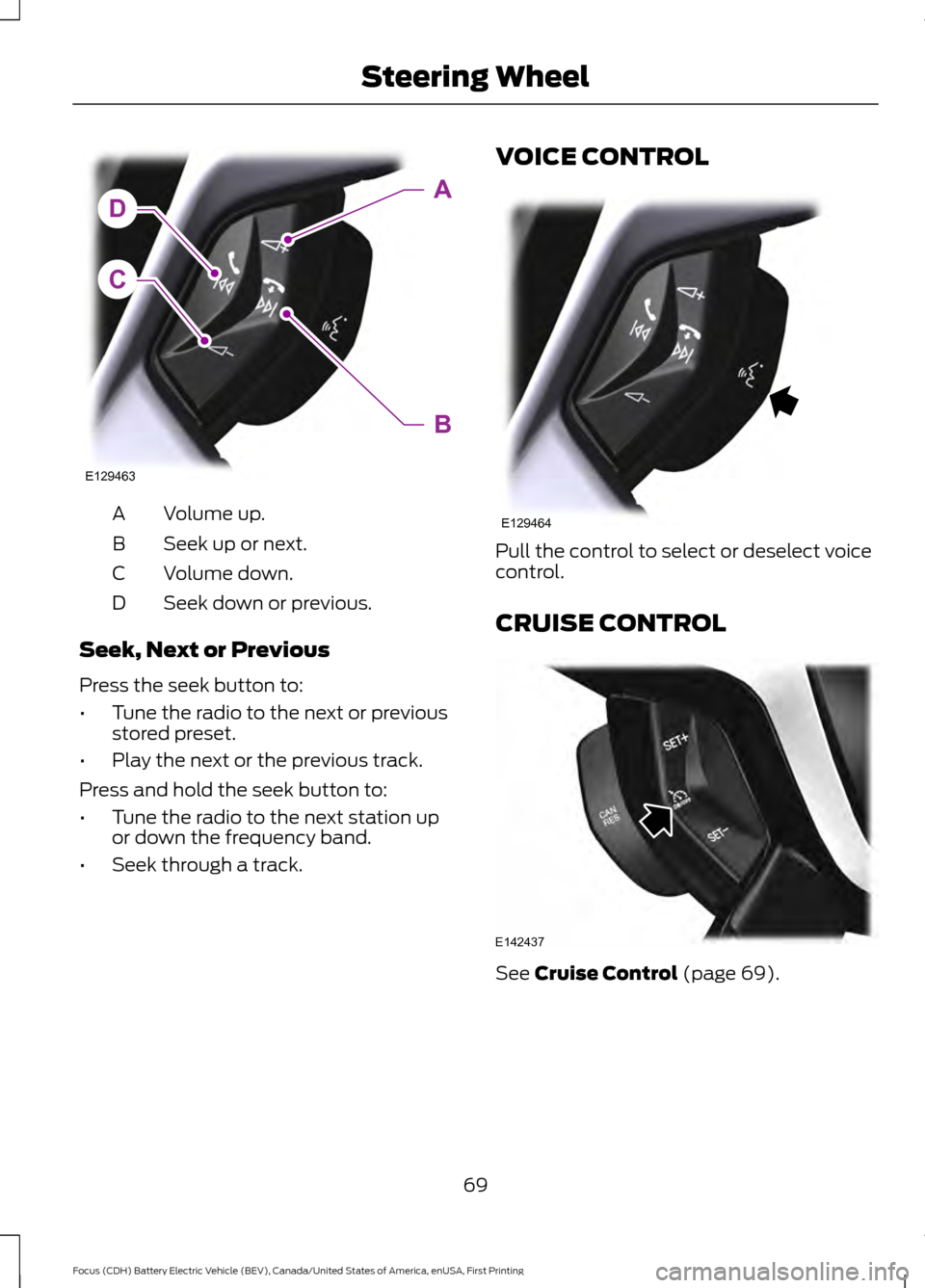
Volume up.
A
Seek up or next.
B
Volume down.
C
Seek down or previous.
D
Seek, Next or Previous
Press the seek button to:
• Tune the radio to the next or previous
stored preset.
• Play the next or the previous track.
Press and hold the seek button to:
• Tune the radio to the next station up
or down the frequency band.
• Seek through a track. VOICE CONTROL
Pull the control to select or deselect voice
control.
CRUISE CONTROL
See Cruise Control (page 69).
69
Focus (CDH) Battery Electric Vehicle (BEV), Canada/United States of America, enUSA, First Printing Steering WheelC
DA
B
E129463 E129464 E142437
Page 82 of 276
2. Close the window a third time to the
point of resistance. You disabled the
bounce-back feature and you can now
close the window manually. The
window travels past the point of
resistance and you can close it fully.
Contact an authorized dealer as soon as
possible if the window does not close after
the third attempt.
Resetting the Bounce-Back Feature WARNING
The bounce-back feature remains
turned off until you reset the
memory.
If you have disconnected the battery, you
must reset the bounce-back memory
separately for each window.
1. Lift and hold the control until the
window is fully closed.
2. Release the control.
3. Lift and hold the control again for a few
seconds.
4. Release the control.
5. Lift and hold the control again for a few
seconds.
6. Release the control.
7. Press and hold the control until the window is fully open.
8. Lift and hold the control until the window is fully closed.
9. Release the control.
10. Open the window and then try to close it automatically.
11. Repeat the procedure if the window does not close automatically. Accessory Delay
You can use the window controls for
several minutes after switching off the
ignition or until opening either front door.
EXTERIOR MIRRORS
Power Exterior Mirrors WARNING
Do not adjust the mirrors when your
vehicle is moving.
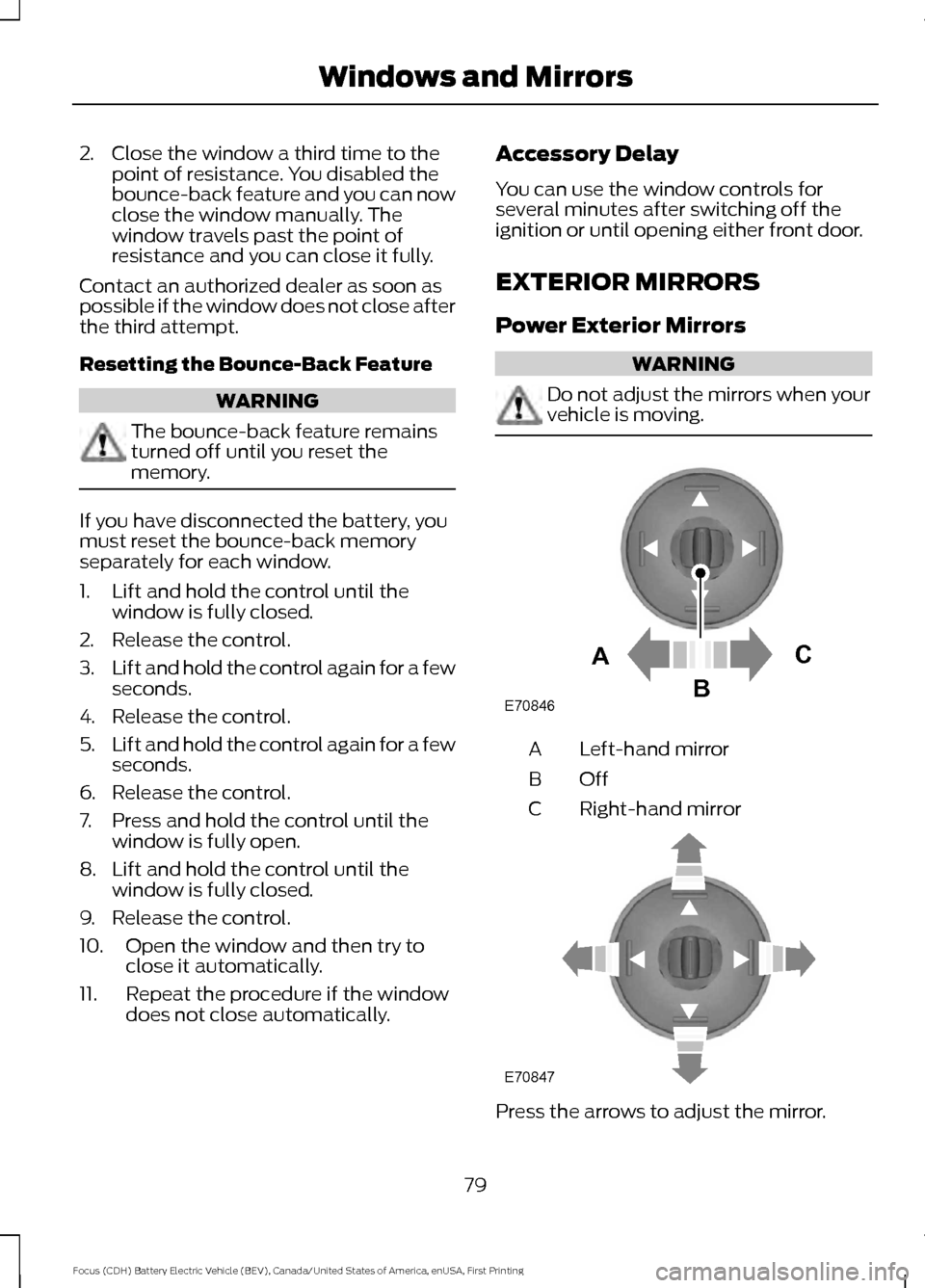
Left-hand mirror
A
OffB
Right-hand mirror
C Press the arrows to adjust the mirror.
79
Focus (CDH) Battery Electric Vehicle (BEV), Canada/United States of America, enUSA, First Printing Windows and MirrorsE70846A
C
B E70847
Page 86 of 276
•
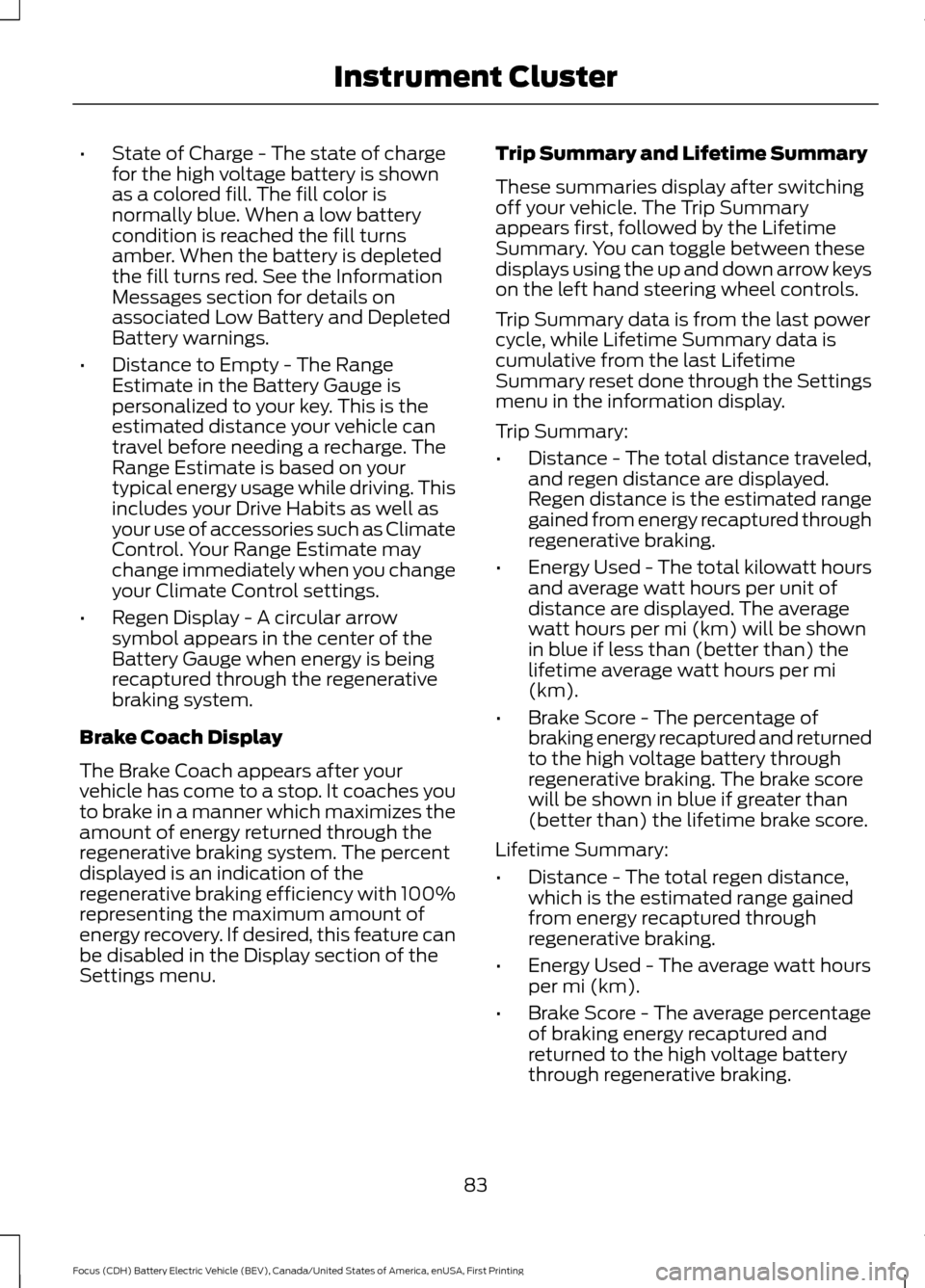
State of Charge - The state of charge
for the high voltage battery is shown
as a colored fill. The fill color is
normally blue. When a low battery
condition is reached the fill turns
amber. When the battery is depleted
the fill turns red. See the Information
Messages section for details on
associated Low Battery and Depleted
Battery warnings.
• Distance to Empty - The Range
Estimate in the Battery Gauge is
personalized to your key. This is the
estimated distance your vehicle can
travel before needing a recharge. The
Range Estimate is based on your
typical energy usage while driving. This
includes your Drive Habits as well as
your use of accessories such as Climate
Control. Your Range Estimate may
change immediately when you change
your Climate Control settings.
• Regen Display - A circular arrow
symbol appears in the center of the
Battery Gauge when energy is being
recaptured through the regenerative
braking system.
Brake Coach Display
The Brake Coach appears after your
vehicle has come to a stop. It coaches you
to brake in a manner which maximizes the
amount of energy returned through the
regenerative braking system. The percent
displayed is an indication of the
regenerative braking efficiency with 100%
representing the maximum amount of
energy recovery. If desired, this feature can
be disabled in the Display section of the
Settings menu. Trip Summary and Lifetime Summary
These summaries display after switching
off your vehicle. The Trip Summary
appears first, followed by the Lifetime
Summary. You can toggle between these
displays using the up and down arrow keys
on the left hand steering wheel controls.
Trip Summary data is from the last power
cycle, while Lifetime Summary data is
cumulative from the last Lifetime
Summary reset done through the Settings
menu in the information display.
Trip Summary:
•
Distance - The total distance traveled,
and regen distance are displayed.
Regen distance is the estimated range
gained from energy recaptured through
regenerative braking.
• Energy Used - The total kilowatt hours
and average watt hours per unit of
distance are displayed. The average
watt hours per mi (km) will be shown
in blue if less than (better than) the
lifetime average watt hours per mi
(km).
• Brake Score - The percentage of
braking energy recaptured and returned
to the high voltage battery through
regenerative braking. The brake score
will be shown in blue if greater than
(better than) the lifetime brake score.
Lifetime Summary:
• Distance - The total regen distance,
which is the estimated range gained
from energy recaptured through
regenerative braking.
• Energy Used - The average watt hours
per mi (km).
• Brake Score - The average percentage
of braking energy recaptured and
returned to the high voltage battery
through regenerative braking.
83
Focus (CDH) Battery Electric Vehicle (BEV), Canada/United States of America, enUSA, First Printing Instrument Cluster
Page 92 of 276
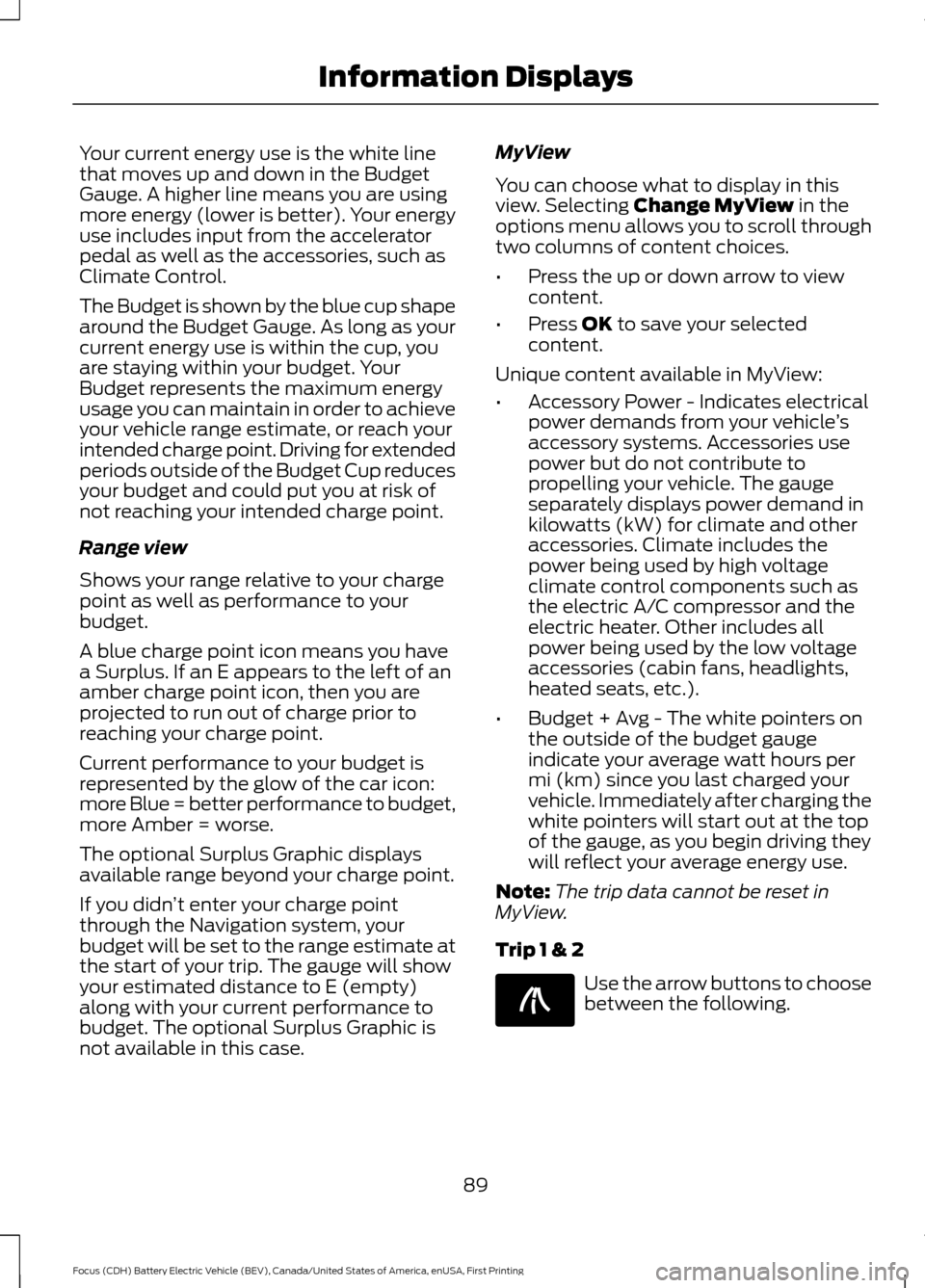
Your current energy use is the white line
that moves up and down in the Budget
Gauge. A higher line means you are using
more energy (lower is better). Your energy
use includes input from the accelerator
pedal as well as the accessories, such as
Climate Control.
The Budget is shown by the blue cup shape
around the Budget Gauge. As long as your
current energy use is within the cup, you
are staying within your budget. Your
Budget represents the maximum energy
usage you can maintain in order to achieve
your vehicle range estimate, or reach your
intended charge point. Driving for extended
periods outside of the Budget Cup reduces
your budget and could put you at risk of
not reaching your intended charge point.
Range view
Shows your range relative to your charge
point as well as performance to your
budget.
A blue charge point icon means you have
a Surplus. If an E appears to the left of an
amber charge point icon, then you are
projected to run out of charge prior to
reaching your charge point.
Current performance to your budget is
represented by the glow of the car icon:
more Blue = better performance to budget,
more Amber = worse.
The optional Surplus Graphic displays
available range beyond your charge point.
If you didn
’t enter your charge point
through the Navigation system, your
budget will be set to the range estimate at
the start of your trip. The gauge will show
your estimated distance to E (empty)
along with your current performance to
budget. The optional Surplus Graphic is
not available in this case. MyView
You can choose what to display in this
view. Selecting Change MyView in the
options menu allows you to scroll through
two columns of content choices.
• Press the up or down arrow to view
content.
• Press
OK to save your selected
content.
Unique content available in MyView:
• Accessory Power - Indicates electrical
power demands from your vehicle ’s
accessory systems. Accessories use
power but do not contribute to
propelling your vehicle. The gauge
separately displays power demand in
kilowatts (kW) for climate and other
accessories. Climate includes the
power being used by high voltage
climate control components such as
the electric A/C compressor and the
electric heater. Other includes all
power being used by the low voltage
accessories (cabin fans, headlights,
heated seats, etc.).
• Budget + Avg - The white pointers on
the outside of the budget gauge
indicate your average watt hours per
mi (km) since you last charged your
vehicle. Immediately after charging the
white pointers will start out at the top
of the gauge, as you begin driving they
will reflect your average energy use.
Note: The trip data cannot be reset in
MyView.
Trip 1 & 2 Use the arrow buttons to choose
between the following.
89
Focus (CDH) Battery Electric Vehicle (BEV), Canada/United States of America, enUSA, First Printing Information DisplaysE138660
Page 93 of 276
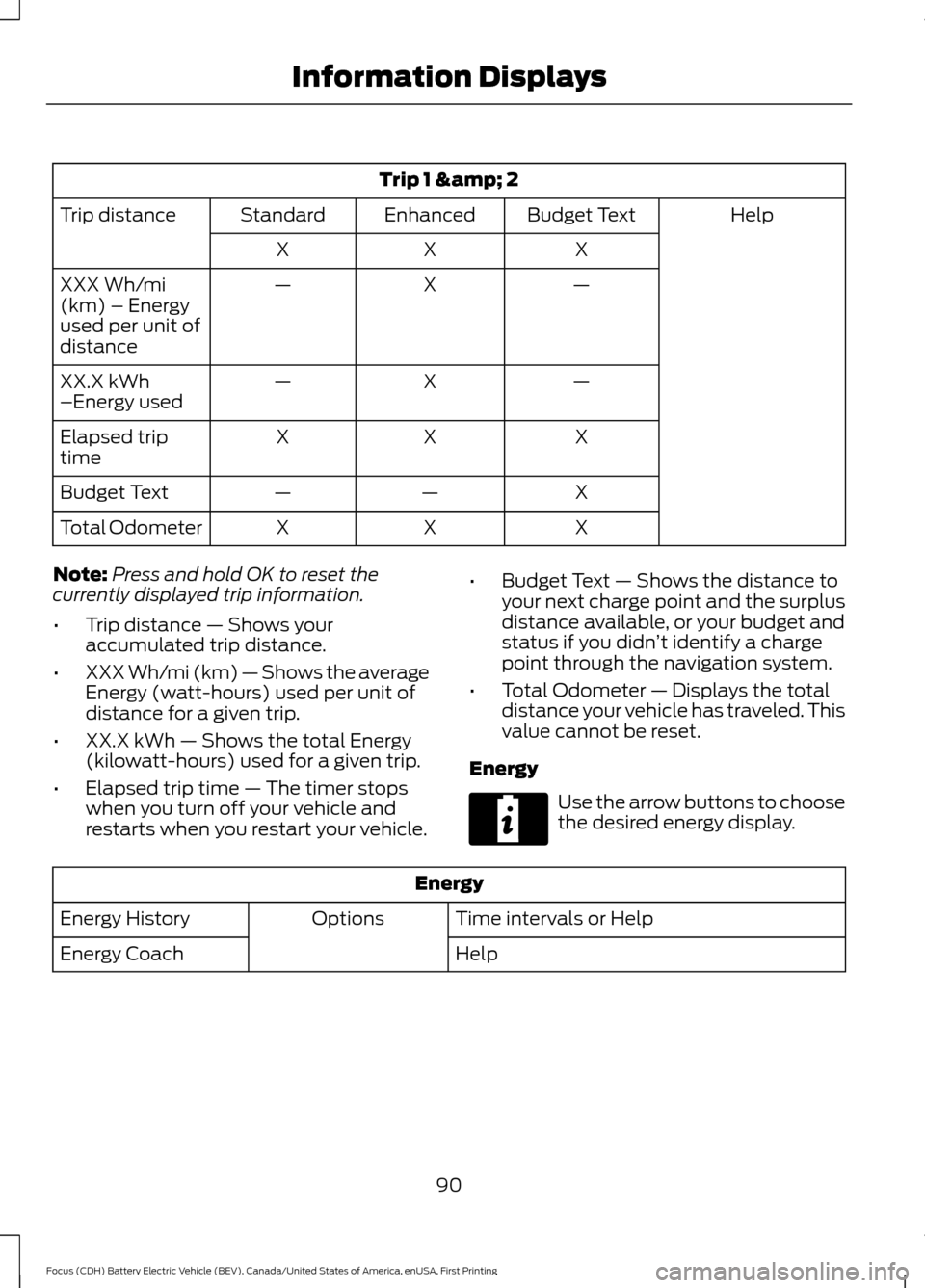
Trip 1 & 2
Help
Budget Text
Enhanced
Standard
Trip distance
X
X
X
—
X
—
XXX Wh/mi
(km) – Energy
used per unit of
distance
—
X
—
XX.X kWh
–Energy used
X
X
X
Elapsed trip
time
X
—
—
Budget Text
X
X
X
Total Odometer
Note: Press and hold OK to reset the
currently displayed trip information.
• Trip distance — Shows your
accumulated trip distance.
• XXX Wh/mi (km) — Shows the average
Energy (watt-hours) used per unit of
distance for a given trip.
• XX.X kWh — Shows the total Energy
(kilowatt-hours) used for a given trip.
• Elapsed trip time — The timer stops
when you turn off your vehicle and
restarts when you restart your vehicle. •
Budget Text — Shows the distance to
your next charge point and the surplus
distance available, or your budget and
status if you didn ’t identify a charge
point through the navigation system.
• Total Odometer — Displays the total
distance your vehicle has traveled. This
value cannot be reset.
Energy Use the arrow buttons to choose
the desired energy display.
Energy
Time intervals or Help
Options
Energy History
Help
Energy Coach
90
Focus (CDH) Battery Electric Vehicle (BEV), Canada/United States of America, enUSA, First Printing Information DisplaysE220615
Page 96 of 276
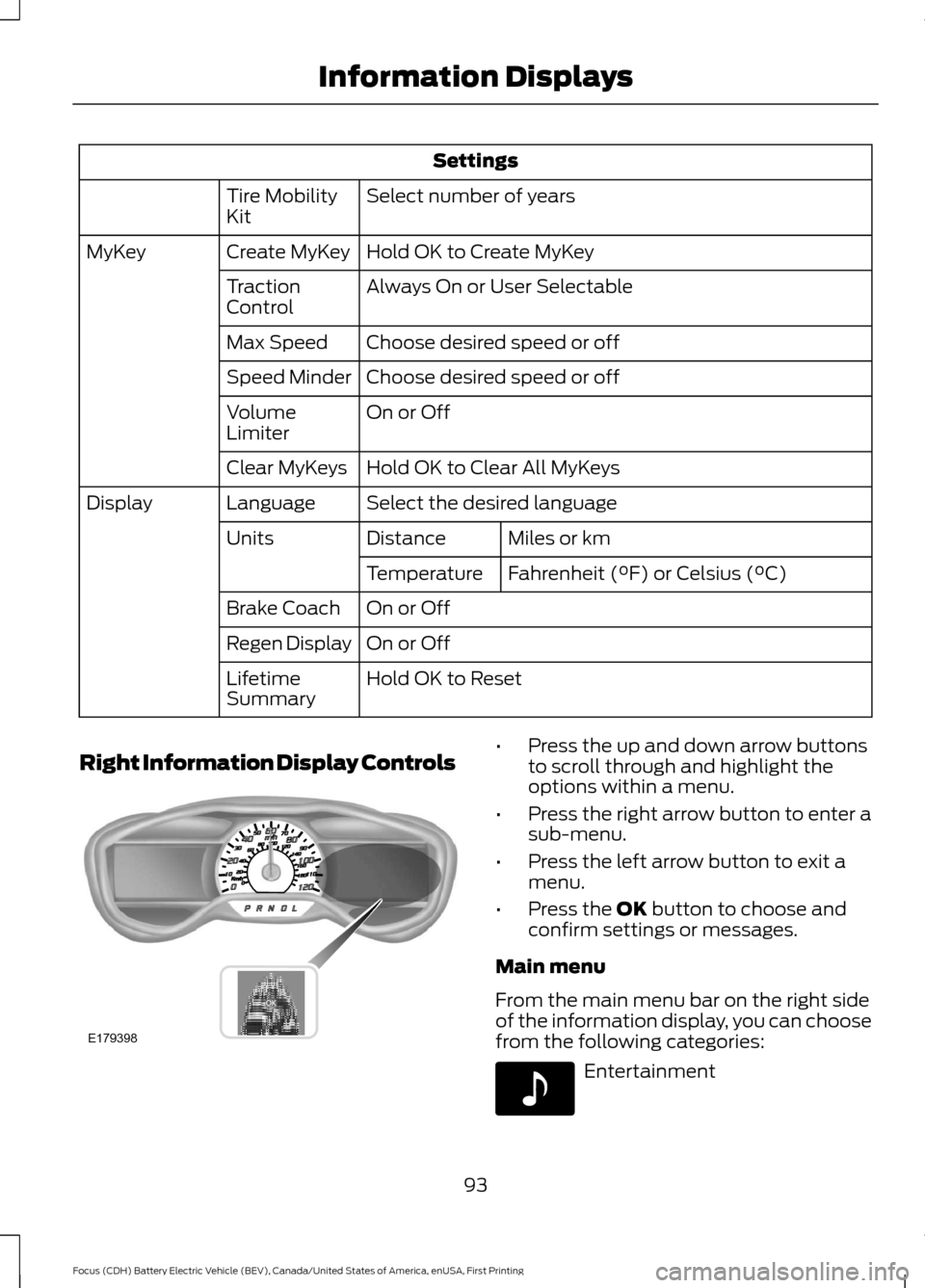
Settings
Select number of years
Tire Mobility
Kit
Hold OK to Create MyKey
Create MyKey
MyKey
Always On or User Selectable
Traction
Control
Choose desired speed or off
Max Speed
Choose desired speed or off
Speed Minder
On or Off
Volume
Limiter
Hold OK to Clear All MyKeys
Clear MyKeys
Select the desired language
Language
Display
Miles or km
Distance
Units
Fahrenheit (°F) or Celsius (°C)
Temperature
On or Off
Brake Coach
On or Off
Regen Display
Hold OK to Reset
Lifetime
Summary
Right Information Display Controls •
Press the up and down arrow buttons
to scroll through and highlight the
options within a menu.
• Press the right arrow button to enter a
sub-menu.
• Press the left arrow button to exit a
menu.
• Press the OK button to choose and
confirm settings or messages.
Main menu
From the main menu bar on the right side
of the information display, you can choose
from the following categories: Entertainment
93
Focus (CDH) Battery Electric Vehicle (BEV), Canada/United States of America, enUSA, First Printing Information DisplaysE179398 E142611
Page 99 of 276
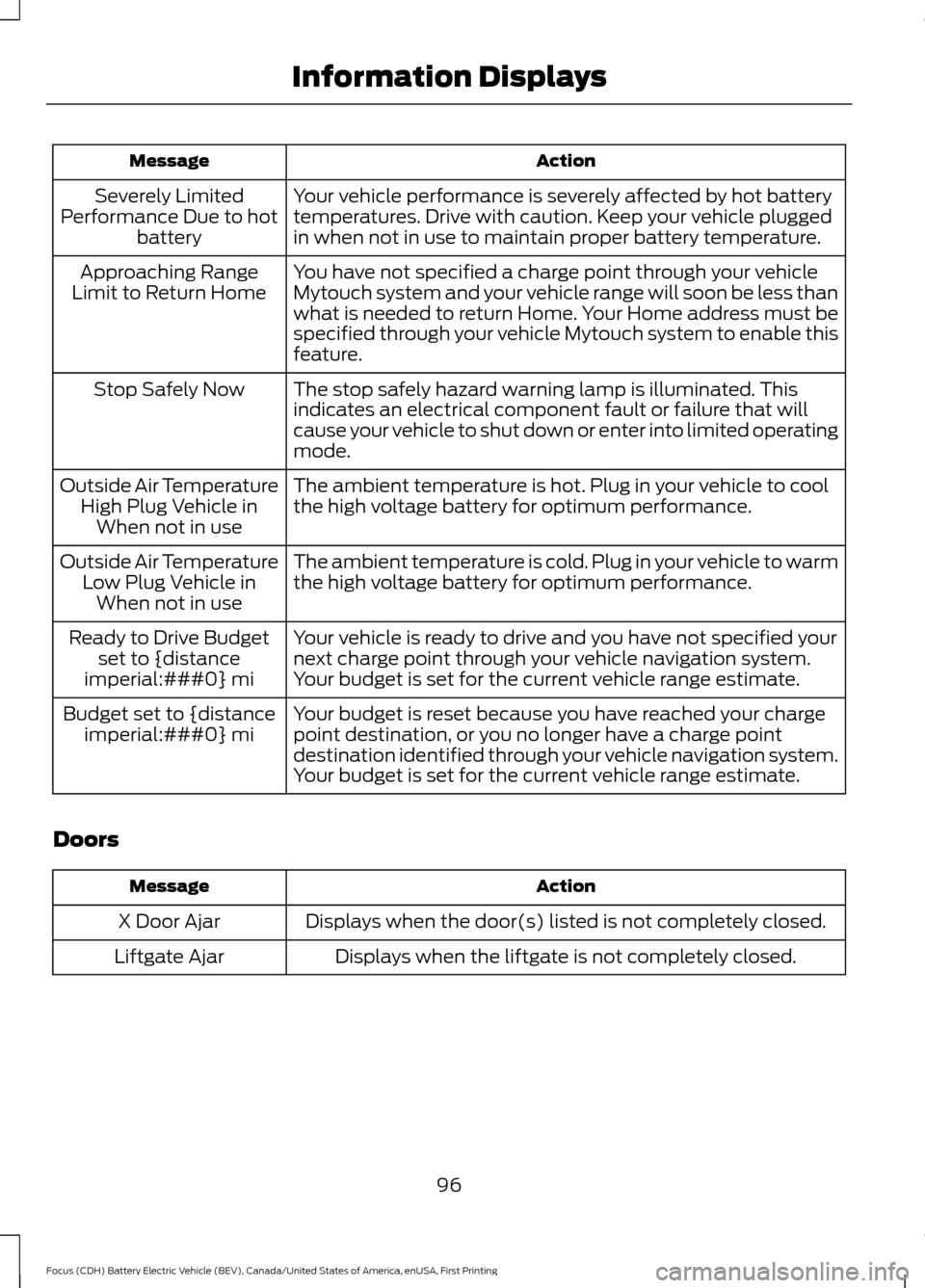
Action
Message
Your vehicle performance is severely affected by hot battery
temperatures. Drive with caution. Keep your vehicle plugged
in when not in use to maintain proper battery temperature.
Severely Limited
Performance Due to hot battery
You have not specified a charge point through your vehicle
Mytouch system and your vehicle range will soon be less than
what is needed to return Home. Your Home address must be
specified through your vehicle Mytouch system to enable this
feature.
Approaching Range
Limit to Return Home
The stop safely hazard warning lamp is illuminated. This
indicates an electrical component fault or failure that will
cause your vehicle to shut down or enter into limited operating
mode.
Stop Safely Now
The ambient temperature is hot. Plug in your vehicle to cool
the high voltage battery for optimum performance.
Outside Air Temperature
High Plug Vehicle inWhen not in use
The ambient temperature is cold. Plug in your vehicle to warm
the high voltage battery for optimum performance.
Outside Air Temperature
Low Plug Vehicle inWhen not in use
Your vehicle is ready to drive and you have not specified your
next charge point through your vehicle navigation system.
Your budget is set for the current vehicle range estimate.
Ready to Drive Budget
set to {distance
imperial:###0} mi
Your budget is reset because you have reached your charge
point destination, or you no longer have a charge point
destination identified through your vehicle navigation system.
Your budget is set for the current vehicle range estimate.
Budget set to {distance
imperial:###0} mi
Doors Action
Message
Displays when the door(s) listed is not completely closed.
X Door Ajar
Displays when the liftgate is not completely closed.
Liftgate Ajar
96
Focus (CDH) Battery Electric Vehicle (BEV), Canada/United States of America, enUSA, First Printing Information Displays
Page 164 of 276
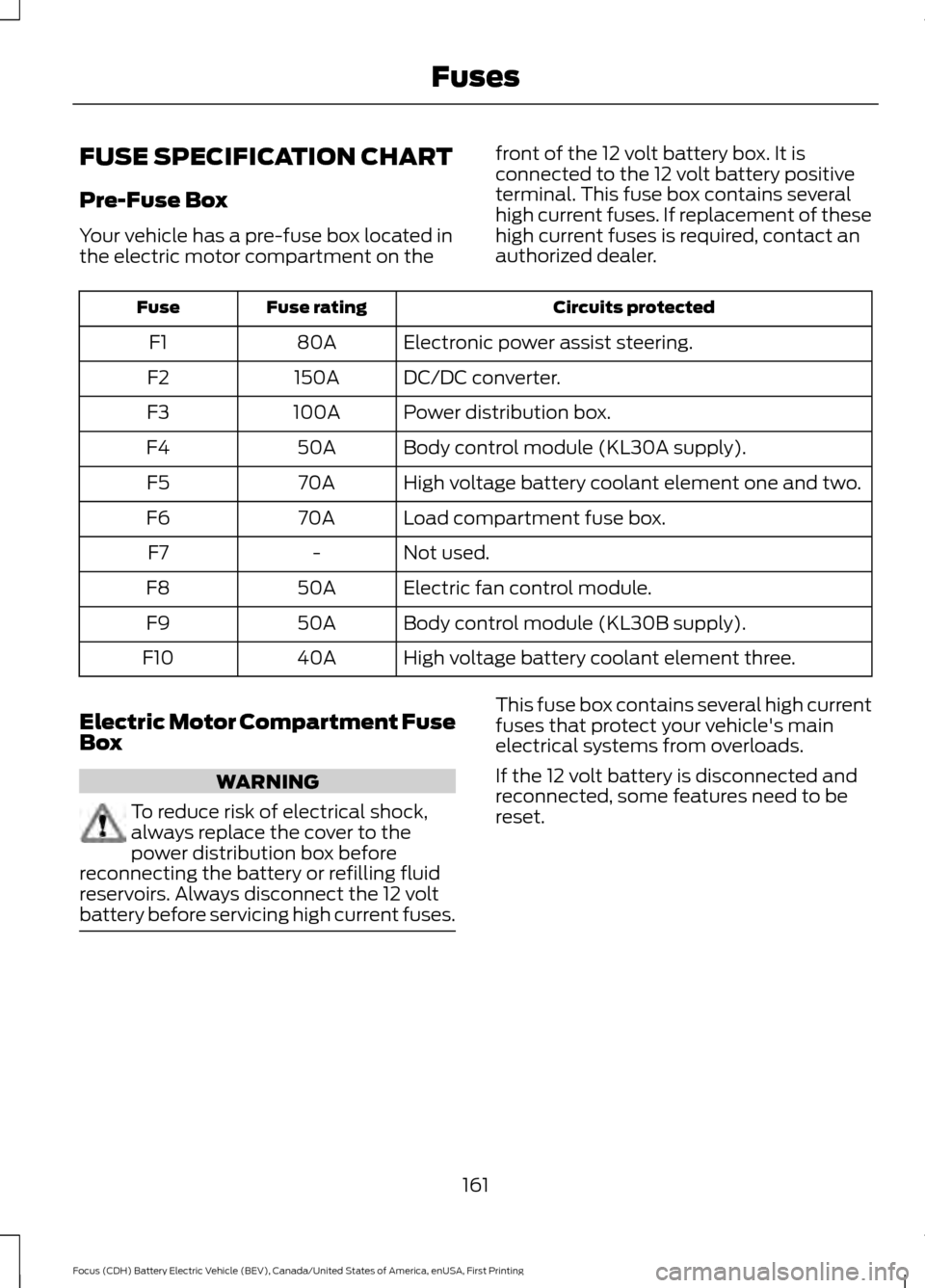
FUSE SPECIFICATION CHART
Pre-Fuse Box
Your vehicle has a pre-fuse box located in
the electric motor compartment on the
front of the 12 volt battery box. It is
connected to the 12 volt battery positive
terminal. This fuse box contains several
high current fuses. If replacement of these
high current fuses is required, contact an
authorized dealer. Circuits protected
Fuse rating
Fuse
Electronic power assist steering.
80A
F1
DC/DC converter.
150A
F2
Power distribution box.
100A
F3
Body control module (KL30A supply).
50A
F4
High voltage battery coolant element one and two.
70A
F5
Load compartment fuse box.
70A
F6
Not used.
-
F7
Electric fan control module.
50A
F8
Body control module (KL30B supply).
50A
F9
High voltage battery coolant element three.
40A
F10
Electric Motor Compartment Fuse
Box WARNING
To reduce risk of electrical shock,
always replace the cover to the
power distribution box before
reconnecting the battery or refilling fluid
reservoirs. Always disconnect the 12 volt
battery before servicing high current fuses. This fuse box contains several high current
fuses that protect your vehicle's main
electrical systems from overloads.
If the 12 volt battery is disconnected and
reconnected, some features need to be
reset.
161
Focus (CDH) Battery Electric Vehicle (BEV), Canada/United States of America, enUSA, First Printing Fuses