traction control FORD FOCUS ELECTRIC 2016 3.G Owners Manual
[x] Cancel search | Manufacturer: FORD, Model Year: 2016, Model line: FOCUS ELECTRIC, Model: FORD FOCUS ELECTRIC 2016 3.GPages: 276, PDF Size: 4.31 MB
Page 6 of 276
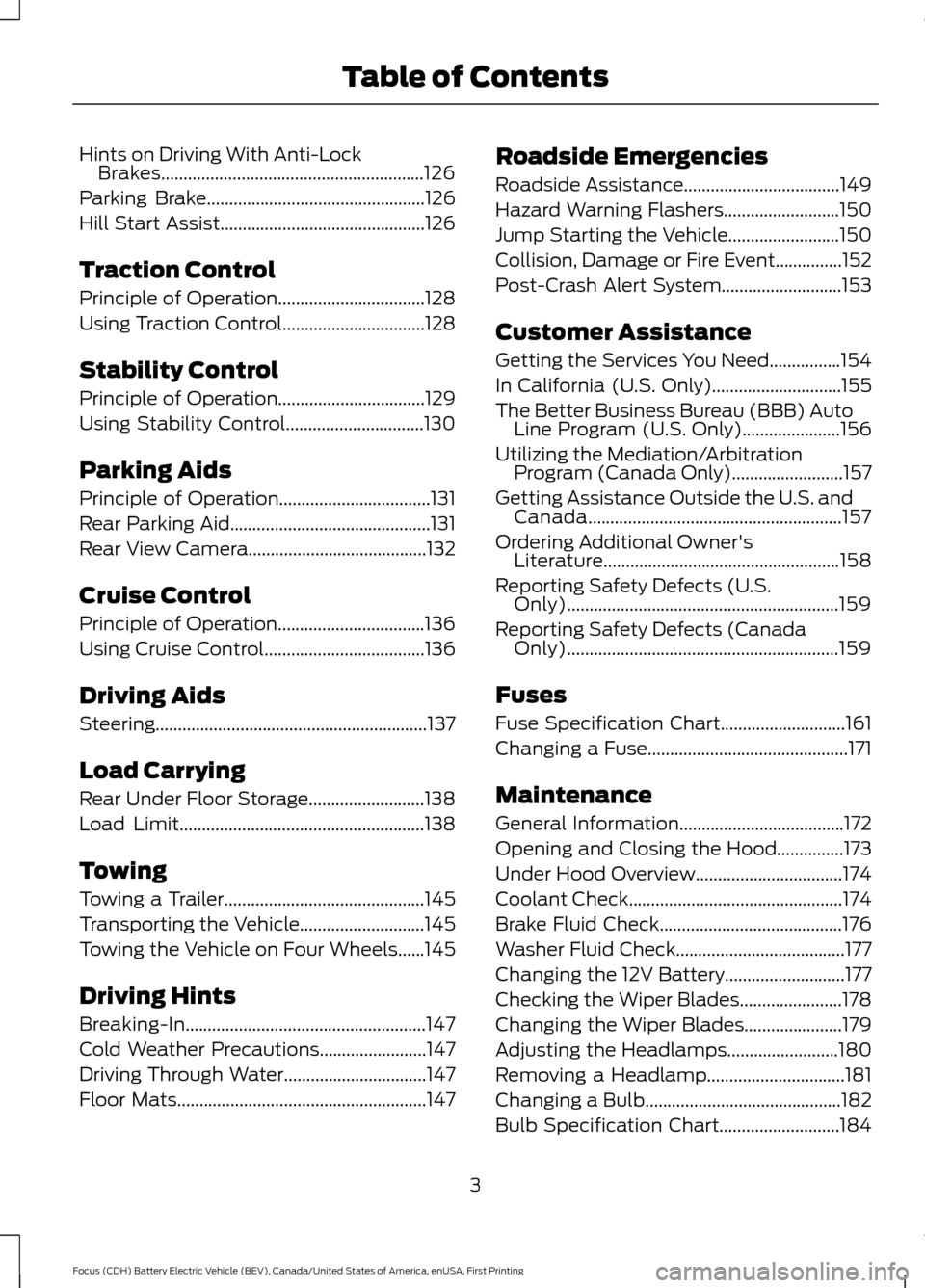
Hints on Driving With Anti-Lock
Brakes...........................................................126
Parking Brake.................................................126
Hill Start Assist..............................................126
Traction Control
Principle of Operation.................................128
Using Traction Control................................128
Stability Control
Principle of Operation.................................129
Using Stability Control...............................130
Parking Aids
Principle of Operation..................................131
Rear Parking Aid.............................................131
Rear View Camera........................................132
Cruise Control
Principle of Operation.................................136
Using Cruise Control
....................................136
Driving Aids
Steering
.............................................................137
Load Carrying
Rear Under Floor Storage..........................138
Load Limit
.......................................................138
Towing
Towing a Trailer
.............................................145
Transporting the Vehicle............................145
Towing the Vehicle on Four Wheels
......145
Driving Hints
Breaking-In......................................................147
Cold Weather Precautions........................147
Driving Through Water................................147
Floor Mats........................................................147 Roadside Emergencies
Roadside Assistance
...................................149
Hazard Warning Flashers..........................150
Jump Starting the Vehicle.........................150
Collision, Damage or Fire Event...............152
Post-Crash Alert System...........................153
Customer Assistance
Getting the Services You Need................154
In California (U.S. Only).............................155
The Better Business Bureau (BBB) Auto Line Program (U.S. Only)......................156
Utilizing the Mediation/Arbitration Program (Canada Only).........................157
Getting Assistance Outside the U.S. and Canada.........................................................157
Ordering Additional Owner's Literature
.....................................................158
Reporting Safety Defects (U.S. Only).............................................................159
Reporting Safety Defects (Canada Only).............................................................159
Fuses
Fuse Specification Chart
............................161
Changing a Fuse.............................................171
Maintenance
General Information.....................................172
Opening and Closing the Hood...............173
Under Hood Overview.................................174
Coolant Check................................................174
Brake Fluid Check.........................................176
Washer Fluid Check......................................177
Changing the 12V Battery...........................177
Checking the Wiper Blades
.......................178
Changing the Wiper Blades......................179
Adjusting the Headlamps.........................180
Removing a Headlamp...............................181
Changing a Bulb
............................................182
Bulb Specification Chart...........................184
3
Focus (CDH) Battery Electric Vehicle (BEV), Canada/United States of America, enUSA, First Printing Table of Contents
Page 55 of 276
•
Various vehicle speed minders can be
set. Once you select a speed, it will be
shown in the display, followed by an
audible tone when the preselected
vehicle speed is exceeded.
• Audio system maximum volume of
45%. A message will be shown in the
display when you attempt to exceed
the limited volume. Also, the
speed-sensitive or compensated
automatic volume control will be
disabled.
• Always on setting. When this is
selected, you will not be able to turn
off AdvanceTrac or traction control,
E911 or Emergency Assistance, or the
do not disturb feature (if your vehicle
is equipped with these features). CREATING A MYKEY
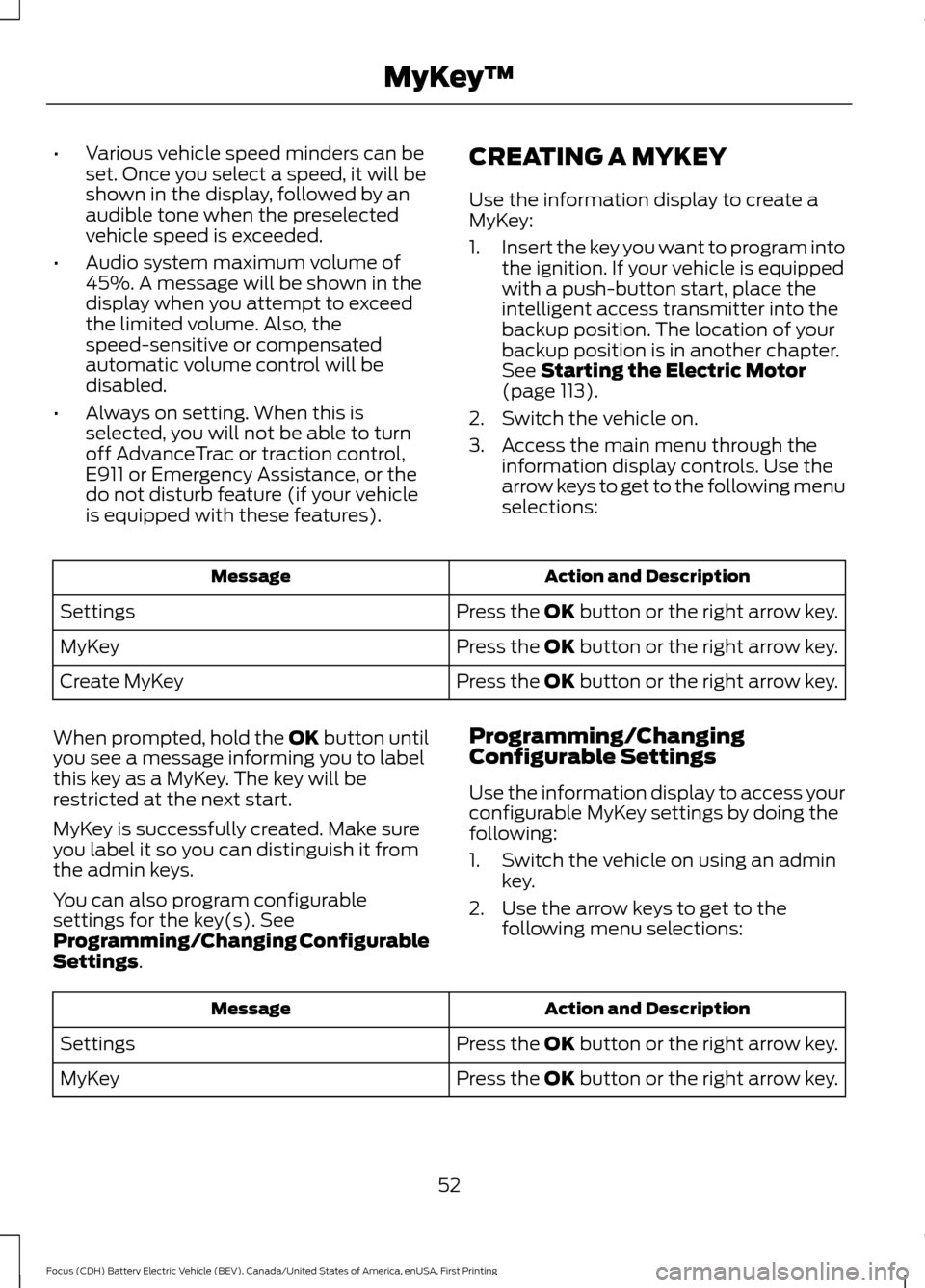
Use the information display to create a
MyKey:
1.
Insert the key you want to program into
the ignition. If your vehicle is equipped
with a push-button start, place the
intelligent access transmitter into the
backup position. The location of your
backup position is in another chapter.
See Starting the Electric Motor
(page 113).
2. Switch the vehicle on.
3. Access the main menu through the information display controls. Use the
arrow keys to get to the following menu
selections: Action and Description
Message
Press the OK button or the right arrow key.
Settings
Press the OK button or the right arrow key.
MyKey
Press the OK button or the right arrow key.
Create MyKey
When prompted, hold the OK button until
you see a message informing you to label
this key as a MyKey. The key will be
restricted at the next start.
MyKey is successfully created. Make sure
you label it so you can distinguish it from
the admin keys.
You can also program configurable
settings for the key(s). See
Programming/Changing Configurable
Settings
. Programming/Changing
Configurable Settings
Use the information display to access your
configurable MyKey settings by doing the
following:
1. Switch the vehicle on using an admin
key.
2. Use the arrow keys to get to the following menu selections: Action and Description
Message
Press the OK button or the right arrow key.
Settings
Press the OK button or the right arrow key.
MyKey
52
Focus (CDH) Battery Electric Vehicle (BEV), Canada/United States of America, enUSA, First Printing MyKey
™
Page 95 of 276
Information
Displays the associated driver alert graphic.
Driver Alert
Displays the number of warnings that need immediate attention in
red. You can only view the warnings from the System Check menu.
View them immediately by pressing OK and then OK again to enter
system check. Use the up and down arrows to scroll through the
warnings.
XX Warnings
All active warnings will display first if applicable. The system check
menu may appear different based upon equipment options and
current vehicle status. Use the up/down arrow buttons to scroll
through the list.
System Check
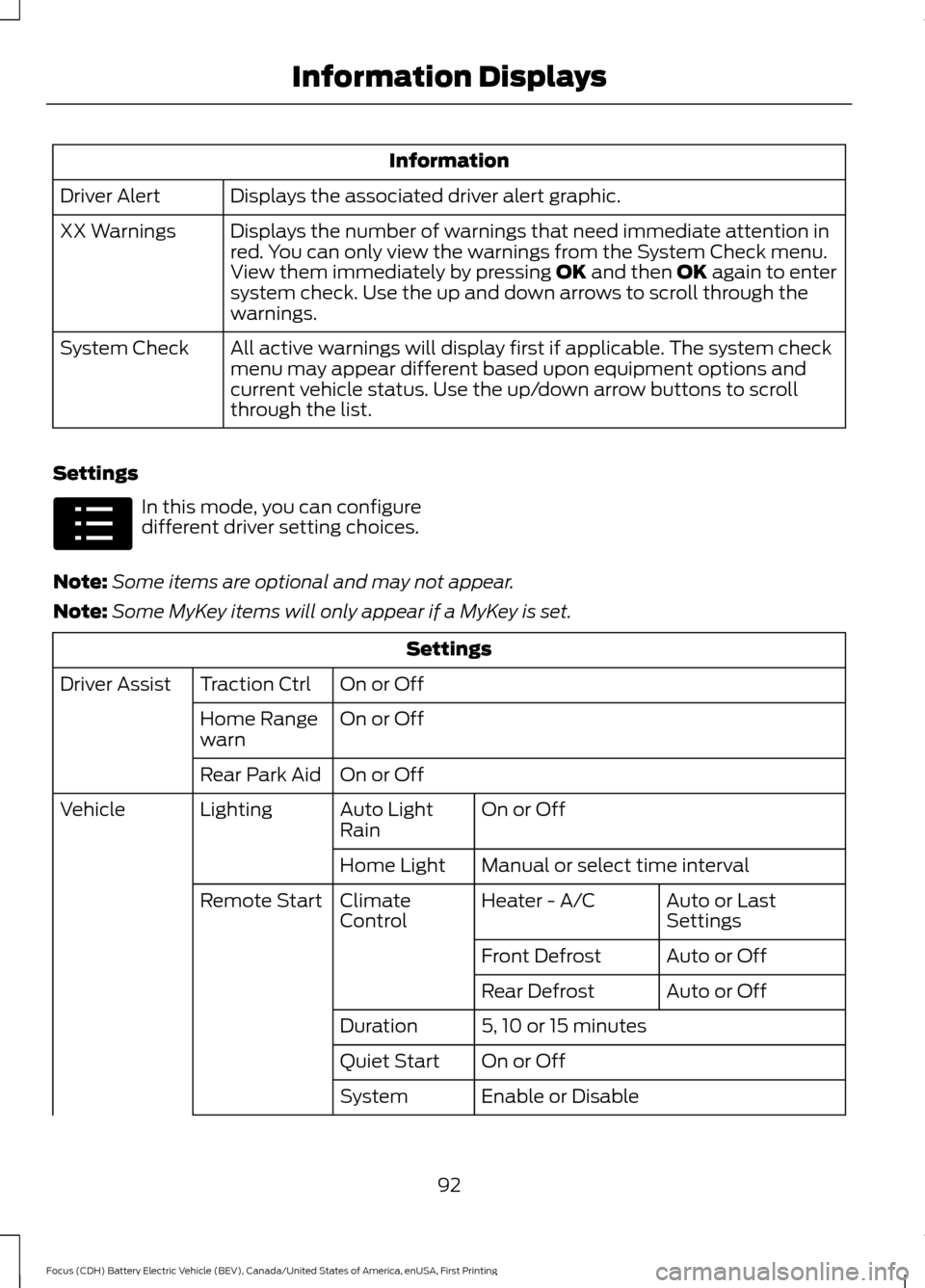
Settings In this mode, you can configure
different driver setting choices.
Note: Some items are optional and may not appear.
Note: Some MyKey items will only appear if a MyKey is set. Settings
On or Off
Traction Ctrl
Driver Assist
On or Off
Home Range
warn
On or Off
Rear Park Aid
On or Off
Auto Light
Rain
Lighting
Vehicle
Manual or select time interval
Home Light
Auto or Last
Settings
Heater - A/C
Climate
Control
Remote Start
Auto or Off
Front Defrost
Auto or Off
Rear Defrost
5, 10 or 15 minutes
Duration
On or Off
Quiet Start
Enable or Disable
System
92
Focus (CDH) Battery Electric Vehicle (BEV), Canada/United States of America, enUSA, First Printing Information DisplaysE100023
Page 96 of 276
Settings
Select number of years
Tire Mobility
Kit
Hold OK to Create MyKey
Create MyKey
MyKey
Always On or User Selectable
Traction
Control
Choose desired speed or off
Max Speed
Choose desired speed or off
Speed Minder
On or Off
Volume
Limiter
Hold OK to Clear All MyKeys
Clear MyKeys
Select the desired language
Language
Display
Miles or km
Distance
Units
Fahrenheit (°F) or Celsius (°C)
Temperature
On or Off
Brake Coach
On or Off
Regen Display
Hold OK to Reset
Lifetime
Summary
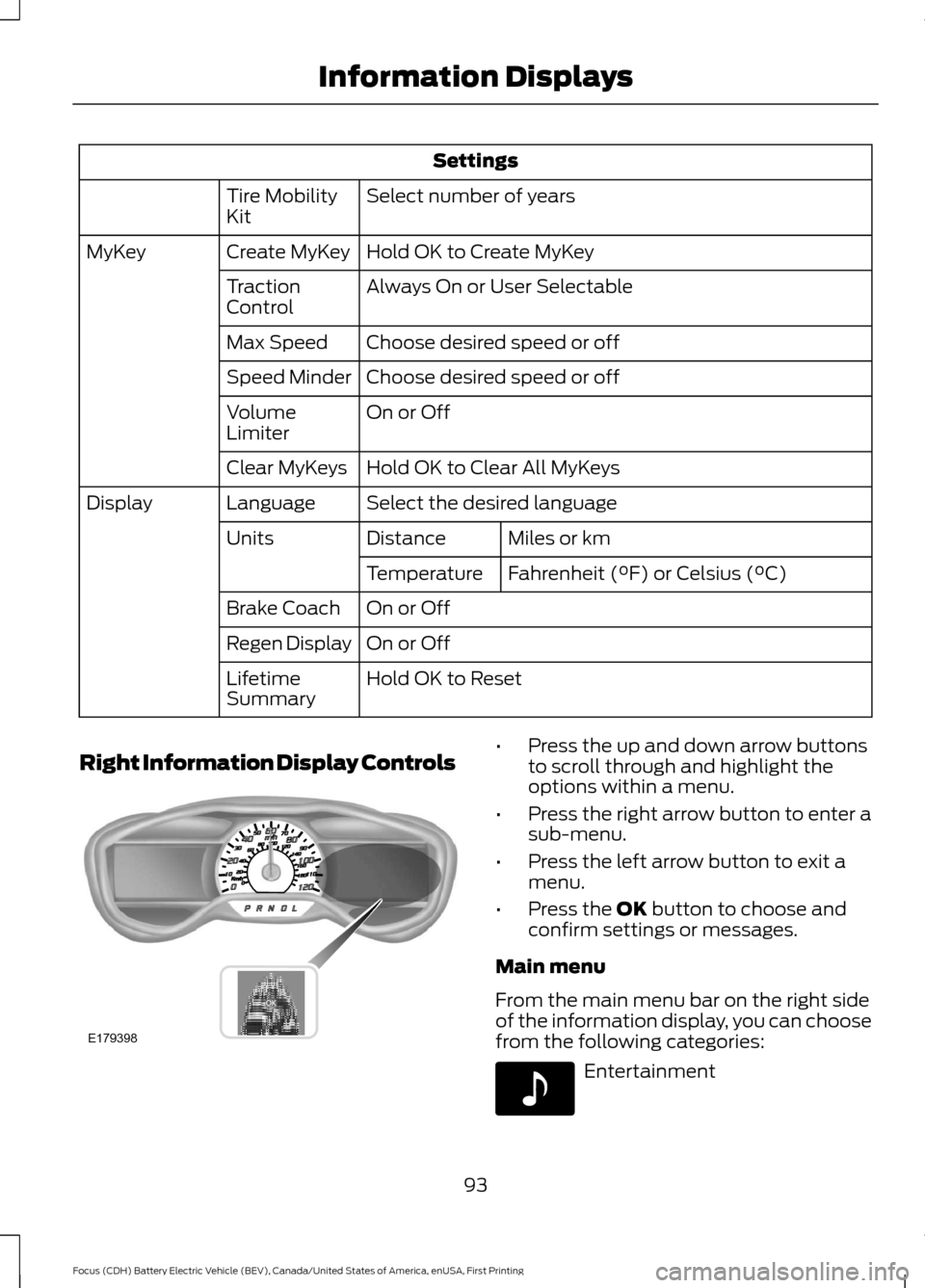
Right Information Display Controls •
Press the up and down arrow buttons
to scroll through and highlight the
options within a menu.
• Press the right arrow button to enter a
sub-menu.
• Press the left arrow button to exit a
menu.
• Press the OK button to choose and
confirm settings or messages.
Main menu
From the main menu bar on the right side
of the information display, you can choose
from the following categories: Entertainment
93
Focus (CDH) Battery Electric Vehicle (BEV), Canada/United States of America, enUSA, First Printing Information DisplaysE179398 E142611
Page 131 of 276
PRINCIPLE OF OPERATION
The traction control system helps avoid
drive wheel spin and loss of traction.
If your vehicle begins to slide, the system
applies the brakes to individual wheels
and, when needed, reduces engine power
at the same time. If the wheels spin when
accelerating on slippery or loose surfaces,
the system reduces engine power in order
to increase traction.
USING TRACTION CONTROL
WARNING
The stability and traction control
light illuminates steadily if the
system detects a failure. Make sure
you did not manually disable the traction
control system using the information
display controls or the switch. If the
stability control and traction control light
is still illuminating steadily, have the
system serviced by an authorized dealer
immediately. Operating your vehicle with
the traction control disabled could lead to
an increased risk of loss of vehicle control,
vehicle rollover, personal injury and death. The system automatically turns on each
time you switch the ignition on.
If your vehicle is stuck in mud or snow,
switching traction control off may be
beneficial as this allows the wheels to spin.
Note:
When you switch traction control off,
stability control remains fully active.
Switching the System Off
When you switch the system off or on, a
message appears in the information
display showing system status.
You can switch the system off by either
using the information display controls or
the switch. Using the Information Display
Controls
You can switch this feature off or on in the
information display. See General
Information (page 87).
Using a Switch
(If Equipped)
Use the traction control switch on the
instrument panel to switch the system off
or on.
The switch illuminates when traction
control is off.
System Indicator Lights and
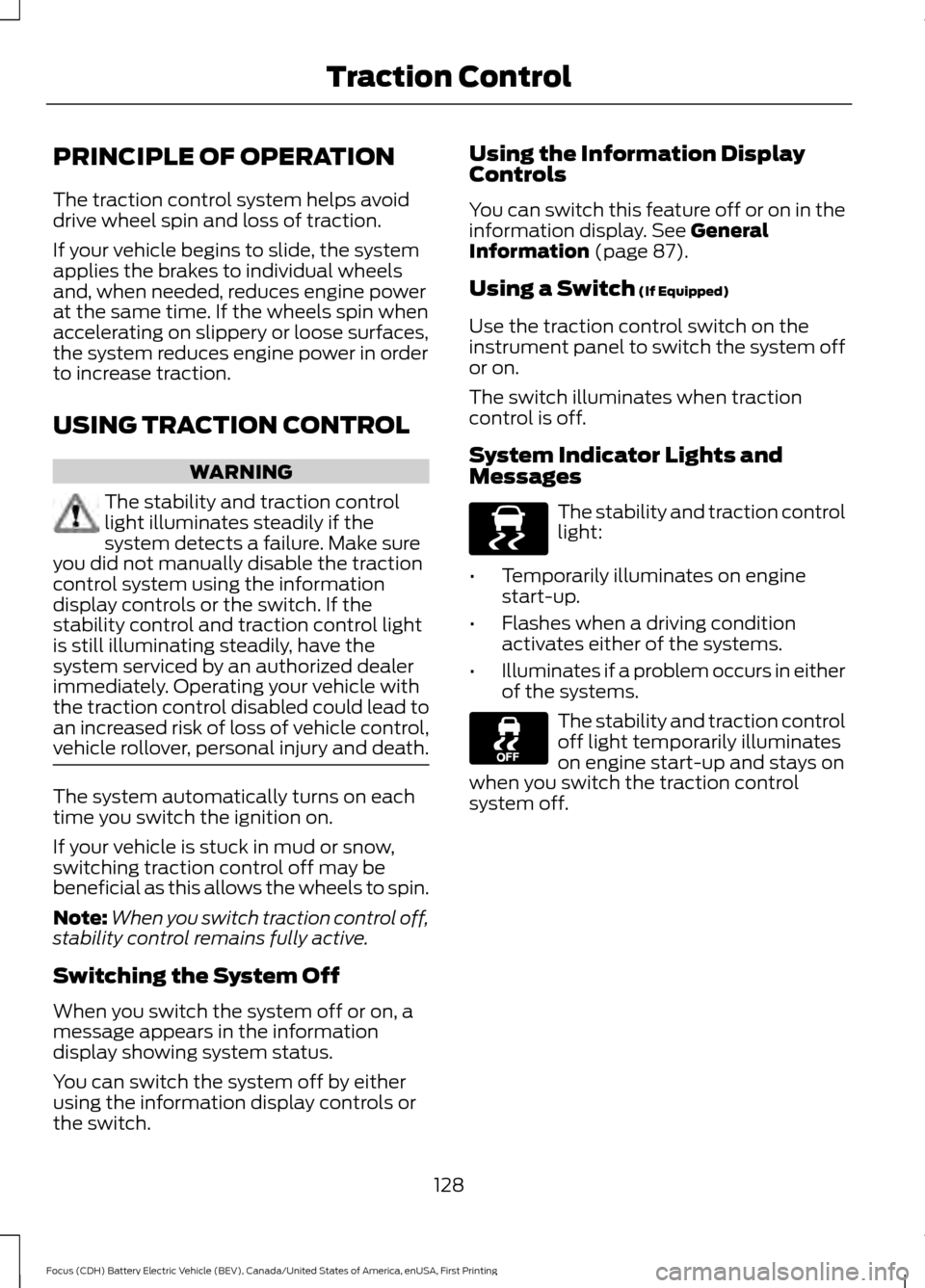
Messages The stability and traction control
light:
• Temporarily illuminates on engine
start-up.
• Flashes when a driving condition
activates either of the systems.
• Illuminates if a problem occurs in either
of the systems. The stability and traction control
off light temporarily illuminates
on engine start-up and stays on
when you switch the traction control
system off.
128
Focus (CDH) Battery Electric Vehicle (BEV), Canada/United States of America, enUSA, First Printing Traction ControlE138639
Page 132 of 276
PRINCIPLE OF OPERATION
WARNINGS
Vehicle modifications involving
braking system, aftermarket roof
racks, suspension, steering system,
tire construction and wheel and tire size
may change the handling characteristics
of your vehicle and may adversely affect
the performance of the electronic stability
control system. In addition, installing any
stereo loudspeakers may interfere with
and adversely affect the electronic stability
control system. Install any aftermarket
stereo loudspeaker as far as possible from
the front center console, the tunnel, and
the front seats in order to minimize the risk
of interfering with the electronic stability
control sensors. Reducing the
effectiveness of the electronic stability
control system could lead to an increased
risk of loss of vehicle control, vehicle
rollover, personal injury and death. Remember that even advanced
technology cannot defy the laws of
physics. It’
s always possible to lose
control of a vehicle due to inappropriate
driver input for the conditions. Aggressive
driving on any road condition can cause
you to lose control of your vehicle
increasing the risk of personal injury or
property damage. Activation of the
electronic stability control system is an
indication that at least some of the tires
have exceeded their ability to grip the road;
this could reduce the operator ’s ability to
control the vehicle potentially resulting in
a loss of vehicle control, vehicle rollover,
personal injury and death. If your electronic
stability control system activates, SLOW
DOWN. The system automatically turns on each
time you switch the ignition on. If a driving condition activates either the
stability control or the traction control
system you may experience the following
conditions:
•
The stability and traction control light
flashes.
• Your vehicle slows down.
• Reduced engine power.
• A vibration in the brake pedal.
• The brake pedal is stiffer than usual.
• If the driving condition is severe and
your foot is not on the brake, the brake
pedal may move as the system applies
higher brake forces.
The stability control system has several
features built into it to help you maintain
control of your vehicle:
Electronic Stability Control
The system enhances your vehicle ’s ability
to prevent skids or lateral slides by
applying brakes to one or more of the
wheels individually and, if necessary,
reducing engine power.
129
Focus (CDH) Battery Electric Vehicle (BEV), Canada/United States of America, enUSA, First Printing Stability Control
Page 133 of 276
Traction Control
The system enhances your vehicle
’s ability
to maintain traction of the wheels by
detecting and controlling wheel spin. See
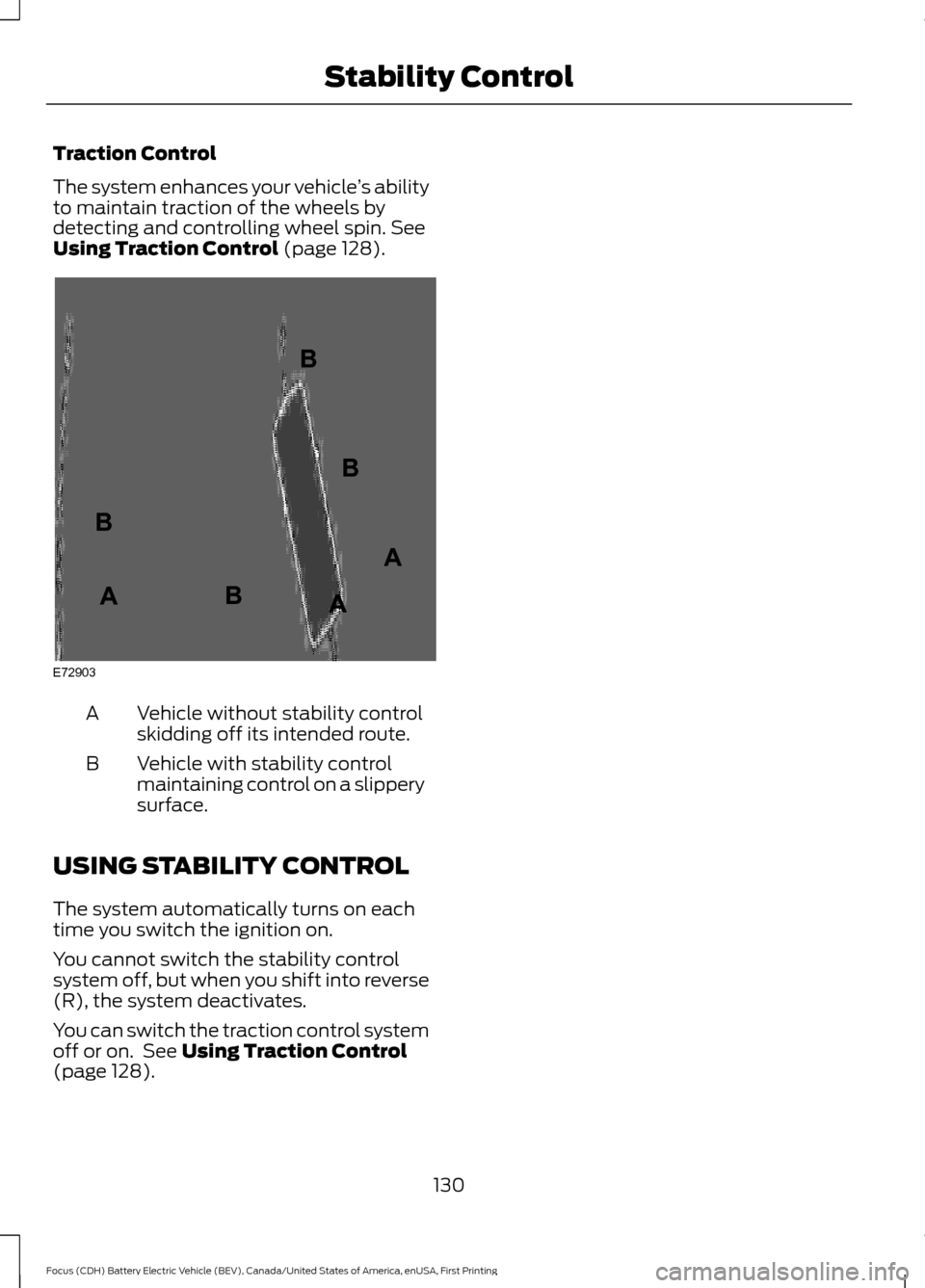
Using Traction Control (page 128). Vehicle without stability control
skidding off its intended route.
A
Vehicle with stability control
maintaining control on a slippery
surface.
B
USING STABILITY CONTROL
The system automatically turns on each
time you switch the ignition on.
You cannot switch the stability control
system off, but when you shift into reverse
(R), the system deactivates.
You can switch the traction control system
off or on. See
Using Traction Control
(page 128).
130
Focus (CDH) Battery Electric Vehicle (BEV), Canada/United States of America, enUSA, First Printing Stability ControlE72903A
AA
B
BB
B
Page 150 of 276
BREAKING-IN
You need to break in new tires for
approximately 300 mi (480 km). During
this time, your vehicle may exhibit some
unusual driving characteristics.
Avoid hard accelerations and driving too
fast during the first
1,000 mi (1,600 km).
COLD WEATHER
PRECAUTIONS
The functional operation of some
components and systems can be affected
at temperatures below
-13°F (-25°C).
DRIVING THROUGH WATER WARNING
Do not drive through flowing or deep
water as you may lose control of your
vehicle.
Note:
Driving through standing water can
cause vehicle damage.
Note: Engine damage can occur if water
enters the air filter.
Before driving through standing water,
check the depth. Never drive through water
that is higher than the bottom of the front
rocker area of your vehicle. When driving through standing water, drive
very slowly and do not stop your vehicle.
Your brake performance and traction may
be limited. After driving through water and
as soon as it is safe to do so:
•
Lightly press the brake pedal to dry the
brakes and to check that they work.
• Check that the horn works.
• Check that the exterior lights work.
• Turn the steering wheel to check that
the steering power assist works.
FLOOR MATS WARNINGS
Always use floor mats that are
designed to fit the foot well of your
vehicle. Only use floor mats that
leave the pedal area unobstructed. Only
use floor mats that are firmly secured to
retention posts so that they cannot slip out
of position and interfere with the pedals
or impair safe operation of your vehicle in
other ways. Pedals that cannot move freely can
cause loss of vehicle control and
increase the risk of serious personal
injury.
147
Focus (CDH) Battery Electric Vehicle (BEV), Canada/United States of America, enUSA, First Printing Driving HintsE176360
Page 203 of 276
U.S. Department of
Transportation-Tire quality
grades: The U.S. Department of
Transportation requires Ford
Motor Company to give you the
following information about tire
grades exactly as the government
has written it.
Treadwear
The treadwear grade is a
comparative rating based on the
wear rate of the tire when tested
under controlled conditions on a
specified government test course.
For example, a tire graded 150
would wear 1½ times as well on
the government course as a tire
graded 100. The relative
performance of tires depends
upon the actual conditions of their
use, however, and may depart
significantly from the norm due to
variations in driving habits, service
practices, and differences in road
characteristics and climate.
Traction AA A B C WARNING
The traction grade assigned
to this tire is based on
straight-ahead braking traction
tests, and does not include
acceleration, cornering,
hydroplaning or peak traction
characteristics. The traction grades, from highest
to lowest are AA, A, B, and C. The
grades represent the tire
’s ability
to stop on wet pavement as
measured under controlled
conditions on specified
government test surfaces of
asphalt and concrete. A tire
marked C may have poor traction
performance.
Temperature A B C WARNING
The temperature grade for
this tire is established for a
tire that is properly inflated and
not overloaded. Excessive speed,
under-inflation, or excessive
loading, either separately or in
combination, can cause heat
buildup and possible tire failure. The temperature grades are A
(the highest), B and C,
representing the tire
’s resistance
to the generation of heat and its
ability to dissipate heat when
tested under controlled conditions
on a specified indoor laboratory
test wheel. Sustained high
temperature can cause the
material of the tire to degenerate
and reduce tire life, and excessive
temperature can lead to sudden
tire failure. The grade C
corresponds to a level of
performance which all passenger
car tires must meet under the
200
Focus (CDH) Battery Electric Vehicle (BEV), Canada/United States of America, enUSA, First Printing Wheels and Tires
Page 207 of 276
J.
Tire Ply Composition and
Material Used: Indicates the
number of plies or the number of
layers of rubber-coated fabric in
the tire tread and sidewall. Tire
manufacturers also must indicate
the ply materials in the tire and the
sidewall, which include steel,
nylon, polyester, and others.
K. Maximum Load: Indicates the
maximum load in kilograms and
pounds that can be carried by the
tire. Refer to the Safety
Compliance Certification Label
(affixed to either the door hinge
pillar, door-latch post, or the door
edge that meets the door-latch
post, next to the driver's seating
position), for the correct tire
pressure for your vehicle.
L. Treadwear, Traction and
Temperature Grades:
*Treadwear The treadwear grade
is a comparative rating based on
the wear rate of the tire when
tested under controlled conditions
on a specified government test
course. For example, a tire graded
150 would wear one and one-half
times as well on the government
course as a tire graded 100. *Traction: The traction grades,
from highest to lowest are AA, A,
B, and C. The grades represent the
tire's ability to stop on wet
pavement as measured under
controlled conditions on specified
government test surfaces of
asphalt and concrete. A tire
marked C may have poor traction
performance.
*
Temperature: The temperature
grades are A (the highest), B and
C, representing the tire's
resistance to the generation of
heat and its ability to dissipate
heat when tested under controlled
conditions on a specified indoor
laboratory test wheel.
M. Maximum Inflation
Pressure:
Indicates the tire
manufacturer's maximum
permissible pressure or the
pressure at which the maximum
load can be carried by the tire. This
pressure is normally higher than
the manufacturer's recommended
cold inflation pressure, which can
be found on the Safety
Compliance Certification Label
(affixed to either the door hinge
pillar, door-latch post, or the door
edge that meets the door-latch
post, next to the driver's seating
position), or Tire Label which is
located on the B-Pillar or the edge
of the driver ’s door. The cold
inflation pressure should never be
set lower than the recommended
pressure on the vehicle label.
204
Focus (CDH) Battery Electric Vehicle (BEV), Canada/United States of America, enUSA, First Printing Wheels and Tires