power steering FORD FOCUS ELECTRIC 2018 User Guide
[x] Cancel search | Manufacturer: FORD, Model Year: 2018, Model line: FOCUS ELECTRIC, Model: FORD FOCUS ELECTRIC 2018Pages: 375, PDF Size: 12.81 MB
Page 163 of 375
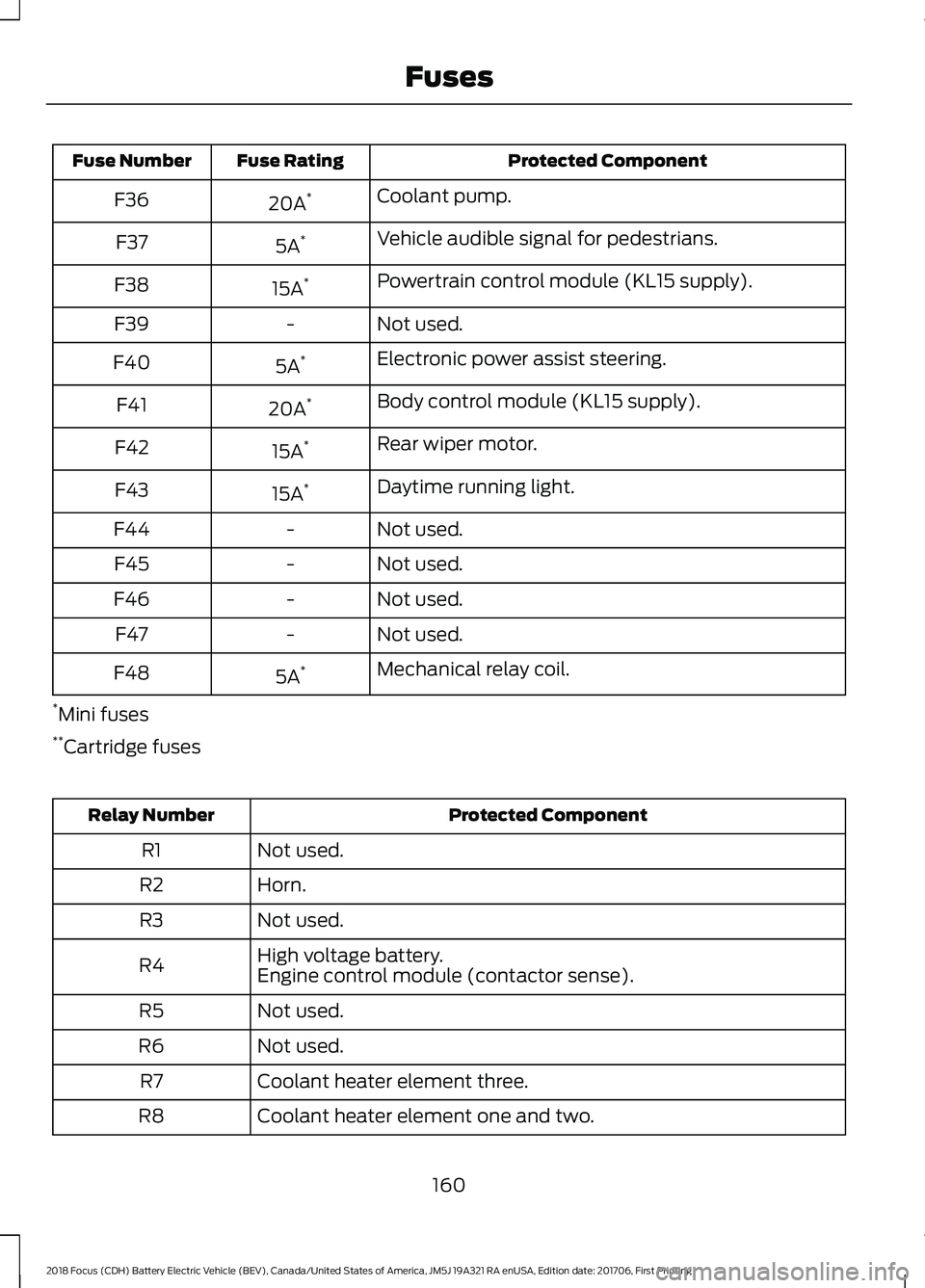
Protected Component
Fuse Rating
Fuse Number
Coolant pump.
20A *
F36
Vehicle audible signal for pedestrians.
5A *
F37
Powertrain control module (KL15 supply).
15A *
F38
Not used.
-
F39
Electronic power assist steering.
5A *
F40
Body control module (KL15 supply).
20A *
F41
Rear wiper motor.
15A *
F42
Daytime running light.
15A *
F43
Not used.
-
F44
Not used.
-
F45
Not used.
-
F46
Not used.
-
F47
Mechanical relay coil.
5A *
F48
* Mini fuses
** Cartridge fuses Protected Component
Relay Number
Not used.
R1
Horn.
R2
Not used.
R3
High voltage battery.
R4 Engine control module (contactor sense).
Not used.
R5
Not used.
R6
Coolant heater element three.
R7
Coolant heater element one and two.
R8
160
2018 Focus (CDH) Battery Electric Vehicle (BEV), Canada/United States of America, JM5J 19A321 RA enUSA, Edition date: 201706, First Printing Fuses
Page 166 of 375
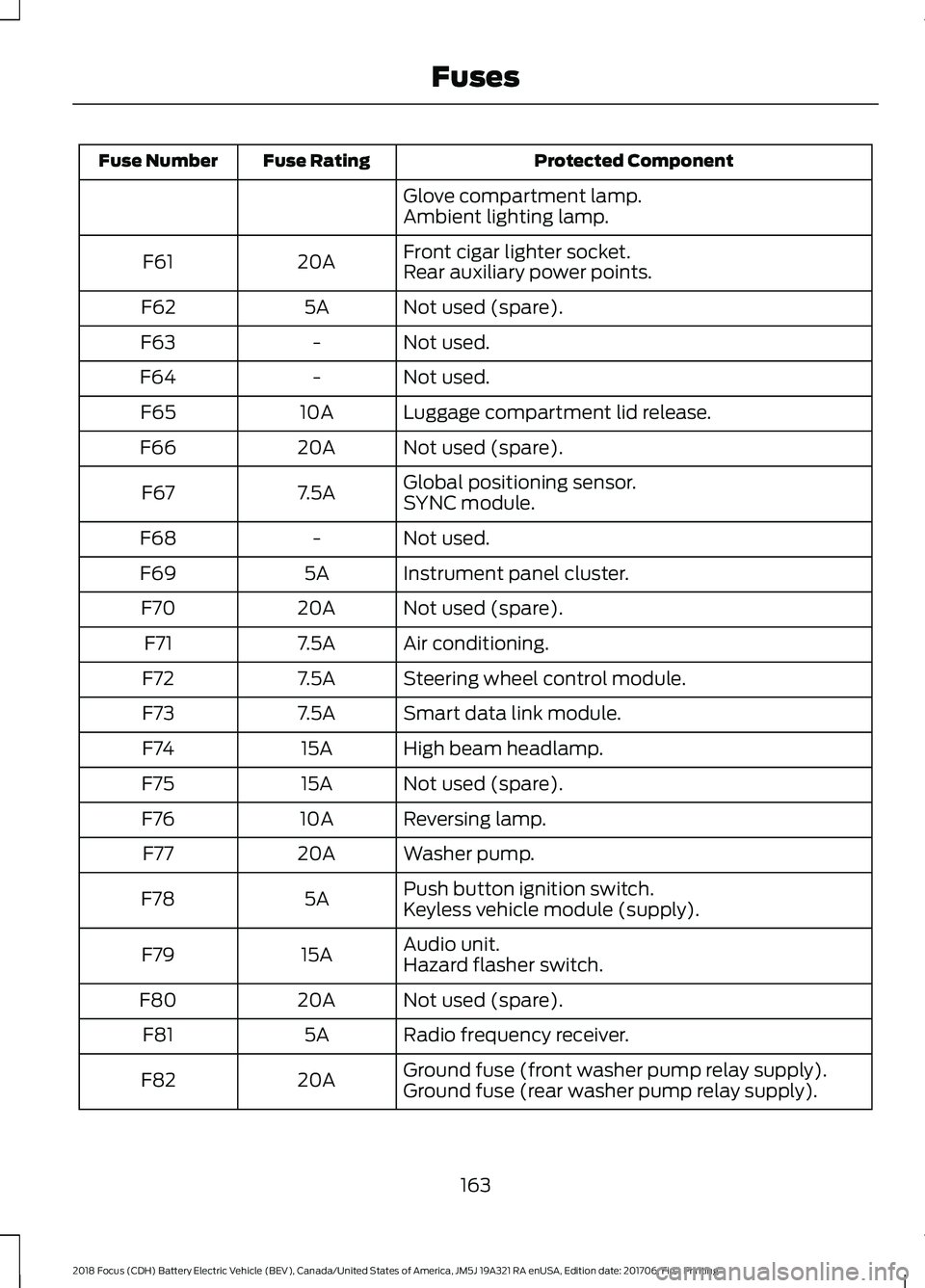
Protected Component
Fuse Rating
Fuse Number
Glove compartment lamp.
Ambient lighting lamp.
Front cigar lighter socket.
20A
F61
Rear auxiliary power points.
Not used (spare).
5A
F62
Not used.
-
F63
Not used.
-
F64
Luggage compartment lid release.
10A
F65
Not used (spare).
20A
F66
Global positioning sensor.
7.5A
F67
SYNC module.
Not used.
-
F68
Instrument panel cluster.
5A
F69
Not used (spare).
20A
F70
Air conditioning.
7.5A
F71
Steering wheel control module.
7.5A
F72
Smart data link module.
7.5A
F73
High beam headlamp.
15A
F74
Not used (spare).
15A
F75
Reversing lamp.
10A
F76
Washer pump.
20A
F77
Push button ignition switch.
5A
F78
Keyless vehicle module (supply).
Audio unit.
15A
F79
Hazard flasher switch.
Not used (spare).
20A
F80
Radio frequency receiver.
5A
F81
Ground fuse (front washer pump relay supply).
20A
F82
Ground fuse (rear washer pump relay supply).
163
2018 Focus (CDH) Battery Electric Vehicle (BEV), Canada/United States of America, JM5J 19A321 RA enUSA, Edition date: 201706, First Printing Fuses
Page 212 of 375
WARNINGS
may be found on either the Safety
Compliance Certification Label
(affixed to either the door hinge
pillar, door-latch post, or the door
edge that meets the door-latch
post, next to the driver's seating
position), or the Tire Label which
is located on the B-Pillar or edge
of the driver ’s door. If this
information is not found on these
labels, then you should contact
your authorized dealer as soon as
possible. Use of any tire or wheel
not recommended by Ford can
affect the safety and performance
of your vehicle, which could result
in an increased risk of loss of
vehicle control, vehicle rollover,
personal injury and death.
Additionally the use of
non-recommended tires and
wheels could cause steering,
suspension, axle, transfer case or
power transfer unit failure. If you
have questions regarding tire
replacement, contact your
authorized dealer as soon as
possible. When mounting replacement
tires and wheels, you should
not exceed the maximum pressure
indicated on the sidewall of the
tire to set the beads without
additional precautions listed
below. If the beads do not seat at
the maximum pressure indicated,
re-lubricate and try again. WARNINGS
When inflating the tire for
mounting pressures up to 20 psi
(1.38 bar) greater than the
maximum pressure on the tire
sidewall, the following
precautions must be taken to
protect the person mounting the
tire:
1. Make sure that you have the
correct tire and wheel size.
2. Lubricate the tire bead and
wheel bead seat area again.
3. Stand at a minimum of
12 ft
(3.66 m) away from the wheel
and tire assembly.
4. Use both eye and ear
protection.
For a mounting pressure more
than 20 psi (1.38 bar) greater than
the maximum pressure, a Ford
dealer or other tire service
professional should do the
mounting.
Always inflate steel carcass tires
with a remote air fill with the
person inflating standing at a
minimum of 12 ft (3.66 m) away
from the wheel and tire assembly. Important: Remember to replace
the wheel valve stems when the
road tires are replaced on your
vehicle.
209
2018 Focus (CDH) Battery Electric Vehicle (BEV), Canada/United States of America, JM5J 19A321 RA enUSA, Edition date: 201706, First Printing Wheels and Tires
Page 234 of 375
Cleaning the Touchscreen
You can remove fingerprints with a dry,
clean, soft cloth.
If dirt or fingerprints are still on the screen,
apply a small amount of alcohol to the
cloth and try to clean it again.
Note:
Do not use detergent or any type of
solvent to clean the touchscreen.
Note: Do not pour or spray alcohol onto the
touchscreen.
Using Voice Recognition
Using voice commands allows you to keep
your hands on the wheel and eyes on the
road. The system provides feedback
through audible tones, prompts, questions
and spoken confirmations depending on
the situation and the chosen level of
interaction (voice settings).
The system also asks short questions
(confirmation prompts) when it is not sure
of your request or when there are multiple
possible responses to your request.
When using voice commands, words and
icons may appear in the status bar
indicating the status of the voice command
session. See Using Voice Recognition
(page 239).
Using the Steering Wheel Controls
Depending on your vehicle and option
package, you can use different controls on
your steering wheel to interact with the
touchscreen system in different ways.
VOL:
Control the volume of audio output.
Mute:
Mute the audio output.
Voice:
Press to start a voice session. Press
again to stop the voice prompt and
immediately begin speaking. Press and
hold to end a voice session. SEEK NEXT:
•
While in radio mode, press to seek
between memory presets.
• While in USB, Bluetooth Audio or CD
mode, press to seek between songs or
press and hold to fast seek.
SEEK PREVIOUS:
• While in radio mode, press to seek
between memory presets.
• While in USB, Bluetooth Audio or CD
mode, press to seek between songs or
press and hold to fast seek.
PHONE ACCEPT:
Press to answer a call
or switch between calls.
PHONE REJECT:
Press to end a call or
reject an incoming call.
Note: On some models, SEEK NEXT
may
be combined with PHONE REJECT and
SEEK PREVIOUS may be combined with
PHONE ACCEPT.
M:
Touch the control repeatedly to switch
between media sources (modes).
See
Steering Wheel (page 61).
Using Your Bezel Controls
Depending on your vehicle and option
package, you may also have these controls
on your instrument panel:
• Power:
Switch the audio system on
and off.
• VOL:
Control the volume of playing
audio.
• Seek
and Tune: se as you normally
would in audio modes.
• Eject:
Eject a CD from the audio
system.
• SOURCE
or MEDIA: Press repeatedly
to advance through available media
modes.
231
2018 Focus (CDH) Battery Electric Vehicle (BEV), Canada/United States of America, JM5J 19A321 RA enUSA, Edition date: 201706, First Printing SYNC™ 3
Page 236 of 375
•
You must pair and connect a
Bluetooth-enabled and compatible
cell phone to SYNC.
• A connected Bluetooth-enabled phone
must have the ability to make and
maintain an outgoing call at the time
of the incident.
• A connected Bluetooth-enabled phone
must have adequate network coverage,
battery power and signal strength.
• The vehicle must have battery power
and be located in the U.S., Canada or
in a territory in which 911 is the
emergency number.
In the Event of a Crash
Not all crashes will deploy an airbag or
activate the fuel pump shut-off (the
triggers for 911 Assist). If a connected cell
phone sustains damage or loses its
connection to SYNC during a crash, SYNC
will search for and try to connect to a
previously paired cell phone; SYNC will
then attempt to call the emergency
services.
Before making the call:
• SYNC provides a short window of time
(about 10 seconds) to cancel the call.
If you fail to cancel the call, SYNC
attempts to dial 911.
• SYNC says the following, or a similar
message: "SYNC will attempt to call
911, to cancel the call, press Cancel on
your screen or press and hold the
phone button on your steering wheel."
If you do not cancel the call, and SYNC
makes a successful call, a pre-recorded
message plays for the 911 operator, and
then the occupant(s) in your vehicle is able
to talk with the operator. Be prepared to
provide your name, phone number and
location immediately, because not all 911
systems are capable of receiving this
information electronically. 911 Assist May Not Work If
•
Your cellular phone or 911 Assist
hardware sustains damage in a crash.
• The vehicle's battery or the SYNC
system has no power.
• The phone(s) thrown from your vehicle
are the ones paired and connected to
the system.
911 Assist Privacy Notice
When you switch on 911 Assist, it may
disclose to emergency services that your
vehicle has been in a crash involving the
deployment of an airbag or activation of
the fuel pump shut-off. Certain versions or
updates to 911 Assist may also be capable
of electronically or verbally disclosing to
911 operators your vehicle location or other
details about your vehicle or crash to assist
911 operators to provide the most
appropriate emergency services. If you do
not want to disclose this information, do
not switch the feature on.
Safety Information WARNING
Driving while distracted can result in
loss of vehicle control, crash and
injury. We strongly recommend that
you use extreme caution when using any
device that may take your focus off the
road. Your primary responsibility is the safe
operation of your vehicle. We recommend
against the use of any hand-held device
while driving and encourage the use of
voice-operated systems when possible.
Make sure you are aware of all applicable
local laws that may affect the use of
electronic devices while driving. 233
2018 Focus (CDH) Battery Electric Vehicle (BEV), Canada/United States of America, JM5J 19A321 RA enUSA, Edition date: 201706, First Printing SYNC™ 3
Page 368 of 375
A
A/C
See: Climate Control.......................................... 94
About This Manual...........................................5
ABS See: Brakes........................................................... 120
ABS driving hints See: Hints on Driving With Anti-Lock
Brakes.................................................................. 121
Accessories.....................................................316 Exterior style......................................................... 316
Interior style.......................................................... 316
Lifestyle.................................................................. 316
Peace of mind...................................................... 316
Accessories See: Replacement Parts
Recommendation............................................ 10
Adjusting the Headlamps..........................177
Horizontal Aim Adjustment............................ 178
Vertical Aim Adjustment.................................. 177
Adjusting the Steering Wheel....................61
Airbag Disposal
...............................................43
Air Conditioning See: Climate Control.......................................... 94
Alarm See: Anti-Theft Alarm........................................ 59
Ambient Lighting
............................................70
Anti-Theft Alarm............................................59 Arming the Alarm................................................. 59
Disarming the Alarm.......................................... 60
Appendices....................................................334
Apps.................................................................288 ........................................................................\
.......... 288
SiriusXM Traffic and Travel Link................... 289
At a Glance
........................................................13
Audible Warnings and Indicators.............79 Headlamps On Warning Chime...................... 79
Keyless Warning Alert......................................... 79
Parking Brake On Warning Chime.................. 79
Audio Control....................................................61 Seek, Next or Previous........................................ 62
Audio System................................................223 General Information.......................................... 223
Audio Unit - Vehicles With: Sony Audio System..........................................................224 Autolamps........................................................67
Windshield Wiper Activated
Headlamps........................................................ 67
Automatic Climate Control
........................94
Dual Zone Temperature Control.................... 95
Single Zone Temperature Control.................95
Temperature Control.......................................... 95
Automatic Transmission
............................118
Brake-Shift Interlock.......................................... 118
If Your Vehicle Gets Stuck In Mud or Snow................................................................... 119
Understanding the Positions of Your Automatic Transmission.............................. 118
Auxiliary Power Points
................................105
12 Volt DC Power Point..................................... 105
Location................................................................. 105
B
Battery See: Changing the 12V Battery....................... 174
Bonnet Lock See: Opening and Closing the Hood...........170
Booster Seats
..................................................22
Types of Booster Seats...................................... 23
Brake Fluid Check..........................................173
Brakes...............................................................120 General Information.......................................... 120
Breaking-In......................................................142
Bulb Specification Chart............................181
C
Cabin Air Filter.................................................97
California Proposition 65...............................9
Capacities and Specifications.................221 Capacities.............................................................. 221
Specifications....................................................... 221
Car Wash See: Cleaning the Exterior............................... 184
Center Console.............................................106
Changing a Bulb............................................179 Headlamp.............................................................. 179
Licence Plate and High Mounted Stop Lamp................................................................... 181
Rear Lamp............................................................ 180
Changing a Fuse............................................167 Fuses........................................................................\
167
365
2018 Focus (CDH) Battery Electric Vehicle (BEV), Canada/United States of America, JM5J 19A321 RA enUSA, Edition date: 201706, First Printing Index
Page 371 of 375
Hill Start Assist..............................................122
Switching the System On and Off................122
Using Hill Start Assist........................................ 122
Hints on Controlling the Interior Climate............................................................95
General Hints......................................................... 95
Improving Vehicle Drive Range....................... 96
Recommended Settings for Cooling............96
Side Window Defogging in Cold Weather.............................................................. 96
Hints on Driving With Anti-Lock Brakes..............................................................121
Home Screen................................................238
Hood Lock See: Opening and Closing the Hood...........170
I
In California (U.S. Only).............................150
Information Display Control.......................63 Multimedia Controls........................................... 63
Information Displays....................................80 General Information........................................... 80
Information Messages
..................................87
AdvanceTrac®....................................................... 87
Alarm System........................................................ 88
Battery and Charging System (High Voltage).............................................................. 88
Door Ajar................................................................. 89
Hill Start Assist..................................................... 90
Keys and Intelligent Access............................. 90
Lighting.................................................................... 90
Maintenance........................................................... 91
MyKey........................................................................\
91
Parking Aid.............................................................. 92
Parking Brake......................................................... 92
Power Steering...................................................... 92
Remote Start......................................................... 93
Tire Pressure Monitoring System................... 93
Traction Control.................................................... 93
Transmission.......................................................... 93
Installing Child Restraints
............................16
Child Restraints...................................................... 16
Using Lap and Shoulder Belts.......................... 17
Using Lower Anchors and Tethers for Children (LATCH)............................................. 19
Using Tether Straps.............................................. 21
Instrument Cluster.........................................75 Instrument Lighting Dimmer.....................68
Instrument Panel Overview.........................13
Interior Lamps
.................................................69
Front Interior Lamps (If Equipped)...............69
Interior Mirror
....................................................73
Introduction........................................................5
J
Jump Starting the Vehicle.........................145 To Connect the Booster Cables.................... 146
To Start Your Vehicle......................................... 146
K
Keys and Remote Controls.........................44
L
Lighting Control..............................................66 Headlamp Flasher................................................ 67
High Beams............................................................ 66
Parking Lamps...................................................... 66
Lighting..............................................................66 General Information........................................... 66
Load Carrying
.................................................134
Load Limit........................................................134
Special Loading Instructions for Owners of
Pick-up Trucks and Utility-type
Vehicles............................................................. 139
Vehicle Loading - with and without a Trailer.................................................................. 134
Locking and Unlocking
.................................53
Activating Intelligent Access............................ 54
Autolock................................................................... 55
Autounlock............................................................. 55
Battery Saver......................................................... 56
Disabled Intelligent Access Keys.................... 55
Illuminated Entry.................................................. 56
Illuminated Exit..................................................... 56
Opening the Liftgate........................................... 56
Power Door Locks................................................ 53
Remote Control..................................................... 53
Smart Unlocks for Intelligent Access Keys...................................................................... 55
Lug Nuts See: Changing a Road Wheel........................ 216
Lug Nuts
............................................................217
368
2018 Focus (CDH) Battery Electric Vehicle (BEV), Canada/United States of America, JM5J 19A321 RA enUSA, Edition date: 201706, First Printing Index
Page 373 of 375
Remote Control..............................................44
Changing the Remote Control Battery........45
Intelligent Access Key........................................ 44
Locating Your Vehicle......................................... 46
Programming a New Remote Control..........45
Remote Start......................................................... 46
Reprogramming the Unlocking Function.............................................................. 45
Sounding the Panic Alarm............................... 46
Remote Start...................................................97
Automatic Settings.............................................. 97
Heated and Cooled Devices............................ 98
Last Settings.......................................................... 98
Removing a Headlamp...............................178
Repairing Minor Paint Damage...............188
Replacement Parts Recommendation........................................10
Collision Repairs.................................................... 10
Scheduled Maintenance and Mechanical Repairs................................................................. 10
Warranty on Replacement Parts.................... 10
Replacing a Lost Key or Remote Control.............................................................47
Reporting Safety Defects (Canada Only)...............................................................154
Reporting Safety Defects (U.S. Only)...............................................................154
Roadside Assistance
...................................144
Vehicles Sold in Canada: Getting Roadside
Assistance........................................................ 145
Vehicles Sold in Canada: Roadside Assistance Program Coverage.................. 145
Vehicles Sold in Canada: Using Roadside Assistance........................................................ 145
Vehicles Sold in the United States: Getting Roadside Assistance.................................... 144
Vehicles Sold in the United States: Using Roadside Assistance.................................... 144
Roadside Emergencies...............................144
Running-In See: Breaking-In.................................................. 142
S
Safety Canopy ™
.............................................41
Scheduled Maintenance Record...........324
Scheduled Maintenance...........................320
Seatbelt Extension
........................................33 Seatbelt Height Adjustment.....................30
Seatbelt Reminder
..........................................31
Belt-Minder™......................................................... 31
Seatbelts............................................................27 Principle of Operation......................................... 27
Seatbelt Warning Lamp and Indicator Chime..............................................................30
Conditions of operation...................................... 31
Seats...................................................................99
Security..............................................................58
Settings...........................................................290 911 Assist............................................................... 295
Ambient Lighting............................................... 302
Bluetooth.............................................................. 292
Clock....................................................................... 292
Display................................................................... 303
General................................................................. 300
Media Player......................................................... 291
Mobile Apps......................................................... 298
Navigation............................................................ 296
Phone..................................................................... 292
Radio...................................................................... 295
Sound.................................................................... 290
Valet Mode........................................................... 304
Vehicle................................................................... 302
Voice Control....................................................... 303
Wi-Fi & Hotspot................................................. 300
Side Airbags
.....................................................40
Sitting in the Correct Position...................99
Snow Chains See: Using Snow Chains................................... 212
Special Notices
................................................10
New Vehicle Limited Warranty........................ 10
On Board Diagnostics Data Link Connector
............................................................. 11
Special Instructions............................................. 10
Speed Control See: Cruise Control.............................................. 131
Stability Control............................................124 Principle of Operation....................................... 124
Starting and Stopping the Electric Motor
..............................................................107
Starting the Electric Motor........................107 Keyless Starting................................................... 107
Starting Your Vehicle......................................... 107
Steering............................................................133 Electric Power Steering.................................... 133
Steering Wheel................................................61
370
2018 Focus (CDH) Battery Electric Vehicle (BEV), Canada/United States of America, JM5J 19A321 RA enUSA, Edition date: 201706, First Printing Index