bluetooth FORD FOCUS ELECTRIC 2018 Owner's Manual
[x] Cancel search | Manufacturer: FORD, Model Year: 2018, Model line: FOCUS ELECTRIC, Model: FORD FOCUS ELECTRIC 2018Pages: 375, PDF Size: 12.81 MB
Page 308 of 375
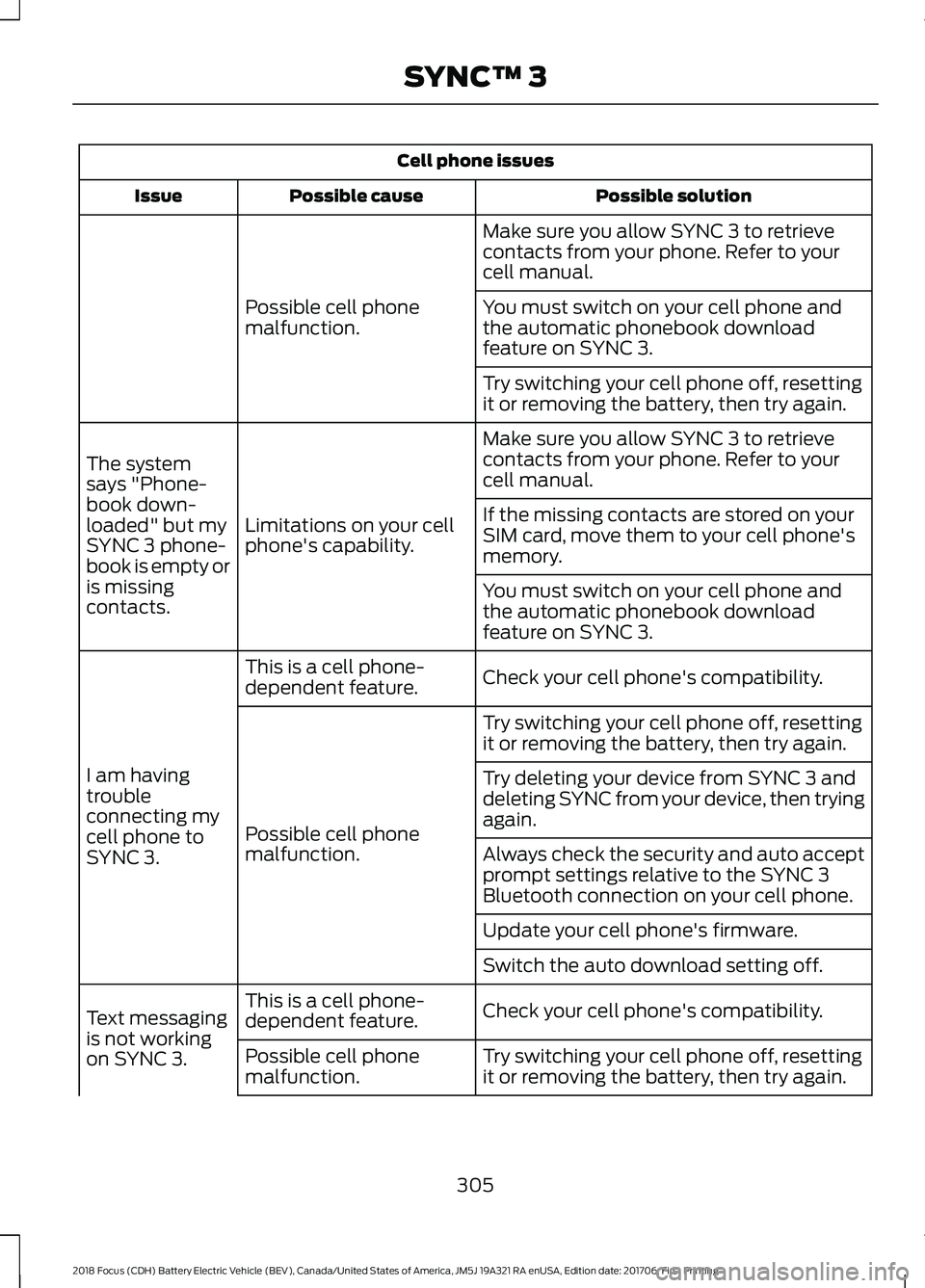
Cell phone issues
Possible solution
Possible cause
Issue
Make sure you allow SYNC 3 to retrieve
contacts from your phone. Refer to your
cell manual.
Possible cell phone
malfunction. You must switch on your cell phone and
the automatic phonebook download
feature on SYNC 3.
Try switching your cell phone off, resetting
it or removing the battery, then try again.
Make sure you allow SYNC 3 to retrieve
contacts from your phone. Refer to your
cell manual.
Limitations on your cell
phone's capability.
The system
says "Phone-
book down-
loaded" but my
SYNC 3 phone-
book is empty or
is missing
contacts. If the missing contacts are stored on your
SIM card, move them to your cell phone's
memory.
You must switch on your cell phone and
the automatic phonebook download
feature on SYNC 3.
Check your cell phone's compatibility.
This is a cell phone-
dependent feature.
I am having
trouble
connecting my
cell phone to
SYNC 3. Try switching your cell phone off, resetting
it or removing the battery, then try again.
Possible cell phone
malfunction. Try deleting your device from SYNC 3 and
deleting SYNC from your device, then trying
again.
Always check the security and auto accept
prompt settings relative to the SYNC 3
Bluetooth connection on your cell phone.
Update your cell phone's firmware.
Switch the auto download setting off.
Check your cell phone's compatibility.
This is a cell phone-
dependent feature.
Text messaging
is not working
on SYNC 3. Try switching your cell phone off, resetting
it or removing the battery, then try again.
Possible cell phone
malfunction.
305
2018 Focus (CDH) Battery Electric Vehicle (BEV), Canada/United States of America, JM5J 19A321 RA enUSA, Edition date: 201706, First Printing SYNC™ 3
Page 309 of 375
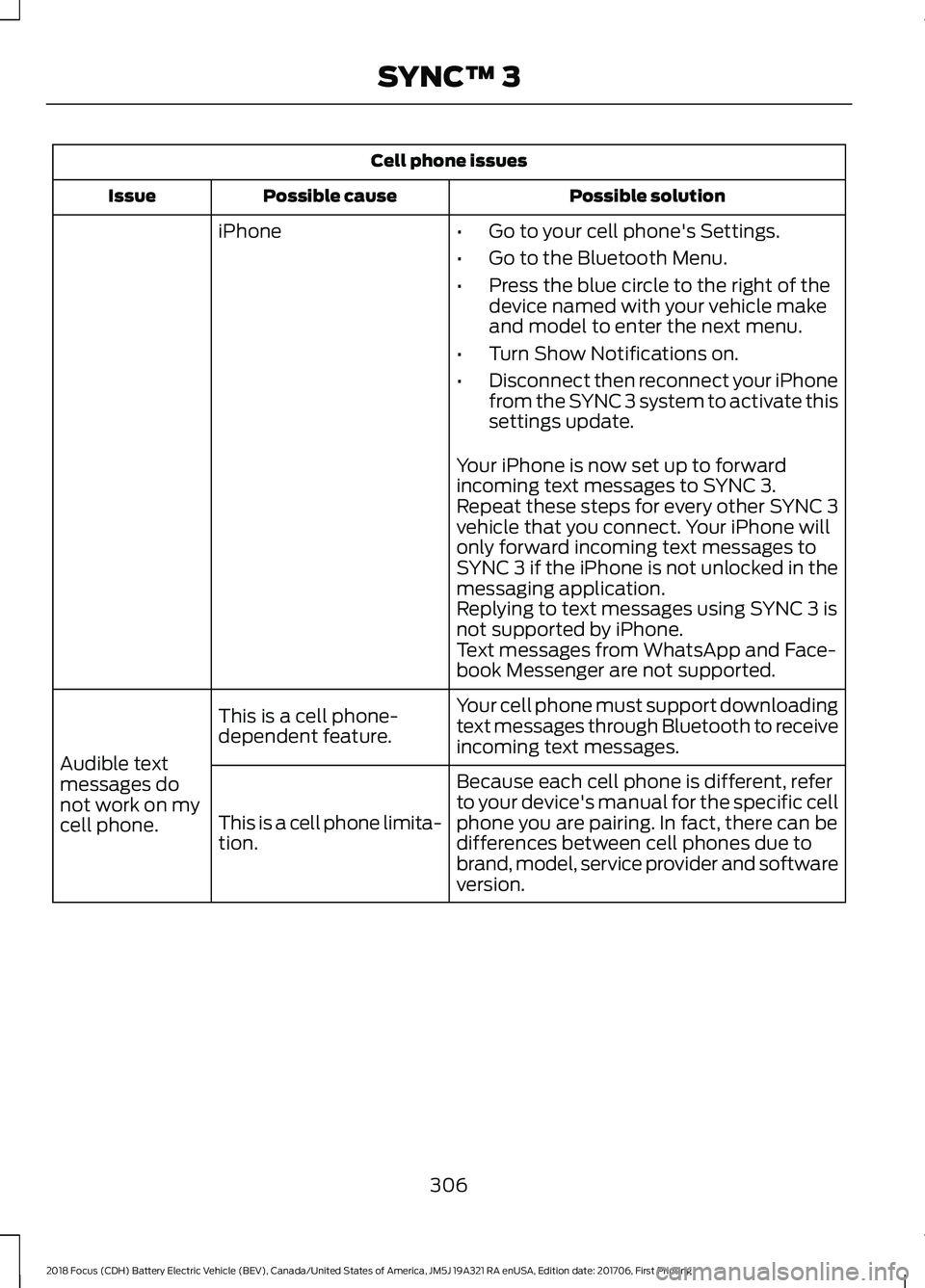
Cell phone issues
Possible solution
Possible cause
Issue
iPhone •Go to your cell phone's Settings.
• Go to the Bluetooth Menu.
• Press the blue circle to the right of the
device named with your vehicle make
and model to enter the next menu.
• Turn Show Notifications on.
• Disconnect then reconnect your iPhone
from the SYNC 3 system to activate this
settings update.
Your iPhone is now set up to forward
incoming text messages to SYNC 3.
Repeat these steps for every other SYNC 3
vehicle that you connect. Your iPhone will
only forward incoming text messages to
SYNC 3 if the iPhone is not unlocked in the
messaging application.
Replying to text messages using SYNC 3 is
not supported by iPhone.
Text messages from WhatsApp and Face-
book Messenger are not supported.
Your cell phone must support downloading
text messages through Bluetooth to receive
incoming text messages.
This is a cell phone-
dependent feature.
Audible text
messages do
not work on my
cell phone. Because each cell phone is different, refer
to your device's manual for the specific cell
phone you are pairing. In fact, there can be
differences between cell phones due to
brand, model, service provider and software
version.
This is a cell phone limita-
tion.
306
2018 Focus (CDH) Battery Electric Vehicle (BEV), Canada/United States of America, JM5J 19A321 RA enUSA, Edition date: 201706, First Printing SYNC™ 3
Page 310 of 375
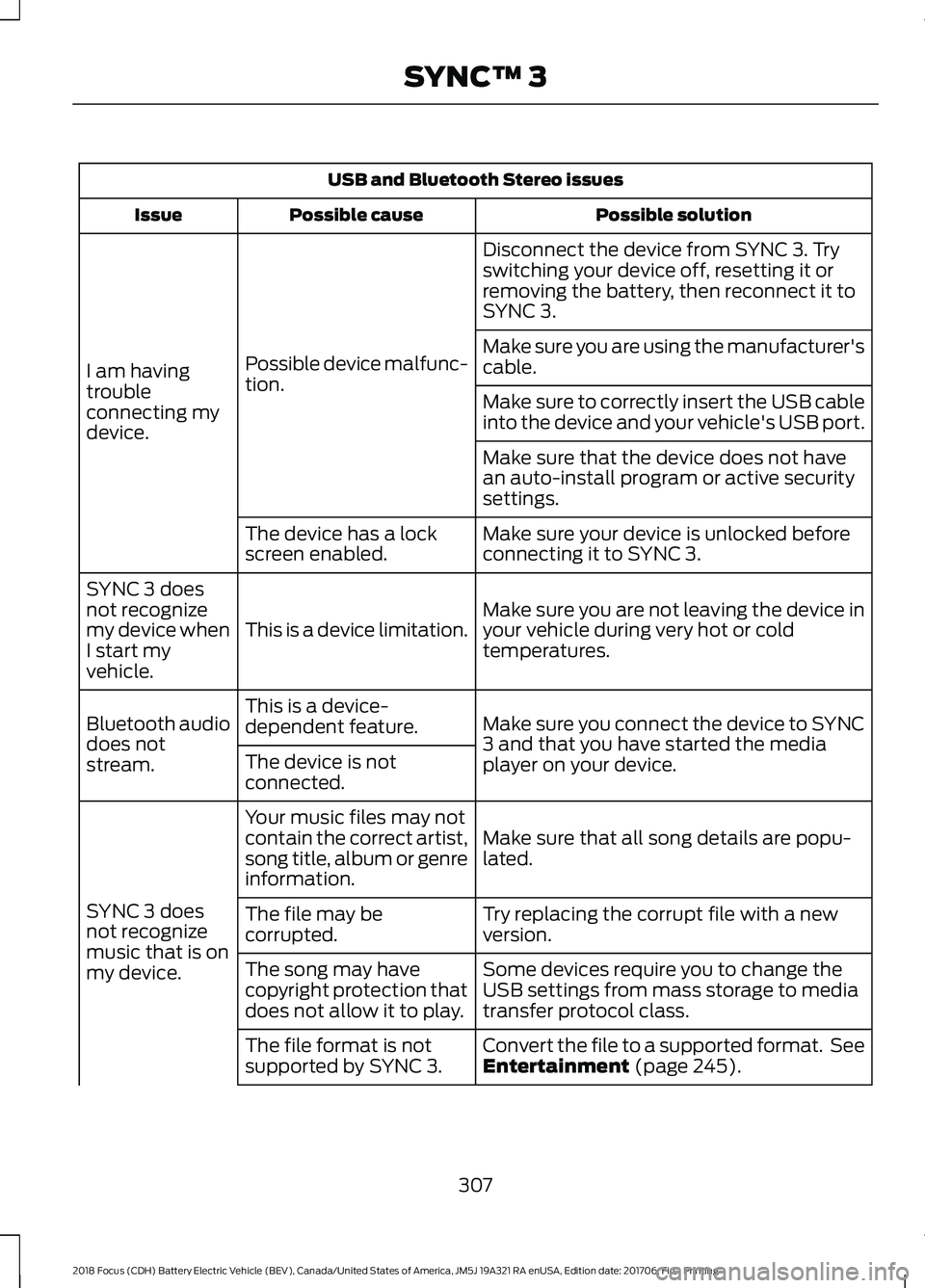
USB and Bluetooth Stereo issues
Possible solution
Possible cause
Issue
Disconnect the device from SYNC 3. Try
switching your device off, resetting it or
removing the battery, then reconnect it to
SYNC 3.
Possible device malfunc-
tion.
I am having
trouble
connecting my
device. Make sure you are using the manufacturer's
cable.
Make sure to correctly insert the USB cable
into the device and your vehicle's USB port.
Make sure that the device does not have
an auto-install program or active security
settings.
Make sure your device is unlocked before
connecting it to SYNC 3.
The device has a lock
screen enabled.
Make sure you are not leaving the device in
your vehicle during very hot or cold
temperatures.
This is a device limitation.
SYNC 3 does
not recognize
my device when
I start my
vehicle.
Make sure you connect the device to SYNC
3 and that you have started the media
player on your device.
This is a device-
dependent feature.
Bluetooth audio
does not
stream. The device is not
connected.
Make sure that all song details are popu-
lated.
Your music files may not
contain the correct artist,
song title, album or genre
information.
SYNC 3 does
not recognize
music that is on
my device. Try replacing the corrupt file with a new
version.
The file may be
corrupted.
Some devices require you to change the
USB settings from mass storage to media
transfer protocol class.
The song may have
copyright protection that
does not allow it to play.
Convert the file to a supported format. See
Entertainment (page 245).
The file format is not
supported by SYNC 3.
307
2018 Focus (CDH) Battery Electric Vehicle (BEV), Canada/United States of America, JM5J 19A321 RA enUSA, Edition date: 201706, First Printing SYNC™ 3
Page 311 of 375
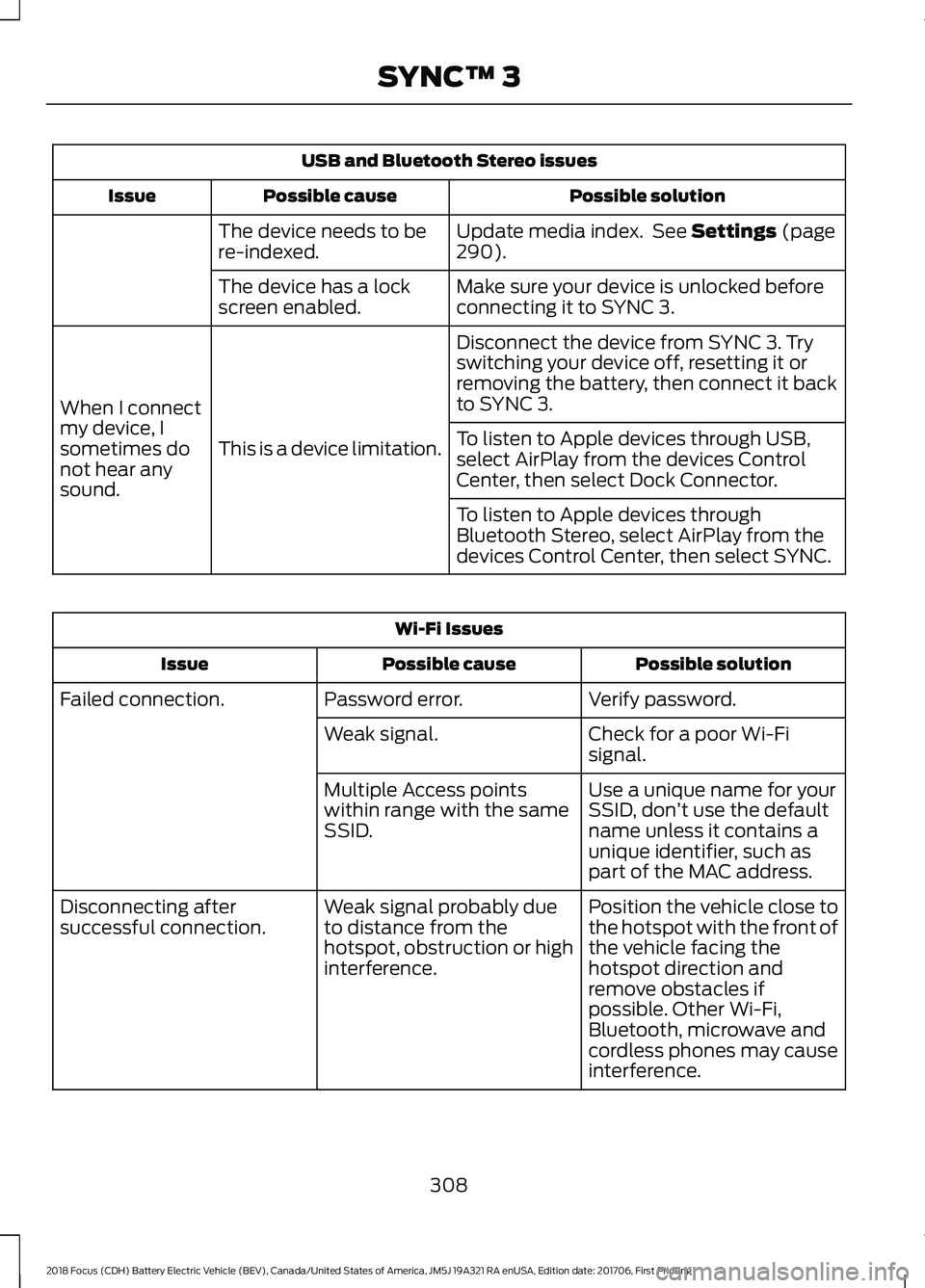
USB and Bluetooth Stereo issues
Possible solution
Possible cause
Issue
Update media index. See Settings (page
290).
The device needs to be
re-indexed.
Make sure your device is unlocked before
connecting it to SYNC 3.
The device has a lock
screen enabled.
Disconnect the device from SYNC 3. Try
switching your device off, resetting it or
removing the battery, then connect it back
to SYNC 3.
This is a device limitation.
When I connect
my device, I
sometimes do
not hear any
sound. To listen to Apple devices through USB,
select AirPlay from the devices Control
Center, then select Dock Connector.
To listen to Apple devices through
Bluetooth Stereo, select AirPlay from the
devices Control Center, then select SYNC.Wi-Fi Issues
Possible solution
Possible cause
Issue
Verify password.
Password error.
Failed connection.
Check for a poor Wi-Fi
signal.
Weak signal.
Use a unique name for your
SSID, don’t use the default
name unless it contains a
unique identifier, such as
part of the MAC address.
Multiple Access points
within range with the same
SSID.
Position the vehicle close to
the hotspot with the front of
the vehicle facing the
hotspot direction and
remove obstacles if
possible. Other Wi-Fi,
Bluetooth, microwave and
cordless phones may cause
interference.
Weak signal probably due
to distance from the
hotspot, obstruction or high
interference.
Disconnecting after
successful connection.
308
2018 Focus (CDH) Battery Electric Vehicle (BEV), Canada/United States of America, JM5J 19A321 RA enUSA, Edition date: 201706, First Printing SYNC™ 3
Page 314 of 375
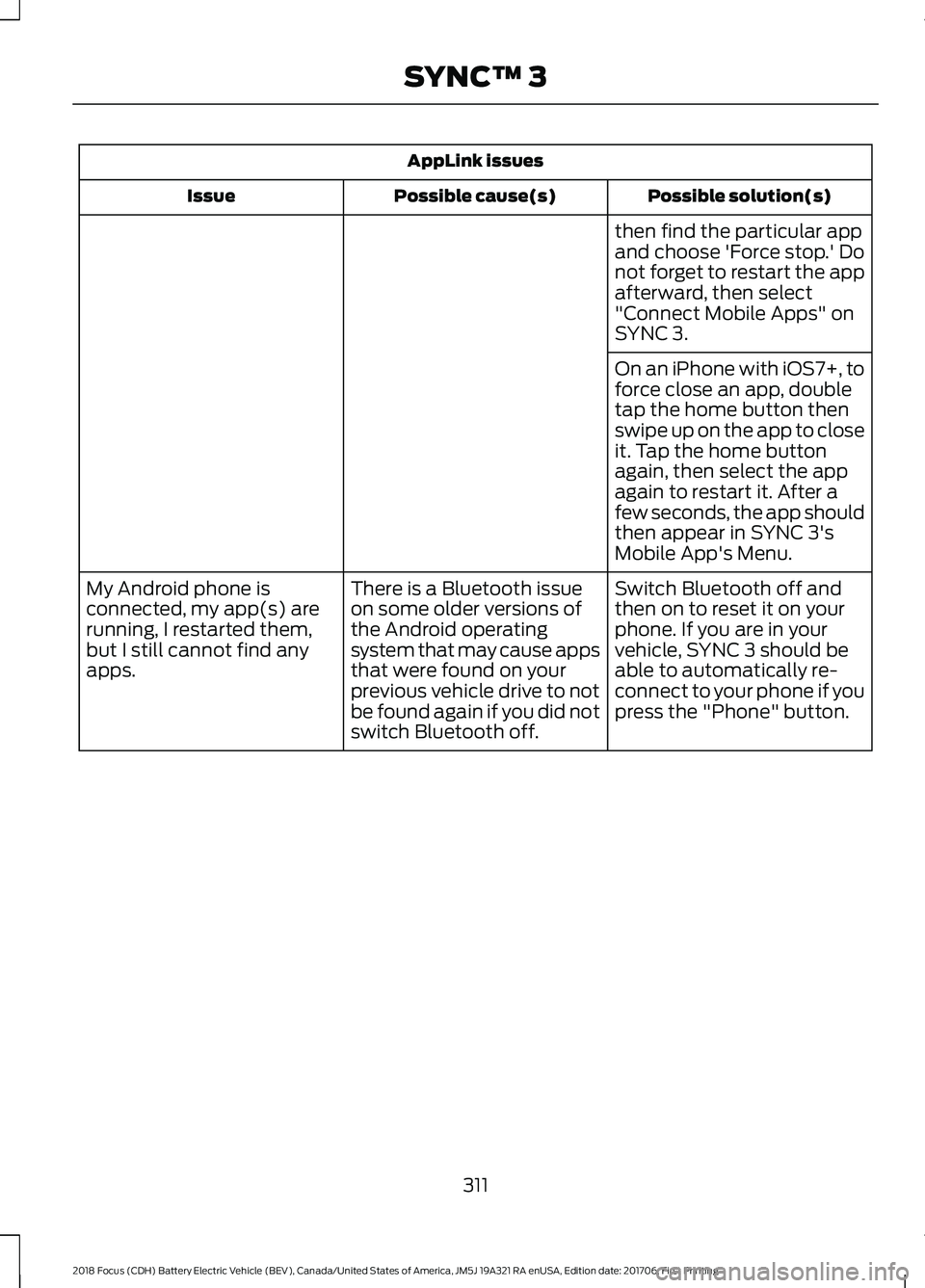
AppLink issues
Possible solution(s)
Possible cause(s)
Issue
then find the particular app
and choose 'Force stop.' Do
not forget to restart the app
afterward, then select
"Connect Mobile Apps" on
SYNC 3.
On an iPhone with iOS7+, to
force close an app, double
tap the home button then
swipe up on the app to close
it. Tap the home button
again, then select the app
again to restart it. After a
few seconds, the app should
then appear in SYNC 3's
Mobile App's Menu.
Switch Bluetooth off and
then on to reset it on your
phone. If you are in your
vehicle, SYNC 3 should be
able to automatically re-
connect to your phone if you
press the "Phone" button.
There is a Bluetooth issue
on some older versions of
the Android operating
system that may cause apps
that were found on your
previous vehicle drive to not
be found again if you did not
switch Bluetooth off.
My Android phone is
connected, my app(s) are
running, I restarted them,
but I still cannot find any
apps.
311
2018 Focus (CDH) Battery Electric Vehicle (BEV), Canada/United States of America, JM5J 19A321 RA enUSA, Edition date: 201706, First Printing SYNC™ 3
Page 315 of 375
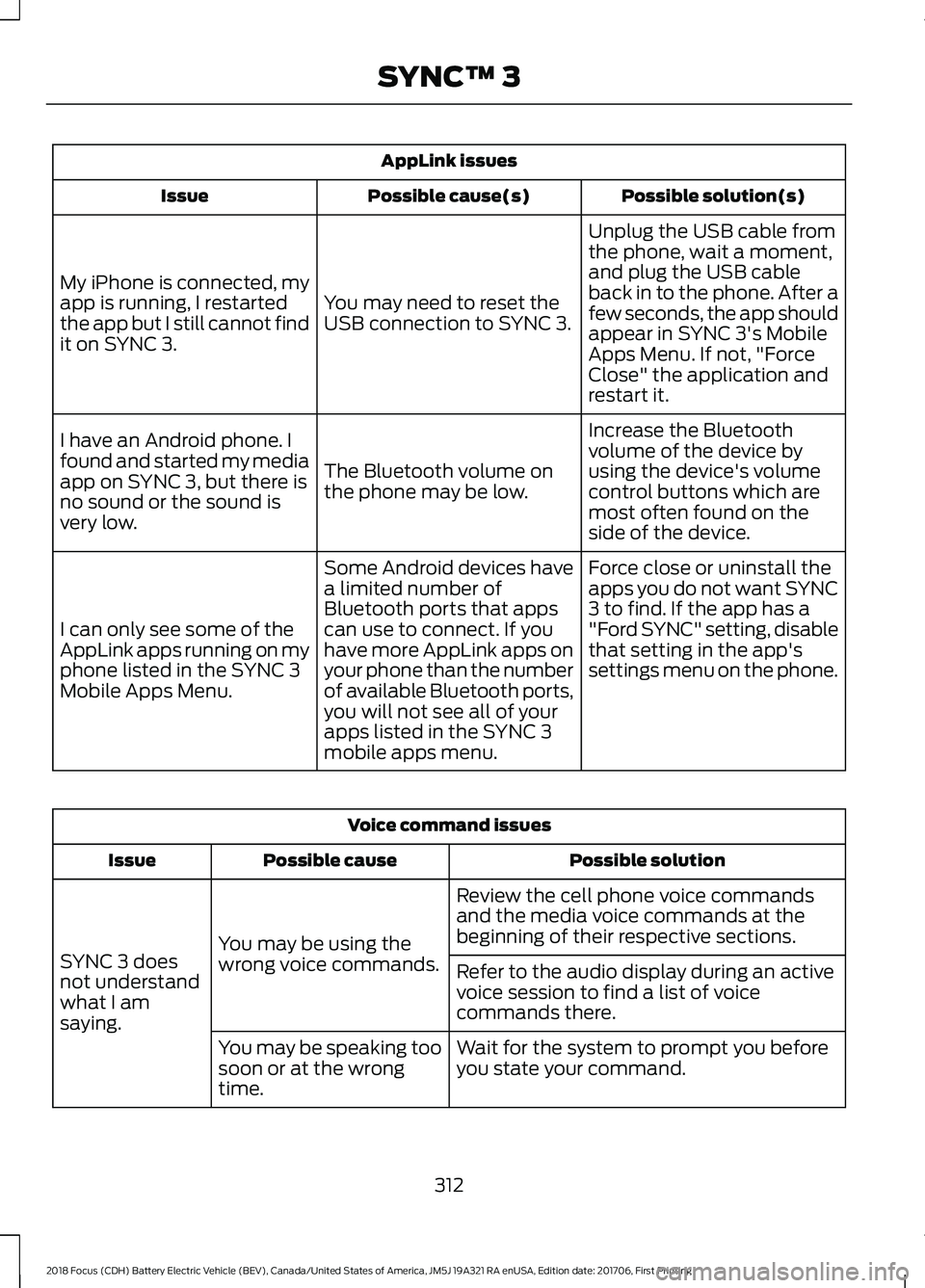
AppLink issues
Possible solution(s)
Possible cause(s)
Issue
Unplug the USB cable from
the phone, wait a moment,
and plug the USB cable
back in to the phone. After a
few seconds, the app should
appear in SYNC 3's Mobile
Apps Menu. If not, "Force
Close" the application and
restart it.
You may need to reset the
USB connection to SYNC 3.
My iPhone is connected, my
app is running, I restarted
the app but I still cannot find
it on SYNC 3.
Increase the Bluetooth
volume of the device by
using the device's volume
control buttons which are
most often found on the
side of the device.
The Bluetooth volume on
the phone may be low.
I have an Android phone. I
found and started my media
app on SYNC 3, but there is
no sound or the sound is
very low.
Force close or uninstall the
apps you do not want SYNC
3 to find. If the app has a
"Ford SYNC" setting, disable
that setting in the app's
settings menu on the phone.
Some Android devices have
a limited number of
Bluetooth ports that apps
can use to connect. If you
have more AppLink apps on
your phone than the number
of available Bluetooth ports,
you will not see all of your
apps listed in the SYNC 3
mobile apps menu.
I can only see some of the
AppLink apps running on my
phone listed in the SYNC 3
Mobile Apps Menu. Voice command issues
Possible solution
Possible cause
Issue
Review the cell phone voice commands
and the media voice commands at the
beginning of their respective sections.
You may be using the
wrong voice commands.
SYNC 3 does
not understand
what I am
saying. Refer to the audio display during an active
voice session to find a list of voice
commands there.
Wait for the system to prompt you before
you state your command.
You may be speaking too
soon or at the wrong
time.
312
2018 Focus (CDH) Battery Electric Vehicle (BEV), Canada/United States of America, JM5J 19A321 RA enUSA, Edition date: 201706, First Printing SYNC™ 3
Page 318 of 375
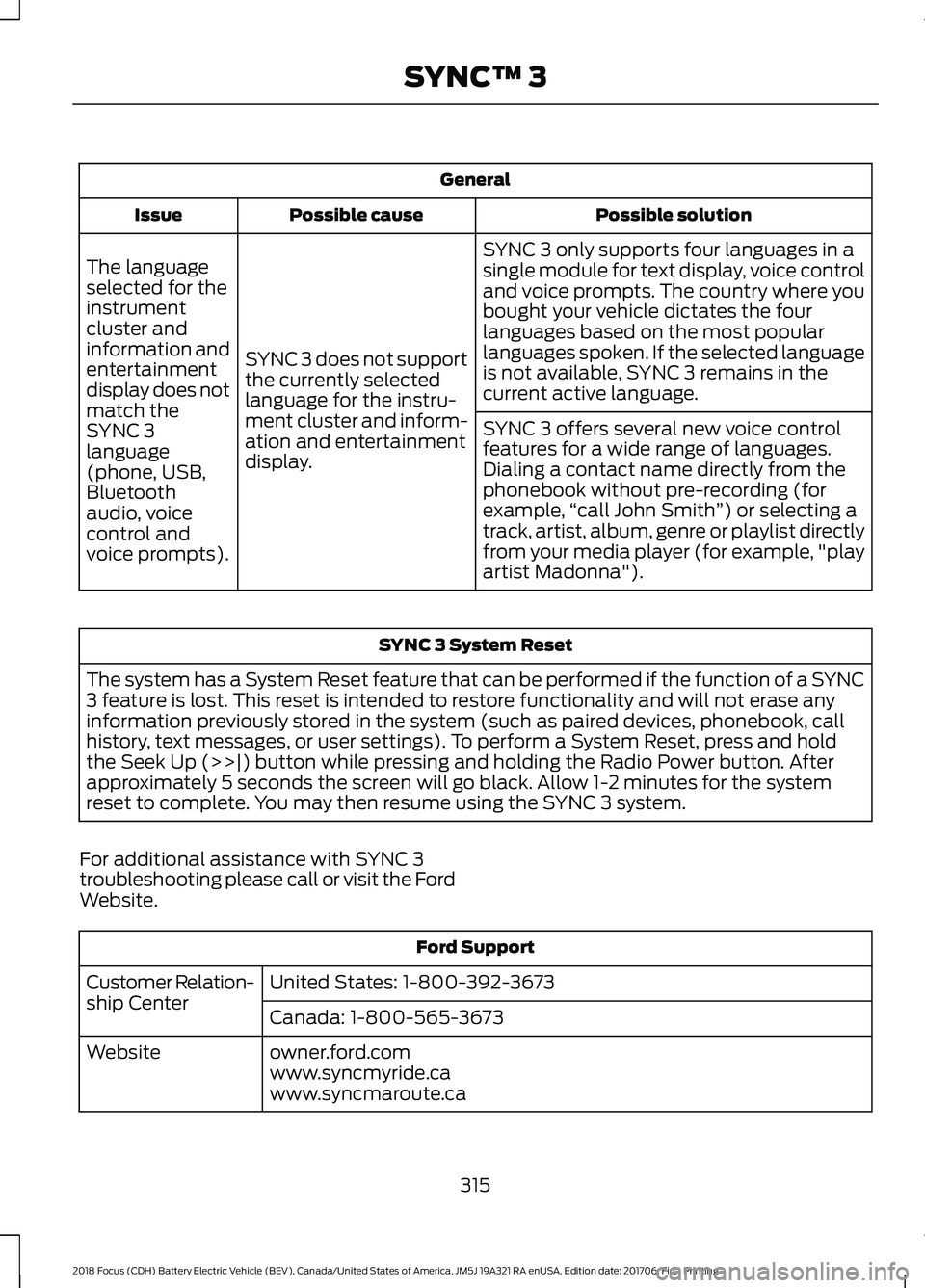
General
Possible solution
Possible cause
Issue
SYNC 3 only supports four languages in a
single module for text display, voice control
and voice prompts. The country where you
bought your vehicle dictates the four
languages based on the most popular
languages spoken. If the selected language
is not available, SYNC 3 remains in the
current active language.
SYNC 3 does not support
the currently selected
language for the instru-
ment cluster and inform-
ation and entertainment
display.
The language
selected for the
instrument
cluster and
information and
entertainment
display does not
match the
SYNC 3
SYNC 3 offers several new voice control
features for a wide range of languages.
Dialing a contact name directly from the
phonebook without pre-recording (for
example,
“call John Smith ”) or selecting a
track, artist, album, genre or playlist directly
from your media player (for example, "play
artist Madonna").
language
(phone, USB,
Bluetooth
audio, voice
control and
voice prompts). SYNC 3 System Reset
The system has a System Reset feature that can be performed if the function of a SYNC
3 feature is lost. This reset is intended to restore functionality and will not erase any
information previously stored in the system (such as paired devices, phonebook, call
history, text messages, or user settings). To perform a System Reset, press and hold
the Seek Up (>>|) button while pressing and holding the Radio Power button. After
approximately 5 seconds the screen will go black. Allow 1-2 minutes for the system
reset to complete. You may then resume using the SYNC 3 system.
For additional assistance with SYNC 3
troubleshooting please call or visit the Ford
Website. Ford Support
United States: 1-800-392-3673
Customer Relation-
ship Center
Canada: 1-800-565-3673
owner.ford.com
Website
www.syncmyride.ca
www.syncmaroute.ca
315
2018 Focus (CDH) Battery Electric Vehicle (BEV), Canada/United States of America, JM5J 19A321 RA enUSA, Edition date: 201706, First Printing SYNC™ 3
Page 370 of 375
Entertainment...............................................245
AM/FM Radio...................................................... 246
Apps........................................................................\
254
Bluetooth Stereo or USB................................ 253
CD........................................................................\
.... 252
HD Radio ™ Information (If
Available)........................................................ 249
SiriusXM® Satellite Radio (If Activated)........................................................ 247
Sources.................................................................. 246
Supported Media Players, Formats and Metadata Information................................ 254
USB Ports............................................................. 254
Environment......................................................12
Event Data Recording See: Data Recording............................................... 7
Exterior Mirrors.................................................72
Fold-Away Exterior Mirrors................................ 73
Heated Exterior Mirrors....................................... 73
Integrated Blind Spot Mirrors........................... 73
Power Exterior Mirrors......................................... 72
F
Fastening the Seatbelts..............................28 Seatbelt Locking Modes.................................... 29
Using Seatbelts During Pregnancy................28
Flat Tire Inflation See: Tire Sealant and Inflator Kit...................191
Floor Mats........................................................142
Ford Credit
...........................................................9
US Only....................................................................... 9
Ford Protect....................................................318 Ford Protect Extended Service Plan
(CANADA ONLY)........................................... 319
Ford Protect Extended Service Plans (U.S. Only)................................................................... 318
Front Passenger Sensing System.............37
Front Wiper Blades See: Changing the Front Wiper Blades.......176
Fuse Box Locations......................................156 Engine Compartment Fuse Box.................... 156
Luggage Compartment Fuse Box................156
Passenger Compartment Fuse Box............156
Fuses.................................................................156
Fuse Specification Chart...........................156 Electric Motor Compartment Fuse
Box....................................................................... 157Luggage Compartment Fuse Box................164
Passenger Compartment Fuse Box.............162
Pre-fuse Box.........................................................
156
G
Gauges................................................................75 Common Displays................................................ 75
Gearbox See: Transmission............................................... 118
General Information on Radio Frequencies...................................................44
General Maintenance Information.......320 Multi-point Inspection...................................... 322
Owner Checks and Services........................... 321
Protecting Your Investment........................... 320
Why Maintain Your Vehicle?......................... 320
Why Maintain Your Vehicle at Your Dealership?..................................................... 320
Getting Assistance Outside the U.S. and Canada..........................................................152
Getting the Services You Need...............149 Away From Home ............................................... 149
H
Handbrake See: Parking Brake............................................... 121
Hazard Flashers
............................................145
Headlamp Adjusting See: Adjusting the Headlamps....................... 177
Headlamp Exit Delay....................................68
Headlamp Removal See: Removing a Headlamp........................... 178
Head Restraints..............................................99 Adjusting the Head Restraint........................ 100
Tilting Head Restraints ................................... 100
Heated Seats
.................................................104
Heated Windows and Mirrors...................96 Heated Exterior Mirrors....................................... 97
Heated Rear Window......................................... 96
Heating See: Climate Control.......................................... 94
High Voltage Battery Cut-Off Switch.............................................................116
High Voltage Battery....................................110 General Information........................................... 110
367
2018 Focus (CDH) Battery Electric Vehicle (BEV), Canada/United States of America, JM5J 19A321 RA enUSA, Edition date: 201706, First Printing Index
Page 373 of 375
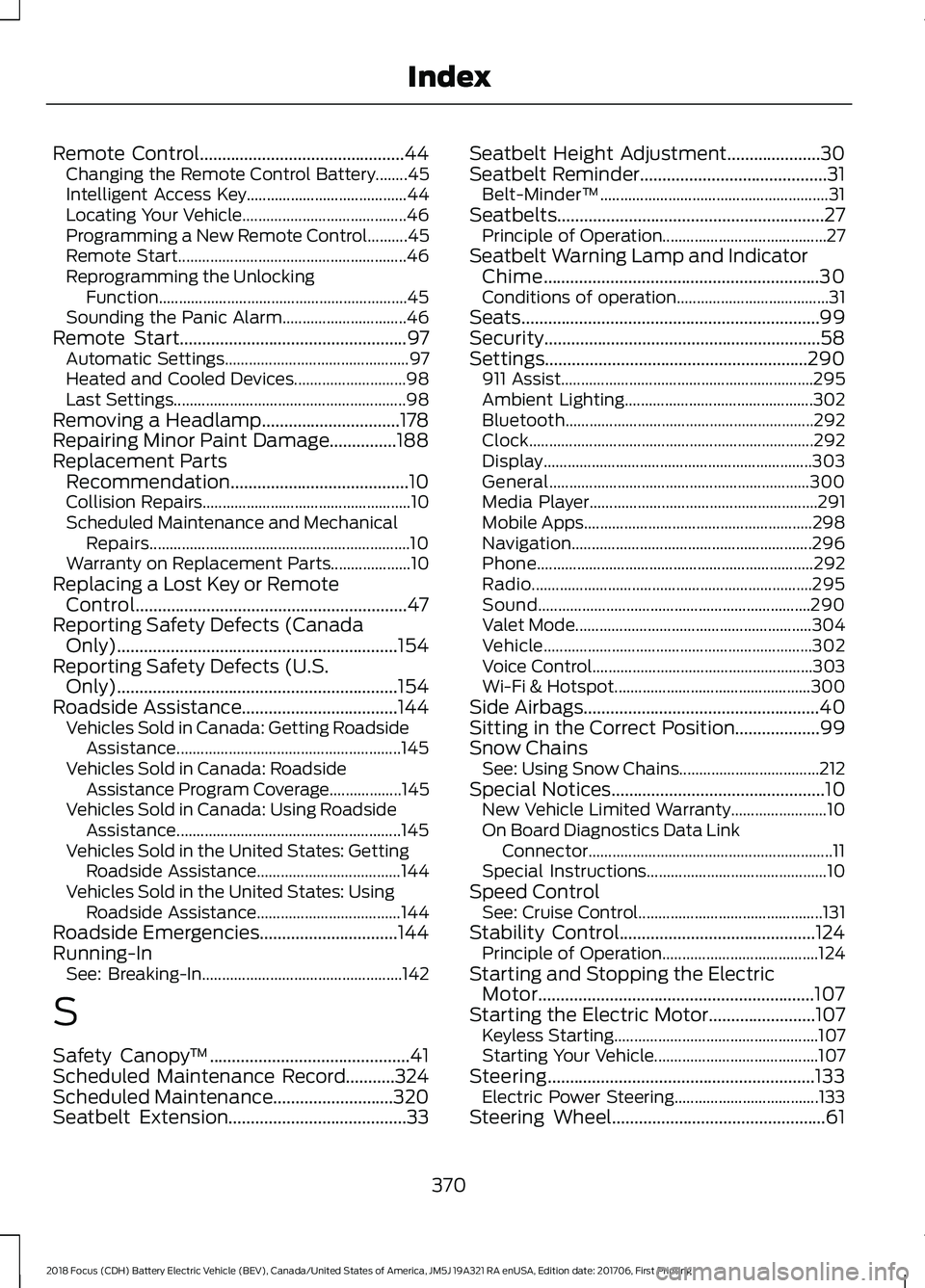
Remote Control..............................................44
Changing the Remote Control Battery........45
Intelligent Access Key........................................ 44
Locating Your Vehicle......................................... 46
Programming a New Remote Control..........45
Remote Start......................................................... 46
Reprogramming the Unlocking Function.............................................................. 45
Sounding the Panic Alarm............................... 46
Remote Start...................................................97
Automatic Settings.............................................. 97
Heated and Cooled Devices............................ 98
Last Settings.......................................................... 98
Removing a Headlamp...............................178
Repairing Minor Paint Damage...............188
Replacement Parts Recommendation........................................10
Collision Repairs.................................................... 10
Scheduled Maintenance and Mechanical Repairs................................................................. 10
Warranty on Replacement Parts.................... 10
Replacing a Lost Key or Remote Control.............................................................47
Reporting Safety Defects (Canada Only)...............................................................154
Reporting Safety Defects (U.S. Only)...............................................................154
Roadside Assistance
...................................144
Vehicles Sold in Canada: Getting Roadside
Assistance........................................................ 145
Vehicles Sold in Canada: Roadside Assistance Program Coverage.................. 145
Vehicles Sold in Canada: Using Roadside Assistance........................................................ 145
Vehicles Sold in the United States: Getting Roadside Assistance.................................... 144
Vehicles Sold in the United States: Using Roadside Assistance.................................... 144
Roadside Emergencies...............................144
Running-In See: Breaking-In.................................................. 142
S
Safety Canopy ™
.............................................41
Scheduled Maintenance Record...........324
Scheduled Maintenance...........................320
Seatbelt Extension
........................................33 Seatbelt Height Adjustment.....................30
Seatbelt Reminder
..........................................31
Belt-Minder™......................................................... 31
Seatbelts............................................................27 Principle of Operation......................................... 27
Seatbelt Warning Lamp and Indicator Chime..............................................................30
Conditions of operation...................................... 31
Seats...................................................................99
Security..............................................................58
Settings...........................................................290 911 Assist............................................................... 295
Ambient Lighting............................................... 302
Bluetooth.............................................................. 292
Clock....................................................................... 292
Display................................................................... 303
General................................................................. 300
Media Player......................................................... 291
Mobile Apps......................................................... 298
Navigation............................................................ 296
Phone..................................................................... 292
Radio...................................................................... 295
Sound.................................................................... 290
Valet Mode........................................................... 304
Vehicle................................................................... 302
Voice Control....................................................... 303
Wi-Fi & Hotspot................................................. 300
Side Airbags
.....................................................40
Sitting in the Correct Position...................99
Snow Chains See: Using Snow Chains................................... 212
Special Notices
................................................10
New Vehicle Limited Warranty........................ 10
On Board Diagnostics Data Link Connector
............................................................. 11
Special Instructions............................................. 10
Speed Control See: Cruise Control.............................................. 131
Stability Control............................................124 Principle of Operation....................................... 124
Starting and Stopping the Electric Motor
..............................................................107
Starting the Electric Motor........................107 Keyless Starting................................................... 107
Starting Your Vehicle......................................... 107
Steering............................................................133 Electric Power Steering.................................... 133
Steering Wheel................................................61
370
2018 Focus (CDH) Battery Electric Vehicle (BEV), Canada/United States of America, JM5J 19A321 RA enUSA, Edition date: 201706, First Printing Index