ESP FORD FOCUS ELECTRIC 2018 Owners Manual
[x] Cancel search | Manufacturer: FORD, Model Year: 2018, Model line: FOCUS ELECTRIC, Model: FORD FOCUS ELECTRIC 2018Pages: 375, PDF Size: 12.81 MB
Page 8 of 375
ABOUT THIS MANUAL
Thank you for choosing Ford. We
recommend that you take some time to
get to know your vehicle by reading this
manual. The more that you know about
your vehicle, the greater the safety and
pleasure you will get from driving it.
WARNING
Driving while distracted can result in
loss of vehicle control, crash and
injury. We strongly recommend that
you use extreme caution when using any
device that may take your focus off the
road. Your primary responsibility is the safe
operation of your vehicle. We recommend
against the use of any hand-held device
while driving and encourage the use of
voice-operated systems when possible.
Make sure you are aware of all applicable
local laws that may affect the use of
electronic devices while driving. Note:
This manual describes product
features and options available throughout
the range of available models, sometimes
even before they are generally available. It
may describe options not fitted to the
vehicle you have purchased.
Note: Some of the illustrations in this
manual may show features as used in
different models, so may appear different
to you on your vehicle.
Note: Always use and operate your vehicle
in line with all applicable laws and
regulations.
Note: Pass on this manual when selling
your vehicle. It is an integral part of your
vehicle.
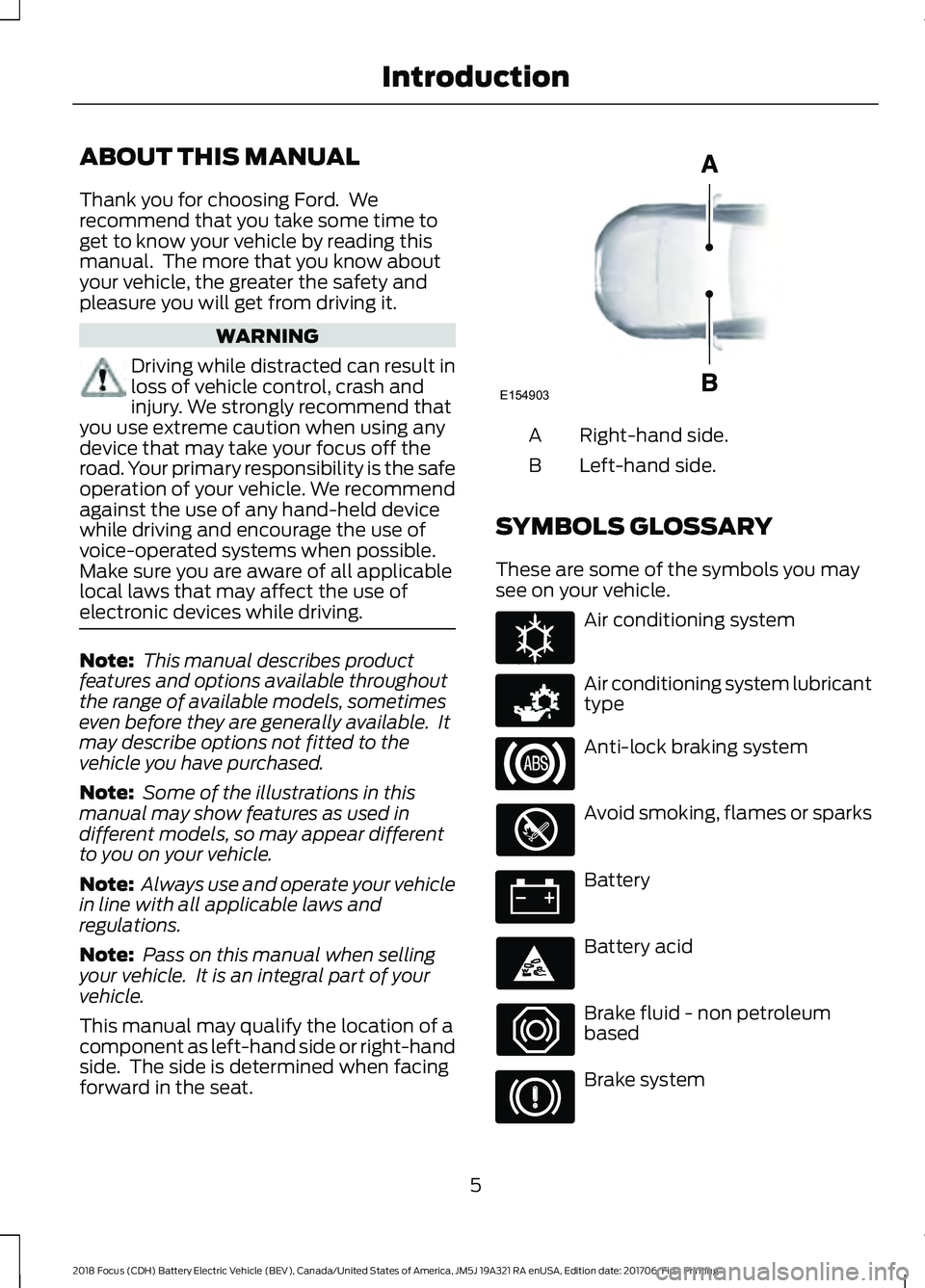
This manual may qualify the location of a
component as left-hand side or right-hand
side. The side is determined when facing
forward in the seat. Right-hand side.
A
Left-hand side.
B
SYMBOLS GLOSSARY
These are some of the symbols you may
see on your vehicle. Air conditioning system
Air conditioning system lubricant
type
Anti-lock braking system
Avoid smoking, flames or sparks
Battery
Battery acid
Brake fluid - non petroleum
based
Brake system
5
2018 Focus (CDH) Battery Electric Vehicle (BEV), Canada/United States of America, JM5J 19A321 RA enUSA, Edition date: 201706, First Printing IntroductionE154903 E162384 E231157
Page 10 of 375
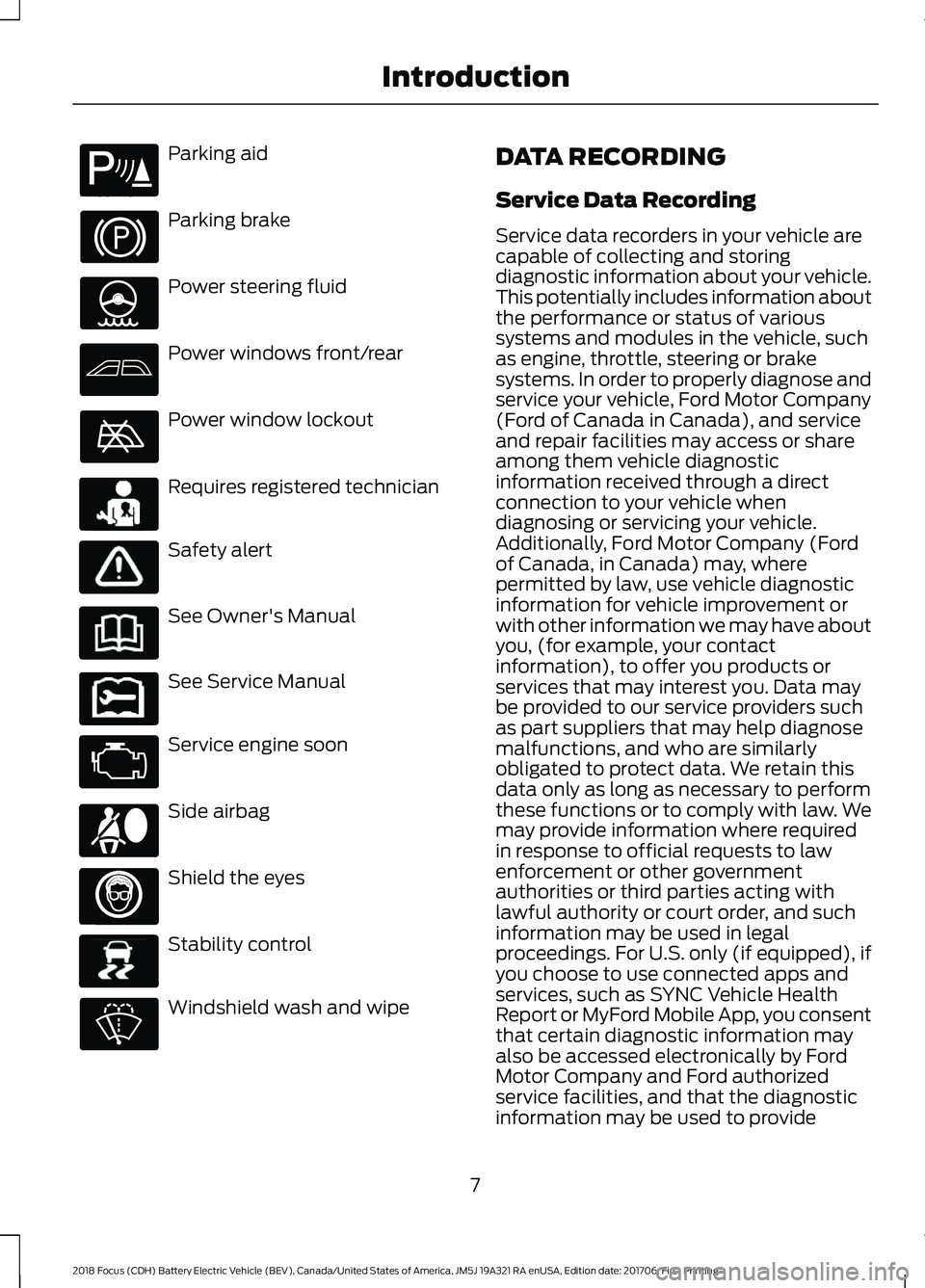
Parking aid
Parking brake
Power steering fluid
Power windows front/rear
Power window lockout
Requires registered technician
Safety alert
See Owner's Manual
See Service Manual
Service engine soon
Side airbag
Shield the eyes
Stability control
Windshield wash and wipe DATA RECORDING
Service Data Recording
Service data recorders in your vehicle are
capable of collecting and storing
diagnostic information about your vehicle.
This potentially includes information about
the performance or status of various
systems and modules in the vehicle, such
as engine, throttle, steering or brake
systems. In order to properly diagnose and
service your vehicle, Ford Motor Company
(Ford of Canada in Canada), and service
and repair facilities may access or share
among them vehicle diagnostic
information received through a direct
connection to your vehicle when
diagnosing or servicing your vehicle.
Additionally, Ford Motor Company (Ford
of Canada, in Canada) may, where
permitted by law, use vehicle diagnostic
information for vehicle improvement or
with other information we may have about
you, (for example, your contact
information), to offer you products or
services that may interest you. Data may
be provided to our service providers such
as part suppliers that may help diagnose
malfunctions, and who are similarly
obligated to protect data. We retain this
data only as long as necessary to perform
these functions or to comply with law. We
may provide information where required
in response to official requests to law
enforcement or other government
authorities or third parties acting with
lawful authority or court order, and such
information may be used in legal
proceedings. For U.S. only (if equipped), if
you choose to use connected apps and
services, such as SYNC Vehicle Health
Report or MyFord Mobile App, you consent
that certain diagnostic information may
also be accessed electronically by Ford
Motor Company and Ford authorized
service facilities, and that the diagnostic
information may be used to provide
7
2018 Focus (CDH) Battery Electric Vehicle (BEV), Canada/United States of America, JM5J 19A321 RA enUSA, Edition date: 201706, First Printing IntroductionE139213 E231159 E231158 E167012 E138639
Page 14 of 375
On Board Diagnostics Data Link
Connector
WARNING
Do not connect wireless plug-in
devices to the data link connector.
Unauthorized third parties could gain
access to vehicle data and impair the
performance of safety related systems.
Only allow repair facilities that follow our
service and repair instructions to connect
their equipment to the data link connector. Your vehicle has an OBD Data Link
Connector (DLC) that is used in
conjunction with a diagnostic scan tool for
vehicle diagnostics, repairs and
reprogramming services. Installing an
aftermarket device that uses the DLC
during normal driving for purposes such as
remote insurance company monitoring,
transmission of vehicle data to other
devices or entities, or altering the
performance of the vehicle, may cause
interference with or even damage to
vehicle systems. We do not recommend
or endorse the use of aftermarket plug-in
devices unless approved by Ford. The
vehicle Warranty will not cover damage
caused by an aftermarket plug-in device.
MOBILE COMMUNICATIONS
EQUIPMENT WARNING
Driving while distracted can result in
loss of vehicle control, crash and
injury. We strongly recommend that
you use extreme caution when using any
device that may take your focus off the
road. Your primary responsibility is the safe
operation of your vehicle. We recommend
against the use of any hand-held device
while driving and encourage the use of
voice-operated systems when possible.
Make sure you are aware of all applicable
local laws that may affect the use of
electronic devices while driving. Using mobile communications equipment
is becoming increasingly important in the
conduct of business and personal affairs.
However, you must not compromise your
own or others’
safety when using such
equipment. Mobile communications can
enhance personal safety and security when
appropriately used, particularly in
emergency situations. Safety must be
paramount when using mobile
communications equipment to avoid
negating these benefits. Mobile
communication equipment includes, but
is not limited to, cellular phones, pagers,
portable email devices, text messaging
devices and portable two-way radios.
11
2018 Focus (CDH) Battery Electric Vehicle (BEV), Canada/United States of America, JM5J 19A321 RA enUSA, Edition date: 201706, First Printing Introduction
Page 18 of 375
GENERAL INFORMATION
See the following sections for directions
on how to properly use safety restraints
for children.
WARNINGS
Always make sure your child is
secured properly in a device that is
appropriate for their height, age and
weight. Child safety restraints must be
bought separately from your vehicle.
Failure to follow these instructions and
guidelines may result in an increased risk
of serious injury or death to your child. All children are shaped differently.
The National Highway Traffic Safety
Administration and other safety
organizations, base their recommendations
for child restraints on probable child height,
age and weight thresholds, or on the
minimum requirements of the law. We
recommend that you check with a NHTSA
Certified Child Passenger Safety WARNINGS
Technician (CPST) to make sure that you
properly install the child restraint in your
vehicle and that you consult your
pediatrician to make sure you have a child
restraint appropriate for your child. To
locate a child restraint fitting station and
CPST, contact NHTSA toll free at
1-888-327-4236 or go to
www.nhtsa.dot.gov. In Canada, contact
Transport Canada toll free at
1-800-333-0371 or go to www.tc.gc.ca to
find a Child Car Seat Clinic in your area.
Failure to properly restrain children in child
restraints made especially for their height,
age and weight, may result in an increased
risk of serious injury or death to your child. On hot days, the temperature inside
the vehicle can rise very quickly.
Exposure of people or animals to
these high temperatures for even a short
time can cause death or serious heat
related injuries, including brain damage.
Small children are particularly at risk. 15
2018 Focus (CDH) Battery Electric Vehicle (BEV), Canada/United States of America, JM5J 19A321 RA enUSA, Edition date: 201706, First Printing Child Safety
Page 32 of 375
Pregnant women should always wear their
seatbelt. The lap belt portion of a
combination lap and shoulder belt should
be positioned low across the hips below
the belly and worn as tight as comfort
allows. The shoulder belt should be
positioned to cross the middle of the
shoulder and the center of the chest.
Seatbelt Locking Modes
WARNINGS
After a crash, have a qualified
technician check all the seatbelts to
make sure the seatbelts including
the automatic locking retractor feature for
child restraints operate properly. We
recommend replacing any system that has
damage or does not operate properly.
Failure to do so can result in personal injury
or death in the event of a sudden stop or
another crash. You must replace the seatbelt if the
automatic locking retractor or any
other seatbelt function is not
operating correctly. Failure to replace the
seatbelt and retractor assembly could
increase the risk of injury in a crash. All safety restraints in your vehicle are
combination lap and shoulder belts. The
driver seatbelt has the first type of locking
mode. The front outermost passenger and
rear seat seatbelts have both types of
locking modes described as follows:
Vehicle Sensitive Mode
This is the normal retractor mode which
allows free shoulder belt length
adjustment to your movements and
locking in response to vehicle movement.
For example, if you brake suddenly or turn
a corner sharply, or your vehicle receives
an impact of approximately 5 mph
(8 km/h) or more, the combination
seatbelts lock to help reduce forward
movement of the driver and passengers. In addition, the retractor is designed to lock
if you pull the webbing out too quickly. If
the seatbelt retractor locks, slowly lower
the height adjuster to allow the seatbelt
to retract. If the retractor does not unlock,
pull the seatbelt out slowly then feed a
small length of webbing back toward the
stowed position. For rear seatbelts, recline
the rear seat backrest or push the seat
backrest cushion away from the seatbelt.
Feed a small length of webbing back
toward the stowed position.
Automatic Locking Mode
In this mode, the shoulder belt
automatically pre-locks. The seatbelt still
retracts to remove any slack in the
shoulder belt. The automatic locking mode
is not available on the driver seatbelt.
Using Automatic Locking Mode
You should use automatic locking mode
when a child safety seat, except a booster,
is on the front passenger seat or rear seat.
Children 12 years old and under should be
correctly restrained in a rear seating
position whenever possible. See
Child
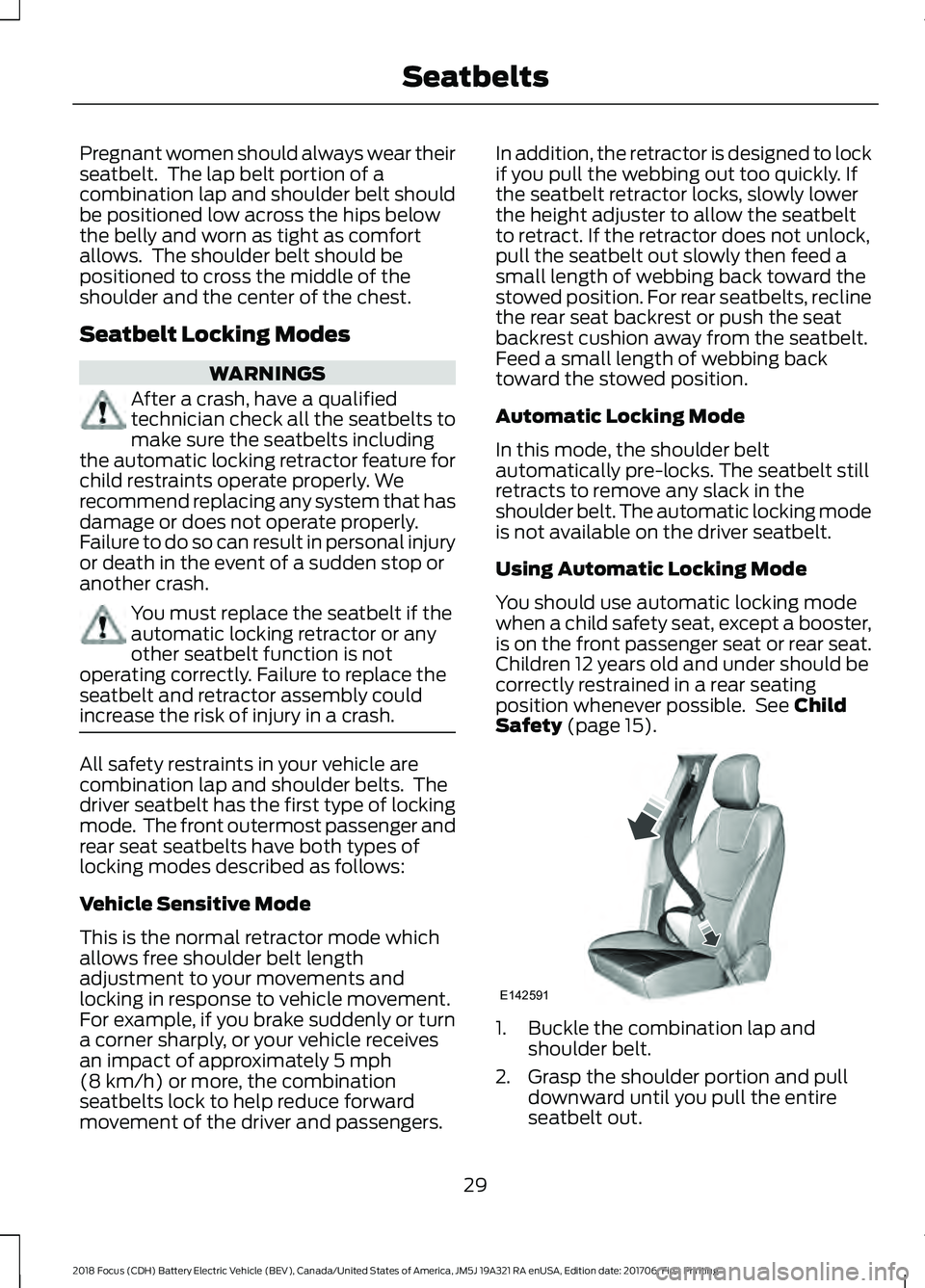
Safety (page 15). 1. Buckle the combination lap and
shoulder belt.
2. Grasp the shoulder portion and pull downward until you pull the entire
seatbelt out.
29
2018 Focus (CDH) Battery Electric Vehicle (BEV), Canada/United States of America, JM5J 19A321 RA enUSA, Edition date: 201706, First Printing SeatbeltsE142591
Page 47 of 375
GENERAL INFORMATION ON
RADIO FREQUENCIES
This device complies with Part 15 of the
FCC Rules and with Licence exempt RSS
Standards of Industry Canada. Operation
is subject to the following two conditions:
•
This device may not cause harmful
interference, and
• This device must accept any
interference received, including
interference that may cause undesired
operation. WARNING
Changes or modifications not
expressively approved by the party
responsible for compliance could
void the user's authority to operate the
equipment. The term "IC:" before the radio
certification number only signifies that
Industry Canada technical specifications
were met. The typical operating range for your
transmitter is approximately 33 ft (10 m).
Vehicles with the remote start feature will
have a greater range. One of the following
could cause a decrease in operating range:
• Weather conditions.
• Nearby radio towers.
• Structures around the vehicle.
• Other vehicles parked next to your
vehicle.
Other short distance radio transmissions,
for example amateur radios, medical
equipment, wireless headphones, remote
controls and alarm systems can also use
the radio frequency used by your remote
control. If the frequencies are jammed, you
will not be able to use your remote control.
You can lock and unlock the doors with the
key. Note:
Make sure to lock your vehicle before
leaving it unattended.
Note: If you are in range, the remote control
will operate if you press any button
unintentionally.
Note: The remote control contains sensitive
electrical components. Exposure to moisture
or impact may cause permanent damage.
REMOTE CONTROL
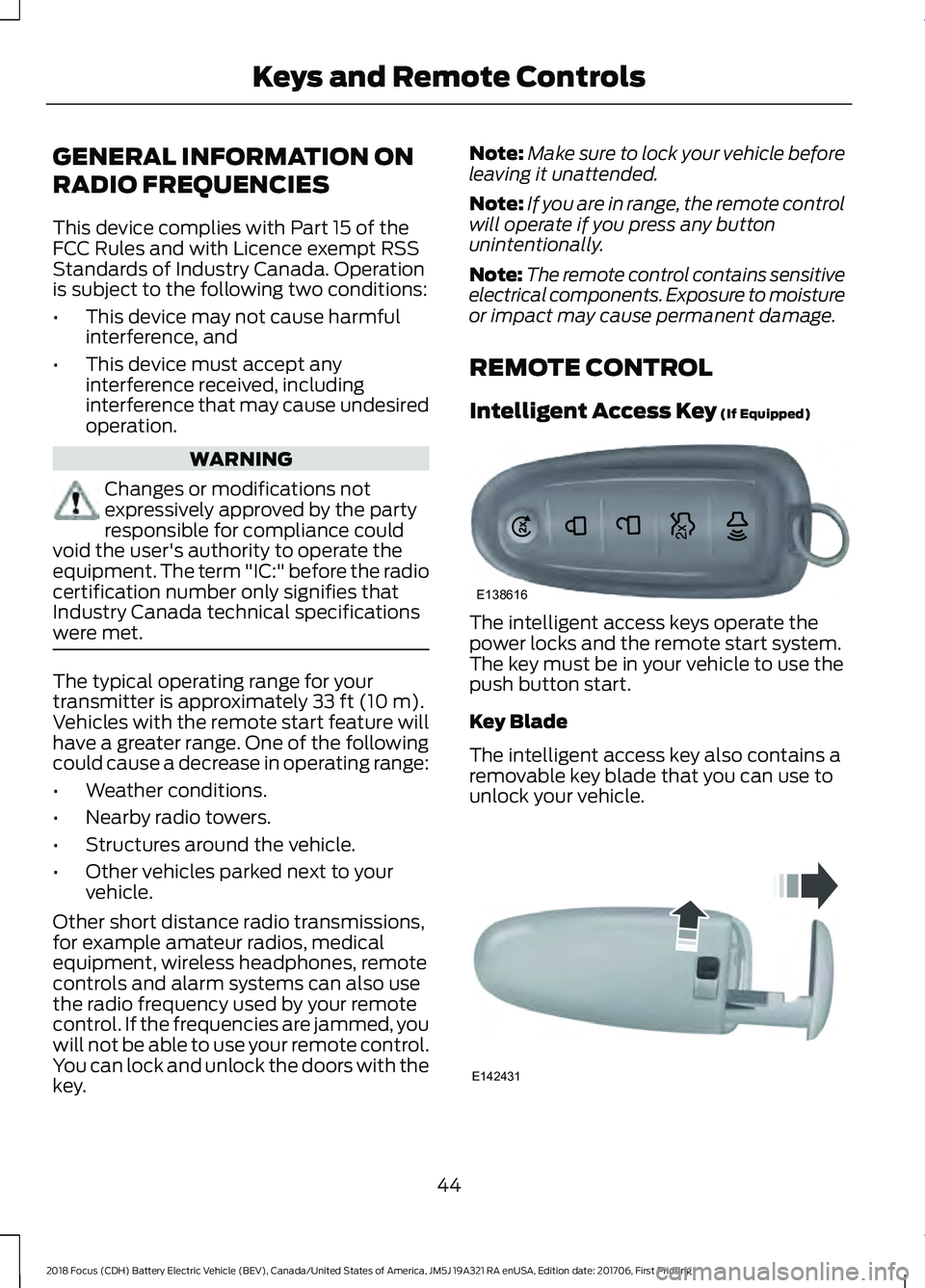
Intelligent Access Key
(If Equipped) The intelligent access keys operate the
power locks and the remote start system.
The key must be in your vehicle to use the
push button start.
Key Blade
The intelligent access key also contains a
removable key blade that you can use to
unlock your vehicle.
44
2018 Focus (CDH) Battery Electric Vehicle (BEV), Canada/United States of America, JM5J 19A321 RA enUSA, Edition date: 201706, First Printing Keys and Remote ControlsE138616 E142431
Page 51 of 375
PRINCIPLE OF OPERATION
MyKey allows you to program keys with
restricted driving modes to promote good
driving habits. All but one of the keys can
be activated with these restricted modes.
Any keys that remain unprogrammed are
referred to as administrator keys or admin
keys. They can be used to:
•
Create a MyKey.
• Program configurable MyKey settings.
• Clear all MyKey features.
When you have created a MyKey, you can
access the following information by using
the information display to determine:
• How many admin keys and MyKeys are
programmed to your vehicle.
• The total distance your vehicle traveled
with a MyKey.
Note: Switch the ignition on to use the
system.
Note: All MyKeys are programmed to the
same settings. You cannot program them
individually.
Note: For vehicles equipped with a
push-button start, when both a MyKey and
an admin key are present, the admin key will
be recognized by the vehicle while switching
the vehicle on to start.
Non-configurable Settings
The following settings cannot be changed
by an admin key user:
• Safety belt reminder. You cannot
disable this feature. The audio system
will mute when the front seat
passengers’ safety belts are not
fastened.
• Early low charge. The low-charge
warning activates earlier, giving the
MyKey user more time to recharge. •
Driver assist features, if equipped on
your vehicle, are forced on: parking aid.
• Satellite radio adult content
restrictions, if equipped on your vehicle.
Configurable Settings
With an admin key, you can configure
certain MyKey settings when you first
create a MyKey and before you recycle the
key or restart the engine. You can also
change the settings afterward with an
admin key.
• A vehicle speed limit can be set.
Warnings will be shown in the display
followed by an audible tone when your
vehicle reaches the set speed. You
cannot override the set speed by fully
depressing the accelerator pedal or by
setting cruise control. WARNING
Do not set MyKey maximum speed
limit to a limit that will prevent the
driver from maintaining a safe speed
considering posted speed limits and
prevailing road conditions. The driver is
always responsible to drive in accordance
with local laws and prevailing conditions.
Failure to do so could result in accident or
injury. 48
2018 Focus (CDH) Battery Electric Vehicle (BEV), Canada/United States of America, JM5J 19A321 RA enUSA, Edition date: 201706, First Printing MyKey
™
Page 61 of 375
PASSIVE ANTI-THEFT
SYSTEM
Note:
The system is not compatible with
non-Ford aftermarket remote start systems.
Use of these systems may result in vehicle
starting problems and a loss of security
protection.
Note: Metallic objects, electronic devices
or a second coded key on the same key
chain may result in vehicle starting
problems, especially if they are too close to
the key when starting your vehicle. Prevent
these objects from touching the coded key
when starting your vehicle. If your vehicle
fails to start, switch your vehicle off, move
all objects on the key chain away from the
key and start your vehicle.
Note: Do not leave a duplicate coded key
in your vehicle. Always take your keys and
lock all doors when leaving your vehicle.
SecuriLock
The system helps prevent your vehicle
from starting unless you use a coded key
programmed to your vehicle. A message
may appear in the information display.
If your vehicle fails to start, the system may
have a fault. Contact an authorized dealer.
A message may appear in the information
display.
Automatic Arming
The system arms when you switch your
vehicle off.
Automatic Disarming
The system disarms when you switch your
vehicle on with a coded key.
Replacement Keys
Note: Your vehicle comes with two keys. The intelligent access key functions as a
programmed key that operates the driver
door lock and turns on the intelligent
access with push button start system, as
well as a remote control.
If your intelligent access keys are lost or
stolen and you do not have an extra coded
key, you need to have your vehicle towed
to an authorized dealer. You need to erase
the key codes from your vehicle and
program new coded keys.
Store a spare intelligent access key away
from your vehicle in a safe place. Contact
an authorized dealer to purchase
additional spare or replacement keys.
Programming a Spare Intelligent
Access Key
You must have two previously
programmed coded keys and the new
unprogrammed key readily accessible.
Contact an authorized dealer to have the
spare key programmed if two previously
programmed keys are not available.
Make sure that your vehicle is switched off
before beginning this procedure. Make sure
that you close all the doors before
beginning and that they remain closed
throughout the procedure. Carry out all
steps within 30 seconds of starting the
sequence. Stop and wait for at least one
minute before starting again if you carry
out any steps out of sequence.
Note:
You can program a maximum of eight
coded keys to your vehicle.
Read and understand the entire procedure
before you begin.
58
2018 Focus (CDH) Battery Electric Vehicle (BEV), Canada/United States of America, JM5J 19A321 RA enUSA, Edition date: 201706, First Printing Security
Page 80 of 375
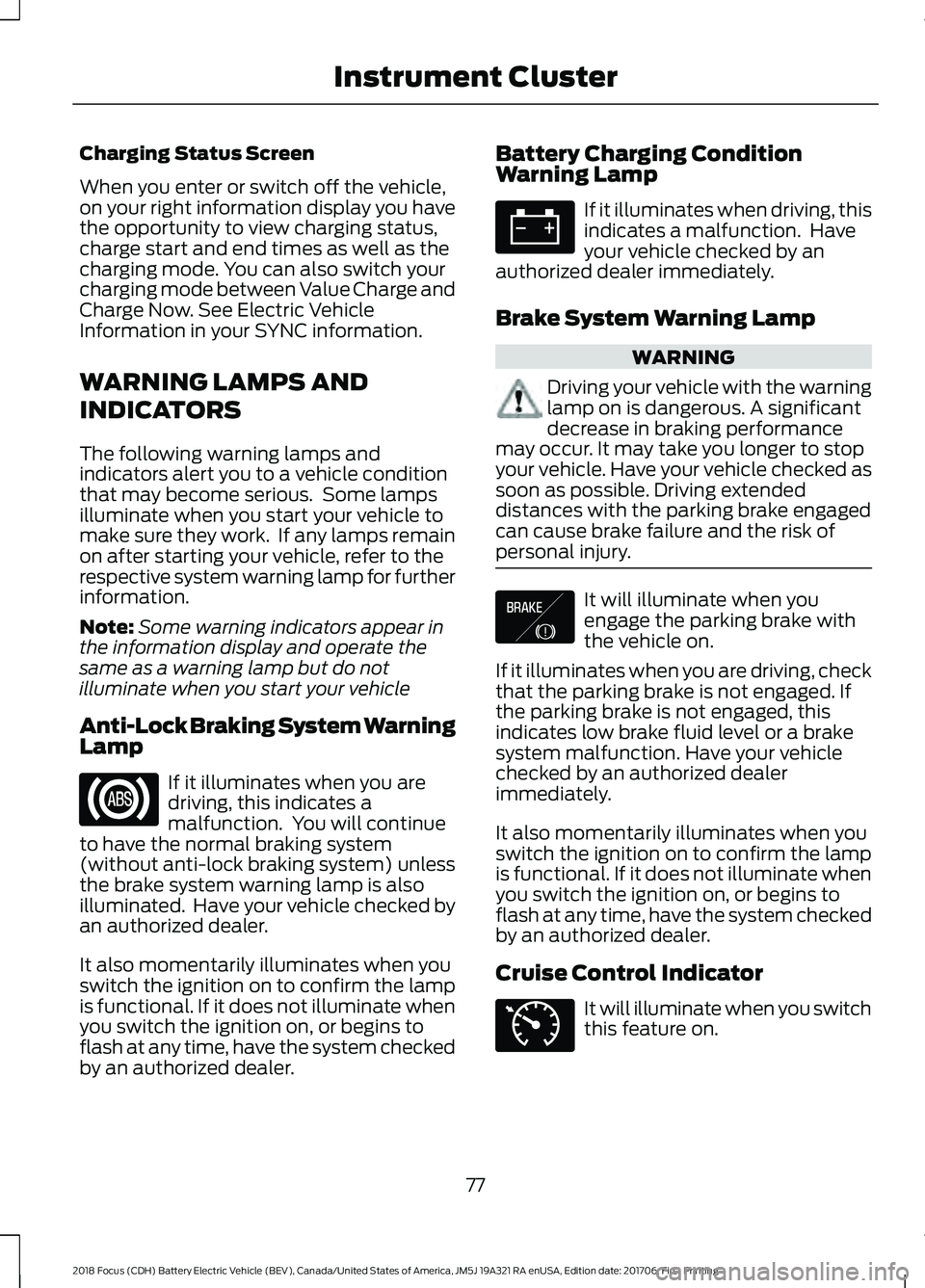
Charging Status Screen
When you enter or switch off the vehicle,
on your right information display you have
the opportunity to view charging status,
charge start and end times as well as the
charging mode. You can also switch your
charging mode between Value Charge and
Charge Now. See Electric Vehicle
Information in your SYNC information.
WARNING LAMPS AND
INDICATORS
The following warning lamps and
indicators alert you to a vehicle condition
that may become serious. Some lamps
illuminate when you start your vehicle to
make sure they work. If any lamps remain
on after starting your vehicle, refer to the
respective system warning lamp for further
information.
Note:
Some warning indicators appear in
the information display and operate the
same as a warning lamp but do not
illuminate when you start your vehicle
Anti-Lock Braking System Warning
Lamp If it illuminates when you are
driving, this indicates a
malfunction. You will continue
to have the normal braking system
(without anti-lock braking system) unless
the brake system warning lamp is also
illuminated. Have your vehicle checked by
an authorized dealer.
It also momentarily illuminates when you
switch the ignition on to confirm the lamp
is functional. If it does not illuminate when
you switch the ignition on, or begins to
flash at any time, have the system checked
by an authorized dealer. Battery Charging Condition
Warning Lamp If it illuminates when driving, this
indicates a malfunction. Have
your vehicle checked by an
authorized dealer immediately.
Brake System Warning Lamp WARNING
Driving your vehicle with the warning
lamp on is dangerous. A significant
decrease in braking performance
may occur. It may take you longer to stop
your vehicle. Have your vehicle checked as
soon as possible. Driving extended
distances with the parking brake engaged
can cause brake failure and the risk of
personal injury. It will illuminate when you
engage the parking brake with
the vehicle on.
If it illuminates when you are driving, check
that the parking brake is not engaged. If
the parking brake is not engaged, this
indicates low brake fluid level or a brake
system malfunction. Have your vehicle
checked by an authorized dealer
immediately.
It also momentarily illuminates when you
switch the ignition on to confirm the lamp
is functional. If it does not illuminate when
you switch the ignition on, or begins to
flash at any time, have the system checked
by an authorized dealer.
Cruise Control Indicator It will illuminate when you switch
this feature on.
77
2018 Focus (CDH) Battery Electric Vehicle (BEV), Canada/United States of America, JM5J 19A321 RA enUSA, Edition date: 201706, First Printing Instrument Cluster E138644 E71340
Page 81 of 375
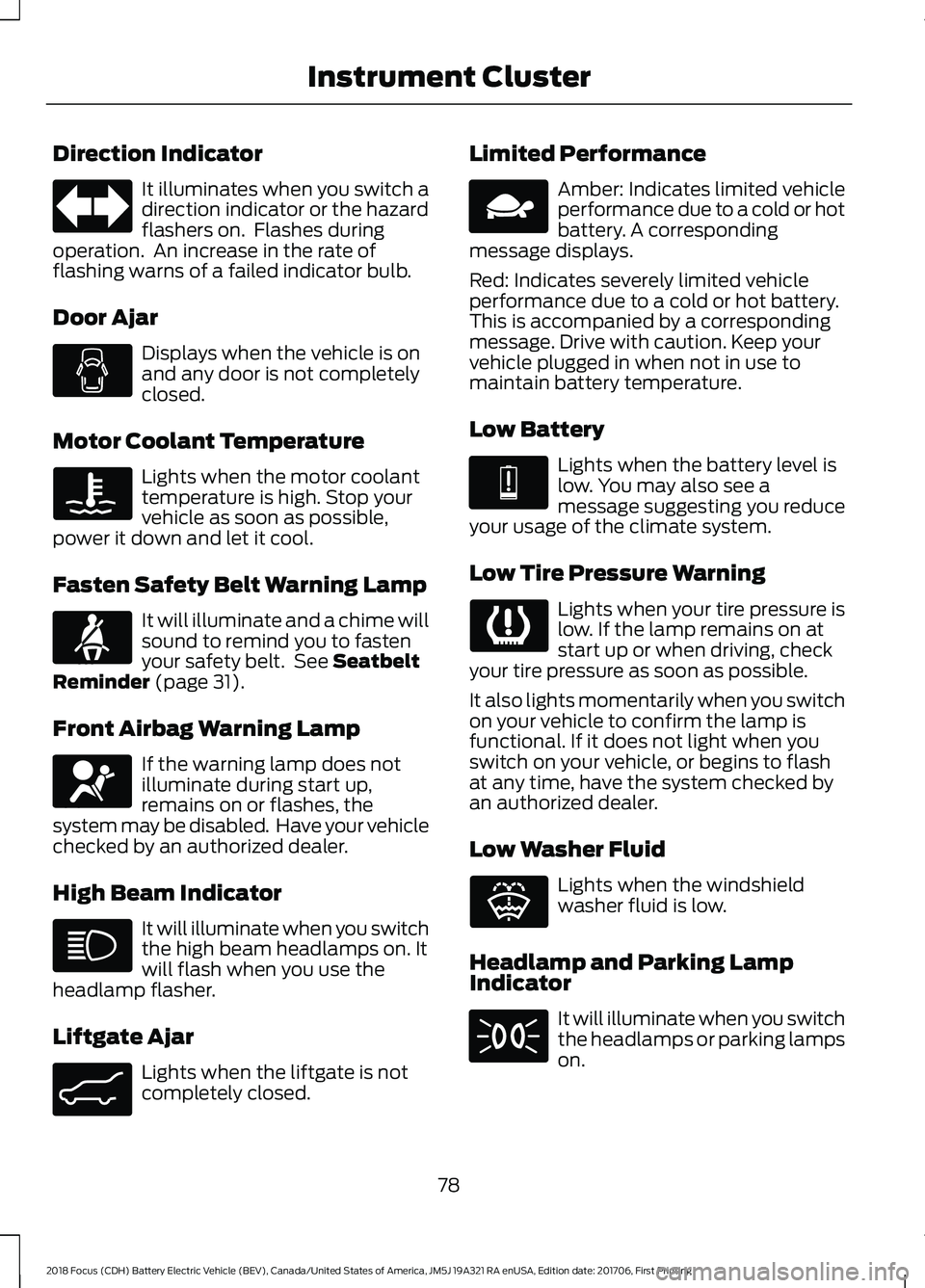
Direction Indicator
It illuminates when you switch a
direction indicator or the hazard
flashers on. Flashes during
operation. An increase in the rate of
flashing warns of a failed indicator bulb.
Door Ajar Displays when the vehicle is on
and any door is not completely
closed.
Motor Coolant Temperature Lights when the motor coolant
temperature is high. Stop your
vehicle as soon as possible,
power it down and let it cool.
Fasten Safety Belt Warning Lamp It will illuminate and a chime will
sound to remind you to fasten
your safety belt. See Seatbelt
Reminder (page 31).
Front Airbag Warning Lamp If the warning lamp does not
illuminate during start up,
remains on or flashes, the
system may be disabled. Have your vehicle
checked by an authorized dealer.
High Beam Indicator It will illuminate when you switch
the high beam headlamps on. It
will flash when you use the
headlamp flasher.
Liftgate Ajar Lights when the liftgate is not
completely closed. Limited Performance Amber: Indicates limited vehicle
performance due to a cold or hot
battery. A corresponding
message displays.
Red: Indicates severely limited vehicle
performance due to a cold or hot battery.
This is accompanied by a corresponding
message. Drive with caution. Keep your
vehicle plugged in when not in use to
maintain battery temperature.
Low Battery Lights when the battery level is
low. You may also see a
message suggesting you reduce
your usage of the climate system.
Low Tire Pressure Warning Lights when your tire pressure is
low. If the lamp remains on at
start up or when driving, check
your tire pressure as soon as possible.
It also lights momentarily when you switch
on your vehicle to confirm the lamp is
functional. If it does not light when you
switch on your vehicle, or begins to flash
at any time, have the system checked by
an authorized dealer.
Low Washer Fluid Lights when the windshield
washer fluid is low.
Headlamp and Parking Lamp
Indicator It will illuminate when you switch
the headlamps or parking lamps
on.
78
2018 Focus (CDH) Battery Electric Vehicle (BEV), Canada/United States of America, JM5J 19A321 RA enUSA, Edition date: 201706, First Printing Instrument Cluster E71880 E67017 E162453 E144690 E144691 E132353