climate settings FORD FOCUS ELECTRIC 2018 Owners Manual
[x] Cancel search | Manufacturer: FORD, Model Year: 2018, Model line: FOCUS ELECTRIC, Model: FORD FOCUS ELECTRIC 2018Pages: 375, PDF Size: 12.81 MB
Page 79 of 375
•
State of Charge - The state of charge
for the high voltage battery is shown
as a colored fill. The fill color is
normally blue. When a low battery
condition is reached the fill turns
amber. When the battery is depleted
the fill turns red. See the Information
Messages section for details on
associated Low Battery and Depleted
Battery warnings.
• Distance to Empty - The Range
Estimate in the Battery Gauge is
personalized to your key. This is the
estimated distance your vehicle can
travel before needing a recharge. The
Range Estimate is based on your
typical energy usage while driving. This
includes your Drive Habits as well as
your use of accessories such as Climate
Control. Your Range Estimate may
change immediately when you change
your Climate Control settings.
• Regen Display - A circular arrow
symbol appears in the center of the
Battery Gauge when energy is being
recaptured through the regenerative
braking system.
Brake Coach Display
The Brake Coach appears after your
vehicle has come to a stop. It coaches you
to brake in a manner which maximizes the
amount of energy returned through the
regenerative braking system. The percent
displayed is an indication of the
regenerative braking efficiency with 100%
representing the maximum amount of
energy recovery. If desired, this feature can
be disabled in the Display section of the
Settings menu. Trip Summary and Lifetime Summary
These summaries display after switching
off your vehicle. The Trip Summary
appears first, followed by the Lifetime
Summary. You can toggle between these
displays using the up and down arrow keys
on the left hand steering wheel controls.
Trip Summary data is from the last power
cycle, while Lifetime Summary data is
cumulative from the last Lifetime
Summary reset done through the Settings
menu in the information display.
Trip Summary:
•
Distance - The total distance traveled,
and regen distance are displayed.
Regen distance is the estimated range
gained from energy recaptured through
regenerative braking.
• Energy Used - The total kilowatt hours
and average watt hours per unit of
distance are displayed. The average
watt hours per mi (km) will be shown
in blue if less than (better than) the
lifetime average watt hours per mi
(km).
• Brake Score - The percentage of
braking energy recaptured and returned
to the high voltage battery through
regenerative braking. The brake score
will be shown in blue if greater than
(better than) the lifetime brake score.
Lifetime Summary:
• Distance - The total regen distance,
which is the estimated range gained
from energy recaptured through
regenerative braking.
• Energy Used - The average watt hours
per mi (km).
• Brake Score - The average percentage
of braking energy recaptured and
returned to the high voltage battery
through regenerative braking.
76
2018 Focus (CDH) Battery Electric Vehicle (BEV), Canada/United States of America, JM5J 19A321 RA enUSA, Edition date: 201706, First Printing Instrument Cluster
Page 88 of 375
Information
Displays the associated driver alert graphic.
Driver Alert
Displays the number of warnings that need immediate attention in
red. You can only view the warnings from the System Check menu.
View them immediately by pressing OK and then OK again to enter
system check. Use the up and down arrows to scroll through the
warnings.
XX Warnings
All active warnings will display first if applicable. The system check
menu may appear different based upon equipment options and
current vehicle status. Use the up/down arrow buttons to scroll
through the list.
System Check
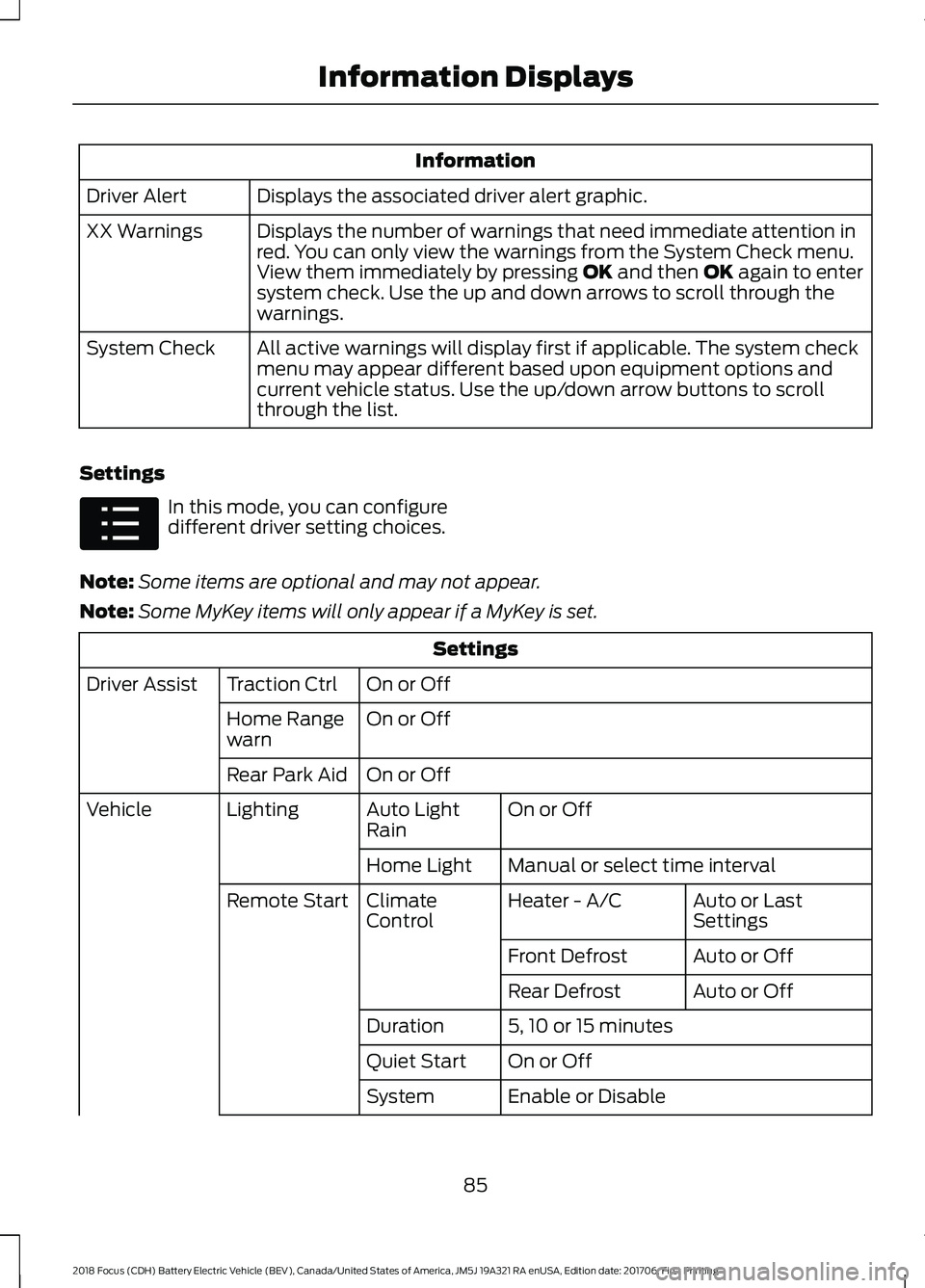
Settings In this mode, you can configure
different driver setting choices.
Note: Some items are optional and may not appear.
Note: Some MyKey items will only appear if a MyKey is set. Settings
On or Off
Traction Ctrl
Driver Assist
On or Off
Home Range
warn
On or Off
Rear Park Aid
On or Off
Auto Light
Rain
Lighting
Vehicle
Manual or select time interval
Home Light
Auto or Last
Settings
Heater - A/C
Climate
Control
Remote Start
Auto or Off
Front Defrost
Auto or Off
Rear Defrost
5, 10 or 15 minutes
Duration
On or Off
Quiet Start
Enable or Disable
System
85
2018 Focus (CDH) Battery Electric Vehicle (BEV), Canada/United States of America, JM5J 19A321 RA enUSA, Edition date: 201706, First Printing Information DisplaysE100023
Page 98 of 375
MAX A/C: Press the button for maximum cooling. Recirculated air flows through
the instrument panel vents, air conditioning automatically turns on and the fan
automatically adjusts to the highest speed.
I
MAX Defrost: Press the button to switch on defrost. Outside air flows through
the windshield vents, air conditioning automatically turns on, and fan
automatically adjusts to the highest speed. You can also use this setting to
defrost and clear the windshield of a thin covering of ice. The heated rear window
also automatically turns on when you select maximum defrost.
J
Power: Press the button to switch the system on and off. When the system is
off, it prevents outside air from entering the vehicle.
K
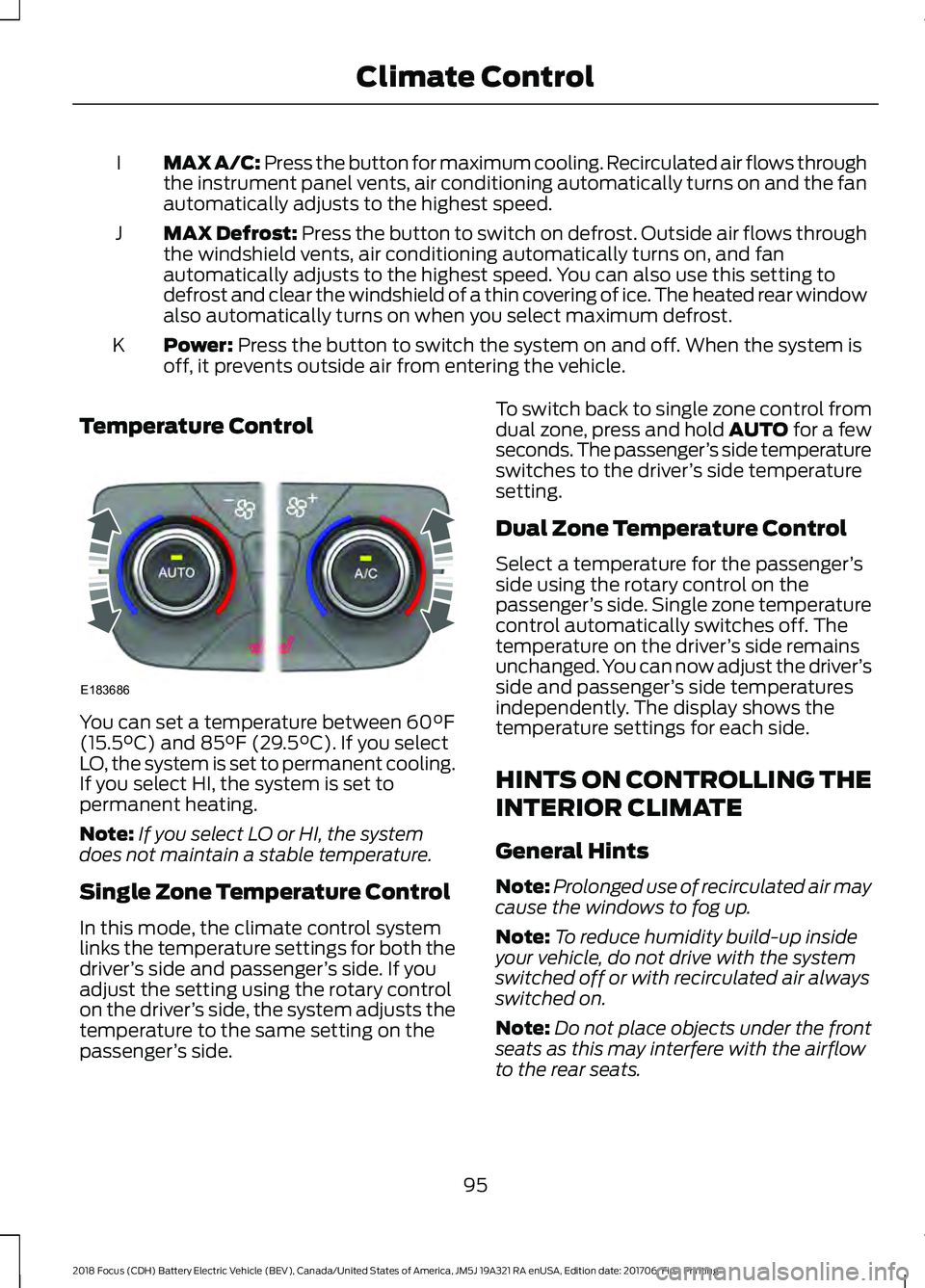
Temperature Control You can set a temperature between
60°F
(15.5°C) and 85°F (29.5°C). If you select
LO, the system is set to permanent cooling.
If you select HI, the system is set to
permanent heating.
Note: If you select LO or HI, the system
does not maintain a stable temperature.
Single Zone Temperature Control
In this mode, the climate control system
links the temperature settings for both the
driver ’s side and passenger ’s side. If you
adjust the setting using the rotary control
on the driver ’s side, the system adjusts the
temperature to the same setting on the
passenger ’s side. To switch back to single zone control from
dual zone, press and hold AUTO for a few
seconds. The passenger
’s side temperature
switches to the driver ’s side temperature
setting.
Dual Zone Temperature Control
Select a temperature for the passenger ’s
side using the rotary control on the
passenger ’s side. Single zone temperature
control automatically switches off. The
temperature on the driver ’s side remains
unchanged. You can now adjust the driver ’s
side and passenger ’s side temperatures
independently. The display shows the
temperature settings for each side.
HINTS ON CONTROLLING THE
INTERIOR CLIMATE
General Hints
Note: Prolonged use of recirculated air may
cause the windows to fog up.
Note: To reduce humidity build-up inside
your vehicle, do not drive with the system
switched off or with recirculated air always
switched on.
Note: Do not place objects under the front
seats as this may interfere with the airflow
to the rear seats.
95
2018 Focus (CDH) Battery Electric Vehicle (BEV), Canada/United States of America, JM5J 19A321 RA enUSA, Edition date: 201706, First Printing Climate ControlE183686
Page 99 of 375
Note:
Remove any snow, ice, or leaves from
the air intake area at the base of the
windshield.
Note: To improve air conditioning when
starting your vehicle, drive with the windows
slightly open for two to three minutes.
Recommended Settings for
Cooling
1. Press the AUTO button.
2. Adjust the temperature control to the desired setting.
Side Window Defogging in Cold
Weather
1. Select air distribution through the floor
vent.
2. Select air distribution through the panel
vent.
3. Select
A/C.
4. Adjust the temperature control to the desired setting.
5. Adjust the outer panel vents toward the side windows.
Note: To increase airflow to the outer panel
vents, close the vents in the middle of the
instrument panel.
Improving Vehicle Drive Range
Your vehicle is equipped with a high
voltage electric compressor and a high
voltage electric heater. You can increase
your driving range by minimizing the
amount of energy expended to cool or heat
the interior during the drive.
Pre-condition the interior temperature
during vehicle charging reduces the battery
energy use on the interior comfort and
improves range.
Note: Your vehicle may not always reach
the set cabin temperature due to charging
and ambient temperature conditions. Hot and cold temperatures make your
vehicle use more energy to achieve and
maintain a comfortable interior
temperature. Park the vehicle in the shade
or in a parking structure when hot, and in
a garage when cold.
Consider partially opening a window (or
windows) to let fresh air circulate, if
weather conditions permit. You can
achieve maximum energy savings by
switching the climate system off. Do this
only if conditions exist for safe vehicle
operation.
Reduce fan speed.
Set the
AUTO temperature a couple
degrees cooler than you normally do on
cold days and a couple degrees higher on
hot days. Use the heated seats on cold
days to increase interior comfort.
Switch the air conditioning off in mild
temperatures or low humidity conditions.
Defrost mode automatically turns the air
conditioning on to dehumidify the air, and
cannot be switched off. If defogging or
defrosting is not necessary, select a
non-defrost mode and disengage air
conditioning to extend vehicle range.
Air conditioning and heating functions are
automatically switched off (unless in
defrost mode) when driving distance to
empty is zero miles (zero km). The interior
fan will continue to operate.
HEATED WINDOWS AND
MIRRORS
Heated Rear Window
Note: Make sure the vehicle is running
before operating the heated windows.
96
2018 Focus (CDH) Battery Electric Vehicle (BEV), Canada/United States of America, JM5J 19A321 RA enUSA, Edition date: 201706, First Printing Climate Control
Page 100 of 375
Press the button to clear the
heated rear window of thin ice
and fog. The heated rear
window will automatically turn off after a
short period of time.
Note: Do not use razor blades or other
sharp objects to clean or remove decals
from the inside of the heated rear window.
The vehicle warranty does not cover
damage caused to the heated rear window
grid lines.
Heated Exterior Mirrors (If Equipped) When you switch the heated rear
window on, the heated exterior
mirrors will automatically turn
on.
Note: Do not remove ice from the mirrors
with a scraper or adjust the mirror glass
when it is frozen in place.
Note: Do not clean the mirror housing or
glass with harsh abrasives, fuel or other
petroleum-based cleaning products.
CABIN AIR FILTER
Your vehicle is equipped with a cabin air
filter. It is located behind the center
console.
The particulate filtration system reduces
the concentration of airborne particles
such as dust, spores and pollen in the air
supplied to the interior of your vehicle.
Note: Make sure you have a cabin air filter
installed at all times. This prevents foreign
objects from entering the system. Running
the system without a filter in place could
result in degradation or damage to the
system. The particulate filtration system gives you
and your passengers the following
benefits:
•
It improves your driving comfort by
reducing particle concentration.
• It improves the interior compartment
cleanliness.
• It protects the climate control
components from particle deposits.
Replace the filter at regular intervals. See
Scheduled Maintenance (page 320).
For additional cabin air filter information,
or to replace the filter, see an authorized
dealer.
REMOTE START
The climate control system adjusts the
cabin temperature during remote start.
You cannot adjust the system during
remote start operation. Switch on the
ignition to return the system to its previous
settings. You can now make adjustments.
You need to switch on certain
vehicle-dependent features, such as:
• Heated mirrors.
• Heated rear window.
You can adjust the settings using the
information display controls. See
Information Displays
(page 80).
Note: You can control the system through
SYNC using a smartphone app. See
Apps
(page 288).
Automatic Settings
You can set the climate control to operate
in AUTO mode through the information
display setting: Remote Start > Climate
Control > Heater-A/C > Auto. The climate
control system automatically sets the
interior temperature to
72°F (22°C).
97
2018 Focus (CDH) Battery Electric Vehicle (BEV), Canada/United States of America, JM5J 19A321 RA enUSA, Edition date: 201706, First Printing Climate ControlE72507 E72507
Page 101 of 375
In hot weather, the system is set to 72°F
(22°C).
In cold weather, the system is set to
72°F
(22°C). The rear defroster and heated
mirrors automatically turn on.
Last Settings
You can set the climate control to operate
using the last climate control settings
through the information display setting:
Remote Start > Climate Control >
Heater –A/C > Last Settings. The climate
control system automatically uses the
settings last selected before you turned
off the vehicle.
Heated and Cooled Devices
Heated devices typically switch on during
cold weather, and cooled devices during
hot weather.
98
2018 Focus (CDH) Battery Electric Vehicle (BEV), Canada/United States of America, JM5J 19A321 RA enUSA, Edition date: 201706, First Printing Climate Control
Page 231 of 375
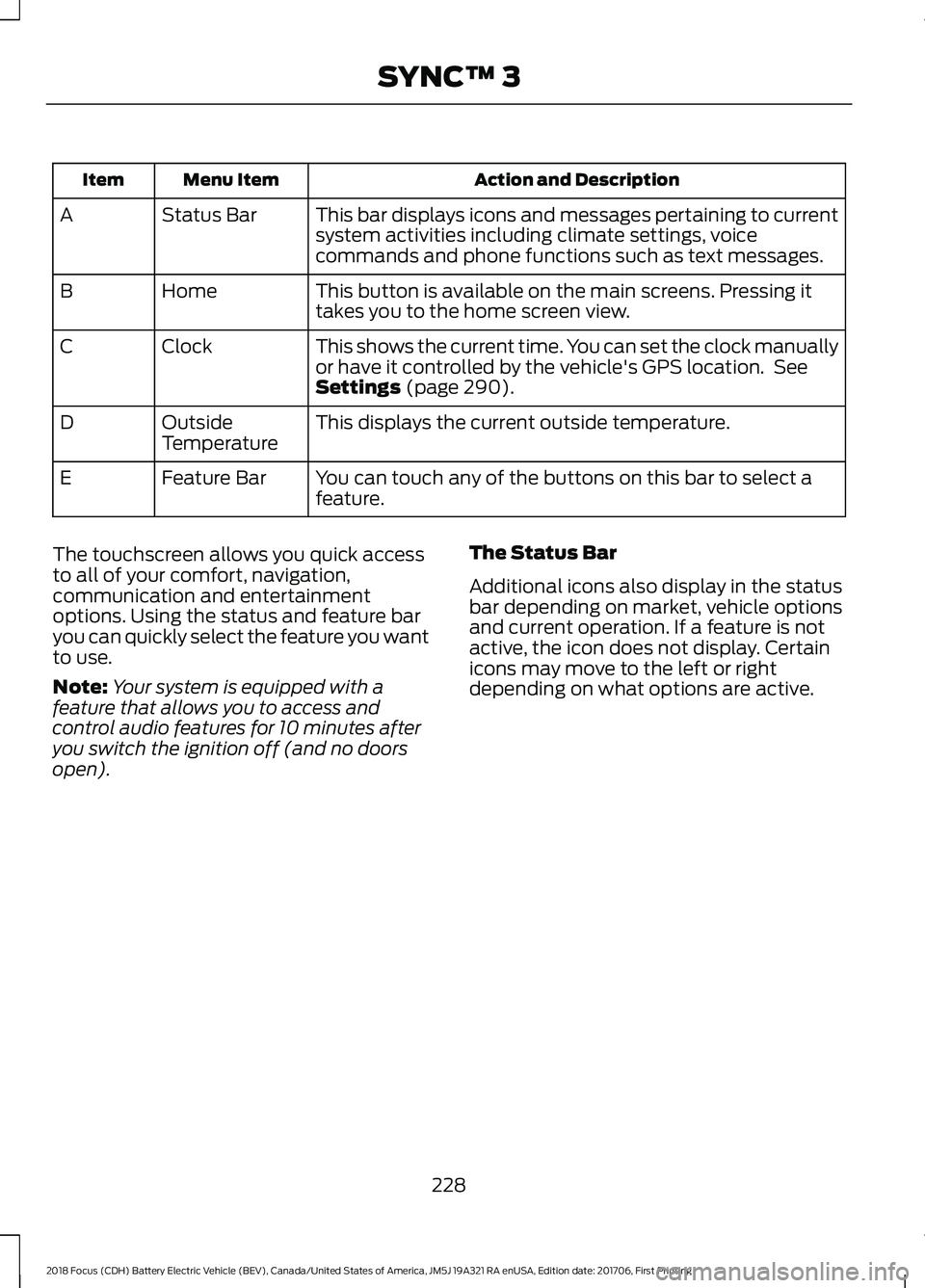
Action and Description
Menu Item
Item
This bar displays icons and messages pertaining to current
system activities including climate settings, voice
commands and phone functions such as text messages.
Status Bar
A
This button is available on the main screens. Pressing it
takes you to the home screen view.
Home
B
This shows the current time. You can set the clock manually
or have it controlled by the vehicle's GPS location. See
Settings (page 290).
Clock
C
This displays the current outside temperature.
Outside
Temperature
D
You can touch any of the buttons on this bar to select a
feature.
Feature Bar
E
The touchscreen allows you quick access
to all of your comfort, navigation,
communication and entertainment
options. Using the status and feature bar
you can quickly select the feature you want
to use.
Note: Your system is equipped with a
feature that allows you to access and
control audio features for 10 minutes after
you switch the ignition off (and no doors
open). The Status Bar
Additional icons also display in the status
bar depending on market, vehicle options
and current operation. If a feature is not
active, the icon does not display. Certain
icons may move to the left or right
depending on what options are active.
228
2018 Focus (CDH) Battery Electric Vehicle (BEV), Canada/United States of America, JM5J 19A321 RA enUSA, Edition date: 201706, First Printing SYNC™ 3
Page 235 of 375
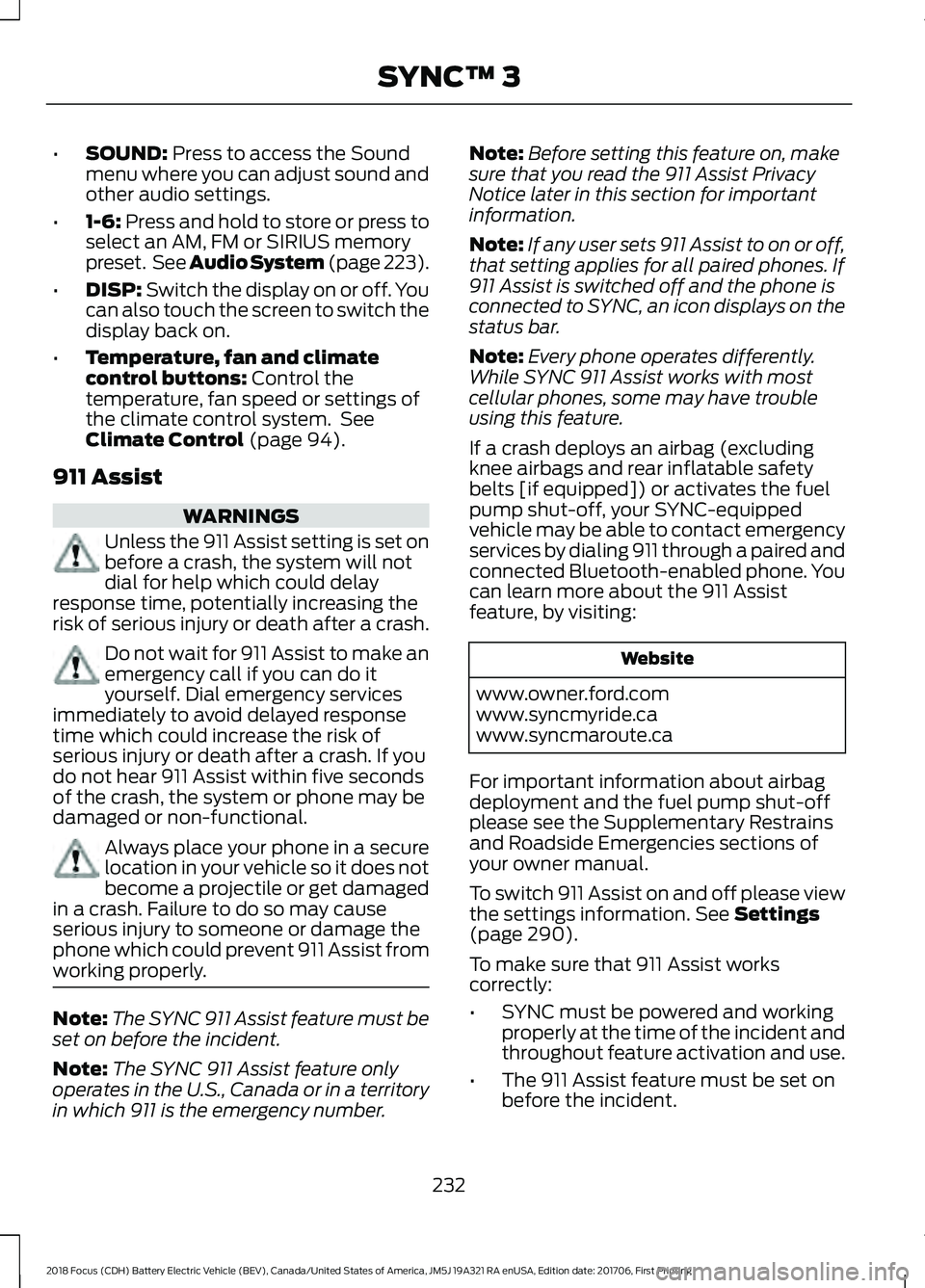
•
SOUND: Press to access the Sound
menu where you can adjust sound and
other audio settings.
• 1-6:
Press and hold to store or press to
select an AM, FM or SIRIUS memory
preset. See Audio System (page 223).
• DISP:
Switch the display on or off. You
can also touch the screen to switch the
display back on.
• Temperature, fan and climate
control buttons:
Control the
temperature, fan speed or settings of
the climate control system. See
Climate Control
(page 94).
911 Assist WARNINGS
Unless the 911 Assist setting is set on
before a crash, the system will not
dial for help which could delay
response time, potentially increasing the
risk of serious injury or death after a crash. Do not wait for 911 Assist to make an
emergency call if you can do it
yourself. Dial emergency services
immediately to avoid delayed response
time which could increase the risk of
serious injury or death after a crash. If you
do not hear 911 Assist within five seconds
of the crash, the system or phone may be
damaged or non-functional. Always place your phone in a secure
location in your vehicle so it does not
become a projectile or get damaged
in a crash. Failure to do so may cause
serious injury to someone or damage the
phone which could prevent 911 Assist from
working properly. Note:
The SYNC 911 Assist feature must be
set on before the incident.
Note: The SYNC 911 Assist feature only
operates in the U.S., Canada or in a territory
in which 911 is the emergency number. Note:
Before setting this feature on, make
sure that you read the 911 Assist Privacy
Notice later in this section for important
information.
Note: If any user sets 911 Assist to on or off,
that setting applies for all paired phones. If
911 Assist is switched off and the phone is
connected to SYNC, an icon displays on the
status bar.
Note: Every phone operates differently.
While SYNC 911 Assist works with most
cellular phones, some may have trouble
using this feature.
If a crash deploys an airbag (excluding
knee airbags and rear inflatable safety
belts [if equipped]) or activates the fuel
pump shut-off, your SYNC-equipped
vehicle may be able to contact emergency
services by dialing 911 through a paired and
connected Bluetooth-enabled phone. You
can learn more about the 911 Assist
feature, by visiting: Website
www.owner.ford.com
www.syncmyride.ca
www.syncmaroute.ca
For important information about airbag
deployment and the fuel pump shut-off
please see the Supplementary Restrains
and Roadside Emergencies sections of
your owner manual.
To switch 911 Assist on and off please view
the settings information.
See Settings
(page 290).
To make sure that 911 Assist works
correctly:
• SYNC must be powered and working
properly at the time of the incident and
throughout feature activation and use.
• The 911 Assist feature must be set on
before the incident.
232
2018 Focus (CDH) Battery Electric Vehicle (BEV), Canada/United States of America, JM5J 19A321 RA enUSA, Edition date: 201706, First Printing SYNC™ 3
Page 248 of 375
Note:
Depending on the current climate
control settings, the fan speed may
automatically go down while issuing voice
commands or while making and receiving
phone calls via SYNC to reduce the amount
of background noise in the vehicle. The fan
speed will automatically return to normal
operation once the voice session ends. Fan
speed can also be adjusted normally during
a voice session, simply press fan buttons (or
turn fan knob) to increase or decrease fan
speed to desired setting. To disable this automatic fan speed
reduction feature during voice sessions,
press and hold the climate control AC and
Recirculated air buttons simultaneously,
release and then increase fan speed within
2 seconds. To re-enable this feature, repeat
the above sequence.
ENTERTAINMENT 245
2018 Focus (CDH) Battery Electric Vehicle (BEV), Canada/United States of America, JM5J 19A321 RA enUSA, Edition date: 201706, First Printing SYNC™ 3E207617D
Page 275 of 375
To improve the charging experience, your vehicle has the following convenience
features:
Description
Feature
Your vehicle schedules its charging time for when the utility rates
are lowest. Contact your utility company to see what rates are
available.
Value Charge
Your vehicle starts charging immediately after you connect the
charging plug.
Charge Now
Get the most miles out of every charge by conditioning your
plugged in vehicle. Set the cabin temperature when you set your
GO Time in order to use energy from your home, or charging
station, instead of your vehicle battery.
Cabin Conditioning
Setting GO Times allows you to control charging schedules and
cabin conditioning settings so your vehicle is ready to drive when
you are. By setting a GO Time, your vehicle can use your value
charge settings to minimize your electricity costs but still prioritize
getting a full charge before your GO Time. A calendar view allows
you to program two GO Times per day for each day of the week.
My GO Times
Note: Remember, you must plug in your vehicle for My GO Time
to work.
Note: Value Charge is not available when
using DC Fast Charge. If climate control is
left on when the vehicle is powered off
before plugging in to a DC Fast Charge
Station, the vehicle cabin will be
conditioned to
72°F (22°C) while Fast
Charging. See Charging the High Voltage
Battery
(page 110). Note:
Charging to 100% by your next GO
Time will always be the priority. When Value
Charge is selected, charging outside of
off-peak times may be necessary in order
to be fully charged by your GO Time.
Charge Settings Screen
Each of the four areas highlighted below
show a different feature of the charge
settings screen.
272
2018 Focus (CDH) Battery Electric Vehicle (BEV), Canada/United States of America, JM5J 19A321 RA enUSA, Edition date: 201706, First Printing SYNC™ 3