wheel FORD FREESTAR 2004 1.G Owners Manual
[x] Cancel search | Manufacturer: FORD, Model Year: 2004, Model line: FREESTAR, Model: FORD FREESTAR 2004 1.GPages: 280, PDF Size: 5.08 MB
Page 1 of 280
Introduction 4
Instrument Cluster 10
Warning and control lights 10
Gauges 15
Entertainment Systems 18
AM/FM stereo 18
AM/FM stereo with CD 20
AM/FM stereo cassette with CD 26
Climate Controls 32
Manual heating and air conditioning 32
Rear window defroster 41
Lights 42
Headlamps 42
Turn signal control 46
Bulb replacement 48
Driver Controls 52
Windshield wiper/washer control 52
Steering wheel adjustment 53
Power windows 63
Mirrors 64
Speed control 66
Message center 75
2004 Windstar(win)
Owners Guide (post-2002-fmt)
USA English(fus)
Table of Contents
Table of Contents
1
Page 6 of 280
SPECIAL NOTICES
Emission warranty
The New Vehicle Limited Warranty includes Bumper-to-Bumper Coverage,
Safety Restraint Coverage, Corrosion Coverage, and 6.0L Power Stroke
Diesel Engine Coverage. In addition, your vehicle is eligible for Emissions
Defect and Emissions Performance Warranties. For a detailed description
of what is covered and what is not covered, refer to theWarranty Guide
that is provided to you along with your Owner’s Guide.
Service Data Recording
Service date recorders in your vehicle are capable of collecting and
storing diagnostic information about your vehicle. This potentially
includes information about the performance or status of various systems
and modules in the vehicle, such as engine, throttle, steering or brake
systems. In order to properly diagnose and service your vehicle, Ford
Motor Company, Ford of Canada and service and repair facilities may
access vehicle diagnostic information through a direct connection to your
vehicle when diagnosing or servicing your vehicle.
Event Data Recording
Other modules in your vehicle — event data recorders — are capable of
collecting and storing data during a crash or near crash event. The
recorded information may assist in the investigation of such an event.
The modules may record information about both the vehicle and the
occupants, potentially including information such as:
• how various systems in your vehicle were operating;
• whether or not the driver and passenger seatbelts were buckled;
• how far (if at all) the driver was depressing the accelerator and/or the
brake pedal;
• how fast the vehicle was traveling; and
• where the driver was positioning the steering wheel.
To access this information, special equipment must be directly connected
to the recording modules. Ford Motor Company and Ford of Canada do
not access event data recorder information without obtaining consent,
unless pursuant to court order or where required by law enforcement,
other government authorities or other third parties acting with lawful
authority. Other parties may seek to access the information
independently of Ford Motor Company and Ford of Canada.
2004 Windstar (win)
Owners Guide (post-2002-fmt)
USA English (fus)
Introduction
6
Page 44 of 280
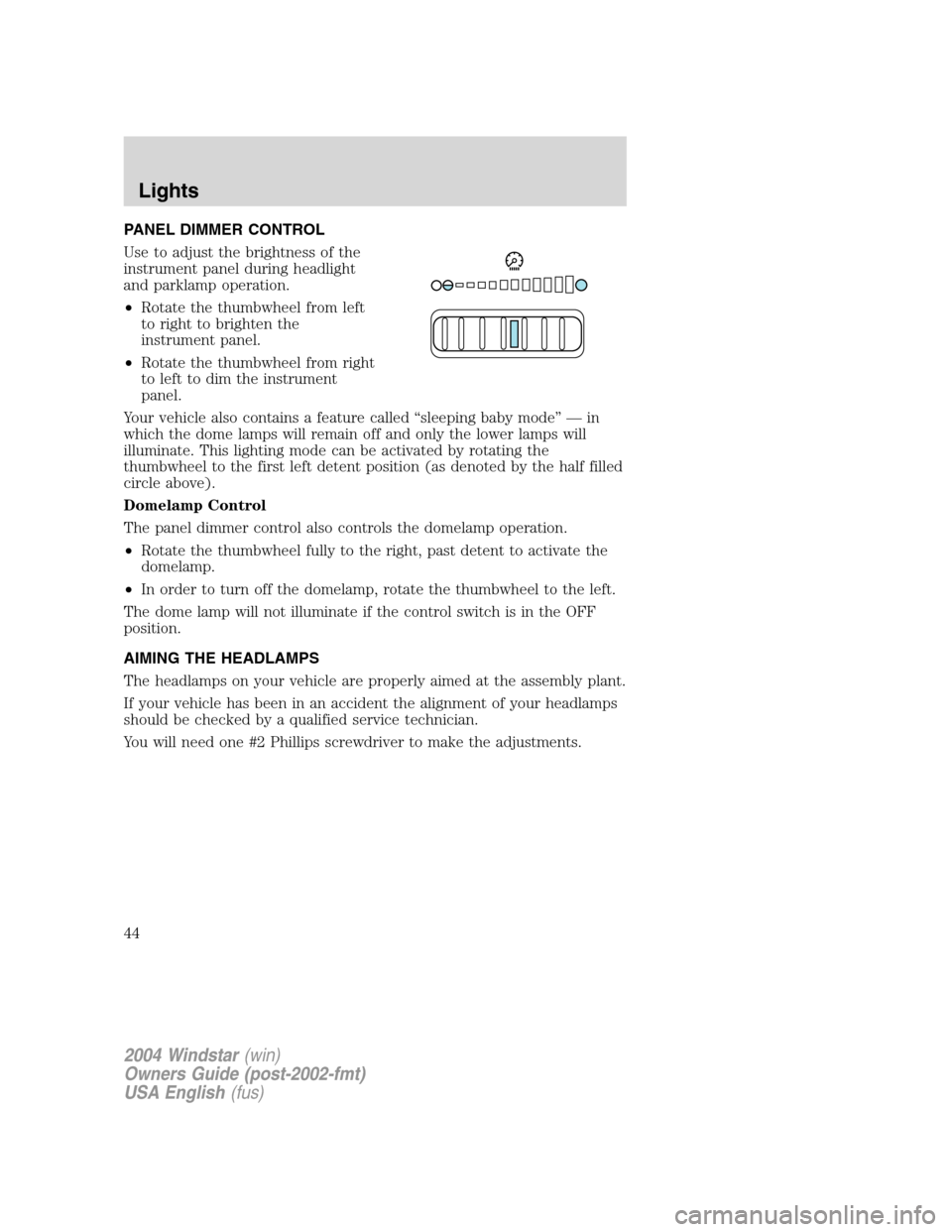
PANEL DIMMER CONTROL
Use to adjust the brightness of the
instrument panel during headlight
and parklamp operation.
•Rotate the thumbwheel from left
to right to brighten the
instrument panel.
•Rotate the thumbwheel from right
to left to dim the instrument
panel.
Your vehicle also contains a feature called “sleeping baby mode” — in
which the dome lamps will remain off and only the lower lamps will
illuminate. This lighting mode can be activated by rotating the
thumbwheel to the first left detent position (as denoted by the half filled
circle above).
Domelamp Control
The panel dimmer control also controls the domelamp operation.
•Rotate the thumbwheel fully to the right, past detent to activate the
domelamp.
•In order to turn off the domelamp, rotate the thumbwheel to the left.
The dome lamp will not illuminate if the control switch is in the OFF
position.
AIMING THE HEADLAMPS
The headlamps on your vehicle are properly aimed at the assembly plant.
If your vehicle has been in an accident the alignment of your headlamps
should be checked by a qualified service technician.
You will need one #2 Phillips screwdriver to make the adjustments.
2004 Windstar(win)
Owners Guide (post-2002-fmt)
USA English(fus)
Lights
44
Page 53 of 280
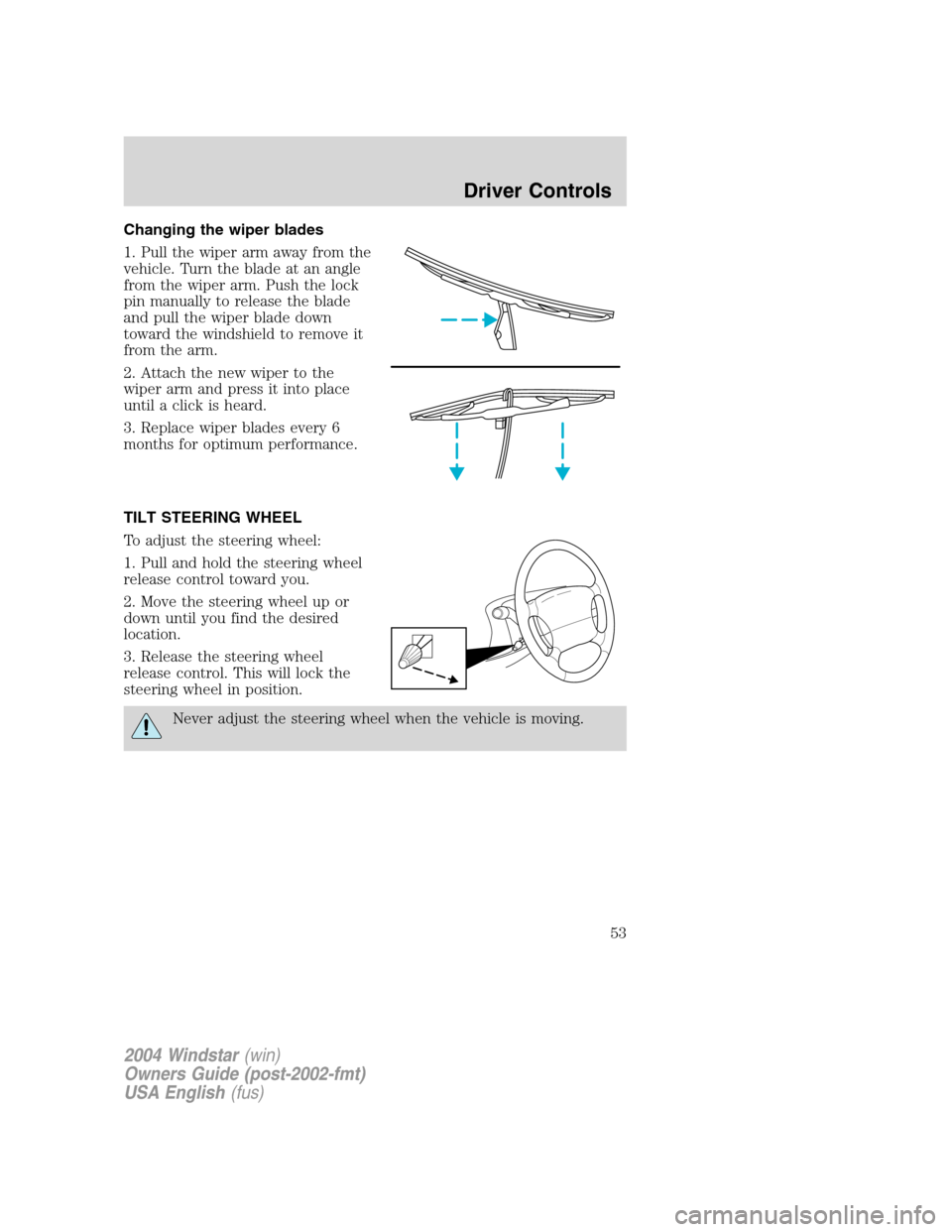
Changing the wiper blades
1. Pull the wiper arm away from the
vehicle. Turn the blade at an angle
from the wiper arm. Push the lock
pin manually to release the blade
and pull the wiper blade down
toward the windshield to remove it
from the arm.
2. Attach the new wiper to the
wiper arm and press it into place
until a click is heard.
3. Replace wiper blades every 6
months for optimum performance.
TILT STEERING WHEEL
To adjust the steering wheel:
1. Pull and hold the steering wheel
release control toward you.
2. Move the steering wheel up or
down until you find the desired
location.
3. Release the steering wheel
release control. This will lock the
steering wheel in position.
Never adjust the steering wheel when the vehicle is moving.
2004 Windstar(win)
Owners Guide (post-2002-fmt)
USA English(fus)
Driver Controls
53
Page 67 of 280
Do not use the speed control in heavy traffic or on roads that
are winding, slippery or unpaved.
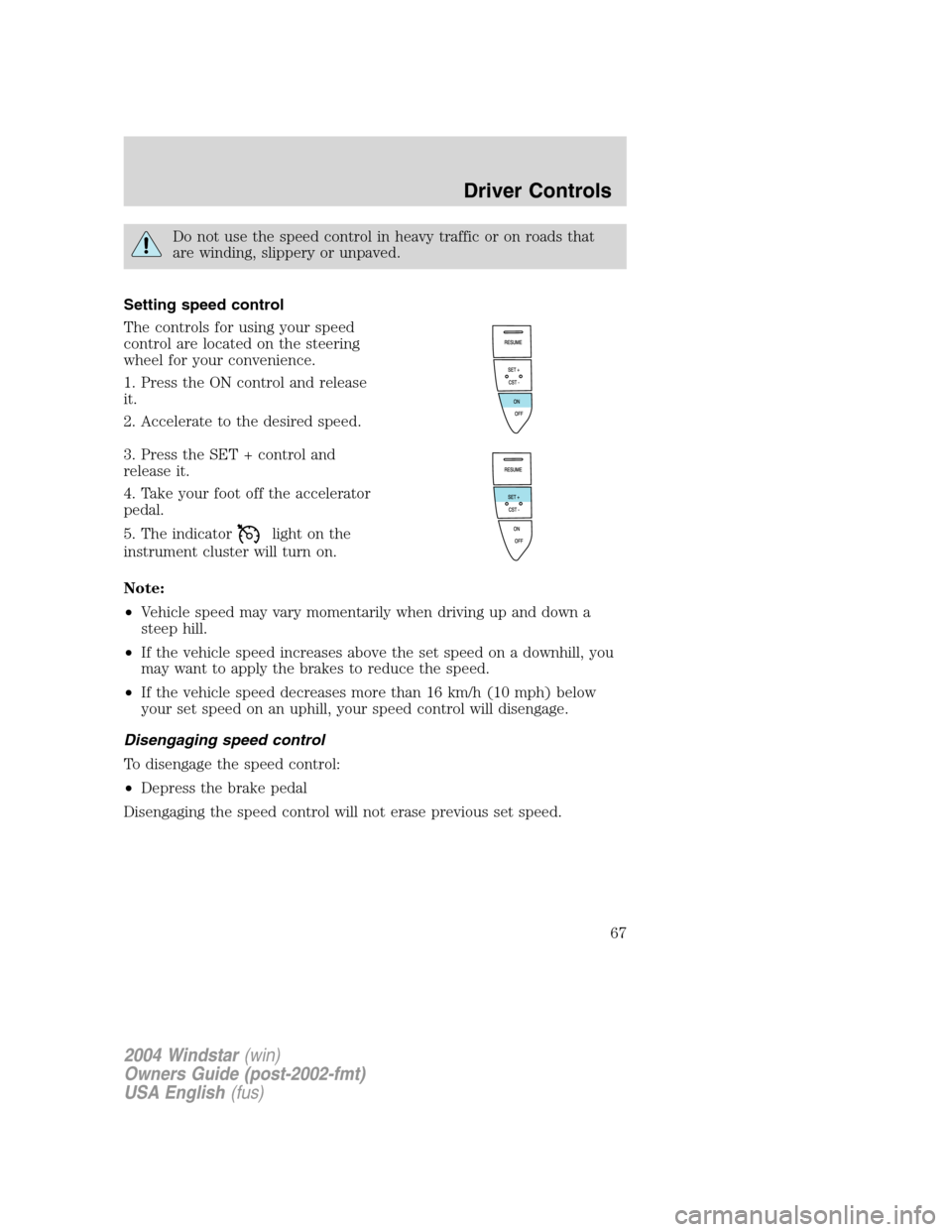
Setting speed control
The controls for using your speed
control are located on the steering
wheel for your convenience.
1. Press the ON control and release
it.
2. Accelerate to the desired speed.
3. Press the SET + control and
release it.
4. Take your foot off the accelerator
pedal.
5. The indicator
light on the
instrument cluster will turn on.
Note:
•Vehicle speed may vary momentarily when driving up and down a
steep hill.
•If the vehicle speed increases above the set speed on a downhill, you
may want to apply the brakes to reduce the speed.
•If the vehicle speed decreases more than 16 km/h (10 mph) below
your set speed on an uphill, your speed control will disengage.
Disengaging speed control
To disengage the speed control:
•Depress the brake pedal
Disengaging the speed control will not erase previous set speed.
2004 Windstar(win)
Owners Guide (post-2002-fmt)
USA English(fus)
Driver Controls
67
Page 69 of 280
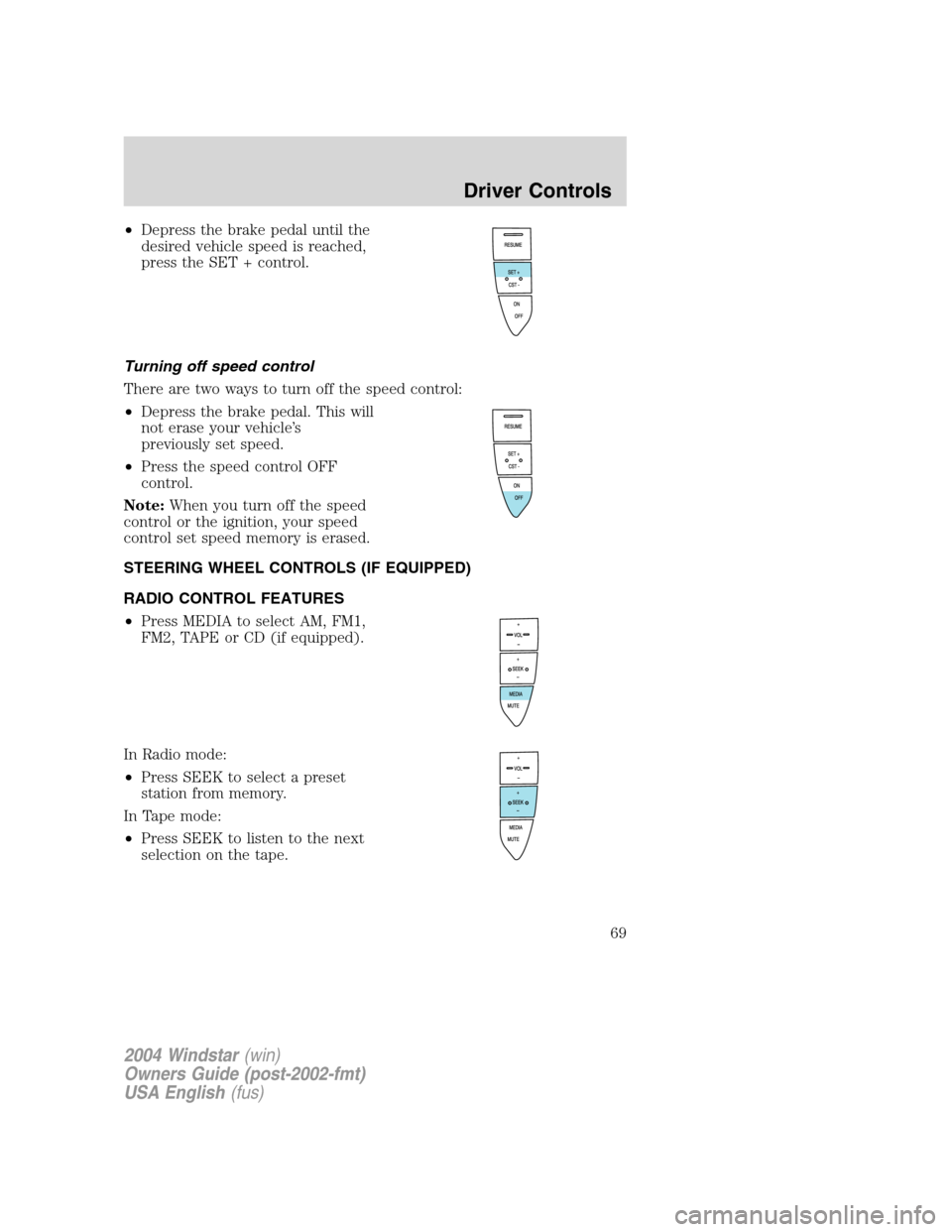
•Depress the brake pedal until the
desired vehicle speed is reached,
press the SET + control.
Turning off speed control
There are two ways to turn off the speed control:
•Depress the brake pedal. This will
not erase your vehicle’s
previously set speed.
•Press the speed control OFF
control.
Note:When you turn off the speed
control or the ignition, your speed
control set speed memory is erased.
STEERING WHEEL CONTROLS (IF EQUIPPED)
RADIO CONTROL FEATURES
•Press MEDIA to select AM, FM1,
FM2, TAPE or CD (if equipped).
In Radio mode:
•Press SEEK to select a preset
station from memory.
In Tape mode:
•Press SEEK to listen to the next
selection on the tape.
2004 Windstar(win)
Owners Guide (post-2002-fmt)
USA English(fus)
Driver Controls
69
Page 85 of 280
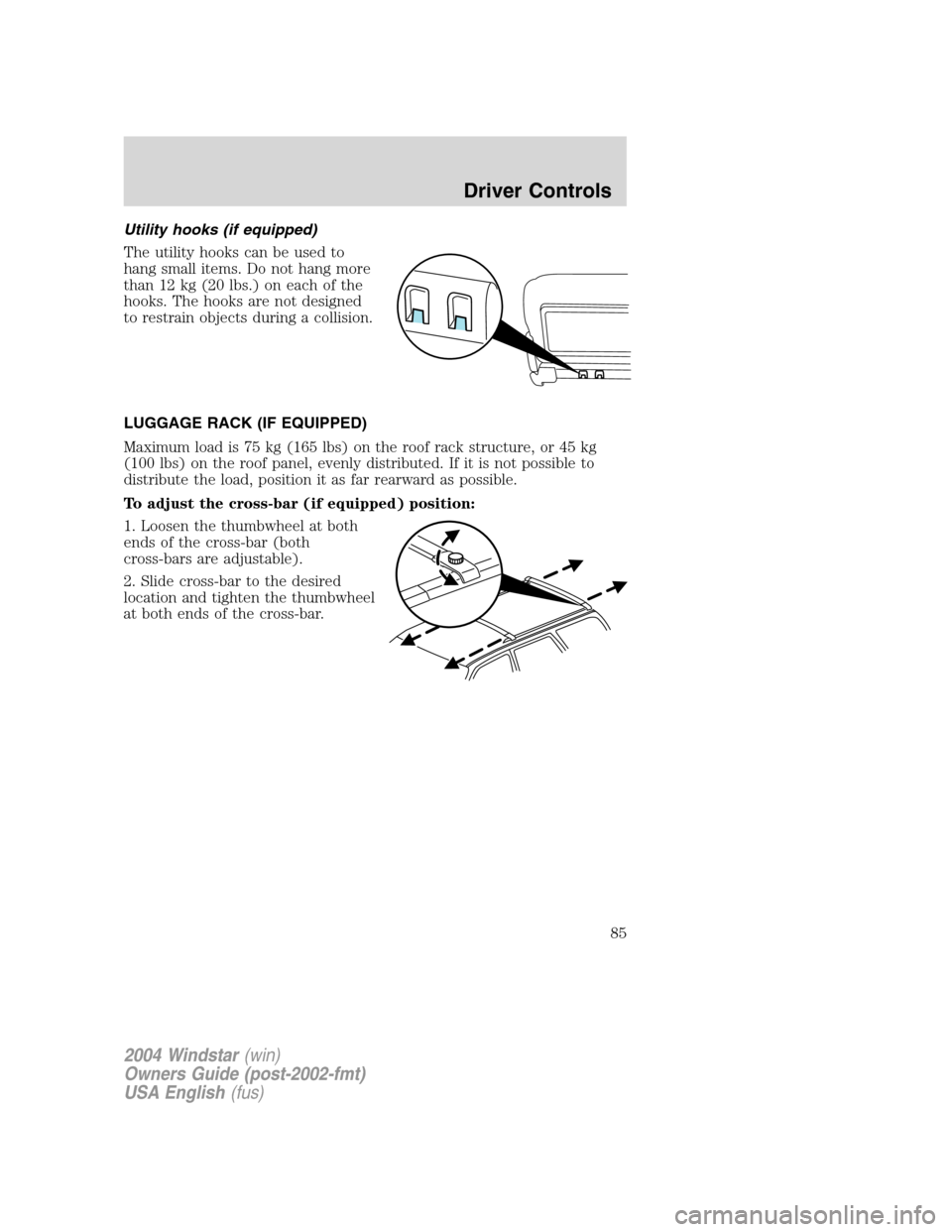
Utility hooks (if equipped)
The utility hooks can be used to
hang small items. Do not hang more
than 12 kg (20 lbs.) on each of the
hooks. The hooks are not designed
to restrain objects during a collision.
LUGGAGE RACK (IF EQUIPPED)
Maximum load is 75 kg (165 lbs) on the roof rack structure, or 45 kg
(100 lbs) on the roof panel, evenly distributed. If it is not possible to
distribute the load, position it as far rearward as possible.
To adjust the cross-bar (if equipped) position:
1. Loosen the thumbwheel at both
ends of the cross-bar (both
cross-bars are adjustable).
2. Slide cross-bar to the desired
location and tighten the thumbwheel
at both ends of the cross-bar.
2004 Windstar(win)
Owners Guide (post-2002-fmt)
USA English(fus)
Driver Controls
85
Page 86 of 280
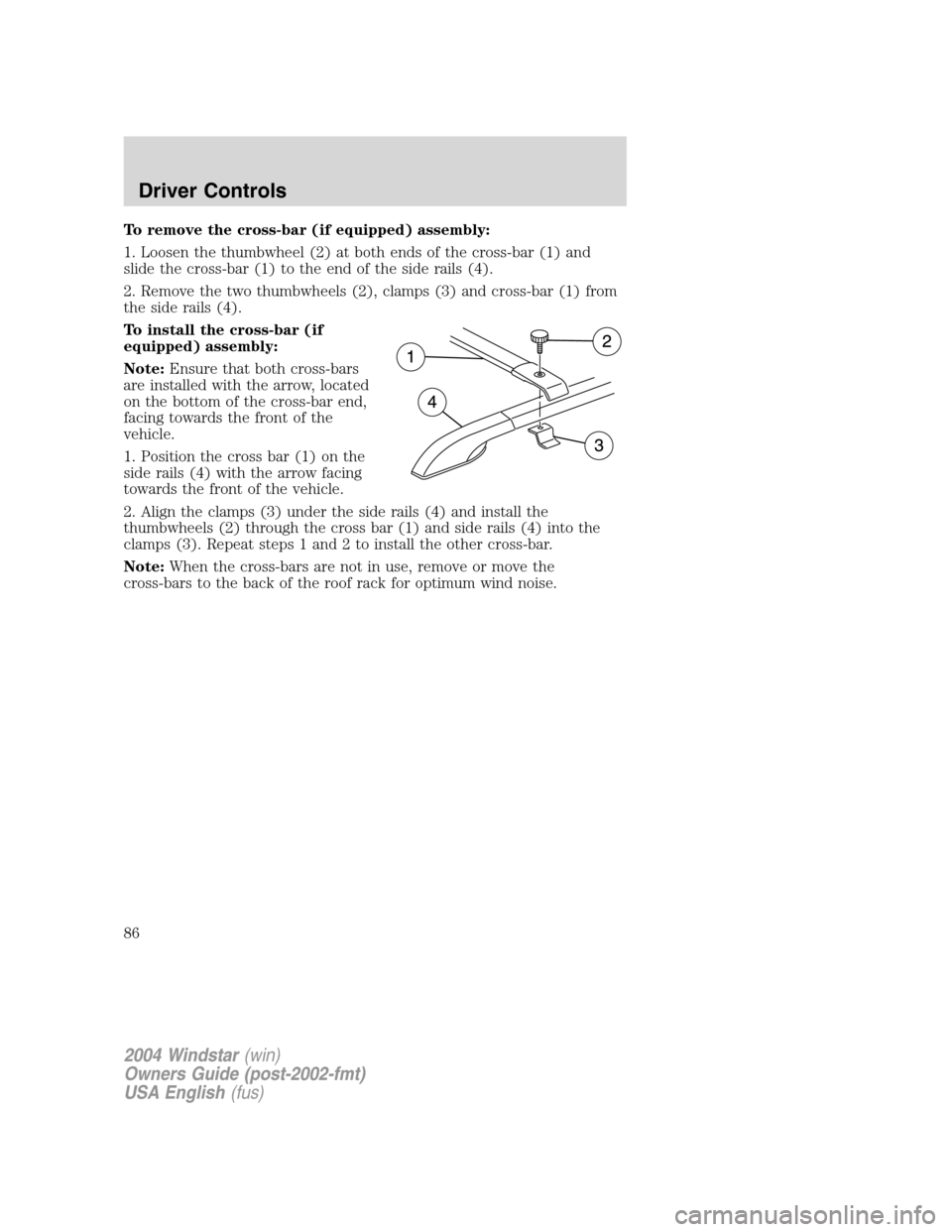
To remove the cross-bar (if equipped) assembly:
1. Loosen the thumbwheel (2) at both ends of the cross-bar (1) and
slide the cross-bar (1) to the end of the side rails (4).
2. Remove the two thumbwheels (2), clamps (3) and cross-bar (1) from
the side rails (4).
To install the cross-bar (if
equipped) assembly:
Note:Ensure that both cross-bars
are installed with the arrow, located
on the bottom of the cross-bar end,
facing towards the front of the
vehicle.
1. Position the cross bar (1) on the
side rails (4) with the arrow facing
towards the front of the vehicle.
2. Align the clamps (3) under the side rails (4) and install the
thumbwheels (2) through the cross bar (1) and side rails (4) into the
clamps (3). Repeat steps 1 and 2 to install the other cross-bar.
Note:When the cross-bars are not in use, remove or move the
cross-bars to the back of the roof rack for optimum wind noise.
2004 Windstar(win)
Owners Guide (post-2002-fmt)
USA English(fus)
Driver Controls
86
Page 163 of 280
STARTING
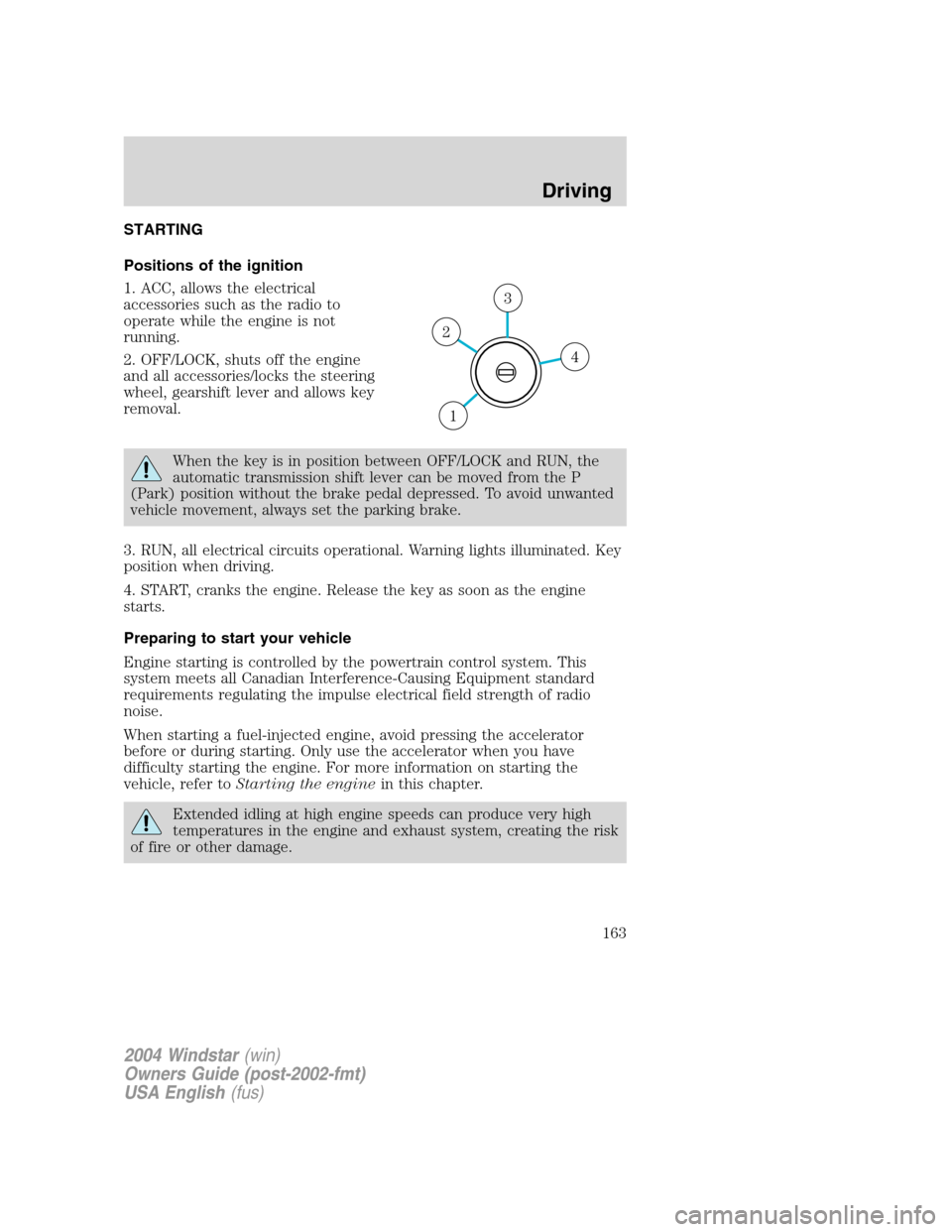
Positions of the ignition
1. ACC, allows the electrical
accessories such as the radio to
operate while the engine is not
running.
2. OFF/LOCK, shuts off the engine
and all accessories/locks the steering
wheel, gearshift lever and allows key
removal.
When the key is in position between OFF/LOCK and RUN, the
automatic transmission shift lever can be moved from the P
(Park) position without the brake pedal depressed. To avoid unwanted
vehicle movement, always set the parking brake.
3. RUN, all electrical circuits operational. Warning lights illuminated. Key
position when driving.
4. START, cranks the engine. Release the key as soon as the engine
starts.
Preparing to start your vehicle
Engine starting is controlled by the powertrain control system. This
system meets all Canadian Interference-Causing Equipment standard
requirements regulating the impulse electrical field strength of radio
noise.
When starting a fuel-injected engine, avoid pressing the accelerator
before or during starting. Only use the accelerator when you have
difficulty starting the engine. For more information on starting the
vehicle, refer to Starting the engine in this chapter.
Extended idling at high engine speeds can produce very high
temperatures in the engine and exhaust system, creating the risk
of fire or other damage.
4
3
2
1
2004 Windstar (win)
Owners Guide (post-2002-fmt)
USA English (fus)
Driving
Driving
163
Page 167 of 280
BRAKES
Occasional brake noise is normal. If a metal-to-metal, continuous grinding
or continuous squeal sound is present, the brake linings may be worn-out
and should be inspected by a qualified service technician. If the vehicle
has continuous vibration or shudder in the steering wheel while braking,
the vehicle should be inspected by a qualified service technician.
Refer toBrake system warning
lightin theInstrument Cluster
chapter for information on the brake
system warning light.
Four-wheel anti-lock brake system (ABS)
Your vehicle is equipped with an Anti-lock Braking System (ABS). This
system helps you maintain steering control during emergency stops by
keeping the brakes from locking. Noise from the ABS pump motor and
brake pedal pulsation may be observed during ABS braking; this is
normal and should be no reason for concern.
ABS warning lamp
The ABS lamp in the instrument
cluster momentarily illuminates
when the ignition is turned to ON. If
the light does not illuminate during
start up, remains on or flashes, the
ABS may be disabled and may need to be serviced.
Even when the ABS is disabled,
normal braking is still effective. (If
your BRAKE warning lamp
illuminates with the parking brake
released, have your brake system serviced immediately.)
Using ABS
When hard braking is required, apply continuous force on the brake
pedal; do not pump the brake pedal since this will reduce the
effectiveness of the ABS and will increase your vehicle’s stopping
distance. The ABS will be activated if wheelslip or skidding is detected,
optimizing your stopping distance and allowing you to retain full steering
control.
ABS
2004 Windstar(win)
Owners Guide (post-2002-fmt)
USA English(fus)
Driving
167