air condition FORD FREESTAR 2005 1.G Owners Manual
[x] Cancel search | Manufacturer: FORD, Model Year: 2005, Model line: FREESTAR, Model: FORD FREESTAR 2005 1.GPages: 312, PDF Size: 3.96 MB
Page 1 of 312
Introduction 4
Instrument Cluster 10
Warning and control lights 10
Gauges 15
Entertainment Systems 18
AM/FM stereo 18
AM/FM stereo with CD 20
AM/FM stereo with in-dash six CD 23
AM/FM stereo cassette with CD 26
Climate Controls 34
Manual heating and air conditioning 34
Rear window defroster 44
Lights 45
Headlamps 45
Turn signal control 49
Bulb replacement 51
Driver Controls 56
Windshield wiper/washer control 56
Steering wheel adjustment 57
Power windows 68
Mirrors 69
Speed control 71
Message center 79
Locks and Security 95
Keys 95
Locks 95
Anti-theft system 108
Table of Contents
1
REVIEW COPY
2005 Freestar(win), Owners Guide (post-2002-fmt)(own2002),
Market:USA_English(fus)
Table of Contents
Page 10 of 312
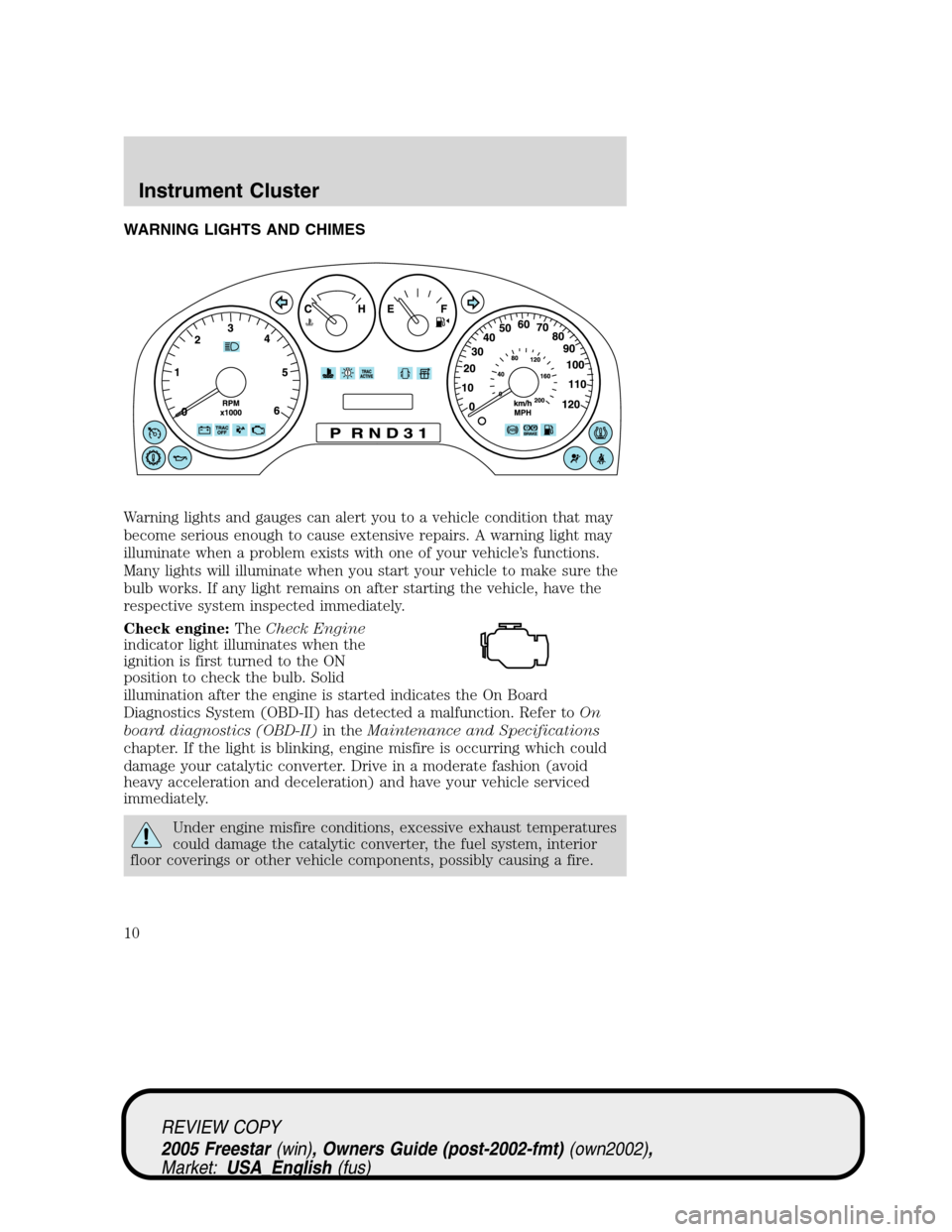
WARNING LIGHTS AND CHIMES
Warning lights and gauges can alert you to a vehicle condition that may
become serious enough to cause extensive repairs. A warning light may
illuminate when a problem exists with one of your vehicle’s functions.
Many lights will illuminate when you start your vehicle to make sure the
bulb works. If any light remains on after starting the vehicle, have the
respective system inspected immediately.
Check engine:TheCheck Engine
indicator light illuminates when the
ignition is first turned to the ON
position to check the bulb. Solid
illumination after the engine is started indicates the On Board
Diagnostics System (OBD-II) has detected a malfunction. Refer toOn
board diagnostics (OBD-II)in theMaintenance and Specifications
chapter. If the light is blinking, engine misfire is occurring which could
damage your catalytic converter. Drive in a moderate fashion (avoid
heavy acceleration and deceleration) and have your vehicle serviced
immediately.
Under engine misfire conditions, excessive exhaust temperatures
could damage the catalytic converter, the fuel system, interior
floor coverings or other vehicle components, possibly causing a fire.
REVIEW COPY
2005 Freestar(win), Owners Guide (post-2002-fmt)(own2002),
Market:USA_English(fus)
Instrument Cluster
Instrument Cluster
10
Page 34 of 312
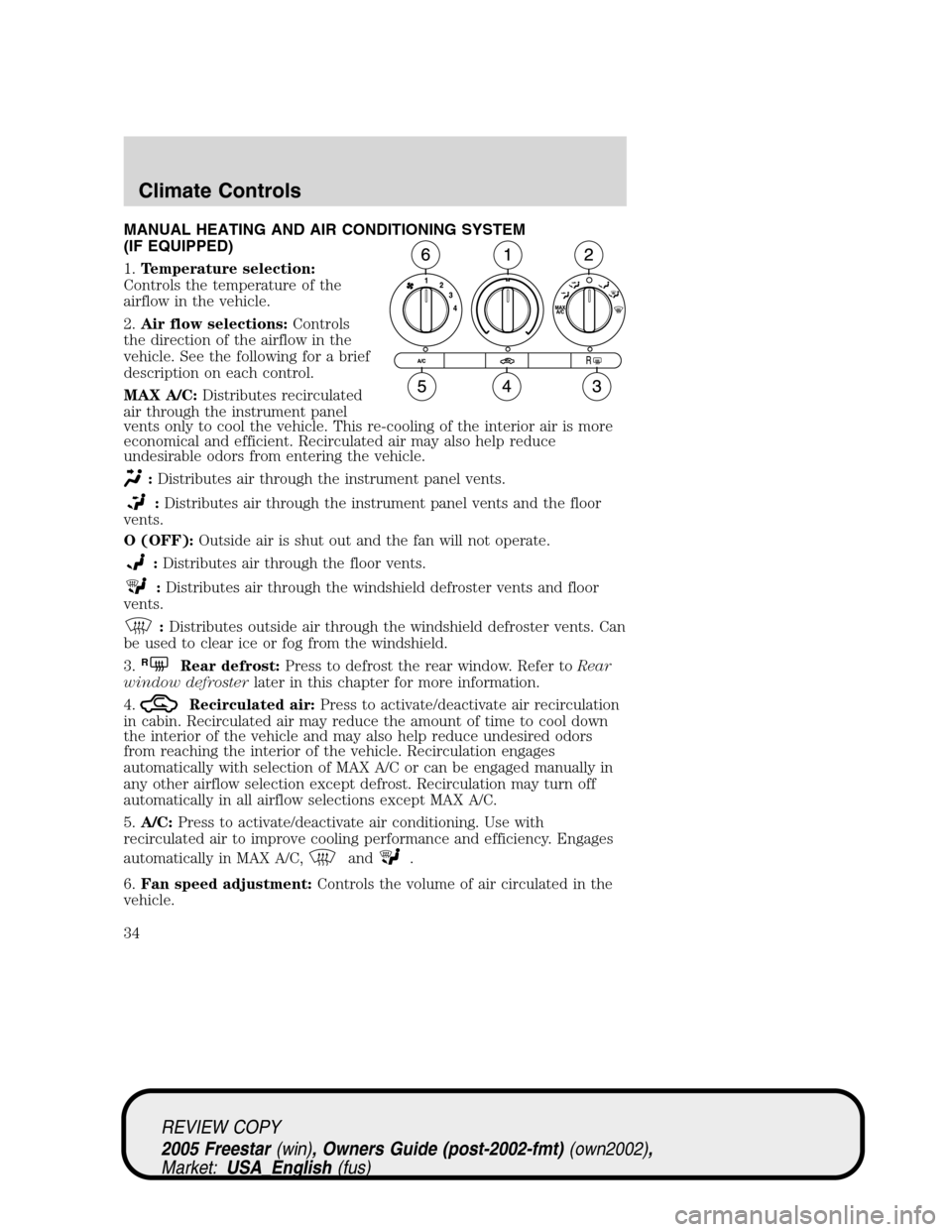
MANUAL HEATING AND AIR CONDITIONING SYSTEM
(IF EQUIPPED)
1.Temperature selection:
Controls the temperature of the
airflow in the vehicle.
2.Air flow selections:Controls
the direction of the airflow in the
vehicle. See the following for a brief
description on each control.
MAX A/C:Distributes recirculated
air through the instrument panel
vents only to cool the vehicle. This re-cooling of the interior air is more
economical and efficient. Recirculated air may also help reduce
undesirable odors from entering the vehicle.
:Distributes air through the instrument panel vents.
:Distributes air through the instrument panel vents and the floor
vents.
O (OFF):Outside air is shut out and the fan will not operate.
:Distributes air through the floor vents.
:Distributes air through the windshield defroster vents and floor
vents.
:Distributes outside air through the windshield defroster vents. Can
be used to clear ice or fog from the windshield.
3.
RRear defrost:Press to defrost the rear window. Refer toRear
window defrosterlater in this chapter for more information.
4.
Recirculated air:Press to activate/deactivate air recirculation
in cabin. Recirculated air may reduce the amount of time to cool down
the interior of the vehicle and may also help reduce undesired odors
from reaching the interior of the vehicle. Recirculation engages
automatically with selection of MAX A/C or can be engaged manually in
any other airflow selection except defrost. Recirculation may turn off
automatically in all airflow selections except MAX A/C.
5.A/C:Press to activate/deactivate air conditioning. Use with
recirculated air to improve cooling performance and efficiency. Engages
automatically in MAX A/C,
and.
6.Fan speed adjustment:Controls the volume of air circulated in the
vehicle.
REVIEW COPY
2005 Freestar(win), Owners Guide (post-2002-fmt)(own2002),
Market:USA_English(fus)
Climate Controls
Climate Controls
34
Page 36 of 312
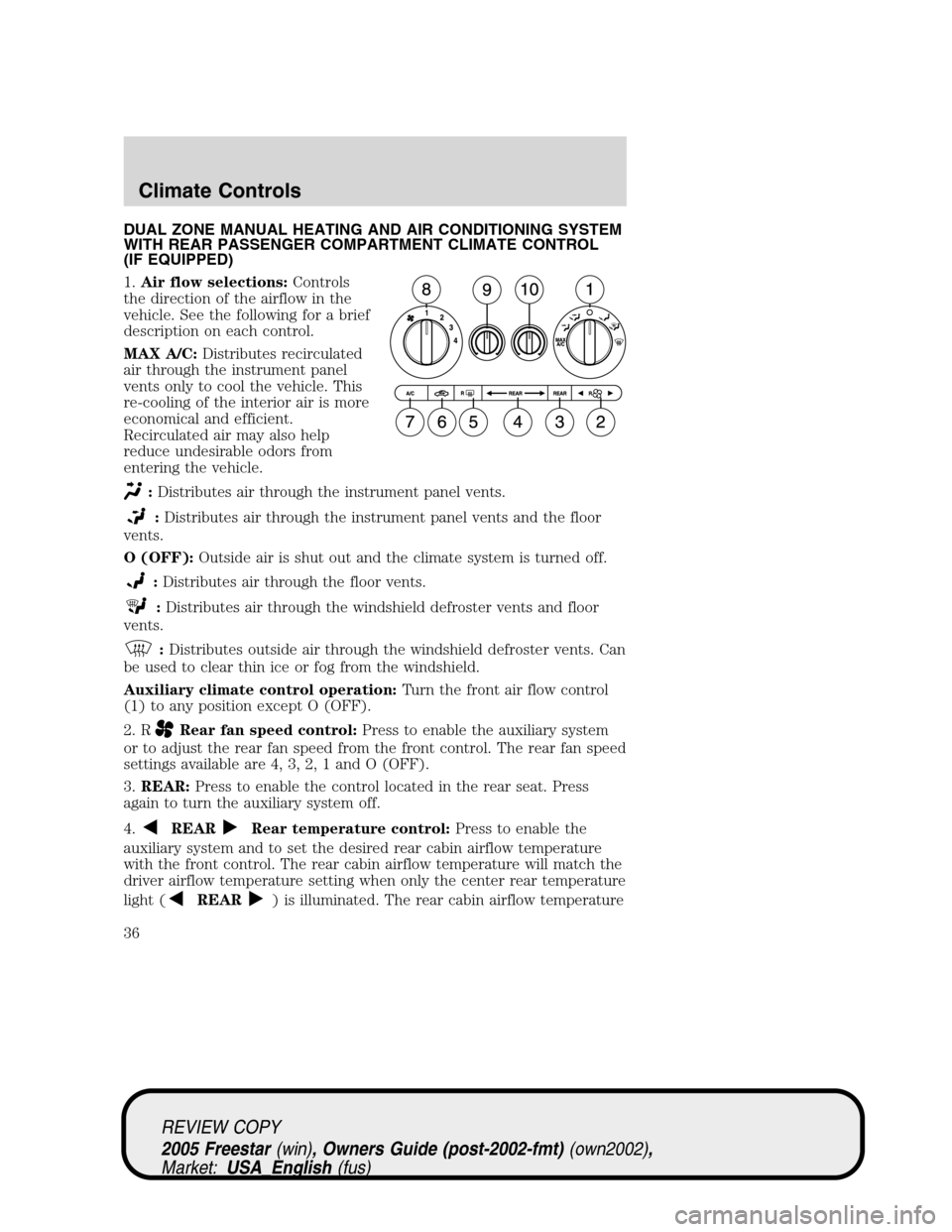
DUAL ZONE MANUAL HEATING AND AIR CONDITIONING SYSTEM
WITH REAR PASSENGER COMPARTMENT CLIMATE CONTROL
(IF EQUIPPED)
1.Air flow selections:Controls
the direction of the airflow in the
vehicle. See the following for a brief
description on each control.
MAX A/C:Distributes recirculated
air through the instrument panel
vents only to cool the vehicle. This
re-cooling of the interior air is more
economical and efficient.
Recirculated air may also help
reduce undesirable odors from
entering the vehicle.
:Distributes air through the instrument panel vents.
:Distributes air through the instrument panel vents and the floor
vents.
O (OFF):Outside air is shut out and the climate system is turned off.
:Distributes air through the floor vents.
:Distributes air through the windshield defroster vents and floor
vents.
:Distributes outside air through the windshield defroster vents. Can
be used to clear thin ice or fog from the windshield.
Auxiliary climate control operation:Turn the front air flow control
(1) to any position except O (OFF).
2. R
Rear fan speed control:Press to enable the auxiliary system
or to adjust the rear fan speed from the front control. The rear fan speed
settings available are 4, 3, 2, 1 and O (OFF).
3.REAR:Press to enable the control located in the rear seat. Press
again to turn the auxiliary system off.
4.
REARRear temperature control:Press to enable the
auxiliary system and to set the desired rear cabin airflow temperature
with the front control. The rear cabin airflow temperature will match the
driver airflow temperature setting when only the center rear temperature
light (
REAR) is illuminated. The rear cabin airflow temperature
REVIEW COPY
2005 Freestar(win), Owners Guide (post-2002-fmt)(own2002),
Market:USA_English(fus)
Climate Controls
36
Page 37 of 312
will be warmer or cooler than the driver airflow temperature setting
when more than one rear temperature light (
REAR)is
illuminated.
5.
RRear defrost:Press to activate/deactivate rear window defrost.
Refer toRear window defrosterlater in this chapter for more
information.
6.
Recirculated air:Press to activate/deactivate air recirculation
in cabin. Recirculated air may reduce the amount of time to cool down
the interior of the vehicle and may also help reduce undesired odors
from reaching the interior of the vehicle. Recirculation engages
automatically with selection of MAX A/C or can be engaged manually in
any other airflow selection except
. Recirculation may turn off
automatically in all airflow selections except MAX A/C.
7.A/C:Press to activate/deactivate air conditioning. Use with
recirculated air to improve cooling performance and efficiency. Engages
automatically in MAX A/C,
and.
8.Fan speed adjustment:Controls the volume of air circulated in the
vehicle.
9.Left temperature selection:Controls the temperature of the airflow
to the driver in the front of the vehicle.
10.Right temperature selection:Controls the temperature of the
airflow to the passenger in the front of the vehicle.
Operating tips
•To reduce fog build up on the windshield during humid weather, place
the air flow selector in the
position.
•To reduce humidity build up inside the vehicle: do not drive with the
airflow selector in the OFF or with recirculated air engaged.
•Do not put objects under the front seats that will interfere with the
airflow to the back seats.
•Remove any snow, ice or leaves from the air intake area at the base of
the windshield.
•For maximum cooling performance (MAX A/C):
In the MAX A/C mode:
•Move the temperature control selector to the coldest setting.
•Set the fan to the highest speed initially, then adjust to maintain
passenger comfort.
REVIEW COPY
2005 Freestar(win), Owners Guide (post-2002-fmt)(own2002),
Market:USA_English(fus)
Climate Controls
37
Page 40 of 312
engaged manually in any airflow selection except. Recirculated air
may turn off automatically in all airflow selections.
7.A/C:Press to activate/deactivate air conditioning. Use with
recirculated air to improve cooling performance and efficiency. Engages
automatically in AUTO,
, and.
8.
:Distributes air through the windshield defroster vents and floor
vents.
9.
:Distributes air through the floor vents.
10.
:Distributes air through the instrument panel vents and the floor
vents.
11.
:Distributes air through the instrument panel vents.
12.Manual override controls:Allows you to change the system
operation. To return to full automatic control, press AUTO.
13. F
Front fan speed control:Press to manually increase or
decrease the fan speed. To return to full automatic control, press AUTO.
14.OFF:Outside air is shut out and the climate system is turned off.
15.Driver temperature control:Press to increase or decrease the
temperature on the driver side of the cabin. Sets the passenger side
temperature also when DUAL is disengaged.Note:The recommended
vehicle cabin setting is between 72°F (22°C) and 75°F (24°C).
•Dual temperature control:Press and hold AUTO to
engage/disengage separate passenger side temperature control.
16.AUTO:Press to engage full automatic operation, and select the
desired temperature using the temperature control. The system will
automatically determine fan speed, airflow location, A/C on or off, and
outside or recirculated air, to heat or cool the vehicle to reach the
desired temperature.
17.REAR:Press to enable the control located in the rear seat. Press
again to turn the auxiliary system off.
REVIEW COPY
2005 Freestar(win), Owners Guide (post-2002-fmt)(own2002),
Market:USA_English(fus)
Climate Controls
40
Page 42 of 312
7.:Distributes air through the windshield defroster vents and the
floor vents.
8.
:Distributes air through the floor vents.
9.
:Distributes air through the instrument panel vents and the floor
vents.
10.
:Distributes air through the instrument panel vents.
11.Manual override controls:Allows you to change the system
operation. To return to full automatic control, press AUTO.
12.
Driver heated seat control:Press once to activate the high
heat setting (2 indicator lights). Press again to activate the low heat
setting (1 indicator light). Press again to deactivate the passenger heated
seat.
13. F
Front fan speed control:Press to manually increase or
decrease the fan speed. To return to full automatic control, press AUTO.
14.
Recirculated air:Press to activate/deactivate air
recirculation in the vehicle cabin. Recirculated air may reduce the
amount of time to cool down the interior of the vehicle and may also
help reduce undesired odors from reaching the interior of the vehicle.
Recirculated air can be engaged manually in any airflow selection
except
. Recirculated air may turn off automatically in all airflow
selections.
15.A/C:Press to activate/deactivate air conditioning. Use with
recirculated air to improve cooling performance and efficiency. Engages
automatically in AUTO,
, and.
16.OFF:Outside air is shut out and the climate system is turned off.
17.Driver temperature control:Press to increase or decrease the
temperature on the driver side of the cabin. Sets the passenger side
temperature also when DUAL is disengaged.Note:The recommended
vehicle cabin setting is between 72°F (22°C) and 75°F (24°C).
•Dual temperature control:Press and hold AUTO to
engage/disengage separate passenger side temperature control.
18.AUTO:Press to engage full automatic operation, and select the
desired temperature using the temperature control. The system will
automatically determine fan speed, airflow location, A/C on or off, and
outside or recirculated air, to heat or cool the vehicle to reach the
desired temperature.
REVIEW COPY
2005 Freestar(win), Owners Guide (post-2002-fmt)(own2002),
Market:USA_English(fus)
Climate Controls
42
Page 92 of 312
If any of these conditions occur, the PLG must be reset. To reset the
PLG:
1. Manually close and fully latch the liftgate.
2. Power open the liftgate by using the keyfob or overhead console
button.
3. Once the liftgate is fully open, close the liftgate using the power
switch on the liftgate, keyfob or overhead console button.
Liftgate ajar signal
If the liftgate is not fully latched, you will receive a“LIFTGATE AJAR”
message on the instrument panel. If you see this message, check the
liftgate to ensure it is fully latched.
Make sure the liftgate is closed to prevent exhaust fumes from
being drawn into the vehicle. If you must drive with the liftgate
open, keep the climate control vents open so that fresh outside air
circulates through the vehicle.
CARGO AREA FEATURES
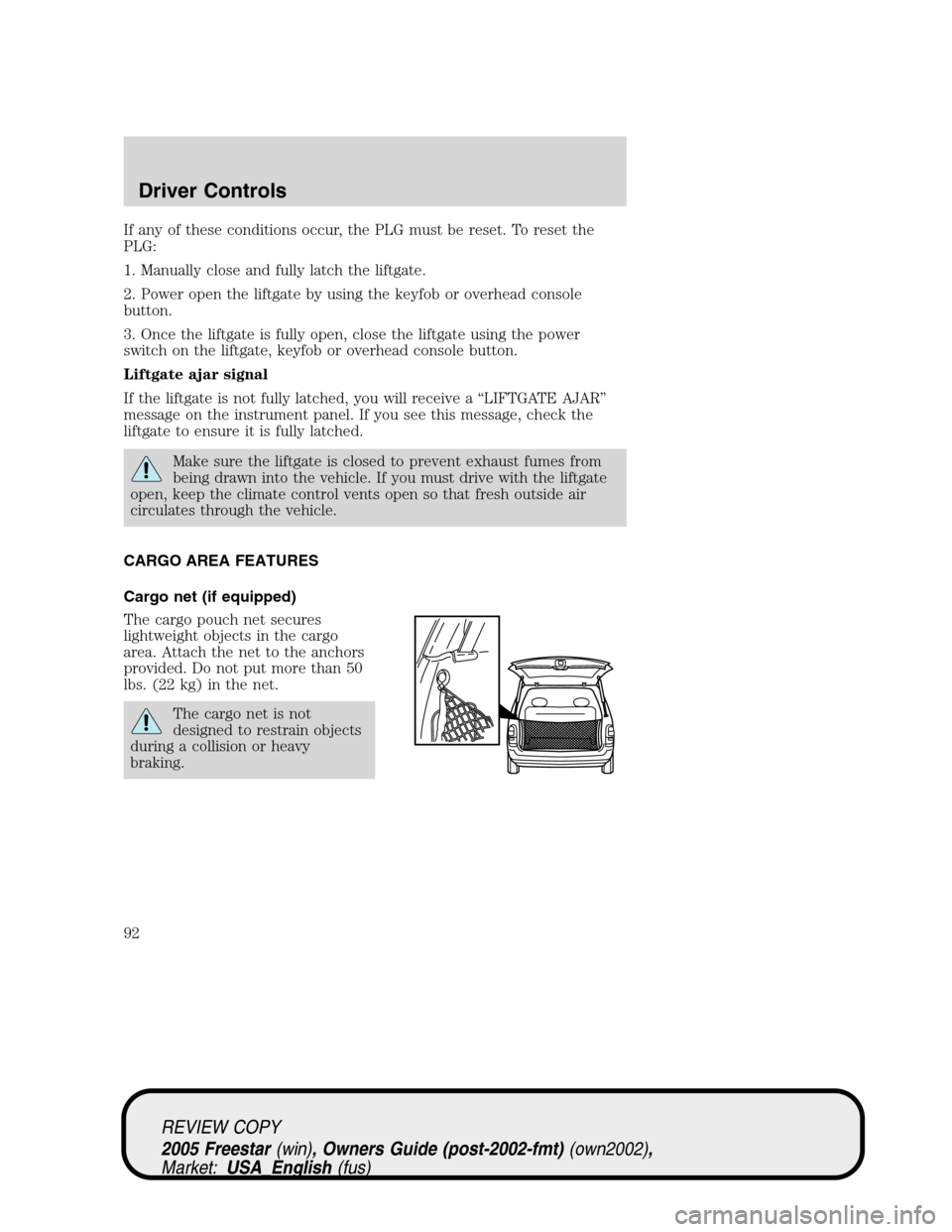
Cargo net (if equipped)
The cargo pouch net secures
lightweight objects in the cargo
area. Attach the net to the anchors
provided. Do not put more than 50
lbs. (22 kg) in the net.
The cargo net is not
designed to restrain objects
during a collision or heavy
braking.
REVIEW COPY
2005 Freestar(win), Owners Guide (post-2002-fmt)(own2002),
Market:USA_English(fus)
Driver Controls
92
Page 135 of 312

3. To return the seat, ensure seat
latching area is free of objects.
Then, raise the seat off the liftgate
scuff plate and push at the top of
the seat back to rotate the seat back
onto the latches. Pull up on the
head restraints to raise them.
Ensure seat is latched to vehicle floor by pushing/pulling on seat.
If not latched, the seat may cause injury during a sudden stop.
SAFETY RESTRAINTS
Personal Safety System
The Personal Safety System provides an improved overall level of frontal
crash protection to front seat occupants and is designed to help further
reduce the risk of air bag-related injuries. The system is able to analyze
different occupant conditions and crash severity before activating the
appropriate safety devices to help better protect a range of occupants in
a variety of frontal crash situations.
Your vehicle’s Personal Safety System consists of:
•Driver and passenger dual-stage air bag supplemental restraints.
•Front safety belts with pretensioners, energy management retractors
(first row only), and safety belt usage sensors.
•Driver’s seat position sensor.
•Passenger occupant classification sensor
•Front crash severity sensor.
•Restraints Control Module (RCM) with impact and safing sensors.
•Restraint system warning light and back-up tone.
•The electrical wiring for the air bags, crash sensor(s), safety belt
pretensioners, front safety belt usage sensors, driver seat position
sensor, passenger occupant classification sensor, and indicator lights.
How does the Personal Safety System work?
The Personal Safety System can adapt the deployment strategy of your
vehicle’s safety devices according to crash severity and occupant
REVIEW COPY
2005 Freestar(win), Owners Guide (post-2002-fmt)(own2002),
Market:USA_English(fus)
Seating and Safety Restraints
135
Page 136 of 312
conditions. A collection of crash and occupant sensors provides
information to the Restraints Control Module (RCM). During a crash, the
RCM activates the safety belt pretensioners and/or either one or both
stages of the dual-stage air bag supplemental restraints based on crash
severity and occupant conditions.
The fact that the pretensioners or air bags did not activate for both front
seat occupants in a collision does not mean that something is wrong with
the system. Rather, it means the Personal Safety System determined the
accident conditions (crash severity, belt usage, etc.) were not
appropriate to activate these safety devices. Front air bags are designed
to activate only in frontal and near-frontal collisions (not rollovers, side
impacts or rear impacts) unless the collision causes sufficient
longitudinal deceleration. The pretensioners are designed to activate in
frontal and side collisions, and rollovers.
Driver and passenger dual-stage air bag supplemental restraints
The dual-stage air bags offer the capability to tailor the level of air bag
inflation energy. A lower, less forceful energy level is provided for more
common, moderate-severity impacts. A higher energy level is used for
the most severe impacts. Refer toAir bag supplemental restraints
section in this chapter.
Front crash severity sensor
The front crash severity sensor enhances the ability to detect the
severity of an impact. Positioned up front, it provides valuable
information early in the crash event on the severity of the impact. This
allows your Personal Safety System to distinguish between different
levels of crash severity and modify the deployment strategy of the
dual-stage air bags and safety belt pretensioners.
Driver’s seat position sensor
The driver’s seat position sensor allows your Personal Safety System to
tailor the deployment level of the driver dual-stage air bag based on seat
position. The system is designed to help protect smaller drivers sitting
close to the driver air bag by providing a lower air bag output level.
Front passenger sensing system
For air bags to do their job they must inflate with great force, and this
force can pose a potentially deadly risk to occupants that are very close
to the air bag when it begins to inflate. For some occupants, this occurs
because they are initially sitting very close to the air bag. For other
occupants, this occurs when the occupant is not properly restrained by
REVIEW COPY
2005 Freestar(win), Owners Guide (post-2002-fmt)(own2002),
Market:USA_English(fus)
Seating and Safety Restraints
136