display FORD FREESTYLE 2006 1.G User Guide
[x] Cancel search | Manufacturer: FORD, Model Year: 2006, Model line: FREESTYLE, Model: FORD FREESTYLE 2006 1.GPages: 288, PDF Size: 2.55 MB
Page 33 of 288
Note:The volume level of the wireless headphones can only be
controlled by the thumbwheel. Neither the remote control nor the rear
seat controls will affect the volume output of the wireless headphones.
When not using the headphones, turn them off to preserve battery life.
The headphones will automatically turn off after five minutes if they have
not received an infrared audio signal from the Family Entertainment
System (FES).
Note:Ensure that the line of sight between the headphone and infrared
transmitter (mounted on the DVD housing) is not obstructed for optimal
performance.
Liquid Crystal Display (LCD) flip-down screen
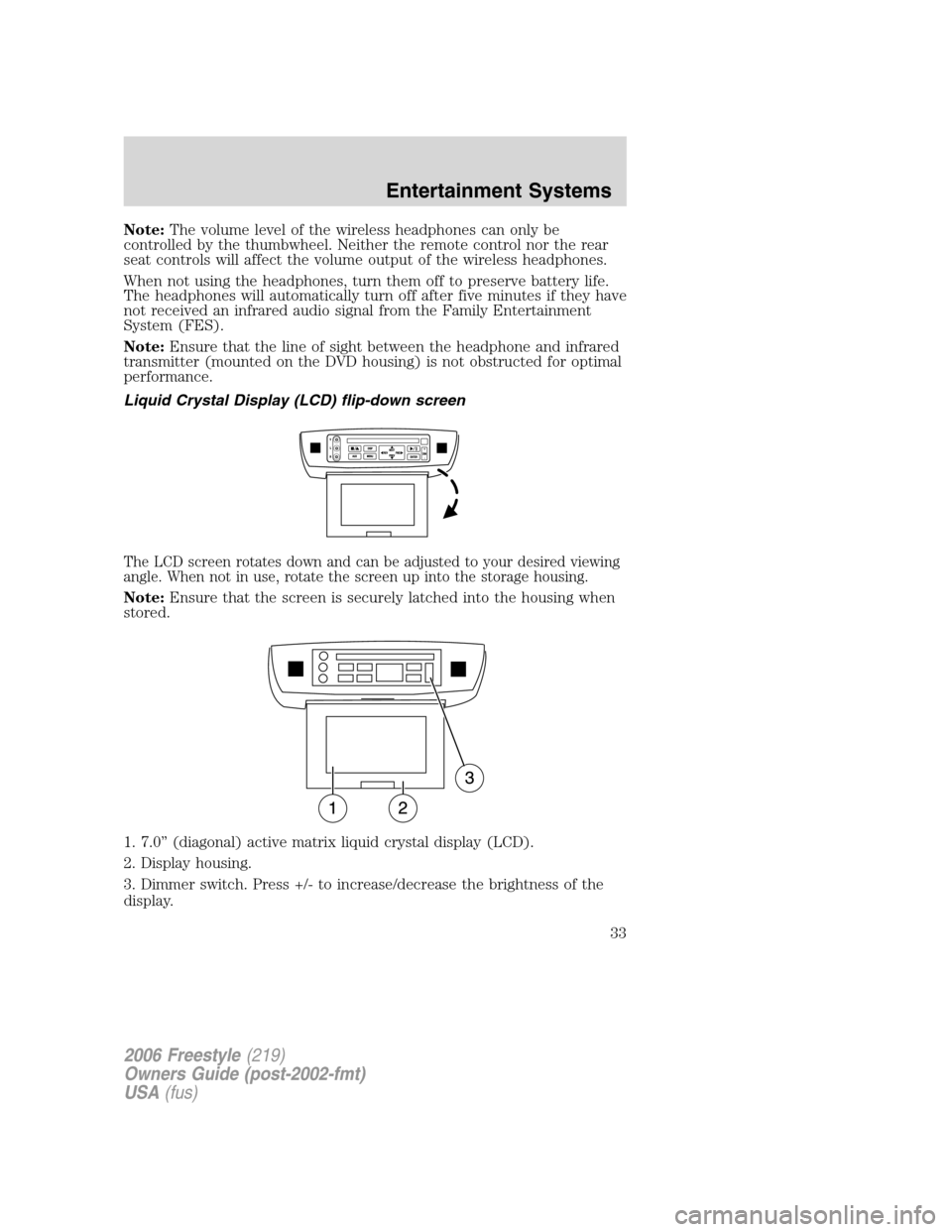
The LCD screen rotates down and can be adjusted to your desired viewing
angle. When not in use, rotate the screen up into the storage housing.
Note:Ensure that the screen is securely latched into the housing when
stored.
1. 7.0” (diagonal) active matrix liquid crystal display (LCD).
2. Display housing.
3. Dimmer switch. Press +/- to increase/decrease the brightness of the
display.
2006 Freestyle(219)
Owners Guide (post-2002-fmt)
USA(fus)
Entertainment Systems
33
Page 34 of 288
Playback and format
•The DVD player of your Family Entertainment DVD System can only
be used in the “playback” mode. (The DVD player does not offer a
record feature.)
•The system plays standard CDs or DVDs, CDR/RW, DVDRs, VCDs and
MP3 media.
Family Entertainment DVD System protection circuits
High temperature sensor circuit
•Excessively high temperatures may cause damage to the DVD player.
•When the temperature of the DVD player becomes too hot, the high
temperature sensor circuit stops machine operation. DVD/CD HOT will
be displayed on the radio display.
•The DVD player will remain disabled until it cools to a normal
operating temperature. The length of time for the system to cool will
vary depending on the climate and operating conditions.
Operating
•Only use the system when the vehicle is started for optimal
performance and to maintain battery life.
•If the Family Entertainment System (FES) is playing and the ignition
is turned OFF, the system will turn off, and suspend playback. When
the ignition is turned on again, playback will begin from the last
selected media source when the play control is pressed.
•To disable the DVD player rear controls, simultaneously press the 3
and 5 memory presets on the radio face. To enable the DVD player
rear controls again, press the 3 and 5 presets simultaneously.
•The DVD player is only capable of reading the bottom side of a disc.
When inserting a single sided disc, the label should be up. For a
multi-sided disc, the desired play side should be down when the disc
is inserted into the player.
•DVDs are formatted by regions. This DVD system can only play region
1 DVDs (DVDs manufactured for U.S. and Canada).
This unit is designed to play commercially pressed 4.75 (12 cm)
audio compact discs and DVDs only. Due to technical
incompatibility, certain recordable and re-recordable compact
discs may not function correctly when used in Ford DVD/CD
players. Irregular shaped discs, discs with a scratch protection
2006 Freestyle(219)
Owners Guide (post-2002-fmt)
USA(fus)
Entertainment Systems
34
Page 35 of 288
film attached, and discs with homemade paper (adhesive) labels
should not be inserted into the player. The label may peel and
cause the disc to become jammed. It is recommended that
homemade discs be identified with permanent felt tip marker
rather than adhesive labels. Ball point pens may damage discs.
Please contact your dealer for further information.
Inserting a CD/DVD
With the ignition ON, inserting a CD/DVD into the DVD player
automatically turns ON the FES and playback should begin immediately.
The counter is automatically reset to 0:00:00 when any disc is inserted
into the FES.
Removing a CD/DVD (while playing)
1. Press the STOP/EJECT control to stop playback if a disc is playing.
2. Press the STOP/EJECT control again to eject the CD/DVD.
If the CD/DVD is not removed within the allotted time, the system will
pull the CD/DVD back into the system for safety purposes.
If the CD/DVD will not eject from the system, press and hold the EJECT
control for approximately 2 seconds. The disc should eject whether the
vehicle ignition is ON or OFF.
Playing a video game/auxiliary device
1. Connect the video line from your video game device to the YELLOW
auxiliary input jack.
2. Connect the left and right audio lines to the WHITE (left) and RED
(right) auxiliary input jacks respectively.
3. Press the MODE control repeatedly until DVD/CD AUX (no disc in
player) or DVD/CD play (disc in player) illuminates in the radio display.
If a disc is in the system, playback should begin. To enable the aux
inputs, press the STOP control or press the AUX control on the DVD
player.
2006 Freestyle(219)
Owners Guide (post-2002-fmt)
USA(fus)
Entertainment Systems
35
Page 36 of 288
On-screen indicators
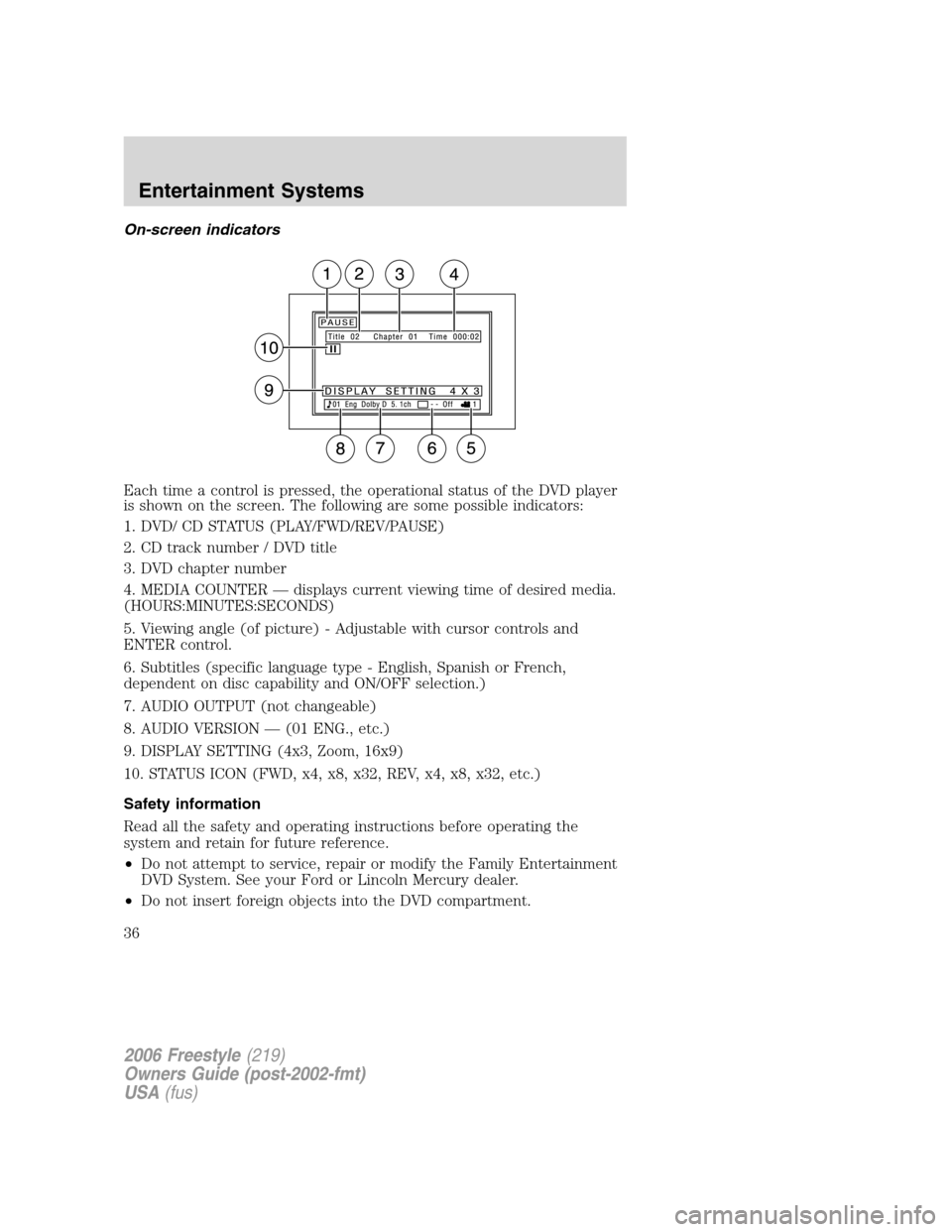
Each time a control is pressed, the operational status of the DVD player
is shown on the screen. The following are some possible indicators:
1. DVD/ CD STATUS (PLAY/FWD/REV/PAUSE)
2. CD track number / DVD title
3. DVD chapter number
4. MEDIA COUNTER — displays current viewing time of desired media.
(HOURS:MINUTES:SECONDS)
5. Viewing angle (of picture) - Adjustable with cursor controls and
ENTER control.
6. Subtitles (specific language type - English, Spanish or French,
dependent on disc capability and ON/OFF selection.)
7. AUDIO OUTPUT (not changeable)
8. AUDIO VERSION — (01 ENG., etc.)
9. DISPLAY SETTING (4x3, Zoom, 16x9)
10. STATUS ICON (FWD, x4, x8, x32, REV, x4, x8, x32, etc.)
Safety information
Read all the safety and operating instructions before operating the
system and retain for future reference.
•Do not attempt to service, repair or modify the Family Entertainment
DVD System. See your Ford or Lincoln Mercury dealer.
•Do not insert foreign objects into the DVD compartment.
2006 Freestyle(219)
Owners Guide (post-2002-fmt)
USA(fus)
Entertainment Systems
36
Page 37 of 288
The front glass on the flip-down liquid crystal display (LCD) may
break when hit with a hard surface. If the glass breaks, do not
touch the liquid crystalline material. In case of contact with skin, wash
immediately with soap and water.
Do not expose the flip-down liquid crystal display (LCD) to direct
sunlight or intensive ultraviolet rays for extensive periods of
time. Ultraviolet rays deteriorate the liquid crystal.
•Ensure that you review User Manuals for video games and video game
equipment when used as auxiliary inputs for your Family
Entertainment DVD System.
•Do not operate video games or video equipment if the power cords
and/or cables are broken, split or damaged. Carefully place cords
and/or cables where they will not be stepped on or interfere with the
operation of seats and/or compartments.
•Disconnect video games and video equipment power cords and/or
cables when not in use.
•Avoid touching auxiliary input jacks with your fingers. Do not blow on
them or allow them to get wet or dirty.
•Do not clean any part of the DVD player with benzene, paint thinner
or any other solvent.
Whenever a warning notice is received, the radio volume will be
lowered to a volume that will allow the tones to be heard. The
radio volume will return to the previous level after the warning
notice is complete.
Federal Communication Commission (FCC) Compliance
Changes or modifications not approved by Ford or Lincoln Mercury could
void user’s authority to operate the equipment. This equipment has been
tested and found to comply with the limits for a Class B digital device,
pursuant to Part 15 of the FCC Rules. These limits are designed to
provide reasonable protection against harmful interference in a
residential installation. This equipment generates, uses and can radiate
radio frequency energy. If not installed and used in accordance with the
instructions, the Family Entertainment System (FES) may cause harmful
interference with radio communications.
2006 Freestyle(219)
Owners Guide (post-2002-fmt)
USA(fus)
Entertainment Systems
37
Page 38 of 288
However, there is no guarantee that interference will not occur in a
particular installation. If this equipment does cause harmful interference
to radio or television reception, (which can be determined by turning the
equipment off and on), the user is encouraged to consult the dealer or
an experienced radio/TV technician for help.
Care and service of the DVD player
Environmental extremes
DVD players that are subjected to harsh environmental conditions may
be damaged or perform at less than optimal capability. To avoid these
outcomes, whenever possible avoid exposing your DVD player to:
•extremely hot or cold temperatures.
•direct sunlight.
•high humidity.
•a dusty environment.
•locations where strong magnetic fields are generated.
Temperature extremes
When the vehicle is parked under direct sunlight or in an extremely cold
place for a long period of time, wait until the cabin temperature of the
vehicle is at normal temperature before operating the system.
Humidity and moisture condensation
Moisture in the air will condense in the DVD player under extremely
humid conditions or when moving from a cold to a warm location. If
moisture condensation occurs, do not insert a CD or DVD into the
player. If one is already in the player, remove it and turn the DVD player
ON to dry the moisture before inserting a DVD. This could take an hour
or more depending on the amount of moisture.
Cleaning the liquid crystal display (LCD) flip-down screen
Clean the display screen by applying a small amount of water or any
ammonia-based household glass cleaner directly to a soft cloth. Rub the
screen gently until the dust, dirt or fingerprints are removed. Do not
spray the screen directly with water or glass cleaning solvents. Overspray
from these fluids could drip down into the internal electronics of the
screen and cause damage. Do not apply excessive pressure while
cleaning the screen.
2006 Freestyle(219)
Owners Guide (post-2002-fmt)
USA(fus)
Entertainment Systems
38
Page 43 of 288
8.:Distributes air through the instrument panel and floor vents.
9.
:Distributes air through the instrument panel vents.
10.Manual override controls:Allows you to manually select where
airflow is directed. To return to full automatic control, press AUTO.
11.
Front fan speed control:Press to manually increase or
decrease the fan speed. To return to automatic fan operation, press
AUTO.
12.EXT:Press to display outside temperature. Press again to display
cabin temperature settings.
13.F/C (Temperature conversions):Press to switch temperature
display between ° Fahrenheit and ° Celsius.
14.OFF:Outside air is shut out and the climate control system is turned
off.
15.Driver temperature control:Press to increase/decrease the
temperature on the driver side of the cabin. Sets the passenger side
temperature also when DUAL is disengaged. The recommended vehicle
cabin setting is between 72°F (22°C) and 75°F (24°C).
Dual temperature control:Press and hold the AUTO button to
engage-disengage separate passenger side temperature control.
16.AUTO:To engage automatic temperature control, press AUTO and
select the desired temperature using the temperature control. The
system will automatically determine fan speed, airflow location, A/C on
or off, and outside or recirculated air, to heat or cool the vehicle to reach
the desired temperature.
2006 Freestyle(219)
Owners Guide (post-2002-fmt)
USA(fus)
Climate Controls
43
Page 45 of 288
7.A/C:Press to activate/deactivate air conditioning. Use with
recirculated air to improve cooling performance and efficiency. Engages
automatically in AUTO, defrost and floor/defrost.
8.Airflow direction control:Press to toggle through the air
distribution modes listed below. The selected mode will be shown in the
display.
:Distributes air through the instrument panel and center console
vents (if equipped).
:Distributes air through the instrument panel, floor and center
console vents (if equipped).
:Distributes air through the floor vents.Note:You may notice a
small amount of air flowing from the demister and defroster vents.
:Distributes air through the windshield defroster, demister and floor
vents.
9.Manual override controls:Allows you to manually select where
airflow is directed. To return to full automatic control, press AUTO.
10.
Driver heated seat control:Press to heat the driver seat. Press
once to activate high heat (two indicator lights). Press again to activate
low heat (one indicator light). Press again to deactivate the driver
heated seat.Note:The heated seat feature will remain on for
approximately ten minutes.
11.
Front fan speed control:Press to manually increase or
decrease the fan speed. To return to automatic fan operation, press
AUTO.
12.EXT:Press to display outside temperature. Press again to display
cabin temperature settings.
13.F/C (Temperature conversions):Press to switch temperature
display between ° Fahrenheit and ° Celsius.
14.OFF:Outside air is shut out and the climate control system is turned
off.
15.Driver temperature control:Press to increase/decrease the
temperature on the driver side of the cabin. Sets the passenger side
temperature also when DUAL is disengaged. The recommended vehicle
cabin setting is between 72°F (22°C) and 75°F (24°C).
16.AUTO:Press to engage automatic temperature control. Select the
desired temperature using the temperature control. The system will
automatically determine fan speed, airflow location, A/C on or off, and
outside or recirculated air, to heat or cool the vehicle to reach the
desired temperature.
2006 Freestyle(219)
Owners Guide (post-2002-fmt)
USA(fus)
Climate Controls
45
Page 47 of 288
odors from reaching the interior of the vehicle. Recirculation can be
engaged manually in any other airflow selection except defrost.
Recirculation may turn off automatically in all airflow selections.
7.A/C:Press to activate/deactivate air conditioning. Use with
recirculated air to improve cooling performance and efficiency. Engages
automatically in AUTO, defrost and floor/defrost.
8.
:Distributes air through the windshield defroster, demister and
floor vents.
9.
:Distributes air through the floor vents.Note:You may notice a
small amount of air flowing from the demister and defroster vents.
10.
:Distributes air through the instrument panel and floor vents.
11.
:Distributes air through the instrument panel vents.
12.Manual override controls:Allows you to manually select where
airflow is directed. To return to full automatic control, press AUTO.
13.
Front fan speed control:Press to manually increase or
decrease the fan speed. To return to automatic fan operation, press
AUTO.
14.OFF:Outside air is shut out and the climate control system is turned
off.
15.Driver temperature control:Press to increase/decrease the
temperature on the driver side of the cabin. Sets the passenger side
temperature also when DUAL is disengaged. The recommended vehicle
cabin setting is between 72°F (22°C) and 75°F (24°C).
16.AUTO:To engage automatic temperature control, press AUTO and
select the desired temperature using the temperature control. The
system will automatically determine fan speed, airflow location, A/C on
or off, and outside or recirculated air, to heat or cool the vehicle to reach
the desired temperature.
17.F/C (Temperature conversions):Press to switch temperature
display between ° Fahrenheit and ° Celsius.
18.REAR:Press to enable the control located in the rear seat. Press
again to turn the auxiliary system OFF.
19.EXT:Press to display outside temperature. Press again to display
cabin temperature settings.
2006 Freestyle(219)
Owners Guide (post-2002-fmt)
USA(fus)
Climate Controls
47
Page 50 of 288
7.Recirculated air:Press to activate/deactivate air recirculation
in the cabin. Recirculated air may reduce the amount of time to cool
down the interior of the vehicle and may also help reduce undesired
odors from reaching the interior of the vehicle. Recirculation can be
engaged manually in any other airflow selection except defrost.
Recirculation may turn off automatically in all airflow selections.
8.A/C:Press to activate/deactivate air conditioning. Use with
recirculated air to improve cooling performance and efficiency. Engages
automatically in AUTO, defrost and floor/defrost.
9.DUAL (Dual temperature control):Press to engage/disengage
separate passenger side temperature control.
10.Airflow direction control:Press to toggle through the air distribution
modes listed below. The selected mode will be shown in the display.
:Distributes air through the instrument panel and center console
vents (if equipped).
:Distributes air through the instrument panel, floor and center
console vents (if equipped).
:Distributes air through the floor vents.Note:You may notice a
small amount of air flowing from the demister and defroster vents.
:Distributes air through the windshield defroster, demister and floor
vents.
11.Manual override controls:Allows you to manually select where
airflow is directed. To return to full automatic control, press AUTO.
12.
Driver heated seat control:Press to heat the driver seat. Press
once to activate high heat (two indicator lights). Press again to activate
low heat (one indicator light). Press again to deactivate the driver
heated seat.Note:The heated seat feature will remain on for
approximately ten minutes.
13.
Front fan speed control:Press to manually increase or decrease
the fan speed. To return to automatic fan operation, press AUTO.
14.EXT:Press to display outside temperature. Press again to display
cabin temperature settings.
15.F/C (Temperature conversions):Press to switch temperature
display between ° Fahrenheit and ° Celsius.
16.OFF:Outside air is shut out and the climate control system is turned
off.
2006 Freestyle(219)
Owners Guide (post-2002-fmt)
USA(fus)
Climate Controls
50