lock FORD FREESTYLE 2008 Owners Manual
[x] Cancel search | Manufacturer: FORD, Model Year: 2008, Model line: FREESTYLE, Model: FORD FREESTYLE 2008Pages: 352, PDF Size: 3.2 MB
Page 2 of 352
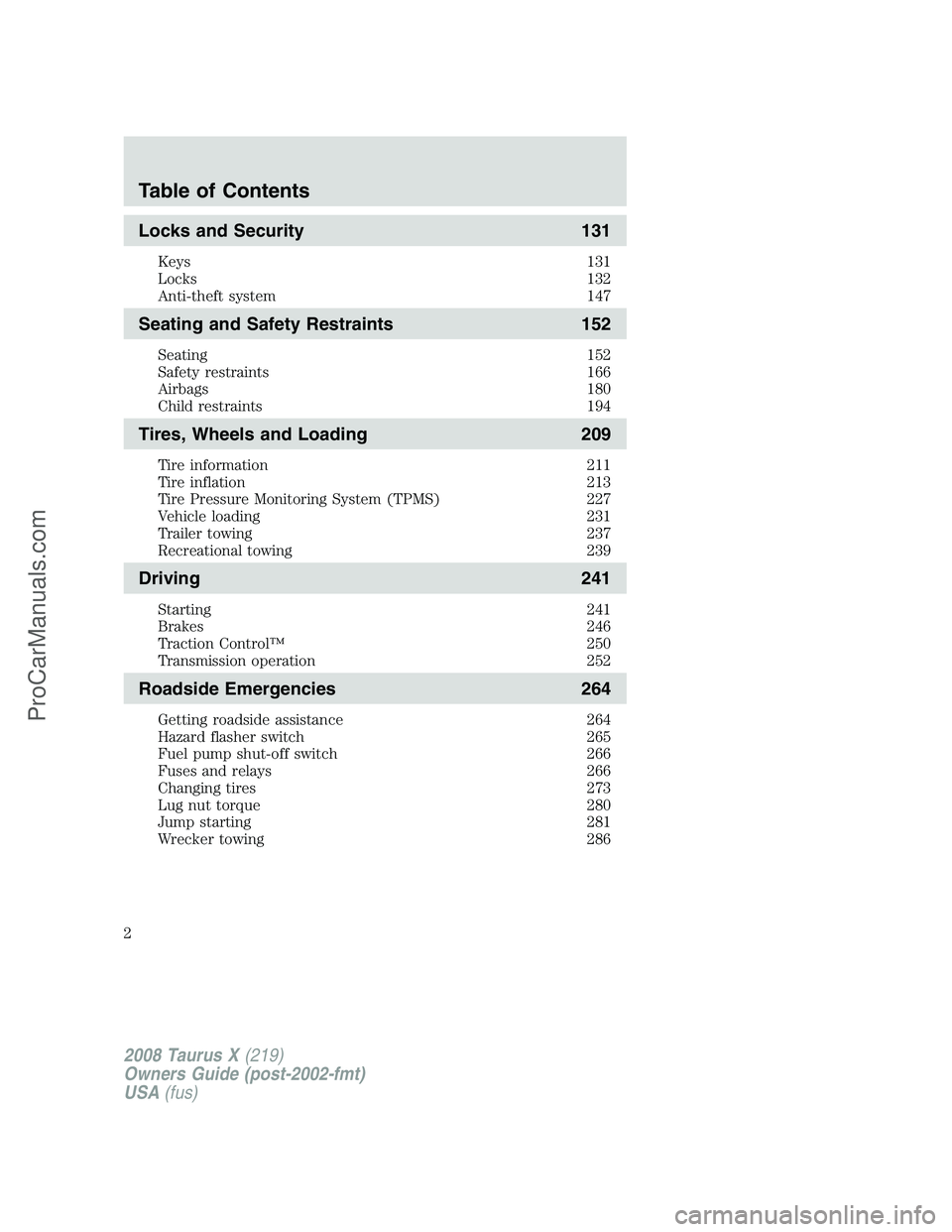
Locks and Security 131
Keys 131
Locks 132
Anti-theft system 147
Seating and Safety Restraints 152
Seating 152
Safety restraints 166
Airbags 180
Child restraints 194
Tires, Wheels and Loading 209
Tire information 211
Tire inflation 213
Tire Pressure Monitoring System (TPMS) 227
Vehicle loading 231
Trailer towing 237
Recreational towing 239
Driving 241
Starting 241
Brakes 246
Traction Control™ 250
Transmission operation 252
Roadside Emergencies 264
Getting roadside assistance 264
Hazard flasher switch 265
Fuel pump shut-off switch 266
Fuses and relays 266
Changing tires 273
Lug nut torque 280
Jump starting 281
Wrecker towing 286
Table of Contents
2
2008 Taurus X(219)
Owners Guide (post-2002-fmt)
USA(fus)
ProCarManuals.com
Page 8 of 352
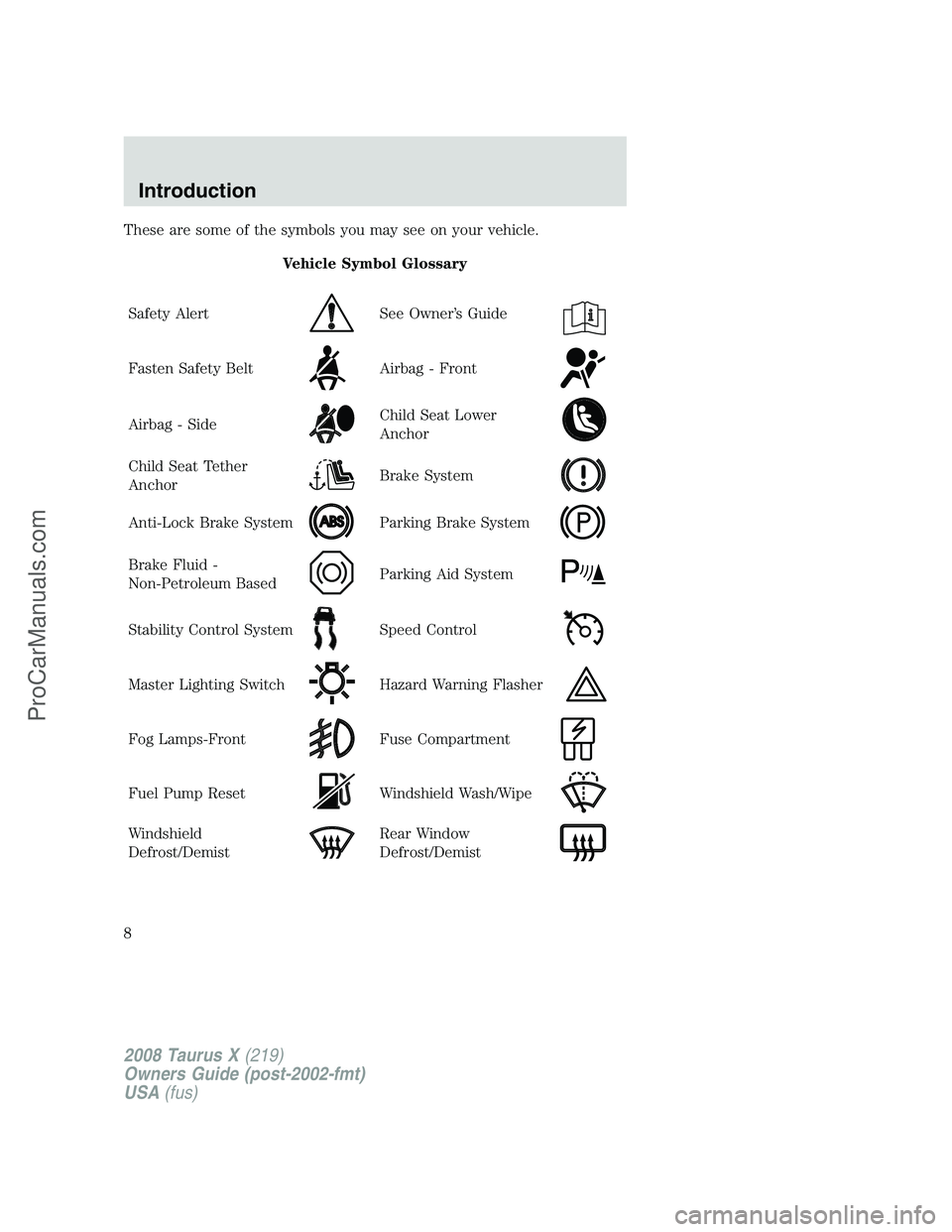
These are some of the symbols you may see on your vehicle.
Vehicle Symbol Glossary
Safety Alert
See Owner’s Guide
Fasten Safety BeltAirbag - Front
Airbag - SideChild Seat Lower
Anchor
Child Seat Tether
AnchorBrake System
Anti-Lock Brake SystemParking Brake System
Brake Fluid -
Non-Petroleum BasedParking Aid System
Stability Control SystemSpeed Control
Master Lighting SwitchHazard Warning Flasher
Fog Lamps-FrontFuse Compartment
Fuel Pump ResetWindshield Wash/Wipe
Windshield
Defrost/DemistRear Window
Defrost/Demist
2008 Taurus X(219)
Owners Guide (post-2002-fmt)
USA(fus)
Introduction
8
ProCarManuals.com
Page 9 of 352
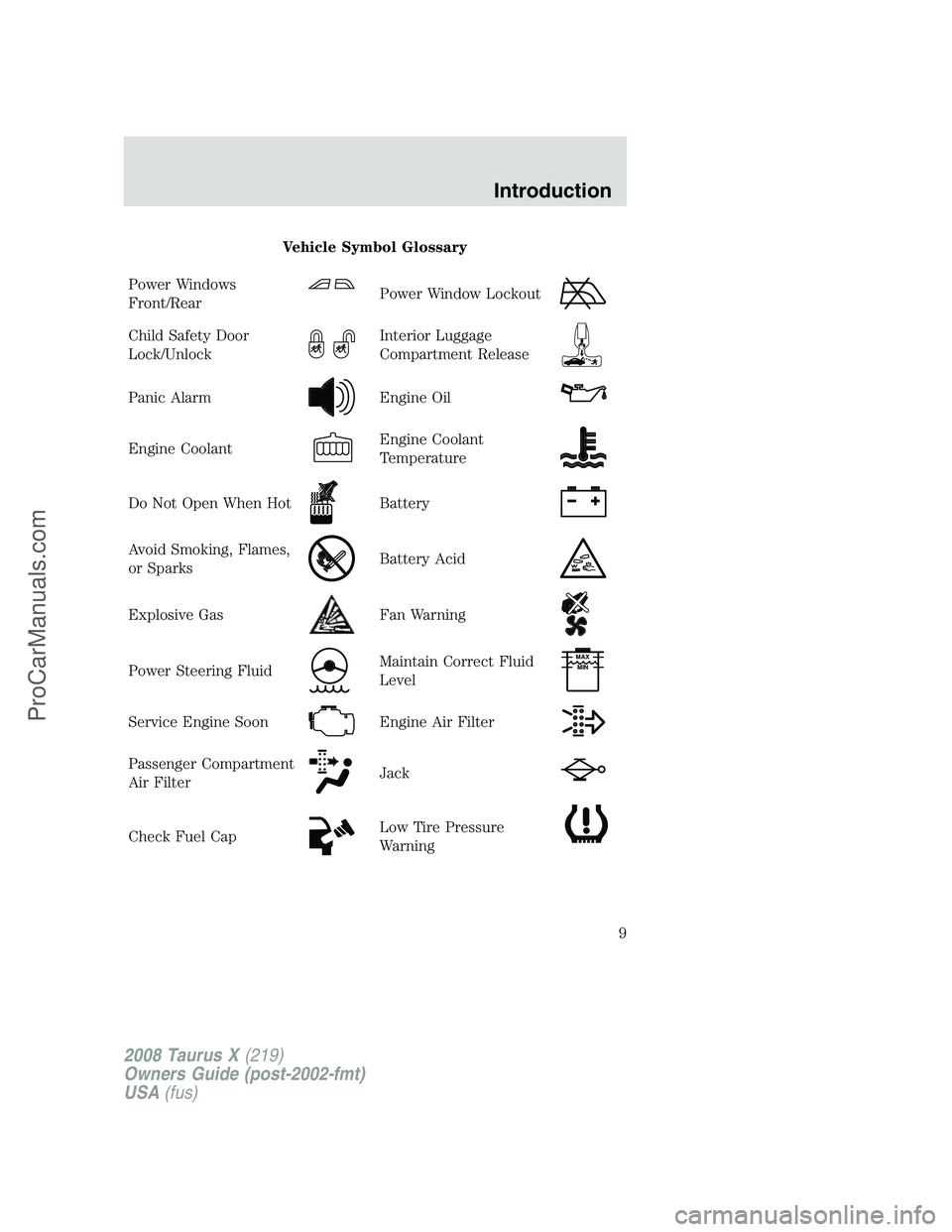
Vehicle Symbol Glossary
Power Windows
Front/Rear
Power Window Lockout
Child Safety Door
Lock/UnlockInterior Luggage
Compartment Release
Panic AlarmEngine Oil
Engine CoolantEngine Coolant
Temperature
Do Not Open When HotBattery
Avoid Smoking, Flames,
or SparksBattery Acid
Explosive GasFan Warning
Power Steering FluidMaintain Correct Fluid
LevelMAX
MIN
Service Engine SoonEngine Air Filter
Passenger Compartment
Air FilterJack
Check Fuel CapLow Tire Pressure
Warning
2008 Taurus X(219)
Owners Guide (post-2002-fmt)
USA(fus)
Introduction
9
ProCarManuals.com
Page 11 of 352
Under engine misfire conditions, excessive exhaust temperatures
could damage the catalytic converter, the fuel system, interior
floor coverings or other vehicle components, possibly causing a fire.
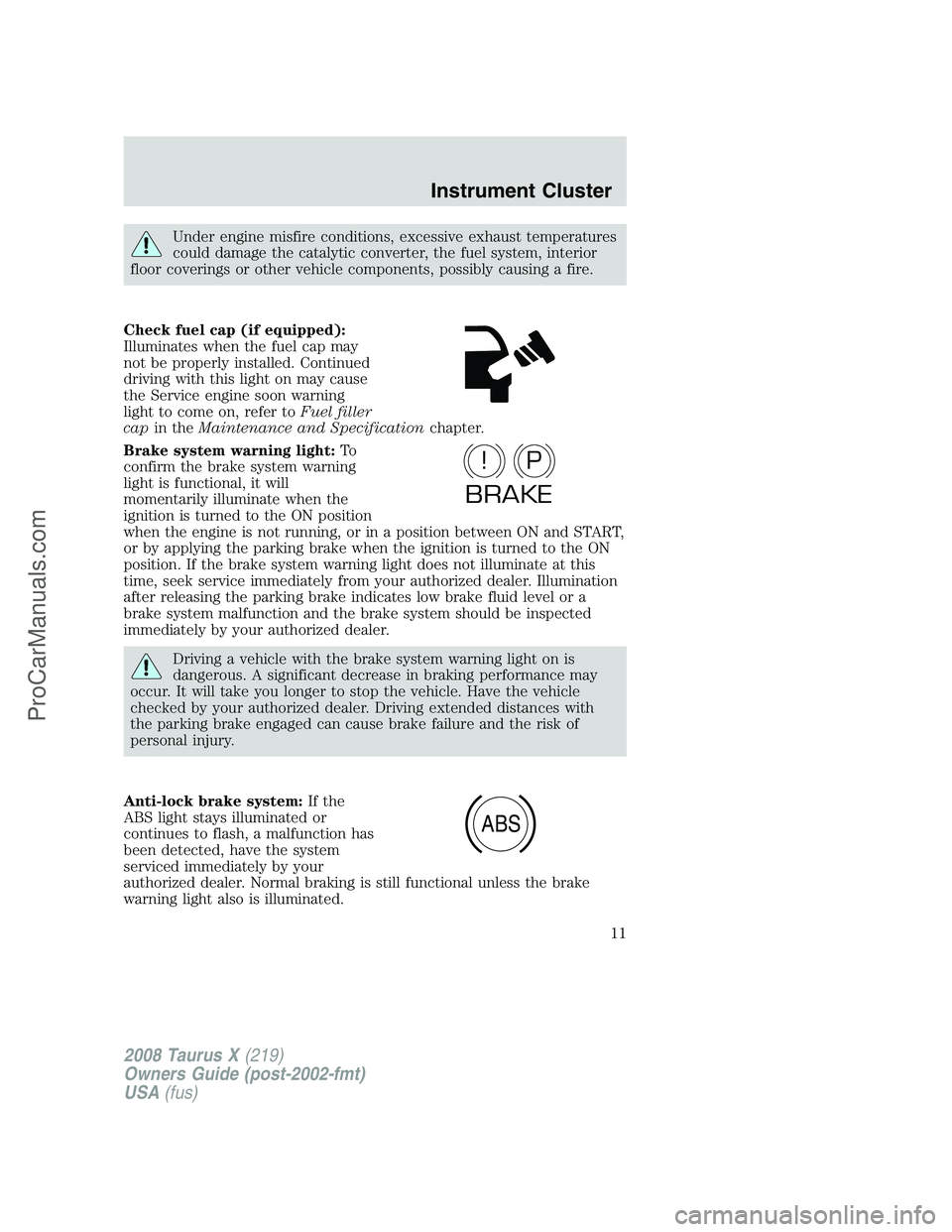
Check fuel cap (if equipped):
Illuminates when the fuel cap may
not be properly installed. Continued
driving with this light on may cause
the Service engine soon warning
light to come on, refer toFuel filler
capin theMaintenance and Specificationchapter.
Brake system warning light:To
confirm the brake system warning
light is functional, it will
momentarily illuminate when the
ignition is turned to the ON position
when the engine is not running, or in a position between ON and START,
or by applying the parking brake when the ignition is turned to the ON
position. If the brake system warning light does not illuminate at this
time, seek service immediately from your authorized dealer. Illumination
after releasing the parking brake indicates low brake fluid level or a
brake system malfunction and the brake system should be inspected
immediately by your authorized dealer.
Driving a vehicle with the brake system warning light on is
dangerous. A significant decrease in braking performance may
occur. It will take you longer to stop the vehicle. Have the vehicle
checked by your authorized dealer. Driving extended distances with
the parking brake engaged can cause brake failure and the risk of
personal injury.
Anti-lock brake system:If the
ABS light stays illuminated or
continues to flash, a malfunction has
been detected, have the system
serviced immediately by your
authorized dealer. Normal braking is still functional unless the brake
warning light also is illuminated.
P!
BRAKE
ABS
2008 Taurus X(219)
Owners Guide (post-2002-fmt)
USA(fus)
Instrument Cluster
11
ProCarManuals.com
Page 13 of 352
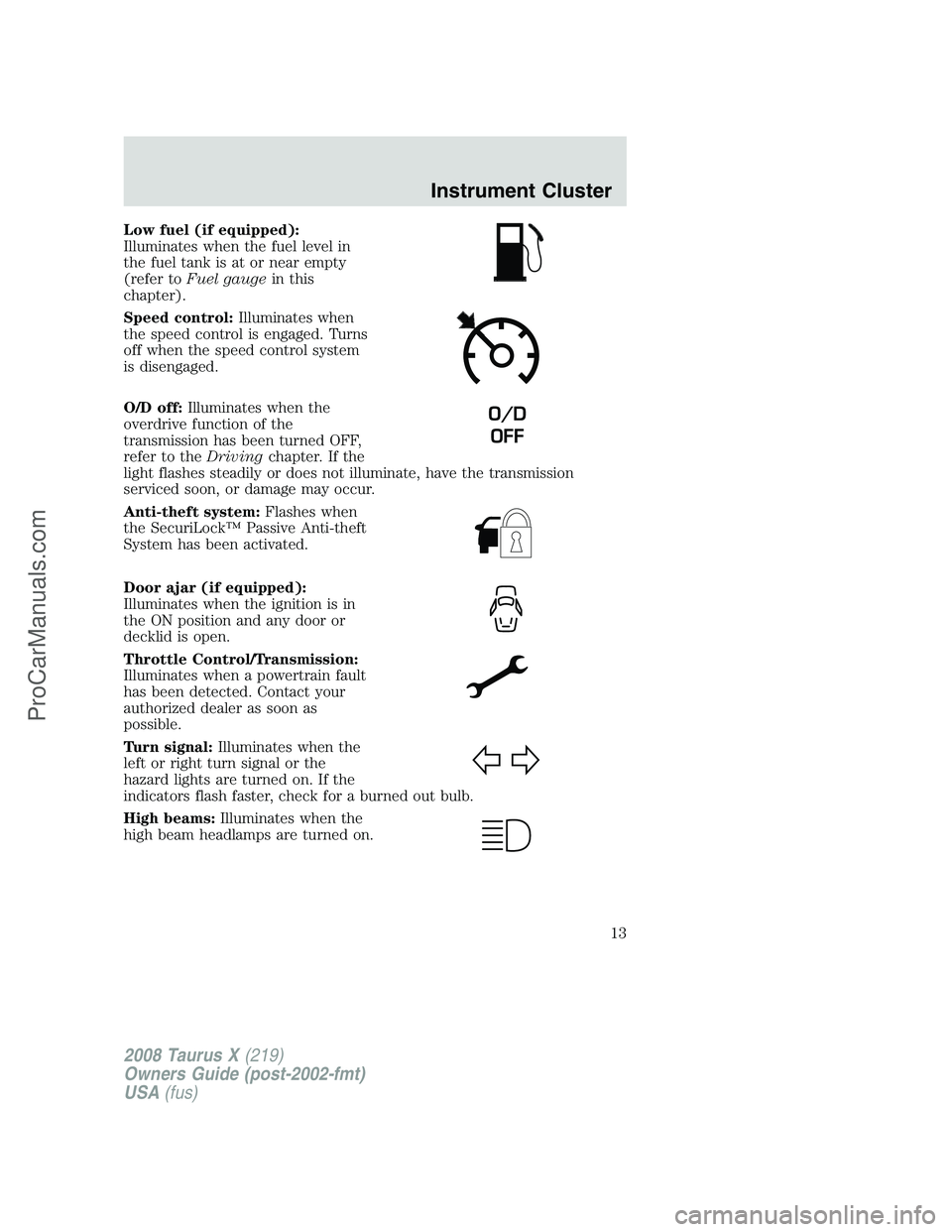
Low fuel (if equipped):
Illuminates when the fuel level in
the fuel tank is at or near empty
(refer toFuel gaugein this
chapter).
Speed control:Illuminates when
the speed control is engaged. Turns
off when the speed control system
is disengaged.
O/D off:Illuminates when the
overdrive function of the
transmission has been turned OFF,
refer to theDrivingchapter. If the
light flashes steadily or does not illuminate, have the transmission
serviced soon, or damage may occur.
Anti-theft system:Flashes when
the SecuriLock™ Passive Anti-theft
System has been activated.
Door ajar (if equipped):
Illuminates when the ignition is in
the ON position and any door or
decklid is open.
Throttle Control/Transmission:
Illuminates when a powertrain fault
has been detected. Contact your
authorized dealer as soon as
possible.
Turn signal:Illuminates when the
left or right turn signal or the
hazard lights are turned on. If the
indicators flash faster, check for a burned out bulb.
High beams:Illuminates when the
high beam headlamps are turned on.
O/D
OFF
2008 Taurus X(219)
Owners Guide (post-2002-fmt)
USA(fus)
Instrument Cluster
13
ProCarManuals.com
Page 14 of 352
Key-in-ignition warning chime:Sounds when the key is left in the
ignition in the OFF/LOCK or ACCESSORY position and the driver’s door
is opened.
Headlamps on warning chime:Sounds when the headlamps or parking
lamps are on, the ignition is off (the key is not in the ignition) and the
driver’s door is opened.
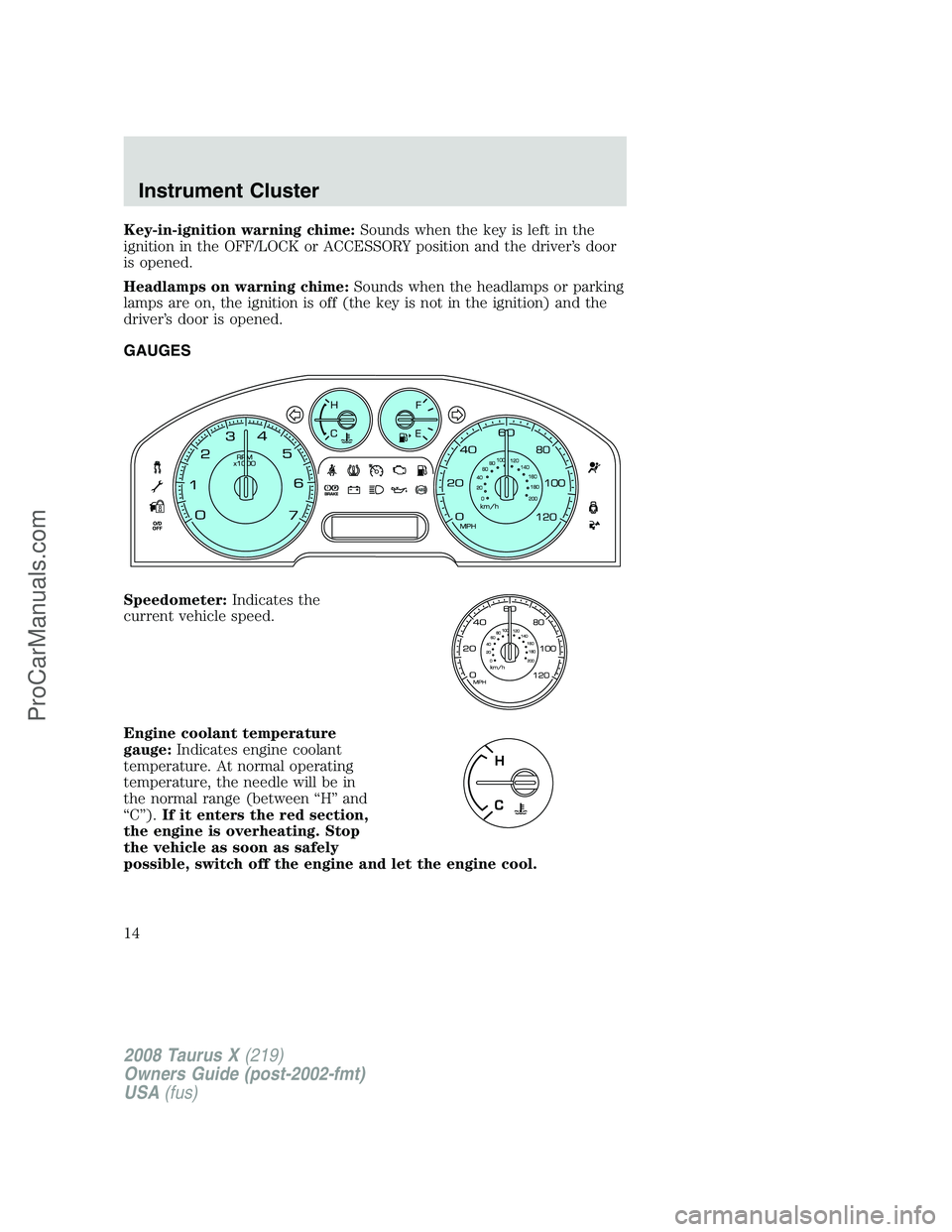
GAUGES
Speedometer:Indicates the
current vehicle speed.
Engine coolant temperature
gauge:Indicates engine coolant
temperature. At normal operating
temperature, the needle will be in
the normal range (between “H” and
“C”).If it enters the red section,
the engine is overheating. Stop
the vehicle as soon as safely
possible, switch off the engine and let the engine cool.
2008 Taurus X(219)
Owners Guide (post-2002-fmt)
USA(fus)
Instrument Cluster
14
ProCarManuals.com
Page 21 of 352
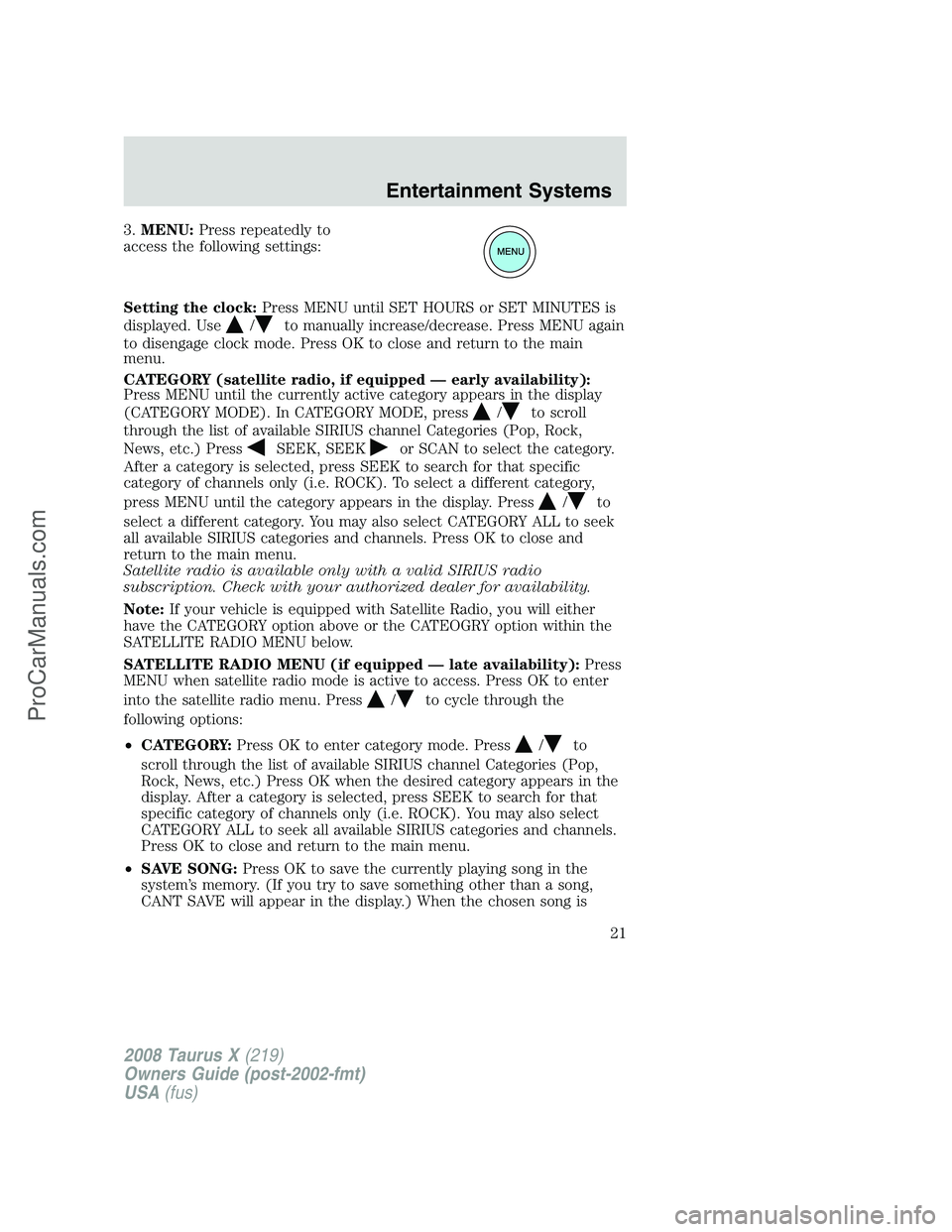
3.MENU:Press repeatedly to
access the following settings:
Setting the clock:Press MENU until SET HOURS or SET MINUTES is
displayed. Use
/to manually increase/decrease. Press MENU again
to disengage clock mode. Press OK to close and return to the main
menu.
CATEGORY (satellite radio, if equipped — early availability):
Press MENU until the currently active category appears in the display
(CATEGORY MODE). In CATEGORY MODE, press
/to scroll
through the list of available SIRIUS channel Categories (Pop, Rock,
News, etc.) Press
SEEK, SEEKor SCAN to select the category.
After a category is selected, press SEEK to search for that specific
category of channels only (i.e. ROCK). To select a different category,
press MENU until the category appears in the display. Press
/to
select a different category. You may also select CATEGORY ALL to seek
all available SIRIUS categories and channels. Press OK to close and
return to the main menu.
Satellite radio is available only with a valid SIRIUS radio
subscription. Check with your authorized dealer for availability.
Note:If your vehicle is equipped with Satellite Radio, you will either
have the CATEGORY option above or the CATEOGRY option within the
SATELLITE RADIO MENU below.
SATELLITE RADIO MENU (if equipped — late availability):Press
MENU when satellite radio mode is active to access. Press OK to enter
into the satellite radio menu. Press
/to cycle through the
following options:
•CATEGORY:Press OK to enter category mode. Press
/to
scroll through the list of available SIRIUS channel Categories (Pop,
Rock, News, etc.) Press OK when the desired category appears in the
display. After a category is selected, press SEEK to search for that
specific category of channels only (i.e. ROCK). You may also select
CATEGORY ALL to seek all available SIRIUS categories and channels.
Press OK to close and return to the main menu.
•SAVE SONG:Press OK to save the currently playing song in the
system’s memory. (If you try to save something other than a song,
CANT SAVE will appear in the display.) When the chosen song is
2008 Taurus X(219)
Owners Guide (post-2002-fmt)
USA(fus)
Entertainment Systems
21
ProCarManuals.com
Page 29 of 352
3.MENU:Press repeatedly to
access to the following settings:
Setting the clock:Press until SELECT HOURS or SELECT MINUTES is
displayed. Press
/to adjust the hours/minutes.
CATEGORY (satellite radio, if equipped- early availability):Press
MENU until the currently active category appears in the display
(CATEGORY MODE). In CATEGORY MODE, press
/to scroll
through the list of available SIRIUS channel Categories (Pop, Rock,
News, etc.) Press
SEEKor SCAN to select the category. After a
category is selected, press SEEK to search for that specific category of
channels only (i.e. ROCK). To select a different category, press MENU
until the category appears in the display. Press
/to select a
different category. You may also select CATEGORY ALL to seek all
available SIRIUS categories and channels. Press OK to close and return
to the main menu.
Satellite radio is available only with a valid SIRIUS radio
subscription. Check with your authorized dealer for availability.
Note:If your vehicle is equipped with Satellite Radio, you will either
have the CATEGORY option above or the CATEOGRY option within the
SATELLITE RADIO MENU below.
SATELLITE RADIO MENU (if equipped — late availability):Press
MENU when satellite radio mode is active to access. Press OK to enter
into the satellite radio menu. Press
/to cycle through the
following options:
•CATEGORY:Press OK to enter category mode. Press
/to
scroll through the list of available SIRIUS channel Categories (Pop,
Rock, News, etc.) Press OK when the desired category appears in the
display. After a category is selected, press SEEK to search for that
specific category of channels only (i.e. ROCK). You may also select
CATEGORY ALL to seek all available SIRIUS categories and channels.
Press OK to close and return to the main menu.
2008 Taurus X(219)
Owners Guide (post-2002-fmt)
USA(fus)
Entertainment Systems
29
ProCarManuals.com
Page 32 of 352
SPEEDVOL (Speed sensitive volume, if equipped):Press MENU to
reach the SPEEDVOL setting. Radio volume automatically gets louder
with increasing vehicle speed to compensate for road and wind noise.
Use
//SEEK, SEEKto adjust. Press OK to close and
return to the main menu.
The default setting isoff;increasing your vehicle speed will not change
the volume level.
Adjust1–7:Increasing this setting from 1 (lowest setting) to 7 (highest
setting) allows the radio volume to automatically change slightly with
vehicle speed to compensate for road and wind noise.
Recommended level is1–3;SPEED OFF turns the feature off and level 7
is the maximum setting.
Track/Folder Mode:Available only on MP3 discs in CD mode. In Track
Mode, pressing
SEEKwill scroll through all tracks on the disc.
In Folder mode, pressing
SEEKwill scroll only through tracks
within the selected folder.
Press
FOLDER, FOLDERto access the previous/next folder (if
available). Press OK to close and return to the main menu.
COMPRESS (Compression):Available only in CD/MP3 mode. Press
MENU until COMPRESS ON/OFF appears in the display. Use
//
SEEK, SEEKto toggle ON/OFF. When COMPRESS is ON, the
system will bring soft and loud CD passages together for a more
consistent listening level. Press OK to close and return to the main
menu.
Single Play/Dual Play:If Single Play is ON, press
/for Dual Play.
For further information on Single Play/Dual Play, refer toRear seat
controlslater in this chapter.
FES(FULL/LOCKED): If this appears in your display, your vehicle is
equipped with a Family Entertaiment DVD system. For further
information on the DVD system, refer toFamily entertainment DVD
systemlater in this chapter.
4.AUX:Press repeatedly to cycle
through FES/DVD (if equipped)
LINE IN (Auxiliary audio), SAT1,
SAT2, SAT3 (Satellite radio modes, if equipped) and SYNC (if equipped).
To return to radio mode, press AM/FM.
For location and further information on the auxiliary audio mode, refer
toAuxiliary input jacklater in this chapter.
2008 Taurus X(219)
Owners Guide (post-2002-fmt)
USA(fus)
Entertainment Systems
32
ProCarManuals.com
Page 44 of 352
Radio Display Condition Action Required
NO TEXT Song title information
not available.Song title information
not available at this
time on this channel.
The system is working
properly.
NO TEXT Category information
not available.Category information
not available at this
time on this channel.
The system is working
properly.
NO SIGNAL Loss of signal from
the SIRIUS satellite or
SIRIUS tower to the
vehicle antenna.You are in a location
that is blocking the
SIRIUS signal (i.e.,
tunnel, under an
overpass, dense foliage,
etc). The system is
working properly. When
you move into an open
area, the signal should
return.
UPDATING Update of channel
programming in
progress.No action required. The
process may take up to
three minutes.
CALL SIRIUS
1–888–539–7474Satellite service has
been deactivated by
SIRIUS Satellite
Radio.Call SIRIUS at
1–888–539–7474 to
re-activate or resolve
subscription issues.
FAMILY ENTERTAINMENT DVD SYSTEM (IF EQUIPPED)
Driving while distracted can result in loss of vehicle control,
accident and injury. Ford strongly recommends that drivers use
extreme caution when using any device that may take their focus off
the road. The drivers primary responsibility is the safe operation of
their vehicle. Only use cell phones and other devices not essential to
the driving task when it is safe to do so.
2008 Taurus X(219)
Owners Guide (post-2002-fmt)
USA(fus)
Entertainment Systems
44
ProCarManuals.com