clock FORD FUSION 2018 User Guide
[x] Cancel search | Manufacturer: FORD, Model Year: 2018, Model line: FUSION, Model: FORD FUSION 2018Pages: 539, PDF Size: 6.42 MB
Page 275 of 539
ADJUSTING THE HEADLAMPS
Vertical Aim Adjustment
The headlamps on your vehicle are
properly aimed at the assembly plant. If
your vehicle has been in an accident, the
alignment of your headlamps should be
checked by your authorized dealer.
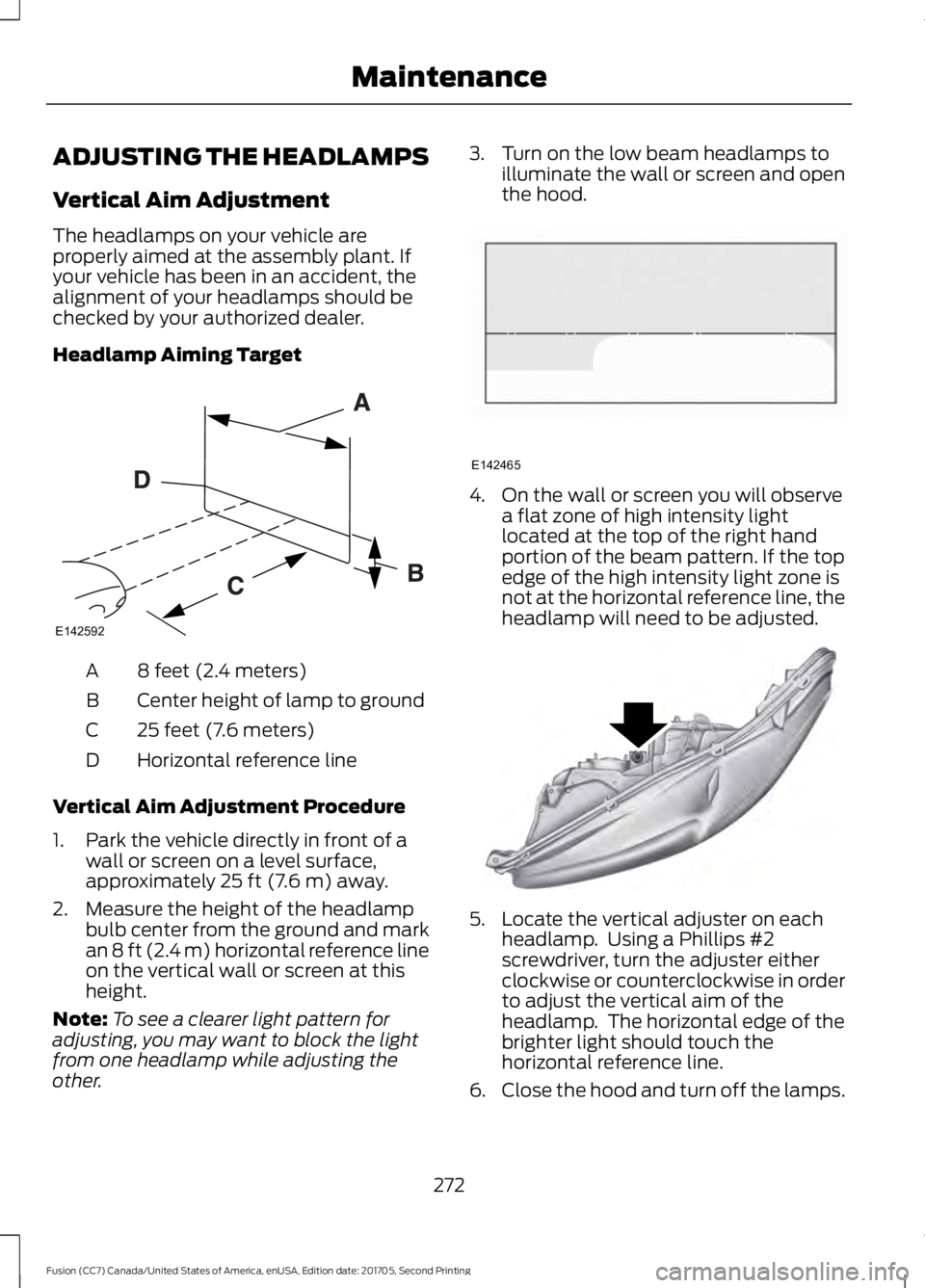
Headlamp Aiming Target
8 feet (2.4 meters)
A
Center height of lamp to ground
B
25 feet (7.6 meters)
C
Horizontal reference line
D
Vertical Aim Adjustment Procedure
1. Park the vehicle directly in front of a wall or screen on a level surface,
approximately 25 ft (7.6 m) away.
2. Measure the height of the headlamp bulb center from the ground and mark
an
8 ft (2.4 m) horizontal reference line
on the vertical wall or screen at this
height.
Note: To see a clearer light pattern for
adjusting, you may want to block the light
from one headlamp while adjusting the
other. 3. Turn on the low beam headlamps to
illuminate the wall or screen and open
the hood. 4. On the wall or screen you will observe
a flat zone of high intensity light
located at the top of the right hand
portion of the beam pattern. If the top
edge of the high intensity light zone is
not at the horizontal reference line, the
headlamp will need to be adjusted. 5. Locate the vertical adjuster on each
headlamp. Using a Phillips #2
screwdriver, turn the adjuster either
clockwise or counterclockwise in order
to adjust the vertical aim of the
headlamp. The horizontal edge of the
brighter light should touch the
horizontal reference line.
6. Close the hood and turn off the lamps.
272
Fusion (CC7) Canada/United States of America, enUSA, Edition date: 201705, Second Printing MaintenanceE142592 E142465 E145594
Page 276 of 539
Horizontal Aim Adjustment
Horizontal aim is not required for this
vehicle and is not adjustable.
CHANGING A BULB
WARNINGS
Switch the lamps and the ignition off.
Failure to follow this warning could
result in serious personal injury.
Bulbs can become hot. Let the bulb
cool down before removing it. Failure
to do so could result in personal
injury. Use the correct specification bulb. See
Bulb Specification Chart (page 339).
Install in the reverse order unless otherwise
stated.
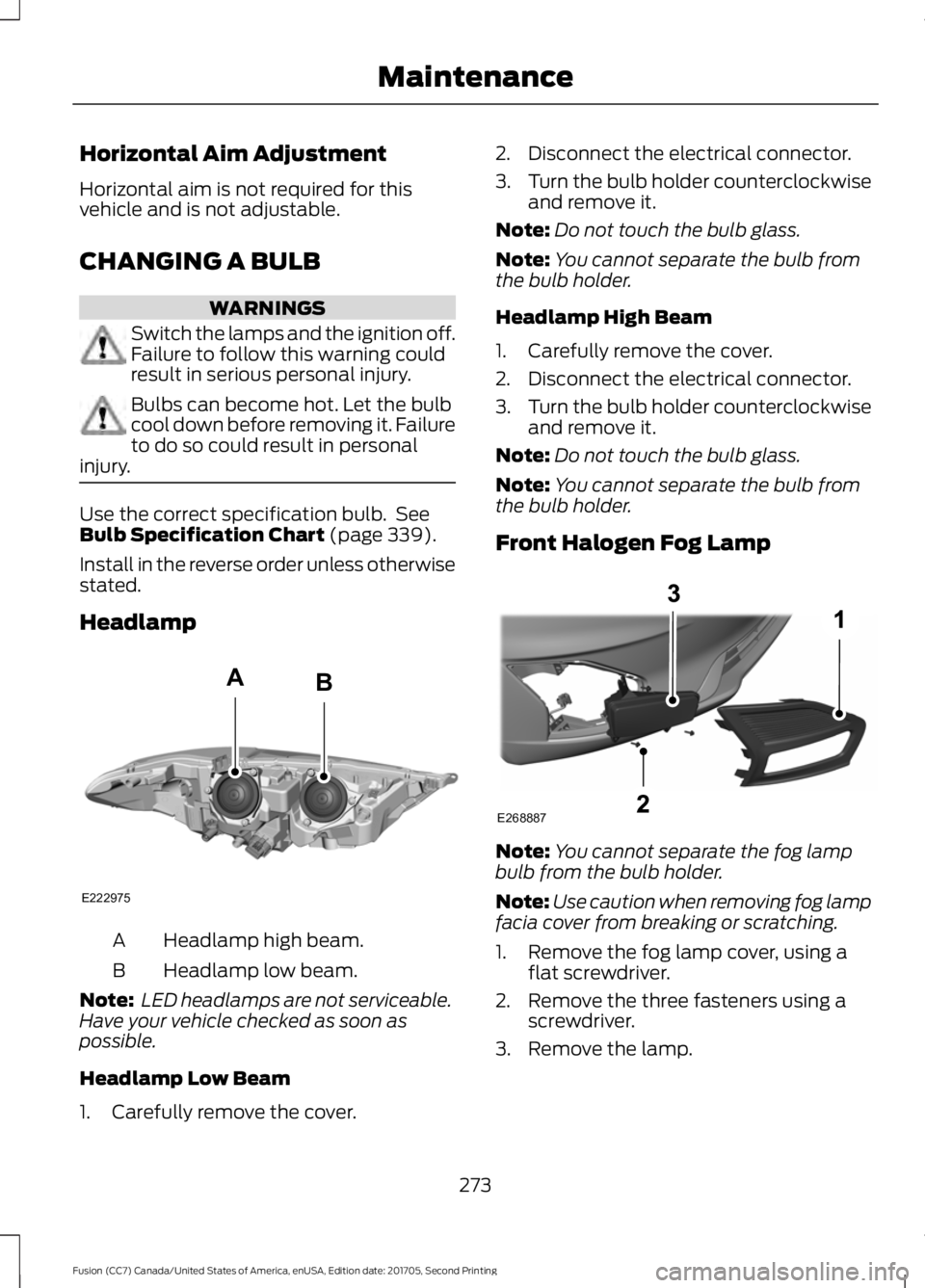
Headlamp Headlamp high beam.
A
Headlamp low beam.
B
Note: LED headlamps are not serviceable.
Have your vehicle checked as soon as
possible.
Headlamp Low Beam
1. Carefully remove the cover. 2. Disconnect the electrical connector.
3.
Turn the bulb holder counterclockwise
and remove it.
Note: Do not touch the bulb glass.
Note: You cannot separate the bulb from
the bulb holder.
Headlamp High Beam
1. Carefully remove the cover.
2. Disconnect the electrical connector.
3. Turn the bulb holder counterclockwise
and remove it.
Note: Do not touch the bulb glass.
Note: You cannot separate the bulb from
the bulb holder.
Front Halogen Fog Lamp Note:
You cannot separate the fog lamp
bulb from the bulb holder.
Note: Use caution when removing fog lamp
facia cover from breaking or scratching.
1. Remove the fog lamp cover, using a flat screwdriver.
2. Remove the three fasteners using a screwdriver.
3. Remove the lamp.
273
Fusion (CC7) Canada/United States of America, enUSA, Edition date: 201705, Second Printing MaintenanceE222975
AB E268887
Page 277 of 539
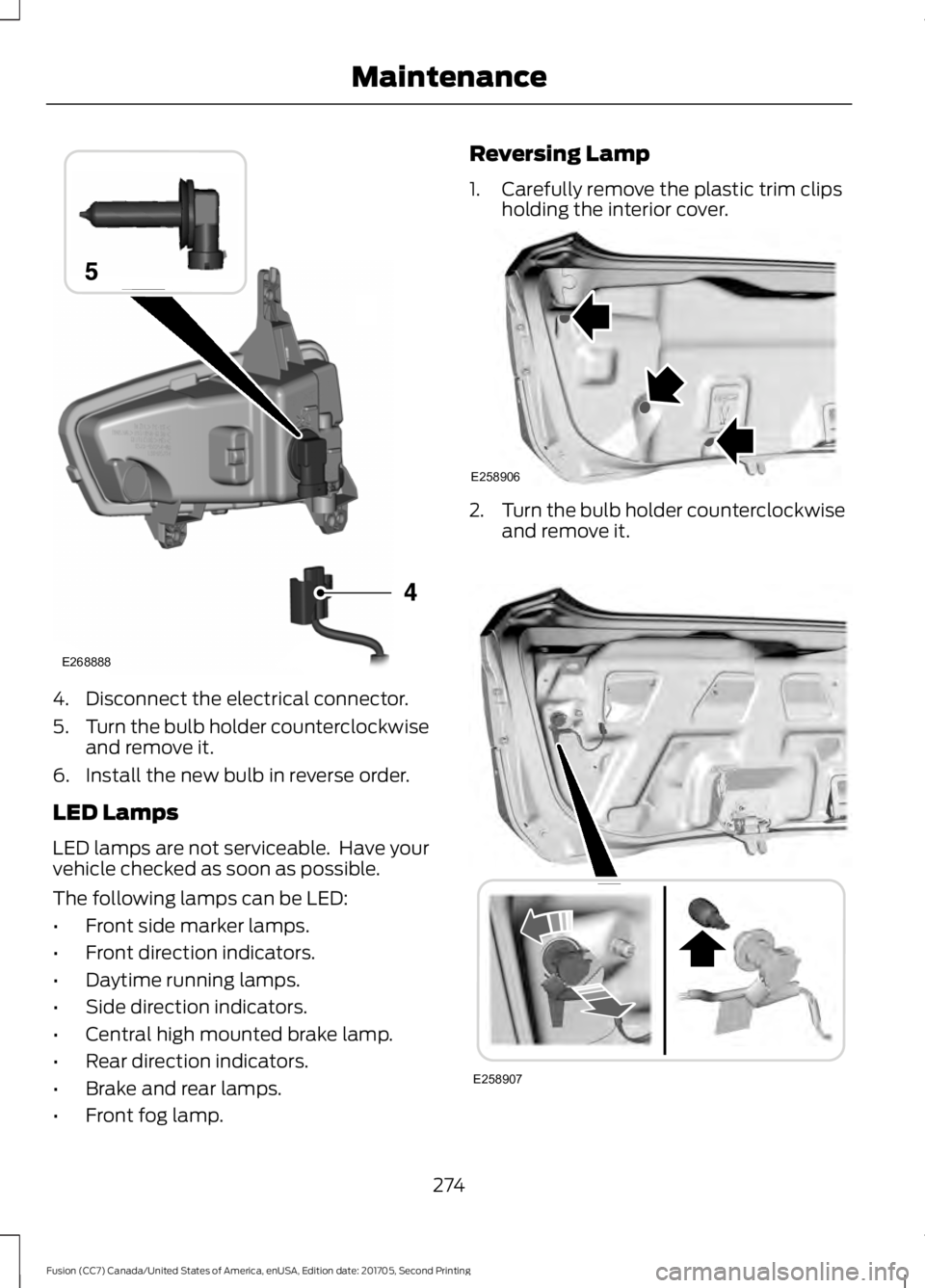
4. Disconnect the electrical connector.
5.
Turn the bulb holder counterclockwise
and remove it.
6. Install the new bulb in reverse order.
LED Lamps
LED lamps are not serviceable. Have your
vehicle checked as soon as possible.
The following lamps can be LED:
• Front side marker lamps.
• Front direction indicators.
• Daytime running lamps.
• Side direction indicators.
• Central high mounted brake lamp.
• Rear direction indicators.
• Brake and rear lamps.
• Front fog lamp. Reversing Lamp
1. Carefully remove the plastic trim clips
holding the interior cover. 2.
Turn the bulb holder counterclockwise
and remove it. 274
Fusion (CC7) Canada/United States of America, enUSA, Edition date: 201705, Second Printing MaintenanceE268888 E258906 E258907
Page 278 of 539
3. Press the bulb in and turn the bulb
counterclockwise to remove it.
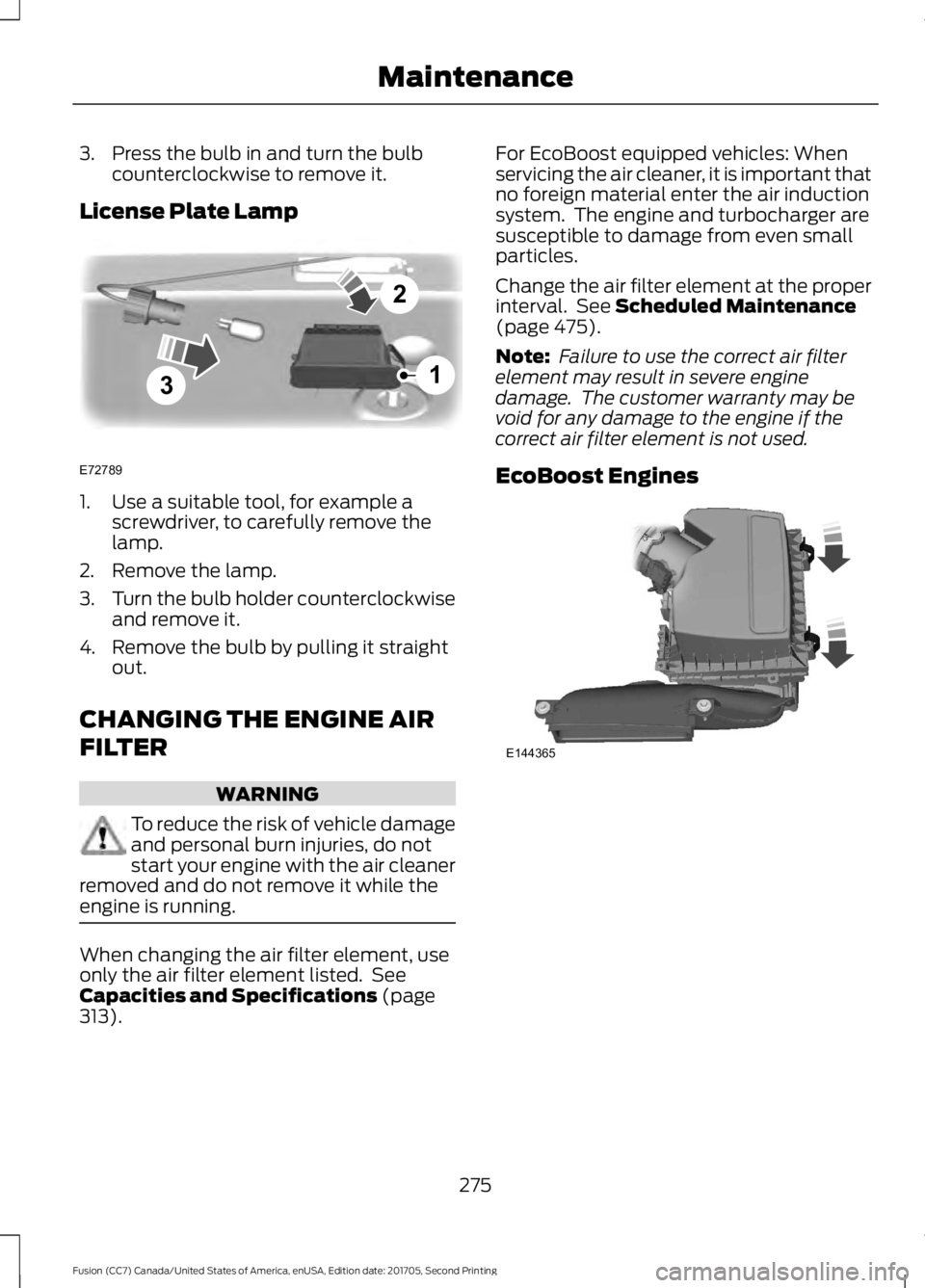
License Plate Lamp 1. Use a suitable tool, for example a
screwdriver, to carefully remove the
lamp.
2. Remove the lamp.
3. Turn the bulb holder counterclockwise
and remove it.
4. Remove the bulb by pulling it straight out.
CHANGING THE ENGINE AIR
FILTER WARNING
To reduce the risk of vehicle damage
and personal burn injuries, do not
start your engine with the air cleaner
removed and do not remove it while the
engine is running. When changing the air filter element, use
only the air filter element listed. See
Capacities and Specifications (page
313). For EcoBoost equipped vehicles: When
servicing the air cleaner, it is important that
no foreign material enter the air induction
system. The engine and turbocharger are
susceptible to damage from even small
particles.
Change the air filter element at the proper
interval. See
Scheduled Maintenance
(page 475).
Note: Failure to use the correct air filter
element may result in severe engine
damage. The customer warranty may be
void for any damage to the engine if the
correct air filter element is not used.
EcoBoost Engines 275
Fusion (CC7) Canada/United States of America, enUSA, Edition date: 201705, Second Printing Maintenance3
2
1
E72789 E144365
Page 309 of 539
Changing a Road Wheel Procedure
WARNINGS
When one of the front wheels is off
the ground, the transmission alone
will not prevent the vehicle from
moving or slipping off the jack, even if the
transmission is in park (P). To help prevent your vehicle from
moving when changing a wheel, shift
the transmission into park (P), set
the parking brake and use an appropriate
block or wheel chock to secure the wheel
diagonally opposite to the wheel being
changed. For example, when changing the
front left wheel, place an appropriate block
or wheel chock on the right rear wheel. Do not work on your vehicle when
the jack is the only support. If the
vehicle slips off the jack, you or
someone else could be seriously injured. Do not attempt to change a tire on
the side of the vehicle close to
moving traffic. Pull far enough off the
road to avoid the danger of being hit when
operating the jack or changing the wheel. Always use the jack provided as
original equipment with your vehicle.
If using a jack other than the one
provided, make sure the jack capacity is
adequate for the vehicle weight, including
any vehicle cargo or modifications. If you
are unsure if the jack capacity is adequate,
contact the authorized dealer. Note:
Passengers should not remain in your
vehicle when the vehicle is being jacked.
1. Park on a level surface, set the parking
brake and activate the hazard flashers.
2. Place the transmission in park (P) and
turn the engine off. For vehicles with a
manual transmission, place the
transmission in reverse (R) after the
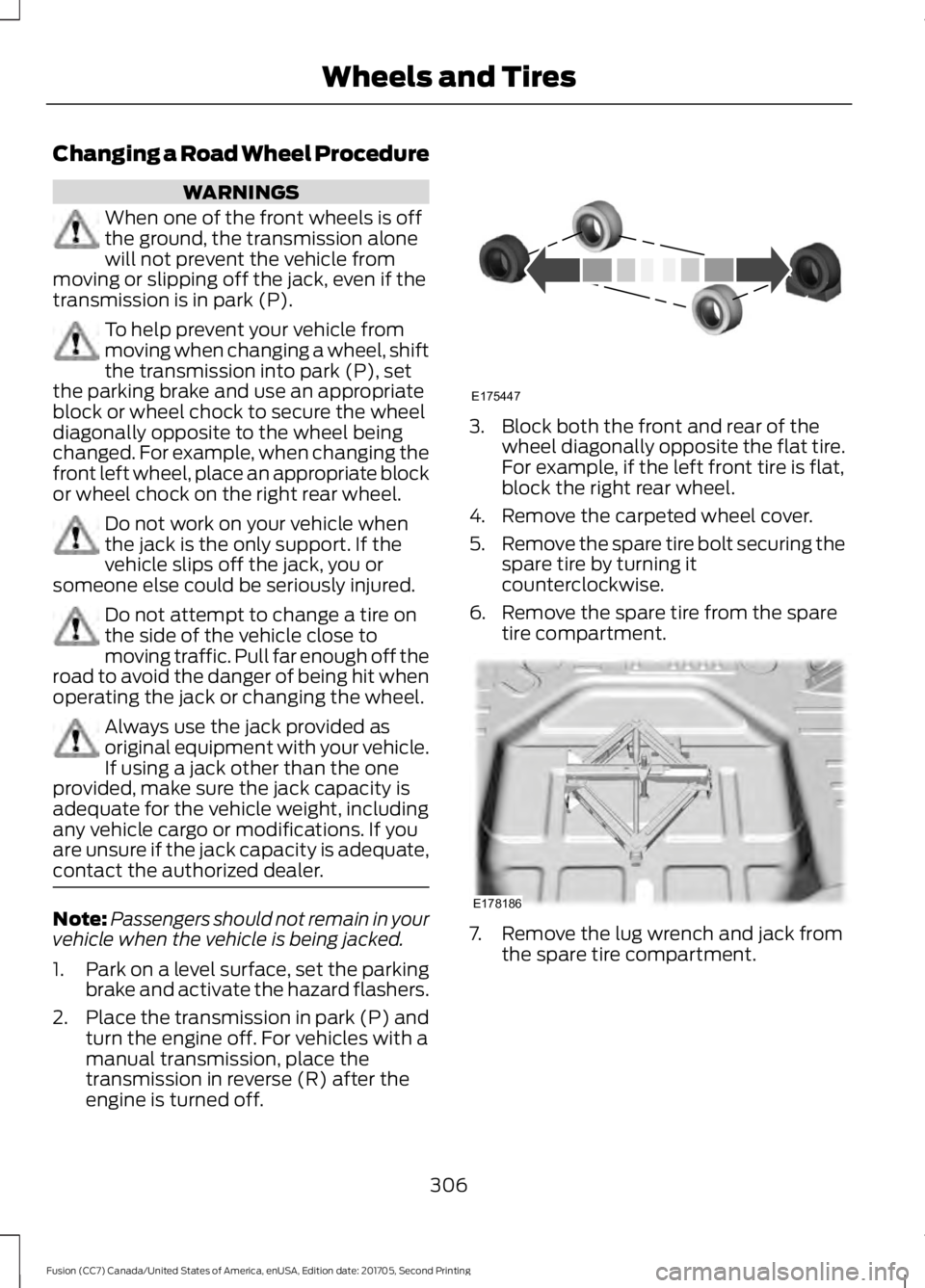
engine is turned off. 3. Block both the front and rear of the
wheel diagonally opposite the flat tire.
For example, if the left front tire is flat,
block the right rear wheel.
4. Remove the carpeted wheel cover.
5. Remove the spare tire bolt securing the
spare tire by turning it
counterclockwise.
6. Remove the spare tire from the spare tire compartment. 7. Remove the lug wrench and jack from
the spare tire compartment.
306
Fusion (CC7) Canada/United States of America, enUSA, Edition date: 201705, Second Printing Wheels and TiresE175447 E178186
Page 310 of 539
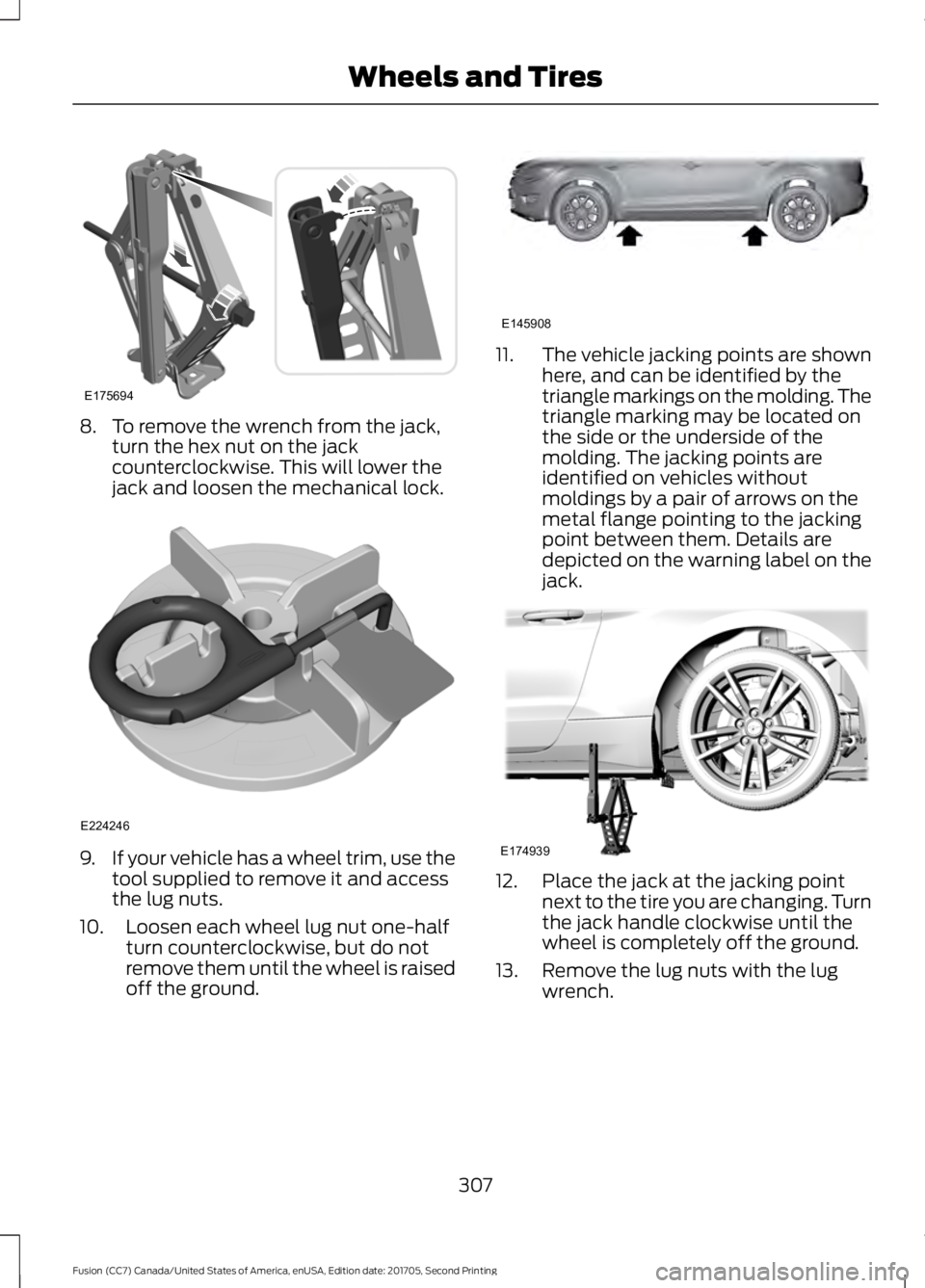
8. To remove the wrench from the jack,
turn the hex nut on the jack
counterclockwise. This will lower the
jack and loosen the mechanical lock. 9.
If your vehicle has a wheel trim, use the
tool supplied to remove it and access
the lug nuts.
10. Loosen each wheel lug nut one-half turn counterclockwise, but do not
remove them until the wheel is raised
off the ground. 11.
The vehicle jacking points are shown
here, and can be identified by the
triangle markings on the molding. The
triangle marking may be located on
the side or the underside of the
molding. The jacking points are
identified on vehicles without
moldings by a pair of arrows on the
metal flange pointing to the jacking
point between them. Details are
depicted on the warning label on the
jack. 12. Place the jack at the jacking point
next to the tire you are changing. Turn
the jack handle clockwise until the
wheel is completely off the ground.
13. Remove the lug nuts with the lug wrench.
307
Fusion (CC7) Canada/United States of America, enUSA, Edition date: 201705, Second Printing Wheels and TiresE175694 E224246 E145908 E174939
Page 311 of 539
14. Replace the flat tire with the spare
tire, making sure the valve stem is
facing outward. Reinstall the lug nuts
until the wheel is snug against the
hub. Do not fully tighten the lug nuts
until the wheel has been lowered. If
you are using the temporary tire, the
lug nut washers will not appear to be
flush with the rim. This is normal only
when using the temporary spare tire.
15. Lower the wheel by turning the jack handle counterclockwise. 16.
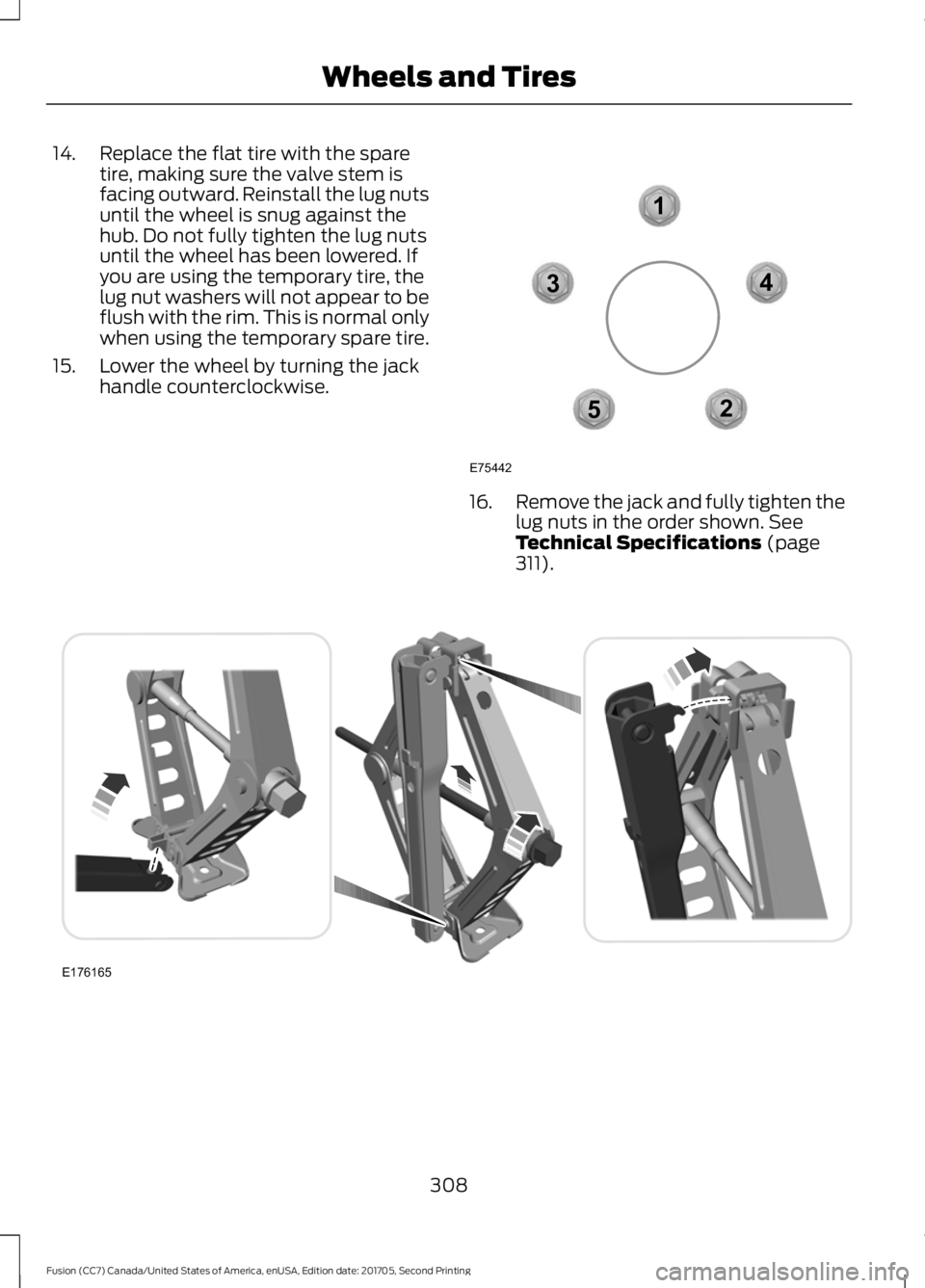
Remove the jack and fully tighten the
lug nuts in the order shown. See
Technical Specifications (page
311). 308
Fusion (CC7) Canada/United States of America, enUSA, Edition date: 201705, Second Printing Wheels and Tires12
3
4
5
E75442 E176165
Page 312 of 539
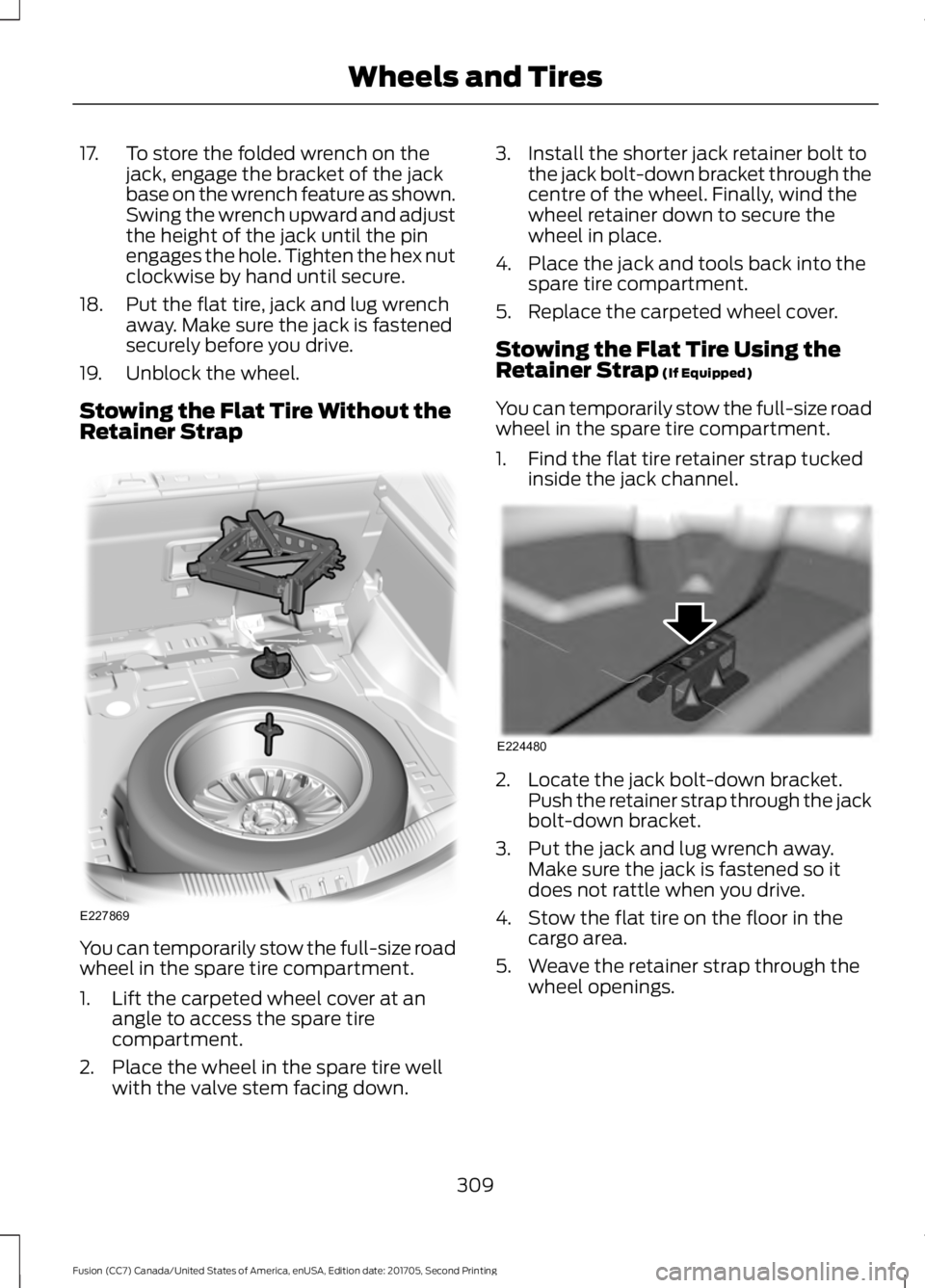
17. To store the folded wrench on the
jack, engage the bracket of the jack
base on the wrench feature as shown.
Swing the wrench upward and adjust
the height of the jack until the pin
engages the hole. Tighten the hex nut
clockwise by hand until secure.
18. Put the flat tire, jack and lug wrench away. Make sure the jack is fastened
securely before you drive.
19. Unblock the wheel.
Stowing the Flat Tire Without the
Retainer Strap You can temporarily stow the full-size road
wheel in the spare tire compartment.
1. Lift the carpeted wheel cover at an
angle to access the spare tire
compartment.
2. Place the wheel in the spare tire well with the valve stem facing down. 3. Install the shorter jack retainer bolt to
the jack bolt-down bracket through the
centre of the wheel. Finally, wind the
wheel retainer down to secure the
wheel in place.
4. Place the jack and tools back into the spare tire compartment.
5. Replace the carpeted wheel cover.
Stowing the Flat Tire Using the
Retainer Strap (If Equipped)
You can temporarily stow the full-size road
wheel in the spare tire compartment.
1. Find the flat tire retainer strap tucked inside the jack channel. 2. Locate the jack bolt-down bracket.
Push the retainer strap through the jack
bolt-down bracket.
3. Put the jack and lug wrench away. Make sure the jack is fastened so it
does not rattle when you drive.
4. Stow the flat tire on the floor in the cargo area.
5. Weave the retainer strap through the wheel openings.
309
Fusion (CC7) Canada/United States of America, enUSA, Edition date: 201705, Second Printing Wheels and TiresE227869 E224480
Page 348 of 539
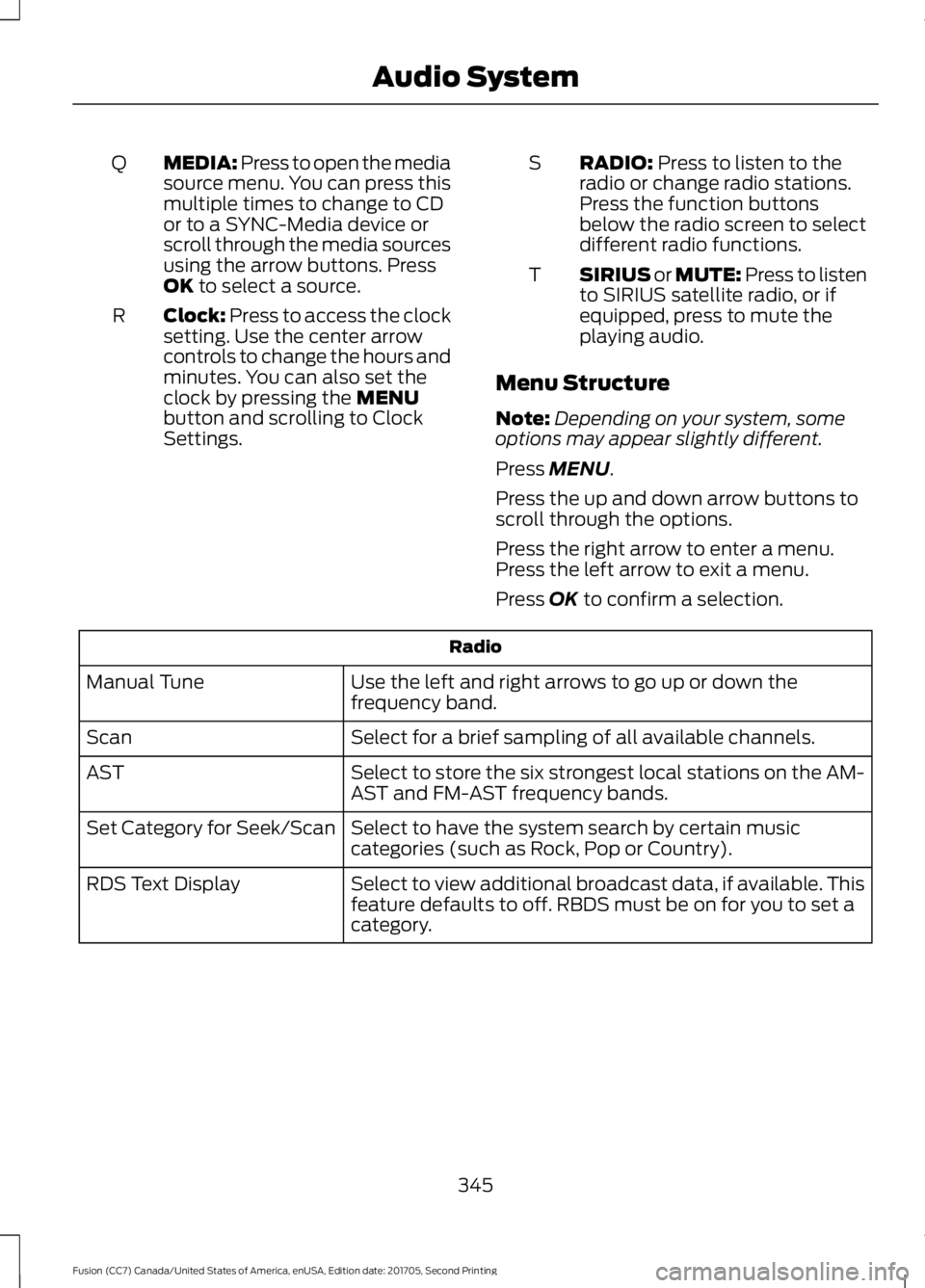
MEDIA: Press to open the media
source menu. You can press this
multiple times to change to CD
or to a SYNC-Media device or
scroll through the media sources
using the arrow buttons. Press
OK to select a source.
Q
Clock:
Press to access the clock
setting. Use the center arrow
controls to change the hours and
minutes. You can also set the
clock by pressing the
MENU
button and scrolling to Clock
Settings.
R RADIO:
Press to listen to the
radio or change radio stations.
Press the function buttons
below the radio screen to select
different radio functions.
S
SIRIUS or MUTE: Press to listen
to SIRIUS satellite radio, or if
equipped, press to mute the
playing audio.
T
Menu Structure
Note: Depending on your system, some
options may appear slightly different.
Press
MENU.
Press the up and down arrow buttons to
scroll through the options.
Press the right arrow to enter a menu.
Press the left arrow to exit a menu.
Press
OK to confirm a selection. Radio
Use the left and right arrows to go up or down the
frequency band.
Manual Tune
Select for a brief sampling of all available channels.
Scan
Select to store the six strongest local stations on the AM-
AST and FM-AST frequency bands.
AST
Select to have the system search by certain music
categories (such as Rock, Pop or Country).
Set Category for Seek/Scan
Select to view additional broadcast data, if available. This
feature defaults to off. RBDS must be on for you to set a
category.
RDS Text Display
345
Fusion (CC7) Canada/United States of America, enUSA, Edition date: 201705, Second Printing Audio System
Page 350 of 539
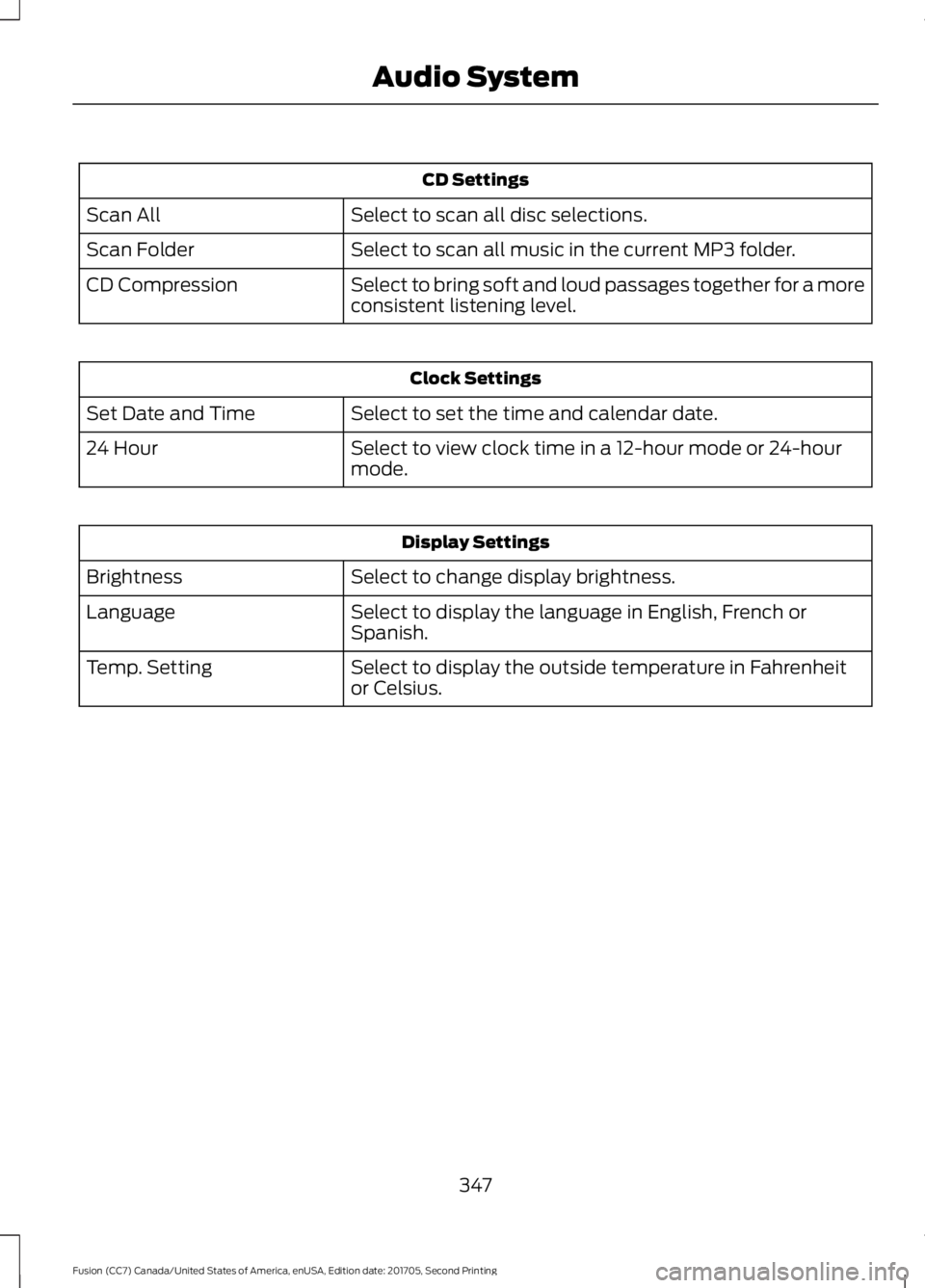
CD Settings
Select to scan all disc selections.
Scan All
Select to scan all music in the current MP3 folder.
Scan Folder
Select to bring soft and loud passages together for a more
consistent listening level.
CD Compression Clock Settings
Select to set the time and calendar date.
Set Date and Time
Select to view clock time in a 12-hour mode or 24-hour
mode.
24 Hour Display Settings
Select to change display brightness.
Brightness
Select to display the language in English, French or
Spanish.
Language
Select to display the outside temperature in Fahrenheit
or Celsius.
Temp. Setting
347
Fusion (CC7) Canada/United States of America, enUSA, Edition date: 201705, Second Printing Audio System