security FORD FUSION 2018 User Guide
[x] Cancel search | Manufacturer: FORD, Model Year: 2018, Model line: FUSION, Model: FORD FUSION 2018Pages: 539, PDF Size: 6.42 MB
Page 457 of 539
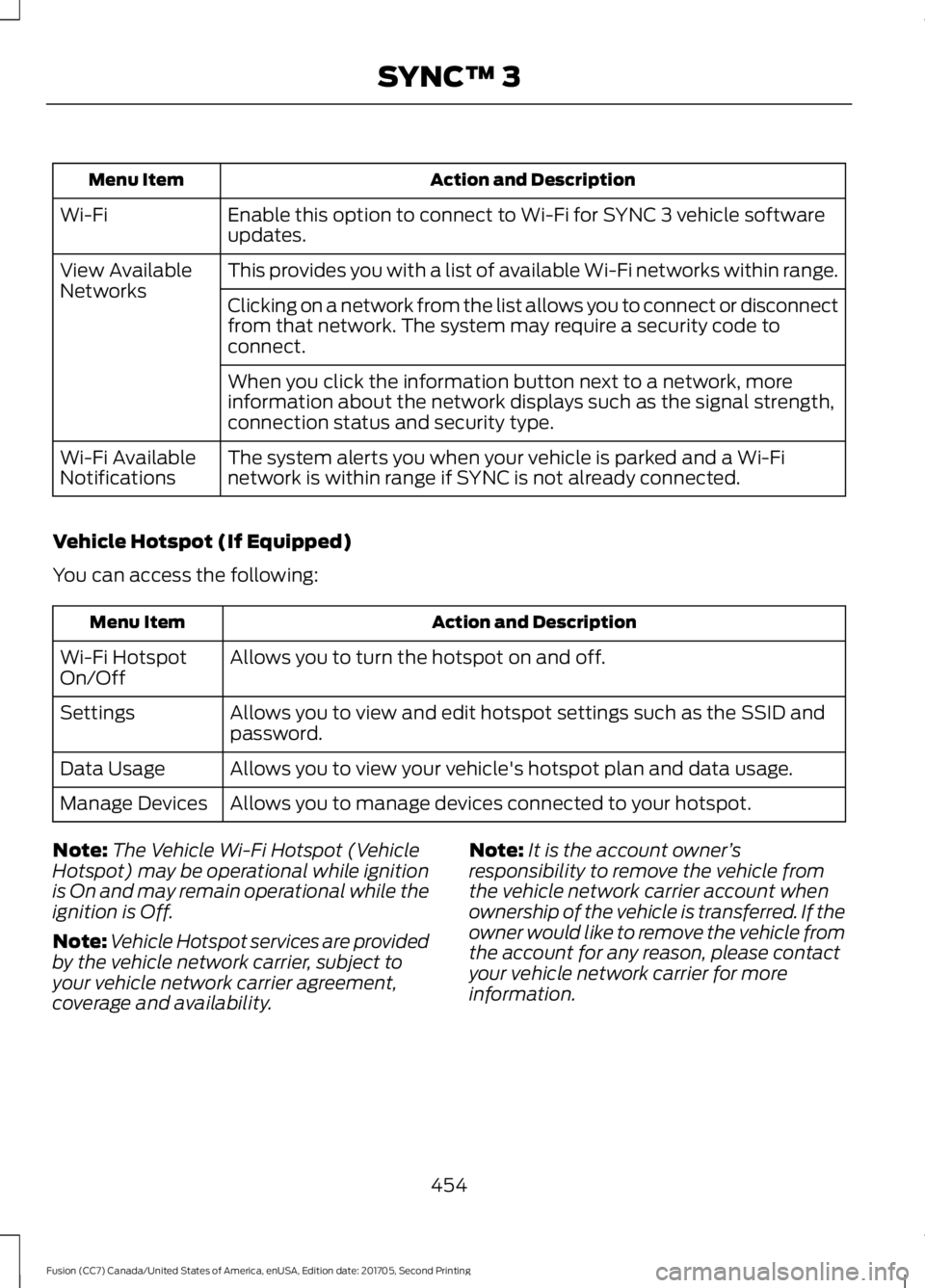
Action and Description
Menu Item
Enable this option to connect to Wi-Fi for SYNC 3 vehicle software
updates.
Wi-Fi
This provides you with a list of available Wi-Fi networks within range.
View Available
Networks
Clicking on a network from the list allows you to connect or disconnect
from that network. The system may require a security code to
connect.
When you click the information button next to a network, more
information about the network displays such as the signal strength,
connection status and security type.
The system alerts you when your vehicle is parked and a Wi-Fi
network is within range if SYNC is not already connected.
Wi-Fi Available
Notifications
Vehicle Hotspot (If Equipped)
You can access the following: Action and Description
Menu Item
Allows you to turn the hotspot on and off.
Wi-Fi Hotspot
On/Off
Allows you to view and edit hotspot settings such as the SSID and
password.
Settings
Allows you to view your vehicle's hotspot plan and data usage.
Data Usage
Allows you to manage devices connected to your hotspot.
Manage Devices
Note: The Vehicle Wi-Fi Hotspot (Vehicle
Hotspot) may be operational while ignition
is On and may remain operational while the
ignition is Off.
Note: Vehicle Hotspot services are provided
by the vehicle network carrier, subject to
your vehicle network carrier agreement,
coverage and availability. Note:
It is the account owner ’s
responsibility to remove the vehicle from
the vehicle network carrier account when
ownership of the vehicle is transferred. If the
owner would like to remove the vehicle from
the account for any reason, please contact
your vehicle network carrier for more
information.
454
Fusion (CC7) Canada/United States of America, enUSA, Edition date: 201705, Second Printing SYNC™ 3
Page 458 of 539
Note:
Data, for example the Vehicle
Identification Number (VIN), SIM Card ID,
and data plan usage, is shared between
Ford and the vehicle network carrier to
provide the Vehicle Hotspot service in
accordance with your vehicle network carrier
agreement, coverage and availability, and
may be used to enable a seamless transition
from an old to new embedded modem and
to confirm any updates are successfully
delivered.
Note: For your convenience data usage may
be available for monitoring under Settings
but may not reflect actual or current usage.
The vehicle network carrier is responsible
for providing information about your
account. Please contact the vehicle network
carrier for more information.
Note: Ford may need to update operating
system software on your vehicle, including
security updates and bug fixes, to keep
connected services current, like Vehicle
Hotspot, without prior notice to you.
Note: If you do not have an active vehicle
hotspot data plan, open your web browser
and go to a website using the HTTP protocol
to be automatically redirected to the vehicle
network carrier landing page where you can
purchase data. Websites using HTTPS will
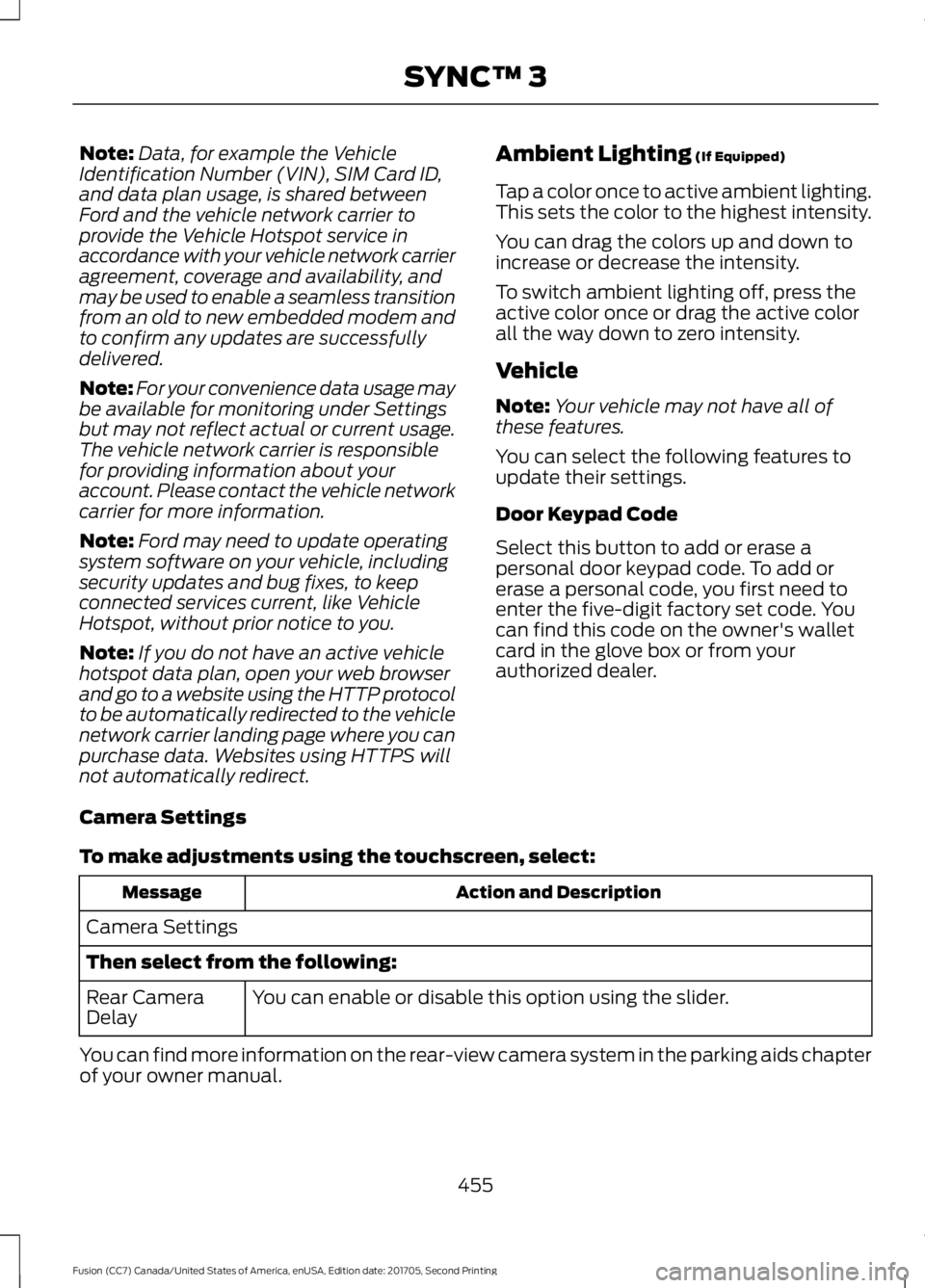
not automatically redirect. Ambient Lighting (If Equipped)
Tap a color once to active ambient lighting.
This sets the color to the highest intensity.
You can drag the colors up and down to
increase or decrease the intensity.
To switch ambient lighting off, press the
active color once or drag the active color
all the way down to zero intensity.
Vehicle
Note: Your vehicle may not have all of
these features.
You can select the following features to
update their settings.
Door Keypad Code
Select this button to add or erase a
personal door keypad code. To add or
erase a personal code, you first need to
enter the five-digit factory set code. You
can find this code on the owner's wallet
card in the glove box or from your
authorized dealer.
Camera Settings
To make adjustments using the touchscreen, select: Action and Description
Message
Camera Settings
Then select from the following: You can enable or disable this option using the slider.
Rear Camera
Delay
You can find more information on the rear-view camera system in the parking aids chapter
of your owner manual.
455
Fusion (CC7) Canada/United States of America, enUSA, Edition date: 201705, Second Printing SYNC™ 3
Page 461 of 539
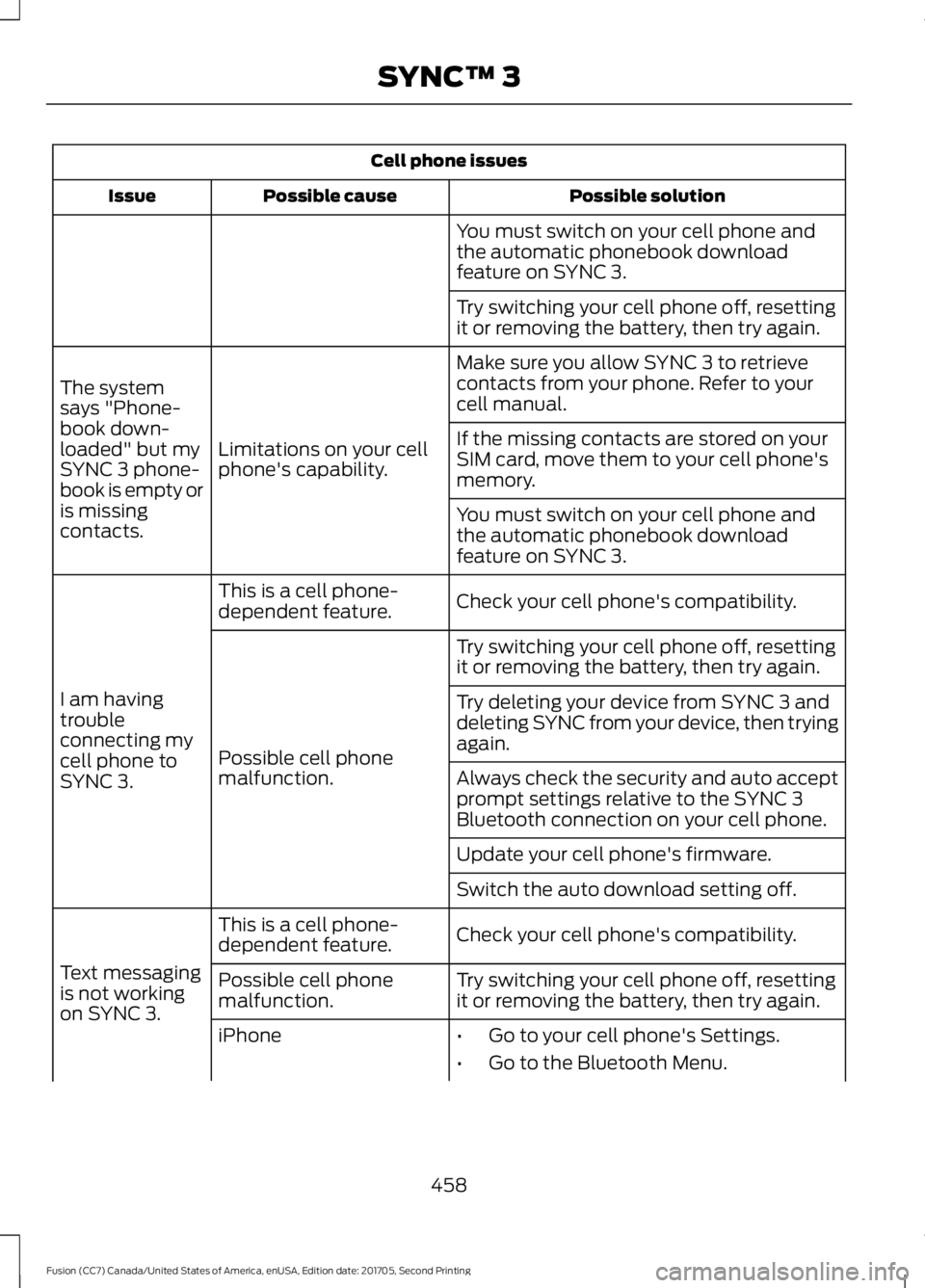
Cell phone issues
Possible solution
Possible cause
Issue
You must switch on your cell phone and
the automatic phonebook download
feature on SYNC 3.
Try switching your cell phone off, resetting
it or removing the battery, then try again.
Make sure you allow SYNC 3 to retrieve
contacts from your phone. Refer to your
cell manual.
Limitations on your cell
phone's capability.
The system
says "Phone-
book down-
loaded" but my
SYNC 3 phone-
book is empty or
is missing
contacts. If the missing contacts are stored on your
SIM card, move them to your cell phone's
memory.
You must switch on your cell phone and
the automatic phonebook download
feature on SYNC 3.
Check your cell phone's compatibility.
This is a cell phone-
dependent feature.
I am having
trouble
connecting my
cell phone to
SYNC 3. Try switching your cell phone off, resetting
it or removing the battery, then try again.
Possible cell phone
malfunction. Try deleting your device from SYNC 3 and
deleting SYNC from your device, then trying
again.
Always check the security and auto accept
prompt settings relative to the SYNC 3
Bluetooth connection on your cell phone.
Update your cell phone's firmware.
Switch the auto download setting off.
Check your cell phone's compatibility.
This is a cell phone-
dependent feature.
Text messaging
is not working
on SYNC 3. Try switching your cell phone off, resetting
it or removing the battery, then try again.
Possible cell phone
malfunction.
iPhone
•Go to your cell phone's Settings.
• Go to the Bluetooth Menu.
458
Fusion (CC7) Canada/United States of America, enUSA, Edition date: 201705, Second Printing SYNC™ 3
Page 463 of 539
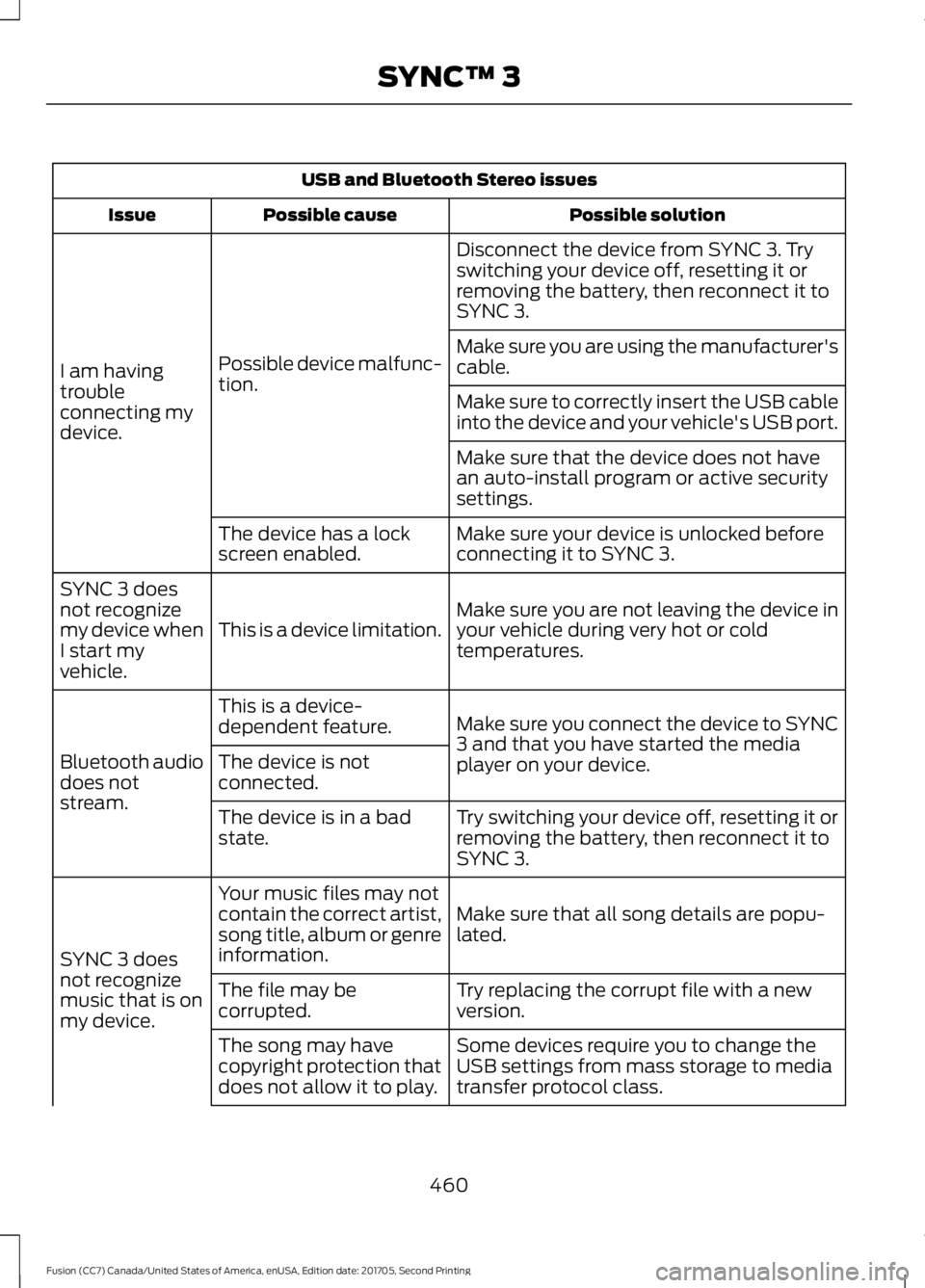
USB and Bluetooth Stereo issues
Possible solution
Possible cause
Issue
Disconnect the device from SYNC 3. Try
switching your device off, resetting it or
removing the battery, then reconnect it to
SYNC 3.
Possible device malfunc-
tion.
I am having
trouble
connecting my
device. Make sure you are using the manufacturer's
cable.
Make sure to correctly insert the USB cable
into the device and your vehicle's USB port.
Make sure that the device does not have
an auto-install program or active security
settings.
Make sure your device is unlocked before
connecting it to SYNC 3.
The device has a lock
screen enabled.
Make sure you are not leaving the device in
your vehicle during very hot or cold
temperatures.
This is a device limitation.
SYNC 3 does
not recognize
my device when
I start my
vehicle.
Make sure you connect the device to SYNC
3 and that you have started the media
player on your device.
This is a device-
dependent feature.
Bluetooth audio
does not
stream. The device is not
connected.
Try switching your device off, resetting it or
removing the battery, then reconnect it to
SYNC 3.
The device is in a bad
state.
Make sure that all song details are popu-
lated.
Your music files may not
contain the correct artist,
song title, album or genre
information.
SYNC 3 does
not recognize
music that is on
my device. Try replacing the corrupt file with a new
version.
The file may be
corrupted.
Some devices require you to change the
USB settings from mass storage to media
transfer protocol class.
The song may have
copyright protection that
does not allow it to play.
460
Fusion (CC7) Canada/United States of America, enUSA, Edition date: 201705, Second Printing SYNC™ 3
Page 474 of 539
For a complete listing of the accessories
that are available for your vehicle, please
contact your authorized dealer or visit the
online store web site:
Web Address (United States)
www.Accessories.Ford.com Web Address (Canada)
www.Accessories.Ford.ca
Ford Motor Company will repair or replace
any properly authorized dealer-installed
Ford Original Accessory found to be
defective in factory-supplied materials or
workmanship during the warranty period,
as well as any component damaged by the
defective accessories.
Ford Motor Company warrants your
vehicle's accessory through the warranty
that provides the greatest benefit:
• 24 months, unlimited mileage.
• The remainder of your new vehicle
limited warranty.
Contact an authorized dealer for details
and a copy of the warranty.
Exterior Style
• Bumper protectors.
• Graphics.
• Hood deflector.
• Rear spoiler.
• Side window deflectors*.
• Splash guards.
Interior Style
• All-weather floor mats.
• Door sill plates.
• Floor liners.
• Premium carpeted floor mats. Lifestyle
•
Ash cup or smoker's packages.
• Car covers*.
• Cargo area protectors.
• Cargo net.
• Cargo organizers.
• Interior light kit.
• Roof racks and carriers*.
• Tablet cradle*.
Peace of Mind
• Keyless entry keypad.
• Remote start.
• Roadside assistance kit*.
• Vehicle security systems.
• Warning sensor system.
• Wheel locks.
*Ford Licensed Accessories. The
accessory manufacturer designs, develops
and therefore warrants Ford Licensed
Accessories, and does not design or test
these accessories to Ford Motor Company
engineering requirements. Contact an
authorized Ford dealer for the accessory
manufacturer's limited warranty details
and request a copy of the Ford Licensed
Accessories product limited warranty from
the accessory manufacturer.
471
Fusion (CC7) Canada/United States of America, enUSA, Edition date: 201705, Second Printing Accessories
Page 477 of 539
Less Cost to Properly Maintain Your
Vehicle
Ford Protect extended service plan also
offers a Premium Maintenance Plan that
covers all scheduled maintenance, and
selected wear items. The coverage is
prepaid, so you never have to worry about
the cost of your vehicle
’s maintenance.
Covered maintenance includes:
• Windshield wiper blades.
• Spark plugs.
• The clutch disc (if equipped).
• Brake pads and linings.
• Shock absorbers.
• Struts.
• Engine Belts.
• Engine coolant hoses, clamps and
o-rings.
• Diesel exhaust fluid replenishment (if
equipped).
• Cabin air filter replacement every
20,000 mi (32,000 km) (electric
vehicles only).
Interest Free Finance Options
Just a 10% down payment will provide you
with an affordable, no interest, no fee
payment program allowing you all the
security and benefits Ford Protect
extended service plan has to offer while
paying over time. You are pre-approved
with no credit check or hassles. To learn
more, call our Ford Protect extended
service plan specialists at 800-367-3377.
Ford Protect Extended Service Plan
P.O. Box 321067
Detroit, MI 48232 Ford Protect Extended Service
Plan (CANADA ONLY)
You can get more protection for your
vehicle by purchasing a Ford Protect
extended service plan. Ford Protect
extended service plan is the only service
contract backed by Ford Motor Company
of Canada, Limited. Depending on the plan
you purchase, Ford Protect extended
service plan provides benefits such as:
•
Rental reimbursement.
• Coverage for certain maintenance and
wear items.
• Protection against repair costs after
your New Vehicle Limited Warranty
Coverage expires.
• Roadside Assistance benefits.
There are several Ford Protect extended
service plans available in various time,
distance and deductible combinations.
Each plan is tailored to fit your own driving
needs, including reimbursement for towing
and rental. When you purchase Ford
Protect extended service plan, you receive
added peace-of-mind protection
throughout Canada, the United States and
Mexico, provided by a network of
participating authorized Ford Motor
Company dealers.
Note: Repairs performed outside of
Canada, the United States and Mexico are
not eligible for Ford Protect extended
service plan coverage.
This information is subject to change. For
more information; visit your local Ford of
Canada dealer or www.ford.ca to find the
Ford Protect extended service plan that is
right for you.
474
Fusion (CC7) Canada/United States of America, enUSA, Edition date: 201705, Second Printing Ford Protect
Page 511 of 539
Restrictions. Except where you have been
specifically licensed to do so by Telenav,
and without limiting the preceding
paragraph, you may not use this Data (a)
with any products, systems, or applications
installed or otherwise connected to or in
communication with vehicles, capable of
vehicle navigation, positioning, dispatch,
real time route guidance, fleet
management or similar applications; or (b)
with or in communication with any
positioning devices or any mobile or
wireless-connected electronic or computer
devices, including without limitation
cellular phones, palmtop and handheld
computers, pagers, and personal digital
assistants or PDAs.
Warning. The Data may contain
inaccurate or incomplete information due
to the passage of time, changing
circumstances, sources used and the
nature of collecting comprehensive
geographic data, any of which may lead to
incorrect results.
No Warranty.
This Data is provided to you
“ as is, ” and you agree to use it at your own
risk. Telenav and its licensors (and their
licensors and suppliers) make no
guarantees, representations or warranties
of any kind, express or implied, arising by
law or otherwise, including but not limited
to, content, quality, accuracy,
completeness, effectiveness, reliability,
fitness for a particular purpose, usefulness,
use or results to be obtained from this
Data, or that the Data or server will be
uninterrupted or error-free.
Disclaimer of Warranty:
TELENAV AND
ITS LICENSORS (INCLUDING THEIR
LICENSORS AND SUPPLIERS) DISCLAIM
ANY WARRANTIES, EXPRESS OR IMPLIED,
OF QUALITY, PERFORMANCE,
MERCHANTABILITY, FITNESS FOR A PARTICULAR PURPOSE OR
NON-INFRINGEMENT. Some States,
Territories and Countries do not allow
certain warranty exclusions, so to that
extent the above exclusion may not apply
to you.
Disclaimer of Liability:
TELENAV AND
ITS LICENSORS (INCLUDING THEIR
LICENSORS AND SUPPLIERS) SHALL NOT
BE LIABLE TO YOU: IN RESPECT OF ANY
CLAIM, DEMAND OR ACTION,
IRRESPECTIVE OF THE NATURE OF THE
CAUSE OF THE CLAIM, DEMAND OR
ACTION ALLEGING ANY LOSS, INJURY OR
DAMAGES, DIRECT OR INDIRECT, WHICH
MAY RESULT FROM THE USE OR
POSSESSION OF THE INFORMATION; OR
FOR ANY LOSS OF PROFIT, REVENUE,
CONTRACTS OR SAVINGS, OR ANY
OTHER DIRECT, INDIRECT, INCIDENTAL,
SPECIAL OR CONSEQUENTIAL DAMAGES
ARISING OUT OF YOUR USE OF OR
INABILITY TO USE THIS INFORMATION,
ANY DEFECT IN THE INFORMATION, OR
THE BREACH OF THESE TERMS OR
CONDITIONS, WHETHER IN AN ACTION
IN CONTRACT OR TORT OR BASED ON A
WARRANTY, EVEN IF TELENAV OR ITS
LICENSORS HAVE BEEN ADVISED OF THE
POSSIBILITY OF SUCH DAMAGES. Some
States, Territories and Countries do not
allow certain liability exclusions or
damages limitations, so to that extent the
above may not apply to you.
Export Control.
You shall not export from
anywhere any part of the Data or any direct
product thereof except in compliance with,
and with all licenses and approvals
required under, applicable export laws,
rules and regulations, including but not
limited to the laws, rules and regulations
administered by the Office of Foreign
Assets Control of the U.S. Department of
Commerce and the Bureau of Industry and
Security of the U.S. Department of
Commerce. To the extent that any such
508
Fusion (CC7) Canada/United States of America, enUSA, Edition date: 201705, Second Printing Appendices
Page 518 of 539
DISRUPTION OF SERVICE PROVIDED
HEREUNDER, IS LIMITED TO PAYMENT
OF DAMAGES IN AN AMOUNT NOT TO
EXCEED THE AMOUNT PAID BY END USER
FOR THE SERVICES DURING THE
TWO-MONTH PERIOD PRECEDING THE
DATE THE CLAIM AROSE.
(ii) END USER AGREES TO INDEMNIFY
AND HOLD HARMLESS THE UNDERLYING
WIRELESS SERVICE CARRIER AND ITS
OFFICERS, EMPLOYEES, AND AGENTS
AGAINST ANY AND ALL CLAIMS,
INCLUDING WITHOUT LIMITATION
CLAIMS FOR LIBEL, SLANDER, OR ANY
PROPERTY DAMAGE, PERSONAL INJURY
OR DEATH, ARISING IN ANY WAY,
DIRECTLY OR INDIRECTLY, IN
CONNECTION WITH THIS AGREEMENT
OR THE USE, FAILURE TO USE, OR
INABILITY TO USE THE DEVICE EXCEPT
WHERE THE CLAIMS RESULT FROM THE
UNDERLYING CARRIER’
S GROSS
NEGLIGENCE OR WILLFUL MISCONDUCT.
THIS INDEMNITY WILL SURVIVE THE
TERMINATION OF THE AGREEMENT.
(iii) END USER HAS NO PROPERTY RIGHT
IN ANY NUMBER ASSIGNED TO THE
DEVICE.
(iv) END USER UNDERSTANDS THAT
FORD AND THE UNDERLYING CARRIER
CANNOT GUARANTY THE SECURITY OF
WIRELESS TRANSMISSIONS, AND WILL
NOT BE LIABLE FOR ANY LACK OF
SECURITY RELATING TO THE USE OF THE
SERVICES
THE SERVICE IS FOR [END USER’ S] USE
ONLY AND END USER MAY NOT RESELL
THE SERVICE TO ANY OTHER PARTY END
USER UNDERSTANDS THAT THE
UNDERLYING CARRIER DOES NOT
GUARANTEE ANY END USER
UNINTERRUPTED SERVICE OR
COVERAGE. THE UNDERLYING CARRIER
DOES NOT WARRANT THAT END USERS
CAN OR WILL BE LOCATED USING THE
SERVICE. THE UNDERLYING CARRIER MAKES NO WARRANTY, EXPRESS OR
IMPLIED, OF MERCHANTABILITY OR
FITNESS FOR A PARTICULAR PURPOSE,
SUITABILITY, OR PERFORMANCE
REGARDING ANY SERVICES OR GOODS,
AND IN NO EVENT SHALL AT&T BE
LIABLE, WHETHER OR NOT DUE TO ITS
OWN NEGLIGENCE, FOR ANY: (A) ACT OR
OMISSION OF A THIRD PARTY; (B)
MISTAKES, OMISSIONS, INTERRUPTIONS,
ERRORS, FAILURES TO TRANSMIT,
DELAYS, OR DEFECTS IN THE SERVICE
PROVIDED BY OR THROUGH THE
UNDERLYING CARRIER; (C) DAMAGE OR
INJURY CAUSED BY SUSPENSION OR
TERMINATION BY THE UNDERLYING
CARRIER; OR (D) DAMAGE OR INJURY
CAUSED BY A FAILURE OR DELAY IN
CONNECTING A CALL TO ANY ENTITY,
INCLUDING 911 OR ANY OTHER
EMERGENCY SERVICE. TO THE FULL
EXTENT ALLOWED BY LAW, THE END
USER RELEASES, INDEMNIFIES AND
HOLDS THE UNDERLYING CARRIER
HARMLESS FROM AND AGAINST ANY
AND ALL CLAIMS OF ANY PERSON OR
ENTITY FOR DAMAGES OF ANY NATURE
ARISING IN ANY WAY FROM OR RELATING
TO, DIRECTLY OR INDIRECTLY, SERVICES
PROVIDED BY THE UNDERLYING CARRIER
OR ANY PERSON’
S USE THEREOF,
INCLUDING CLAIMS ARISING IN WHOLE
OR IN PART FROM THE ALLEGED
NEGLIGENCE OF THE UNDERLYING
CARRIER.
VII. China Territory
Personal Use Only
You agree to use this Data together with
[insert name of Client Application] for the
solely personal, non-commercial purposes
for which you were licensed, and not for
service bureau, time-sharing or other
similar purposes. Accordingly, but subject
to the restrictions set forth in the following
paragraphs, you may copy this Data only
as necessary for your personal use to (i)
515
Fusion (CC7) Canada/United States of America, enUSA, Edition date: 201705, Second Printing Appendices
Page 536 of 539
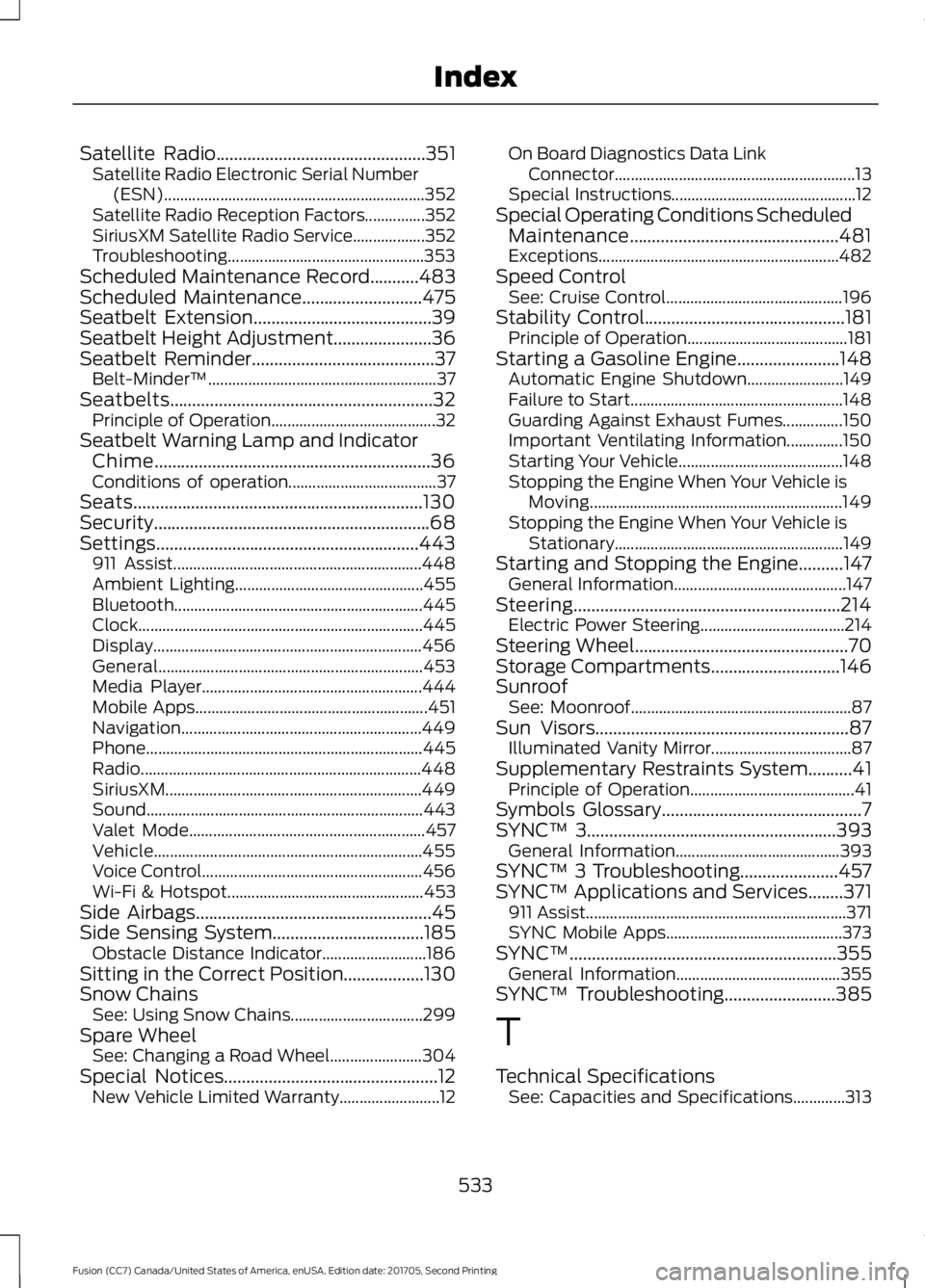
Satellite Radio...............................................351
Satellite Radio Electronic Serial Number
(ESN)................................................................. 352
Satellite Radio Reception Factors...............352
SiriusXM Satellite Radio Service.................. 352
Troubleshooting................................................. 353
Scheduled Maintenance Record
...........483
Scheduled Maintenance...........................475
Seatbelt Extension
........................................39
Seatbelt Height Adjustment......................36
Seatbelt Reminder.........................................37 Belt-Minder™......................................................... 37
Seatbelts...........................................................32 Principle of Operation......................................... 32
Seatbelt Warning Lamp and Indicator Chime..............................................................36
Conditions of operation..................................... 37
Seats
.................................................................130
Security..............................................................68
Settings...........................................................443 911 Assist.............................................................. 448
Ambient Lighting............................................... 455
Bluetooth.............................................................. 445
Clock....................................................................... 445
Display................................................................... 456
General.................................................................. 453
Media Player....................................................... 444
Mobile Apps.......................................................... 451
Navigation............................................................ 449
Phone..................................................................... 445
Radio...................................................................... 448
SiriusXM................................................................ 449
Sound..................................................................... 443
Valet Mode........................................................... 457
Vehicle................................................................... 455
Voice Control....................................................... 456
Wi-Fi & Hotspot................................................. 453
Side Airbags
.....................................................45
Side Sensing System..................................185 Obstacle Distance Indicator.......................... 186
Sitting in the Correct Position..................130
Snow Chains See: Using Snow Chains................................. 299
Spare Wheel See: Changing a Road Wheel....................... 304
Special Notices................................................12 New Vehicle Limited Warranty......................... 12On Board Diagnostics Data Link
Connector............................................................ 13
Special Instructions.............................................. 12
Special Operating Conditions Scheduled Maintenance...............................................481
Exceptions............................................................ 482
Speed Control See: Cruise Control............................................ 196
Stability Control
.............................................181
Principle of Operation........................................ 181
Starting a Gasoline Engine.......................148 Automatic Engine Shutdown........................ 149
Failure to Start..................................................... 148
Guarding Against Exhaust Fumes...............150
Important Ventilating Information..............150
Starting Your Vehicle......................................... 148
Stopping the Engine When Your Vehicle is Moving............................................................... 149
Stopping the Engine When Your Vehicle is Stationary......................................................... 149
Starting and Stopping the Engine..........147 General Information........................................... 147
Steering............................................................214 Electric Power Steering.................................... 214
Steering Wheel................................................70
Storage Compartments
.............................146
Sunroof See: Moonroof....................................................... 87
Sun Visors
.........................................................87
Illuminated Vanity Mirror................................... 87
Supplementary Restraints System..........41 Principle of Operation......................................... 41
Symbols Glossary
.............................................7
SYNC™ 3........................................................393
General Information......................................... 393
SYNC™ 3 Troubleshooting......................457
SYNC™ Applications and Services
........371
911 Assist................................................................. 371
SYNC Mobile Apps............................................ 373
SYNC™............................................................355 General Information......................................... 355
SYNC™ Troubleshooting.........................385
T
Technical Specifications See: Capacities and Specifications.............313
533
Fusion (CC7) Canada/United States of America, enUSA, Edition date: 201705, Second Printing Index