tire type FORD FUSION 2018 User Guide
[x] Cancel search | Manufacturer: FORD, Model Year: 2018, Model line: FUSION, Model: FORD FUSION 2018Pages: 539, PDF Size: 6.42 MB
Page 294 of 539
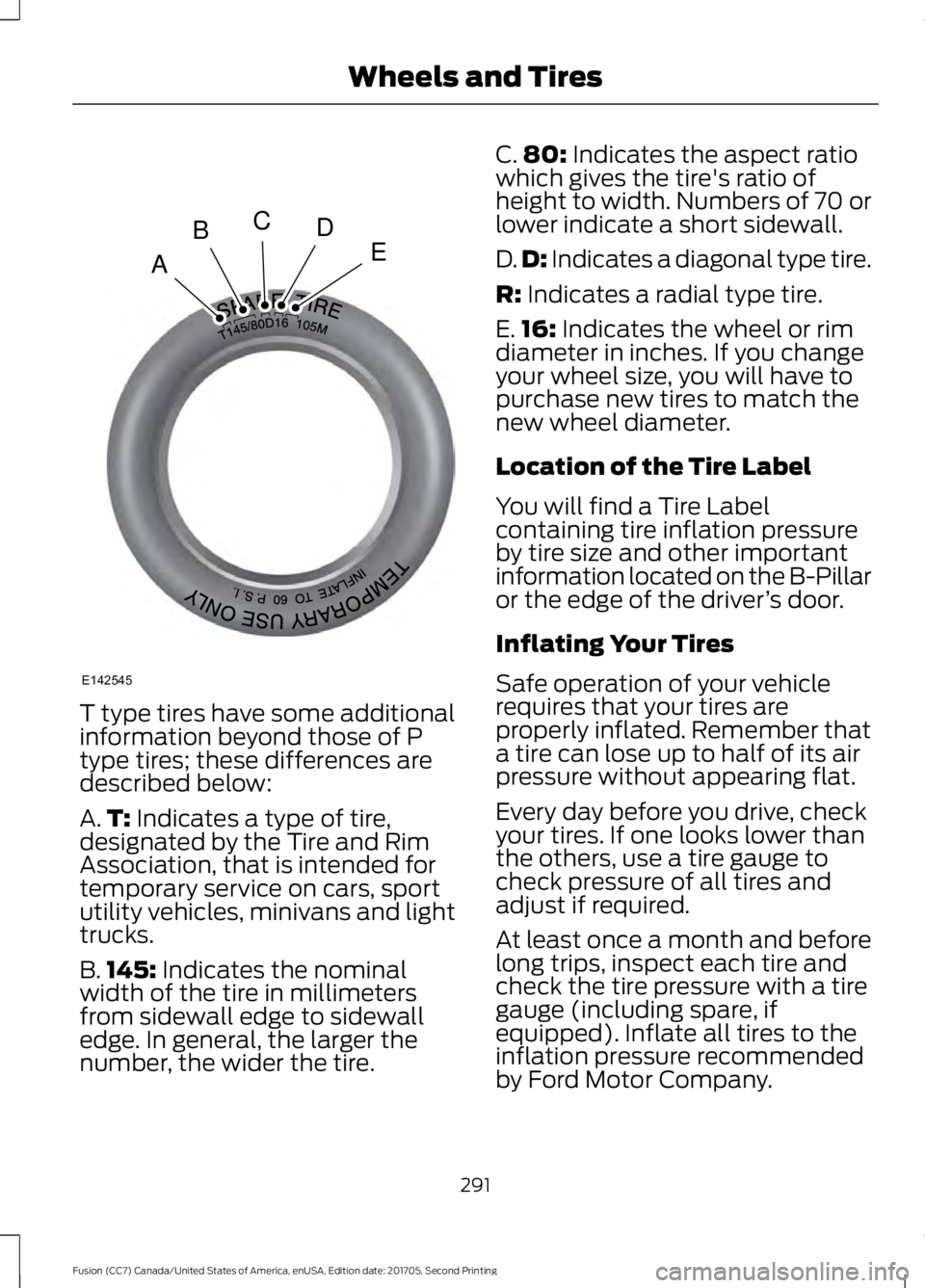
T type tires have some additional
information beyond those of P
type tires; these differences are
described below:
A.
T: Indicates a type of tire,
designated by the Tire and Rim
Association, that is intended for
temporary service on cars, sport
utility vehicles, minivans and light
trucks.
B. 145:
Indicates the nominal
width of the tire in millimeters
from sidewall edge to sidewall
edge. In general, the larger the
number, the wider the tire. C.
80:
Indicates the aspect ratio
which gives the tire's ratio of
height to width. Numbers of 70 or
lower indicate a short sidewall.
D. D:
Indicates a diagonal type tire.
R:
Indicates a radial type tire.
E. 16:
Indicates the wheel or rim
diameter in inches. If you change
your wheel size, you will have to
purchase new tires to match the
new wheel diameter.
Location of the Tire Label
You will find a Tire Label
containing tire inflation pressure
by tire size and other important
information located on the B-Pillar
or the edge of the driver ’s door.
Inflating Your Tires
Safe operation of your vehicle
requires that your tires are
properly inflated. Remember that
a tire can lose up to half of its air
pressure without appearing flat.
Every day before you drive, check
your tires. If one looks lower than
the others, use a tire gauge to
check pressure of all tires and
adjust if required.
At least once a month and before
long trips, inspect each tire and
check the tire pressure with a tire
gauge (including spare, if
equipped). Inflate all tires to the
inflation pressure recommended
by Ford Motor Company.
291
Fusion (CC7) Canada/United States of America, enUSA, Edition date: 201705, Second Printing Wheels and TiresA
BCDE
E142545
Page 295 of 539
You are strongly urged to buy a
reliable tire pressure gauge, as
automatic service station gauges
may be inaccurate. Ford
recommends the use of a digital
or dial-type tire pressure gauge
rather than a stick-type tire
pressure gauge.
Use the recommended cold
inflation pressure for optimum tire
performance and wear.
Under-inflation or over-inflation
may cause uneven treadwear
patterns.
WARNING
Under-inflation is the most
common cause of tire failures
and may result in severe tire
cracking, tread separation or
blowout, with unexpected loss of
vehicle control and increased risk
of injury. Under-inflation increases
sidewall flexing and rolling
resistance, resulting in heat
buildup and internal damage to
the tire. It also may result in
unnecessary tire stress, irregular
wear, loss of vehicle control and
accidents. A tire can lose up to
half of its air pressure and not
appear to be flat! Always inflate your tires to the
Ford recommended inflation
pressure even if it is less than the
maximum inflation pressure
information found on the tire. The
Ford recommended tire inflation
pressure is found on the Safety
Compliance Certification Label (affixed to either the door hinge
pillar, door-latch post, or the door
edge that meets the door-latch
post, next to the driver's seating
position), or Tire Label which is
located on the B-Pillar or the edge
of the driver
’s door. Failure to
follow the tire pressure
recommendations can cause
uneven treadwear patterns and
adversely affect the way your
vehicle handles.
Maximum Inflation Pressure is
the tire manufacturer's maximum
permissible pressure and the
pressure at which the maximum
load can be carried by the tire. This
pressure is normally higher than
the manufacturer ’s recommended
cold inflation pressure which can
be found on the Safety
Compliance Certification Label
(affixed to either the door hinge
pillar, door-latch post, or the door
edge that meets the door-latch
post, next to the driver's seating
position), or Tire Label which is
located on the B-Pillar or the edge
of the driver ’s door. The cold
inflation pressure should never be
set lower than the recommended
pressure on the Safety
Compliance Certification Label or
Tire Label.
292
Fusion (CC7) Canada/United States of America, enUSA, Edition date: 201705, Second Printing Wheels and Tires
Page 296 of 539
When weather temperature
changes occur, tire inflation
pressures also change. A 10°F
(6°C) temperature drop can
cause a corresponding drop of
1 psi (7 kPa) in inflation pressure.
Check your tire pressures
frequently and adjust them to the
proper pressure which can be
found on the Safety Compliance
Certification Label or Tire Label.
To check the pressure in your
tire(s):
1. Make sure the tires are cool,
meaning they are not hot from
driving even a mile.
Note: If you are checking tire
pressure when the tire is hot, (for
example, driven more than
1 mi
(1.6 km)), never bleed or reduce air
pressure. The tires are hot from
driving and it is normal for
pressures to increase above
recommended cold pressures. A
hot tire at or below recommended
cold inflation pressure could be
significantly under-inflated.
Note: If you have to drive a
distance to get air for your tire(s),
check and record the tire pressure
first and add the appropriate air
pressure when you get to the
pump. It is normal for tires to heat
up and the air pressure inside to go
up as you drive.
2. Remove the cap from the valve
on one tire, then firmly press the
tire gauge onto the valve and
measure the pressure. 3. Add enough air to reach the
recommended air pressure.
Note:
If you overfill the tire, release
air by pressing on the metal stem
in the center of the valve. Then
recheck the pressure with your tire
gauge.
4. Replace the valve cap.
5. Repeat this procedure for each
tire, including the spare.
Note: Some spare tires operate at
a higher inflation pressure than the
other tires. For T type mini-spare
tires, (see the Dissimilar spare
wheel and tire assembly
information for a description. Store
and maintain at
60 psi (4.15 bar).
For full-size and dissimilar spare
tires, see the Dissimilar spare wheel
and tire assembly information for
a description. Store and maintain
at the higher of the front and rear
inflation pressure as shown on the
Tire Label.
6. Visually inspect the tires to
make sure there are no nails or
other objects embedded that
could poke a hole in the tire and
cause an air leak.
7. Check the sidewalls to make
sure there are no gouges, cuts or
bulges.
293
Fusion (CC7) Canada/United States of America, enUSA, Edition date: 201705, Second Printing Wheels and Tires
Page 299 of 539
WARNINGS
Only use replacement tires
and wheels that are the same
size, load index, speed rating and
type (such as P-metric versus
LT-metric or all-season versus
all-terrain) as those originally
provided by Ford. The
recommended tire and wheel size
may be found on either the Safety
Compliance Certification Label
(affixed to either the door hinge
pillar, door-latch post, or the door
edge that meets the door-latch
post, next to the driver's seating
position), or the Tire Label which
is located on the B-Pillar or edge
of the driver's door. If this
information is not found on these
labels, then you should contact
your authorized dealer as soon as
possible. Use of any tire or wheel
not recommended by Ford can
affect the safety and performance
of your vehicle, which could result
in an increased risk of loss of
vehicle control, vehicle rollover,
personal injury and death. To reduce the risk of serious
injury, when mounting
replacement tires and wheels, you
should not exceed the maximum
pressure indicated on the sidewall
of the tire to set the beads without
additional precautions listed
below. If the beads do not seat at
the maximum pressure indicated,
re-lubricate and try again. WARNINGS
When inflating the tire for
mounting pressures up to
20 psi (1.38 bar) greater than the
maximum pressure on the tire
sidewall, the following
precautions must be taken to
protect the person mounting the
tire: •
Make sure that you have the
correct tire and wheel size.
• Lubricate the tire bead and
wheel bead seat area again.
• Stand at a minimum of 12 feet
(3.66 meters) away from the
wheel and tire assembly.
• Use both eye and ear
protection. WARNINGS
For a mounting pressure
more than
20 psi (1.38 bar)
greater than the maximum
pressure, a Ford dealer or other
tire service professional should do
the mounting. Always inflate steel carcass
tires with a remote air fill with
the person inflating standing at a
minimum of
12 ft (3.66 m) away
from the wheel and tire assembly. Important: Remember to replace
the wheel valve stems when the
road tires are replaced on your
vehicle
296
Fusion (CC7) Canada/United States of America, enUSA, Edition date: 201705, Second Printing Wheels and Tires
Page 307 of 539

How Temperature Affects Your Tire
Pressure
The tire pressure monitoring system
monitors tire pressure in each pneumatic
tire. While driving in a normal manner, a
typical passenger tire inflation pressure
may increase about 2
–4 psi (14– 28 kPa)
from a cold start situation. If the vehicle is
stationary overnight with the outside
temperature significantly lower than the
daytime temperature, the tire pressure may
decrease about 3 psi (21 kPa) for a drop of
30°F (17°C) in ambient temperature. This
lower pressure value may be detected by
the tire pressure monitoring system as
being significantly lower than the
recommended inflation pressure and
activate the system warning light for low
tire pressure. If the low tire pressure
warning light is on, visually check each tire
to verify that no tire is flat. If one or more
tires are flat, repair as necessary. Check
the air pressure in the road tires. If any tire
is under-inflated, carefully drive the vehicle
to the nearest location where air can be
added to the tires. Inflate all the tires to
the recommended inflation pressure.
CHANGING A ROAD WHEEL WARNINGS
Do not use tire sealants as they may
damage the tire pressure monitoring
system.
If the tire pressure monitor sensor
becomes damaged it may not
function.
Note:
The tire pressure monitoring system
indicator light will illuminate when the spare
tire is in use. To restore the full function of
the monitoring system, all road wheels
equipped with tire pressure monitoring
sensors must be mounted on the vehicle. If you get a flat tire while driving, do not
apply the brake heavily. Instead, gradually
decrease your speed. Hold the steering
wheel firmly and slowly move to a safe
place on the side of the road.
Have a flat serviced by an authorized
dealer in order to prevent damage to the
tire pressure monitoring system sensors.
See
Tire Pressure Monitoring System
(page 300). Replace the spare tire with a
road tire as soon as possible. During
repairing or replacing of the flat tire, have
an authorized dealer inspect the tire
pressure monitoring system sensor for
damage.
Dissimilar Spare Wheel and Tire
Assembly Information WARNING
Failure to follow these guidelines
could result in an increased risk of
loss of vehicle control, injury or death.
If you have a dissimilar spare wheel and
tire, then it is intended for temporary use
only. This means that if you need to use it,
you should replace it as soon as possible
with a road wheel and tire assembly that
is the same size and type as the road tires
and wheels that were originally provided
by Ford. If the dissimilar spare tire or wheel
is damaged, it should be replaced rather
than repaired.
304
Fusion (CC7) Canada/United States of America, enUSA, Edition date: 201705, Second Printing Wheels and Tires
Page 308 of 539
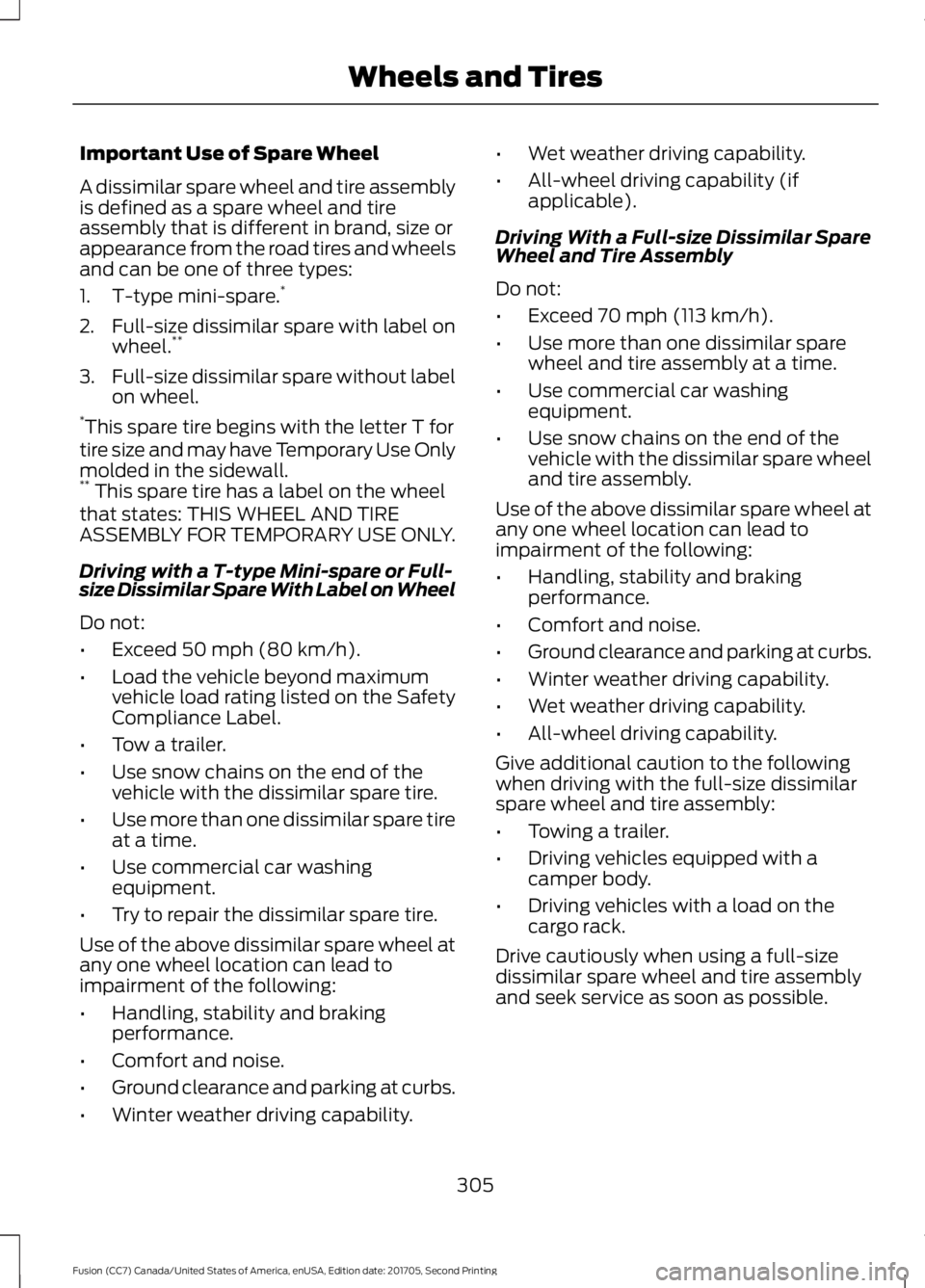
Important Use of Spare Wheel
A dissimilar spare wheel and tire assembly
is defined as a spare wheel and tire
assembly that is different in brand, size or
appearance from the road tires and wheels
and can be one of three types:
1. T-type mini-spare.
*
2. Full-size dissimilar spare with label on wheel. **
3. Full-size dissimilar spare without label
on wheel.
* This spare tire begins with the letter T for
tire size and may have Temporary Use Only
molded in the sidewall.
** This spare tire has a label on the wheel
that states: THIS WHEEL AND TIRE
ASSEMBLY FOR TEMPORARY USE ONLY.
Driving with a T-type Mini-spare or Full-
size Dissimilar Spare With Label on Wheel
Do not:
• Exceed 50 mph (80 km/h).
• Load the vehicle beyond maximum
vehicle load rating listed on the Safety
Compliance Label.
• Tow a trailer.
• Use snow chains on the end of the
vehicle with the dissimilar spare tire.
• Use more than one dissimilar spare tire
at a time.
• Use commercial car washing
equipment.
• Try to repair the dissimilar spare tire.
Use of the above dissimilar spare wheel at
any one wheel location can lead to
impairment of the following:
• Handling, stability and braking
performance.
• Comfort and noise.
• Ground clearance and parking at curbs.
• Winter weather driving capability. •
Wet weather driving capability.
• All-wheel driving capability (if
applicable).
Driving With a Full-size Dissimilar Spare
Wheel and Tire Assembly
Do not:
• Exceed
70 mph (113 km/h).
• Use more than one dissimilar spare
wheel and tire assembly at a time.
• Use commercial car washing
equipment.
• Use snow chains on the end of the
vehicle with the dissimilar spare wheel
and tire assembly.
Use of the above dissimilar spare wheel at
any one wheel location can lead to
impairment of the following:
• Handling, stability and braking
performance.
• Comfort and noise.
• Ground clearance and parking at curbs.
• Winter weather driving capability.
• Wet weather driving capability.
• All-wheel driving capability.
Give additional caution to the following
when driving with the full-size dissimilar
spare wheel and tire assembly:
• Towing a trailer.
• Driving vehicles equipped with a
camper body.
• Driving vehicles with a load on the
cargo rack.
Drive cautiously when using a full-size
dissimilar spare wheel and tire assembly
and seek service as soon as possible.
305
Fusion (CC7) Canada/United States of America, enUSA, Edition date: 201705, Second Printing Wheels and Tires
Page 520 of 539
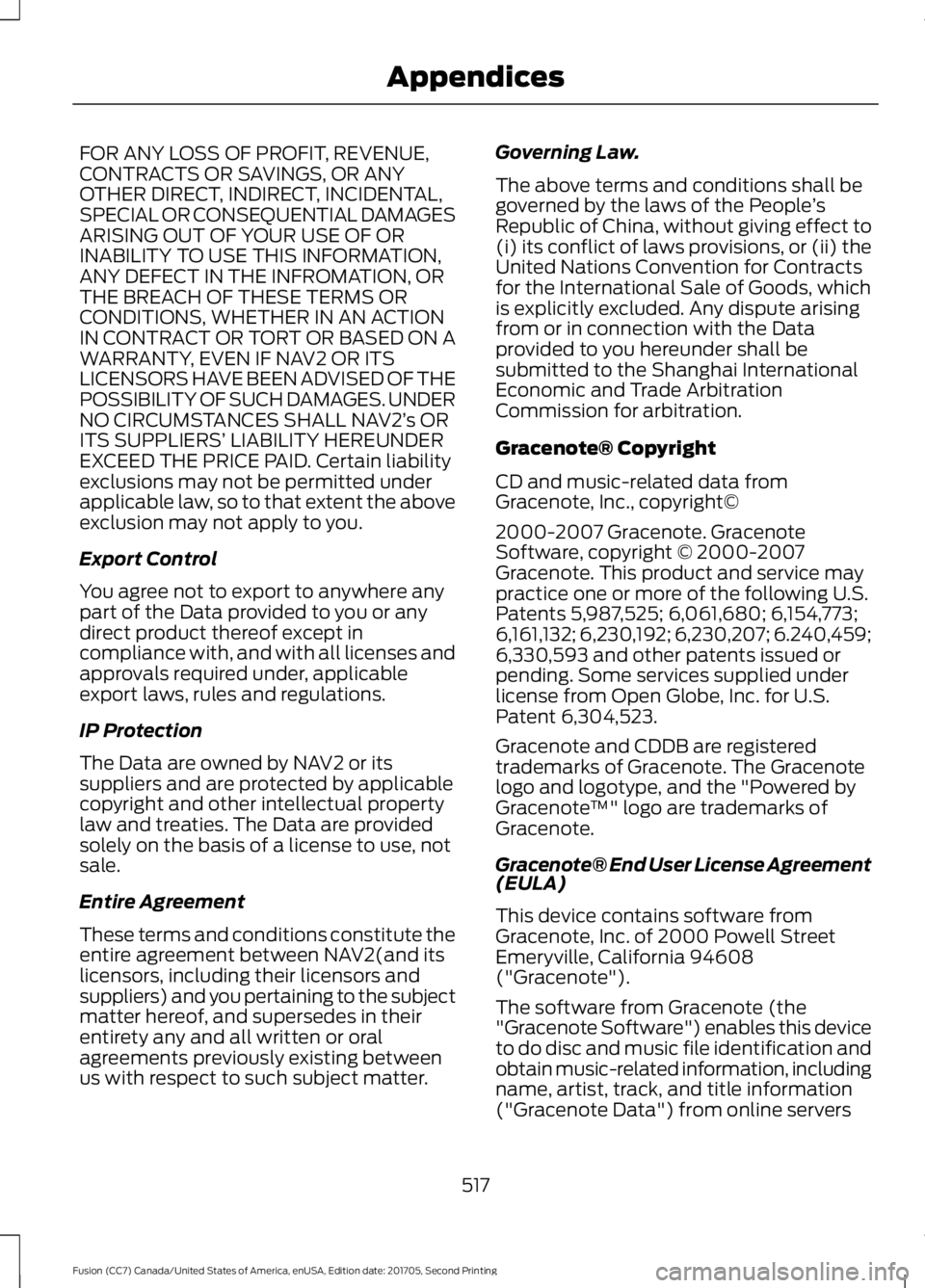
FOR ANY LOSS OF PROFIT, REVENUE,
CONTRACTS OR SAVINGS, OR ANY
OTHER DIRECT, INDIRECT, INCIDENTAL,
SPECIAL OR CONSEQUENTIAL DAMAGES
ARISING OUT OF YOUR USE OF OR
INABILITY TO USE THIS INFORMATION,
ANY DEFECT IN THE INFROMATION, OR
THE BREACH OF THESE TERMS OR
CONDITIONS, WHETHER IN AN ACTION
IN CONTRACT OR TORT OR BASED ON A
WARRANTY, EVEN IF NAV2 OR ITS
LICENSORS HAVE BEEN ADVISED OF THE
POSSIBILITY OF SUCH DAMAGES. UNDER
NO CIRCUMSTANCES SHALL NAV2’
s OR
ITS SUPPLIERS ’ LIABILITY HEREUNDER
EXCEED THE PRICE PAID. Certain liability
exclusions may not be permitted under
applicable law, so to that extent the above
exclusion may not apply to you.
Export Control
You agree not to export to anywhere any
part of the Data provided to you or any
direct product thereof except in
compliance with, and with all licenses and
approvals required under, applicable
export laws, rules and regulations.
IP Protection
The Data are owned by NAV2 or its
suppliers and are protected by applicable
copyright and other intellectual property
law and treaties. The Data are provided
solely on the basis of a license to use, not
sale.
Entire Agreement
These terms and conditions constitute the
entire agreement between NAV2(and its
licensors, including their licensors and
suppliers) and you pertaining to the subject
matter hereof, and supersedes in their
entirety any and all written or oral
agreements previously existing between
us with respect to such subject matter. Governing Law.
The above terms and conditions shall be
governed by the laws of the People
’s
Republic of China, without giving effect to
(i) its conflict of laws provisions, or (ii) the
United Nations Convention for Contracts
for the International Sale of Goods, which
is explicitly excluded. Any dispute arising
from or in connection with the Data
provided to you hereunder shall be
submitted to the Shanghai International
Economic and Trade Arbitration
Commission for arbitration.
Gracenote® Copyright
CD and music-related data from
Gracenote, Inc., copyright©
2000-2007 Gracenote. Gracenote
Software, copyright © 2000-2007
Gracenote. This product and service may
practice one or more of the following U.S.
Patents 5,987,525; 6,061,680; 6,154,773;
6,161,132; 6,230,192; 6,230,207; 6.240,459;
6,330,593 and other patents issued or
pending. Some services supplied under
license from Open Globe, Inc. for U.S.
Patent 6,304,523.
Gracenote and CDDB are registered
trademarks of Gracenote. The Gracenote
logo and logotype, and the "Powered by
Gracenote ™" logo are trademarks of
Gracenote.
Gracenote® End User License Agreement
(EULA)
This device contains software from
Gracenote, Inc. of 2000 Powell Street
Emeryville, California 94608
("Gracenote").
The software from Gracenote (the
"Gracenote Software") enables this device
to do disc and music file identification and
obtain music-related information, including
name, artist, track, and title information
("Gracenote Data") from online servers
517
Fusion (CC7) Canada/United States of America, enUSA, Edition date: 201705, Second Printing Appendices
Page 524 of 539
WARNING
Driving while distracted can result in
loss of vehicle control, crash and
injury. We strongly recommend that
you use extreme caution when using any
device that may take your focus off the
road. Your primary responsibility is the safe
operation of your vehicle. We recommend
against the use of any hand-held device
while driving and encourage the use of
voice-operated systems when possible.
Make sure you are aware of all applicable
local laws that may affect the use of
electronic devices while driving. TYPE APPROVALS
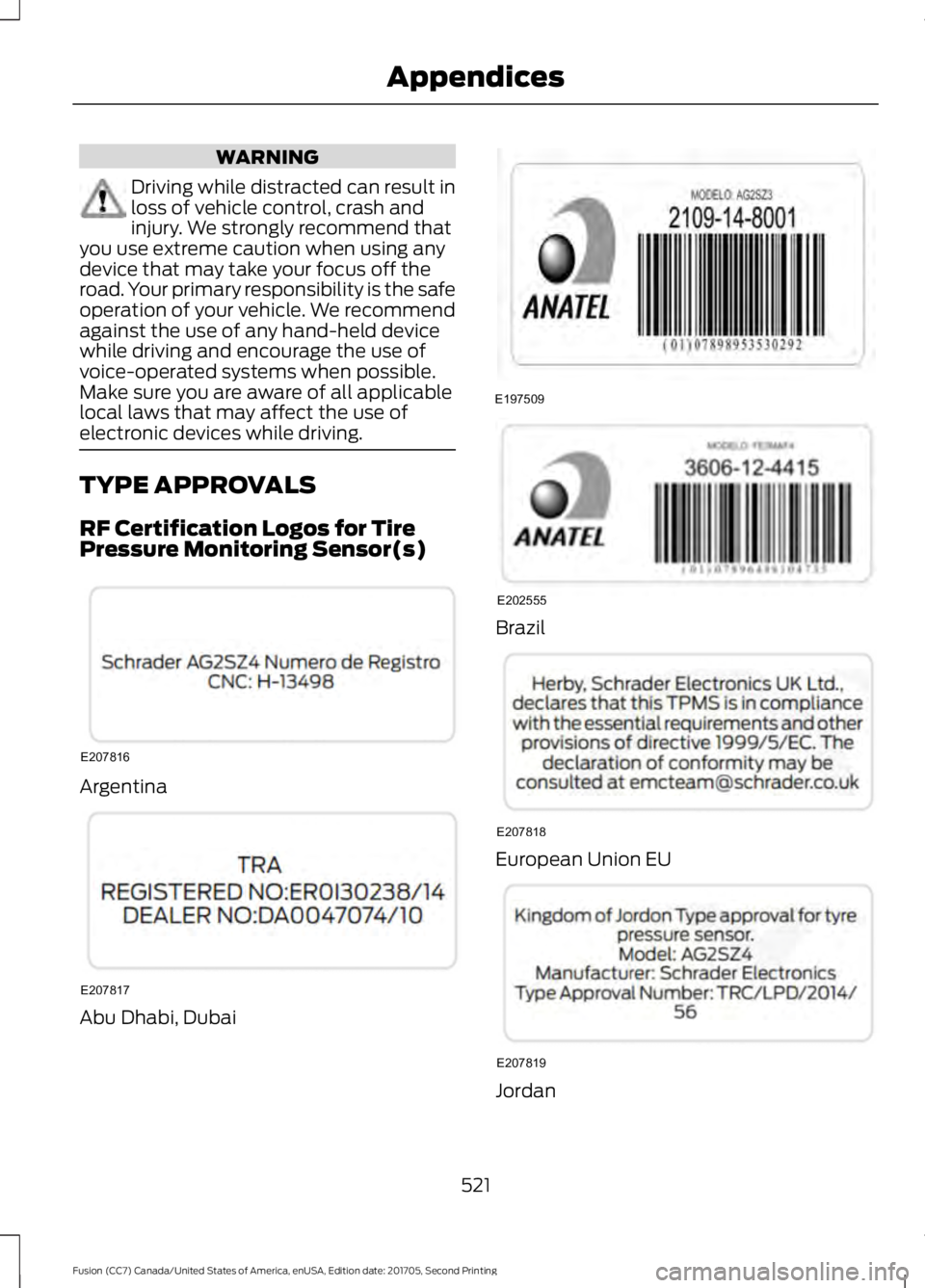
RF Certification Logos for Tire
Pressure Monitoring Sensor(s)
Argentina
Abu Dhabi, Dubai Brazil
European Union EU
Jordan
521
Fusion (CC7) Canada/United States of America, enUSA, Edition date: 201705, Second Printing AppendicesE207816 E207817 E197509 E202555 E207818 E207819
Page 530 of 539
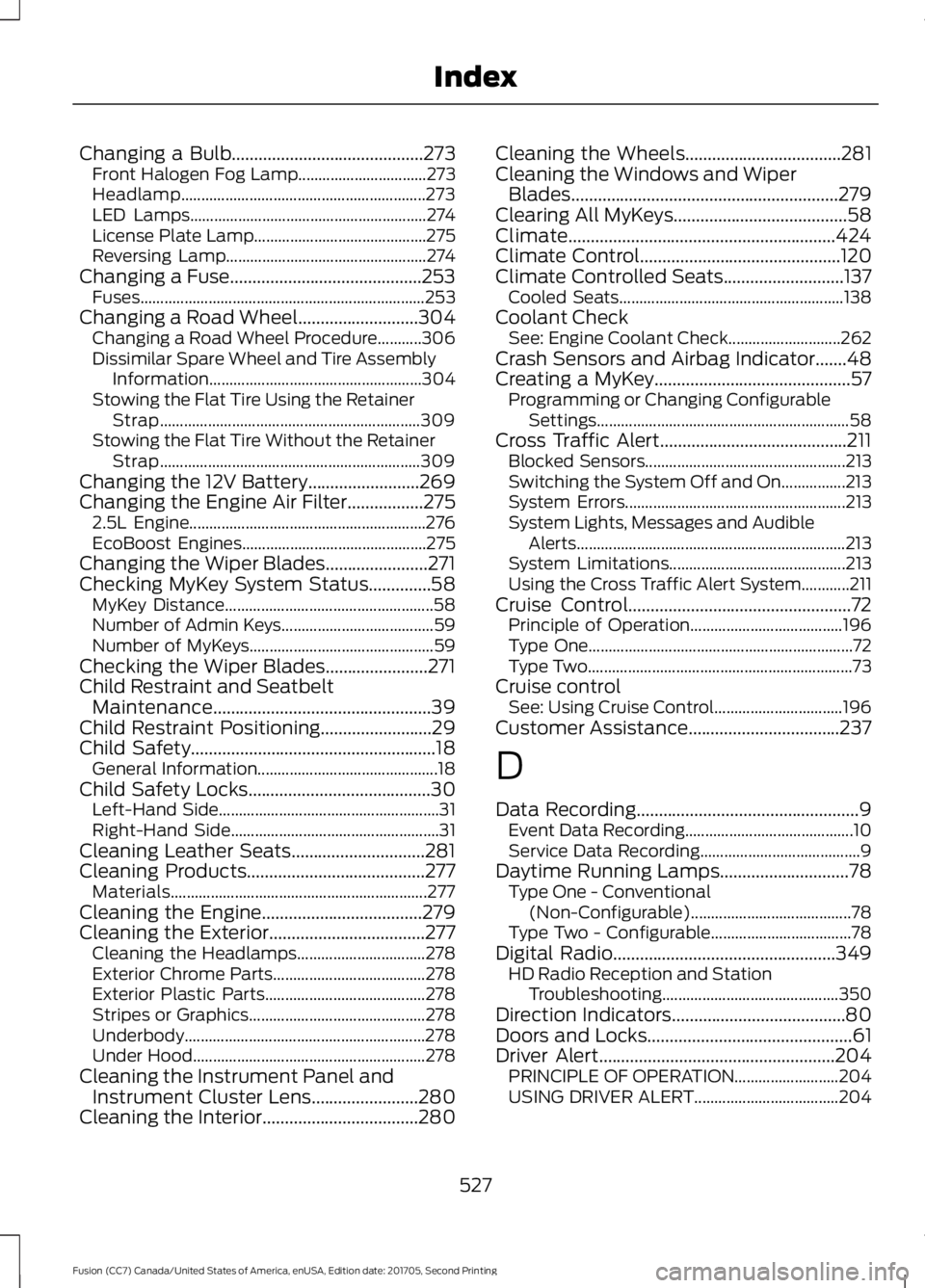
Changing a Bulb...........................................273
Front Halogen Fog Lamp................................ 273
Headlamp............................................................. 273
LED Lamps........................................................... 274
License Plate Lamp........................................... 275
Reversing Lamp.................................................. 274
Changing a Fuse...........................................253 Fuses....................................................................... 253
Changing a Road Wheel...........................304 Changing a Road Wheel Procedure...........306
Dissimilar Spare Wheel and Tire Assembly
Information..................................................... 304
Stowing the Flat Tire Using the Retainer Strap................................................................. 309
Stowing the Flat Tire Without the Retainer Strap................................................................. 309
Changing the 12V Battery.........................269
Changing the Engine Air Filter.................275 2.5L Engine........................................................... 276
EcoBoost Engines.............................................. 275
Changing the Wiper Blades.......................271
Checking MyKey System Status..............58 MyKey Distance.................................................... 58
Number of Admin Keys...................................... 59
Number of MyKeys.............................................. 59
Checking the Wiper Blades.......................271
Child Restraint and Seatbelt Maintenance.................................................39
Child Restraint Positioning.........................29
Child Safety
.......................................................18
General Information............................................. 18
Child Safety Locks.........................................30 Left-Hand Side....................................................... 31
Right-Hand Side.................................................... 31
Cleaning Leather Seats..............................281
Cleaning Products
........................................277
Materials................................................................ 277
Cleaning the Engine....................................279
Cleaning the Exterior...................................277 Cleaning the Headlamps................................ 278
Exterior Chrome Parts...................................... 278
Exterior Plastic Parts........................................ 278
Stripes or Graphics............................................ 278
Underbody............................................................ 278
Under Hood.......................................................... 278
Cleaning the Instrument Panel and Instrument Cluster Lens........................280
Cleaning the Interior...................................280 Cleaning the Wheels...................................281
Cleaning the Windows and Wiper
Blades............................................................279
Clearing All MyKeys
.......................................58
Climate............................................................424
Climate Control
.............................................120
Climate Controlled Seats...........................137 Cooled Seats........................................................ 138
Coolant Check See: Engine Coolant Check............................ 262
Crash Sensors and Airbag Indicator.......48
Creating a MyKey............................................57 Programming or Changing Configurable
Settings............................................................... 58
Cross Traffic Alert..........................................211 Blocked Sensors.................................................. 213
Switching the System Off and On................213
System Errors....................................................... 213
System Lights, Messages and Audible Alerts................................................................... 213
System Limitations............................................ 213
Using the Cross Traffic Alert System............211
Cruise Control
..................................................72
Principle of Operation...................................... 196
Type One.................................................................. 72
Type Two.................................................................. 73
Cruise control See: Using Cruise Control................................ 196
Customer Assistance
..................................237
D
Data Recording
..................................................9
Event Data Recording.......................................... 10
Service Data Recording........................................ 9
Daytime Running Lamps
.............................78
Type One - Conventional
(Non-Configurable)........................................ 78
Type Two - Configurable................................... 78
Digital Radio
..................................................349
HD Radio Reception and Station
Troubleshooting............................................ 350
Direction Indicators.......................................80
Doors and Locks
..............................................61
Driver Alert.....................................................204 PRINCIPLE OF OPERATION.......................... 204
USING DRIVER ALERT.................................... 204
527
Fusion (CC7) Canada/United States of America, enUSA, Edition date: 201705, Second Printing Index
Page 533 of 539
Hints on Driving With Anti-Lock
Brakes.............................................................175
Home Screen................................................405
Hood Lock See: Opening and Closing the Hood..........255
I
In California (U.S. Only)............................238
Information Display Control
.......................73
Information Displays....................................96 General Information........................................... 96
Information Messages
................................105
Active Park............................................................ 105
Adaptive Cruise Control.................................. 106
AdvanceTrac®..................................................... 106
Airbag...................................................................... 107
Alarm....................................................................... 107
All-Wheel Drive................................................... 109
Automatic Engine Shutdown........................ 109
Auto Start-Stop................................................... 107
Battery and Charging System......................... 110
Blind Spot Information and Cross Traffic Alert System..................................................... 110
Doors and Locks.................................................... 111
Driver Alert............................................................... 111
Fuel........................................................................\
..... 111
Hill Start Assist...................................................... 111
Keys and Intelligent Access............................. 112
Lane Keeping System......................................... 113
Maintenance.......................................................... 113
MyKey....................................................................... 114
Park Aid................................................................... 115
Park Brake............................................................... 115
Power Steering..................................................... 116
Pre-Collision Assist............................................. 116
Remote Start......................................................... 116
Seats........................................................................\
. 117
Starting System ................................................... 117
Tire Pressure Monitoring System................... 117
Traction Control................................................... 118
Transmission......................................................... 118
Installing Child Restraints............................19 Child Seats............................................................... 19
Using Lap and Shoulder Belts......................... 20
Using Lower Anchors and Tethers for CHildren (LATCH)........................................... 24
Using Tether Straps............................................. 26Instrument Cluster
........................................89
Instrument Lighting Dimmer......................77 Vehicles With Front Fog Lamps...................... 78
Vehicles Without Front Fog Lamps...............78
Instrument Panel Overview........................16
Interior Lamps
.................................................80
Front Interior Lamps........................................... 80
Rear Interior Lamps.............................................. 81
Interior Luggage Compartment Release...........................................................66
Interior Mirror
...................................................86
Automatic Dimming Mirror.............................. 86
Manual Dimming Mirror..................................... 86
Introduction.........................................................7
J
Jump Starting the Vehicle........................233 Connecting the Jumper Cables.................... 233
Jump Starting...................................................... 234
Preparing Your Vehicle..................................... 233
Removing the Jumper Cables....................... 234
K
Keyless Entry
...................................................64
SECURICODE™ Keyless Entry
Keypad................................................................ 64
Keyless Starting
.............................................147
Ignition Modes...................................................... 147
Keys and Remote Controls........................50
L
Lane Keeping System
................................205
Switching the System On and Off..............206
Lighting Control
..............................................76
Headlamp Flasher................................................ 77
Headlamp High Beam........................................ 76
Lighting...............................................................76 General Information............................................ 76
Load Carrying.................................................218
Load Limit........................................................218 Special Loading Instructions for Owners of
Pick-up Trucks and Utility-type
Vehicles............................................................. 222
Vehicle Loading - with and without a Trailer.................................................................. 218
530
Fusion (CC7) Canada/United States of America, enUSA, Edition date: 201705, Second Printing Index