brake light FORD FUSION 2018 Owner's Guide
[x] Cancel search | Manufacturer: FORD, Model Year: 2018, Model line: FUSION, Model: FORD FUSION 2018Pages: 539, PDF Size: 6.42 MB
Page 271 of 539
*
Vehicles With 2.7L Turbocharger WARNING
Do not start the engine with the air
filter removed. This can cause
damage not covered by the vehicle
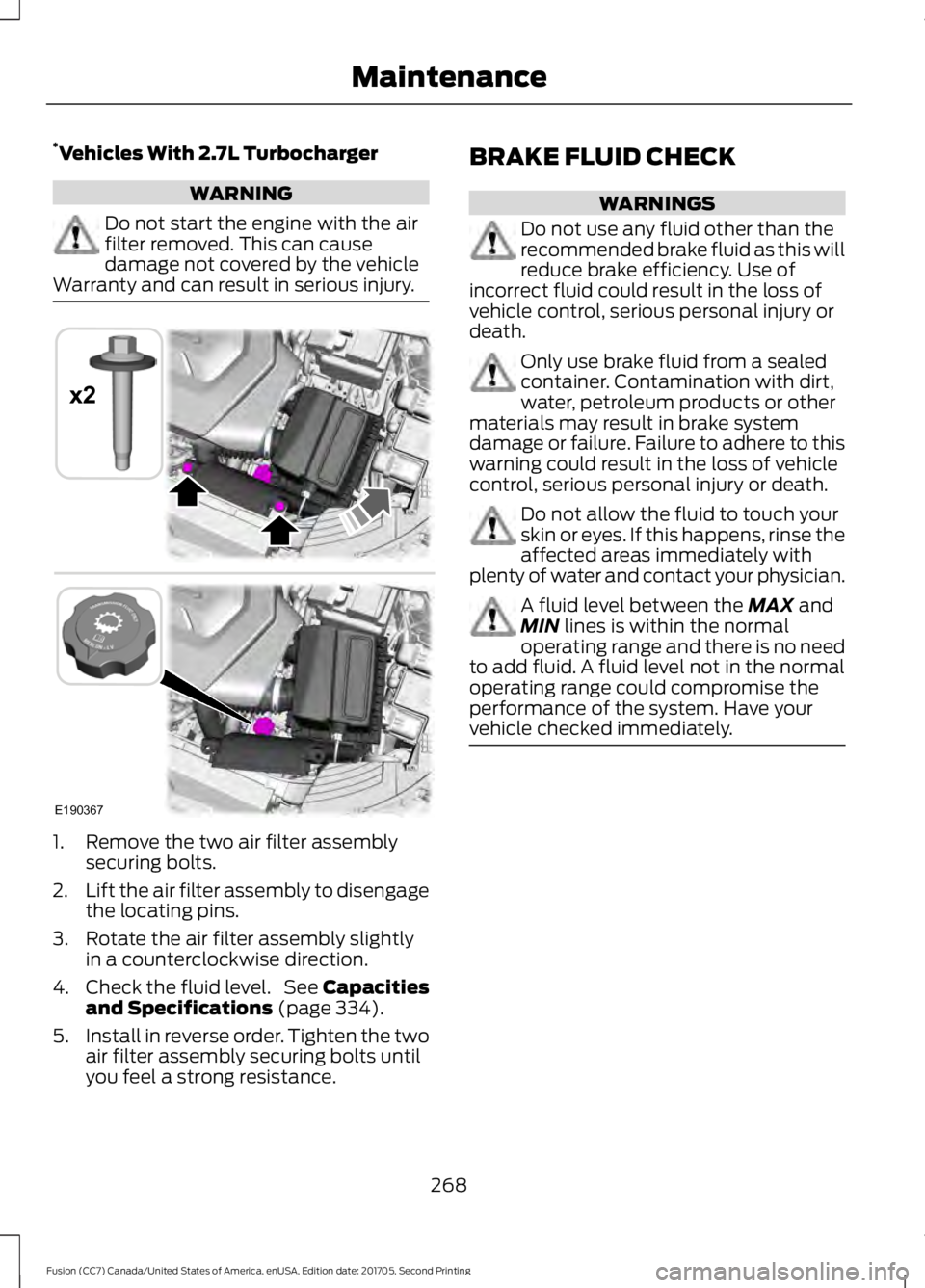
Warranty and can result in serious injury. 1. Remove the two air filter assembly
securing bolts.
2. Lift the air filter assembly to disengage
the locating pins.
3. Rotate the air filter assembly slightly in a counterclockwise direction.
4. Check the fluid level. See Capacities
and Specifications (page 334).
5. Install in reverse order. Tighten the two
air filter assembly securing bolts until
you feel a strong resistance. BRAKE FLUID CHECK WARNINGS
Do not use any fluid other than the
recommended brake fluid as this will
reduce brake efficiency. Use of
incorrect fluid could result in the loss of
vehicle control, serious personal injury or
death. Only use brake fluid from a sealed
container. Contamination with dirt,
water, petroleum products or other
materials may result in brake system
damage or failure. Failure to adhere to this
warning could result in the loss of vehicle
control, serious personal injury or death. Do not allow the fluid to touch your
skin or eyes. If this happens, rinse the
affected areas immediately with
plenty of water and contact your physician. A fluid level between the
MAX and
MIN lines is within the normal
operating range and there is no need
to add fluid. A fluid level not in the normal
operating range could compromise the
performance of the system. Have your
vehicle checked immediately. 268
Fusion (CC7) Canada/United States of America, enUSA, Edition date: 201705, Second Printing MaintenanceE190367
x2
Page 285 of 539
3.
Remove tar and grease with a bug and
tar remover. We recommend that you
use Ford approved bug and tar remover
if available.
4. Thoroughly rinse the wheels with water
after cleaning.
If you intend on parking your vehicle for an
extended period after cleaning the wheels
with a wheel cleaner, drive your vehicle for
a few minutes before doing so. This
reduces the risk of corrosion of the brake
discs, brake pads and linings.
Do not clean the wheels when they are hot.
Note: Some car washes could damage
wheel rims and covers.
Note: Using non-recommended cleaners,
harsh cleaning products, chrome wheel
cleaners or abrasive materials could
damage wheel rims and covers.
VEHICLE STORAGE
If you plan on storing your vehicle for 30
days or more, read the following
maintenance recommendations to make
sure your vehicle stays in good operating
condition.
We engineer and test all motor vehicles
and their components for reliable, regular
driving. Under various conditions,
long-term storage may lead to degraded
engine performance or failure unless you
use specific precautions to preserve engine
components.
General
• Store all vehicles in a dry, ventilated
place.
• Protect from sunlight, if possible.
• If vehicles are stored outside, they
require regular maintenance to protect
against rust and damage. Body
•
Wash your vehicle thoroughly to
remove dirt, grease, oil, tar or mud from
exterior surfaces, rear-wheel housing
and the underside of front fenders.
• Periodically wash your vehicle if it is
stored in exposed locations.
• Touch-up exposed or primed metal to
prevent rust.
• Cover chrome and stainless steel parts
with a thick coat of auto wax to prevent
discoloration. Re-wax as necessary
when you wash your vehicle.
• Lubricate all hood, door and luggage
compartment hinges and latches with
a light grade oil.
• Cover interior trim to prevent fading.
• Keep all rubber parts free from oil and
solvents.
Engine
• Change the engine oil and filter prior to
storage because used engine oil
contains contaminates which may
cause engine damage.
• Start the engine every 15 days for a
minimum of 15 minutes. Run at fast idle
with the climate controls set to defrost
until the engine reaches normal
operating temperature.
• With your foot on the brake, shift
through all the gears while the engine
is running.
• We recommend that you change the
engine oil before you use your vehicle
again.
Fuel system
• Fill the fuel tank with high-quality fuel
until the first automatic shutoff of the
fuel pump nozzle.
282
Fusion (CC7) Canada/United States of America, enUSA, Edition date: 201705, Second Printing Vehicle Care
Page 307 of 539

How Temperature Affects Your Tire
Pressure
The tire pressure monitoring system
monitors tire pressure in each pneumatic
tire. While driving in a normal manner, a
typical passenger tire inflation pressure
may increase about 2
–4 psi (14– 28 kPa)
from a cold start situation. If the vehicle is
stationary overnight with the outside
temperature significantly lower than the
daytime temperature, the tire pressure may
decrease about 3 psi (21 kPa) for a drop of
30°F (17°C) in ambient temperature. This
lower pressure value may be detected by
the tire pressure monitoring system as
being significantly lower than the
recommended inflation pressure and
activate the system warning light for low
tire pressure. If the low tire pressure
warning light is on, visually check each tire
to verify that no tire is flat. If one or more
tires are flat, repair as necessary. Check
the air pressure in the road tires. If any tire
is under-inflated, carefully drive the vehicle
to the nearest location where air can be
added to the tires. Inflate all the tires to
the recommended inflation pressure.
CHANGING A ROAD WHEEL WARNINGS
Do not use tire sealants as they may
damage the tire pressure monitoring
system.
If the tire pressure monitor sensor
becomes damaged it may not
function.
Note:
The tire pressure monitoring system
indicator light will illuminate when the spare
tire is in use. To restore the full function of
the monitoring system, all road wheels
equipped with tire pressure monitoring
sensors must be mounted on the vehicle. If you get a flat tire while driving, do not
apply the brake heavily. Instead, gradually
decrease your speed. Hold the steering
wheel firmly and slowly move to a safe
place on the side of the road.
Have a flat serviced by an authorized
dealer in order to prevent damage to the
tire pressure monitoring system sensors.
See
Tire Pressure Monitoring System
(page 300). Replace the spare tire with a
road tire as soon as possible. During
repairing or replacing of the flat tire, have
an authorized dealer inspect the tire
pressure monitoring system sensor for
damage.
Dissimilar Spare Wheel and Tire
Assembly Information WARNING
Failure to follow these guidelines
could result in an increased risk of
loss of vehicle control, injury or death.
If you have a dissimilar spare wheel and
tire, then it is intended for temporary use
only. This means that if you need to use it,
you should replace it as soon as possible
with a road wheel and tire assembly that
is the same size and type as the road tires
and wheels that were originally provided
by Ford. If the dissimilar spare tire or wheel
is damaged, it should be replaced rather
than repaired.
304
Fusion (CC7) Canada/United States of America, enUSA, Edition date: 201705, Second Printing Wheels and Tires
Page 342 of 539
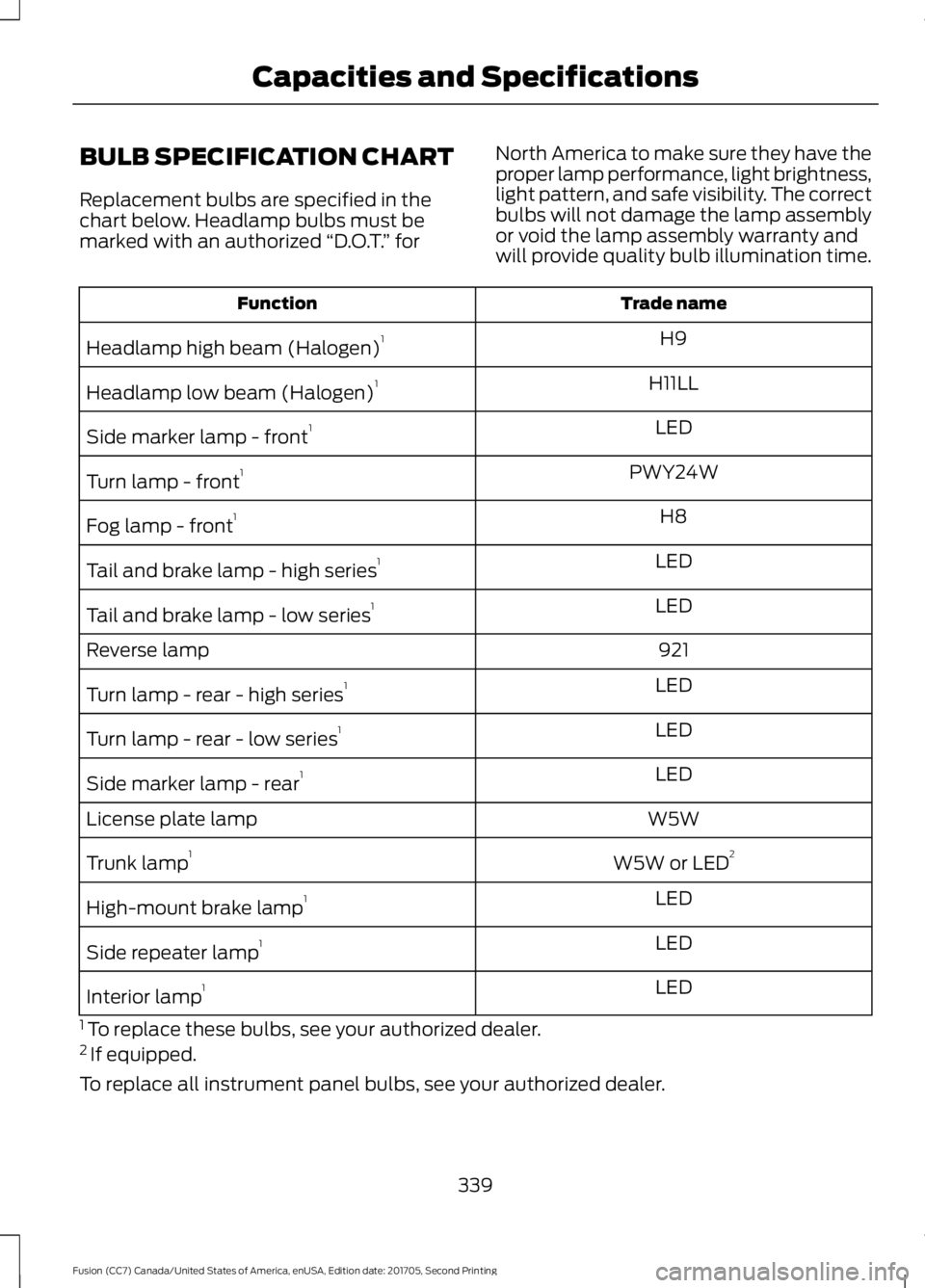
BULB SPECIFICATION CHART
Replacement bulbs are specified in the
chart below. Headlamp bulbs must be
marked with an authorized
“D.O.T.” for North America to make sure they have the
proper lamp performance, light brightness,
light pattern, and safe visibility. The correct
bulbs will not damage the lamp assembly
or void the lamp assembly warranty and
will provide quality bulb illumination time. Trade name
Function
H9
Headlamp high beam (Halogen) 1
H11LL
Headlamp low beam (Halogen) 1
LED
Side marker lamp - front 1
PWY24W
Turn lamp - front 1
H8
Fog lamp - front 1
LED
Tail and brake lamp - high series 1
LED
Tail and brake lamp - low series 1
921
Reverse lamp
LED
Turn lamp - rear - high series 1
LED
Turn lamp - rear - low series 1
LED
Side marker lamp - rear 1
W5W
License plate lamp
W5W or LED2
Trunk lamp 1
LED
High-mount brake lamp 1
LED
Side repeater lamp 1
LED
Interior lamp 1
1 To replace these bulbs, see your authorized dealer.
2 If equipped.
To replace all instrument panel bulbs, see your authorized dealer.
339
Fusion (CC7) Canada/United States of America, enUSA, Edition date: 201705, Second Printing Capacities and Specifications
Page 480 of 539
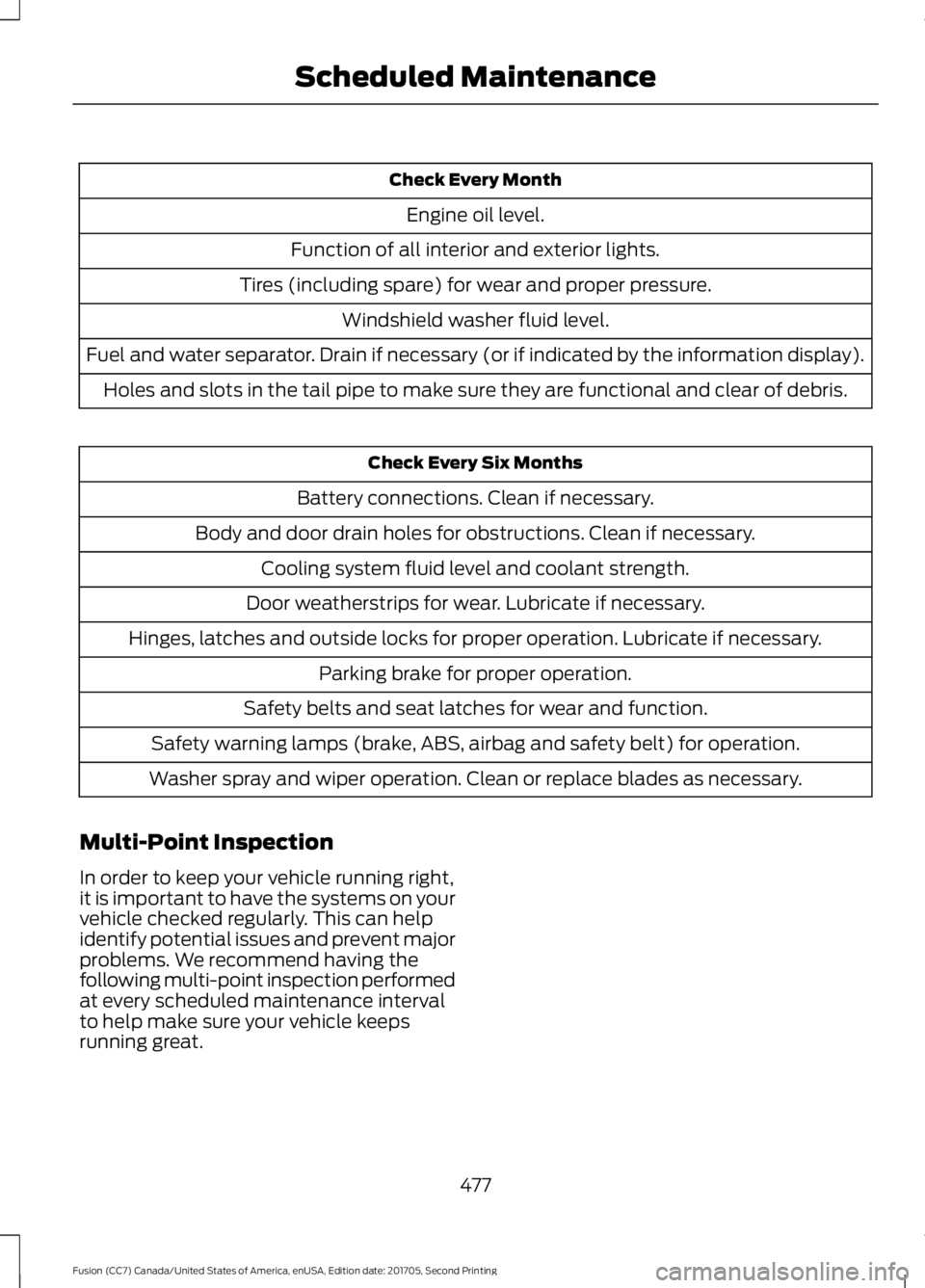
Check Every Month
Engine oil level.
Function of all interior and exterior lights.
Tires (including spare) for wear and proper pressure. Windshield washer fluid level.
Fuel and water separator. Drain if necessary (or if indicated by the information display). Holes and slots in the tail pipe to make sure they are functional and clear of debris. Check Every Six Months
Battery connections. Clean if necessary.
Body and door drain holes for obstructions. Clean if necessary. Cooling system fluid level and coolant strength.
Door weatherstrips for wear. Lubricate if necessary.
Hinges, latches and outside locks for proper operation. Lubricate if necessary. Parking brake for proper operation.
Safety belts and seat latches for wear and function.
Safety warning lamps (brake, ABS, airbag and safety belt) for operation.
Washer spray and wiper operation. Clean or replace blades as necessary.
Multi-Point Inspection
In order to keep your vehicle running right,
it is important to have the systems on your
vehicle checked regularly. This can help
identify potential issues and prevent major
problems. We recommend having the
following multi-point inspection performed
at every scheduled maintenance interval
to help make sure your vehicle keeps
running great.
477
Fusion (CC7) Canada/United States of America, enUSA, Edition date: 201705, Second Printing Scheduled Maintenance
Page 528 of 539
A
A/C
See: Climate Control......................................... 120
About This Manual...........................................7
ABS See: Brakes............................................................ 175
ABS driving hints See: Hints on Driving With Anti-Lock
Brakes................................................................. 175
Accessories.....................................................471 Exterior Style......................................................... 471
Interior Style.......................................................... 471
Lifestyle................................................................... 471
Peace of Mind....................................................... 471
Accessories See: Replacement Parts
Recommendation............................................ 12
ACC See: Using Adaptive Cruise Control.............197
Active Park Assist.........................................187 Deactivating the Active Park Assist
Feature ................................................................ 191
Parallel Parking, Perpendicular Parking, Parallel Park Out Assist............................... 187
Troubleshooting the System.......................... 192
Adjusting the Headlamps
.........................272
Horizontal Aim Adjustment............................ 273
Vertical Aim Adjustment................................. 272
Adjusting the Steering Wheel - Vehicles With: Manual Adjustable Steering
Column.............................................................71
Adjusting the Steering Wheel - Vehicles With: Power Adjustable Steering
Column............................................................70
End of Travel Position......................................... 70
Airbag Disposal
...............................................49
Air Conditioning See: Climate Control......................................... 120
Air Filter See: Changing the Engine Air Filter.............275
Alarm See: Anti-Theft Alarm........................................ 69
All-Wheel Drive
.............................................170
Ambient Lighting............................................82
Anti-Theft Alarm............................................69 Arming the Alarm................................................ 69
Disarming the Alarm........................................... 69Appendices....................................................493
Apps
.................................................................440
........................................................................\
......... 440
SiriusXM Traffic and Travel Link................... 442
At a Glance........................................................16
Audible Warnings and Indicators.............95 Headlamps On Warning Chime...................... 95
Keyless Warning Alert........................................ 95
Parking Brake On Warning Chime.................95
Audio Control....................................................71 MODE........................................................................\
72
Seek, Next or Previous........................................ 72
Audio System...............................................340 General Information......................................... 340
Audio Unit - Vehicles With: Sony Audio System/Touchscreen Display
...............341
Audio Unit - Vehicles With: SYNC.........343 Menu Structure................................................... 345
Audio Unit - Vehicles With: Touchscreen Display, Vehicles Without: Sony Audio
System.........................................................348
Autolamps
.........................................................77
Windshield Wiper Activated
Headlamps......................................................... 77
Automatic Climate Control - Vehicles With: Sony Audio System........................121
A/C........................................................................\
.... 122
AUTO....................................................................... 123
Climate Controlled Seats................................. 123
Defrost.................................................................... 123
Fan Speed Control.............................................. 123
Heated Rear Window........................................ 123
Heated Seats........................................................ 123
Heated Windshield............................................. 123
Left-hand Temperature Control.................... 123
Max A/C.................................................................. 122
Max Defrost........................................................... 123
Power....................................................................... 123
Recirculated Air.................................................... 123
Right-hand Temperature Control.................123
Automatic Climate Control - Vehicles Without: Sony Audio System................124
A/C........................................................................\
... 125
AUTO....................................................................... 125
Climate Controlled Seats................................ 125
Defrost.................................................................... 124
Fan Speed Control............................................. 125
Heated Rear Window........................................ 125
525
Fusion (CC7) Canada/United States of America, enUSA, Edition date: 201705, Second Printing Index
Page 533 of 539
Hints on Driving With Anti-Lock
Brakes.............................................................175
Home Screen................................................405
Hood Lock See: Opening and Closing the Hood..........255
I
In California (U.S. Only)............................238
Information Display Control
.......................73
Information Displays....................................96 General Information........................................... 96
Information Messages
................................105
Active Park............................................................ 105
Adaptive Cruise Control.................................. 106
AdvanceTrac®..................................................... 106
Airbag...................................................................... 107
Alarm....................................................................... 107
All-Wheel Drive................................................... 109
Automatic Engine Shutdown........................ 109
Auto Start-Stop................................................... 107
Battery and Charging System......................... 110
Blind Spot Information and Cross Traffic Alert System..................................................... 110
Doors and Locks.................................................... 111
Driver Alert............................................................... 111
Fuel........................................................................\
..... 111
Hill Start Assist...................................................... 111
Keys and Intelligent Access............................. 112
Lane Keeping System......................................... 113
Maintenance.......................................................... 113
MyKey....................................................................... 114
Park Aid................................................................... 115
Park Brake............................................................... 115
Power Steering..................................................... 116
Pre-Collision Assist............................................. 116
Remote Start......................................................... 116
Seats........................................................................\
. 117
Starting System ................................................... 117
Tire Pressure Monitoring System................... 117
Traction Control................................................... 118
Transmission......................................................... 118
Installing Child Restraints............................19 Child Seats............................................................... 19
Using Lap and Shoulder Belts......................... 20
Using Lower Anchors and Tethers for CHildren (LATCH)........................................... 24
Using Tether Straps............................................. 26Instrument Cluster
........................................89
Instrument Lighting Dimmer......................77 Vehicles With Front Fog Lamps...................... 78
Vehicles Without Front Fog Lamps...............78
Instrument Panel Overview........................16
Interior Lamps
.................................................80
Front Interior Lamps........................................... 80
Rear Interior Lamps.............................................. 81
Interior Luggage Compartment Release...........................................................66
Interior Mirror
...................................................86
Automatic Dimming Mirror.............................. 86
Manual Dimming Mirror..................................... 86
Introduction.........................................................7
J
Jump Starting the Vehicle........................233 Connecting the Jumper Cables.................... 233
Jump Starting...................................................... 234
Preparing Your Vehicle..................................... 233
Removing the Jumper Cables....................... 234
K
Keyless Entry
...................................................64
SECURICODE™ Keyless Entry
Keypad................................................................ 64
Keyless Starting
.............................................147
Ignition Modes...................................................... 147
Keys and Remote Controls........................50
L
Lane Keeping System
................................205
Switching the System On and Off..............206
Lighting Control
..............................................76
Headlamp Flasher................................................ 77
Headlamp High Beam........................................ 76
Lighting...............................................................76 General Information............................................ 76
Load Carrying.................................................218
Load Limit........................................................218 Special Loading Instructions for Owners of
Pick-up Trucks and Utility-type
Vehicles............................................................. 222
Vehicle Loading - with and without a Trailer.................................................................. 218
530
Fusion (CC7) Canada/United States of America, enUSA, Edition date: 201705, Second Printing Index
Page 538 of 539
Media Voice Commands.................................
377
USB 2...................................................................... 382
Voice Commands for Audio Sources.........383
Using SYNC™ With Your Phone............359 Accessing Features through the Phone
Menu................................................................. 364
Accessing Your Phone Settings.................... 367
Bluetooth Devices............................................. 368
Making Calls........................................................ 363
Pairing a Phone for the First Time..............360
Pairing Subsequent Phones........................... 361
Phone Options during an Active Call.........363
Phone Voice Commands................................. 361
Receiving Calls.................................................... 363
System Settings................................................. 369
Text Messaging................................................... 365
Using Traction Control...............................180 Switching the System Off............................... 180
System Indicator Lights and Messages......................................................... 180
Using a Switch.................................................... 180
Using the Information Display Controls............................................................ 180
Using Voice Recognition............................357 Audio Voice Commands................................. 407
Climate Voice Commands............................ 408
Initiating a Voice Session................................ 357
Mobile App Voice Commands........................ 411
Navigation Voice Commands........................ 410
Phone Voice Commands............................... 409
SiriusXM Traffic and Travel Link Voice Commands...................................................... 412
System Interaction and Feedback..............358
Voice Settings Commands............................. 412
Utilizing the Mediation/Arbitration Program (Canada Only)........................240
V
Vehicle Care....................................................277
General Information.......................................... 277
Vehicle Certification Label
.......................320
Vehicle Identification Number.................319
Vehicle Storage
............................................282
Battery................................................................... 283
Body........................................................................\
282
Brakes.................................................................... 283
Cooling system................................................... 283Engine....................................................................
282
Fuel system.......................................................... 282
General.................................................................. 282
Miscellaneous..................................................... 283
Removing Vehicle From Storage.................283
Tires........................................................................\
283
Ventilation See: Climate Control......................................... 120
VIN See: Vehicle Identification Number.............319
Voice Control
....................................................72
W
Warning Lamps and Indicators..................91 Adaptive Cruise Control..................................... 92
Anti-Lock Braking System................................ 92
Auto Start-stop..................................................... 92
Battery...................................................................... 92
Blind Spot Monitor............................................... 92
Brake System......................................................... 92
Cruise Control........................................................ 92
Direction Indicator................................................ 92
Door Ajar.................................................................. 93
Electric Park Brake............................................... 93
Engine Coolant Temperature.......................... 93
Engine Oil................................................................ 93
Fasten Seatbelt.................................................... 93
Front Airbag............................................................ 93
Front Fog Lamps.................................................. 93
Grade Assist........................................................... 93
Heads Up Display................................................. 93
High Beam.............................................................. 93
Hood Ajar................................................................ 93
Lane Keeping System Lamp............................ 93
Low Fuel Level....................................................... 93
Low Tire Pressure Warning............................... 94
Parking Lamps...................................................... 94
Powertrain Fault................................................... 94
Service Engine Soon........................................... 94
Sport Mode............................................................ 94
Stability Control................................................... 94
Stability Control Off............................................ 94
Trunk Ajar................................................................ 94
Washer Fluid Check....................................269
Washers See: Cleaning the Exterior............................... 277
See: Wipers and Washers.................................. 74
535
Fusion (CC7) Canada/United States of America, enUSA, Edition date: 201705, Second Printing Index