automatic transmission FORD FUSION 2018 Owners Manual
[x] Cancel search | Manufacturer: FORD, Model Year: 2018, Model line: FUSION, Model: FORD FUSION 2018Pages: 539, PDF Size: 6.42 MB
Page 6 of 539
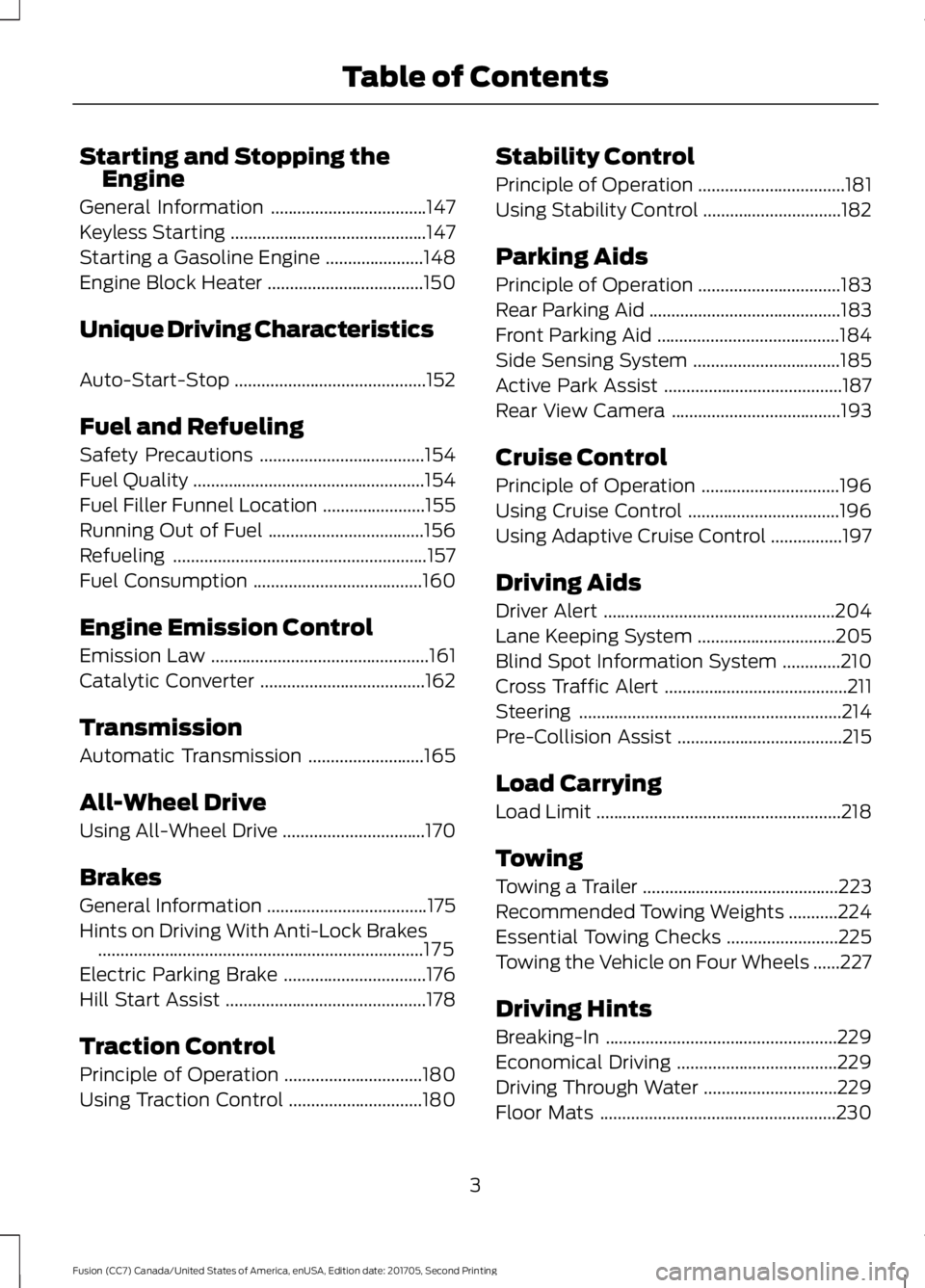
Starting and Stopping the
Engine
General Information ...................................147
Keyless Starting ............................................
147
Starting a Gasoline Engine ......................
148
Engine Block Heater ...................................
150
Unique Driving Characteristics
Auto-Start-Stop ...........................................
152
Fuel and Refueling
Safety Precautions .....................................
154
Fuel Quality ....................................................
154
Fuel Filler Funnel Location .......................
155
Running Out of Fuel ...................................
156
Refueling .........................................................
157
Fuel Consumption ......................................
160
Engine Emission Control
Emission Law .................................................
161
Catalytic Converter .....................................
162
Transmission
Automatic Transmission ..........................
165
All-Wheel Drive
Using All-Wheel Drive ................................
170
Brakes
General Information ....................................
175
Hints on Driving With Anti-Lock Brakes ........................................................................\
.
175
Electric Parking Brake ................................
176
Hill Start Assist .............................................
178
Traction Control
Principle of Operation ...............................
180
Using Traction Control ..............................
180Stability Control
Principle of Operation
.................................
181
Using Stability Control ...............................
182
Parking Aids
Principle of Operation ................................
183
Rear Parking Aid ...........................................
183
Front Parking Aid .........................................
184
Side Sensing System .................................
185
Active Park Assist ........................................
187
Rear View Camera ......................................
193
Cruise Control
Principle of Operation ...............................
196
Using Cruise Control ..................................
196
Using Adaptive Cruise Control ................
197
Driving Aids
Driver Alert ....................................................
204
Lane Keeping System ...............................
205
Blind Spot Information System .............
210
Cross Traffic Alert .........................................
211
Steering ...........................................................
214
Pre-Collision Assist .....................................
215
Load Carrying
Load Limit .......................................................
218
Towing
Towing a Trailer ............................................
223
Recommended Towing Weights ...........
224
Essential Towing Checks .........................
225
Towing the Vehicle on Four Wheels ......
227
Driving Hints
Breaking-In ....................................................
229
Economical Driving ....................................
229
Driving Through Water ..............................
229
Floor Mats .....................................................
230
3
Fusion (CC7) Canada/United States of America, enUSA, Edition date: 201705, Second Printing Table of Contents
Page 7 of 539
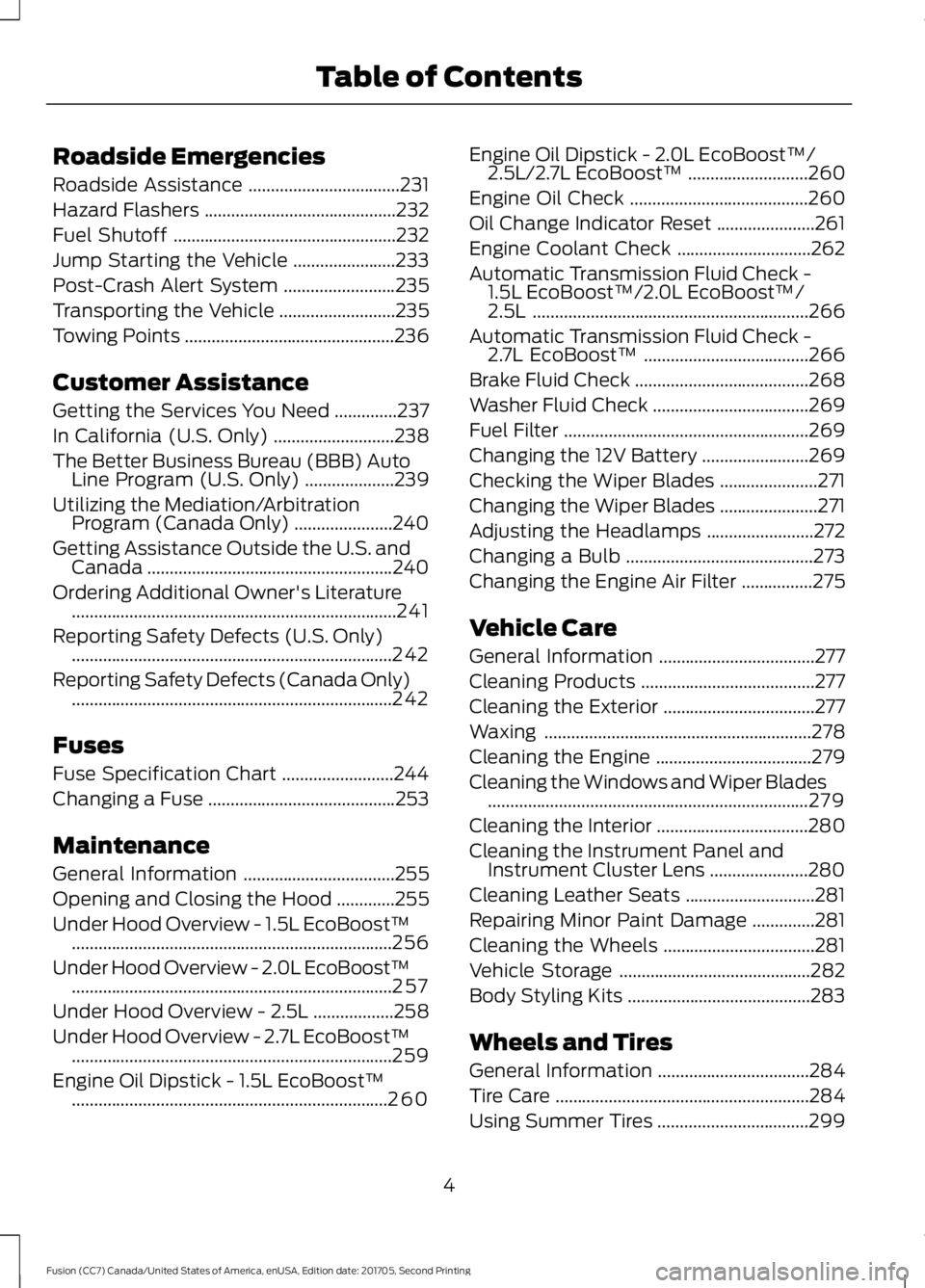
Roadside Emergencies
Roadside Assistance
..................................231
Hazard Flashers ...........................................
232
Fuel Shutoff ..................................................
232
Jump Starting the Vehicle .......................
233
Post-Crash Alert System .........................
235
Transporting the Vehicle ..........................
235
Towing Points ...............................................
236
Customer Assistance
Getting the Services You Need ..............
237
In California (U.S. Only) ...........................
238
The Better Business Bureau (BBB) Auto Line Program (U.S. Only) ....................
239
Utilizing the Mediation/Arbitration Program (Canada Only) ......................
240
Getting Assistance Outside the U.S. and Canada .......................................................
240
Ordering Additional Owner's Literature ........................................................................\
.
241
Reporting Safety Defects (U.S. Only) ........................................................................\
242
Reporting Safety Defects (Canada Only) ........................................................................\
242
Fuses
Fuse Specification Chart .........................
244
Changing a Fuse ..........................................
253
Maintenance
General Information ..................................
255
Opening and Closing the Hood .............
255
Under Hood Overview - 1.5L EcoBoost™ ........................................................................\
256
Under Hood Overview - 2.0L EcoBoost™ ........................................................................\
257
Under Hood Overview - 2.5L ..................
258
Under Hood Overview - 2.7L EcoBoost™ ........................................................................\
259
Engine Oil Dipstick - 1.5L EcoBoost™ .......................................................................
260 Engine Oil Dipstick - 2.0L EcoBoost™/
2.5L/2.7L EcoBoost™ ...........................
260
Engine Oil Check ........................................
260
Oil Change Indicator Reset ......................
261
Engine Coolant Check ..............................
262
Automatic Transmission Fluid Check - 1.5L EcoBoost™/2.0L EcoBoost™/
2.5L ..............................................................
266
Automatic Transmission Fluid Check - 2.7L EcoBoost™ .....................................
266
Brake Fluid Check .......................................
268
Washer Fluid Check ...................................
269
Fuel Filter .......................................................
269
Changing the 12V Battery ........................
269
Checking the Wiper Blades ......................
271
Changing the Wiper Blades ......................
271
Adjusting the Headlamps ........................
272
Changing a Bulb ..........................................
273
Changing the Engine Air Filter ................
275
Vehicle Care
General Information ...................................
277
Cleaning Products .......................................
277
Cleaning the Exterior ..................................
277
Waxing ............................................................
278
Cleaning the Engine ...................................
279
Cleaning the Windows and Wiper Blades ........................................................................\
279
Cleaning the Interior ..................................
280
Cleaning the Instrument Panel and Instrument Cluster Lens ......................
280
Cleaning Leather Seats .............................
281
Repairing Minor Paint Damage ..............
281
Cleaning the Wheels ..................................
281
Vehicle Storage ...........................................
282
Body Styling Kits .........................................
283
Wheels and Tires
General Information ..................................
284
Tire Care .........................................................
284
Using Summer Tires ..................................
299
4
Fusion (CC7) Canada/United States of America, enUSA, Edition date: 201705, Second Printing Table of Contents
Page 57 of 539
Remote Start (If Equipped)
WARNING
To avoid exhaust fumes, do not use
remote start if your vehicle is parked
indoors or in areas that are not well
ventilated. Note:
Do not use remote start if your fuel
level is low. The remote start button is on the
transmitter.
This feature allows you to start your
vehicle from the outside. The transmitter
has an extended operating range.
If your vehicle has automatic climate
control, you can configure it to operate
when you remote start your vehicle. See
Climate Control
(page 120). A manual
climate control system will run at the
setting it was set to when you switched
your vehicle off.
Many states and provinces have
restrictions for the use of remote start.
Check your local and state or provincial
laws for specific requirements regarding
remote start systems.
The remote start system does not work
when any of the following conditions occur:
• The ignition is on.
• The anti-theft alarm triggers.
• You switch the feature off in the
information display.
• The hood is open.
• The transmission is not in park (P).
• The battery voltage is below the
minimum operating voltage. Remote Control Feedback (If
Equipped)
An LED on the remote control provides
status feedback of remote start or stop
commands. Status
LED
Remote startsuccessful
Solid green
Remote stopsuccessful
Solid red
Request failed or
status not received
Blinking red
Status incomplete
Blinking green
Remote Starting your Vehicle
Note: You must press each button within
three seconds of each other. Your vehicle
will not remote start if you do not follow this
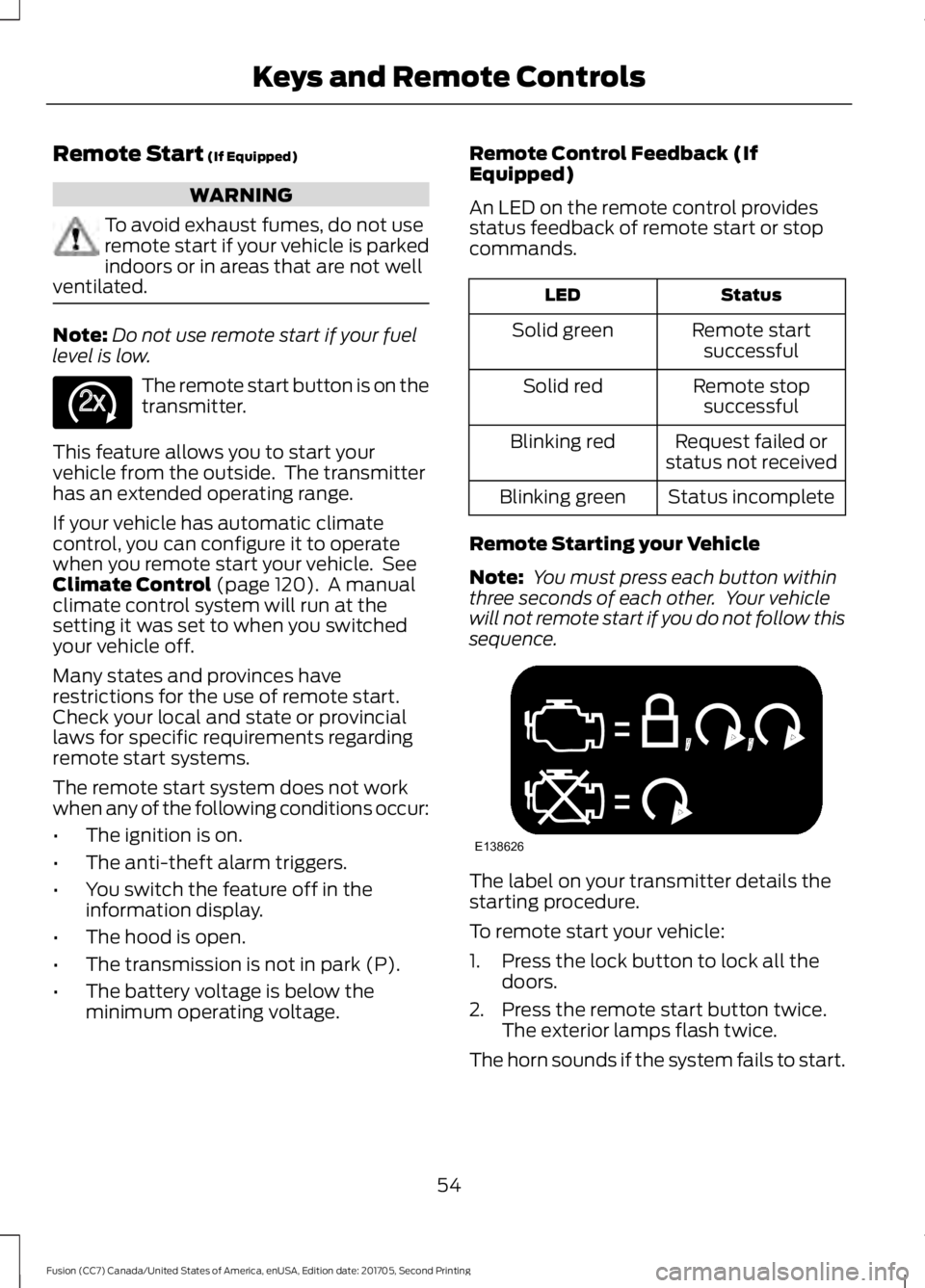
sequence. The label on your transmitter details the
starting procedure.
To remote start your vehicle:
1. Press the lock button to lock all the
doors.
2. Press the remote start button twice. The exterior lamps flash twice.
The horn sounds if the system fails to start.
54
Fusion (CC7) Canada/United States of America, enUSA, Edition date: 201705, Second Printing Keys and Remote ControlsE138625 E138626
Page 81 of 539
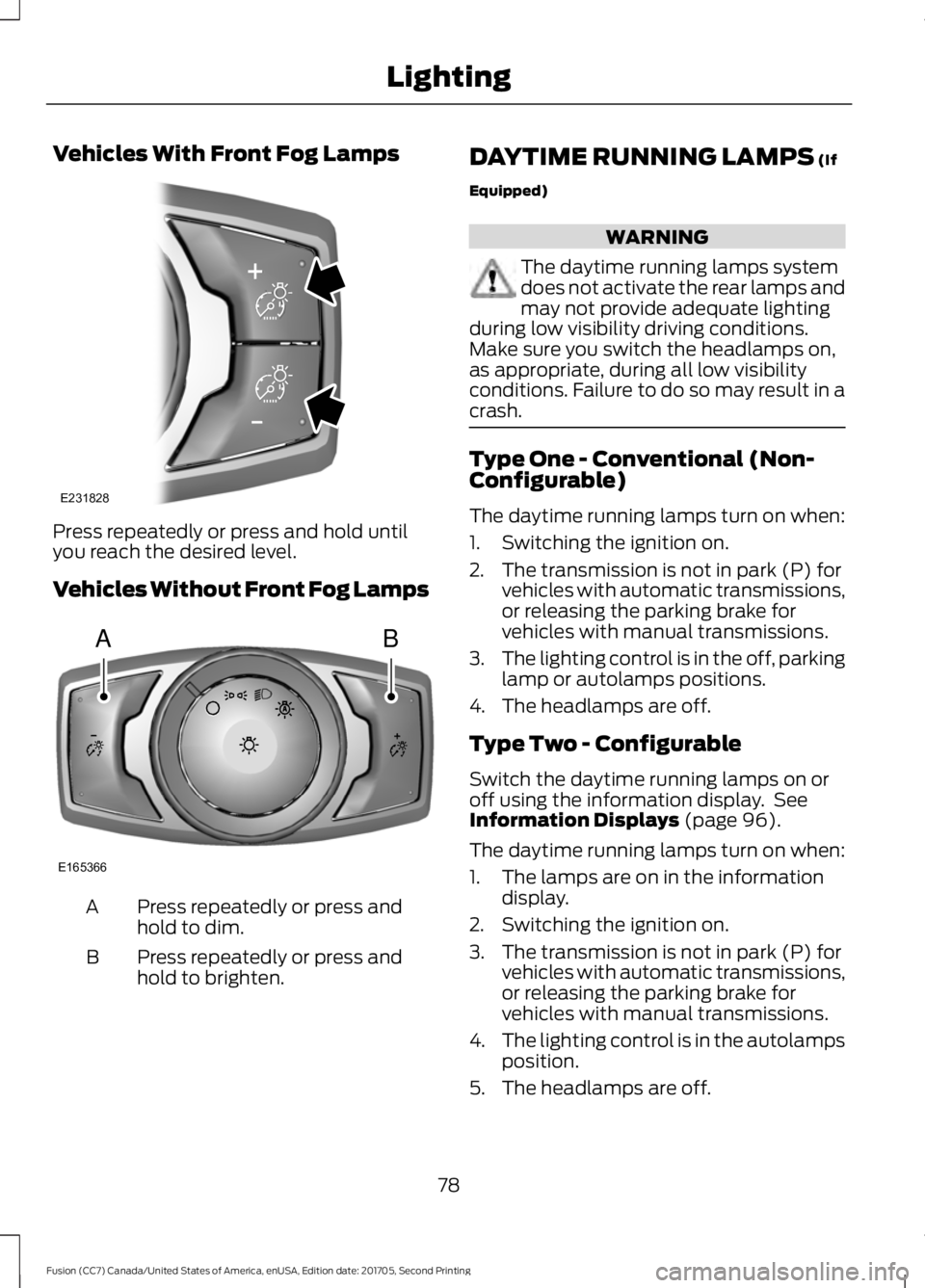
Vehicles With Front Fog Lamps
Press repeatedly or press and hold until
you reach the desired level.
Vehicles Without Front Fog Lamps
Press repeatedly or press and
hold to dim.
A
Press repeatedly or press and
hold to brighten.
B DAYTIME RUNNING LAMPS (If
Equipped) WARNING
The daytime running lamps system
does not activate the rear lamps and
may not provide adequate lighting
during low visibility driving conditions.
Make sure you switch the headlamps on,
as appropriate, during all low visibility
conditions. Failure to do so may result in a
crash. Type One - Conventional (Non-
Configurable)
The daytime running lamps turn on when:
1. Switching the ignition on.
2. The transmission is not in park (P) for
vehicles with automatic transmissions,
or releasing the parking brake for
vehicles with manual transmissions.
3. The lighting control is in the off, parking
lamp or autolamps positions.
4. The headlamps are off.
Type Two - Configurable
Switch the daytime running lamps on or
off using the information display. See
Information Displays
(page 96).
The daytime running lamps turn on when:
1. The lamps are on in the information display.
2. Switching the ignition on.
3. The transmission is not in park (P) for vehicles with automatic transmissions,
or releasing the parking brake for
vehicles with manual transmissions.
4. The lighting control is in the autolamps
position.
5. The headlamps are off.
78
Fusion (CC7) Canada/United States of America, enUSA, Edition date: 201705, Second Printing LightingE231828 AB
E165366
Page 104 of 539
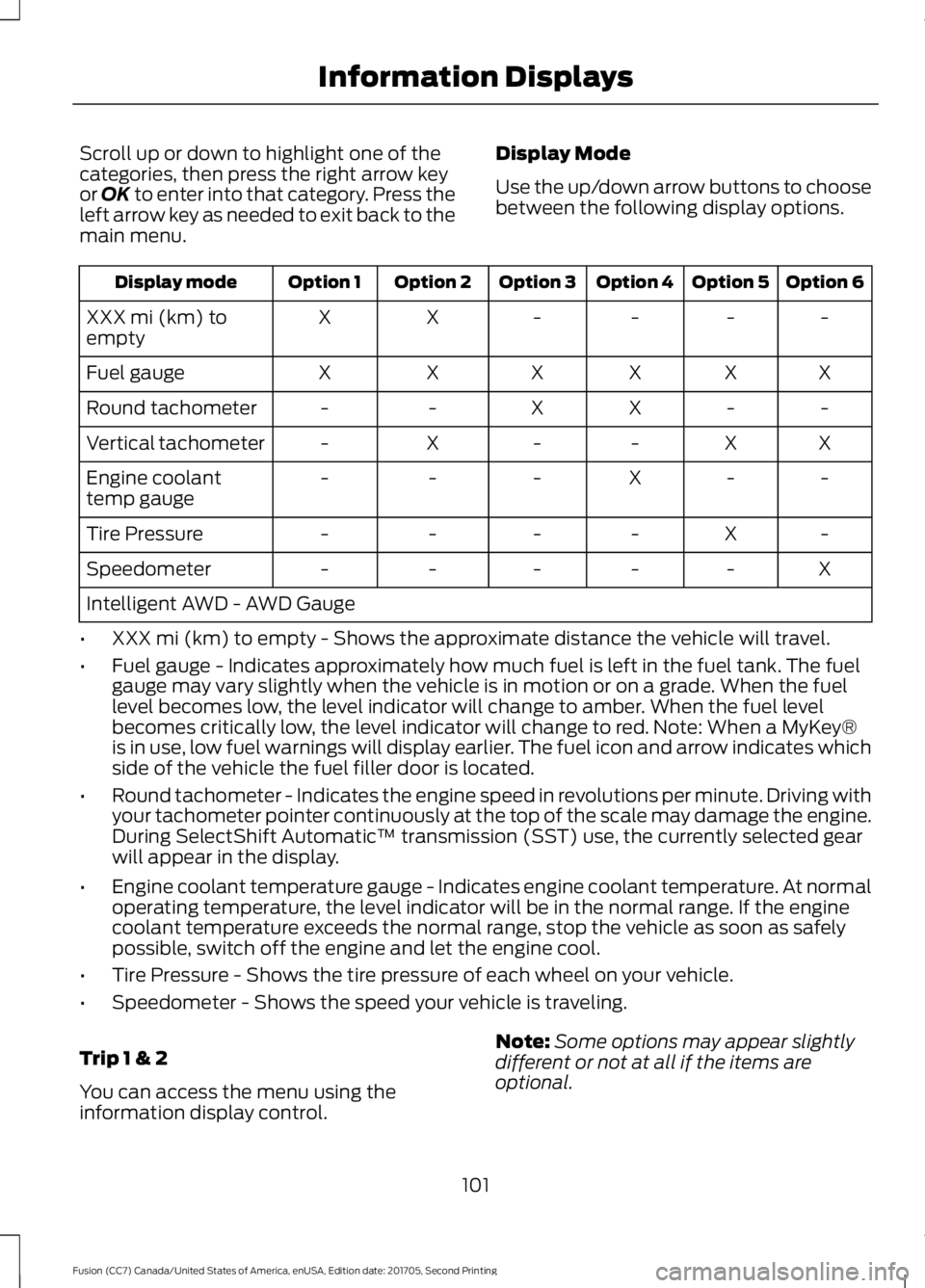
Scroll up or down to highlight one of the
categories, then press the right arrow key
or OK to enter into that category. Press the
left arrow key as needed to exit back to the
main menu. Display Mode
Use the up/down arrow buttons to choose
between the following display options. Option 6
Option 5
Option 4
Option 3
Option 2
Option 1
Display mode
-
-
-
-
X
X
XXX mi (km) to
empty
X
X
X
X
X
X
Fuel gauge
-
-
X
X
-
-
Round tachometer
X
X
-
-
X
-
Vertical tachometer
-
-
X
-
-
-
Engine coolant
temp gauge
-
X
-
-
-
-
Tire Pressure
X
-
-
-
-
-
Speedometer
Intelligent AWD - AWD Gauge
• XXX mi (km) to empty - Shows the approximate distance the vehicle will travel.
• Fuel gauge - Indicates approximately how much fuel is left in the fuel tank. The fuel
gauge may vary slightly when the vehicle is in motion or on a grade. When the fuel
level becomes low, the level indicator will change to amber. When the fuel level
becomes critically low, the level indicator will change to red. Note: When a MyKey®
is in use, low fuel warnings will display earlier. The fuel icon and arrow indicates which
side of the vehicle the fuel filler door is located.
• Round tachometer - Indicates the engine speed in revolutions per minute. Driving with
your tachometer pointer continuously at the top of the scale may damage the engine.
During SelectShift Automatic ™ transmission (SST) use, the currently selected gear
will appear in the display.
• Engine coolant temperature gauge - Indicates engine coolant temperature. At normal
operating temperature, the level indicator will be in the normal range. If the engine
coolant temperature exceeds the normal range, stop the vehicle as soon as safely
possible, switch off the engine and let the engine cool.
• Tire Pressure - Shows the tire pressure of each wheel on your vehicle.
• Speedometer - Shows the speed your vehicle is traveling.
Trip 1 & 2
You can access the menu using the
information display control. Note:
Some options may appear slightly
different or not at all if the items are
optional.
101
Fusion (CC7) Canada/United States of America, enUSA, Edition date: 201705, Second Printing Information Displays
Page 109 of 539
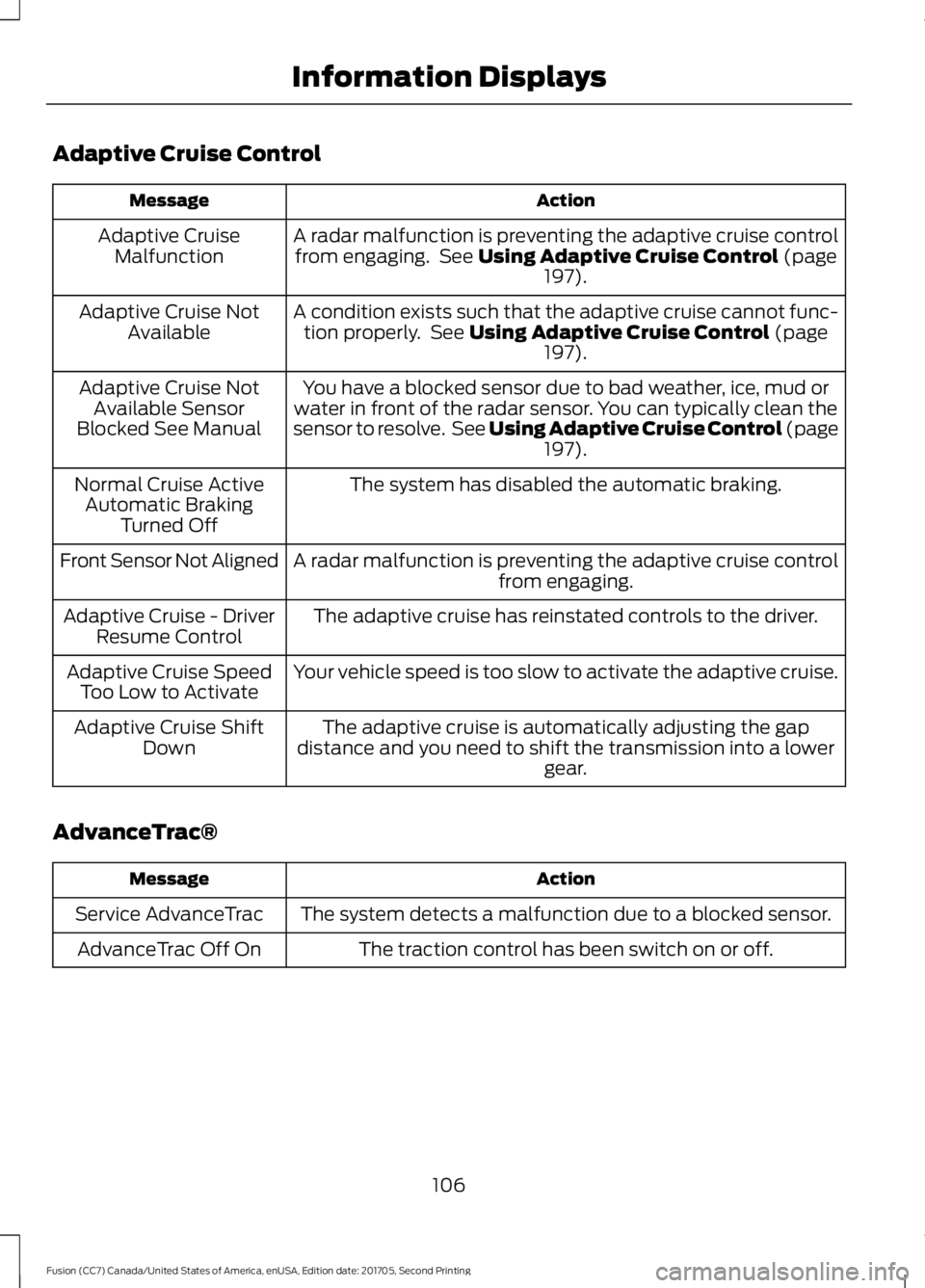
Adaptive Cruise Control
Action
Message
A radar malfunction is preventing the adaptive cruise controlfrom engaging. See Using Adaptive Cruise Control (page
197).
Adaptive Cruise
Malfunction
A condition exists such that the adaptive cruise cannot func-tion properly. See
Using Adaptive Cruise Control (page
197).
Adaptive Cruise Not
Available
You have a blocked sensor due to bad weather, ice, mud or
water in front of the radar sensor. You can typically clean the
sensor to resolve. See Using Adaptive Cruise Control
(page
197).
Adaptive Cruise Not
Available Sensor
Blocked See Manual
The system has disabled the automatic braking.
Normal Cruise Active
Automatic Braking Turned Off
A radar malfunction is preventing the adaptive cruise control from engaging.
Front Sensor Not Aligned
The adaptive cruise has reinstated controls to the driver.
Adaptive Cruise - Driver
Resume Control
Your vehicle speed is too slow to activate the adaptive cruise.
Adaptive Cruise Speed
Too Low to Activate
The adaptive cruise is automatically adjusting the gap
distance and you need to shift the transmission into a lower gear.
Adaptive Cruise Shift
Down
AdvanceTrac® Action
Message
The system detects a malfunction due to a blocked sensor.
Service AdvanceTrac
The traction control has been switch on or off.
AdvanceTrac Off On
106
Fusion (CC7) Canada/United States of America, enUSA, Edition date: 201705, Second Printing Information Displays
Page 121 of 539
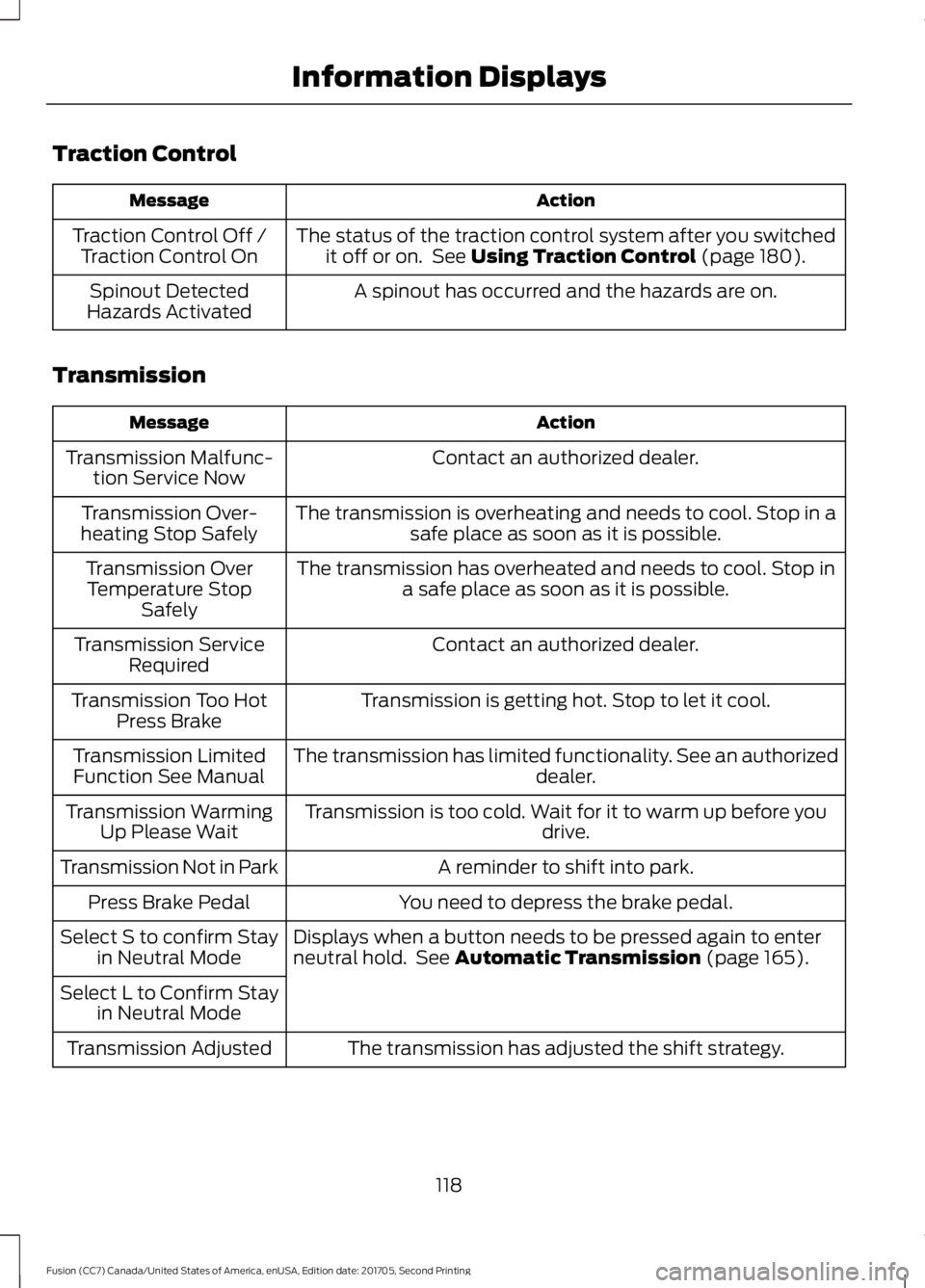
Traction Control
Action
Message
The status of the traction control system after you switchedit off or on. See Using Traction Control (page 180).
Traction Control Off /
Traction Control On
A spinout has occurred and the hazards are on.
Spinout Detected
Hazards Activated
Transmission Action
Message
Contact an authorized dealer.
Transmission Malfunc-
tion Service Now
The transmission is overheating and needs to cool. Stop in asafe place as soon as it is possible.
Transmission Over-
heating Stop Safely
The transmission has overheated and needs to cool. Stop ina safe place as soon as it is possible.
Transmission Over
Temperature Stop Safely
Contact an authorized dealer.
Transmission Service
Required
Transmission is getting hot. Stop to let it cool.
Transmission Too Hot
Press Brake
The transmission has limited functionality. See an authorized dealer.
Transmission Limited
Function See Manual
Transmission is too cold. Wait for it to warm up before you drive.
Transmission Warming
Up Please Wait
A reminder to shift into park.
Transmission Not in Park
You need to depress the brake pedal.
Press Brake Pedal
Displays when a button needs to be pressed again to enter
neutral hold. See
Automatic Transmission (page 165).
Select S to confirm Stay
in Neutral Mode
Select L to Confirm Stay in Neutral Mode
The transmission has adjusted the shift strategy.
Transmission Adjusted
118
Fusion (CC7) Canada/United States of America, enUSA, Edition date: 201705, Second Printing Information Displays
Page 138 of 539
•
Driver seat.
• Power mirrors.
• Power steering column.
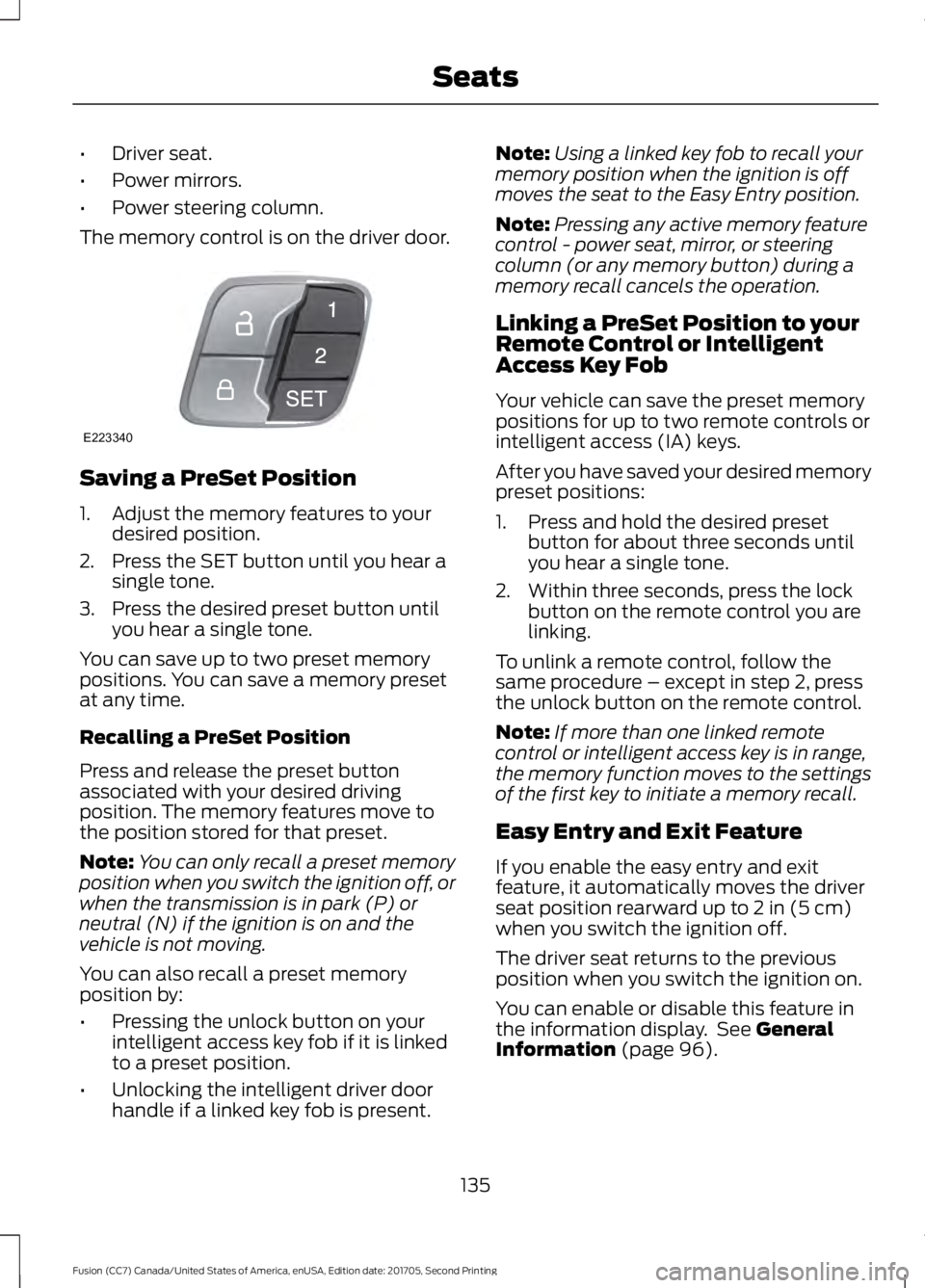
The memory control is on the driver door. Saving a PreSet Position
1. Adjust the memory features to your
desired position.
2. Press the SET button until you hear a single tone.
3. Press the desired preset button until you hear a single tone.
You can save up to two preset memory
positions. You can save a memory preset
at any time.
Recalling a PreSet Position
Press and release the preset button
associated with your desired driving
position. The memory features move to
the position stored for that preset.
Note: You can only recall a preset memory
position when you switch the ignition off, or
when the transmission is in park (P) or
neutral (N) if the ignition is on and the
vehicle is not moving.
You can also recall a preset memory
position by:
• Pressing the unlock button on your
intelligent access key fob if it is linked
to a preset position.
• Unlocking the intelligent driver door
handle if a linked key fob is present. Note:
Using a linked key fob to recall your
memory position when the ignition is off
moves the seat to the Easy Entry position.
Note: Pressing any active memory feature
control - power seat, mirror, or steering
column (or any memory button) during a
memory recall cancels the operation.
Linking a PreSet Position to your
Remote Control or Intelligent
Access Key Fob
Your vehicle can save the preset memory
positions for up to two remote controls or
intelligent access (IA) keys.
After you have saved your desired memory
preset positions:
1. Press and hold the desired preset button for about three seconds until
you hear a single tone.
2. Within three seconds, press the lock button on the remote control you are
linking.
To unlink a remote control, follow the
same procedure – except in step 2, press
the unlock button on the remote control.
Note: If more than one linked remote
control or intelligent access key is in range,
the memory function moves to the settings
of the first key to initiate a memory recall.
Easy Entry and Exit Feature
If you enable the easy entry and exit
feature, it automatically moves the driver
seat position rearward up to 2 in (5 cm)
when you switch the ignition off.
The driver seat returns to the previous
position when you switch the ignition on.
You can enable or disable this feature in
the information display. See
General
Information (page 96).
135
Fusion (CC7) Canada/United States of America, enUSA, Edition date: 201705, Second Printing SeatsE223340
Page 151 of 539

STARTING A GASOLINE
ENGINE
When you start the engine, the idle speed
increases. This helps to warm up the
engine. If the engine idle speed does not
slow down automatically, have your
vehicle checked by an authorized dealer.
Note:
You can crank the engine for a total
of 60 seconds without the engine starting
before the starting system temporarily
disables. The 60 seconds does not have to
be all at once. For example, if you crank the
engine three times for 20 seconds each
time, without the engine starting, you
reached the 60-second time limit. A
message appears in the information display
alerting you that you exceeded the cranking
time. You cannot attempt to start the
engine for at least 15 minutes. After 15
minutes, you are limited to a 15-second
engine cranking time. You need to wait 60
minutes before you can crank the engine for
60 seconds again.
Before starting your vehicle, check the
following:
• Make sure all occupants have fastened
their seatbelts.
• Make sure the headlamps and
electrical accessories are off.
• Make sure the parking brake is on.
• Make sure the transmission is in park
(P).
Starting Your Vehicle
Note: Do not touch the accelerator pedal.
Note: You must have your intelligent access
key in your vehicle to shift the transmission
out of park (P).
1. Fully depress the brake pedal.
2. Press the push button ignition switch. Failure to Start
The system does not function if:
•
The key frequencies are jammed.
• The key battery has no charge.
If you are unable to start your vehicle, do
the following:
1. Remove the key blade from the transmitter. 2. Remove the rubber covering (A) from
the cup holder. With the buttons facing
upward and the unlock button facing
the front of your vehicle, place the first
intelligent access key into the backup
slot (B).
3. Press the push button ignition switch.
If you cannot start the engine after three
attempts, wait 10 seconds and follow this
procedure:
1. Apply the parking brake.
2. Fully depress the brake pedal.
3. Shift into park (P).
4. Fully press the accelerator pedal.
5. Briefly press the push button ignition switch.
148
Fusion (CC7) Canada/United States of America, enUSA, Edition date: 201705, Second Printing Starting and Stopping the EngineE155835
Page 155 of 539
AUTO-START-STOP (If Equipped)
The system helps reduce fuel consumption
by automatically shutting off and restarting
the engine while your vehicle is stopped.
The engine will restart automatically when
you release the brake pedal. In some
situations, your vehicle may restart
automatically, for example:
• To maintain interior comfort
• To recharge the battery
Note: Power assist steering is turned off
when the engine is off. WARNINGS
Always fully apply the parking brake.
Make sure you shift into park (P) for
vehicles with an automatic
transmission. Switch the ignition off and
remove the key whenever you leave your
vehicle. Before opening the hood or
performing any maintenance, fully
apply the parking brake, shift into
park (P) or neutral (N) and switch the
ignition off. Always switch the ignition off before
leaving the vehicle. If the ignition is
switched on an automatic restart
may occur at any time. The system may require the engine
to automatically restart when the
auto-start-stop indicator illuminates
green or flashes amber. Failure to follow
this instruction could result in personal
injury. The Auto-Start-Stop system status is
available at a glance within the information
display. See Information Displays (page
96
). Enabling Auto-Start-Stop
The system is automatically enabled every
time you start your vehicle if the following
conditions are met:
•
The Auto-Start-Stop button is not
pressed (not illuminated).
• Your vehicle exceeds an initial speed
of
3 mph (5 km/h) after you have
initially started the vehicle.
• Your vehicle is stopped.
• Your foot is on the brake pedal.
• The transmission is in drive (D).
• The driver's door is closed.
• There is adequate brake vacuum.
• The interior compartment has been
cooled or warmed to an acceptable
level.
• The front windshield defroster is off.
• The steering wheel is not turned rapidly
or is not at a sharp angle.
• The vehicle is not on a steep road
grade.
• The battery is within optimal operating
conditions (battery state of charge and
temperature in range).
• The engine coolant is at operating
temperature.
• Elevation is below approximately
10,000 ft (3,050 m)
.
• Ambient temperature is moderate. The green Auto-Start-Stop
indicator light on the instrument
cluster will illuminate to indicate
when the automatic engine stop occurs. If the instrument cluster is
equipped with a grey
Auto-Start-Stop indicator light,
it is illuminated when automatic engine
stop is not available due to one of the
above noted conditions not being met.
152
Fusion (CC7) Canada/United States of America, enUSA, Edition date: 201705, Second Printing Unique Driving Characteristics E146361