fuel FORD FUSION 2019 User Guide
[x] Cancel search | Manufacturer: FORD, Model Year: 2019, Model line: FUSION, Model: FORD FUSION 2019Pages: 550, PDF Size: 8.5 MB
Page 98 of 550
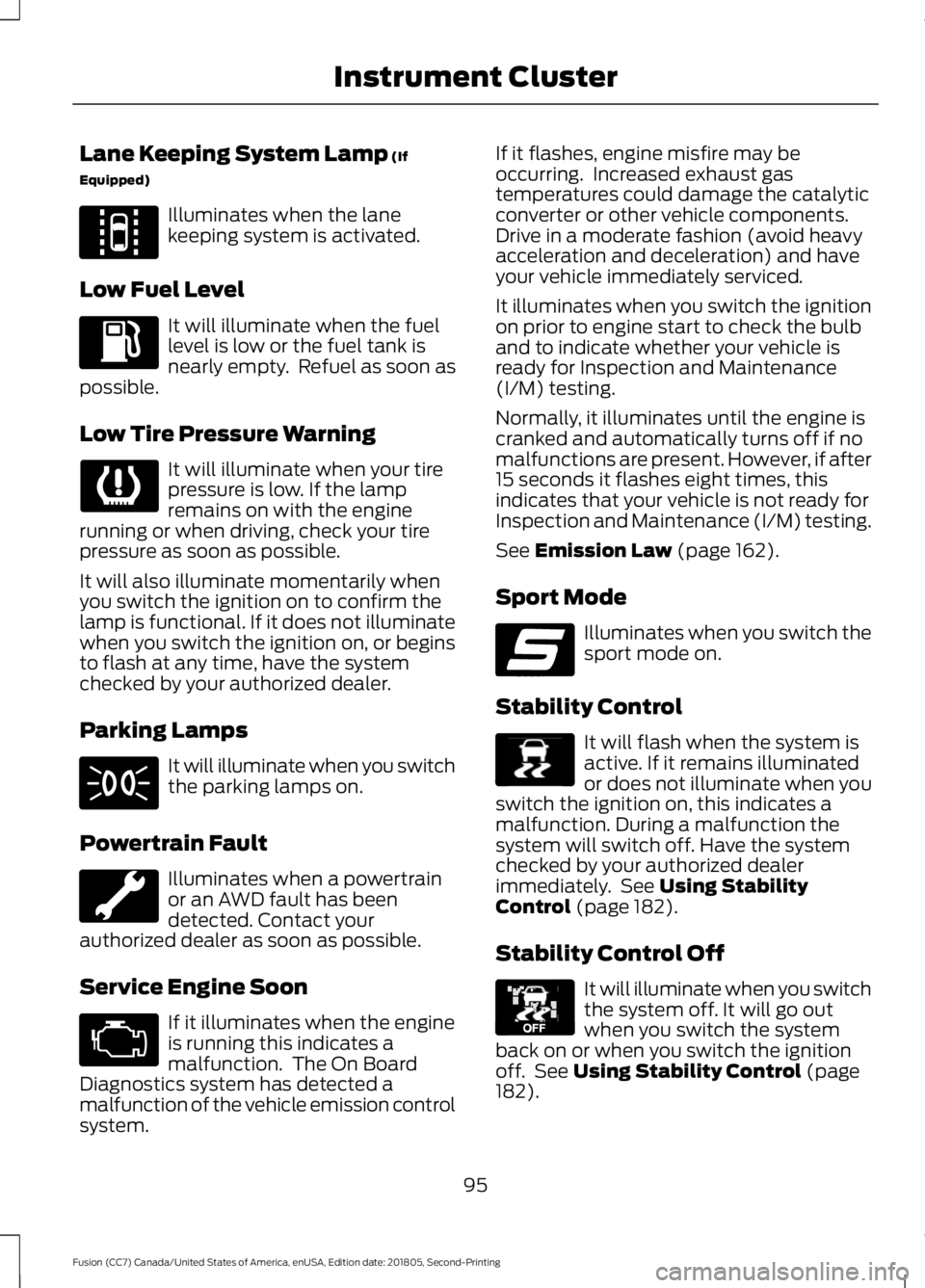
Lane Keeping System Lamp (If
Equipped) Illuminates when the lane
keeping system is activated.
Low Fuel Level It will illuminate when the fuel
level is low or the fuel tank is
nearly empty. Refuel as soon as
possible.
Low Tire Pressure Warning It will illuminate when your tire
pressure is low. If the lamp
remains on with the engine
running or when driving, check your tire
pressure as soon as possible.
It will also illuminate momentarily when
you switch the ignition on to confirm the
lamp is functional. If it does not illuminate
when you switch the ignition on, or begins
to flash at any time, have the system
checked by your authorized dealer.
Parking Lamps It will illuminate when you switch
the parking lamps on.
Powertrain Fault Illuminates when a powertrain
or an AWD fault has been
detected. Contact your
authorized dealer as soon as possible.
Service Engine Soon If it illuminates when the engine
is running this indicates a
malfunction. The On Board
Diagnostics system has detected a
malfunction of the vehicle emission control
system. If it flashes, engine misfire may be
occurring. Increased exhaust gas
temperatures could damage the catalytic
converter or other vehicle components.
Drive in a moderate fashion (avoid heavy
acceleration and deceleration) and have
your vehicle immediately serviced.
It illuminates when you switch the ignition
on prior to engine start to check the bulb
and to indicate whether your vehicle is
ready for Inspection and Maintenance
(I/M) testing.
Normally, it illuminates until the engine is
cranked and automatically turns off if no
malfunctions are present. However, if after
15 seconds it flashes eight times, this
indicates that your vehicle is not ready for
Inspection and Maintenance (I/M) testing.
See
Emission Law (page 162).
Sport Mode Illuminates when you switch the
sport mode on.
Stability Control It will flash when the system is
active. If it remains illuminated
or does not illuminate when you
switch the ignition on, this indicates a
malfunction. During a malfunction the
system will switch off. Have the system
checked by your authorized dealer
immediately. See
Using Stability
Control (page 182).
Stability Control Off It will illuminate when you switch
the system off. It will go out
when you switch the system
back on or when you switch the ignition
off. See
Using Stability Control (page
182).
95
Fusion (CC7) Canada/United States of America, enUSA, Edition date: 201805, Second-Printing Instrument ClusterE144813 E176099 E138639 E130458
Page 100 of 550
GENERAL INFORMATION
WARNING: Driving while
distracted can result in loss of vehicle
control, crash and injury. We strongly
recommend that you use extreme
caution when using any device that may
take your focus off the road. Your
primary responsibility is the safe
operation of your vehicle. We
recommend against the use of any
hand-held device while driving and
encourage the use of voice-operated
systems when possible. Make sure you
are aware of all applicable local laws
that may affect the use of electronic
devices while driving.
Note: Your vehicle may or may not be
equipped with all the messages listed in this
chapter. Your vehicle will not display
messages of systems it is not equipped with.
Various systems on your vehicle can be
controlled using the information display
controls on the steering wheel.
Corresponding information is displayed in
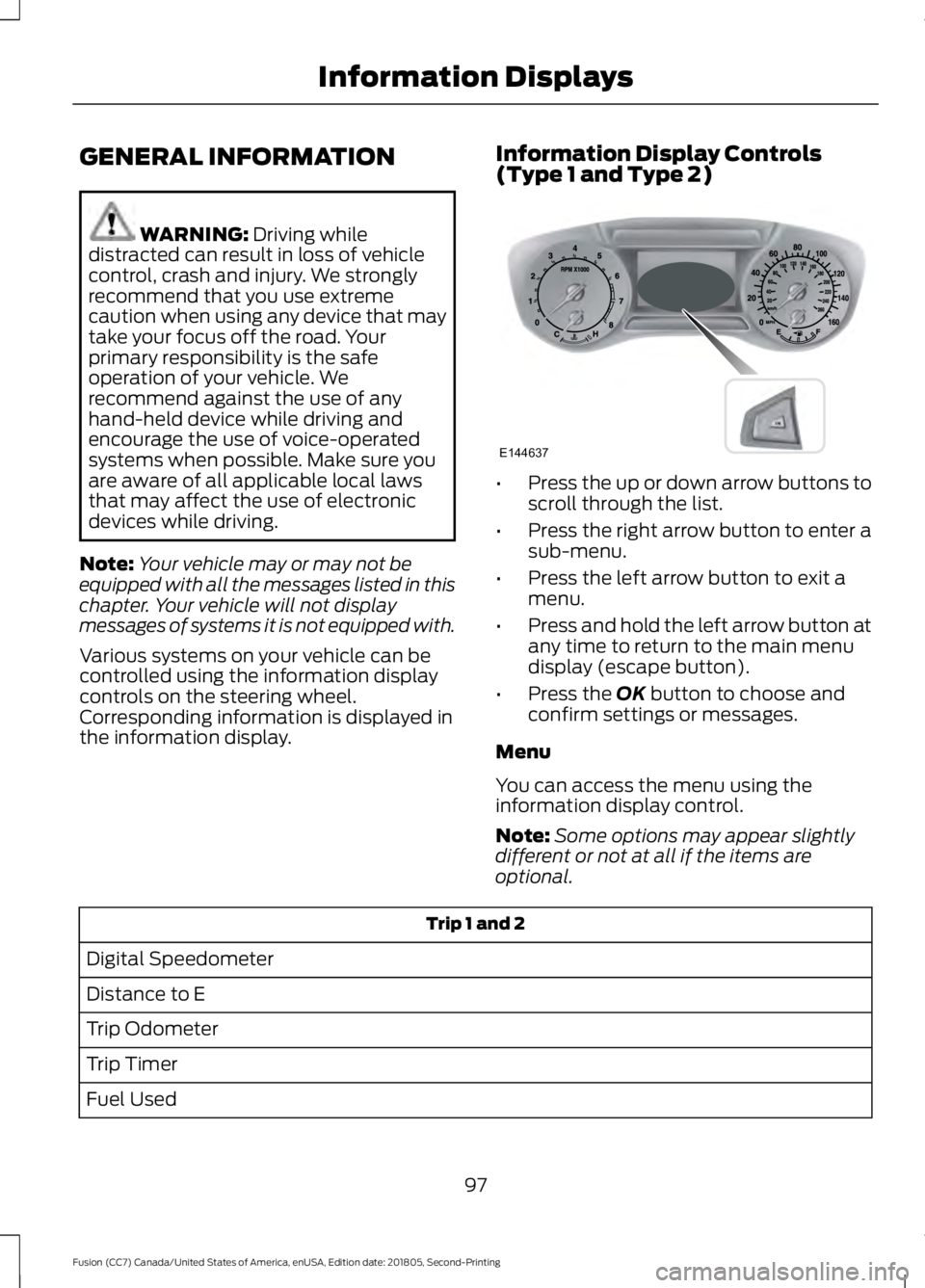
the information display. Information Display Controls
(Type 1 and Type 2) •
Press the up or down arrow buttons to
scroll through the list.
• Press the right arrow button to enter a
sub-menu.
• Press the left arrow button to exit a
menu.
• Press and hold the left arrow button at
any time to return to the main menu
display (escape button).
• Press the
OK button to choose and
confirm settings or messages.
Menu
You can access the menu using the
information display control.
Note: Some options may appear slightly
different or not at all if the items are
optional. Trip 1 and 2
Digital Speedometer
Distance to E
Trip Odometer
Trip Timer
Fuel Used
97
Fusion (CC7) Canada/United States of America, enUSA, Edition date: 201805, Second-Printing Information DisplaysE144637
Page 101 of 550
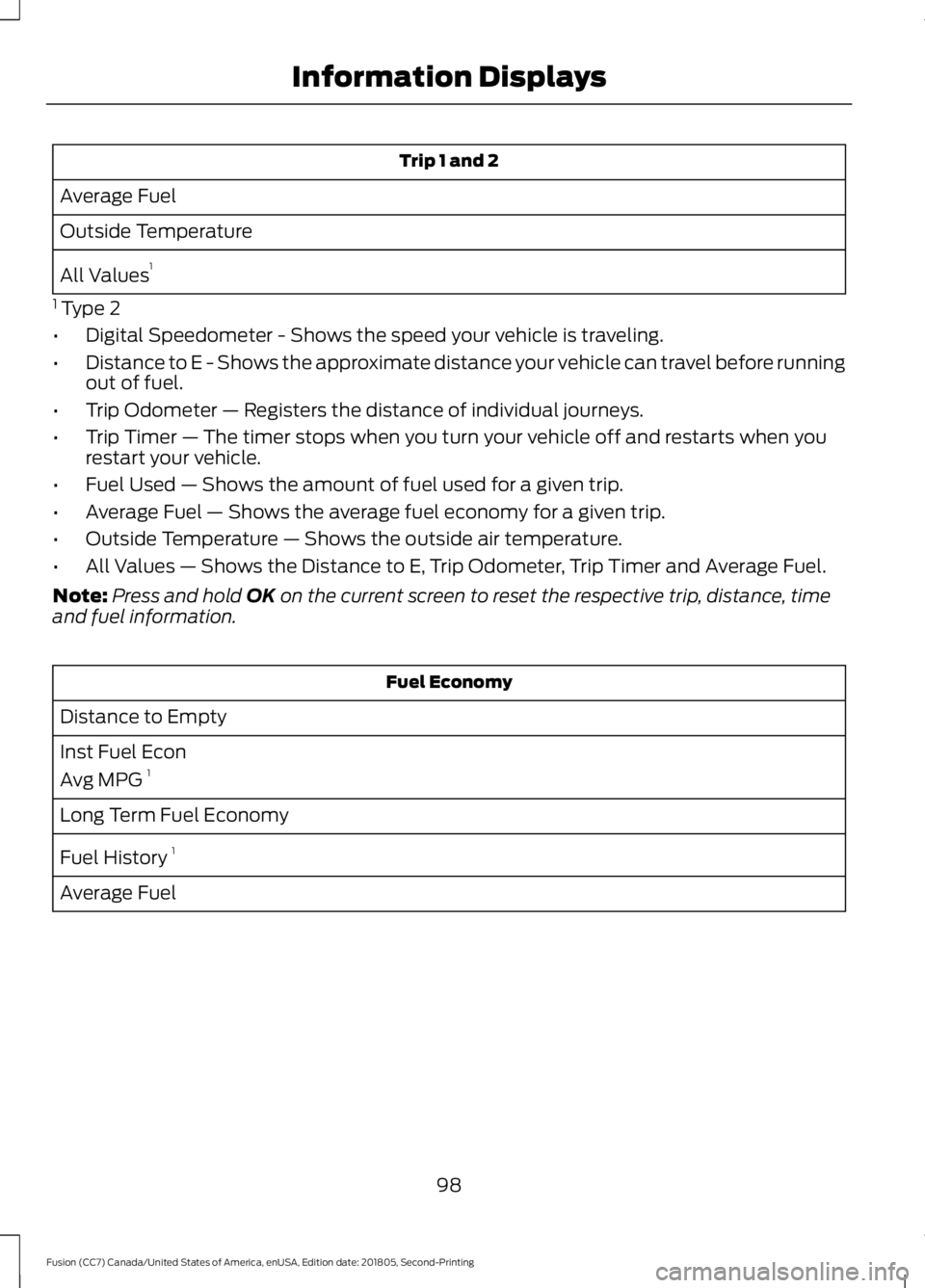
Trip 1 and 2
Average Fuel
Outside Temperature
All Values 1
1 Type 2
• Digital Speedometer - Shows the speed your vehicle is traveling.
• Distance to E - Shows the approximate distance your vehicle can travel before running
out of fuel.
• Trip Odometer — Registers the distance of individual journeys.
• Trip Timer — The timer stops when you turn your vehicle off and restarts when you
restart your vehicle.
• Fuel Used — Shows the amount of fuel used for a given trip.
• Average Fuel — Shows the average fuel economy for a given trip.
• Outside Temperature — Shows the outside air temperature.
• All Values — Shows the Distance to E, Trip Odometer, Trip Timer and Average Fuel.
Note: Press and hold OK on the current screen to reset the respective trip, distance, time
and fuel information. Fuel Economy
Distance to Empty
Inst Fuel Econ
Avg MPG 1
Long Term Fuel Economy
Fuel History 1
Average Fuel
98
Fusion (CC7) Canada/United States of America, enUSA, Edition date: 201805, Second-Printing Information Displays
Page 102 of 550
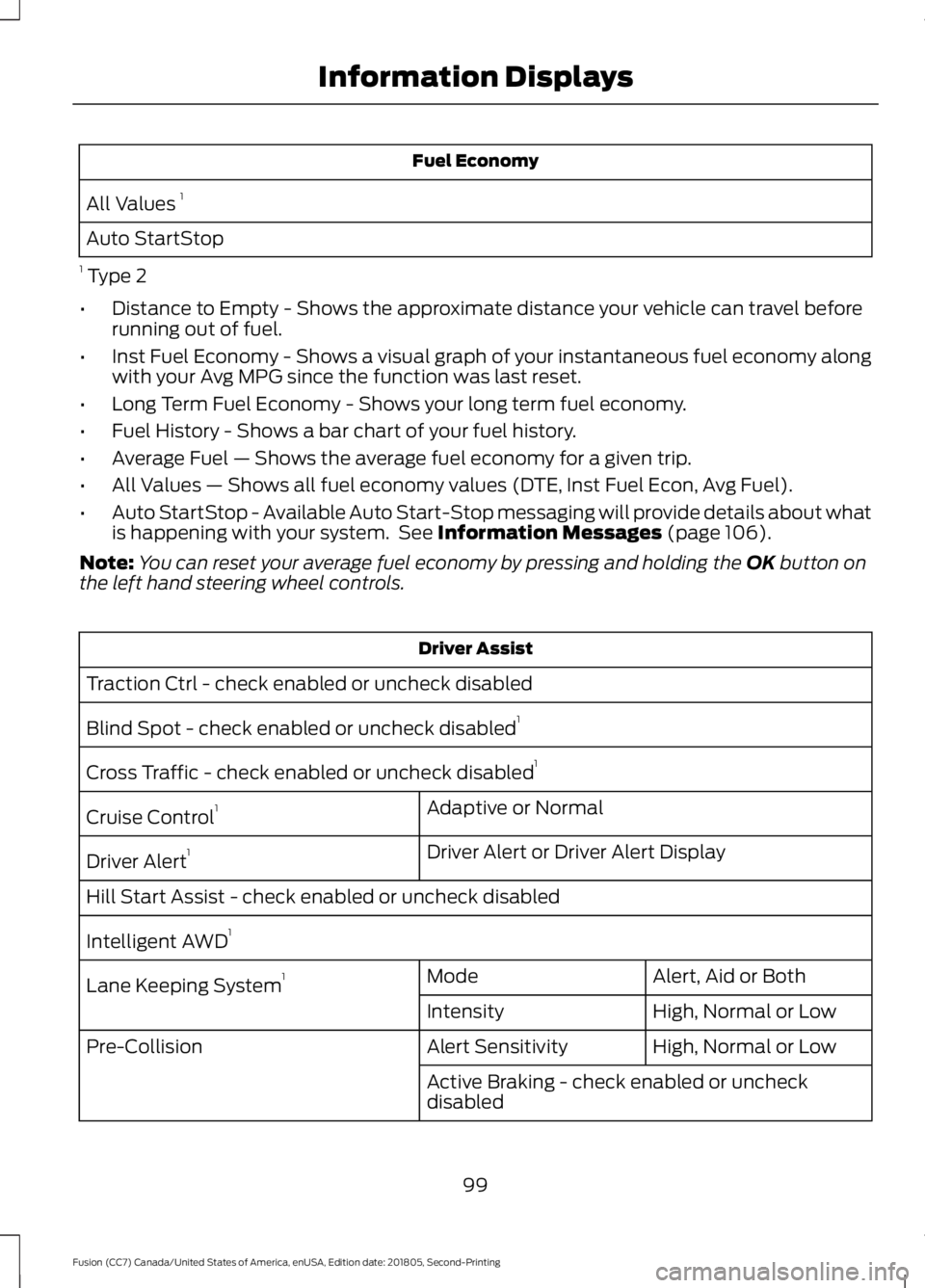
Fuel Economy
All Values 1
Auto StartStop
1 Type 2
• Distance to Empty - Shows the approximate distance your vehicle can travel before
running out of fuel.
• Inst Fuel Economy - Shows a visual graph of your instantaneous fuel economy along
with your Avg MPG since the function was last reset.
• Long Term Fuel Economy - Shows your long term fuel economy.
• Fuel History - Shows a bar chart of your fuel history.
• Average Fuel — Shows the average fuel economy for a given trip.
• All Values — Shows all fuel economy values (DTE, Inst Fuel Econ, Avg Fuel).
• Auto StartStop - Available Auto Start-Stop messaging will provide details about what
is happening with your system. See Information Messages (page 106).
Note: You can reset your average fuel economy by pressing and holding the
OK button on
the left hand steering wheel controls. Driver Assist
Traction Ctrl - check enabled or uncheck disabled
Blind Spot - check enabled or uncheck disabled 1
Cross Traffic - check enabled or uncheck disabled 1
Adaptive or Normal
Cruise Control 1
Driver Alert or Driver Alert Display
Driver Alert 1
Hill Start Assist - check enabled or uncheck disabled
Intelligent AWD 1
Alert, Aid or Both
Mode
Lane Keeping System 1
High, Normal or Low
Intensity
High, Normal or Low
Alert Sensitivity
Pre-Collision
Active Braking - check enabled or uncheck
disabled
99
Fusion (CC7) Canada/United States of America, enUSA, Edition date: 201805, Second-Printing Information Displays
Page 105 of 550
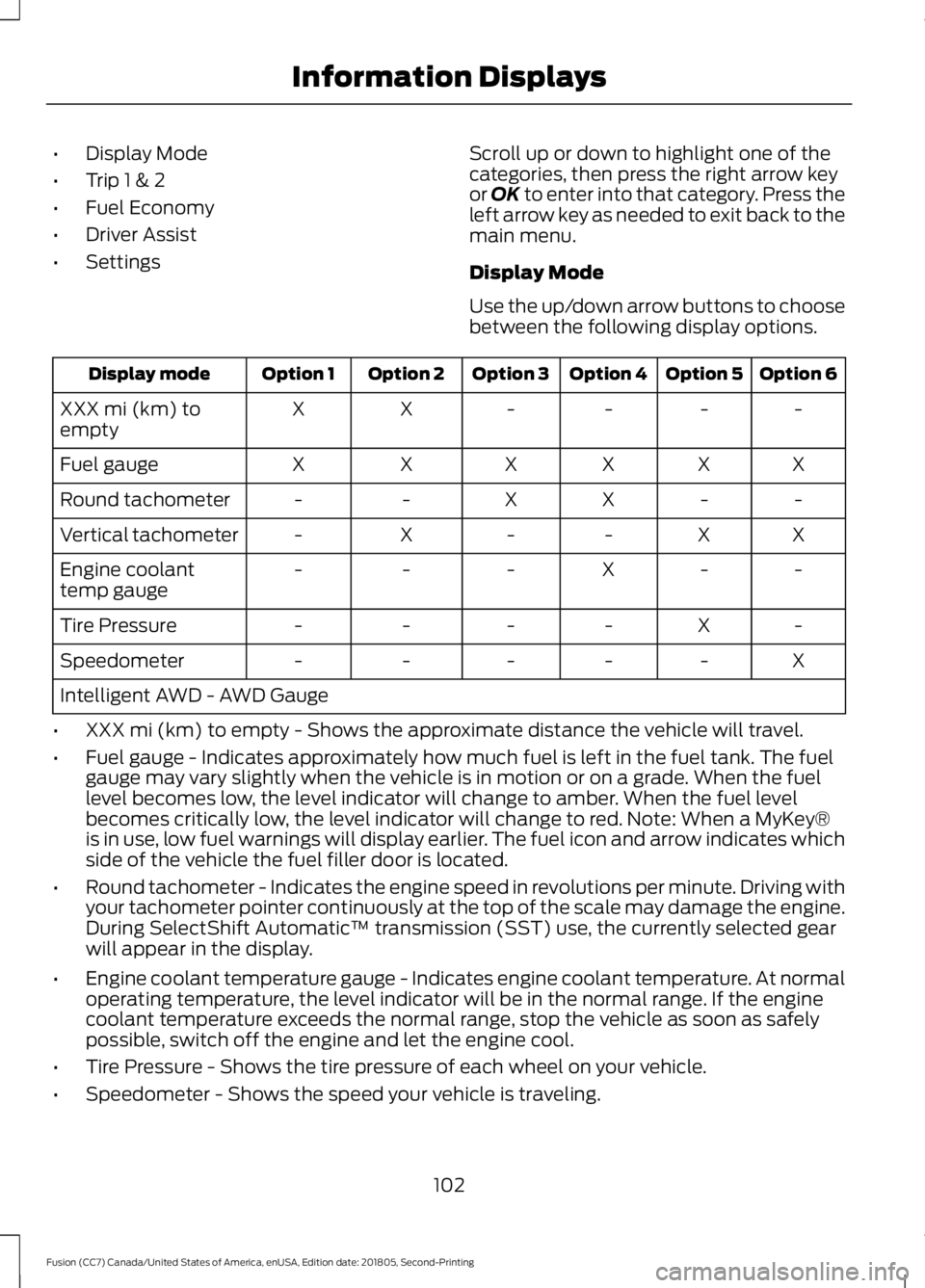
•
Display Mode
• Trip 1 & 2
• Fuel Economy
• Driver Assist
• Settings Scroll up or down to highlight one of the
categories, then press the right arrow key
or OK to enter into that category. Press the
left arrow key as needed to exit back to the
main menu.
Display Mode
Use the up/down arrow buttons to choose
between the following display options. Option 6
Option 5
Option 4
Option 3
Option 2
Option 1
Display mode
-
-
-
-
X
X
XXX mi (km) to
empty
X
X
X
X
X
X
Fuel gauge
-
-
X
X
-
-
Round tachometer
X
X
-
-
X
-
Vertical tachometer
-
-
X
-
-
-
Engine coolant
temp gauge
-
X
-
-
-
-
Tire Pressure
X
-
-
-
-
-
Speedometer
Intelligent AWD - AWD Gauge
• XXX mi (km) to empty - Shows the approximate distance the vehicle will travel.
• Fuel gauge - Indicates approximately how much fuel is left in the fuel tank. The fuel
gauge may vary slightly when the vehicle is in motion or on a grade. When the fuel
level becomes low, the level indicator will change to amber. When the fuel level
becomes critically low, the level indicator will change to red. Note: When a MyKey®
is in use, low fuel warnings will display earlier. The fuel icon and arrow indicates which
side of the vehicle the fuel filler door is located.
• Round tachometer - Indicates the engine speed in revolutions per minute. Driving with
your tachometer pointer continuously at the top of the scale may damage the engine.
During SelectShift Automatic ™ transmission (SST) use, the currently selected gear
will appear in the display.
• Engine coolant temperature gauge - Indicates engine coolant temperature. At normal
operating temperature, the level indicator will be in the normal range. If the engine
coolant temperature exceeds the normal range, stop the vehicle as soon as safely
possible, switch off the engine and let the engine cool.
• Tire Pressure - Shows the tire pressure of each wheel on your vehicle.
• Speedometer - Shows the speed your vehicle is traveling.
102
Fusion (CC7) Canada/United States of America, enUSA, Edition date: 201805, Second-Printing Information Displays
Page 106 of 550
Trip 1 & 2
You can access the menu using the
information display control.
Note:
Some options may appear slightly
different or not at all if the items are
optional. Trip 1 and 2
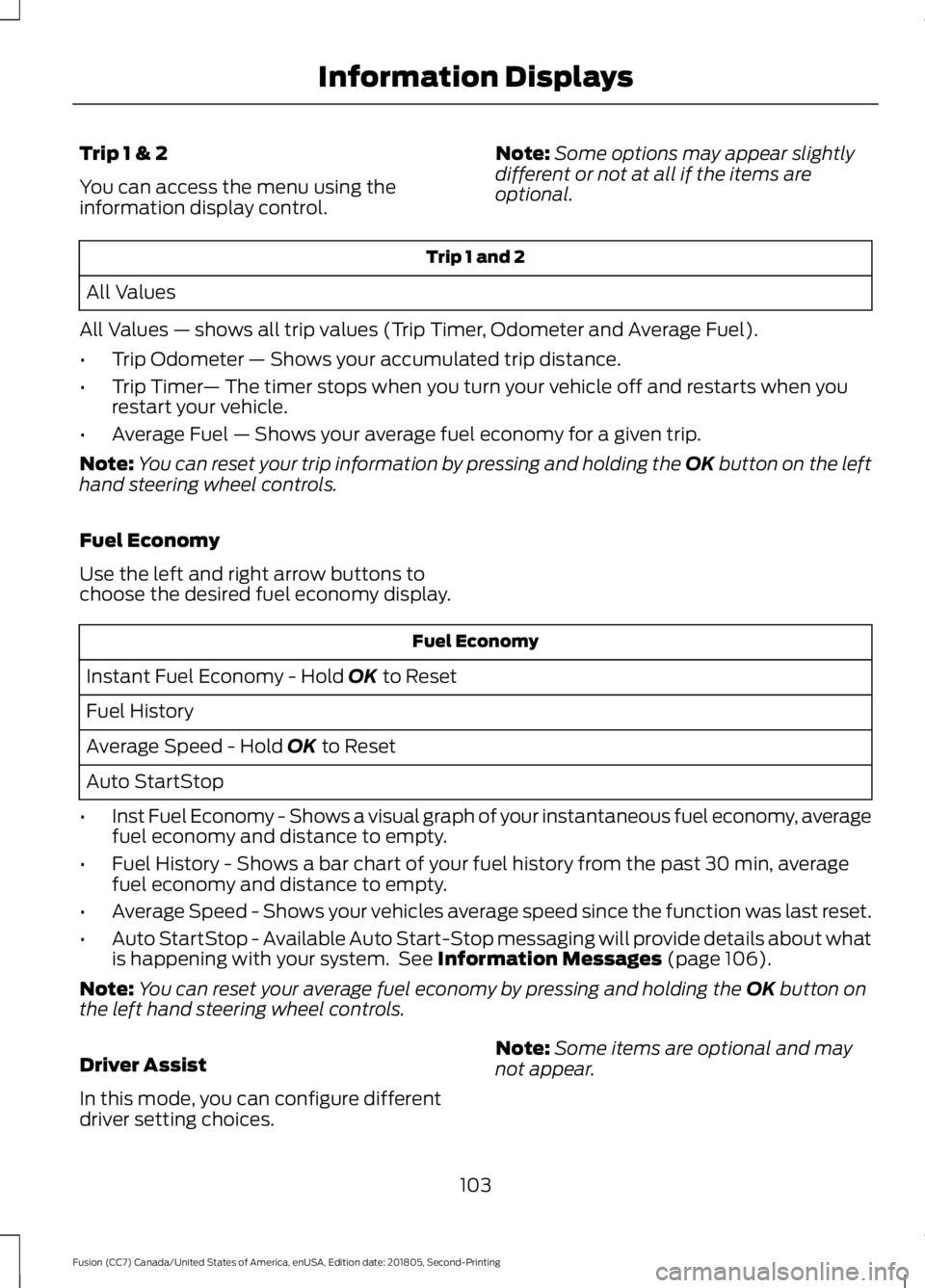
All Values
All Values — shows all trip values (Trip Timer, Odometer and Average Fuel).
• Trip Odometer — Shows your accumulated trip distance.
• Trip Timer — The timer stops when you turn your vehicle off and restarts when you
restart your vehicle.
• Average Fuel — Shows your average fuel economy for a given trip.
Note: You can reset your trip information by pressing and holding the OK button on the left
hand steering wheel controls.
Fuel Economy
Use the left and right arrow buttons to
choose the desired fuel economy display. Fuel Economy
Instant Fuel Economy - Hold OK to Reset
Fuel History
Average Speed - Hold
OK to Reset
Auto StartStop
• Inst Fuel Economy - Shows a visual graph of your instantaneous fuel economy, average
fuel economy and distance to empty.
• Fuel History - Shows a bar chart of your fuel history from the past 30 min, average
fuel economy and distance to empty.
• Average Speed - Shows your vehicles average speed since the function was last reset.
• Auto StartStop - Available Auto Start-Stop messaging will provide details about what
is happening with your system. See
Information Messages (page 106).
Note: You can reset your average fuel economy by pressing and holding the
OK button on
the left hand steering wheel controls.
Driver Assist
In this mode, you can configure different
driver setting choices. Note:
Some items are optional and may
not appear.
103
Fusion (CC7) Canada/United States of America, enUSA, Edition date: 201805, Second-Printing Information Displays
Page 108 of 550
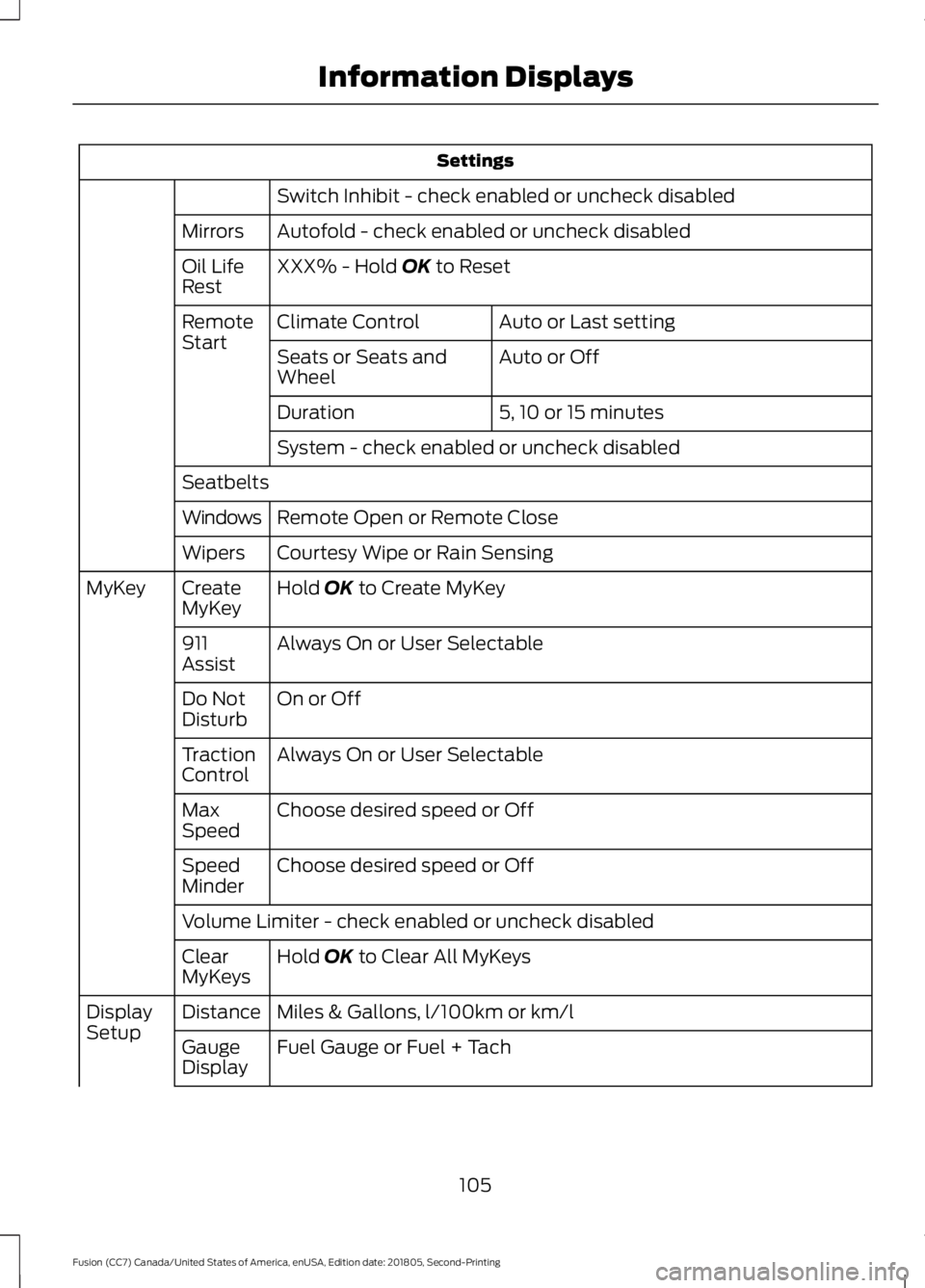
Settings
Switch Inhibit - check enabled or uncheck disabled
Autofold - check enabled or uncheck disabled
Mirrors
XXX% - Hold OK to Reset
Oil Life
Rest
Auto or Last setting
Climate Control
Remote
Start
Auto or Off
Seats or Seats and
Wheel
5, 10 or 15 minutes
Duration
System - check enabled or uncheck disabled
Seatbelts Remote Open or Remote Close
Windows
Courtesy Wipe or Rain Sensing
Wipers
Hold
OK to Create MyKey
Create
MyKey
MyKey
Always On or User Selectable
911
Assist
On or Off
Do Not
Disturb
Always On or User Selectable
Traction
Control
Choose desired speed or Off
Max
Speed
Choose desired speed or Off
Speed
Minder
Volume Limiter - check enabled or uncheck disabled
Hold
OK to Clear All MyKeys
Clear
MyKeys
Miles & Gallons, l/100km or km/l
Distance
Display
Setup
Fuel Gauge or Fuel + Tach
Gauge
Display
105
Fusion (CC7) Canada/United States of America, enUSA, Edition date: 201805, Second-Printing Information Displays
Page 113 of 550
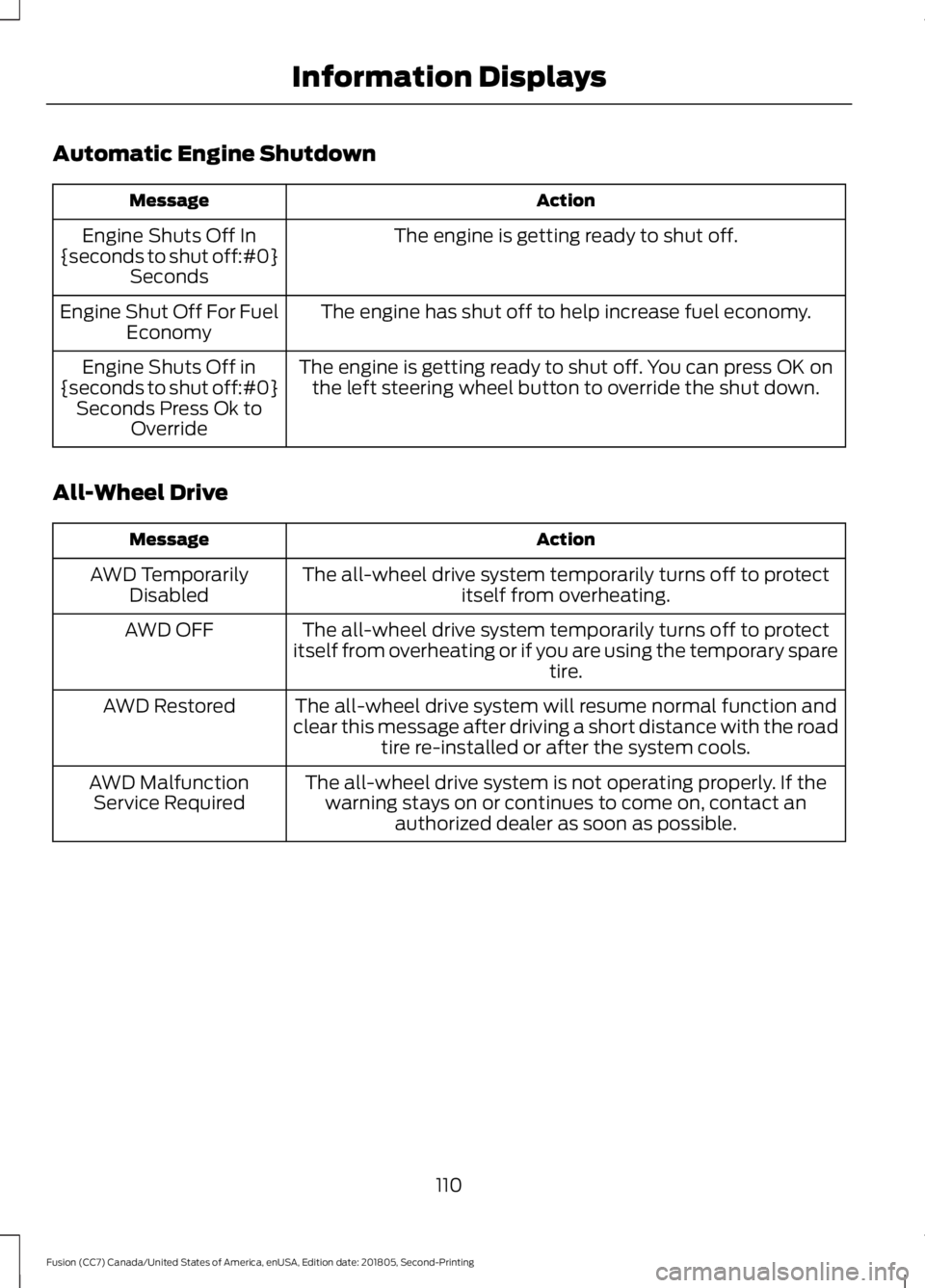
Automatic Engine Shutdown
Action
Message
The engine is getting ready to shut off.
Engine Shuts Off In
{seconds to shut off:#0} Seconds
The engine has shut off to help increase fuel economy.
Engine Shut Off For Fuel
Economy
The engine is getting ready to shut off. You can press OK onthe left steering wheel button to override the shut down.
Engine Shuts Off in
{seconds to shut off:#0} Seconds Press Ok to Override
All-Wheel Drive Action
Message
The all-wheel drive system temporarily turns off to protectitself from overheating.
AWD Temporarily
Disabled
The all-wheel drive system temporarily turns off to protect
itself from overheating or if you are using the temporary spare tire.
AWD OFF
The all-wheel drive system will resume normal function and
clear this message after driving a short distance with the road tire re-installed or after the system cools.
AWD Restored
The all-wheel drive system is not operating properly. If thewarning stays on or continues to come on, contact an authorized dealer as soon as possible.
AWD Malfunction
Service Required
110
Fusion (CC7) Canada/United States of America, enUSA, Edition date: 201805, Second-Printing Information Displays
Page 115 of 550
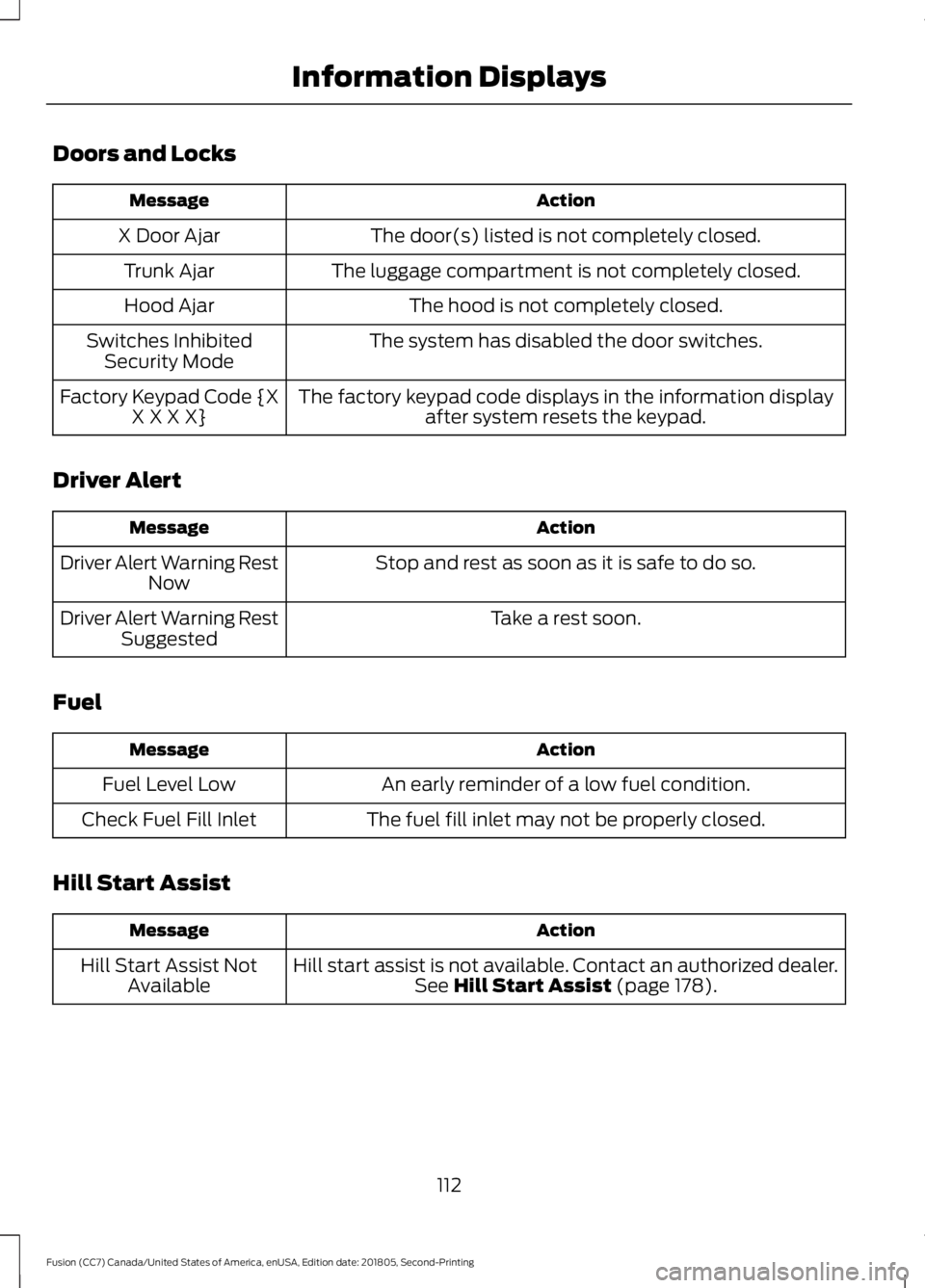
Doors and Locks
Action
Message
The door(s) listed is not completely closed.
X Door Ajar
The luggage compartment is not completely closed.
Trunk Ajar
The hood is not completely closed.
Hood Ajar
The system has disabled the door switches.
Switches Inhibited
Security Mode
The factory keypad code displays in the information displayafter system resets the keypad.
Factory Keypad Code {X
X X X X}
Driver Alert Action
Message
Stop and rest as soon as it is safe to do so.
Driver Alert Warning Rest
Now
Take a rest soon.
Driver Alert Warning Rest
Suggested
Fuel Action
Message
An early reminder of a low fuel condition.
Fuel Level Low
The fuel fill inlet may not be properly closed.
Check Fuel Fill Inlet
Hill Start Assist Action
Message
Hill start assist is not available. Contact an authorized dealer.See Hill Start Assist (page 178).
Hill Start Assist Not
Available
112
Fusion (CC7) Canada/United States of America, enUSA, Edition date: 201805, Second-Printing Information Displays
Page 133 of 550
Note:
Do not clean the mirror housing or
glass with harsh abrasives, fuel or other
petroleum-based cleaning products. The
vehicle warranty may not cover damage
caused to the mirror housing or glass.
CABIN AIR FILTER
Your vehicle is equipped with a cabin air
filter, which gives you and your passengers
the following benefits:
• It improves your driving comfort by
reducing particle concentration.
• It improves the interior compartment
cleanliness.
• It protects the climate control
components from particle deposits.
You can locate the cabin air filter behind
the glove box.
Note: Make sure you have a cabin air filter
installed at all times. This prevents foreign
objects from entering the system. Running
the system without a filter in place could
result in degradation or damage to the
system.
Replace the filter at regular intervals. See
Scheduled Maintenance (page 476).
For additional cabin air filter information,
or to replace the filter, see an authorized
dealer.
REMOTE START
(IF EQUIPPED)
The climate control system adjusts the
interior temperature during remote start.
You can switch this feature on or off and
adjust the settings using the information
display controls. See
Information
Displays (page 97).
You cannot adjust the climate control
setting during remote start operation.
Switch the ignition on to make
adjustments. Based on your remote start settings, the
following vehicle-dependent features may
or may not remain on after remote starting
your vehicle:
•
Climate controlled seats.
• Heated steering wheel.
• Heated mirrors.
• Heated rear window.
• Windshield wiper de-icer.
Note: For dual zone climate controlled
seats, the passenger seat setting defaults
to match the driver seat during remote start.
Automatic Settings
If
Auto is on, the system sets the interior
temperature to 72°F (22°C) and heats or
cools the vehicle interior as required to
achieve comfort.
Note: In cold weather, the heated rear
window and heated mirrors turn on.
Last Settings
If
Last Settings is on, the system uses the
settings last selected before you turned
off the vehicle.
Heated and Cooled Features
In Auto mode, certain heated features may
switch on during cold weather, and cooled
features during hot weather.
130
Fusion (CC7) Canada/United States of America, enUSA, Edition date: 201805, Second-Printing Climate Control