seats FORD FUSION 2019 Owner's Guide
[x] Cancel search | Manufacturer: FORD, Model Year: 2019, Model line: FUSION, Model: FORD FUSION 2019Pages: 550, PDF Size: 8.5 MB
Page 135 of 550
WARNING: The head restraint is
a safety device. Whenever possible it
should be installed and properly
adjusted when the seat is occupied.
Failure to adjust the head restraint
properly could reduce its effectiveness
during certain impacts.
Note: Adjust the seat backrest to an upright
driving position before adjusting the head
restraint. Adjust the head restraint so that
the top of it is level with the top of your head
and as far forward as possible. Make sure
that you remain comfortable. If you are
extremely tall, adjust the head restraint to
its highest position.
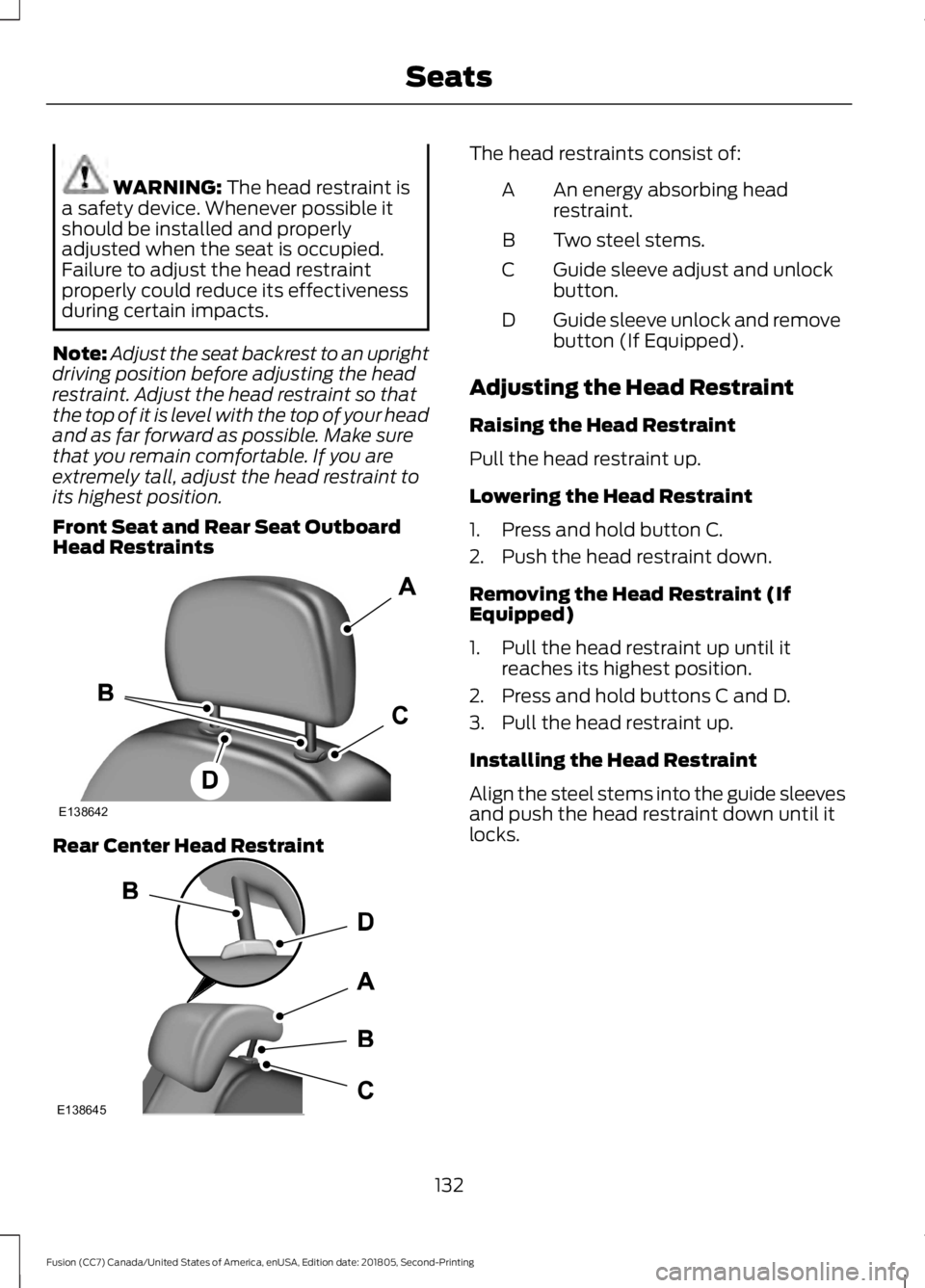
Front Seat and Rear Seat Outboard
Head Restraints Rear Center Head Restraint The head restraints consist of:
An energy absorbing head
restraint.
A
Two steel stems.
B
Guide sleeve adjust and unlock
button.
C
Guide sleeve unlock and remove
button (If Equipped).
D
Adjusting the Head Restraint
Raising the Head Restraint
Pull the head restraint up.
Lowering the Head Restraint
1. Press and hold button C.
2. Push the head restraint down.
Removing the Head Restraint (If
Equipped)
1. Pull the head restraint up until it reaches its highest position.
2. Press and hold buttons C and D.
3. Pull the head restraint up.
Installing the Head Restraint
Align the steel stems into the guide sleeves
and push the head restraint down until it
locks.
132
Fusion (CC7) Canada/United States of America, enUSA, Edition date: 201805, Second-Printing SeatsE138642 E138645
Page 136 of 550
Tilting Head Restraints (If Equipped)
The front head restraints tilt for extra
comfort.
1. Adjust the seat backrest to an upright
driving or riding position.
2. Pivot the head restraint forward toward
your head to the desired position.
After the head restraint reaches the
forward-most tilt position, pivot it forward
again to release it to the rearward, un-tilted
position.
MANUAL SEATS
(IF EQUIPPED) WARNING:
Do not adjust the
driver seat or seatback when your vehicle
is moving. WARNING:
Rock the seat
backward and forward after releasing
the lever to make sure that it is fully
engaged. WARNING: Reclining the seatback
can cause an occupant to slide under the
seat's safety belt, resulting in severe
personal injuries in the event of a crash.
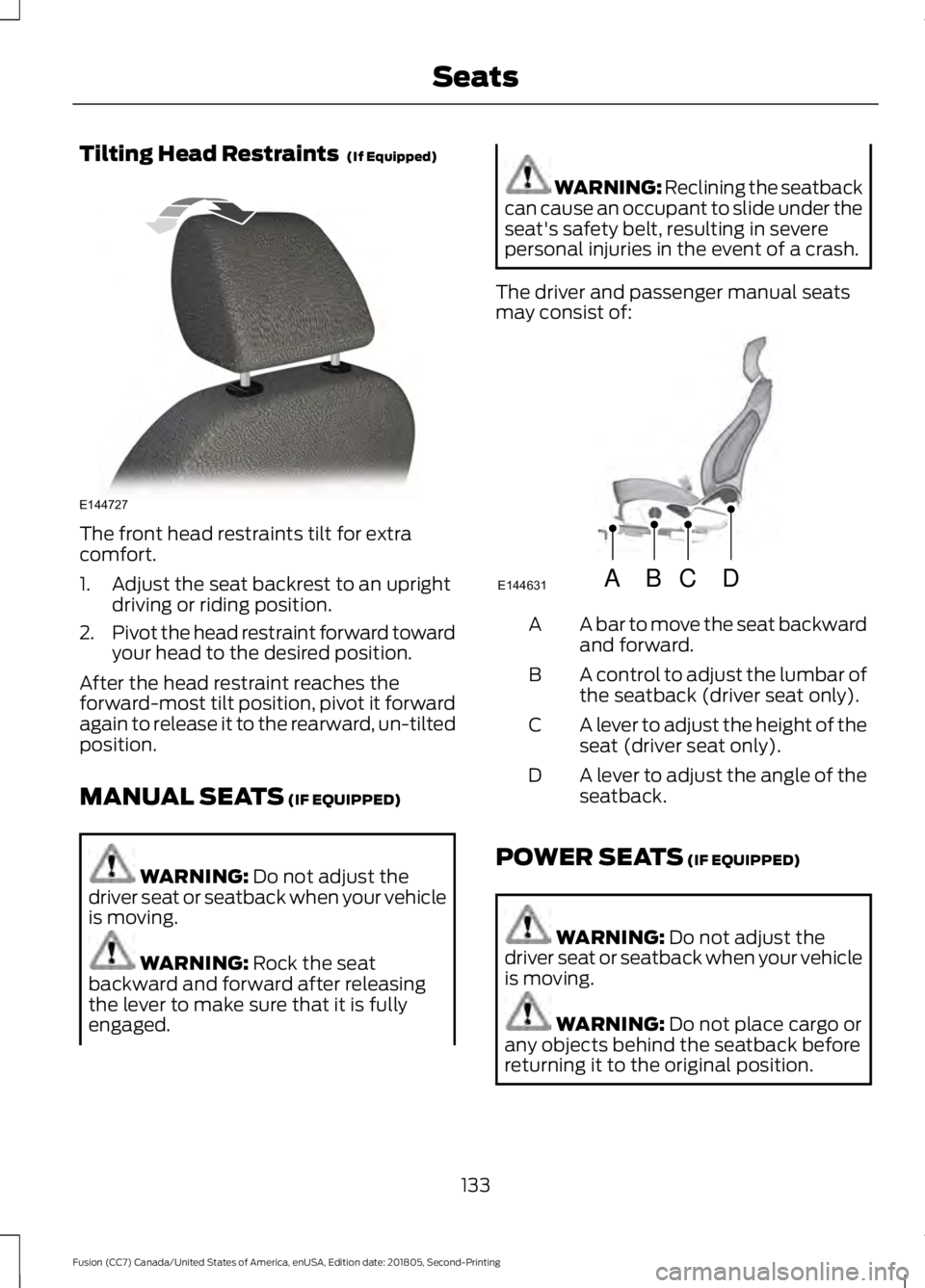
The driver and passenger manual seats
may consist of: A bar to move the seat backward
and forward.
A
A control to adjust the lumbar of
the seatback (driver seat only).
B
A lever to adjust the height of the
seat (driver seat only).
C
A lever to adjust the angle of the
seatback.
D
POWER SEATS
(IF EQUIPPED) WARNING:
Do not adjust the
driver seat or seatback when your vehicle
is moving. WARNING:
Do not place cargo or
any objects behind the seatback before
returning it to the original position.
133
Fusion (CC7) Canada/United States of America, enUSA, Edition date: 201805, Second-Printing SeatsE144727 ABCD
E144631
Page 137 of 550
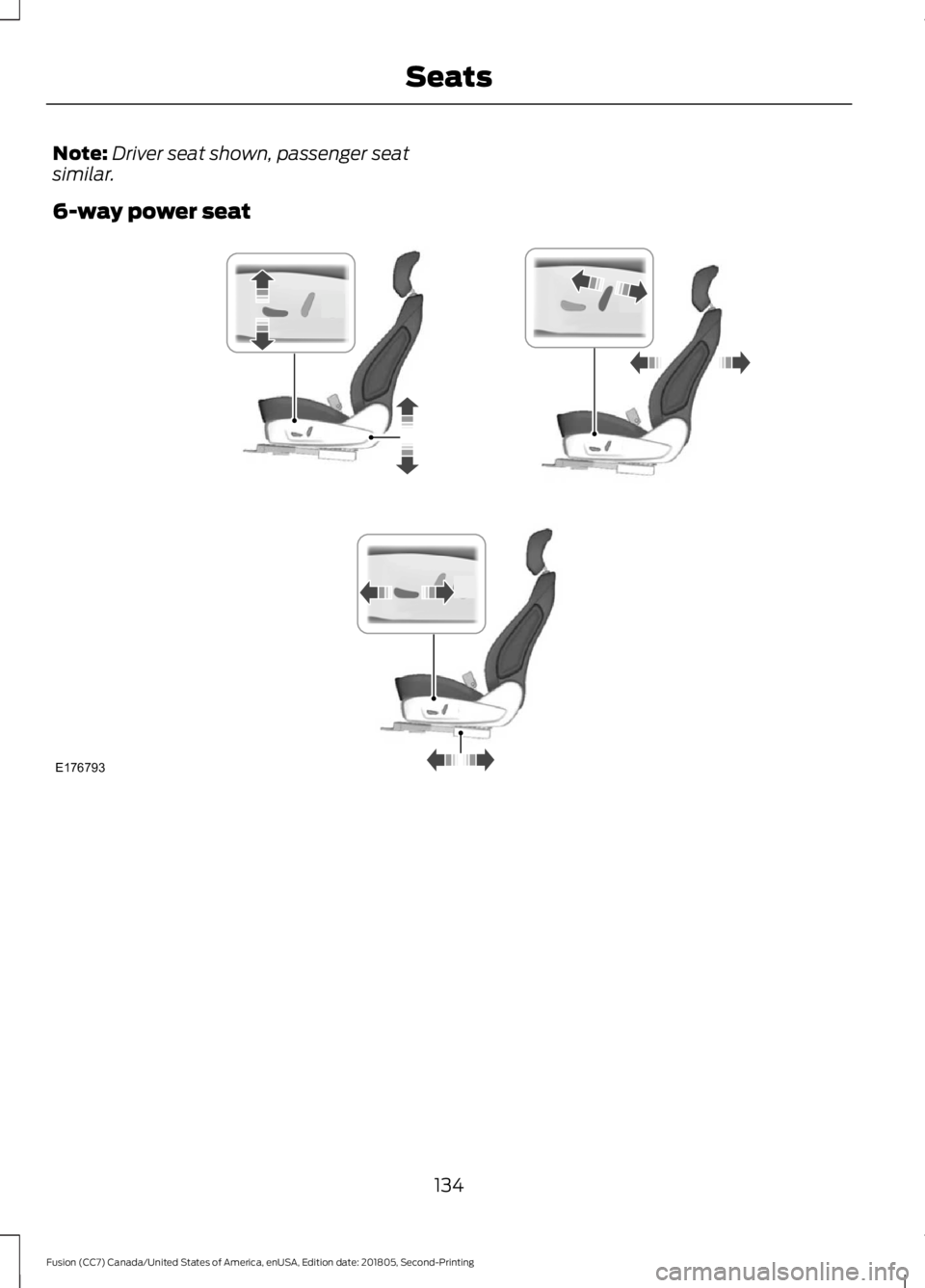
Note:
Driver seat shown, passenger seat
similar.
6-way power seat 134
Fusion (CC7) Canada/United States of America, enUSA, Edition date: 201805, Second-Printing SeatsE176793
Page 138 of 550
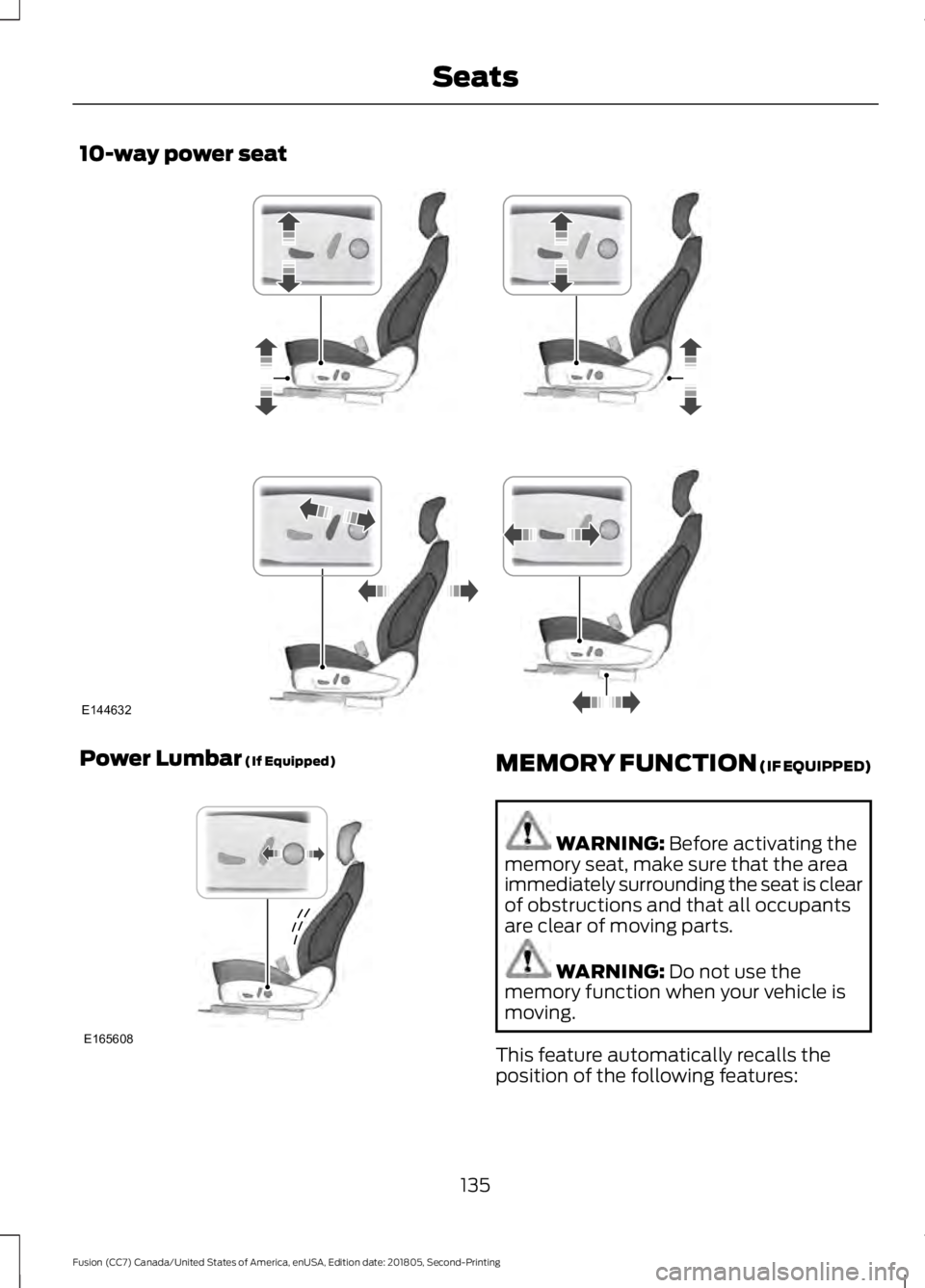
10-way power seat
Power Lumbar (If Equipped)
MEMORY FUNCTION (IF EQUIPPED)
WARNING:
Before activating the
memory seat, make sure that the area
immediately surrounding the seat is clear
of obstructions and that all occupants
are clear of moving parts. WARNING:
Do not use the
memory function when your vehicle is
moving.
This feature automatically recalls the
position of the following features:
135
Fusion (CC7) Canada/United States of America, enUSA, Edition date: 201805, Second-Printing SeatsE144632 E165608
Page 139 of 550
•
Driver seat.
• Power mirrors.
• Power steering column.
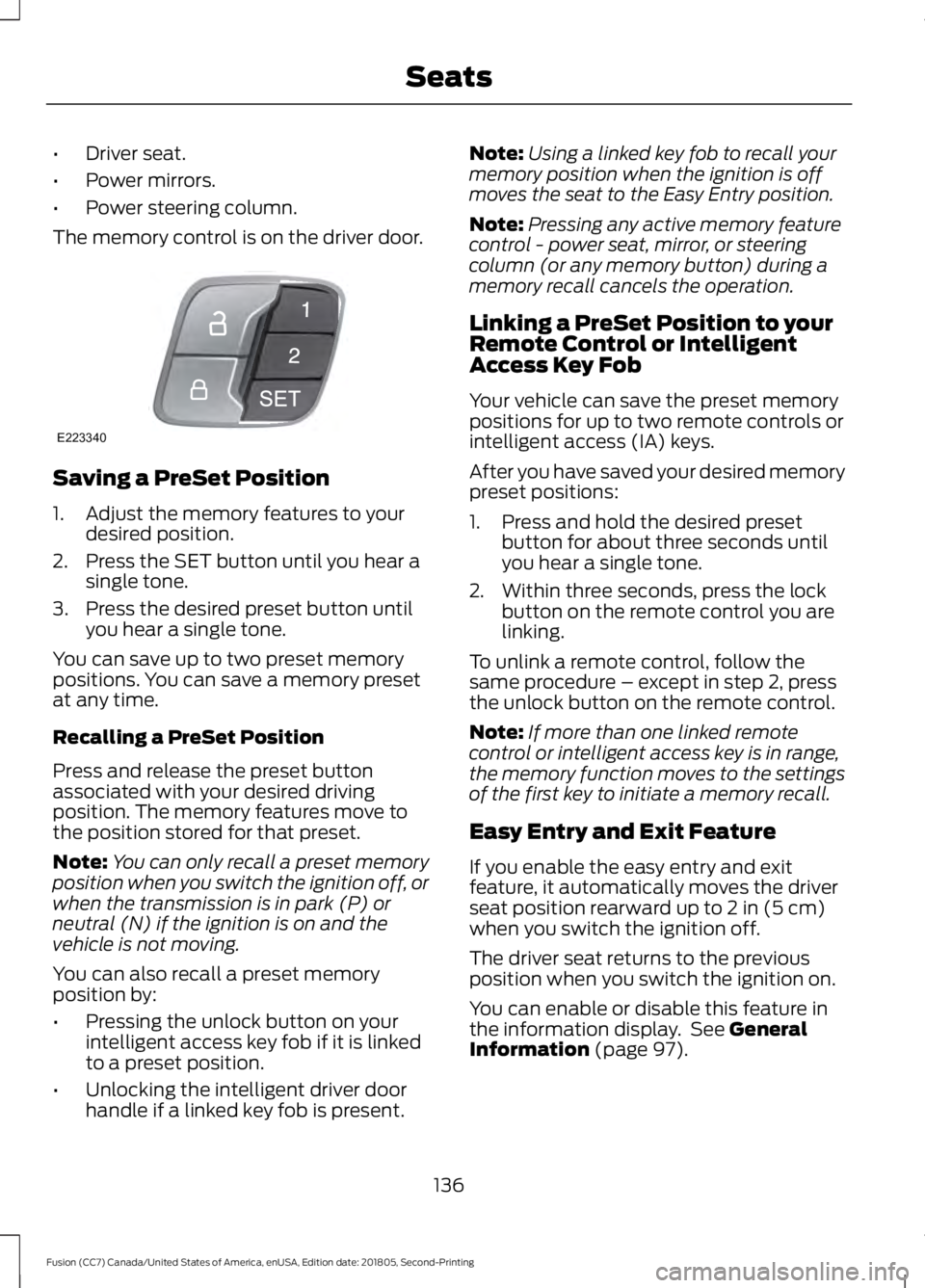
The memory control is on the driver door. Saving a PreSet Position
1. Adjust the memory features to your
desired position.
2. Press the SET button until you hear a single tone.
3. Press the desired preset button until you hear a single tone.
You can save up to two preset memory
positions. You can save a memory preset
at any time.
Recalling a PreSet Position
Press and release the preset button
associated with your desired driving
position. The memory features move to
the position stored for that preset.
Note: You can only recall a preset memory
position when you switch the ignition off, or
when the transmission is in park (P) or
neutral (N) if the ignition is on and the
vehicle is not moving.
You can also recall a preset memory
position by:
• Pressing the unlock button on your
intelligent access key fob if it is linked
to a preset position.
• Unlocking the intelligent driver door
handle if a linked key fob is present. Note:
Using a linked key fob to recall your
memory position when the ignition is off
moves the seat to the Easy Entry position.
Note: Pressing any active memory feature
control - power seat, mirror, or steering
column (or any memory button) during a
memory recall cancels the operation.
Linking a PreSet Position to your
Remote Control or Intelligent
Access Key Fob
Your vehicle can save the preset memory
positions for up to two remote controls or
intelligent access (IA) keys.
After you have saved your desired memory
preset positions:
1. Press and hold the desired preset button for about three seconds until
you hear a single tone.
2. Within three seconds, press the lock button on the remote control you are
linking.
To unlink a remote control, follow the
same procedure – except in step 2, press
the unlock button on the remote control.
Note: If more than one linked remote
control or intelligent access key is in range,
the memory function moves to the settings
of the first key to initiate a memory recall.
Easy Entry and Exit Feature
If you enable the easy entry and exit
feature, it automatically moves the driver
seat position rearward up to 2 in (5 cm)
when you switch the ignition off.
The driver seat returns to the previous
position when you switch the ignition on.
You can enable or disable this feature in
the information display. See
General
Information (page 97).
136
Fusion (CC7) Canada/United States of America, enUSA, Edition date: 201805, Second-Printing SeatsE223340
Page 140 of 550
REAR SEATS
Note:
Your vehicle may have split
seatbacks that you must fold individually.
Note: Make sure the center safety belt is
unbuckled before folding the seatback.
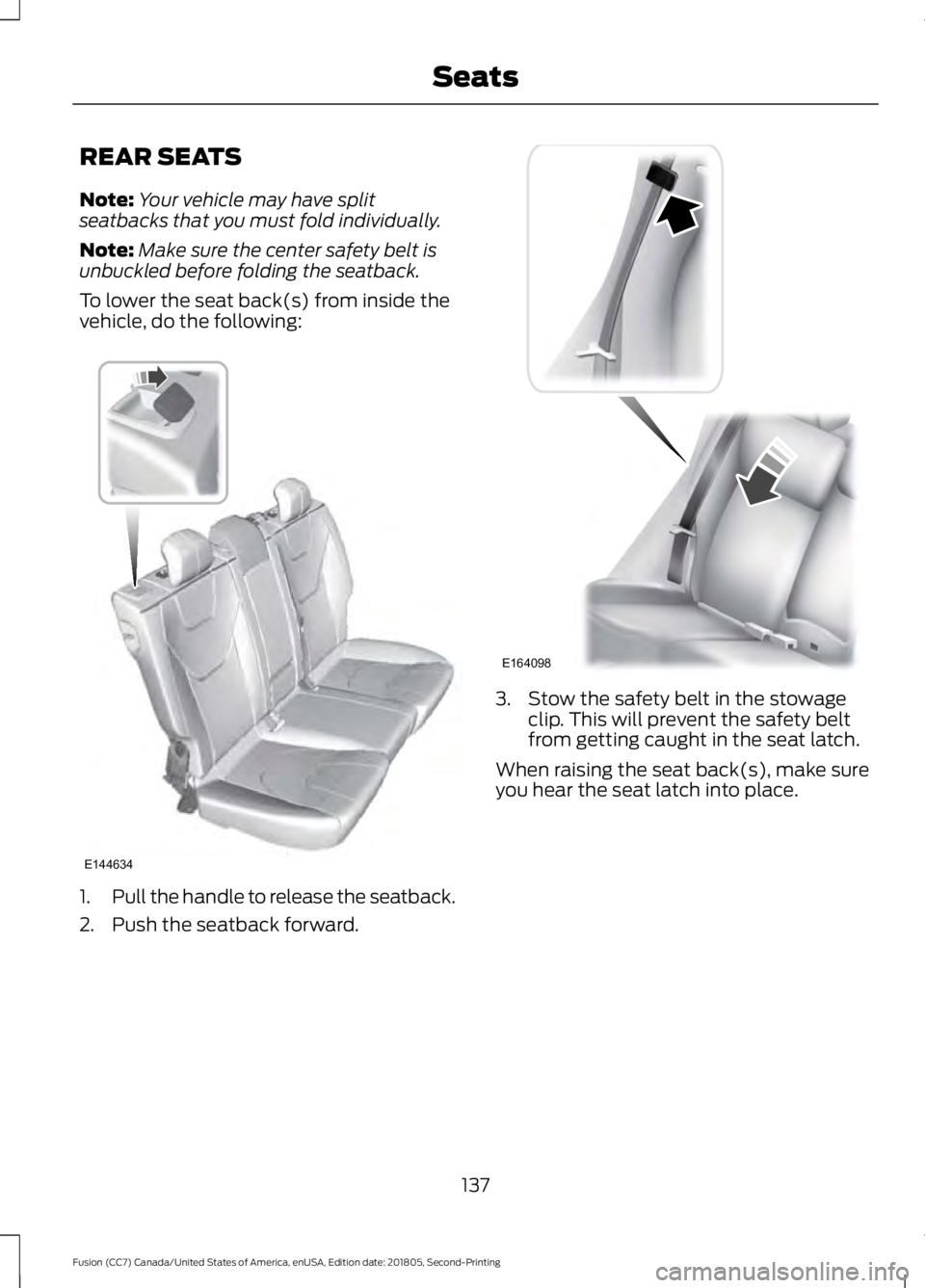
To lower the seat back(s) from inside the
vehicle, do the following: 1.
Pull the handle to release the seatback.
2. Push the seatback forward. 3. Stow the safety belt in the stowage
clip. This will prevent the safety belt
from getting caught in the seat latch.
When raising the seat back(s), make sure
you hear the seat latch into place.
137
Fusion (CC7) Canada/United States of America, enUSA, Edition date: 201805, Second-Printing SeatsE144634 E164098
Page 141 of 550
HEATED SEATS (IF EQUIPPED)
WARNING:
Use caution when
using the heated seat if you are unable
to feel pain to your skin because of
advanced age, chronic illness, diabetes,
spinal cord injury, medication, alcohol
use, exhaustion or other physical
conditions. The heated seat could cause
burns even at low temperatures,
especially if used for long periods of time.
Failure to follow this instruction could
result in personal injury. WARNING:
Do not place anything
on the seat that blocks the heat, for
example a seat cover or a cushion. This
could cause the seat to overheat. Failure
to follow this instruction could result in
personal injury. WARNING:
Do not poke sharp
objects into the seat cushion or seat
backrest. This could damage the heated
seat element and cause it to overheat.
Failure to follow this instruction could
result in personal injury.
Do not do the following:
• Place heavy objects on the seat.
• Operate the heated seat if water or any
other liquid is spilled on the seat. Allow
the seat to dry thoroughly.
• Operate the heated seats unless the
engine is running. Doing so can cause
the battery to lose charge. Press the heated seat symbol to cycle
through the various heat settings and off.
Warmer settings are indicated by more
indicator lights.
CLIMATE CONTROLLED SEATS
(IF EQUIPPED)
Heated Seats
WARNING:
Persons who are
unable to feel pain to the skin because
of advanced age, chronic illness,
diabetes, spinal cord injury, medication,
alcohol use, exhaustion, or other physical
conditions, must exercise care when
using the seat heater. The seat heater
may cause burns even at low
temperatures, especially if used for long
periods of time. Do not place anything
on the seat that insulates against heat,
such as a blanket or cushion, because
this may cause the seat heater to
overheat. Do not puncture the seat with
pins, needles, or other pointed objects
because this may damage the heating
element which may cause the seat
heater to overheat. An overheated seat
may cause serious personal injury.
138
Fusion (CC7) Canada/United States of America, enUSA, Edition date: 201805, Second-Printing SeatsE146941
Page 142 of 550
Do not do the following:
•
Place heavy objects on the seat.
• Operate the seat heater if water or any
other liquid spills on the seat. Allow the
seat to dry thoroughly.
• Operate the heated seats unless the
engine is running. Doing so can cause
the battery to lose charge. Press the heated seat symbol to cycle
through the various heat settings and off.
More indicator lights indicate warmer
settings.
Cooled Seats
The cooled seats will only function when
the engine is running.
To operate the cooled seats:
Press the cooled seat symbol to cycle
through the various cooling settings and
off. More indicator lights indicate cooler
settings.
If the engine falls below 350 RPM while
the cooled seats are on, the feature will
turn itself off. You will need to reactivate
it. Climate controlled seat air filter
replacement
Your vehicle is equipped with lifetime air
filters that are integrated with the seats.
Regular maintenance or replacement is
not needed.
139
Fusion (CC7) Canada/United States of America, enUSA, Edition date: 201805, Second-Printing SeatsE146322 E146309
Page 184 of 550
PRINCIPLE OF OPERATION
WARNING: Vehicle modifications
involving braking system, aftermarket
roof racks, suspension, steering system,
tire construction and wheel and tire size
may change the handling characteristics
of your vehicle and may adversely affect
the performance of the electronic
stability control system. In addition,
installing any stereo loudspeakers may
interfere with and adversely affect the
electronic stability control system. Install
any aftermarket stereo loudspeaker as
far as possible from the front center
console, the tunnel, and the front seats
in order to minimize the risk of interfering
with the electronic stability control
sensors. Reducing the effectiveness of
the electronic stability control system
could lead to an increased risk of loss of
vehicle control, vehicle rollover, personal
injury and death. WARNING:
Remember that even
advanced technology cannot defy the
laws of physics. It’ s always possible to
lose control of a vehicle due to
inappropriate driver input for the
conditions. Aggressive driving on any
road condition can cause you to lose
control of your vehicle increasing the risk
of personal injury or property damage.
Activation of the electronic stability
control system is an indication that at
least some of the tires have exceeded
their ability to grip the road; this could
reduce the operator ’s ability to control
the vehicle potentially resulting in a loss
of vehicle control, vehicle rollover,
personal injury and death. If your
electronic stability control system
activates, SLOW DOWN.
The system automatically turns on each
time you switch the ignition on. If a fault occurs in either the stability
control or the traction control system, you
may experience the following conditions:
•
The stability and traction control light
illuminates steadily.
• The stability control and traction
control systems do not enhance your
vehicle's ability to maintain traction of
the wheels.
If a driving condition activates either the
stability control or the traction control
system you may experience the following
conditions:
• The stability and traction control light
flashes.
• Your vehicle slows down.
• Reduced engine power.
• A vibration in the brake pedal.
• The brake pedal is stiffer than usual.
• If the driving condition is severe and
your foot is not on the brake, the brake
pedal may move as the system applies
higher brake force.
The stability control system has several
features built into it to help you maintain
control of your vehicle:
Electronic Stability Control
The system enhances your vehicle ’s ability
to prevent skids or lateral slides by
applying brakes to one or more of the
wheels individually and, if necessary,
reducing engine power.
Traction Control
The system enhances your vehicle ’s ability
to maintain traction of the wheels by
detecting and controlling wheel spin.
See
Using Traction Control (page 180).
181
Fusion (CC7) Canada/United States of America, enUSA, Edition date: 201805, Second-Printing Stability Control
Page 253 of 550
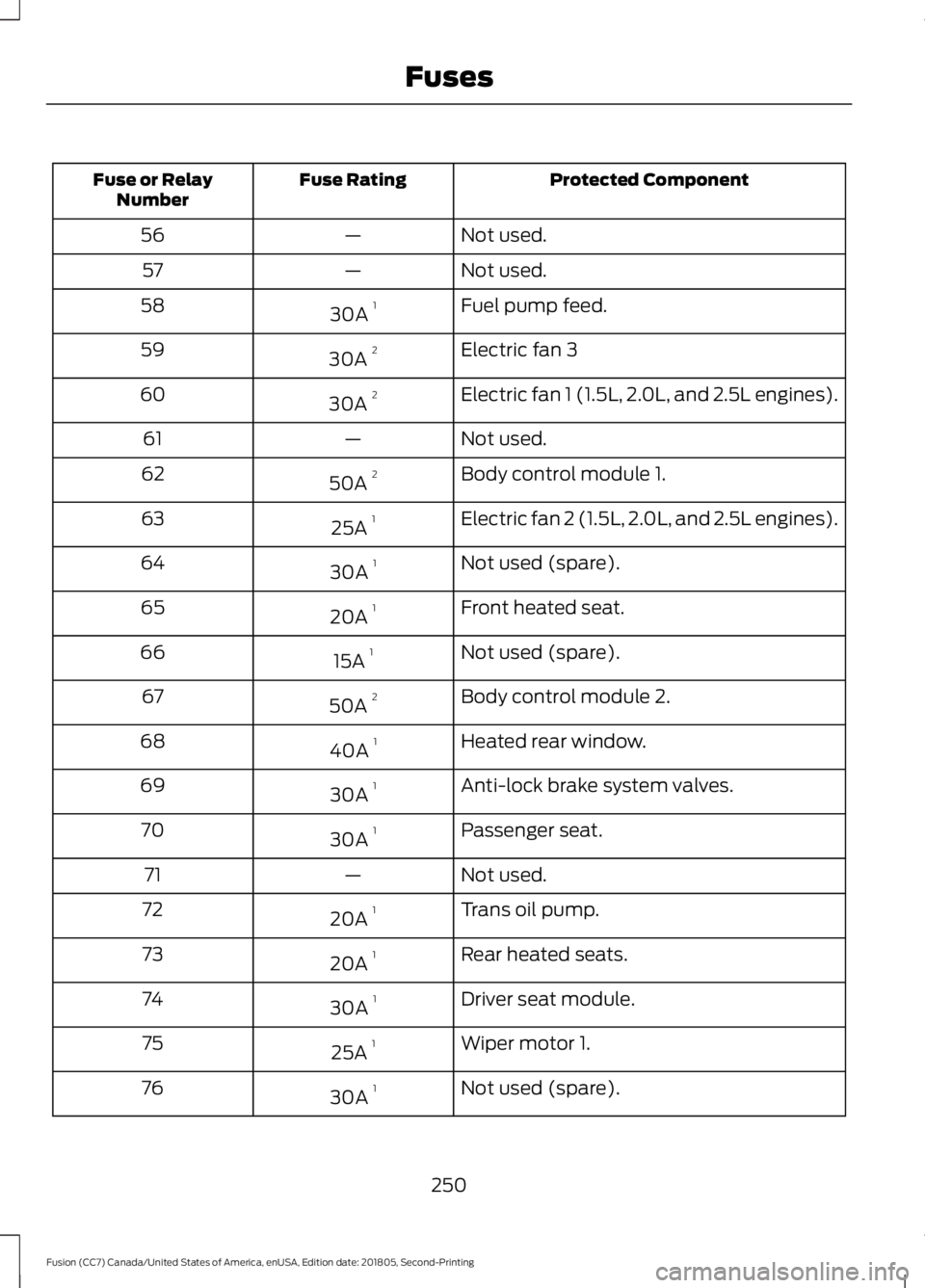
Protected Component
Fuse Rating
Fuse or Relay
Number
Not used.
—
56
Not used.
—
57
Fuel pump feed.
30A 1
58
Electric fan 3
30A 2
59
Electric fan 1 (1.5L, 2.0L, and 2.5L engines).
30A 2
60
Not used.
—
61
Body control module 1.
50A 2
62
Electric fan 2 (1.5L, 2.0L, and 2.5L engines).
25A 1
63
Not used (spare).
30A 1
64
Front heated seat.
20A 1
65
Not used (spare).
15A 1
66
Body control module 2.
50A 2
67
Heated rear window.
40A 1
68
Anti-lock brake system valves.
30A 1
69
Passenger seat.
30A 1
70
Not used.
—
71
Trans oil pump.
20A 1
72
Rear heated seats.
20A 1
73
Driver seat module.
30A 1
74
Wiper motor 1.
25A 1
75
Not used (spare).
30A 1
76
250
Fusion (CC7) Canada/United States of America, enUSA, Edition date: 201805, Second-Printing Fuses