USB port FORD FUSION 2019 Owners Manual
[x] Cancel search | Manufacturer: FORD, Model Year: 2019, Model line: FUSION, Model: FORD FUSION 2019Pages: 550, PDF Size: 8.5 MB
Page 8 of 550

Changing a Road Wheel
...........................310
Technical Specifications - 1.5L EcoBoost™/2.0L EcoBoost™/2.5L
........................................................................\
.
317
Technical Specifications - 2.7L EcoBoost™ ................................................
318
Capacities and Specifications
Engine Specifications - 1.5L EcoBoost™ ........................................................................\
.
319
Engine Specifications - 2.0L EcoBoost™ ........................................................................\
.
319
Engine Specifications - 2.5L ...................
320
Engine Specifications - 2.7L EcoBoost™ ........................................................................\
.
321
Motorcraft Parts - 1.5L EcoBoost™ ......
321
Motorcraft Parts - 2.0L EcoBoost™ .....
323
Motorcraft Parts - 2.5L .............................
324
Motorcraft Parts - 2.7L EcoBoost™ ......
325
Vehicle Identification Number ...............
326
Vehicle Certification Label .......................
327
Transmission Code Designation ............
327
Capacities and Specifications - 1.5L EcoBoost™ ...............................................
328
Capacities and Specifications - 2.0L EcoBoost™ ................................................
331
Capacities and Specifications - 2.5L ........................................................................\
335
Capacities and Specifications - 2.7L EcoBoost™ ...............................................
339
Bulb Specification Chart .........................
344
Audio System
General Information ..................................
345
Audio Unit - Vehicles With: Touchscreen Display, Vehicles Without: Sony Audio
System .......................................................
346
Audio Unit - Vehicles With: Sony Audio System/Touchscreen Display ............
347
Audio Unit - Vehicles With: SYNC ........
349
Digital Radio .................................................
353
Satellite Radio .............................................
355USB Port
........................................................
358
Media Hub .....................................................
358
SYNC™
General Information ..................................
359
Using Voice Recognition ...........................
361
Using SYNC™ With Your Phone ...........
363
SYNC™ Applications and Services ......
375
Using SYNC™ With Your Media Player .......................................................................
380
SYNC™ Troubleshooting ........................
389
SYNC™ 3
General Information ..................................
397
Home Screen ...............................................
409
Using Voice Recognition ...........................
410
Entertainment ...............................................
417
Climate ...........................................................
426
Phone ..............................................................
429
Navigation .....................................................
435
Apps ................................................................
443
Settings ..........................................................
446
SYNC™ 3 Troubleshooting ....................
460
Accessories
Accessories ...................................................
472
Ford Protect
Ford Protect ..................................................
474
Scheduled Maintenance
General Maintenance Information .......
476
Normal Scheduled Maintenance .........
479
Special Operating Conditions Scheduled Maintenance ............................................
482
Scheduled Maintenance Record ..........
484
Appendices
Electromagnetic Compatibility .............
494
End User License Agreement ................
496
5
Fusion (CC7) Canada/United States of America, enUSA, Edition date: 201805, Second-Printing Table of Contents
Page 150 of 550
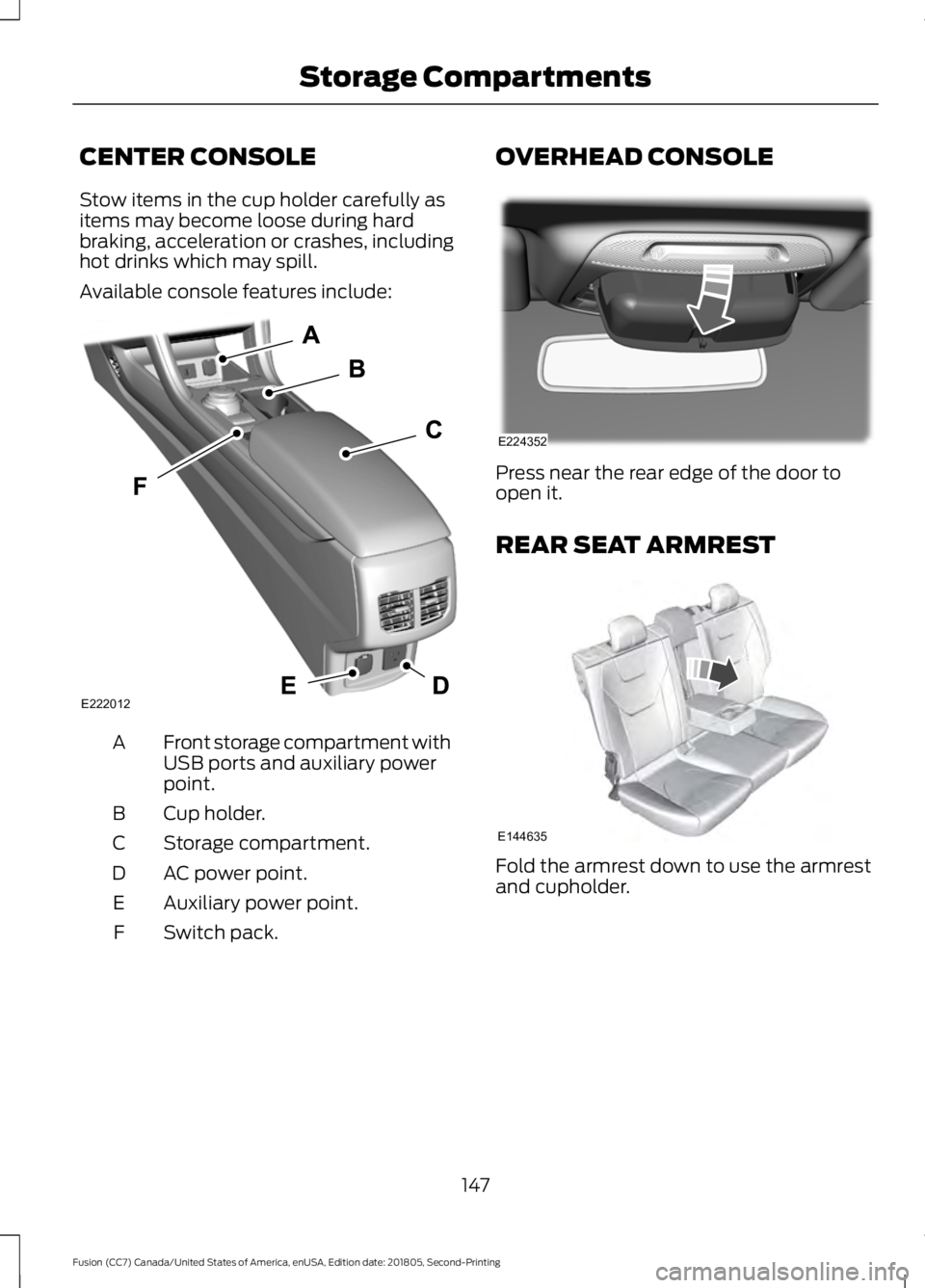
CENTER CONSOLE
Stow items in the cup holder carefully as
items may become loose during hard
braking, acceleration or crashes, including
hot drinks which may spill.
Available console features include:
Front storage compartment with
USB ports and auxiliary power
point.
A
Cup holder.
B
Storage compartment.
C
AC power point.
D
Auxiliary power point.
E
Switch pack.
F OVERHEAD CONSOLE
Press near the rear edge of the door to
open it.
REAR SEAT ARMREST
Fold the armrest down to use the armrest
and cupholder.
147
Fusion (CC7) Canada/United States of America, enUSA, Edition date: 201805, Second-Printing Storage CompartmentsE222012 E224352 E144635
Page 361 of 550
USB PORT
WARNING: Driving while
distracted can result in loss of vehicle
control, crash and injury. We strongly
recommend that you use extreme
caution when using any device that may
take your focus off the road. Your
primary responsibility is the safe
operation of your vehicle. We
recommend against the use of any
hand-held device while driving and
encourage the use of voice-operated
systems when possible. Make sure you
are aware of all applicable local laws
that may affect the use of electronic
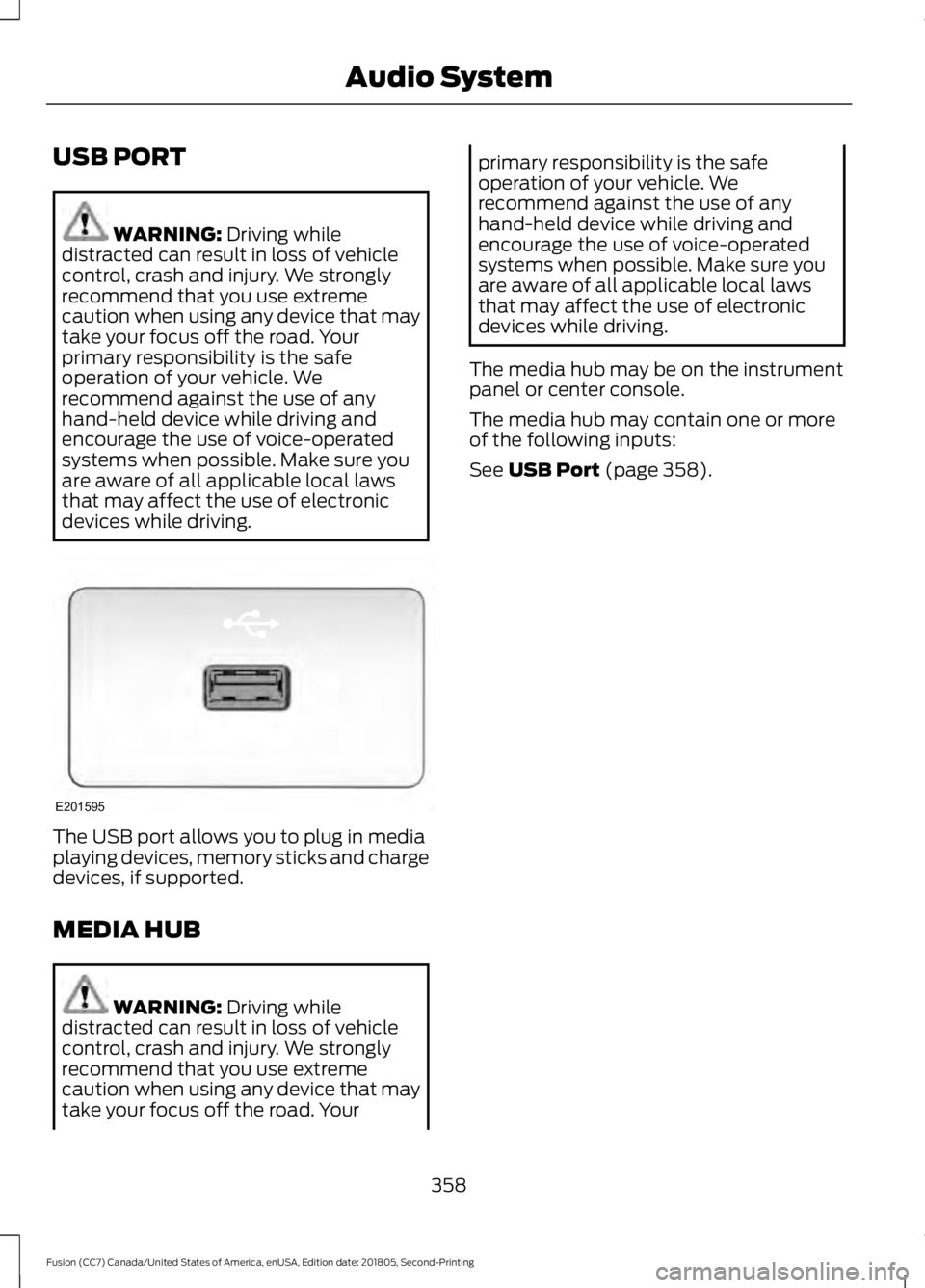
devices while driving. The USB port allows you to plug in media
playing devices, memory sticks and charge
devices, if supported.
MEDIA HUB
WARNING:
Driving while
distracted can result in loss of vehicle
control, crash and injury. We strongly
recommend that you use extreme
caution when using any device that may
take your focus off the road. Your primary responsibility is the safe
operation of your vehicle. We
recommend against the use of any
hand-held device while driving and
encourage the use of voice-operated
systems when possible. Make sure you
are aware of all applicable local laws
that may affect the use of electronic
devices while driving.
The media hub may be on the instrument
panel or center console.
The media hub may contain one or more
of the following inputs:
See
USB Port (page 358).
358
Fusion (CC7) Canada/United States of America, enUSA, Edition date: 201805, Second-Printing Audio SystemE201595
Page 362 of 550

GENERAL INFORMATION
SYNC is an in-vehicle communications
system that works with your
Bluetooth-enabled cellular phone and
portable media player.
This allows you to:
•
Make and receive calls.
• Access and play music from your
portable music player.
• Use 911 Assist and applications, via
SYNC Applink . *
• Access phonebook contacts and music
using voice commands.
• Stream music from your connected
phone.
• Text message. •
Use the advanced voice recognition
system.
• Charge your USB device (if your device
supports this).
* These features are not available in all
markets and may require activation.
Available AppLink enabled apps vary by
market.
Make sure that you review your device's
manual before using it with SYNC.
Support
The SYNC support team is available to
help you with any questions you cannot
answer on your own.
Monday-Saturday, 8:30am-9:00pm EST.
359
Fusion (CC7) Canada/United States of America, enUSA, Edition date: 201805, Second-Printing SYNC™E198355
Page 380 of 550
911 Assist Privacy Notice
When you switch on 911 Assist, it may
disclose to emergency services that your
vehicle has been in a crash involving the
deployment of an airbag or activation of
the fuel pump shut-off. Certain versions or
updates to 911 Assist may also be capable
of electronically or verbally disclosing to
911 operators your vehicle location or other
details about your vehicle or crash to assist
911 operators to provide the most
appropriate emergency services. If you do
not want to disclose this information, do
not switch the feature on.
SYNC Mobile Apps
The system enables voice and steering
wheel control of SYNC AppLink enabled
smartphone apps. When an app is running
through AppLink, you can control main
features of the app through voice
commands and steering wheel controls.
Note:
You must pair and connect your
smartphone to SYNC to access AppLink.
Note: iPhone users need to connect the
phone to the USB port.
Note: Android users need to connect the
phone to SYNC using Bluetooth.
Note: For information on available apps,
supported smartphone devices and
troubleshooting tips please visit the local
website.
Note: Availability of SYNC AppLink enabled
Apps will vary by region. Note:
Make sure you have an active account
for the app that you have downloaded.
Some apps work automatically with no
setup. Other apps want you to configure
your personal settings and personalize your
experience by creating stations or favorites.
We recommend you do this at home or
outside of your vehicle.
Note: AppLink is not available if your
vehicle is equipped with the MyFord Touch
system.
To Access Using the SYNC Menu
Press the MENU button to access the
menu on-screen. Then select: Action and Description
Menu
Item
SYNC-Apps Scroll through the list of
available applications and
select a particular app or
select:
Mobile
Apps
Find New Apps
Note: If you cannot find a compatible SYNC
AppLink app, make sure the required app is
running on the mobile device.
Accessing an App's Menu
When an app is running through SYNC,
press the right arrow button on the steering
wheel control to access the app menu.
You can access various app features from
here, for example thumbs up and thumbs
down.
Press the left arrow button on the steering
wheel control to exit the app menu.
377
Fusion (CC7) Canada/United States of America, enUSA, Edition date: 201805, Second-Printing SYNC™
Page 383 of 550
There are three possible statuses:
Action and Description
Menu Item
The system has detected a new apprequiring authorization or a general permissions update.
Update Needed
No update is required.
Up-To-Date
The system is trying to receive an update.
Updating...
Update settings Action and Description
Menu Item
Select this option from the settings menuto manually perform a needed update.
Request Update
Select this option from the settings menuto disable automatic updates.
Disable Updates
Doing so also disables the use of MobileApps on SYNC.
USING SYNC™ WITH YOUR
MEDIA PLAYER
You can access and play music from your
digital music player over your vehicle's
speaker system using the system's media
menu or voice commands. You can also
sort and play your music by specific
categories, such as artist and album.
Note: The system is capable of indexing up
to 15,000 songs.
SYNC is capable of hosting nearly any
digital media player including: iPod, Zune,
plays from device players, and most USB
drives. SYNC also supports audio formats,
such as MP3, WMA, WAV and ACC. Confirm that the USB device has been
formatted correctly and has the following
specifications:
•
USB 2.0.
• File format must be FAT16/32.
The format of the audio files on the USB
device must be:
• MP3.
• Non DRM protected WMA.
• WAV.
• AAC.
Connecting Your Digital Media
Player to the USB Port
Note: If your digital media player has a
power switch, make sure you switch it on
before plugging it in.
380
Fusion (CC7) Canada/United States of America, enUSA, Edition date: 201805, Second-Printing SYNC™
Page 384 of 550
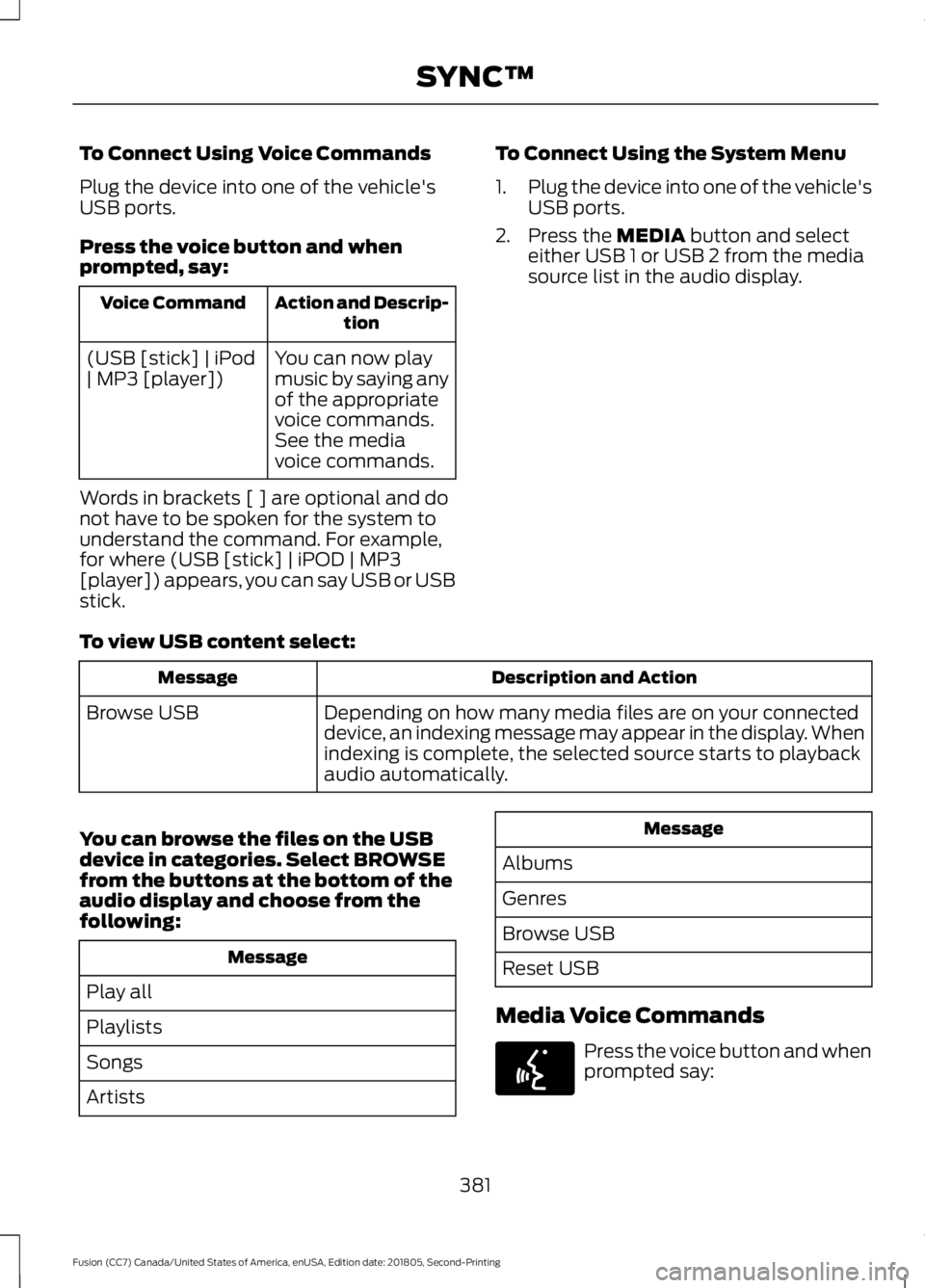
To Connect Using Voice Commands
Plug the device into one of the vehicle's
USB ports.
Press the voice button and when
prompted, say:
Action and Descrip-
tion
Voice Command
You can now play
music by saying any
of the appropriate
voice commands.
See the media
voice commands.
(USB [stick] | iPod
| MP3 [player])
Words in brackets [ ] are optional and do
not have to be spoken for the system to
understand the command. For example,
for where (USB [stick] | iPOD | MP3
[player]) appears, you can say USB or USB
stick. To Connect Using the System Menu
1.
Plug the device into one of the vehicle's
USB ports.
2. Press the MEDIA button and select
either USB 1 or USB 2 from the media
source list in the audio display.
To view USB content select: Description and Action
Message
Depending on how many media files are on your connected
device, an indexing message may appear in the display. When
indexing is complete, the selected source starts to playback
audio automatically.
Browse USB
You can browse the files on the USB
device in categories. Select
BROWSE
from the buttons at the bottom of the
audio display and choose from the
following: Message
Play all
Playlists
Songs
Artists Message
Albums
Genres
Browse USB
Reset USB
Media Voice Commands Press the voice button and when
prompted say:
381
Fusion (CC7) Canada/United States of America, enUSA, Edition date: 201805, Second-Printing SYNC™E142599
Page 386 of 550
![FORD FUSION 2019 Owners Manual Description and Action
Command
Plays the current playlist in a random order.
(Not all devices support this command.)
shuffle [all] [on]
shuffle off At any time during playback, you can press
the voice](/img/11/40714/w960_40714-385.png "FORD FUSION 2019 Owners Manual Description and Action
Command
Plays the current playlist in a random order.
(Not all devices support this command.)
shuffle [all] [on]
shuffle off At any time during playback, you can press
the voice")
Description and Action
Command
Plays the current playlist in a random order.
(Not all devices support this command.)
shuffle [all] [on]
shuffle off At any time during playback, you can press
the voice button and ask the system what is
playing. The system reads the metadata tags
(if populated) of the current track.
((who's | who is) this | who plays this |
(what's | what is) playing [now] | (what | which) (song | track | artist) is this |
(who's | who is) playing | (what's | what is) this)
___ is a dynamic listing, meaning that it
could be the name of anything, such as a
group, artist or song. For example you
could say "Play artist The Beatles".
Examples of USB Commands
SYNC provides the user with many intuitive
ways to find and play a song using voice.
For example, if we have a song called
"Penny Lane" from the album "Magical
Mystery Tour" we can say the following to
play this song:
• Play song "Penny Lane".
• Play "Penny Lane".
If we wanted to play the entire album, we
can say: •
Play album "Magical Mystery Tour".
• Play "Magical Mystery Tour".
Bluetooth Audio
The system is also capable of playing
music from your cellular phone through
Bluetooth.
To switch the Bluetooth Audio on, press
the MEDIA button and select: Menu Item
BT audio
Then any of the following: Voice Command
pause
play
next [track | title | song | file | podcast | chapter | episode]
previous [track | title | song | file | podcast | chapter | episode]
Media Menu Features
The media menu allows you to select how
to play your music (such as by artist, genre,
shuffle or repeat), find similar music or
reset the index of your USB devices. Press the MEDIA button and select either
USB 1 or USB 2 from the media source list
in the audio display to start USB playback.
383
Fusion (CC7) Canada/United States of America, enUSA, Edition date: 201805, Second-Printing SYNC™
Page 387 of 550
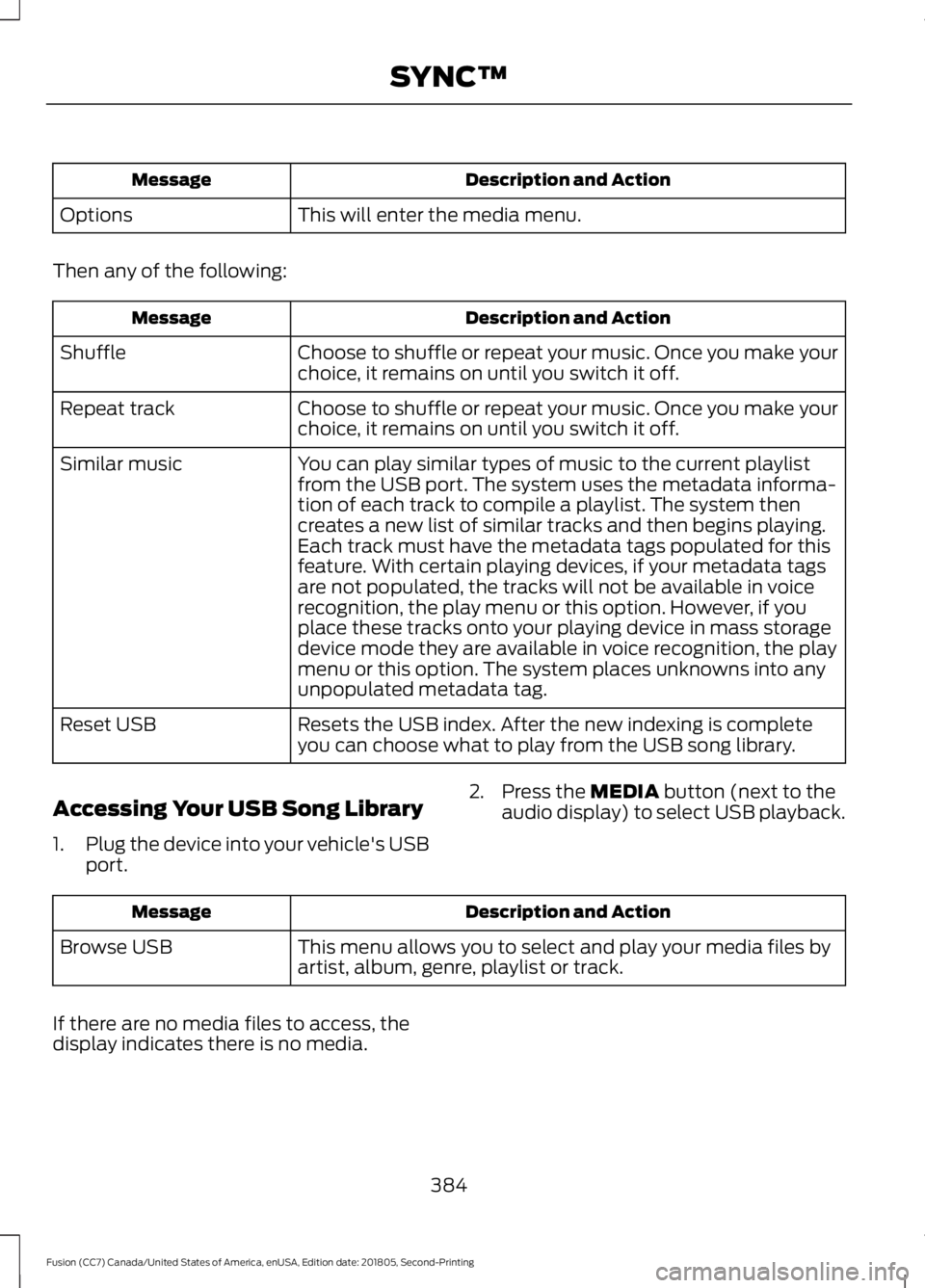
Description and Action
Message
This will enter the media menu.
Options
Then any of the following: Description and Action
Message
Choose to shuffle or repeat your music. Once you make your
choice, it remains on until you switch it off.
Shuffle
Choose to shuffle or repeat your music. Once you make your
choice, it remains on until you switch it off.
Repeat track
You can play similar types of music to the current playlist
from the USB port. The system uses the metadata informa-
tion of each track to compile a playlist. The system then
creates a new list of similar tracks and then begins playing.
Each track must have the metadata tags populated for this
feature. With certain playing devices, if your metadata tags
Similar music
are not populated, the tracks will not be available in voice
recognition, the play menu or this option. However, if you
place these tracks onto your playing device in mass storage
device mode they are available in voice recognition, the play
menu or this option. The system places unknowns into any
unpopulated metadata tag.
Resets the USB index. After the new indexing is complete
you can choose what to play from the USB song library.
Reset USB
Accessing Your USB Song Library
1. Plug the device into your vehicle's USB
port. 2. Press the MEDIA button (next to the
audio display) to select USB playback. Description and Action
Message
This menu allows you to select and play your media files by
artist, album, genre, playlist or track.
Browse USB
If there are no media files to access, the
display indicates there is no media.
384
Fusion (CC7) Canada/United States of America, enUSA, Edition date: 201805, Second-Printing SYNC™
Page 388 of 550
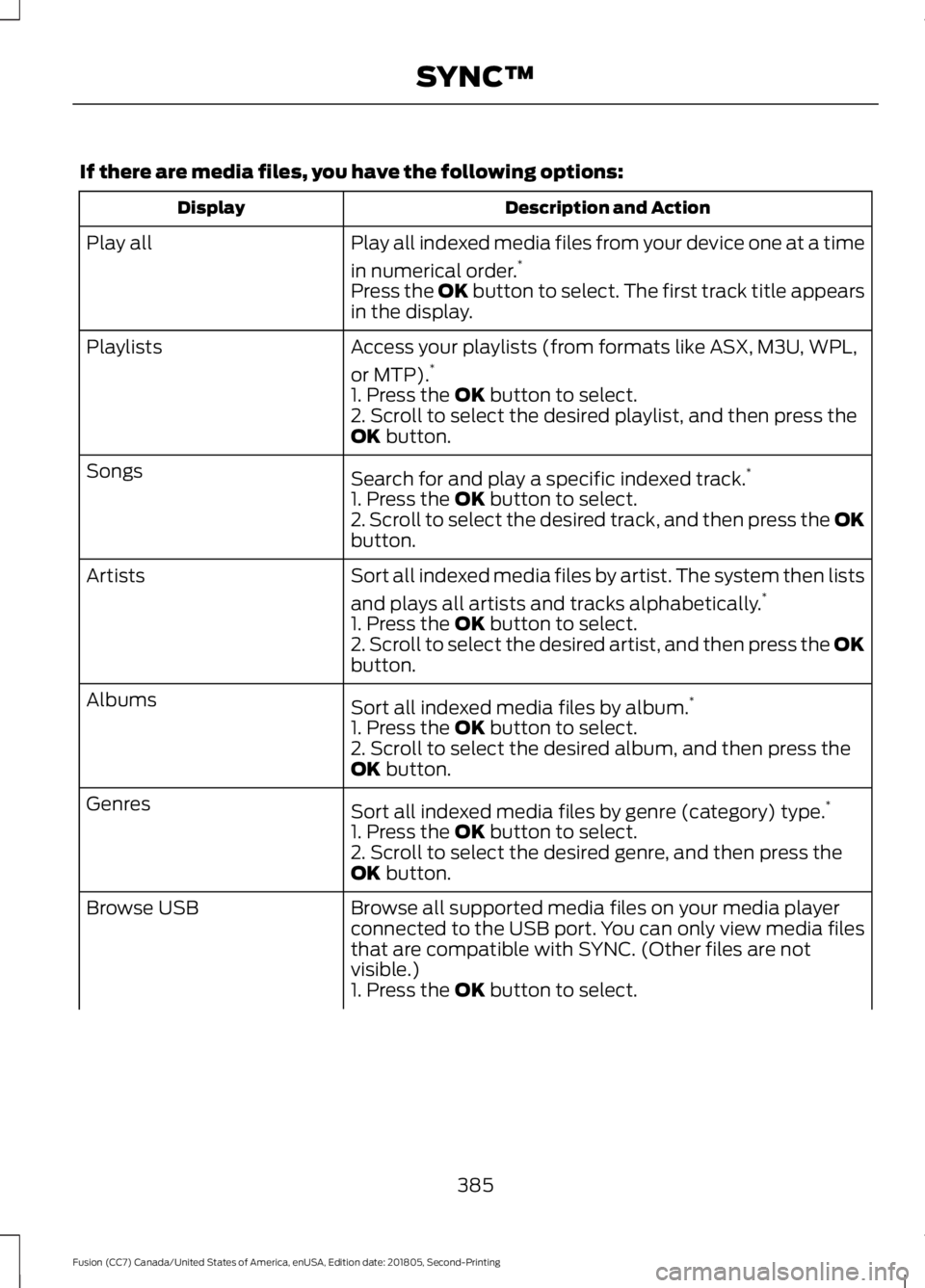
If there are media files, you have the following options:
Description and Action
Display
Play all indexed media files from your device one at a time
in numerical order.*
Play all
Press the OK button to select. The first track title appears
in the display.
Access your playlists (from formats like ASX, M3U, WPL,
or MTP).*
Playlists
1. Press the OK button to select.
2. Scroll to select the desired playlist, and then press the
OK
button.
Search for and play a specific indexed track. *
Songs
1. Press the
OK button to select.
2. Scroll to select the desired track, and then press the OK
button.
Sort all indexed media files by artist. The system then lists
and plays all artists and tracks alphabetically. *
Artists
1. Press the
OK button to select.
2. Scroll to select the desired artist, and then press the OK
button.
Sort all indexed media files by album. *
Albums
1. Press the
OK button to select.
2. Scroll to select the desired album, and then press the
OK
button.
Sort all indexed media files by genre (category) type. *
Genres
1. Press the
OK button to select.
2. Scroll to select the desired genre, and then press the
OK
button.
Browse all supported media files on your media player
connected to the USB port. You can only view media files
that are compatible with SYNC. (Other files are not
visible.)
Browse USB
1. Press the
OK button to select.
385
Fusion (CC7) Canada/United States of America, enUSA, Edition date: 201805, Second-Printing SYNC™