wipers FORD FUSION 2019 Owners Manual
[x] Cancel search | Manufacturer: FORD, Model Year: 2019, Model line: FUSION, Model: FORD FUSION 2019Pages: 550, PDF Size: 8.5 MB
Page 5 of 550
Voice Control
...................................................74
Cruise Control .................................................
74
Information Display Control ......................
75
Heated Steering Wheel ...............................
75
Wipers and Washers
Windshield Wipers ........................................
76
Autowipers .......................................................
76
Windshield Washers .....................................
77
Lighting
General Information .....................................
78
Lighting Control .............................................
78
Autolamps .......................................................
79
Instrument Lighting Dimmer .....................
79
Headlamp Exit Delay ..................................
80
Daytime Running Lamps ...........................
80
Automatic High Beam Control ..................
81
Front Fog Lamps ...........................................
82
Direction Indicators ......................................
82
Interior Lamps ................................................
82
Ambient Lighting ...........................................
83
Windows and Mirrors
Power Windows ............................................
85
Global Opening and Closing ....................
86
Exterior Mirrors ...............................................
86
Interior Mirror ..................................................
88
Sun Visors ........................................................
88
Moonroof .........................................................
88
Instrument Cluster
Gauges ..............................................................
90
Warning Lamps and Indicators ................
93
Audible Warnings and Indicators ............
96
Information Displays
General Information .....................................
97
Information Messages ..............................
106Climate Control
Manual Climate Control
.............................
121
Automatic Climate Control - Vehicles With: Touchscreen Display, Vehicles
Without: Sony Audio System ..............
122
Automatic Climate Control - Vehicles With: Sony Audio System/
Touchscreen Display ..............................
124
Automatic Climate Control - Vehicles With: SYNC ................................................
125
Hints on Controlling the Interior Climate ........................................................................\
..
127
Heated Rear Window .................................
129
Heated Exterior Mirrors ..............................
129
Cabin Air Filter ..............................................
130
Remote Start ................................................
130
Seats
Sitting in the Correct Position ..................
131
Head Restraints .............................................
131
Manual Seats ................................................
133
Power Seats ...................................................
133
Memory Function .........................................
135
Rear Seats .......................................................
137
Heated Seats ................................................
138
Climate Controlled Seats .........................
138
Garage Door Opener
Universal Garage Door Opener ..............
140
Auxiliary Power Points
Auxiliary Power Points ...............................
145
Storage Compartments
Center Console .............................................
147
Overhead Console .......................................
147
Rear Seat Armrest .......................................
147
Starting and Stopping the Engine
General Information ...................................
148
2
Fusion (CC7) Canada/United States of America, enUSA, Edition date: 201805, Second-Printing Table of Contents
Page 21 of 550
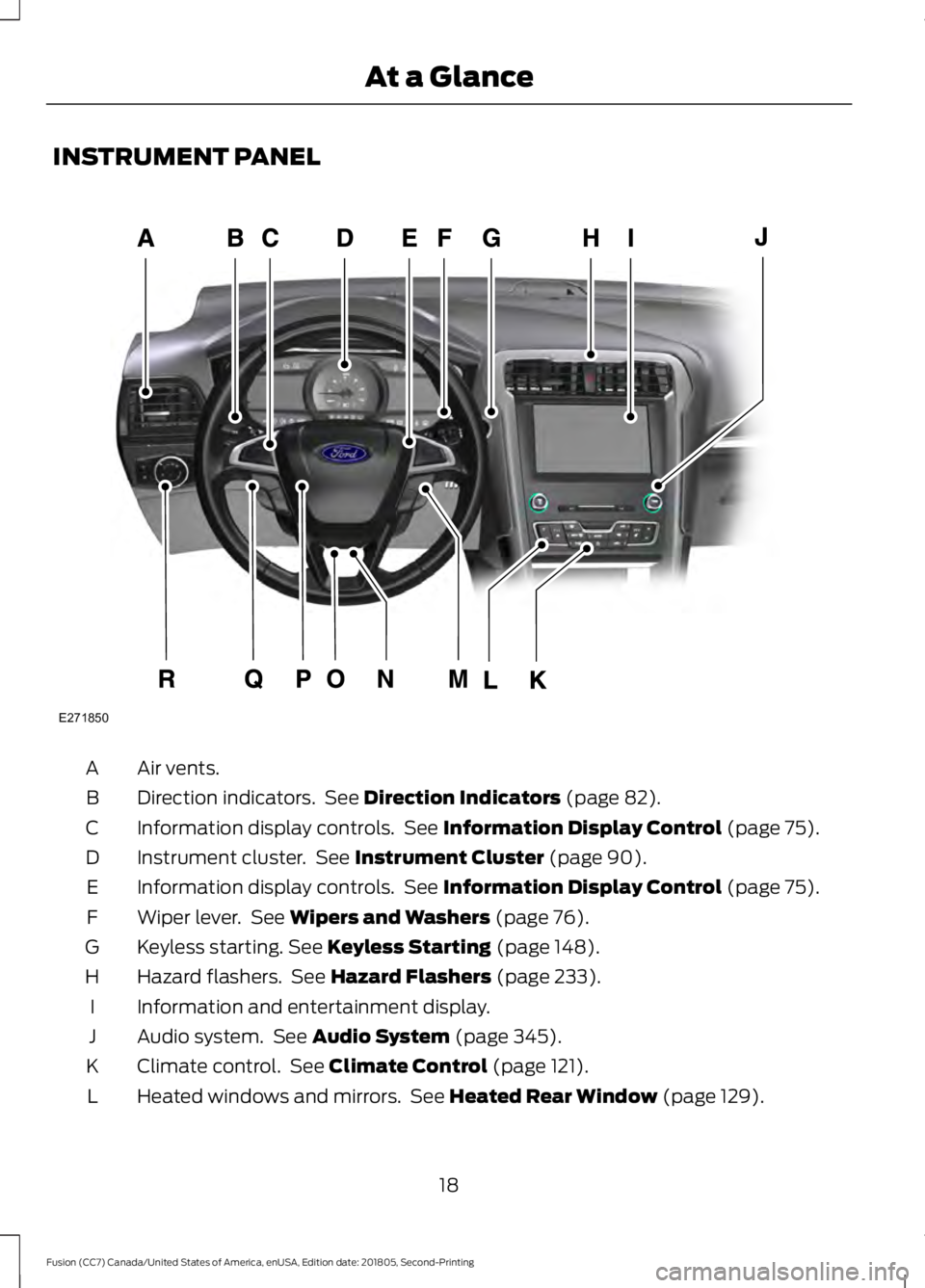
INSTRUMENT PANEL
Air vents.
A
Direction indicators. See Direction Indicators (page 82).
B
Information display controls. See
Information Display Control (page 75).
C
Instrument cluster. See
Instrument Cluster (page 90).
D
Information display controls. See
Information Display Control (page 75).
E
Wiper lever. See
Wipers and Washers (page 76).
F
Keyless starting.
See Keyless Starting (page 148).
G
Hazard flashers. See
Hazard Flashers (page 233).
H
Information and entertainment display.
I
Audio system. See
Audio System (page 345).
J
Climate control. See
Climate Control (page 121).
K
Heated windows and mirrors. See
Heated Rear Window (page 129).
L
18
Fusion (CC7) Canada/United States of America, enUSA, Edition date: 201805, Second-Printing At a GlanceE271850
Page 79 of 550
WINDSHIELD WIPERS
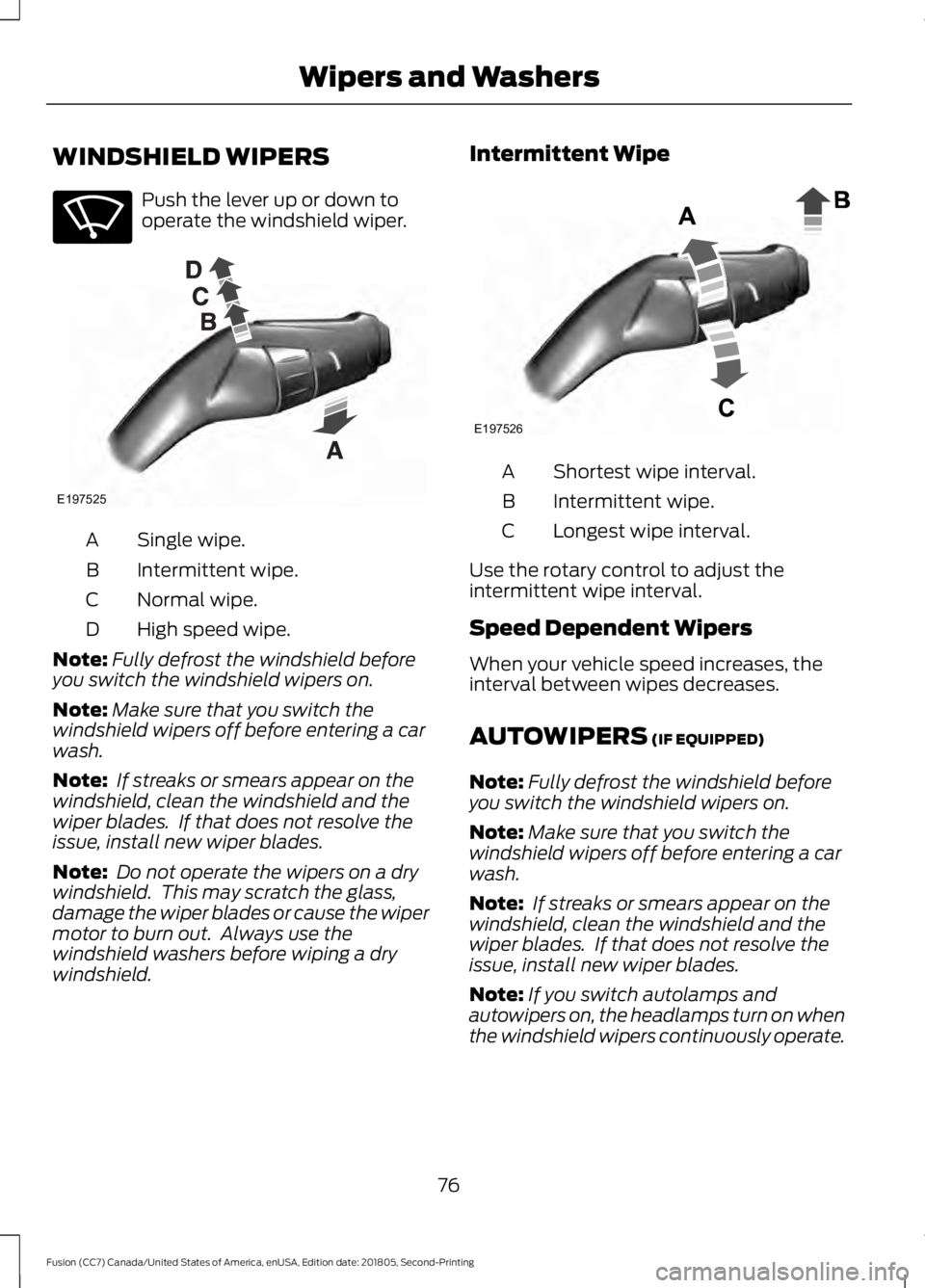
Push the lever up or down to
operate the windshield wiper.
Single wipe.
A
Intermittent wipe.
B
Normal wipe.
C
High speed wipe.
D
Note: Fully defrost the windshield before
you switch the windshield wipers on.
Note: Make sure that you switch the
windshield wipers off before entering a car
wash.
Note: If streaks or smears appear on the
windshield, clean the windshield and the
wiper blades. If that does not resolve the
issue, install new wiper blades.
Note: Do not operate the wipers on a dry
windshield. This may scratch the glass,
damage the wiper blades or cause the wiper
motor to burn out. Always use the
windshield washers before wiping a dry
windshield. Intermittent Wipe
Shortest wipe interval.
A
Intermittent wipe.
B
Longest wipe interval.
C
Use the rotary control to adjust the
intermittent wipe interval.
Speed Dependent Wipers
When your vehicle speed increases, the
interval between wipes decreases.
AUTOWIPERS (IF EQUIPPED)
Note: Fully defrost the windshield before
you switch the windshield wipers on.
Note: Make sure that you switch the
windshield wipers off before entering a car
wash.
Note: If streaks or smears appear on the
windshield, clean the windshield and the
wiper blades. If that does not resolve the
issue, install new wiper blades.
Note: If you switch autolamps and
autowipers on, the headlamps turn on when
the windshield wipers continuously operate.
76
Fusion (CC7) Canada/United States of America, enUSA, Edition date: 201805, Second-Printing Wipers and WashersE270969 E197525 E197526
Page 80 of 550
Wet or winter driving conditions with ice,
snow or salty road mist can cause
inconsistent and unexpected wiping or
smearing.
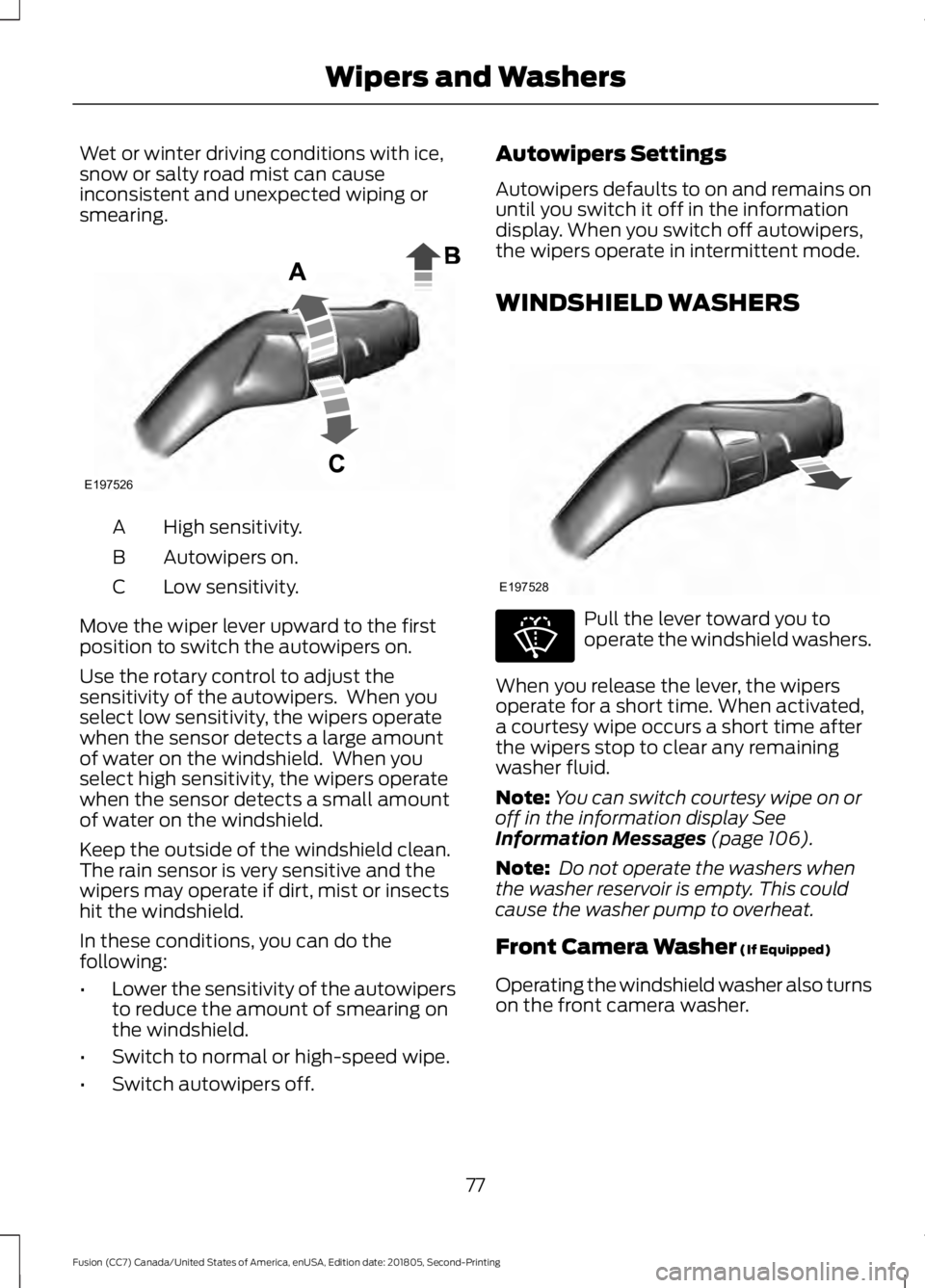
High sensitivity.
A
Autowipers on.
B
Low sensitivity.
C
Move the wiper lever upward to the first
position to switch the autowipers on.
Use the rotary control to adjust the
sensitivity of the autowipers. When you
select low sensitivity, the wipers operate
when the sensor detects a large amount
of water on the windshield. When you
select high sensitivity, the wipers operate
when the sensor detects a small amount
of water on the windshield.
Keep the outside of the windshield clean.
The rain sensor is very sensitive and the
wipers may operate if dirt, mist or insects
hit the windshield.
In these conditions, you can do the
following:
• Lower the sensitivity of the autowipers
to reduce the amount of smearing on
the windshield.
• Switch to normal or high-speed wipe.
• Switch autowipers off. Autowipers Settings
Autowipers defaults to on and remains on
until you switch it off in the information
display. When you switch off autowipers,
the wipers operate in intermittent mode.
WINDSHIELD WASHERS
Pull the lever toward you to
operate the windshield washers.
When you release the lever, the wipers
operate for a short time. When activated,
a courtesy wipe occurs a short time after
the wipers stop to clear any remaining
washer fluid.
Note: You can switch courtesy wipe on or
off in the information display See
Information Messages (page 106).
Note: Do not operate the washers when
the washer reservoir is empty. This could
cause the washer pump to overheat.
Front Camera Washer
(If Equipped)
Operating the windshield washer also turns
on the front camera washer.
77
Fusion (CC7) Canada/United States of America, enUSA, Edition date: 201805, Second-Printing Wipers and WashersE197526 E197528 E270967
Page 82 of 550
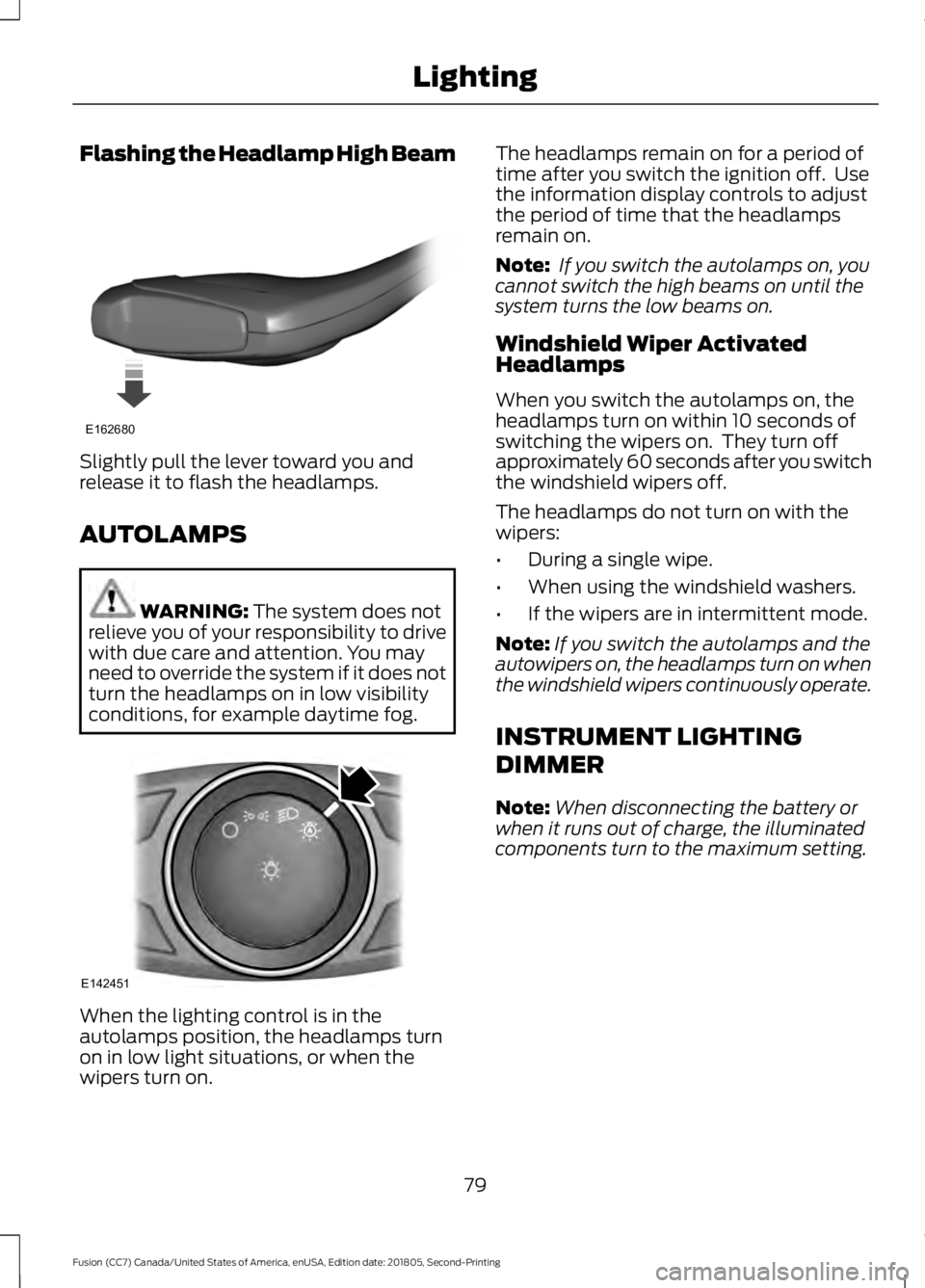
Flashing the Headlamp High Beam
Slightly pull the lever toward you and
release it to flash the headlamps.
AUTOLAMPS
WARNING: The system does not
relieve you of your responsibility to drive
with due care and attention. You may
need to override the system if it does not
turn the headlamps on in low visibility
conditions, for example daytime fog. When the lighting control is in the
autolamps position, the headlamps turn
on in low light situations, or when the
wipers turn on. The headlamps remain on for a period of
time after you switch the ignition off. Use
the information display controls to adjust
the period of time that the headlamps
remain on.
Note:
If you switch the autolamps on, you
cannot switch the high beams on until the
system turns the low beams on.
Windshield Wiper Activated
Headlamps
When you switch the autolamps on, the
headlamps turn on within 10 seconds of
switching the wipers on. They turn off
approximately 60 seconds after you switch
the windshield wipers off.
The headlamps do not turn on with the
wipers:
• During a single wipe.
• When using the windshield washers.
• If the wipers are in intermittent mode.
Note: If you switch the autolamps and the
autowipers on, the headlamps turn on when
the windshield wipers continuously operate.
INSTRUMENT LIGHTING
DIMMER
Note: When disconnecting the battery or
when it runs out of charge, the illuminated
components turn to the maximum setting.
79
Fusion (CC7) Canada/United States of America, enUSA, Edition date: 201805, Second-Printing LightingE162680 E142451
Page 103 of 550
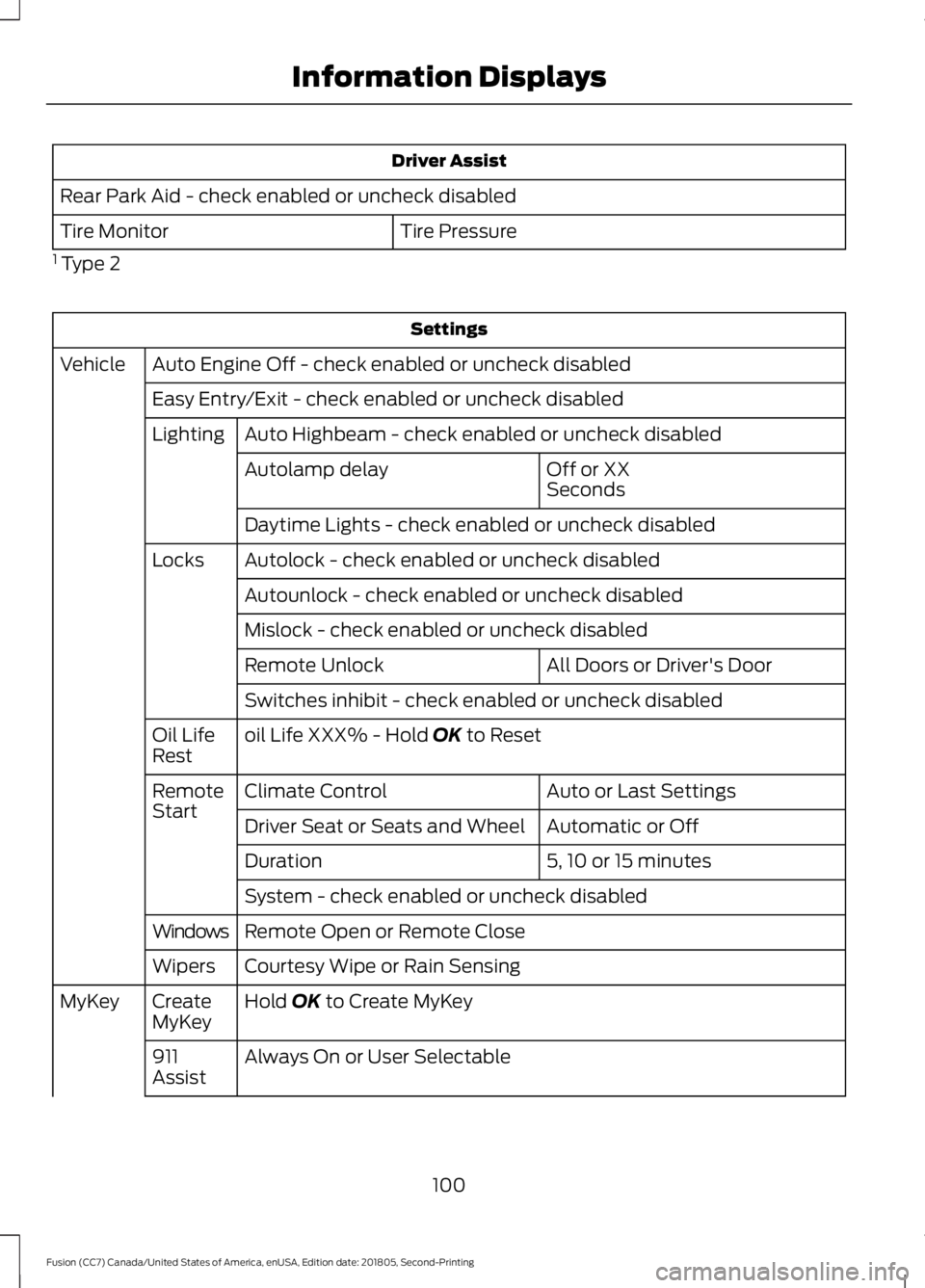
Driver Assist
Rear Park Aid - check enabled or uncheck disabled Tire Pressure
Tire Monitor
1 Type 2 Settings
Auto Engine Off - check enabled or uncheck disabled
Vehicle
Easy Entry/Exit - check enabled or uncheck disabledAuto Highbeam - check enabled or uncheck disabled
Lighting
Off or XX
Seconds
Autolamp delay
Daytime Lights - check enabled or uncheck disabled
Autolock - check enabled or uncheck disabled
Locks
Autounlock - check enabled or uncheck disabled
Mislock - check enabled or uncheck disabled All Doors or Driver's Door
Remote Unlock
Switches inhibit - check enabled or uncheck disabled
oil Life XXX% - Hold OK to Reset
Oil Life
Rest
Auto or Last Settings
Climate Control
Remote
Start
Automatic or Off
Driver Seat or Seats and Wheel
5, 10 or 15 minutes
Duration
System - check enabled or uncheck disabled
Remote Open or Remote Close
Windows
Courtesy Wipe or Rain Sensing
Wipers
Hold
OK to Create MyKey
Create
MyKey
MyKey
Always On or User Selectable
911
Assist
100
Fusion (CC7) Canada/United States of America, enUSA, Edition date: 201805, Second-Printing Information Displays
Page 108 of 550
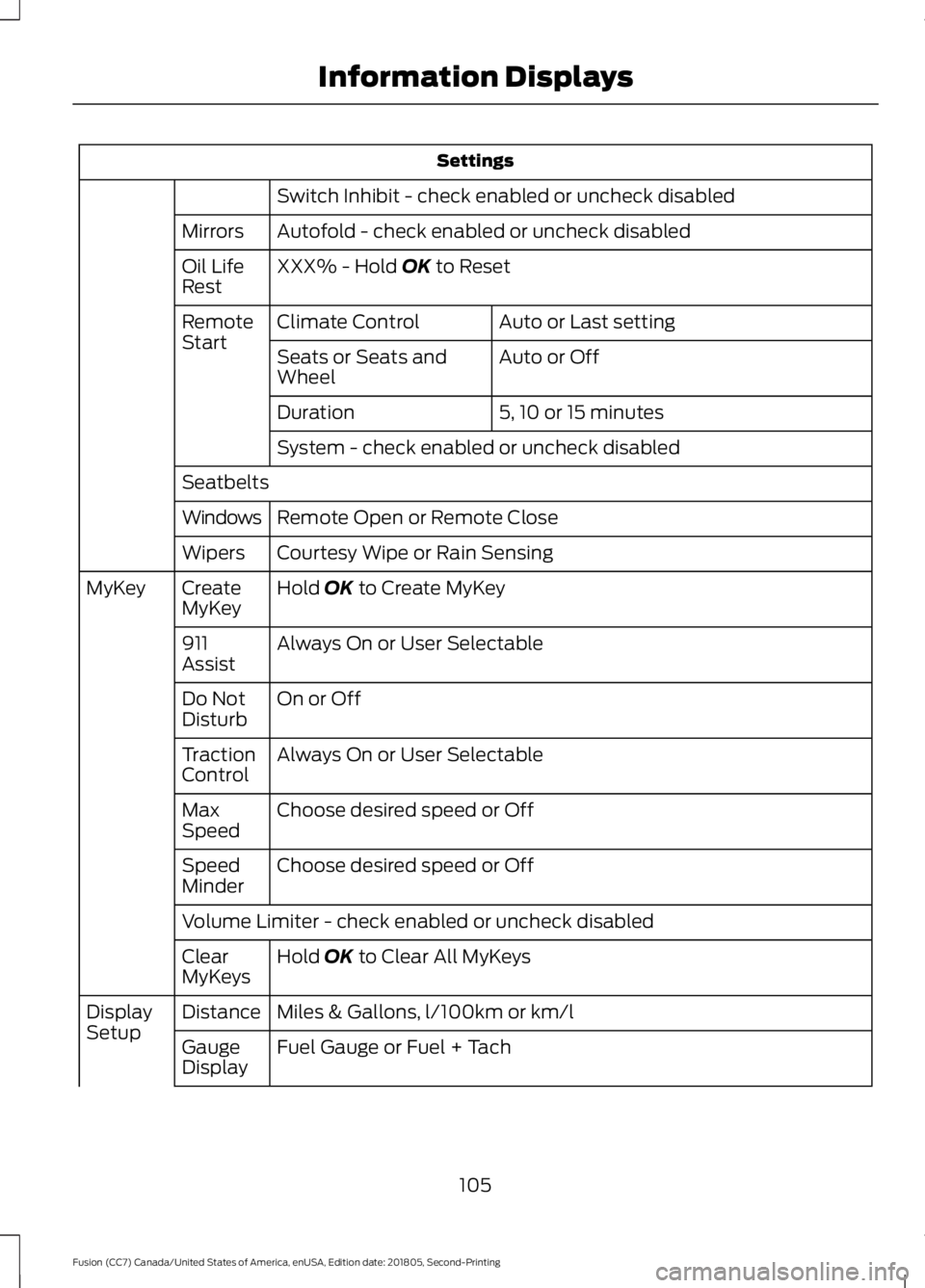
Settings
Switch Inhibit - check enabled or uncheck disabled
Autofold - check enabled or uncheck disabled
Mirrors
XXX% - Hold OK to Reset
Oil Life
Rest
Auto or Last setting
Climate Control
Remote
Start
Auto or Off
Seats or Seats and
Wheel
5, 10 or 15 minutes
Duration
System - check enabled or uncheck disabled
Seatbelts Remote Open or Remote Close
Windows
Courtesy Wipe or Rain Sensing
Wipers
Hold
OK to Create MyKey
Create
MyKey
MyKey
Always On or User Selectable
911
Assist
On or Off
Do Not
Disturb
Always On or User Selectable
Traction
Control
Choose desired speed or Off
Max
Speed
Choose desired speed or Off
Speed
Minder
Volume Limiter - check enabled or uncheck disabled
Hold
OK to Clear All MyKeys
Clear
MyKeys
Miles & Gallons, l/100km or km/l
Distance
Display
Setup
Fuel Gauge or Fuel + Tach
Gauge
Display
105
Fusion (CC7) Canada/United States of America, enUSA, Edition date: 201805, Second-Printing Information Displays
Page 285 of 550
WAXING
Regular waxing is necessary to protect your
car's paint from the elements. We
recommend that you wash and wax the
painted surface once or twice a year.
When washing and waxing, park your
vehicle in a shaded area out of direct
sunlight. Always wash your vehicle before
applying wax.
•
Use a quality wax that does not contain
abrasives.
• Follow the manufacturer ’s instructions
to apply and remove the wax.
• Apply a small amount of wax in a
back-and-forth motion, not in circles.
• Do not allow wax to come in contact
with any non-body (low-gloss black)
colored trim. The wax will discolor or
stain the parts over time.
•Roof racks.
• Bumpers.
• Grained door handles.
• Side moldings.
• Mirror housings.
• Windshield cowl area.
• Do not apply wax to glass areas.
• After waxing, your car's paint should
feel smooth, and be free of streaks and
smudges.
CLEANING THE ENGINE
Engines are more efficient when they are
clean because grease and dirt buildup keep
the engine warmer than normal. When washing:
•
Take care when using a power washer
to clean the engine. The high-pressure
fluid could penetrate the sealed parts
and cause damage.
• Do not spray a hot engine with cold
water to avoid cracking the engine
block or other engine components.
• Spray Motorcraft Engine Shampoo and
Degreaser on all parts that require
cleaning and pressure rinse clean. In
Canada, use Motorcraft Engine
Shampoo.
Note: If your vehicle has an engine cover
remove the cover before application of
Motorcraft Engine Shampoo and Degreaser.
Immediately rinse away any over spray.
• Never wash or rinse the engine while it
is hot or running; water in the running
engine may cause internal damage.
• Never wash or rinse any ignition coil,
spark plug wire or spark plug well, or
the area in and around these locations.
• Cover the battery, power distribution
box, and air filter assembly to prevent
water damage when cleaning the
engine.
CLEANING THE WINDOWS AND
WIPER BLADES
Car wash chemicals and environmental
fallout can result in windshield and wiper
blade contamination. Dirty windshield and
wipers will result in poor windshield wiper
operation. Keep the windshield and wiper
blades clean to maintain windshield wiper
performance.
282
Fusion (CC7) Canada/United States of America, enUSA, Edition date: 201805, Second-Printing Vehicle Care
Page 289 of 550
•
Cover interior trim to prevent fading.
• Keep all rubber parts free from oil and
solvents.
Engine
• Change the engine oil and filter prior to
storage because used engine oil
contains contaminates which may
cause engine damage.
• Start the engine every 15 days for a
minimum of 15 minutes. Run at fast idle
with the climate controls set to defrost
until the engine reaches normal
operating temperature.
• With your foot on the brake, shift
through all the gears while the engine
is running.
• We recommend that you change the
engine oil before you use your vehicle
again.
Fuel system
• Fill the fuel tank with high-quality fuel
until the first automatic shutoff of the
fuel pump nozzle.
Cooling system
• Protect against freezing temperatures.
• When removing your vehicle from
storage, check coolant fluid level.
Confirm that there are no cooling
system leaks and that fluid is at the
recommended level.
Battery
• Check and recharge as necessary. Keep
connections clean.
• If storing your vehicle for more than 30
days without recharging the battery,
we recommend that you disconnect
the battery cables to maintain battery
charge for quick starting. Note:
It is necessary to reset memory
features if battery cables are disconnected.
Brakes
• Make sure the brakes and parking brake
release fully.
Tires
• Maintain recommended air pressure.
Miscellaneous
• Make sure all linkages, cables, levers
and pins under your vehicle are covered
with grease to prevent rust.
• Move vehicles at least 25 ft (7.5 m)
every 15 days to lubricate working parts
and prevent corrosion.
Removing Vehicle From Storage
When your vehicle is ready to come out of
storage, do the following:
• Wash your vehicle to remove any dirt
or grease film build-up on window
surfaces.
• Check windshield wipers for any
deterioration.
• Check under the hood for any foreign
material that may have collected
during storage such as mice or squirrel
nests.
• Check the exhaust for any foreign
material that may have collected
during storage.
• Check tire pressures and set tire
inflation per the Tire Label.
• Check brake pedal operation. Drive
your vehicle
15 ft (4.5 m) back and
forth to remove rust build-up.
286
Fusion (CC7) Canada/United States of America, enUSA, Edition date: 201805, Second-Printing Vehicle Care
Page 539 of 550
Autolamps........................................................79
Windshield Wiper Activated
Headlamps........................................................ 79
Automatic Climate Control - Vehicles With: Sony Audio System/Touchscreen
Display...........................................................124
Setting the Blower Motor Speed.................. 124
Setting the Temperature.................................. 124
Switching Auto Mode On and Off................124
Switching Defrost On and Off........................ 125
Switching Maximum Air Conditioning On and Off............................................................... 125
Switching Maximum Defrost On and Off........................................................................\
125
Switching Recirculated Air On and Off........................................................................\
125
Switching the Air Conditioning On and Off........................................................................\
124
Switching the Climate Controlled Seats On and Off............................................................... 124
Switching the Climate Control On and Off........................................................................\
124
Switching the Heated Seats On and Off........................................................................\
125
Automatic Climate Control - Vehicles With: SYNC...................................................125
Directing Air to the Footwell Air Vents................................................................... 125
Directing Air to the Instrument Panel Air Vents................................................................... 125
Setting the Blower Motor Speed.................. 125
Setting the Temperature................................. 126
Switching Auto Mode On and Off................126
Switching Defrost On and Off....................... 126
Switching Maximum Air Conditioning On and Off............................................................... 126
Switching Maximum Defrost On and Off........................................................................\
127
Switching Recirculated Air On and Off........................................................................\
127
Switching the Air Conditioning On and Off........................................................................\
126
Switching the Climate Control On and Off........................................................................\
126Automatic Climate Control - Vehicles
With: Touchscreen Display, Vehicles
Without: Sony Audio System................122
Accessing the Air Distribution
Controls............................................................. 122
Setting the Blower Motor Speed................... 122
Setting the Temperature.................................. 123
Switching Auto Mode On and Off................123
Switching Maximum Air Conditioning On and Off............................................................... 123
Switching Maximum Defrost On and Off........................................................................\
123
Switching Recirculated Air On and Off........................................................................\
124
Switching the Air Conditioning On and Off........................................................................\
123
Switching the Climate Controlled Seats On and Off............................................................... 123
Switching the Climate Control On and Off........................................................................\
123
Switching the Heated Seats On and Off........................................................................\
123
Automatic High Beam Control..................81 Automatic High Beam Indicator..................... 82
Switching the System On and Off.................. 81
Automatic Transmission
...........................166
Automatic Transmission Adaptive
Learning............................................................. 170
Brake-Shift Interlock Override....................... 169
If Your Vehicle Gets Stuck In Mud or Snow................................................................... 170
SelectShift™ Automatic Transmission................................................... 168
Understanding the Positions of Your Rotary Shift Transmission........................................ 166
Automatic Transmission Fluid Check - 1.5L EcoBoost™/2.0L EcoBoost™/
2.5L
.................................................................267
Automatic Transmission Fluid Check - 2.7L EcoBoost™
........................................267
Adding Transmission Fluid* ......................... 268
Checking the Transmission Fluid Level ........................................................................\
...... 267
Auto-Start-Stop............................................153 Disabling Auto-Start-Stop............................. 154
Enabling Auto-Start-Stop............................... 153
Autowipers........................................................76 Autowipers Settings............................................. 77
536
Fusion (CC7) Canada/United States of America, enUSA, Edition date: 201805, Second-Printing Index