wheel FORD FUSION 2020 Owners Manual
[x] Cancel search | Manufacturer: FORD, Model Year: 2020, Model line: FUSION, Model: FORD FUSION 2020Pages: 497, PDF Size: 6.64 MB
Page 420 of 497
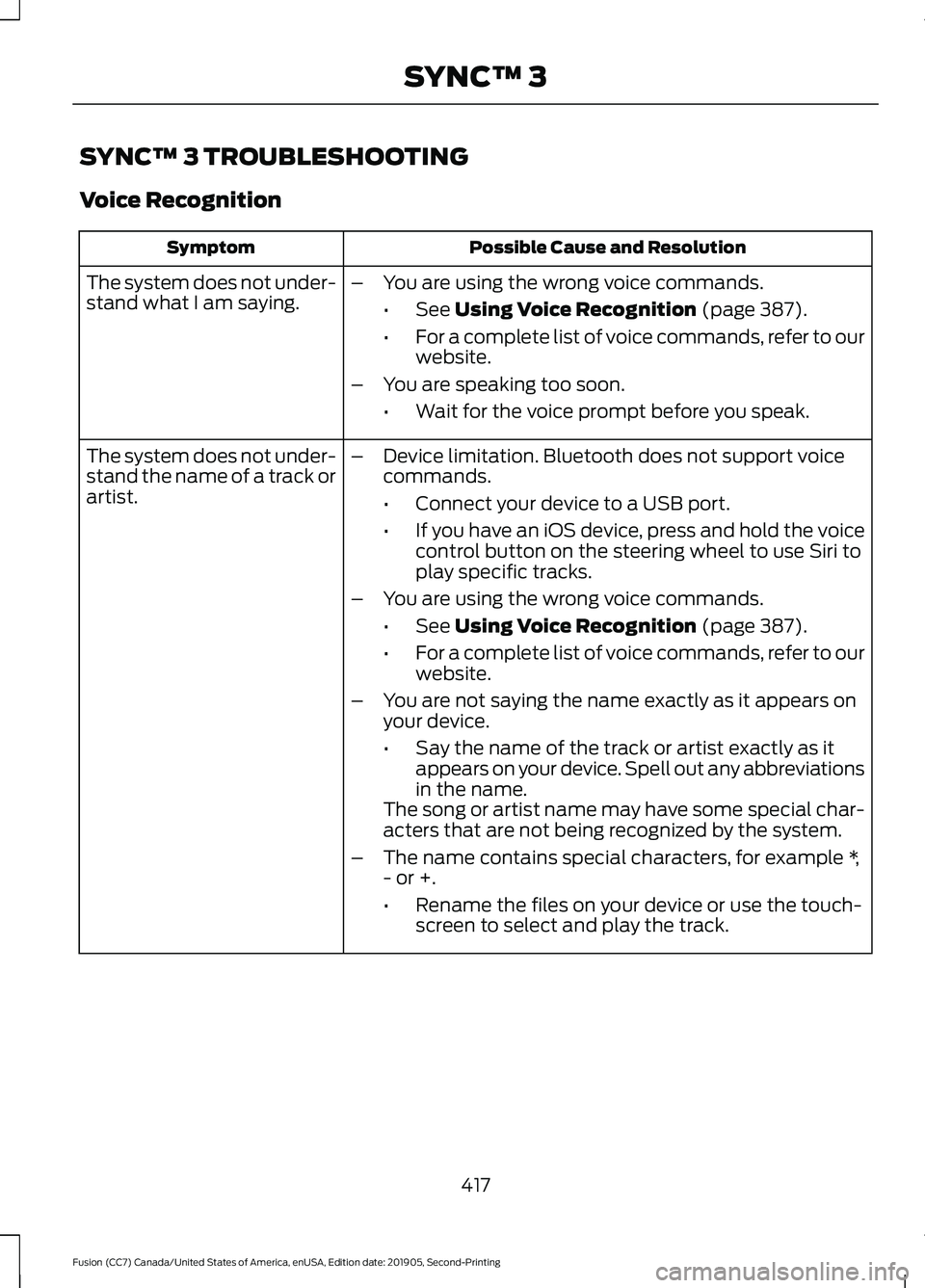
SYNC™ 3 TROUBLESHOOTING
Voice Recognition
Possible Cause and Resolution
Symptom
The system does not under-
stand what I am saying. –
You are using the wrong voice commands.
•See Using Voice Recognition (page 387).
• For a complete list of voice commands, refer to our
website.
– You are speaking too soon.
•Wait for the voice prompt before you speak.
The system does not under-
stand the name of a track or
artist. –
Device limitation. Bluetooth does not support voice
commands.
•Connect your device to a USB port.
• If you have an iOS device, press and hold the voice
control button on the steering wheel to use Siri to
play specific tracks.
– You are using the wrong voice commands.
•See
Using Voice Recognition (page 387).
• For a complete list of voice commands, refer to our
website.
– You are not saying the name exactly as it appears on
your device.
•Say the name of the track or artist exactly as it
appears on your device. Spell out any abbreviations
in the name.
The song or artist name may have some special char-
acters that are not being recognized by the system.
– The name contains special characters, for example *,
- or +.
•Rename the files on your device or use the touch-
screen to select and play the track.
417
Fusion (CC7) Canada/United States of America, enUSA, Edition date: 201905, Second-Printing SYNC™ 3
Page 422 of 497

Possible Cause and Resolution
Symptom
–Incorrect device settings.
•Make sure that your device does not have an auto-
install program or active security settings.
• Check that your device is not set only to charge.
– Device lock screen enabled.
•Unlock your device before connecting it.
The system does not recog-
nize my device. –
Device limitation.
•Do not leave your device in your vehicle during very
hot or very cold weather conditions.
– Cable connection issue.
•Correctly connect the cable to your device and the
vehicle USB port.
– Incompatible cable.
•Use the cable recommended by the manufacturer
of your device.
The system does not under-
stand the name of a track or
artist. –
Device limitation. Bluetooth does not support voice
commands.
•Connect your device to a USB port.
• If you have an iOS device, press and hold the voice
control button on the steering wheel to use Siri to
play specific tracks.
I cannot stream audio from
my Bluetooth device. –
Incompatible device.
•Check the compatibility of your device on our
website.
– Device not connected.
•Pair your device. See Phone (page 405).
– Media player not running.
•Start the media player on your device.
The system does not recog-
nize the music on my device. –
Missing or incorrect audio file metadata, for example
artist, song title, album or genre.
•Repair the files on your device.
– Corrupt files.
•Repair the files on your device.
419
Fusion (CC7) Canada/United States of America, enUSA, Edition date: 201905, Second-Printing SYNC™ 3
Page 440 of 497
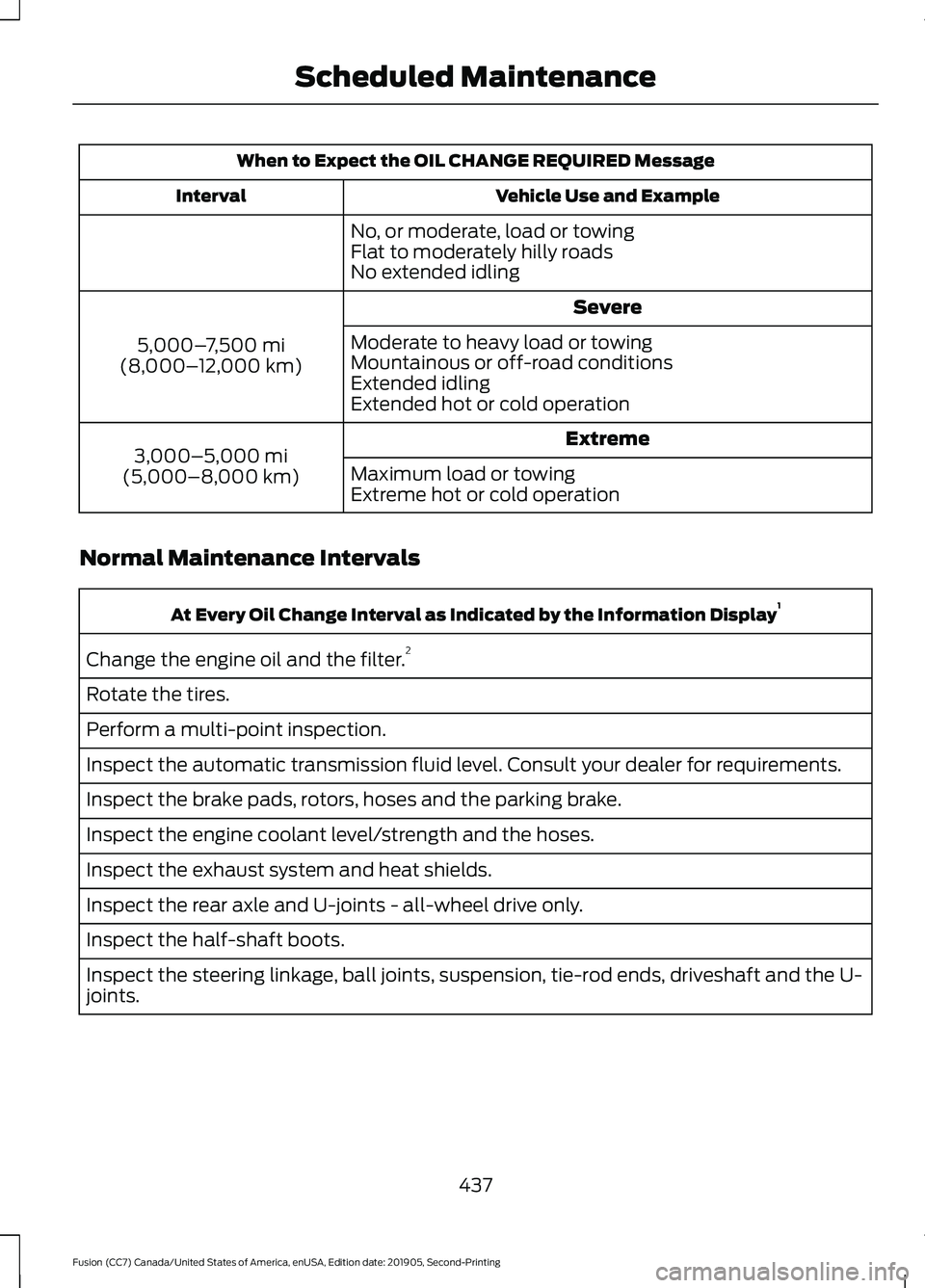
When to Expect the OIL CHANGE REQUIRED Message
Vehicle Use and Example
Interval
No, or moderate, load or towing
Flat to moderately hilly roads
No extended idling Severe
5,000– 7,500 mi
(8,000– 12,000 km) Moderate to heavy load or towing
Mountainous or off-road conditions
Extended idling
Extended hot or cold operation
Extreme
3,000–5,000 mi
(5,000–8,000 km) Maximum load or towing
Extreme hot or cold operation
Normal Maintenance Intervals At Every Oil Change Interval as Indicated by the Information Display
1
Change the engine oil and the filter. 2
Rotate the tires.
Perform a multi-point inspection.
Inspect the automatic transmission fluid level. Consult your dealer for requirements.
Inspect the brake pads, rotors, hoses and the parking brake.
Inspect the engine coolant level/strength and the hoses.
Inspect the exhaust system and heat shields.
Inspect the rear axle and U-joints - all-wheel drive only.
Inspect the half-shaft boots.
Inspect the steering linkage, ball joints, suspension, tie-rod ends, driveshaft and the U-
joints.
437
Fusion (CC7) Canada/United States of America, enUSA, Edition date: 201905, Second-Printing Scheduled Maintenance
Page 441 of 497
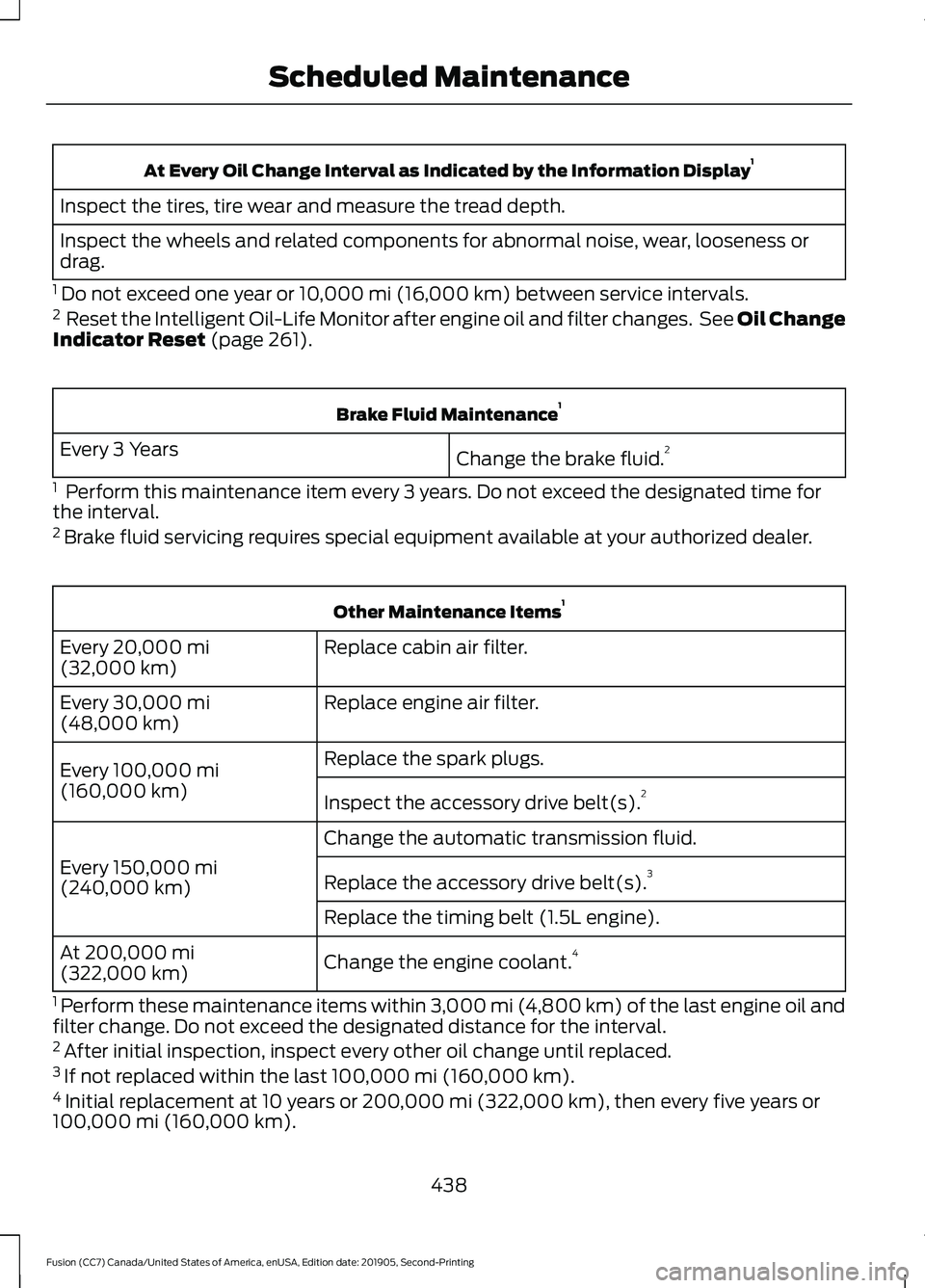
At Every Oil Change Interval as Indicated by the Information Display
1
Inspect the tires, tire wear and measure the tread depth.
Inspect the wheels and related components for abnormal noise, wear, looseness or
drag.
1 Do not exceed one year or 10,000 mi (16,000 km) between service intervals.
2 Reset the Intelligent Oil-Life Monitor after engine oil and filter changes. See Oil Change
Indicator Reset
(page 261). Brake Fluid Maintenance
1
Change the brake fluid. 2
Every 3 Years
1 Perform this maintenance item every 3 years. Do not exceed the designated time for
the interval.
2 Brake fluid servicing requires special equipment available at your authorized dealer. Other Maintenance Items
1
Replace cabin air filter.
Every
20,000 mi
(32,000 km)
Replace engine air filter.
Every
30,000 mi
(48,000 km)
Replace the spark plugs.
Every
100,000 mi
(160,000 km) Inspect the accessory drive belt(s). 2
Change the automatic transmission fluid.
Every
150,000 mi
(240,000 km) Replace the accessory drive belt(s). 3
Replace the timing belt (1.5L engine).
Change the engine coolant. 4
At
200,000 mi
(322,000 km)
1 Perform these maintenance items within
3,000 mi (4,800 km) of the last engine oil and
filter change. Do not exceed the designated distance for the interval.
2 After initial inspection, inspect every other oil change until replaced.
3 If not replaced within the last
100,000 mi (160,000 km).
4 Initial replacement at 10 years or
200,000 mi (322,000 km), then every five years or
100,000 mi (160,000 km).
438
Fusion (CC7) Canada/United States of America, enUSA, Edition date: 201905, Second-Printing Scheduled Maintenance
Page 442 of 497
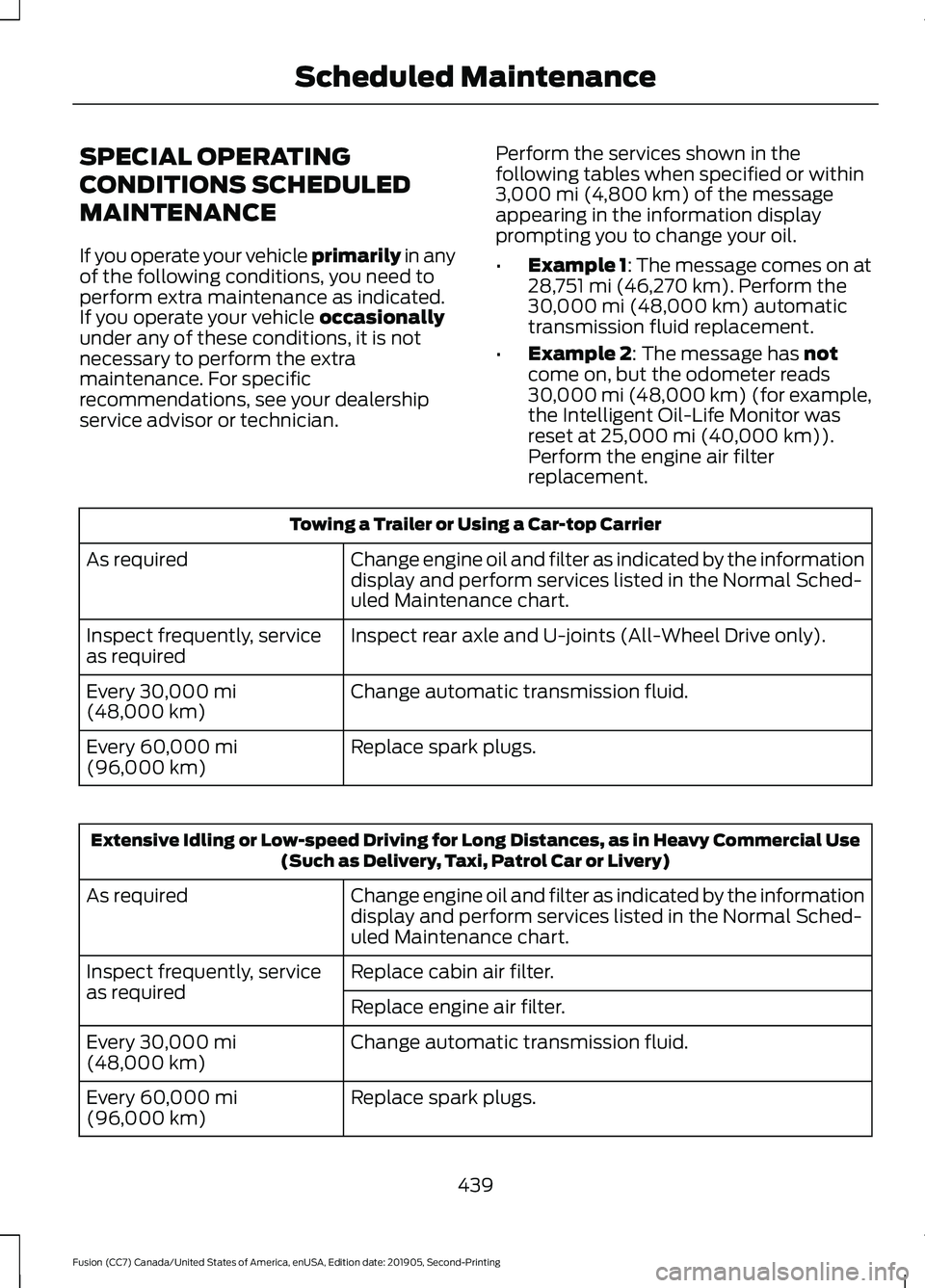
SPECIAL OPERATING
CONDITIONS SCHEDULED
MAINTENANCE
If you operate your vehicle primarily in any
of the following conditions, you need to
perform extra maintenance as indicated.
If you operate your vehicle
occasionally
under any of these conditions, it is not
necessary to perform the extra
maintenance. For specific
recommendations, see your dealership
service advisor or technician. Perform the services shown in the
following tables when specified or within
3,000 mi (4,800 km)
of the message
appearing in the information display
prompting you to change your oil.
• Example 1: The message comes on at
28,751 mi (46,270 km)
. Perform the
30,000 mi (48,000 km) automatic
transmission fluid replacement.
• Example 2
: The message has not
come on, but the odometer reads
30,000 mi (48,000 km) (for example,
the Intelligent Oil-Life Monitor was
reset at
25,000 mi (40,000 km)).
Perform the engine air filter
replacement. Towing a Trailer or Using a Car-top Carrier
Change engine oil and filter as indicated by the information
display and perform services listed in the Normal Sched-
uled Maintenance chart.
As required
Inspect rear axle and U-joints (All-Wheel Drive only).
Inspect frequently, service
as required
Change automatic transmission fluid.
Every
30,000 mi
(48,000 km)
Replace spark plugs.
Every
60,000 mi
(96,000 km) Extensive Idling or Low-speed Driving for Long Distances, as in Heavy Commercial Use
(Such as Delivery, Taxi, Patrol Car or Livery)
Change engine oil and filter as indicated by the information
display and perform services listed in the Normal Sched-
uled Maintenance chart.
As required
Replace cabin air filter.
Inspect frequently, service
as required
Replace engine air filter.
Change automatic transmission fluid.
Every
30,000 mi
(48,000 km)
Replace spark plugs.
Every
60,000 mi
(96,000 km)
439
Fusion (CC7) Canada/United States of America, enUSA, Edition date: 201905, Second-Printing Scheduled Maintenance
Page 443 of 497
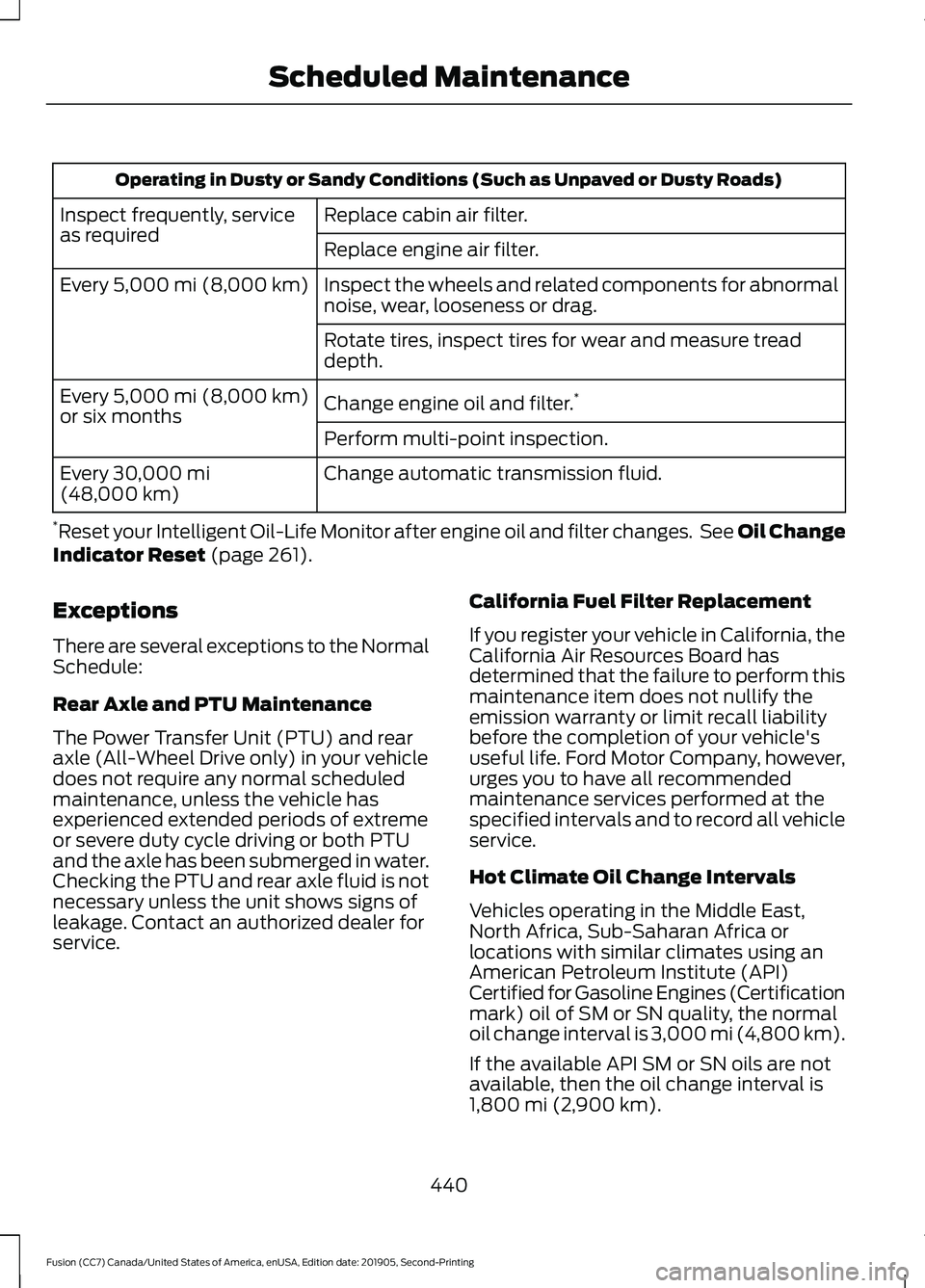
Operating in Dusty or Sandy Conditions (Such as Unpaved or Dusty Roads)
Replace cabin air filter.
Inspect frequently, service
as required
Replace engine air filter.
Inspect the wheels and related components for abnormal
noise, wear, looseness or drag.
Every 5,000 mi (8,000 km)
Rotate tires, inspect tires for wear and measure tread
depth.
Change engine oil and filter. *
Every
5,000 mi (8,000 km)
or six months
Perform multi-point inspection.
Change automatic transmission fluid.
Every
30,000 mi
(48,000 km)
* Reset your Intelligent Oil-Life Monitor after engine oil and filter changes. See Oil Change
Indicator Reset
(page 261).
Exceptions
There are several exceptions to the Normal
Schedule:
Rear Axle and PTU Maintenance
The Power Transfer Unit (PTU) and rear
axle (All-Wheel Drive only) in your vehicle
does not require any normal scheduled
maintenance, unless the vehicle has
experienced extended periods of extreme
or severe duty cycle driving or both PTU
and the axle has been submerged in water.
Checking the PTU and rear axle fluid is not
necessary unless the unit shows signs of
leakage. Contact an authorized dealer for
service. California Fuel Filter Replacement
If you register your vehicle in California, the
California Air Resources Board has
determined that the failure to perform this
maintenance item does not nullify the
emission warranty or limit recall liability
before the completion of your vehicle's
useful life. Ford Motor Company, however,
urges you to have all recommended
maintenance services performed at the
specified intervals and to record all vehicle
service.
Hot Climate Oil Change Intervals
Vehicles operating in the Middle East,
North Africa, Sub-Saharan Africa or
locations with similar climates using an
American Petroleum Institute (API)
Certified for Gasoline Engines (Certification
mark) oil of SM or SN quality, the normal
oil change interval is 3,000 mi (4,800 km).
If the available API SM or SN oils are not
available, then the oil change interval is
1,800 mi (2,900 km)
.
440
Fusion (CC7) Canada/United States of America, enUSA, Edition date: 201905, Second-Printing Scheduled Maintenance
Page 460 of 497
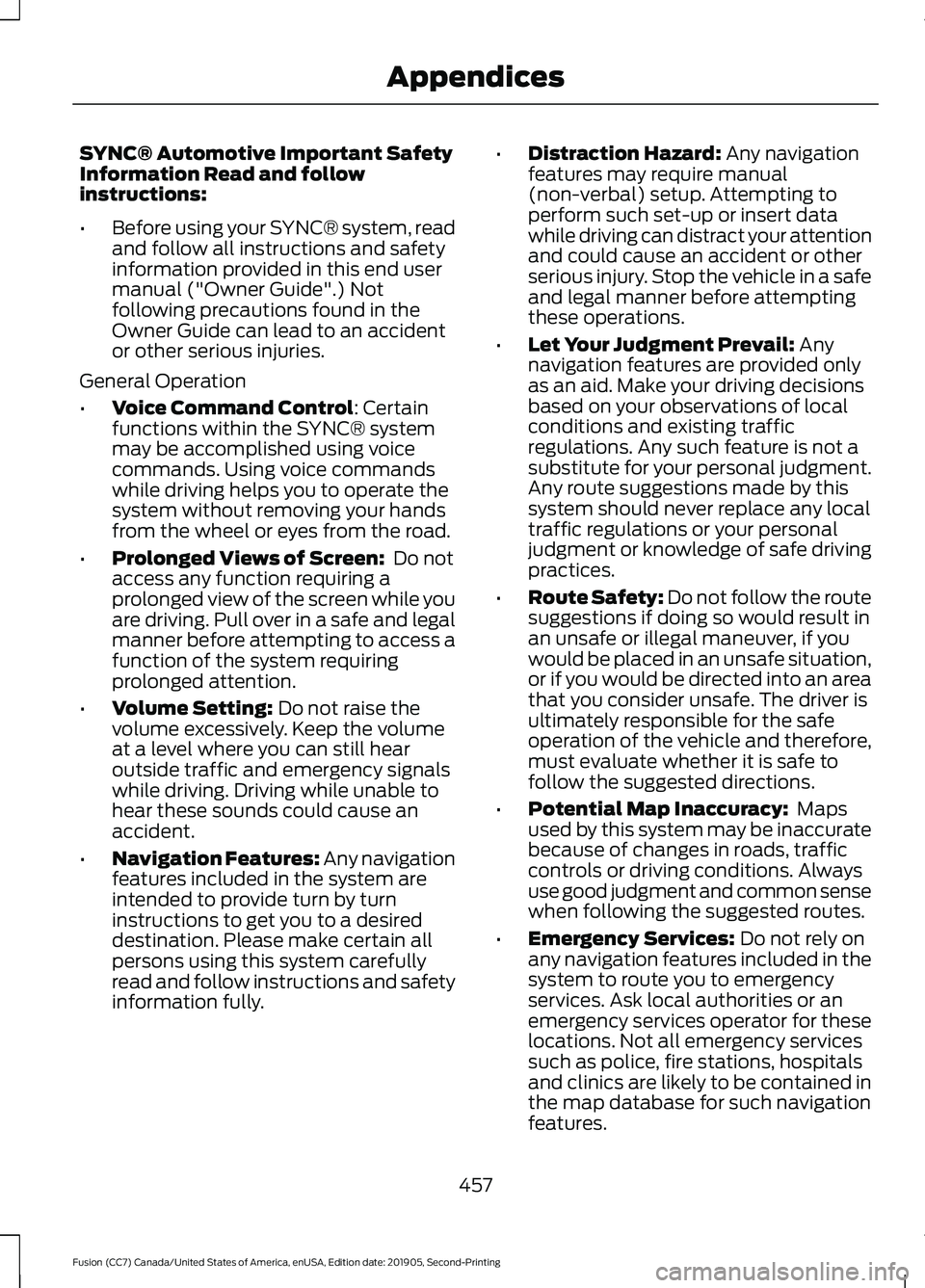
SYNC® Automotive Important Safety
Information Read and follow
instructions:
•
Before using your SYNC® system, read
and follow all instructions and safety
information provided in this end user
manual ("Owner Guide".) Not
following precautions found in the
Owner Guide can lead to an accident
or other serious injuries.
General Operation
• Voice Command Control: Certain
functions within the SYNC® system
may be accomplished using voice
commands. Using voice commands
while driving helps you to operate the
system without removing your hands
from the wheel or eyes from the road.
• Prolonged Views of Screen:
Do not
access any function requiring a
prolonged view of the screen while you
are driving. Pull over in a safe and legal
manner before attempting to access a
function of the system requiring
prolonged attention.
• Volume Setting:
Do not raise the
volume excessively. Keep the volume
at a level where you can still hear
outside traffic and emergency signals
while driving. Driving while unable to
hear these sounds could cause an
accident.
• Navigation Features:
Any navigation
features included in the system are
intended to provide turn by turn
instructions to get you to a desired
destination. Please make certain all
persons using this system carefully
read and follow instructions and safety
information fully. •
Distraction Hazard:
Any navigation
features may require manual
(non-verbal) setup. Attempting to
perform such set-up or insert data
while driving can distract your attention
and could cause an accident or other
serious injury. Stop the vehicle in a safe
and legal manner before attempting
these operations.
• Let Your Judgment Prevail:
Any
navigation features are provided only
as an aid. Make your driving decisions
based on your observations of local
conditions and existing traffic
regulations. Any such feature is not a
substitute for your personal judgment.
Any route suggestions made by this
system should never replace any local
traffic regulations or your personal
judgment or knowledge of safe driving
practices.
• Route Safety: Do not follow the route
suggestions if doing so would result in
an unsafe or illegal maneuver, if you
would be placed in an unsafe situation,
or if you would be directed into an area
that you consider unsafe. The driver is
ultimately responsible for the safe
operation of the vehicle and therefore,
must evaluate whether it is safe to
follow the suggested directions.
• Potential Map Inaccuracy:
Maps
used by this system may be inaccurate
because of changes in roads, traffic
controls or driving conditions. Always
use good judgment and common sense
when following the suggested routes.
• Emergency Services:
Do not rely on
any navigation features included in the
system to route you to emergency
services. Ask local authorities or an
emergency services operator for these
locations. Not all emergency services
such as police, fire stations, hospitals
and clinics are likely to be contained in
the map database for such navigation
features.
457
Fusion (CC7) Canada/United States of America, enUSA, Edition date: 201905, Second-Printing Appendices
Page 484 of 497
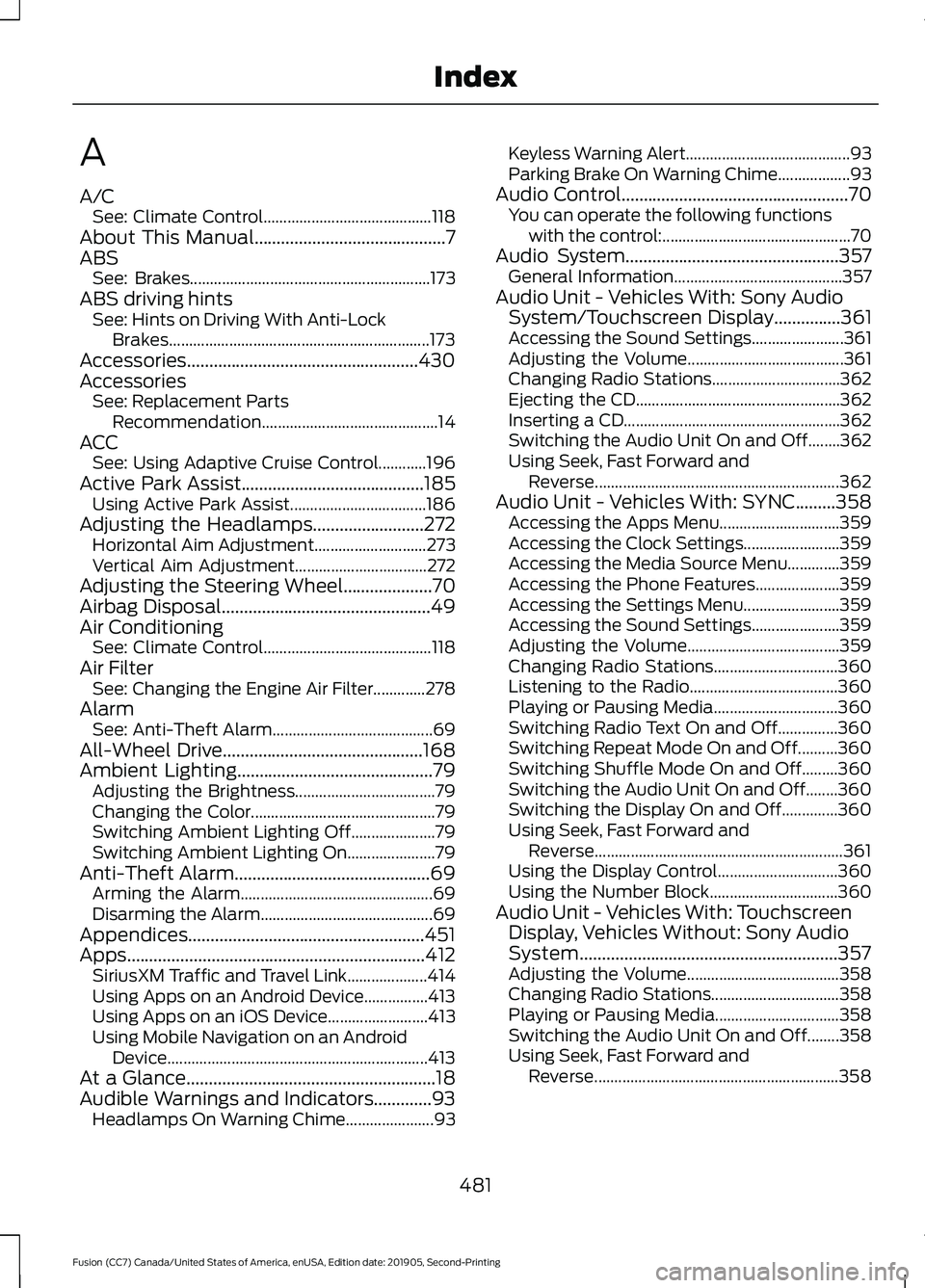
A
A/C
See: Climate Control.......................................... 118
About This Manual...........................................7
ABS See: Brakes............................................................ 173
ABS driving hints See: Hints on Driving With Anti-Lock
Brakes................................................................. 173
Accessories....................................................430
Accessories See: Replacement Parts
Recommendation............................................ 14
ACC See: Using Adaptive Cruise Control............196
Active Park Assist
.........................................185
Using Active Park Assist.................................. 186
Adjusting the Headlamps
.........................272
Horizontal Aim Adjustment............................ 273
Vertical Aim Adjustment................................. 272
Adjusting the Steering Wheel....................70
Airbag Disposal
...............................................49
Air Conditioning See: Climate Control.......................................... 118
Air Filter See: Changing the Engine Air Filter.............278
Alarm See: Anti-Theft Alarm........................................ 69
All-Wheel Drive.............................................168
Ambient Lighting............................................79 Adjusting the Brightness................................... 79
Changing the Color.............................................. 79
Switching Ambient Lighting Off..................... 79
Switching Ambient Lighting On...................... 79
Anti-Theft Alarm............................................69 Arming the Alarm................................................ 69
Disarming the Alarm........................................... 69
Appendices.....................................................451
Apps...................................................................412 SiriusXM Traffic and Travel Link.................... 414
Using Apps on an Android Device................413
Using Apps on an iOS Device......................... 413
Using Mobile Navigation on an Android Device................................................................. 413
At a Glance........................................................18
Audible Warnings and Indicators.............93 Headlamps On Warning Chime...................... 93Keyless Warning Alert.........................................
93
Parking Brake On Warning Chime.................. 93
Audio Control...................................................70 You can operate the following functions
with the control:............................................... 70
Audio System................................................357 General Information.......................................... 357
Audio Unit - Vehicles With: Sony Audio System/Touchscreen Display
...............361
Accessing the Sound Settings....................... 361
Adjusting the Volume....................................... 361
Changing Radio Stations................................ 362
Ejecting the CD................................................... 362
Inserting a CD...................................................... 362
Switching the Audio Unit On and Off........362
Using Seek, Fast Forward and Reverse............................................................. 362
Audio Unit - Vehicles With: SYNC.........358 Accessing the Apps Menu.............................. 359
Accessing the Clock Settings........................ 359
Accessing the Media Source Menu.............359
Accessing the Phone Features..................... 359
Accessing the Settings Menu........................ 359
Accessing the Sound Settings...................... 359
Adjusting the Volume...................................... 359
Changing Radio Stations............................... 360
Listening to the Radio..................................... 360
Playing or Pausing Media............................... 360
Switching Radio Text On and Off...............360
Switching Repeat Mode On and Off..........360
Switching Shuffle Mode On and Off.........360
Switching the Audio Unit On and Off........360
Switching the Display On and Off..............360
Using Seek, Fast Forward and Reverse.............................................................. 361
Using the Display Control.............................. 360
Using the Number Block................................ 360
Audio Unit - Vehicles With: Touchscreen Display, Vehicles Without: Sony Audio
System..........................................................357
Adjusting the Volume...................................... 358
Changing Radio Stations................................ 358
Playing or Pausing Media............................... 358
Switching the Audio Unit On and Off........358
Using Seek, Fast Forward and Reverse............................................................. 358
481
Fusion (CC7) Canada/United States of America, enUSA, Edition date: 201905, Second-Printing Index
Page 485 of 497
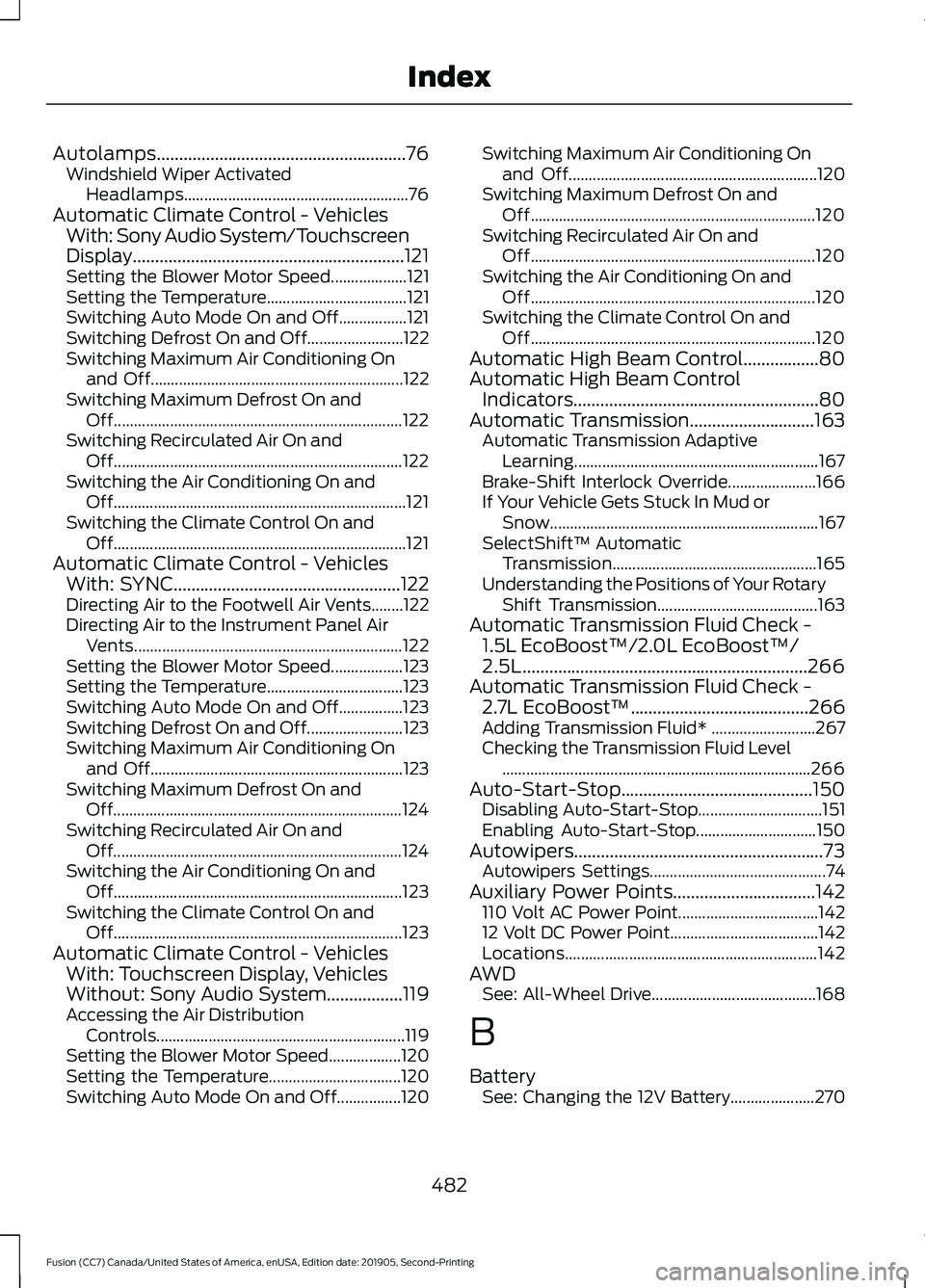
Autolamps........................................................76
Windshield Wiper Activated
Headlamps........................................................ 76
Automatic Climate Control - Vehicles With: Sony Audio System/Touchscreen
Display.............................................................121
Setting the Blower Motor Speed................... 121
Setting the Temperature................................... 121
Switching Auto Mode On and Off.................121
Switching Defrost On and Off........................ 122
Switching Maximum Air Conditioning On and Off............................................................... 122
Switching Maximum Defrost On and Off........................................................................\
122
Switching Recirculated Air On and Off........................................................................\
122
Switching the Air Conditioning On and Off........................................................................\
. 121
Switching the Climate Control On and Off........................................................................\
. 121
Automatic Climate Control - Vehicles With: SYNC...................................................122
Directing Air to the Footwell Air Vents........122
Directing Air to the Instrument Panel Air
Vents................................................................... 122
Setting the Blower Motor Speed.................. 123
Setting the Temperature.................................. 123
Switching Auto Mode On and Off................123
Switching Defrost On and Off........................ 123
Switching Maximum Air Conditioning On and Off............................................................... 123
Switching Maximum Defrost On and Off........................................................................\
124
Switching Recirculated Air On and Off........................................................................\
124
Switching the Air Conditioning On and Off........................................................................\
123
Switching the Climate Control On and Off........................................................................\
123
Automatic Climate Control - Vehicles With: Touchscreen Display, Vehicles
Without: Sony Audio System.................119
Accessing the Air Distribution Controls.............................................................. 119
Setting the Blower Motor Speed.................. 120
Setting the Temperature................................. 120
Switching Auto Mode On and Off................120 Switching Maximum Air Conditioning On
and Off.............................................................. 120
Switching Maximum Defrost On and Off....................................................................... 120
Switching Recirculated Air On and Off....................................................................... 120
Switching the Air Conditioning On and Off....................................................................... 120
Switching the Climate Control On and Off....................................................................... 120
Automatic High Beam Control.................80
Automatic High Beam Control Indicators.......................................................80
Automatic Transmission............................163 Automatic Transmission Adaptive
Learning............................................................. 167
Brake-Shift Interlock Override...................... 166
If Your Vehicle Gets Stuck In Mud or Snow................................................................... 167
SelectShift™ Automatic Transmission................................................... 165
Understanding the Positions of Your Rotary Shift Transmission........................................ 163
Automatic Transmission Fluid Check - 1.5L EcoBoost™/2.0L EcoBoost™/
2.5L................................................................266
Automatic Transmission Fluid Check - 2.7L EcoBoost™........................................266
Adding Transmission Fluid* .......................... 267
Checking the Transmission Fluid Level ........................................................................\
..... 266
Auto-Start-Stop
...........................................150
Disabling Auto-Start-Stop............................... 151
Enabling Auto-Start-Stop.............................. 150
Autowipers........................................................73 Autowipers Settings............................................ 74
Auxiliary Power Points
................................142
110 Volt AC Power Point................................... 142
12 Volt DC Power Point..................................... 142
Locations............................................................... 142
AWD See: All-Wheel Drive......................................... 168
B
Battery See: Changing the 12V Battery..................... 270
482
Fusion (CC7) Canada/United States of America, enUSA, Edition date: 201905, Second-Printing Index
Page 487 of 497
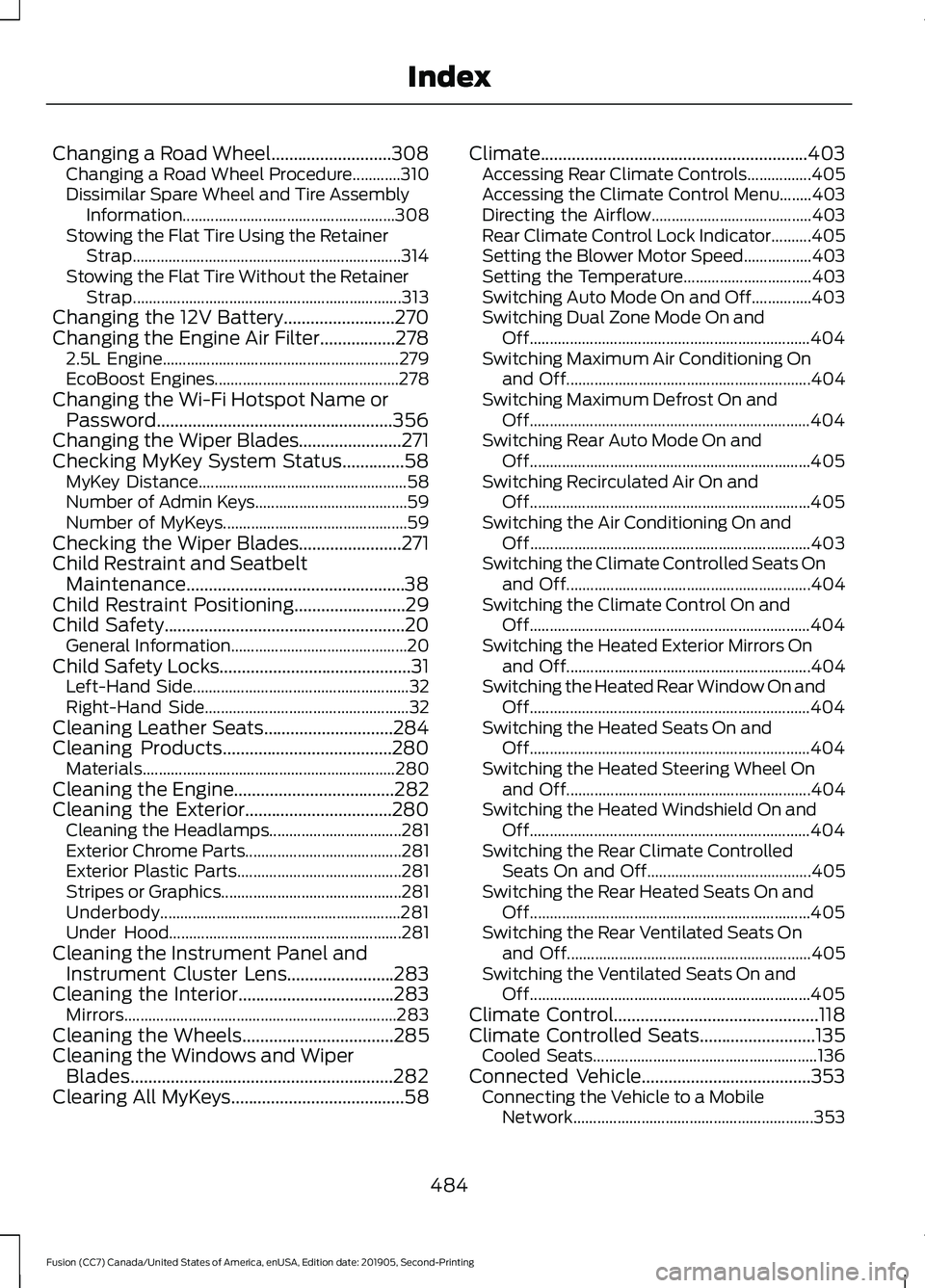
Changing a Road Wheel...........................308
Changing a Road Wheel Procedure............310
Dissimilar Spare Wheel and Tire Assembly
Information..................................................... 308
Stowing the Flat Tire Using the Retainer Strap................................................................... 314
Stowing the Flat Tire Without the Retainer Strap................................................................... 313
Changing the 12V Battery.........................270
Changing the Engine Air Filter.................278 2.5L Engine........................................................... 279
EcoBoost Engines.............................................. 278
Changing the Wi-Fi Hotspot Name or Password.....................................................356
Changing the Wiper Blades.......................271
Checking MyKey System Status..............58 MyKey Distance.................................................... 58
Number of Admin Keys...................................... 59
Number of MyKeys.............................................. 59
Checking the Wiper Blades.......................271
Child Restraint and Seatbelt Maintenance.................................................38
Child Restraint Positioning.........................29
Child Safety......................................................20 General Information............................................ 20
Child Safety Locks...........................................31 Left-Hand Side...................................................... 32
Right-Hand Side................................................... 32
Cleaning Leather Seats.............................284
Cleaning Products
......................................280
Materials............................................................... 280
Cleaning the Engine
....................................282
Cleaning the Exterior.................................280
Cleaning the Headlamps................................. 281
Exterior Chrome Parts....................................... 281
Exterior Plastic Parts......................................... 281
Stripes or Graphics............................................. 281
Underbody............................................................ 281
Under Hood.......................................................... 281
Cleaning the Instrument Panel and Instrument Cluster Lens........................283
Cleaning the Interior...................................283 Mirrors.................................................................... 283
Cleaning the Wheels
..................................285
Cleaning the Windows and Wiper Blades...........................................................282
Clearing All MyKeys
.......................................58 Climate............................................................403
Accessing Rear Climate Controls................405
Accessing the Climate Control Menu........403
Directing the Airflow........................................ 403
Rear Climate Control Lock Indicator..........405
Setting the Blower Motor Speed.................403
Setting the Temperature................................ 403
Switching Auto Mode On and Off...............403
Switching Dual Zone Mode On and Off...................................................................... 404
Switching Maximum Air Conditioning On and Off............................................................. 404
Switching Maximum Defrost On and Off...................................................................... 404
Switching Rear Auto Mode On and Off...................................................................... 405
Switching Recirculated Air On and Off...................................................................... 405
Switching the Air Conditioning On and Off...................................................................... 403
Switching the Climate Controlled Seats On and Off............................................................. 404
Switching the Climate Control On and Off...................................................................... 404
Switching the Heated Exterior Mirrors On and Off............................................................. 404
Switching the Heated Rear Window On and Off...................................................................... 404
Switching the Heated Seats On and Off...................................................................... 404
Switching the Heated Steering Wheel On and Off............................................................. 404
Switching the Heated Windshield On and Off...................................................................... 404
Switching the Rear Climate Controlled Seats On and Off......................................... 405
Switching the Rear Heated Seats On and Off...................................................................... 405
Switching the Rear Ventilated Seats On and Off............................................................. 405
Switching the Ventilated Seats On and Off...................................................................... 405
Climate Control
..............................................118
Climate Controlled Seats..........................135
Cooled Seats........................................................ 136
Connected Vehicle
......................................353
Connecting the Vehicle to a Mobile
Network............................................................ 353
484
Fusion (CC7) Canada/United States of America, enUSA, Edition date: 201905, Second-Printing Index