rear FORD FUSION 2020 Owner's Guide
[x] Cancel search | Manufacturer: FORD, Model Year: 2020, Model line: FUSION, Model: FORD FUSION 2020Pages: 497, PDF Size: 6.64 MB
Page 82 of 497
When the interior lamp function is on and
you open a door, the courtesy and door
lamps turn on.
Note:
The indicator lamp lights amber
when the door function is off.
Individual Map Lamps
Press a map lens to switch individual map
lamps on and off independently.
Rear Interior Lamps
The rear interior lamps may be above the
rear seat or above the rear windows. Press to switch the lamps on or
off.
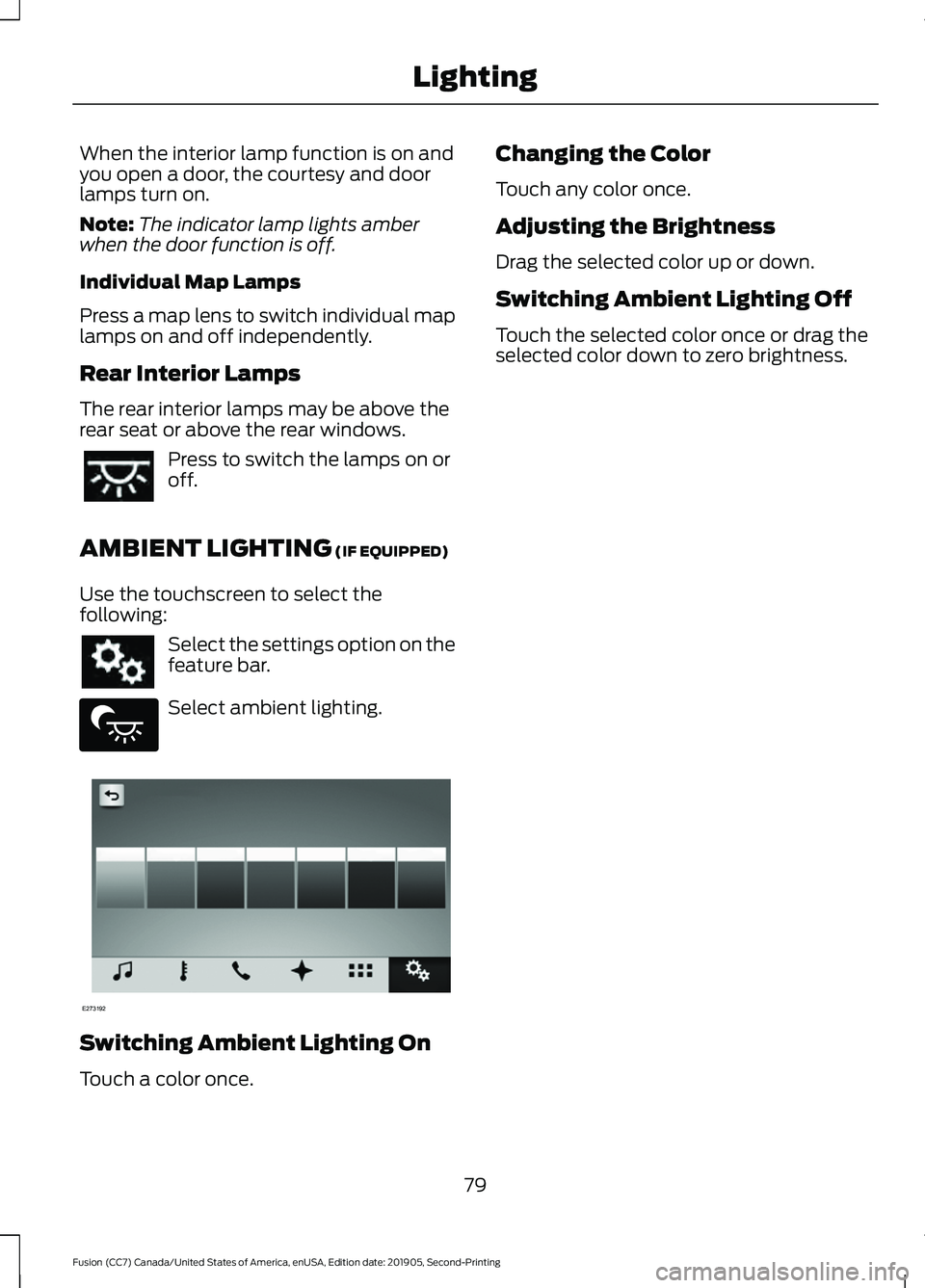
AMBIENT LIGHTING (IF EQUIPPED)
Use the touchscreen to select the
following: Select the settings option on the
feature bar.
Select ambient lighting.
Switching Ambient Lighting On
Touch a color once. Changing the Color
Touch any color once.
Adjusting the Brightness
Drag the selected color up or down.
Switching Ambient Lighting Off
Touch the selected color once or drag the
selected color down to zero brightness.
79
Fusion (CC7) Canada/United States of America, enUSA, Edition date: 201905, Second-Printing Lighting E279027 E273192
Page 86 of 497
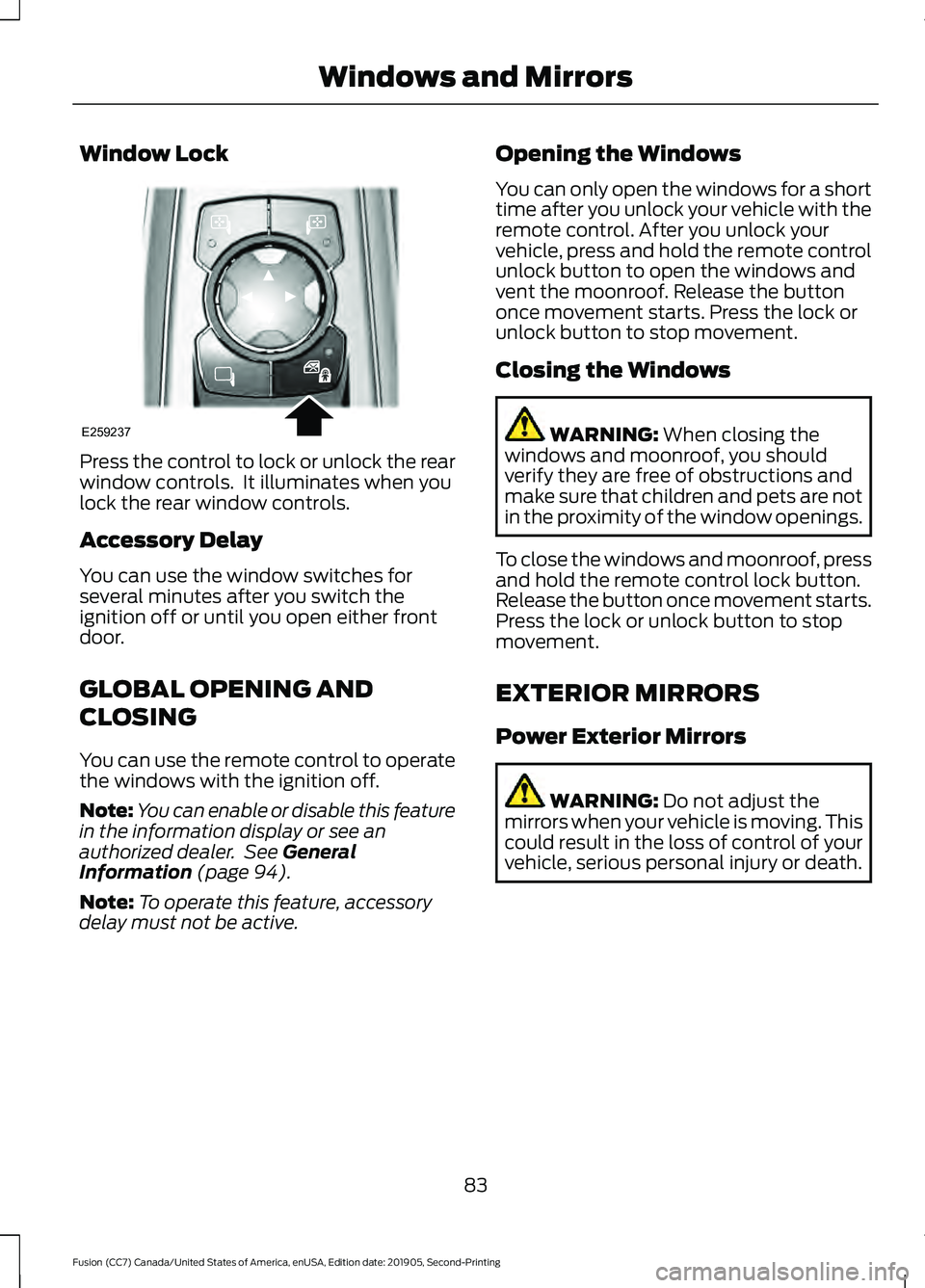
Window Lock
Press the control to lock or unlock the rear
window controls. It illuminates when you
lock the rear window controls.
Accessory Delay
You can use the window switches for
several minutes after you switch the
ignition off or until you open either front
door.
GLOBAL OPENING AND
CLOSING
You can use the remote control to operate
the windows with the ignition off.
Note:
You can enable or disable this feature
in the information display or see an
authorized dealer. See General
Information (page 94).
Note: To operate this feature, accessory
delay must not be active. Opening the Windows
You can only open the windows for a short
time after you unlock your vehicle with the
remote control. After you unlock your
vehicle, press and hold the remote control
unlock button to open the windows and
vent the moonroof. Release the button
once movement starts. Press the lock or
unlock button to stop movement.
Closing the Windows WARNING:
When closing the
windows and moonroof, you should
verify they are free of obstructions and
make sure that children and pets are not
in the proximity of the window openings.
To close the windows and moonroof, press
and hold the remote control lock button.
Release the button once movement starts.
Press the lock or unlock button to stop
movement.
EXTERIOR MIRRORS
Power Exterior Mirrors WARNING:
Do not adjust the
mirrors when your vehicle is moving. This
could result in the loss of control of your
vehicle, serious personal injury or death.
83
Fusion (CC7) Canada/United States of America, enUSA, Edition date: 201905, Second-Printing Windows and MirrorsE259237
Page 88 of 497
INTERIOR MIRROR
WARNING: Do not adjust the
mirrors when your vehicle is moving. This
could result in the loss of control of your
vehicle, serious personal injury or death.
Note: Do not clean the mirror housing or
glass with harsh abrasives, fuel or other
petroleum-based cleaning products.
You can adjust the interior mirror to your
preference. Some mirrors also have a
second pivot point. This lets you move the
mirror hear up or down and from side to
side.
Manual Dimming Mirror
Pull the tab below the mirror toward you
to reduce the effect of bright light from
behind.
Auto-Dimming Mirror
(If Equipped)
Note: Do not block the sensors on the front
and back of the mirror. A rear center
passenger or raised rear center head
restraint may also block light from reaching
the sensor.
The mirror dims to reduce glare when
bright lights are detected from behind your
vehicle. It automatically returns to normal
reflection when you shift the transmission
into reverse (R) to make sure you have a
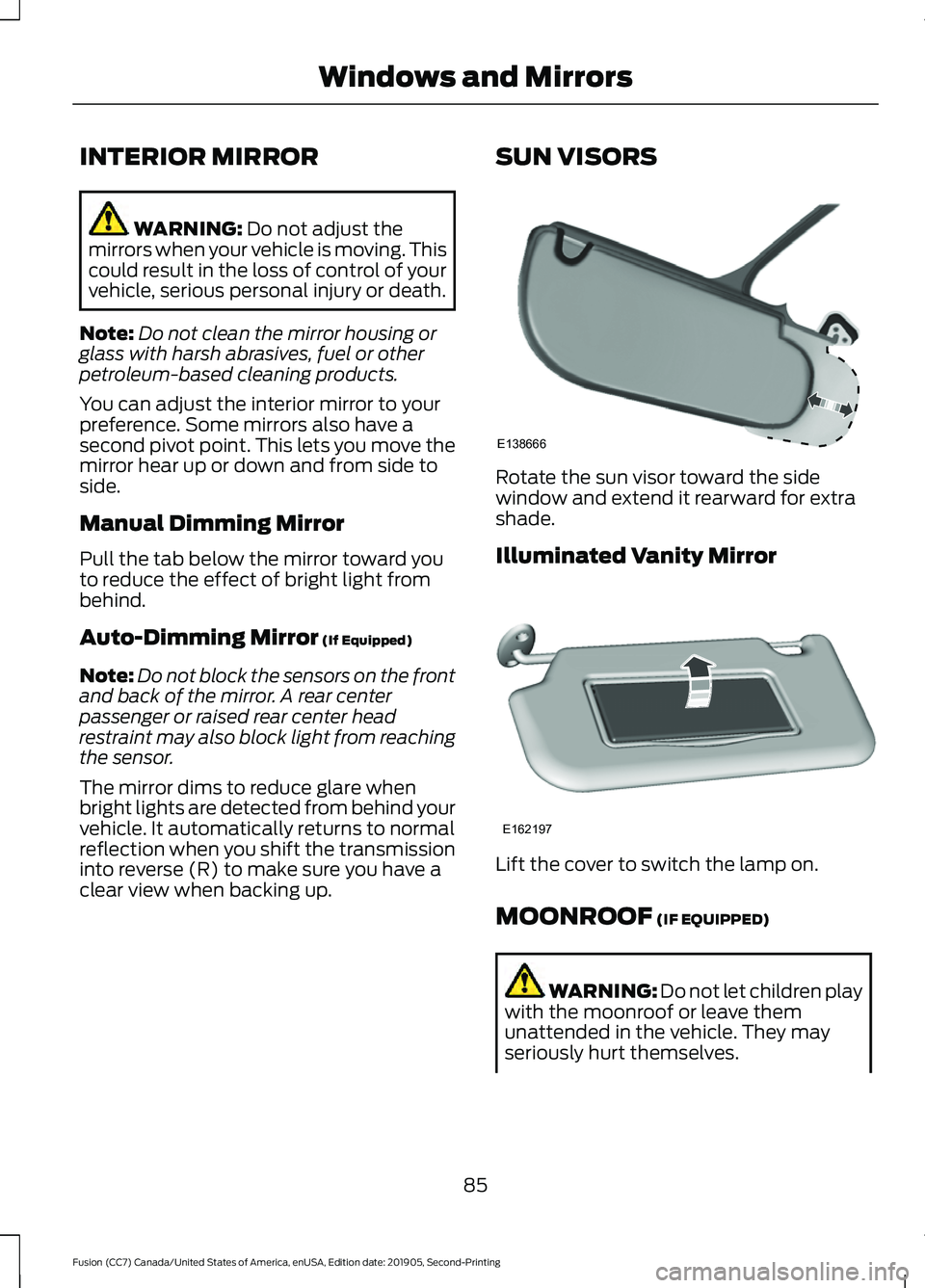
clear view when backing up. SUN VISORS Rotate the sun visor toward the side
window and extend it rearward for extra
shade.
Illuminated Vanity Mirror
Lift the cover to switch the lamp on.
MOONROOF
(IF EQUIPPED)
WARNING:
Do not let children play
with the moonroof or leave them
unattended in the vehicle. They may
seriously hurt themselves.
85
Fusion (CC7) Canada/United States of America, enUSA, Edition date: 201905, Second-Printing Windows and MirrorsE138666 E162197
Page 100 of 497
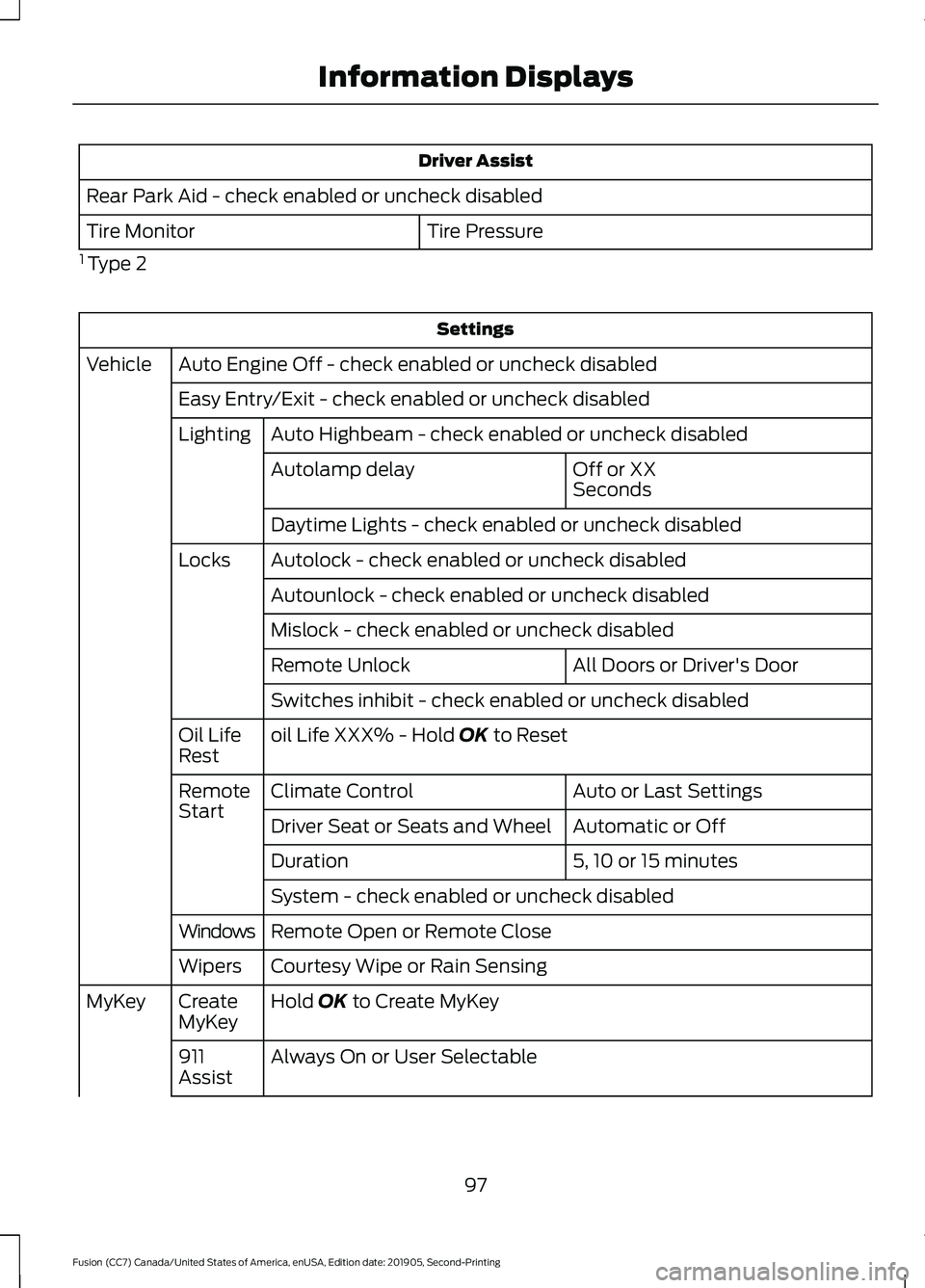
Driver Assist
Rear Park Aid - check enabled or uncheck disabled Tire Pressure
Tire Monitor
1 Type 2 Settings
Auto Engine Off - check enabled or uncheck disabled
Vehicle
Easy Entry/Exit - check enabled or uncheck disabledAuto Highbeam - check enabled or uncheck disabled
Lighting
Off or XX
Seconds
Autolamp delay
Daytime Lights - check enabled or uncheck disabled
Autolock - check enabled or uncheck disabled
Locks
Autounlock - check enabled or uncheck disabled
Mislock - check enabled or uncheck disabled All Doors or Driver's Door
Remote Unlock
Switches inhibit - check enabled or uncheck disabled
oil Life XXX% - Hold OK to Reset
Oil Life
Rest
Auto or Last Settings
Climate Control
Remote
Start
Automatic or Off
Driver Seat or Seats and Wheel
5, 10 or 15 minutes
Duration
System - check enabled or uncheck disabled
Remote Open or Remote Close
Windows
Courtesy Wipe or Rain Sensing
Wipers
Hold
OK to Create MyKey
Create
MyKey
MyKey
Always On or User Selectable
911
Assist
97
Fusion (CC7) Canada/United States of America, enUSA, Edition date: 201905, Second-Printing Information Displays
Page 104 of 497
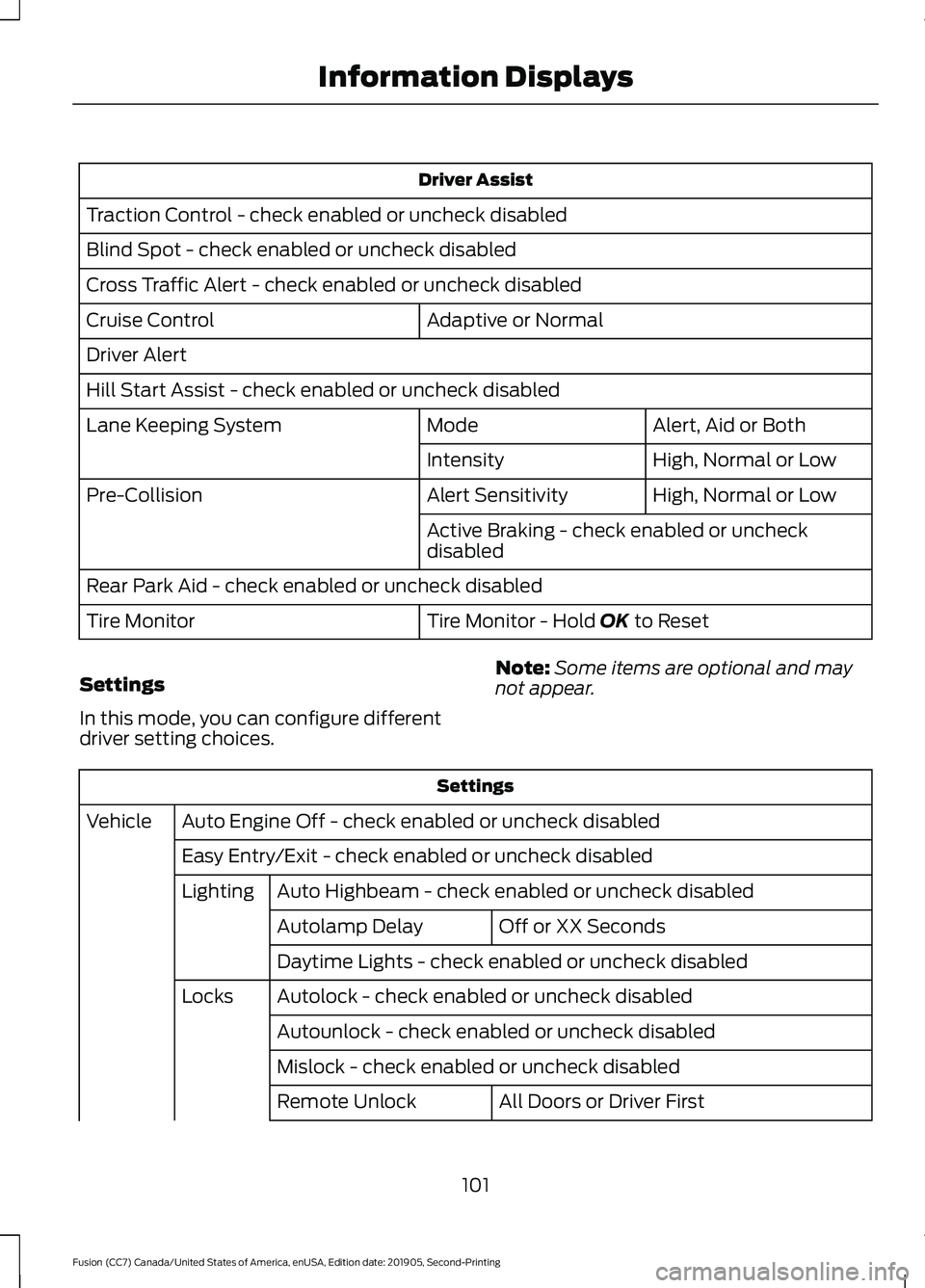
Driver Assist
Traction Control - check enabled or uncheck disabled
Blind Spot - check enabled or uncheck disabled
Cross Traffic Alert - check enabled or uncheck disabled Adaptive or Normal
Cruise Control
Driver Alert
Hill Start Assist - check enabled or uncheck disabled
Alert, Aid or Both
Mode
Lane Keeping System
High, Normal or Low
Intensity
High, Normal or Low
Alert Sensitivity
Pre-Collision
Active Braking - check enabled or uncheck
disabled
Rear Park Aid - check enabled or uncheck disabled Tire Monitor - Hold OK to Reset
Tire Monitor
Settings
In this mode, you can configure different
driver setting choices. Note:
Some items are optional and may
not appear. Settings
Auto Engine Off - check enabled or uncheck disabled
Vehicle
Easy Entry/Exit - check enabled or uncheck disabledAuto Highbeam - check enabled or uncheck disabled
Lighting
Off or XX Seconds
Autolamp Delay
Daytime Lights - check enabled or uncheck disabled
Autolock - check enabled or uncheck disabled
Locks
Autounlock - check enabled or uncheck disabled
Mislock - check enabled or uncheck disabled All Doors or Driver First
Remote Unlock
101
Fusion (CC7) Canada/United States of America, enUSA, Edition date: 201905, Second-Printing Information Displays
Page 109 of 497
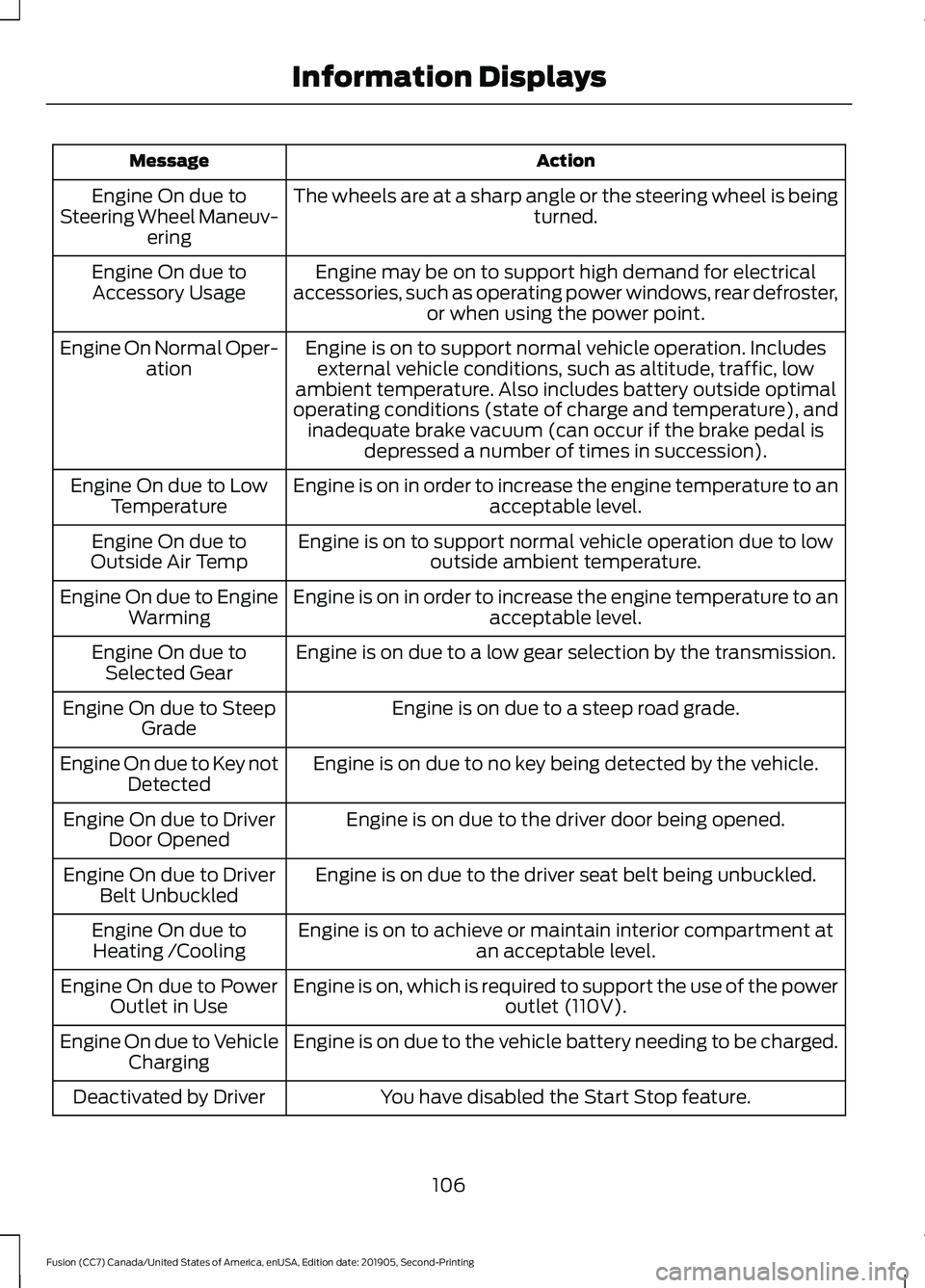
Action
Message
The wheels are at a sharp angle or the steering wheel is being turned.
Engine On due to
Steering Wheel Maneuv- ering
Engine may be on to support high demand for electrical
accessories, such as operating power windows, rear defroster, or when using the power point.
Engine On due to
Accessory Usage
Engine is on to support normal vehicle operation. Includesexternal vehicle conditions, such as altitude, traffic, low
ambient temperature. Also includes battery outside optimal
operating conditions (state of charge and temperature), and inadequate brake vacuum (can occur if the brake pedal is depressed a number of times in succession).
Engine On Normal Oper-
ation
Engine is on in order to increase the engine temperature to an acceptable level.
Engine On due to Low
Temperature
Engine is on to support normal vehicle operation due to lowoutside ambient temperature.
Engine On due to
Outside Air Temp
Engine is on in order to increase the engine temperature to anacceptable level.
Engine On due to Engine
Warming
Engine is on due to a low gear selection by the transmission.
Engine On due to
Selected Gear
Engine is on due to a steep road grade.
Engine On due to Steep
Grade
Engine is on due to no key being detected by the vehicle.
Engine On due to Key not
Detected
Engine is on due to the driver door being opened.
Engine On due to Driver
Door Opened
Engine is on due to the driver seat belt being unbuckled.
Engine On due to Driver
Belt Unbuckled
Engine is on to achieve or maintain interior compartment atan acceptable level.
Engine On due to
Heating /Cooling
Engine is on, which is required to support the use of the power outlet (110V).
Engine On due to Power
Outlet in Use
Engine is on due to the vehicle battery needing to be charged.
Engine On due to Vehicle
Charging
You have disabled the Start Stop feature.
Deactivated by Driver
106
Fusion (CC7) Canada/United States of America, enUSA, Edition date: 201905, Second-Printing Information Displays
Page 116 of 497
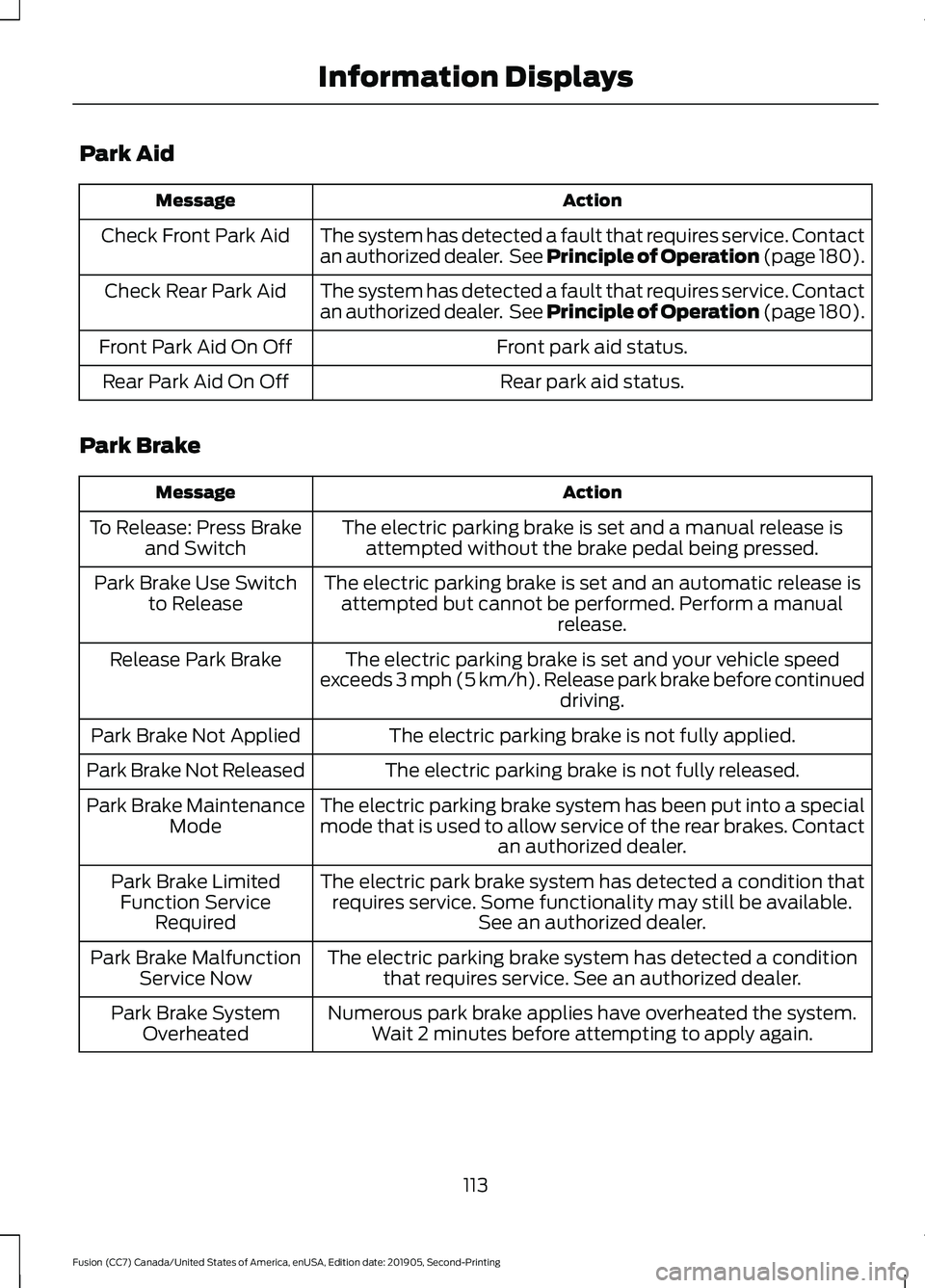
Park Aid
Action
Message
The system has detected a fault that requires service. Contact
an authorized dealer. See Principle of Operation (page 180).
Check Front Park Aid
The system has detected a fault that requires service. Contact
an authorized dealer. See Principle of Operation (page 180).
Check Rear Park Aid
Front park aid status.
Front Park Aid On Off
Rear park aid status.
Rear Park Aid On Off
Park Brake Action
Message
The electric parking brake is set and a manual release isattempted without the brake pedal being pressed.
To Release: Press Brake
and Switch
The electric parking brake is set and an automatic release isattempted but cannot be performed. Perform a manual release.
Park Brake Use Switch
to Release
The electric parking brake is set and your vehicle speed
exceeds 3 mph (5 km/h). Release park brake before continued driving.
Release Park Brake
The electric parking brake is not fully applied.
Park Brake Not Applied
The electric parking brake is not fully released.
Park Brake Not Released
The electric parking brake system has been put into a special
mode that is used to allow service of the rear brakes. Contactan authorized dealer.
Park Brake Maintenance
Mode
The electric park brake system has detected a condition thatrequires service. Some functionality may still be available. See an authorized dealer.
Park Brake Limited
Function Service Required
The electric parking brake system has detected a conditionthat requires service. See an authorized dealer.
Park Brake Malfunction
Service Now
Numerous park brake applies have overheated the system.Wait 2 minutes before attempting to apply again.
Park Brake System
Overheated
113
Fusion (CC7) Canada/United States of America, enUSA, Edition date: 201905, Second-Printing Information Displays
Page 122 of 497
Note:
In certain conditions, for example,
maximum defrost, the air conditioning
compressor may continue to operate even
though you switch off the air conditioning.
Switching the Climate Control On
and Off Press and release the button.
Switching Maximum Air
Conditioning On and Off Turn the temperature control
counterclockwise to the lowest
setting for maximum cooling.
The left-hand and right-hand settings set
to LO, recirculated air flows through the
instrument panel air vents, air conditioning
turns on and the blower motor adjusts to
the highest speed.
Switching Maximum Defrost On
and Off Turn the temperature control
clockwise to the highest setting
for maximum defrosting.
The left-hand and right-hand settings set
to HI, air flows through the windshield air
vents, and the blower motor adjusts to the
highest speed. You can also use this setting
to defog and clear the windshield of a thin
covering of ice. The heated rear window
also turns on when you select maximum
defrost.
Note: To prevent window fogging, you
cannot select recirculated air when
maximum defrost is on.
Switching Recirculated Air On and
Off Press and release the button to
switch between outside air and
recirculated air. The air currently in the passenger
compartment recirculates. This may
reduce the time needed to cool the interior,
when used with A/C, and reduce unwanted
odors from entering your vehicle.
Note:
Recirculated air may turn off, or
prevent you from switching on, in all air flow
modes except MAX A/C to reduce the risk
of fogging. Recirculation may also turn on
and off in various air distribution control
combinations during hot weather to improve
cooling efficiency.
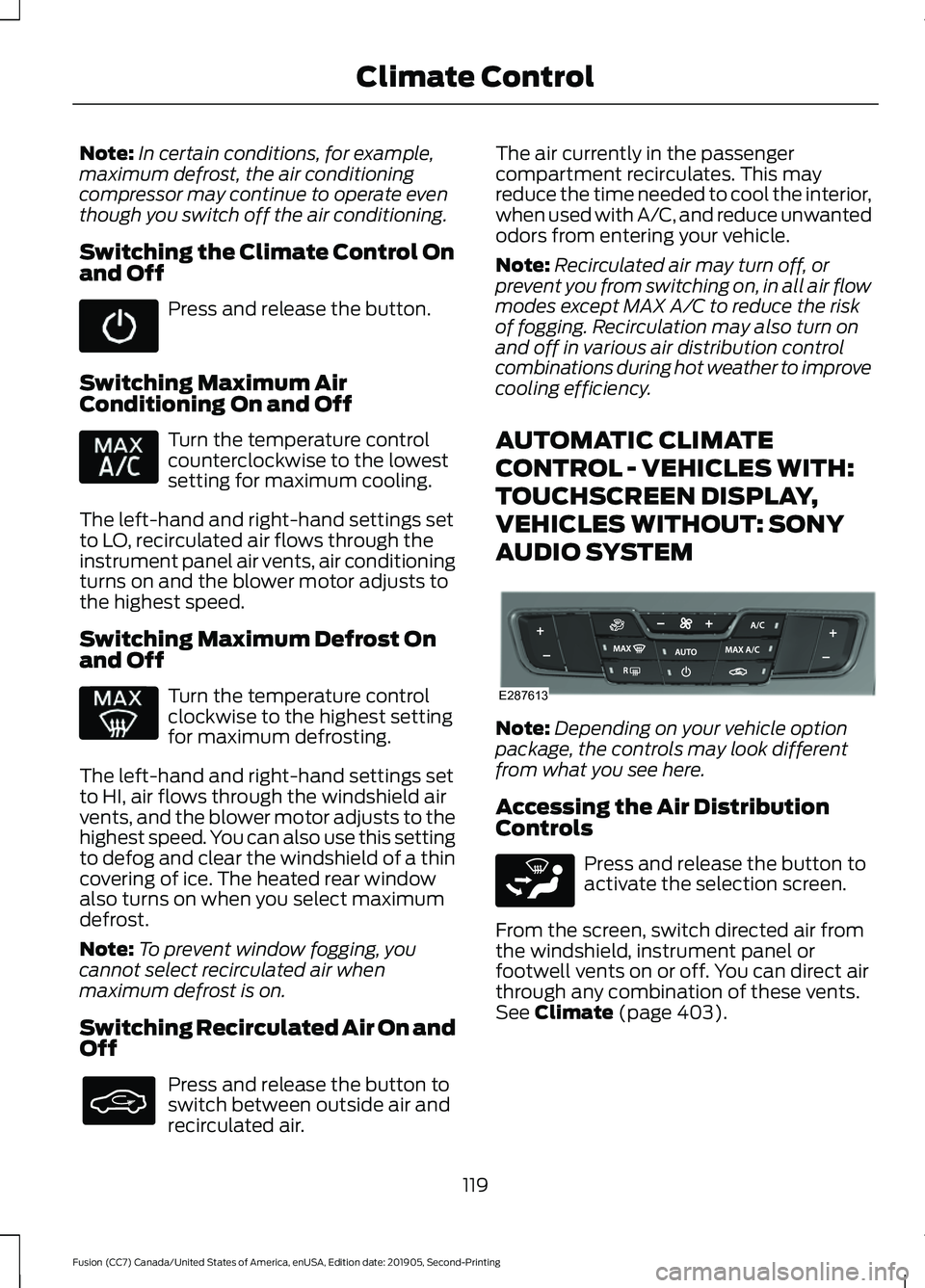
AUTOMATIC CLIMATE
CONTROL - VEHICLES WITH:
TOUCHSCREEN DISPLAY,
VEHICLES WITHOUT: SONY
AUDIO SYSTEM Note:
Depending on your vehicle option
package, the controls may look different
from what you see here.
Accessing the Air Distribution
Controls Press and release the button to
activate the selection screen.
From the screen, switch directed air from
the windshield, instrument panel or
footwell vents on or off. You can direct air
through any combination of these vents.
See Climate (page 403).
119
Fusion (CC7) Canada/United States of America, enUSA, Edition date: 201905, Second-Printing Climate Control E287613 E265283
Page 125 of 497
Switching Defrost On and Off
Press and release the button to
distribute air through the
windshield air vents and
de-mister.
Air directed to the instrument panel and
footwell air vents turns off. You can also
use this setting to defog and clear the
windshield of a thin covering of ice.
Switching Maximum Air
Conditioning On and Off Press and release the button for
maximum cooling.
The left-hand and right-hand settings set
to LO, recirculated air flows through the
instrument panel air vents, air conditioning
turns on and the blower motor adjusts to
the highest speed.
Switching Maximum Defrost On
and Off Press and release the button to
switch on maximum defrost.
The left-hand and right-hand settings set
to HI, air flows through the windshield air
vents, and the blower motor adjusts to the
highest speed. You can also use this setting
to defog and clear the windshield of a thin
covering of ice. The heated rear window
also turns on when you select maximum
defrost.
Note: To prevent window fogging, you
cannot select recirculated air when
maximum defrost is on.
Switching Recirculated Air On and
Off Press and release the button to
switch between outside air and
recirculated air. The air currently in the passenger
compartment recirculates. This may
reduce the time needed to cool the interior,
when used with A/C, and reduce unwanted
odors from entering your vehicle.
Note:
Recirculated air may turn off, or
prevent you from switching on, in all air flow
modes except MAX A/C to reduce the risk
of fogging. Recirculation may also turn on
and off in various air distribution control
combinations during hot weather to improve
cooling efficiency.
AUTOMATIC CLIMATE
CONTROL - VEHICLES WITH:
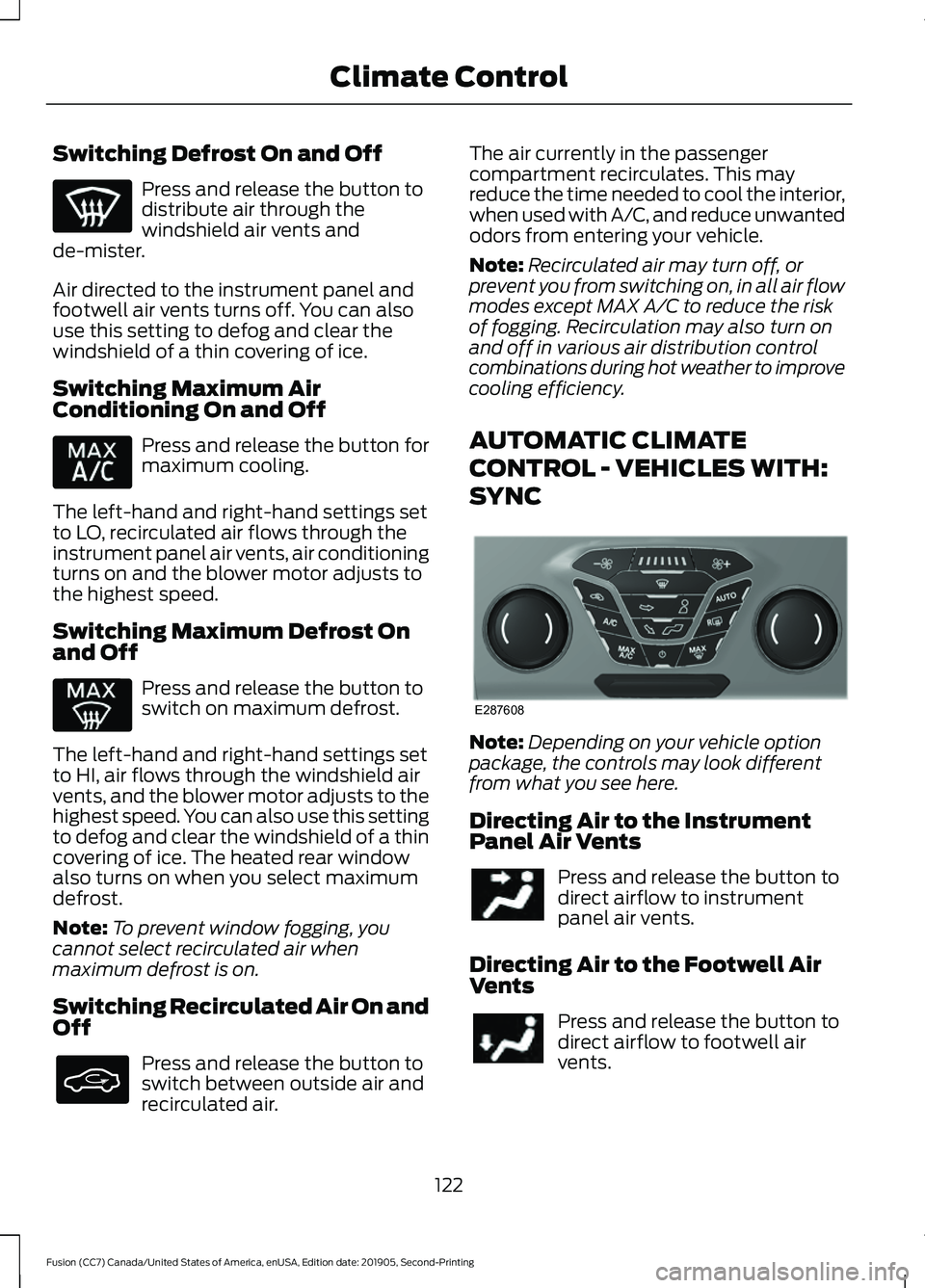
SYNC Note:
Depending on your vehicle option
package, the controls may look different
from what you see here.
Directing Air to the Instrument
Panel Air Vents Press and release the button to
direct airflow to instrument
panel air vents.
Directing Air to the Footwell Air
Vents Press and release the button to
direct airflow to footwell air
vents.
122
Fusion (CC7) Canada/United States of America, enUSA, Edition date: 201905, Second-Printing Climate Control E287608
Page 127 of 497
Switching Maximum Defrost On
and Off
Press and release the button to
switch on maximum defrost.
The left-hand and right-hand settings set
to HI, air flows through the windshield air
vents, and the blower motor adjusts to the
highest speed. You can also use this setting
to defog and clear the windshield of a thin
covering of ice. The heated rear window
also turns on when you select maximum
defrost.
Note: To prevent window fogging, you
cannot select recirculated air when
maximum defrost is on.
Switching Recirculated Air On and
Off Press and release the button to
switch between outside air and
recirculated air.
The air currently in the passenger
compartment recirculates. This may
reduce the time needed to cool the interior,
when used with A/C, and reduce unwanted
odors from entering your vehicle.
Note: Recirculated air may turn off, or
prevent you from switching on, in all air flow
modes except MAX A/C to reduce the risk
of fogging. Recirculation may also turn on
and off in various air distribution control
combinations during hot weather to improve
cooling efficiency. HINTS ON CONTROLLING THE
INTERIOR CLIMATE -
VEHICLES WITH: AUTOMATIC
TEMPERATURE CONTROL
General Hints
Note:
Prolonged use of recirculated air may
cause the windows to fog up.
Note: You may feel a small amount of air
from the footwell air vents regardless of the
air distribution setting.
Note: To reduce humidity build-up inside
your vehicle, do not drive with the system
switched off or with recirculated air always
switched on.
Note: Do not place objects under the front
seats as this may interfere with the airflow
to the rear seats.
Note: Remove any snow, ice or leaves from
the air intake area at the base of the
windshield.
Note: To improve the time to reach a
comfortable temperature in hot weather,
drive with the windows open until you feel
cold air through the air vents.
Automatic Climate Control
Note: Adjusting the settings when your
vehicle interior is extremely hot or cold is
not necessary. Automatic mode is best
recommended to maintain set temperature.
Note: The system adjusts to heat or cool
the interior to the temperature you select
as quickly as possible.
Note: For the system to function efficiently,
the instrument panel and side air vents
should be fully open.
124
Fusion (CC7) Canada/United States of America, enUSA, Edition date: 201905, Second-Printing Climate Control