fuel type FORD FUSION 2020 Owners Manual
[x] Cancel search | Manufacturer: FORD, Model Year: 2020, Model line: FUSION, Model: FORD FUSION 2020Pages: 497, PDF Size: 6.64 MB
Page 13 of 497
Your vehicle has electronic control units
that have data recording functionality and
the ability to permanently or temporarily
store data. This data could include
information on the condition and status of
your vehicle, vehicle maintenance
requirements, events and malfunctions.
The types of data that can be recorded are
described in this section. Some of the data
recorded is stored in event logs or error
logs.
Note:
Error logs are reset following a service
or repair.
Note: We may provide information in
response to requests from law enforcement,
other government authorities and third
parties acting with lawful authority or
through a legal process. Such information
could be used by them in legal proceedings.
Data recorded includes, for example:
• Operating states of system
components, for example, fuel level,
tire pressure and battery charge level.
• Vehicle and component status, for
example, wheel speed, deceleration,
lateral acceleration and seatbelt
status.
• Events or errors in essential systems,
for example, headlamps and brakes.
• System responses to driving situations,
for example, airbag deployment and
stability control.
• Environmental conditions, for example,
temperature.
Some of this data, when used in
combination with other information, for
example, an accident report, damage to a
vehicle or eyewitness statements, could
be associated with a specific person. Service Data
Service data recorders in your vehicle are
capable of collecting and storing
diagnostic information about your vehicle.
This potentially includes information about
the performance or status of various
systems and modules in the vehicle, such
as engine, throttle, steering or brake
systems. In order to properly diagnose and
service your vehicle, Ford Motor Company
(Ford of Canada in Canada), and service
and repair facilities may access or share
among them vehicle diagnostic
information received through a direct
connection to your vehicle when
diagnosing or servicing your vehicle.
Additionally, Ford Motor Company (Ford
of Canada, in Canada) may, where
permitted by law, use vehicle diagnostic
information for vehicle improvement or
with other information we may have about
you, for example, your contact information,
to offer you products or services that may
interest you. Data may be provided to our
service providers such as part suppliers
that may help diagnose malfunctions, and
who are similarly obligated to protect data.
We retain this data only as long as
necessary to perform these functions or to
comply with law. We may provide
information where required in response to
official requests to law enforcement or
other government authorities or third
parties acting with lawful authority or court
order, and such information may be used
in legal proceedings. For U.S. only (if
equipped), if you choose to use connected
apps and services, you consent that certain
diagnostic information may also be
accessed electronically by Ford Motor
Company and Ford authorized service
facilities, and that the diagnostic
information may be used to provide
services to you, personalizing your
experience, troubleshoot, and to improve
products and services and offer you
products and services that may interest
10
Fusion (CC7) Canada/United States of America, enUSA, Edition date: 201905, Second-Printing Introduction
Page 90 of 497
GAUGES
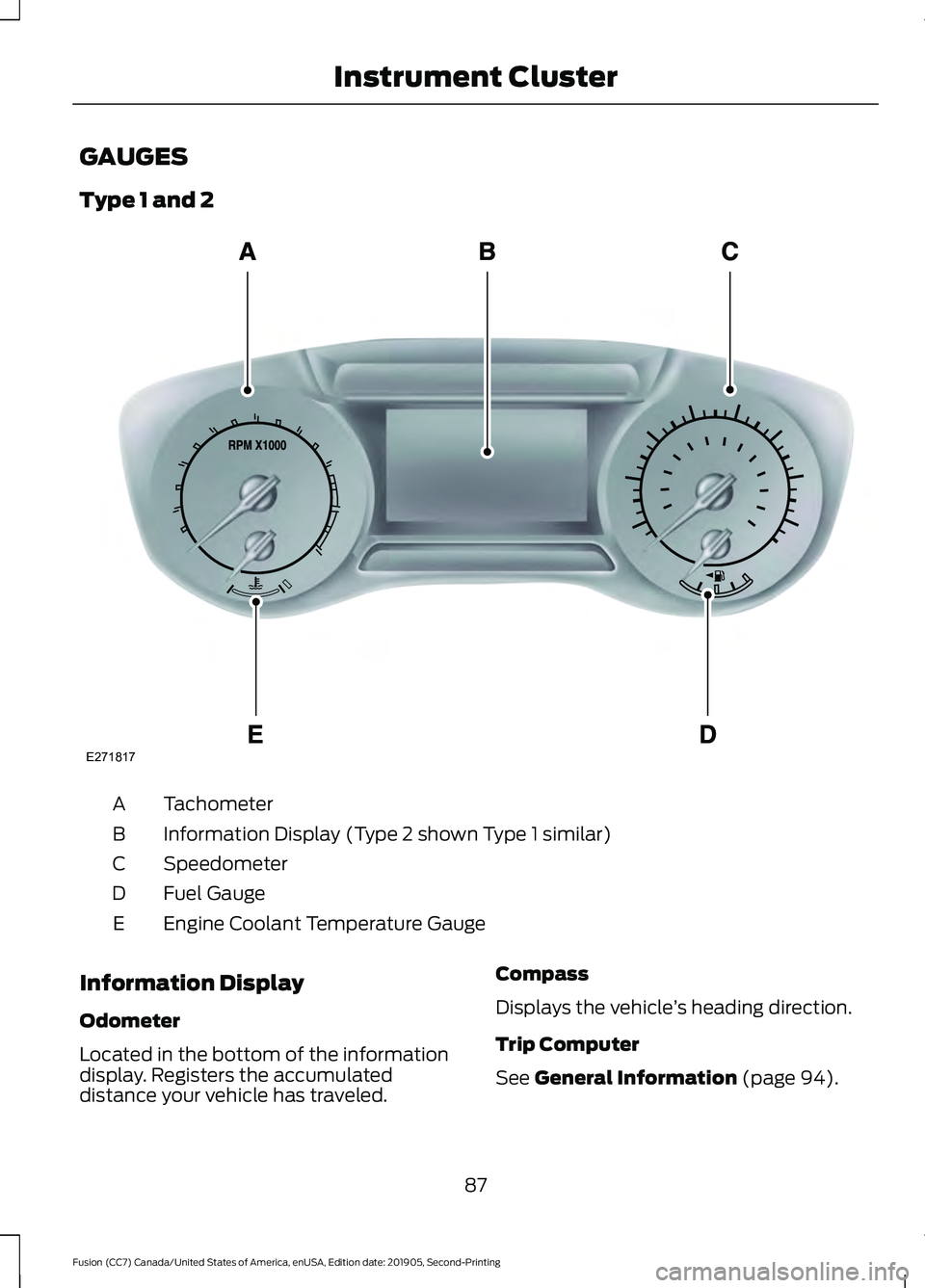
Type 1 and 2
Tachometer
A
Information Display (Type 2 shown Type 1 similar)
B
Speedometer
C
Fuel Gauge
D
Engine Coolant Temperature Gauge
E
Information Display
Odometer
Located in the bottom of the information
display. Registers the accumulated
distance your vehicle has traveled. Compass
Displays the vehicle
’s heading direction.
Trip Computer
See General Information (page 94).
87
Fusion (CC7) Canada/United States of America, enUSA, Edition date: 201905, Second-Printing Instrument ClusterE271817
Page 97 of 497
GENERAL INFORMATION
WARNING: Driving while distracted
can result in loss of vehicle control, crash
and injury. We strongly recommend that
you use extreme caution when using any
device that may take your focus off the
road. Your primary responsibility is the
safe operation of your vehicle. We
recommend against the use of any
hand-held device while driving and
encourage the use of voice-operated
systems when possible. Make sure you
are aware of all applicable local laws
that may affect the use of electronic
devices while driving.
Note: Your vehicle may or may not be
equipped with all the messages listed in this
chapter. Your vehicle will not display
messages of systems it is not equipped with.
Various systems on your vehicle can be
controlled using the information display
controls on the steering wheel.
Corresponding information is displayed in
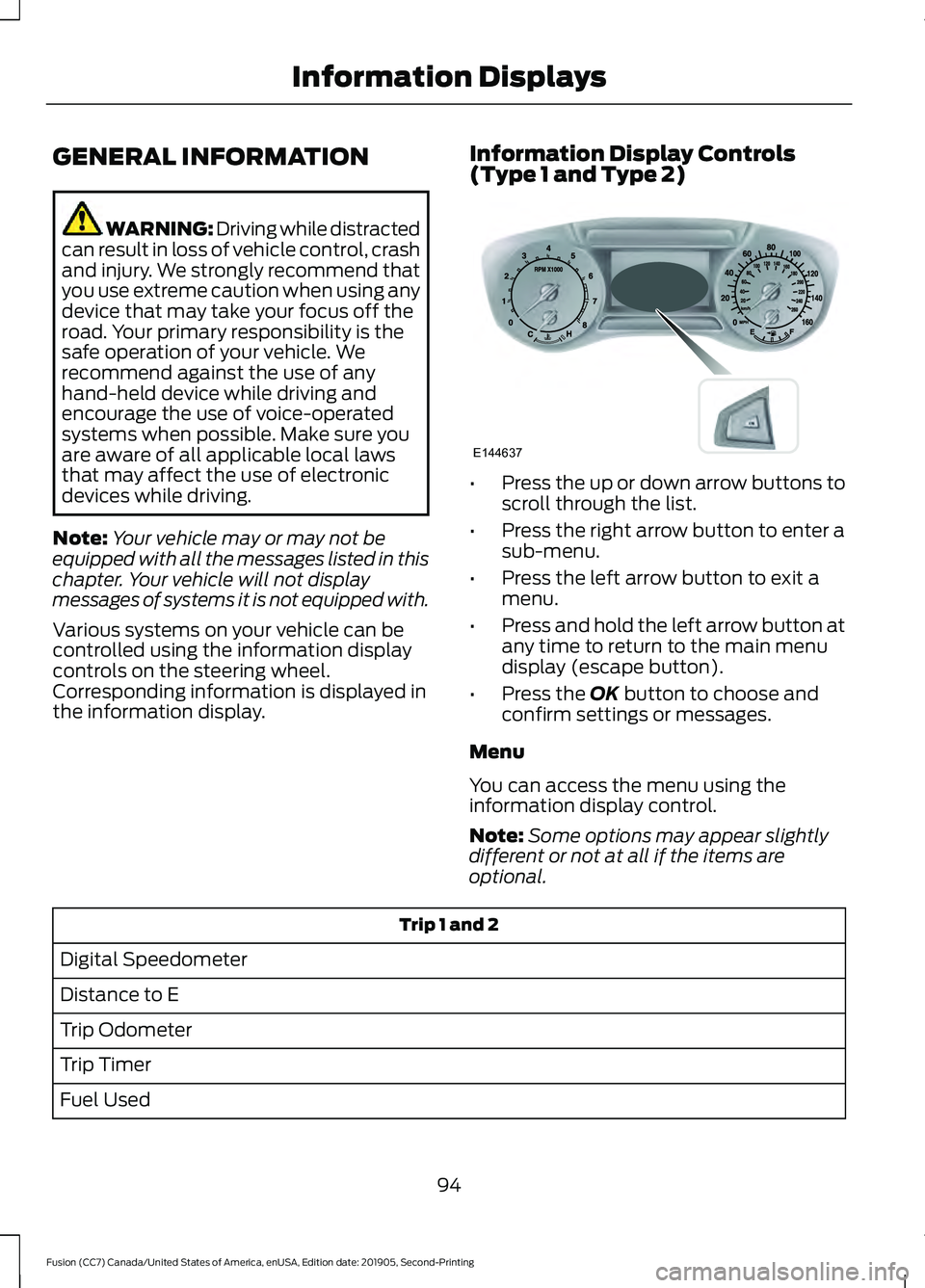
the information display. Information Display Controls
(Type 1 and Type 2) •
Press the up or down arrow buttons to
scroll through the list.
• Press the right arrow button to enter a
sub-menu.
• Press the left arrow button to exit a
menu.
• Press and hold the left arrow button at
any time to return to the main menu
display (escape button).
• Press the OK button to choose and
confirm settings or messages.
Menu
You can access the menu using the
information display control.
Note: Some options may appear slightly
different or not at all if the items are
optional. Trip 1 and 2
Digital Speedometer
Distance to E
Trip Odometer
Trip Timer
Fuel Used
94
Fusion (CC7) Canada/United States of America, enUSA, Edition date: 201905, Second-Printing Information DisplaysE144637
Page 98 of 497
Trip 1 and 2
Average Fuel
Outside Temperature
All Values 1
1 Type 2
• Digital Speedometer - Shows the speed your vehicle is traveling.
• Distance to E - Shows the approximate distance your vehicle can travel before running
out of fuel.
• Trip Odometer — Registers the distance of individual journeys.
• Trip Timer — The timer stops when you turn your vehicle off and restarts when you
restart your vehicle.
• Fuel Used — Shows the amount of fuel used for a given trip.
• Average Fuel — Shows the average fuel economy for a given trip.
• Outside Temperature — Shows the outside air temperature.
• All Values — Shows the Distance to E, Trip Odometer, Trip Timer and Average Fuel.
Note: Press and hold OK on the current screen to reset the respective trip, distance, time
and fuel information. Fuel Economy
Distance to Empty
Inst Fuel Econ
Avg MPG 1
Long Term Fuel Economy
Fuel History 1
Average Fuel
95
Fusion (CC7) Canada/United States of America, enUSA, Edition date: 201905, Second-Printing Information Displays
Page 99 of 497
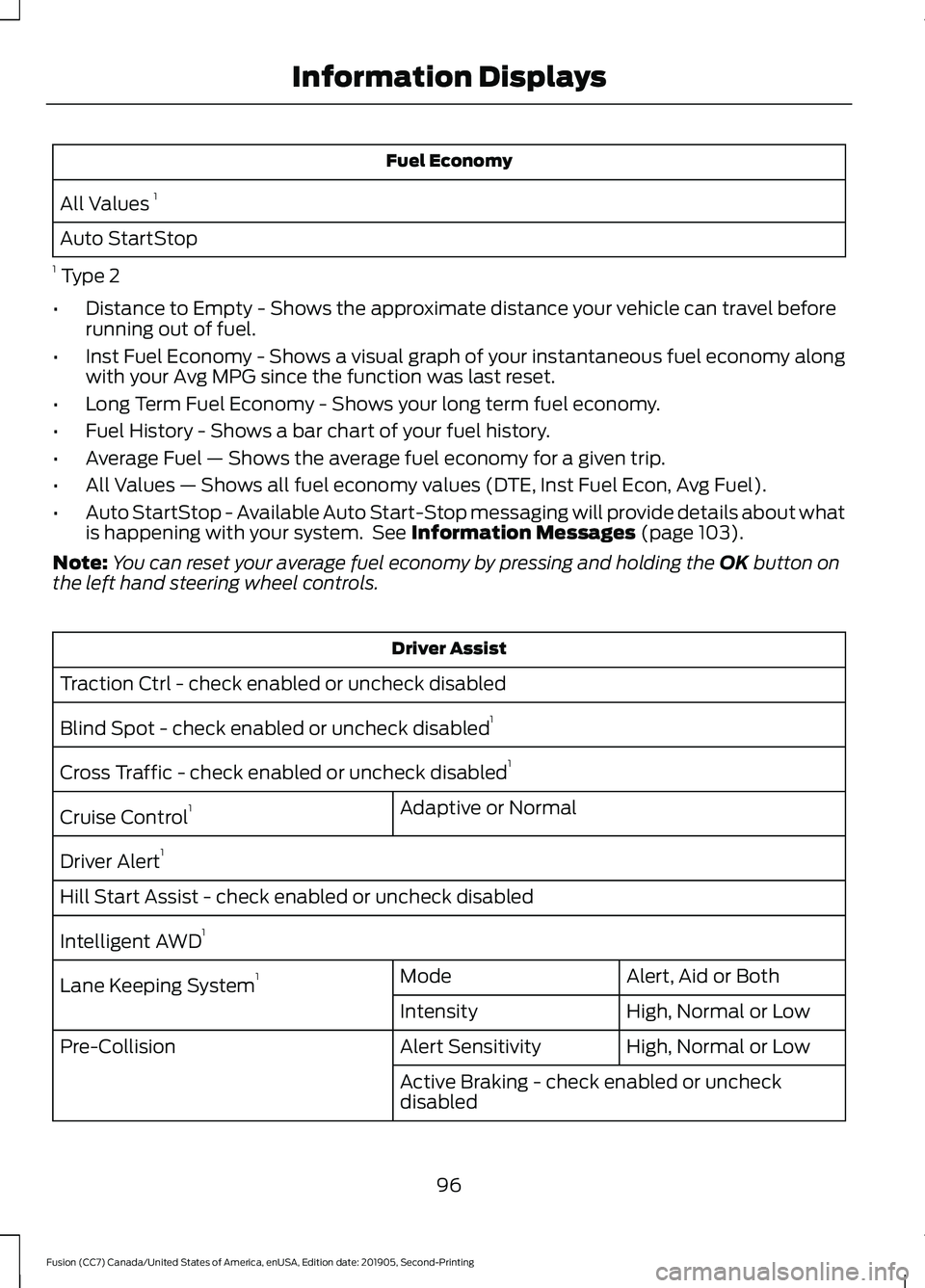
Fuel Economy
All Values 1
Auto StartStop
1 Type 2
• Distance to Empty - Shows the approximate distance your vehicle can travel before
running out of fuel.
• Inst Fuel Economy - Shows a visual graph of your instantaneous fuel economy along
with your Avg MPG since the function was last reset.
• Long Term Fuel Economy - Shows your long term fuel economy.
• Fuel History - Shows a bar chart of your fuel history.
• Average Fuel — Shows the average fuel economy for a given trip.
• All Values — Shows all fuel economy values (DTE, Inst Fuel Econ, Avg Fuel).
• Auto StartStop - Available Auto Start-Stop messaging will provide details about what
is happening with your system. See Information Messages (page 103).
Note: You can reset your average fuel economy by pressing and holding the
OK button on
the left hand steering wheel controls. Driver Assist
Traction Ctrl - check enabled or uncheck disabled
Blind Spot - check enabled or uncheck disabled 1
Cross Traffic - check enabled or uncheck disabled 1
Adaptive or Normal
Cruise Control 1
Driver Alert 1
Hill Start Assist - check enabled or uncheck disabled
Intelligent AWD 1
Alert, Aid or Both
Mode
Lane Keeping System 1
High, Normal or Low
Intensity
High, Normal or Low
Alert Sensitivity
Pre-Collision
Active Braking - check enabled or uncheck
disabled
96
Fusion (CC7) Canada/United States of America, enUSA, Edition date: 201905, Second-Printing Information Displays
Page 150 of 497
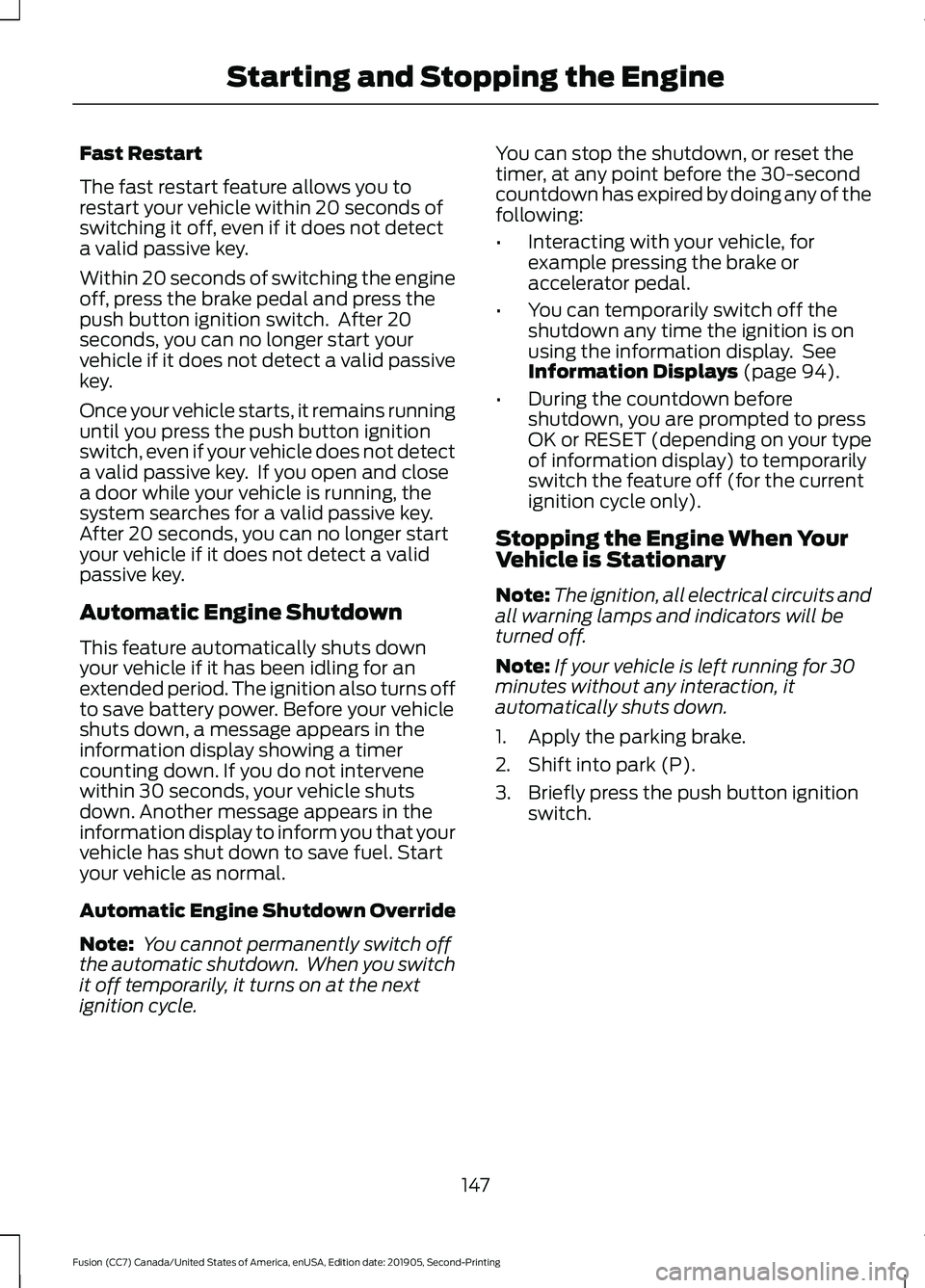
Fast Restart
The fast restart feature allows you to
restart your vehicle within 20 seconds of
switching it off, even if it does not detect
a valid passive key.
Within 20 seconds of switching the engine
off, press the brake pedal and press the
push button ignition switch. After 20
seconds, you can no longer start your
vehicle if it does not detect a valid passive
key.
Once your vehicle starts, it remains running
until you press the push button ignition
switch, even if your vehicle does not detect
a valid passive key. If you open and close
a door while your vehicle is running, the
system searches for a valid passive key.
After 20 seconds, you can no longer start
your vehicle if it does not detect a valid
passive key.
Automatic Engine Shutdown
This feature automatically shuts down
your vehicle if it has been idling for an
extended period. The ignition also turns off
to save battery power. Before your vehicle
shuts down, a message appears in the
information display showing a timer
counting down. If you do not intervene
within 30 seconds, your vehicle shuts
down. Another message appears in the
information display to inform you that your
vehicle has shut down to save fuel. Start
your vehicle as normal.
Automatic Engine Shutdown Override
Note:
You cannot permanently switch off
the automatic shutdown. When you switch
it off temporarily, it turns on at the next
ignition cycle. You can stop the shutdown, or reset the
timer, at any point before the 30-second
countdown has expired by doing any of the
following:
•
Interacting with your vehicle, for
example pressing the brake or
accelerator pedal.
• You can temporarily switch off the
shutdown any time the ignition is on
using the information display. See
Information Displays (page 94).
• During the countdown before
shutdown, you are prompted to press
OK or RESET (depending on your type
of information display) to temporarily
switch the feature off (for the current
ignition cycle only).
Stopping the Engine When Your
Vehicle is Stationary
Note: The ignition, all electrical circuits and
all warning lamps and indicators will be
turned off.
Note: If your vehicle is left running for 30
minutes without any interaction, it
automatically shuts down.
1. Apply the parking brake.
2. Shift into park (P).
3. Briefly press the push button ignition switch.
147
Fusion (CC7) Canada/United States of America, enUSA, Edition date: 201905, Second-Printing Starting and Stopping the Engine
Page 161 of 497
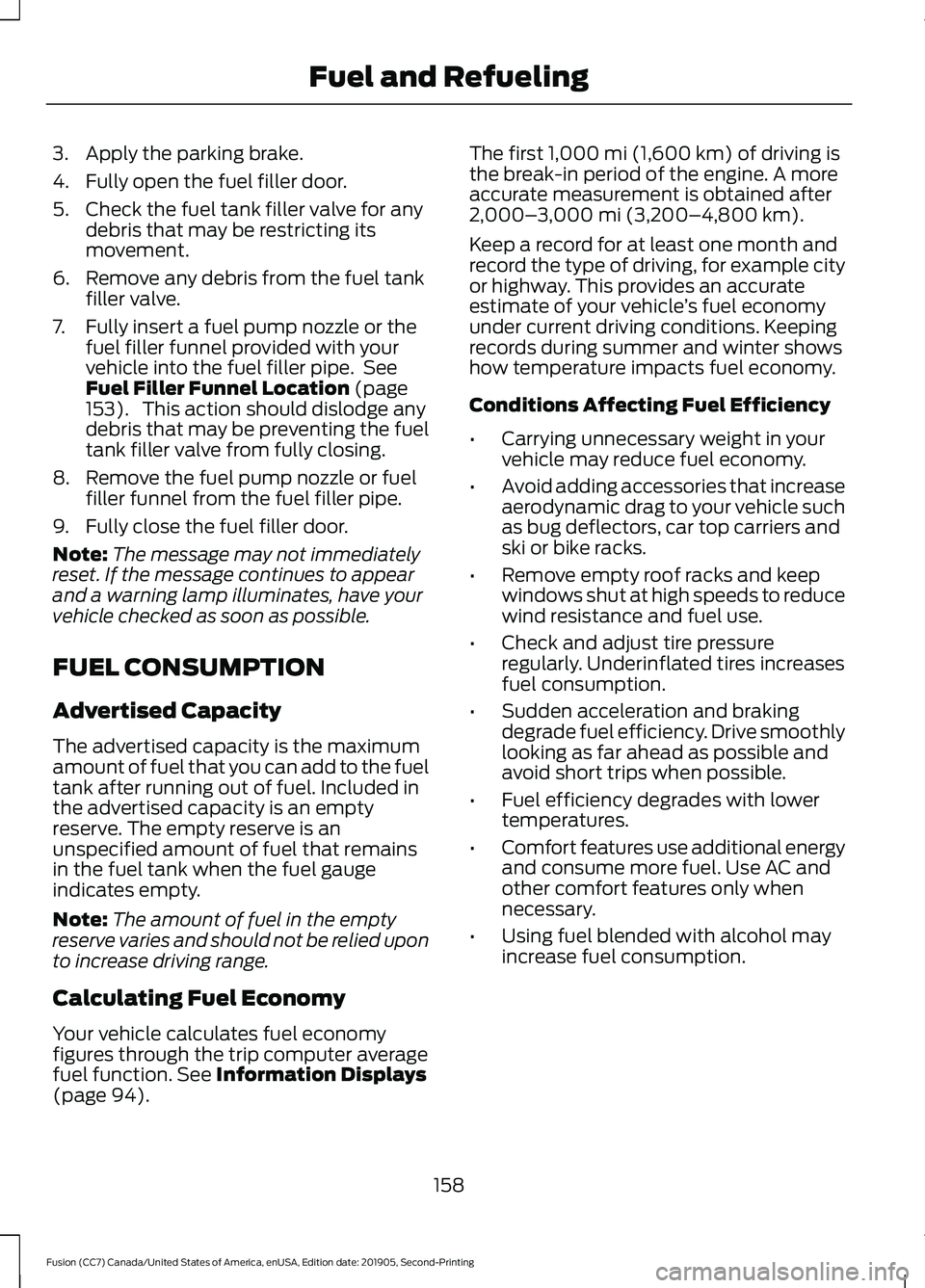
3. Apply the parking brake.
4. Fully open the fuel filler door.
5. Check the fuel tank filler valve for any
debris that may be restricting its
movement.
6. Remove any debris from the fuel tank filler valve.
7. Fully insert a fuel pump nozzle or the fuel filler funnel provided with your
vehicle into the fuel filler pipe. See
Fuel Filler Funnel Location (page
153). This action should dislodge any
debris that may be preventing the fuel
tank filler valve from fully closing.
8. Remove the fuel pump nozzle or fuel filler funnel from the fuel filler pipe.
9. Fully close the fuel filler door.
Note: The message may not immediately
reset. If the message continues to appear
and a warning lamp illuminates, have your
vehicle checked as soon as possible.
FUEL CONSUMPTION
Advertised Capacity
The advertised capacity is the maximum
amount of fuel that you can add to the fuel
tank after running out of fuel. Included in
the advertised capacity is an empty
reserve. The empty reserve is an
unspecified amount of fuel that remains
in the fuel tank when the fuel gauge
indicates empty.
Note: The amount of fuel in the empty
reserve varies and should not be relied upon
to increase driving range.
Calculating Fuel Economy
Your vehicle calculates fuel economy
figures through the trip computer average
fuel function.
See Information Displays
(page 94). The first
1,000 mi (1,600 km) of driving is
the break-in period of the engine. A more
accurate measurement is obtained after
2,000– 3,000 mi (3,200–4,800 km)
.
Keep a record for at least one month and
record the type of driving, for example city
or highway. This provides an accurate
estimate of your vehicle ’s fuel economy
under current driving conditions. Keeping
records during summer and winter shows
how temperature impacts fuel economy.
Conditions Affecting Fuel Efficiency
• Carrying unnecessary weight in your
vehicle may reduce fuel economy.
• Avoid adding accessories that increase
aerodynamic drag to your vehicle such
as bug deflectors, car top carriers and
ski or bike racks.
• Remove empty roof racks and keep
windows shut at high speeds to reduce
wind resistance and fuel use.
• Check and adjust tire pressure
regularly. Underinflated tires increases
fuel consumption.
• Sudden acceleration and braking
degrade fuel efficiency. Drive smoothly
looking as far ahead as possible and
avoid short trips when possible.
• Fuel efficiency degrades with lower
temperatures.
• Comfort features use additional energy
and consume more fuel. Use AC and
other comfort features only when
necessary.
• Using fuel blended with alcohol may
increase fuel consumption.
158
Fusion (CC7) Canada/United States of America, enUSA, Edition date: 201905, Second-Printing Fuel and Refueling
Page 291 of 497
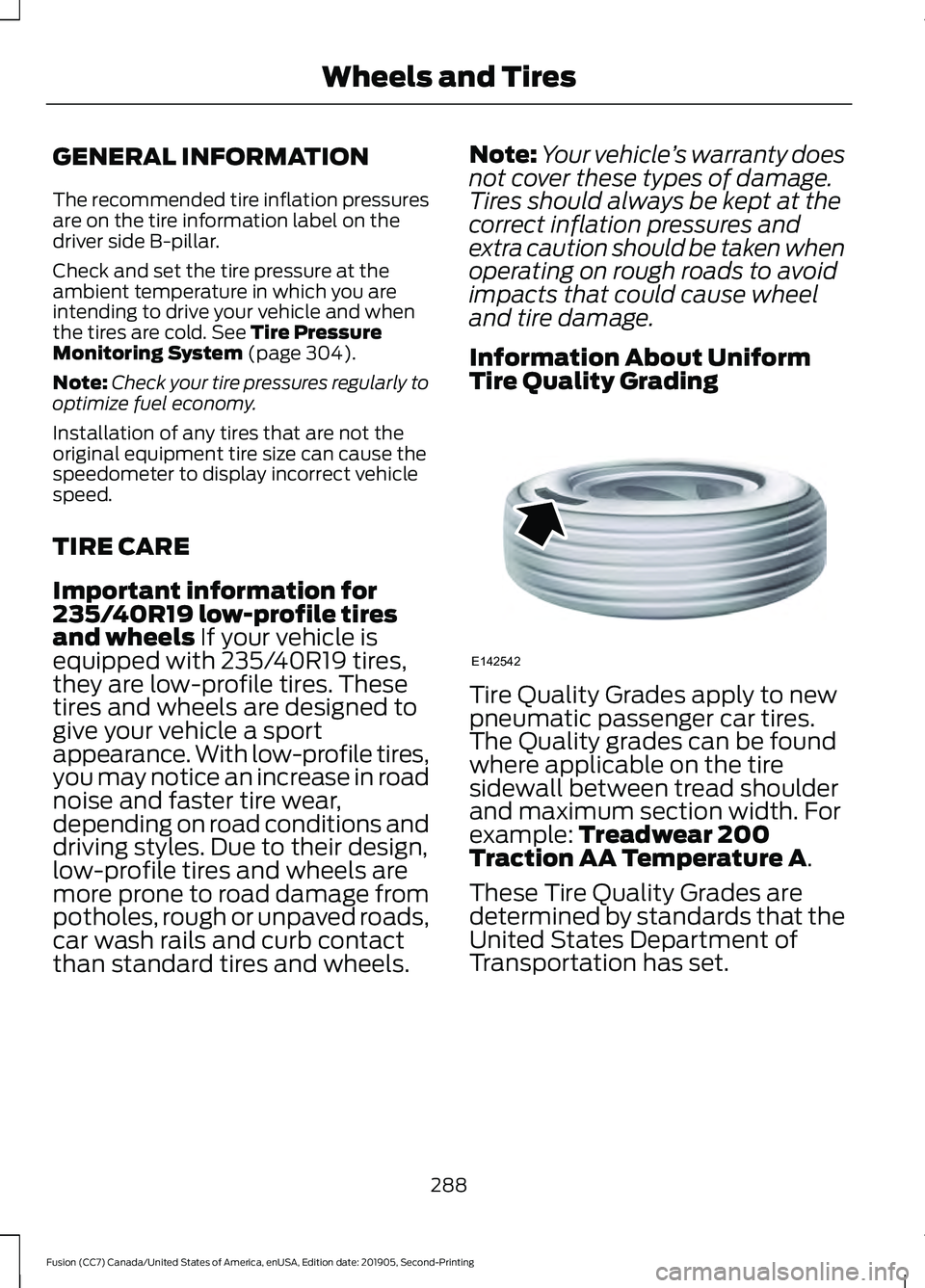
GENERAL INFORMATION
The recommended tire inflation pressures
are on the tire information label on the
driver side B-pillar.
Check and set the tire pressure at the
ambient temperature in which you are
intending to drive your vehicle and when
the tires are cold. See Tire Pressure
Monitoring System (page 304).
Note: Check your tire pressures regularly to
optimize fuel economy.
Installation of any tires that are not the
original equipment tire size can cause the
speedometer to display incorrect vehicle
speed.
TIRE CARE
Important information for
235/40R19 low-profile tires
and wheels
If your vehicle is
equipped with 235/40R19 tires,
they are low-profile tires. These
tires and wheels are designed to
give your vehicle a sport
appearance. With low-profile tires,
you may notice an increase in road
noise and faster tire wear,
depending on road conditions and
driving styles. Due to their design,
low-profile tires and wheels are
more prone to road damage from
potholes, rough or unpaved roads,
car wash rails and curb contact
than standard tires and wheels. Note:
Your vehicle ’s warranty does
not cover these types of damage.
Tires should always be kept at the
correct inflation pressures and
extra caution should be taken when
operating on rough roads to avoid
impacts that could cause wheel
and tire damage.
Information About Uniform
Tire Quality Grading Tire Quality Grades apply to new
pneumatic passenger car tires.
The Quality grades can be found
where applicable on the tire
sidewall between tread shoulder
and maximum section width. For
example:
Treadwear 200
Traction AA Temperature A.
These Tire Quality Grades are
determined by standards that the
United States Department of
Transportation has set.
288
Fusion (CC7) Canada/United States of America, enUSA, Edition date: 201905, Second-Printing Wheels and TiresE142542
Page 486 of 497
Blind Spot Information System.............208
Switching the System Off and On..............209
System Errors..................................................... 209
Using the Blind Spot Information System............................................................. 209
BLIS See: Blind Spot Information System.........208
Body Styling Kits..........................................287
Bonnet Lock See: Opening and Closing the Hood..........255
Booster Seats...................................................27
Types of Booster Seats...................................... 28
Brake Fluid Check........................................268 Brake Fluid Service Interval........................... 269
Brakes................................................................173 General Information........................................... 173
Breaking-In.....................................................229
Bulb Specification Chart............................351
C
Cabin Air Filter................................................126
Canceling the Set Speed
...........................196
Capacities and Specifications - 1.5L EcoBoost™.................................................326
Air Conditioning System................................. 326
Alternative Engine Oil for Extremely Cold Climates........................................................... 329
Automatic Transmission................................. 326
Engine Coolant.................................................... 327
Engine Oil.............................................................. 328
Fuel Tank............................................................... 329
Grease.................................................................... 329
Hydraulic Brake System.................................. 330
Locks...................................................................... 330
Washer Reservoir................................................ 331
Capacities and Specifications - 2.0L EcoBoost™..................................................331
Air Conditioning System................................... 331
Alternative Engine Oil for Extremely Cold Climates........................................................... 334
Automatic Transmission................................. 332
Engine Coolant................................................... 333
Engine Oil.............................................................. 333
Fuel Tank............................................................... 335
Grease.................................................................... 335
Hydraulic Brake System.................................. 336
Locks...................................................................... 336Power Transfer Unit..........................................
336
Rear Axle................................................................ 337
Washer Reservoir................................................ 337
Capacities and Specifications - 2.5L................................................................338
Air Conditioning System................................. 338
Alternative Engine Oil for Extremely Cold Climates............................................................ 341
Automatic Transmission................................. 339
Engine Coolant................................................... 340
Engine Oil............................................................. 340
Fuel Tank............................................................... 342
Grease.................................................................... 342
Hydraulic Brake System.................................. 343
Locks....................................................................... 343
Washer Reservoir............................................... 343
Capacities and Specifications - 2.7L EcoBoost™.................................................344
Air Conditioning System................................. 344
Alternative Engine Oil for Extremely Cold Climates............................................................ 347
Automatic Transmission................................. 345
Engine Coolant................................................... 346
Engine Oil............................................................. 346
Fuel Tank.............................................................. 348
Grease.................................................................... 348
Hydraulic Brake System.................................. 349
Locks...................................................................... 349
Power Transfer Unit.......................................... 349
Rear Axle............................................................... 350
Washer Reservoir............................................... 350
Capacities and Specifications.................317
Car Wash See: Cleaning the Exterior.............................. 280
Catalytic Converter......................................160 On-Board Diagnostics (OBD-II).................... 161
Readiness for Inspection and Maintenance (I/M) Testing.................................................... 161
Center Console
..............................................144
Changing a Bulb...........................................275
Front Halogen Fog Lamp................................ 276
Headlamp............................................................. 276
LED Lamps............................................................ 277
License Plate Lamp........................................... 278
Reversing Lamp................................................... 277
Changing a Fuse...........................................253 Fuses....................................................................... 253
483
Fusion (CC7) Canada/United States of America, enUSA, Edition date: 201905, Second-Printing Index
Page 490 of 497
Ford Protect....................................................431
Ford Protect Extended Service Plan
(CANADA ONLY).......................................... 432
Ford Protect Extended Service Plans (U.S. Only)................................................................... 431
Front Fog Lamps.............................................77 Front Fog Lamp Indicator.................................. 78
Switching the Front Fog Lamps On or Off........................................................................\
.. 77
Front Parking Aid..........................................182
Object Distance Indicator................................ 183
Front Passenger Sensing System............43
Fuel and Refueling.......................................152
Fuel Consumption
.......................................158
Advertised Capacity.......................................... 158
Calculating Fuel Economy.............................. 158
Fuel Filler Funnel Location........................153
Fuel Filter
........................................................269
Fuel Quality.....................................................152
Choosing the Right Fuel................................... 152
Fuel Shutoff...................................................232
Fuses
................................................................244
Fuse Specification Chart..........................244
Passenger Compartment Fuse
Panel................................................................. 250
Power Distribution Box.................................... 244
G
Garage Door Opener
....................................137
Garage Door Opener See: Universal Garage Door Opener............137
Gauges................................................................87 Engine Coolant Temperature Gauge............88
Fuel Gauge............................................................. 88
Information Display............................................. 87
Left Information Display................................... 89
Type 1 and 2............................................................ 87
Type 3....................................................................... 89
Gearbox See: Transmission.............................................. 163
General Information on Radio Frequencies...................................................50
Intelligent Access................................................. 50
General Maintenance Information........433 Multi-Point Inspection..................................... 435
Owner Checks and Services.......................... 434
Protecting Your Investment........................... 433Why Maintain Your Vehicle?..........................
433
Why Maintain Your Vehicle at Your Dealership?..................................................... 433
Getting Assistance Outside the U.S. and Canada.........................................................240
Getting the Services You Need...............237 Away From Home.............................................. 237
Global Opening and Closing
......................83
Closing the Windows.......................................... 83
Opening the Windows....................................... 83
H
Hazard Flashers............................................232
Headlamp Adjusting See: Adjusting the Headlamps...................... 272
Headlamp Exit Delay....................................76
Headlamp Removal See: Removing a Headlamp.......................... 274
Headrest See: Head Restraints......................................... 128
Head Restraints
.............................................128
Adjusting the Head Restraint......................... 129
Tilting Head Restraints .................................... 130
Heated Exterior Mirrors
...............................126
Heated Rear Window..................................126
Heated Seats..................................................135
Heated Steering Wheel.................................71
Heating See: Climate Control.......................................... 118
Hill Start Assist
..............................................175
Switching the System On and Off................176
Using Hill Start Assist........................................ 176
Hints on Controlling the Interior Climate - Vehicles With: Automatic
Temperature Control................................124
Defogging the Side Windows in Cold Weather............................................................. 125
General Hints........................................................ 124
Quickly Cooling the Interior............................. 125
Quickly Heating the Interior............................ 125
Recommended Settings for Cooling...........125
Recommended Settings for Heating...........125
Hints on Controlling the Interior Climate - Vehicles With: Manual Temperature
Control...........................................................125
Defogging the Side Windows in Cold Weather............................................................. 126
487
Fusion (CC7) Canada/United States of America, enUSA, Edition date: 201905, Second-Printing Index