clock FORD FUSION (AMERICAS) 2007 1.G Owners Manual
[x] Cancel search | Manufacturer: FORD, Model Year: 2007, Model line: FUSION (AMERICAS), Model: FORD FUSION (AMERICAS) 2007 1.GPages: 280, PDF Size: 2.56 MB
Page 22 of 280
3.MENU:Press repeatedly to
access the following settings:
CATEGORY (satellite radio if equipped):Press MENU until the
currently active category appears in the display (CATEGORY MODE). In
CATEGORY MODE, press
/to scroll through the list of available
SIRIUS channel Categories (Pop, Rock, News, etc.). Press
SEEK, SEEKor SCAN to select the category. After a category is
selected, press SEEK to search for that specific category of channels
only (i.e. ROCK). To select a different category, press MENU until the
category appears in the display. Press
/to select a different
category. You may also select CATEGORY ALL to seek all available
SIRIUS categories and channels.
Satellite radio is available only with a valid SIRIUS radio
subscription. Check with your authorized dealer for availability.
Setting the clock:If your vehicle is equipped with an in-dash clock,
refer toClockin theDriver Controlschapter for instructions on how to
set the time.
If your vehicle is not equipped with an in-dash clock, press MENU until
SET HOURS or SET MINUTES appears in the display. Press
/to
adjust the hours/minutes.
AUTOSET:Press MENU until the display reads AUTOSET. Autoset
allows you to set the strongest local radio stations without losing your
original manually set preset stations for AM/FM1/FM2. Use
//
SEEK, SEEKto turn on/off.
When the six strongest stations are filled, the station stored in preset 1
will begin playing. If there are less than six strong stations, the system
will store the last one in the remaining presets.
BASS:Press MENU to reach the bass setting. Use
/to adjust.
TREB (Treble):Press MENU to reach the treble setting. Use
/to
adjust.
BAL (Balance):Press MENU to reach the balance setting. Use
/
to adjust the audio between the left (L) and right (R) speakers.
2007 Fusion(fsn)
Owners Guide (post-2002-fmt)
USA(fus)
Entertainment Systems
22
Page 28 of 280
2.MUTE/: Press to mute the
playing media. Press again to return
to the playing media.
3.MENU:Press repeatedly to
access the following settings:
CATEGORY (satellite radio if equipped):Press MENU until the
currently active category appears in the display (CATEGORY MODE). In
CATEGORY MODE, press
/to scroll through the list of available
SIRIUS channel Categories (Pop, Rock, News, etc.) Press
SEEK, SEEKor SCAN to select the category. After a category is
selected, press SEEK to search for that specific category of channels
only (i.e. ROCK). To select a different category, press MENU until the
category appears in the display. Press
/to select a different
category. You may also select CATEGORY ALL to seek all available
SIRIUS categories and channels.
Satellite radio is available only with a valid SIRIUS radio
subscription. Check with your authorized dealer for availability.
Setting the clock:If your vehicle is equipped with an in-dash clock,
refer toClockin theDriver Controlschapter for instructions on how to
set the time.
If your vehicle is not equipped with an in-dash clock, press MENU until
SET HOURS or SET MINUTES appears in the display. Press
/to
adjust.
AUTOSET:Press MENU until the display reads AUTOSET. Autoset
allows you to set the strongest local radio stations without losing your
original manually set preset stations for AM/FM1/FM2. Use
//
SEEK, SEEKto turn on/off.
When the six strongest stations are filled, the station stored in preset 1
will begin playing. If there are less than six strong stations, the system
will store the last one in the remaining presets.
RBDS (if equipped):Available only in FM mode on Audiophile systems.
This feature allows you to search RBDS-equipped stations for a certain
category of music format: CLASSIC, COUNTRY, INFORM, JAZZ/RB,
ROCK, etc.
2007 Fusion(fsn)
Owners Guide (post-2002-fmt)
USA(fus)
Entertainment Systems
28
Page 49 of 280
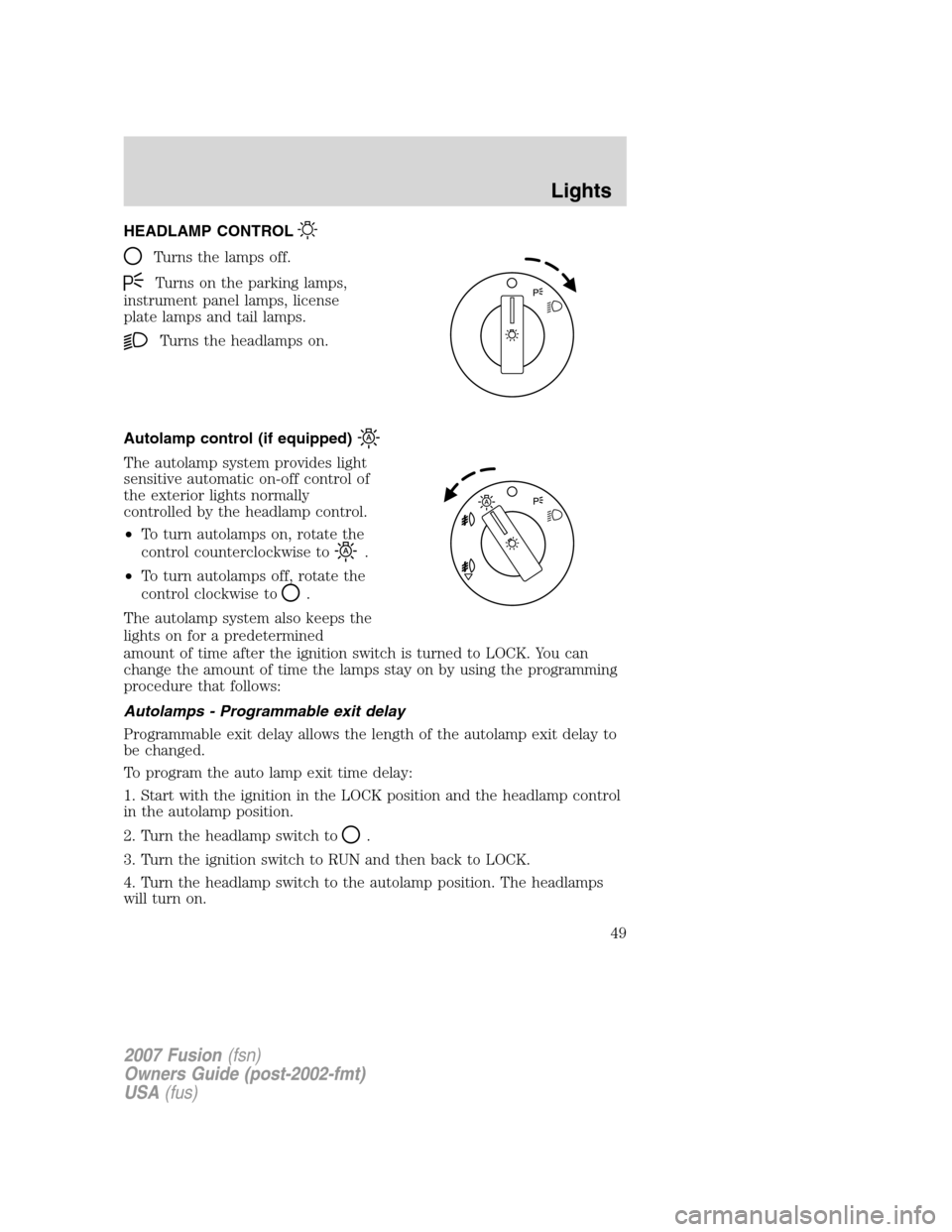
HEADLAMP CONTROL
Turns the lamps off.
Turns on the parking lamps,
instrument panel lamps, license
plate lamps and tail lamps.
Turns the headlamps on.
Autolamp control (if equipped)
The autolamp system provides light
sensitive automatic on-off control of
the exterior lights normally
controlled by the headlamp control.
•To turn autolamps on, rotate the
control counterclockwise to
.
•To turn autolamps off, rotate the
control clockwise to
.
The autolamp system also keeps the
lights on for a predetermined
amount of time after the ignition switch is turned to LOCK. You can
change the amount of time the lamps stay on by using the programming
procedure that follows:
Autolamps - Programmable exit delay
Programmable exit delay allows the length of the autolamp exit delay to
be changed.
To program the auto lamp exit time delay:
1. Start with the ignition in the LOCK position and the headlamp control
in the autolamp position.
2. Turn the headlamp switch to
.
3. Turn the ignition switch to RUN and then back to LOCK.
4. Turn the headlamp switch to the autolamp position. The headlamps
will turn on.
2007 Fusion(fsn)
Owners Guide (post-2002-fmt)
USA(fus)
Lights
49
Page 52 of 280
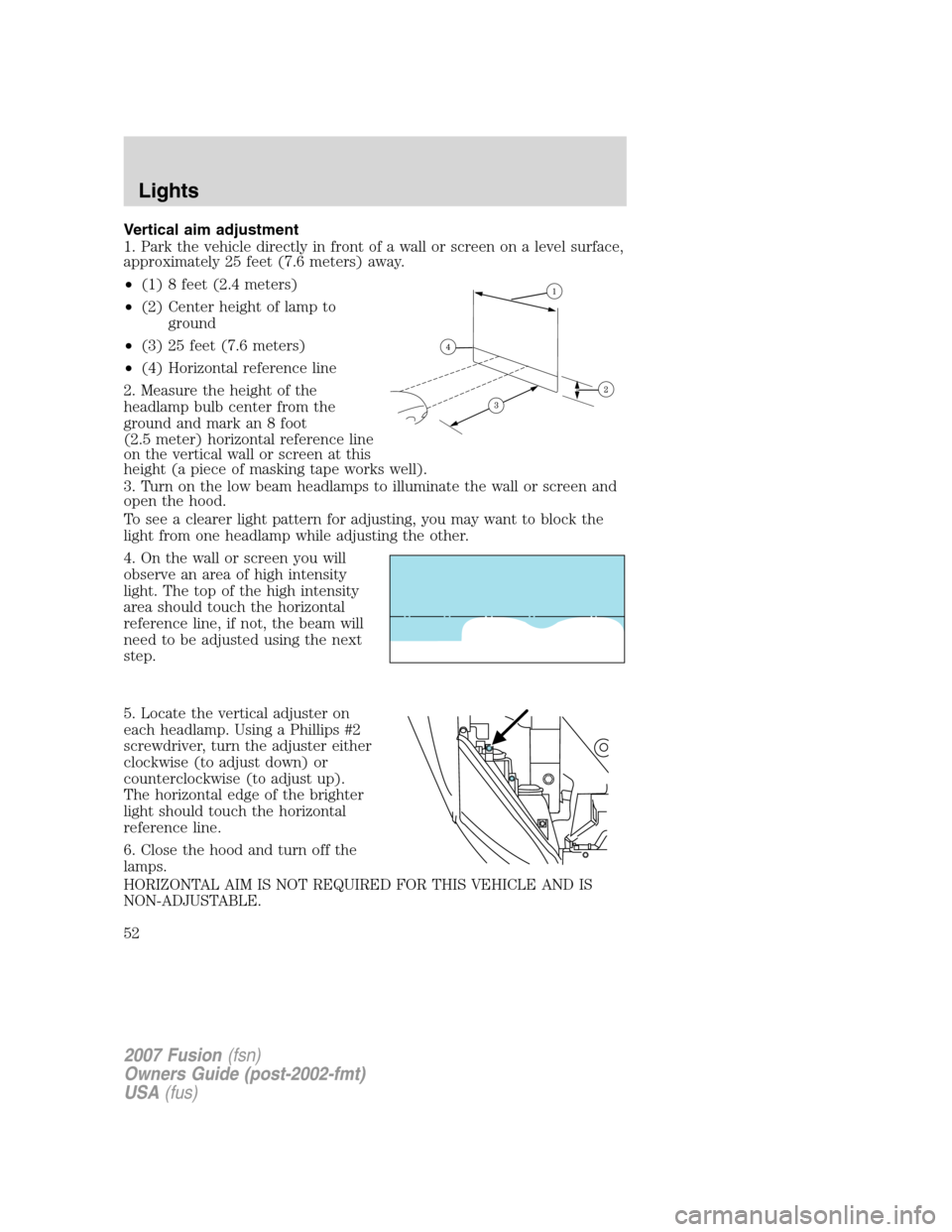
Vertical aim adjustment
1. Park the vehicle directly in front of a wall or screen on a level surface,
approximately 25 feet (7.6 meters) away.
•(1) 8 feet (2.4 meters)
•(2) Center height of lamp to
ground
•(3) 25 feet (7.6 meters)
•(4) Horizontal reference line
2. Measure the height of the
headlamp bulb center from the
ground and mark an 8 foot
(2.5 meter) horizontal reference line
on the vertical wall or screen at this
height (a piece of masking tape works well).
3. Turn on the low beam headlamps to illuminate the wall or screen and
open the hood.
To see a clearer light pattern for adjusting, you may want to block the
light from one headlamp while adjusting the other.
4. On the wall or screen you will
observe an area of high intensity
light. The top of the high intensity
area should touch the horizontal
reference line, if not, the beam will
need to be adjusted using the next
step.
5. Locate the vertical adjuster on
each headlamp. Using a Phillips #2
screwdriver, turn the adjuster either
clockwise (to adjust down) or
counterclockwise (to adjust up).
The horizontal edge of the brighter
light should touch the horizontal
reference line.
6. Close the hood and turn off the
lamps.
HORIZONTAL AIM IS NOT REQUIRED FOR THIS VEHICLE AND IS
NON-ADJUSTABLE.
2007 Fusion(fsn)
Owners Guide (post-2002-fmt)
USA(fus)
Lights
52
Page 55 of 280
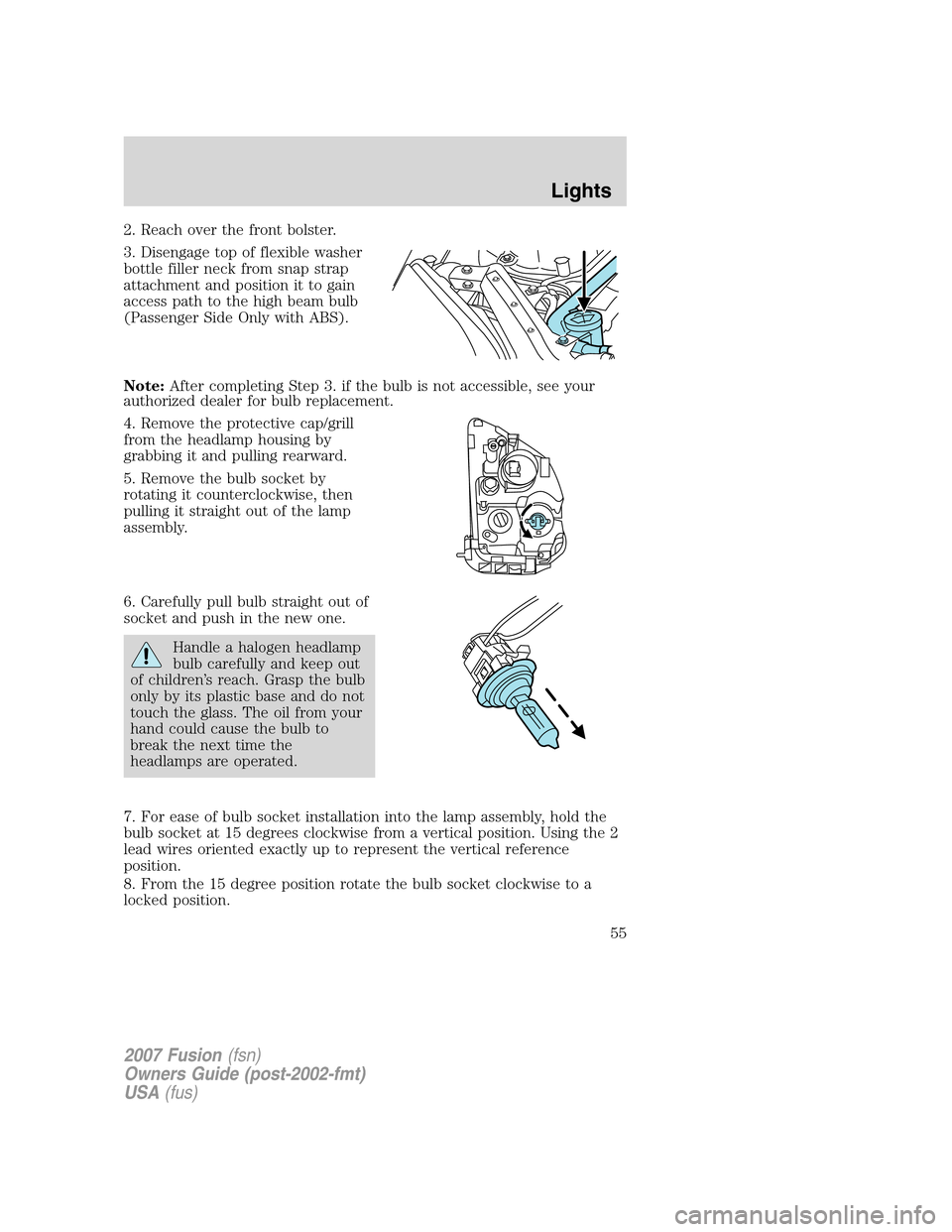
2. Reach over the front bolster.
3. Disengage top of flexible washer
bottle filler neck from snap strap
attachment and position it to gain
access path to the high beam bulb
(Passenger Side Only with ABS).
Note:After completing Step 3. if the bulb is not accessible, see your
authorized dealer for bulb replacement.
4. Remove the protective cap/grill
from the headlamp housing by
grabbing it and pulling rearward.
5. Remove the bulb socket by
rotating it counterclockwise, then
pulling it straight out of the lamp
assembly.
6. Carefully pull bulb straight out of
socket and push in the new one.
Handle a halogen headlamp
bulb carefully and keep out
of children’s reach. Grasp the bulb
only by its plastic base and do not
touch the glass. The oil from your
hand could cause the bulb to
break the next time the
headlamps are operated.
7. For ease of bulb socket installation into the lamp assembly, hold the
bulb socket at 15 degrees clockwise from a vertical position. Using the 2
lead wires oriented exactly up to represent the vertical reference
position.
8. From the 15 degree position rotate the bulb socket clockwise to a
locked position.
2007 Fusion(fsn)
Owners Guide (post-2002-fmt)
USA(fus)
Lights
55
Page 56 of 280
9. Tuck the 2 lead wires into the lamp housing to assure that they are
not pinched when installing the protective rubber cap.
10. Install the protective cap/grill to the housing circular ring by pushing
and pressing it forward.
11. Re-apply pressure around the complete circular ring on the housing
to make sure the protective cap is completely seated.
12. Reconnect the washer bottle neck by reversing Step 3 (Passenger
side only with ABS).
13. Turn the headlamps on and make sure they work properly. If the
headlamp was correctly aligned before you changed the bulb, you should
not need to align it again.
Lowbeam bulb (upper) replacement
1. Make sure headlamp switch is in OFF position, then open the hood.
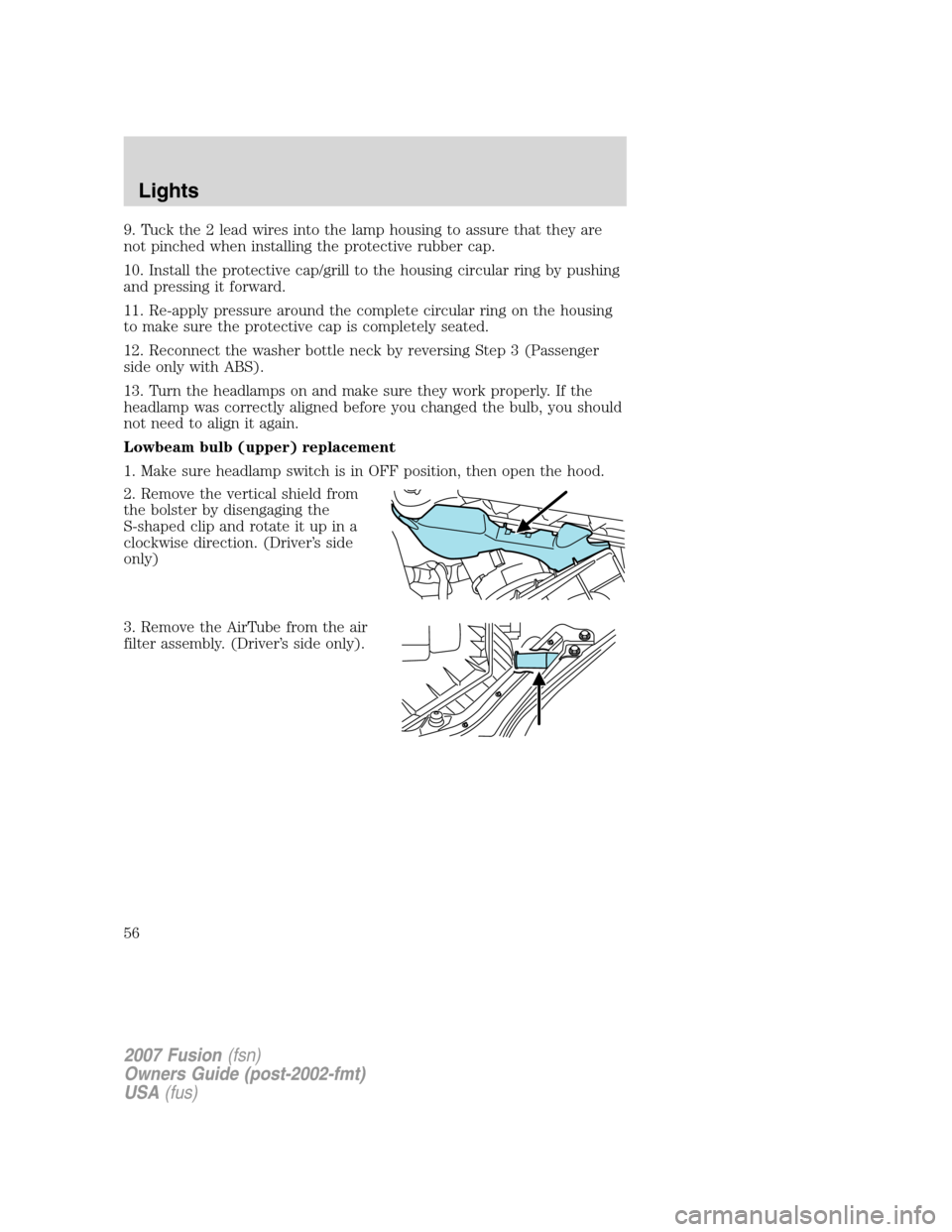
2. Remove the vertical shield from
the bolster by disengaging the
S-shaped clip and rotate it up in a
clockwise direction. (Driver’s side
only)
3. Remove the AirTube from the air
filter assembly. (Driver’s side only).
2007 Fusion(fsn)
Owners Guide (post-2002-fmt)
USA(fus)
Lights
56
Page 57 of 280
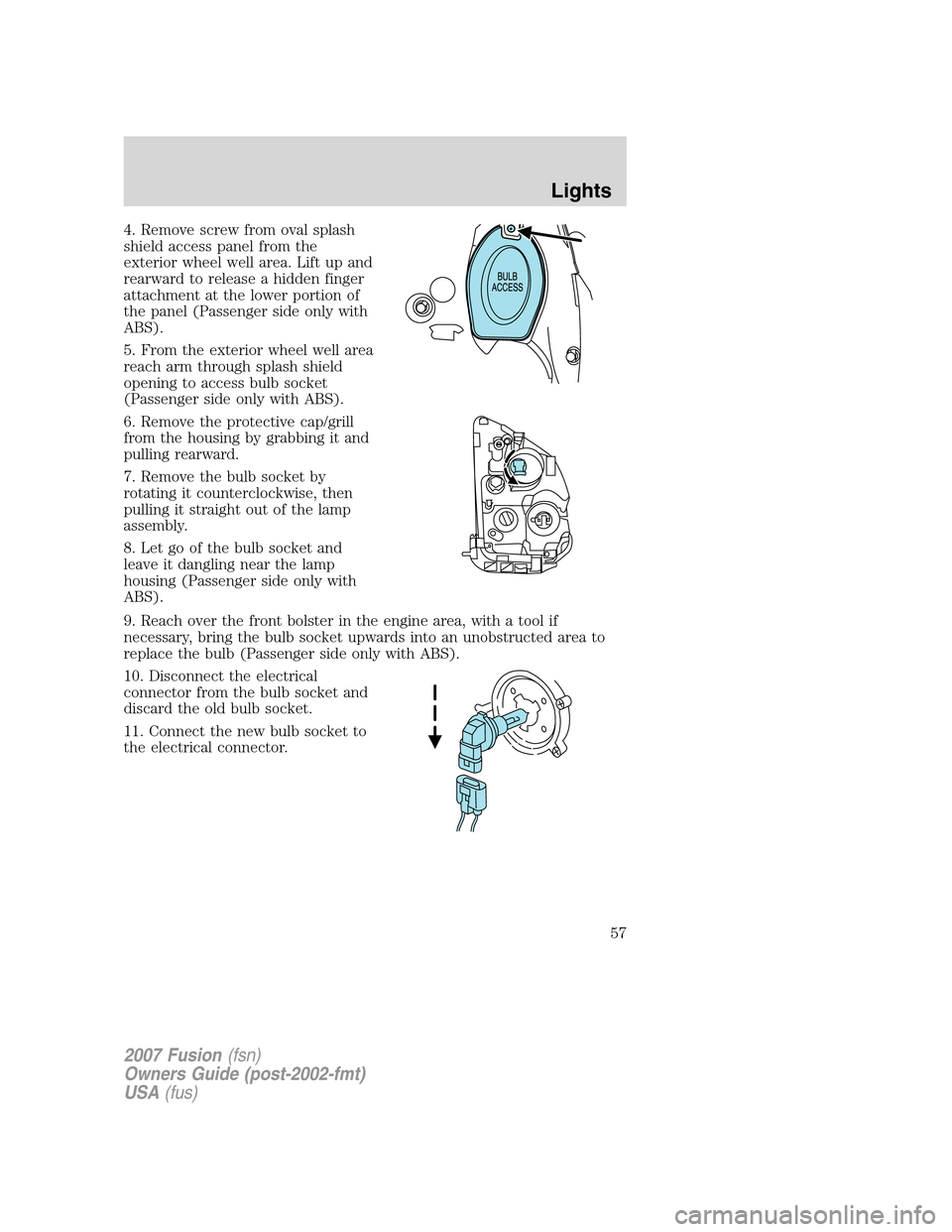
4. Remove screw from oval splash
shield access panel from the
exterior wheel well area. Lift up and
rearward to release a hidden finger
attachment at the lower portion of
the panel (Passenger side only with
ABS).
5. From the exterior wheel well area
reach arm through splash shield
opening to access bulb socket
(Passenger side only with ABS).
6. Remove the protective cap/grill
from the housing by grabbing it and
pulling rearward.
7. Remove the bulb socket by
rotating it counterclockwise, then
pulling it straight out of the lamp
assembly.
8. Let go of the bulb socket and
leave it dangling near the lamp
housing (Passenger side only with
ABS).
9. Reach over the front bolster in the engine area, with a tool if
necessary, bring the bulb socket upwards into an unobstructed area to
replace the bulb (Passenger side only with ABS).
10. Disconnect the electrical
connector from the bulb socket and
discard the old bulb socket.
11. Connect the new bulb socket to
the electrical connector.
2007 Fusion(fsn)
Owners Guide (post-2002-fmt)
USA(fus)
Lights
57
Page 58 of 280
Handle a halogen headlamp bulb carefully and keep out of
children’s reach. Grasp the bulb only by its plastic base and do
not touch the glass. The oil from your hand could cause the bulb to
break the next time the headlamps are operated.
12. After the new bulb is installed, carefully let the bulb socket dangle
downward near the lamp housing (Passenger side only with ABS).
13. From the exterior wheel well area reach arm through splash shield
opening to install bulb socket with new bulb (Passenger side only with
ABS).
14. Install the new bulb socket into the lamp assembly by aligning the
indexing fingers, then rotate clockwise to locked position.
15. Install the protective cap/grill to the housing circular ring by pushing
and pressing it forward.
16. Re-apply pressure around the complete circular ring on the housing
to make sure the protective cap is completely seated.
17. Reinstall splash shield access panel with screw (Passenger side only
with ABS).
18. Reinstall the AirTube to the air filter assembly. (Driver’s side only).
19. Reinstall the vertical shield to the bolster. (Driver’s side only).
20. Turn the headlamps on and make sure they work properly. If the
headlamp was correctly aligned before you changed the bulb, you should
not need to align it again.
Replacing front parking lamp/turn signal bulbs
1. Make sure headlamp switch is in the OFF position, then open the
hood.
2. Reach over the front bolster.
2007 Fusion(fsn)
Owners Guide (post-2002-fmt)
USA(fus)
Lights
58
Page 59 of 280
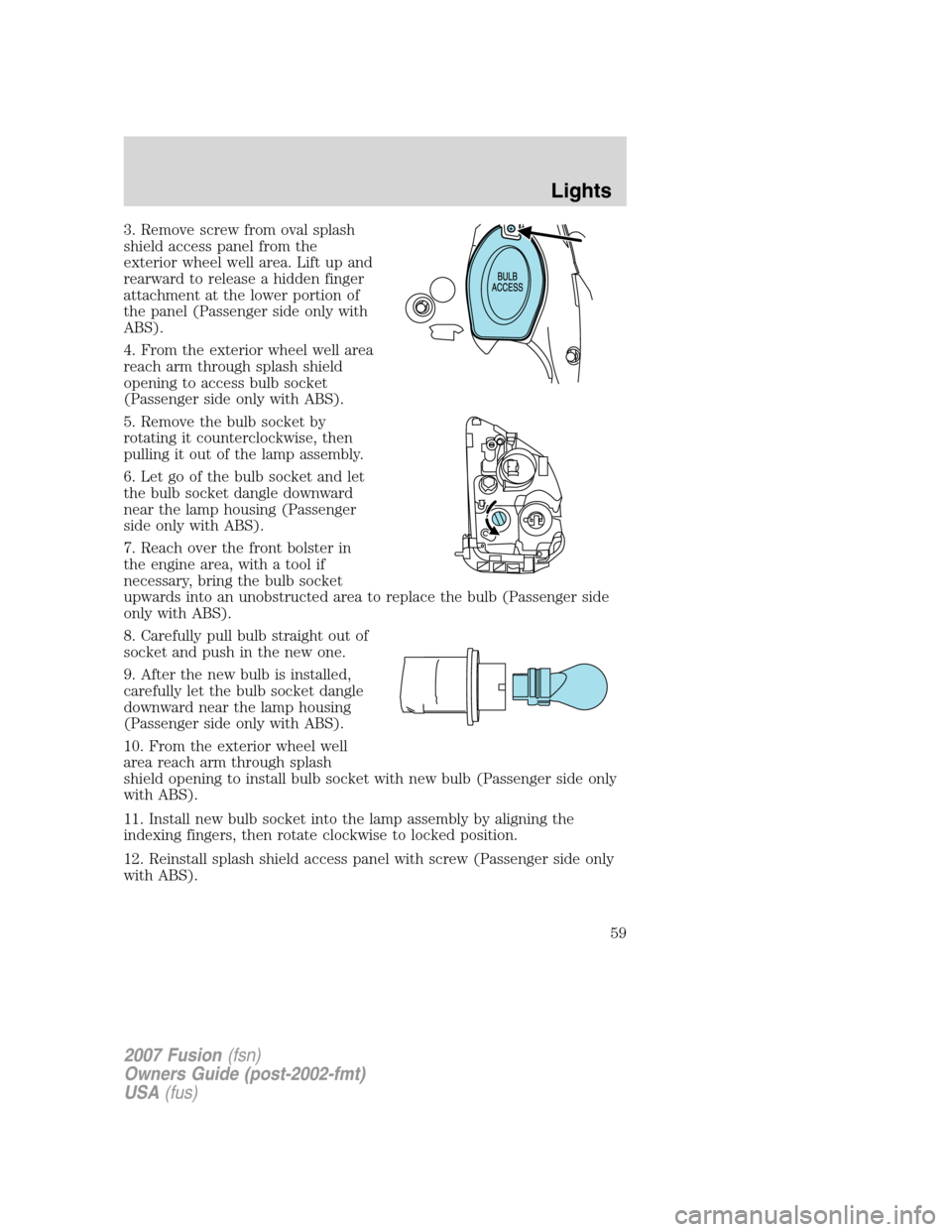
3. Remove screw from oval splash
shield access panel from the
exterior wheel well area. Lift up and
rearward to release a hidden finger
attachment at the lower portion of
the panel (Passenger side only with
ABS).
4. From the exterior wheel well area
reach arm through splash shield
opening to access bulb socket
(Passenger side only with ABS).
5. Remove the bulb socket by
rotating it counterclockwise, then
pulling it out of the lamp assembly.
6. Let go of the bulb socket and let
the bulb socket dangle downward
near the lamp housing (Passenger
side only with ABS).
7. Reach over the front bolster in
the engine area, with a tool if
necessary, bring the bulb socket
upwards into an unobstructed area to replace the bulb (Passenger side
only with ABS).
8. Carefully pull bulb straight out of
socket and push in the new one.
9. After the new bulb is installed,
carefully let the bulb socket dangle
downward near the lamp housing
(Passenger side only with ABS).
10. From the exterior wheel well
area reach arm through splash
shield opening to install bulb socket with new bulb (Passenger side only
with ABS).
11. Install new bulb socket into the lamp assembly by aligning the
indexing fingers, then rotate clockwise to locked position.
12. Reinstall splash shield access panel with screw (Passenger side only
with ABS).
2007 Fusion(fsn)
Owners Guide (post-2002-fmt)
USA(fus)
Lights
59
Page 60 of 280
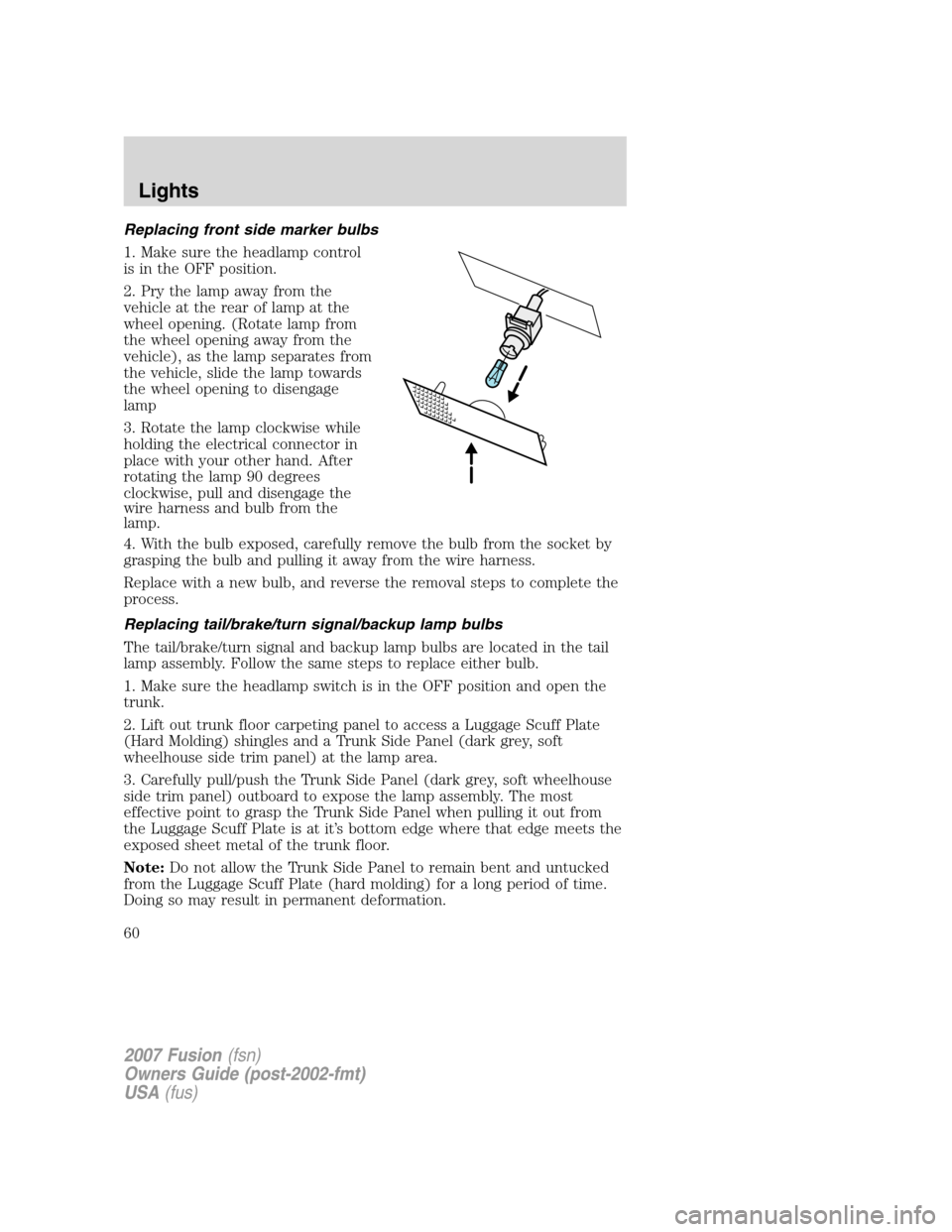
Replacing front side marker bulbs
1. Make sure the headlamp control
is in the OFF position.
2. Pry the lamp away from the
vehicle at the rear of lamp at the
wheel opening. (Rotate lamp from
the wheel opening away from the
vehicle), as the lamp separates from
the vehicle, slide the lamp towards
the wheel opening to disengage
lamp
3. Rotate the lamp clockwise while
holding the electrical connector in
place with your other hand. After
rotating the lamp 90 degrees
clockwise, pull and disengage the
wire harness and bulb from the
lamp.
4. With the bulb exposed, carefully remove the bulb from the socket by
grasping the bulb and pulling it away from the wire harness.
Replace with a new bulb, and reverse the removal steps to complete the
process.
Replacing tail/brake/turn signal/backup lamp bulbs
The tail/brake/turn signal and backup lamp bulbs are located in the tail
lamp assembly. Follow the same steps to replace either bulb.
1. Make sure the headlamp switch is in the OFF position and open the
trunk.
2. Lift out trunk floor carpeting panel to access a Luggage Scuff Plate
(Hard Molding) shingles and a Trunk Side Panel (dark grey, soft
wheelhouse side trim panel) at the lamp area.
3. Carefully pull/push the Trunk Side Panel (dark grey, soft wheelhouse
side trim panel) outboard to expose the lamp assembly. The most
effective point to grasp the Trunk Side Panel when pulling it out from
the Luggage Scuff Plate is at it’s bottom edge where that edge meets the
exposed sheet metal of the trunk floor.
Note:Do not allow the Trunk Side Panel to remain bent and untucked
from the Luggage Scuff Plate (hard molding) for a long period of time.
Doing so may result in permanent deformation.
2007 Fusion(fsn)
Owners Guide (post-2002-fmt)
USA(fus)
Lights
60