park assist FORD FUSION (AMERICAS) 2013 2.G Owner's Manual
[x] Cancel search | Manufacturer: FORD, Model Year: 2013, Model line: FUSION (AMERICAS), Model: FORD FUSION (AMERICAS) 2013 2.GPages: 458
Page 350 of 458
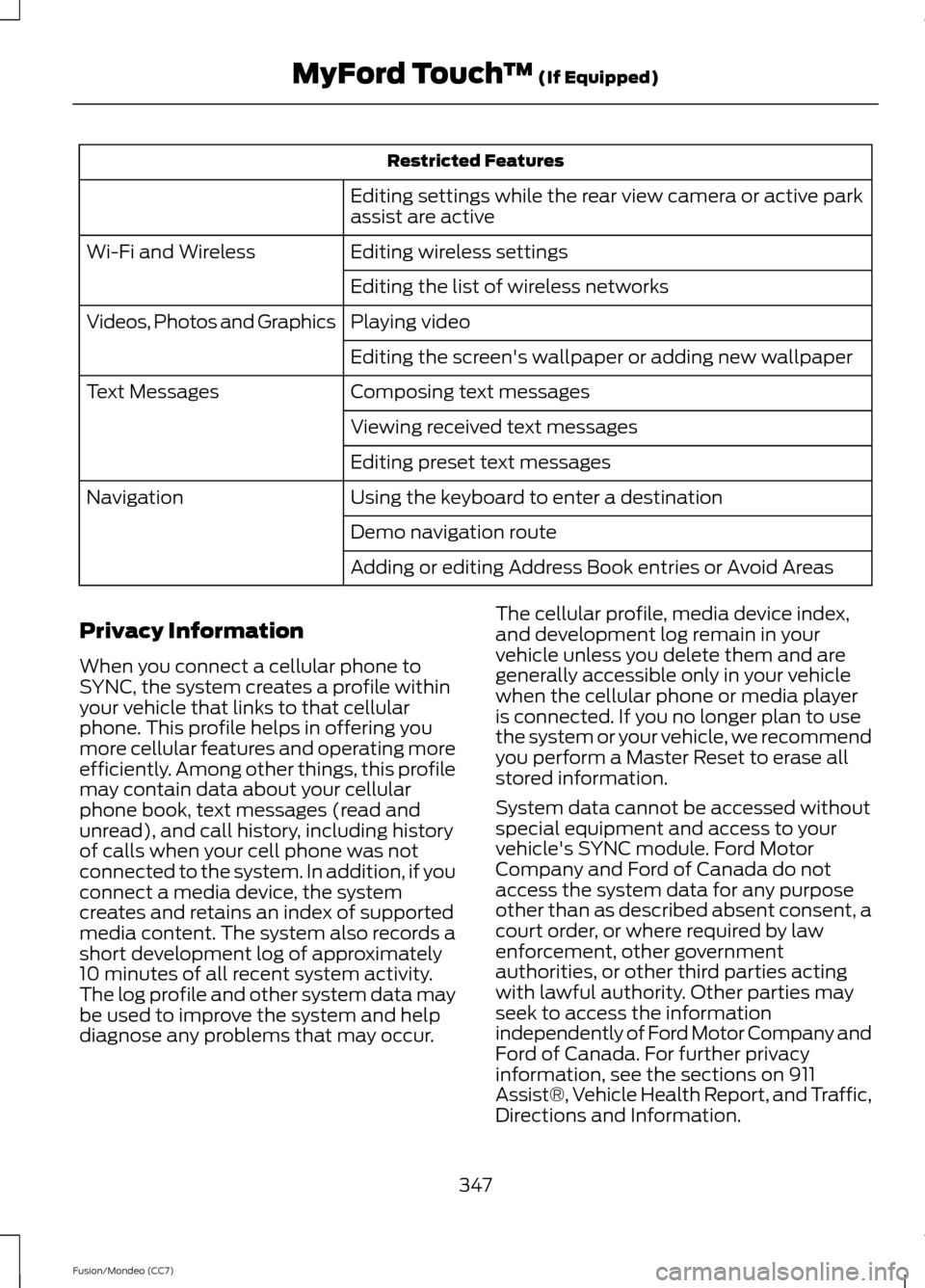
Restricted Features
Editing settings while the rear view camera or active park
assist are active
Editing wireless settings
Wi-Fi and Wireless
Editing the list of wireless networks
Playing video
Videos, Photos and Graphics
Editing the screen's wallpaper or adding new wallpaper
Composing text messages
Text Messages
Viewing received text messages
Editing preset text messages
Using the keyboard to enter a destination
Navigation
Demo navigation route
Adding or editing Address Book entries or Avoid Areas
Privacy Information
When you connect a cellular phone to
SYNC, the system creates a profile within
your vehicle that links to that cellular
phone. This profile helps in offering you
more cellular features and operating more
efficiently. Among other things, this profile
may contain data about your cellular
phone book, text messages (read and
unread), and call history, including history
of calls when your cell phone was not
connected to the system. In addition, if you
connect a media device, the system
creates and retains an index of supported
media content. The system also records a
short development log of approximately
10 minutes of all recent system activity.
The log profile and other system data may
be used to improve the system and help
diagnose any problems that may occur. The cellular profile, media device index,
and development log remain in your
vehicle unless you delete them and are
generally accessible only in your vehicle
when the cellular phone or media player
is connected. If you no longer plan to use
the system or your vehicle, we recommend
you perform a Master Reset to erase all
stored information.
System data cannot be accessed without
special equipment and access to your
vehicle's SYNC module. Ford Motor
Company and Ford of Canada do not
access the system data for any purpose
other than as described absent consent, a
court order, or where required by law
enforcement, other government
authorities, or other third parties acting
with lawful authority. Other parties may
seek to access the information
independently of Ford Motor Company and
Ford of Canada. For further privacy
information, see the sections on 911
Assist®, Vehicle Health Report, and Traffic,
Directions and Information.
347
Fusion/Mondeo (CC7) MyFord Touch
™ (If Equipped)
Page 364 of 458
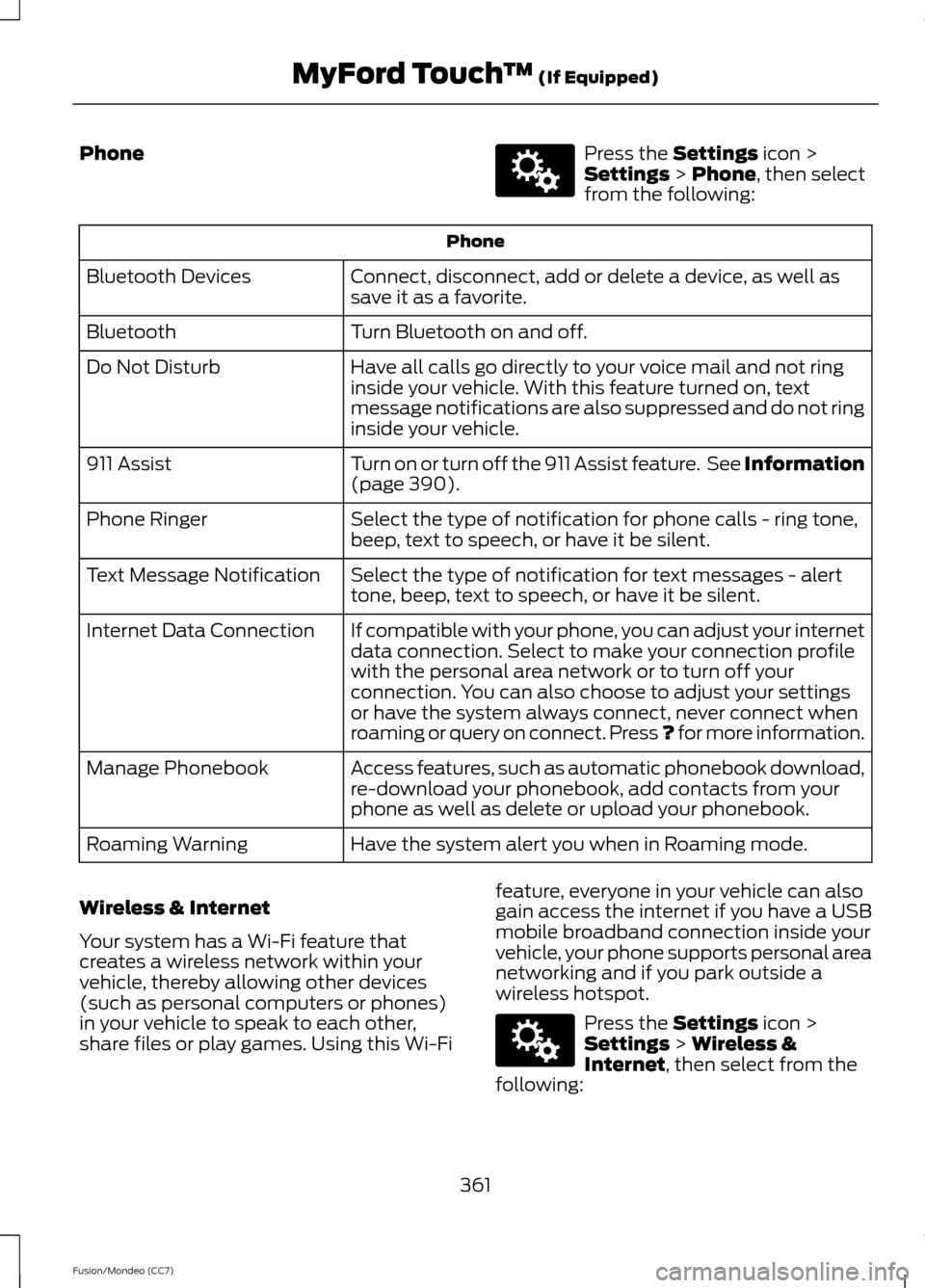
Phone Press the Settings icon >
Settings > Phone, then select
from the following: Phone
Connect, disconnect, add or delete a device, as well as
save it as a favorite.
Bluetooth Devices
Turn Bluetooth on and off.
Bluetooth
Have all calls go directly to your voice mail and not ring
inside your vehicle. With this feature turned on, text
message notifications are also suppressed and do not ring
inside your vehicle.
Do Not Disturb
Turn on or turn off the 911 Assist feature. See Information
(page
390).
911 Assist
Select the type of notification for phone calls - ring tone,
beep, text to speech, or have it be silent.
Phone Ringer
Select the type of notification for text messages - alert
tone, beep, text to speech, or have it be silent.
Text Message Notification
If compatible with your phone, you can adjust your internet
data connection. Select to make your connection profile
with the personal area network or to turn off your
connection. You can also choose to adjust your settings
or have the system always connect, never connect when
roaming or query on connect. Press ? for more information.
Internet Data Connection
Access features, such as automatic phonebook download,
re-download your phonebook, add contacts from your
phone as well as delete or upload your phonebook.
Manage Phonebook
Have the system alert you when in Roaming mode.
Roaming Warning
Wireless & Internet
Your system has a Wi-Fi feature that
creates a wireless network within your
vehicle, thereby allowing other devices
(such as personal computers or phones)
in your vehicle to speak to each other,
share files or play games. Using this Wi-Fi feature, everyone in your vehicle can also
gain access the internet if you have a USB
mobile broadband connection inside your
vehicle, your phone supports personal area
networking and if you park outside a
wireless hotspot. Press the
Settings icon >
Settings > Wireless &
Internet, then select from the
following:
361
Fusion/Mondeo (CC7) MyFord Touch
™
(If Equipped)E142607 E142607
Page 448 of 458
A
A/C
See: Climate Control.......................................... 118
About This Manual...........................................7
Protecting the Environment................................ 7
ABS See: Brakes............................................................. 171
ABS driving hints See: Hints on Driving With Anti-Lock
Brakes.................................................................. 171
Accessories...................................................300 Exterior style....................................................... 300
Interior style........................................................ 300
Lifestyle................................................................ 300
Peace of mind.................................................... 300
Accessories See: Replacement Parts
Recommendation............................................. 11
ACC See: Using Adaptive Cruise Control.............187
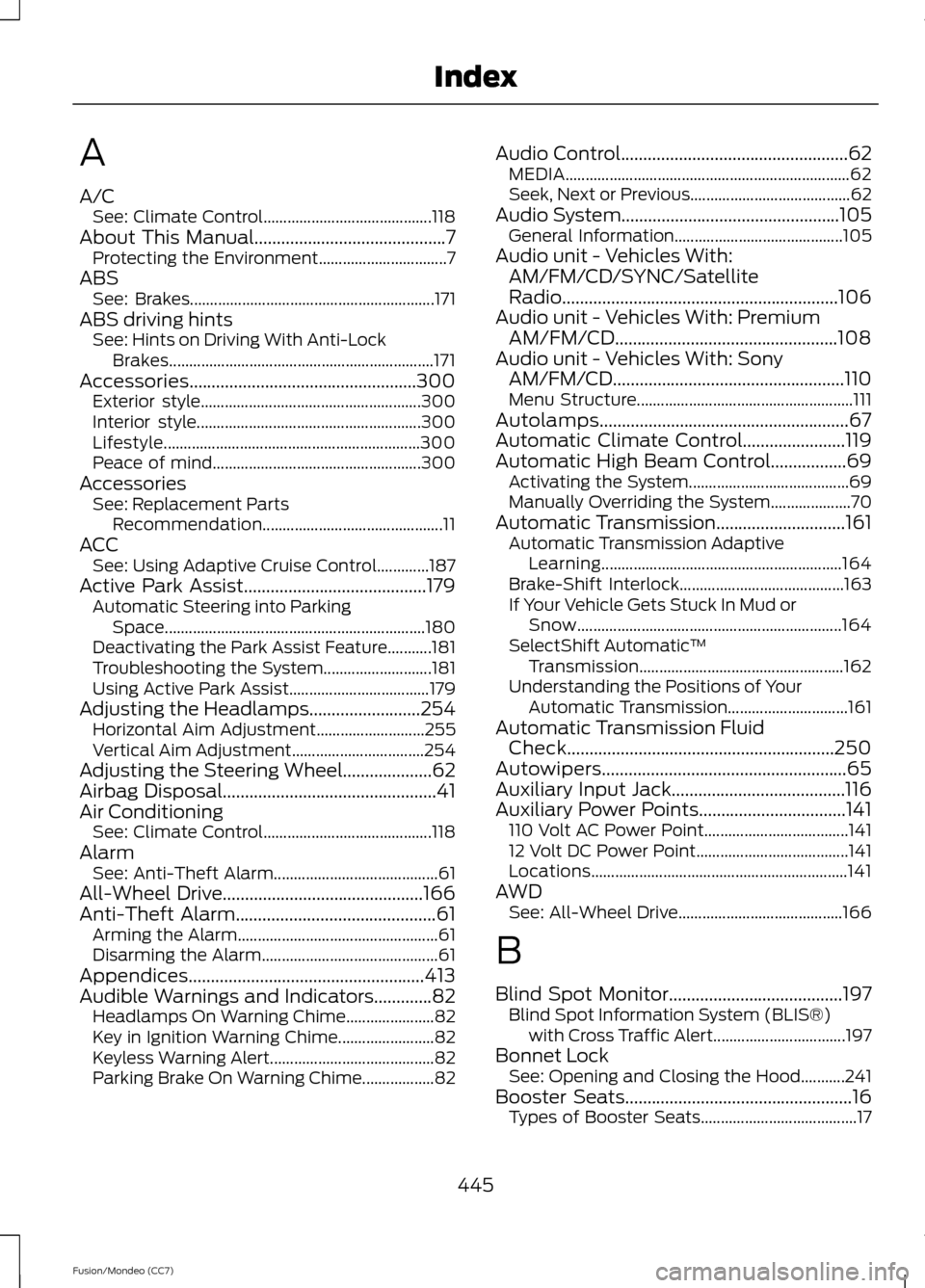
Active Park Assist.........................................179 Automatic Steering into Parking
Space................................................................. 180
Deactivating the Park Assist Feature...........181
Troubleshooting the System........................... 181
Using Active Park Assist................................... 179
Adjusting the Headlamps
.........................254
Horizontal Aim Adjustment........................... 255
Vertical Aim Adjustment................................. 254
Adjusting the Steering Wheel....................62
Airbag Disposal................................................41
Air Conditioning See: Climate Control.......................................... 118
Alarm See: Anti-Theft Alarm......................................... 61
All-Wheel Drive.............................................166
Anti-Theft Alarm
.............................................61
Arming the Alarm.................................................. 61
Disarming the Alarm............................................ 61
Appendices
.....................................................413
Audible Warnings and Indicators.............82 Headlamps On Warning Chime...................... 82
Key in Ignition Warning Chime........................ 82
Keyless Warning Alert......................................... 82
Parking Brake On Warning Chime.................. 82Audio Control
...................................................62
MEDIA....................................................................... 62
Seek, Next or Previous........................................ 62
Audio System
.................................................105
General Information.......................................... 105
Audio unit - Vehicles With: AM/FM/CD/SYNC/Satellite
Radio..............................................................106
Audio unit - Vehicles With: Premium AM/FM/CD..................................................108
Audio unit - Vehicles With: Sony AM/FM/CD....................................................110
Menu Structure...................................................... 111
Autolamps........................................................67
Automatic Climate Control.......................119
Automatic High Beam Control
.................69
Activating the System........................................ 69
Manually Overriding the System.................... 70
Automatic Transmission
.............................161
Automatic Transmission Adaptive
Learning............................................................ 164
Brake-Shift Interlock......................................... 163
If Your Vehicle Gets Stuck In Mud or Snow.................................................................. 164
SelectShift Automatic ™
Transmission................................................... 162
Understanding the Positions of Your Automatic Transmission.............................. 161
Automatic Transmission Fluid Check............................................................250
Autowipers.......................................................65
Auxiliary Input Jack.......................................116
Auxiliary Power Points.................................141 110 Volt AC Power Point.................................... 141
12 Volt DC Power Point...................................... 141
Locations................................................................ 141
AWD See: All-Wheel Drive......................................... 166
B
Blind Spot Monitor
.......................................197
Blind Spot Information System (BLIS®)
with Cross Traffic Alert................................. 197
Bonnet Lock See: Opening and Closing the Hood...........241
Booster Seats
...................................................16
Types of Booster Seats....................................... 17
445
Fusion/Mondeo (CC7) Index
Page 452 of 458
Information Messages..................................91
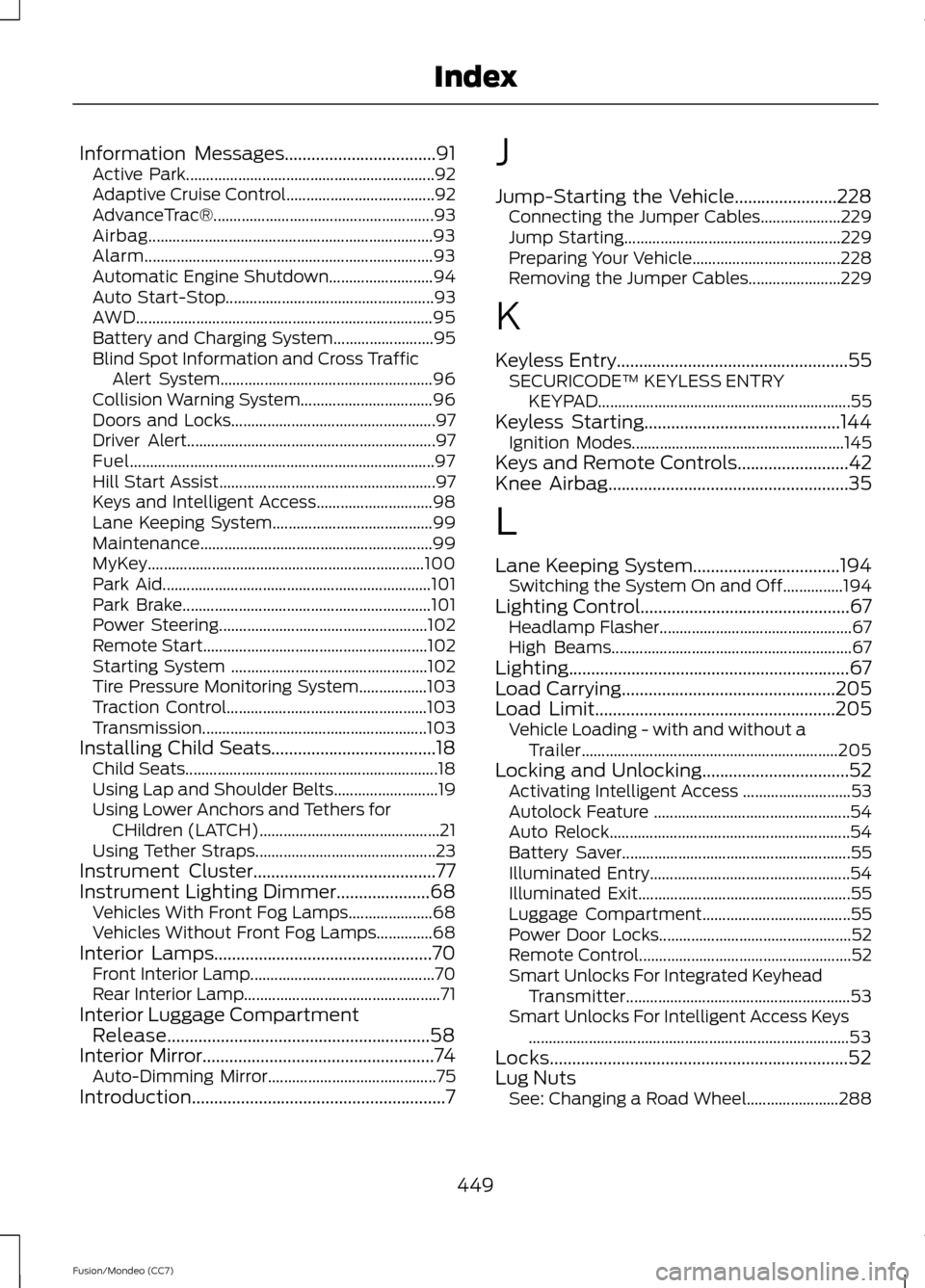
Active Park.............................................................. 92
Adaptive Cruise Control..................................... 92
AdvanceTrac®....................................................... 93
Airbag....................................................................... 93
Alarm........................................................................\
93
Automatic Engine Shutdown.......................... 94
Auto Start-Stop.................................................... 93
AWD........................................................................\
.. 95
Battery and Charging System......................... 95
Blind Spot Information and Cross Traffic Alert System..................................................... 96
Collision Warning System................................. 96
Doors and Locks................................................... 97
Driver Alert.............................................................. 97
Fuel........................................................................\
.... 97
Hill Start Assist...................................................... 97
Keys and Intelligent Access............................. 98
Lane Keeping System........................................ 99
Maintenance.......................................................... 99
MyKey..................................................................... 100
Park Aid................................................................... 101
Park Brake.............................................................. 101
Power Steering.................................................... 102
Remote Start........................................................ 102
Starting System ................................................. 102
Tire Pressure Monitoring System.................103
Traction Control.................................................. 103
Transmission........................................................ 103
Installing Child Seats
.....................................18
Child Seats............................................................... 18
Using Lap and Shoulder Belts.......................... 19
Using Lower Anchors and Tethers for CHildren (LATCH)............................................. 21
Using Tether Straps............................................. 23
Instrument Cluster
.........................................77
Instrument Lighting Dimmer.....................68 Vehicles With Front Fog Lamps..................... 68
Vehicles Without Front Fog Lamps..............68
Interior Lamps.................................................70 Front Interior Lamp.............................................. 70
Rear Interior Lamp................................................. 71
Interior Luggage Compartment Release...........................................................58
Interior Mirror
....................................................74
Auto-Dimming Mirror.......................................... 75
Introduction.........................................................7 J
Jump-Starting the Vehicle.......................228
Connecting the Jumper Cables.................... 229
Jump Starting...................................................... 229
Preparing Your Vehicle..................................... 228
Removing the Jumper Cables....................... 229
K
Keyless Entry....................................................55 SECURICODE™ KEYLESS ENTRY
KEYPAD
............................................................... 55
Keyless Starting............................................144
Ignition Modes..................................................... 145
Keys and Remote Controls
.........................42
Knee Airbag......................................................35
L
Lane Keeping System.................................194 Switching the System On and Off...............194
Lighting Control...............................................67 Headlamp Flasher................................................ 67
High Beams............................................................ 67
Lighting...............................................................67
Load Carrying
................................................205
Load Limit......................................................205 Vehicle Loading - with and without a
Trailer................................................................ 205
Locking and Unlocking.................................52 Activating Intelligent Access ........................... 53
Autolock Feature ................................................. 54
Auto Relock............................................................ 54
Battery Saver......................................................... 55
Illuminated Entry.................................................. 54
Illuminated Exit..................................................... 55
Luggage Compartment..................................... 55
Power Door Locks................................................ 52
Remote Control..................................................... 52
Smart Unlocks For Integrated Keyhead Transmitter........................................................ 53
Smart Unlocks For Intelligent Access Keys ........................................................................\
........ 53
Locks...................................................................52
Lug Nuts See: Changing a Road Wheel....................... 288
449
Fusion/Mondeo (CC7) Index