mirror FORD FUSION (AMERICAS) 2014 2.G User Guide
[x] Cancel search | Manufacturer: FORD, Model Year: 2014, Model line: FUSION (AMERICAS), Model: FORD FUSION (AMERICAS) 2014 2.GPages: 458, PDF Size: 27.89 MB
Page 117 of 458
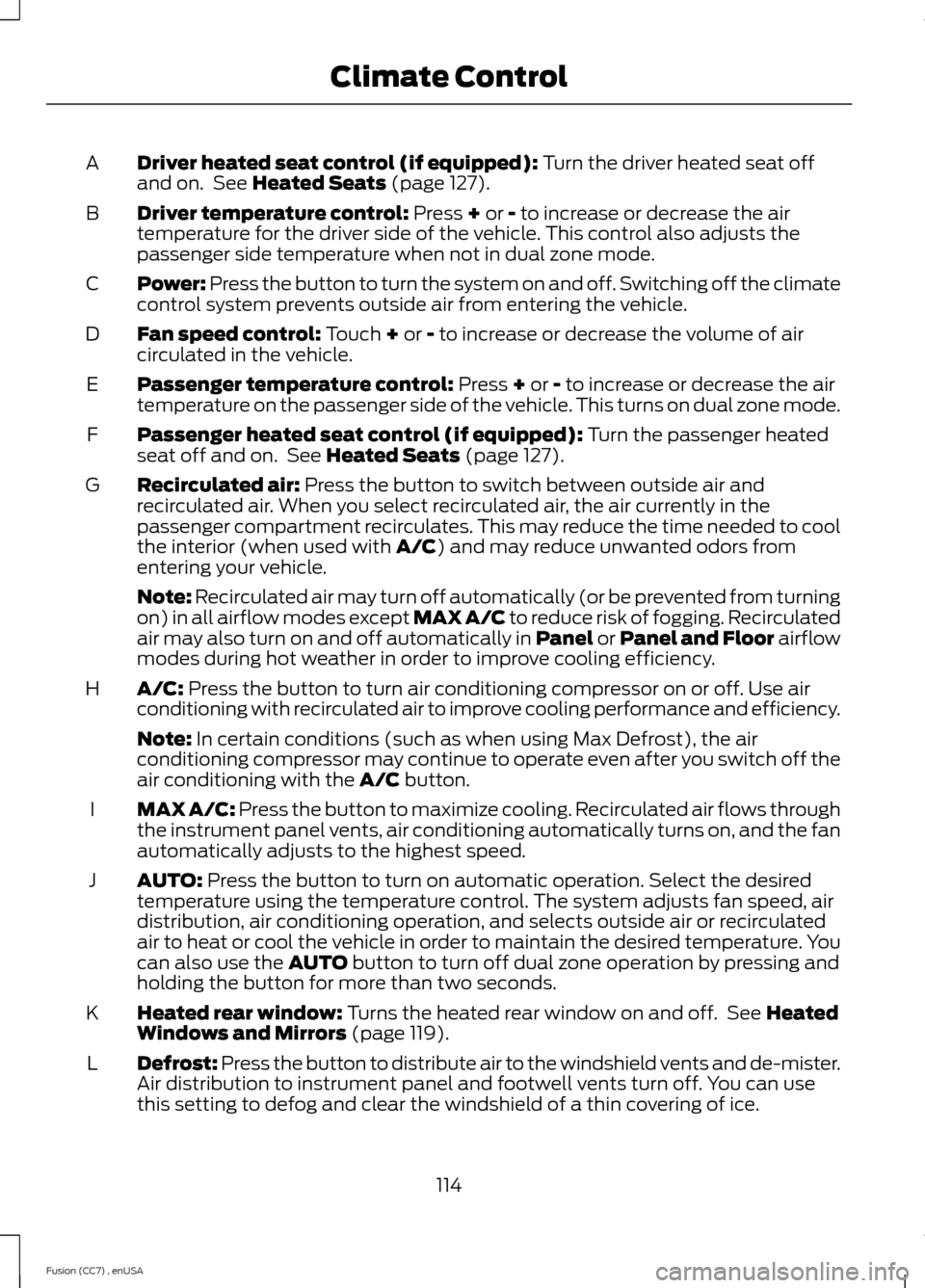
Driver heated seat control (if equipped): Turn the driver heated seat offand on. See Heated Seats (page 127).A
Driver temperature control: Press + or - to increase or decrease the airtemperature for the driver side of the vehicle. This control also adjusts thepassenger side temperature when not in dual zone mode.
B
Power: Press the button to turn the system on and off. Switching off the climatecontrol system prevents outside air from entering the vehicle.C
Fan speed control: Touch + or - to increase or decrease the volume of aircirculated in the vehicle.D
Passenger temperature control: Press + or - to increase or decrease the airtemperature on the passenger side of the vehicle. This turns on dual zone mode.E
Passenger heated seat control (if equipped): Turn the passenger heatedseat off and on. See Heated Seats (page 127).F
Recirculated air: Press the button to switch between outside air andrecirculated air. When you select recirculated air, the air currently in thepassenger compartment recirculates. This may reduce the time needed to coolthe interior (when used with A/C) and may reduce unwanted odors fromentering your vehicle.
G
Note: Recirculated air may turn off automatically (or be prevented from turningon) in all airflow modes except MAX A/C to reduce risk of fogging. Recirculatedair may also turn on and off automatically in Panel or Panel and Floor airflowmodes during hot weather in order to improve cooling efficiency.
A/C: Press the button to turn air conditioning compressor on or off. Use airconditioning with recirculated air to improve cooling performance and efficiency.H
Note: In certain conditions (such as when using Max Defrost), the airconditioning compressor may continue to operate even after you switch off theair conditioning with the A/C button.
MAX A/C: Press the button to maximize cooling. Recirculated air flows throughthe instrument panel vents, air conditioning automatically turns on, and the fanautomatically adjusts to the highest speed.
I
AUTO: Press the button to turn on automatic operation. Select the desiredtemperature using the temperature control. The system adjusts fan speed, airdistribution, air conditioning operation, and selects outside air or recirculatedair to heat or cool the vehicle in order to maintain the desired temperature. Youcan also use the AUTO button to turn off dual zone operation by pressing andholding the button for more than two seconds.
J
Heated rear window: Turns the heated rear window on and off. See HeatedWindows and Mirrors (page 119).K
Defrost: Press the button to distribute air to the windshield vents and de-mister.Air distribution to instrument panel and footwell vents turn off. You can usethis setting to defog and clear the windshield of a thin covering of ice.
L
114Fusion (CC7) , enUSAClimate Control
Page 119 of 458
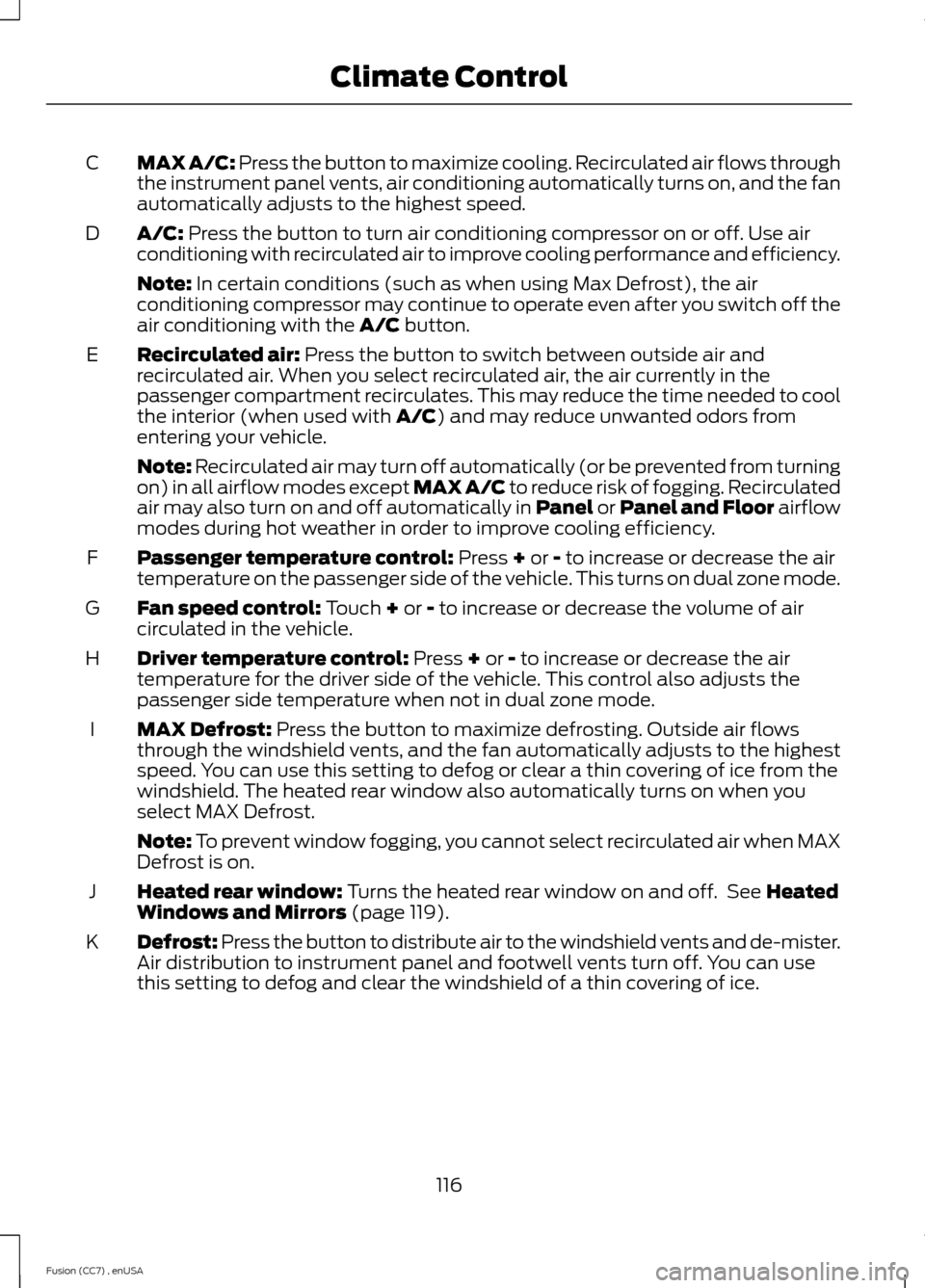
MAX A/C: Press the button to maximize cooling. Recirculated air flows throughthe instrument panel vents, air conditioning automatically turns on, and the fanautomatically adjusts to the highest speed.
C
A/C: Press the button to turn air conditioning compressor on or off. Use airconditioning with recirculated air to improve cooling performance and efficiency.D
Note: In certain conditions (such as when using Max Defrost), the airconditioning compressor may continue to operate even after you switch off theair conditioning with the A/C button.
Recirculated air: Press the button to switch between outside air andrecirculated air. When you select recirculated air, the air currently in thepassenger compartment recirculates. This may reduce the time needed to coolthe interior (when used with A/C) and may reduce unwanted odors fromentering your vehicle.
E
Note: Recirculated air may turn off automatically (or be prevented from turningon) in all airflow modes except MAX A/C to reduce risk of fogging. Recirculatedair may also turn on and off automatically in Panel or Panel and Floor airflowmodes during hot weather in order to improve cooling efficiency.
Passenger temperature control: Press + or - to increase or decrease the airtemperature on the passenger side of the vehicle. This turns on dual zone mode.F
Fan speed control: Touch + or - to increase or decrease the volume of aircirculated in the vehicle.G
Driver temperature control: Press + or - to increase or decrease the airtemperature for the driver side of the vehicle. This control also adjusts thepassenger side temperature when not in dual zone mode.
H
MAX Defrost: Press the button to maximize defrosting. Outside air flowsthrough the windshield vents, and the fan automatically adjusts to the highestspeed. You can use this setting to defog or clear a thin covering of ice from thewindshield. The heated rear window also automatically turns on when youselect MAX Defrost.
I
Note: To prevent window fogging, you cannot select recirculated air when MAXDefrost is on.
Heated rear window: Turns the heated rear window on and off. See HeatedWindows and Mirrors (page 119).J
Defrost: Press the button to distribute air to the windshield vents and de-mister.Air distribution to instrument panel and footwell vents turn off. You can usethis setting to defog and clear the windshield of a thin covering of ice.
K
116Fusion (CC7) , enUSAClimate Control
Page 122 of 458
Side Window Defogging in Cold Weather
Vehicle With Automatic Climate ControlVehicle With Manual Climate Control
Press the defrost button.Select the instrument panel and footwellair vents positions through the air distri-bution control.
1
Adjust the temperature control to thedesired setting. Use 72°F (22°C) as astarting point, then adjust the setting asnecessary.
Press the A/C button.2
Adjust the temperature control to thedesired setting.3
Adjust the fan speed to the highestsetting.4
Direct the instrument panel side air ventstoward the side windows.5
Close the instrument panel center vents.6
HEATED WINDOWS AND
MIRRORS (IF EQUIPPED)
Heated Rear Window
Note:You must switch the ignition on touse this feature.
Press the button to clear therear window of thin ice and fog.It switches off automaticallyafter 10 minutes, or when you switch offthe ignition. You can also press the buttonagain to switch it off.
Do not use razor blades or other sharpobjects to clean the inside of the rearwindow or to remove decals from theinside of the rear window. This maycause damage to the heated grid lines.Your warranty does not cover thisdamage.
Heated Exterior Mirror (If Equipped)
Note:Do not remove ice from the mirrorswith a scraper or attempt to readjust themirror glass that has frozen in place. Theseactions could cause damage to the glassand mirrors.
Note:Do not clean the housing or glass ofany mirror with harsh abrasives, fuel or otherpetroleum-based cleaning products.
The heated mirrors remove ice, mist andfog when you switch on the heated rearwindow.
CABIN AIR FILTER
Your vehicle is equipped with a cabin airfilter. It is located behind the glove box.
The particulate filtration system reducesthe concentration of airborne particlessuch as dust, spores and pollen in the airsupplied to the interior of your vehicle.
119Fusion (CC7) , enUSAClimate ControlE72507
Page 123 of 458
Note:Make sure you have a cabin air filterinstalled at all times. This prevents foreignobjects from entering the system. Runningthe system without a filter in place couldresult in degradation or damage to thesystem.
The particulate filtration system gives youand your passengers the followingbenefits:
•It improves your driving comfort byreducing particle concentration.
•It improves the interior compartmentcleanliness.
•It protects the climate controlcomponents from particle deposits.
Replace the filter at regular intervals. SeeScheduled Maintenance (page 428).
For additional cabin air filter information,or to replace the filter, see an authorizeddealer.
REMOTE START (IF EQUIPPED)
The remote start feature allows you topre-condition the interior of your vehicle.The climate control system works toachieve comfort according to your previoussettings.
Note:You cannot adjust the system duringremote start operation.
Turn the ignition on to return the systemto its previous settings. You can now makeadjustments normally, but you need to turncertain vehicle-dependent features backon, such as:
•Heated seats.
•Cooled seats.
•Heated steering wheel.
•Heated mirrors.
•Heated rear window.
You can adjust the default remote startsettings using the information displaycontrols. See Information Displays(page 87).
Automatic Settings
In hot weather, the system is set to 72°F(22°C). The cooled seats are set to high(if available, and selected to AUTO in theinformation display).
In moderate weather, the system eitherheats or cools (based on previoussettings). The rear defroster, heatedmirrors and heated seats do notautomatically turn on.
In cold weather, the system is set to 72°F(22°C). The heated seats are set to high(if available, and selected to AUTO in theinformation display). The rear defrosterand heated mirrors automatically turn on.
120Fusion (CC7) , enUSAClimate Control
Page 127 of 458
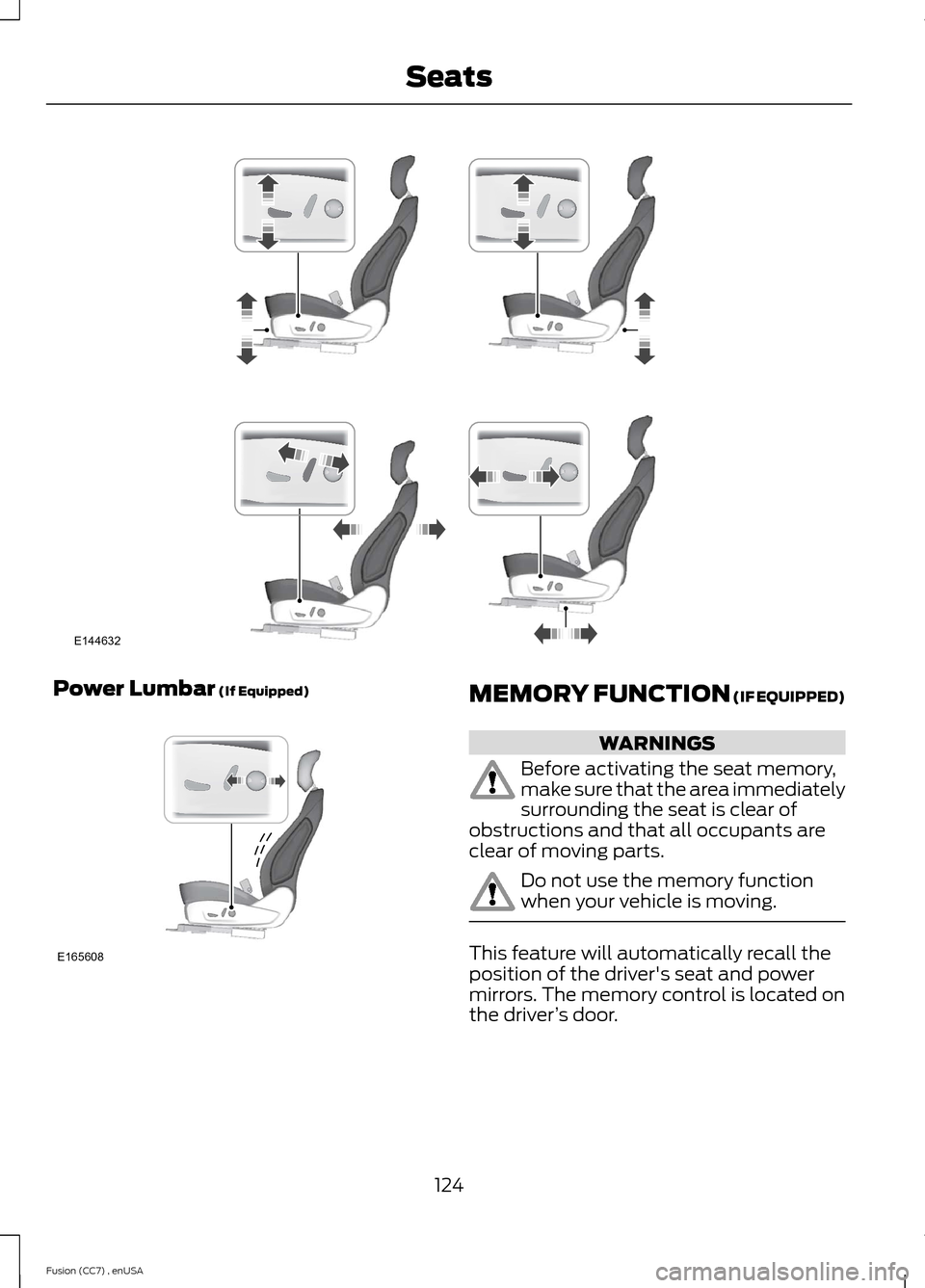
Power Lumbar (If Equipped)MEMORY FUNCTION (IF EQUIPPED)
WARNINGS
Before activating the seat memory,make sure that the area immediatelysurrounding the seat is clear ofobstructions and that all occupants areclear of moving parts.
Do not use the memory functionwhen your vehicle is moving.
This feature will automatically recall theposition of the driver's seat and powermirrors. The memory control is located onthe driver’s door.
124Fusion (CC7) , enUSASeatsE144632 E165608
Page 128 of 458
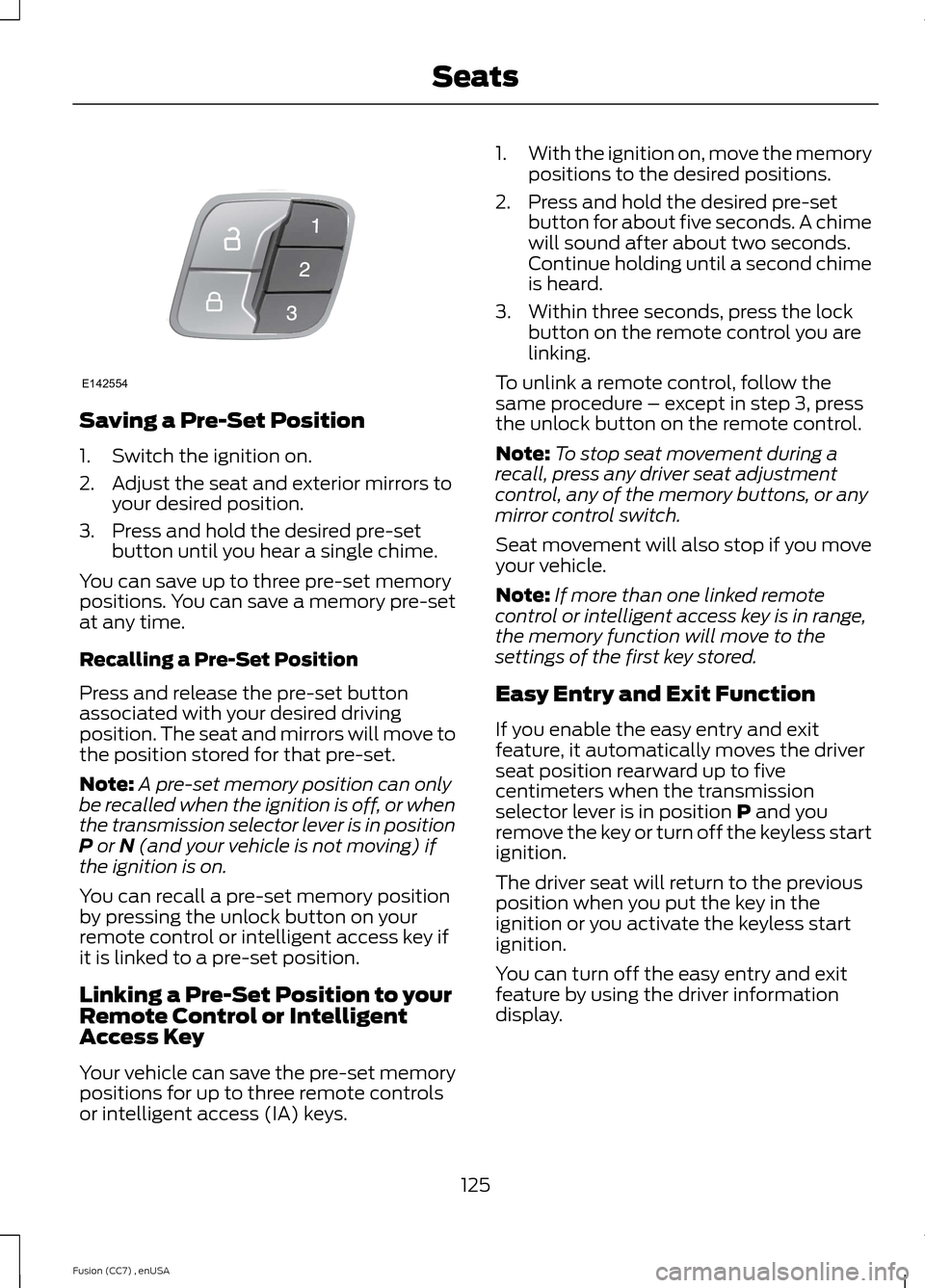
Saving a Pre-Set Position
1.Switch the ignition on.
2.Adjust the seat and exterior mirrors toyour desired position.
3.Press and hold the desired pre-setbutton until you hear a single chime.
You can save up to three pre-set memorypositions. You can save a memory pre-setat any time.
Recalling a Pre-Set Position
Press and release the pre-set buttonassociated with your desired drivingposition. The seat and mirrors will move tothe position stored for that pre-set.
Note:A pre-set memory position can onlybe recalled when the ignition is off, or whenthe transmission selector lever is in positionP or N (and your vehicle is not moving) ifthe ignition is on.
You can recall a pre-set memory positionby pressing the unlock button on yourremote control or intelligent access key ifit is linked to a pre-set position.
Linking a Pre-Set Position to yourRemote Control or IntelligentAccess Key
Your vehicle can save the pre-set memorypositions for up to three remote controlsor intelligent access (IA) keys.
1.With the ignition on, move the memorypositions to the desired positions.
2.Press and hold the desired pre-setbutton for about five seconds. A chimewill sound after about two seconds.Continue holding until a second chimeis heard.
3.Within three seconds, press the lockbutton on the remote control you arelinking.
To unlink a remote control, follow thesame procedure – except in step 3, pressthe unlock button on the remote control.
Note:To stop seat movement during arecall, press any driver seat adjustmentcontrol, any of the memory buttons, or anymirror control switch.
Seat movement will also stop if you moveyour vehicle.
Note:If more than one linked remotecontrol or intelligent access key is in range,the memory function will move to thesettings of the first key stored.
Easy Entry and Exit Function
If you enable the easy entry and exitfeature, it automatically moves the driverseat position rearward up to fivecentimeters when the transmissionselector lever is in position P and youremove the key or turn off the keyless startignition.
The driver seat will return to the previousposition when you put the key in theignition or you activate the keyless startignition.
You can turn off the easy entry and exitfeature by using the driver informationdisplay.
125Fusion (CC7) , enUSASeatsE142554
Page 178 of 458
![FORD FUSION (AMERICAS) 2014 2.G User Guide The system does not position the vehicle where I want in the space
Your vehicle is rolling in the opposite direction of the transmission (rolling forward whenReverse [R] is selected)
An irregular curb](/img/11/5191/w960_5191-177.png "FORD FUSION (AMERICAS) 2014 2.G User Guide The system does not position the vehicle where I want in the space
Your vehicle is rolling in the opposite direction of the transmission (rolling forward whenReverse [R] is selected)
An irregular curb")
The system does not position the vehicle where I want in the space
Your vehicle is rolling in the opposite direction of the transmission (rolling forward whenReverse [R] is selected)
An irregular curb along the parking space prevents the system from aligning your vehicleproperly
Vehicles or objects bordering the space may not be positioned correctly
You pulled your vehicle too far past the parking space. The system performs best whenyou drive the same distance past the parking space
The tires may not be installed or maintained correctly (not inflated correctly, impropersize, or of different sizes)
A repair or alteration has changed detection capabilities
A parked vehicle has a high attachment (salt sprayer, snowplow, moving truck bed,etc.)
The parking space length or position of parked objects changed after your vehicle passed
The temperature around your vehicle changes quickly (driving from a heated garageinto the cold, or after leaving a car wash)
REAR VIEW CAMERA (IF EQUIPPED)
WARNINGS
The rear view camera system is areverse aid supplement device thatstill requires the driver to use it inconjunction with the interior and exteriormirrors for maximum coverage.
Objects that are close to eithercorner of the bumper or under thebumper, might not be seen on thescreen due to the limited coverage of thecamera system.
Back up as slow as possible sincehigher speeds might limit yourreaction time to stop the vehicle.
WARNINGS
Use caution when using the rearvideo camera and the trunk is ajar. Ifthe trunk is ajar, the camera will beout of position and the video image maybe incorrect. All guidelines (if enabled)have been removed when the trunk is ajar.
Use caution when turning camerafeatures on or off while in R(Reverse). Make sure the vehicle isnot moving.
The rear view camera system provides avideo image of the area behind the vehicle.The image will be displayed in either in therear view mirror or the display in the centerof the instrument panel.
During operation, lines appear in thedisplay which represent your vehicle’s pathand proximity to objects behind the vehicle.
175Fusion (CC7) , enUSAParking Aids
Page 180 of 458
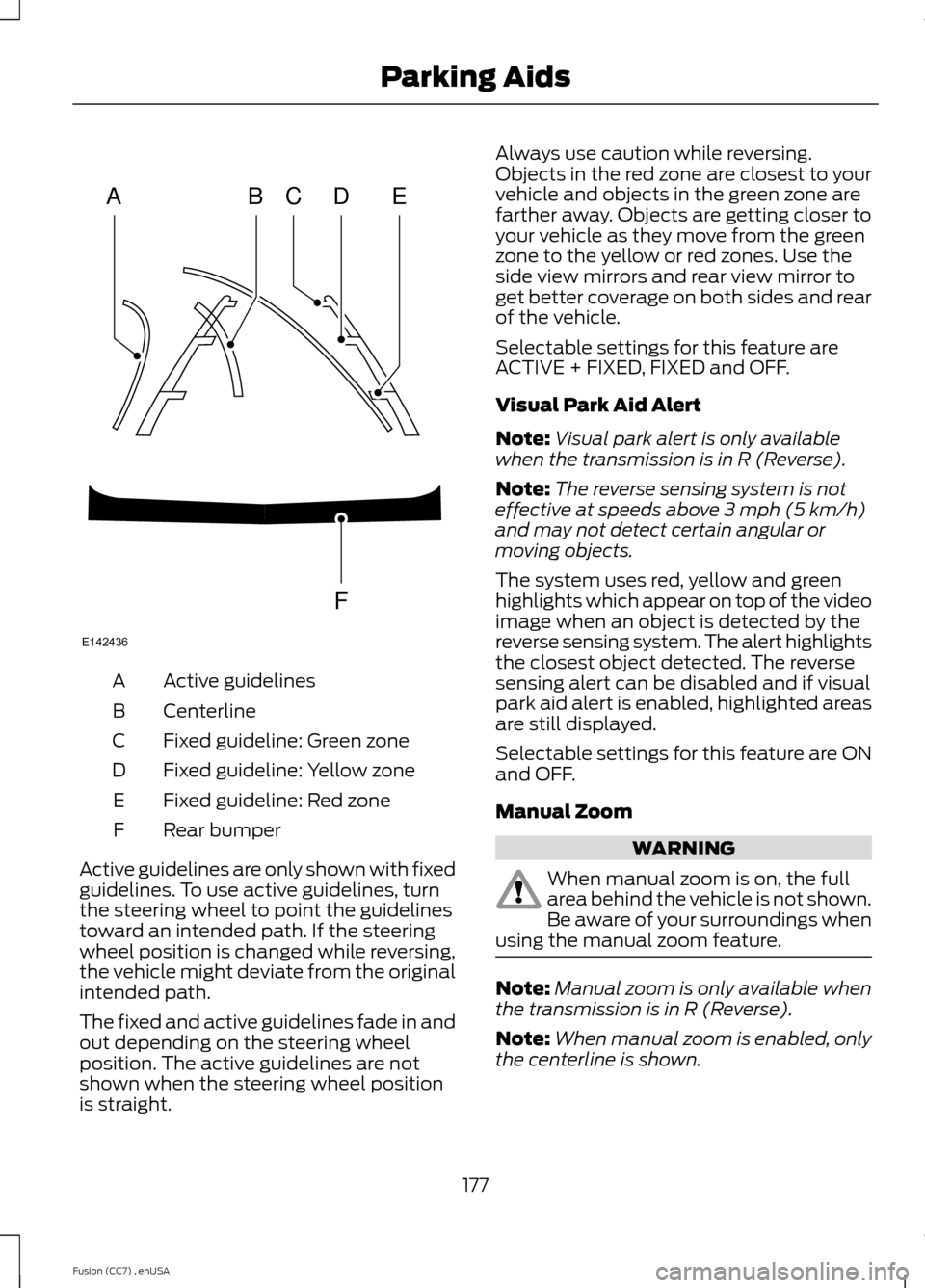
Active guidelinesA
CenterlineB
Fixed guideline: Green zoneC
Fixed guideline: Yellow zoneD
Fixed guideline: Red zoneE
Rear bumperF
Active guidelines are only shown with fixedguidelines. To use active guidelines, turnthe steering wheel to point the guidelinestoward an intended path. If the steeringwheel position is changed while reversing,the vehicle might deviate from the originalintended path.
The fixed and active guidelines fade in andout depending on the steering wheelposition. The active guidelines are notshown when the steering wheel positionis straight.
Always use caution while reversing.Objects in the red zone are closest to yourvehicle and objects in the green zone arefarther away. Objects are getting closer toyour vehicle as they move from the greenzone to the yellow or red zones. Use theside view mirrors and rear view mirror toget better coverage on both sides and rearof the vehicle.
Selectable settings for this feature areACTIVE + FIXED, FIXED and OFF.
Visual Park Aid Alert
Note:Visual park alert is only availablewhen the transmission is in R (Reverse).
Note:The reverse sensing system is noteffective at speeds above 3 mph (5 km/h)and may not detect certain angular ormoving objects.
The system uses red, yellow and greenhighlights which appear on top of the videoimage when an object is detected by thereverse sensing system. The alert highlightsthe closest object detected. The reversesensing alert can be disabled and if visualpark aid alert is enabled, highlighted areasare still displayed.
Selectable settings for this feature are ONand OFF.
Manual Zoom
WARNING
When manual zoom is on, the fullarea behind the vehicle is not shown.Be aware of your surroundings whenusing the manual zoom feature.
Note:Manual zoom is only available whenthe transmission is in R (Reverse).
Note:When manual zoom is enabled, onlythe centerline is shown.
177Fusion (CC7) , enUSAParking AidsABCDFEE142436
Page 190 of 458
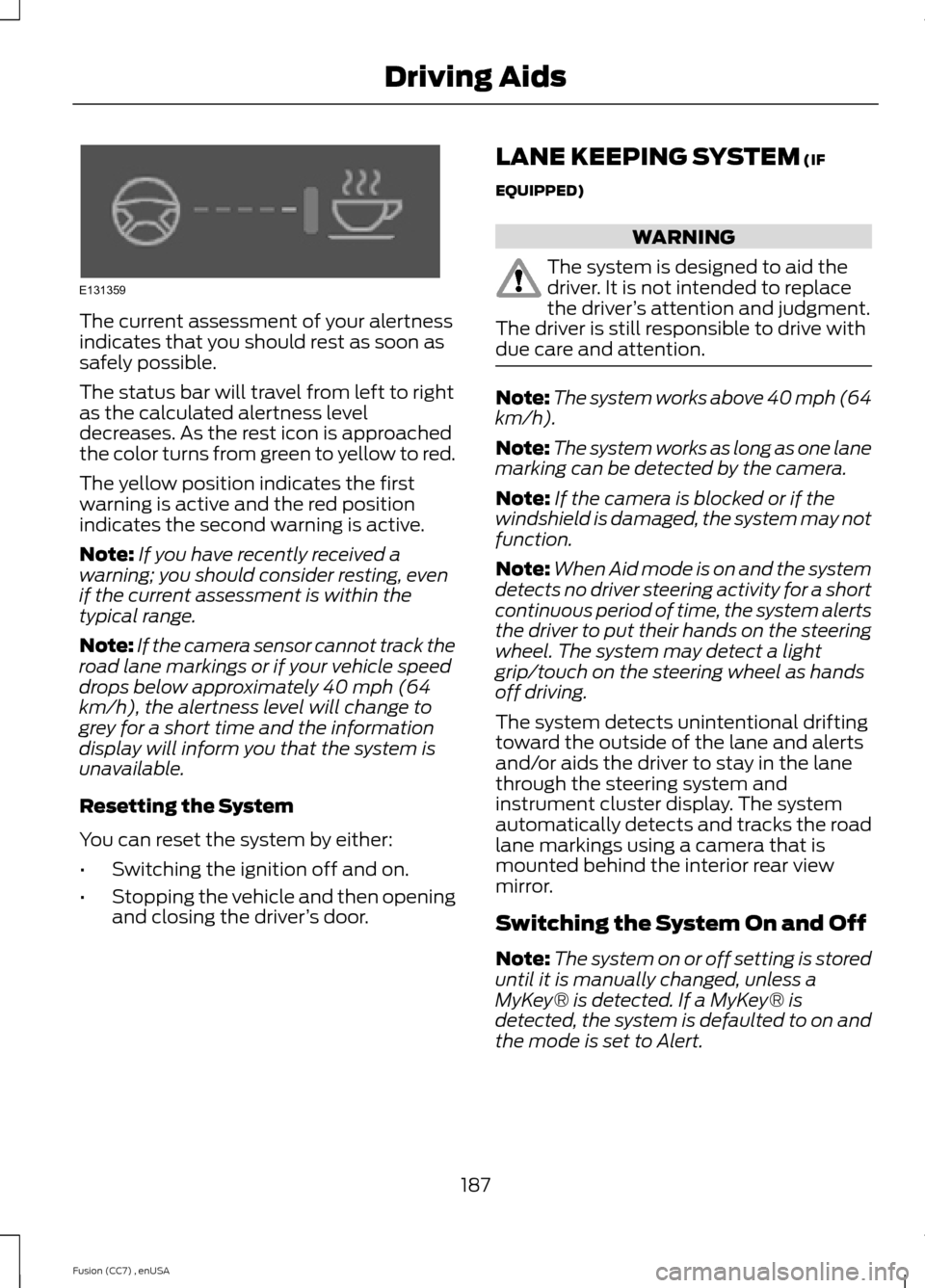
The current assessment of your alertnessindicates that you should rest as soon assafely possible.
The status bar will travel from left to rightas the calculated alertness leveldecreases. As the rest icon is approachedthe color turns from green to yellow to red.
The yellow position indicates the firstwarning is active and the red positionindicates the second warning is active.
Note:If you have recently received awarning; you should consider resting, evenif the current assessment is within thetypical range.
Note:If the camera sensor cannot track theroad lane markings or if your vehicle speeddrops below approximately 40 mph (64km/h), the alertness level will change togrey for a short time and the informationdisplay will inform you that the system isunavailable.
Resetting the System
You can reset the system by either:
•Switching the ignition off and on.
•Stopping the vehicle and then openingand closing the driver’s door.
LANE KEEPING SYSTEM (IF
EQUIPPED)
WARNING
The system is designed to aid thedriver. It is not intended to replacethe driver’s attention and judgment.The driver is still responsible to drive withdue care and attention.
Note:The system works above 40 mph (64km/h).
Note:The system works as long as one lanemarking can be detected by the camera.
Note:If the camera is blocked or if thewindshield is damaged, the system may notfunction.
Note:When Aid mode is on and the systemdetects no driver steering activity for a shortcontinuous period of time, the system alertsthe driver to put their hands on the steeringwheel. The system may detect a lightgrip/touch on the steering wheel as handsoff driving.
The system detects unintentional driftingtoward the outside of the lane and alertsand/or aids the driver to stay in the lanethrough the steering system andinstrument cluster display. The systemautomatically detects and tracks the roadlane markings using a camera that ismounted behind the interior rear viewmirror.
Switching the System On and Off
Note:The system on or off setting is storeduntil it is manually changed, unless aMyKey® is detected. If a MyKey® isdetected, the system is defaulted to on andthe mode is set to Alert.
187Fusion (CC7) , enUSADriving AidsE131359
Page 194 of 458
BLIND SPOT INFORMATION
SYSTEM
Blind Spot Information System(BLIS®) with Cross Traffic Alert (If
Equipped)
WARNING
To help avoid injuries, NEVER use theBlind Spot Information System as areplacement for using the interiorand exterior mirrors and looking over yourshoulder before changing lanes. The BlindSpot Information System is not areplacement for careful driving.
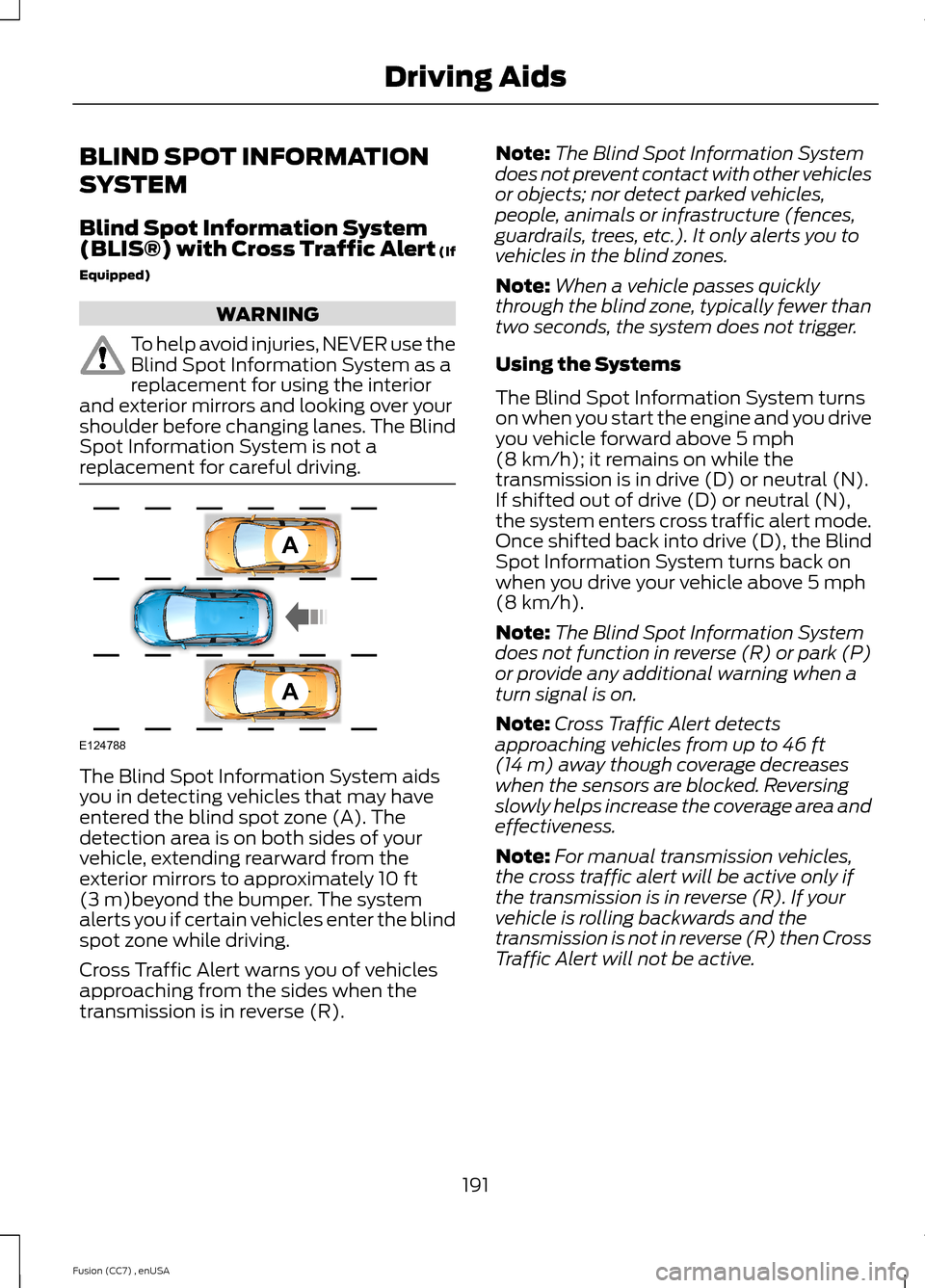
The Blind Spot Information System aidsyou in detecting vehicles that may haveentered the blind spot zone (A). Thedetection area is on both sides of yourvehicle, extending rearward from theexterior mirrors to approximately 10 ft(3 m)beyond the bumper. The systemalerts you if certain vehicles enter the blindspot zone while driving.
Cross Traffic Alert warns you of vehiclesapproaching from the sides when thetransmission is in reverse (R).
Note:The Blind Spot Information Systemdoes not prevent contact with other vehiclesor objects; nor detect parked vehicles,people, animals or infrastructure (fences,guardrails, trees, etc.). It only alerts you tovehicles in the blind zones.
Note:When a vehicle passes quicklythrough the blind zone, typically fewer thantwo seconds, the system does not trigger.
Using the Systems
The Blind Spot Information System turnson when you start the engine and you driveyou vehicle forward above 5 mph(8 km/h); it remains on while thetransmission is in drive (D) or neutral (N).If shifted out of drive (D) or neutral (N),the system enters cross traffic alert mode.Once shifted back into drive (D), the BlindSpot Information System turns back onwhen you drive your vehicle above 5 mph(8 km/h).
Note:The Blind Spot Information Systemdoes not function in reverse (R) or park (P)or provide any additional warning when aturn signal is on.
Note:Cross Traffic Alert detectsapproaching vehicles from up to 46 ft(14 m) away though coverage decreaseswhen the sensors are blocked. Reversingslowly helps increase the coverage area andeffectiveness.
Note:For manual transmission vehicles,the cross traffic alert will be active only ifthe transmission is in reverse (R). If yourvehicle is rolling backwards and thetransmission is not in reverse (R) then CrossTraffic Alert will not be active.
191Fusion (CC7) , enUSADriving AidsAAE124788