climate settings FORD FUSION (AMERICAS) 2014 2.G Owners Manual
[x] Cancel search | Manufacturer: FORD, Model Year: 2014, Model line: FUSION (AMERICAS), Model: FORD FUSION (AMERICAS) 2014 2.GPages: 458, PDF Size: 27.89 MB
Page 8 of 458
Digital Radio..................................................302
Satellite Radio..............................................305
Audio Input Jack...........................................307
USB Port.........................................................308
Media Hub.....................................................308
SYNC™
General Information...................................309
Using Voice Recognition.............................311
Using SYNC™ With Your Phone.............313
SYNC™ Applications and Services......325
Using SYNC™ With Your MediaPlayer............................................................332
SYNC™ Troubleshooting.........................340
MyFord Touch™
General Information...................................346
Settings...........................................................354
Entertainment..............................................364
Phone...............................................................382
Information....................................................387
Climate............................................................396
Navigation.....................................................400
Accessories
Accessories...................................................409
Appendices
End User License Agreement....................411
Extended Service Plan(ESP)
Extended Service Plan (ESP).................426
Scheduled Maintenance
General Maintenance Information.......428
Normal Scheduled Maintenance...........431
Special Operating Conditions ScheduledMaintenance.............................................434
Scheduled Maintenance Record...........436
5Fusion (CC7) , enUSATable of Contents
Page 97 of 458
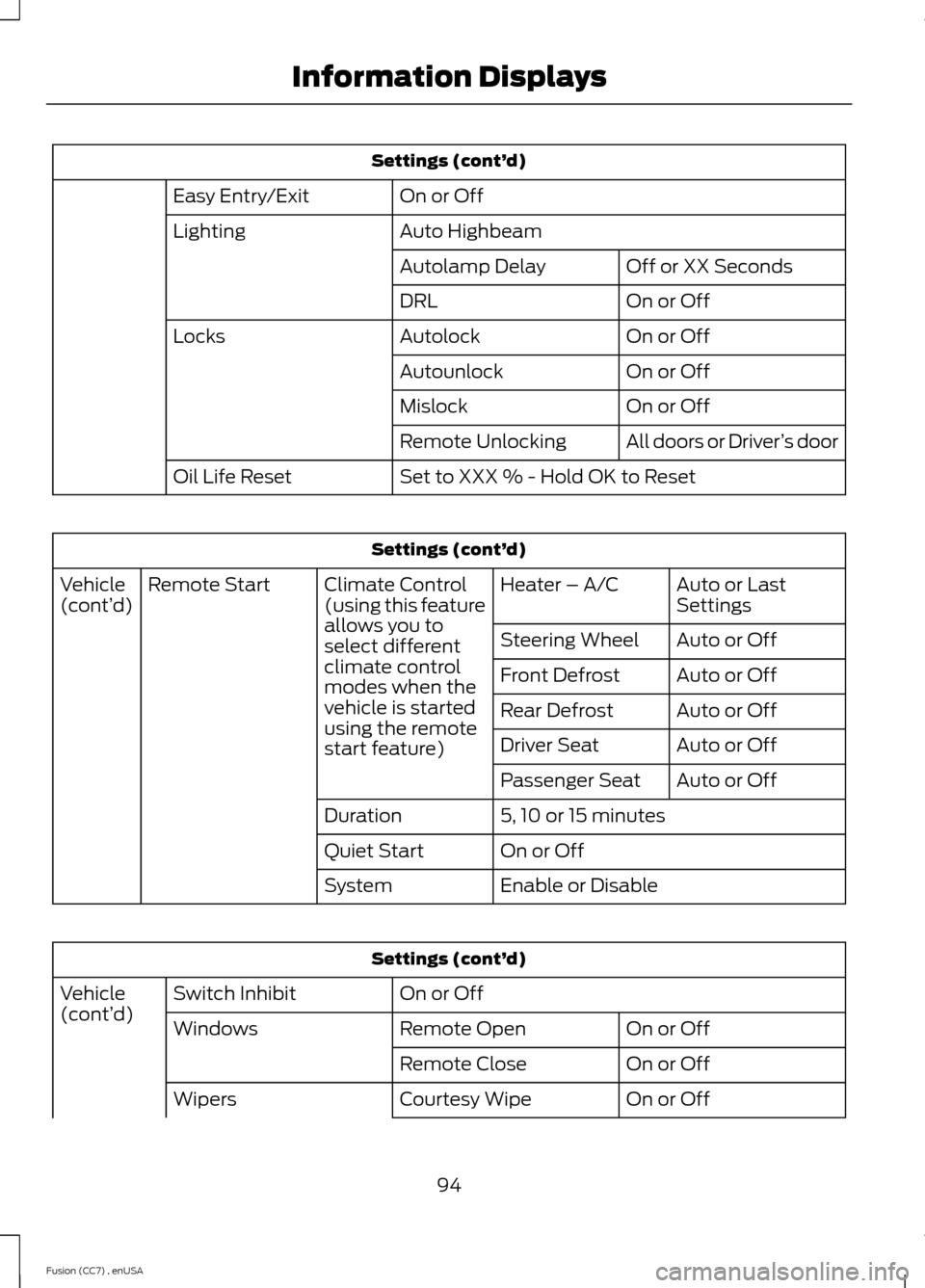
Settings (cont’d)
On or OffEasy Entry/Exit
Auto HighbeamLighting
Off or XX SecondsAutolamp Delay
On or OffDRL
On or OffAutolockLocks
On or OffAutounlock
On or OffMislock
All doors or Driver’s doorRemote Unlocking
Set to XXX % - Hold OK to ResetOil Life Reset
Settings (cont’d)
Auto or LastSettingsHeater – A/CClimate Control(using this featureallows you toselect differentclimate controlmodes when thevehicle is startedusing the remotestart feature)
Remote StartVehicle(cont’d)
Auto or OffSteering Wheel
Auto or OffFront Defrost
Auto or OffRear Defrost
Auto or OffDriver Seat
Auto or OffPassenger Seat
5, 10 or 15 minutesDuration
On or OffQuiet Start
Enable or DisableSystem
Settings (cont’d)
On or OffSwitch InhibitVehicle(cont’d)On or OffRemote OpenWindows
On or OffRemote Close
On or OffCourtesy WipeWipers
94Fusion (CC7) , enUSAInformation Displays
Page 116 of 458
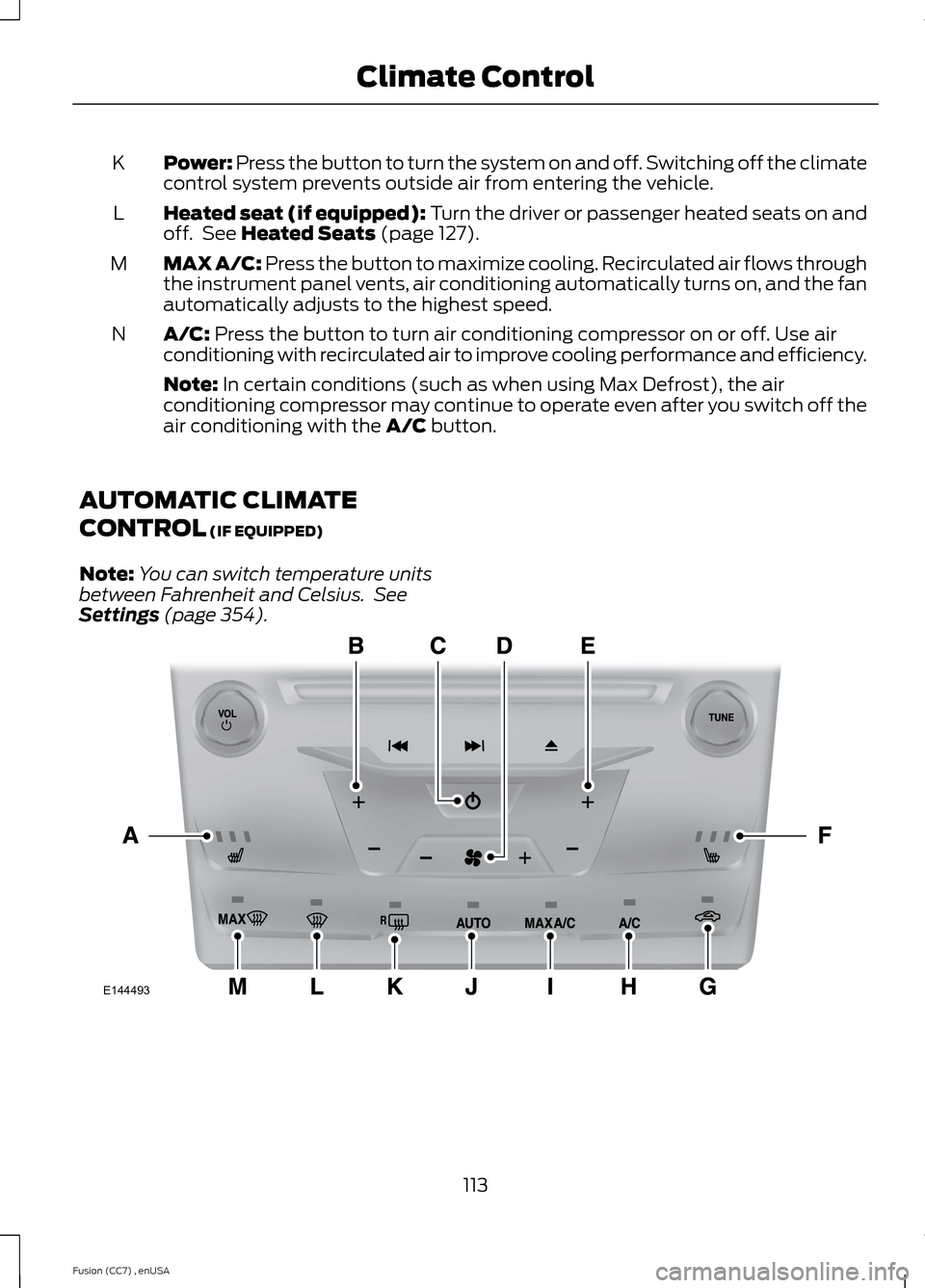
Power: Press the button to turn the system on and off. Switching off the climatecontrol system prevents outside air from entering the vehicle.K
Heated seat (if equipped): Turn the driver or passenger heated seats on andoff. See Heated Seats (page 127).L
MAX A/C: Press the button to maximize cooling. Recirculated air flows throughthe instrument panel vents, air conditioning automatically turns on, and the fanautomatically adjusts to the highest speed.
M
A/C: Press the button to turn air conditioning compressor on or off. Use airconditioning with recirculated air to improve cooling performance and efficiency.N
Note: In certain conditions (such as when using Max Defrost), the airconditioning compressor may continue to operate even after you switch off theair conditioning with the A/C button.
AUTOMATIC CLIMATE
CONTROL (IF EQUIPPED)
Note:You can switch temperature unitsbetween Fahrenheit and Celsius. SeeSettings (page 354).
113Fusion (CC7) , enUSAClimate ControlE144493
Page 118 of 458
MAX Defrost: Press the button to maximize defrosting. Outside air flowsthrough the windshield vents, fan automatically adjusts to the highest speedand the temperature dial returns to the full heat position. You can use thissetting to defog or clear a thin covering of ice from the windshield. The heatedrear window also automatically turns on when you select MAX Defrost.
M
Note: To prevent window fogging, you cannot select recirculated air when MAXDefrost is on.
AUTOMATIC CLIMATE
CONTROL (IF EQUIPPED)
Note:You can switch temperature unitsbetween Fahrenheit and Celsius. SeeSettings (page 354).
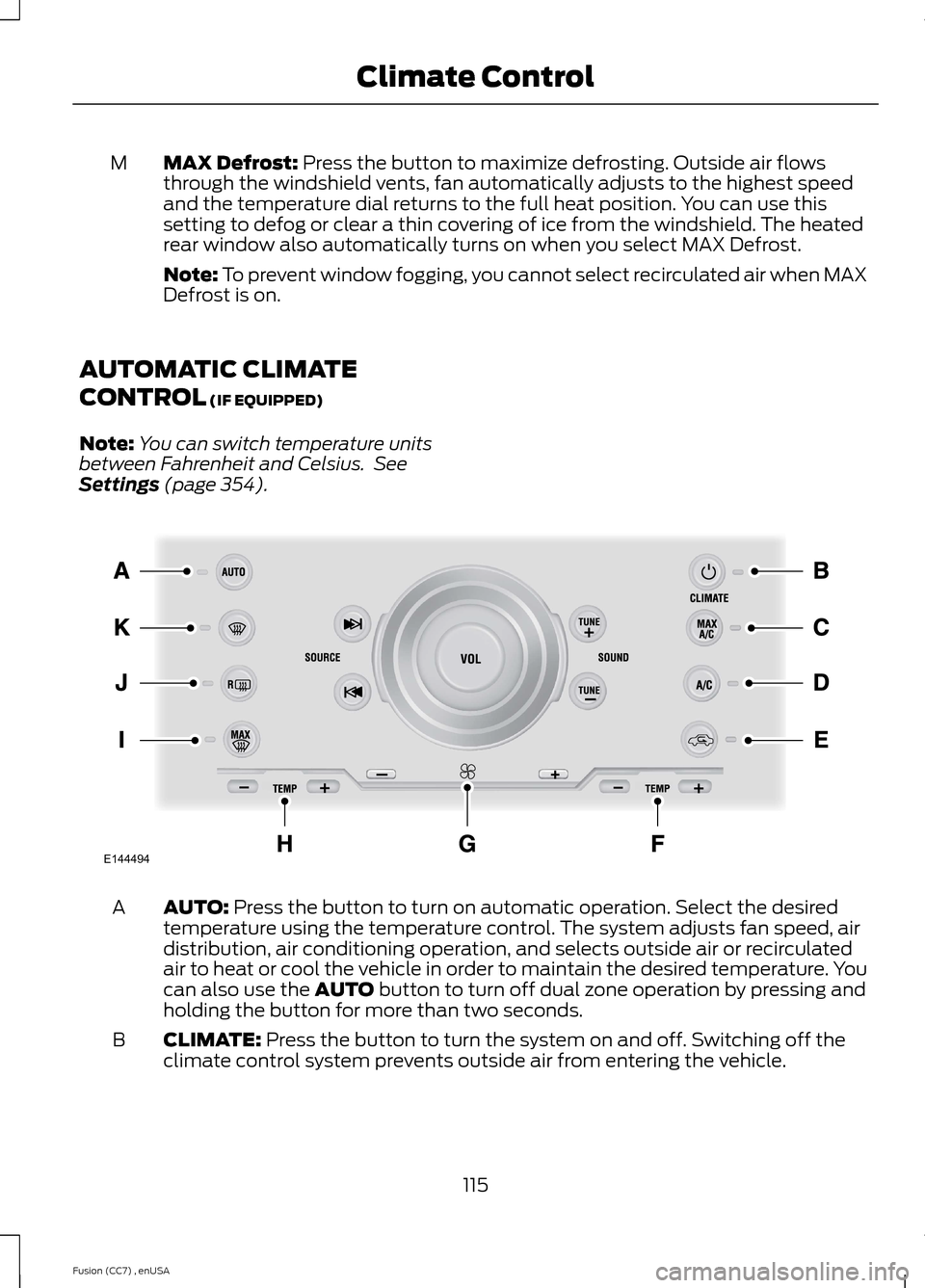
AUTO: Press the button to turn on automatic operation. Select the desiredtemperature using the temperature control. The system adjusts fan speed, airdistribution, air conditioning operation, and selects outside air or recirculatedair to heat or cool the vehicle in order to maintain the desired temperature. Youcan also use the AUTO button to turn off dual zone operation by pressing andholding the button for more than two seconds.
A
CLIMATE: Press the button to turn the system on and off. Switching off theclimate control system prevents outside air from entering the vehicle.B
115Fusion (CC7) , enUSAClimate ControlE144494
Page 120 of 458
HINTS ON CONTROLLING THE
INTERIOR CLIMATE
General Hints
Note:Prolonged use of recirculated air maycause the windows to fog up.
Note:You may feel a small amount of airfrom the footwell air vents regardless of theair distribution setting.
Note:To reduce humidity build-up insideyour vehicle, do not drive with the systemswitched off or with recirculated air alwaysswitched on.
Note:Do not place objects under the frontseats as this may interfere with the airflowto the rear seats.
Note:Remove any snow, ice or leaves fromthe air intake area at the base of thewindshield.
Note:To improve the time to reach comfortin hot weather, drive with the windowsslightly open for 2-3 minutes after start-upor until your vehicle airs out.
Manual Climate Control
Note:To reduce fogging of the windshieldduring humid weather, adjust the airdistribution control to the windshield airvents position.
Automatic Climate Control
Note:Adjusting the settings when yourvehicle interior is extremely hot or cold isnot necessary. The system automaticallyadjusts to heat or cool the cabin to yourselected temperature as quickly as possible.For the system to function efficiently, theinstrument panel and side air vents shouldbe fully open.
Note:If you select AUTO during coldoutside temperatures, the system directsairflow to the windshield and side windowvents. In addition, the fan may run at aslower speed until the engine warms up.
Note:If you select AUTO during hot outsidetemperatures, or when the inside of thevehicle is hot, the system automatically usesrecirculated air to maximize interior cooling.When the interior reaches the selectedtemperature, the system automaticallyswitches to using outside air.
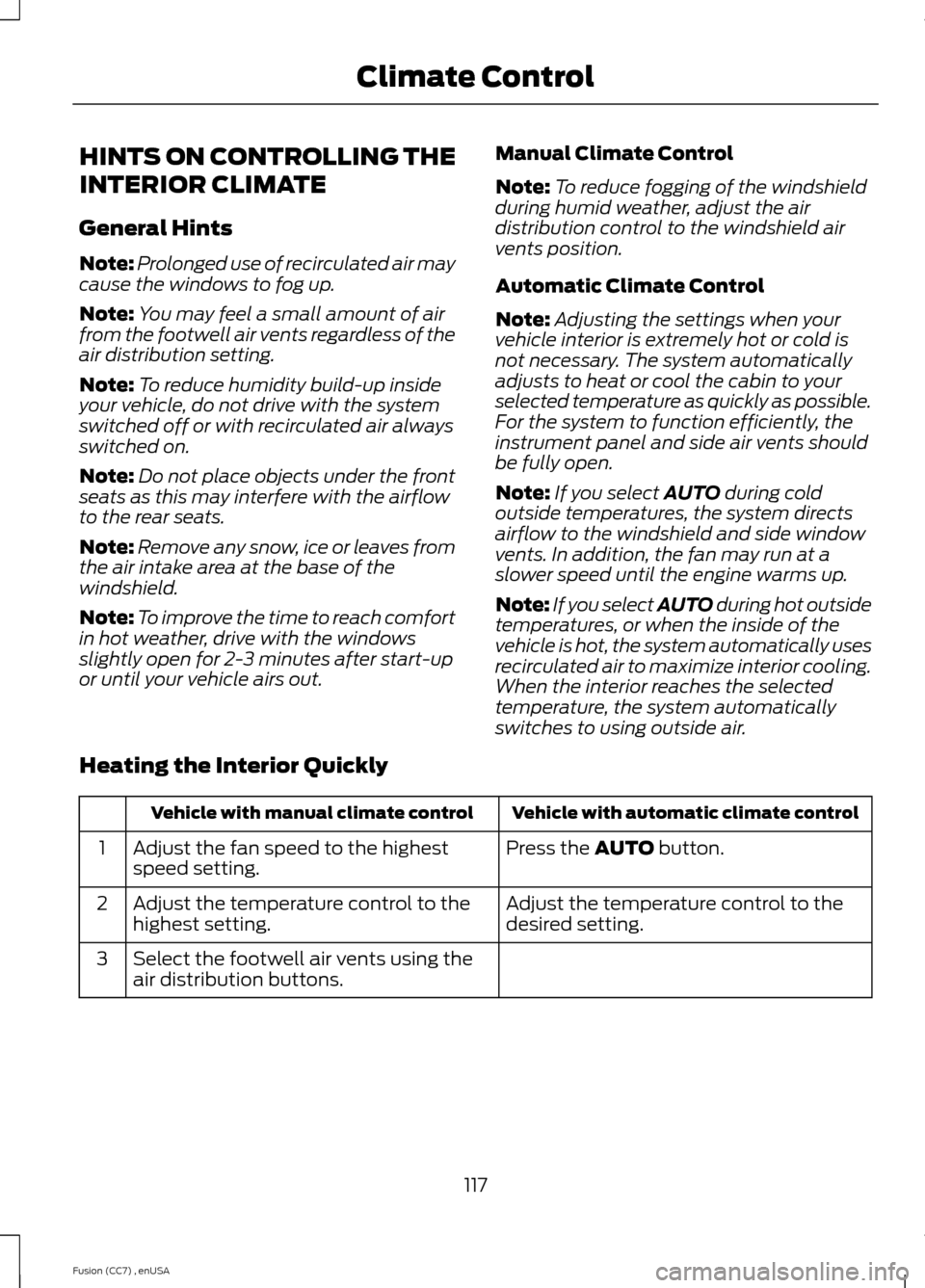
Heating the Interior Quickly
Vehicle with automatic climate controlVehicle with manual climate control
Press the AUTO button.Adjust the fan speed to the highestspeed setting.1
Adjust the temperature control to thedesired setting.Adjust the temperature control to thehighest setting.2
Select the footwell air vents using theair distribution buttons.3
117Fusion (CC7) , enUSAClimate Control
Page 121 of 458
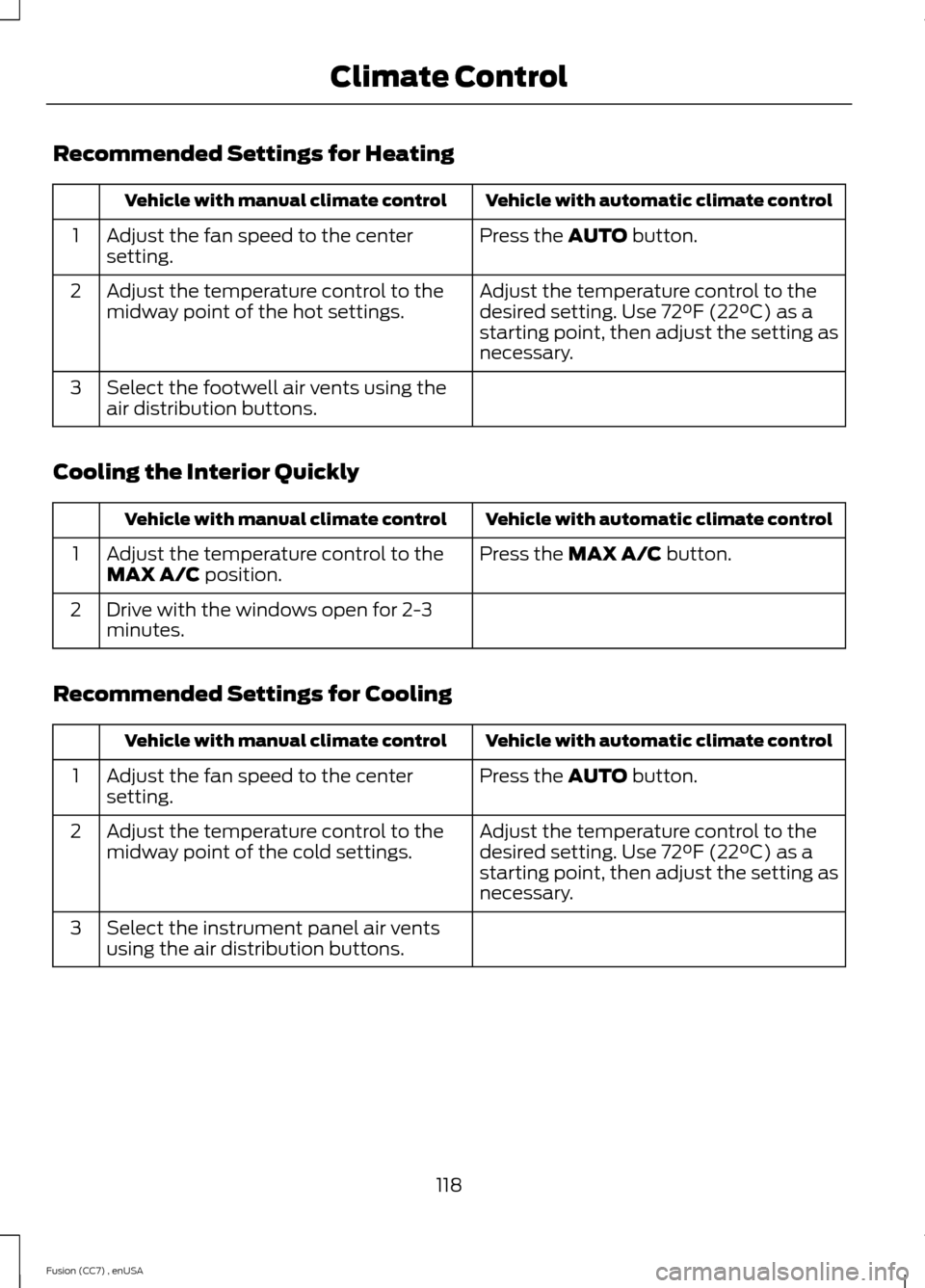
Recommended Settings for Heating
Vehicle with automatic climate controlVehicle with manual climate control
Press the AUTO button.Adjust the fan speed to the centersetting.1
Adjust the temperature control to thedesired setting. Use 72°F (22°C) as astarting point, then adjust the setting asnecessary.
Adjust the temperature control to themidway point of the hot settings.2
Select the footwell air vents using theair distribution buttons.3
Cooling the Interior Quickly
Vehicle with automatic climate controlVehicle with manual climate control
Press the MAX A/C button.Adjust the temperature control to theMAX A/C position.1
Drive with the windows open for 2-3minutes.2
Recommended Settings for Cooling
Vehicle with automatic climate controlVehicle with manual climate control
Press the AUTO button.Adjust the fan speed to the centersetting.1
Adjust the temperature control to thedesired setting. Use 72°F (22°C) as astarting point, then adjust the setting asnecessary.
Adjust the temperature control to themidway point of the cold settings.2
Select the instrument panel air ventsusing the air distribution buttons.3
118Fusion (CC7) , enUSAClimate Control
Page 123 of 458
Note:Make sure you have a cabin air filterinstalled at all times. This prevents foreignobjects from entering the system. Runningthe system without a filter in place couldresult in degradation or damage to thesystem.
The particulate filtration system gives youand your passengers the followingbenefits:
•It improves your driving comfort byreducing particle concentration.
•It improves the interior compartmentcleanliness.
•It protects the climate controlcomponents from particle deposits.
Replace the filter at regular intervals. SeeScheduled Maintenance (page 428).
For additional cabin air filter information,or to replace the filter, see an authorizeddealer.
REMOTE START (IF EQUIPPED)
The remote start feature allows you topre-condition the interior of your vehicle.The climate control system works toachieve comfort according to your previoussettings.
Note:You cannot adjust the system duringremote start operation.
Turn the ignition on to return the systemto its previous settings. You can now makeadjustments normally, but you need to turncertain vehicle-dependent features backon, such as:
•Heated seats.
•Cooled seats.
•Heated steering wheel.
•Heated mirrors.
•Heated rear window.
You can adjust the default remote startsettings using the information displaycontrols. See Information Displays(page 87).
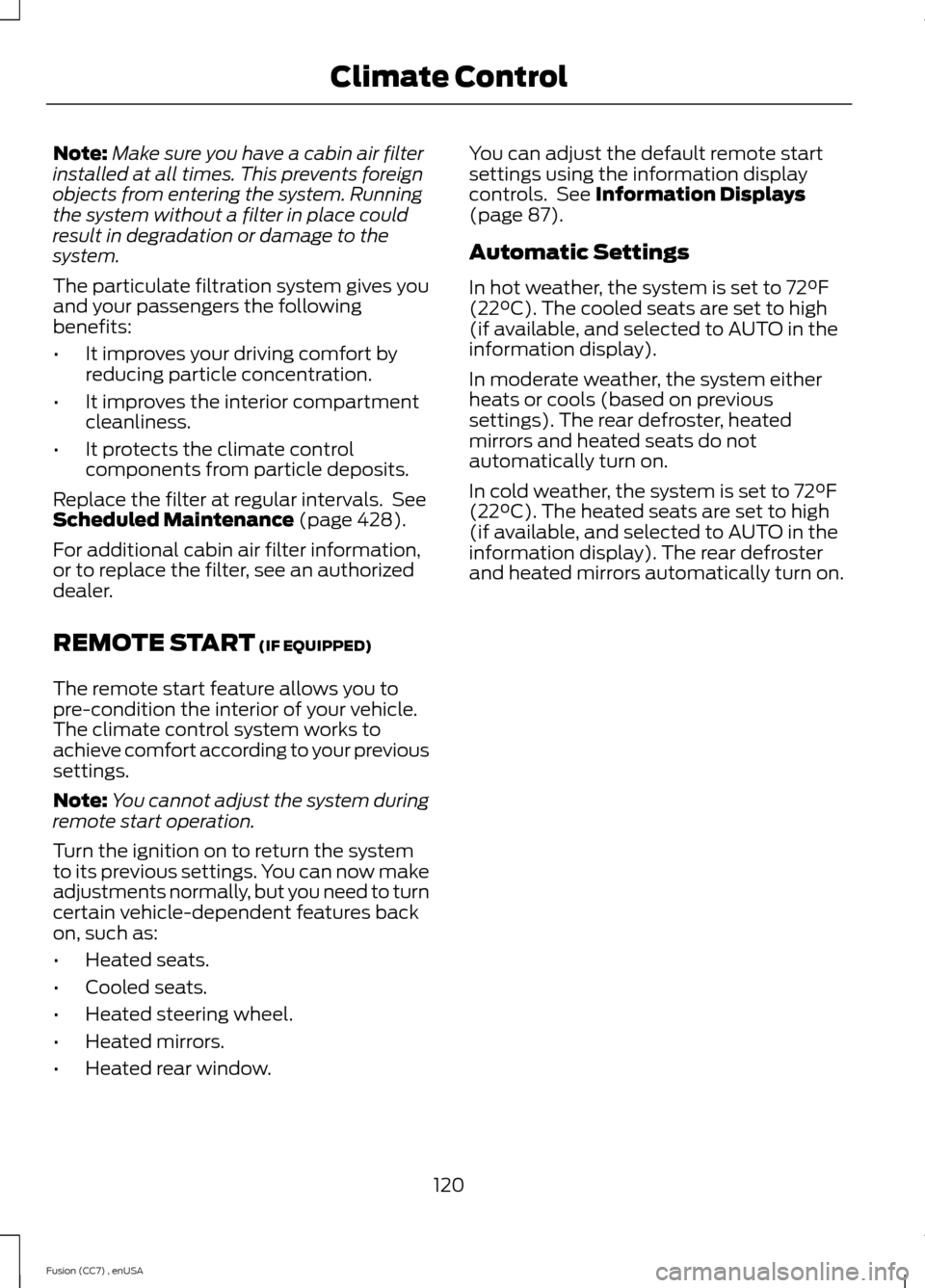
Automatic Settings
In hot weather, the system is set to 72°F(22°C). The cooled seats are set to high(if available, and selected to AUTO in theinformation display).
In moderate weather, the system eitherheats or cools (based on previoussettings). The rear defroster, heatedmirrors and heated seats do notautomatically turn on.
In cold weather, the system is set to 72°F(22°C). The heated seats are set to high(if available, and selected to AUTO in theinformation display). The rear defrosterand heated mirrors automatically turn on.
120Fusion (CC7) , enUSAClimate Control
Page 349 of 458
GENERAL INFORMATIONWARNING
Driving while distracted can result inloss of vehicle control, crash andinjury. We strongly recommend thatyou use extreme caution when using anydevice that may take your focus off theroad. Your primary responsibility is the safeoperation of your vehicle. We recommendagainst the use of any hand-held devicewhile driving and encourage the use ofvoice-operated systems when possible.Make sure you are aware of all applicablelocal laws that may affect the use ofelectronic devices while driving.
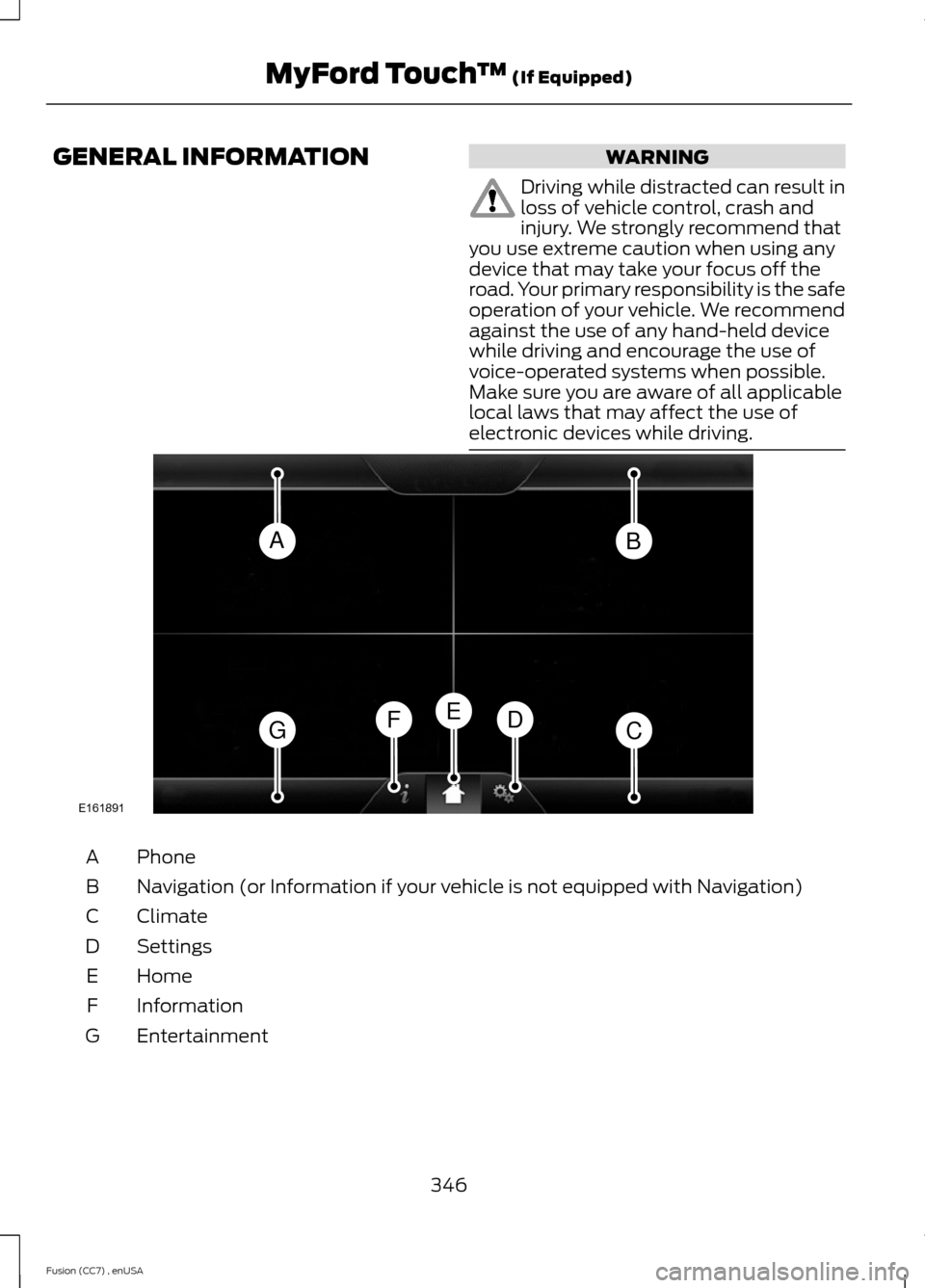
PhoneA
Navigation (or Information if your vehicle is not equipped with Navigation)B
ClimateC
SettingsD
HomeE
InformationF
EntertainmentG
346Fusion (CC7) , enUSAMyFord Touch™ (If Equipped)ABGCDFEE161891
Page 350 of 458
This system uses a four-corner strategy toprovide quick access to several vehiclefeatures and settings. The touchscreenprovides easy interaction with your cellularphone, multimedia, climate control andnavigation system. The corners display anyactive modes within those menus, such asphone status or the climate temperature.
Note:Some features are not available whileyour vehicle is moving.
Note:Your system is equipped with afeature that allows you to access andcontrol audio features for 30 minutes afteryou switch the ignition off (and no doorsopen).
PHONE
Press to select any of the following:
•Phone
•Quick Dial
•Phonebook
•History
•Messaging
•Settings
NAVIGATION
Press to select any of the following:
•My Home
•Favorites
•Previous Destinations
•Point of Interest
•Emergency
•Street Address
•Intersection
•City Center
•Map
•Edit Route Cancel Route
CLIMATE
Press to select any of the following:
•Driver Settings
•Recirculated Air
•Auto
•Dual
•Passenger Settings
•A/C
•Defrost
SETTINGS
Press to select any of the following:
•Clock
•Display
•Sound
•Vehicle
•Settings
•Help
HOME
Press to access your homescreen. Depending on yourvehicle’s option package and software,your screens may vary in appearance fromthe descriptions in this section. Yourfeatures may also be limited depending onyour market. Check with an authorizeddealer for availability.
INFORMATION
Press to select any of the following:
•Services
•Travel Link
•Alerts
•Calendar
•Apps
ENTERTAINMENT
Press to select any of the following:
•AM
•FM
•SIRIUS
347Fusion (CC7) , enUSAMyFord Touch™ (If Equipped)E142607 E142613 E142608
Page 351 of 458
•CD
•USB
•BT Stereo
•SD Card
•A/V In
Using the Touch-SensitiveControls on Your System
To turn a feature on and off, just touch thegraphic with your finger. To get the bestperformance from the touch-sensitivecontrols:
•Do not press hard on the controls. Theyare sensitive to light touch.
•Use your bare finger to touch the centerof a touch-control graphic. Touchingoff-center of the graphic may affectoperation of a nearby control.
•Make sure your hands are clean anddry.
•Since the touchscreen operates basedon the touch of a finger, you may havetrouble using it if you are wearinggloves.
•Keep metal and other conductivematerial away from the surface of thetouchscreen as this may causeelectronic interference (for example,inadvertently turning on a feature otherthan the one you meant to turn on).
Depending on your vehicle and optionpackage, you may also have these controlson your bezel:
•Power: Switch the media or climatefeatures off and on.
•VOL: Control the volume of playingmedia.
•Fan: Control the speed of the climatesystem fan.
•Seek and Tune buttons: Use as younormally would in media modes.
•Eject: Eject a CD from theentertainment system.
•SOURCE: Touch the word repeatedlyto see all available media modes. Thescreen does not change, but you seethe media change in the lower leftstatus bar.
•SOUND: Touch the word to access theSound menu where you can adjustsettings such as: Bass, Treble,Midrange, Balance and Fade, DSP(Digital Signal Processing), OccupancyMode and Speed CompensatedVolume. (Your vehicle may not haveall of these sound options.)
•Hazard flasher: Switch the hazardflashers off and on.
Cleaning the Touchscreen Display
Use a clean, soft cloth such as one usedfor cleaning glasses. If dirt or fingerprintsare still visible, apply a small amount ofalcohol to the cloth. Do not pour or sprayalcohol onto the display. Do not usedetergent or any type of solvent to cleanthe display.
Support
The SYNC support team is available tohelp you with any questions you are notable to answer on your own.
Monday-Saturday, 8:30am-9:00pm EST.
Sunday, 10:30am-7:30pm EST.
In the United States, call: 1-800-392-3673.
In Canada, call: 1-800-565-3673.
Times are subject to change due toholidays.
348Fusion (CC7) , enUSAMyFord Touch™ (If Equipped)