roof FORD FUSION (AMERICAS) 2014 2.G Owners Manual
[x] Cancel search | Manufacturer: FORD, Model Year: 2014, Model line: FUSION (AMERICAS), Model: FORD FUSION (AMERICAS) 2014 2.GPages: 458, PDF Size: 27.89 MB
Page 5 of 458
Wipers and Washers
Windshield Wipers.........................................67
Autowipers........................................................67
Windshield Washers.....................................68
Lighting
Lighting Control..............................................69
Autolamps........................................................69
Instrument Lighting Dimmer.....................70
Headlamp Exit Delay......................................71
Daytime Running Lamps..............................71
Automatic High Beam Control...................71
Front Fog Lamps.............................................72
Direction Indicators........................................73
Interior Lamps..................................................73
Ambient Lighting............................................74
Windows and Mirrors
Power Windows..............................................75
Global Opening and Closing......................76
Exterior Mirrors................................................76
Interior Mirror....................................................77
Sun Visors.........................................................78
Moonroof...........................................................78
Instrument Cluster
Gauges...............................................................80
Warning Lamps and Indicators.................82
Audible Warnings and Indicators.............86
Information Displays
General Information......................................87
Information Messages.................................95
Climate Control
Manual Climate Control.............................110
Automatic Climate Control.........................111
Automatic Climate Control........................113
Automatic Climate Control........................115
Hints on Controlling the InteriorClimate..........................................................117
Heated Windows and Mirrors...................119
Cabin Air Filter................................................119
Remote Start.................................................120
Seats
Sitting in the Correct Position...................121
Head Restraints..............................................121
Manual Seats.................................................123
Power Seats....................................................123
Memory Function.........................................124
Rear Seats.......................................................126
Heated Seats..................................................127
Ventilated Seats............................................127
Rear Seat Armrest........................................127
Universal Garage DoorOpener
Universal Garage Door Opener...............129
Auxiliary Power Points
Auxiliary Power Points................................133
Storage Compartments
Center Console..............................................135
Overhead Console........................................135
Starting and Stopping theEngine
General Information....................................136
Ignition Switch...............................................136
Keyless Starting............................................136
Starting a Gasoline Engine........................137
Engine Block Heater....................................140
Unique Driving Character-istics
Auto-Start-Stop...........................................142
2Fusion (CC7) , enUSATable of Contents
Page 26 of 458
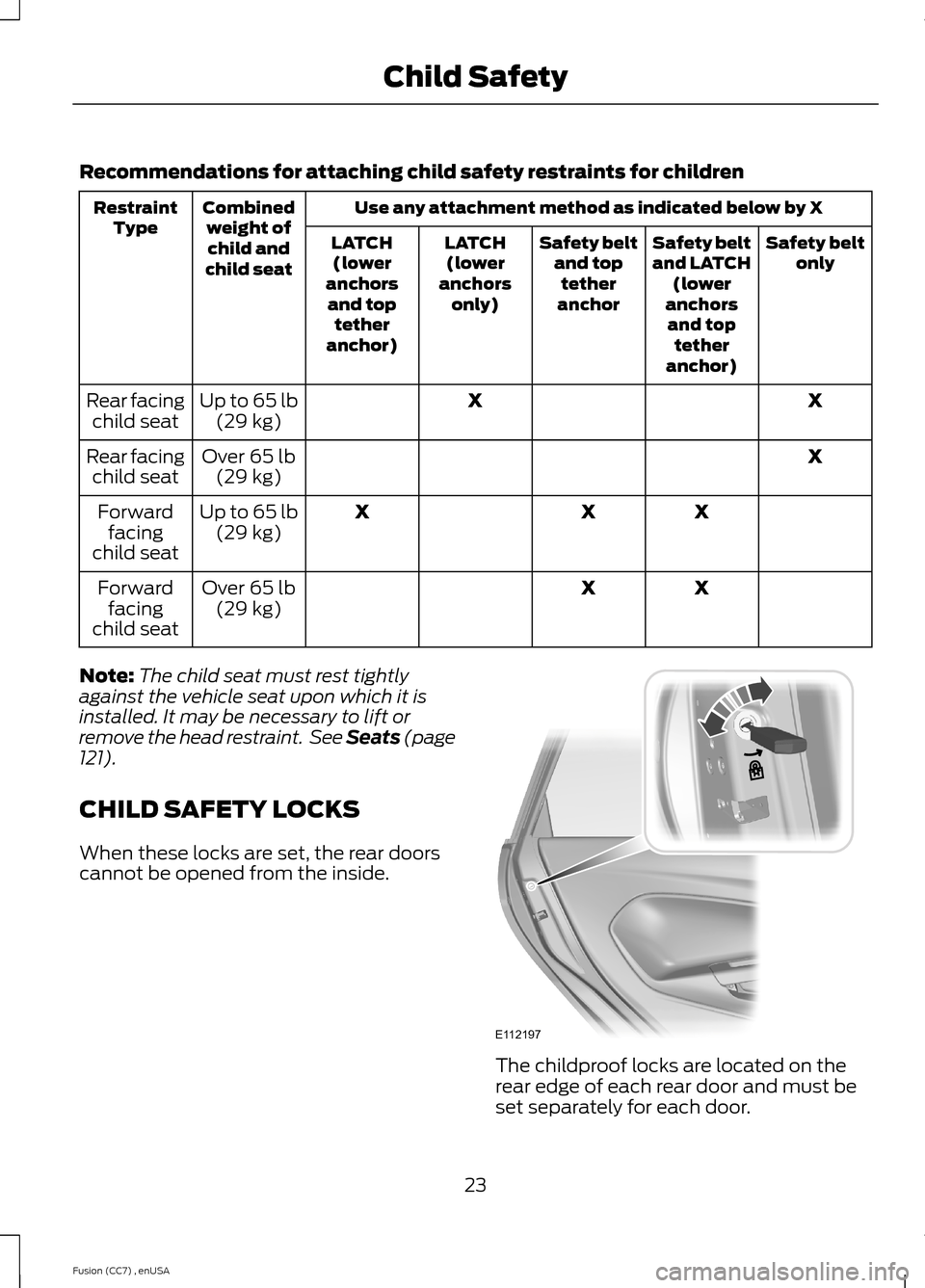
Recommendations for attaching child safety restraints for children
Use any attachment method as indicated below by XCombinedweight ofchild andchild seat
RestraintTypeSafety beltonlySafety beltand LATCH(loweranchorsand toptetheranchor)
Safety beltand toptetheranchor
LATCH(loweranchorsonly)
LATCH(loweranchorsand toptetheranchor)
XXUp to 65 lb(29 kg)Rear facingchild seat
XOver 65 lb(29 kg)Rear facingchild seat
XXXUp to 65 lb(29 kg)Forwardfacingchild seat
XXOver 65 lb(29 kg)Forwardfacingchild seat
Note:The child seat must rest tightlyagainst the vehicle seat upon which it isinstalled. It may be necessary to lift orremove the head restraint. See Seats (page121).
CHILD SAFETY LOCKS
When these locks are set, the rear doorscannot be opened from the inside.
The childproof locks are located on therear edge of each rear door and must beset separately for each door.
23Fusion (CC7) , enUSAChild SafetyE112197
Page 44 of 458
WARNINGS
Do not lean your head on the door.The side curtain airbag could injureyou as it deploys from the headliner.
Do not attempt to service, repair, ormodify the side curtain airbags, itsfuses, the A, B, or C pillar trim, or theheadliner on a vehicle containing sidecurtain airbags. Contact your authorizeddealer as soon as possible.
All occupants of the vehicle includingthe driver should always wear theirsafety belts even when an airbagsupplemental restraint system and sidecurtain airbag is provided.
To reduce risk of injury, do notobstruct or place objects in thedeployment path of the side curtainairbag.
If the side curtain airbags havedeployed, the side curtain airbagswill not function again. The sidecurtain airbags (including the A, B and Cpillar trim and headliner) must beinspected and serviced by an authorizeddealer. If the side curtain airbag is notreplaced, the unrepaired area will increasethe risk of injury in a crash.
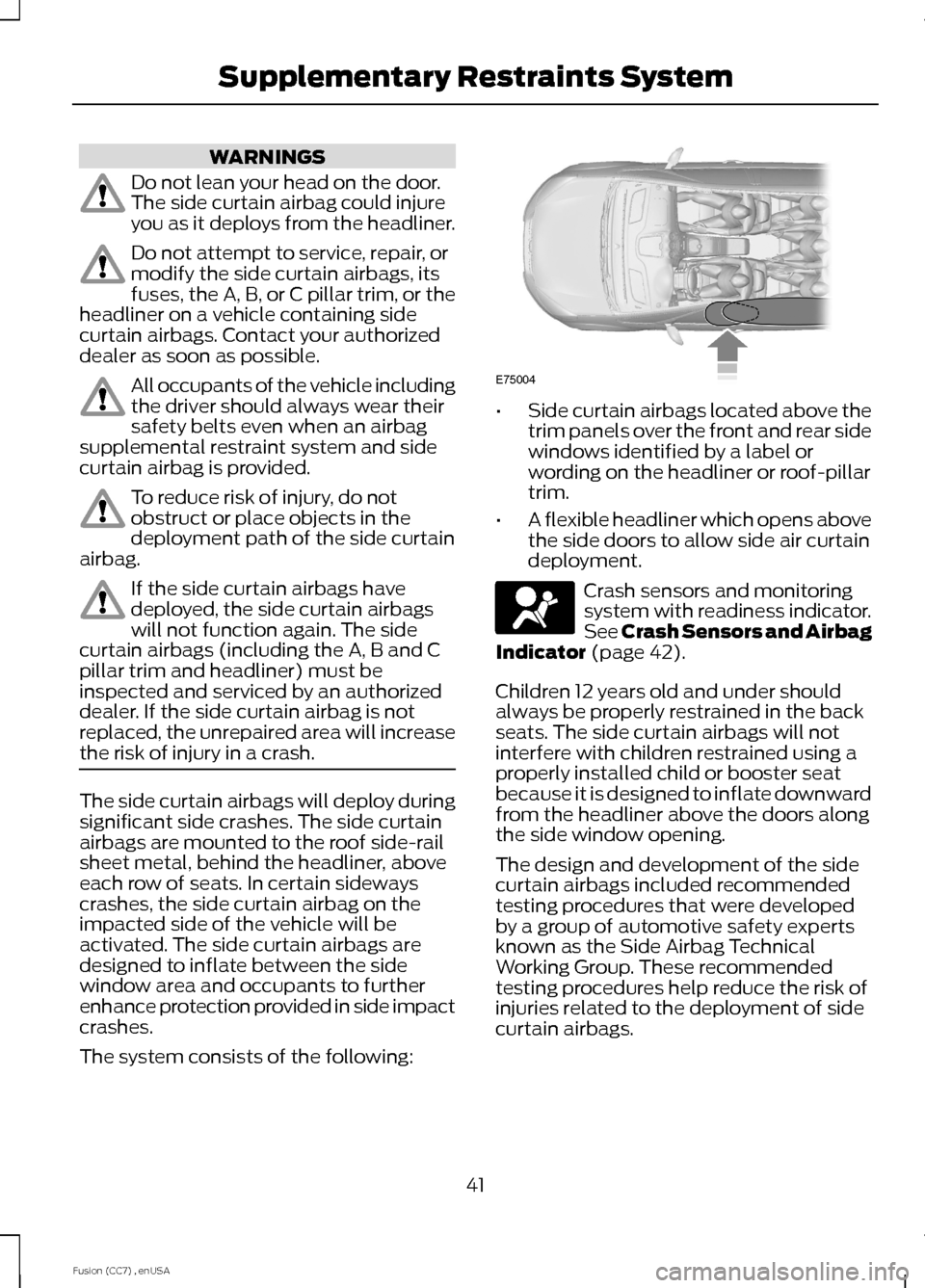
The side curtain airbags will deploy duringsignificant side crashes. The side curtainairbags are mounted to the roof side-railsheet metal, behind the headliner, aboveeach row of seats. In certain sidewayscrashes, the side curtain airbag on theimpacted side of the vehicle will beactivated. The side curtain airbags aredesigned to inflate between the sidewindow area and occupants to furtherenhance protection provided in side impactcrashes.
The system consists of the following:
•Side curtain airbags located above thetrim panels over the front and rear sidewindows identified by a label orwording on the headliner or roof-pillartrim.
•A flexible headliner which opens abovethe side doors to allow side air curtaindeployment.
Crash sensors and monitoringsystem with readiness indicator.See Crash Sensors and AirbagIndicator (page 42).
Children 12 years old and under shouldalways be properly restrained in the backseats. The side curtain airbags will notinterfere with children restrained using aproperly installed child or booster seatbecause it is designed to inflate downwardfrom the headliner above the doors alongthe side window opening.
The design and development of the sidecurtain airbags included recommendedtesting procedures that were developedby a group of automotive safety expertsknown as the Side Airbag TechnicalWorking Group. These recommendedtesting procedures help reduce the risk ofinjuries related to the deployment of sidecurtain airbags.
41Fusion (CC7) , enUSASupplementary Restraints SystemE75004
Page 76 of 458
DIRECTION INDICATORS
Push the lever up or down to use thedirection indicators.
Note:Tap the lever up or down to make thedirection indicators flash three times toindicate a lane change.
INTERIOR LAMPS
The lamps will turn on when you have metone of the following conditions:
•You open any door.
•You press a remote control button.
•You press button A on the front interiorlamp.
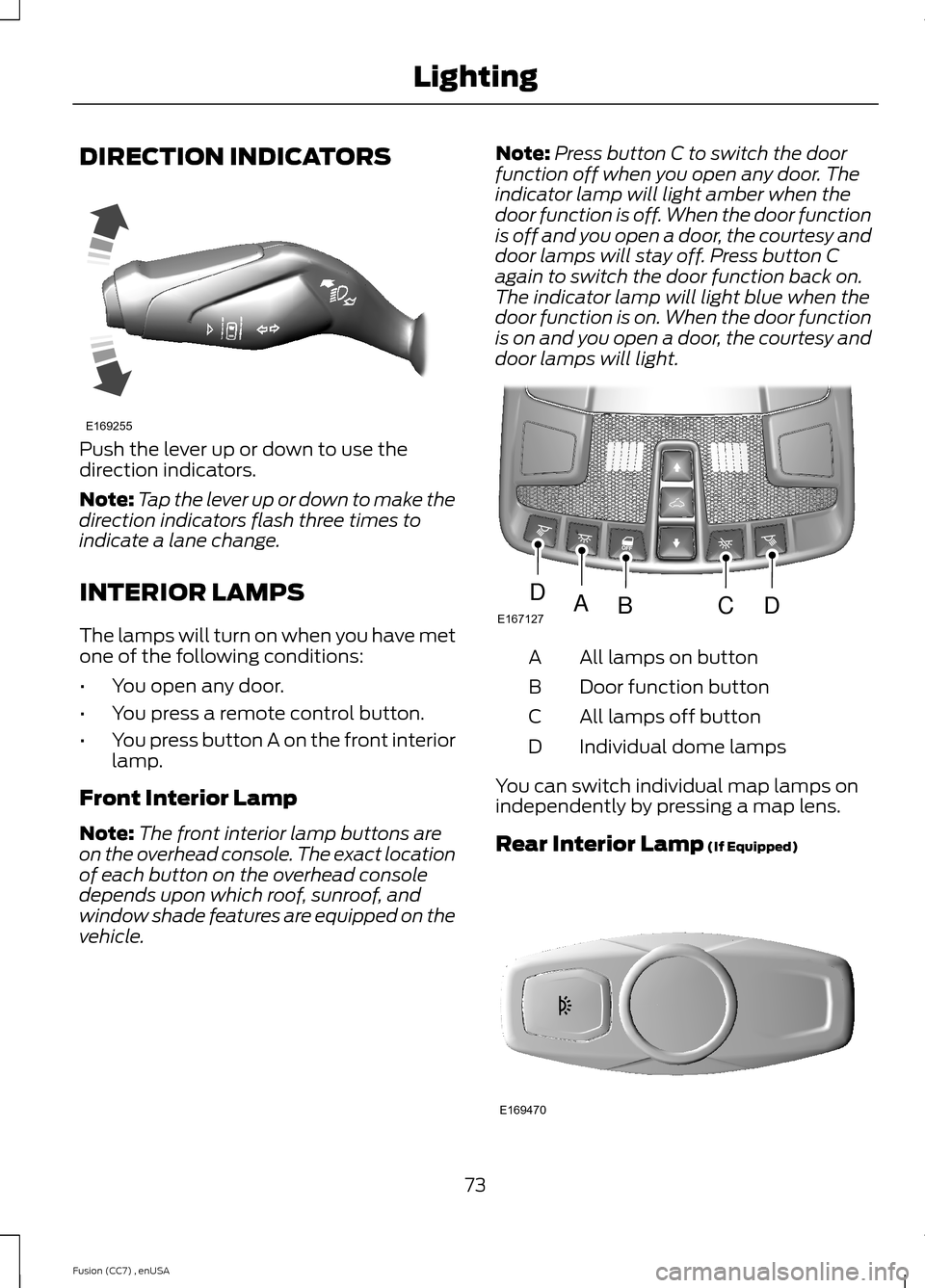
Front Interior Lamp
Note:The front interior lamp buttons areon the overhead console. The exact locationof each button on the overhead consoledepends upon which roof, sunroof, andwindow shade features are equipped on thevehicle.
Note:Press button C to switch the doorfunction off when you open any door. Theindicator lamp will light amber when thedoor function is off. When the door functionis off and you open a door, the courtesy anddoor lamps will stay off. Press button Cagain to switch the door function back on.The indicator lamp will light blue when thedoor function is on. When the door functionis on and you open a door, the courtesy anddoor lamps will light.
All lamps on buttonA
Door function buttonB
All lamps off buttonC
Individual dome lampsD
You can switch individual map lamps onindependently by pressing a map lens.
Rear Interior Lamp (If Equipped)
73Fusion (CC7) , enUSALightingE169255 E167127ABCDD E169470
Page 79 of 458
GLOBAL OPENING AND
CLOSING
You can use the remote control to operatethe windows with the ignition off.
Note:You can enable or disable this featurein the information display or see anauthorized dealer. See GeneralInformation (page 87).
Note:To operate this feature, accessorydelay must not be active.
Opening the Windows
You can only open the windows for a shorttime after you unlock your vehicle with theremote control. After you unlock yourvehicle, press and hold the remote controlunlock button to open the windows andvent the moonroof. Release the buttononce movement starts. Press the lock orunlock button to stop movement.
Closing the Windows
WARNING
When closing the windows andmoonroof, you should verify they arefree of obstructions and make surethat children and pets are not in theproximity of the window openings.
To close the windows and moonroof, pressand hold the remote control lock button.Release the button once movement starts.Press the lock or unlock button to stopmovement.
EXTERIOR MIRRORS
Power Exterior Mirrors
WARNING
Do not adjust the mirrors when yourvehicle is moving.
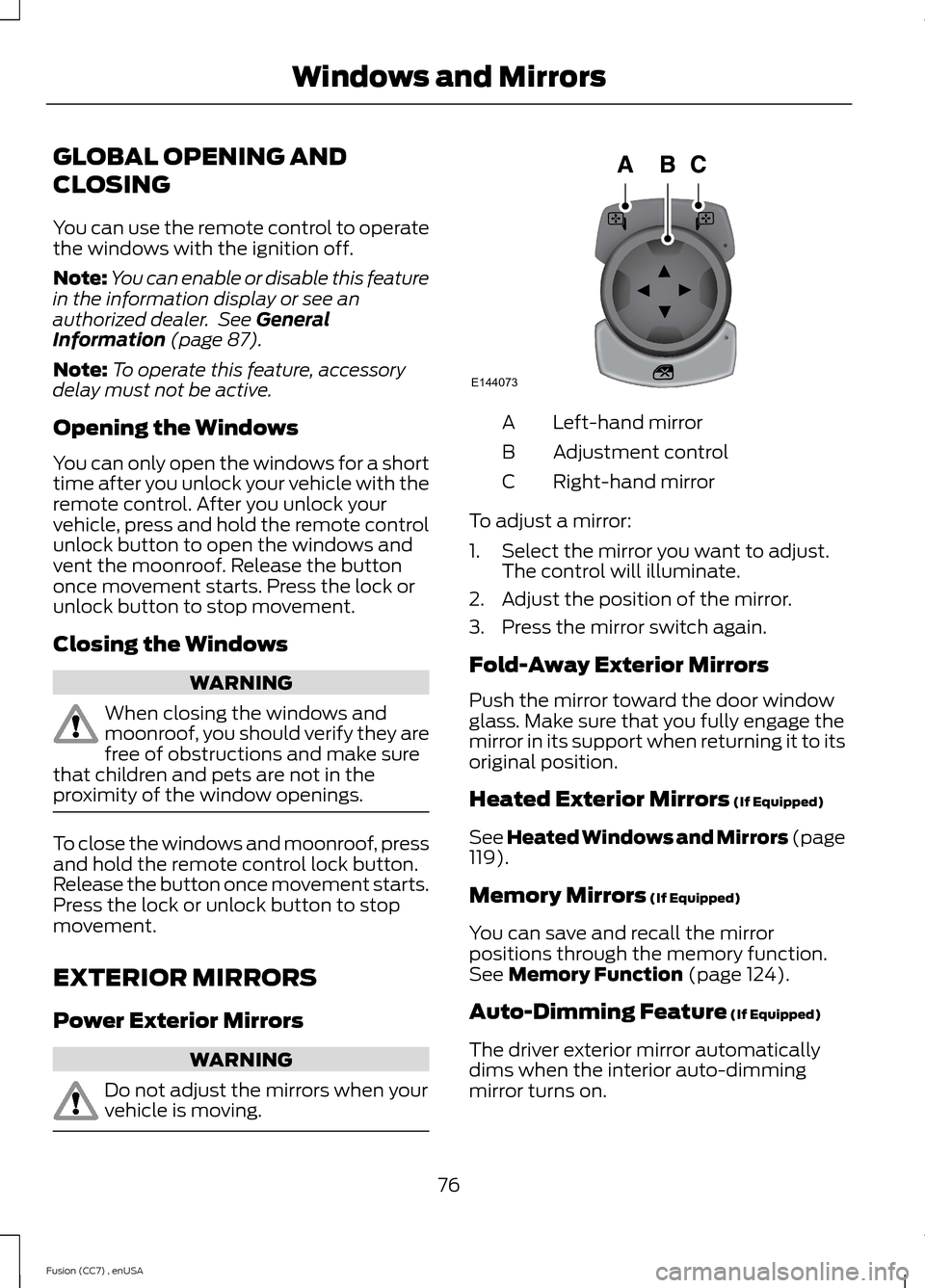
Left-hand mirrorA
Adjustment controlB
Right-hand mirrorC
To adjust a mirror:
1.Select the mirror you want to adjust.The control will illuminate.
2.Adjust the position of the mirror.
3.Press the mirror switch again.
Fold-Away Exterior Mirrors
Push the mirror toward the door windowglass. Make sure that you fully engage themirror in its support when returning it to itsoriginal position.
Heated Exterior Mirrors (If Equipped)
See Heated Windows and Mirrors (page119).
Memory Mirrors (If Equipped)
You can save and recall the mirrorpositions through the memory function.See Memory Function (page 124).
Auto-Dimming Feature (If Equipped)
The driver exterior mirror automaticallydims when the interior auto-dimmingmirror turns on.
76Fusion (CC7) , enUSAWindows and MirrorsE144073
Page 81 of 458
Note:Do not clean the housing or glass ofany mirror with harsh abrasives, fuel or otherpetroleum or ammonia-based cleaningproducts.
You can adjust the interior mirror to yourpreference. Some mirrors also have asecond pivot point. This lets you move themirror head up or down and from side toside.
Pull the tab below the mirror toward youto reduce glare at night.
Auto-Dimming Mirror (If Equipped)
Note:Do not block the sensors on the frontand back of the mirror. Mirror performancemay be affected. A rear center passenger orraised rear center head restraint may alsoblock light from reaching the sensor.
The mirror will dim automatically to reduceglare when bright lights are detected frombehind your vehicle. It will automaticallyreturn to normal reflection when you selectreverse gear to make sure you have a clearview when backing up.
SUN VISORS
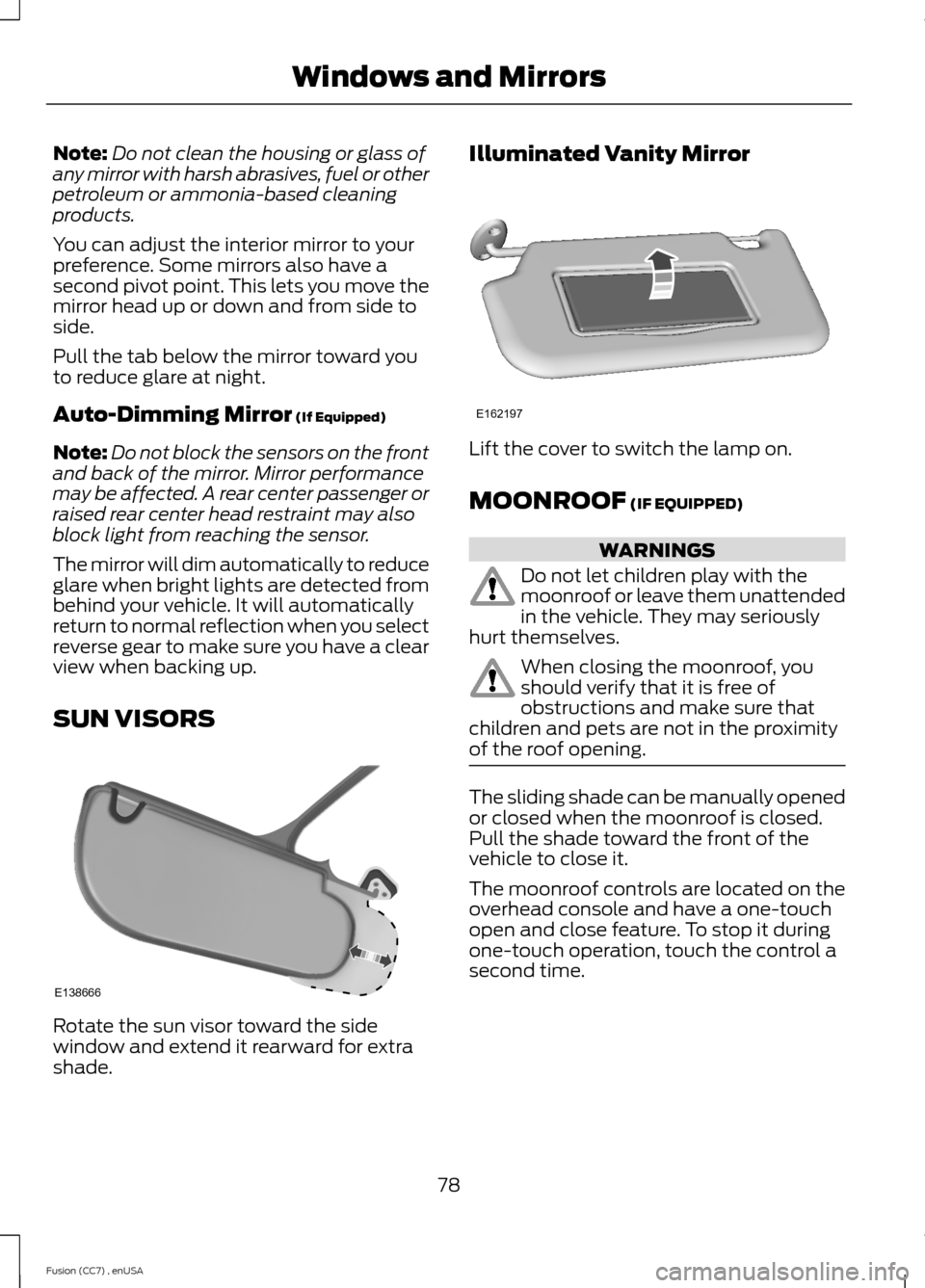
Rotate the sun visor toward the sidewindow and extend it rearward for extrashade.
Illuminated Vanity Mirror
Lift the cover to switch the lamp on.
MOONROOF (IF EQUIPPED)
WARNINGS
Do not let children play with themoonroof or leave them unattendedin the vehicle. They may seriouslyhurt themselves.
When closing the moonroof, youshould verify that it is free ofobstructions and make sure thatchildren and pets are not in the proximityof the roof opening.
The sliding shade can be manually openedor closed when the moonroof is closed.Pull the shade toward the front of thevehicle to close it.
The moonroof controls are located on theoverhead console and have a one-touchopen and close feature. To stop it duringone-touch operation, touch the control asecond time.
78Fusion (CC7) , enUSAWindows and MirrorsE138666 E162197
Page 82 of 458
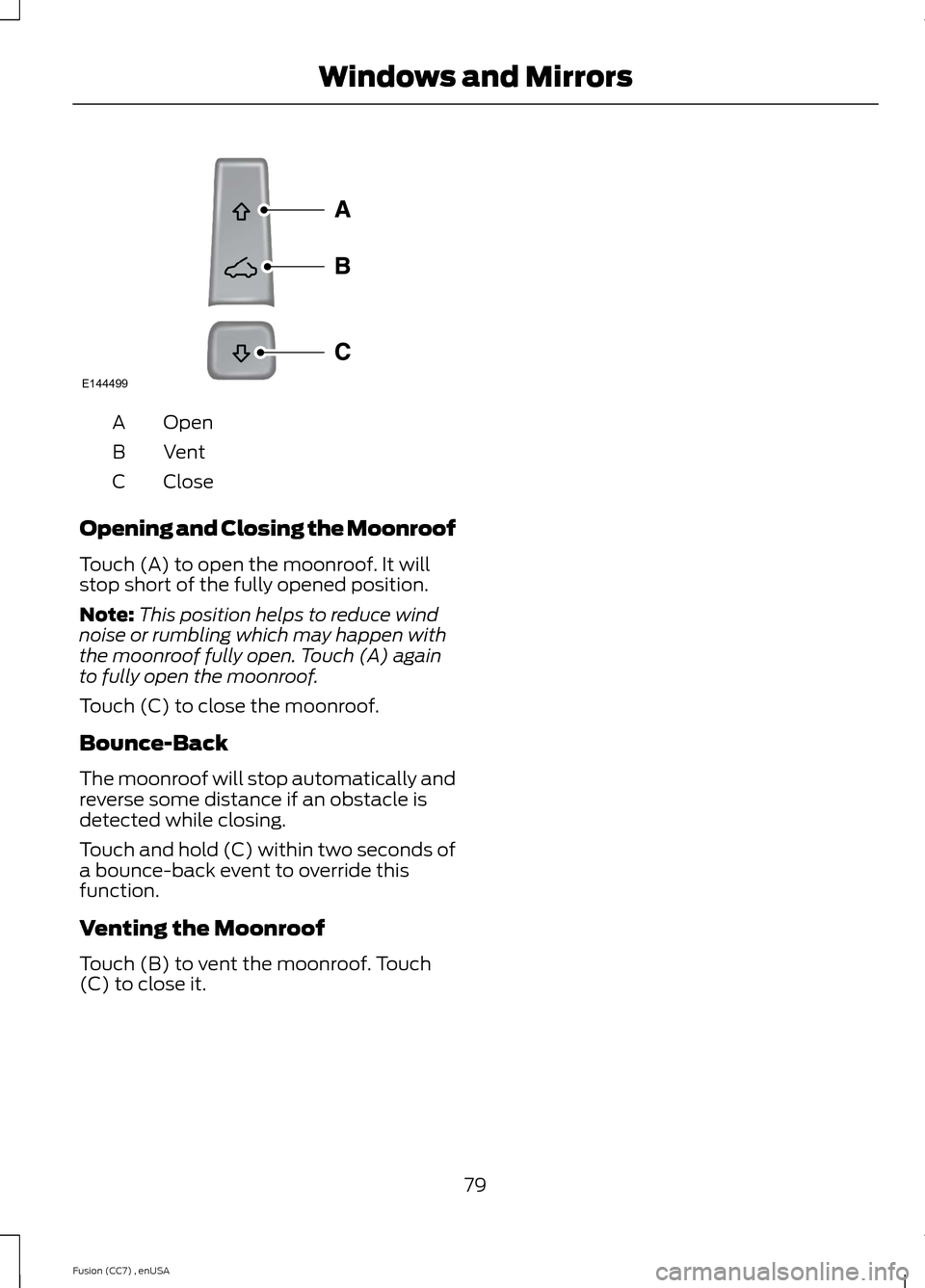
OpenA
VentB
CloseC
Opening and Closing the Moonroof
Touch (A) to open the moonroof. It willstop short of the fully opened position.
Note:This position helps to reduce windnoise or rumbling which may happen withthe moonroof fully open. Touch (A) againto fully open the moonroof.
Touch (C) to close the moonroof.
Bounce-Back
The moonroof will stop automatically andreverse some distance if an obstacle isdetected while closing.
Touch and hold (C) within two seconds ofa bounce-back event to override thisfunction.
Venting the Moonroof
Touch (B) to vent the moonroof. Touch(C) to close it.
79Fusion (CC7) , enUSAWindows and MirrorsE144499
Page 172 of 458
PRINCIPLE OF OPERATION
WARNINGS
Vehicle modifications involvingbraking system, aftermarket roofracks, suspension, steering system,tire construction and wheel and tire sizemay change the handling characteristicsof the vehicle and may adversely affectthe performance of the AdvanceTracsystem. In addition, installing any stereoloudspeakers may interfere with andadversely affect the AdvanceTrac system.Install any aftermarket stereo loudspeakeras far as possible from the front centerconsole, the tunnel, and the front seats inorder to minimize the risk of interfering withthe AdvanceTrac sensors. Reducing theeffectiveness of the AdvanceTrac systemcould lead to an increased risk of loss ofvehicle control, vehicle rollover, personalinjury and death.
Remember that even advancedtechnology cannot defy the laws ofphysics. It’s always possible to losecontrol of a vehicle due to inappropriatedriver input for the conditions. Aggressivedriving on any road condition can causeyou to lose control of your vehicleincreasing the risk of personal injury orproperty damage. Activation of theAdvanceTrac system is an indication thatat least some of the tires have exceededtheir ability to grip the road; this couldreduce the operator’s ability to control thevehicle potentially resulting in a loss ofvehicle control, vehicle rollover, personalinjury and death. If your AdvanceTracsystem activates, SLOW DOWN.
The AdvanceTrac Control system helpsyou keep control of your vehicle when ona slippery surface. The electronic stabilitycontrol portion of the system helps avoidskids and lateral slides. The tractioncontrol system helps avoid drive wheelspin and loss of traction. See UsingTraction Control (page 168).
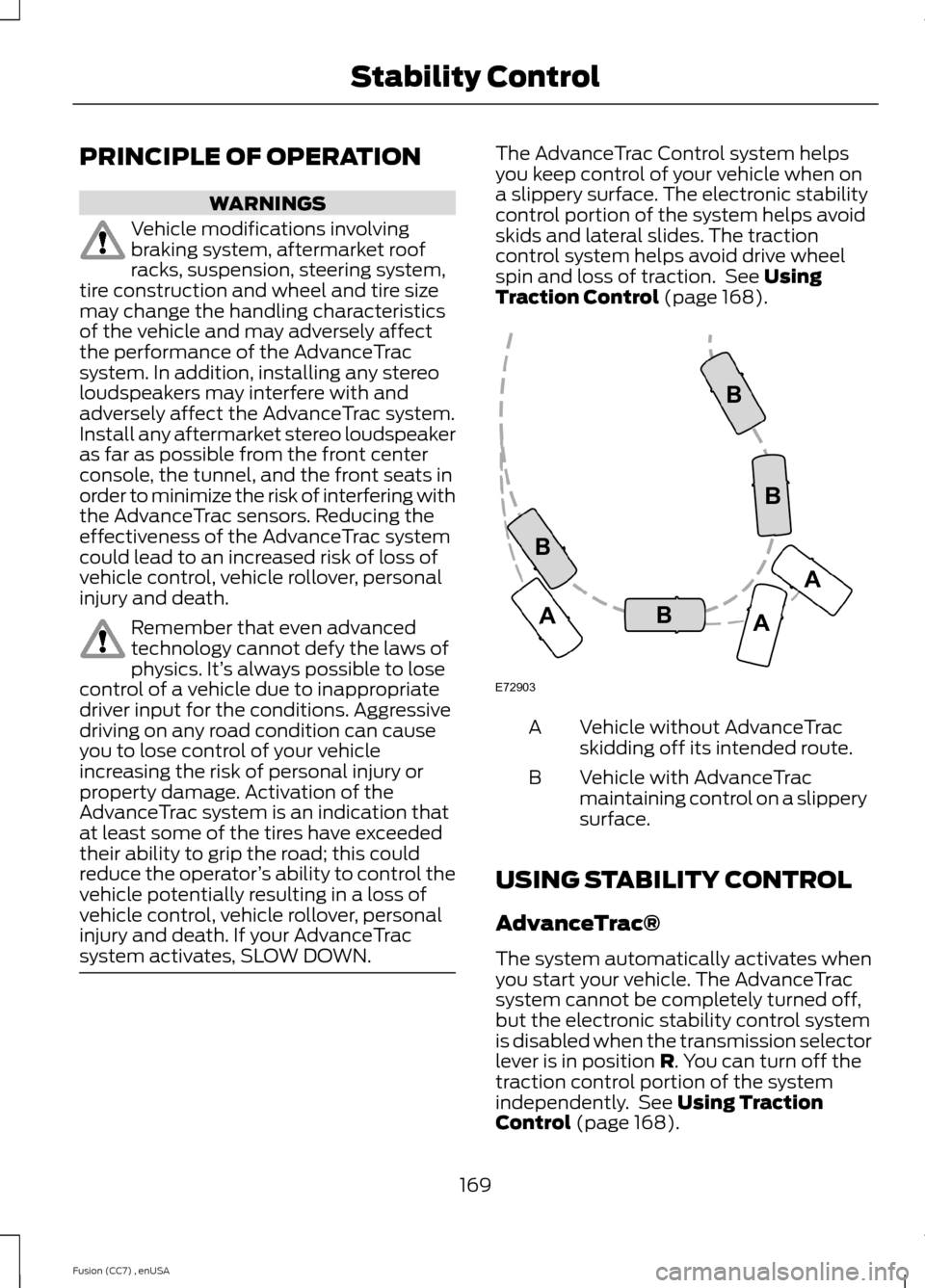
Vehicle without AdvanceTracskidding off its intended route.A
Vehicle with AdvanceTracmaintaining control on a slipperysurface.
B
USING STABILITY CONTROL
AdvanceTrac®
The system automatically activates whenyou start your vehicle. The AdvanceTracsystem cannot be completely turned off,but the electronic stability control systemis disabled when the transmission selectorlever is in position R. You can turn off thetraction control portion of the systemindependently. See Using TractionControl (page 168).
169Fusion (CC7) , enUSAStability ControlE72903AAABBBB
Page 175 of 458
For specific information on the reversesensing portion of the system, refer to thatsection.
ACTIVE PARK ASSIST (IF
EQUIPPED)
WARNING
Designed to be a supplementary parkaid, this system may not work in allconditions. This system cannotreplace the driver’s attention andjudgment. The driver is responsible foravoiding hazards and maintaining a safedistance and speed, even when the systemis in use.
Note:The driver is always responsible forcontrolling the vehicle, supervising thesystem and intervening if required.
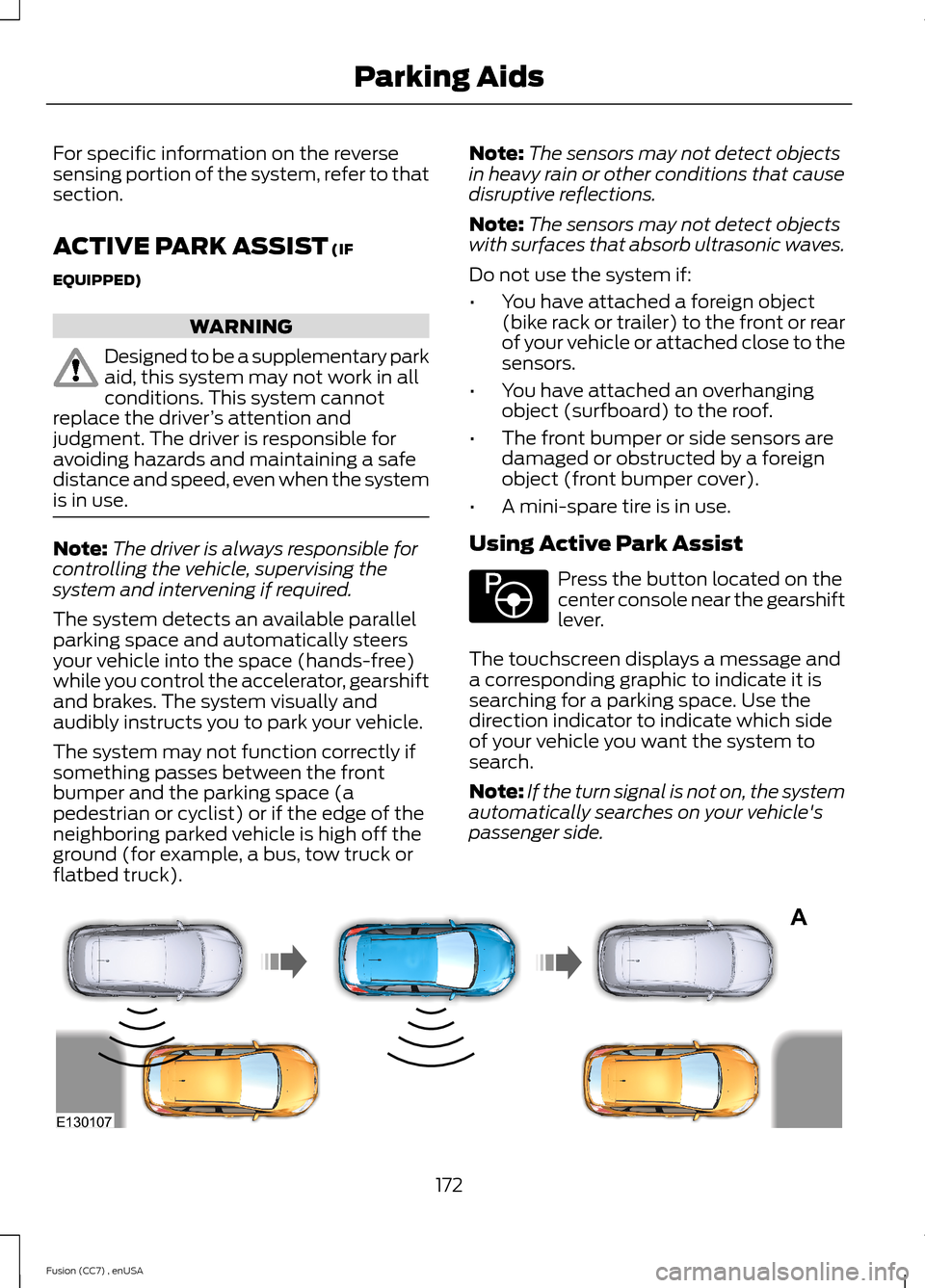
The system detects an available parallelparking space and automatically steersyour vehicle into the space (hands-free)while you control the accelerator, gearshiftand brakes. The system visually andaudibly instructs you to park your vehicle.
The system may not function correctly ifsomething passes between the frontbumper and the parking space (apedestrian or cyclist) or if the edge of theneighboring parked vehicle is high off theground (for example, a bus, tow truck orflatbed truck).
Note:The sensors may not detect objectsin heavy rain or other conditions that causedisruptive reflections.
Note:The sensors may not detect objectswith surfaces that absorb ultrasonic waves.
Do not use the system if:
•You have attached a foreign object(bike rack or trailer) to the front or rearof your vehicle or attached close to thesensors.
•You have attached an overhangingobject (surfboard) to the roof.
•The front bumper or side sensors aredamaged or obstructed by a foreignobject (front bumper cover).
•A mini-spare tire is in use.
Using Active Park Assist
Press the button located on thecenter console near the gearshiftlever.
The touchscreen displays a message anda corresponding graphic to indicate it issearching for a parking space. Use thedirection indicator to indicate which sideof your vehicle you want the system tosearch.
Note:If the turn signal is not on, the systemautomatically searches on your vehicle'spassenger side.
172Fusion (CC7) , enUSAParking AidsE146186 AE130107
Page 225 of 458
THE BETTER BUSINESS
BUREAU (BBB) AUTO LINE
PROGRAM (U.S. ONLY)
Your satisfaction is important to FordMotor Company and to your dealer. If awarranty concern has not been resolvedusing the three-step procedure outlinedearlier in this chapter in the Getting theServices you need section, you may beeligible to participate in the BBB AUTOLINE program.
The BBB AUTO LINE program consists oftwo parts – mediation and arbitration.During mediation, a representative of theBBB will contact both you and Ford MotorCompany to explore options for settlementof the claim. If an agreement is not reachedduring mediation or you do not want toparticipate in mediation, and if your claimis eligible, you may participate in thearbitration process. An arbitration hearingwill be scheduled so that you can presentyour case in an informal setting before animpartial person. The arbitrator willconsider the testimony provided and makea decision after the hearing.
Disputes submitted to the BBB AUTO LINEprogram are usually decided within fortydays after you file your claim with the BBB.You are not bound by the decision, andmay reject the decision and proceed tocourt where all findings of the BBB AutoLine dispute, and decision, are admissiblein the court action. Should you choose toaccept the BBB AUTO LINE decision, Fordis then bound by the decision, and mustcomply with the decision within 30 daysof receipt of your acceptance letter.
BBB AUTO LINE Application: Using theinformation provided below, please call orwrite to request a program application.You will be asked for your name andaddress, general information about yournew vehicle, information about yourwarranty concerns, and any steps you have
already taken to try to resolve them. ACustomer Claim Form will be mailed thatwill need to be completed, signed andreturned to the BBB along with proof ofownership. Upon receipt, the BBB willreview the claim for eligibility under theProgram Summary Guidelines.
You can get more information bycalling BBB AUTO LINE at1-800-955-5100, or writing to:
BBB AUTO LINE4200 Wilson Boulevard, Suite 800Arlington, Virginia 22203-1833
BBB AUTO LINE applications can also berequested by calling the Ford MotorCompany Customer Relationship Centerat 1-800-392-3673.
Note:Ford Motor Company reserves theright to change eligibility limitations, modifyprocedures, or to discontinue this processat any time without notice and withoutobligation.
UTILIZING THE
MEDIATION/ARBITRATION
PROGRAM (CANADA ONLY)
For vehicles delivered to authorizedCanadian dealers. In those cases whereyou continue to feel that the efforts by Fordof Canada and the authorized dealer toresolve a factory-related vehicle serviceconcern have been unsatisfactory, Ford ofCanada participates in an impartial thirdparty mediation/arbitration programadministered by the Canadian MotorVehicle Arbitration Plan (CAMVAP).
The CAMVAP program is a straight forwardand relatively speedy alternative to resolvea disagreement when all other efforts toproduce a settlement have failed. Thisprocedure is without cost to you and isdesigned to eliminate the need for lengthyand expensive legal proceedings.
222Fusion (CC7) , enUSACustomer Assistance