climate settings FORD FUSION (AMERICAS) 2016 2.G User Guide
[x] Cancel search | Manufacturer: FORD, Model Year: 2016, Model line: FUSION (AMERICAS), Model: FORD FUSION (AMERICAS) 2016 2.GPages: 518, PDF Size: 5.72 MB
Page 389 of 518
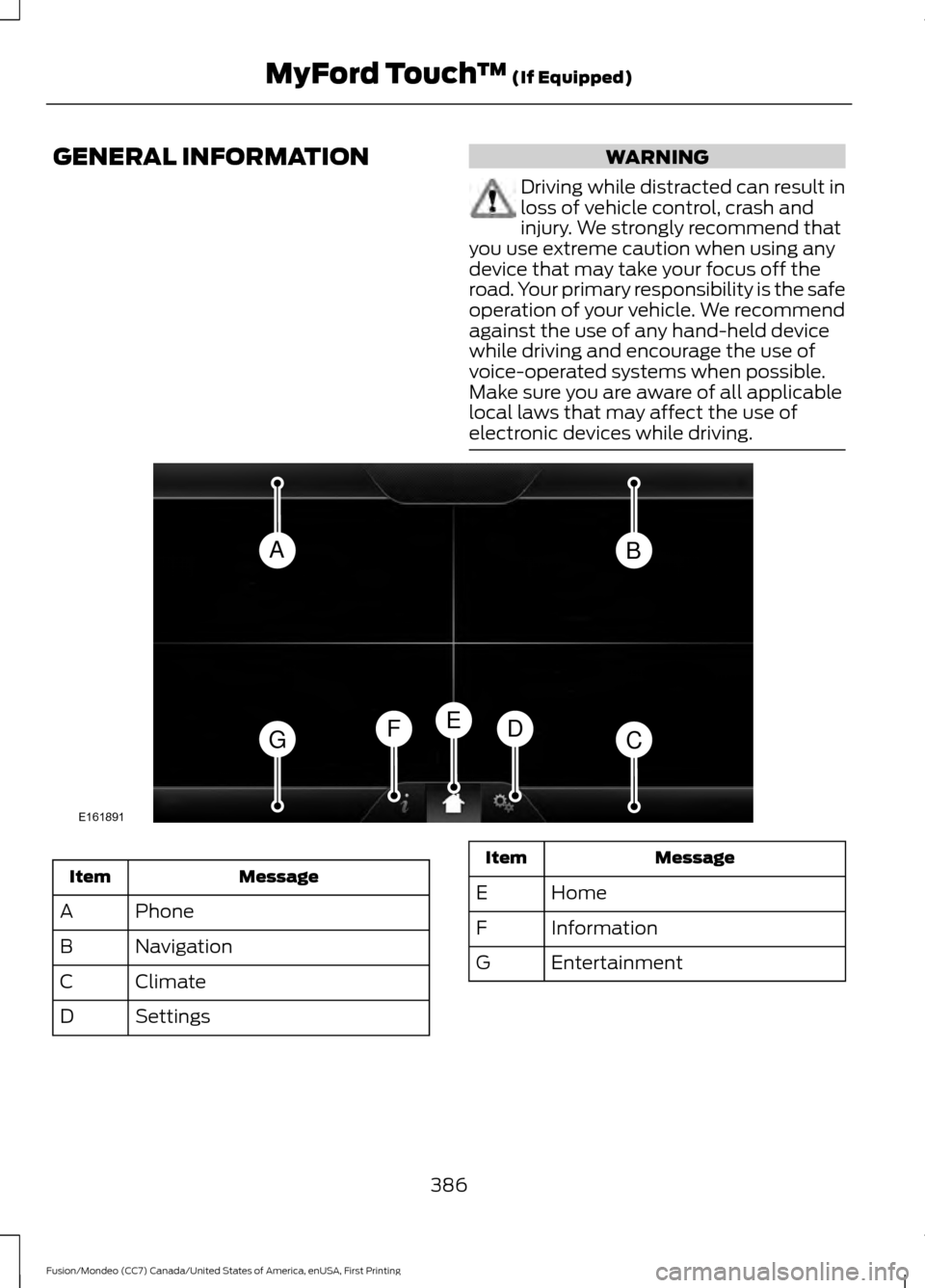
GENERAL INFORMATION WARNING
Driving while distracted can result in
loss of vehicle control, crash and
injury. We strongly recommend that
you use extreme caution when using any
device that may take your focus off the
road. Your primary responsibility is the safe
operation of your vehicle. We recommend
against the use of any hand-held device
while driving and encourage the use of
voice-operated systems when possible.
Make sure you are aware of all applicable
local laws that may affect the use of
electronic devices while driving. Message
Item
Phone
A
Navigation
B
Climate
C
Settings
D Message
Item
Home
E
Information
F
Entertainment
G
386
Fusion/Mondeo (CC7) Canada/United States of America, enUSA, First Printing MyFord Touch
™ (If Equipped)AB
GCDFE
E161891
Page 390 of 518
This system uses a four-corner strategy to
provide quick access to several vehicle
features and settings. The touchscreen
provides easy interaction with your cell
phone, entertainment, information and
system settings. The corners display active
modes within the menus, for example; your
cell phone's status.
Note:
Some features are not available while
your vehicle is moving.
Note: You can access the entertainment
features for 30 minutes after you switch the
ignition off, and no doors are opened.
PHONE
Press to select any of the following: Message
Phone
Quick Dial
Phonebook
History
Messaging
Settings
NAVIGATION
Press to select any of the following: Message
My Home
Favorites
Previous Destinations
Point of Interest
Emergency
Street Address
Intersection Message
City Center
Map
Edit Route
Cancel Route
CLIMATE
Press the corresponding icons to control
the following options:
• Driver Settings
• Recirculated Air
• Auto
• Dual
• Passenger Settings
• A/C
• Defrost
SETTINGS Press to select any of the following:
Message
Clock
Display
Sound
Vehicle
Settings
Help
HOME Press to access the home
screen.
387
Fusion/Mondeo (CC7) Canada/United States of America, enUSA, First Printing MyFord Touch
™ (If Equipped)E142607 E142613
Page 444 of 518
If you want to run a report by using the
touchscreen, select:
Message
Apps
Vehicle Health Report You can also run a vehicle health
report by voice command.
Press the voice button and when
prompted say: Voice command
Vehicle Health Report
Vehicle Health Report Privacy Notice
When you create a Vehicle Health Report,
Ford Motor Company may collect your
cellular phone number (to process your
report request) and diagnostic information
about your vehicle. Certain versions or
updates to Vehicle Health Report may also
collect more vehicle information. Ford may
use your vehicle information it collects for
any purpose. If you do not want to disclose
your cellular phone number or vehicle information, do not run the feature or set
up your Vehicle Health Report profile at
www.SYNCMyRide.com. See
www.SYNCMyRide.com (Vehicle Health
Report Terms and Conditions, and Privacy
Statement) for more information.
Where Am I?
For information about your current
location, select: Action and Descrip-
tion
Message
View your vehicle's
current location, if
your vehicle is
equipped with
navigation. If your
vehicle is not
equipped with
navigation, nothing
displays.
Where Am I?
CLIMATE
Touch the lower right corner on the
touchscreen to access your climate control
features. Depending on your vehicle line
and option package, your climate screen
may look different from this screen.
Note: You can switch temperature units
between Fahrenheit and Celsius. See
Settings (page 395).
441
Fusion/Mondeo (CC7) Canada/United States of America, enUSA, First Printing MyFord Touch
™
(If Equipped)E142599
Page 445 of 518
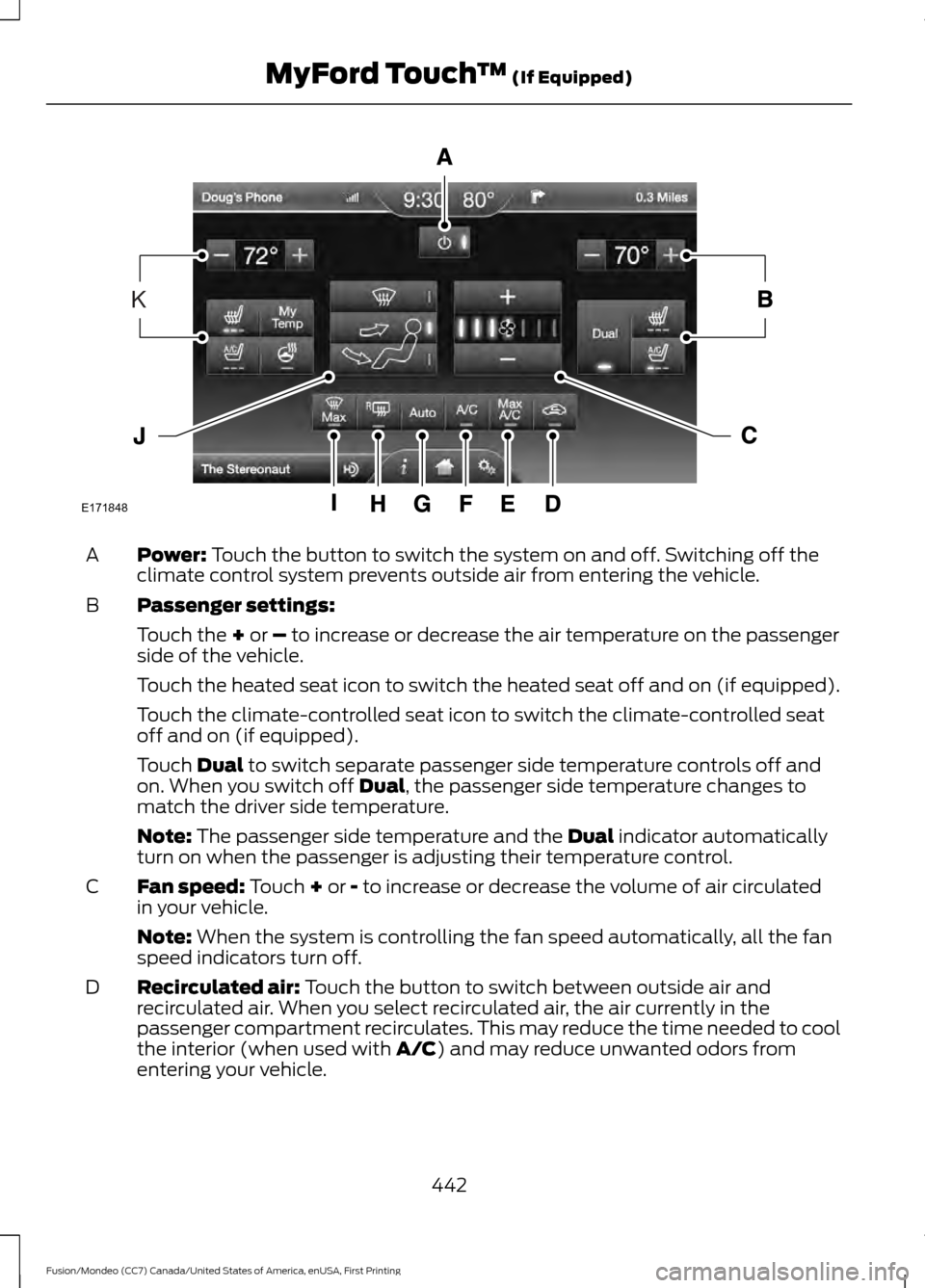
Power: Touch the button to switch the system on and off. Switching off the
climate control system prevents outside air from entering the vehicle.
A
Passenger settings:
B
Touch the
+ or – to increase or decrease the air temperature on the passenger
side of the vehicle.
Touch the heated seat icon to switch the heated seat off and on (if equipped).
Touch the climate-controlled seat icon to switch the climate-controlled seat
off and on (if equipped).
Touch
Dual to switch separate passenger side temperature controls off and
on. When you switch off Dual, the passenger side temperature changes to
match the driver side temperature.
Note:
The passenger side temperature and the Dual indicator automatically
turn on when the passenger is adjusting their temperature control.
Fan speed:
Touch + or - to increase or decrease the volume of air circulated
in your vehicle.
C
Note:
When the system is controlling the fan speed automatically, all the fan
speed indicators turn off.
Recirculated air:
Touch the button to switch between outside air and
recirculated air. When you select recirculated air, the air currently in the
passenger compartment recirculates. This may reduce the time needed to cool
the interior (when used with
A/C) and may reduce unwanted odors from
entering your vehicle.
D
442
Fusion/Mondeo (CC7) Canada/United States of America, enUSA, First Printing MyFord Touch
™
(If Equipped)E171848
K
Page 446 of 518
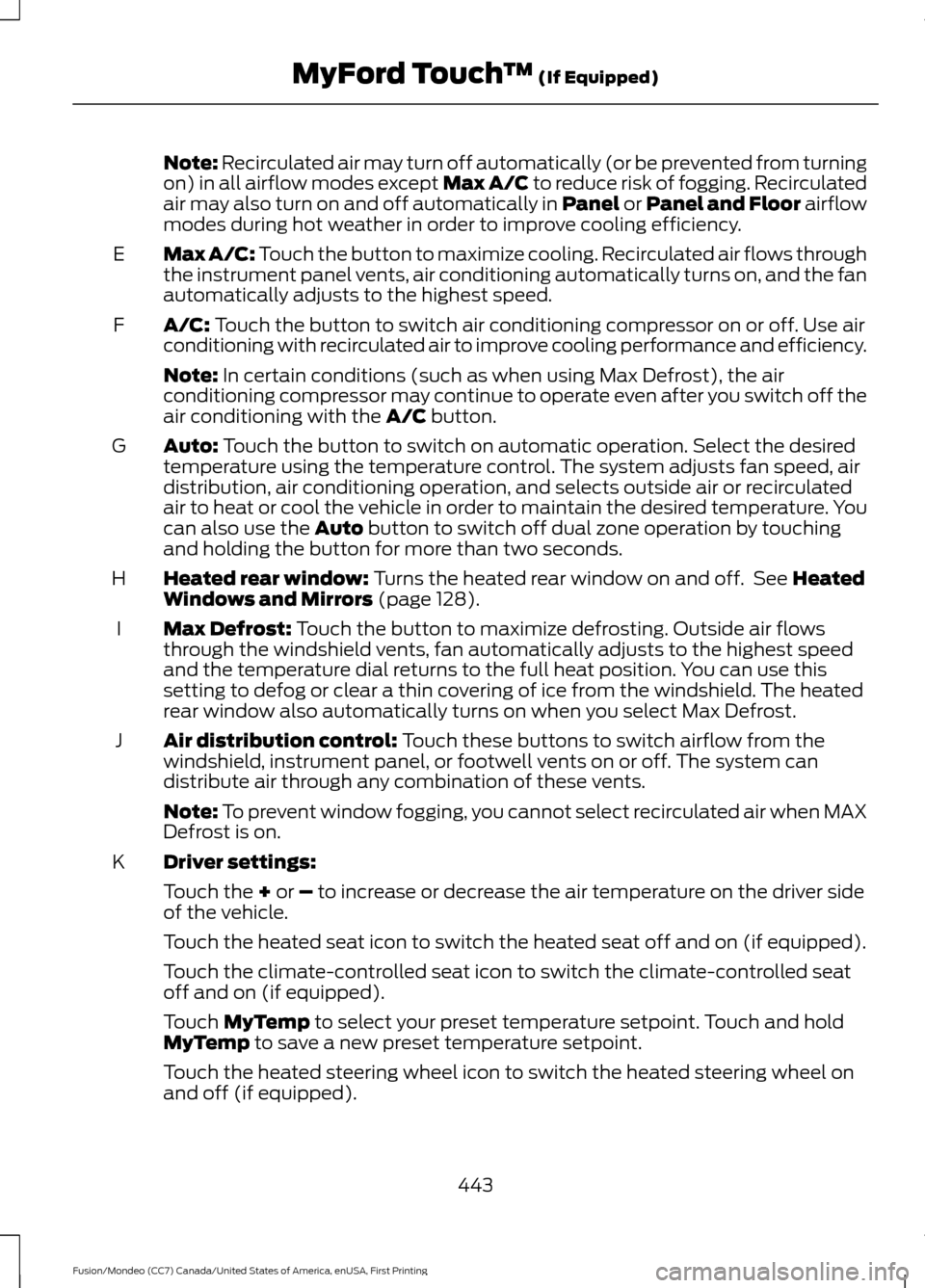
Note: Recirculated air may turn off automatically (or be prevented from turning
on) in all airflow modes except Max A/C to reduce risk of fogging. Recirculated
air may also turn on and off automatically in Panel or Panel and Floor airflow
modes during hot weather in order to improve cooling efficiency.
Max A/C:
Touch the button to maximize cooling. Recirculated air flows through
the instrument panel vents, air conditioning automatically turns on, and the fan
automatically adjusts to the highest speed.
E
A/C:
Touch the button to switch air conditioning compressor on or off. Use air
conditioning with recirculated air to improve cooling performance and efficiency.
F
Note:
In certain conditions (such as when using Max Defrost), the air
conditioning compressor may continue to operate even after you switch off the
air conditioning with the
A/C button.
Auto:
Touch the button to switch on automatic operation. Select the desired
temperature using the temperature control. The system adjusts fan speed, air
distribution, air conditioning operation, and selects outside air or recirculated
air to heat or cool the vehicle in order to maintain the desired temperature. You
can also use the
Auto button to switch off dual zone operation by touching
and holding the button for more than two seconds.
G
Heated rear window:
Turns the heated rear window on and off. See Heated
Windows and Mirrors (page 128).
H
Max Defrost:
Touch the button to maximize defrosting. Outside air flows
through the windshield vents, fan automatically adjusts to the highest speed
and the temperature dial returns to the full heat position. You can use this
setting to defog or clear a thin covering of ice from the windshield. The heated
rear window also automatically turns on when you select Max Defrost.
I
Air distribution control:
Touch these buttons to switch airflow from the
windshield, instrument panel, or footwell vents on or off. The system can
distribute air through any combination of these vents.
J
Note:
To prevent window fogging, you cannot select recirculated air when MAX
Defrost is on.
Driver settings:
K
Touch the
+ or – to increase or decrease the air temperature on the driver side
of the vehicle.
Touch the heated seat icon to switch the heated seat off and on (if equipped).
Touch the climate-controlled seat icon to switch the climate-controlled seat
off and on (if equipped).
Touch
MyTemp to select your preset temperature setpoint. Touch and hold
MyTemp to save a new preset temperature setpoint.
Touch the heated steering wheel icon to switch the heated steering wheel on
and off (if equipped).
443
Fusion/Mondeo (CC7) Canada/United States of America, enUSA, First Printing MyFord Touch
™
(If Equipped)
Page 509 of 518
B
Blind Spot Information System..............201
Blind Spot Information System (BLIS ™)
with Cross Traffic Alert................................ 201
Bonnet Lock See: Opening and Closing the Hood...........247
Booster Seats..................................................24 Types of Booster Seats...................................... 24
Brake Fluid Check........................................255
Brakes................................................................172 General Information........................................... 172
Breaking-In.....................................................223
Bulb Specification Chart...........................263
C
Cabin Air Filter
................................................128
California Proposition 65..............................11
Capacities and Specifications - 1.5L EcoBoost™..................................................316
Specifications....................................................... 317
Capacities and Specifications - 2.0L EcoBoost™..................................................319
Specifications..................................................... 320
Capacities and Specifications - 2.5L.................................................................323
Specifications..................................................... 324
Capacities and Specifications
.................313
Car Wash See: Cleaning the Exterior.............................. 266
Center Console..............................................145
Changing a Bulb............................................261 Headlamp............................................................. 262
LED Lamps........................................................... 262
Replacing the License Plate Lamp Bulb.................................................................... 263
Reverse Lamp..................................................... 262
Changing a Fuse..........................................246 Fuses...................................................................... 246
Changing a Road Wheel...........................305 Dissimilar Spare Wheel and Tire Assembly
Information..................................................... 305
Stowing the flat tire (Type 1)......................... 310
Stowing the flat tire (Type 2)......................... 310
Tire Change Procedure................................... 306
Type 1...................................................................... 307
Type 2.................................................................... 308Changing the 12V Battery.........................256
Changing the Engine Air Filter................265
2.5L Engine........................................................... 265
EcoBoost Engines............................................. 265
Changing the Wiper Blades
.....................258
Checking MyKey System Status...............57
Checking the Wiper Blades.....................258
Child Restraint and Safety Belt Maintenance
.................................................36
Child Safety.......................................................15
General Information............................................. 15
Child Safety Locks..........................................27 Left-Hand Side..................................................... 28
Right-Hand Side................................................... 28
Child Seat Positioning..................................26
Cleaning Leather Seats
.............................269
Cleaning Products.......................................266
Cleaning the Alloy Wheels
.......................270
Cleaning the Engine....................................267
Cleaning the Exterior..................................266 Exterior Chrome Parts..................................... 266
Exterior Plastic Parts......................................... 267
Stripes or Graphics............................................ 267
Underbody............................................................ 267
Cleaning the Instrument Panel and Instrument Cluster Lens........................269
Cleaning the Interior...................................268
Cleaning the Windows and Wiper Blades...........................................................268
Clearing All MyKeys
.......................................56
Climate.............................................................441 Climate Control Voice Commands.............444
Climate Control
.............................................120
Climate Controlled Seats...........................137 Cooled Seats........................................................ 138
Coolant Check See: Engine Coolant Check............................ 252
Crash Sensors and Airbag Indicator
........45
Creating a MyKey............................................55
Programming/Changing Configurable
Settings............................................................... 55
Cruise Control
..................................................72
Principle of Operation...................................... 188
Type 1........................................................................\
. 72
Type 2........................................................................\
72
Cruise control See: Using Cruise Control................................188
Customer Assistance
..................................231
506
Fusion/Mondeo (CC7) Canada/United States of America, enUSA, First Printing Index
Page 512 of 518
Hints on Controlling the Interior
Climate..........................................................125
Cooling the Interior Quickly............................. 127
General Hints........................................................ 125
Heating the Interior Quickly............................ 126
Recommended Settings for Cooling ..........127
Recommended Settings for Heating...........127
Side Window Defogging in Cold Weather............................................................. 128
Hints on Driving With Anti-Lock Brakes.............................................................172
Hood Lock See: Opening and Closing the Hood...........247
I
Ignition Switch...............................................146
In California (U.S. Only).............................232
Information Display Control.......................72 Information Display Control Features...........73
Information Displays....................................96 General Information........................................... 96
Information....................................................432 911 Assist............................................................... 438
Alerts....................................................................... 437
Calendar............................................................... 438
Sirius Travel Link................................................ 436
SYNC Services (If Equipped, United States Only).................................................................. 432
Vehicle Health Report (If Equipped, US Only)................................................................. 440Information Messages
................................105
Active Park............................................................ 105
Adaptive Cruise Control.................................. 106
AdvanceTrac®..................................................... 106
Airbag...................................................................... 107
Alarm....................................................................... 107
All-Wheel Drive................................................... 109
Automatic Engine Shutdown........................ 109
Auto Start-Stop................................................... 107
Battery and Charging System......................... 110
Blind Spot Information and Cross Traffic Alert System..................................................... 110
Doors and Locks.................................................... 111
Driver Alert............................................................... 111
Fuel........................................................................\
..... 111
Hill Start Assist...................................................... 111
Keys and Intelligent Access............................. 112
Lane Keeping System......................................... 113
Maintenance.......................................................... 113
MyKey....................................................................... 114
Park Aid................................................................... 115
Park Brake............................................................... 115
Power Steering..................................................... 116
Pre-Collision Assist............................................. 116
Remote Start......................................................... 117
Seats........................................................................\
. 117
Starting System ................................................... 117
Tire Pressure Monitoring System................... 118
Traction Control................................................... 118
Transmission......................................................... 118
Installing Child Seats.....................................16 Child Seats............................................................... 16
Using Lap and Shoulder Belts.......................... 17
Using Lower Anchors and Tethers for CHildren (LATCH)............................................. 21
Using Tether Straps............................................. 23
Instrument Cluster
........................................89
Instrument Lighting Dimmer......................79 Vehicles With Front Fog Lamps...................... 79
Vehicles Without Front Fog Lamps...............79
Interior Lamps.................................................82 Front Interior Lamp.............................................. 82
Rear Interior Lamp............................................... 83
Interior Luggage Compartment Release...........................................................66
Interior Mirror
...................................................86
Auto-Dimming Mirror.......................................... 87
Introduction.........................................................7
509
Fusion/Mondeo (CC7) Canada/United States of America, enUSA, First Printing Index
Page 517 of 518
Using All-Wheel Drive.................................167
Driving In Special Conditions With
All-Wheel Drive (AWD)............................... 167
Using Cruise Control...................................188 Switching Cruise Control Off......................... 188
Switching Cruise Control On.......................... 188
Using MyKey With Remote Start Systems..........................................................58
Using Snow Chains......................................301
Using Stability Control................................178 AdvanceTrac® .................................................... 178
Using Summer Tires..................................300
Using SYNC™ With Your Media Player.............................................................367
Accessing Your Play Menu.............................. 372
Connecting Your Digital Media Player to the USB Port........................................................... 367
Media Menu Features....................................... 370
Media Voice Commands................................ 369
System Settings................................................. 374
What's Playing?................................................. 369
Using SYNC™ With Your Phone............346 Accessing Features Through the Phone
Menu................................................................. 350
Accessing Your Phone Settings................... 354
Making a Call....................................................... 349
Pairing a Cell Phone for the First Time.................................................................. 346
Pairing Subsequent Cell Phones.................. 347
Phone Options during an Active Call.........349
Phone Voice Commands................................ 347
Receiving Calls................................................... 349
System Settings................................................. 355
Text Messaging................................................... 352
Using Traction Control.................................177 Switching the System Off Using a
Switch................................................................. 177
Switching the System Off Using the Information Display Controls..................... 177
System Indicator Lights and Messages........................................................... 177
Using Voice Recognition
...........................343
Initiating a Voice Session................................ 343
System Interaction and Feedback..............344
Utilizing the Mediation/Arbitration Program (Canada Only).........................233 V
Vehicle Care...................................................266
General Information......................................... 266
Vehicle Certification Label
........................315
Vehicle Identification Number.................315
Vehicle Storage.............................................270 Battery..................................................................... 271
Body........................................................................\
. 271
Brakes...................................................................... 271
Cooling system..................................................... 271
Engine...................................................................... 271
Fuel system........................................................... 271
General.................................................................... 271
Miscellaneous...................................................... 272
Removing Vehicle From Storage.................. 272
Tires........................................................................\
.. 271
Ventilation See: Climate Control......................................... 120
VIN See: Vehicle Identification Number.............315
Voice Control
....................................................72
514
Fusion/Mondeo (CC7) Canada/United States of America, enUSA, First Printing Index