language FORD FUSION (AMERICAS) 2016 2.G Owners Manual
[x] Cancel search | Manufacturer: FORD, Model Year: 2016, Model line: FUSION (AMERICAS), Model: FORD FUSION (AMERICAS) 2016 2.GPages: 518, PDF Size: 5.72 MB
Page 2 of 518

The information contained in this publication was correct at the time of going to print. In the interest of
continuous development, we reserve the right to change specifications, design or equipment at any time
without notice or obligation. No part of this publication may be reproduced, transmitted, stored in a
retrieval system or translated into any language in any form by any means without our written permission.
Errors and omissions excepted.
© Ford Motor Company 2015
All rights reserved.
Part Number: 20150203202023
Page 103 of 518
Settings
Always On or User Selectable
911
Assist
On or Off
Do Not
Disturb
Always On or User Selectable
Traction
Control
Choose desired speed or Off
MAX
Speed
Choose desired speed or Off
Speed
Minder
Volume Limiter - check enabled or uncheck disabled
Hold OK to Clear All MyKeys
Clear
MyKeys
Miles & Gallons, L/100km or km/L
Distance
Display
Setup
Fahrenheit (°F) or Celsius (°C)
Temper-
ature
psi, kPa or bar
Tire Pres-
sure
Choose your applicable setting
Language
1 Type 2
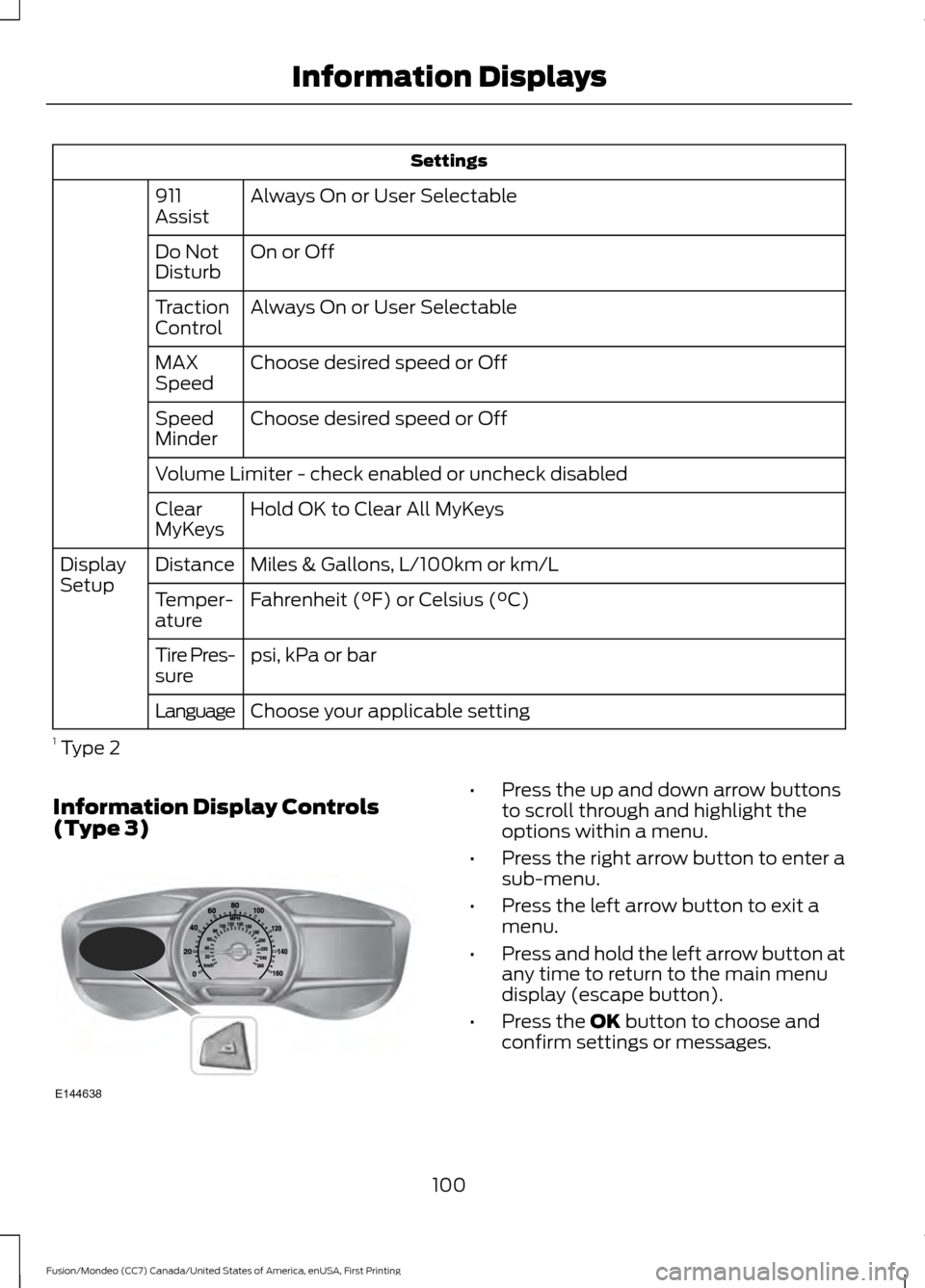
Information Display Controls
(Type 3) •
Press the up and down arrow buttons
to scroll through and highlight the
options within a menu.
• Press the right arrow button to enter a
sub-menu.
• Press the left arrow button to exit a
menu.
• Press and hold the left arrow button at
any time to return to the main menu
display (escape button).
• Press the OK button to choose and
confirm settings or messages.
100
Fusion/Mondeo (CC7) Canada/United States of America, enUSA, First Printing Information DisplaysE144638
Page 108 of 518
Settings
Volume Limiter - check enabled or uncheck disabled Hold OK to Clear All MyKeys
Clear
MyKeys
Miles & Gallons, l/100km or km/l
Distance
Display
Setup
Fuel Gauge or Fuel + Tach
Gauge
Display
°Fahrenheit or °Celsius
Temper-
ature
psi, kPa or bar
Tire Pres-
sure
Choose your applicable setting
Language
INFORMATION MESSAGES
Note: Depending on the vehicle options
equipped with your vehicle, not all of the
messages will display or be available.
Certain messages may be abbreviated or
shortened depending upon which cluster
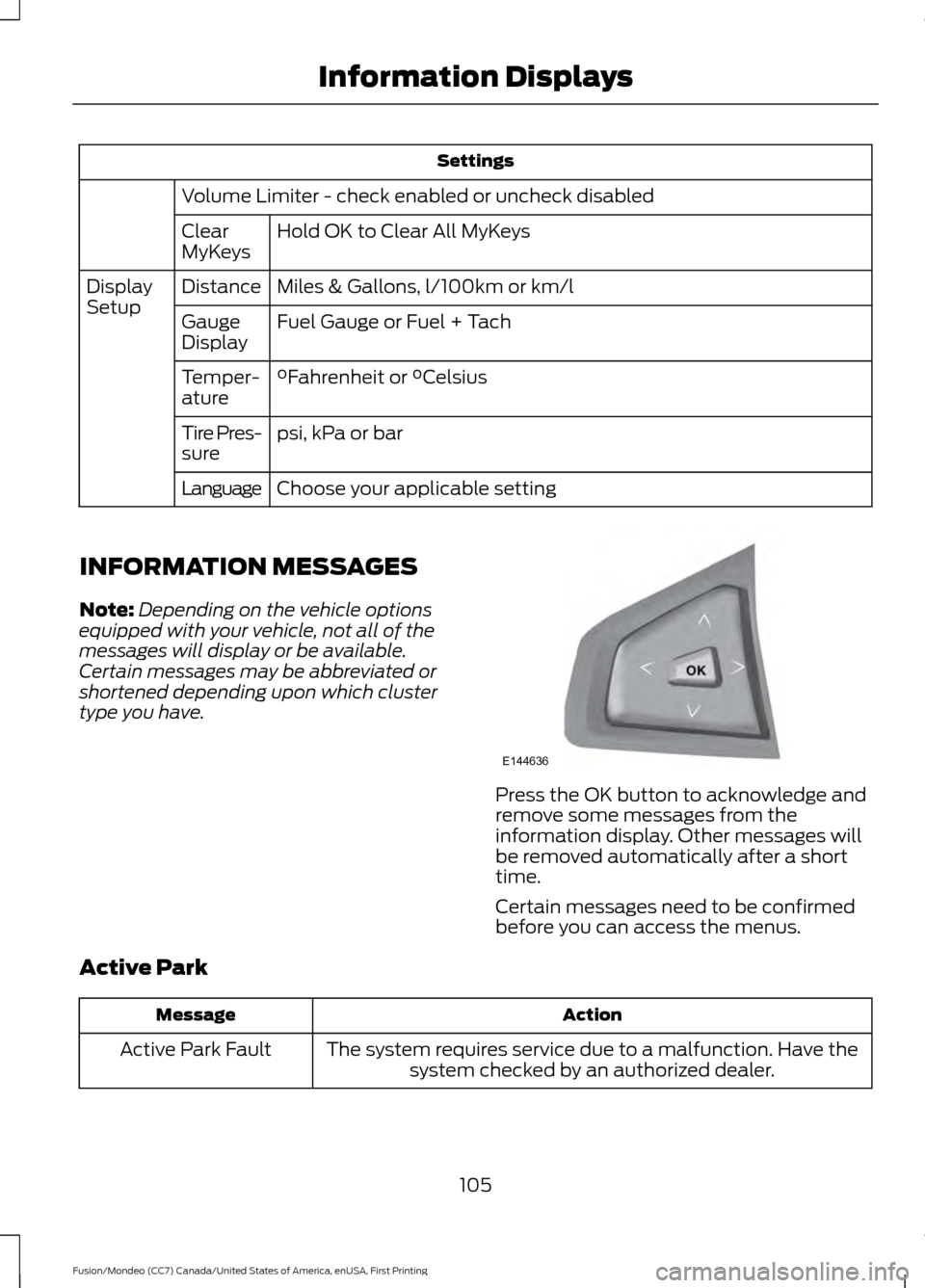
type you have. Press the OK button to acknowledge and
remove some messages from the
information display. Other messages will
be removed automatically after a short
time.
Certain messages need to be confirmed
before you can access the menus.
Active Park Action
Message
The system requires service due to a malfunction. Have thesystem checked by an authorized dealer.
Active Park Fault
105
Fusion/Mondeo (CC7) Canada/United States of America, enUSA, First Printing Information DisplaysE144636
Page 338 of 518
CD Settings
Select to scan all disc selections.
Scan All
Select to scan all music in the current MP3 folder.
Scan Folder
Select to bring soft and loud passages together for a more
consistent listening level.
CD Compression Clock Settings
Select to set the time.
Set Time
Select to set the calendar date.
Set Date
Select to view clock time in a 12-hour mode or 24-hour
mode.
24h Mode Display Settings
Select to change display brightness.
Dimming
Select to display the language in English, French or
Spanish.
Language
Select to display the outside temperature in Fahrenheit
or Celsius.
Temp. setting
DIGITAL RADIO
Note: HD Radio broadcasts are not
available in all markets.
HD Radio technology is the digital
evolution of analog AM/FM radio. Your
system has a special receiver that allows
it to receive digital broadcasts (where
available) in addition to the analog
broadcasts, it already receives. Digital
broadcasts provide a better sound quality than analog broadcasts with free,
crystal-clear audio and no static or
distortion. For more information, and a
guide to available stations and
programming, please visit
www.hdradio.com.
When HD Radio is on and you tune to a
station broadcasting HD Radio technology,
you may notice the HD Radio logo on your
screen. When this logo is available, you
may also see Title and Artist fields
on-screen.
335
Fusion/Mondeo (CC7) Canada/United States of America, enUSA, First Printing Audio System
Page 360 of 518
Advanced
The Advanced menu allows you to access
and set prompts, languages, defaults,
perform a master reset, install an
application and view system information.
To access the advanced menu, press the phone button to enter the Phone Menu,
the scroll to: Action and Description
Message
Press OK.
Sys Settings
Press
OK.
Advanced
Select one of the following:
Get help from SYNC by using questions, helpful hints or asking
you for a specific action. To turn these prompts on or off:
Confirmation Prompts
1.Press the
OK button to select and scroll to select between
On and Off.
2. Press the
OK button when the desired selection appears
in the display. SYNC returns you to the Advanced menu.
1. Press
OK to select and then scroll through the languages.
Choose between English, Français and Español. Once
selected, all of the radio displays and prompts are in the
selected language.
2. Press
OK when the desired selection appears in the
display. If you change the language setting, the display
indicates that the system is updating. When complete,
SYNC returns you to the Advanced menu.
Language
Return to the factory default settings. This selection does
not erase your indexed information, for example phonebook,
call history, text messages or paired devices.
Factory Defaults
Press the OK button to select and then press OK again when
the following message appears in the display.
Confirm Restore
Completely erase all information stored on SYNC, for example
phonebook, call history, text messages and paired devices,
and return the system to the factory default settings.
Master reset
Press
OK to select. The display indicates when complete.
SYNC returns you to the Advanced menu.
Install applications you have downloaded.
Install Applications
357
Fusion/Mondeo (CC7) Canada/United States of America, enUSA, First Printing SYNC™
Page 378 of 518
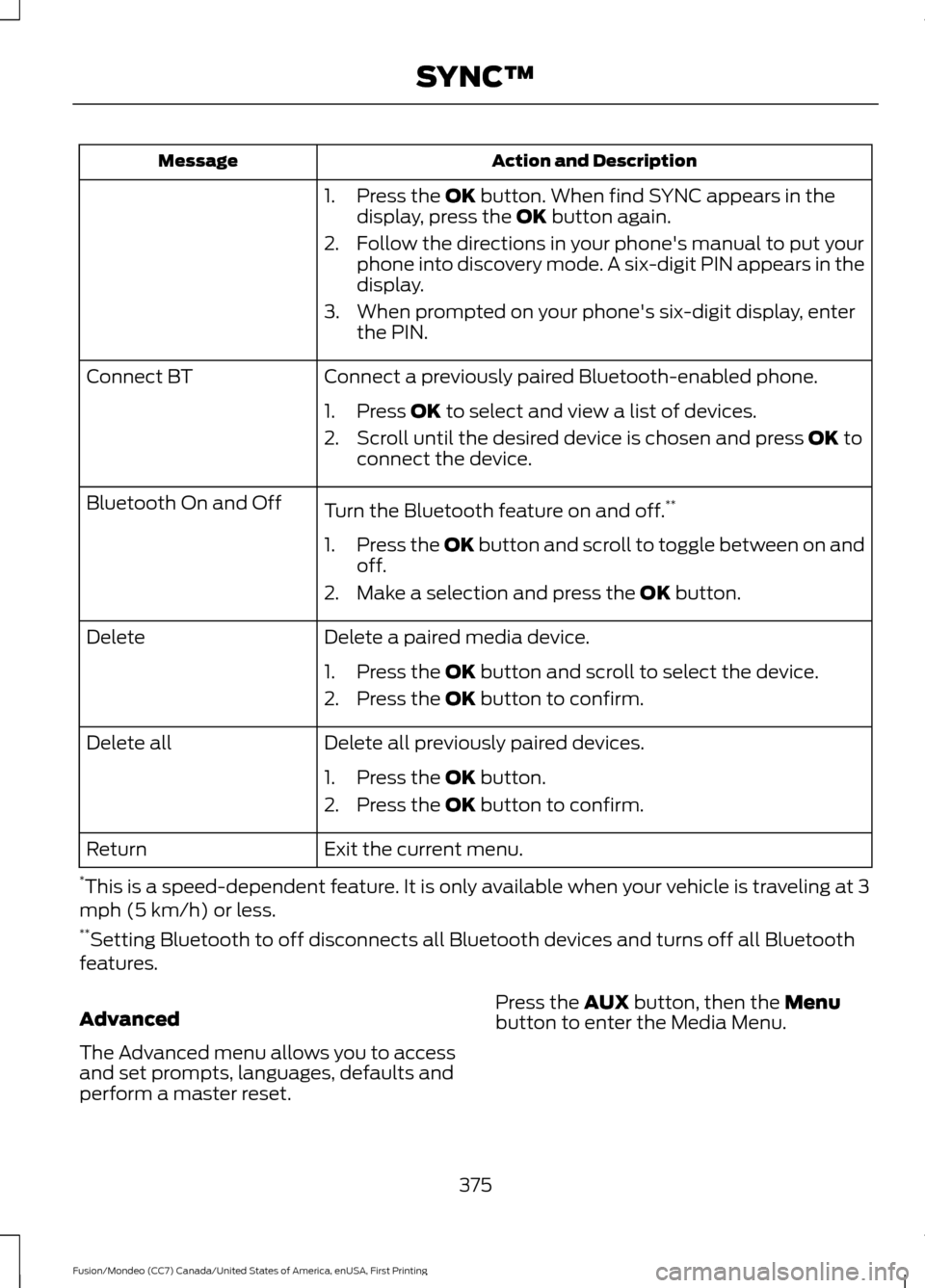
Action and Description
Message
1. Press the OK button. When find SYNC appears in the
display, press the OK button again.
2. Follow the directions in your phone's manual to put your phone into discovery mode. A six-digit PIN appears in the
display.
3. When prompted on your phone's six-digit display, enter the PIN.
Connect a previously paired Bluetooth-enabled phone.
Connect BT
1. Press
OK to select and view a list of devices.
2. Scroll until the desired device is chosen and press
OK to
connect the device.
Turn the Bluetooth feature on and off. **
Bluetooth On and Off
1.Press the OK button and scroll to toggle between on and
off.
2. Make a selection and press the
OK button.
Delete a paired media device.
Delete
1. Press the
OK button and scroll to select the device.
2. Press the
OK button to confirm.
Delete all previously paired devices.
Delete all
1. Press the
OK button.
2. Press the
OK button to confirm.
Exit the current menu.
Return
* This is a speed-dependent feature. It is only available when your vehicle is traveling at 3
mph (5 km/h) or less.
** Setting Bluetooth to off disconnects all Bluetooth devices and turns off all Bluetooth
features.
Advanced
The Advanced menu allows you to access
and set prompts, languages, defaults and
perform a master reset. Press the
AUX button, then the Menu
button to enter the Media Menu.
375
Fusion/Mondeo (CC7) Canada/United States of America, enUSA, First Printing SYNC™
Page 379 of 518
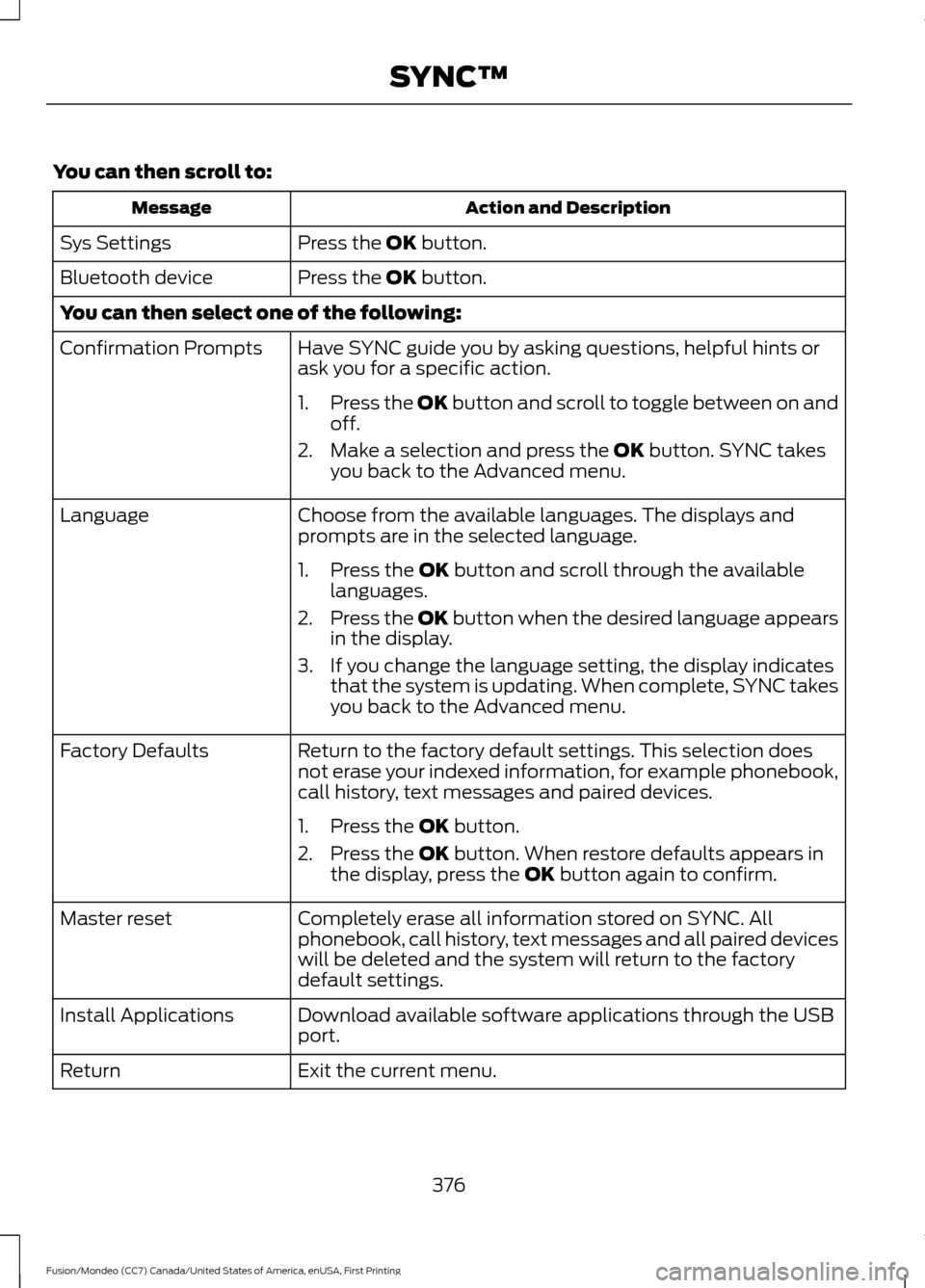
You can then scroll to:
Action and Description
Message
Press the OK button.
Sys Settings
Press the
OK button.
Bluetooth device
You can then select one of the following:
Have SYNC guide you by asking questions, helpful hints or
ask you for a specific action.
Confirmation Prompts
1.Press the OK button and scroll to toggle between on and
off.
2. Make a selection and press the
OK button. SYNC takes
you back to the Advanced menu.
Choose from the available languages. The displays and
prompts are in the selected language.
Language
1. Press the
OK button and scroll through the available
languages.
2. Press the OK button when the desired language appears
in the display.
3. If you change the language setting, the display indicates that the system is updating. When complete, SYNC takes
you back to the Advanced menu.
Return to the factory default settings. This selection does
not erase your indexed information, for example phonebook,
call history, text messages and paired devices.
Factory Defaults
1. Press the
OK button.
2. Press the
OK button. When restore defaults appears in
the display, press the OK button again to confirm.
Completely erase all information stored on SYNC. All
phonebook, call history, text messages and all paired devices
will be deleted and the system will return to the factory
default settings.
Master reset
Download available software applications through the USB
port.
Install Applications
Exit the current menu.
Return
376
Fusion/Mondeo (CC7) Canada/United States of America, enUSA, First Printing SYNC™
Page 403 of 518
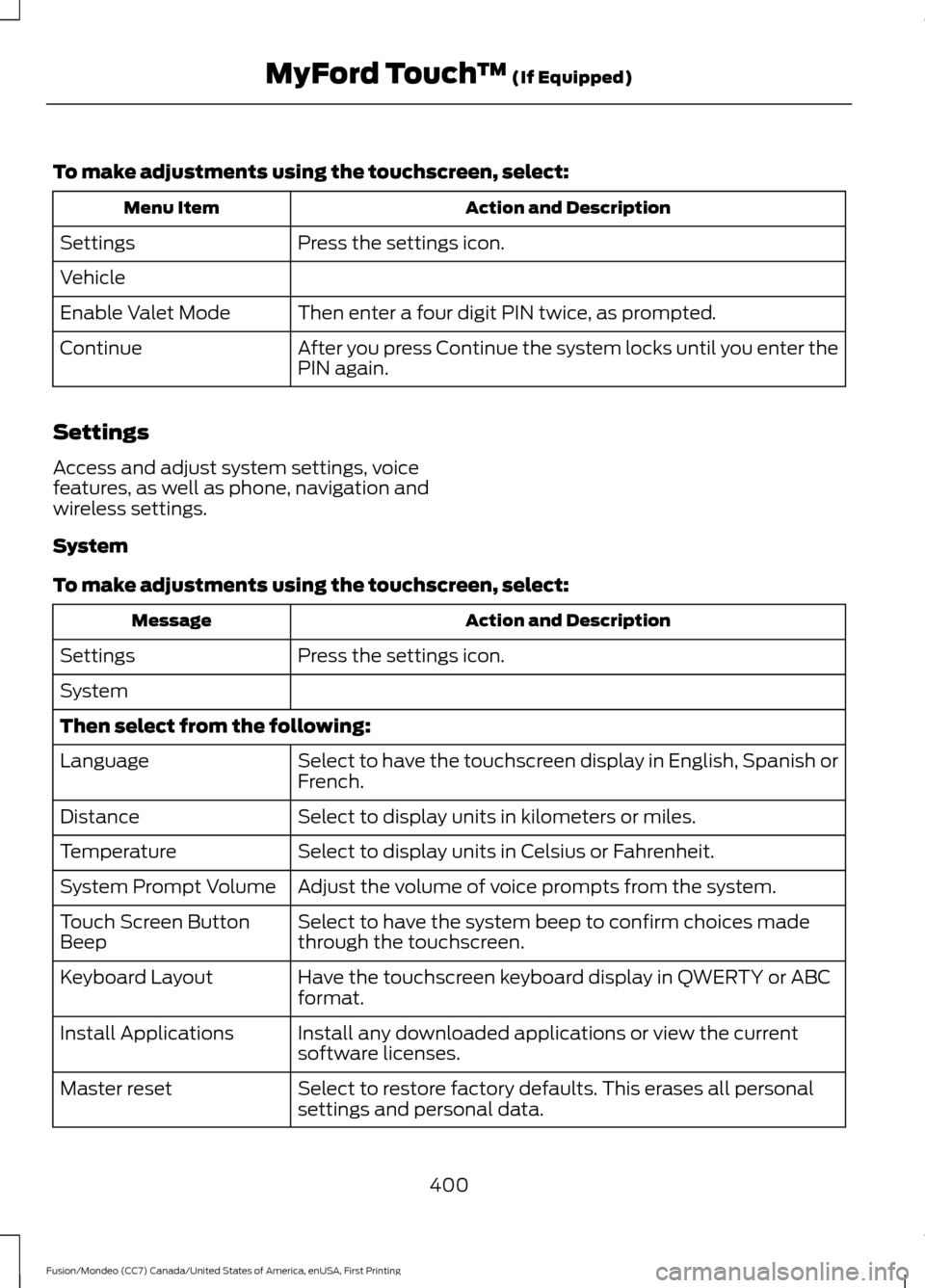
To make adjustments using the touchscreen, select:
Action and Description
Menu Item
Press the settings icon.
Settings
Vehicle
Then enter a four digit PIN twice, as prompted.
Enable Valet Mode
After you press Continue the system locks until you enter the
PIN again.
Continue
Settings
Access and adjust system settings, voice
features, as well as phone, navigation and
wireless settings.
System
To make adjustments using the touchscreen, select: Action and Description
Message
Press the settings icon.
Settings
System
Then select from the following:
Select to have the touchscreen display in English, Spanish or
French.
Language
Select to display units in kilometers or miles.
Distance
Select to display units in Celsius or Fahrenheit.
Temperature
Adjust the volume of voice prompts from the system.
System Prompt Volume
Select to have the system beep to confirm choices made
through the touchscreen.
Touch Screen Button
Beep
Have the touchscreen keyboard display in QWERTY or ABC
format.
Keyboard Layout
Install any downloaded applications or view the current
software licenses.
Install Applications
Select to restore factory defaults. This erases all personal
settings and personal data.
Master reset
400
Fusion/Mondeo (CC7) Canada/United States of America, enUSA, First Printing MyFord Touch
™ (If Equipped)