engine FORD FUSION (AMERICAS) 2017 2.G User Guide
[x] Cancel search | Manufacturer: FORD, Model Year: 2017, Model line: FUSION (AMERICAS), Model: FORD FUSION (AMERICAS) 2017 2.GPages: 528, PDF Size: 7.53 MB
Page 89 of 528
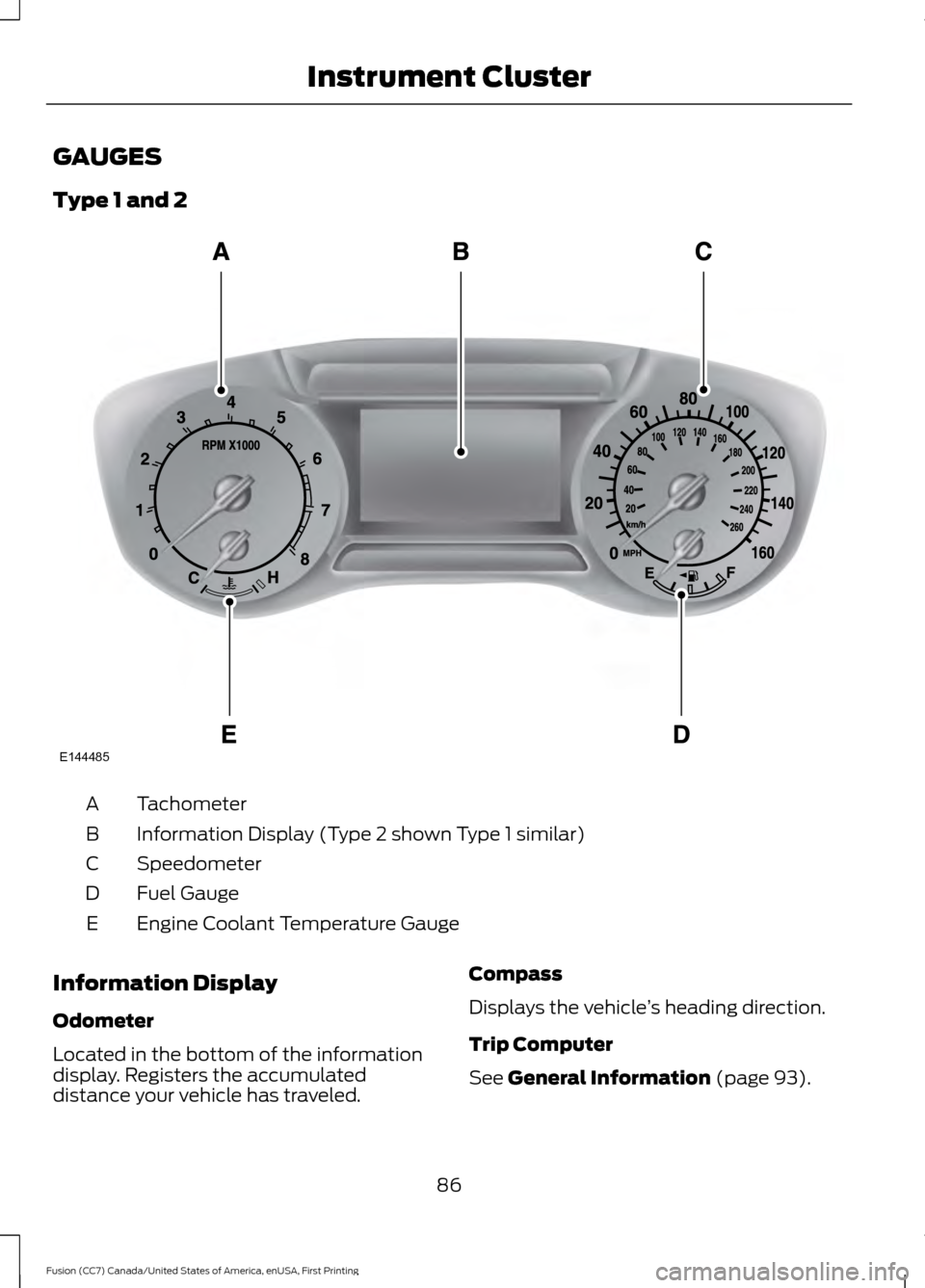
GAUGES
Type 1 and 2
Tachometer
A
Information Display (Type 2 shown Type 1 similar)
B
Speedometer
C
Fuel Gauge
D
Engine Coolant Temperature Gauge
E
Information Display
Odometer
Located in the bottom of the information
display. Registers the accumulated
distance your vehicle has traveled. Compass
Displays the vehicle
’s heading direction.
Trip Computer
See General Information (page 93).
86
Fusion (CC7) Canada/United States of America, enUSA, First Printing Instrument ClusterE144485
Page 90 of 528
Vehicle Settings and Personalization
See General Information (page 93).
Engine Coolant Temperature
Gauge
Shows the temperature of the engine
coolant. At normal operating temperature,
the needle will remain in the center section.
If the needle enters the red section, the
engine is overheating. Stop the engine,
switch the ignition off and determine the
cause once the engine has cooled down.
Note: Do not restart the engine until the
cause of overheating has been resolved. WARNING
Never remove the coolant reservoir
cap while the engine is running or hot.
Fuel Gauge
Note:
The fuel gauge may vary slightly
when your vehicle is moving or on a gradient.
Switch the ignition on. The fuel gauge will
indicate approximately how much fuel is
left in the fuel tank. The arrow adjacent to
the fuel pump symbol indicates on which
side of your vehicle the fuel filler door is
located. The needle should move toward F when
you refuel your vehicle. If the needle points
to E after adding fuel, this indicates your
vehicle needs service soon.
After refueling some variability in needle
position is normal:
•
It may take a short time for the needle
to reach full after leaving the gas
station. This is normal and depends
upon the slope of pavement at the gas
station.
• The fuel amount dispensed into the
tank is a little less or more than the
gauge indicated. This is normal and
depends upon the slope of pavement
at the gas station.
• If the gas station nozzle shuts off
before the tank is full, try a different
gas pump nozzle.
• There is a small reserve left in the tank
when the fuel gauge reaches empty.
Low Fuel Reminder
A low fuel reminder triggers at
50 mi
(80 km) to empty.
Variations:
Note: The low fuel reminder can appear at
different fuel gauge positions depending on
fuel economy conditions. This variation is
normal.
87
Fusion (CC7) Canada/United States of America, enUSA, First Printing Instrument Cluster
Page 92 of 528
WARNING LAMPS AND
INDICATORS
The following warning lamps and
indicators will alert you to a vehicle
condition that may become serious. Some
lamps will illuminate when you start your
vehicle to make sure they work. If any
lamps remain on after starting your vehicle,
refer to the respective system warning
lamp for further information.
Note:
Some warning indicators appear in
the information display and function the
same as a warning lamp but do not display
when you start your vehicle.
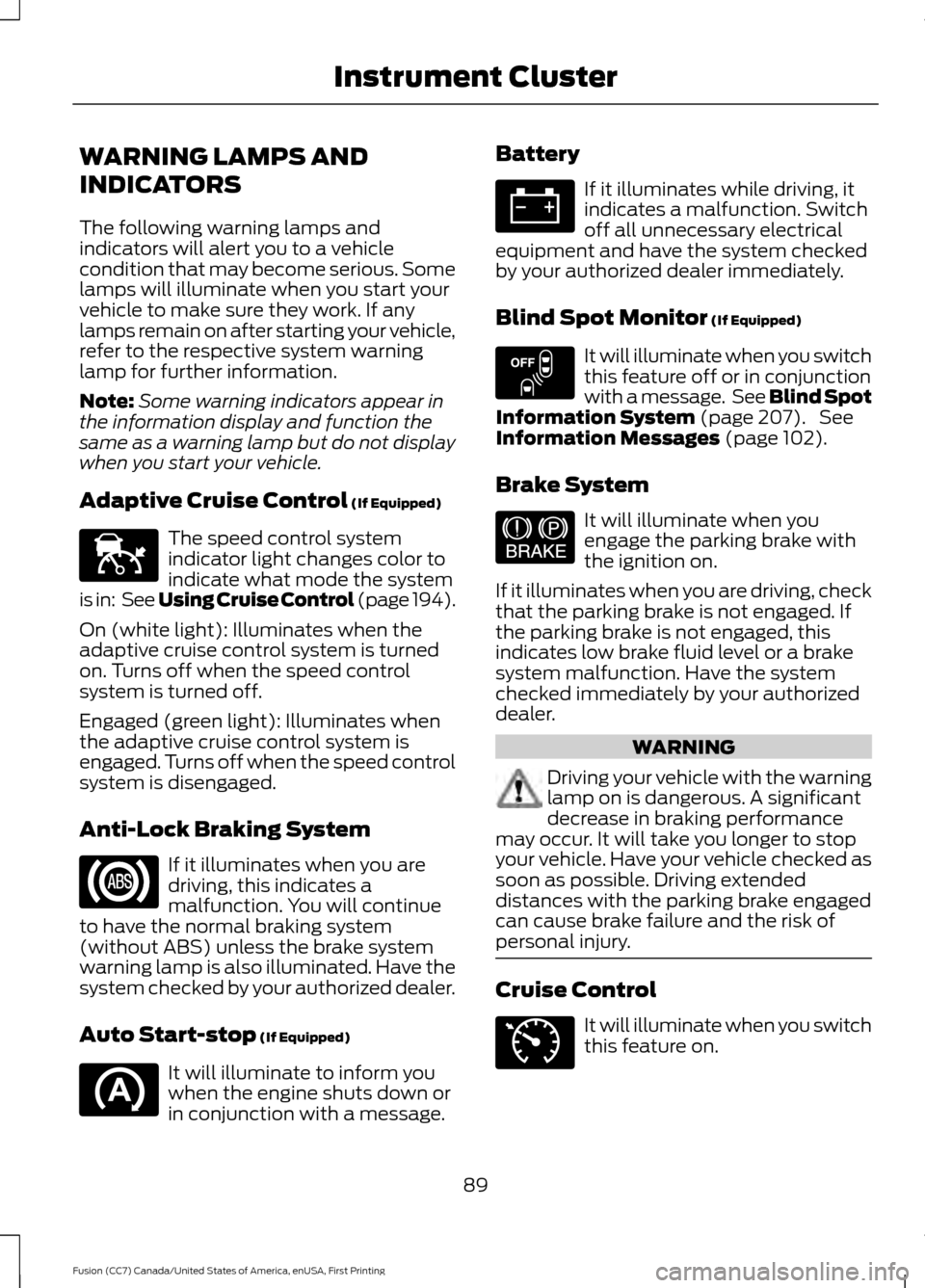
Adaptive Cruise Control (If Equipped) The speed control system
indicator light changes color to
indicate what mode the system
is in: See Using Cruise Control (page 194).
On (white light): Illuminates when the
adaptive cruise control system is turned
on. Turns off when the speed control
system is turned off.
Engaged (green light): Illuminates when
the adaptive cruise control system is
engaged. Turns off when the speed control
system is disengaged.
Anti-Lock Braking System If it illuminates when you are
driving, this indicates a
malfunction. You will continue
to have the normal braking system
(without ABS) unless the brake system
warning lamp is also illuminated. Have the
system checked by your authorized dealer.
Auto Start-stop
(If Equipped) It will illuminate to inform you
when the engine shuts down or
in conjunction with a message. Battery If it illuminates while driving, it
indicates a malfunction. Switch
off all unnecessary electrical
equipment and have the system checked
by your authorized dealer immediately.
Blind Spot Monitor
(If Equipped) It will illuminate when you switch
this feature off or in conjunction
with a message. See Blind Spot
Information System
(page 207). See
Information Messages (page 102).
Brake System It will illuminate when you
engage the parking brake with
the ignition on.
If it illuminates when you are driving, check
that the parking brake is not engaged. If
the parking brake is not engaged, this
indicates low brake fluid level or a brake
system malfunction. Have the system
checked immediately by your authorized
dealer. WARNING
Driving your vehicle with the warning
lamp on is dangerous. A significant
decrease in braking performance
may occur. It will take you longer to stop
your vehicle. Have your vehicle checked as
soon as possible. Driving extended
distances with the parking brake engaged
can cause brake failure and the risk of
personal injury. Cruise Control
It will illuminate when you switch
this feature on.
89
Fusion (CC7) Canada/United States of America, enUSA, First Printing Instrument ClusterE144524 E151262 E144522 E71340
Page 93 of 528
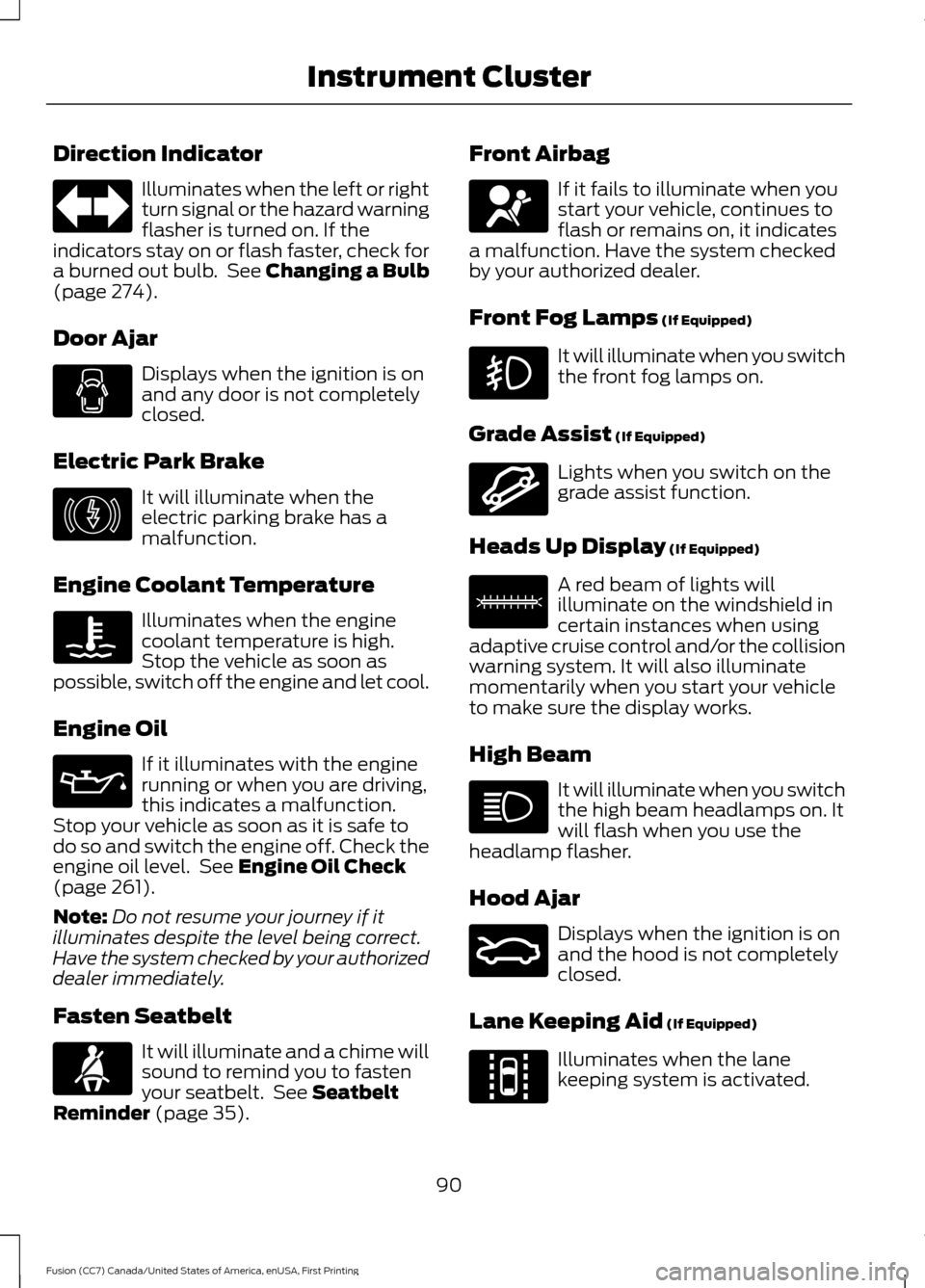
Direction Indicator
Illuminates when the left or right
turn signal or the hazard warning
flasher is turned on. If the
indicators stay on or flash faster, check for
a burned out bulb. See Changing a Bulb
(page 274).
Door Ajar Displays when the ignition is on
and any door is not completely
closed.
Electric Park Brake It will illuminate when the
electric parking brake has a
malfunction.
Engine Coolant Temperature Illuminates when the engine
coolant temperature is high.
Stop the vehicle as soon as
possible, switch off the engine and let cool.
Engine Oil If it illuminates with the engine
running or when you are driving,
this indicates a malfunction.
Stop your vehicle as soon as it is safe to
do so and switch the engine off. Check the
engine oil level. See
Engine Oil Check
(page 261).
Note: Do not resume your journey if it
illuminates despite the level being correct.
Have the system checked by your authorized
dealer immediately.
Fasten Seatbelt It will illuminate and a chime will
sound to remind you to fasten
your seatbelt. See
Seatbelt
Reminder (page 35). Front Airbag If it fails to illuminate when you
start your vehicle, continues to
flash or remains on, it indicates
a malfunction. Have the system checked
by your authorized dealer.
Front Fog Lamps
(If Equipped) It will illuminate when you switch
the front fog lamps on.
Grade Assist
(If Equipped) Lights when you switch on the
grade assist function.
Heads Up Display
(If Equipped) A red beam of lights will
illuminate on the windshield in
certain instances when using
adaptive cruise control and/or the collision
warning system. It will also illuminate
momentarily when you start your vehicle
to make sure the display works.
High Beam It will illuminate when you switch
the high beam headlamps on. It
will flash when you use the
headlamp flasher.
Hood Ajar Displays when the ignition is on
and the hood is not completely
closed.
Lane Keeping Aid
(If Equipped) Illuminates when the lane
keeping system is activated.
90
Fusion (CC7) Canada/United States of America, enUSA, First Printing Instrument Cluster E146190 E144523 E156133 E159324 E144813
Page 94 of 528
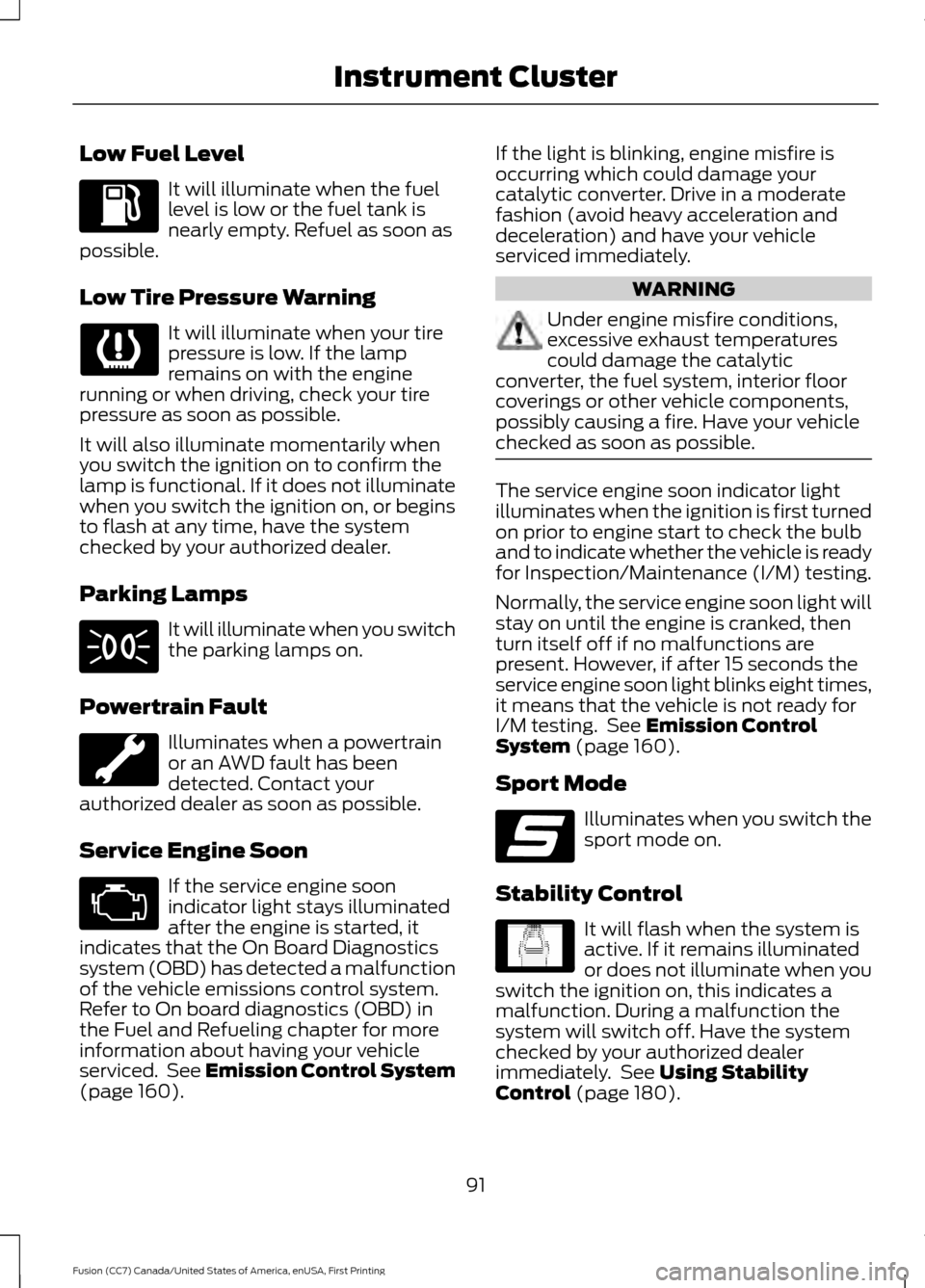
Low Fuel Level
It will illuminate when the fuel
level is low or the fuel tank is
nearly empty. Refuel as soon as
possible.
Low Tire Pressure Warning It will illuminate when your tire
pressure is low. If the lamp
remains on with the engine
running or when driving, check your tire
pressure as soon as possible.
It will also illuminate momentarily when
you switch the ignition on to confirm the
lamp is functional. If it does not illuminate
when you switch the ignition on, or begins
to flash at any time, have the system
checked by your authorized dealer.
Parking Lamps It will illuminate when you switch
the parking lamps on.
Powertrain Fault Illuminates when a powertrain
or an AWD fault has been
detected. Contact your
authorized dealer as soon as possible.
Service Engine Soon If the service engine soon
indicator light stays illuminated
after the engine is started, it
indicates that the On Board Diagnostics
system (OBD) has detected a malfunction
of the vehicle emissions control system.
Refer to On board diagnostics (OBD) in
the Fuel and Refueling chapter for more
information about having your vehicle
serviced. See Emission Control System
(page 160). If the light is blinking, engine misfire is
occurring which could damage your
catalytic converter. Drive in a moderate
fashion (avoid heavy acceleration and
deceleration) and have your vehicle
serviced immediately. WARNING
Under engine misfire conditions,
excessive exhaust temperatures
could damage the catalytic
converter, the fuel system, interior floor
coverings or other vehicle components,
possibly causing a fire. Have your vehicle
checked as soon as possible. The service engine soon indicator light
illuminates when the ignition is first turned
on prior to engine start to check the bulb
and to indicate whether the vehicle is ready
for Inspection/Maintenance (I/M) testing.
Normally, the service engine soon light will
stay on until the engine is cranked, then
turn itself off if no malfunctions are
present. However, if after 15 seconds the
service engine soon light blinks eight times,
it means that the vehicle is not ready for
I/M testing. See
Emission Control
System (page 160).
Sport Mode Illuminates when you switch the
sport mode on.
Stability Control It will flash when the system is
active. If it remains illuminated
or does not illuminate when you
switch the ignition on, this indicates a
malfunction. During a malfunction the
system will switch off. Have the system
checked by your authorized dealer
immediately. See
Using Stability
Control (page 180).
91
Fusion (CC7) Canada/United States of America, enUSA, First Printing Instrument Cluster E176099 E138639
Page 99 of 528
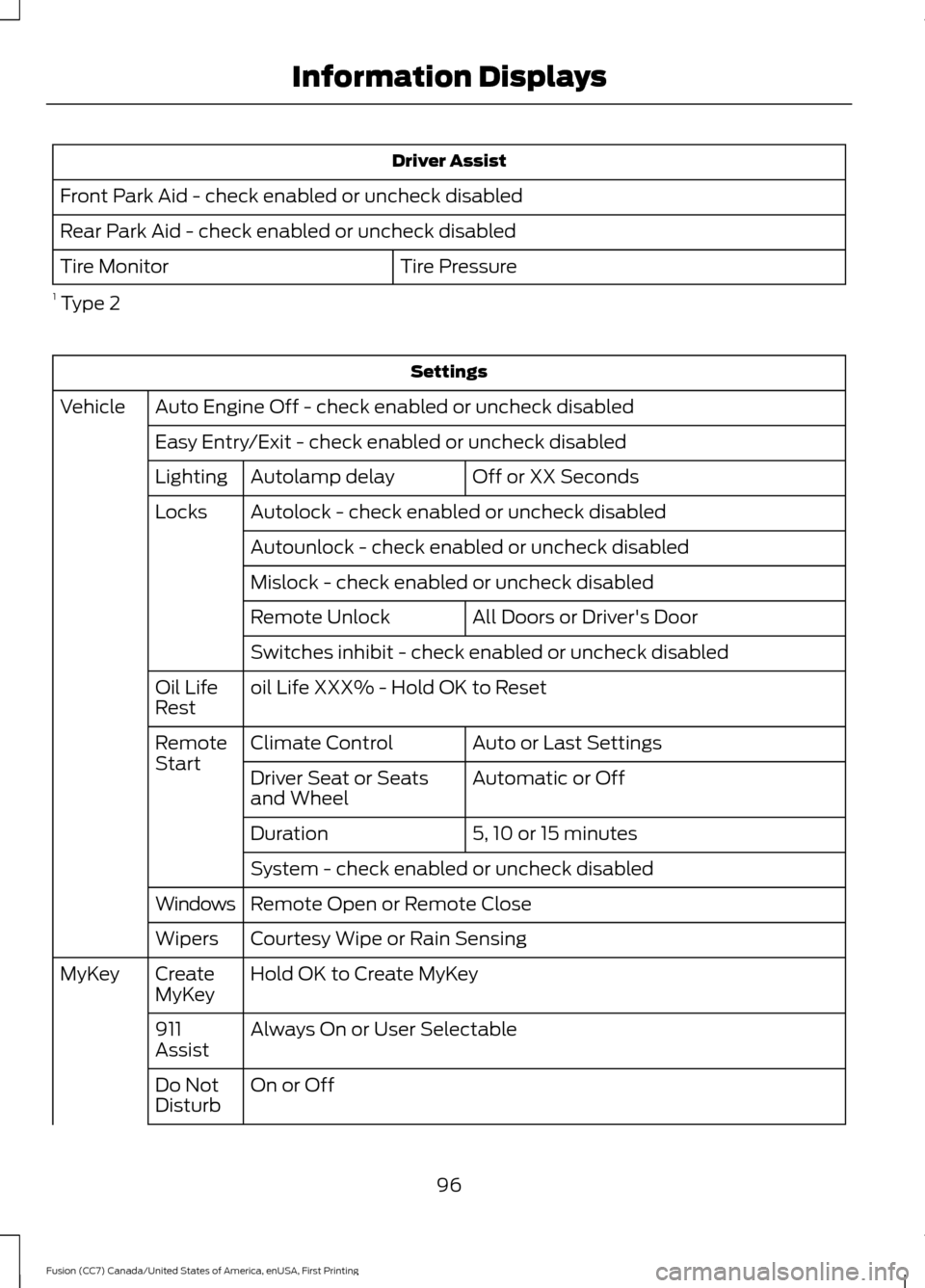
Driver Assist
Front Park Aid - check enabled or uncheck disabled
Rear Park Aid - check enabled or uncheck disabled Tire Pressure
Tire Monitor
1 Type 2 Settings
Auto Engine Off - check enabled or uncheck disabled
Vehicle
Easy Entry/Exit - check enabled or uncheck disabled Off or XX Seconds
Autolamp delay
Lighting
Autolock - check enabled or uncheck disabled
Locks
Autounlock - check enabled or uncheck disabled
Mislock - check enabled or uncheck disabled All Doors or Driver's Door
Remote Unlock
Switches inhibit - check enabled or uncheck disabled
oil Life XXX% - Hold OK to Reset
Oil Life
Rest
Auto or Last Settings
Climate Control
Remote
Start
Automatic or Off
Driver Seat or Seats
and Wheel
5, 10 or 15 minutes
Duration
System - check enabled or uncheck disabled
Remote Open or Remote Close
Windows
Courtesy Wipe or Rain Sensing
Wipers
Hold OK to Create MyKey
Create
MyKey
MyKey
Always On or User Selectable
911
Assist
On or Off
Do Not
Disturb
96
Fusion (CC7) Canada/United States of America, enUSA, First Printing Information Displays
Page 101 of 528
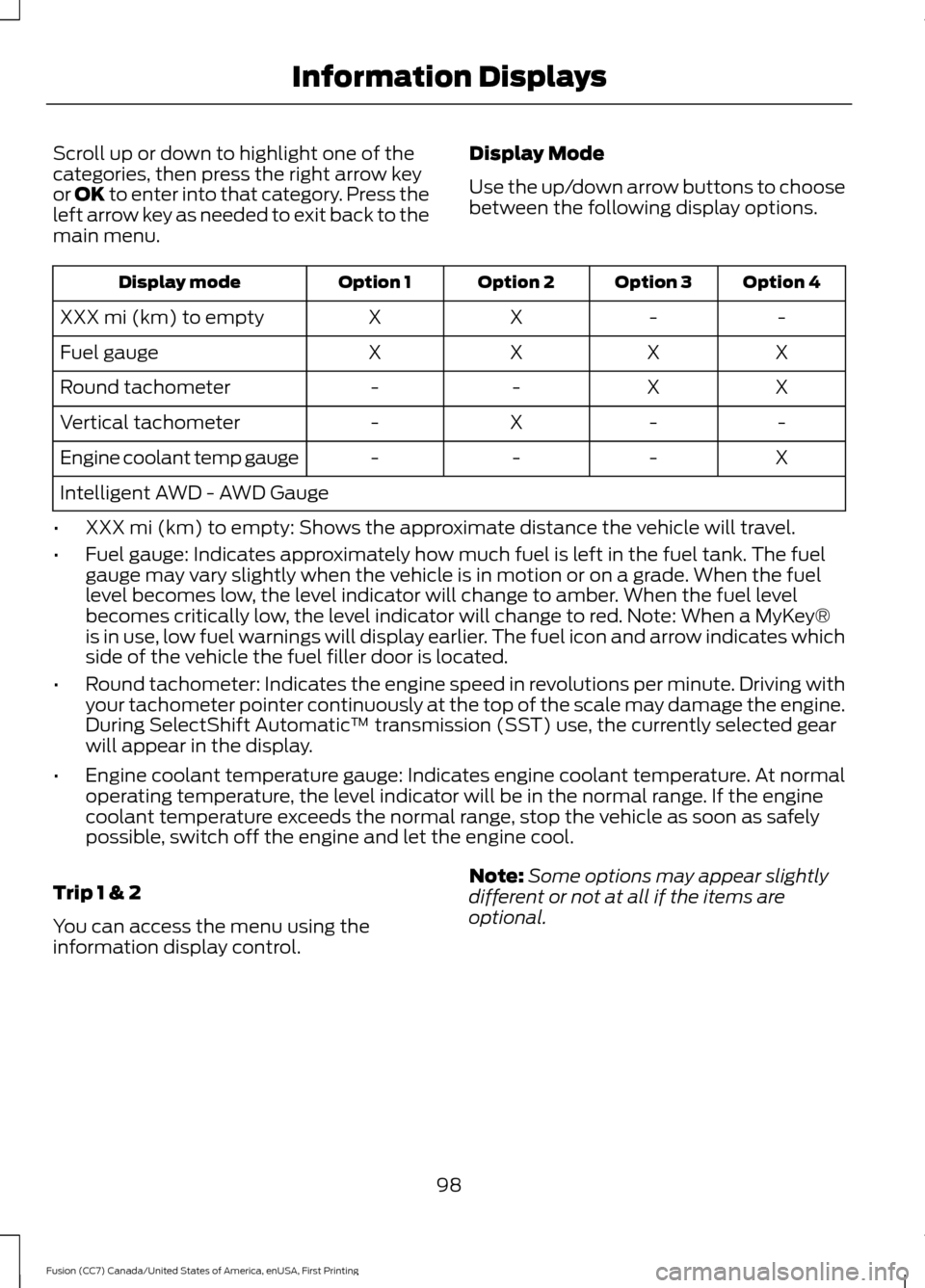
Scroll up or down to highlight one of the
categories, then press the right arrow key
or OK to enter into that category. Press the
left arrow key as needed to exit back to the
main menu.
Display Mode
Use the up/down arrow buttons to choose
between the following display options. Option 4
Option 3
Option 2
Option 1
Display mode
-
-
X
X
XXX mi (km) to empty
X
X
X
X
Fuel gauge
X
X
-
-
Round tachometer
-
-
X
-
Vertical tachometer
X
-
-
-
Engine coolant temp gauge
Intelligent AWD - AWD Gauge
• XXX mi (km) to empty: Shows the approximate distance the vehicle will travel.
• Fuel gauge: Indicates approximately how much fuel is left in the fuel tank. The fuel
gauge may vary slightly when the vehicle is in motion or on a grade. When the fuel
level becomes low, the level indicator will change to amber. When the fuel level
becomes critically low, the level indicator will change to red. Note: When a MyKey®
is in use, low fuel warnings will display earlier. The fuel icon and arrow indicates which
side of the vehicle the fuel filler door is located.
• Round tachometer: Indicates the engine speed in revolutions per minute. Driving with
your tachometer pointer continuously at the top of the scale may damage the engine.
During SelectShift Automatic ™ transmission (SST) use, the currently selected gear
will appear in the display.
• Engine coolant temperature gauge: Indicates engine coolant temperature. At normal
operating temperature, the level indicator will be in the normal range. If the engine
coolant temperature exceeds the normal range, stop the vehicle as soon as safely
possible, switch off the engine and let the engine cool.
Trip 1 & 2
You can access the menu using the
information display control. Note:
Some options may appear slightly
different or not at all if the items are
optional.
98
Fusion (CC7) Canada/United States of America, enUSA, First Printing Information Displays
Page 103 of 528
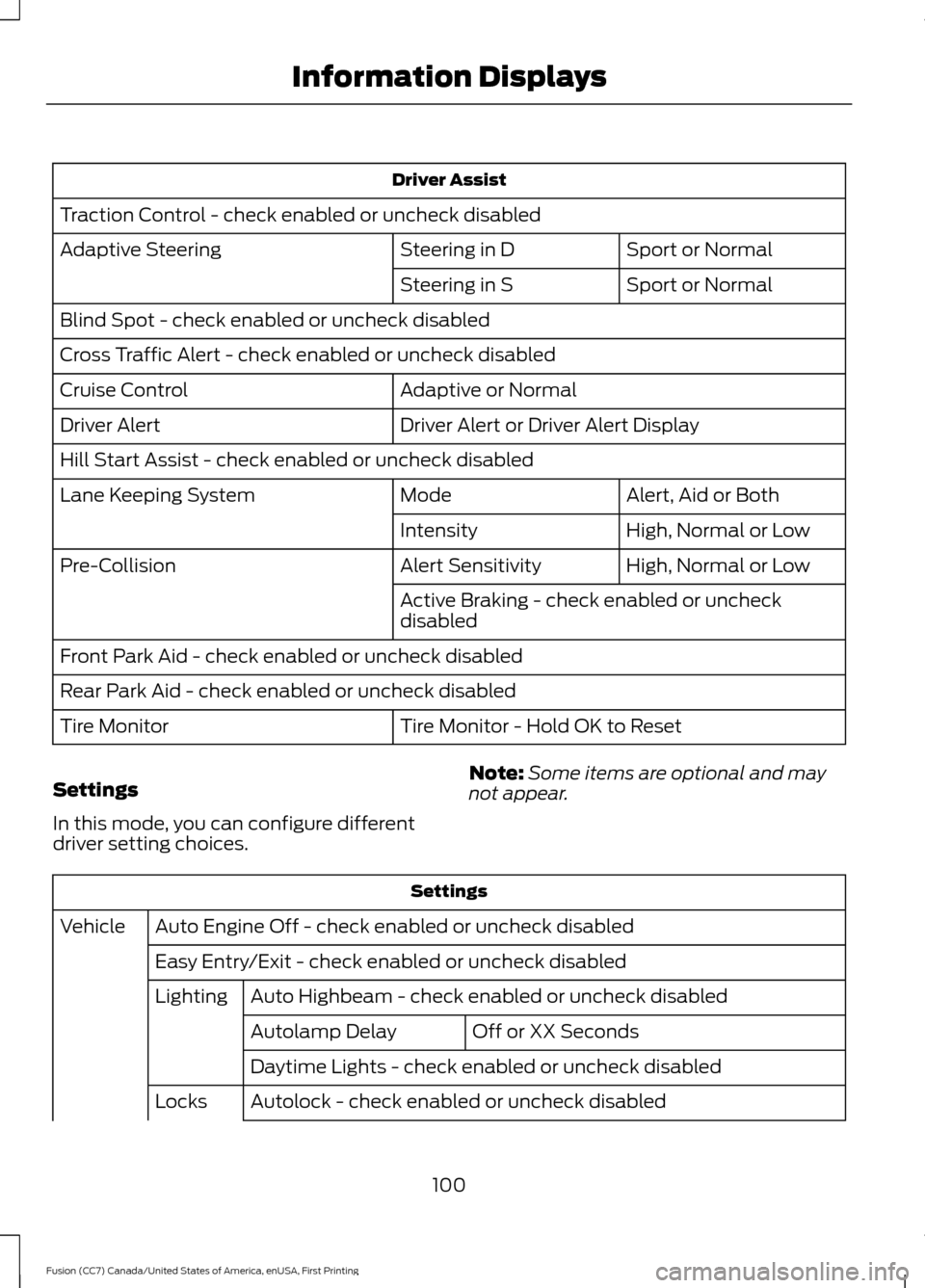
Driver Assist
Traction Control - check enabled or uncheck disabled Sport or Normal
Steering in D
Adaptive Steering
Sport or Normal
Steering in S
Blind Spot - check enabled or uncheck disabled
Cross Traffic Alert - check enabled or uncheck disabled Adaptive or Normal
Cruise Control
Driver Alert or Driver Alert Display
Driver Alert
Hill Start Assist - check enabled or uncheck disabled
Alert, Aid or Both
Mode
Lane Keeping System
High, Normal or Low
Intensity
High, Normal or Low
Alert Sensitivity
Pre-Collision
Active Braking - check enabled or uncheck
disabled
Front Park Aid - check enabled or uncheck disabled
Rear Park Aid - check enabled or uncheck disabled Tire Monitor - Hold OK to Reset
Tire Monitor
Settings
In this mode, you can configure different
driver setting choices. Note:
Some items are optional and may
not appear. Settings
Auto Engine Off - check enabled or uncheck disabled
Vehicle
Easy Entry/Exit - check enabled or uncheck disabledAuto Highbeam - check enabled or uncheck disabled
Lighting
Off or XX Seconds
Autolamp Delay
Daytime Lights - check enabled or uncheck disabled
Autolock - check enabled or uncheck disabled
Locks
100
Fusion (CC7) Canada/United States of America, enUSA, First Printing Information Displays
Page 107 of 528
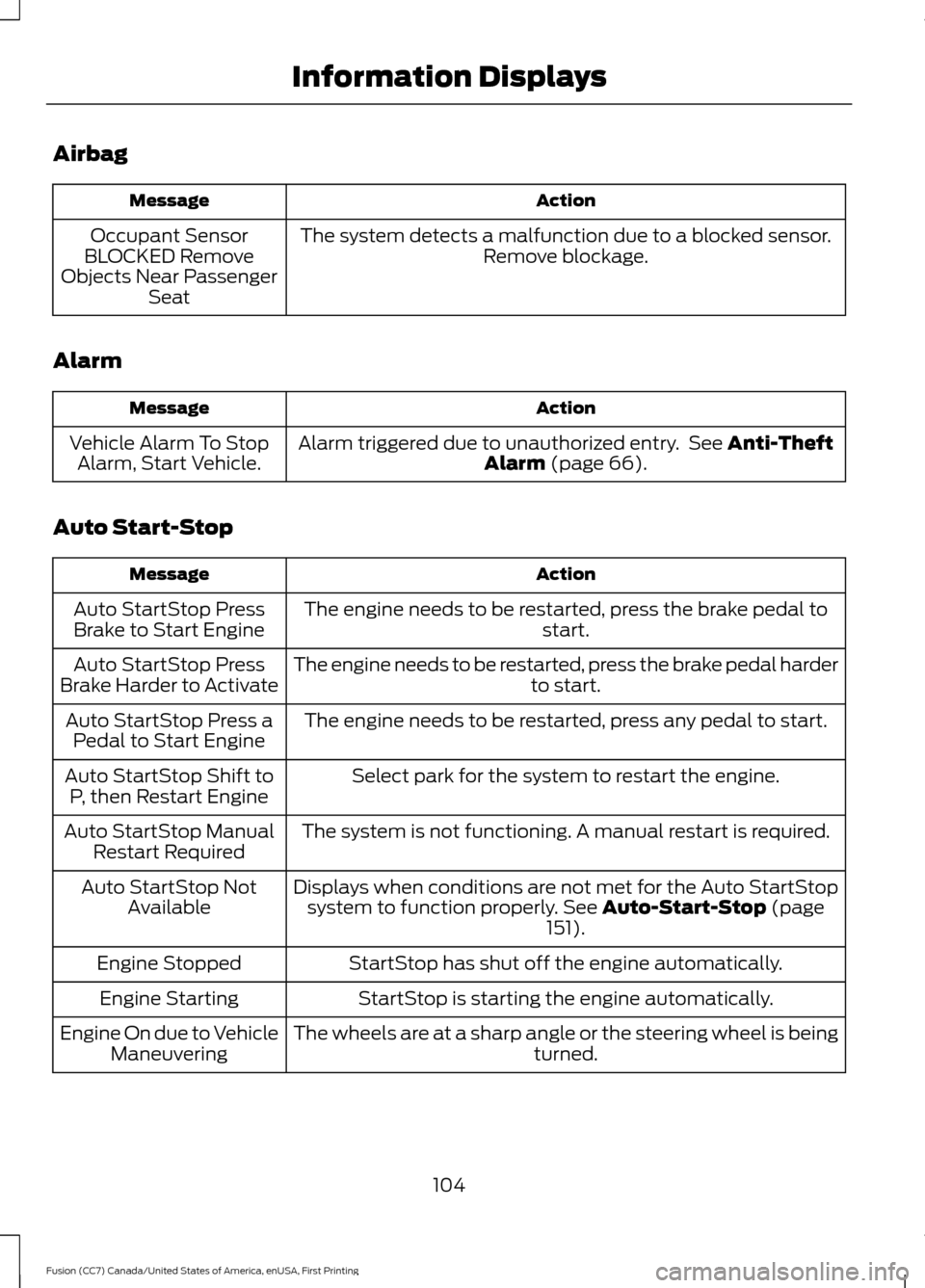
Airbag
Action
Message
The system detects a malfunction due to a blocked sensor. Remove blockage.
Occupant Sensor
BLOCKED Remove
Objects Near Passenger Seat
Alarm Action
Message
Alarm triggered due to unauthorized entry. See Anti-Theft
Alarm (page 66).
Vehicle Alarm To Stop
Alarm, Start Vehicle.
Auto Start-Stop Action
Message
The engine needs to be restarted, press the brake pedal to start.
Auto StartStop Press
Brake to Start Engine
The engine needs to be restarted, press the brake pedal harder to start.
Auto StartStop Press
Brake Harder to Activate
The engine needs to be restarted, press any pedal to start.
Auto StartStop Press a
Pedal to Start Engine
Select park for the system to restart the engine.
Auto StartStop Shift to
P, then Restart Engine
The system is not functioning. A manual restart is required.
Auto StartStop Manual
Restart Required
Displays when conditions are not met for the Auto StartStopsystem to function properly.
See Auto-Start-Stop (page
151).
Auto StartStop Not
Available
StartStop has shut off the engine automatically.
Engine Stopped
StartStop is starting the engine automatically.
Engine Starting
The wheels are at a sharp angle or the steering wheel is being turned.
Engine On due to Vehicle
Maneuvering
104
Fusion (CC7) Canada/United States of America, enUSA, First Printing Information Displays
Page 108 of 528
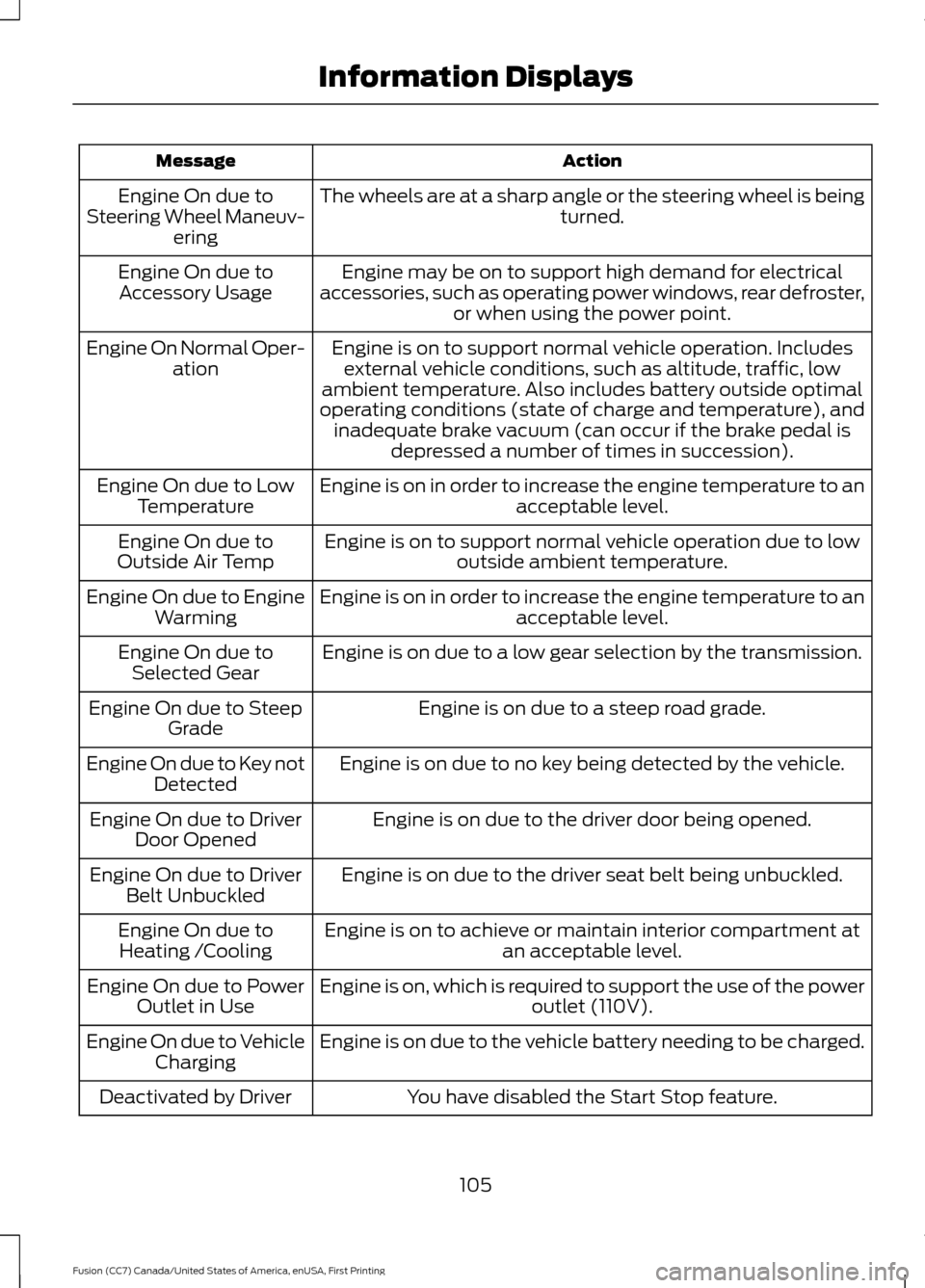
Action
Message
The wheels are at a sharp angle or the steering wheel is being turned.
Engine On due to
Steering Wheel Maneuv- ering
Engine may be on to support high demand for electrical
accessories, such as operating power windows, rear defroster, or when using the power point.
Engine On due to
Accessory Usage
Engine is on to support normal vehicle operation. Includesexternal vehicle conditions, such as altitude, traffic, low
ambient temperature. Also includes battery outside optimal
operating conditions (state of charge and temperature), and inadequate brake vacuum (can occur if the brake pedal is depressed a number of times in succession).
Engine On Normal Oper-
ation
Engine is on in order to increase the engine temperature to an acceptable level.
Engine On due to Low
Temperature
Engine is on to support normal vehicle operation due to lowoutside ambient temperature.
Engine On due to
Outside Air Temp
Engine is on in order to increase the engine temperature to anacceptable level.
Engine On due to Engine
Warming
Engine is on due to a low gear selection by the transmission.
Engine On due to
Selected Gear
Engine is on due to a steep road grade.
Engine On due to Steep
Grade
Engine is on due to no key being detected by the vehicle.
Engine On due to Key not
Detected
Engine is on due to the driver door being opened.
Engine On due to Driver
Door Opened
Engine is on due to the driver seat belt being unbuckled.
Engine On due to Driver
Belt Unbuckled
Engine is on to achieve or maintain interior compartment atan acceptable level.
Engine On due to
Heating /Cooling
Engine is on, which is required to support the use of the power outlet (110V).
Engine On due to Power
Outlet in Use
Engine is on due to the vehicle battery needing to be charged.
Engine On due to Vehicle
Charging
You have disabled the Start Stop feature.
Deactivated by Driver
105
Fusion (CC7) Canada/United States of America, enUSA, First Printing Information Displays