manual transmission FORD FUSION (AMERICAS) 2017 2.G Owner's Manual
[x] Cancel search | Manufacturer: FORD, Model Year: 2017, Model line: FUSION (AMERICAS), Model: FORD FUSION (AMERICAS) 2017 2.GPages: 528, PDF Size: 7.53 MB
Page 215 of 528
The following are other situations that may
limit the Cross Traffic Alert performance:
•
Adjacently parked vehicles or objects
obstructing the sensors.
• Approaching vehicles passing at
speeds greater than 37 mph
(60 km/h).
• Driving in reverse faster than
7 mph
(12 km/h).
• Backing out of an angled parking spot.
False Alerts
Note: If your vehicle has a tow bar with a
factory equipped trailer tow module and it
is towing a trailer, the sensors will
automatically turn the Cross Traffic Alert
off. If your vehicle has a tow bar but no
factory equipped trailer tow module, it is
recommended to turn the Cross Traffic Alert
off manually. Operating Cross Traffic Alert
with a trailer attached will cause poor Cross
Traffic Alert performance.
There may be certain instances when there
is a false alert by the Cross Traffic Alert
system that illuminates the alert indicator
with no vehicle in the coverage zone. Some
amount of false alerts are normal; they are
temporary and self-correct.
System Errors
If Cross Traffic Alert senses a problem with
the left or right sensor a message will
appear in the information display. See
(page
93).
Switching the System Off and On
You can temporarily switch Cross Traffic
Alert off in the information display. See
General Information
(page 93). When
you switch Cross Traffic Alert off, you will
not receive alerts and the information
display will display a system off message. Note:
The Cross Traffic Alert switches on
whenever the ignition is switched on and
ready to provide appropriate alerts when
the transmission is in reverse (R). Cross
Traffic Alert will not remember the last
selected on or off setting.
You can also have Cross Traffic Alert
switched off permanently at an authorized
dealer. Once switched off permanently,
the system can only be switched back on
at an authorized dealer.
STEERING
Electric Power Steering WARNINGS
The electric power steering system
has diagnostic checks that
continuously monitor the system. If
a fault is detected, a message displays in
the information display. Stop your vehicle
as soon as it is safe to do so. Switch the
ignition off. After at least 10 seconds,
switch the ignition on and watch the
information display for a steering system
warning message. If a steering system
warning message returns, have the system
checked by an authorized dealer. If the system detects an error, you
may not feel a difference in the
steering, however a serious condition
may exist. Obtain immediate service from
an authorized dealer, failure to do so may
result in loss of steering control. Your vehicle has an electric power steering
system. There is no fluid reservoir. No
maintenance is required.
If your vehicle loses electrical power while
you are driving, electric power steering
assistance is lost. The steering system still
operates and you can steer your vehicle
manually. Manually steering your vehicle
requires more effort.
212
Fusion (CC7) Canada/United States of America, enUSA, First Printing Driving Aids
Page 239 of 528
TRANSPORTING THE VEHICLE
If you need to have your vehicle towed,
contact a professional towing service or,
if you are a member of a roadside
assistance program, your roadside
assistance service provider.
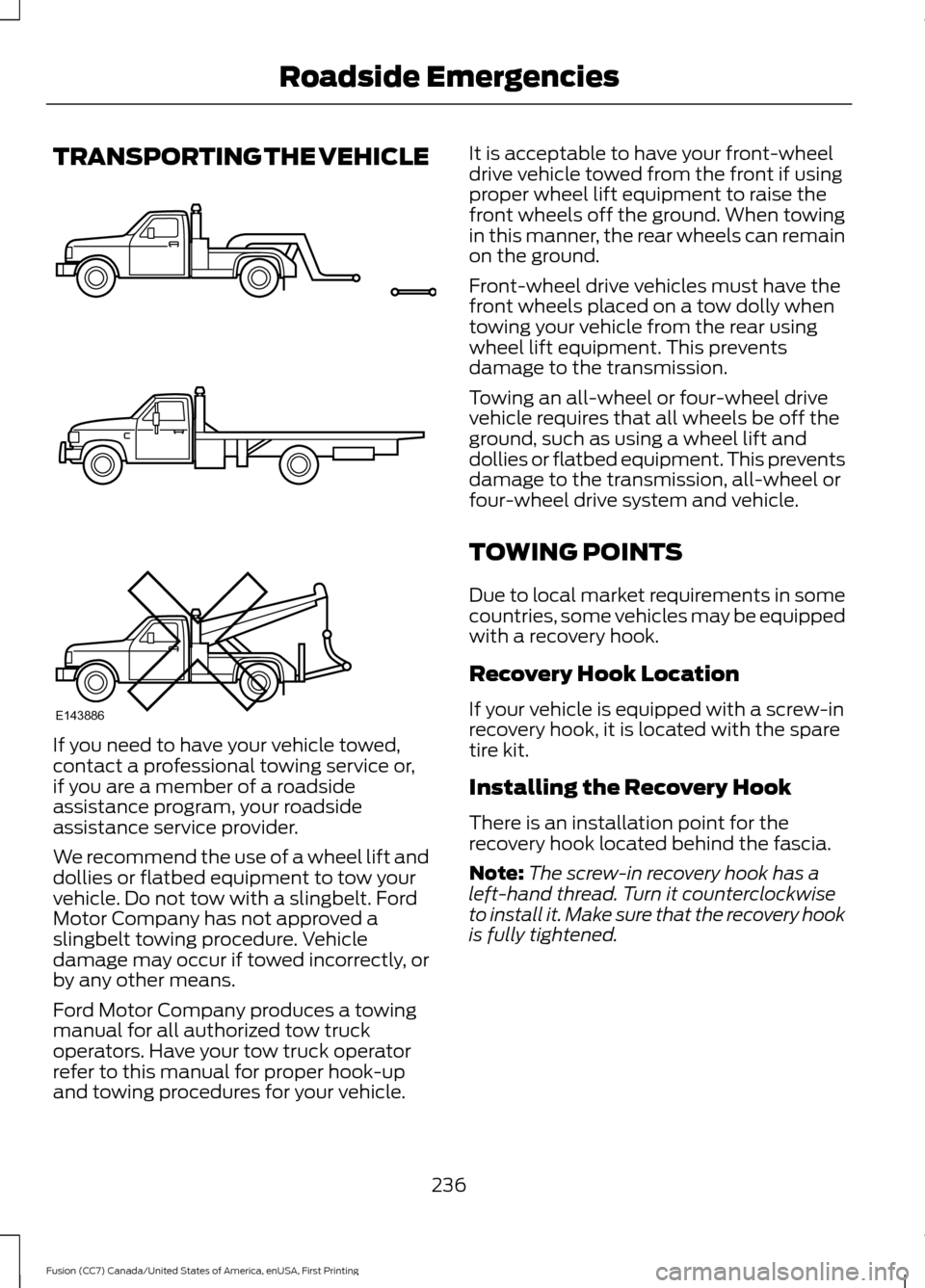
We recommend the use of a wheel lift and
dollies or flatbed equipment to tow your
vehicle. Do not tow with a slingbelt. Ford
Motor Company has not approved a
slingbelt towing procedure. Vehicle
damage may occur if towed incorrectly, or
by any other means.
Ford Motor Company produces a towing
manual for all authorized tow truck
operators. Have your tow truck operator
refer to this manual for proper hook-up
and towing procedures for your vehicle. It is acceptable to have your front-wheel
drive vehicle towed from the front if using
proper wheel lift equipment to raise the
front wheels off the ground. When towing
in this manner, the rear wheels can remain
on the ground.
Front-wheel drive vehicles must have the
front wheels placed on a tow dolly when
towing your vehicle from the rear using
wheel lift equipment. This prevents
damage to the transmission.
Towing an all-wheel or four-wheel drive
vehicle requires that all wheels be off the
ground, such as using a wheel lift and
dollies or flatbed equipment. This prevents
damage to the transmission, all-wheel or
four-wheel drive system and vehicle.
TOWING POINTS
Due to local market requirements in some
countries, some vehicles may be equipped
with a recovery hook.
Recovery Hook Location
If your vehicle is equipped with a screw-in
recovery hook, it is located with the spare
tire kit.
Installing the Recovery Hook
There is an installation point for the
recovery hook located behind the fascia.
Note:
The screw-in recovery hook has a
left-hand thread. Turn it counterclockwise
to install it. Make sure that the recovery hook
is fully tightened.
236
Fusion (CC7) Canada/United States of America, enUSA, First Printing Roadside EmergenciesE143886
Page 317 of 528
Changing a Road Wheel Procedure
(If Equipped)
WARNINGS
When one of the front wheels is off
the ground, the transmission alone
will not prevent the vehicle from
moving or slipping off the jack, even if the
transmission is in park (P). To help prevent your vehicle from
moving when you change a tire, be
sure to place the transmission in park
(P), set the parking brake and block (in
both directions) the wheel that is
diagonally opposite (other side and end of
the vehicle) to the tire being changed. Never get underneath a vehicle that
is supported only by a jack. If your
vehicle slips off the jack, you or
someone else could be seriously injured. Do not attempt to change a tire on
the side of the vehicle close to
moving traffic. Pull far enough off the
road to avoid the danger of being hit when
operating the jack or changing the wheel. Always use the jack provided as
original equipment with your vehicle.
If using a jack other than the one
provided as original equipment with your
vehicle, make sure the jack capacity is
adequate for the vehicle weight, including
any vehicle cargo or modifications. Note:
Passengers should not remain in your
vehicle when the vehicle is being jacked.
1. Park on a level surface, set the parking
brake and activate the hazard flashers.
2. Place the transmission in park (P) and
turn the engine off. For vehicles with a
manual transmission, place the
transmission in reverse ®) after the
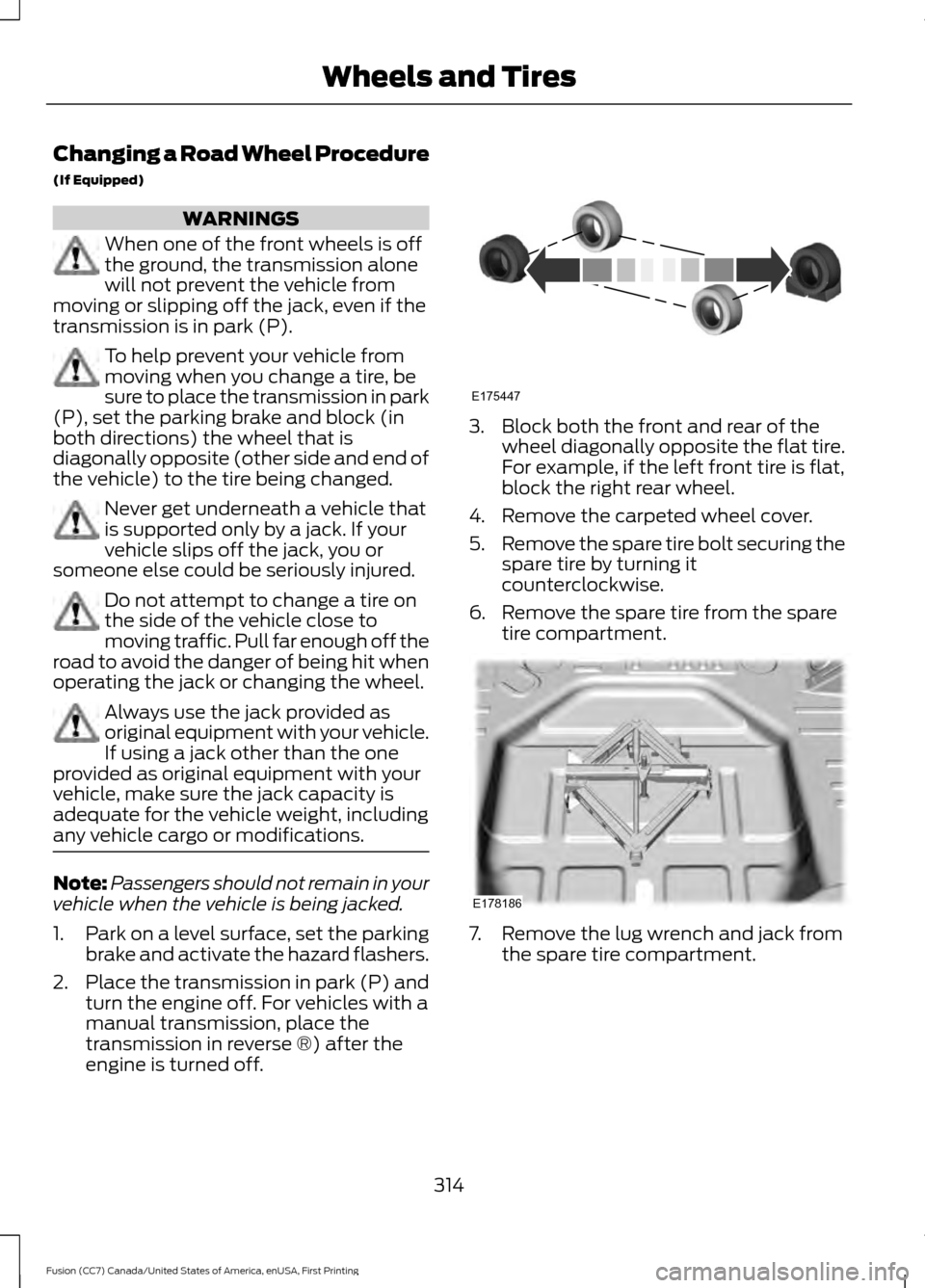
engine is turned off. 3. Block both the front and rear of the
wheel diagonally opposite the flat tire.
For example, if the left front tire is flat,
block the right rear wheel.
4. Remove the carpeted wheel cover.
5. Remove the spare tire bolt securing the
spare tire by turning it
counterclockwise.
6. Remove the spare tire from the spare tire compartment. 7. Remove the lug wrench and jack from
the spare tire compartment.
314
Fusion (CC7) Canada/United States of America, enUSA, First Printing Wheels and TiresE175447 E178186
Page 367 of 528
To adjust this setting press the voice button, when prompted say:
Action and Description
Voice Command
voice settings
Then any of the following: When enabled, this feature will prompt you
to confirm any voice initiated call command
prior to the call being placed.
phone confirmation on
The system will make a best guess; you
may still occasionally be asked to confirm
settings.
phone confirmation off
Changing the Voice Settings
In addition to using voice commands to
change the voice settings, you can also use
the menu in the audio display.
To change the voice settings press the
Menu button then select: Menu Item
SYNC-Settings
Voice settings
USING SYNC™ WITH YOUR
PHONE
Hands-free calling is one of the main
features of SYNC. While the system
supports a variety of features, many are
dependent on your cellular phone's
functionality. At a minimum, most cellular
phones with Bluetooth wireless technology
support the following functions:
• Answering an incoming call.
• Ending a call.
• Using privacy mode.
• Dialing a number.
• Redialing. •
Call waiting notification.
• Caller ID.
Other features, such as text messaging
using Bluetooth and automatic phonebook
download, are phone-dependent features.
To check your phone's compatibility, see
your phone's manual and visit
www.SYNCMyRide.com,
www.SYNCMyRide.ca or
www.syncmaroute.ca.
Pairing a Phone for the First Time
Wirelessly pairing your phone with SYNC
allows you to make and receive hands-free
calls.
Note: SYNC can support downloading up
to approximately 4000 entries per
Bluetooth-enabled cellular phone.
Note: Make sure to switch on the ignition
and the radio. Shift the transmission into
park (P) for automatic transmission or first
gear for manual transmission.
Using the Audio System
Note: To scroll through the menus, press
the up and down arrows on your audio
system.
364
Fusion (CC7) Canada/United States of America, enUSA, First Printing SYNC™
Page 368 of 528
1. Make sure to switch on your phone's
Bluetooth feature before starting the
search. See your device's manual if
necessary.
2. Press the PHONE button. When the
audio display indicates there is no
paired phone, select the option to add.
3. When a message to begin pairing appears in the audio display, search for
SYNC on your phone to start the pairing
process.
4. When prompted on your cell phone ’s
display, confirm that the PIN provided
by SYNC matches the PIN displayed
on your cell phone. Your phone is now
paired and the display indicates that
the pairing was successful. If you are
prompted to enter a PIN on your device,
enter the PIN displayed on the screen.
The display indicates when the pairing
is successful.
Depending on your phone's capability and
your market, the system may prompt you
with questions, such as setting the current
phone as the primary phone (the phone
SYNC automatically tries to connect with
first upon vehicle start-up) and
downloading your phonebook.
Using Voice Commands Make sure to switch on your
phone's Bluetooth feature
before starting the search. See
your device's manual if necessary. Press the voice and when prompted
say: Action and Descrip-
tion
Voice Command
Follow the instruc-
tions on the audio
display.
(pair ([Bluetooth]
device | phone |
Bluetooth audio) |
add phone)
You can say any of the voice commands
that appear within open and close brackets
that are separated by |. For example,
where; (what's | what is) appears you say;
what's or what is.
The commands that have [ ] around the
word means that the word is optional.
Depending on your phone's capability and
your market, the system may prompt you
with questions, such as setting the current
phone as the primary phone (the phone
SYNC automatically tries to connect with
first upon vehicle start-up) and
downloading your phonebook.
Pairing Subsequent Phones
Note: Make sure to switch on the ignition
and the radio. Shift the transmission into
park (P) for automatic transmission or first
gear for manual transmission.
Note: To scroll through the menus, press
the up and down arrows on your audio
system.
1. Make sure to switch on your phone's Bluetooth feature before starting the
search. See your device's manual if
necessary.
2. Press the
PHONE button.
3. Select the option for Bluetooth Devices.
4. Press the
OK button.
365
Fusion (CC7) Canada/United States of America, enUSA, First Printing SYNC™E142599
Page 518 of 528
A
A/C
See: Climate Control........................................... 117
About This Manual...........................................7
ABS See: Brakes............................................................ 173
ABS driving hints See: Hints on Driving With Anti-Lock
Brakes................................................................. 173
Accessories....................................................473 Exterior Style........................................................ 473
Interior Style......................................................... 473
Lifestyle.................................................................. 473
Peace of Mind...................................................... 473
Accessories See: Replacement Parts
Recommendation............................................ 12
ACC See: Using Adaptive Cruise Control.............195
Active Park Assist
.........................................185
Deactivating the Active Park Assist
Feature.............................................................. 189
Parallel Parking, Perpendicular Parking, Parallel Park Out Assist.............................. 185
Troubleshooting the System......................... 189
Adjusting the Headlamps..........................271 Horizontal Aim Adjustment............................ 272
Vertical Aim Adjustment.................................. 271
Adjusting the Steering Wheel
....................67
Power Tilt and Telescope Steering
Column................................................................ 67
Airbag Disposal...............................................47
Air Conditioning See: Climate Control........................................... 117
Air Filter See: Changing the Engine Air Filter.............278
Alarm See: Anti-Theft Alarm........................................ 66
All-Wheel Drive.............................................168
Ambient Lighting...........................................80
Anti-Theft Alarm............................................66 Arming the Alarm................................................ 66
Disarming the Alarm........................................... 66
Appendices...................................................496
Apps.................................................................445 ........................................................................\
.......... 445
SiriusXM Traffic and Travel Link................... 447Audible Warnings and Indicators.............92
Headlamps On Warning Chime...................... 92
Keyless Warning Alert......................................... 92
Parking Brake On Warning Chime.................. 92
Audio Control..................................................68 MODE....................................................................... 69
Seek, Next or Previous....................................... 69
Audio System
................................................345
General Information......................................... 345
Audio Unit - Vehicles With: AM/FM/CD/ SYNC/Satellite Radio.............................348
Audio Unit - Vehicles With: AM/FM/ CD
...................................................................346
Audio Unit - Vehicles With: Sony AM/ FM/CD..........................................................350
Menu Structure.................................................... 351
Autolamps.........................................................74 Windshield Wiper Activated
Headlamps......................................................... 74
Automatic Climate Control - Vehicles With: Sony Audio System.......................120
Automatic Climate Control - Vehicles Without: Sony Audio System.................119
Automatic High Beam Control..................76 Activating the System......................................... 77
Manually Overriding the System..................... 77
Automatic Transmission............................163 Automatic Transmission Adaptive
Learning............................................................. 167
Brake-Shift Interlock Override...................... 166
If Your Vehicle Gets Stuck In Mud or Snow................................................................... 167
SelectShift Automatic ™
Transmission................................................... 165
Understanding the Positions of Your Automatic Transmission............................. 163
Automatic Transmission Fluid Check - 1.5L EcoBoost™/2.0L EcoBoost™/
2.5L................................................................266
Automatic Transmission Fluid Check - 2.7L EcoBoost™
........................................267
Adding Transmission Fluid ............................ 268
Checking the Transmission Fluid Level ........................................................................\
...... 267
Auto-Start-Stop.............................................151 Disabling Auto StartStop................................. 152
Enabling Auto StartStop................................... 151
515
Fusion (CC7) Canada/United States of America, enUSA, First Printing Index
Page 520 of 528
Climate............................................................429
Climate Control...............................................117
Climate Controlled Seats..........................135
Cooled Seats........................................................ 135
Coolant Check See: Engine Coolant Check............................ 263
Crash Sensors and Airbag Indicator.......46
Creating a MyKey
............................................55
Programming or Changing Configurable
Settings............................................................... 56
Cross Traffic Alert
........................................209
False Alerts............................................................ 212
Switching the System Off and On................212
System Errors....................................................... 212
System Lights, Messages and Audible Alerts.................................................................... 211
System Limitations............................................. 211
Using the System.............................................. 209
Cruise Control
.................................................69
Principle of Operation....................................... 194
Type 1........................................................................\
69
Type 2....................................................................... 69
Cruise control See: Using Cruise Control................................ 194
Customer Assistance
.................................238
D
Data Recording
..................................................9
Event Data Recording.......................................... 10
Service Data Recording........................................ 9
Daytime Running Lamps.............................76 Type 1 - Conventional
(Non-Configurable)........................................ 76
Type 2 - Configurable.......................................... 76
Digital Radio
..................................................354
HD Radio Reception and Station
Troubleshooting............................................ 355
Direction Indicators
........................................78
Driver Alert.....................................................202
PRINCIPLE OF OPERATION.......................... 202
USING DRIVER ALERT.................................... 202
Driver and Passenger Airbags
...................40
Children and Airbags.......................................... 40
Proper Driver and Front Passenger Seating Adjustment....................................................... 40
Driver and Passenger Knee Airbags
........44
Driving Aids....................................................202 Driving Hints
..................................................228
Driving Through Water...............................228
DRL See: Daytime Running Lamps......................... 76
E
Economical Driving
.....................................228
Electric Parking Brake..................................174
Applying the Electric Parking brake.............174
Battery With No Charge.................................... 176
Parking On a Hill (Vehicles With a Manual Transmission) ................................................. 174
Releasing the Electric Parking Brake...........175
Emission Control System..........................160 On-Board Diagnostics (OBD-II).................... 161
Readiness for Inspection and Maintenance (I/M) Testing.................................................... 162
End User License Agreement.................496 VEHICLE SOFTWARE END USER LICENSE
AGREEMENT (EULA) ................................ 496
Engine Block Heater
....................................149
Using the Engine Block Heater...................... 150
Engine Coolant Check
...............................263
Adding Coolant................................................... 263
Engine Coolant Temperature Management.................................................. 266
Fail-Safe Cooling............................................... 265
Recycled Coolant.............................................. 264
Severe Climates................................................. 264
Engine Immobilizer See: Passive Anti-Theft System..................... 65
Engine Oil Check...........................................261 Adding Engine Oil............................................... 261
Engine Oil Dipstick - 1.5L EcoBoost™..................................................261
Engine Oil Dipstick - 2.0L EcoBoost™/ 2.5L/2.7L EcoBoost™
..............................261
Engine Specifications - 1.5L EcoBoost™..................................................321
Drivebelt Routing................................................ 321
Engine Specifications - 2.0L EcoBoost™..................................................321
Drivebelt Routing............................................... 322
Engine Specifications - 2.5L....................322 Drivebelt Routing............................................... 322
517
Fusion (CC7) Canada/United States of America, enUSA, First Printing Index