tires FORD FUSION (AMERICAS) 2017 2.G Workshop Manual
[x] Cancel search | Manufacturer: FORD, Model Year: 2017, Model line: FUSION (AMERICAS), Model: FORD FUSION (AMERICAS) 2017 2.GPages: 528, PDF Size: 7.53 MB
Page 322 of 528
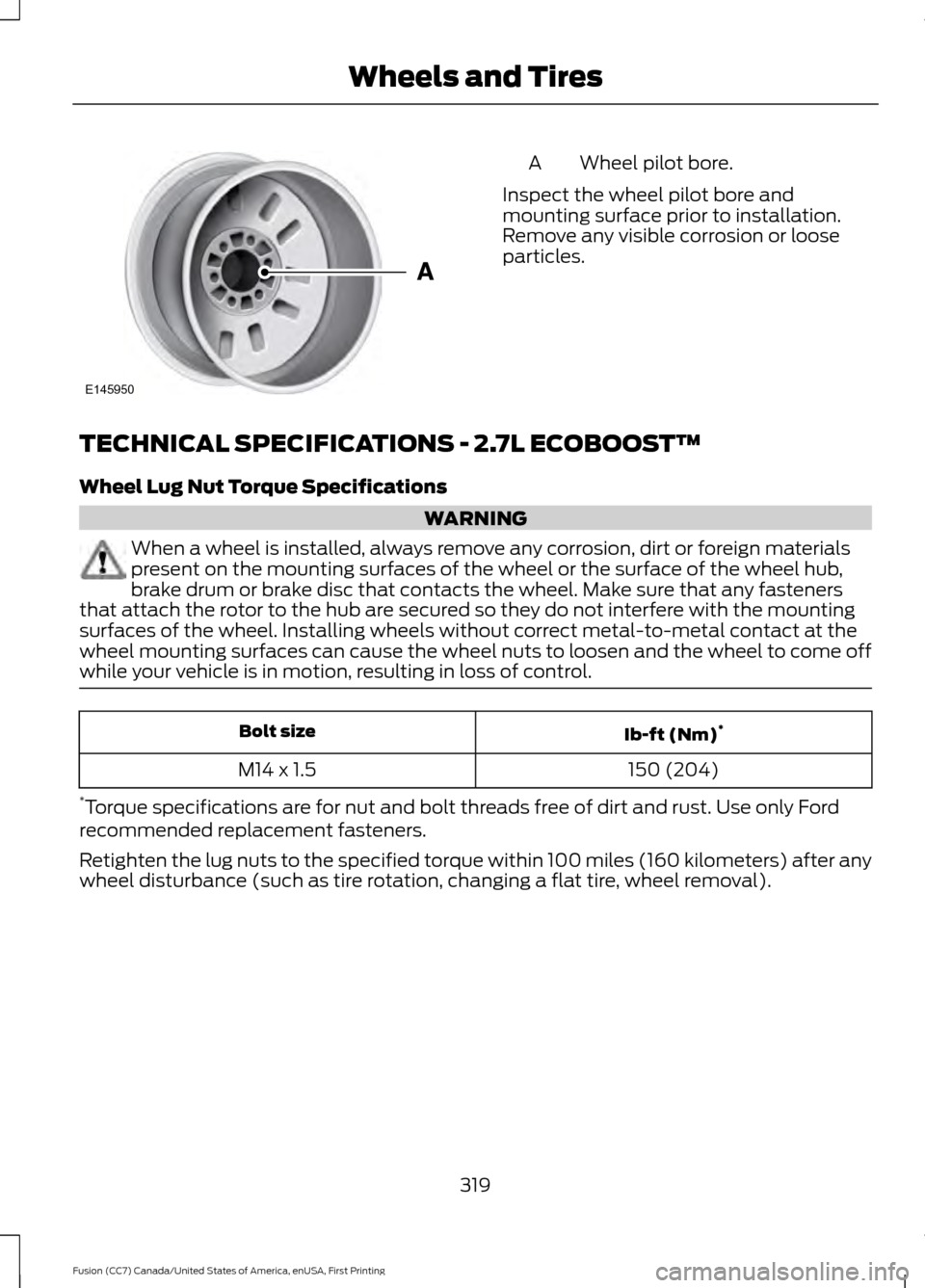
Wheel pilot bore.
A
Inspect the wheel pilot bore and
mounting surface prior to installation.
Remove any visible corrosion or loose
particles.
TECHNICAL SPECIFICATIONS - 2.7L ECOBOOST™
Wheel Lug Nut Torque Specifications WARNING
When a wheel is installed, always remove any corrosion, dirt or foreign materials
present on the mounting surfaces of the wheel or the surface of the wheel hub,
brake drum or brake disc that contacts the wheel. Make sure that any fasteners
that attach the rotor to the hub are secured so they do not interfere with the mounting
surfaces of the wheel. Installing wheels without correct metal-to-metal contact at the
wheel mounting surfaces can cause the wheel nuts to loosen and the wheel to come off
while your vehicle is in motion, resulting in loss of control. Ib-ft (Nm)
*
Bolt size
150 (204)
M14 x 1.5
* Torque specifications are for nut and bolt threads free of dirt and rust. Use only Ford
recommended replacement fasteners.
Retighten the lug nuts to the specified torque within 100 miles (160 kilometers) after any
wheel disturbance (such as tire rotation, changing a flat tire, wheel removal).
319
Fusion (CC7) Canada/United States of America, enUSA, First Printing Wheels and TiresE145950
Page 323 of 528
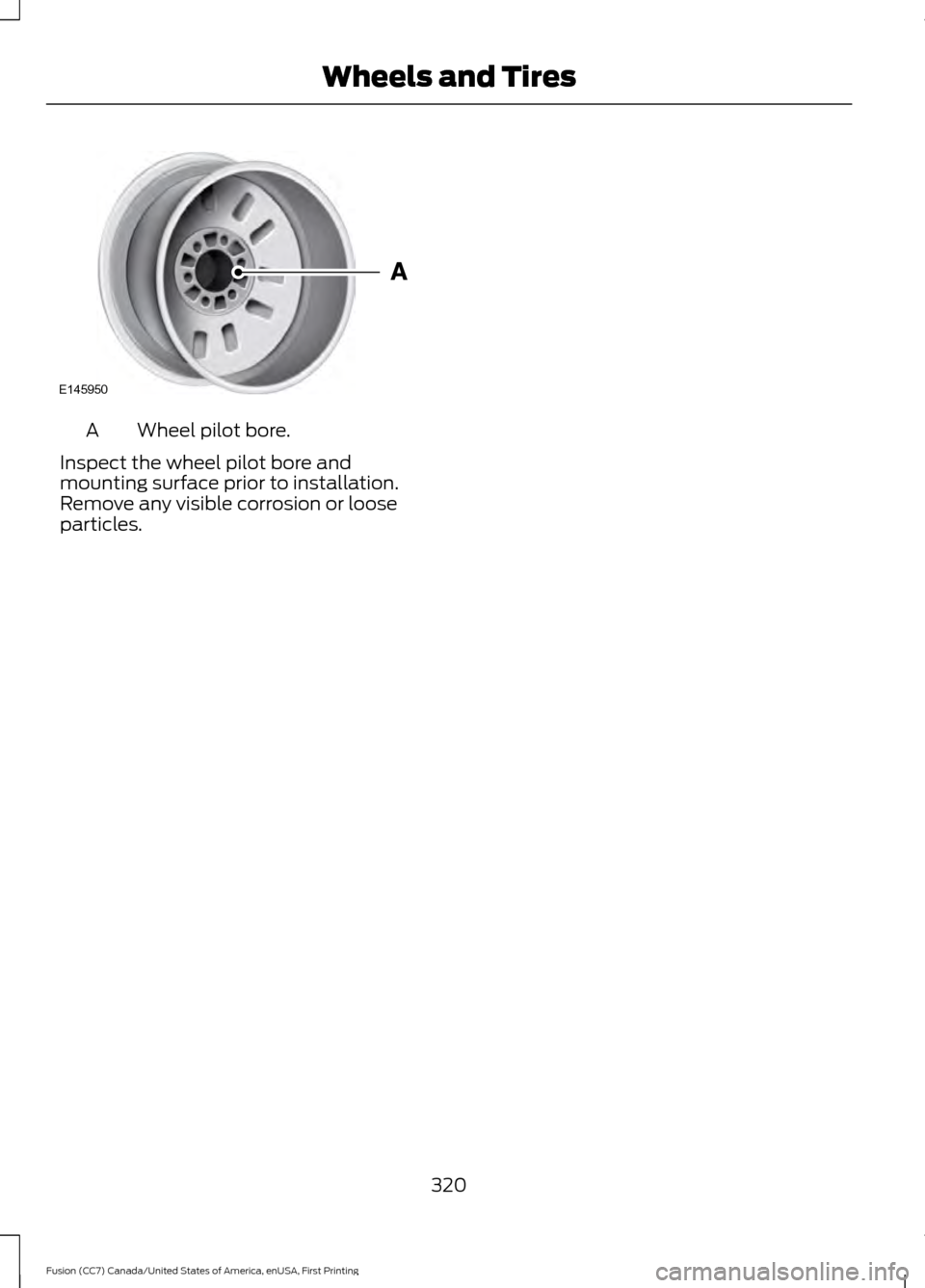
Wheel pilot bore.
A
Inspect the wheel pilot bore and
mounting surface prior to installation.
Remove any visible corrosion or loose
particles.
320
Fusion (CC7) Canada/United States of America, enUSA, First Printing Wheels and TiresE145950
Page 482 of 528
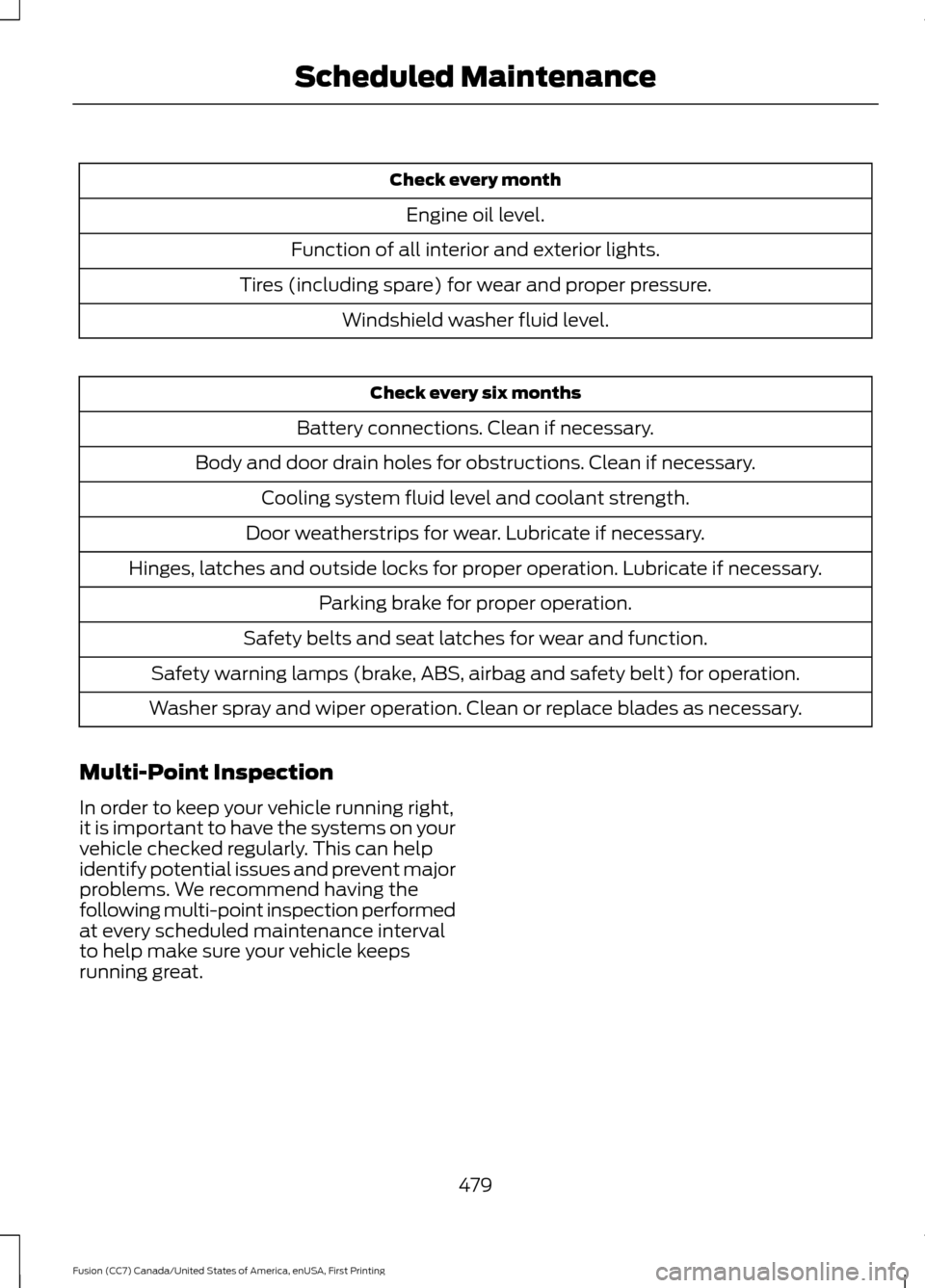
Check every month
Engine oil level.
Function of all interior and exterior lights.
Tires (including spare) for wear and proper pressure. Windshield washer fluid level. Check every six months
Battery connections. Clean if necessary.
Body and door drain holes for obstructions. Clean if necessary. Cooling system fluid level and coolant strength.
Door weatherstrips for wear. Lubricate if necessary.
Hinges, latches and outside locks for proper operation. Lubricate if necessary. Parking brake for proper operation.
Safety belts and seat latches for wear and function.
Safety warning lamps (brake, ABS, airbag and safety belt) for operation.
Washer spray and wiper operation. Clean or replace blades as necessary.
Multi-Point Inspection
In order to keep your vehicle running right,
it is important to have the systems on your
vehicle checked regularly. This can help
identify potential issues and prevent major
problems. We recommend having the
following multi-point inspection performed
at every scheduled maintenance interval
to help make sure your vehicle keeps
running great.
479
Fusion (CC7) Canada/United States of America, enUSA, First Printing Scheduled Maintenance
Page 483 of 528
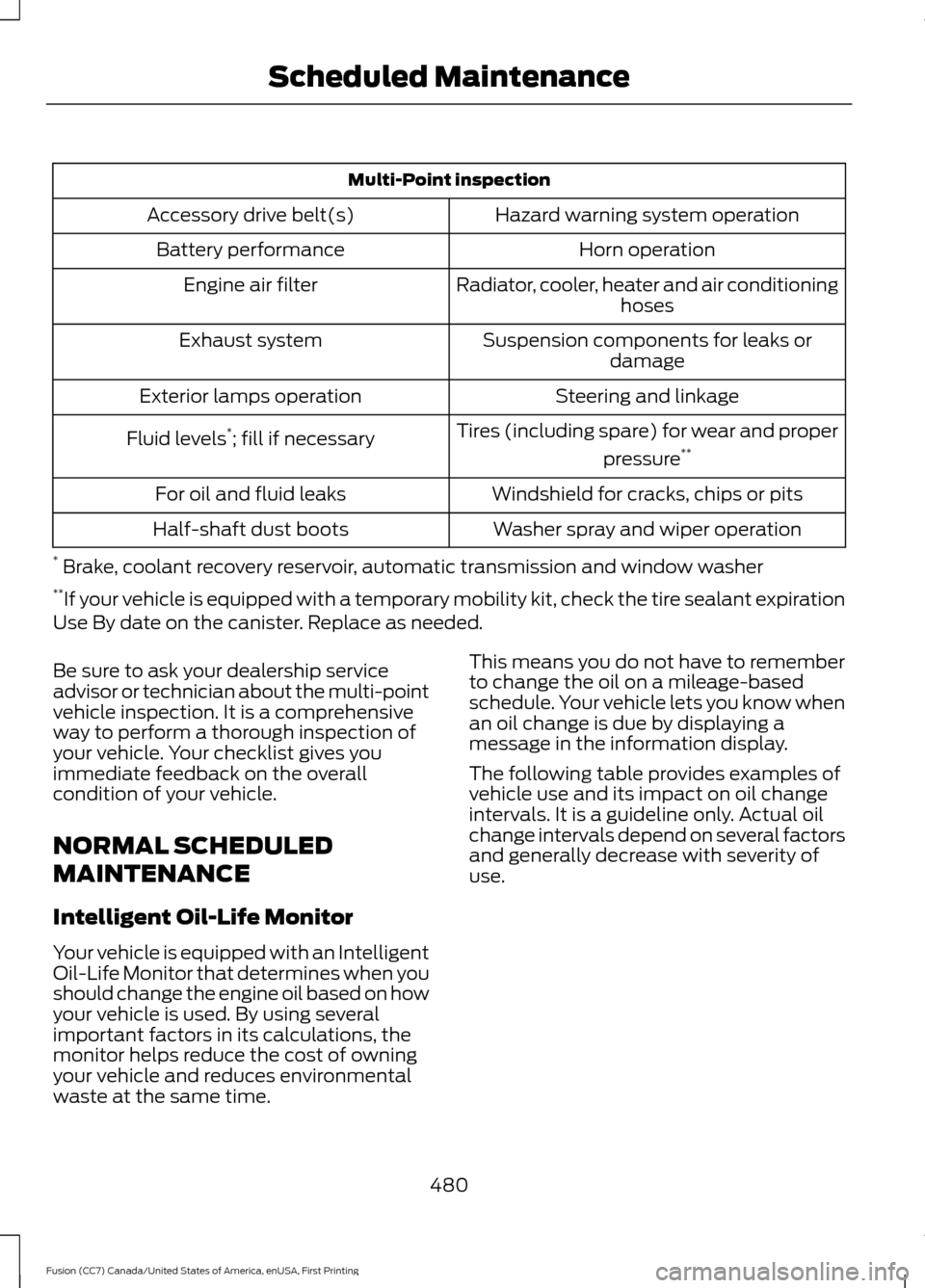
Multi-Point inspection
Hazard warning system operation
Accessory drive belt(s)
Horn operation
Battery performance
Radiator, cooler, heater and air conditioninghoses
Engine air filter
Suspension components for leaks ordamage
Exhaust system
Steering and linkage
Exterior lamps operation
Tires (including spare) for wear and properpressure**
Fluid levels *
; fill if necessary
Windshield for cracks, chips or pits
For oil and fluid leaks
Washer spray and wiper operation
Half-shaft dust boots
* Brake, coolant recovery reservoir, automatic transmission and window washer
** If your vehicle is equipped with a temporary mobility kit, check the tire sealant expiration
Use By date on the canister. Replace as needed.
Be sure to ask your dealership service
advisor or technician about the multi-point
vehicle inspection. It is a comprehensive
way to perform a thorough inspection of
your vehicle. Your checklist gives you
immediate feedback on the overall
condition of your vehicle.
NORMAL SCHEDULED
MAINTENANCE
Intelligent Oil-Life Monitor
Your vehicle is equipped with an Intelligent
Oil-Life Monitor that determines when you
should change the engine oil based on how
your vehicle is used. By using several
important factors in its calculations, the
monitor helps reduce the cost of owning
your vehicle and reduces environmental
waste at the same time. This means you do not have to remember
to change the oil on a mileage-based
schedule. Your vehicle lets you know when
an oil change is due by displaying a
message in the information display.
The following table provides examples of
vehicle use and its impact on oil change
intervals. It is a guideline only. Actual oil
change intervals depend on several factors
and generally decrease with severity of
use.
480
Fusion (CC7) Canada/United States of America, enUSA, First Printing Scheduled Maintenance
Page 484 of 528
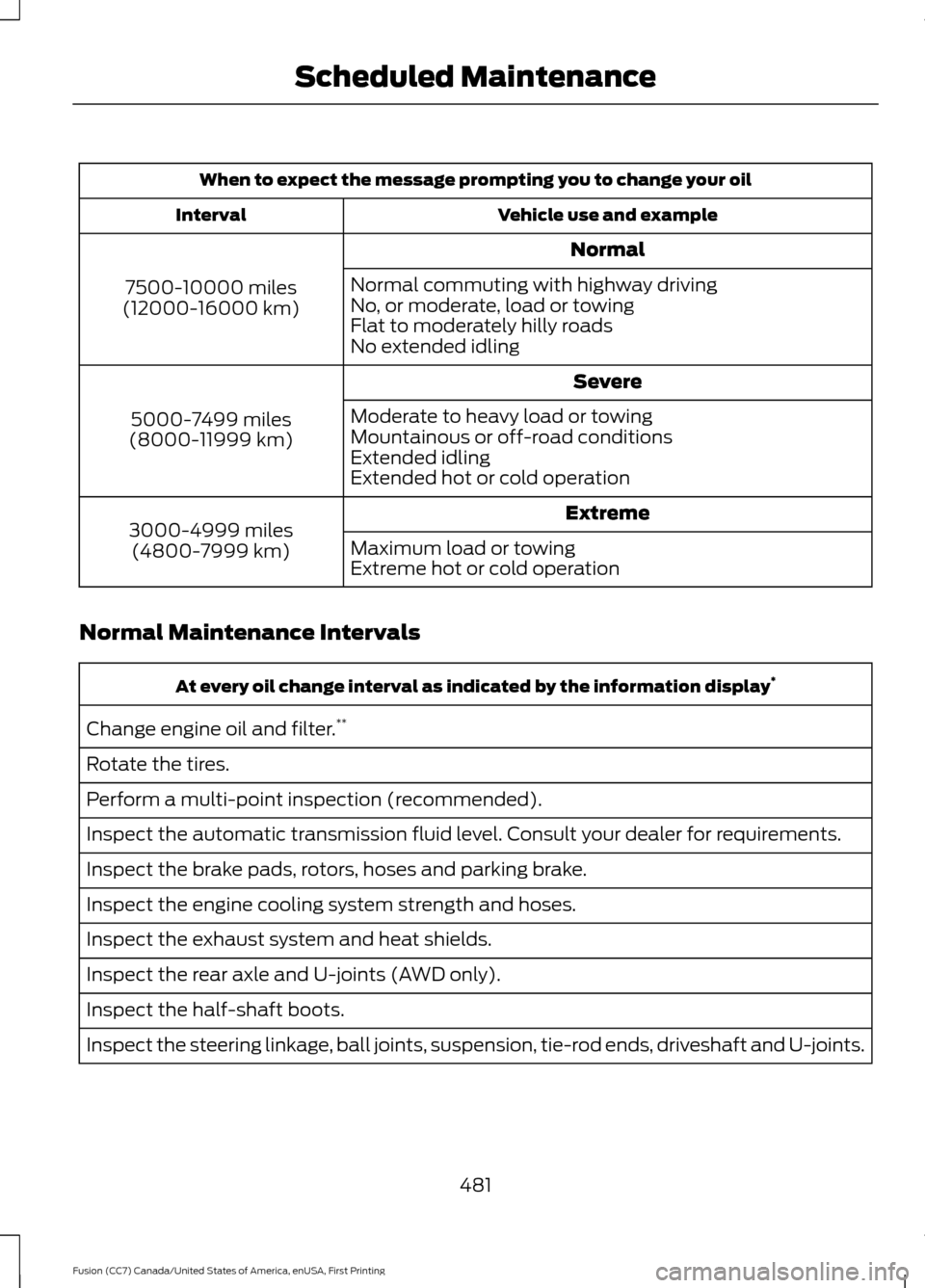
When to expect the message prompting you to change your oil
Vehicle use and example
Interval
Normal
7500-10000 miles
(12000-16000 km) Normal commuting with highway driving
No, or moderate, load or towing
Flat to moderately hilly roads
No extended idling
Severe
5000-7499 miles
(8000-11999 km) Moderate to heavy load or towing
Mountainous or off-road conditions
Extended idling
Extended hot or cold operation
Extreme
3000-4999 miles
(4800-7999 km) Maximum load or towing
Extreme hot or cold operation
Normal Maintenance Intervals At every oil change interval as indicated by the information display
*
Change engine oil and filter. **
Rotate the tires.
Perform a multi-point inspection (recommended).
Inspect the automatic transmission fluid level. Consult your dealer for requirements.
Inspect the brake pads, rotors, hoses and parking brake.
Inspect the engine cooling system strength and hoses.
Inspect the exhaust system and heat shields.
Inspect the rear axle and U-joints (AWD only).
Inspect the half-shaft boots.
Inspect the steering linkage, ball joints, suspension, tie-rod ends, driveshaft and U-joints.
481
Fusion (CC7) Canada/United States of America, enUSA, First Printing Scheduled Maintenance
Page 485 of 528
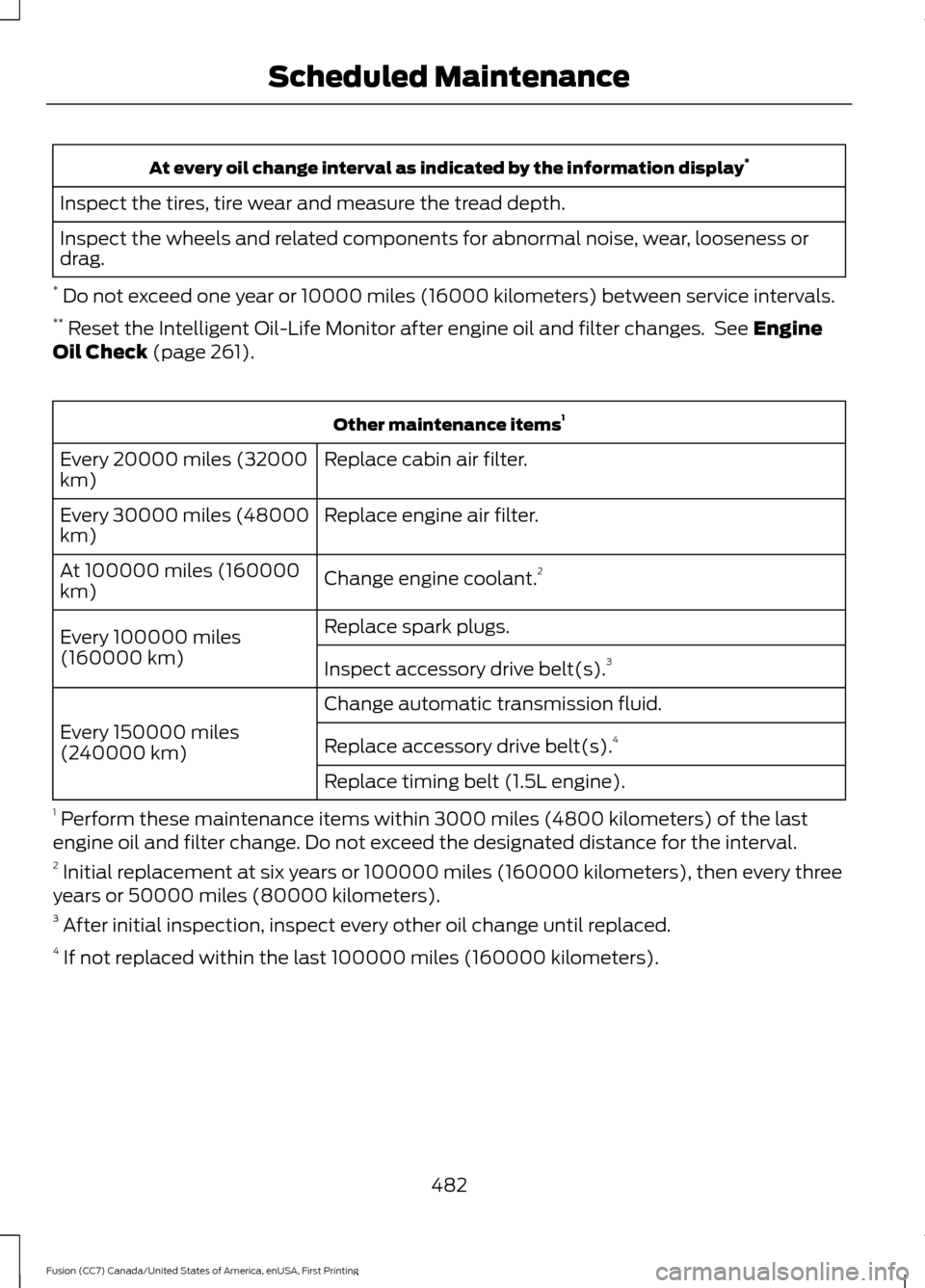
At every oil change interval as indicated by the information display
*
Inspect the tires, tire wear and measure the tread depth.
Inspect the wheels and related components for abnormal noise, wear, looseness or
drag.
* Do not exceed one year or 10000 miles (16000 kilometers) between service intervals.
** Reset the Intelligent Oil-Life Monitor after engine oil and filter changes. See Engine
Oil Check (page 261). Other maintenance items
1
Replace cabin air filter.
Every 20000 miles (32000
km)
Replace engine air filter.
Every 30000 miles (48000
km)
Change engine coolant.2
At 100000 miles (160000
km)
Replace spark plugs.
Every 100000 miles
(160000 km) Inspect accessory drive belt(s). 3
Change automatic transmission fluid.
Every 150000 miles
(240000 km) Replace accessory drive belt(s). 4
Replace timing belt (1.5L engine).
1 Perform these maintenance items within 3000 miles (4800 kilometers) of the last
engine oil and filter change. Do not exceed the designated distance for the interval.
2 Initial replacement at six years or 100000 miles (160000 kilometers), then every three
years or 50000 miles (80000 kilometers).
3 After initial inspection, inspect every other oil change until replaced.
4 If not replaced within the last 100000 miles (160000 kilometers).
482
Fusion (CC7) Canada/United States of America, enUSA, First Printing Scheduled Maintenance
Page 487 of 528
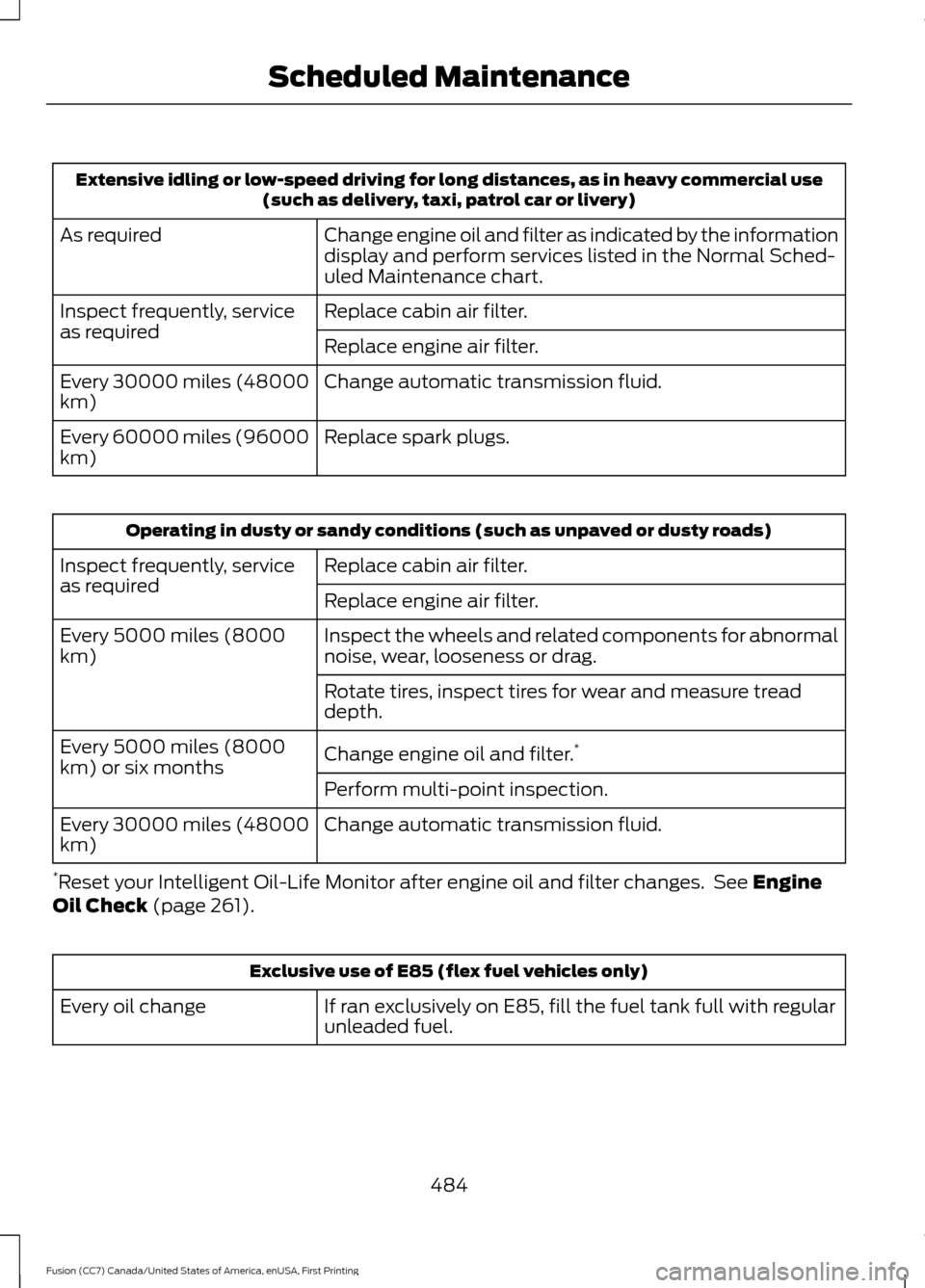
Extensive idling or low-speed driving for long distances, as in heavy commercial use
(such as delivery, taxi, patrol car or livery)
Change engine oil and filter as indicated by the information
display and perform services listed in the Normal Sched-
uled Maintenance chart.
As required
Replace cabin air filter.
Inspect frequently, service
as required
Replace engine air filter.
Change automatic transmission fluid.
Every 30000 miles (48000
km)
Replace spark plugs.
Every 60000 miles (96000
km) Operating in dusty or sandy conditions (such as unpaved or dusty roads)
Replace cabin air filter.
Inspect frequently, service
as required
Replace engine air filter.
Inspect the wheels and related components for abnormal
noise, wear, looseness or drag.
Every 5000 miles (8000
km)
Rotate tires, inspect tires for wear and measure tread
depth.
Change engine oil and filter.*
Every 5000 miles (8000
km) or six months
Perform multi-point inspection.
Change automatic transmission fluid.
Every 30000 miles (48000
km)
* Reset your Intelligent Oil-Life Monitor after engine oil and filter changes. See Engine
Oil Check (page 261). Exclusive use of E85 (flex fuel vehicles only)
If ran exclusively on E85, fill the fuel tank full with regular
unleaded fuel.
Every oil change
484
Fusion (CC7) Canada/United States of America, enUSA, First Printing Scheduled Maintenance
Page 526 of 528
Steering Wheel................................................67
Storage Compartments.............................144
Sunroof See: Moonroof....................................................... 84
Sun Visors
.........................................................84
Illuminated Vanity Mirror................................... 84
Supplementary Restraints System
.........39
Principle of Operation........................................ 39
Symbols Glossary
.............................................7
SYNC™ 3........................................................398
General Information......................................... 398
SYNC™ 3 Troubleshooting.....................460
SYNC™ Applications and Services........................................................376
911 Assist............................................................... 376
SYNC Mobile Apps............................................ 378
SYNC™...........................................................360 General Information......................................... 360
SYNC™ Troubleshooting.........................390
T
Technical Specifications See: Capacities and Specifications.............321
The Better Business Bureau (BBB) Auto Line Program (U.S. Only)
......................240
Tire Care..........................................................292
Glossary of Tire Terminology........................ 294
Information About Uniform Tire Quality Grading............................................................. 292
Information Contained on the Tire Sidewall........................................................... 295
Temperature A B C............................................ 294
Traction AA A B C............................................... 293
Treadwear.............................................................293
Tire Inflation When Punctured See: Tire Sealant and Inflator Kit................286
Tire Pressure Monitoring System
..........309
Changing Tires With a Tire Pressure
Monitoring System........................................ 310
Understanding Your Tire Pressure Monitoring System ....................................... 310
Tire Repair Kit See: Tire Sealant and Inflator Kit................286
Tire Sealant and Inflator Kit....................286 First Stage: Reinflating the Tire with Sealing
Compound and Air....................................... 288
General Information.......................................... 287Second Stage: Checking Tire
Pressure........................................................... 290
Tips for Use of the Kit....................................... 287
What to do after the Tire has been Sealed............................................................... 290
What to do when a Tire Is Punctured........288
Tires See: Wheels and Tires..................................... 286
Towing a Trailer
.............................................222
Load Placement................................................. 222
Towing Points................................................236 Installing the Recovery Hook........................ 236
Recovery Hook Location................................. 236
Towing the Vehicle on Four Wheels..........................................................226
Emergency Towing............................................ 226
Recreational Towing......................................... 226
Vehicles Equipped with 1.5L, 2.0L, and 2.5L Engines............................................................. 226
Vehicles Equipped with a 2.7L Engine................................................................226
Towing..............................................................222
Traction Control
.............................................178
Principle of Operation....................................... 178
Transmission Code Designation............329
Transmission..................................................163
Transmission See: Transmission.............................................. 163
Transporting the Vehicle...........................236
Type Approvals
..............................................512
RF Certification Logos for Tire Pressure
Monitoring Sensor(s)................................... 512
U
Under Hood Overview - 1.5L EcoBoost™..................................................257
Under Hood Overview - 2.0L EcoBoost™.................................................258
Under Hood Overview - 2.5L...................259
Under Hood Overview - 2.7L EcoBoost™................................................260
Unique Driving Characteristics.................151
Universal Garage Door Opener................137 HomeLink Wireless Control System............137
USB Port
.........................................................359
Using Adaptive Cruise Control................195 Automatic Cancellation................................... 199
523
Fusion (CC7) Canada/United States of America, enUSA, First Printing Index
Page 527 of 528
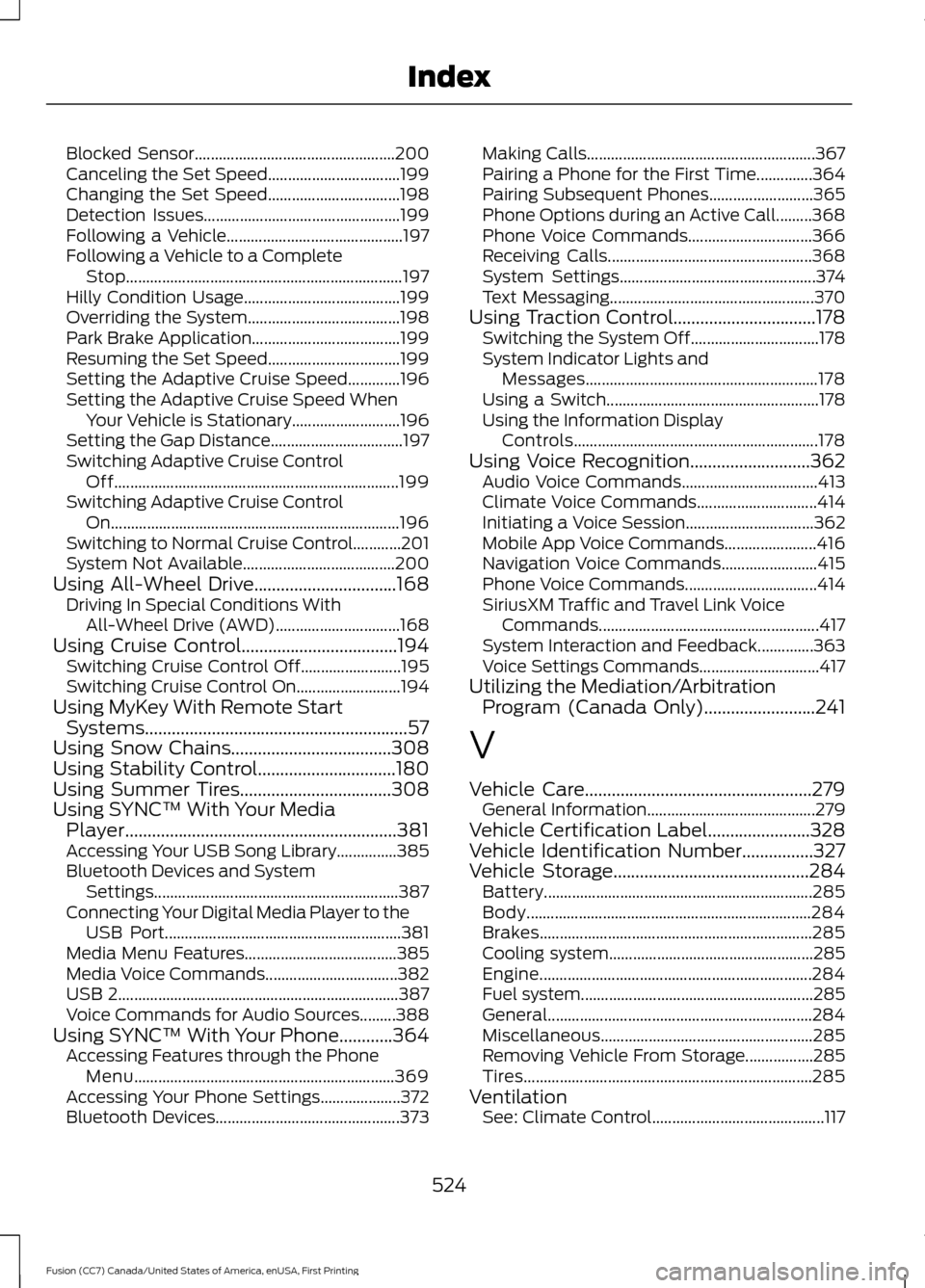
Blocked Sensor..................................................
200
Canceling the Set Speed................................. 199
Changing the Set Speed................................. 198
Detection Issues................................................. 199
Following a Vehicle............................................ 197
Following a Vehicle to a Complete Stop..................................................................... 197
Hilly Condition Usage....................................... 199
Overriding the System...................................... 198
Park Brake Application..................................... 199
Resuming the Set Speed................................. 199
Setting the Adaptive Cruise Speed.............196
Setting the Adaptive Cruise Speed When Your Vehicle is Stationary........................... 196
Setting the Gap Distance................................. 197
Switching Adaptive Cruise Control Off....................................................................... 199
Switching Adaptive Cruise Control On........................................................................\
196
Switching to Normal Cruise Control............201
System Not Available...................................... 200
Using All-Wheel Drive................................168 Driving In Special Conditions With
All-Wheel Drive (AWD)............................... 168
Using Cruise Control...................................194 Switching Cruise Control Off......................... 195
Switching Cruise Control On.......................... 194
Using MyKey With Remote Start Systems...........................................................57
Using Snow Chains....................................308
Using Stability Control...............................180
Using Summer Tires
..................................308
Using SYNC™ With Your Media Player.............................................................381
Accessing Your USB Song Library...............385
Bluetooth Devices and System Settings............................................................. 387
Connecting Your Digital Media Player to the USB Port........................................................... 381
Media Menu Features...................................... 385
Media Voice Commands................................. 382
USB 2...................................................................... 387
Voice Commands for Audio Sources.........388
Using SYNC™ With Your Phone............364 Accessing Features through the Phone
Menu................................................................. 369
Accessing Your Phone Settings.................... 372
Bluetooth Devices.............................................. 373Making Calls.........................................................
367
Pairing a Phone for the First Time..............364
Pairing Subsequent Phones.......................... 365
Phone Options during an Active Call.........368
Phone Voice Commands............................... 366
Receiving Calls................................................... 368
System Settings................................................. 374
Text Messaging................................................... 370
Using Traction Control................................178 Switching the System Off................................ 178
System Indicator Lights and Messages.......................................................... 178
Using a Switch..................................................... 178
Using the Information Display Controls............................................................. 178
Using Voice Recognition...........................362 Audio Voice Commands.................................. 413
Climate Voice Commands.............................. 414
Initiating a Voice Session................................ 362
Mobile App Voice Commands....................... 416
Navigation Voice Commands........................ 415
Phone Voice Commands................................. 414
SiriusXM Traffic and Travel Link Voice Commands....................................................... 417
System Interaction and Feedback..............363
Voice Settings Commands.............................. 417
Utilizing the Mediation/Arbitration Program (Canada Only)
.........................241
V
Vehicle Care
...................................................279
General Information.......................................... 279
Vehicle Certification Label.......................328
Vehicle Identification Number
................327
Vehicle Storage............................................284
Battery................................................................... 285
Body....................................................................... 284
Brakes.................................................................... 285
Cooling system................................................... 285
Engine.................................................................... 284
Fuel system.......................................................... 285
General.................................................................. 284
Miscellaneous..................................................... 285
Removing Vehicle From Storage.................285
Tires........................................................................\
285
Ventilation See: Climate Control........................................... 117
524
Fusion (CC7) Canada/United States of America, enUSA, First Printing Index
Page 528 of 528
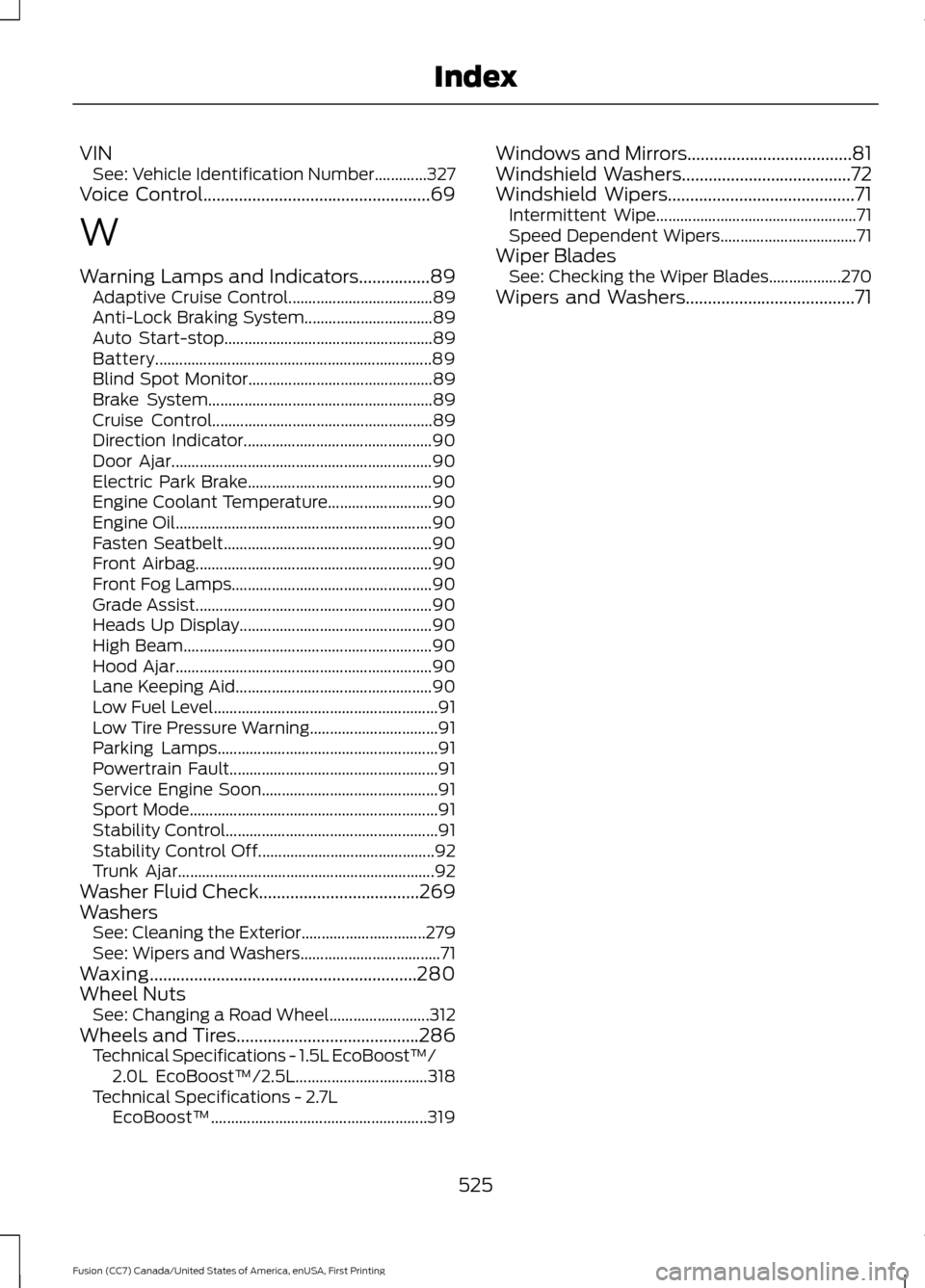
VIN
See: Vehicle Identification Number.............327
Voice Control...................................................69
W
Warning Lamps and Indicators................89 Adaptive Cruise Control.................................... 89
Anti-Lock Braking System................................ 89
Auto Start-stop.................................................... 89
Battery..................................................................... 89
Blind Spot Monitor.............................................. 89
Brake System........................................................ 89
Cruise Control....................................................... 89
Direction Indicator............................................... 90
Door Ajar................................................................. 90
Electric Park Brake.............................................. 90
Engine Coolant Temperature.......................... 90
Engine Oil................................................................ 90
Fasten Seatbelt.................................................... 90
Front Airbag........................................................... 90
Front Fog Lamps.................................................. 90
Grade Assist........................................................... 90
Heads Up Display................................................ 90
High Beam.............................................................. 90
Hood Ajar................................................................ 90
Lane Keeping Aid................................................. 90
Low Fuel Level........................................................ 91
Low Tire Pressure Warning................................ 91
Parking Lamps....................................................... 91
Powertrain Fault.................................................... 91
Service Engine Soon............................................ 91
Sport Mode.............................................................. 91
Stability Control..................................................... 91
Stability Control Off............................................ 92
Trunk Ajar................................................................ 92
Washer Fluid Check....................................269
Washers See: Cleaning the Exterior............................... 279
See: Wipers and Washers................................... 71
Waxing............................................................280
Wheel Nuts See: Changing a Road Wheel......................... 312
Wheels and Tires.........................................286 Technical Specifications - 1.5L EcoBoost™/
2.0L EcoBoost™/2.5L................................. 318
Technical Specifications - 2.7L EcoBoost™...................................................... 319Windows and Mirrors.....................................81
Windshield Washers......................................72
Windshield Wipers..........................................71
Intermittent Wipe.................................................. 71
Speed Dependent Wipers.................................. 71
Wiper Blades See: Checking the Wiper Blades.................. 270
Wipers and Washers......................................71
525
Fusion (CC7) Canada/United States of America, enUSA, First Printing Index