fuel FORD FUSION ENERGI 2017 User Guide
[x] Cancel search | Manufacturer: FORD, Model Year: 2017, Model line: FUSION ENERGI, Model: FORD FUSION ENERGI 2017Pages: 526, PDF Size: 7.89 MB
Page 98 of 526
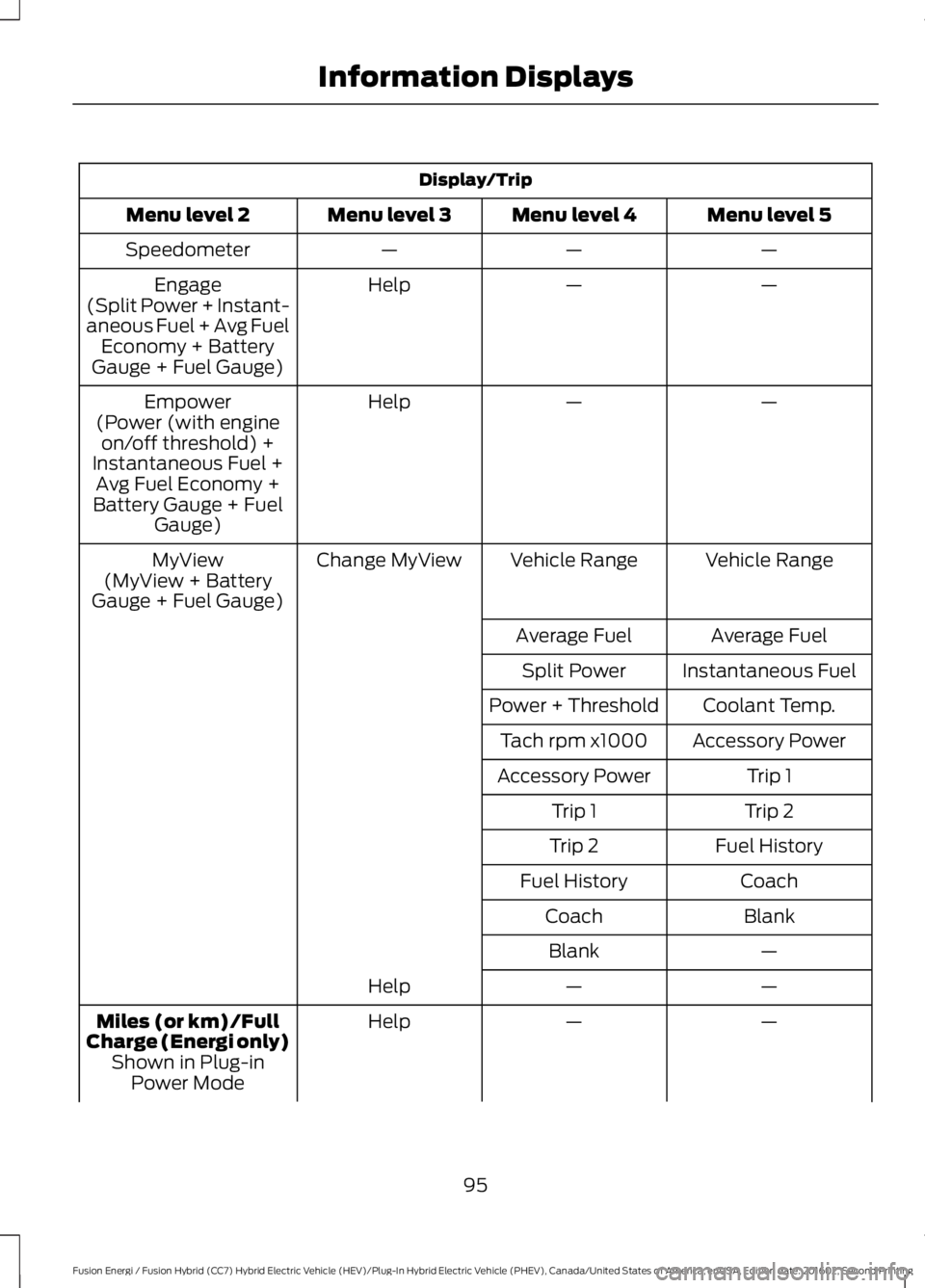
Display/Trip
Menu level 5Menu level 4Menu level 3Menu level 2
———Speedometer
——HelpEngage(Split Power + Instant-aneous Fuel + Avg FuelEconomy + BatteryGauge + Fuel Gauge)
——HelpEmpower(Power (with engineon/off threshold) +Instantaneous Fuel +Avg Fuel Economy +Battery Gauge + FuelGauge)
Vehicle RangeVehicle RangeChange MyViewMyView(MyView + BatteryGauge + Fuel Gauge)
Average FuelAverage Fuel
Instantaneous FuelSplit Power
Coolant Temp.Power + Threshold
Accessory PowerTach rpm x1000
Trip 1Accessory Power
Trip 2Trip 1
Fuel HistoryTrip 2
CoachFuel History
BlankCoach
—Blank
——Help
——HelpMiles (or km)/FullCharge (Energi only)Shown in Plug-inPower Mode
95
Fusion Energi / Fusion Hybrid (CC7) Hybrid Electric Vehicle (HEV)/Plug-In Hybrid Electric Vehicle (PHEV), Canada/United States of America, enUSA, Edition date: 201602, Second Printing
Information Displays
Page 99 of 526
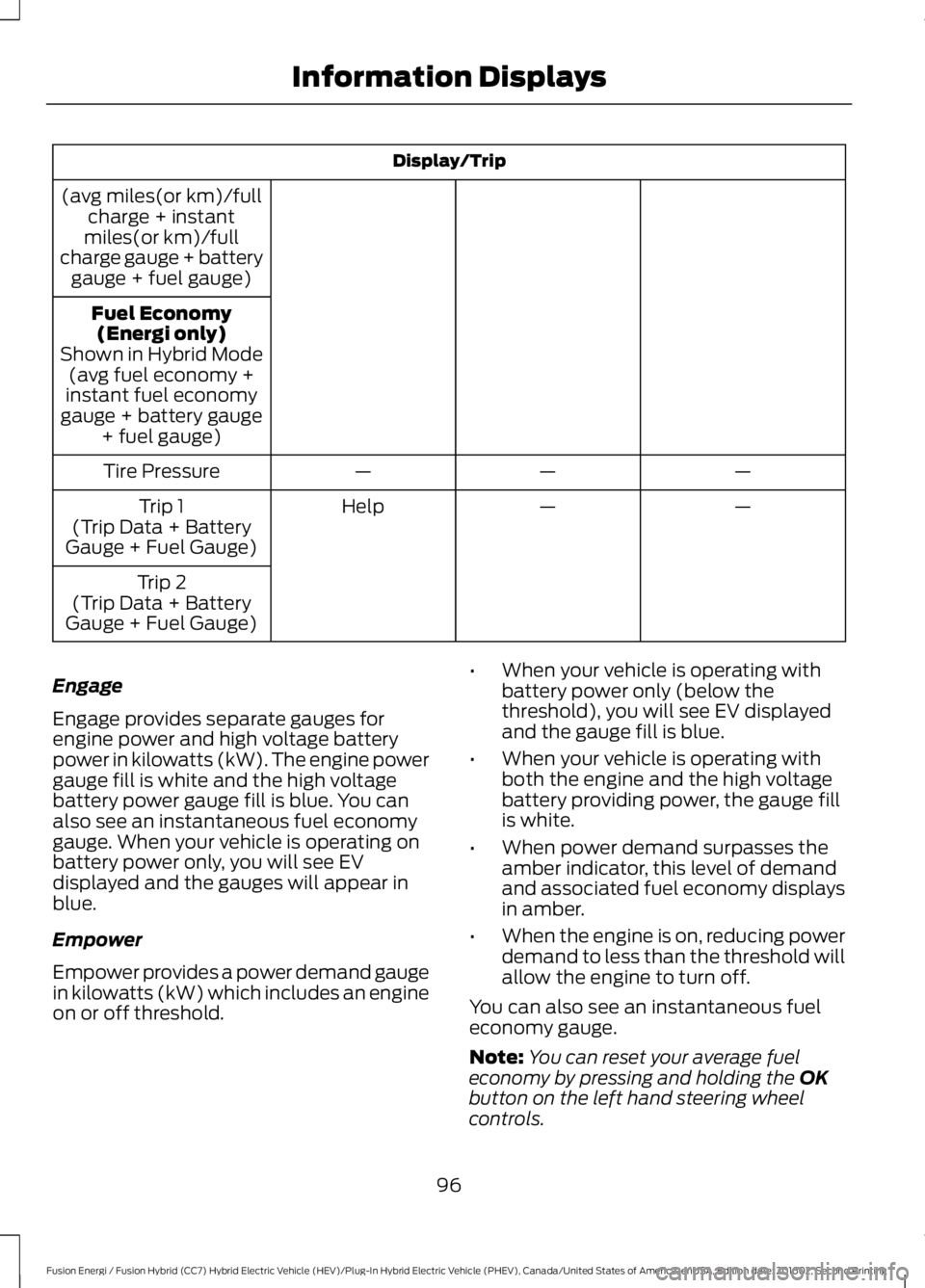
Display/Trip
(avg miles(or km)/fullcharge + instantmiles(or km)/fullcharge gauge + batterygauge + fuel gauge)
Fuel Economy(Energi only)Shown in Hybrid Mode(avg fuel economy +instant fuel economygauge + battery gauge+ fuel gauge)
———Tire Pressure
——HelpTrip 1(Trip Data + BatteryGauge + Fuel Gauge)
Trip 2(Trip Data + BatteryGauge + Fuel Gauge)
Engage
Engage provides separate gauges forengine power and high voltage batterypower in kilowatts (kW). The engine powergauge fill is white and the high voltagebattery power gauge fill is blue. You canalso see an instantaneous fuel economygauge. When your vehicle is operating onbattery power only, you will see EVdisplayed and the gauges will appear inblue.
Empower
Empower provides a power demand gaugein kilowatts (kW) which includes an engineon or off threshold.
•When your vehicle is operating withbattery power only (below thethreshold), you will see EV displayedand the gauge fill is blue.
•When your vehicle is operating withboth the engine and the high voltagebattery providing power, the gauge fillis white.
•When power demand surpasses theamber indicator, this level of demandand associated fuel economy displaysin amber.
•When the engine is on, reducing powerdemand to less than the threshold willallow the engine to turn off.
You can also see an instantaneous fueleconomy gauge.
Note:You can reset your average fueleconomy by pressing and holding the OKbutton on the left hand steering wheelcontrols.
96
Fusion Energi / Fusion Hybrid (CC7) Hybrid Electric Vehicle (HEV)/Plug-In Hybrid Electric Vehicle (PHEV), Canada/United States of America, enUSA, Edition date: 201602, Second Printing
Information Displays
Page 100 of 526
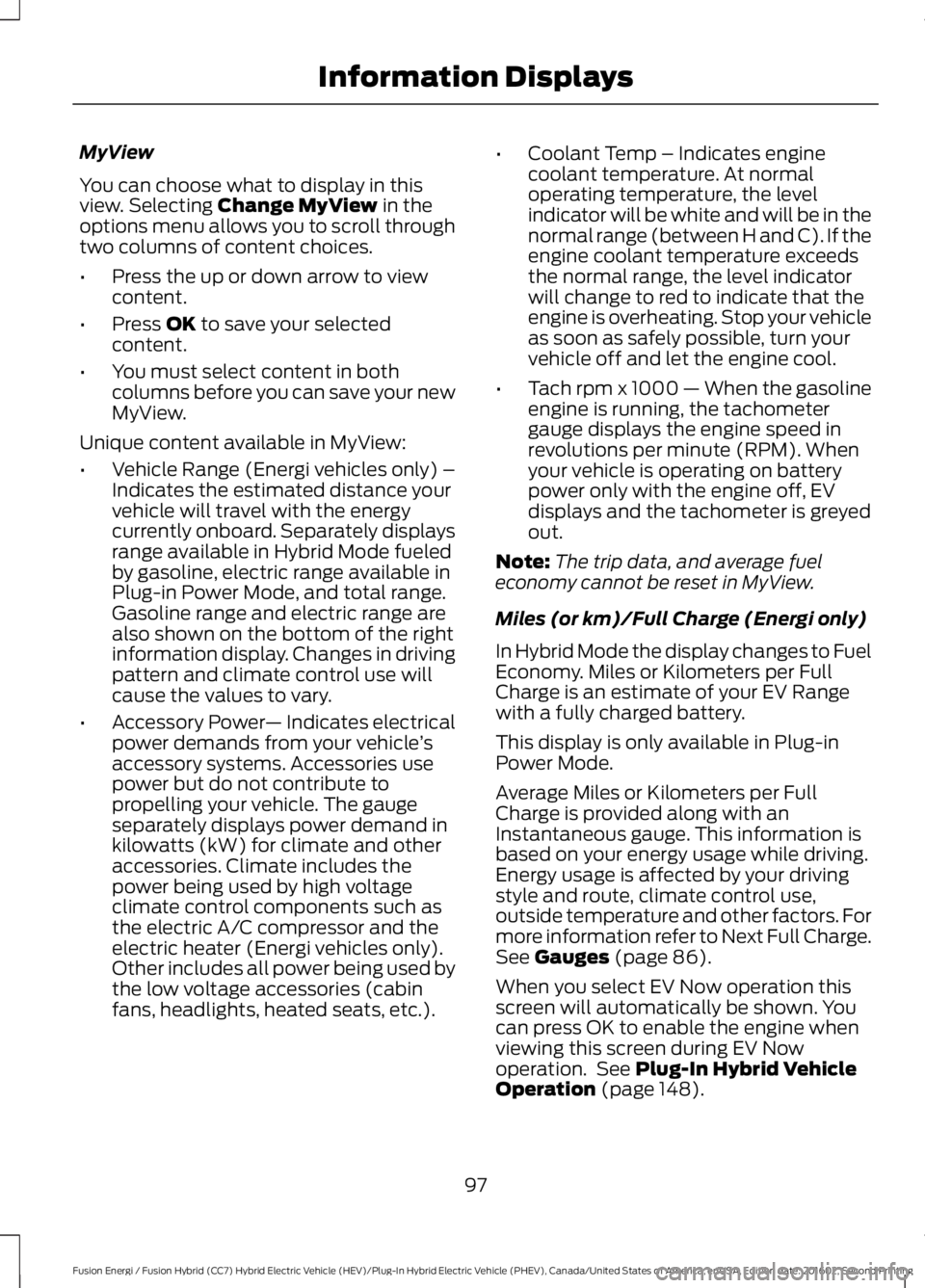
MyView
You can choose what to display in thisview. Selecting Change MyView in theoptions menu allows you to scroll throughtwo columns of content choices.
•Press the up or down arrow to viewcontent.
•Press OK to save your selectedcontent.
•You must select content in bothcolumns before you can save your newMyView.
Unique content available in MyView:
•Vehicle Range (Energi vehicles only) –Indicates the estimated distance yourvehicle will travel with the energycurrently onboard. Separately displaysrange available in Hybrid Mode fueledby gasoline, electric range available inPlug-in Power Mode, and total range.Gasoline range and electric range arealso shown on the bottom of the rightinformation display. Changes in drivingpattern and climate control use willcause the values to vary.
•Accessory Power— Indicates electricalpower demands from your vehicle’saccessory systems. Accessories usepower but do not contribute topropelling your vehicle. The gaugeseparately displays power demand inkilowatts (kW) for climate and otheraccessories. Climate includes thepower being used by high voltageclimate control components such asthe electric A/C compressor and theelectric heater (Energi vehicles only).Other includes all power being used bythe low voltage accessories (cabinfans, headlights, heated seats, etc.).
•Coolant Temp – Indicates enginecoolant temperature. At normaloperating temperature, the levelindicator will be white and will be in thenormal range (between H and C). If theengine coolant temperature exceedsthe normal range, the level indicatorwill change to red to indicate that theengine is overheating. Stop your vehicleas soon as safely possible, turn yourvehicle off and let the engine cool.
•Tach rpm x 1000 — When the gasolineengine is running, the tachometergauge displays the engine speed inrevolutions per minute (RPM). Whenyour vehicle is operating on batterypower only with the engine off, EVdisplays and the tachometer is greyedout.
Note:The trip data, and average fueleconomy cannot be reset in MyView.
Miles (or km)/Full Charge (Energi only)
In Hybrid Mode the display changes to FuelEconomy. Miles or Kilometers per FullCharge is an estimate of your EV Rangewith a fully charged battery.
This display is only available in Plug-inPower Mode.
Average Miles or Kilometers per FullCharge is provided along with anInstantaneous gauge. This information isbased on your energy usage while driving.Energy usage is affected by your drivingstyle and route, climate control use,outside temperature and other factors. Formore information refer to Next Full Charge.See Gauges (page 86).
When you select EV Now operation thisscreen will automatically be shown. Youcan press OK to enable the engine whenviewing this screen during EV Nowoperation. See Plug-In Hybrid VehicleOperation (page 148).
97
Fusion Energi / Fusion Hybrid (CC7) Hybrid Electric Vehicle (HEV)/Plug-In Hybrid Electric Vehicle (PHEV), Canada/United States of America, enUSA, Edition date: 201602, Second Printing
Information Displays
Page 101 of 526
Fuel Economy (Energi only)
This display is only available in HybridMode. In Plug-in Power Mode the displaychanges to Miles (or km)/Full Charge.
An Instant Fuel Economy gauge is providedalong with Avg Fuel Economy. Whileviewing this screen you can reset youraverage fuel economy by pressing andholding the OK button on the left handsteering wheel controls. For moreinformation see Common Displays in thischapter.
Trip 1 & 2
Provides trip odometer, trip average fueleconomy and trip timer.
Distance traveled on battery power onlywith the engine off is shown in blue nextto total trip distance.
For Energi vehicles total plug-in electricityused in kilowatt hours (kWh) is shown inblue next to trip average fuel economy.
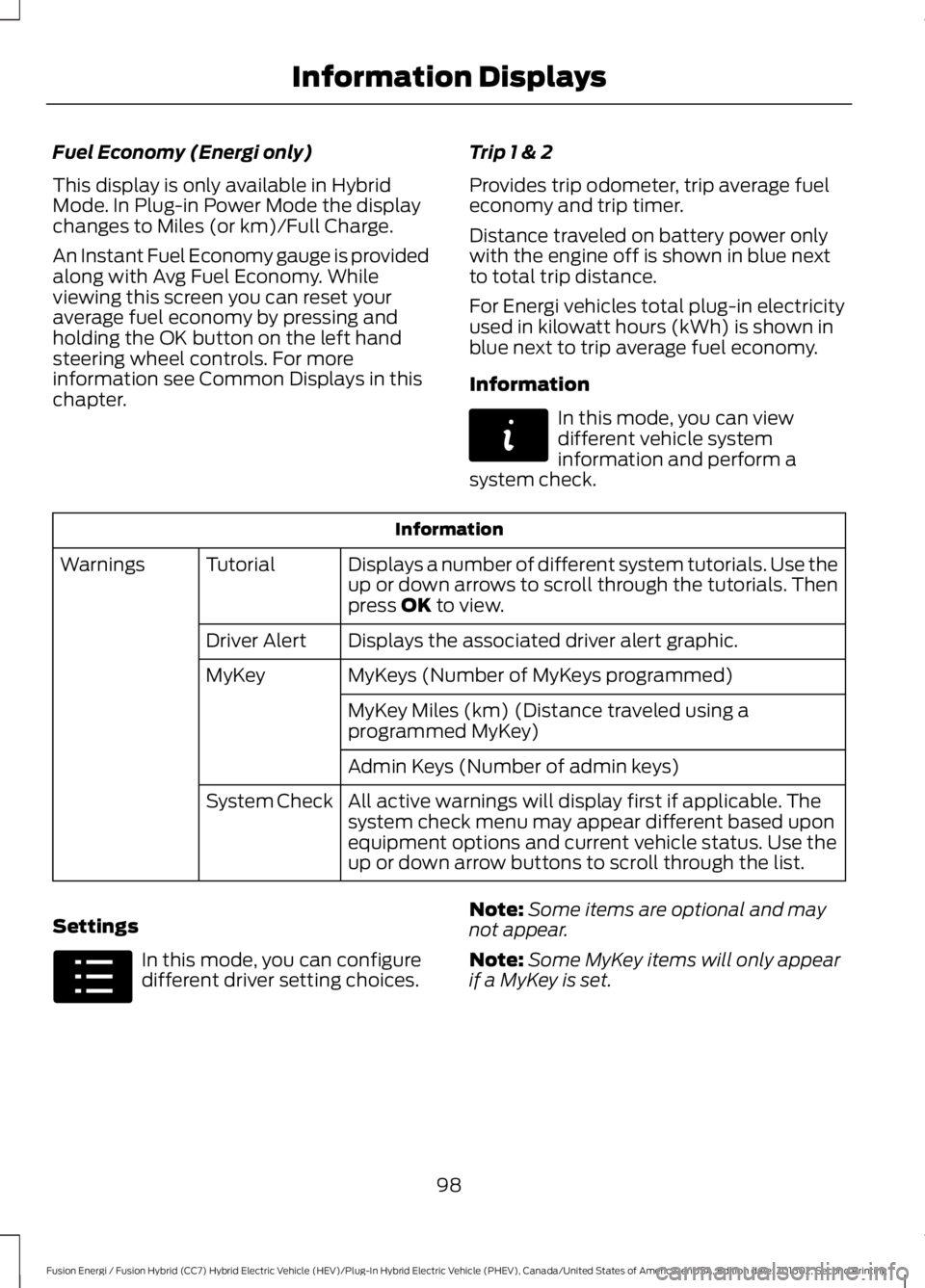
Information
In this mode, you can viewdifferent vehicle systeminformation and perform asystem check.
Information
Displays a number of different system tutorials. Use theup or down arrows to scroll through the tutorials. Thenpress OK to view.
TutorialWarnings
Displays the associated driver alert graphic.Driver Alert
MyKeys (Number of MyKeys programmed)MyKey
MyKey Miles (km) (Distance traveled using aprogrammed MyKey)
Admin Keys (Number of admin keys)
All active warnings will display first if applicable. Thesystem check menu may appear different based uponequipment options and current vehicle status. Use theup or down arrow buttons to scroll through the list.
System Check
Settings
In this mode, you can configuredifferent driver setting choices.
Note:Some items are optional and maynot appear.
Note:Some MyKey items will only appearif a MyKey is set.
98
Fusion Energi / Fusion Hybrid (CC7) Hybrid Electric Vehicle (HEV)/Plug-In Hybrid Electric Vehicle (PHEV), Canada/United States of America, enUSA, Edition date: 201602, Second Printing
Information DisplaysE144642 E100023
Page 104 of 526
Settings
Select the desired language - Hold OK to SetLanguageDisplay
Miles & GAL, l/100km or km/LDistanceUnits
Fahrenheit (°F) or Celsius (°C)Temperature
psi, kPa or barTire Pressure
On or OffBrake Coach
On or OffBatteryDisplay
On or OffRegen Display
Hold OK to ResetDriving History
*Energi only.
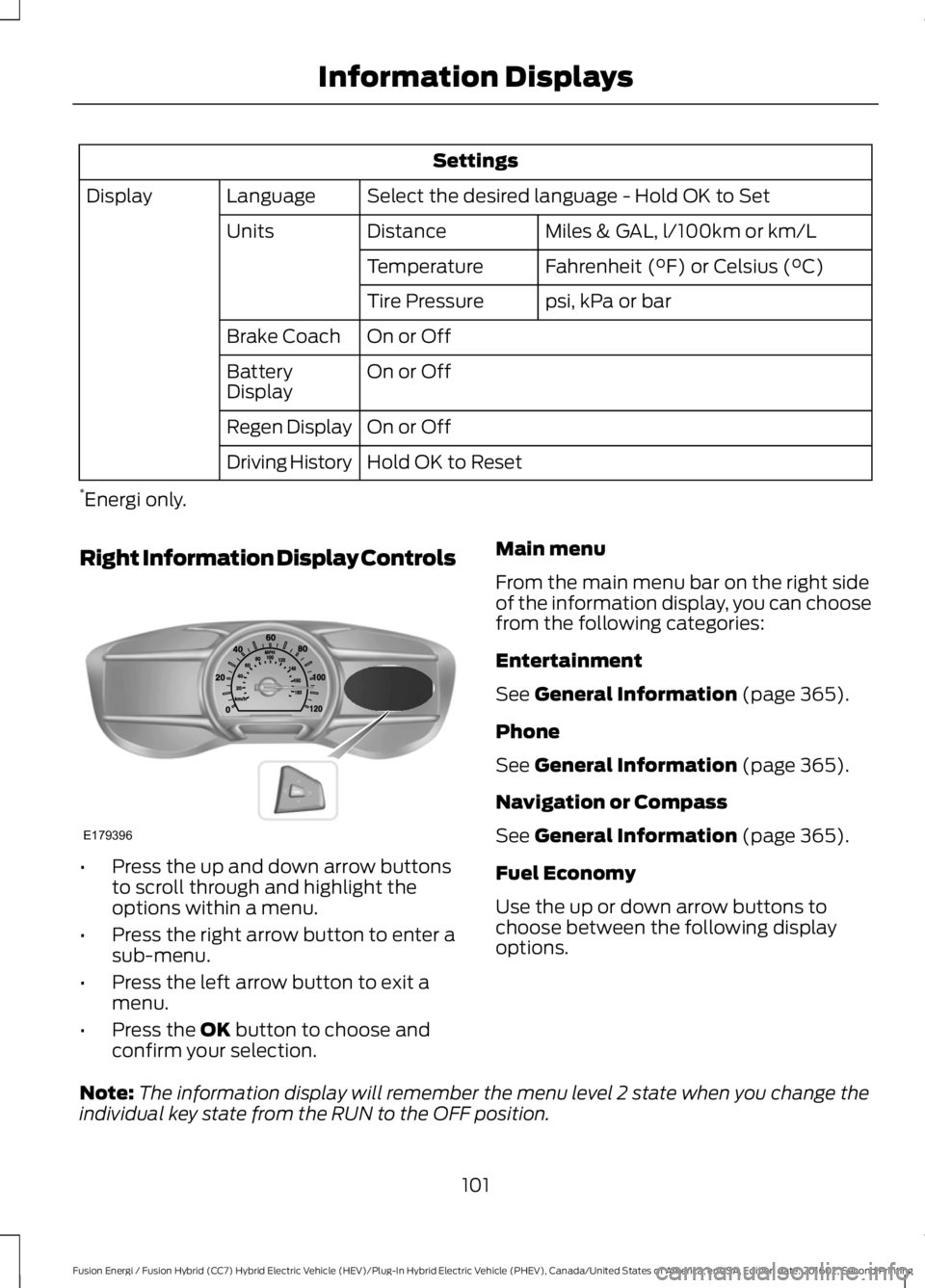
Right Information Display Controls
•Press the up and down arrow buttonsto scroll through and highlight theoptions within a menu.
•Press the right arrow button to enter asub-menu.
•Press the left arrow button to exit amenu.
•Press the OK button to choose andconfirm your selection.
Main menu
From the main menu bar on the right sideof the information display, you can choosefrom the following categories:
Entertainment
See General Information (page 365).
Phone
See General Information (page 365).
Navigation or Compass
See General Information (page 365).
Fuel Economy
Use the up or down arrow buttons tochoose between the following displayoptions.
Note:The information display will remember the menu level 2 state when you change theindividual key state from the RUN to the OFF position.
101
Fusion Energi / Fusion Hybrid (CC7) Hybrid Electric Vehicle (HEV)/Plug-In Hybrid Electric Vehicle (PHEV), Canada/United States of America, enUSA, Edition date: 201602, Second Printing
Information DisplaysE179396
Page 105 of 526

Fuel Economy
Menu level 5Menu level 4Menu level 3Menu level 2
——HelpEfficiency Leaves
—5, 10 or 30 minutesDurationFuel History(Instantaneous FuelEconomy + FuelEconomy History + AvgFuel Economy)
——Help
——HelpCoach
Efficiency Leaves
Efficiency leaves indicate short term drivingefficiency measured over the last fewminutes. The more leaves and vines thatappear on the display, the better your fueleconomy. Leaves and vines willoccasionally appear and disappear toindicate a change in your driving efficiency.
Fuel History
From left to right this view includes aninstantaneous fuel economy gauge,historical fuel economy data and averagefuel economy. The historical datarepresents an average over time intervalsof either 1, 2 or 6 minutes, with the leftmostinterval being the most recent. Shown atthe bottom of the view is the total timeduration for the 5 intervals. You can selecttotal duration in the options menu.Intervals shown in grey color are from theprevious drive. The blue horizontal linerepresents the average fuel economy valueshown to the right.
Note:Hold OK to reset fuel history andaverage fuel economy.
Coach
This view provides a comparison of yourrecent acceleration, braking and cruisingbehavior, then recommends the mostefficient use of energy under presentconditions. The horizontal bars fill from leftto right with best behavior and appear bluewhen at least half full. When the bars areless than half full, the color is amber,suggesting that you need a change in yourdriving behavior to achieve better energyefficiency.
Note:Fuel Economy will be impacted byyour use of brakes, accelerator andaccessories, as well as environmentalconditions such as hills and weather.
Note:Fuel economy is not always ameasure of appropriate driving behavior. Forexample, when driving uphill andmaintaining an appropriate speed, yourinstant fuel economy may not be good(losing leaves) but the Coach may show ablue bar for Acceleration and Cruising.
102
Fusion Energi / Fusion Hybrid (CC7) Hybrid Electric Vehicle (HEV)/Plug-In Hybrid Electric Vehicle (PHEV), Canada/United States of America, enUSA, Edition date: 201602, Second Printing
Information Displays
Page 106 of 526
Common Displays
Both Average fuel economy and aninstantaneous fuel economy gauge areincluded in Engage, Empower, MyView (ifselected) and Fuel Economy (shown inHybrid Mode) on the left-hand informationdisplay. They are also included in FuelHistory on the right-hand informationdisplay.
Average Fuel Economy
Average Fuel Economy is continuouslyaveraged since the last reset. You can resetyour average fuel economy by pressing andholding the OK button on thecorresponding steering wheel controls. ForEnergi vehicles both Hybrid and Plug-inPower mode operation will be included inthe calculation.
Note:Average fuel economy cannot bereset in MyView.
Instantaneous Fuel Economy
If your instantaneous fuel economy isgreater than the maximum valuedisplayed, a + sign will be shown next tothe maximum scale number. When yourvehicle is operating on battery power only,EV will display and the gauge fill will showin blue.
INFORMATION MESSAGES
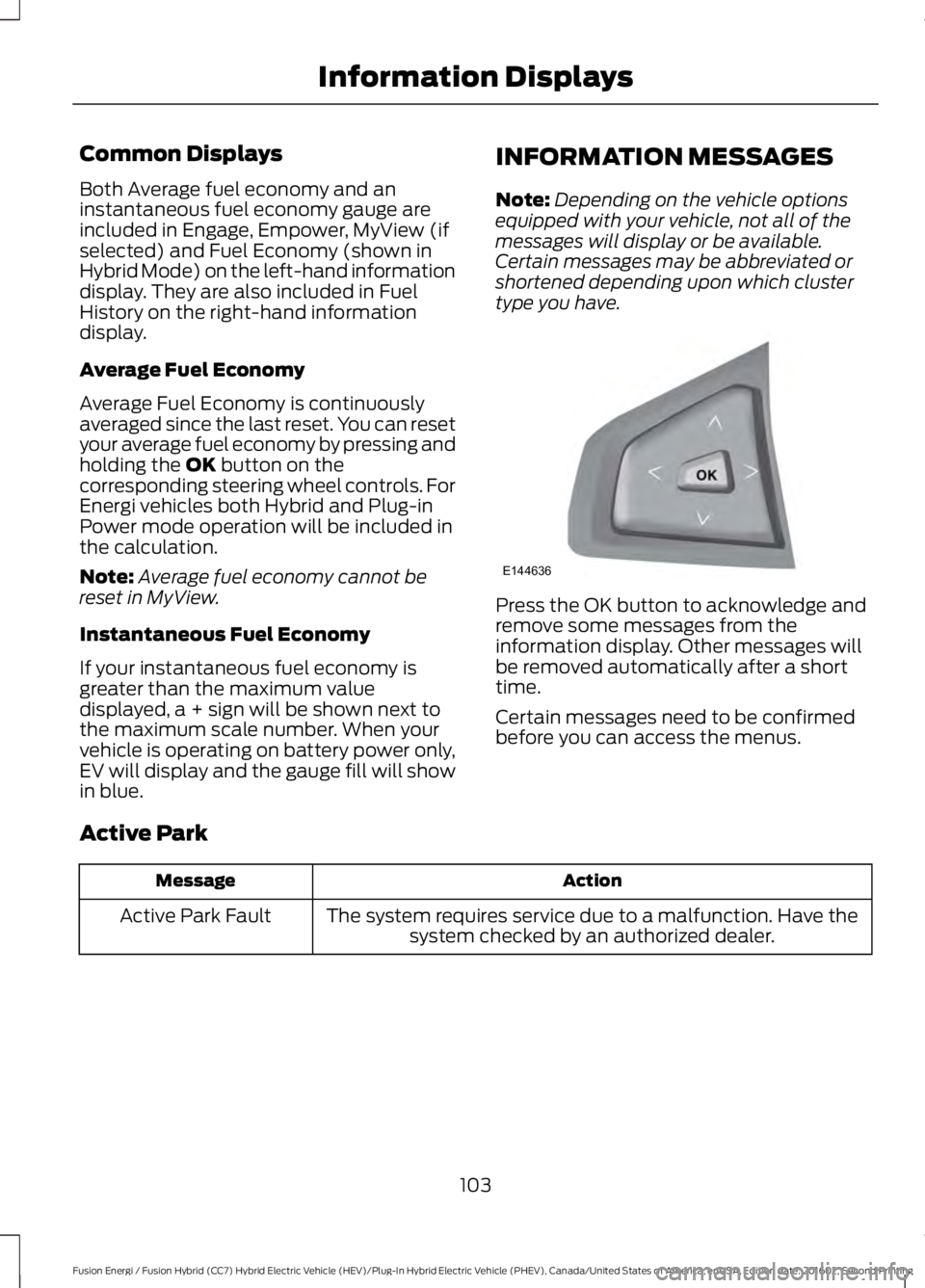
Note:Depending on the vehicle optionsequipped with your vehicle, not all of themessages will display or be available.Certain messages may be abbreviated orshortened depending upon which clustertype you have.
Press the OK button to acknowledge andremove some messages from theinformation display. Other messages willbe removed automatically after a shorttime.
Certain messages need to be confirmedbefore you can access the menus.
Active Park
ActionMessage
The system requires service due to a malfunction. Have thesystem checked by an authorized dealer.Active Park Fault
103
Fusion Energi / Fusion Hybrid (CC7) Hybrid Electric Vehicle (HEV)/Plug-In Hybrid Electric Vehicle (PHEV), Canada/United States of America, enUSA, Edition date: 201602, Second Printing
Information DisplaysE144636
Page 108 of 526
Airbag
ActionMessage
The system detects a malfunction due to a blocked sensor.Remove blockage.Occupant SensorBLOCKED RemoveObjects Near PassengerSeat
Alarm
ActionMessage
Alarm triggered due to unauthorized entry. See Anti-TheftAlarm (page 66).Vehicle Alarm To StopAlarm, Start Vehicle.
Automatic Engine Shutdown
ActionMessage
The engine is getting ready to shut off.Engine Shuts Off In{seconds to shut off:#0}Seconds
The engine has shut off to help increase fuel economy.Engine Shut Off For FuelEconomy
The engine is getting ready to shut off. You can press OK onthe left steering wheel button to override the shut down.Engine Shuts Off in{seconds to shut off:#0}Seconds Press Ok toOverride
105
Fusion Energi / Fusion Hybrid (CC7) Hybrid Electric Vehicle (HEV)/Plug-In Hybrid Electric Vehicle (PHEV), Canada/United States of America, enUSA, Edition date: 201602, Second Printing
Information Displays
Page 111 of 526
ActionMessage
The system has disabled the door switches.Switches InhibitedSecurity Mode
There is a system malfunction with the child locks. Contactan authorized dealer as soon as possible.Child Lock MalfunctionService Required
The factory keypad code displays in the information displayafter system resets the keypad.Factory Keypad Code {XX X X X}
Driver Alert
ActionMessage
Stop and rest as soon as it is safe to do so.Driver Alert Warning RestNow
Take a rest soon.Driver Alert Warning RestSuggested
Fuel
ActionMessage
An early reminder of a low fuel condition.Fuel Level Low
The fuel fill inlet may not be properly closed.Check Fuel Fill Inlet
EV functionality is disabled and the engine is running tomaintain fuel freshness. See Fuel Quality (page 154).Fuel Freshness Enginemay run to maintain fuelfreshness
Wait for up to 15 seconds while the fuel system depressurizes.Fuel Door Opening
The fuel system has finished depressurizing and you can beginto refuel.Fuel Door Open
A reminder to close the fuel door.Close Fuel Door
There is an error in attempting to refill your vehicle.Refuel Error See Manual
108
Fusion Energi / Fusion Hybrid (CC7) Hybrid Electric Vehicle (HEV)/Plug-In Hybrid Electric Vehicle (PHEV), Canada/United States of America, enUSA, Edition date: 201602, Second Printing
Information Displays
Page 124 of 526
Note:Do not remove ice from the mirrorswith a scraper or adjust the mirror glasswhen it is frozen in place.
Note:Do not clean the mirror housing orglass with harsh abrasives, fuel or otherpetroleum-based cleaning products.
CABIN AIR FILTER
Your vehicle is equipped with a cabin airfilter, which gives you and your passengersthe following benefits:
•It improves your driving comfort byreducing particle concentration.
•It improves the interior compartmentcleanliness.
•It protects the climate controlcomponents from particle deposits.
You can locate the cabin air filter behindthe glove box.
Note:Make sure you have a cabin air filterinstalled at all times. This prevents foreignobjects from entering the system. Runningthe system without a filter in place couldresult in degradation or damage to thesystem.
Replace the filter at regular intervals. SeeScheduled Maintenance (page 467).
For additional cabin air filter information,or to replace the filter, see an authorizeddealer.
REMOTE START (If Equipped)
You can switch this feature on or off andadjust the settings using the informationdisplay.
The system adjusts the interiortemperature depending on your chosensettings during remote start.
You cannot adjust the climate controlsetting during remote start operation.When you switch the ignition on, theclimate control system will return to theprevious settings. You can now makeadjustments.
You can switch on certainvehicle-dependent features when needed,such as:
•Heated seats.
•Cooled seats.
•Heated steering wheel.
•Heated mirrors.
•Heated rear window.
Automatic Settings
In hot weather, the system is set to 72°F(22°C). The cooled seats are set to high(if available, and selected to AUTO in theinformation display).
In moderate weather, the system eitherheats or cools (based on previoussettings). The rear defroster, heatedmirrors and heated or cooled seats do notautomatically turn on.
In cold weather, the system is set to 72°F(22°C). The heated seats are set to high(if available, and selected to AUTO in theinformation display). The heated rearwindow and heated mirrors automaticallyturn on.
121
Fusion Energi / Fusion Hybrid (CC7) Hybrid Electric Vehicle (HEV)/Plug-In Hybrid Electric Vehicle (PHEV), Canada/United States of America, enUSA, Edition date: 201602, Second Printing
Climate Control