ignition FORD FUSION ENERGI 2017 Owner's Manual
[x] Cancel search | Manufacturer: FORD, Model Year: 2017, Model line: FUSION ENERGI, Model: FORD FUSION ENERGI 2017Pages: 526, PDF Size: 7.89 MB
Page 93 of 526
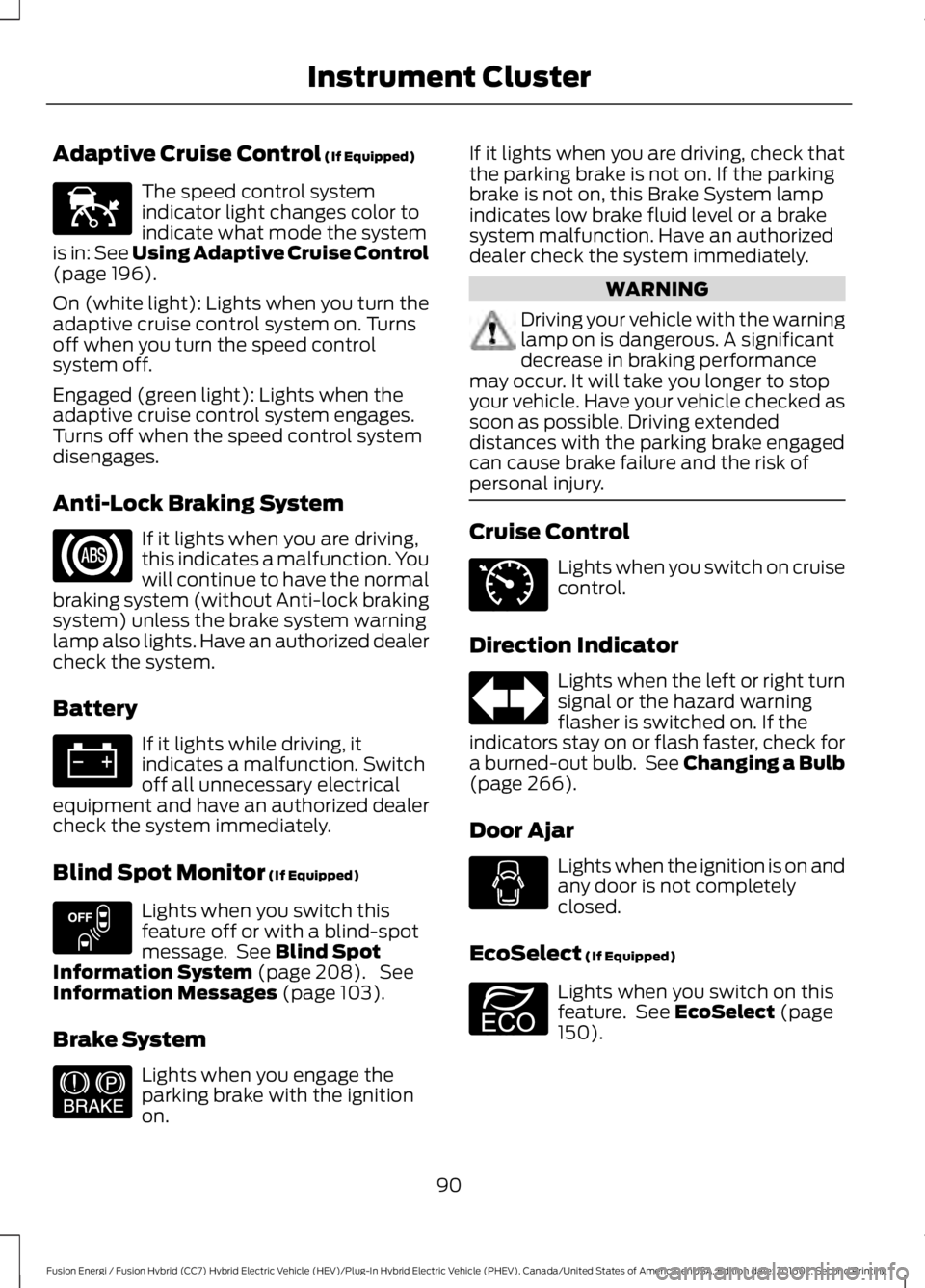
Adaptive Cruise Control (If Equipped)
The speed control systemindicator light changes color toindicate what mode the systemis in: See Using Adaptive Cruise Control(page 196).
On (white light): Lights when you turn theadaptive cruise control system on. Turnsoff when you turn the speed controlsystem off.
Engaged (green light): Lights when theadaptive cruise control system engages.Turns off when the speed control systemdisengages.
Anti-Lock Braking System
If it lights when you are driving,this indicates a malfunction. Youwill continue to have the normalbraking system (without Anti-lock brakingsystem) unless the brake system warninglamp also lights. Have an authorized dealercheck the system.
Battery
If it lights while driving, itindicates a malfunction. Switchoff all unnecessary electricalequipment and have an authorized dealercheck the system immediately.
Blind Spot Monitor (If Equipped)
Lights when you switch thisfeature off or with a blind-spotmessage. See Blind SpotInformation System (page 208). SeeInformation Messages (page 103).
Brake System
Lights when you engage theparking brake with the ignitionon.
If it lights when you are driving, check thatthe parking brake is not on. If the parkingbrake is not on, this Brake System lampindicates low brake fluid level or a brakesystem malfunction. Have an authorizeddealer check the system immediately.
WARNING
Driving your vehicle with the warninglamp on is dangerous. A significantdecrease in braking performancemay occur. It will take you longer to stopyour vehicle. Have your vehicle checked assoon as possible. Driving extendeddistances with the parking brake engagedcan cause brake failure and the risk ofpersonal injury.
Cruise Control
Lights when you switch on cruisecontrol.
Direction Indicator
Lights when the left or right turnsignal or the hazard warningflasher is switched on. If theindicators stay on or flash faster, check fora burned-out bulb. See Changing a Bulb(page 266).
Door Ajar
Lights when the ignition is on andany door is not completelyclosed.
EcoSelect (If Equipped)
Lights when you switch on thisfeature. See EcoSelect (page150).
90
Fusion Energi / Fusion Hybrid (CC7) Hybrid Electric Vehicle (HEV)/Plug-In Hybrid Electric Vehicle (PHEV), Canada/United States of America, enUSA, Edition date: 201602, Second Printing
Instrument ClusterE144524 E151262 E144522 E71340 E194390
Page 94 of 526
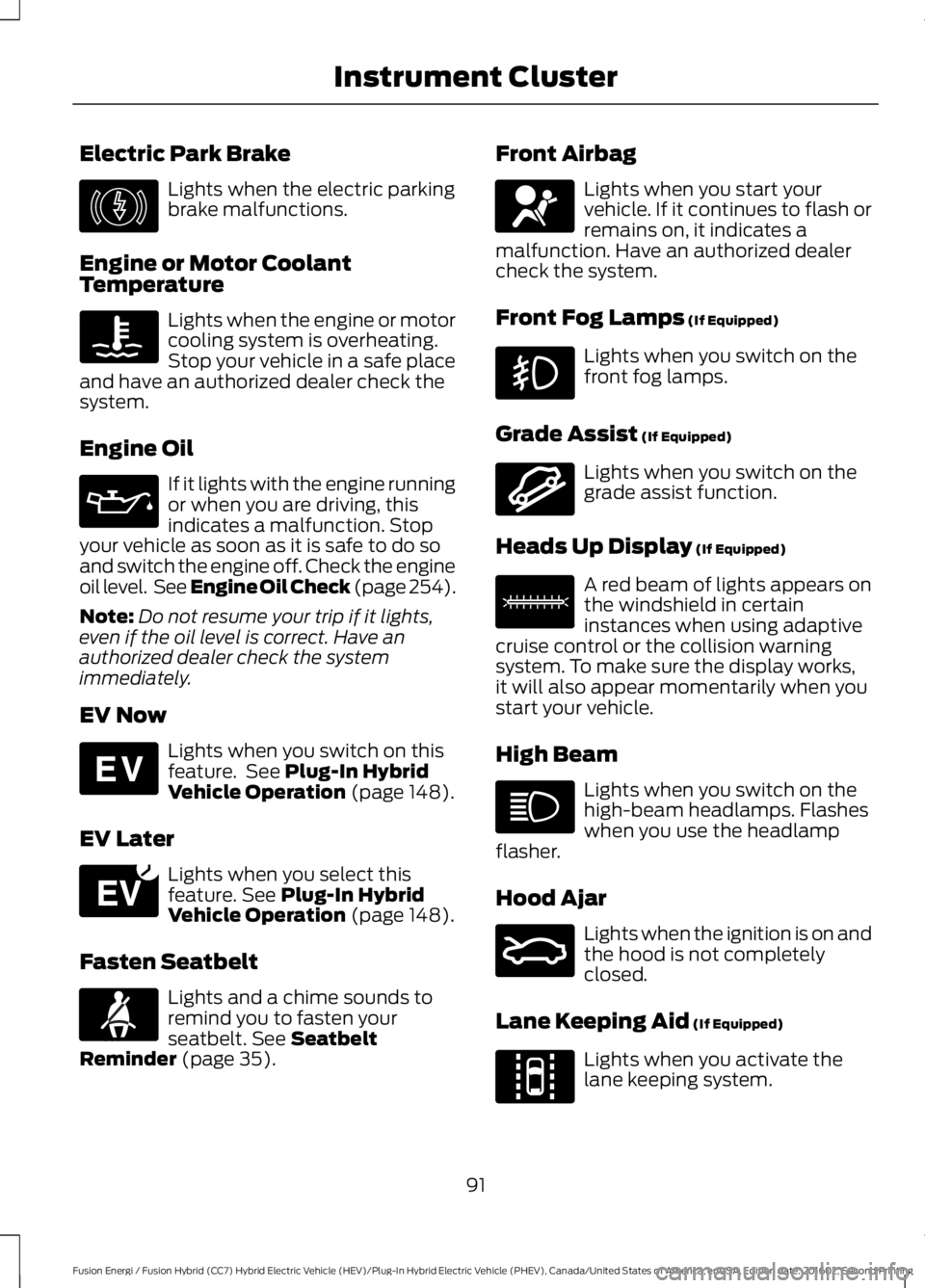
Electric Park Brake
Lights when the electric parkingbrake malfunctions.
Engine or Motor CoolantTemperature
Lights when the engine or motorcooling system is overheating.Stop your vehicle in a safe placeand have an authorized dealer check thesystem.
Engine Oil
If it lights with the engine runningor when you are driving, thisindicates a malfunction. Stopyour vehicle as soon as it is safe to do soand switch the engine off. Check the engineoil level. See Engine Oil Check (page 254).
Note:Do not resume your trip if it lights,even if the oil level is correct. Have anauthorized dealer check the systemimmediately.
EV Now
Lights when you switch on thisfeature. See Plug-In HybridVehicle Operation (page 148).
EV Later
Lights when you select thisfeature. See Plug-In HybridVehicle Operation (page 148).
Fasten Seatbelt
Lights and a chime sounds toremind you to fasten yourseatbelt. See SeatbeltReminder (page 35).
Front Airbag
Lights when you start yourvehicle. If it continues to flash orremains on, it indicates amalfunction. Have an authorized dealercheck the system.
Front Fog Lamps (If Equipped)
Lights when you switch on thefront fog lamps.
Grade Assist (If Equipped)
Lights when you switch on thegrade assist function.
Heads Up Display (If Equipped)
A red beam of lights appears onthe windshield in certaininstances when using adaptivecruise control or the collision warningsystem. To make sure the display works,it will also appear momentarily when youstart your vehicle.
High Beam
Lights when you switch on thehigh-beam headlamps. Flasheswhen you use the headlampflasher.
Hood Ajar
Lights when the ignition is on andthe hood is not completelyclosed.
Lane Keeping Aid (If Equipped)
Lights when you activate thelane keeping system.
91
Fusion Energi / Fusion Hybrid (CC7) Hybrid Electric Vehicle (HEV)/Plug-In Hybrid Electric Vehicle (PHEV), Canada/United States of America, enUSA, Edition date: 201602, Second Printing
Instrument ClusterE146190 E144814 E151263 E71880 E67017 E144523 E156133 E159324 E144813
Page 95 of 526
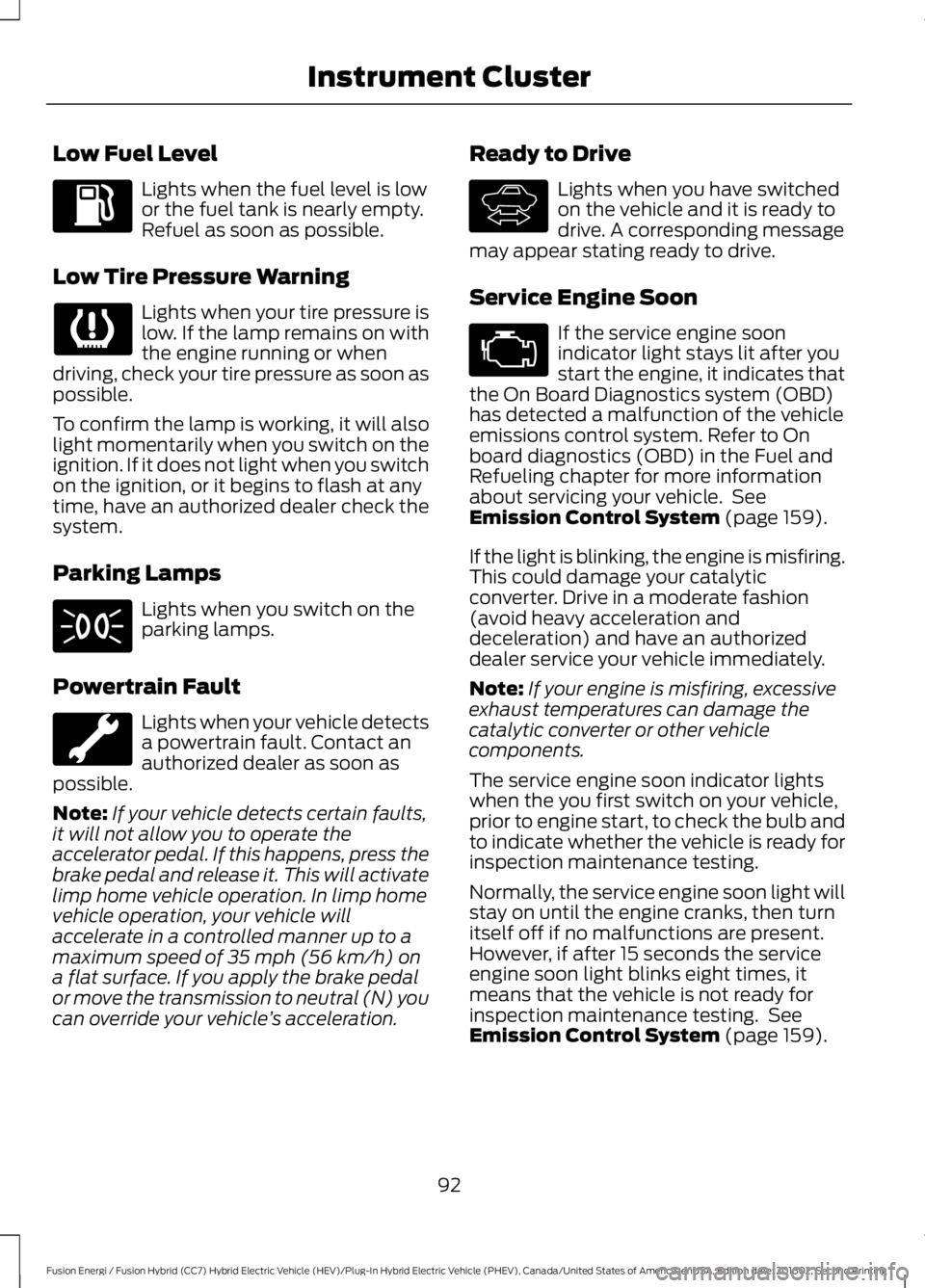
Low Fuel Level
Lights when the fuel level is lowor the fuel tank is nearly empty.Refuel as soon as possible.
Low Tire Pressure Warning
Lights when your tire pressure islow. If the lamp remains on withthe engine running or whendriving, check your tire pressure as soon aspossible.
To confirm the lamp is working, it will alsolight momentarily when you switch on theignition. If it does not light when you switchon the ignition, or it begins to flash at anytime, have an authorized dealer check thesystem.
Parking Lamps
Lights when you switch on theparking lamps.
Powertrain Fault
Lights when your vehicle detectsa powertrain fault. Contact anauthorized dealer as soon aspossible.
Note:If your vehicle detects certain faults,it will not allow you to operate theaccelerator pedal. If this happens, press thebrake pedal and release it. This will activatelimp home vehicle operation. In limp homevehicle operation, your vehicle willaccelerate in a controlled manner up to amaximum speed of 35 mph (56 km/h) ona flat surface. If you apply the brake pedalor move the transmission to neutral (N) youcan override your vehicle’s acceleration.
Ready to Drive
Lights when you have switchedon the vehicle and it is ready todrive. A corresponding messagemay appear stating ready to drive.
Service Engine Soon
If the service engine soonindicator light stays lit after youstart the engine, it indicates thatthe On Board Diagnostics system (OBD)has detected a malfunction of the vehicleemissions control system. Refer to Onboard diagnostics (OBD) in the Fuel andRefueling chapter for more informationabout servicing your vehicle. SeeEmission Control System (page 159).
If the light is blinking, the engine is misfiring.This could damage your catalyticconverter. Drive in a moderate fashion(avoid heavy acceleration anddeceleration) and have an authorizeddealer service your vehicle immediately.
Note:If your engine is misfiring, excessiveexhaust temperatures can damage thecatalytic converter or other vehiclecomponents.
The service engine soon indicator lightswhen the you first switch on your vehicle,prior to engine start, to check the bulb andto indicate whether the vehicle is ready forinspection maintenance testing.
Normally, the service engine soon light willstay on until the engine cranks, then turnitself off if no malfunctions are present.However, if after 15 seconds the serviceengine soon light blinks eight times, itmeans that the vehicle is not ready forinspection maintenance testing. SeeEmission Control System (page 159).
92
Fusion Energi / Fusion Hybrid (CC7) Hybrid Electric Vehicle (HEV)/Plug-In Hybrid Electric Vehicle (PHEV), Canada/United States of America, enUSA, Edition date: 201602, Second Printing
Instrument Cluster E144692
Page 96 of 526
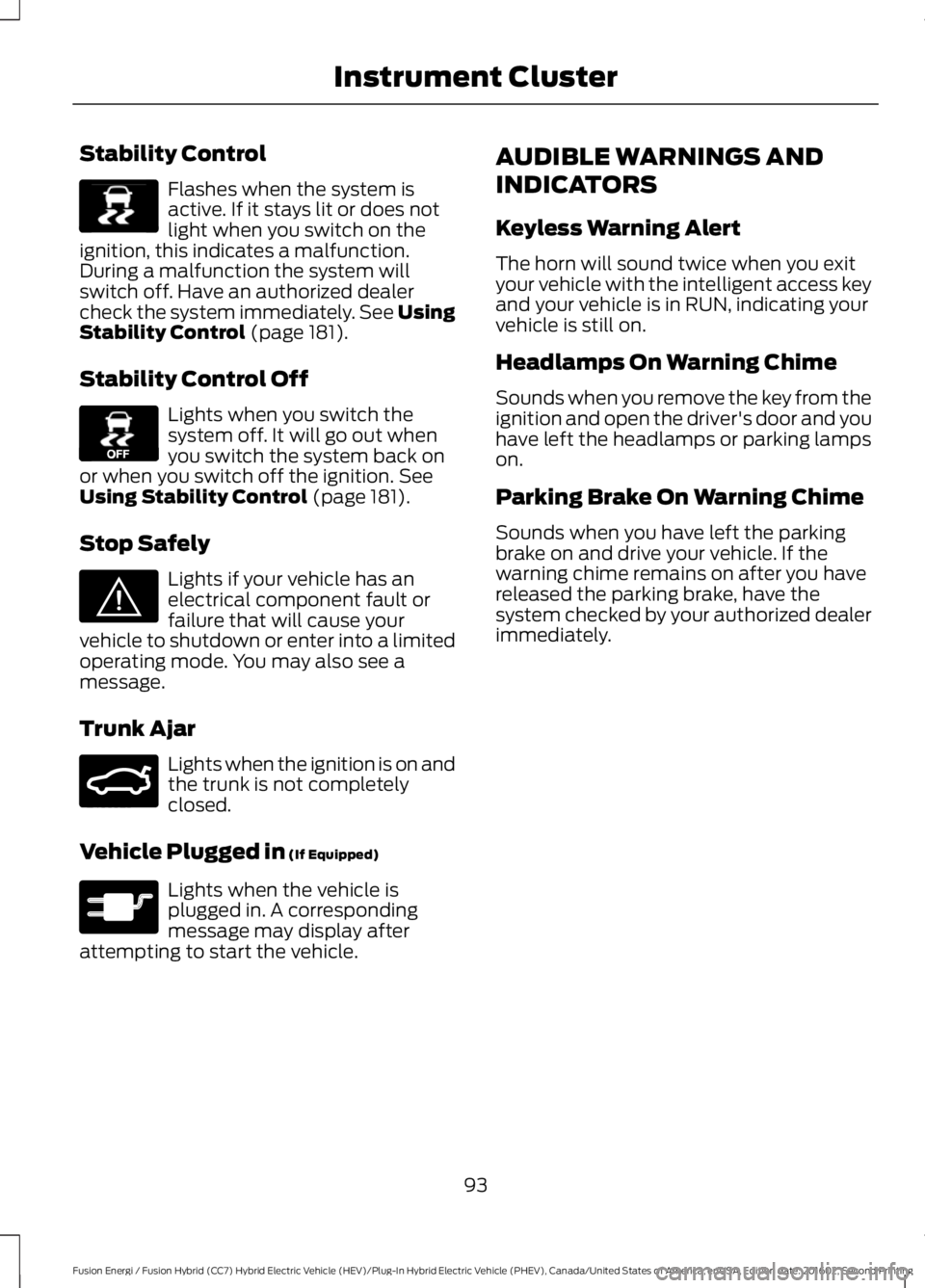
Stability Control
Flashes when the system isactive. If it stays lit or does notlight when you switch on theignition, this indicates a malfunction.During a malfunction the system willswitch off. Have an authorized dealercheck the system immediately. See UsingStability Control (page 181).
Stability Control Off
Lights when you switch thesystem off. It will go out whenyou switch the system back onor when you switch off the ignition. SeeUsing Stability Control (page 181).
Stop Safely
Lights if your vehicle has anelectrical component fault orfailure that will cause yourvehicle to shutdown or enter into a limitedoperating mode. You may also see amessage.
Trunk Ajar
Lights when the ignition is on andthe trunk is not completelyclosed.
Vehicle Plugged in (If Equipped)
Lights when the vehicle isplugged in. A correspondingmessage may display afterattempting to start the vehicle.
AUDIBLE WARNINGS AND
INDICATORS
Keyless Warning Alert
The horn will sound twice when you exityour vehicle with the intelligent access keyand your vehicle is in RUN, indicating yourvehicle is still on.
Headlamps On Warning Chime
Sounds when you remove the key from theignition and open the driver's door and youhave left the headlamps or parking lampson.
Parking Brake On Warning Chime
Sounds when you have left the parkingbrake on and drive your vehicle. If thewarning chime remains on after you havereleased the parking brake, have thesystem checked by your authorized dealerimmediately.
93
Fusion Energi / Fusion Hybrid (CC7) Hybrid Electric Vehicle (HEV)/Plug-In Hybrid Electric Vehicle (PHEV), Canada/United States of America, enUSA, Edition date: 201602, Second Printing
Instrument ClusterE138639 E130458 E144693 E159323 E144694
Page 109 of 526
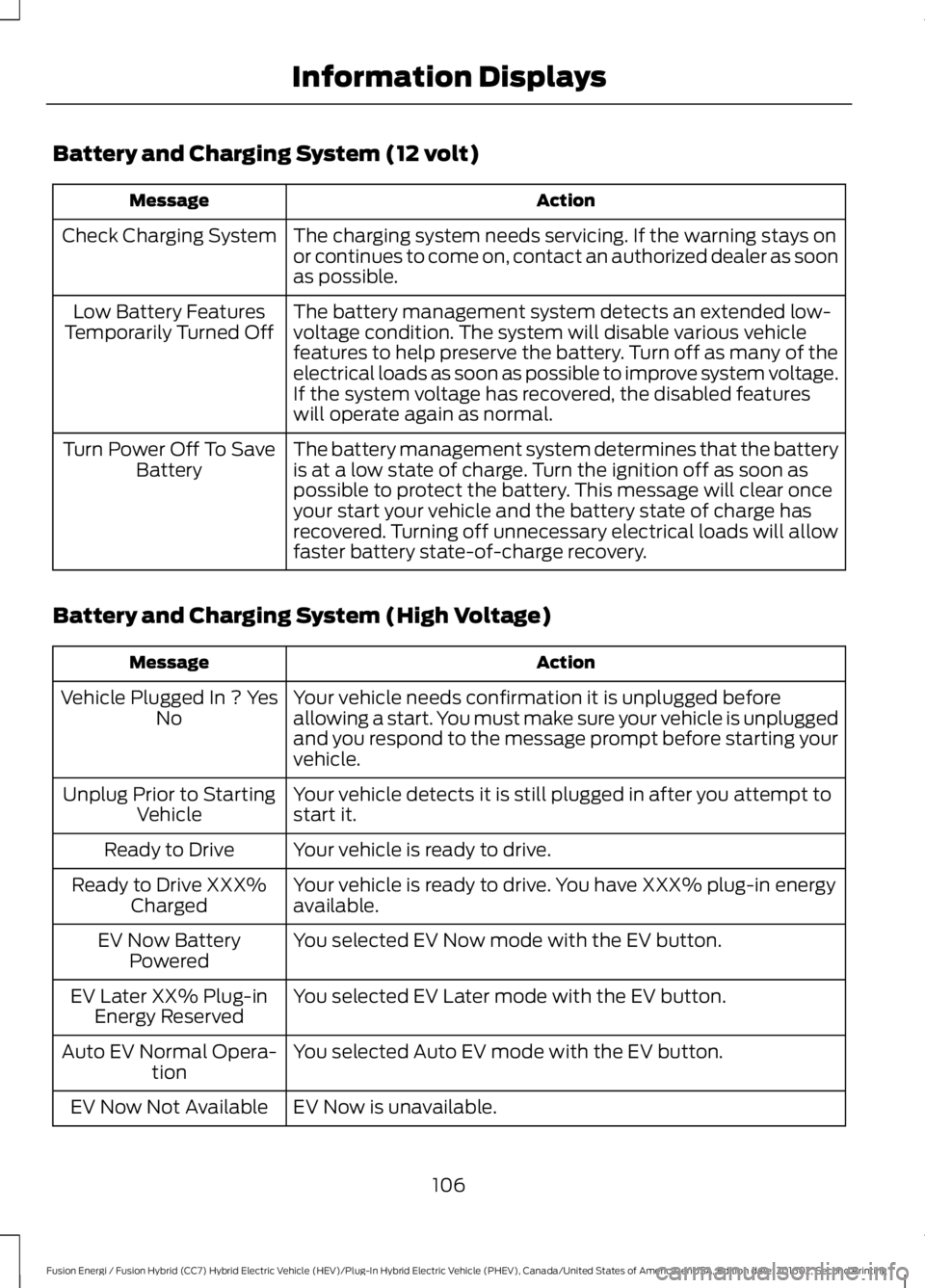
Battery and Charging System (12 volt)
ActionMessage
The charging system needs servicing. If the warning stays onor continues to come on, contact an authorized dealer as soonas possible.
Check Charging System
The battery management system detects an extended low-voltage condition. The system will disable various vehiclefeatures to help preserve the battery. Turn off as many of theelectrical loads as soon as possible to improve system voltage.If the system voltage has recovered, the disabled featureswill operate again as normal.
Low Battery FeaturesTemporarily Turned Off
The battery management system determines that the batteryis at a low state of charge. Turn the ignition off as soon aspossible to protect the battery. This message will clear onceyour start your vehicle and the battery state of charge hasrecovered. Turning off unnecessary electrical loads will allowfaster battery state-of-charge recovery.
Turn Power Off To SaveBattery
Battery and Charging System (High Voltage)
ActionMessage
Your vehicle needs confirmation it is unplugged beforeallowing a start. You must make sure your vehicle is unpluggedand you respond to the message prompt before starting yourvehicle.
Vehicle Plugged In ? YesNo
Your vehicle detects it is still plugged in after you attempt tostart it.Unplug Prior to StartingVehicle
Your vehicle is ready to drive.Ready to Drive
Your vehicle is ready to drive. You have XXX% plug-in energyavailable.Ready to Drive XXX%Charged
You selected EV Now mode with the EV button.EV Now BatteryPowered
You selected EV Later mode with the EV button.EV Later XX% Plug-inEnergy Reserved
You selected Auto EV mode with the EV button.Auto EV Normal Opera-tion
EV Now is unavailable.EV Now Not Available
106
Fusion Energi / Fusion Hybrid (CC7) Hybrid Electric Vehicle (HEV)/Plug-In Hybrid Electric Vehicle (PHEV), Canada/United States of America, enUSA, Edition date: 201602, Second Printing
Information Displays
Page 112 of 526
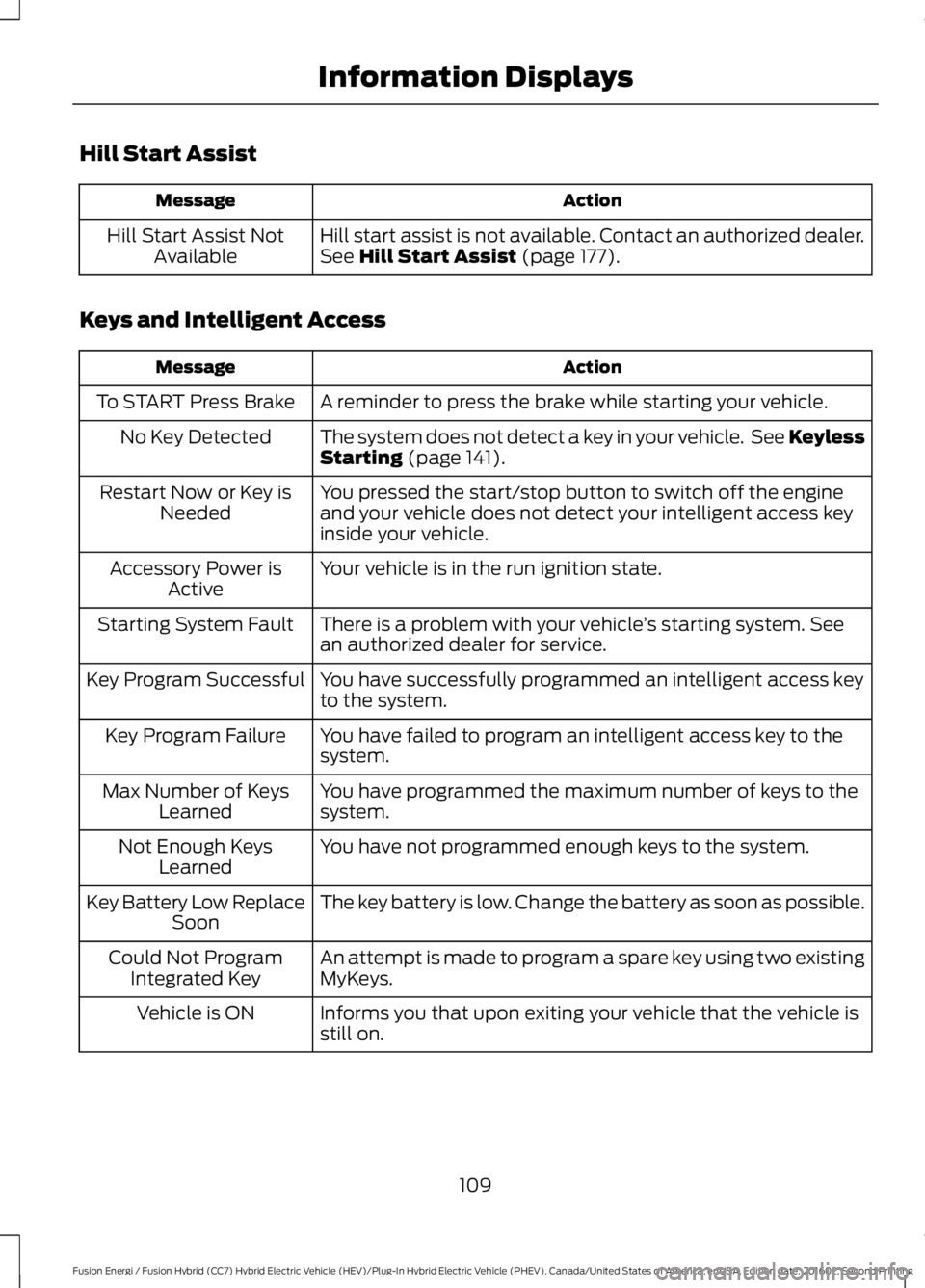
Hill Start Assist
ActionMessage
Hill start assist is not available. Contact an authorized dealer.See Hill Start Assist (page 177).Hill Start Assist NotAvailable
Keys and Intelligent Access
ActionMessage
A reminder to press the brake while starting your vehicle.To START Press Brake
The system does not detect a key in your vehicle. See KeylessStarting (page 141).No Key Detected
You pressed the start/stop button to switch off the engineand your vehicle does not detect your intelligent access keyinside your vehicle.
Restart Now or Key isNeeded
Your vehicle is in the run ignition state.Accessory Power isActive
There is a problem with your vehicle’s starting system. Seean authorized dealer for service.Starting System Fault
You have successfully programmed an intelligent access keyto the system.Key Program Successful
You have failed to program an intelligent access key to thesystem.Key Program Failure
You have programmed the maximum number of keys to thesystem.Max Number of KeysLearned
You have not programmed enough keys to the system.Not Enough KeysLearned
The key battery is low. Change the battery as soon as possible.Key Battery Low ReplaceSoon
An attempt is made to program a spare key using two existingMyKeys.Could Not ProgramIntegrated Key
Informs you that upon exiting your vehicle that the vehicle isstill on.Vehicle is ON
109
Fusion Energi / Fusion Hybrid (CC7) Hybrid Electric Vehicle (HEV)/Plug-In Hybrid Electric Vehicle (PHEV), Canada/United States of America, enUSA, Edition date: 201602, Second Printing
Information Displays
Page 124 of 526
Note:Do not remove ice from the mirrorswith a scraper or adjust the mirror glasswhen it is frozen in place.
Note:Do not clean the mirror housing orglass with harsh abrasives, fuel or otherpetroleum-based cleaning products.
CABIN AIR FILTER
Your vehicle is equipped with a cabin airfilter, which gives you and your passengersthe following benefits:
•It improves your driving comfort byreducing particle concentration.
•It improves the interior compartmentcleanliness.
•It protects the climate controlcomponents from particle deposits.
You can locate the cabin air filter behindthe glove box.
Note:Make sure you have a cabin air filterinstalled at all times. This prevents foreignobjects from entering the system. Runningthe system without a filter in place couldresult in degradation or damage to thesystem.
Replace the filter at regular intervals. SeeScheduled Maintenance (page 467).
For additional cabin air filter information,or to replace the filter, see an authorizeddealer.
REMOTE START (If Equipped)
You can switch this feature on or off andadjust the settings using the informationdisplay.
The system adjusts the interiortemperature depending on your chosensettings during remote start.
You cannot adjust the climate controlsetting during remote start operation.When you switch the ignition on, theclimate control system will return to theprevious settings. You can now makeadjustments.
You can switch on certainvehicle-dependent features when needed,such as:
•Heated seats.
•Cooled seats.
•Heated steering wheel.
•Heated mirrors.
•Heated rear window.
Automatic Settings
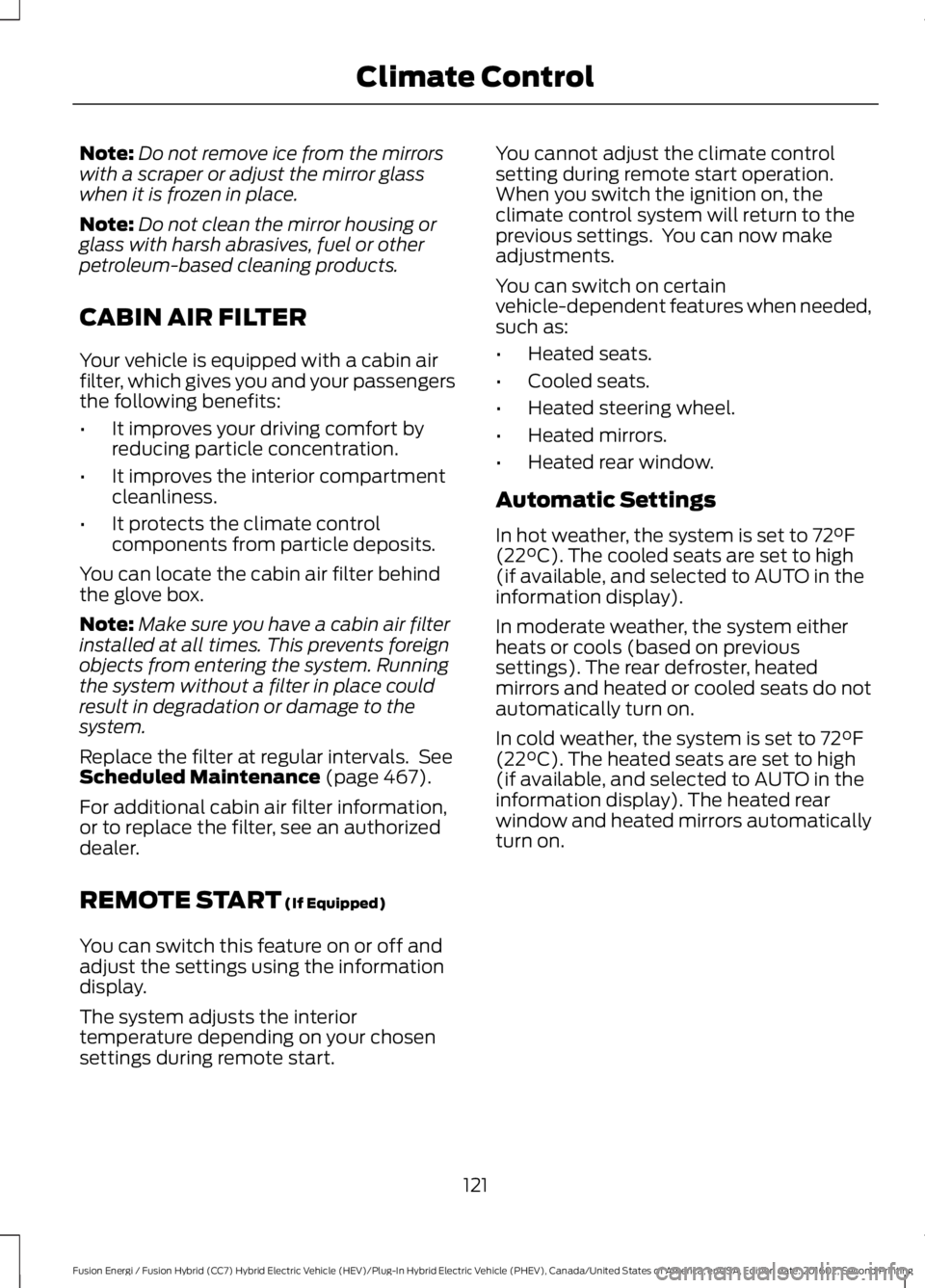
In hot weather, the system is set to 72°F(22°C). The cooled seats are set to high(if available, and selected to AUTO in theinformation display).
In moderate weather, the system eitherheats or cools (based on previoussettings). The rear defroster, heatedmirrors and heated or cooled seats do notautomatically turn on.
In cold weather, the system is set to 72°F(22°C). The heated seats are set to high(if available, and selected to AUTO in theinformation display). The heated rearwindow and heated mirrors automaticallyturn on.
121
Fusion Energi / Fusion Hybrid (CC7) Hybrid Electric Vehicle (HEV)/Plug-In Hybrid Electric Vehicle (PHEV), Canada/United States of America, enUSA, Edition date: 201602, Second Printing
Climate Control
Page 130 of 526
•Driver seat.
•Power mirrors.
•Power steering column.
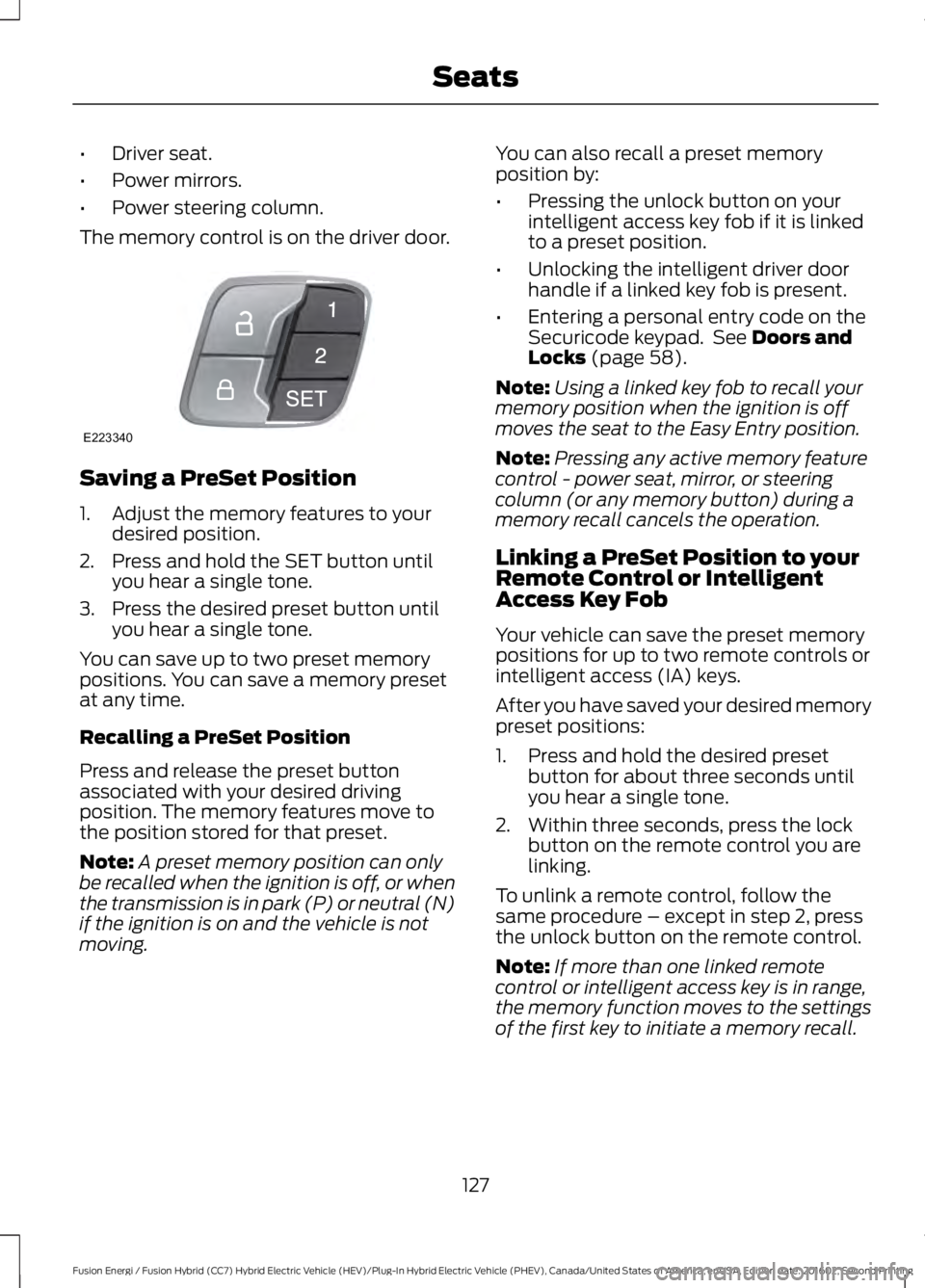
The memory control is on the driver door.
Saving a PreSet Position
1. Adjust the memory features to yourdesired position.
2. Press and hold the SET button untilyou hear a single tone.
3. Press the desired preset button untilyou hear a single tone.
You can save up to two preset memorypositions. You can save a memory presetat any time.
Recalling a PreSet Position
Press and release the preset buttonassociated with your desired drivingposition. The memory features move tothe position stored for that preset.
Note:A preset memory position can onlybe recalled when the ignition is off, or whenthe transmission is in park (P) or neutral (N)if the ignition is on and the vehicle is notmoving.
You can also recall a preset memoryposition by:
•Pressing the unlock button on yourintelligent access key fob if it is linkedto a preset position.
•Unlocking the intelligent driver doorhandle if a linked key fob is present.
•Entering a personal entry code on theSecuricode keypad. See Doors andLocks (page 58).
Note:Using a linked key fob to recall yourmemory position when the ignition is offmoves the seat to the Easy Entry position.
Note:Pressing any active memory featurecontrol - power seat, mirror, or steeringcolumn (or any memory button) during amemory recall cancels the operation.
Linking a PreSet Position to yourRemote Control or IntelligentAccess Key Fob
Your vehicle can save the preset memorypositions for up to two remote controls orintelligent access (IA) keys.
After you have saved your desired memorypreset positions:
1. Press and hold the desired presetbutton for about three seconds untilyou hear a single tone.
2. Within three seconds, press the lockbutton on the remote control you arelinking.
To unlink a remote control, follow thesame procedure – except in step 2, pressthe unlock button on the remote control.
Note:If more than one linked remotecontrol or intelligent access key is in range,the memory function moves to the settingsof the first key to initiate a memory recall.
127
Fusion Energi / Fusion Hybrid (CC7) Hybrid Electric Vehicle (HEV)/Plug-In Hybrid Electric Vehicle (PHEV), Canada/United States of America, enUSA, Edition date: 201602, Second Printing
SeatsE223340
Page 131 of 526
Easy Entry and Exit Feature
If you enable the easy entry and exitfeature, it automatically moves the driverseat position rearward up to two inches(five centimeters) when you switch theignition off.
The driver seat will return to the previousposition when you switch the ignition on.
You can enable or disable this feature inthe information display. See InformationDisplays (page 94).
REAR SEATS
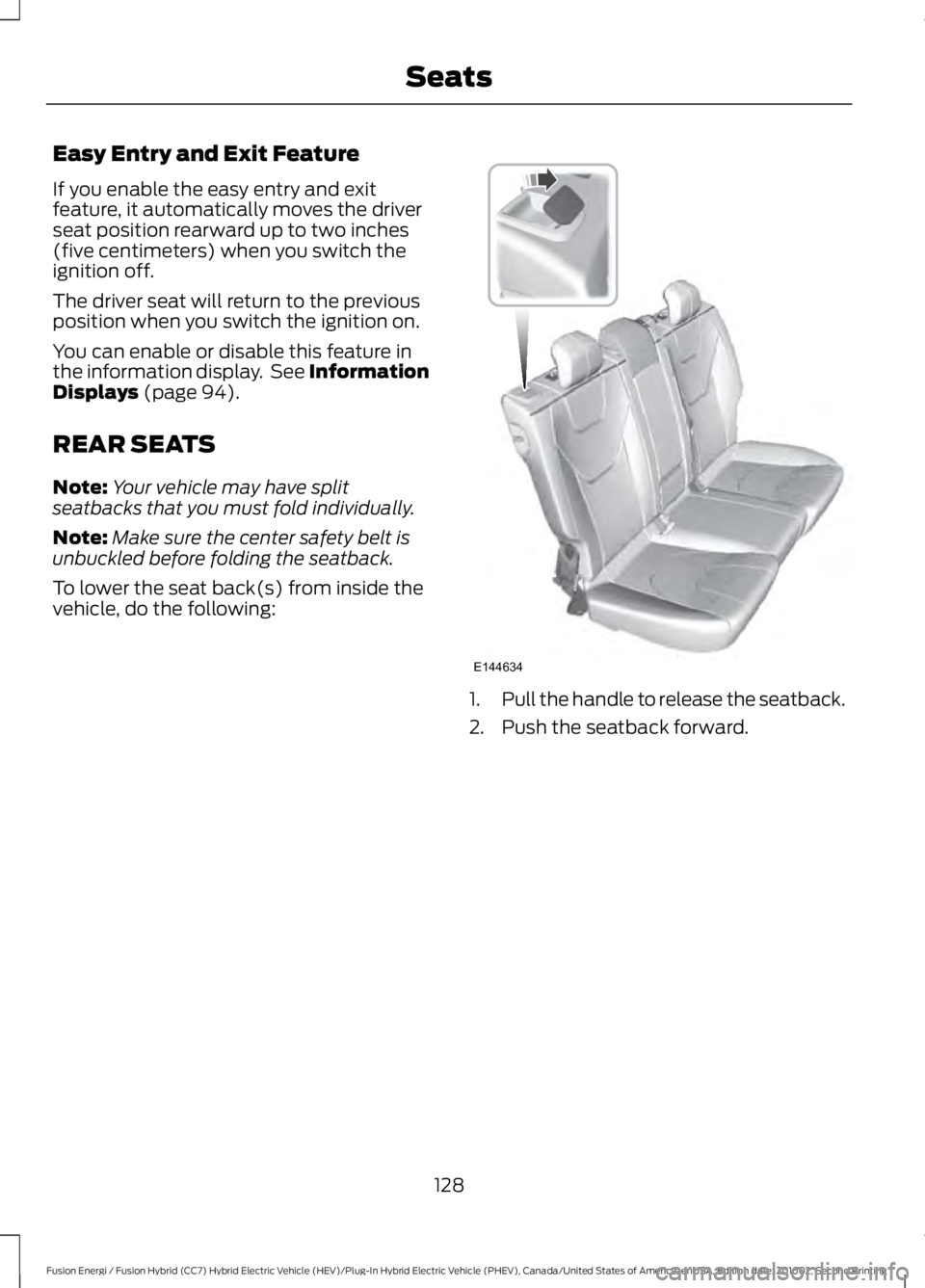
Note:Your vehicle may have splitseatbacks that you must fold individually.
Note:Make sure the center safety belt isunbuckled before folding the seatback.
To lower the seat back(s) from inside thevehicle, do the following:
1.Pull the handle to release the seatback.
2. Push the seatback forward.
128
Fusion Energi / Fusion Hybrid (CC7) Hybrid Electric Vehicle (HEV)/Plug-In Hybrid Electric Vehicle (PHEV), Canada/United States of America, enUSA, Edition date: 201602, Second Printing
SeatsE144634
Page 136 of 526
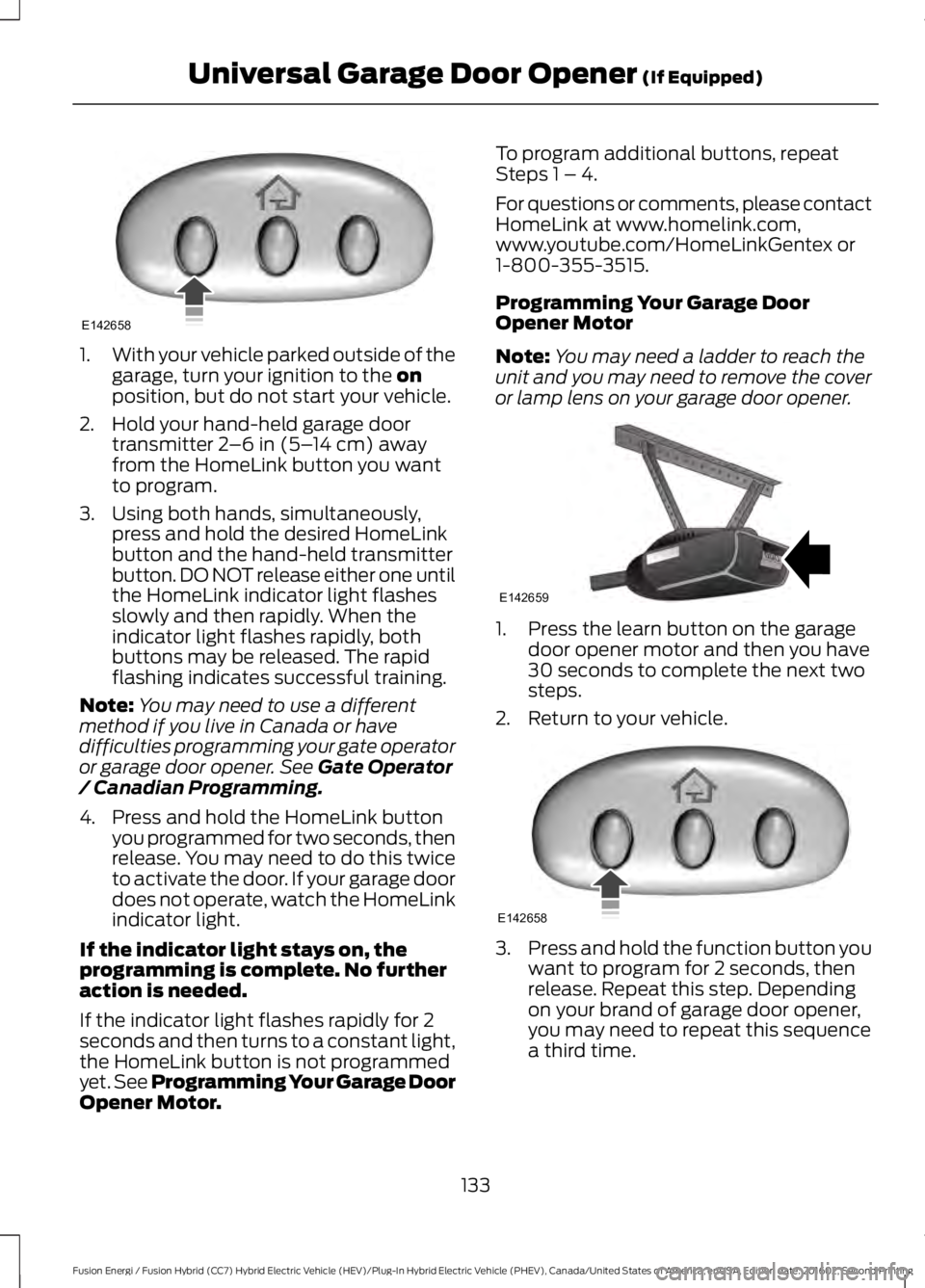
1.With your vehicle parked outside of thegarage, turn your ignition to the onposition, but do not start your vehicle.
2. Hold your hand-held garage doortransmitter 2–6 in (5–14 cm) awayfrom the HomeLink button you wantto program.
3. Using both hands, simultaneously,press and hold the desired HomeLinkbutton and the hand-held transmitterbutton. DO NOT release either one untilthe HomeLink indicator light flashesslowly and then rapidly. When theindicator light flashes rapidly, bothbuttons may be released. The rapidflashing indicates successful training.
Note:You may need to use a differentmethod if you live in Canada or havedifficulties programming your gate operatoror garage door opener. See Gate Operator/ Canadian Programming.
4. Press and hold the HomeLink buttonyou programmed for two seconds, thenrelease. You may need to do this twiceto activate the door. If your garage doordoes not operate, watch the HomeLinkindicator light.
If the indicator light stays on, theprogramming is complete. No furtheraction is needed.
If the indicator light flashes rapidly for 2seconds and then turns to a constant light,the HomeLink button is not programmedyet. See Programming Your Garage DoorOpener Motor.
To program additional buttons, repeatSteps 1 – 4.
For questions or comments, please contactHomeLink at www.homelink.com,www.youtube.com/HomeLinkGentex or1-800-355-3515.
Programming Your Garage DoorOpener Motor
Note:You may need a ladder to reach theunit and you may need to remove the coveror lamp lens on your garage door opener.
1. Press the learn button on the garagedoor opener motor and then you have30 seconds to complete the next twosteps.
2. Return to your vehicle.
3.Press and hold the function button youwant to program for 2 seconds, thenrelease. Repeat this step. Dependingon your brand of garage door opener,you may need to repeat this sequencea third time.
133
Fusion Energi / Fusion Hybrid (CC7) Hybrid Electric Vehicle (HEV)/Plug-In Hybrid Electric Vehicle (PHEV), Canada/United States of America, enUSA, Edition date: 201602, Second Printing
Universal Garage Door Opener (If Equipped)E142658 E142659 E142658