remote control FORD FUSION ENERGI 2017 Owner's Manual
[x] Cancel search | Manufacturer: FORD, Model Year: 2017, Model line: FUSION ENERGI, Model: FORD FUSION ENERGI 2017Pages: 526, PDF Size: 7.89 MB
Page 130 of 526
•Driver seat.
•Power mirrors.
•Power steering column.
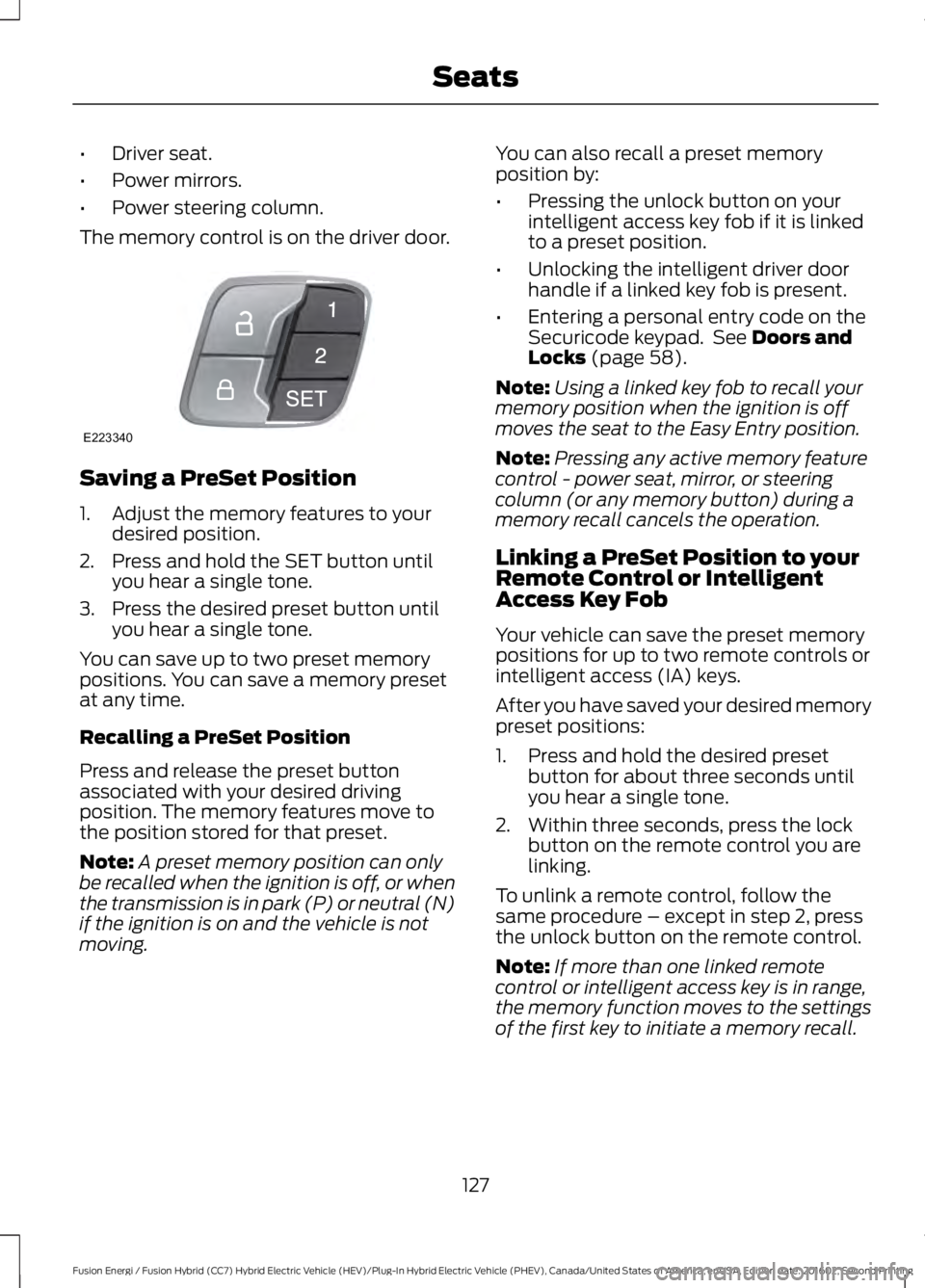
The memory control is on the driver door.
Saving a PreSet Position
1. Adjust the memory features to yourdesired position.
2. Press and hold the SET button untilyou hear a single tone.
3. Press the desired preset button untilyou hear a single tone.
You can save up to two preset memorypositions. You can save a memory presetat any time.
Recalling a PreSet Position
Press and release the preset buttonassociated with your desired drivingposition. The memory features move tothe position stored for that preset.
Note:A preset memory position can onlybe recalled when the ignition is off, or whenthe transmission is in park (P) or neutral (N)if the ignition is on and the vehicle is notmoving.
You can also recall a preset memoryposition by:
•Pressing the unlock button on yourintelligent access key fob if it is linkedto a preset position.
•Unlocking the intelligent driver doorhandle if a linked key fob is present.
•Entering a personal entry code on theSecuricode keypad. See Doors andLocks (page 58).
Note:Using a linked key fob to recall yourmemory position when the ignition is offmoves the seat to the Easy Entry position.
Note:Pressing any active memory featurecontrol - power seat, mirror, or steeringcolumn (or any memory button) during amemory recall cancels the operation.
Linking a PreSet Position to yourRemote Control or IntelligentAccess Key Fob
Your vehicle can save the preset memorypositions for up to two remote controls orintelligent access (IA) keys.
After you have saved your desired memorypreset positions:
1. Press and hold the desired presetbutton for about three seconds untilyou hear a single tone.
2. Within three seconds, press the lockbutton on the remote control you arelinking.
To unlink a remote control, follow thesame procedure – except in step 2, pressthe unlock button on the remote control.
Note:If more than one linked remotecontrol or intelligent access key is in range,the memory function moves to the settingsof the first key to initiate a memory recall.
127
Fusion Energi / Fusion Hybrid (CC7) Hybrid Electric Vehicle (HEV)/Plug-In Hybrid Electric Vehicle (PHEV), Canada/United States of America, enUSA, Edition date: 201602, Second Printing
SeatsE223340
Page 135 of 526
HomeLink Wireless ControlSystem
WARNINGS
Make sure that the garage door andsecurity device are free fromobstruction when you areprogramming. Do not program the systemwith the vehicle in the garage.
Do not use the system with anygarage door opener that does nothave the safety stop and reversefeature as required by U.S. Federal SafetyStandards (this includes any garage dooropener manufactured before April 1, 1982).A garage door opener which cannot detectan object, signaling the door to stop andreverse, does not meet current federalsafety standards. Using a garage dooropener without these features increasesthe risk of serious injury or death.
Note:Make sure you keep the originalremote control transmitter for use in othervehicles as well as for future systemprogramming.
Note:We recommend that upon the saleor lease termination of your vehicle, youerase the programmed function buttons forsecurity reasons. See Erasing the FunctionButton Codes.
Note:You can program a maximum ofthree devices. To change or replace any ofthe three devices after it has been initiallyprogrammed, you must first erase thecurrent settings. See Erasing the FunctionButton Codes.
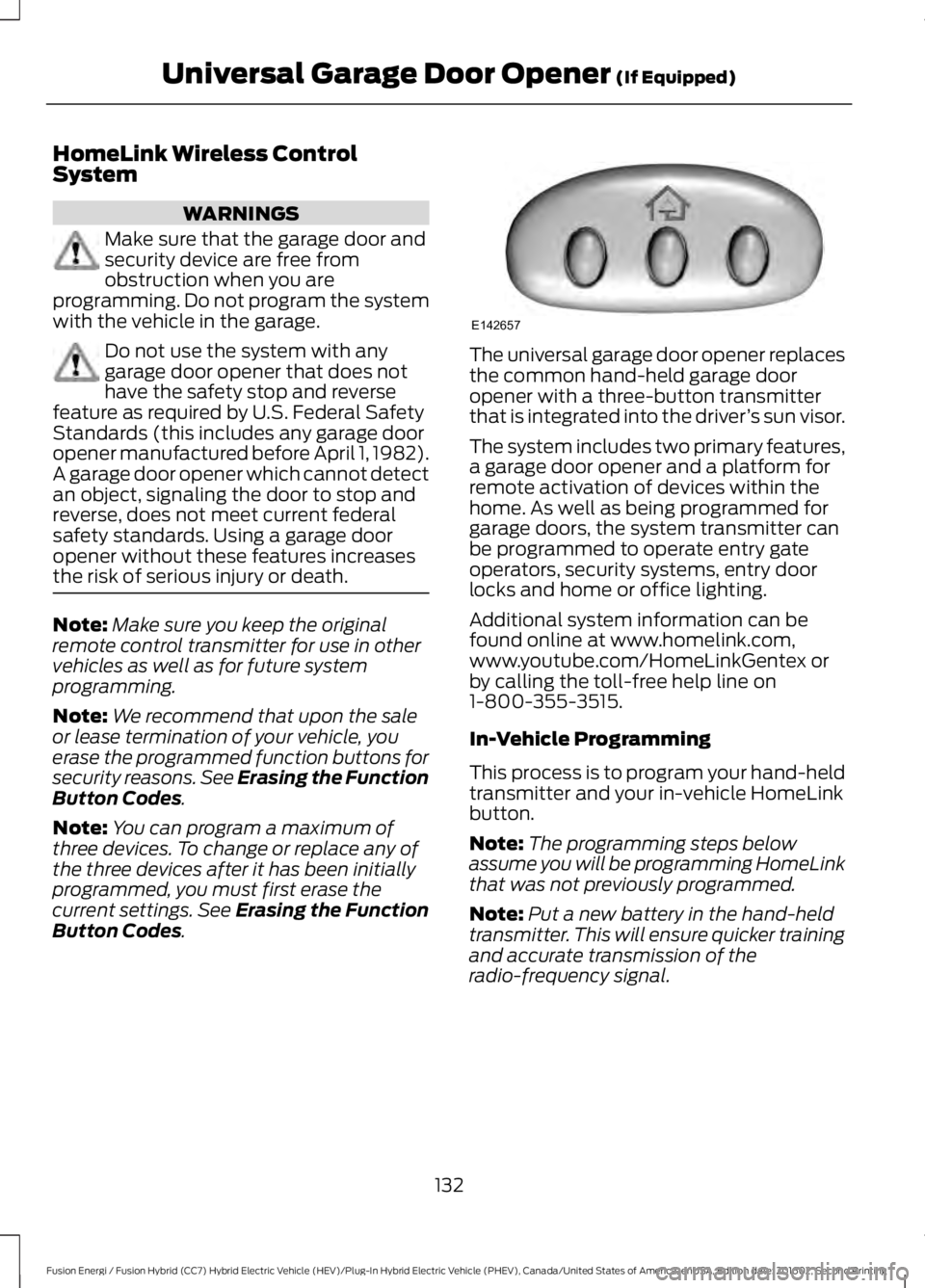
The universal garage door opener replacesthe common hand-held garage dooropener with a three-button transmitterthat is integrated into the driver’s sun visor.
The system includes two primary features,a garage door opener and a platform forremote activation of devices within thehome. As well as being programmed forgarage doors, the system transmitter canbe programmed to operate entry gateoperators, security systems, entry doorlocks and home or office lighting.
Additional system information can befound online at www.homelink.com,www.youtube.com/HomeLinkGentex orby calling the toll-free help line on1-800-355-3515.
In-Vehicle Programming
This process is to program your hand-heldtransmitter and your in-vehicle HomeLinkbutton.
Note:The programming steps belowassume you will be programming HomeLinkthat was not previously programmed.
Note:Put a new battery in the hand-heldtransmitter. This will ensure quicker trainingand accurate transmission of theradio-frequency signal.
132
Fusion Energi / Fusion Hybrid (CC7) Hybrid Electric Vehicle (HEV)/Plug-In Hybrid Electric Vehicle (PHEV), Canada/United States of America, enUSA, Edition date: 201602, Second Printing
Universal Garage Door Opener (If Equipped)E142657
Page 205 of 526
A message appears if something obstructsthe sensor's radar signals. The sensor islocated behind a cover near the driver sideof the lower grille. The system cannotdetect a vehicle ahead and does notfunction when something obstructs the
radar signal.
Note:You cannot see the sensor, it isbehind a fascia panel.
The following table lists possible causesand actions for this message displaying.
ActionCause
Clean the grille surface in front of the radaror remove the object obstructing it.The surface of the radar in the grille is dirtyor obstructed in some way.
Wait a short time. It may take severalminutes for the radar to detect that it is freefrom obstruction.
The surface of the radar in the grille is cleanbut the message remains in the display.
Do not use the system in these conditionsbecause it may not detect any vehiclesahead.
Heavy rain or snow is interfering with theradar signals.
Do not use the system in these conditionsbecause it may not detect any vehiclesahead.
Swirling water, or snow or ice on the surfaceof the road may interfere with the radarsignals.
Wait a short time or switch to normal cruisecontrol.You are in a desert or remote area with noother vehicles and no roadside objects.
Due to the nature of radar technology, it ispossible to get a blockage warning and notbe blocked. This can happen, for example,when driving in sparse rural or desertenvironments. A false blocked conditionwill either self clear or clear after a keycycle.
Switching to Normal CruiseControl
WARNING
Normal cruise control will not brakedue to slower vehicles. Always beaware of which mode you haveselected and apply the brakes whennecessary.
You can manually change from adaptivecruise control to normal cruise controlthrough the information display. SeeInformation Displays (page 94).
The cruise control indicator lightreplaces the adaptive cruisecontrol indicator light if youselect normal cruise control. The gapsetting will not display, the system will notautomatically respond to lead vehicles andautomatic braking will not activate.
202
Fusion Energi / Fusion Hybrid (CC7) Hybrid Electric Vehicle (HEV)/Plug-In Hybrid Electric Vehicle (PHEV), Canada/United States of America, enUSA, Edition date: 201602, Second Printing
Cruise ControlE71340
Page 235 of 526
POST-CRASH ALERT SYSTEM
The system flashes the direction indicatorsand sounds the horn (intermittently) in theevent of a serious impact that deploys anairbag (front, side, side curtain or SafetyCanopy) or the safety belt pretensioners.
The horn and indicators will turn off when:
•You press the hazard control button.
•You press the panic button on theremote entry transmitter (if equipped).
•Your vehicle runs out of power.
SPINOUT DETECTION
If your vehicle detects a spinout and itcomes to a stop, the hazard warningflashers turn on. A spinout detectedmessage appears in the informationdisplay. The message may not appear ifyour vehicle runs out of power.
After your vehicle's hazard warningflashers turn on, you can switch them offby:
•Pressing the hazard warning flasherbutton.
•Pressing the remote control unlockbutton.
•Pressing the remote control panicbutton.
•Switching the ignition on and off twice.
TRANSPORTING THE VEHICLE
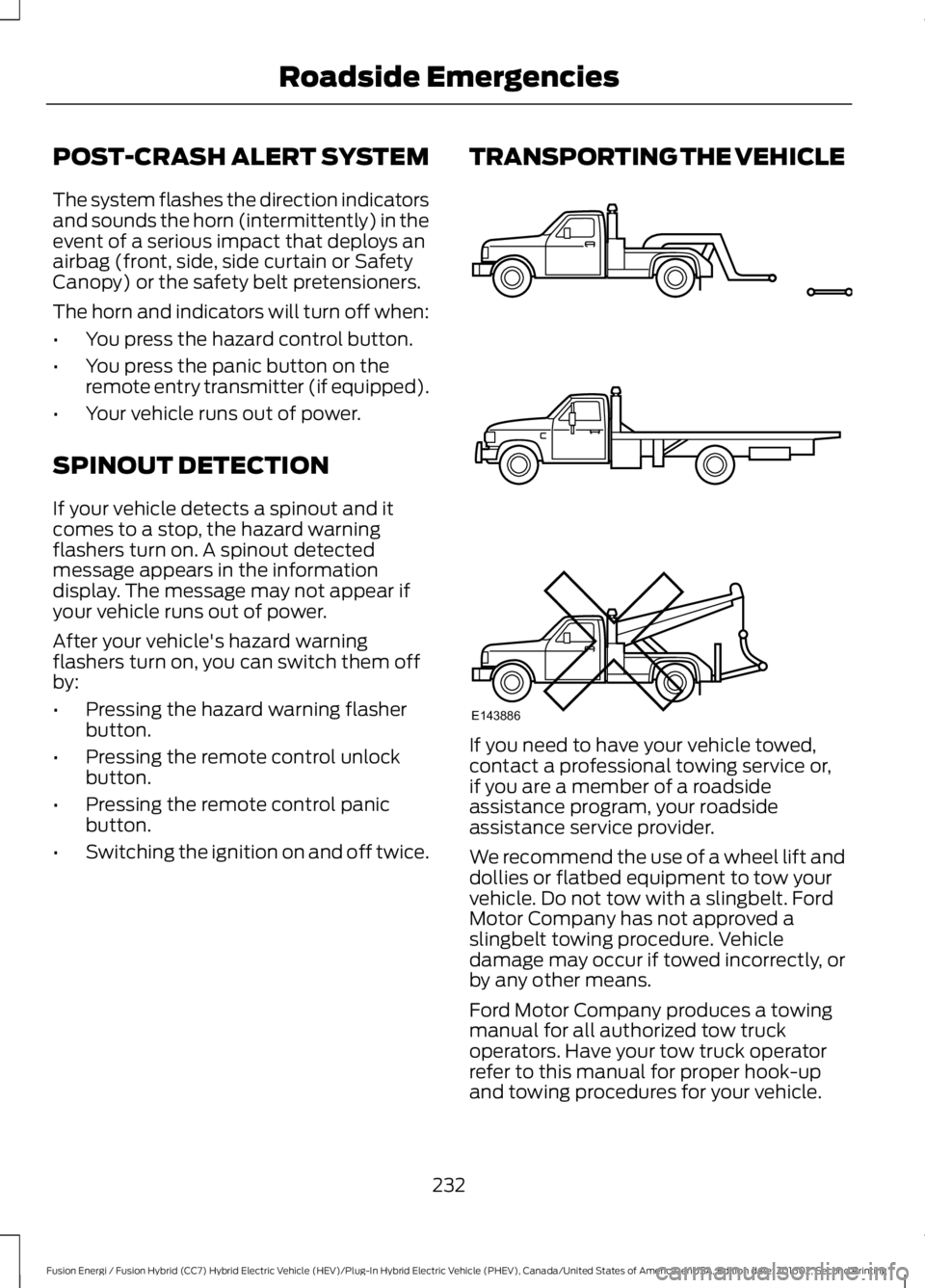
If you need to have your vehicle towed,contact a professional towing service or,if you are a member of a roadsideassistance program, your roadsideassistance service provider.
We recommend the use of a wheel lift anddollies or flatbed equipment to tow yourvehicle. Do not tow with a slingbelt. FordMotor Company has not approved aslingbelt towing procedure. Vehicledamage may occur if towed incorrectly, orby any other means.
Ford Motor Company produces a towingmanual for all authorized tow truckoperators. Have your tow truck operatorrefer to this manual for proper hook-upand towing procedures for your vehicle.
232
Fusion Energi / Fusion Hybrid (CC7) Hybrid Electric Vehicle (HEV)/Plug-In Hybrid Electric Vehicle (PHEV), Canada/United States of America, enUSA, Edition date: 201602, Second Printing
Roadside EmergenciesE143886
Page 299 of 526
WARNINGS
may be found on either the SafetyCompliance Certification Label(affixed to either the door hingepillar, door-latch post, or the dooredge that meets the door-latchpost, next to the driver's seatingposition), or the Tire Label whichis located on the B-Pillar or edgeof the driver’s door. If thisinformation is not found on theselabels then you should contactyour authorized dealer as soon aspossible. Use of any tire or wheelnot recommended by Ford canaffect the safety and performanceof your vehicle, which could resultin an increased risk of loss ofvehicle control, vehicle rollover,personal injury and death.Additionally the use ofnon-recommended tires andwheels could cause steering,suspension, axle, transfer case orpower transfer unit failure. If youhave questions regarding tirereplacement, contact yourauthorized dealer as soon aspossible.
To reduce the risk of seriousinjury when mountingreplacement tires and wheels, youshould not exceed the maximumpressure indicated on the sidewallof the tire to set the beads withoutadditional precautions listedbelow. If the beads do not seat atthe maximum pressure indicated,re-lubricate and try again
WARNINGS
When inflating the tire formounting pressures up to 20 psi(1.38 bar) greater than themaximum pressure on the tiresidewall, the followingprecautions must be taken toprotect the person mounting thetire:
1. Make sure that you have thecorrect tire and wheel size.
2. Lubricate the tire bead andwheel bead seat area again.
3. Stand at a minimum of 12 feet(3.66 meters) away from thewheel and tire assembly.
4. Use both eye and earprotection.
For a mounting pressure morethan 20 psi (1.38 bar) greater thanthe maximum pressure, a Forddealer or other tire serviceprofessional should do themounting.
Always inflate steel carcass tireswith a remote air fill with theperson inflating standing at aminimum of 12 feet (3.66 meters)away from the wheel and tireassembly
Important: Remember to replacethe wheel valve stems when the
road tires are replaced on yourvehicle
296
Fusion Energi / Fusion Hybrid (CC7) Hybrid Electric Vehicle (HEV)/Plug-In Hybrid Electric Vehicle (PHEV), Canada/United States of America, enUSA, Edition date: 201602, Second Printing
Wheels and Tires
Page 520 of 526
Side Window Defogging in ColdWeather.............................................................120Hints on Driving With Anti-LockBrakes.............................................................175Home Screen.................................................378Hood LockSee: Opening and Closing the Hood..........252Hybrid Vehicle Frequently AskedQuestions......................................................151Hybrid Vehicle Operation..........................146Battery:....................................................................147Braking:...................................................................147Driving:....................................................................146Driving to Optimize Fuel Economy...............147Engine:.....................................................................147Starting:.................................................................146Stopping:...............................................................146Transmission Operation:.................................146
I
In California (U.S. Only).............................235Information Display Control.......................70Information Display Control Features..........70Information Displays....................................94General Information............................................94Information Messages................................103Active Park............................................................103Adaptive Cruise Control...................................104AdvanceTrac™....................................................104Airbag......................................................................105Alarm......................................................................105Automatic Engine Shutdown........................105Battery and Charging System (12volt)....................................................................106Battery and Charging System (HighVoltage)............................................................106Blind Spot Information and Cross TrafficAlert System....................................................107Doors and Locks..................................................107Driver Alert............................................................108Fuel..........................................................................108Hill Start Assist...................................................109Keys and Intelligent Access............................109Lane Keeping System........................................110Maintenance.........................................................110MyKey........................................................................111Park Aid....................................................................112
Park Brake...............................................................112Power Steering.....................................................113Pre-Collision Assist.............................................113Remote Start.........................................................113Seats.........................................................................113Starting System ...................................................114Tire Pressure Monitoring System...................114Traction Control...................................................114Transmission.........................................................115Installing Child Restraints.............................17Child Seats...............................................................17Using Lap and Shoulder Belts..........................18Using Lower Anchors and Tethers forCHildren (LATCH)............................................22Using Tether Straps.............................................24Instrument Cluster........................................86Instrument Lighting Dimmer......................75Vehicles With Front Fog Lamps......................75Vehicles Without Front Fog Lamps...............75Interior Lamps.................................................78Front Interior Lamp..............................................78Rear Interior Lamp..............................................80Interior Luggage CompartmentRelease............................................................63Interior Mirror...................................................84Auto-Dimming Mirror.........................................84Introduction.........................................................7
J
Jump Starting the Vehicle........................228Connecting the Jumper Cables....................228Jump Starting......................................................229Preparing Your Vehicle.....................................228Removing the Jumper Cables.......................229
K
Keyless Entry.....................................................61SECURICODE™ Keyless Entry Keypad.........61Keyless Starting.............................................141Ignition Modes......................................................141Keys and Remote Controls........................48
L
Lane Keeping System................................204Switching the System On and Off..............205
517
Fusion Energi / Fusion Hybrid (CC7) Hybrid Electric Vehicle (HEV)/Plug-In Hybrid Electric Vehicle (PHEV), Canada/United States of America, enUSA, Edition date: 201602, Second Printing
Index
Page 521 of 526
Lighting Control...............................................73Headlamp Flasher................................................74High Beams.............................................................73Lighting...............................................................73General Information............................................73Load Carrying..................................................217Load Limit........................................................217Special Loading Instructions for Owners ofPick-up Trucks and Utility-typeVehicles..............................................................221Vehicle Loading - with and without aTrailer..................................................................217Locking and Unlocking.................................58Activating Intelligent Access............................59Autolock..................................................................60Autounlock..............................................................61Battery Saver..........................................................61Illuminated Entry...................................................61Illuminated Exit......................................................61Power Door Locks................................................58Remote Control....................................................58Smart Unlocks for Intelligent AccessKeys......................................................................60
M
Maintenance..................................................252General Information..........................................252Manual Seats.................................................124Media Hub......................................................326Memory Function.........................................126Easy Entry and Exit Feature............................128Linking a PreSet Position to your RemoteControl or Intelligent Access KeyFob.......................................................................127Saving a PreSet Position..................................127Message CenterSee: Information Displays.................................94MirrorsSee: Heated Windows and Mirrors..............120See: Windows and Mirrors.................................81Mobile Communications Equipment.......13Moonroof..........................................................84Bounce-Back.........................................................85Opening and Closing the Moonroof..............85Venting the Moonroof........................................85Motorcraft Parts..........................................306MyKey Troubleshooting................................57
MyKey™.............................................................54Principle of Operation........................................54
N
Navigation.....................................................404cityseeker...............................................................412Destination Mode..............................................407Map Mode............................................................404Navigation Map Updates.................................413Navigation Menu................................................410SiriusXM Traffic and Travel Link....................413Waypoints..............................................................411Normal Scheduled Maintenance..........470Intelligent Oil-Life Monitor.............................470Normal Maintenance Intervals......................471
O
Oil Change Indicator Reset......................255Oil CheckSee: Engine Oil Check......................................254Opening and Closing the Hood..............252Closing the Hood...............................................253Opening the Hood.............................................252Ordering Additional Owner'sLiterature.....................................................238Obtaining a French Owner’s Manual.........239Overhead Console.......................................140
P
Parking Aids....................................................182Principle of Operation.......................................182Passive Anti-Theft System.........................65SecuriLock®...........................................................65PATSSee: Passive Anti-Theft System.....................65Perchlorate.........................................................11Personal Safety System™..........................38How Does the Personal Safety SystemWork?..................................................................38Phone..............................................................399During a Phone Call..........................................402Making Calls.........................................................401Pairing Your Cell Phone for the FirstTime..................................................................399Phone Menu.......................................................400
518
Fusion Energi / Fusion Hybrid (CC7) Hybrid Electric Vehicle (HEV)/Plug-In Hybrid Electric Vehicle (PHEV), Canada/United States of America, enUSA, Edition date: 201602, Second Printing
Index
Page 522 of 526
Receiving Calls...................................................402Smartphone Connectivity.............................403Text Messaging..................................................403Plug-In Hybrid Vehicle Operation..........148ECO Cruise............................................................149EV Modes..............................................................148Fuel Freshness....................................................150Low Engine Use...................................................150Plug-in Power Mode and HybridMode..................................................................148Post-Crash Alert System...........................232Power Door LocksSee: Locking and Unlocking.............................58Power Seats....................................................12410-way power seat.............................................1266-way power seat...............................................125Power Lumbar.....................................................126Power Windows...............................................81Accessory Delay.....................................................81Bounce-Back..........................................................81One-Touch Down..................................................81One-Touch Up........................................................81Window Lock..........................................................81Pre-Collision Assist......................................214Using the Pre-Collision AssistSystem...............................................................214Protecting the Environment........................15
R
Rear Parking Aid............................................182Obstacle Distance Indicator...........................183Rear Seat Armrest.........................................131Rear Seats.......................................................128Rear View Camera........................................192Camera Guidelines............................................193Manual Zoom......................................................194Obstacle Distance Indicator...........................194Rear Camera Delay............................................194Using the Rear View Camera System.........192Rear View CameraSee: Rear View Camera....................................192Refueling..........................................................156Fuel Filler Door Manual OverrideLever...................................................................158System Warnings...............................................158Remote Control..............................................48Car Finder.................................................................51
Intelligent Access Key........................................48Remote Start..........................................................51Replacing the Battery.........................................50Sounding the Panic Alarm.................................51Using the Key Blade............................................49Remote Start...................................................121Automatic Settings.............................................121Removing a Headlamp.............................264Repairing Minor Paint Damage...............275Replacement PartsRecommendation........................................12Collision Repairs....................................................12Scheduled Maintenance and MechanicalRepairs..................................................................12Warranty on Replacement Parts.....................12Replacing a Lost Key or RemoteControl.............................................................53Reporting Safety Defects (CanadaOnly)..............................................................239Reporting Safety Defects (U.S.Only)..............................................................239Roadside Assistance..................................226Vehicles Sold in Canada: Getting RoadsideAssistance.......................................................226Vehicles Sold in Canada: RoadsideAssistance Program Coverage.................227Vehicles Sold in Canada: Using RoadsideAssistance........................................................227Vehicles Sold in the United States: GettingRoadside Assistance...................................226Vehicles Sold in the United States: UsingRoadside Assistance...................................226Roadside Emergencies..............................226Running-InSee: Breaking-In.................................................223Running Out of Fuel.....................................155Adding Fuel From a Portable FuelContainer..........................................................155Filling a Portable Fuel Container..................155
S
Safety Canopy™............................................44Safety Precautions.......................................153Satellite Radio..............................................324Satellite Radio Electronic Serial Number(ESN).................................................................325Satellite Radio Reception Factors...............324
519
Fusion Energi / Fusion Hybrid (CC7) Hybrid Electric Vehicle (HEV)/Plug-In Hybrid Electric Vehicle (PHEV), Canada/United States of America, enUSA, Edition date: 201602, Second Printing
Index
Page 524 of 526
Information Contained on the TireSidewall............................................................287Temperature A B C............................................285Traction AA A B C..............................................285Treadwear............................................................285Tire Inflation When PuncturedSee: Tire Sealant and Inflator Kit.................278Tire Pressure Monitoring System..........300Changing Tires With a Tire PressureMonitoring System........................................301Understanding Your Tire PressureMonitoring System .......................................301Tire Repair KitSee: Tire Sealant and Inflator Kit.................278Tire Sealant and Inflator Kit.....................278First Stage: Reinflating the Tire with SealingCompound and Air......................................280General Information..........................................279Second Stage: Checking TirePressure............................................................282Tips for Use of the Kit.......................................279What to do after the Tire has beenSealed...............................................................282What to do when a Tire Is Punctured........280TiresSee: Wheels and Tires......................................278Towing a Trailer.............................................222Towing Points................................................233Installing the Recovery Hook.........................233Recovery Hook Location..................................233Towing the Vehicle on FourWheels..........................................................222Emergency Towing............................................222Recreational Towing.........................................222Towing..............................................................222Traction Control.............................................179Principle of Operation.......................................179Transmission Code Designation...........308Transmission..................................................170TransmissionSee: Transmission..............................................170Transporting the Vehicle...........................232Type Approvals............................................509RF Certification Logos for Tire PressureMonitoring Sensor(s).................................509
U
Under Hood Overview................................253Unique Driving Characteristics................146Universal Garage Door Opener................132HomeLink Wireless Control System............132USB Port.........................................................326Using Adaptive Cruise Control................196Automatic Cancellation.................................200Blocked Sensor...................................................201Canceling the Set Speed...............................200Changing the Set Speed................................200Detection Issues.................................................201Following a Vehicle............................................198Following a Vehicle to a CompleteStop....................................................................198Hilly Condition Usage......................................200Overriding the System......................................199Resuming the Set Speed...............................200Setting the Adaptive Cruise Speed..............197Setting the Adaptive Cruise Speed WhenYour Vehicle is Stationary...........................197Setting the Gap Distance................................198Switching Adaptive Cruise ControlOff......................................................................200Switching Adaptive Cruise ControlOn........................................................................197Switching to Normal Cruise Control...........202System Not Available.......................................201Using Cruise Control....................................195Switching Cruise Control Off.........................196Switching Cruise Control On..........................195Using MyKey With Remote StartSystems...........................................................57Using Snow Chains.....................................299Using Stability Control................................181Using Summer Tires...................................299Using SYNC™ With Your MediaPlayer............................................................348Accessing Your USB Song Library...............352Bluetooth Devices and SystemSettings............................................................354Connecting Your Digital Media Player to theUSB Port..........................................................348Media Menu Features........................................351Media Voice Commands................................349USB 2......................................................................354Voice Commands for Audio Sources.........355
521
Fusion Energi / Fusion Hybrid (CC7) Hybrid Electric Vehicle (HEV)/Plug-In Hybrid Electric Vehicle (PHEV), Canada/United States of America, enUSA, Edition date: 201602, Second Printing
Index