wheel FORD FUSION ENERGI 2017 Owner's Manual
[x] Cancel search | Manufacturer: FORD, Model Year: 2017, Model line: FUSION ENERGI, Model: FORD FUSION ENERGI 2017Pages: 526, PDF Size: 7.89 MB
Page 170 of 526
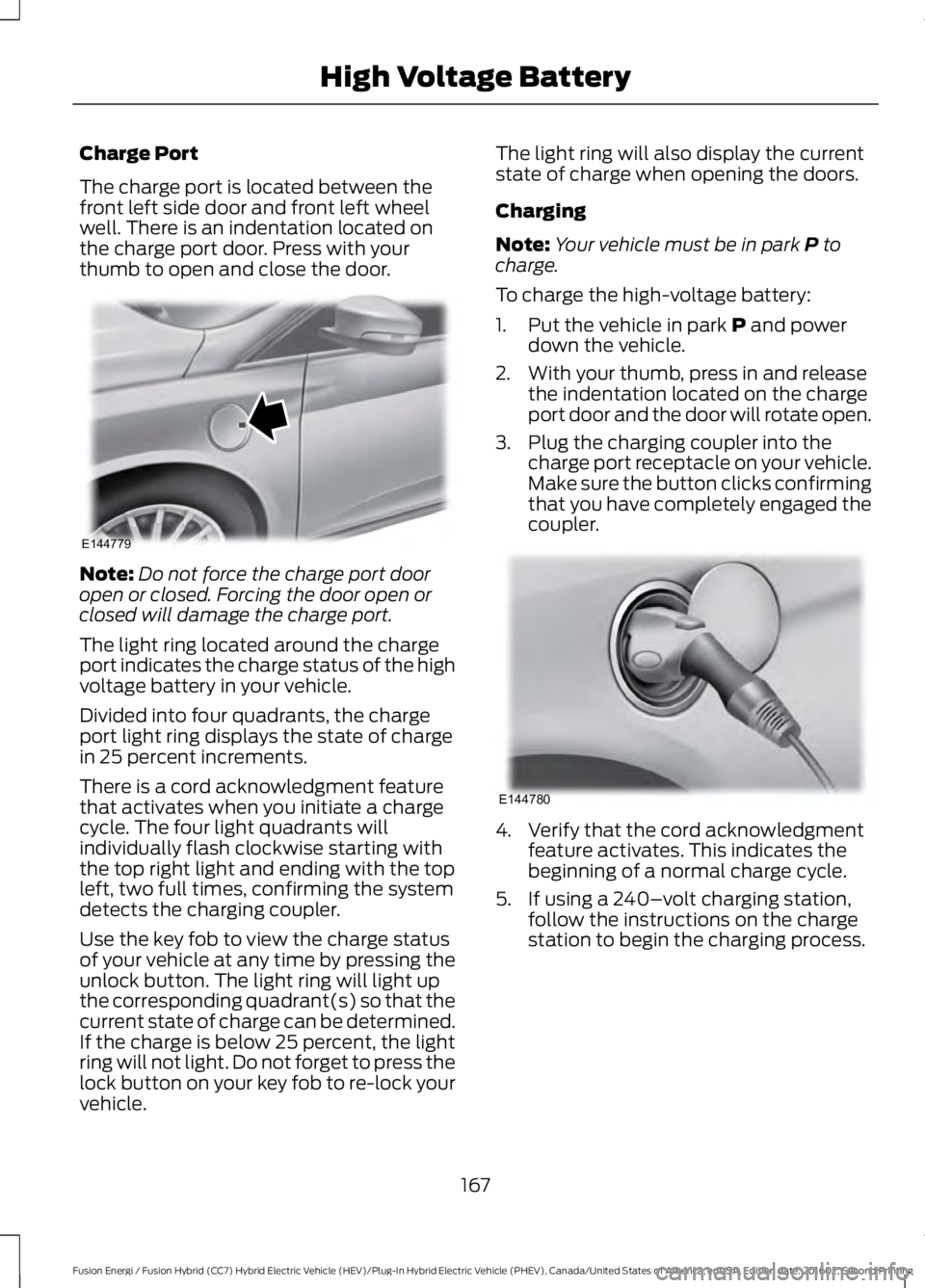
Charge Port
The charge port is located between thefront left side door and front left wheelwell. There is an indentation located onthe charge port door. Press with yourthumb to open and close the door.
Note:Do not force the charge port dooropen or closed. Forcing the door open orclosed will damage the charge port.
The light ring located around the chargeport indicates the charge status of the highvoltage battery in your vehicle.
Divided into four quadrants, the chargeport light ring displays the state of chargein 25 percent increments.
There is a cord acknowledgment featurethat activates when you initiate a chargecycle. The four light quadrants willindividually flash clockwise starting withthe top right light and ending with the topleft, two full times, confirming the systemdetects the charging coupler.
Use the key fob to view the charge statusof your vehicle at any time by pressing theunlock button. The light ring will light upthe corresponding quadrant(s) so that thecurrent state of charge can be determined.If the charge is below 25 percent, the lightring will not light. Do not forget to press thelock button on your key fob to re-lock yourvehicle.
The light ring will also display the currentstate of charge when opening the doors.
Charging
Note:Your vehicle must be in park P tocharge.
To charge the high-voltage battery:
1. Put the vehicle in park P and powerdown the vehicle.
2. With your thumb, press in and releasethe indentation located on the chargeport door and the door will rotate open.
3. Plug the charging coupler into thecharge port receptacle on your vehicle.Make sure the button clicks confirmingthat you have completely engaged thecoupler.
4. Verify that the cord acknowledgmentfeature activates. This indicates thebeginning of a normal charge cycle.
5. If using a 240–volt charging station,follow the instructions on the chargestation to begin the charging process.
167
Fusion Energi / Fusion Hybrid (CC7) Hybrid Electric Vehicle (HEV)/Plug-In Hybrid Electric Vehicle (PHEV), Canada/United States of America, enUSA, Edition date: 201602, Second Printing
High Voltage BatteryE144779 E144780
Page 173 of 526
AUTOMATIC TRANSMISSION
WARNINGS
Always apply the parking brake fullyand make sure you shift into park (P).Switch the ignition off and removethe key whenever you leave your vehicle.
Do not apply the brake pedal andaccelerator pedal simultaneously.Applying both pedals simultaneouslyfor more than a few seconds will limitengine performance, which may result indifficulty maintaining speed in traffic andcould lead to serious injury.
Understanding the Shift Positionsof Your Automatic Transmission
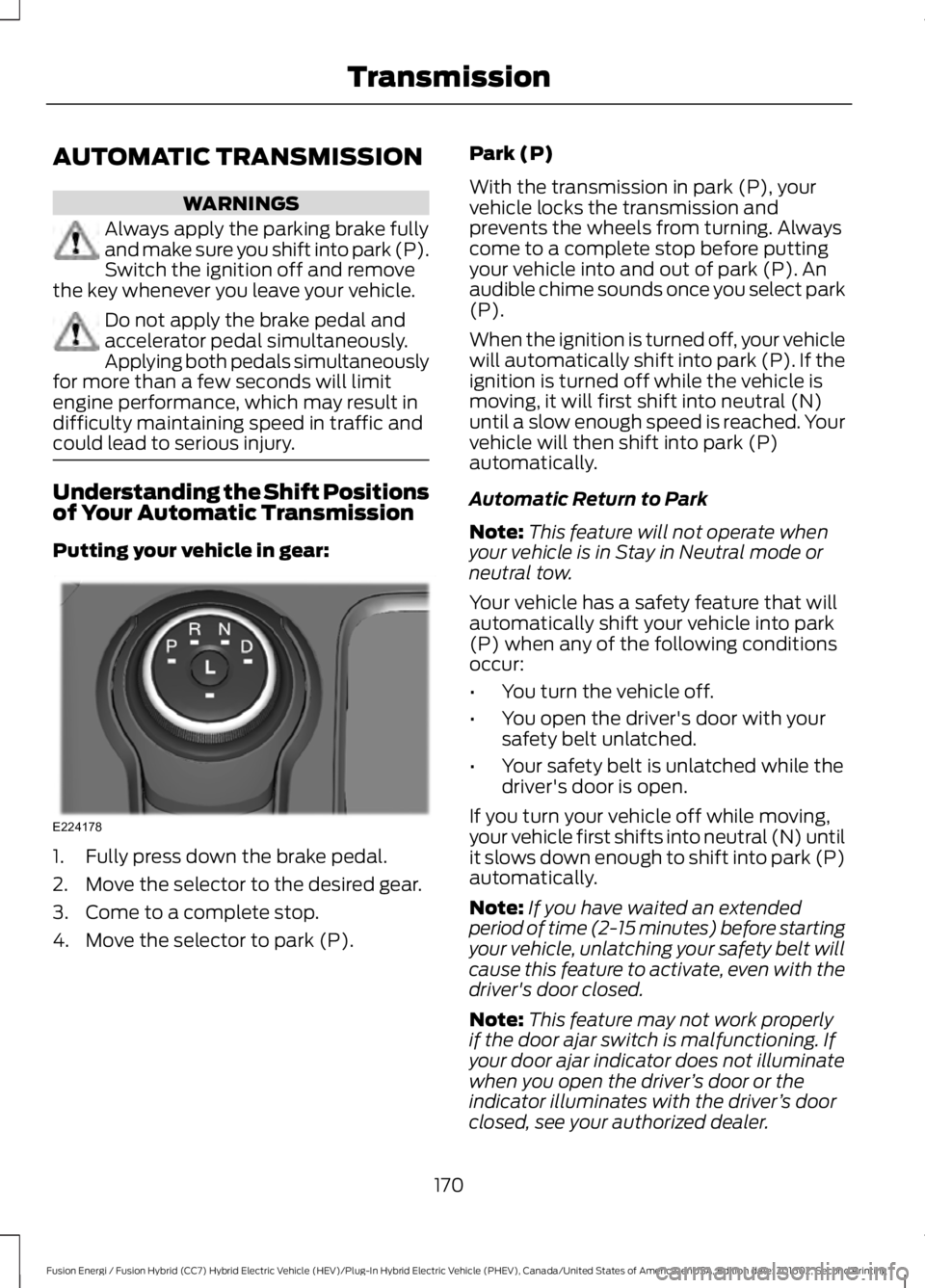
Putting your vehicle in gear:
1. Fully press down the brake pedal.
2. Move the selector to the desired gear.
3. Come to a complete stop.
4. Move the selector to park (P).
Park (P)
With the transmission in park (P), yourvehicle locks the transmission andprevents the wheels from turning. Alwayscome to a complete stop before puttingyour vehicle into and out of park (P). Anaudible chime sounds once you select park(P).
When the ignition is turned off, your vehiclewill automatically shift into park (P). If theignition is turned off while the vehicle ismoving, it will first shift into neutral (N)until a slow enough speed is reached. Yourvehicle will then shift into park (P)automatically.
Automatic Return to Park
Note:This feature will not operate whenyour vehicle is in Stay in Neutral mode orneutral tow.
Your vehicle has a safety feature that willautomatically shift your vehicle into park(P) when any of the following conditionsoccur:
•You turn the vehicle off.
•You open the driver's door with yoursafety belt unlatched.
•Your safety belt is unlatched while thedriver's door is open.
If you turn your vehicle off while moving,your vehicle first shifts into neutral (N) untilit slows down enough to shift into park (P)automatically.
Note:If you have waited an extendedperiod of time (2-15 minutes) before startingyour vehicle, unlatching your safety belt willcause this feature to activate, even with thedriver's door closed.
Note:This feature may not work properlyif the door ajar switch is malfunctioning. Ifyour door ajar indicator does not illuminatewhen you open the driver’s door or theindicator illuminates with the driver’s doorclosed, see your authorized dealer.
170
Fusion Energi / Fusion Hybrid (CC7) Hybrid Electric Vehicle (HEV)/Plug-In Hybrid Electric Vehicle (PHEV), Canada/United States of America, enUSA, Edition date: 201602, Second Printing
TransmissionE224178
Page 175 of 526

Brake-Shift Interlock Override
WARNINGS
Do not drive your vehicle until youverify that the brake lamps areworking.
When doing this procedure, you needto take the transmission out of park(P) which means your vehicle canroll freely. To avoid unwanted vehiclemovement, always fully apply the parkingbrake prior to doing this procedure. Usewheels chocks if appropriate.
If the parking brake is fully released,but the brake warning lamp remainsilluminated, the brakes may not beworking properly. Have your vehiclechecked as soon as possible.
Note:See your authorized dealer as soonas possible if this procedure is used.
Note:For some markets this feature isdisabled.
Note:This feature will only function if your12-volt battery has power. If vehicle batteryvoltage is not sufficient, an external 12-voltpower source (for example, jumper cables,battery charger or jump pack) may berequired to function the interlock overrideswitch.
Use the brake-shift interlock override tomove your transmission from the parkposition in the event of an electricalmalfunction. If your vehicle has a deadbattery, an external power source will berequired.
1. Apply the parking brake and turn yourignition off before performing thisprocedure.
2. Locate your brake-shift interlockaccess slot. The slot is located in yourcenter console storage bin. The accessslot does not have a label.
Note:Make sure that you correctly identifythe access hole as not to damage the mediahub.
3. Using a tool, press and hold the brakeshift interlock switch. The shift buttonson the instrument panel will flash whenyour vehicle is in override mode.
4.With the override switch still held, pressthe neutral button (N) to shift frompark.
5. Release the override button.
6. Your vehicle will remain in Stay inNeutral mode for wrecker towingpurposes or can be shifted to thedesired gear and driven (if possible).
7. Release the parking brake.
If Your Vehicle Gets Stuck In Mudor Snow
Note:Do not rock the vehicle if the engineis not at normal operating temperature ordamage to the transmission may occur.
Note:Do not rock the vehicle for more thana minute or damage to the transmission andtires may occur, or the engine may overheat.
172
Fusion Energi / Fusion Hybrid (CC7) Hybrid Electric Vehicle (HEV)/Plug-In Hybrid Electric Vehicle (PHEV), Canada/United States of America, enUSA, Edition date: 201602, Second Printing
TransmissionE180636
Page 177 of 526
GENERAL INFORMATION
Note:Occasional brake noise is normal. Ifa metal-to-metal, continuous grinding orcontinuous squeal sound is present, thebrake linings may be worn-out. Have thesystem checked by an authorized dealer. Ifthe vehicle has continuous vibration orshudder in the steering wheel while braking,have it checked by an authorized dealer.
Note:Brake dust may accumulate on thewheels, even under normal drivingconditions. Some dust is inevitable as thebrakes wear and does not contribute tobrake noise. See Cleaning the Wheels(page 275).
See Warning Lamps andIndicators (page 89).
Wet brakes result in reduced brakingefficiency. Gently press the brake pedal afew times when driving from a car wash orstanding water to dry the brakes.
Brake Over Accelerator
In the event the accelerator pedalbecomes stuck or entrapped, apply steadyand firm pressure to the brake pedal toslow the vehicle and reduce engine power.If you experience this condition, apply thebrakes and bring your vehicle to a safestop. Move the transmission to park (P),switch the engine off and apply the parkingbrake. Inspect the accelerator pedal forany interference. If none are found and thecondition persists, have your vehicle towedto the nearest authorized dealer.
Brake Assist
Brake assist detects when you brakeheavily by measuring the rate at which youpress the brake pedal. It providesmaximum braking efficiency as long as youpress the pedal. Brake assist can reducestopping distances in critical situations.
Anti-lock Brake System
This system helps you maintain steeringcontrol during emergency stops by keepingthe brakes from locking.
This lamp momentarilyilluminates when you switch theignition on. If the light does notilluminate during start up, remains on orflashes, the anti-lock braking system maybe disabled. Have the system checked byan authorized dealer. If the anti-lock brakesystem is disabled, normal braking is stilleffective.
If the brake warning lampilluminates when you release theparking brake, have your systemchecked by an authorized dealer.
Regenerative Braking System
This feature is used to simulate the enginebraking of an internal combustion engineand assist the standard brake system whilerecovering some of the energy of motionand storing it in the battery to improve fueleconomy. The standard brake system isdesigned to fully stop the car ifregenerative braking is not available.During regenerative braking, the motor isspun as a generator to create electricalcurrent. This recharges the battery andslows the vehicle. In effect, once theaccelerator pedal is released, the motorchanges from an energy user to an energyproducer.
When you release the accelerator pedal orpress the brake pedal, the brake controllerautomatically detects the amount ofdeceleration requested and optimizes howmuch of the deceleration will be producedby regenerative braking. The remainingportion is generated by standard friction
174
Fusion Energi / Fusion Hybrid (CC7) Hybrid Electric Vehicle (HEV)/Plug-In Hybrid Electric Vehicle (PHEV), Canada/United States of America, enUSA, Edition date: 201602, Second Printing
BrakesE144522 E144522
Page 178 of 526
braking. When the battery is almost fullycharged, the amount of regenerativebraking is limited to avoid overcharging,and the requested deceleration isproduced by standard friction brakingalone.
Regenerative braking does not take theplace of the standard friction brakes; it onlyassists them. Regenerative braking hasalso been designed to interact with theanti-lock brake system. Regenerativebraking is disabled when the anti-lockbrake system is activated or the battery isfully charged.
HINTS ON DRIVING WITH
ANTI-LOCK BRAKES
Note:When the system is operating, thebrake pedal may pulse and may travelfurther. Maintain pressure on the brakepedal. You may also hear a noise from thesystem. This is normal.
The anti-lock braking system will noteliminate the risks when:
•You drive too closely to the vehicle infront of you.
•Your vehicle is hydroplaning.
•You take corners too fast.
•The road surface is poor.
ELECTRIC PARKING BRAKE
The electric parking brake replaces theconventional handbrake. The operatingswitch is located in the center console.
WARNING
Always set the parking brake andleave your vehicle with thetransmission in park (P) (automatictransmission) or in first gear (1) or reverse(R) (manual transmission).
Note:When you apply the electric parkingbrake in certain conditions, for example, ona steep hill, the electric parking brake mayreapply the brakes within three to tenminutes.
Note:You may notice various noises whenyou apply and release the electric parkingbrake. This is normal and no cause forconcern.
Parking On a Hill (Vehicles With aManual Transmission)
If you park your vehicle facing uphill, movethe transmission to first gear (1) and turnthe steering wheel away from the curb. Ifyou park your vehicle facing downhill, movethe transmission to reverse (R) and turnthe steering wheel toward the curb.
Applying the Electric Parkingbrake
WARNINGS
The brake system warning lamp willflash during an electric parking brakeapply. If the brake system warninglamp continues to flash, there could be aproblem with your electric parking brake.
Applying the electric parking brakewhile moving will result in use of theanti-lock braking system. Do not usethe electric parking brake system when thevehicle is moving unless the normal brakesystem is unable to stop the vehicle.
With the exception of emergencyconditions (for example, the brakepedal does not work or is blocked),do not apply the electric parking brakewhile the vehicle is moving. On bends, orpoor road surfaces or weather conditions,emergency braking can cause the vehicleto skid out of control or off the road.
175
Fusion Energi / Fusion Hybrid (CC7) Hybrid Electric Vehicle (HEV)/Plug-In Hybrid Electric Vehicle (PHEV), Canada/United States of America, enUSA, Edition date: 201602, Second Printing
Brakes
Page 182 of 526
PRINCIPLE OF OPERATION
The traction control system helps avoiddrive wheel spin and loss of traction.
If your vehicle begins to slide, the systemapplies the brakes to individual wheelsand, when needed, reduces engine powerat the same time. If the wheels spin whenaccelerating on slippery or loose surfaces,the system reduces engine power in orderto increase traction.
USING TRACTION CONTROL
WARNING
The stability and traction controllight illuminates steadily if thesystem detects a failure. Make sureyou did not manually disable the tractioncontrol system using the informationdisplay controls or the switch. If thestability control and traction control lightis still illuminating steadily, have thesystem serviced by an authorized dealerimmediately. Operating your vehicle withthe traction control disabled could lead toan increased risk of loss of vehicle control,vehicle rollover, personal injury and death.
The system automatically turns on eachtime you switch the ignition on.
If your vehicle is stuck in mud or snow,switching traction control off may bebeneficial as this allows the wheels to spin.
Note:When you switch traction control off,stability control remains fully active.
Switching the System Off
When you switch the system off or on, amessage appears in the informationdisplay showing system status.
You can switch the system off by eitherusing the information display controls orthe switch.
Using the Information DisplayControls
You can switch this feature off or on in theinformation display. See GeneralInformation (page 94).
Using a Switch (If Equipped)
Use the traction control switch on theinstrument panel to switch the system offor on.
System Indicator Lights andMessages
The stability and traction controllight:
•Temporarily illuminates on enginestart-up.
•Flashes when a driving conditionactivates either of the systems.
•Illuminates if a problem occurs in eitherof the systems.
The stability and traction controloff light temporarily illuminateson engine start-up and stays onwhen you switch the traction controlsystem off.
179
Fusion Energi / Fusion Hybrid (CC7) Hybrid Electric Vehicle (HEV)/Plug-In Hybrid Electric Vehicle (PHEV), Canada/United States of America, enUSA, Edition date: 201602, Second Printing
Traction ControlE138639 E130458
Page 183 of 526
PRINCIPLE OF OPERATION
WARNINGS
Vehicle modifications involvingbraking system, aftermarket roofracks, suspension, steering system,tire construction and wheel and tire sizemay change the handling characteristicsof your vehicle and may adversely affectthe performance of the electronic stabilitycontrol system. In addition, installing anystereo loudspeakers may interfere withand adversely affect the electronic stabilitycontrol system. Install any aftermarketstereo loudspeaker as far as possible fromthe front center console, the tunnel, andthe front seats in order to minimize the riskof interfering with the electronic stabilitycontrol sensors. Reducing theeffectiveness of the electronic stabilitycontrol system could lead to an increasedrisk of loss of vehicle control, vehiclerollover, personal injury and death.
Remember that even advancedtechnology cannot defy the laws ofphysics. It’s always possible to losecontrol of a vehicle due to inappropriatedriver input for the conditions. Aggressivedriving on any road condition can causeyou to lose control of your vehicleincreasing the risk of personal injury orproperty damage. Activation of theelectronic stability control system is anindication that at least some of the tireshave exceeded their ability to grip the road;this could reduce the operator’s ability tocontrol the vehicle potentially resulting ina loss of vehicle control, vehicle rollover,personal injury and death. If your electronicstability control system activates, SLOWDOWN.
The system automatically turns on eachtime you switch the ignition on.
If a fault occurs in either the stabilitycontrol or the traction control system, youmay experience the following conditions:
•The stability and traction control lightilluminates steadily.
•The stability control and tractioncontrol systems do not enhance yourvehicle's ability to maintain traction ofthe wheels.
If a driving condition activates either thestability control or the traction controlsystem you may experience the followingconditions:
•The stability and traction control lightflashes.
•Your vehicle slows down.
•Reduced engine power.
•A vibration in the brake pedal.
•The brake pedal is stiffer than usual.
•If the driving condition is severe andyour foot is not on the brake, the brakepedal may move as the system applieshigher brake force.
The stability control system has severalfeatures built into it to help you maintaincontrol of your vehicle:
Electronic Stability Control
The system enhances your vehicle’s abilityto prevent skids or lateral slides byapplying brakes to one or more of thewheels individually and, if necessary,reducing engine power.
Traction Control
The system enhances your vehicle’s abilityto maintain traction of the wheels bydetecting and controlling wheel spin. SeeUsing Traction Control (page 179).
180
Fusion Energi / Fusion Hybrid (CC7) Hybrid Electric Vehicle (HEV)/Plug-In Hybrid Electric Vehicle (PHEV), Canada/United States of America, enUSA, Edition date: 201602, Second Printing
Stability Control
Page 189 of 526
•The anti-lock brake system isactivated.
•The traction control system isactivated.
ACTIVE PARK ASSIST
Parallel Parking, PerpendicularParking, Parallel Park Out Assist
WARNINGS
You must remain in your vehiclewhen the system turns on. At alltimes, you are responsible forcontrolling your vehicle, supervising thesystem and intervening, if required. Failureto take care may result in the loss ofcontrol of your vehicle, serious personalinjury or death.
The sensors may not detect objectsin heavy rain or other conditions thatcause interference.
Active park assist does not apply thebrakes under any circumstances.
The system is designed to aid thedriver. It is not intended to replaceyour attention and judgment. You arestill responsible to drive with due care andattention.
Note:The Blind Spot Information Systemdoes not detect traffic alongside or behindyour vehicle during an active park assistmaneuver.
The system detects an available parallelor perpendicular parking space andautomatically steers your vehicle into thespace (hands-free) while you control theaccelerator, gearshift and brakes. Thesystem visually and audibly guides you topark your vehicle.
If you are uncomfortable with the proximityto any vehicle or object, you may chooseto override the system by grabbing thesteering wheel or pushing the active parkassist button.
Parallel Park Out Assist automaticallysteers your vehicle out of a parallel parkingspace (hands-free) while you control theaccelerator, gearshift and brakes. Thesystem visually and audibly guides you toenter traffic.
The system may not correctly operate inany of the following conditions:
•You use a spare tire or a tiresignificantly worn more than the othertires.
•One or more tires are improperlyinflated.
•You try to park on a tight curve.
•Something passes between the frontbumper and the parking space (apedestrian or cyclist).
•The edge of the neighboring parkedvehicle is high off the ground (forexample, a bus, tow truck or flatbedtruck).
•The weather conditions are poor(heavy rain, snow, fog, etc).
Note:Keep the sensors, located on thebumper or fascia, free from snow, ice andlarge accumulations of dirt. Covered sensorscan affect the system's accuracy. Do notclean the sensors with sharp objects.
Note:The sensors may not detect objectswith surfaces that absorb ultrasonic wavesor cause ultrasonic interference (motorcycleexhaust, truck air brakes or horns).
186
Fusion Energi / Fusion Hybrid (CC7) Hybrid Electric Vehicle (HEV)/Plug-In Hybrid Electric Vehicle (PHEV), Canada/United States of America, enUSA, Edition date: 201602, Second Printing
Parking Aids
Page 191 of 526
Automatic Steering into Parking Space
Note:If your vehicle speed exceedsapproximately 6 mph (10 km/h) or themaneuver is interrupted (driver input), thesystem switches off and you need to takefull control of your vehicle.
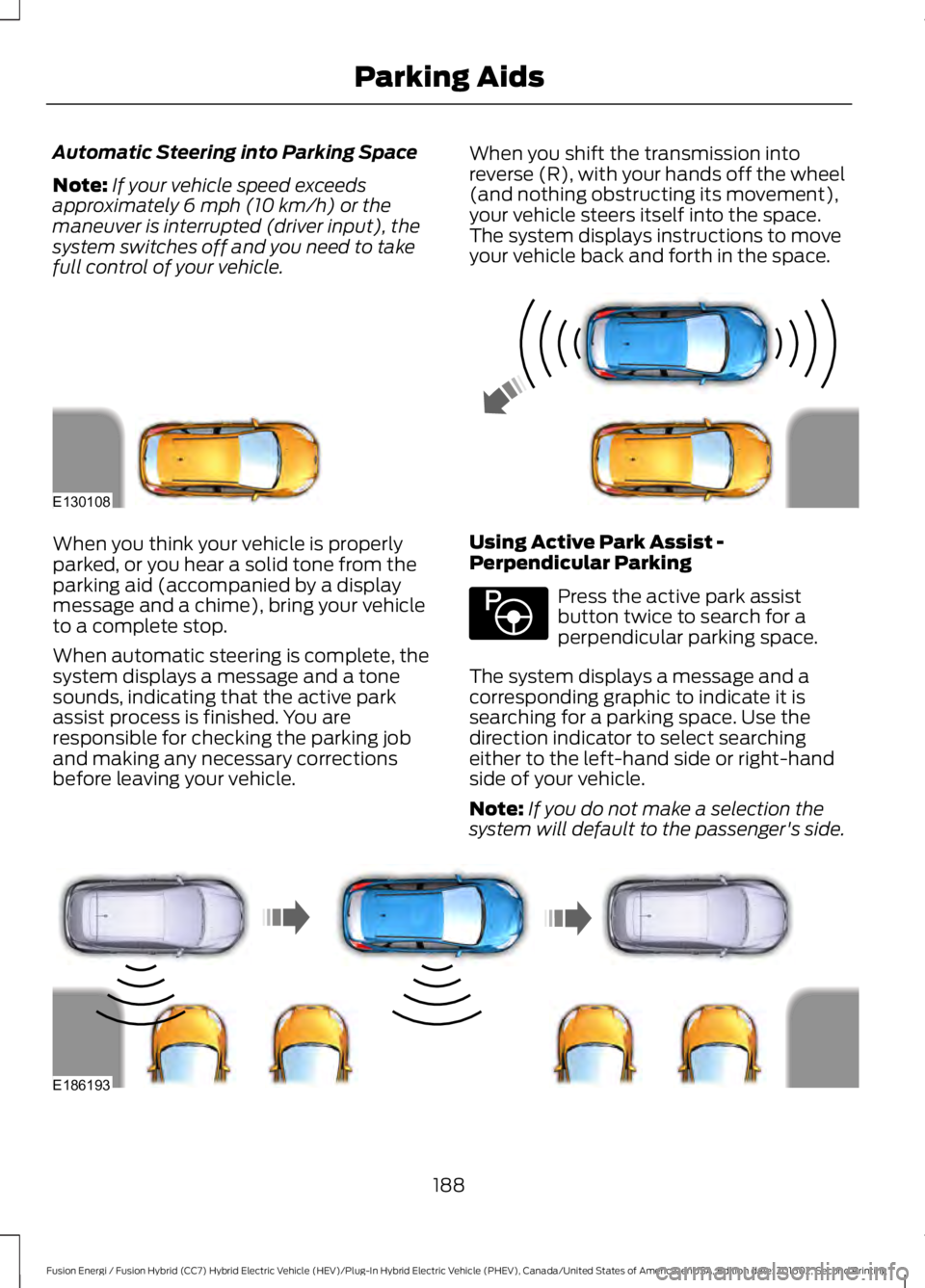
When you shift the transmission intoreverse (R), with your hands off the wheel(and nothing obstructing its movement),your vehicle steers itself into the space.The system displays instructions to moveyour vehicle back and forth in the space.
When you think your vehicle is properlyparked, or you hear a solid tone from theparking aid (accompanied by a displaymessage and a chime), bring your vehicleto a complete stop.
When automatic steering is complete, thesystem displays a message and a tonesounds, indicating that the active parkassist process is finished. You areresponsible for checking the parking joband making any necessary correctionsbefore leaving your vehicle.
Using Active Park Assist -Perpendicular Parking
Press the active park assistbutton twice to search for aperpendicular parking space.
The system displays a message and acorresponding graphic to indicate it issearching for a parking space. Use thedirection indicator to select searchingeither to the left-hand side or right-handside of your vehicle.
Note:If you do not make a selection thesystem will default to the passenger's side.
188
Fusion Energi / Fusion Hybrid (CC7) Hybrid Electric Vehicle (HEV)/Plug-In Hybrid Electric Vehicle (PHEV), Canada/United States of America, enUSA, Edition date: 201602, Second Printing
Parking AidsE130108 E146186 E186193
Page 192 of 526
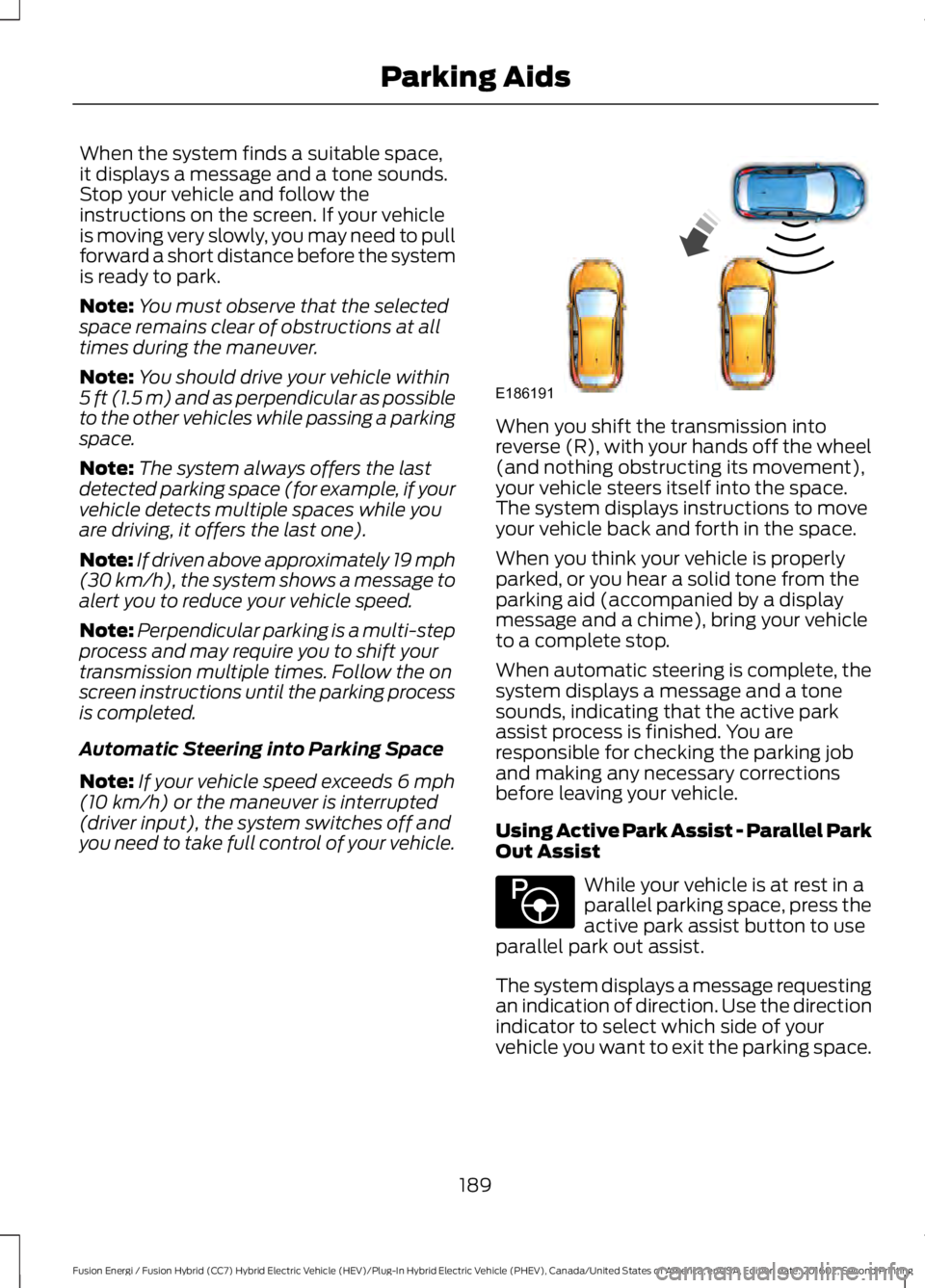
When the system finds a suitable space,it displays a message and a tone sounds.Stop your vehicle and follow theinstructions on the screen. If your vehicleis moving very slowly, you may need to pullforward a short distance before the systemis ready to park.
Note:You must observe that the selectedspace remains clear of obstructions at alltimes during the maneuver.
Note:You should drive your vehicle within5 ft (1.5 m) and as perpendicular as possibleto the other vehicles while passing a parkingspace.
Note:The system always offers the lastdetected parking space (for example, if yourvehicle detects multiple spaces while youare driving, it offers the last one).
Note:If driven above approximately 19 mph(30 km/h), the system shows a message toalert you to reduce your vehicle speed.
Note:Perpendicular parking is a multi-stepprocess and may require you to shift yourtransmission multiple times. Follow the onscreen instructions until the parking processis completed.
Automatic Steering into Parking Space
Note:If your vehicle speed exceeds 6 mph(10 km/h) or the maneuver is interrupted(driver input), the system switches off andyou need to take full control of your vehicle.
When you shift the transmission intoreverse (R), with your hands off the wheel(and nothing obstructing its movement),your vehicle steers itself into the space.The system displays instructions to moveyour vehicle back and forth in the space.
When you think your vehicle is properlyparked, or you hear a solid tone from theparking aid (accompanied by a displaymessage and a chime), bring your vehicleto a complete stop.
When automatic steering is complete, thesystem displays a message and a tonesounds, indicating that the active parkassist process is finished. You areresponsible for checking the parking joband making any necessary correctionsbefore leaving your vehicle.
Using Active Park Assist - Parallel ParkOut Assist
While your vehicle is at rest in aparallel parking space, press theactive park assist button to useparallel park out assist.
The system displays a message requestingan indication of direction. Use the directionindicator to select which side of yourvehicle you want to exit the parking space.
189
Fusion Energi / Fusion Hybrid (CC7) Hybrid Electric Vehicle (HEV)/Plug-In Hybrid Electric Vehicle (PHEV), Canada/United States of America, enUSA, Edition date: 201602, Second Printing
Parking AidsE186191 E146186