climate control FORD FUSION ENERGI 2017 Owner's Guide
[x] Cancel search | Manufacturer: FORD, Model Year: 2017, Model line: FUSION ENERGI, Model: FORD FUSION ENERGI 2017Pages: 526, PDF Size: 7.89 MB
Page 382 of 526
Home screen displayTileItem
If your vehicle does not have navigation, this spacecontains the audio information.
1 If equipped.
You can touch any of the feature displaysto access that feature.
Anytime you select the home button, thesystem returns you to this screen.
USING VOICE RECOGNITION
The SYNC 3 system allows you to use voicecommands, to control features like audioand climate controls. By using voicecommands, you can keep your hands onthe wheel and your eyes on the road.
You can access each feature controlled bySYNC 3 through a variety of commands.
To activate the SYNC 3 voicecommands push the voicebutton on the steering wheel andwait for the prompt.
___ is a dynamic listing, meaning that it canbe the name of anything, such as artist, thename of contact or number. The contextand the description of the command tellyou what to say for this dynamic option.
There are some commands that work forevery feature, these commands are:
Action and DescriptionVoice Command
Brings you to the main menu.Main Menu
Returns you to the previous screen.Go back
Ends the voice session.Cancel
Gives you a list of possible voice commands.List of Commands
You can name any feature and the system gives a list ofcommands available for the feature. For example, you couldsay:
___ List of Commands
Phone List of Commands
Navigation List of Commands
You can use this command to view the next page of options onany screen where multiple pages of choices are given.Next Page
You can use this command to view the previous page of optionson any screen where multiple pages of choices are given.Previous Page
Gives you available commands you can use on the currentscreen.Help
379
Fusion Energi / Fusion Hybrid (CC7) Hybrid Electric Vehicle (HEV)/Plug-In Hybrid Electric Vehicle (PHEV), Canada/United States of America, enUSA, Edition date: 201602, Second Printing
SYNC™ 3E142599
Page 384 of 526
Climate Voice Commands
You can control the temperature of thevehicle using voice commands.
___ is a dynamic listing, meaning that forclimate voice commands it can be thedesired degrees for the temperaturesetting.
To adjust the temperature, say:
DescriptionVoice command
Adjust the temperature between 59–86°F(15–30°C).Climate Set Temperature ___
Climate Help
Phone Voice Commands
Pairing a Phone
You can use voice commands to connectyour Bluetooth-enabled phone to thesystem.
To pair your phone, press the voice button and when prompted, say:
DescriptionVoice command
Follow the on-screen instructions to complete the pairingprocess. See Settings (page 436).Pair Phone
Making Calls
___ is a dynamic listing, meaning that forphone voice commands it can be the nameof the contact you wish to call or the digitsyou want to dial.
Press the voice button and say a command similar to the following:
DescriptionVoice command
Allows you to call a specific contact from your phonebooksuch as "Call Jenny".Call ___
Allows you to call a specific contact from your phonebookat a specific location such as "Call Jenny at Home".Call ___ at ___
Allows you to dial a specific number such as “Dial 867-5309”.Dial ___
381
Fusion Energi / Fusion Hybrid (CC7) Hybrid Electric Vehicle (HEV)/Plug-In Hybrid Electric Vehicle (PHEV), Canada/United States of America, enUSA, Edition date: 201602, Second Printing
SYNC™ 3
Page 388 of 526
DescriptionVoice command
The system does not confirm before placing a call.Phone Confirmation Off
The system displays a short list of available commands.Voice Command Lists On
The system does not display the list of commands.Voice Command Lists Off
You can use the volume control to adjustthe volume of the system voice prompts.While prompt is active, adjust the volumecontrol up or down to your desired setting.
Note:Depending on the current climatecontrol settings, the fan speed mayautomatically go down while issuing voicecommands or while making and receivingphone calls via SYNC to reduce the amountof background noise in the vehicle. The fanspeed will automatically return to normaloperation once the voice session ends. Fanspeed can also be adjusted normally duringa voice session, simply press fan buttons (orturn fan knob) to increase or decrease fanspeed to desired setting.
To disable this automatic fan speedreduction feature during voice sessions,press and hold the climate control AC andRecirculated air buttons simultaneously,release and then increase fan speed within2 seconds. To re-enable this feature, repeatthe above sequence.
385
Fusion Energi / Fusion Hybrid (CC7) Hybrid Electric Vehicle (HEV)/Plug-In Hybrid Electric Vehicle (PHEV), Canada/United States of America, enUSA, Edition date: 201602, Second Printing
SYNC™ 3
Page 399 of 526
CLIMATE
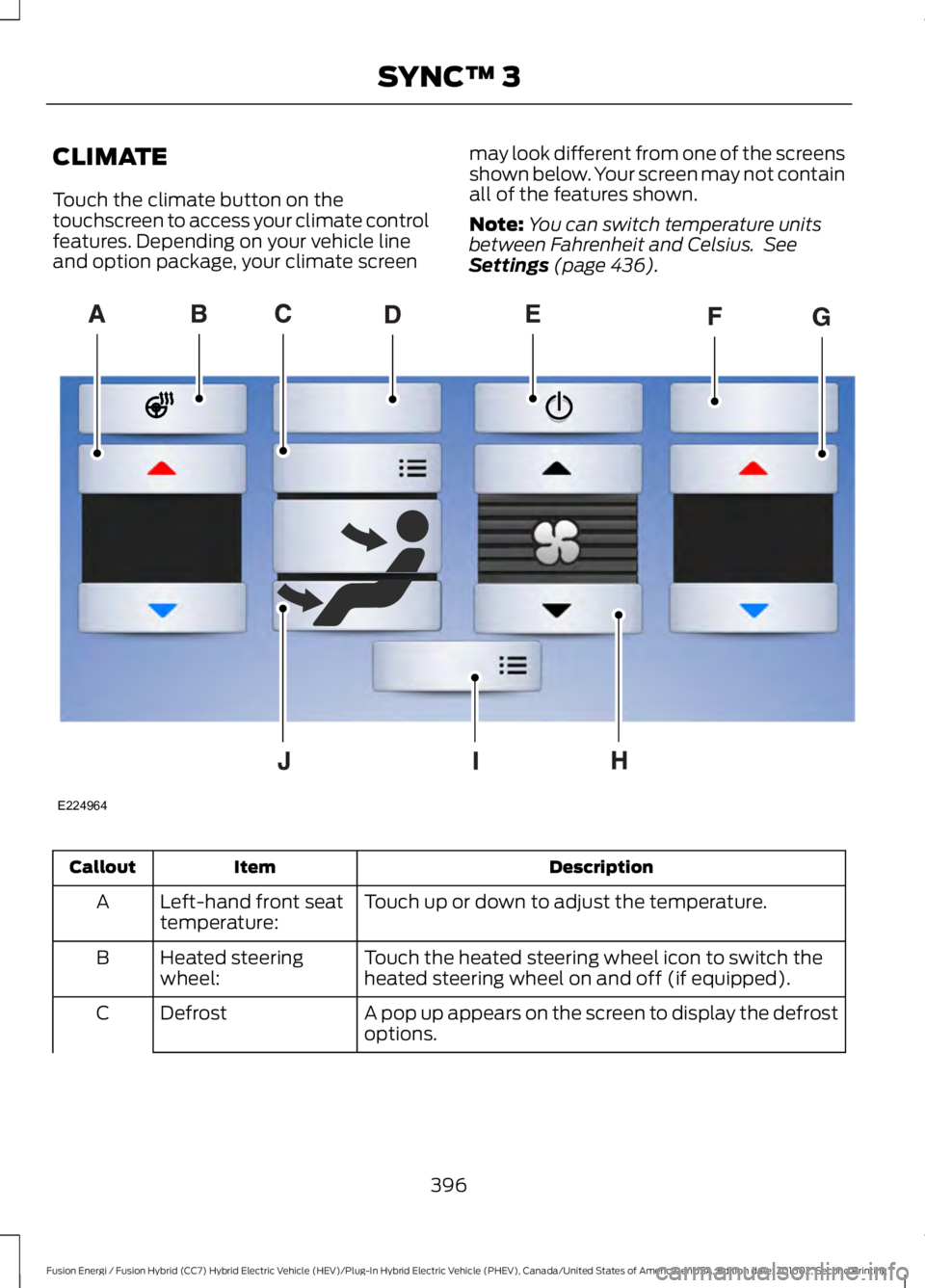
Touch the climate button on thetouchscreen to access your climate controlfeatures. Depending on your vehicle lineand option package, your climate screen
may look different from one of the screensshown below. Your screen may not containall of the features shown.
Note:You can switch temperature unitsbetween Fahrenheit and Celsius. SeeSettings (page 436).
DescriptionItemCallout
Touch up or down to adjust the temperature.Left-hand front seattemperature:A
Touch the heated steering wheel icon to switch theheated steering wheel on and off (if equipped).Heated steeringwheel:B
A pop up appears on the screen to display the defrostoptions.DefrostC
396
Fusion Energi / Fusion Hybrid (CC7) Hybrid Electric Vehicle (HEV)/Plug-In Hybrid Electric Vehicle (PHEV), Canada/United States of America, enUSA, Edition date: 201602, Second Printing
SYNC™ 3E224964
Page 400 of 526
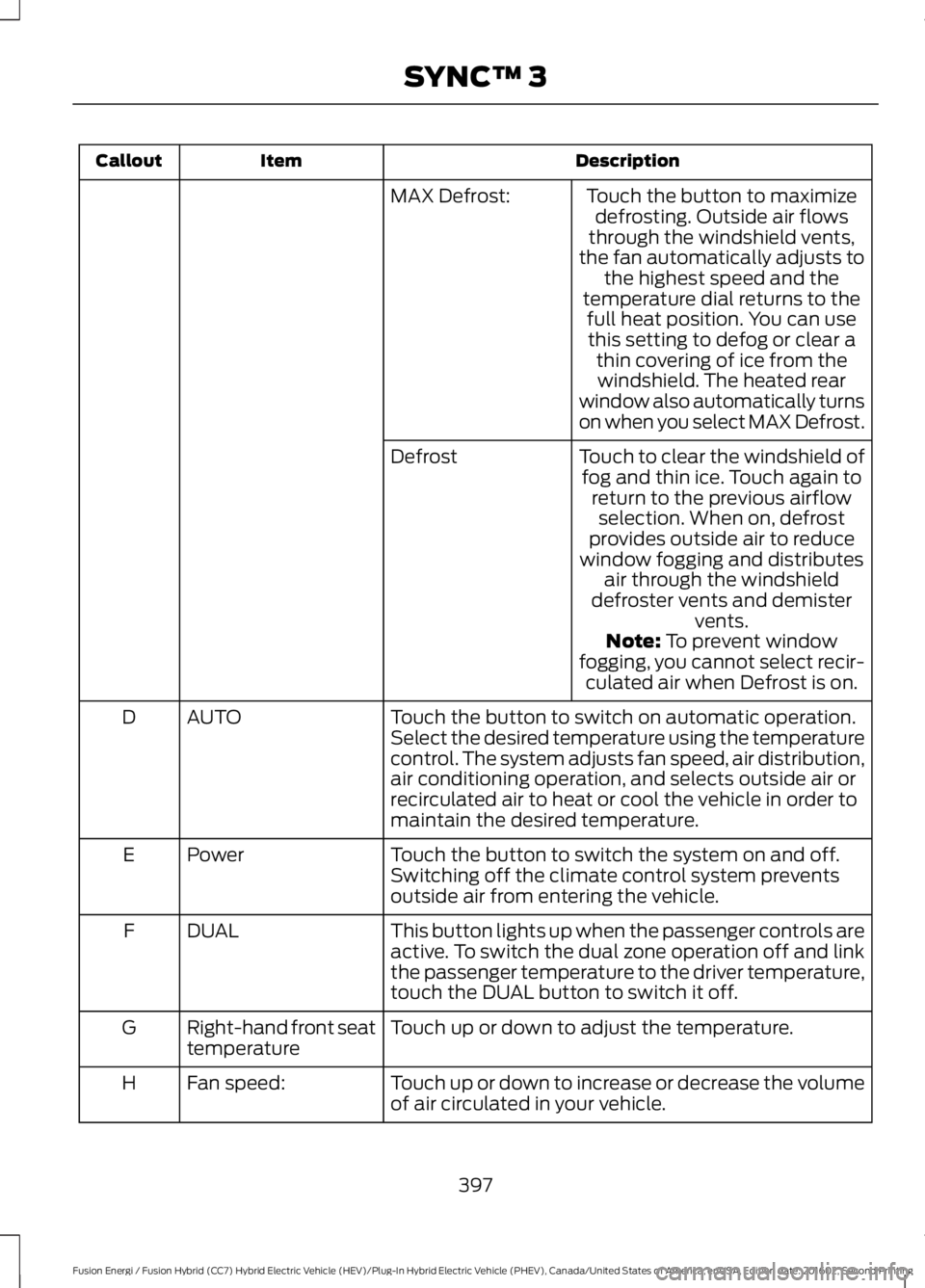
DescriptionItemCallout
Touch the button to maximizedefrosting. Outside air flowsthrough the windshield vents,the fan automatically adjusts tothe highest speed and thetemperature dial returns to the
MAX Defrost:
full heat position. You can usethis setting to defog or clear athin covering of ice from thewindshield. The heated rearwindow also automatically turnson when you select MAX Defrost.
Touch to clear the windshield offog and thin ice. Touch again toreturn to the previous airflowselection. When on, defrostprovides outside air to reducewindow fogging and distributesair through the windshielddefroster vents and demistervents.
Defrost
Note: To prevent windowfogging, you cannot select recir-culated air when Defrost is on.
Touch the button to switch on automatic operation.Select the desired temperature using the temperaturecontrol. The system adjusts fan speed, air distribution,air conditioning operation, and selects outside air orrecirculated air to heat or cool the vehicle in order tomaintain the desired temperature.
AUTOD
Touch the button to switch the system on and off.Switching off the climate control system preventsoutside air from entering the vehicle.
PowerE
This button lights up when the passenger controls areactive. To switch the dual zone operation off and linkthe passenger temperature to the driver temperature,touch the DUAL button to switch it off.
DUALF
Touch up or down to adjust the temperature.Right-hand front seattemperatureG
Touch up or down to increase or decrease the volumeof air circulated in your vehicle.Fan speed:H
397
Fusion Energi / Fusion Hybrid (CC7) Hybrid Electric Vehicle (HEV)/Plug-In Hybrid Electric Vehicle (PHEV), Canada/United States of America, enUSA, Edition date: 201602, Second Printing
SYNC™ 3
Page 434 of 526
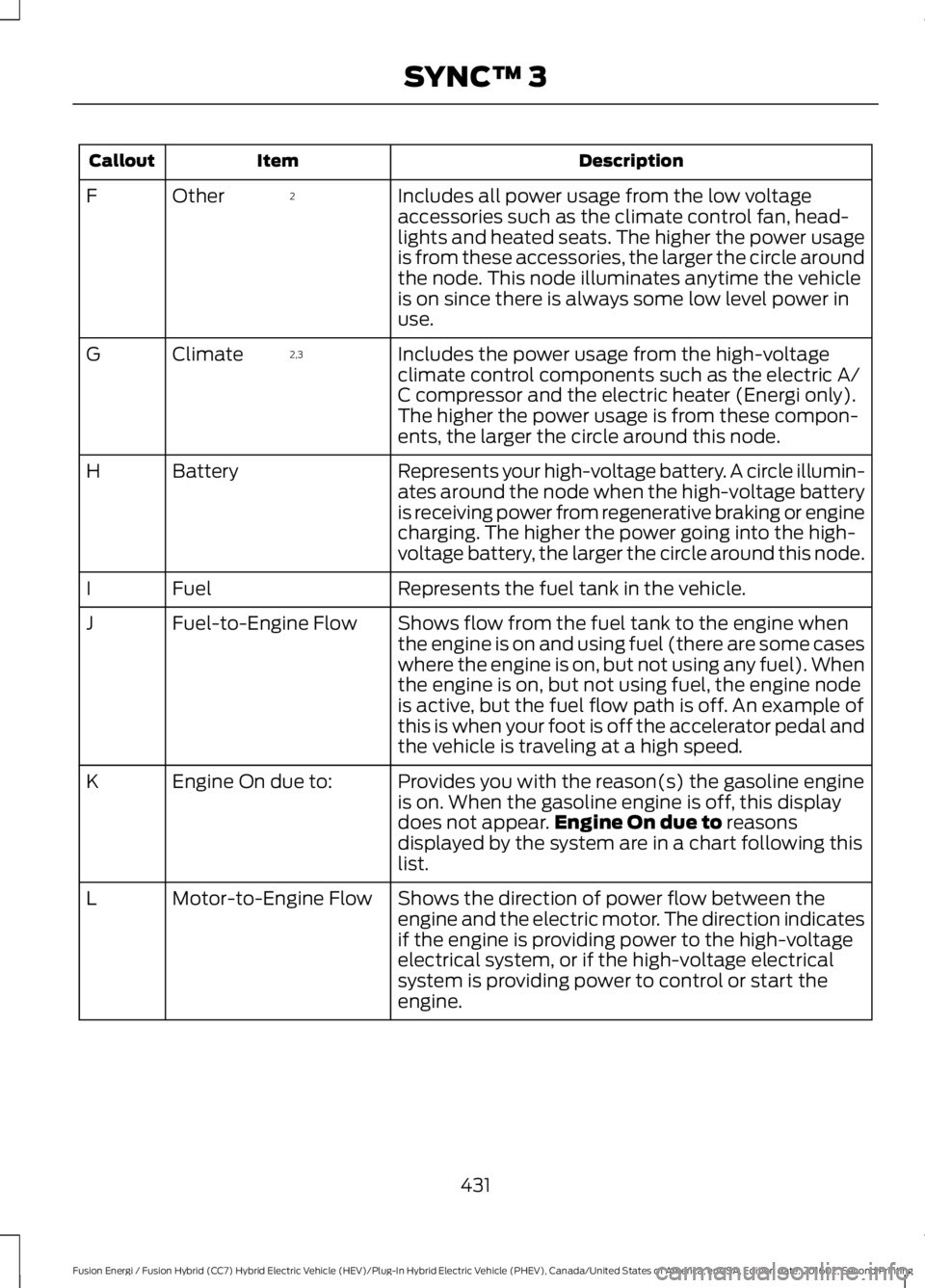
DescriptionItemCallout
Includes all power usage from the low voltageaccessories such as the climate control fan, head-lights and heated seats. The higher the power usageis from these accessories, the larger the circle aroundthe node. This node illuminates anytime the vehicleis on since there is always some low level power inuse.
2OtherF
Includes the power usage from the high-voltageclimate control components such as the electric A/C compressor and the electric heater (Energi only).The higher the power usage is from these compon-ents, the larger the circle around this node.
2,3ClimateG
Represents your high-voltage battery. A circle illumin-ates around the node when the high-voltage batteryis receiving power from regenerative braking or enginecharging. The higher the power going into the high-voltage battery, the larger the circle around this node.
BatteryH
Represents the fuel tank in the vehicle.FuelI
Shows flow from the fuel tank to the engine whenthe engine is on and using fuel (there are some caseswhere the engine is on, but not using any fuel). Whenthe engine is on, but not using fuel, the engine nodeis active, but the fuel flow path is off. An example ofthis is when your foot is off the accelerator pedal andthe vehicle is traveling at a high speed.
Fuel-to-Engine FlowJ
Provides you with the reason(s) the gasoline engineis on. When the gasoline engine is off, this displaydoes not appear.Engine On due to reasonsdisplayed by the system are in a chart following thislist.
Engine On due to:K
Shows the direction of power flow between theengine and the electric motor. The direction indicatesif the engine is providing power to the high-voltageelectrical system, or if the high-voltage electricalsystem is providing power to control or start theengine.
Motor-to-Engine FlowL
431
Fusion Energi / Fusion Hybrid (CC7) Hybrid Electric Vehicle (HEV)/Plug-In Hybrid Electric Vehicle (PHEV), Canada/United States of America, enUSA, Edition date: 201602, Second Printing
SYNC™ 3
Page 435 of 526
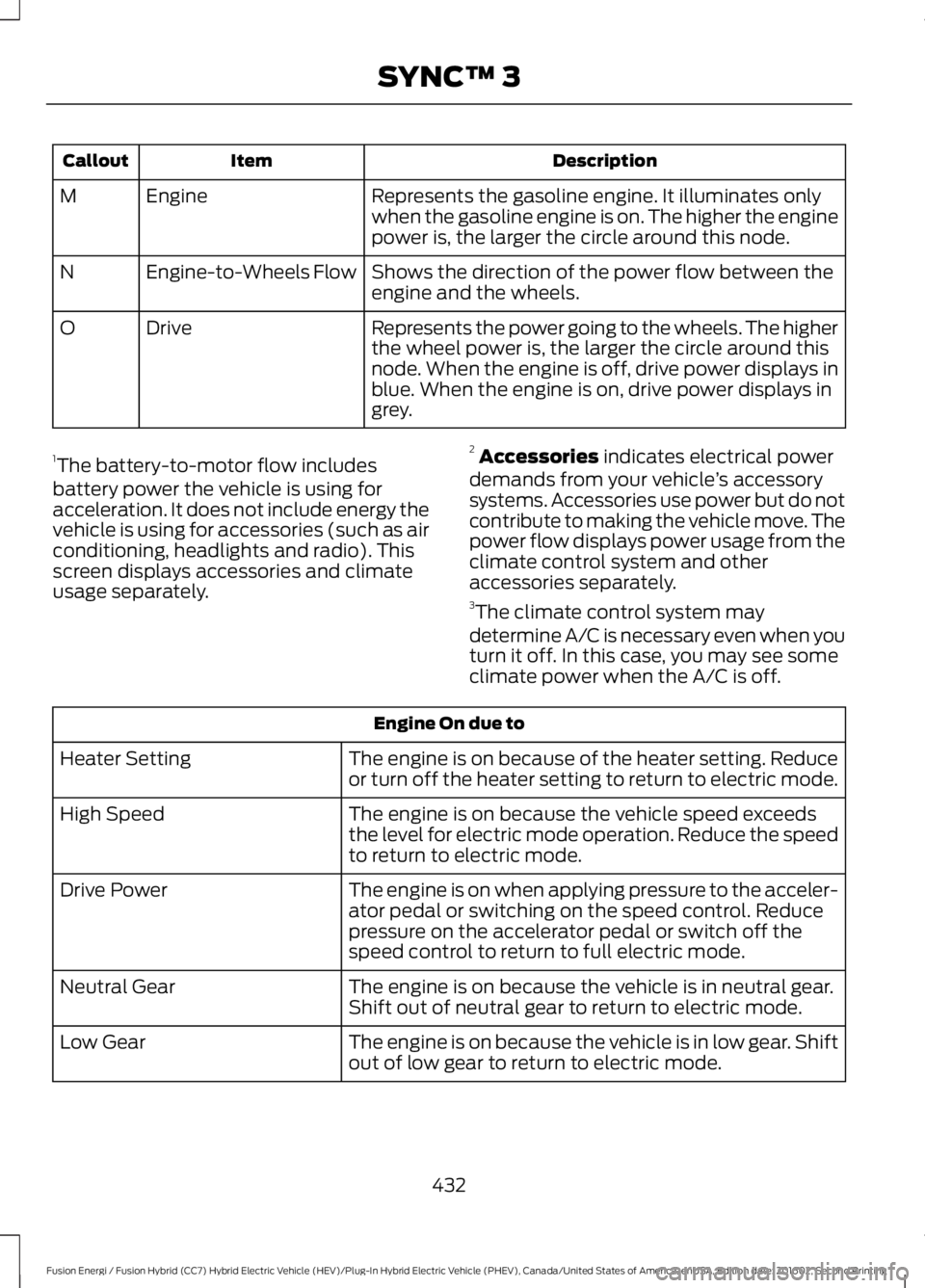
DescriptionItemCallout
Represents the gasoline engine. It illuminates onlywhen the gasoline engine is on. The higher the enginepower is, the larger the circle around this node.
EngineM
Shows the direction of the power flow between theengine and the wheels.Engine-to-Wheels FlowN
Represents the power going to the wheels. The higherthe wheel power is, the larger the circle around thisnode. When the engine is off, drive power displays inblue. When the engine is on, drive power displays ingrey.
DriveO
1The battery-to-motor flow includesbattery power the vehicle is using foracceleration. It does not include energy thevehicle is using for accessories (such as airconditioning, headlights and radio). Thisscreen displays accessories and climateusage separately.
2Accessories indicates electrical powerdemands from your vehicle’s accessorysystems. Accessories use power but do notcontribute to making the vehicle move. Thepower flow displays power usage from theclimate control system and otheraccessories separately.3The climate control system may
determine A/C is necessary even when youturn it off. In this case, you may see someclimate power when the A/C is off.
Engine On due to
The engine is on because of the heater setting. Reduceor turn off the heater setting to return to electric mode.Heater Setting
The engine is on because the vehicle speed exceedsthe level for electric mode operation. Reduce the speedto return to electric mode.
High Speed
The engine is on when applying pressure to the acceler-ator pedal or switching on the speed control. Reducepressure on the accelerator pedal or switch off thespeed control to return to full electric mode.
Drive Power
The engine is on because the vehicle is in neutral gear.Shift out of neutral gear to return to electric mode.Neutral Gear
The engine is on because the vehicle is in low gear. Shiftout of low gear to return to electric mode.Low Gear
432
Fusion Energi / Fusion Hybrid (CC7) Hybrid Electric Vehicle (HEV)/Plug-In Hybrid Electric Vehicle (PHEV), Canada/United States of America, enUSA, Edition date: 201602, Second Printing
SYNC™ 3
Page 516 of 526
A
A/CSee: Climate Control..........................................116About This Manual...........................................7ABSSee: Brakes............................................................174ABS driving hintsSee: Hints on Driving With Anti-LockBrakes.................................................................175Accessories.....................................................461Exterior Style........................................................461Interior Style.........................................................461Lifestyle..................................................................461Peace of Mind......................................................461AccessoriesSee: Replacement PartsRecommendation............................................12ACCSee: Using Adaptive Cruise Control............196Active Park Assist.........................................186Deactivating the Active Park AssistFeature..............................................................190Parallel Parking, Perpendicular Parking,Parallel Park Out Assist..............................186Troubleshooting the System...........................191Adjusting the Headlamps.........................263Horizontal Aim Adjustment...........................264Vertical Aim Adjustment.................................263Adjusting the Steering Wheel....................67Power Tilt and Telescope SteeringColumn................................................................67Airbag Disposal...............................................47Air ConditioningSee: Climate Control..........................................116Air FilterSee: Changing the Engine Air Filter............269AlarmSee: Anti-Theft Alarm........................................66Ambient Lighting...........................................80Anti-Theft Alarm............................................66Arming the Alarm................................................66Disarming the Alarm...........................................66Appendices....................................................485Apps.................................................................434..................................................................................434SiriusXM Traffic and Travel Link...................435
Audible Warnings and Indicators.............93Headlamps On Warning Chime......................93Keyless Warning Alert.........................................93Parking Brake On Warning Chime..................93Audio Control..................................................68MODE.......................................................................69Seek, Next or Previous.......................................69Audio System.................................................313General Information..........................................313Audio Unit - Vehicles With: AM/FM/CD/SYNC/Satellite Radio..............................319Audio Unit - Vehicles With: AM/FM/CD....................................................................318Audio Unit - Vehicles With: Sony AM/FM/CD............................................................314Menu Structure....................................................315Autolamps.........................................................74Windshield Wiper ActivatedHeadlamps.........................................................74Automatic Climate Control - VehiclesWith: Sony Audio System........................116Automatic Climate Control - VehiclesWithout: Sony Audio System.................118Automatic High Beam Control..................76Activating the System.........................................77Manually Overriding the System.....................77Automatic Transmission............................170Brake-Shift Interlock Override........................172If Your Vehicle Gets Stuck In Mud orSnow...................................................................172Understanding the Shift Positions of YourAutomatic Transmission.............................170Automatic Transmission FluidCheck............................................................260Autowipers.........................................................71Autowipers Settings............................................72Auxiliary Power Points.................................137110 Volt AC Power Point....................................13712 Volt DC Power Point......................................137Locations................................................................137
B
BatterySee: Changing the 12V Battery.....................260Blind Spot Information System.............208Switching the System Off and On...............210System Errors.......................................................210
513
Fusion Energi / Fusion Hybrid (CC7) Hybrid Electric Vehicle (HEV)/Plug-In Hybrid Electric Vehicle (PHEV), Canada/United States of America, enUSA, Edition date: 201602, Second Printing
Index
Page 517 of 526
Using the System..............................................209Bonnet LockSee: Opening and Closing the Hood..........252Booster Seats..................................................25Types of Booster Seats......................................26Brake Fluid Check.......................................260Brakes................................................................174General Information...........................................174Breaking-In.....................................................223Bulb Specification Chart...........................267
C
Cabin Air Filter.................................................121California Proposition 65..............................11Capacities and Specifications...............309Specifications.....................................................309Car WashSee: Cleaning the Exterior................................271Center Console..............................................139Center Console with Rotary Control...........139Changing a Bulb..........................................266Headlamp............................................................266LED Lamps...........................................................266License Plate Lamp...........................................267Reversing Lamp.................................................266Changing a Fuse..........................................250Fuses......................................................................250Changing the 12V Battery.........................260Changing the Engine Air Filter................269Changing the Wiper Blades.....................262Charging the High Voltage Battery........164Energi Vehicles....................................................164Checking MyKey System Status...............56MyKey Distance....................................................56Number of Admin Keys......................................56Number of MyKeys..............................................56Checking the Wiper Blades......................262Child Restraint and SeatbeltMaintenance..................................................37Child Restraint Positioning..........................27Child Safety.......................................................16General Information.............................................16Child Safety Locks.........................................28Left-Hand Side......................................................29Right-Hand Side...................................................29Cleaning Leather Seats..............................274Cleaning Products.......................................270
Cleaning the Engine....................................272Cleaning the Exterior....................................271Exterior Chrome Parts.......................................271Exterior Plastic Parts..........................................271Stripes or Graphics.............................................271Underbody............................................................272Under Hood..........................................................272Cleaning the Instrument Panel andInstrument Cluster Lens.........................274Cleaning the Interior....................................273Cleaning the Wheels...................................275Cleaning the Windows and WiperBlades............................................................273Clearing All MyKeys.......................................56Climate............................................................396Climate Control..............................................116Climate Controlled Seats..........................130Cooled Seats........................................................130Collision, Damage or Fire Event.............230Guidance for Ford Motor Company Electricand Hybrid-Electric Vehicles EquippedWith High Voltage Batteries.....................230Coolant CheckSee: Engine Coolant Check............................256Crash Sensors and Airbag Indicator.......46Creating a MyKey............................................55Programming or Changing ConfigurableSettings...............................................................56Cross Traffic Alert.........................................210False Alerts............................................................212Switching the System Off and On................213System Errors.......................................................213System Lights, Messages and AudibleAlerts...................................................................212System Limitations............................................212Using the System...............................................210Cruise Control.................................................69Principle of Operation.......................................195Type 1........................................................................69Type 2.......................................................................69Cruise controlSee: Using Cruise Control................................195Customer Assistance.................................234
D
Data Recording..................................................9Event Data Recording..........................................10
514
Fusion Energi / Fusion Hybrid (CC7) Hybrid Electric Vehicle (HEV)/Plug-In Hybrid Electric Vehicle (PHEV), Canada/United States of America, enUSA, Edition date: 201602, Second Printing
Index
Page 518 of 526
Service Data Recording........................................9Daytime Running Lamps.............................76Type 1 - Conventional(Non-Configurable)........................................76Type 2 - Configurable..........................................76Digital Radio...................................................321HD Radio Reception and StationTroubleshooting............................................322Direction Indicators........................................78Doors and Locks.............................................58Driver Alert.....................................................203PRINCIPLE OF OPERATION..........................203USING DRIVER ALERT....................................203Driver and Passenger Airbags...................40Children and Airbags..........................................40Proper Driver and Front Passenger SeatingAdjustment.......................................................40Driver and Passenger Knee Airbags........44Driving Aids....................................................203Driving Hints...................................................223Driving Through Water...............................224DRLSee: Daytime Running Lamps.........................76
E
Economical Driving.....................................223EcoSelect........................................................150Electric Parking Brake..................................175Applying the Electric Parking brake.............175Battery With No Charge....................................177Parking On a Hill (Vehicles With a ManualTransmission) .................................................175Releasing the Electric Parking Brake...........176Electric Vehicle Information.....................413Charge Settings (Energi VehiclesOnly)...................................................................415Power Flow..........................................................429Emission Control System..........................159On-Board Diagnostics (OBD-II)...................160Readiness for Inspection and Maintenance(I/M) Testing....................................................161End User License Agreement.................485VEHICLE SOFTWARE END USER LICENSEAGREEMENT (EULA) ................................485Engine Block Heater....................................144Using the Engine Block Heater......................145
Engine Coolant Check...............................256Adding Coolant..................................................256Coolant Change.................................................258Engine Coolant TemperatureManagement..................................................259Fail-Safe Cooling...............................................258Recycled Coolant...............................................257Severe Climates.................................................258Engine ImmobilizerSee: Passive Anti-Theft System.....................65Engine Oil Check..........................................254Adding Engine Oil..............................................254Engine Oil Dipstick......................................254Engine Specifications................................305Entertainment..............................................386AM/FM Radio......................................................387Apps.......................................................................395Bluetooth Stereo or USB................................394CD (If equipped)................................................393HD Radio™ Information (IfAvailable)........................................................390SIRIUS® Satellite Radio (IfActivated)........................................................387Sources.................................................................386Supported Media Players, Formats andMetadata Information................................395USB Port...............................................................395Environment......................................................15EPBSee: Electric Parking Brake..............................175Event Data RecordingSee: Data Recording..............................................9Export Unique Options..................................13Extended Service Plan (ESP).................463EXTENDED SERVICE PLAN (CANADAONLY)...............................................................464Ford Protect (U.S. Only).................................463Exterior Mirrors................................................82Auto-Dimming Feature......................................82Blind Spot Monitor..............................................83Fold-Away Exterior Mirrors...............................82Heated Exterior Mirrors......................................82Integrated Blind Spot Mirrors..........................83Memory Mirrors.....................................................82Power Exterior Mirrors........................................82Puddle Lamps ......................................................83Signal Indicator Mirrors......................................83
515
Fusion Energi / Fusion Hybrid (CC7) Hybrid Electric Vehicle (HEV)/Plug-In Hybrid Electric Vehicle (PHEV), Canada/United States of America, enUSA, Edition date: 201602, Second Printing
Index