phone FORD FUSION ENERGI 2017 Owners Manual
[x] Cancel search | Manufacturer: FORD, Model Year: 2017, Model line: FUSION ENERGI, Model: FORD FUSION ENERGI 2017Pages: 526, PDF Size: 7.89 MB
Page 8 of 526
Audio System
General Information....................................313
Audio Unit - Vehicles With: Sony AM/FM/CD...................................................................314
Audio Unit - Vehicles With: AM/FM/CD...................................................................318
Audio Unit - Vehicles With: AM/FM/CD/SYNC/Satellite Radio.............................319
Digital Radio...................................................321
Satellite Radio..............................................324
USB Port.........................................................326
Media Hub......................................................326
SYNC™
General Information....................................327
Using Voice Recognition...........................329
Using SYNC™ With Your Phone.............331
SYNC™ Applications and Services......343
Using SYNC™ With Your MediaPlayer...........................................................348
SYNC™ Troubleshooting..........................357
SYNC™ 3
General Information...................................365
Home Screen.................................................378
Using Voice Recognition...........................379
Entertainment..............................................386
Climate............................................................396
Phone..............................................................399
Navigation.....................................................404
Electric Vehicle Information.....................413
Apps.................................................................434
Settings...........................................................436
SYNC™ 3 Troubleshooting.....................449
Accessories
Accessories.....................................................461
Extended Service Plan(ESP)
Extended Service Plan (ESP).................463
Ford Protect
Ford Protect..................................................465
Scheduled Maintenance
General Maintenance Information........467
Normal Scheduled Maintenance..........470
Special Operating Conditions ScheduledMaintenance..............................................473
Scheduled Maintenance Record............475
Appendices
End User License Agreement.................485
Type Approvals............................................509
5
Fusion Energi / Fusion Hybrid (CC7) Hybrid Electric Vehicle (HEV)/Plug-In Hybrid Electric Vehicle (PHEV), Canada/United States of America, enUSA, Edition date: 201602, Second Printing
Table of Contents
Page 14 of 526
Note:Including to the extent that anylaw pertaining to Event Data Recordersapplies to SYNC or its features, pleasenote the following: Once 911 Assist (ifequipped) is enabled (set ON), 911 Assistmay, through any paired and connectedcell phone, disclose to emergencyservices that the vehicle has been in acrash involving the deployment of anairbag or, in certain vehicles, theactivation of the fuel pump shut-off.Certain versions or updates to 911 Assistmay also be capable of being used toelectronically or verbally provide to 911operators the vehicle location (such aslatitude and longitude), and/or otherdetails about the vehicle or crash orpersonal information about theoccupants to assist 911 operators toprovide the most appropriate emergencyservices. If you do not want to disclosethis information, do not activate the 911Assist feature. See SYNC™ (page 327).
Additionally, when you connect toTraffic, Directions and Information (ifequipped, U.S. only), the service usesGPS technology and advanced vehiclesensors to collect the vehicle’s currentlocation, travel direction, and speed(“vehicle travel information”), only tohelp provide you with the directions,traffic reports, or business searchesthat you request. If you do not wantFord or its vendors to receive thisinformation, do not activate theservice. For more information, seeTraffic, Directions and Information,Terms and Conditions. See SYNC™(page 327).
CALIFORNIA PROPOSITION 65
WARNINGS
Some constituents of engineexhaust, certain vehicle components,certain fluids contained in vehiclesand certain products of component wearcontain or emit chemicals known to theState of California to cause cancer andbirth defects or other reproductive harm.
Battery posts, terminals and relatedaccessories contain lead and leadcompounds, chemicals known to theState of California to cause cancer andreproductive harm. Batteries also containother chemicals known to the State ofCalifornia to cause cancer. Wash yourhands after handling.
PERCHLORATE
Certain components in your vehicle suchas airbag modules, seatbelt pretensionersand remote control batteries may containperchlorate material. Special handlingmay apply for service or vehicle end of lifedisposal.
For more information visit:
Web Address
www.dtsc.ca.gov/hazard-ouswaste/perchlorate
FORD CREDIT
US Only
Ford Credit offers a full range of financingand lease plans to help you acquire yourvehicle. If you have financed or leased yourvehicle through Ford Credit, thank you foryour business.
11
Fusion Energi / Fusion Hybrid (CC7) Hybrid Electric Vehicle (HEV)/Plug-In Hybrid Electric Vehicle (PHEV), Canada/United States of America, enUSA, Edition date: 201602, Second Printing
Introduction
Page 16 of 526
On Board Diagnostics Data LinkConnector
WARNING
Do not connect wireless plug-indevices to the data link connector.Unauthorized third parties could gainaccess to vehicle data and impair theperformance of safety related systems.Only allow repair facilities that follow ourservice and repair instructions to connecttheir equipment to the data link connector.
Your vehicle has an OBD Data LinkConnector (DLC) that is used inconjunction with a diagnostic scan tool forvehicle diagnostics, repairs andreprogramming services. Installing anaftermarket device that uses the DLCduring normal driving for purposes such asremote insurance company monitoring,transmission of vehicle data to otherdevices or entities, or altering theperformance of the vehicle, may causeinterference with or even damage tovehicle systems. We do not recommendor endorse the use of aftermarket plug-indevices unless approved by Ford. Thevehicle Warranty will not cover damagecaused by an aftermarket plug-in device.
MOBILE COMMUNICATIONS
EQUIPMENT
WARNING
Driving while distracted can result inloss of vehicle control, crash andinjury. We strongly recommend thatyou use extreme caution when using anydevice that may take your focus off theroad. Your primary responsibility is the safeoperation of your vehicle. We recommendagainst the use of any hand-held devicewhile driving and encourage the use ofvoice-operated systems when possible.Make sure you are aware of all applicablelocal laws that may affect the use ofelectronic devices while driving.
Using mobile communications equipmentis becoming increasingly important in theconduct of business and personal affairs.However, you must not compromise yourown or others’ safety when using suchequipment. Mobile communications canenhance personal safety and security whenappropriately used, particularly inemergency situations. Safety must beparamount when using mobilecommunications equipment to avoidnegating these benefits. Mobilecommunication equipment includes, butis not limited to, cellular phones, pagers,portable email devices, text messagingdevices and portable two-way radios.
EXPORT UNIQUE OPTIONS
For your particular global region, yourvehicle may be equipped with features andoptions that are different from the featuresand options that are described in thisOwner’s Manual. A market uniquesupplement may be supplied thatcomplements this book. By referring to themarket unique supplement, if provided,you can properly identify those features,
13
Fusion Energi / Fusion Hybrid (CC7) Hybrid Electric Vehicle (HEV)/Plug-In Hybrid Electric Vehicle (PHEV), Canada/United States of America, enUSA, Edition date: 201602, Second Printing
Introduction
Page 51 of 526
GENERAL INFORMATION ON
RADIO FREQUENCIES
This device complies with Part 15 of theFCC Rules and with Industry Canadalicense-exempt RSS standard(s).Operation is subject to the following twoconditions: (1) This device may not causeharmful interference, and (2) This devicemust accept any interference received,including interference that may causeundesired operation.
Note:Changes or modifications notexpressively approved by the partyresponsible for compliance could void theuser's authority to operate the equipment.The term IC before the radio certificationnumber only signifies that Industry Canadatechnical specifications were met.
The typical operating range for yourtransmitter is approximately 33 feet (10meters). Vehicles with the remote startfeature will have a greater range. One ofthe following could cause a decrease inoperating range:
•Weather conditions.
•Nearby radio towers.
•Structures around the vehicle.
•Other vehicles parked next to yourvehicle.
The radio frequency used by your remotecontrol can also be used by other shortdistance radio transmissions, for exampleamateur radios, medical equipment,wireless headphones, remote controls andalarm systems. If the frequencies arejammed, you will not be able to use yourremote control. You can lock and unlockthe doors with the key.
Note:Make sure to lock your vehicle beforeleaving it unattended.
Note:If you are in range, the remote controlwill operate if you press any buttonunintentionally.
Intelligent Access (If Equipped)
The system uses a radio frequency signalto communicate with your vehicle andauthorize your vehicle to unlock when oneof the following conditions are met:
•You activate the front exterior doorhandle switch.
•You press the luggage compartmentbutton.
•You press a button on the transmitter.
If excessive radio frequency interferenceis present in the area or if the transmitterbattery is low, you may need tomechanically unlock your door. You canuse the mechanical key blade in yourintelligent access key to open the driverdoor in this situation. See RemoteControl (page 48).
REMOTE CONTROL
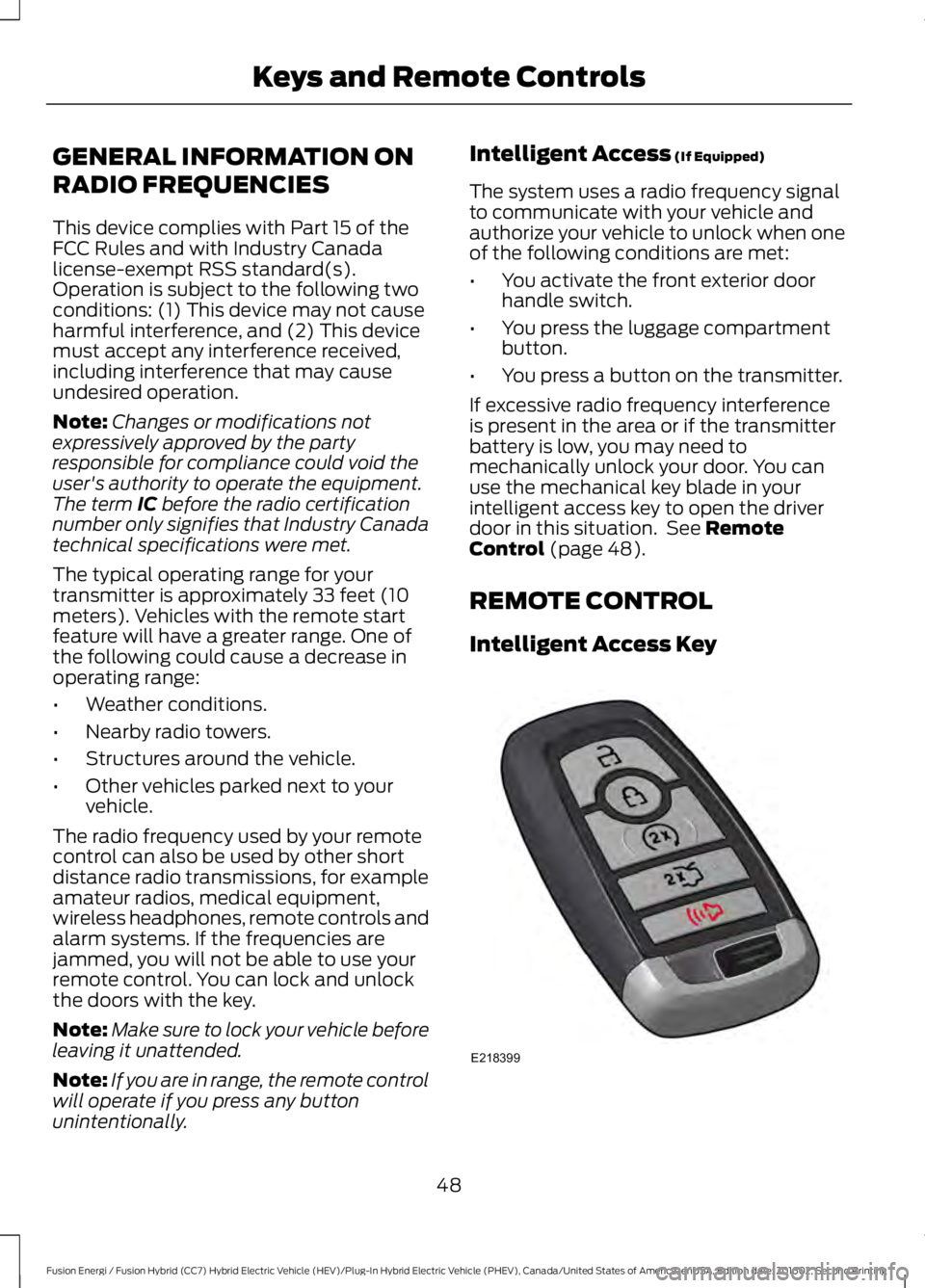
Intelligent Access Key
48
Fusion Energi / Fusion Hybrid (CC7) Hybrid Electric Vehicle (HEV)/Plug-In Hybrid Electric Vehicle (PHEV), Canada/United States of America, enUSA, Edition date: 201602, Second Printing
Keys and Remote ControlsE218399
Page 91 of 526
Brake Coach Display:
The Brake Coach appears after the vehiclehas come to a stop. It coaches you to brakein a manner which maximizes the amountof energy returned through theregenerative braking system. The percentdisplayed is an indication of theregenerative braking efficiency with 100%representing the maximum amount ofenergy recovery.
You can switch this feature on or off in theinformation displays settings menu. SeeGeneral Information (page 94).
Trip Summary:
Trip Summary displays upon shutting offyour vehicle. The information is cumulativeover the last trip. A new trip begins eachtime your start your vehicle (when theReady to Drive message comes on).
•Distance - Displays the total distancetraveled, distance traveled on batterypower only (EV distance) and Regendistance. Regen distance is theestimated range gained from energyrecaptured through regenerativebraking.
•Energy Use - Displays the average fueleconomy. In addition for Energi,displays the total electrical energy usedwhile in Plug-in Power Mode in kilowatthours (kWh).
•Brake Score - The percent displayed isan indication of the regenerativebraking efficiency for the trip.
Note:Corresponding trip efficiency leavesappear on the right information display uponshutting off your Hybrid vehicle. On Energivehicles, the trip efficiency leaves are shownon the right information display when thevehicle operates in Hybrid Mode for theentire trip. For trips with Plug-in Power Modeoperation, an estimate of your EVRange/Full Charge is provided along with alisting of factors and their contributions tothis estimate. See Next Full Charge underRight Information Display in this chapter.
Right Information Display
Entertainment
See General Information (page 365).
Phone
See General Information (page 365).
Navigation or Compass
See General Information (page 365).
Fuel Economy
See General Information (page 94).
Vehicle Range
Vehicle range indicates the estimateddistance your vehicle will travel with theenergy currently onboard. The range isdisplayed at the bottom of the screen withgasoline range shown in white and electricrange (Energi only) shown in blue.
•Gasoline Range: Is the estimateddistance to empty based on the fuelremaining in the tank.
•Electric Range: Is the estimateddistance you can travel in Plug-InPower Mode with the engine off. Thisrange is based on a calculationdetermined by the amount of energystored in the high voltage battery as aresult of charging while plugged in andthe energy being used while driving.
88
Fusion Energi / Fusion Hybrid (CC7) Hybrid Electric Vehicle (HEV)/Plug-In Hybrid Electric Vehicle (PHEV), Canada/United States of America, enUSA, Edition date: 201602, Second Printing
Instrument Cluster
Page 104 of 526
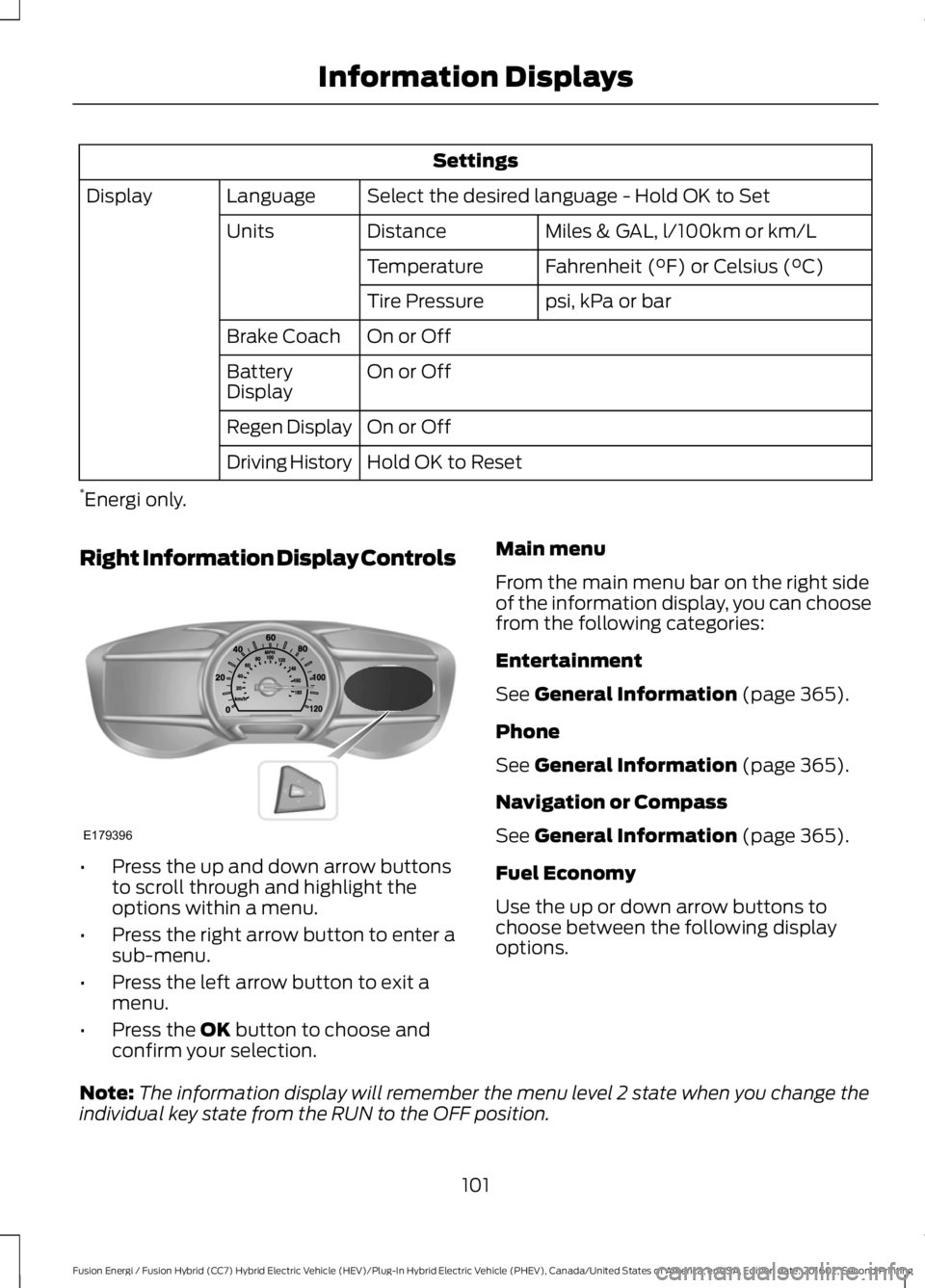
Settings
Select the desired language - Hold OK to SetLanguageDisplay
Miles & GAL, l/100km or km/LDistanceUnits
Fahrenheit (°F) or Celsius (°C)Temperature
psi, kPa or barTire Pressure
On or OffBrake Coach
On or OffBatteryDisplay
On or OffRegen Display
Hold OK to ResetDriving History
*Energi only.
Right Information Display Controls
•Press the up and down arrow buttonsto scroll through and highlight theoptions within a menu.
•Press the right arrow button to enter asub-menu.
•Press the left arrow button to exit amenu.
•Press the OK button to choose andconfirm your selection.
Main menu
From the main menu bar on the right sideof the information display, you can choosefrom the following categories:
Entertainment
See General Information (page 365).
Phone
See General Information (page 365).
Navigation or Compass
See General Information (page 365).
Fuel Economy
Use the up or down arrow buttons tochoose between the following displayoptions.
Note:The information display will remember the menu level 2 state when you change theindividual key state from the RUN to the OFF position.
101
Fusion Energi / Fusion Hybrid (CC7) Hybrid Electric Vehicle (HEV)/Plug-In Hybrid Electric Vehicle (PHEV), Canada/United States of America, enUSA, Edition date: 201602, Second Printing
Information DisplaysE179396
Page 144 of 526
GENERAL INFORMATION
WARNINGS
Extended idling at high enginespeeds can produce very hightemperatures in the engine andexhaust system, creating the risk of fire orother damage.
Do not park, idle or drive your vehicleon dry grass or other dry groundcover. The emission system heats upthe engine compartment and exhaustsystem, creating the risk of fire.
Do not start the vehicle in a closedgarage or in other enclosed areas.Exhaust fumes can be toxic. Alwaysopen the garage door before you start thevehicle.
If you smell exhaust fumes insideyour vehicle, have your vehiclechecked by an authorized dealerimmediately. Do not drive your vehicle ifyou smell exhaust fumes.
If you disconnect the battery, your vehiclemay exhibit some unusual drivingcharacteristics for approximately 5 mi(8 km) after you reconnect it. This isbecause the engine management systemmust realign itself with the engine. You candisregard any unusual drivingcharacteristics during this period.
The powertrain control system meets allCanadian interference-causing equipmentstandard requirements regulating theimpulse electrical field or radio noise.
When you start your vehicle, avoid pressingthe accelerator pedal until the ready todrive indicator illuminates. Only use theaccelerator pedal when you have difficultystarting your vehicle.
KEYLESS STARTING
Note:The system may not function if thepassive key is close to metal objects orelectronic devices, for example keys or a cellphone.
Note:A valid passive key must be locatedinside your vehicle to switch the ignition onand start your vehicle.
Ignition Modes
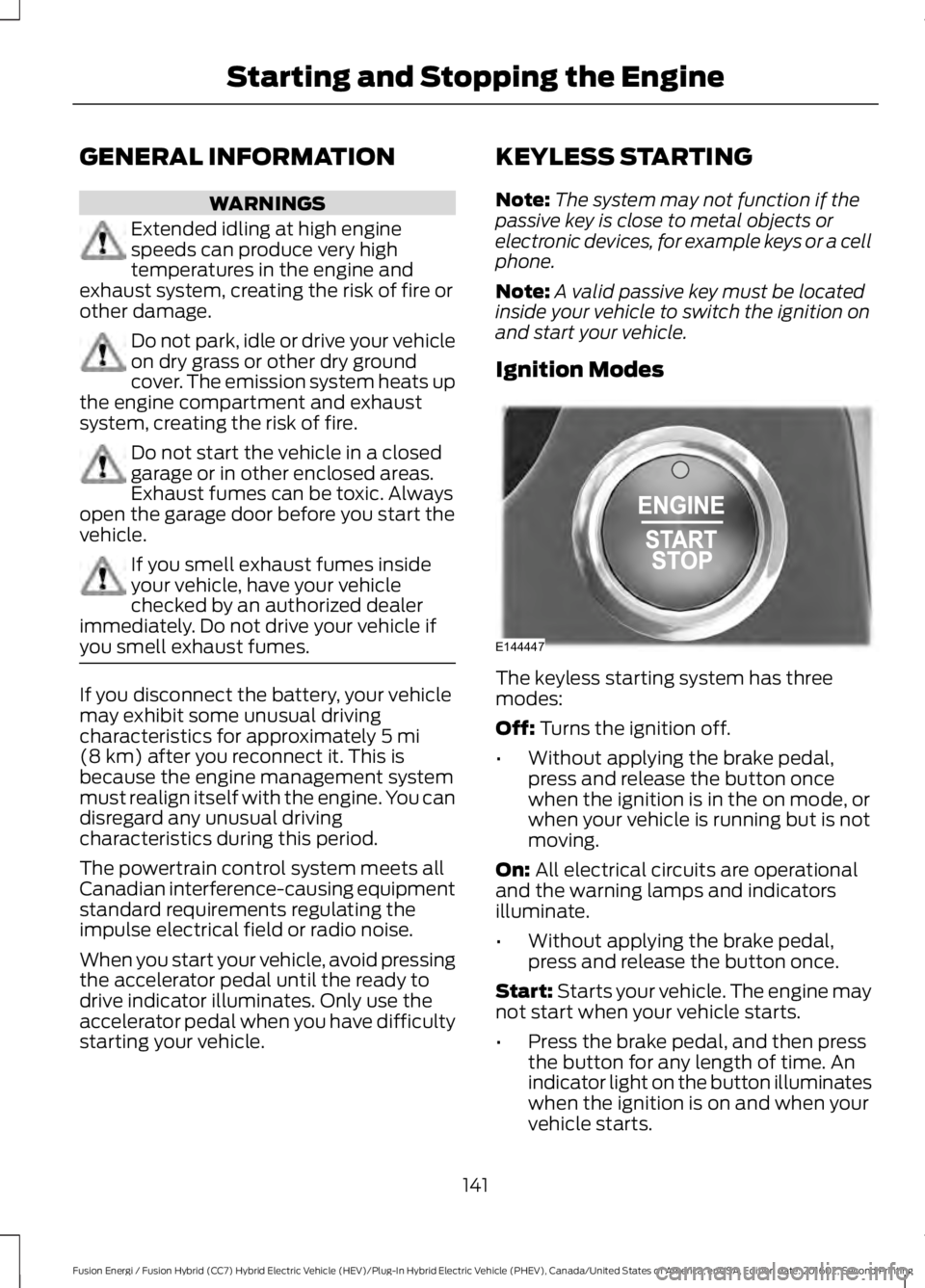
The keyless starting system has threemodes:
Off: Turns the ignition off.
•Without applying the brake pedal,press and release the button oncewhen the ignition is in the on mode, orwhen your vehicle is running but is notmoving.
On: All electrical circuits are operationaland the warning lamps and indicatorsilluminate.
•Without applying the brake pedal,press and release the button once.
Start: Starts your vehicle. The engine maynot start when your vehicle starts.
•Press the brake pedal, and then pressthe button for any length of time. Anindicator light on the button illuminateswhen the ignition is on and when yourvehicle starts.
141
Fusion Energi / Fusion Hybrid (CC7) Hybrid Electric Vehicle (HEV)/Plug-In Hybrid Electric Vehicle (PHEV), Canada/United States of America, enUSA, Edition date: 201602, Second Printing
Starting and Stopping the EngineE144447
Page 156 of 526
SAFETY PRECAUTIONS
WARNINGS
Do not overfill the fuel tank. Thepressure in an overfilled tank maycause leakage and lead to fuel sprayand fire.
The fuel system may be underpressure. If you hear a hissing soundnear the fuel filler inlet, do not refueluntil the sound stops. Otherwise, fuel mayspray out, which could cause seriouspersonal injury.
Fuels can cause serious injury ordeath if misused or mishandled.
Flow of fuel through a fuel pumpnozzle can produce static electricity.This can cause a fire if you are fillingan ungrounded fuel container.
Fuel may contain benzene, which isa cancer-causing agent.
When refueling always shut theengine off and never allow sparks oropen flames near the fuel tank fillervalve. Never smoke or use a cell phonewhile refueling. Fuel vapor is extremelyhazardous under certain conditions. Avoidinhaling excess fumes.
Observe the following guidelines whenhandling automotive fuel:
•Extinguish all smoking materials andany open flames before refueling yourvehicle.
•Always turn off the vehicle beforerefueling.
•Automotive fuels can be harmful orfatal if swallowed. Fuel such asgasoline is highly toxic and ifswallowed can cause death orpermanent injury. If fuel is swallowed,call a physician immediately, even if nosymptoms are immediately apparent.The toxic effects of fuel may not bevisible for hours.
•Avoid inhaling fuel vapors. Inhaling toomuch fuel vapor of any kind can leadto eye and respiratory tract irritation.In severe cases, excessive or prolongedbreathing of fuel vapor can causeserious illness and permanent injury.
•Avoid getting fuel liquid in your eyes. Iffuel is splashed in the eyes, removecontact lenses (if worn), flush withwater for 15 minutes and seek medicalattention. Failure to seek propermedical attention could lead topermanent injury.
•Fuels can also be harmful if absorbedthrough the skin. If fuel is splashed onthe skin, clothing or both, promptlyremove contaminated clothing andwash skin thoroughly with soap andwater. Repeated or prolonged skincontact with fuel liquid or vapor causesskin irritation.
•Be particularly careful if you are takingAntabuse or other forms of Disulfiramfor the treatment of alcoholism.Breathing gasoline vapors could causean adverse reaction, serious personalinjury or sickness. If fuel is splashed onthe skin, wash the affected areasimmediately with plenty of soap andwater. Consult a physician immediatelyif you experience any adverse reactions.
153
Fusion Energi / Fusion Hybrid (CC7) Hybrid Electric Vehicle (HEV)/Plug-In Hybrid Electric Vehicle (PHEV), Canada/United States of America, enUSA, Edition date: 201602, Second Printing
Fuel and Refueling
Page 159 of 526
WARNINGS
Do not dispose of fuel in thehousehold refuse or the publicsewage system. Use an authorizedwaste disposal facility.
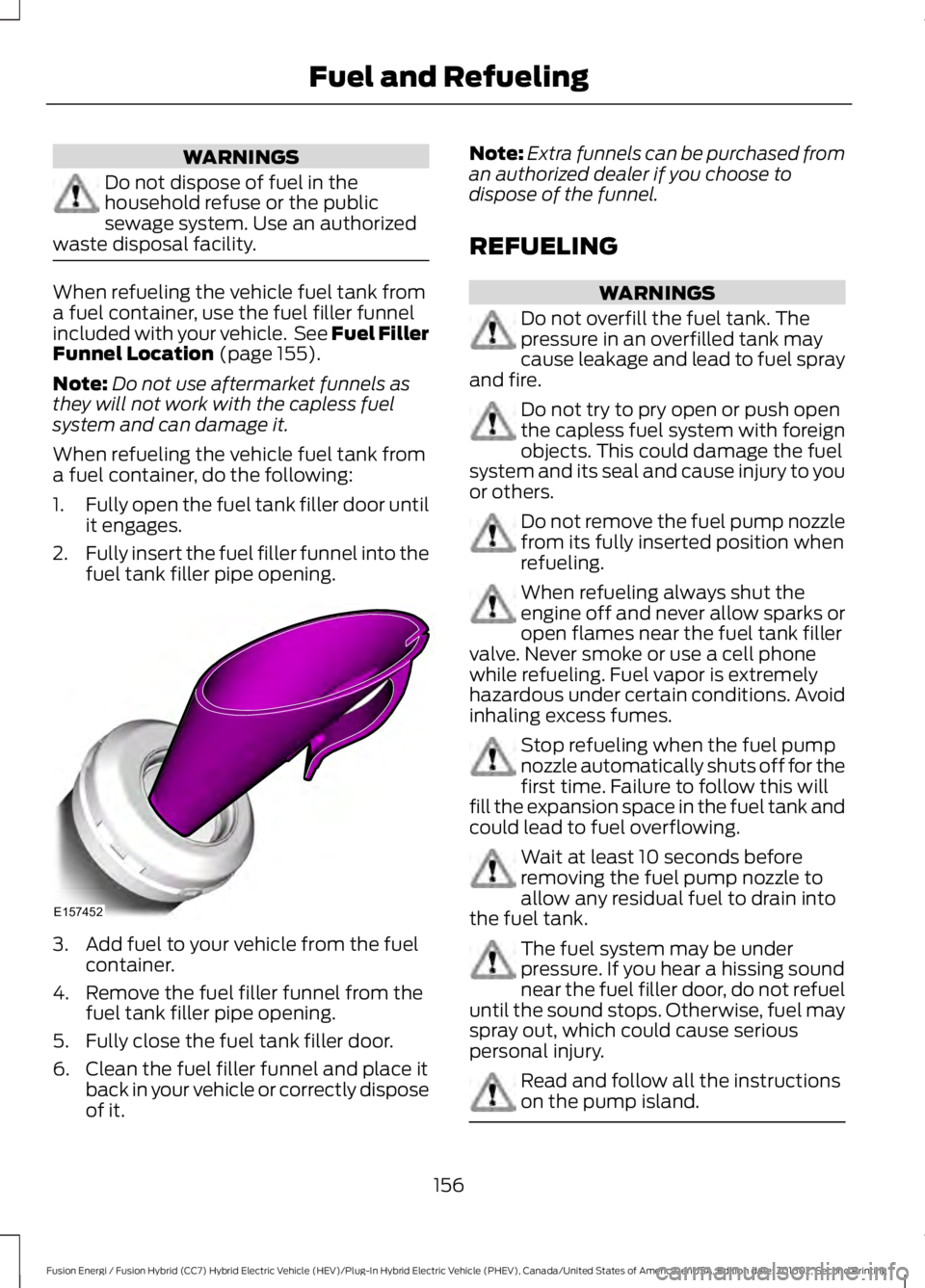
When refueling the vehicle fuel tank froma fuel container, use the fuel filler funnelincluded with your vehicle. See Fuel FillerFunnel Location (page 155).
Note:Do not use aftermarket funnels asthey will not work with the capless fuelsystem and can damage it.
When refueling the vehicle fuel tank froma fuel container, do the following:
1.Fully open the fuel tank filler door untilit engages.
2.Fully insert the fuel filler funnel into thefuel tank filler pipe opening.
3. Add fuel to your vehicle from the fuelcontainer.
4. Remove the fuel filler funnel from thefuel tank filler pipe opening.
5. Fully close the fuel tank filler door.
6. Clean the fuel filler funnel and place itback in your vehicle or correctly disposeof it.
Note:Extra funnels can be purchased froman authorized dealer if you choose todispose of the funnel.
REFUELING
WARNINGS
Do not overfill the fuel tank. Thepressure in an overfilled tank maycause leakage and lead to fuel sprayand fire.
Do not try to pry open or push openthe capless fuel system with foreignobjects. This could damage the fuelsystem and its seal and cause injury to youor others.
Do not remove the fuel pump nozzlefrom its fully inserted position whenrefueling.
When refueling always shut theengine off and never allow sparks oropen flames near the fuel tank fillervalve. Never smoke or use a cell phonewhile refueling. Fuel vapor is extremelyhazardous under certain conditions. Avoidinhaling excess fumes.
Stop refueling when the fuel pumpnozzle automatically shuts off for thefirst time. Failure to follow this willfill the expansion space in the fuel tank andcould lead to fuel overflowing.
Wait at least 10 seconds beforeremoving the fuel pump nozzle toallow any residual fuel to drain intothe fuel tank.
The fuel system may be underpressure. If you hear a hissing soundnear the fuel filler door, do not refueluntil the sound stops. Otherwise, fuel mayspray out, which could cause seriouspersonal injury.
Read and follow all the instructionson the pump island.
156
Fusion Energi / Fusion Hybrid (CC7) Hybrid Electric Vehicle (HEV)/Plug-In Hybrid Electric Vehicle (PHEV), Canada/United States of America, enUSA, Edition date: 201602, Second Printing
Fuel and RefuelingE157452
Page 237 of 526
GETTING THE SERVICES YOU
NEED
Warranty repairs to your vehicle must beperformed by an authorized dealer. Whileany authorized dealer handling your vehicleline will provide warranty service, werecommend you return to your sellingauthorized dealer who wants to ensureyour continued satisfaction.
Please note that certain warranty repairsrequire special training and equipment, sonot all authorized dealers are authorizedto perform all warranty repairs. This meansthat, depending on the warranty repairneeded, you may have to take your vehicleto another authorized dealer.
A reasonable time must be allowed toperform a repair after taking your vehicleto the authorized dealer. Repairs will bemade using Ford or Motorcraft® parts, orremanufactured or other parts that areauthorized by Ford.
Away From Home
If you are away from home when yourvehicle needs service, contact the FordCustomer Relationship Center or use theonline resources listed below to find thenearest authorized dealer.
In the United States:
Mailing address
Ford Motor CompanyCustomer Relationship CenterP.O. Box 6248Dearborn, MI 48126
Telephone
1-800-392-3673 (FORD)(TDD for the hearing impaired:1-800-232-5952)
Additional information and resources areavailable online:
Website
www.owner.ford.com
These are some of the items that can befound online:
•U.S. dealer locator by Dealer Name,City/State or Zip Code.
•Owner Manuals.
•Maintenance Schedules.
•Recalls.
•Ford Extended Service Plans.
•Ford Genuine Accessories.
•Service specials and promotions.
In Canada:
Mailing address
Customer Relationship CentreFord Motor Company of Canada, LimitedP.O. Box 2000Oakville, Ontario L6K 0C8
Telephone
1-800-565-3673 (FORD)
Website
www.ford.ca
Twitter
@FordServiceCA (English Canada)@FordServiceQC (Quebec)
Additional Assistance
If you have questions or concerns, or areunsatisfied with the service you arereceiving, follow these steps:
1. Contact your Sales Representative orService Advisor at your selling orservicing authorized dealer.
234
Fusion Energi / Fusion Hybrid (CC7) Hybrid Electric Vehicle (HEV)/Plug-In Hybrid Electric Vehicle (PHEV), Canada/United States of America, enUSA, Edition date: 201602, Second Printing
Customer Assistance