display FORD FUSION ENERGI 2018 Owners Manual
[x] Cancel search | Manufacturer: FORD, Model Year: 2018, Model line: FUSION ENERGI, Model: FORD FUSION ENERGI 2018Pages: 538, PDF Size: 7.52 MB
Page 268 of 538
Note:Driving your vehicle without repairincreases the chance of engine damage.
Engine Coolant TemperatureManagement (If Equipped)
WARNING
To reduce the risk of crash and injury,be prepared that the vehicle speedmay reduce and the vehicle may notbe able to accelerate with full power untilthe coolant temperature reduces.
If you tow a trailer with your vehicle, theengine may temporarily reach a highertemperature during severe operatingconditions, for example ascending a longor steep grade in high ambienttemperatures.
At this time, you may notice the coolanttemperature gauge moves toward the redzone and a message may appear in theinformation display.
You may notice a reduction in vehiclespeed caused by reduced engine power inorder to manage the engine coolanttemperature. Your vehicle may enter thismode if certain high-temperature andhigh-load conditions take place. Theamount of speed reduction depends onvehicle loading, grade and ambienttemperature. If this occurs, there is no needto pull off the road. You can continue todrive your vehicle.
The air conditioning may automaticallyturn on and off during severe operatingconditions to protect the engine fromoverheating. When the coolanttemperature decreases to the normaloperating temperature, the air conditioningturns on.
If the coolant temperature gauge movesfully into the red zone, or if the coolanttemperature warning or service enginesoon messages appear in your informationdisplay, do the following:
1. Pull off the road as soon as safelypossible and shift the transmission intopark (P).
2. Leave the engine running until thecoolant temperature gauge needlereturns to the normal position. If thetemperature does not drop afterseveral minutes, follow the remainingsteps.
3.Switch the engine off and wait for it tocool. Check the coolant level.
4. If the coolant level is at or below theminimum mark, add prediluted coolantimmediately.
5. If the coolant level is normal, restartthe engine and continue.
AUTOMATIC TRANSMISSION
FLUID CHECK
Note:Transmission fluid should be checkedby an authorized dealer. If required, fluidshould be added by an authorized dealer.
Have an authorized dealer check andchange the transmission fluid at thecorrect service interval. See ScheduledMaintenance (page 473). Yourtransmission does not consume fluid.However, the fluid level should be checkedif the transmission is not working properly,(i.e., if the transmission slips or shiftsslowly) or if you notice some sign of fluidleakage.
Do not use supplemental transmissionfluid additives, treatments or cleaningagents. The use of these materials mayaffect transmission operation and resultin damage to internal transmissioncomponents.
265
Fusion Energi / Fusion Hybrid (CC7) Hybrid Electric Vehicle (HEV)/Plug-In Hybrid Electric Vehicle (PHEV), Canada/United States of America, enUSA, Edition date: 201705, Second Printing
Maintenance
Page 284 of 538
GENERAL INFORMATION
A decal with tire pressure data is locatedin the driver’s door opening.
Check and set the tire pressure at theambient temperature in which you areintending to drive your vehicle and whenthe tires are cold.
Note:Check your tire pressures regularly tooptimize fuel economy.
Note:Use only approved wheel and tiresizes. Using other sizes could damage yourvehicle and will make the National TypeApproval invalid.
Note:If you change the diameter of the tiresfrom that fitted at the factory, thespeedometer may not display the correctspeed. Take your vehicle to an authorizeddealer to have the engine managementsystem reprogrammed.
TIRE SEALANT AND INFLATOR
KIT
Note:The temporary mobility kit containsenough sealant compound in the canisterfor one tire repair only. See your authorizedFord dealer for replacement sealantcanisters.
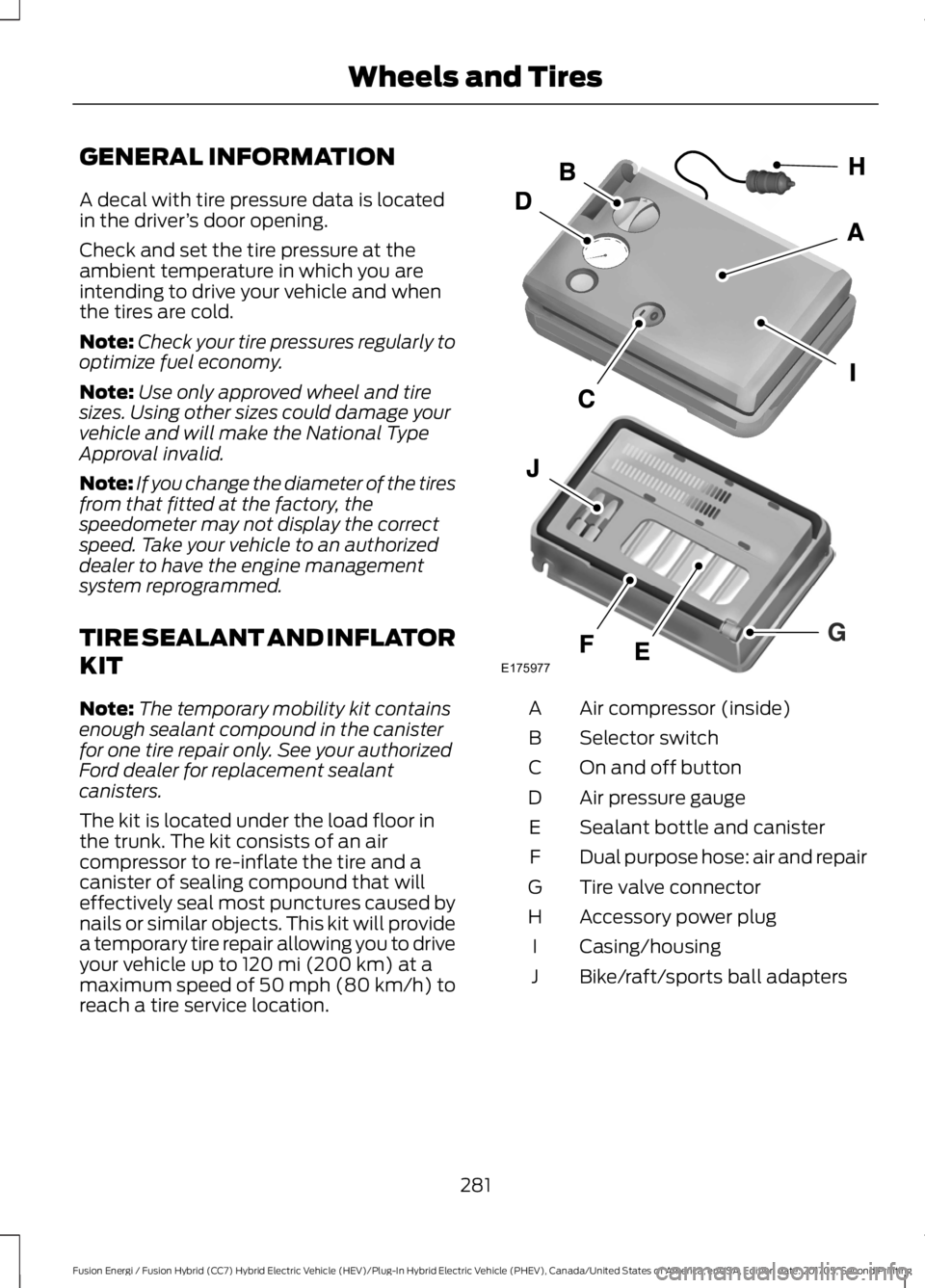
The kit is located under the load floor inthe trunk. The kit consists of an aircompressor to re-inflate the tire and acanister of sealing compound that willeffectively seal most punctures caused bynails or similar objects. This kit will providea temporary tire repair allowing you to driveyour vehicle up to 120 mi (200 km) at amaximum speed of 50 mph (80 km/h) toreach a tire service location.
Air compressor (inside)A
Selector switchB
On and off buttonC
Air pressure gaugeD
Sealant bottle and canisterE
Dual purpose hose: air and repairF
Tire valve connectorG
Accessory power plugH
Casing/housingI
Bike/raft/sports ball adaptersJ
281
Fusion Energi / Fusion Hybrid (CC7) Hybrid Electric Vehicle (HEV)/Plug-In Hybrid Electric Vehicle (PHEV), Canada/United States of America, enUSA, Edition date: 201705, Second Printing
Wheels and TiresE175977
Page 307 of 538
2. This device must accept anyinterference received, includinginterference that may cause undesiredoperation.
Note:Changes or modifications notexpressively approved by the partyresponsible for compliance could void theuser's authority to operate the equipment.The term "IC:" before the radio certificationnumber only signifies that Industry Canadatechnical specifications were met.
Changing Tires With a TirePressure Monitoring System
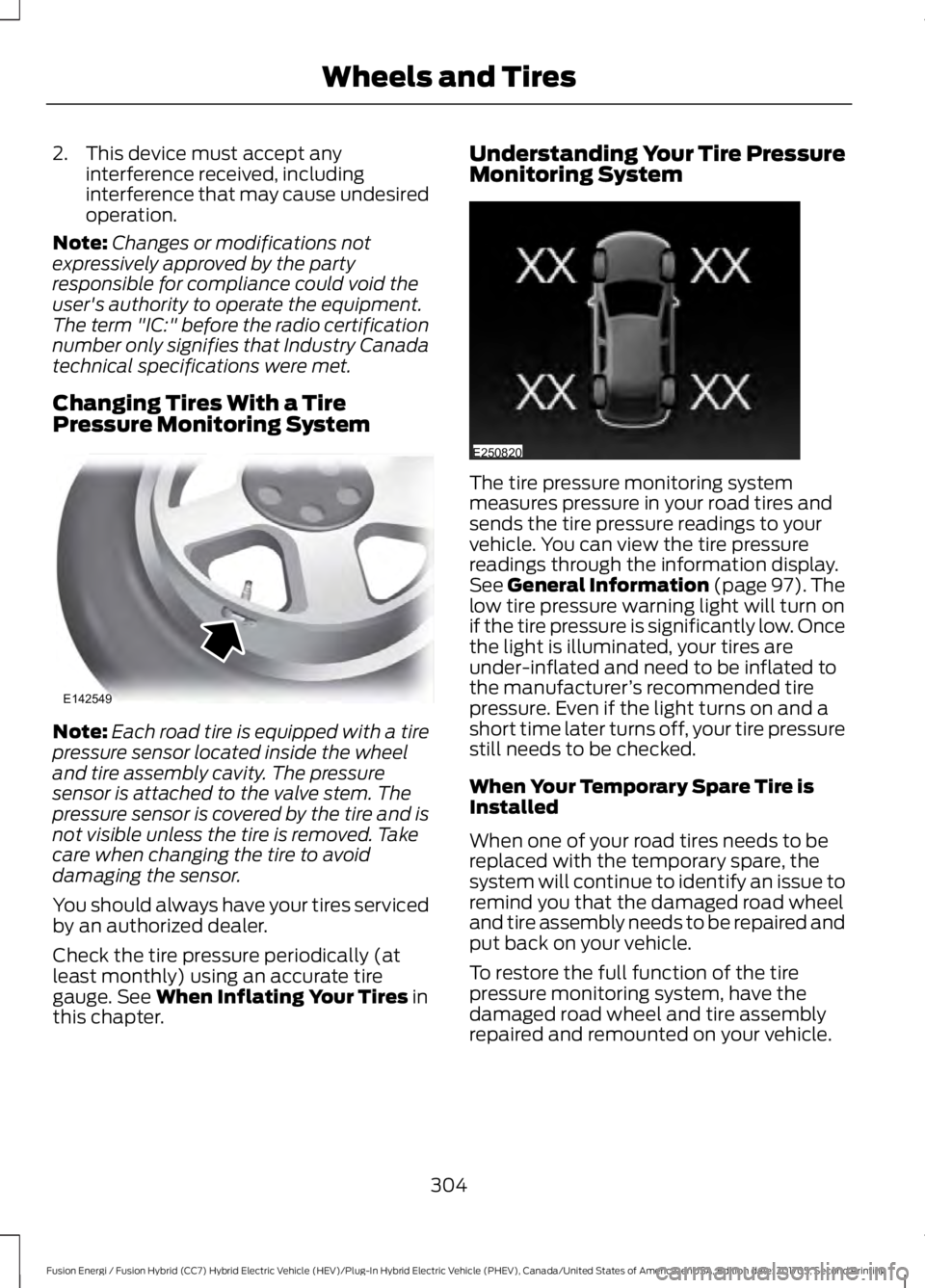
Note:Each road tire is equipped with a tirepressure sensor located inside the wheeland tire assembly cavity. The pressuresensor is attached to the valve stem. Thepressure sensor is covered by the tire and isnot visible unless the tire is removed. Takecare when changing the tire to avoiddamaging the sensor.
You should always have your tires servicedby an authorized dealer.
Check the tire pressure periodically (atleast monthly) using an accurate tiregauge. See When Inflating Your Tires inthis chapter.
Understanding Your Tire PressureMonitoring System
The tire pressure monitoring systemmeasures pressure in your road tires andsends the tire pressure readings to yourvehicle. You can view the tire pressurereadings through the information display.See General Information (page 97). Thelow tire pressure warning light will turn onif the tire pressure is significantly low. Oncethe light is illuminated, your tires areunder-inflated and need to be inflated tothe manufacturer’s recommended tirepressure. Even if the light turns on and ashort time later turns off, your tire pressurestill needs to be checked.
When Your Temporary Spare Tire isInstalled
When one of your road tires needs to bereplaced with the temporary spare, thesystem will continue to identify an issue toremind you that the damaged road wheeland tire assembly needs to be repaired andput back on your vehicle.
To restore the full function of the tirepressure monitoring system, have thedamaged road wheel and tire assemblyrepaired and remounted on your vehicle.
304
Fusion Energi / Fusion Hybrid (CC7) Hybrid Electric Vehicle (HEV)/Plug-In Hybrid Electric Vehicle (PHEV), Canada/United States of America, enUSA, Edition date: 201705, Second Printing
Wheels and TiresE142549 E250820
Page 309 of 538
When Inflating Your Tires
WARNING
Do not use the tire pressuredisplayed in the information displayas a tire pressure gauge. Failure tofollow this instruction could result inpersonal injury or death.
When putting air into your tires (such as ata gas station or in your garage), the tirepressure monitoring system may notrespond immediately to the air added toyour tires.
It may take up to two minutes of drivingover 20 mph (32 km/h) for the light to turnoff after you have filled your tires to therecommended inflation pressure.
How Temperature Affects Your TirePressure
The tire pressure monitoring systemmonitors tire pressure in each pneumatictire. While driving in a normal manner, atypical passenger tire inflation pressuremay increase about 2–4 psi (14–28 kPa)from a cold start situation. If the vehicle is
stationary overnight with the outsidetemperature significantly lower than thedaytime temperature, the tire pressure maydecrease about 3 psi (21 kPa) for a drop of30°F (17°C) in ambient temperature. Thislower pressure value may be detected bythe tire pressure monitoring system asbeing significantly lower than therecommended inflation pressure andactivate the system warning light for lowtire pressure. If the low tire pressurewarning light is on, visually check each tireto verify that no tire is flat. If one or moretires are flat, repair as necessary. Checkthe air pressure in the road tires. If any tireis under-inflated, carefully drive the vehicleto the nearest location where air can beadded to the tires. Inflate all the tires tothe recommended inflation pressure.
TECHNICAL SPECIFICATIONS
Wheel Lug Nut Torque Specifications
WARNING
When a wheel is installed, always remove any corrosion, dirt or foreign materialspresent on the mounting surfaces of the wheel or the surface of the wheel hub,brake drum or brake disc that contacts the wheel. Make sure that any fastenersthat attach the rotor to the hub are secured so they do not interfere with the mountingsurfaces of the wheel. Installing wheels without correct metal-to-metal contact at thewheel mounting surfaces can cause the wheel nuts to loosen and the wheel to come offwhile your vehicle is in motion, resulting in loss of control.
306
Fusion Energi / Fusion Hybrid (CC7) Hybrid Electric Vehicle (HEV)/Plug-In Hybrid Electric Vehicle (PHEV), Canada/United States of America, enUSA, Edition date: 201705, Second Printing
Wheels and Tires
Page 317 of 538
SpecificationName
Motorcraft® R-1234yf Refrigerant POE OilYN-34
-A/C refrigerant compressor oil (Mexico):Motorcraft® Electric A/C Compressor OilYN-32
ESB-M1C93-BMulti-purpose grease:Motorcraft Multi-Purpose Grease SprayXL-5
-Lock cylinders (U.S.):Penetrating and Lock LubricantXL-1
-Lock cylinders (Canada):Penetrating FluidCXC-51-A
-Lock cylinders (Mexico):Penetrating and Lock LubricantMXL-1
If you use oil and fluids that do not meetthe defined specification and viscositygrade, this may lead to:
•Component damage which is notcovered by the vehicle warranty.
•Longer engine cranking periods.
•Increased emission levels.
•Reduced engine performance.
•Reduced fuel economy.
•Degraded brake performance.
We recommend Motorcraft motor oil foryour vehicle. If Motorcraft oil is notavailable, use motor oils of therecommended viscosity grade that meetAPI SN requirements and display the APICertification Mark for gasoline engines. Donot use oil labeled with API SN servicecategory unless the label also displays theAPI certification mark.
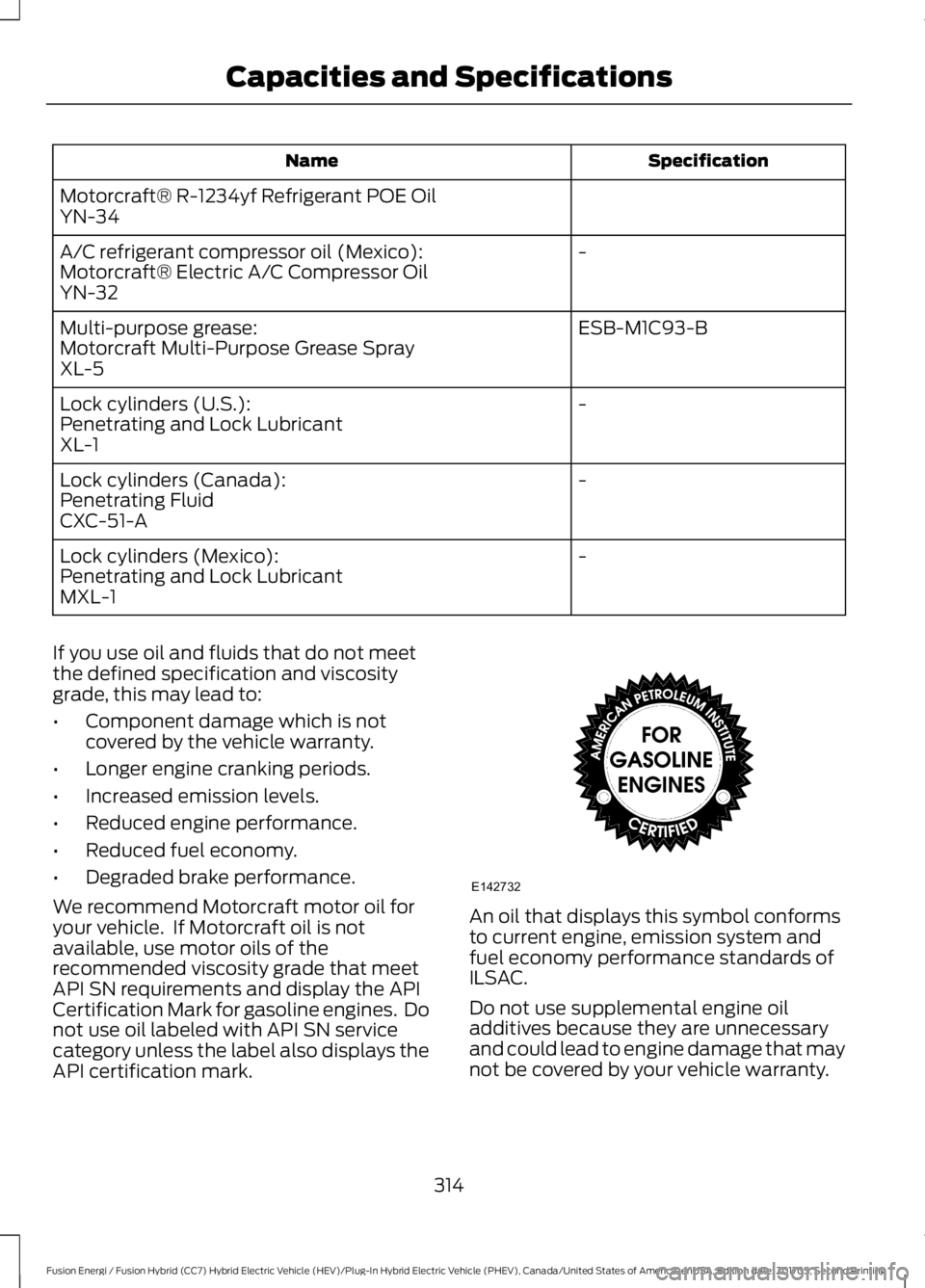
An oil that displays this symbol conformsto current engine, emission system andfuel economy performance standards ofILSAC.
Do not use supplemental engine oiladditives because they are unnecessaryand could lead to engine damage that maynot be covered by your vehicle warranty.
314
Fusion Energi / Fusion Hybrid (CC7) Hybrid Electric Vehicle (HEV)/Plug-In Hybrid Electric Vehicle (PHEV), Canada/United States of America, enUSA, Edition date: 201705, Second Printing
Capacities and SpecificationsE142732
Page 321 of 538
•MP3 and WMA folder mode representsa folder structure consisting of onelevel of folders. The CD player numbersall MP3 and WMA tracks on the disc(noted by the MP3 or WMA fileextension) and all folders containingMP3 and WMA files, from F001 (folder)T001 (track) to F253 T255.
•Creating discs with only one level offolders helps with navigation throughthe disc files.
If you are burning your own MP3 and WMAdiscs, it is important to understand howthe system reads the structures you create.While various files may be present (fileswith extensions other than MP3 andWMA), only files with the MP3 and WMAextension are played; other files areignored by the system. This enables you touse the same MP3 and WMA disc for avariety of tasks on your work computer,home computer and your in-vehiclesystem.
In track mode, the system displays andplays the structure as if it were only onelevel deep (all MP3 and WMA files play,regardless of being in a specific folder). Infolder mode, the system only plays theMP3 and WMA files in the current folder.
AUDIO UNIT - VEHICLES WITH:
SYNC 3/SONY AUDIO SYSTEM
WARNING
Driving while distracted can result inloss of vehicle control, crash andinjury. We strongly recommend thatyou use extreme caution when using anydevice that may take your focus off theroad. Your primary responsibility is the safeoperation of your vehicle. We recommendagainst the use of any hand-held devicewhile driving and encourage the use ofvoice-operated systems when possible.Make sure you are aware of all applicablelocal laws that may affect the use ofelectronic devices while driving.
Note:Some features, such as SIRIUSsatellite radio, may not be available in yourlocation. Check with an authorized dealer.
Note:The touchscreen system controlsmost of the audio features. See your SYNCinformation.
318
Fusion Energi / Fusion Hybrid (CC7) Hybrid Electric Vehicle (HEV)/Plug-In Hybrid Electric Vehicle (PHEV), Canada/United States of America, enUSA, Edition date: 201705, Second Printing
Audio System
Page 323 of 538
AUDIO UNIT - VEHICLES WITH:
SYNC, VEHICLES WITHOUT:
TOUCHSCREEN DISPLAY
WARNING
Driving while distracted can result inloss of vehicle control, crash andinjury. We strongly recommend thatyou use extreme caution when using anydevice that may take your focus off theroad. Your primary responsibility is the safeoperation of your vehicle. We recommendagainst the use of any hand-held devicewhile driving and encourage the use ofvoice-operated systems when possible.Make sure you are aware of all applicablelocal laws that may affect the use ofelectronic devices while driving.
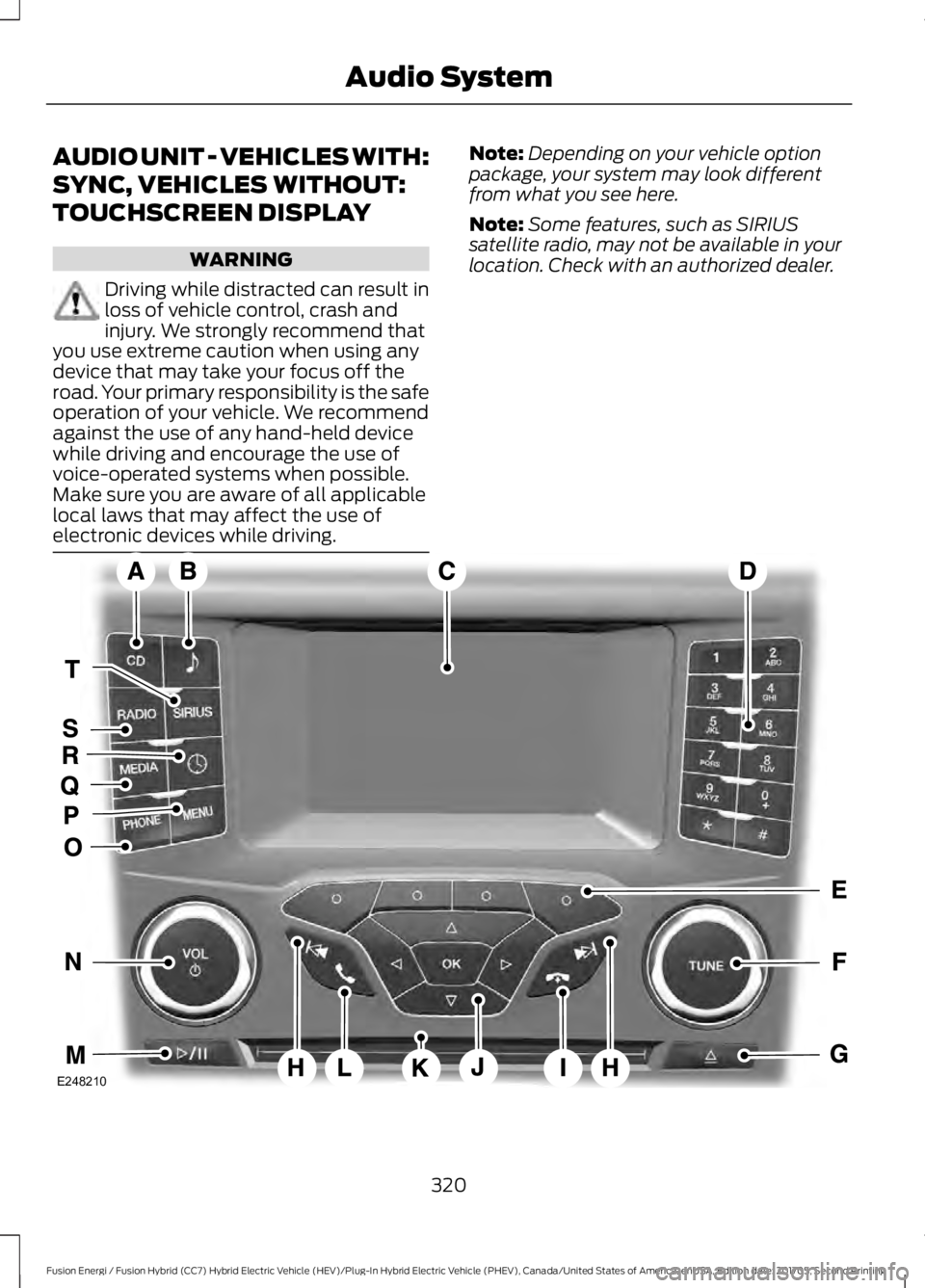
Note:Depending on your vehicle optionpackage, your system may look differentfrom what you see here.
Note:Some features, such as SIRIUSsatellite radio, may not be available in yourlocation. Check with an authorized dealer.
320
Fusion Energi / Fusion Hybrid (CC7) Hybrid Electric Vehicle (HEV)/Plug-In Hybrid Electric Vehicle (PHEV), Canada/United States of America, enUSA, Edition date: 201705, Second Printing
Audio SystemE248210
Page 324 of 538
CD: Press to listen to a CD. Pressthe function buttons below theradio screen to select on-screenoptions of Repeat or Shuffle.
A
SOUND: Press to accesssettings for Treble, Midrange,Bass, Fade and Balance. Use theup and down arrow buttons toselect the various settings. Whenyou make your selection, press
B
the left and right arrow buttonsto change the settings. Press OKto set or press MENU to exit.Sound settings can be set foreach audio sourceindependently.
Display screen: Shows audioand SYNC information.C
Number block: In radio mode,store and recall your favoriteradio stations. To store a radiostation, tune to the station, thenpress and hold a preset buttonuntil sound returns. In CD mode,select a track. In phone mode,enter a phone number.
D
Function buttons: Selectdifferent functions of the audiosystem depending on whichmode you are in (such as Radiomode or CD mode).
E
TUNE: In radio mode, turn tosearch through the radiofrequency band. In SIRIUS mode,turn to find the previous or nextavailable satellite radio station.
F
Eject: Press to eject a CD.G
Seek, Fast Forward andReverse: In radio mode, selecta frequency band and presseither button. The system stopsat the first station it finds in thatdirection. In SIRIUS mode, press
H
to select the next or previous
satellite radio station. If youselect a specific category (suchas jazz, rock or news), press tofind the next or previous stationin the selected category. In CDmode, press to select the next orprevious track. Press and hold tomove quickly forward orbackward through the currenttrack.
End phone call: Press and holdto end a phone call.I
OK and cursor arrows: Use theup and down arrow buttons toselect the various settings. Whenyou make your selection, pressthe left and right arrow buttonsto change the settings. Press OKto set or press MENU to exit.
J
CD slot: Insert a CD.K
Answer or Make phone call:Press to either answer anincoming phone call or to makea phone call.
L
Play/Pause: Press to eitherplay or pause a track whenlistening to a CD.
M
Vol and Power: Turn to adjustthe volume. Press to switch thesystem on and off.
N
PHONE: Press to access thephone features of the SYNCsystem. See your SYNCinformation.
O
MENU: Press to access differentaudio system features. SeeMenu Structure.
P
321
Fusion Energi / Fusion Hybrid (CC7) Hybrid Electric Vehicle (HEV)/Plug-In Hybrid Electric Vehicle (PHEV), Canada/United States of America, enUSA, Edition date: 201705, Second Printing
Audio System
Page 325 of 538
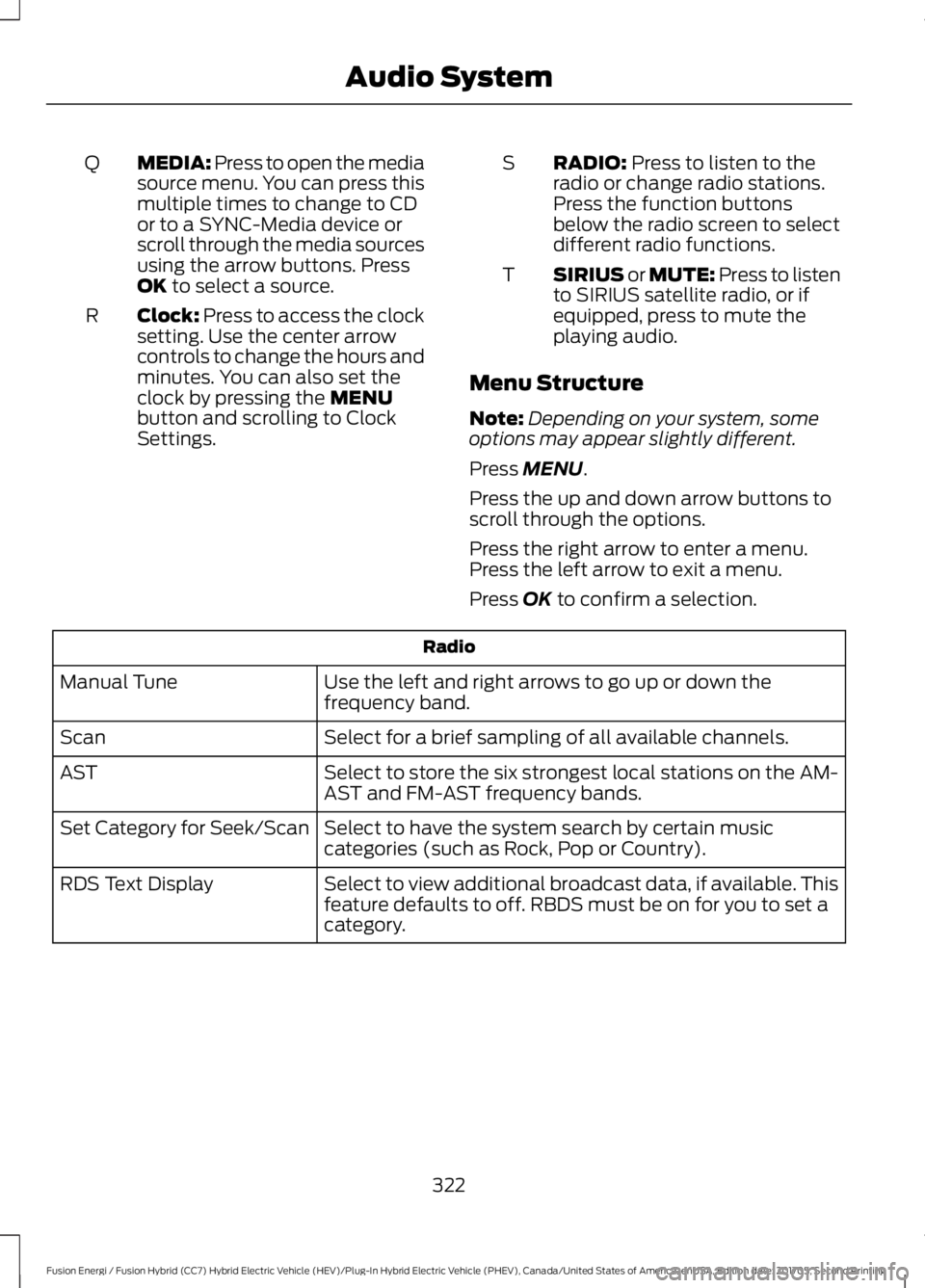
MEDIA: Press to open the mediasource menu. You can press thismultiple times to change to CDor to a SYNC-Media device orscroll through the media sourcesusing the arrow buttons. PressOK to select a source.
Q
Clock: Press to access the clocksetting. Use the center arrowcontrols to change the hours andminutes. You can also set theclock by pressing the MENUbutton and scrolling to ClockSettings.
R
RADIO: Press to listen to theradio or change radio stations.Press the function buttonsbelow the radio screen to selectdifferent radio functions.
S
SIRIUS or MUTE: Press to listento SIRIUS satellite radio, or ifequipped, press to mute theplaying audio.
T
Menu Structure
Note:Depending on your system, someoptions may appear slightly different.
Press MENU.
Press the up and down arrow buttons toscroll through the options.
Press the right arrow to enter a menu.Press the left arrow to exit a menu.
Press OK to confirm a selection.
Radio
Use the left and right arrows to go up or down thefrequency band.Manual Tune
Select for a brief sampling of all available channels.Scan
Select to store the six strongest local stations on the AM-AST and FM-AST frequency bands.AST
Select to have the system search by certain musiccategories (such as Rock, Pop or Country).Set Category for Seek/Scan
Select to view additional broadcast data, if available. Thisfeature defaults to off. RBDS must be on for you to set acategory.
RDS Text Display
322
Fusion Energi / Fusion Hybrid (CC7) Hybrid Electric Vehicle (HEV)/Plug-In Hybrid Electric Vehicle (PHEV), Canada/United States of America, enUSA, Edition date: 201705, Second Printing
Audio System
Page 327 of 538
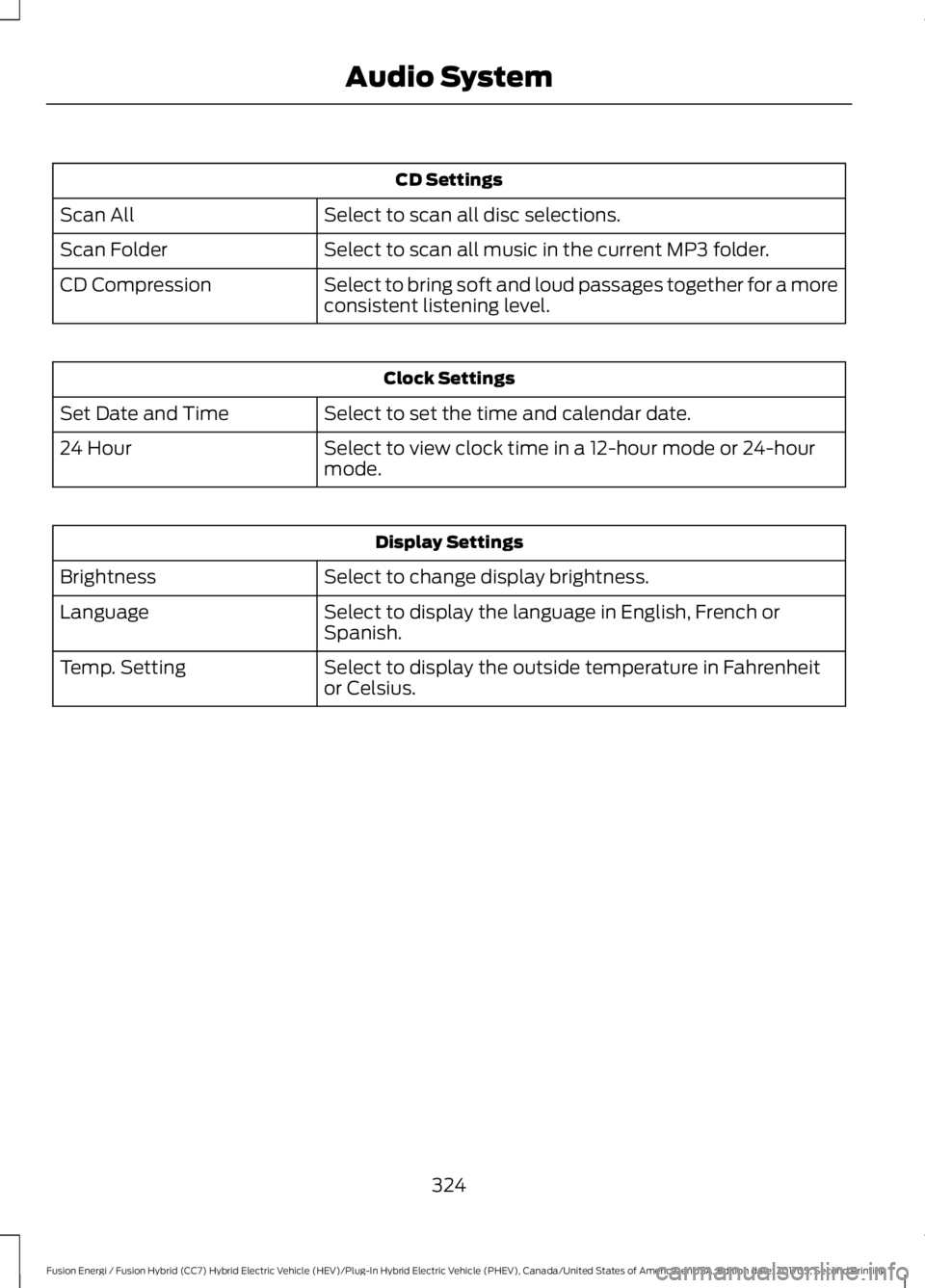
CD Settings
Select to scan all disc selections.Scan All
Select to scan all music in the current MP3 folder.Scan Folder
Select to bring soft and loud passages together for a moreconsistent listening level.CD Compression
Clock Settings
Select to set the time and calendar date.Set Date and Time
Select to view clock time in a 12-hour mode or 24-hourmode.24 Hour
Display Settings
Select to change display brightness.Brightness
Select to display the language in English, French orSpanish.Language
Select to display the outside temperature in Fahrenheitor Celsius.Temp. Setting
324
Fusion Energi / Fusion Hybrid (CC7) Hybrid Electric Vehicle (HEV)/Plug-In Hybrid Electric Vehicle (PHEV), Canada/United States of America, enUSA, Edition date: 201705, Second Printing
Audio System