ECU FORD FUSION ENERGI 2018 Service Manual
[x] Cancel search | Manufacturer: FORD, Model Year: 2018, Model line: FUSION ENERGI, Model: FORD FUSION ENERGI 2018Pages: 538, PDF Size: 7.52 MB
Page 442 of 538
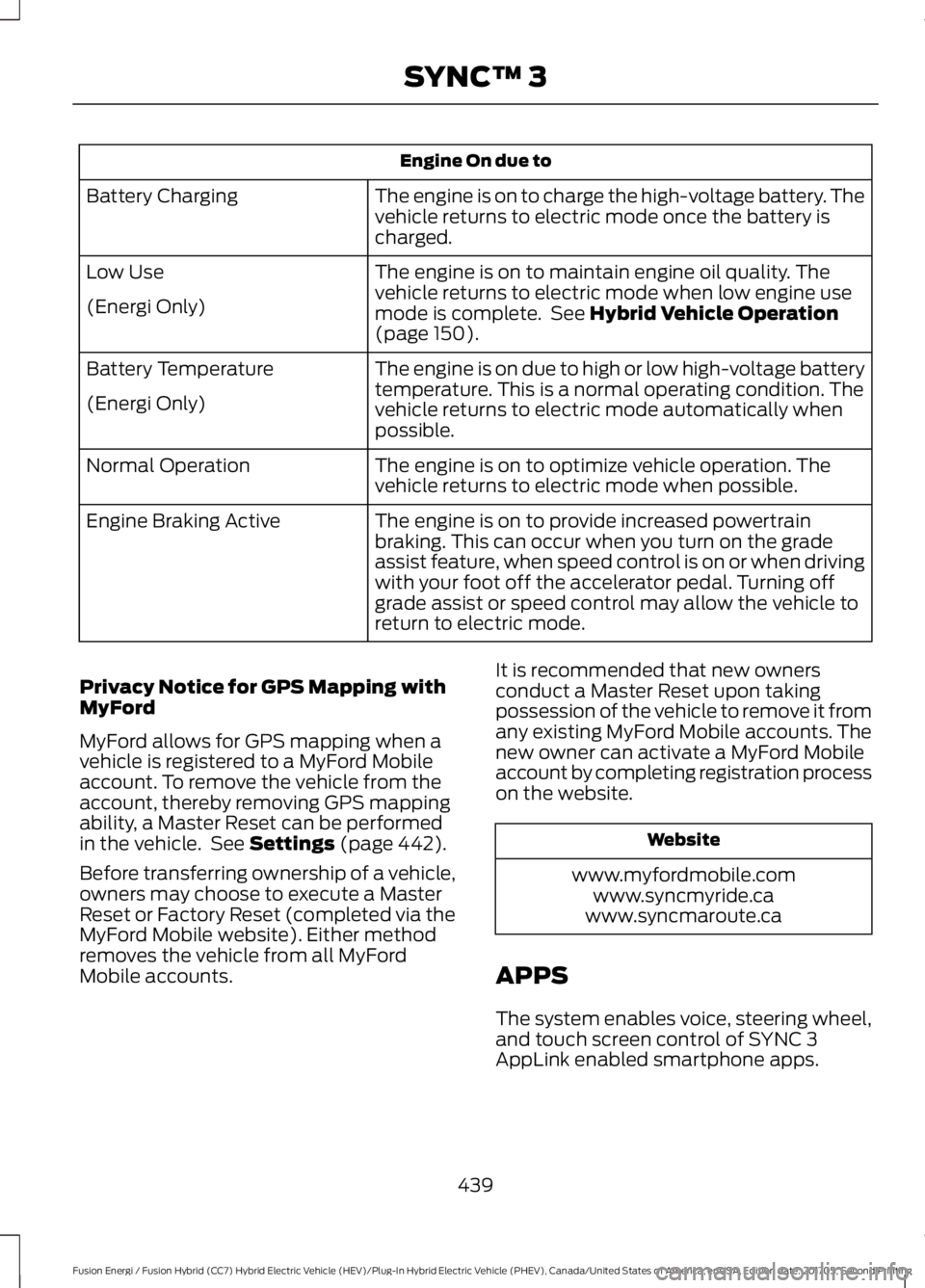
Engine On due to
The engine is on to charge the high-voltage battery. Thevehicle returns to electric mode once the battery ischarged.
Battery Charging
The engine is on to maintain engine oil quality. Thevehicle returns to electric mode when low engine usemode is complete. See Hybrid Vehicle Operation(page 150).
Low Use
(Energi Only)
The engine is on due to high or low high-voltage batterytemperature. This is a normal operating condition. Thevehicle returns to electric mode automatically whenpossible.
Battery Temperature
(Energi Only)
The engine is on to optimize vehicle operation. Thevehicle returns to electric mode when possible.Normal Operation
The engine is on to provide increased powertrainbraking. This can occur when you turn on the gradeassist feature, when speed control is on or when drivingwith your foot off the accelerator pedal. Turning offgrade assist or speed control may allow the vehicle toreturn to electric mode.
Engine Braking Active
Privacy Notice for GPS Mapping withMyFord
MyFord allows for GPS mapping when avehicle is registered to a MyFord Mobileaccount. To remove the vehicle from theaccount, thereby removing GPS mappingability, a Master Reset can be performedin the vehicle. See Settings (page 442).
Before transferring ownership of a vehicle,owners may choose to execute a MasterReset or Factory Reset (completed via theMyFord Mobile website). Either methodremoves the vehicle from all MyFordMobile accounts.
It is recommended that new ownersconduct a Master Reset upon takingpossession of the vehicle to remove it fromany existing MyFord Mobile accounts. Thenew owner can activate a MyFord Mobileaccount by completing registration processon the website.
Website
www.myfordmobile.comwww.syncmyride.cawww.syncmaroute.ca
APPS
The system enables voice, steering wheel,and touch screen control of SYNC 3AppLink enabled smartphone apps.
439
Fusion Energi / Fusion Hybrid (CC7) Hybrid Electric Vehicle (HEV)/Plug-In Hybrid Electric Vehicle (PHEV), Canada/United States of America, enUSA, Edition date: 201705, Second Printing
SYNC™ 3
Page 455 of 538
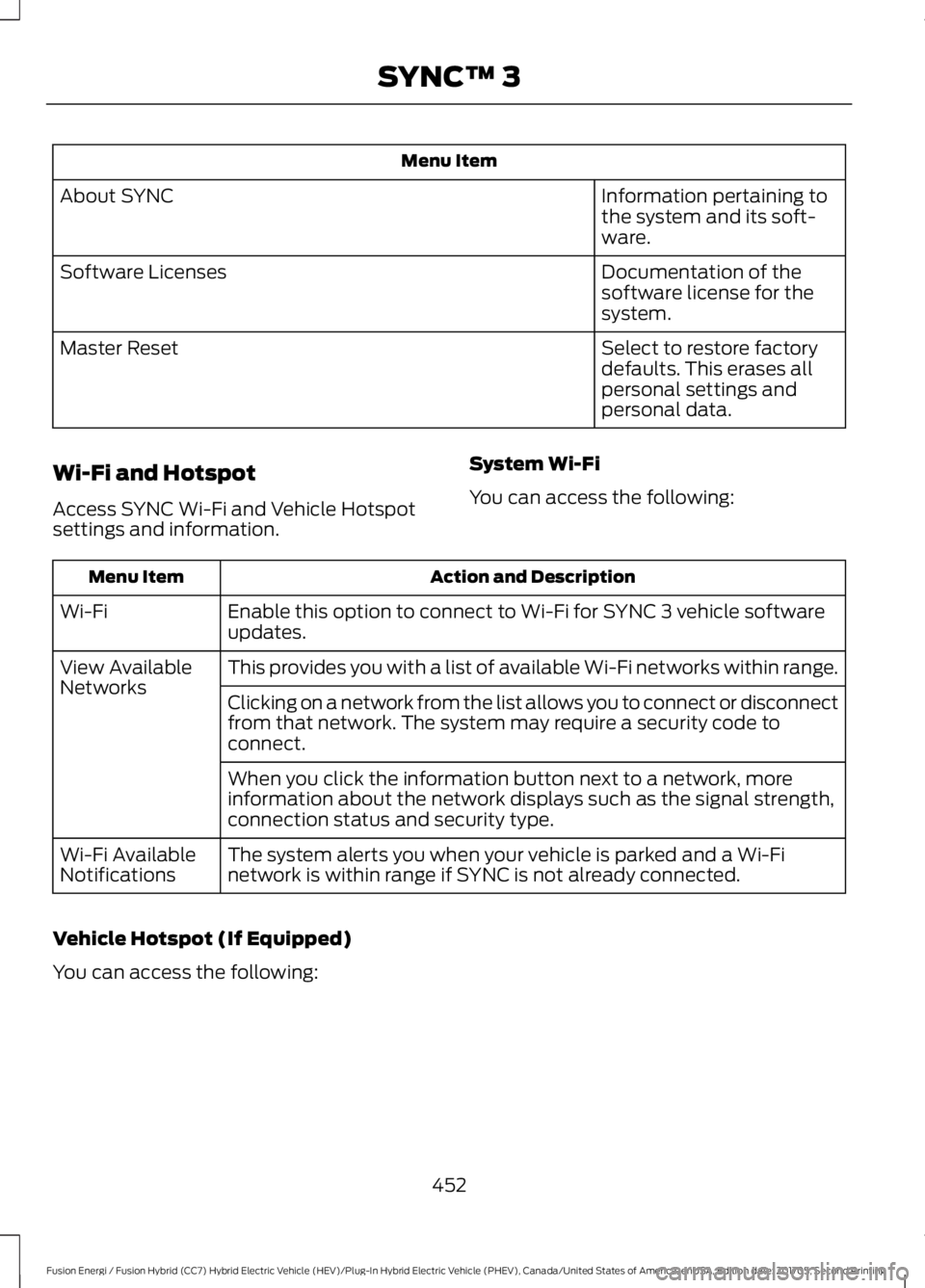
Menu Item
Information pertaining tothe system and its soft-ware.
About SYNC
Documentation of thesoftware license for thesystem.
Software Licenses
Select to restore factorydefaults. This erases allpersonal settings andpersonal data.
Master Reset
Wi-Fi and Hotspot
Access SYNC Wi-Fi and Vehicle Hotspotsettings and information.
System Wi-Fi
You can access the following:
Action and DescriptionMenu Item
Enable this option to connect to Wi-Fi for SYNC 3 vehicle softwareupdates.Wi-Fi
This provides you with a list of available Wi-Fi networks within range.View AvailableNetworksClicking on a network from the list allows you to connect or disconnectfrom that network. The system may require a security code toconnect.
When you click the information button next to a network, moreinformation about the network displays such as the signal strength,connection status and security type.
The system alerts you when your vehicle is parked and a Wi-Finetwork is within range if SYNC is not already connected.Wi-Fi AvailableNotifications
Vehicle Hotspot (If Equipped)
You can access the following:
452
Fusion Energi / Fusion Hybrid (CC7) Hybrid Electric Vehicle (HEV)/Plug-In Hybrid Electric Vehicle (PHEV), Canada/United States of America, enUSA, Edition date: 201705, Second Printing
SYNC™ 3
Page 456 of 538
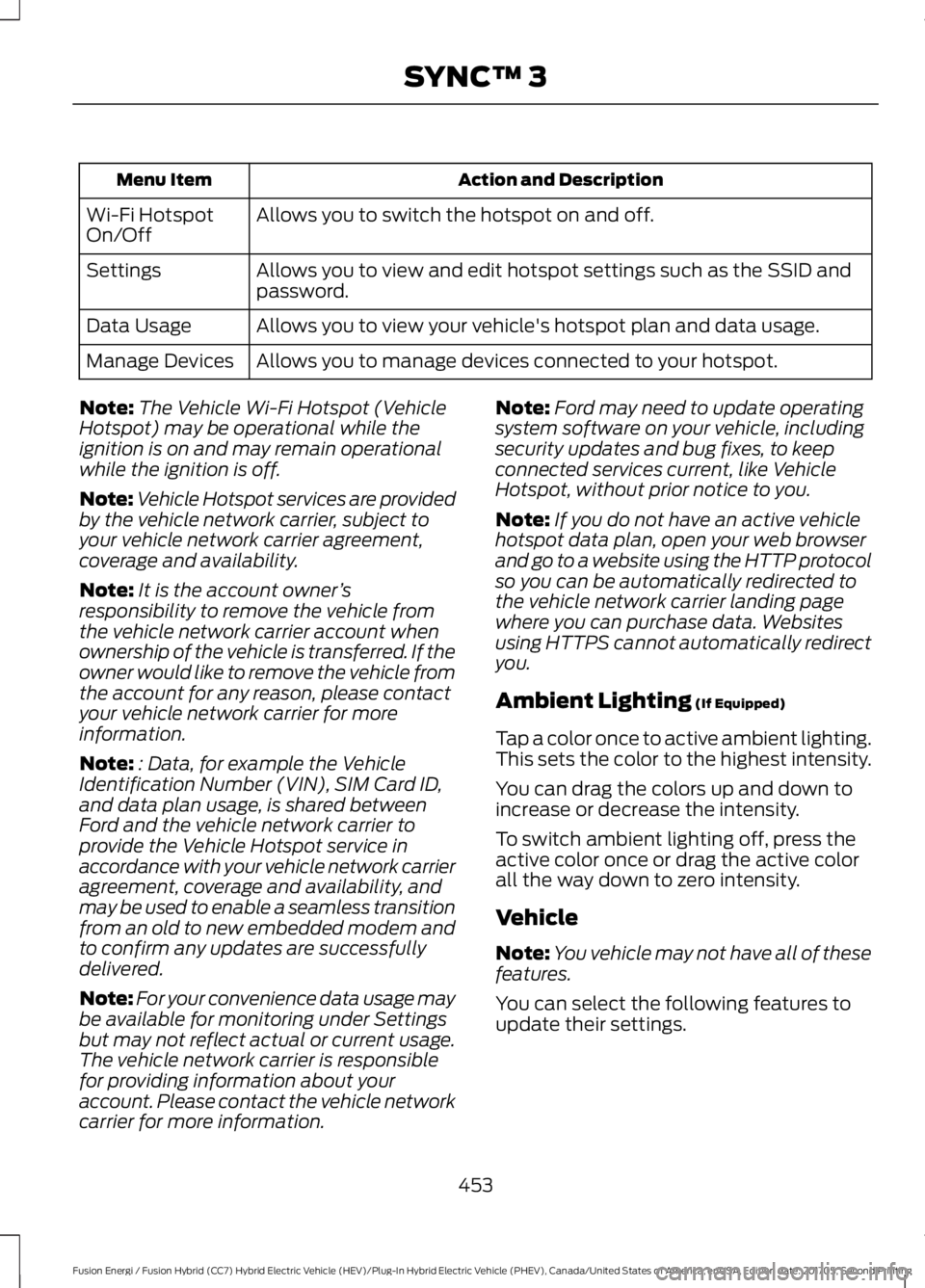
Action and DescriptionMenu Item
Allows you to switch the hotspot on and off.Wi-Fi HotspotOn/Off
Allows you to view and edit hotspot settings such as the SSID andpassword.Settings
Allows you to view your vehicle's hotspot plan and data usage.Data Usage
Allows you to manage devices connected to your hotspot.Manage Devices
Note:The Vehicle Wi-Fi Hotspot (VehicleHotspot) may be operational while theignition is on and may remain operationalwhile the ignition is off.
Note:Vehicle Hotspot services are providedby the vehicle network carrier, subject toyour vehicle network carrier agreement,coverage and availability.
Note:It is the account owner’sresponsibility to remove the vehicle fromthe vehicle network carrier account whenownership of the vehicle is transferred. If theowner would like to remove the vehicle fromthe account for any reason, please contactyour vehicle network carrier for moreinformation.
Note:: Data, for example the VehicleIdentification Number (VIN), SIM Card ID,and data plan usage, is shared betweenFord and the vehicle network carrier toprovide the Vehicle Hotspot service inaccordance with your vehicle network carrieragreement, coverage and availability, andmay be used to enable a seamless transitionfrom an old to new embedded modem andto confirm any updates are successfullydelivered.
Note:For your convenience data usage maybe available for monitoring under Settingsbut may not reflect actual or current usage.The vehicle network carrier is responsiblefor providing information about youraccount. Please contact the vehicle networkcarrier for more information.
Note:Ford may need to update operatingsystem software on your vehicle, includingsecurity updates and bug fixes, to keepconnected services current, like VehicleHotspot, without prior notice to you.
Note:If you do not have an active vehiclehotspot data plan, open your web browserand go to a website using the HTTP protocolso you can be automatically redirected tothe vehicle network carrier landing pagewhere you can purchase data. Websitesusing HTTPS cannot automatically redirectyou.
Ambient Lighting (If Equipped)
Tap a color once to active ambient lighting.This sets the color to the highest intensity.
You can drag the colors up and down toincrease or decrease the intensity.
To switch ambient lighting off, press theactive color once or drag the active colorall the way down to zero intensity.
Vehicle
Note:You vehicle may not have all of thesefeatures.
You can select the following features toupdate their settings.
453
Fusion Energi / Fusion Hybrid (CC7) Hybrid Electric Vehicle (HEV)/Plug-In Hybrid Electric Vehicle (PHEV), Canada/United States of America, enUSA, Edition date: 201705, Second Printing
SYNC™ 3
Page 460 of 538
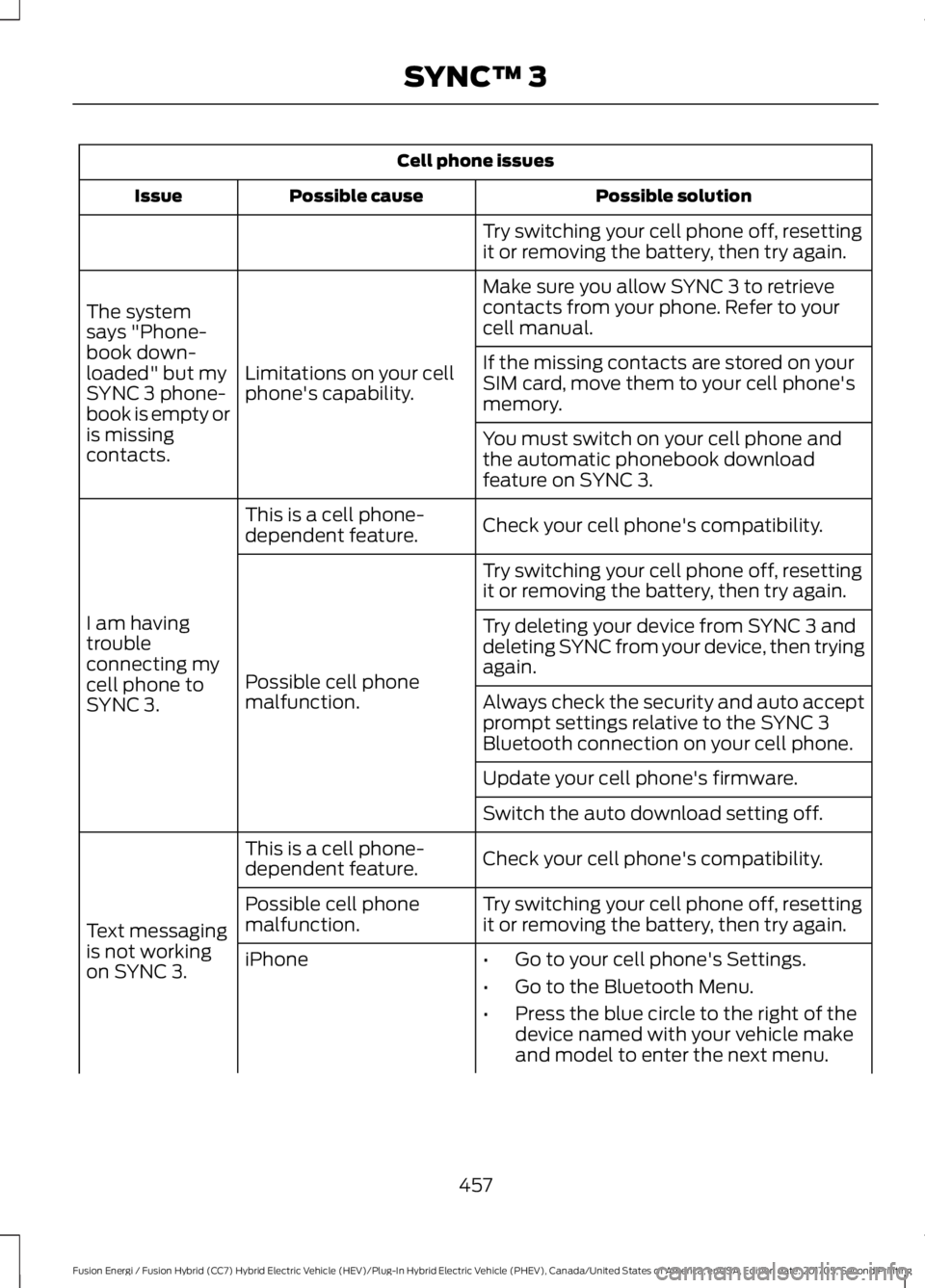
Cell phone issues
Possible solutionPossible causeIssue
Try switching your cell phone off, resettingit or removing the battery, then try again.
Make sure you allow SYNC 3 to retrievecontacts from your phone. Refer to yourcell manual.
Limitations on your cellphone's capability.
The systemsays "Phone-book down-loaded" but mySYNC 3 phone-book is empty oris missingcontacts.
If the missing contacts are stored on yourSIM card, move them to your cell phone'smemory.
You must switch on your cell phone andthe automatic phonebook downloadfeature on SYNC 3.
Check your cell phone's compatibility.This is a cell phone-dependent feature.
I am havingtroubleconnecting mycell phone toSYNC 3.
Try switching your cell phone off, resettingit or removing the battery, then try again.
Possible cell phonemalfunction.
Try deleting your device from SYNC 3 anddeleting SYNC from your device, then tryingagain.
Always check the security and auto acceptprompt settings relative to the SYNC 3Bluetooth connection on your cell phone.
Update your cell phone's firmware.
Switch the auto download setting off.
Check your cell phone's compatibility.This is a cell phone-dependent feature.
Text messagingis not workingon SYNC 3.
Try switching your cell phone off, resettingit or removing the battery, then try again.Possible cell phonemalfunction.
iPhone•Go to your cell phone's Settings.
•Go to the Bluetooth Menu.
•Press the blue circle to the right of thedevice named with your vehicle makeand model to enter the next menu.
457
Fusion Energi / Fusion Hybrid (CC7) Hybrid Electric Vehicle (HEV)/Plug-In Hybrid Electric Vehicle (PHEV), Canada/United States of America, enUSA, Edition date: 201705, Second Printing
SYNC™ 3
Page 462 of 538
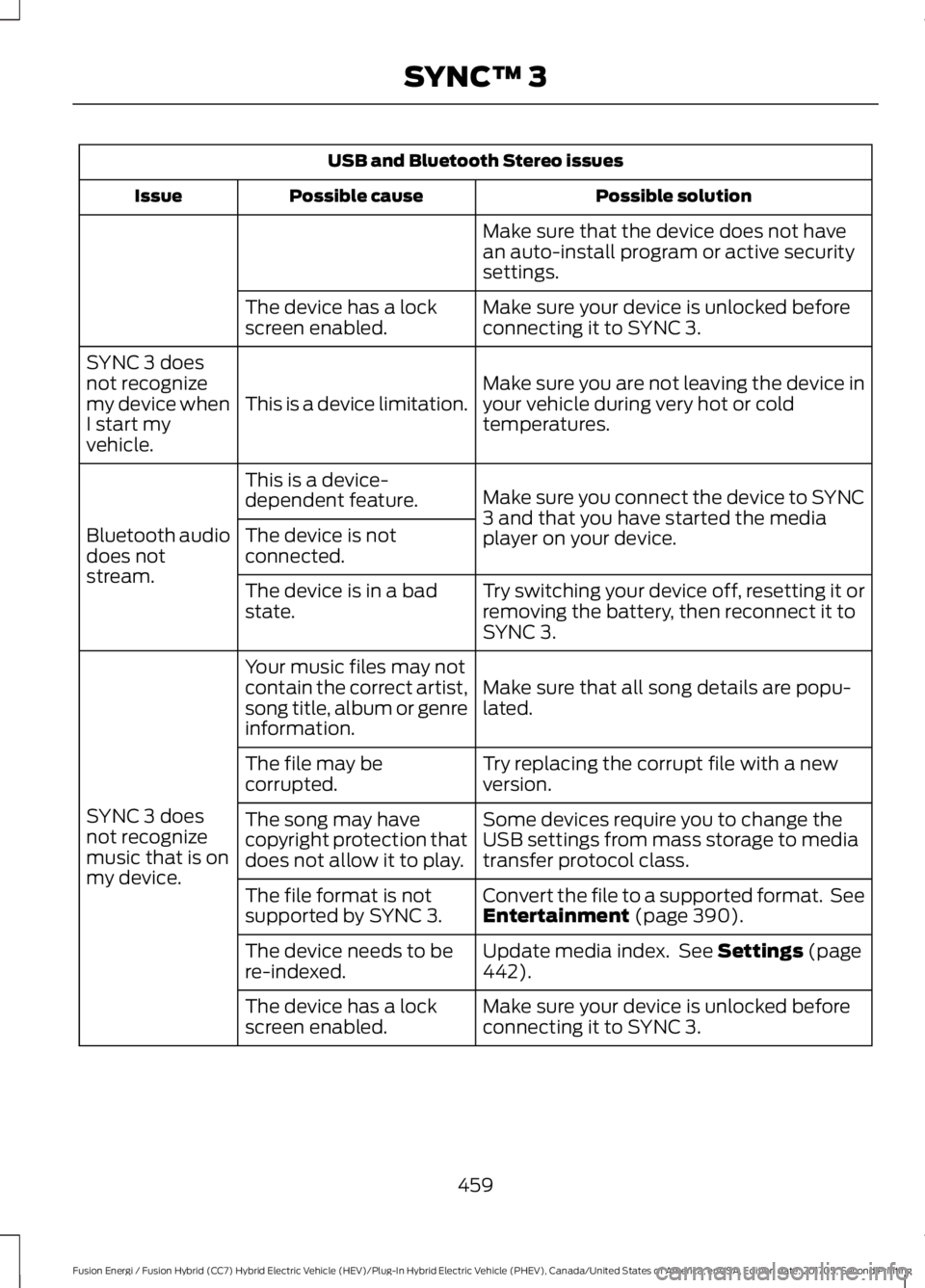
USB and Bluetooth Stereo issues
Possible solutionPossible causeIssue
Make sure that the device does not havean auto-install program or active securitysettings.
Make sure your device is unlocked beforeconnecting it to SYNC 3.The device has a lockscreen enabled.
Make sure you are not leaving the device inyour vehicle during very hot or coldtemperatures.This is a device limitation.
SYNC 3 doesnot recognizemy device whenI start myvehicle.
Make sure you connect the device to SYNC3 and that you have started the mediaplayer on your device.
This is a device-dependent feature.
Bluetooth audiodoes notstream.
The device is notconnected.
Try switching your device off, resetting it orremoving the battery, then reconnect it toSYNC 3.
The device is in a badstate.
Make sure that all song details are popu-lated.
Your music files may notcontain the correct artist,song title, album or genreinformation.
SYNC 3 doesnot recognizemusic that is onmy device.
Try replacing the corrupt file with a newversion.The file may becorrupted.
Some devices require you to change theUSB settings from mass storage to mediatransfer protocol class.
The song may havecopyright protection thatdoes not allow it to play.
Convert the file to a supported format. SeeEntertainment (page 390).The file format is notsupported by SYNC 3.
Update media index. See Settings (page442).The device needs to bere-indexed.
Make sure your device is unlocked beforeconnecting it to SYNC 3.The device has a lockscreen enabled.
459
Fusion Energi / Fusion Hybrid (CC7) Hybrid Electric Vehicle (HEV)/Plug-In Hybrid Electric Vehicle (PHEV), Canada/United States of America, enUSA, Edition date: 201705, Second Printing
SYNC™ 3
Page 468 of 538
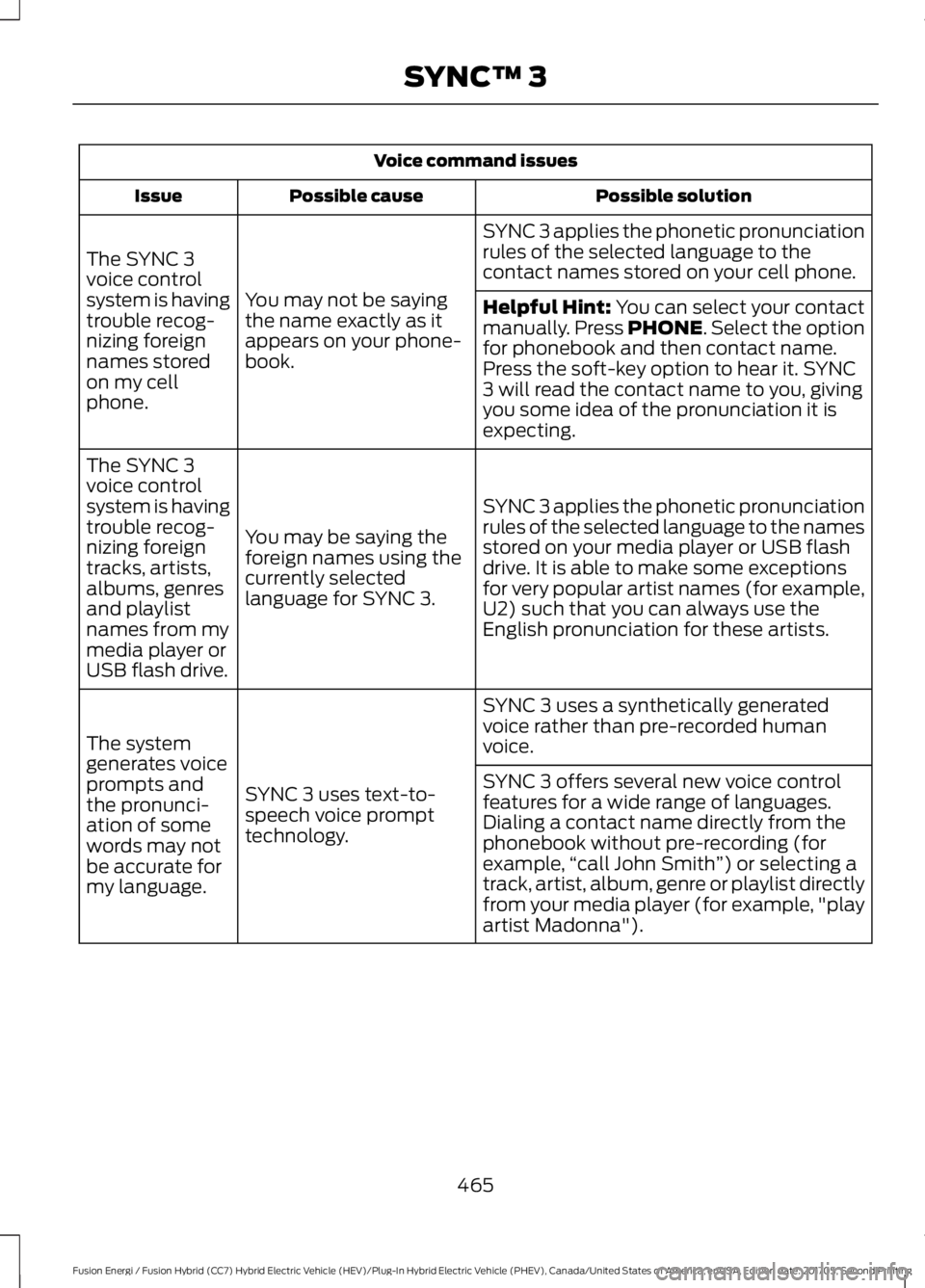
Voice command issues
Possible solutionPossible causeIssue
SYNC 3 applies the phonetic pronunciationrules of the selected language to thecontact names stored on your cell phone.
You may not be sayingthe name exactly as itappears on your phone-book.
The SYNC 3voice controlsystem is havingtrouble recog-nizing foreignnames storedon my cellphone.
Helpful Hint: You can select your contactmanually. Press PHONE. Select the optionfor phonebook and then contact name.Press the soft-key option to hear it. SYNC3 will read the contact name to you, givingyou some idea of the pronunciation it isexpecting.
SYNC 3 applies the phonetic pronunciationrules of the selected language to the namesstored on your media player or USB flashdrive. It is able to make some exceptionsfor very popular artist names (for example,U2) such that you can always use theEnglish pronunciation for these artists.
You may be saying theforeign names using thecurrently selectedlanguage for SYNC 3.
The SYNC 3voice controlsystem is havingtrouble recog-nizing foreigntracks, artists,albums, genresand playlistnames from mymedia player orUSB flash drive.
SYNC 3 uses a synthetically generatedvoice rather than pre-recorded humanvoice.
SYNC 3 uses text-to-speech voice prompttechnology.
The systemgenerates voiceprompts andthe pronunci-ation of somewords may notbe accurate formy language.
SYNC 3 offers several new voice controlfeatures for a wide range of languages.Dialing a contact name directly from thephonebook without pre-recording (forexample,“call John Smith”) or selecting atrack, artist, album, genre or playlist directlyfrom your media player (for example, "playartist Madonna").
465
Fusion Energi / Fusion Hybrid (CC7) Hybrid Electric Vehicle (HEV)/Plug-In Hybrid Electric Vehicle (PHEV), Canada/United States of America, enUSA, Edition date: 201705, Second Printing
SYNC™ 3
Page 471 of 538
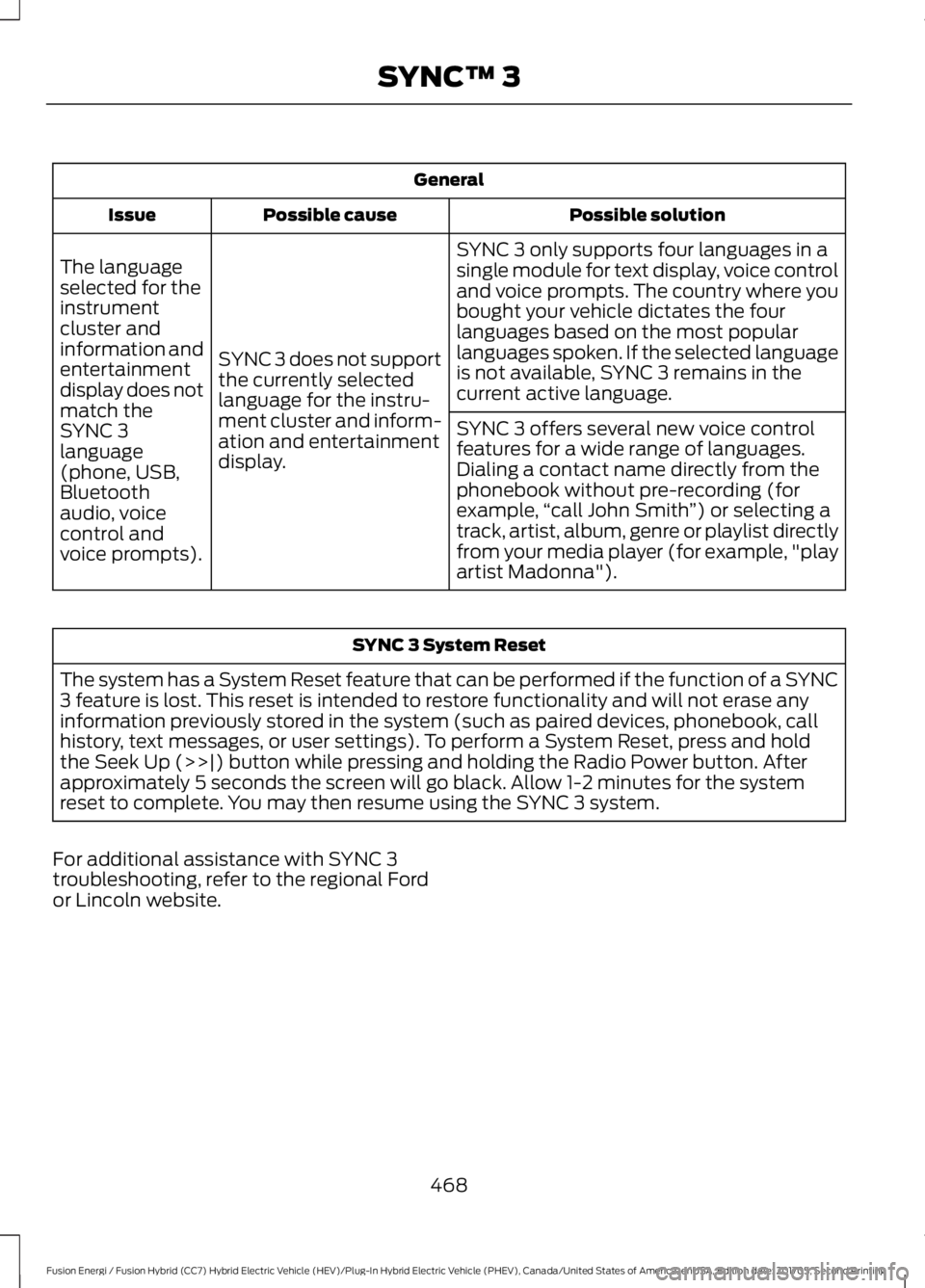
General
Possible solutionPossible causeIssue
SYNC 3 only supports four languages in asingle module for text display, voice controland voice prompts. The country where youbought your vehicle dictates the fourlanguages based on the most popularlanguages spoken. If the selected languageis not available, SYNC 3 remains in thecurrent active language.
SYNC 3 does not supportthe currently selectedlanguage for the instru-ment cluster and inform-ation and entertainmentdisplay.
The languageselected for theinstrumentcluster andinformation andentertainmentdisplay does notmatch theSYNC 3SYNC 3 offers several new voice controlfeatures for a wide range of languages.Dialing a contact name directly from thephonebook without pre-recording (forexample,“call John Smith”) or selecting atrack, artist, album, genre or playlist directlyfrom your media player (for example, "playartist Madonna").
language(phone, USB,Bluetoothaudio, voicecontrol andvoice prompts).
SYNC 3 System Reset
The system has a System Reset feature that can be performed if the function of a SYNC3 feature is lost. This reset is intended to restore functionality and will not erase anyinformation previously stored in the system (such as paired devices, phonebook, callhistory, text messages, or user settings). To perform a System Reset, press and holdthe Seek Up (>>|) button while pressing and holding the Radio Power button. Afterapproximately 5 seconds the screen will go black. Allow 1-2 minutes for the systemreset to complete. You may then resume using the SYNC 3 system.
For additional assistance with SYNC 3troubleshooting, refer to the regional Fordor Lincoln website.
468
Fusion Energi / Fusion Hybrid (CC7) Hybrid Electric Vehicle (HEV)/Plug-In Hybrid Electric Vehicle (PHEV), Canada/United States of America, enUSA, Edition date: 201705, Second Printing
SYNC™ 3
Page 472 of 538
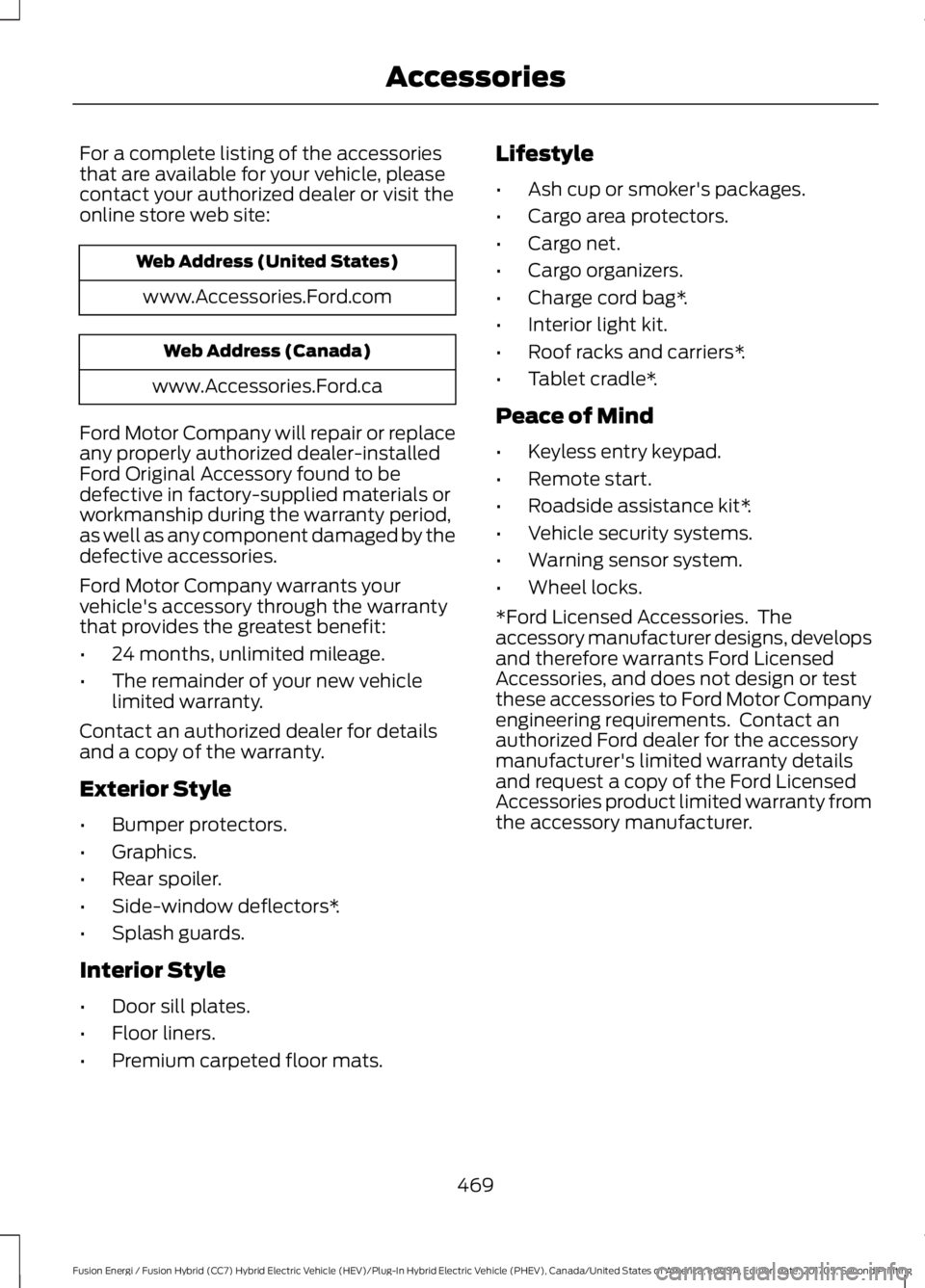
For a complete listing of the accessoriesthat are available for your vehicle, pleasecontact your authorized dealer or visit theonline store web site:
Web Address (United States)
www.Accessories.Ford.com
Web Address (Canada)
www.Accessories.Ford.ca
Ford Motor Company will repair or replaceany properly authorized dealer-installedFord Original Accessory found to bedefective in factory-supplied materials orworkmanship during the warranty period,as well as any component damaged by thedefective accessories.
Ford Motor Company warrants yourvehicle's accessory through the warrantythat provides the greatest benefit:
•24 months, unlimited mileage.
•The remainder of your new vehiclelimited warranty.
Contact an authorized dealer for detailsand a copy of the warranty.
Exterior Style
•Bumper protectors.
•Graphics.
•Rear spoiler.
•Side-window deflectors*.
•Splash guards.
Interior Style
•Door sill plates.
•Floor liners.
•Premium carpeted floor mats.
Lifestyle
•Ash cup or smoker's packages.
•Cargo area protectors.
•Cargo net.
•Cargo organizers.
•Charge cord bag*.
•Interior light kit.
•Roof racks and carriers*.
•Tablet cradle*.
Peace of Mind
•Keyless entry keypad.
•Remote start.
•Roadside assistance kit*.
•Vehicle security systems.
•Warning sensor system.
•Wheel locks.
*Ford Licensed Accessories. Theaccessory manufacturer designs, developsand therefore warrants Ford LicensedAccessories, and does not design or testthese accessories to Ford Motor Companyengineering requirements. Contact anauthorized Ford dealer for the accessorymanufacturer's limited warranty detailsand request a copy of the Ford LicensedAccessories product limited warranty fromthe accessory manufacturer.
469
Fusion Energi / Fusion Hybrid (CC7) Hybrid Electric Vehicle (HEV)/Plug-In Hybrid Electric Vehicle (PHEV), Canada/United States of America, enUSA, Edition date: 201705, Second Printing
Accessories
Page 475 of 538
Less Cost to Properly Maintain YourVehicle
Ford Protect extended service plan alsooffers a Premium Maintenance Plan thatcovers all scheduled maintenance, andselected wear items. The coverage isprepaid, so you never have to worry aboutthe cost of your vehicle’s maintenance.
Covered maintenance includes:
•Windshield wiper blades.
•Spark plugs.
•The clutch disc (if equipped).
•Brake pads and linings.
•Shock absorbers.
•Struts.
•Engine Belts.
•Engine coolant hoses, clamps ando-rings.
•Diesel exhaust fluid replenishment (ifequipped).
•Cabin air filter replacement every20,000 mi (32,000 km) (electricvehicles only).
Interest Free Finance Options
Just a 10% down payment will provide youwith an affordable, no interest, no feepayment program allowing you all thesecurity and benefits Ford Protectextended service plan has to offer whilepaying over time. You are pre-approvedwith no credit check or hassles. To learnmore, call our Ford Protect extendedservice plan specialists at 800-367-3377.
Ford Protect Extended Service PlanP.O. Box 321067Detroit, MI 48232
Ford Protect Extended ServicePlan (CANADA ONLY)
You can get more protection for yourvehicle by purchasing a Ford Protectextended service plan. Ford Protectextended service plan is the only servicecontract backed by Ford Motor Companyof Canada, Limited. Depending on the planyou purchase, Ford Protect extendedservice plan provides benefits such as:
•Rental reimbursement.
•Coverage for certain maintenance andwear items.
•Protection against repair costs afteryour New Vehicle Limited WarrantyCoverage expires.
•Roadside Assistance benefits.
There are several Ford Protect extendedservice plans available in various time,distance and deductible combinations.Each plan is tailored to fit your own drivingneeds, including reimbursement for towingand rental. When you purchase FordProtect extended service plan, you receiveadded peace-of-mind protectionthroughout Canada, the United States andMexico, provided by a network ofparticipating authorized Ford MotorCompany dealers.
Note:Repairs performed outside ofCanada, the United States and Mexico arenot eligible for Ford Protect extendedservice plan coverage.
This information is subject to change. Formore information; visit your local Ford ofCanada dealer or www.ford.ca to find theFord Protect extended service plan that isright for you.
472
Fusion Energi / Fusion Hybrid (CC7) Hybrid Electric Vehicle (HEV)/Plug-In Hybrid Electric Vehicle (PHEV), Canada/United States of America, enUSA, Edition date: 201705, Second Printing
Ford Protect
Page 506 of 538
filing, AAA, and arbitrator’s fees andexpenses. It will not seek its attorney’sfees or expenses from you in anyarbitration. Fees and expenses are notcounted in determining how much adispute involves.
(h) Claims or disputes must be filedwithin one year. To the extent permittedby law, any claim or dispute under thisEULA to which this Section applies mustbe filed within one year in small claimscourt (Section c) or in arbitration (Sectiond). The one-year period begins when theclaim or dispute first could be filed. If sucha claim or dispute is not filed within oneyear, it is permanently barred.
(I) Severability. If the class action waiver(Section e) is found to be illegal orunenforceable as to all or some parts of adispute, then that portion of Section e willnot apply to those parts. Instead, thoseparts will be severed and proceed in a courtof law, with the remaining parts proceedingin arbitration. If any other provision of thatportion Section e is found to be illegal orunenforceable, that provision will besevered with the remainder of Section eremaining in full force and effect.
Telenav Software End User LicenseAgreement
Please read these terms and conditionscarefully before you use the TeleNavSoftware. Your use of the TeleNavSoftware indicates that you accept theseterms and conditions. If you do not acceptthese terms and conditions, do not breakthe seal of the package, launch, orotherwise use the TeleNav Software.TeleNav may revise this Agreement andthe privacy policy at any time, with orwithout notice to you. You agree to visithttp://www.telenav.com from time to timeto review the then current version of thisAgreement and of the privacy policy.
1. Safe and Lawful Use
You acknowledge that devoting attentionto the TeleNav Software may pose a riskof injury or death to you and others insituations that otherwise require yourundivided attention, and you thereforeagree to comply with the following whenusing the TeleNav Software:
(a) observe all traffic laws and otherwisedrive safely;
(b) use your own personal judgment whiledriving. If you feel that a route suggestedby the TeleNav Software instructs you toperform an unsafe or illegal maneuver,places you in an unsafe situation, or directsyou into an area that you consider to beunsafe, do not follow such instructions;
(c) do not input destinations, or otherwisemanipulate the TeleNav Software, unlessyour vehicle is stationary and parked;
(d) do not use the TeleNav Software forany illegal, unauthorized, unintended,unsafe, hazardous, or unlawful purposes,or in any manner inconsistent with thisAgreement;
(e) arrange all GPS and wireless devicesand cables necessary for use of theTeleNav Software in a secure manner inyour vehicle so that they will not interferewith your driving and will not prevent theoperation of any safety device (such as anairbag).
You agree to indemnify and hold TeleNavharmless against all claims resulting fromany dangerous or otherwise inappropriateuse of the TeleNav Software in any movingvehicle, including as a result of your failureto comply with the directions above.
503
Fusion Energi / Fusion Hybrid (CC7) Hybrid Electric Vehicle (HEV)/Plug-In Hybrid Electric Vehicle (PHEV), Canada/United States of America, enUSA, Edition date: 201705, Second Printing
Appendices