key fob FORD FUSION ENERGI 2018 Owners Manual
[x] Cancel search | Manufacturer: FORD, Model Year: 2018, Model line: FUSION ENERGI, Model: FORD FUSION ENERGI 2018Pages: 538, PDF Size: 7.52 MB
Page 65 of 538
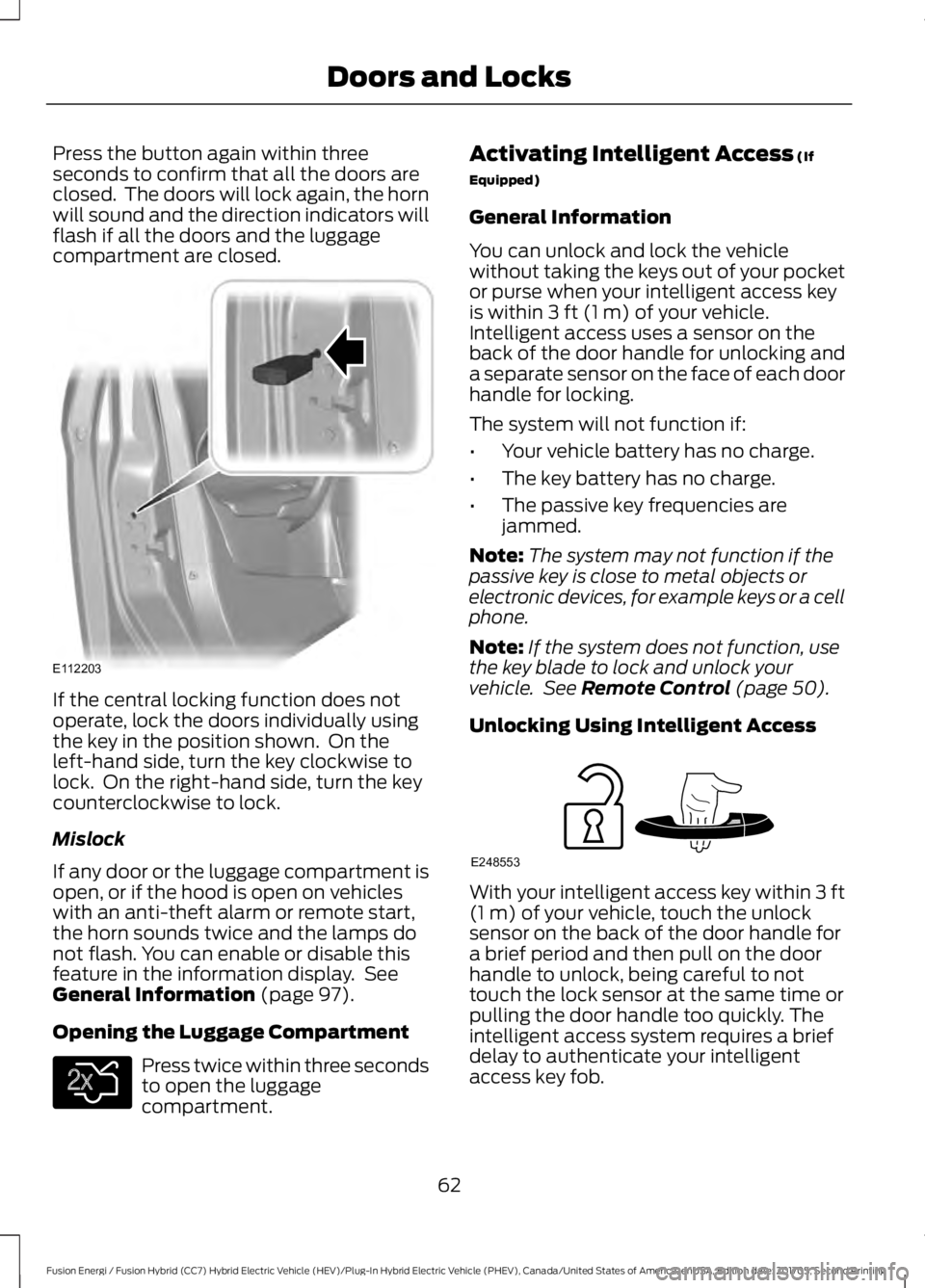
Press the button again within threeseconds to confirm that all the doors areclosed. The doors will lock again, the hornwill sound and the direction indicators willflash if all the doors and the luggagecompartment are closed.
If the central locking function does notoperate, lock the doors individually usingthe key in the position shown. On theleft-hand side, turn the key clockwise tolock. On the right-hand side, turn the keycounterclockwise to lock.
Mislock
If any door or the luggage compartment isopen, or if the hood is open on vehicleswith an anti-theft alarm or remote start,the horn sounds twice and the lamps donot flash. You can enable or disable thisfeature in the information display. SeeGeneral Information (page 97).
Opening the Luggage Compartment
Press twice within three secondsto open the luggagecompartment.
Activating Intelligent Access (If
Equipped)
General Information
You can unlock and lock the vehiclewithout taking the keys out of your pocketor purse when your intelligent access keyis within 3 ft (1 m) of your vehicle.Intelligent access uses a sensor on theback of the door handle for unlocking anda separate sensor on the face of each doorhandle for locking.
The system will not function if:
•Your vehicle battery has no charge.
•The key battery has no charge.
•The passive key frequencies arejammed.
Note:The system may not function if thepassive key is close to metal objects orelectronic devices, for example keys or a cellphone.
Note:If the system does not function, usethe key blade to lock and unlock yourvehicle. See Remote Control (page 50).
Unlocking Using Intelligent Access
With your intelligent access key within 3 ft(1 m) of your vehicle, touch the unlocksensor on the back of the door handle fora brief period and then pull on the doorhandle to unlock, being careful to nottouch the lock sensor at the same time orpulling the door handle too quickly. Theintelligent access system requires a briefdelay to authenticate your intelligentaccess key fob.
62
Fusion Energi / Fusion Hybrid (CC7) Hybrid Electric Vehicle (HEV)/Plug-In Hybrid Electric Vehicle (PHEV), Canada/United States of America, enUSA, Edition date: 201705, Second Printing
Doors and LocksE112203 E138630 E248553
Page 136 of 538
•Driver seat.
•Power mirrors.
•Power steering column.
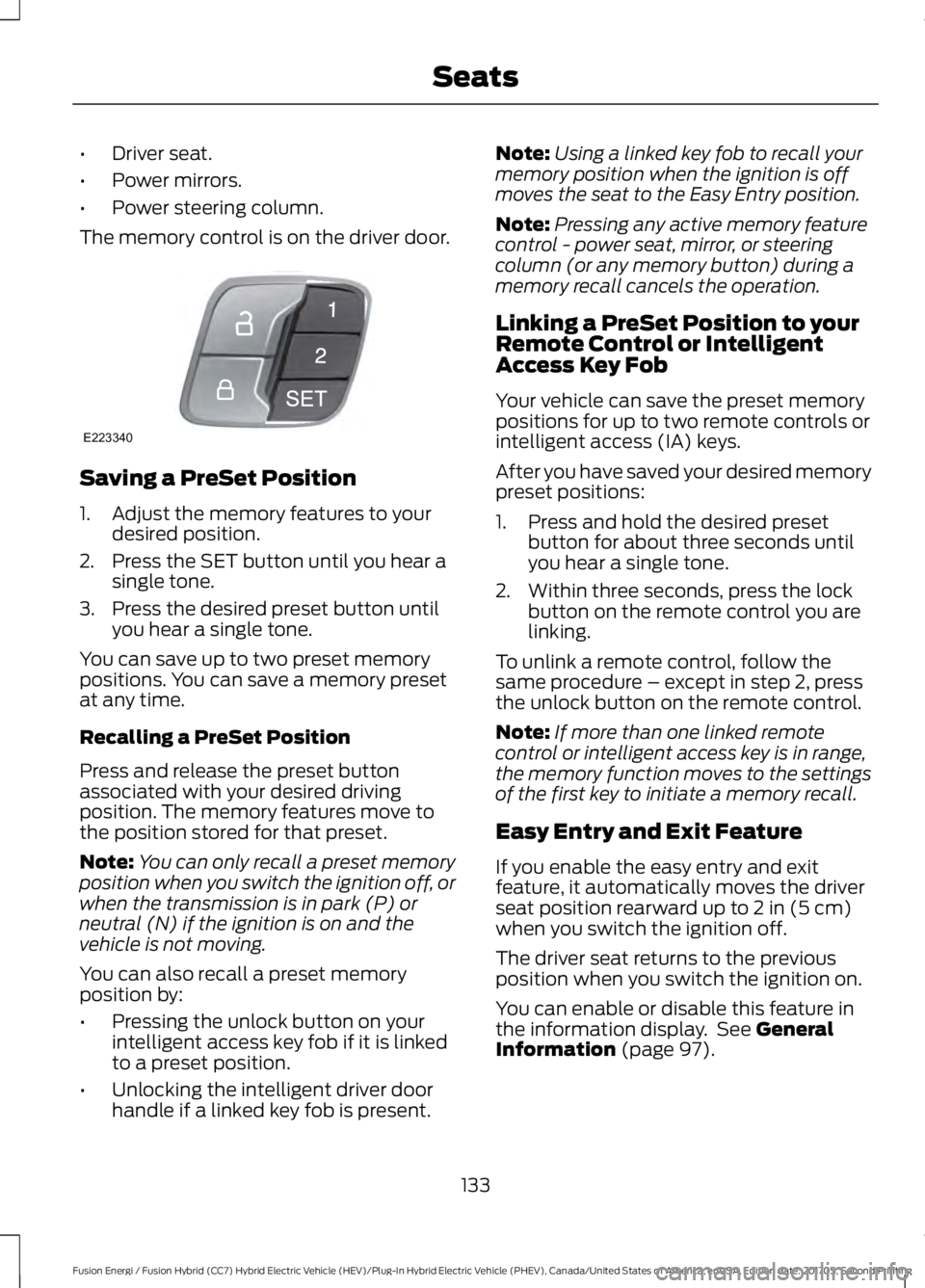
The memory control is on the driver door.
Saving a PreSet Position
1. Adjust the memory features to yourdesired position.
2. Press the SET button until you hear asingle tone.
3. Press the desired preset button untilyou hear a single tone.
You can save up to two preset memorypositions. You can save a memory presetat any time.
Recalling a PreSet Position
Press and release the preset buttonassociated with your desired drivingposition. The memory features move tothe position stored for that preset.
Note:You can only recall a preset memoryposition when you switch the ignition off, orwhen the transmission is in park (P) orneutral (N) if the ignition is on and thevehicle is not moving.
You can also recall a preset memoryposition by:
•Pressing the unlock button on yourintelligent access key fob if it is linkedto a preset position.
•Unlocking the intelligent driver doorhandle if a linked key fob is present.
Note:Using a linked key fob to recall yourmemory position when the ignition is offmoves the seat to the Easy Entry position.
Note:Pressing any active memory featurecontrol - power seat, mirror, or steeringcolumn (or any memory button) during amemory recall cancels the operation.
Linking a PreSet Position to yourRemote Control or IntelligentAccess Key Fob
Your vehicle can save the preset memorypositions for up to two remote controls orintelligent access (IA) keys.
After you have saved your desired memorypreset positions:
1. Press and hold the desired presetbutton for about three seconds untilyou hear a single tone.
2. Within three seconds, press the lockbutton on the remote control you arelinking.
To unlink a remote control, follow thesame procedure – except in step 2, pressthe unlock button on the remote control.
Note:If more than one linked remotecontrol or intelligent access key is in range,the memory function moves to the settingsof the first key to initiate a memory recall.
Easy Entry and Exit Feature
If you enable the easy entry and exitfeature, it automatically moves the driverseat position rearward up to 2 in (5 cm)when you switch the ignition off.
The driver seat returns to the previousposition when you switch the ignition on.
You can enable or disable this feature inthe information display. See GeneralInformation (page 97).
133
Fusion Energi / Fusion Hybrid (CC7) Hybrid Electric Vehicle (HEV)/Plug-In Hybrid Electric Vehicle (PHEV), Canada/United States of America, enUSA, Edition date: 201705, Second Printing
SeatsE223340
Page 175 of 538
Note:If charging for your plug-in vehiclefails, please call the Customer RelationshipCenter, or click on Call for support or Livechat at www.owner.ford.com.
Charge Port
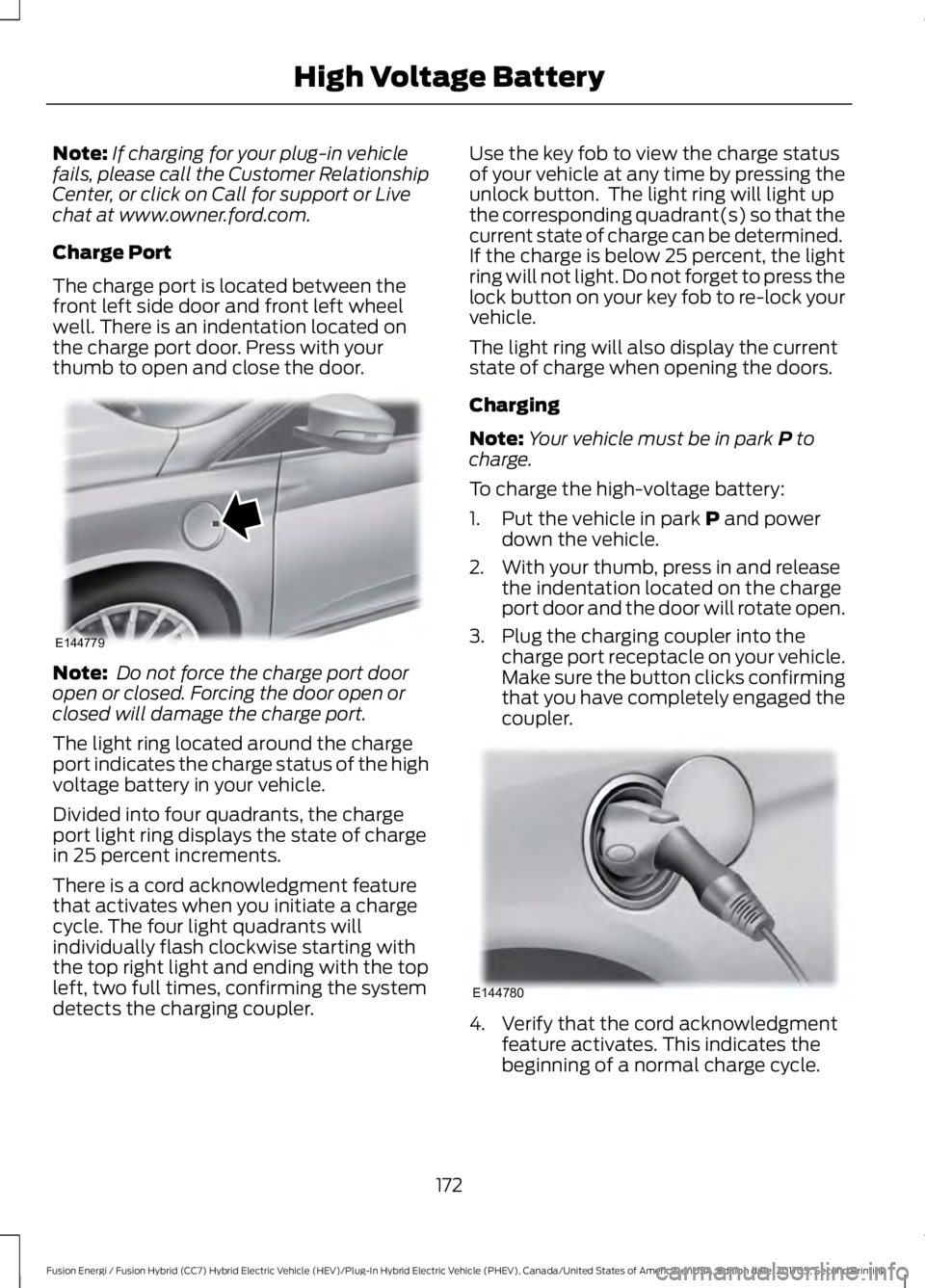
The charge port is located between thefront left side door and front left wheelwell. There is an indentation located onthe charge port door. Press with yourthumb to open and close the door.
Note: Do not force the charge port dooropen or closed. Forcing the door open orclosed will damage the charge port.
The light ring located around the chargeport indicates the charge status of the highvoltage battery in your vehicle.
Divided into four quadrants, the chargeport light ring displays the state of chargein 25 percent increments.
There is a cord acknowledgment featurethat activates when you initiate a chargecycle. The four light quadrants willindividually flash clockwise starting withthe top right light and ending with the topleft, two full times, confirming the systemdetects the charging coupler.
Use the key fob to view the charge statusof your vehicle at any time by pressing theunlock button. The light ring will light upthe corresponding quadrant(s) so that thecurrent state of charge can be determined.If the charge is below 25 percent, the lightring will not light. Do not forget to press thelock button on your key fob to re-lock yourvehicle.
The light ring will also display the currentstate of charge when opening the doors.
Charging
Note:Your vehicle must be in park P tocharge.
To charge the high-voltage battery:
1. Put the vehicle in park P and powerdown the vehicle.
2. With your thumb, press in and releasethe indentation located on the chargeport door and the door will rotate open.
3. Plug the charging coupler into thecharge port receptacle on your vehicle.Make sure the button clicks confirmingthat you have completely engaged thecoupler.
4. Verify that the cord acknowledgmentfeature activates. This indicates thebeginning of a normal charge cycle.
172
Fusion Energi / Fusion Hybrid (CC7) Hybrid Electric Vehicle (HEV)/Plug-In Hybrid Electric Vehicle (PHEV), Canada/United States of America, enUSA, Edition date: 201705, Second Printing
High Voltage BatteryE144779 E144780
Page 190 of 538
PRINCIPLE OF OPERATION
WARNINGS
To help avoid personal injury, alwaysuse caution when in reverse (R) andwhen using the sensing system.
The system may not detect objectswith surfaces that absorb reflection.Always drive with due care andattention. Failure to take care may resultin a crash.
Traffic control systems, inclementweather, air brakes, external motorsand fans may affect the correctoperation of the sensing system.This maycause reduced performance or false alerts.
The system may not detect small ormoving objects, particularly thoseclose to the ground.
Note:If your vehicle is equipped withMyKey™, the sensing system cannot beturned off when a MyKey™ is present. SeePrinciple of Operation (page 56).
Note:Keep the sensors, located on thebumper or fascia, free from snow, ice andlarge accumulations of dirt. If the sensorsare covered, the system’s accuracy can beaffected. Do not clean the sensors withsharp objects.
Note:If your vehicle sustains damage tothe bumper or fascia, leaving it misalignedor bent, the sensing zone may be alteredcausing inaccurate measurement ofobstacles or false alerts.
Note:Certain add-on devices installedaround the bumper or fascia may createfalse alerts. For example, large trailerhitches, bike or surfboard racks, license platebrackets, bumper covers or any other devicethat may block the normal detection zoneof the system. Remove the add-on deviceto prevent false alerts.
Note:When a trailer is connected to yourvehicle, the rear parking aid may detect thetrailer and therefore provide an alert. Disablethe rear parking aid when a trailer isconnected to prevent the alert.
The sensing system warns the driver ofobstacles within a certain range of yourvehicle. The system turns on automaticallywhenever you switch the ignition on.
The system can be switched off throughthe information display menu or from thepop-up message that appears once youshift the transmission into reverse (R). SeeGeneral Information (page 97).
If a fault is present in the system, a warningmessage appears in the informationdisplay. See Information Messages(page 106).
REAR PARKING AID (If Equipped)
The rear sensors are only active when thetransmission is in reverse (R). As yourvehicle moves closer to the obstacle, therate of the audible warning increases.When the obstacle is less than 12 in(30 cm) away, the warning soundscontinuously. If the system detects astationary or receding object farther than12 in (30 cm) from the corners of thebumper, the tone sounds for only threeseconds. Once the system detects anobject approaching, the warning soundsagain.
187
Fusion Energi / Fusion Hybrid (CC7) Hybrid Electric Vehicle (HEV)/Plug-In Hybrid Electric Vehicle (PHEV), Canada/United States of America, enUSA, Edition date: 201705, Second Printing
Parking Aids
Page 469 of 538
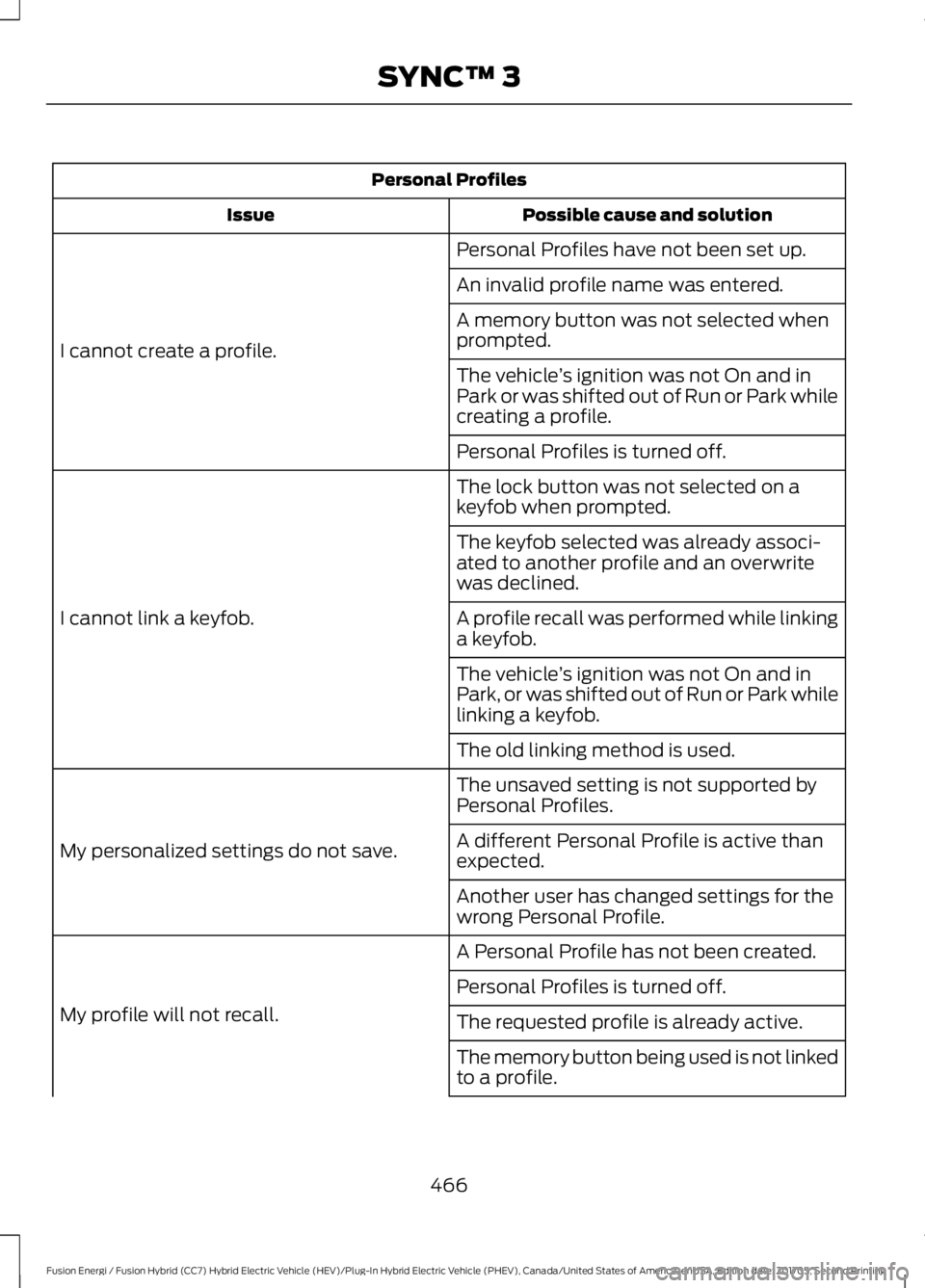
Personal Profiles
Possible cause and solutionIssue
Personal Profiles have not been set up.
I cannot create a profile.
An invalid profile name was entered.
A memory button was not selected whenprompted.
The vehicle’s ignition was not On and inPark or was shifted out of Run or Park whilecreating a profile.
Personal Profiles is turned off.
The lock button was not selected on akeyfob when prompted.
I cannot link a keyfob.
The keyfob selected was already associ-ated to another profile and an overwritewas declined.
A profile recall was performed while linkinga keyfob.
The vehicle’s ignition was not On and inPark, or was shifted out of Run or Park whilelinking a keyfob.
The old linking method is used.
The unsaved setting is not supported byPersonal Profiles.
My personalized settings do not save.A different Personal Profile is active thanexpected.
Another user has changed settings for thewrong Personal Profile.
A Personal Profile has not been created.
My profile will not recall.
Personal Profiles is turned off.
The requested profile is already active.
The memory button being used is not linkedto a profile.
466
Fusion Energi / Fusion Hybrid (CC7) Hybrid Electric Vehicle (HEV)/Plug-In Hybrid Electric Vehicle (PHEV), Canada/United States of America, enUSA, Edition date: 201705, Second Printing
SYNC™ 3
Page 470 of 538
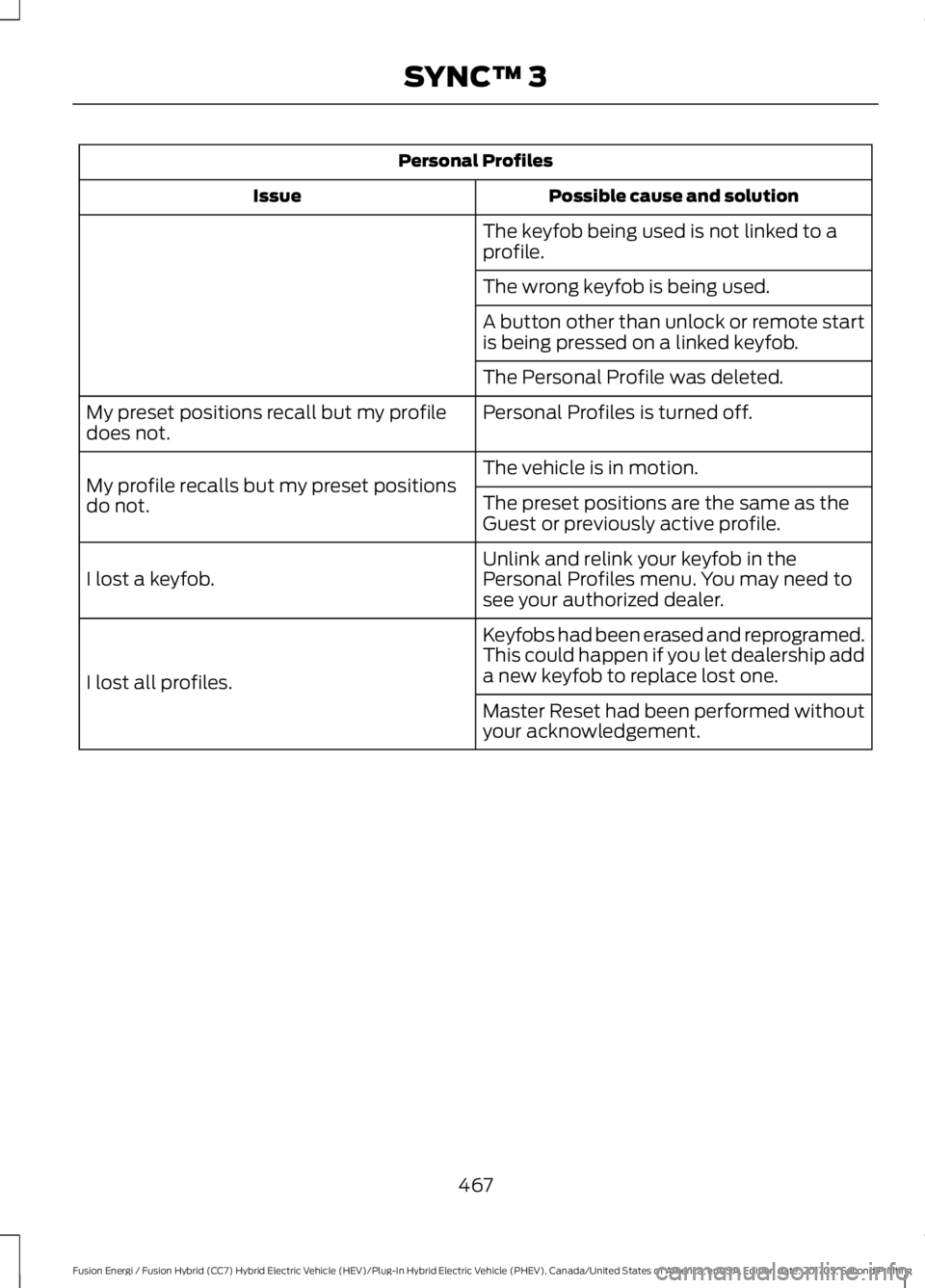
Personal Profiles
Possible cause and solutionIssue
The keyfob being used is not linked to aprofile.
The wrong keyfob is being used.
A button other than unlock or remote startis being pressed on a linked keyfob.
The Personal Profile was deleted.
Personal Profiles is turned off.My preset positions recall but my profiledoes not.
The vehicle is in motion.My profile recalls but my preset positionsdo not.The preset positions are the same as theGuest or previously active profile.
Unlink and relink your keyfob in thePersonal Profiles menu. You may need tosee your authorized dealer.I lost a keyfob.
Keyfobs had been erased and reprogramed.This could happen if you let dealership adda new keyfob to replace lost one.I lost all profiles.
Master Reset had been performed withoutyour acknowledgement.
467
Fusion Energi / Fusion Hybrid (CC7) Hybrid Electric Vehicle (HEV)/Plug-In Hybrid Electric Vehicle (PHEV), Canada/United States of America, enUSA, Edition date: 201705, Second Printing
SYNC™ 3
Page 533 of 538
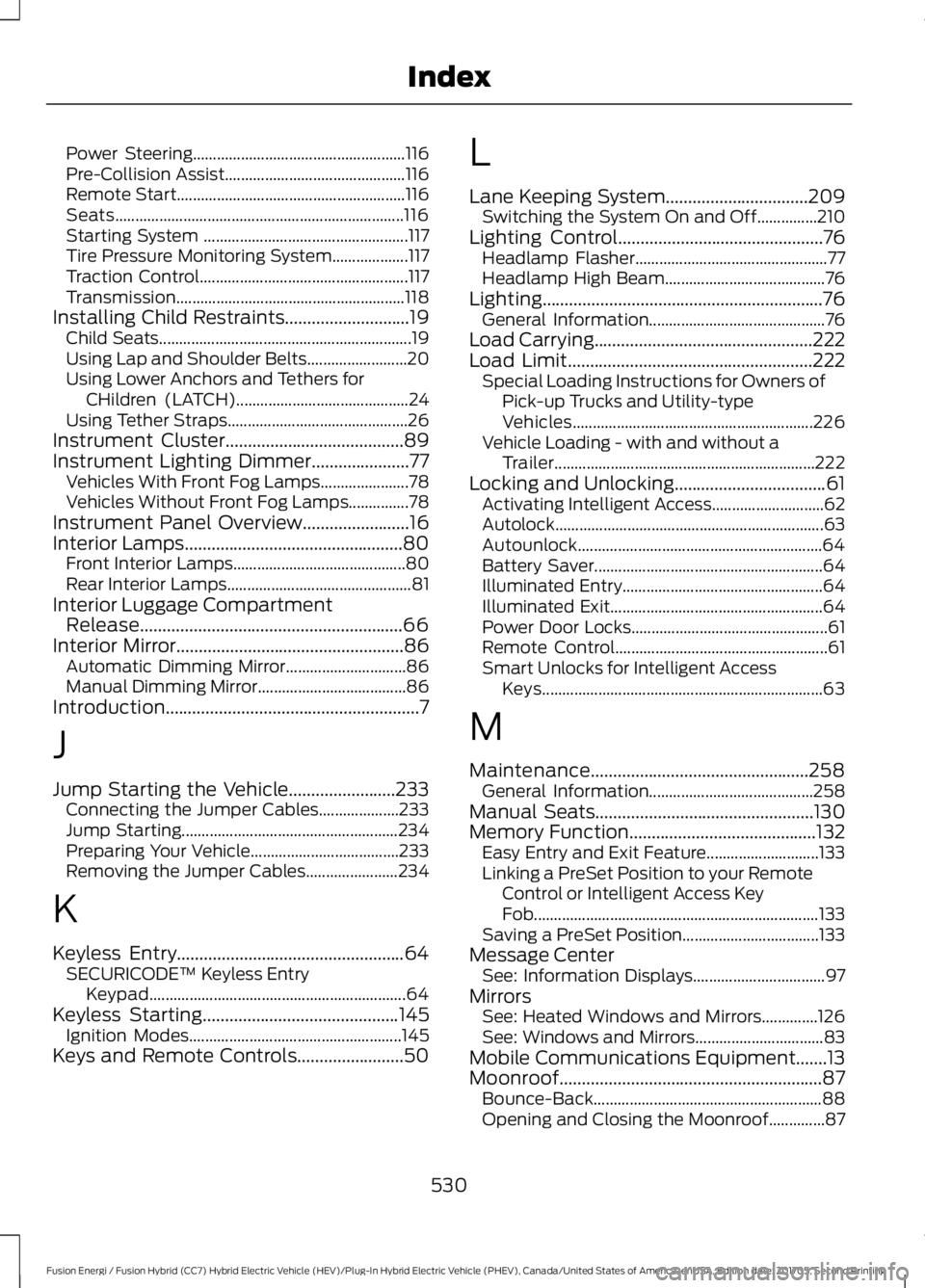
Power Steering.....................................................116Pre-Collision Assist.............................................116Remote Start.........................................................116Seats........................................................................116Starting System ...................................................117Tire Pressure Monitoring System...................117Traction Control....................................................117Transmission.........................................................118Installing Child Restraints............................19Child Seats...............................................................19Using Lap and Shoulder Belts.........................20Using Lower Anchors and Tethers forCHildren (LATCH)...........................................24Using Tether Straps.............................................26Instrument Cluster........................................89Instrument Lighting Dimmer......................77Vehicles With Front Fog Lamps......................78Vehicles Without Front Fog Lamps...............78Instrument Panel Overview........................16Interior Lamps.................................................80Front Interior Lamps...........................................80Rear Interior Lamps..............................................81Interior Luggage CompartmentRelease...........................................................66Interior Mirror...................................................86Automatic Dimming Mirror..............................86Manual Dimming Mirror.....................................86Introduction.........................................................7
J
Jump Starting the Vehicle........................233Connecting the Jumper Cables....................233Jump Starting......................................................234Preparing Your Vehicle.....................................233Removing the Jumper Cables.......................234
K
Keyless Entry...................................................64SECURICODE™ Keyless EntryKeypad................................................................64Keyless Starting............................................145Ignition Modes.....................................................145Keys and Remote Controls........................50
L
Lane Keeping System................................209Switching the System On and Off...............210Lighting Control..............................................76Headlamp Flasher................................................77Headlamp High Beam........................................76Lighting...............................................................76General Information............................................76Load Carrying.................................................222Load Limit.......................................................222Special Loading Instructions for Owners ofPick-up Trucks and Utility-typeVehicles............................................................226Vehicle Loading - with and without aTrailer.................................................................222Locking and Unlocking..................................61Activating Intelligent Access............................62Autolock...................................................................63Autounlock.............................................................64Battery Saver.........................................................64Illuminated Entry..................................................64Illuminated Exit.....................................................64Power Door Locks.................................................61Remote Control.....................................................61Smart Unlocks for Intelligent AccessKeys......................................................................63
M
Maintenance.................................................258General Information.........................................258Manual Seats.................................................130Memory Function..........................................132Easy Entry and Exit Feature............................133Linking a PreSet Position to your RemoteControl or Intelligent Access KeyFob.......................................................................133Saving a PreSet Position..................................133Message CenterSee: Information Displays.................................97MirrorsSee: Heated Windows and Mirrors..............126See: Windows and Mirrors................................83Mobile Communications Equipment.......13Moonroof...........................................................87Bounce-Back.........................................................88Opening and Closing the Moonroof..............87
530
Fusion Energi / Fusion Hybrid (CC7) Hybrid Electric Vehicle (HEV)/Plug-In Hybrid Electric Vehicle (PHEV), Canada/United States of America, enUSA, Edition date: 201705, Second Printing
Index