mirror FORD FUSION ENERGI 2018 Owners Manual
[x] Cancel search | Manufacturer: FORD, Model Year: 2018, Model line: FUSION ENERGI, Model: FORD FUSION ENERGI 2018Pages: 538, PDF Size: 7.52 MB
Page 5 of 538
Adjusting the Steering Wheel - VehiclesWith: Manual Adjustable SteeringColumn...........................................................71
Audio Control...................................................71
Voice Control...................................................72
Cruise Control.................................................72
Information Display Control......................73
Heated Steering Wheel...............................73
Wipers and Washers
Windshield Wipers........................................74
Autowipers.......................................................74
Windshield Washers.....................................75
Lighting
General Information.....................................76
Lighting Control.............................................76
Autolamps........................................................77
Instrument Lighting Dimmer.....................77
Daytime Running Lamps............................78
Automatic High Beam Control.................79
Front Fog Lamps...........................................80
Direction Indicators......................................80
Interior Lamps................................................80
Ambient Lighting...........................................82
Windows and Mirrors
Power Windows.............................................83
Global Opening and Closing.....................84
Exterior Mirrors...............................................84
Interior Mirror..................................................86
Sun Visors........................................................87
Moonroof..........................................................87
Instrument Cluster
Gauges..............................................................89
Warning Lamps and Indicators................92
Audible Warnings and Indicators............96
Information Displays
General Information.....................................97
Information Messages..............................106
Climate Control
Automatic Climate Control - VehiclesWith: SYNC 3/Sony Audio System..........................................................................119
Automatic Climate Control - VehiclesWith: SYNC 3, Vehicles Without: SonyAudio System.............................................121
Automatic Climate Control - VehiclesWith: SYNC, Vehicles Without:Touchscreen Display..............................123
Hints on Controlling the Interior Climate.........................................................................125
Heated Windows and Mirrors.................126
Cabin Air Filter...............................................126
Remote Start.................................................127
Seats
Sitting in the Correct Position.................128
Head Restraints............................................128
Manual Seats................................................130
Power Seats..................................................130
Memory Function.........................................132
Rear Seats......................................................134
Heated Seats.................................................135
Climate Controlled Seats.........................135
Rear Seat Armrest.......................................136
Universal Garage Door Opener
Universal Garage Door Opener...............137
Auxiliary Power Points
Auxiliary Power Points...............................142
Storage Compartments
Center Console.............................................144
Overhead Console......................................144
2
Fusion Energi / Fusion Hybrid (CC7) Hybrid Electric Vehicle (HEV)/Plug-In Hybrid Electric Vehicle (PHEV), Canada/United States of America, enUSA, Edition date: 201705, Second Printing
Table of Contents
Page 19 of 538
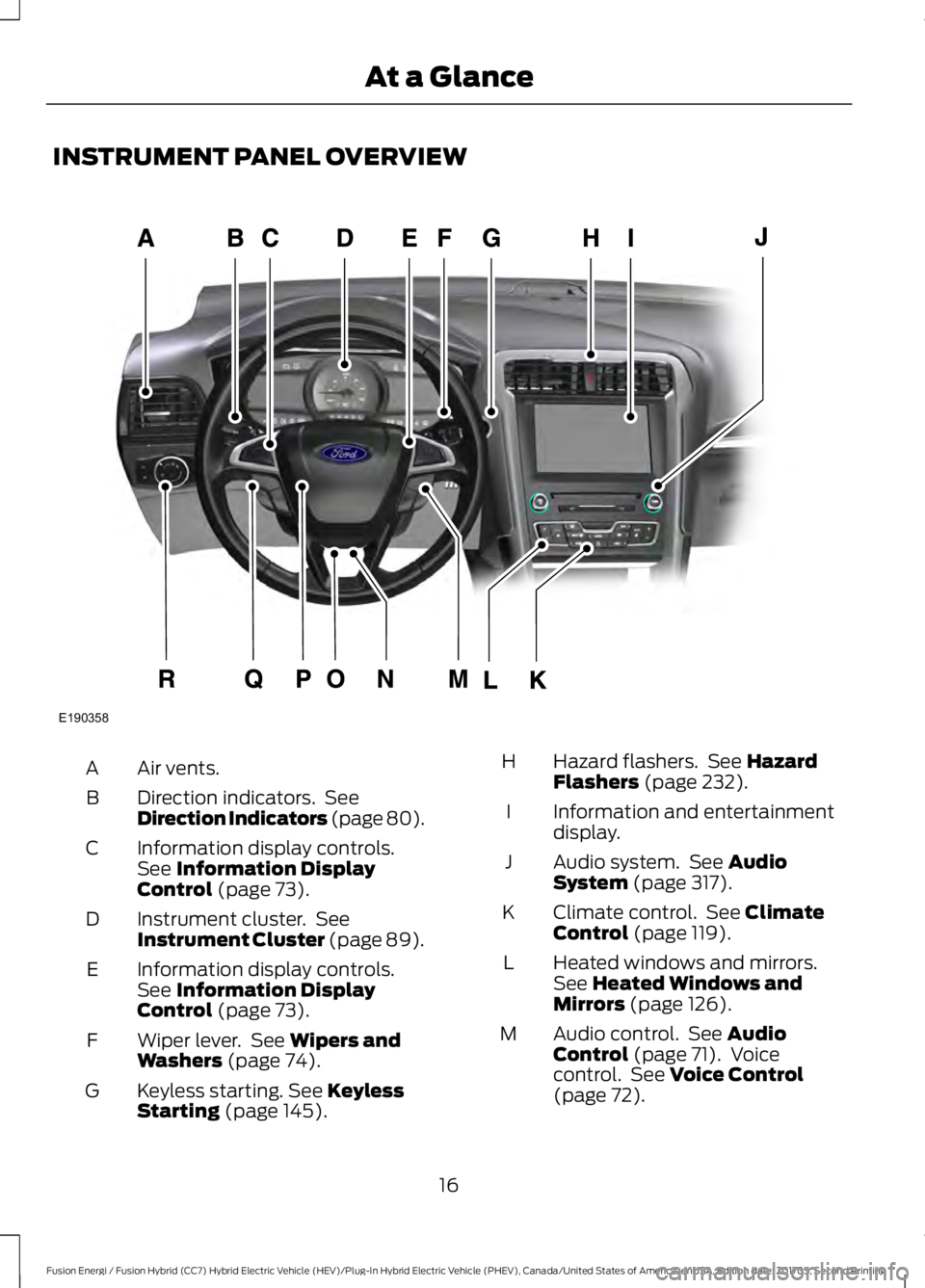
INSTRUMENT PANEL OVERVIEW
Air vents.A
Direction indicators. SeeDirection Indicators (page 80).B
Information display controls.See Information DisplayControl (page 73).
C
Instrument cluster. SeeInstrument Cluster (page 89).D
Information display controls.See Information DisplayControl (page 73).
E
Wiper lever. See Wipers andWashers (page 74).F
Keyless starting. See KeylessStarting (page 145).G
Hazard flashers. See HazardFlashers (page 232).H
Information and entertainmentdisplay.I
Audio system. See AudioSystem (page 317).J
Climate control. See ClimateControl (page 119).K
Heated windows and mirrors.See Heated Windows andMirrors (page 126).
L
Audio control. See AudioControl (page 71). Voicecontrol. See Voice Control(page 72).
M
16
Fusion Energi / Fusion Hybrid (CC7) Hybrid Electric Vehicle (HEV)/Plug-In Hybrid Electric Vehicle (PHEV), Canada/United States of America, enUSA, Edition date: 201705, Second Printing
At a GlanceE190358
Page 86 of 538
POWER WINDOWS
WARNINGS
Do not leave children unattended inyour vehicle and do not let them playwith the power windows. Failure tofollow this instruction could result inpersonal injury.
When closing the power windows,verify they are free of obstruction andmake sure that children and pets arenot in the proximity of the windowopenings.
Note:You may hear a pulsing noise whenjust one of the windows is open. Lower theopposite window slightly to reduce thisnoise.
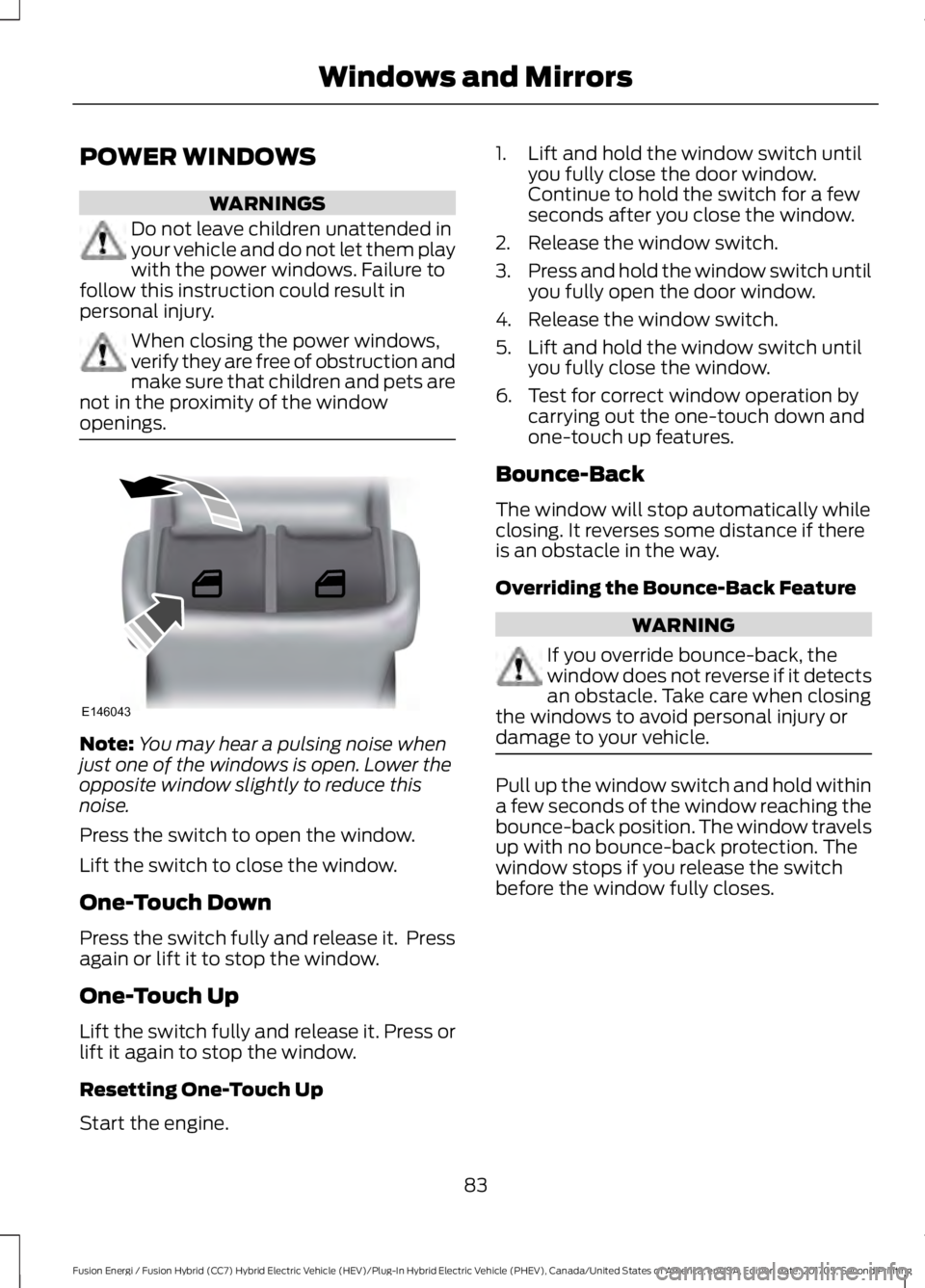
Press the switch to open the window.
Lift the switch to close the window.
One-Touch Down
Press the switch fully and release it. Pressagain or lift it to stop the window.
One-Touch Up
Lift the switch fully and release it. Press orlift it again to stop the window.
Resetting One-Touch Up
Start the engine.
1. Lift and hold the window switch untilyou fully close the door window.Continue to hold the switch for a fewseconds after you close the window.
2. Release the window switch.
3.Press and hold the window switch untilyou fully open the door window.
4. Release the window switch.
5. Lift and hold the window switch untilyou fully close the window.
6. Test for correct window operation bycarrying out the one-touch down andone-touch up features.
Bounce-Back
The window will stop automatically whileclosing. It reverses some distance if thereis an obstacle in the way.
Overriding the Bounce-Back Feature
WARNING
If you override bounce-back, thewindow does not reverse if it detectsan obstacle. Take care when closingthe windows to avoid personal injury ordamage to your vehicle.
Pull up the window switch and hold withina few seconds of the window reaching thebounce-back position. The window travelsup with no bounce-back protection. Thewindow stops if you release the switchbefore the window fully closes.
83
Fusion Energi / Fusion Hybrid (CC7) Hybrid Electric Vehicle (HEV)/Plug-In Hybrid Electric Vehicle (PHEV), Canada/United States of America, enUSA, Edition date: 201705, Second Printing
Windows and MirrorsE146043
Page 87 of 538
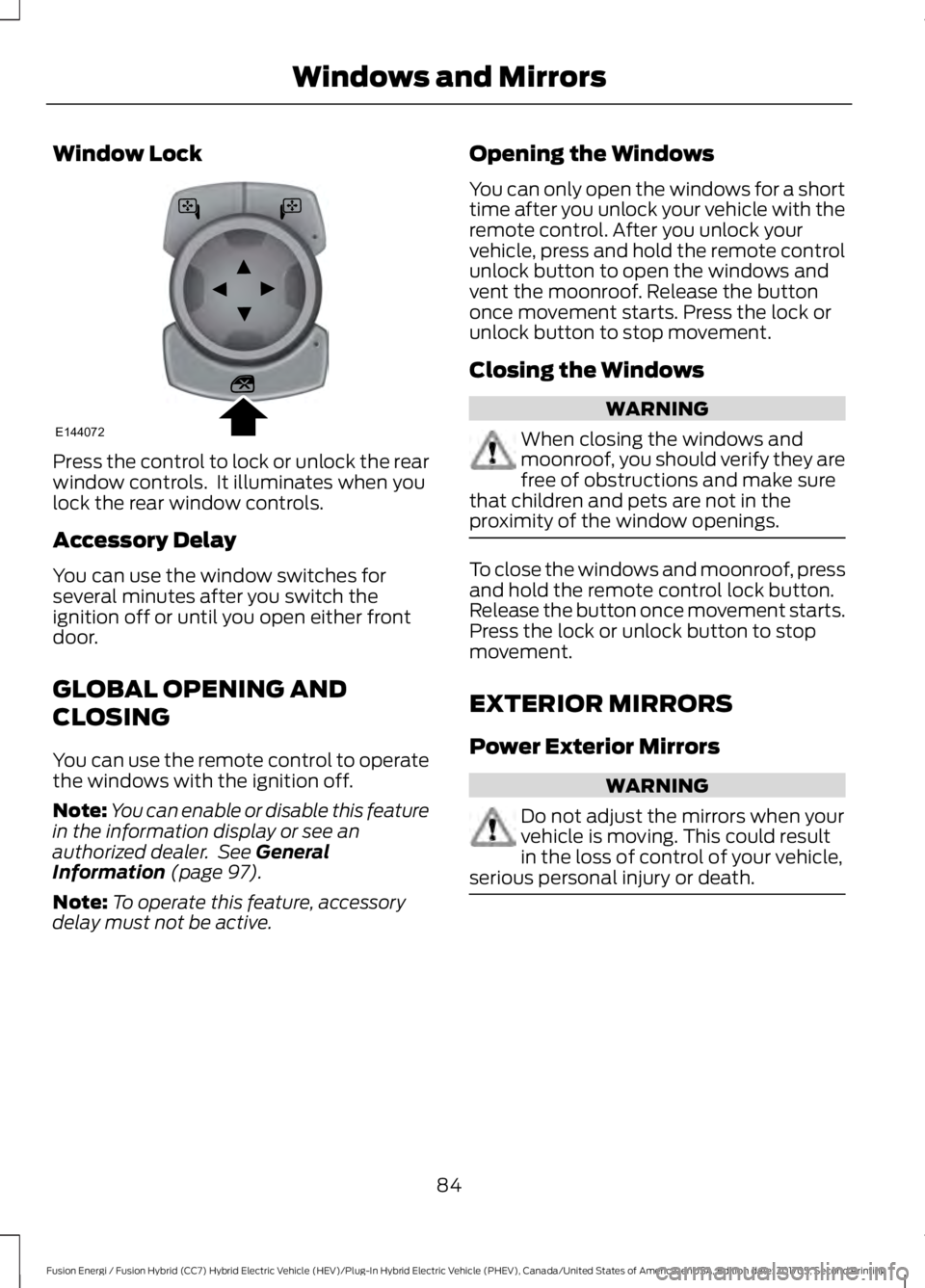
Window Lock
Press the control to lock or unlock the rearwindow controls. It illuminates when youlock the rear window controls.
Accessory Delay
You can use the window switches forseveral minutes after you switch theignition off or until you open either frontdoor.
GLOBAL OPENING AND
CLOSING
You can use the remote control to operatethe windows with the ignition off.
Note:You can enable or disable this featurein the information display or see anauthorized dealer. See GeneralInformation (page 97).
Note:To operate this feature, accessorydelay must not be active.
Opening the Windows
You can only open the windows for a shorttime after you unlock your vehicle with theremote control. After you unlock yourvehicle, press and hold the remote controlunlock button to open the windows andvent the moonroof. Release the buttononce movement starts. Press the lock orunlock button to stop movement.
Closing the Windows
WARNING
When closing the windows andmoonroof, you should verify they arefree of obstructions and make surethat children and pets are not in theproximity of the window openings.
To close the windows and moonroof, pressand hold the remote control lock button.Release the button once movement starts.Press the lock or unlock button to stopmovement.
EXTERIOR MIRRORS
Power Exterior Mirrors
WARNING
Do not adjust the mirrors when yourvehicle is moving. This could resultin the loss of control of your vehicle,serious personal injury or death.
84
Fusion Energi / Fusion Hybrid (CC7) Hybrid Electric Vehicle (HEV)/Plug-In Hybrid Electric Vehicle (PHEV), Canada/United States of America, enUSA, Edition date: 201705, Second Printing
Windows and MirrorsE144072
Page 88 of 538
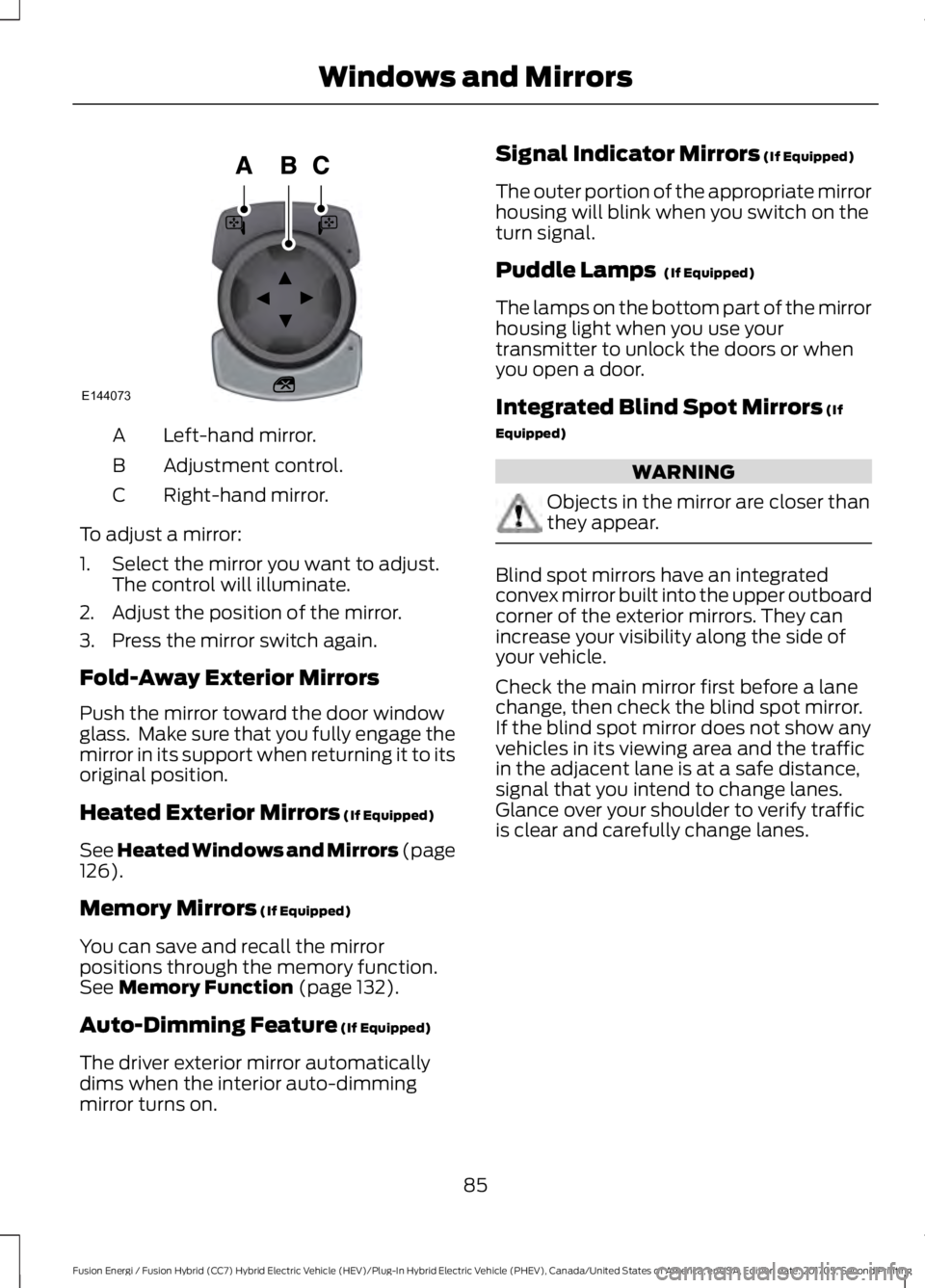
Left-hand mirror.A
Adjustment control.B
Right-hand mirror.C
To adjust a mirror:
1. Select the mirror you want to adjust.The control will illuminate.
2. Adjust the position of the mirror.
3. Press the mirror switch again.
Fold-Away Exterior Mirrors
Push the mirror toward the door windowglass. Make sure that you fully engage themirror in its support when returning it to itsoriginal position.
Heated Exterior Mirrors (If Equipped)
See Heated Windows and Mirrors (page126).
Memory Mirrors (If Equipped)
You can save and recall the mirrorpositions through the memory function.See Memory Function (page 132).
Auto-Dimming Feature (If Equipped)
The driver exterior mirror automaticallydims when the interior auto-dimmingmirror turns on.
Signal Indicator Mirrors (If Equipped)
The outer portion of the appropriate mirrorhousing will blink when you switch on theturn signal.
Puddle Lamps (If Equipped)
The lamps on the bottom part of the mirrorhousing light when you use yourtransmitter to unlock the doors or whenyou open a door.
Integrated Blind Spot Mirrors (If
Equipped)
WARNING
Objects in the mirror are closer thanthey appear.
Blind spot mirrors have an integratedconvex mirror built into the upper outboardcorner of the exterior mirrors. They canincrease your visibility along the side ofyour vehicle.
Check the main mirror first before a lanechange, then check the blind spot mirror.If the blind spot mirror does not show anyvehicles in its viewing area and the trafficin the adjacent lane is at a safe distance,signal that you intend to change lanes.Glance over your shoulder to verify trafficis clear and carefully change lanes.
85
Fusion Energi / Fusion Hybrid (CC7) Hybrid Electric Vehicle (HEV)/Plug-In Hybrid Electric Vehicle (PHEV), Canada/United States of America, enUSA, Edition date: 201705, Second Printing
Windows and MirrorsE144073
Page 89 of 538
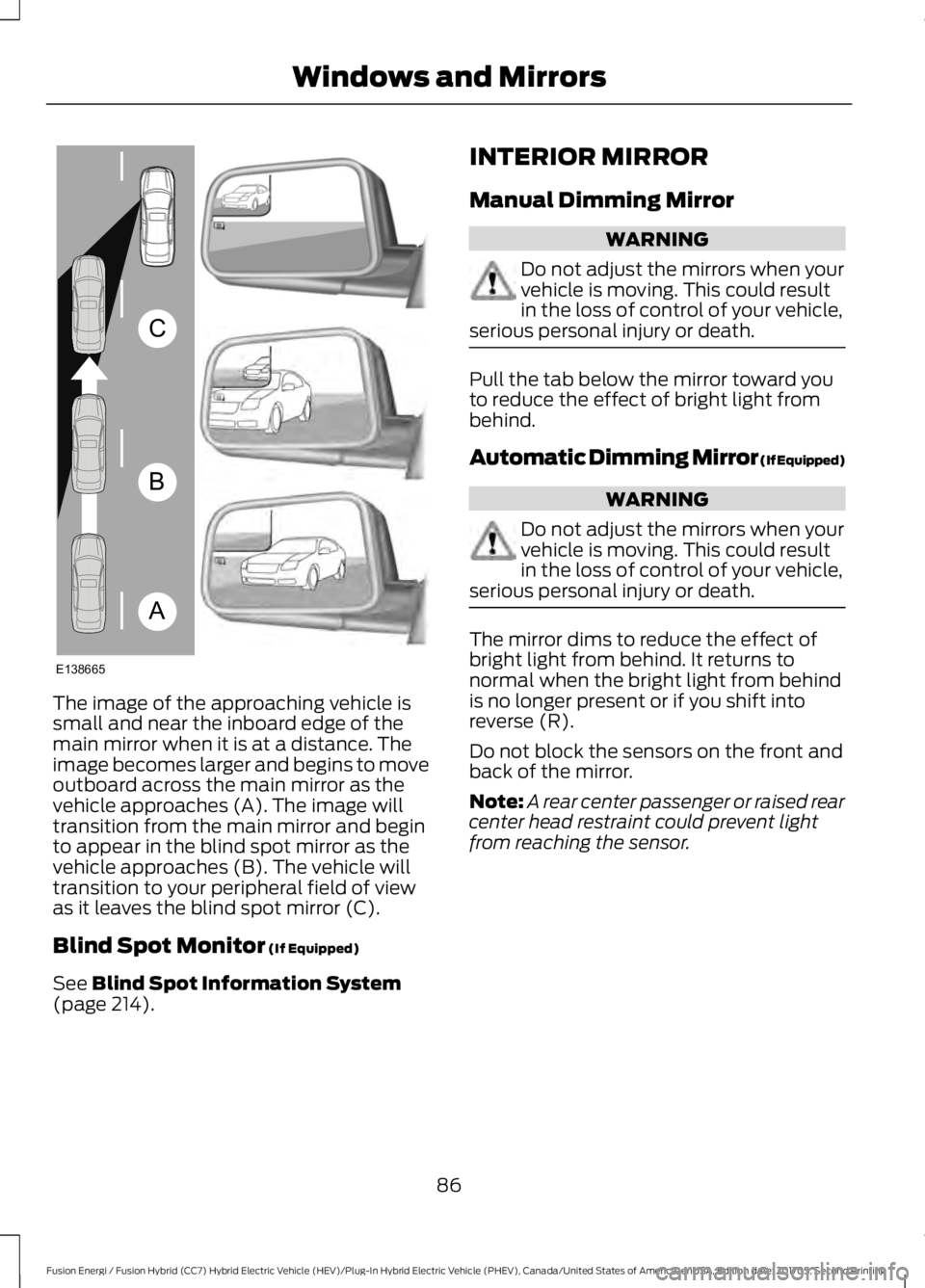
The image of the approaching vehicle issmall and near the inboard edge of themain mirror when it is at a distance. Theimage becomes larger and begins to moveoutboard across the main mirror as thevehicle approaches (A). The image willtransition from the main mirror and beginto appear in the blind spot mirror as thevehicle approaches (B). The vehicle willtransition to your peripheral field of viewas it leaves the blind spot mirror (C).
Blind Spot Monitor (If Equipped)
See Blind Spot Information System(page 214).
INTERIOR MIRROR
Manual Dimming Mirror
WARNING
Do not adjust the mirrors when yourvehicle is moving. This could resultin the loss of control of your vehicle,serious personal injury or death.
Pull the tab below the mirror toward youto reduce the effect of bright light frombehind.
Automatic Dimming Mirror (If Equipped)
WARNING
Do not adjust the mirrors when yourvehicle is moving. This could resultin the loss of control of your vehicle,serious personal injury or death.
The mirror dims to reduce the effect ofbright light from behind. It returns tonormal when the bright light from behindis no longer present or if you shift intoreverse (R).
Do not block the sensors on the front andback of the mirror.
Note:A rear center passenger or raised rearcenter head restraint could prevent lightfrom reaching the sensor.
86
Fusion Energi / Fusion Hybrid (CC7) Hybrid Electric Vehicle (HEV)/Plug-In Hybrid Electric Vehicle (PHEV), Canada/United States of America, enUSA, Edition date: 201705, Second Printing
Windows and MirrorsA
B
C
E138665
Page 90 of 538
SUN VISORS
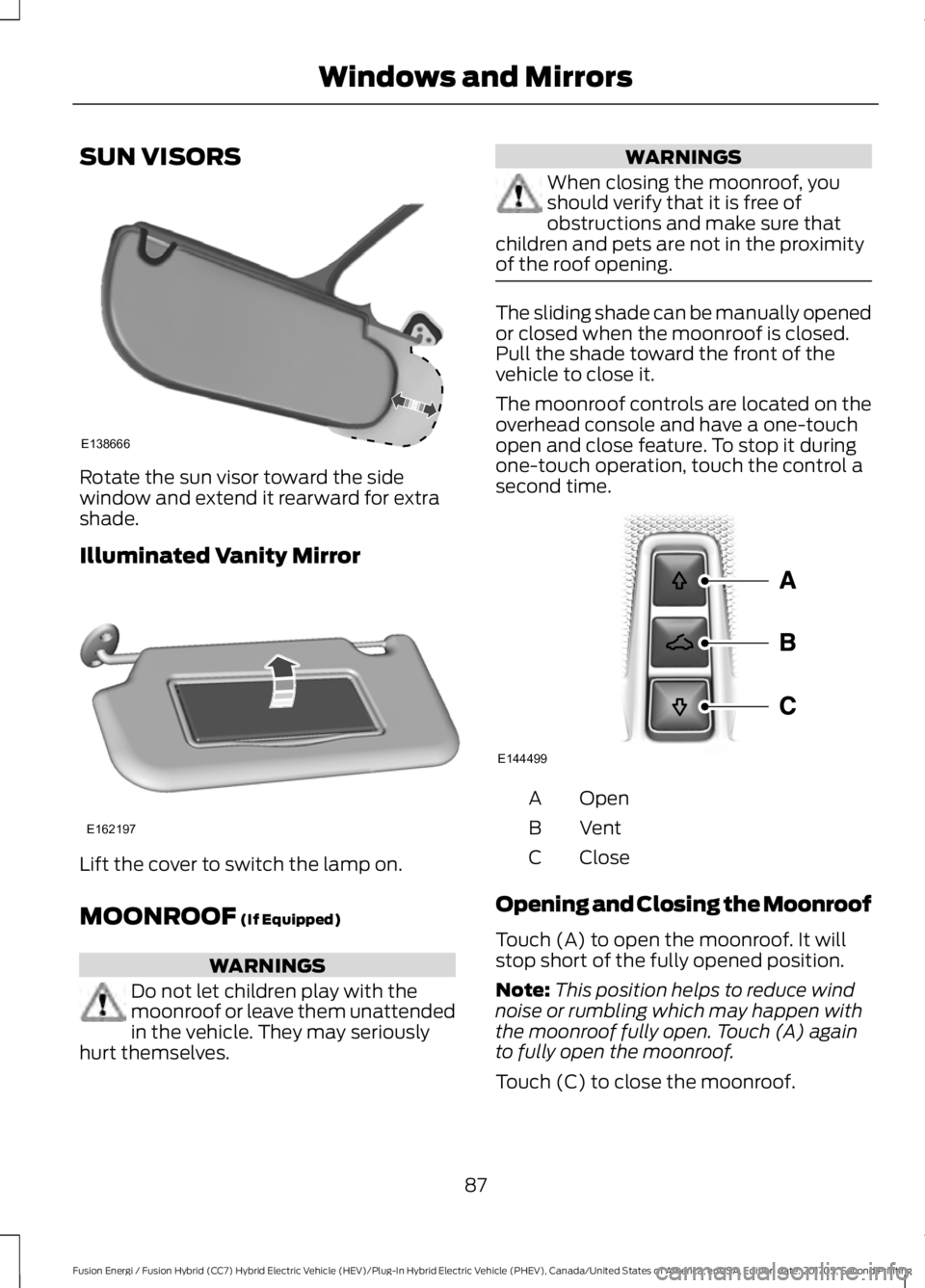
Rotate the sun visor toward the sidewindow and extend it rearward for extrashade.
Illuminated Vanity Mirror
Lift the cover to switch the lamp on.
MOONROOF (If Equipped)
WARNINGS
Do not let children play with themoonroof or leave them unattendedin the vehicle. They may seriouslyhurt themselves.
WARNINGS
When closing the moonroof, youshould verify that it is free ofobstructions and make sure thatchildren and pets are not in the proximityof the roof opening.
The sliding shade can be manually openedor closed when the moonroof is closed.Pull the shade toward the front of thevehicle to close it.
The moonroof controls are located on theoverhead console and have a one-touchopen and close feature. To stop it duringone-touch operation, touch the control asecond time.
OpenA
VentB
CloseC
Opening and Closing the Moonroof
Touch (A) to open the moonroof. It willstop short of the fully opened position.
Note:This position helps to reduce windnoise or rumbling which may happen withthe moonroof fully open. Touch (A) againto fully open the moonroof.
Touch (C) to close the moonroof.
87
Fusion Energi / Fusion Hybrid (CC7) Hybrid Electric Vehicle (HEV)/Plug-In Hybrid Electric Vehicle (PHEV), Canada/United States of America, enUSA, Edition date: 201705, Second Printing
Windows and MirrorsE138666 E162197 E144499
Page 91 of 538
Bounce-Back
The moonroof will stop automatically andreverse some distance if an obstacle isdetected while closing.
Touch and hold (C) within two seconds ofa bounce-back event to override thisfunction.
Venting the Moonroof
Touch (B) to vent the moonroof. Touch(C) to close it.
88
Fusion Energi / Fusion Hybrid (CC7) Hybrid Electric Vehicle (HEV)/Plug-In Hybrid Electric Vehicle (PHEV), Canada/United States of America, enUSA, Edition date: 201705, Second Printing
Windows and Mirrors
Page 123 of 538
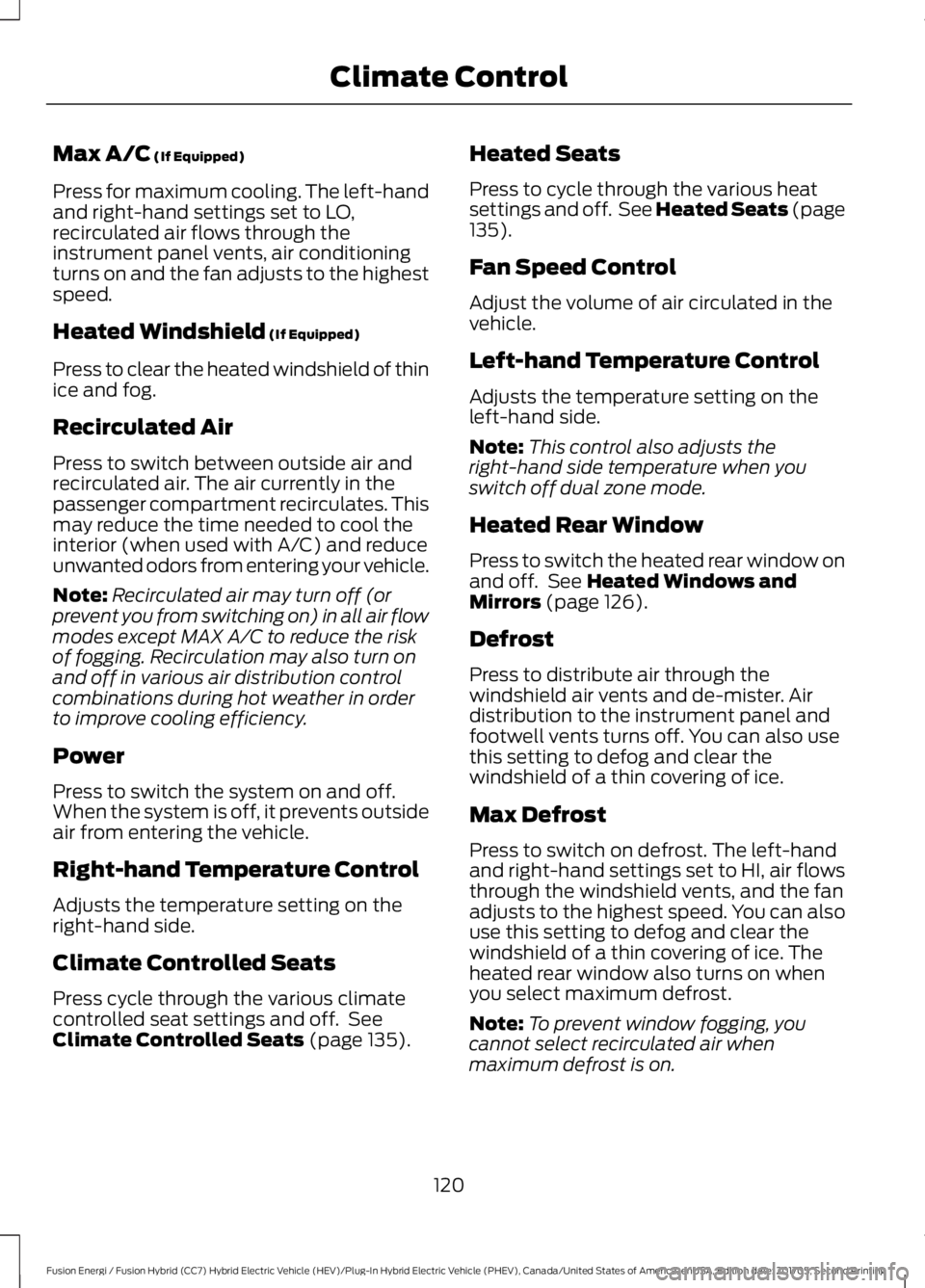
Max A/C (If Equipped)
Press for maximum cooling. The left-handand right-hand settings set to LO,recirculated air flows through theinstrument panel vents, air conditioningturns on and the fan adjusts to the highestspeed.
Heated Windshield (If Equipped)
Press to clear the heated windshield of thinice and fog.
Recirculated Air
Press to switch between outside air andrecirculated air. The air currently in thepassenger compartment recirculates. Thismay reduce the time needed to cool theinterior (when used with A/C) and reduceunwanted odors from entering your vehicle.
Note:Recirculated air may turn off (orprevent you from switching on) in all air flowmodes except MAX A/C to reduce the riskof fogging. Recirculation may also turn onand off in various air distribution controlcombinations during hot weather in orderto improve cooling efficiency.
Power
Press to switch the system on and off.When the system is off, it prevents outsideair from entering the vehicle.
Right-hand Temperature Control
Adjusts the temperature setting on theright-hand side.
Climate Controlled Seats
Press cycle through the various climatecontrolled seat settings and off. SeeClimate Controlled Seats (page 135).
Heated Seats
Press to cycle through the various heatsettings and off. See Heated Seats (page135).
Fan Speed Control
Adjust the volume of air circulated in thevehicle.
Left-hand Temperature Control
Adjusts the temperature setting on theleft-hand side.
Note:This control also adjusts theright-hand side temperature when youswitch off dual zone mode.
Heated Rear Window
Press to switch the heated rear window onand off. See Heated Windows andMirrors (page 126).
Defrost
Press to distribute air through thewindshield air vents and de-mister. Airdistribution to the instrument panel andfootwell vents turns off. You can also usethis setting to defog and clear thewindshield of a thin covering of ice.
Max Defrost
Press to switch on defrost. The left-handand right-hand settings set to HI, air flowsthrough the windshield vents, and the fanadjusts to the highest speed. You can alsouse this setting to defog and clear thewindshield of a thin covering of ice. Theheated rear window also turns on whenyou select maximum defrost.
Note:To prevent window fogging, youcannot select recirculated air whenmaximum defrost is on.
120
Fusion Energi / Fusion Hybrid (CC7) Hybrid Electric Vehicle (HEV)/Plug-In Hybrid Electric Vehicle (PHEV), Canada/United States of America, enUSA, Edition date: 201705, Second Printing
Climate Control
Page 125 of 538
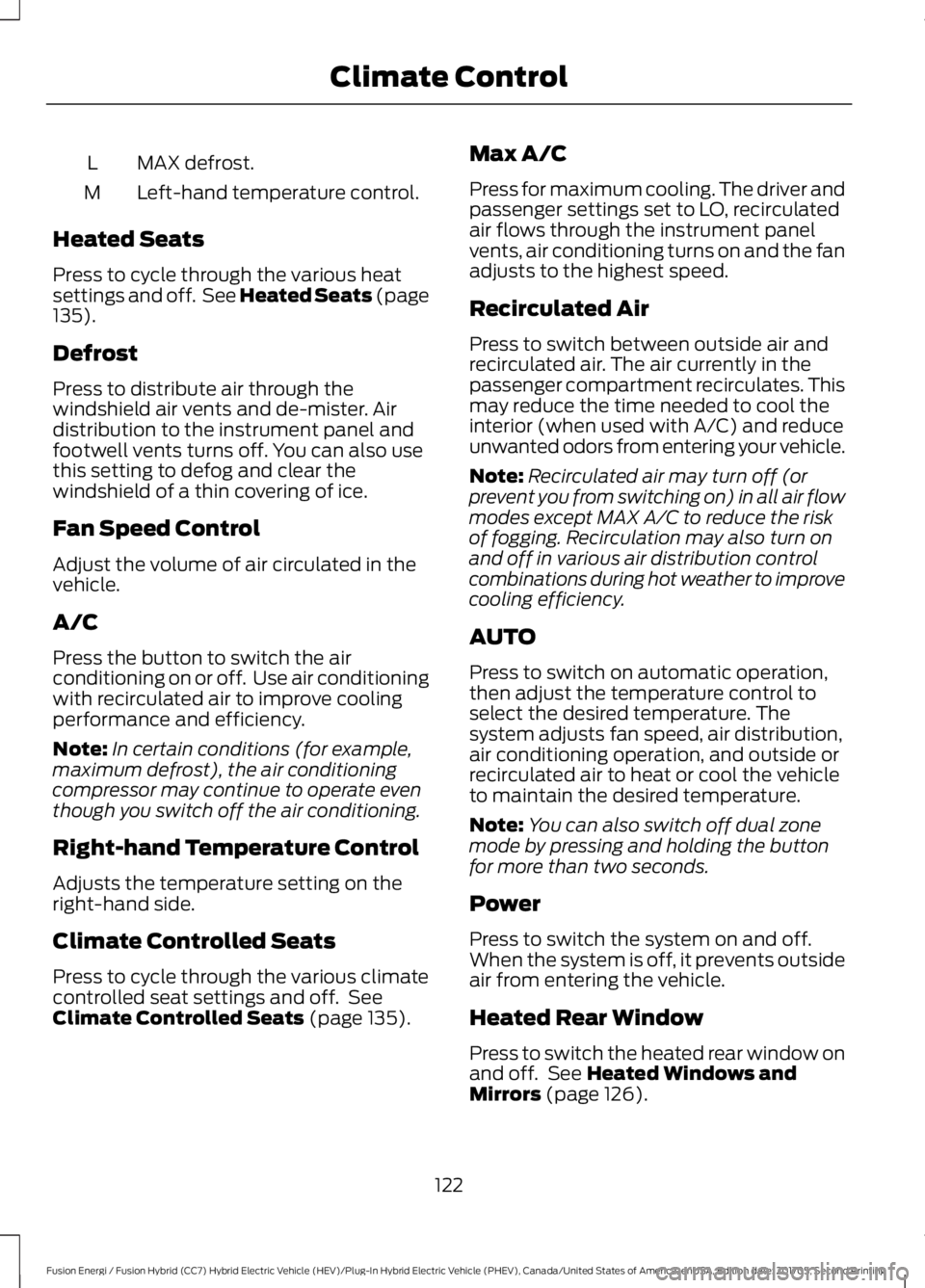
MAX defrost.L
Left-hand temperature control.M
Heated Seats
Press to cycle through the various heatsettings and off. See Heated Seats (page135).
Defrost
Press to distribute air through thewindshield air vents and de-mister. Airdistribution to the instrument panel andfootwell vents turns off. You can also usethis setting to defog and clear thewindshield of a thin covering of ice.
Fan Speed Control
Adjust the volume of air circulated in thevehicle.
A/C
Press the button to switch the airconditioning on or off. Use air conditioningwith recirculated air to improve coolingperformance and efficiency.
Note:In certain conditions (for example,maximum defrost), the air conditioningcompressor may continue to operate eventhough you switch off the air conditioning.
Right-hand Temperature Control
Adjusts the temperature setting on theright-hand side.
Climate Controlled Seats
Press to cycle through the various climatecontrolled seat settings and off. SeeClimate Controlled Seats (page 135).
Max A/C
Press for maximum cooling. The driver andpassenger settings set to LO, recirculatedair flows through the instrument panelvents, air conditioning turns on and the fanadjusts to the highest speed.
Recirculated Air
Press to switch between outside air andrecirculated air. The air currently in thepassenger compartment recirculates. Thismay reduce the time needed to cool theinterior (when used with A/C) and reduceunwanted odors from entering your vehicle.
Note:Recirculated air may turn off (orprevent you from switching on) in all air flowmodes except MAX A/C to reduce the riskof fogging. Recirculation may also turn onand off in various air distribution controlcombinations during hot weather to improvecooling efficiency.
AUTO
Press to switch on automatic operation,then adjust the temperature control toselect the desired temperature. Thesystem adjusts fan speed, air distribution,air conditioning operation, and outside orrecirculated air to heat or cool the vehicleto maintain the desired temperature.
Note:You can also switch off dual zonemode by pressing and holding the buttonfor more than two seconds.
Power
Press to switch the system on and off.When the system is off, it prevents outsideair from entering the vehicle.
Heated Rear Window
Press to switch the heated rear window onand off. See Heated Windows andMirrors (page 126).
122
Fusion Energi / Fusion Hybrid (CC7) Hybrid Electric Vehicle (HEV)/Plug-In Hybrid Electric Vehicle (PHEV), Canada/United States of America, enUSA, Edition date: 201705, Second Printing
Climate Control