lock FORD FUSION ENERGI 2019 Owners Manual
[x] Cancel search | Manufacturer: FORD, Model Year: 2019, Model line: FUSION ENERGI, Model: FORD FUSION ENERGI 2019Pages: 541, PDF Size: 7.19 MB
Page 456 of 541
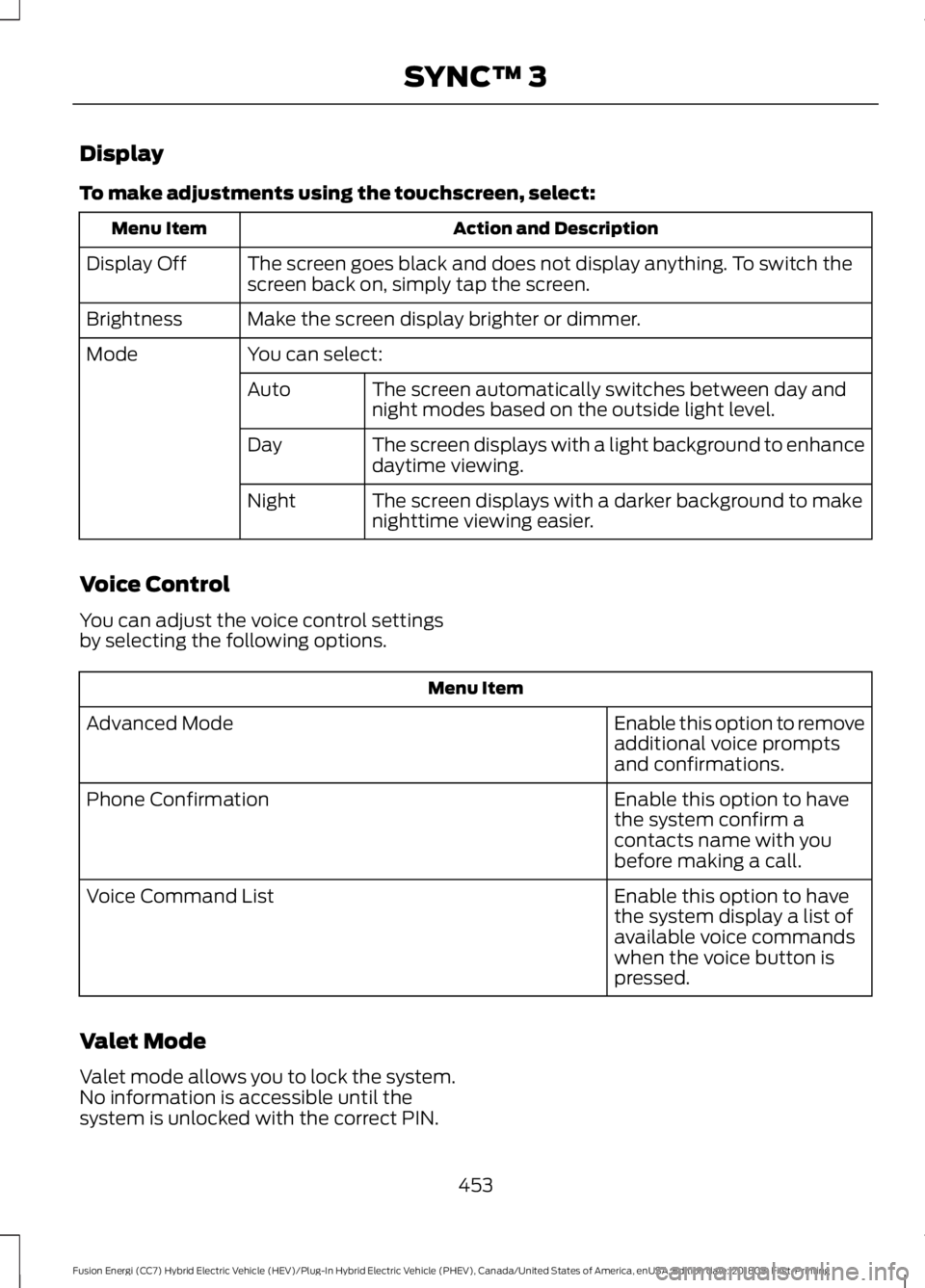
Display
To make adjustments using the touchscreen, select:
Action and Description
Menu Item
The screen goes black and does not display anything. To switch the
screen back on, simply tap the screen.
Display Off
Make the screen display brighter or dimmer.
Brightness
You can select:
Mode
The screen automatically switches between day and
night modes based on the outside light level.
Auto
The screen displays with a light background to enhance
daytime viewing.
Day
The screen displays with a darker background to make
nighttime viewing easier.
Night
Voice Control
You can adjust the voice control settings
by selecting the following options. Menu Item
Enable this option to remove
additional voice prompts
and confirmations.
Advanced Mode
Enable this option to have
the system confirm a
contacts name with you
before making a call.
Phone Confirmation
Enable this option to have
the system display a list of
available voice commands
when the voice button is
pressed.
Voice Command List
Valet Mode
Valet mode allows you to lock the system.
No information is accessible until the
system is unlocked with the correct PIN. 453
Fusion Energi (CC7) Hybrid Electric Vehicle (HEV)/Plug-In Hybrid Electric Vehicle (PHEV), Canada/United States of America, enUSA, Edition date: 201805, First-Printing SYNC™ 3
Page 457 of 541
When you select valet mode a pop up
appears informing you that a four digit
code must be entered to enable and
disable valet mode. You can use any PIN
you chose but you must use the same PIN
to disable valet mode. The system asks
you to input the code.
Note:
If the system is locked and you
cannot remember the PIN, please contact
the Customer Relationship Center.
United States: 1-800-392-3673
Canada: 1-800-565-3673
To enable valet mode, enter your chosen
PIN. The system then asks to confirm your
PIN by reentering it. The system then locks. To unlock the system, enter the same pin
number. The system reconnects to your
phone and all of your options are available
again.
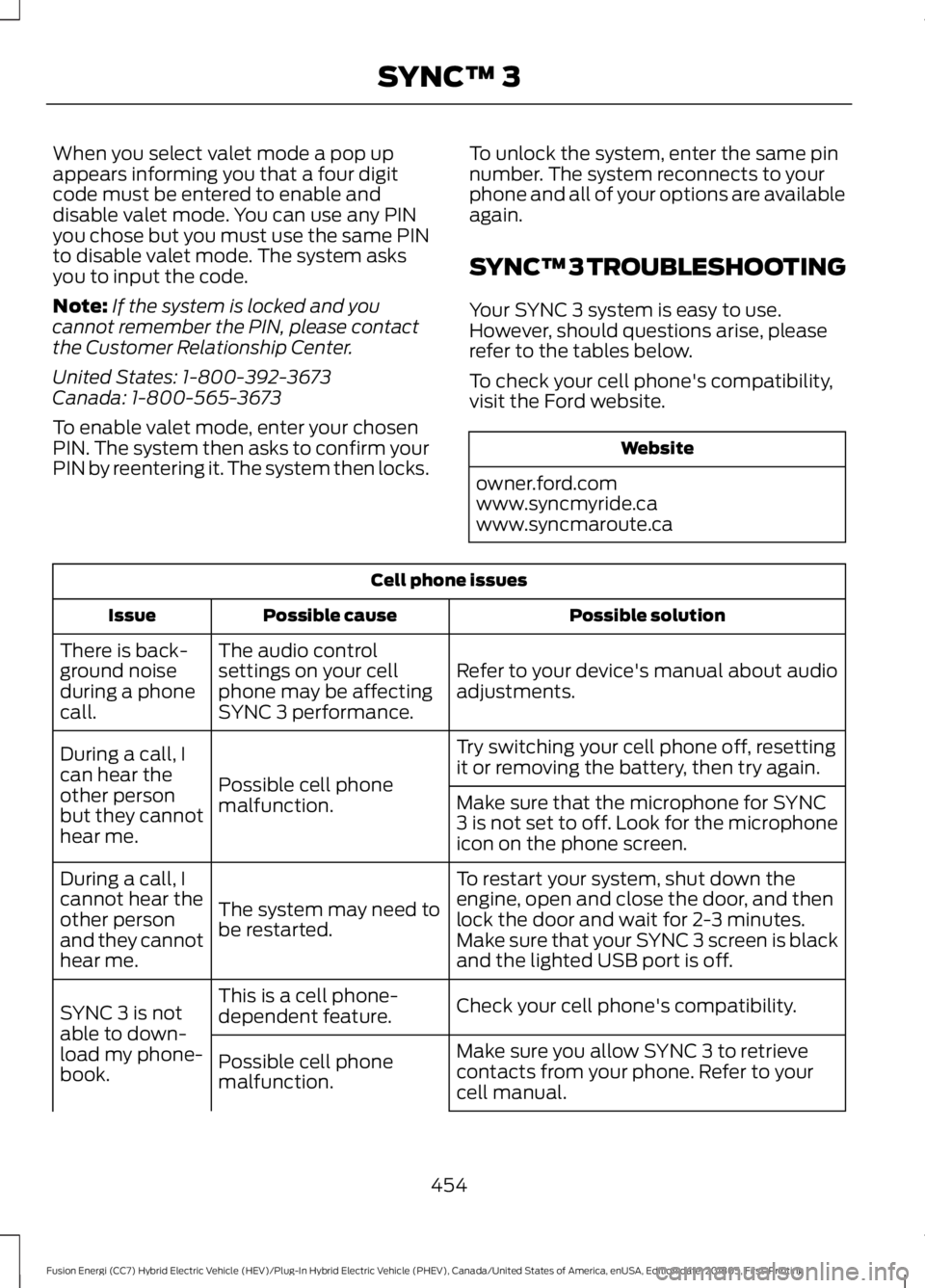
SYNC™ 3 TROUBLESHOOTING
Your SYNC 3 system is easy to use.
However, should questions arise, please
refer to the tables below.
To check your cell phone's compatibility,
visit the Ford website. Website
owner.ford.com
www.syncmyride.ca
www.syncmaroute.ca Cell phone issues
Possible solution
Possible cause
Issue
Refer to your device's manual about audio
adjustments.
The audio control
settings on your cell
phone may be affecting
SYNC 3 performance.
There is back-
ground noise
during a phone
call.
Try switching your cell phone off, resetting
it or removing the battery, then try again.
Possible cell phone
malfunction.
During a call, I
can hear the
other person
but they cannot
hear me.
Make sure that the microphone for SYNC
3 is not set to off. Look for the microphone
icon on the phone screen.
To restart your system, shut down the
engine, open and close the door, and then
lock the door and wait for 2-3 minutes.
Make sure that your SYNC 3 screen is black
and the lighted USB port is off.
The system may need to
be restarted.
During a call, I
cannot hear the
other person
and they cannot
hear me.
Check your cell phone's compatibility.
This is a cell phone-
dependent feature.
SYNC 3 is not
able to down-
load my phone-
book. Make sure you allow SYNC 3 to retrieve
contacts from your phone. Refer to your
cell manual.
Possible cell phone
malfunction.
454
Fusion Energi (CC7) Hybrid Electric Vehicle (HEV)/Plug-In Hybrid Electric Vehicle (PHEV), Canada/United States of America, enUSA, Edition date: 201805, First-Printing SYNC™ 3
Page 459 of 541
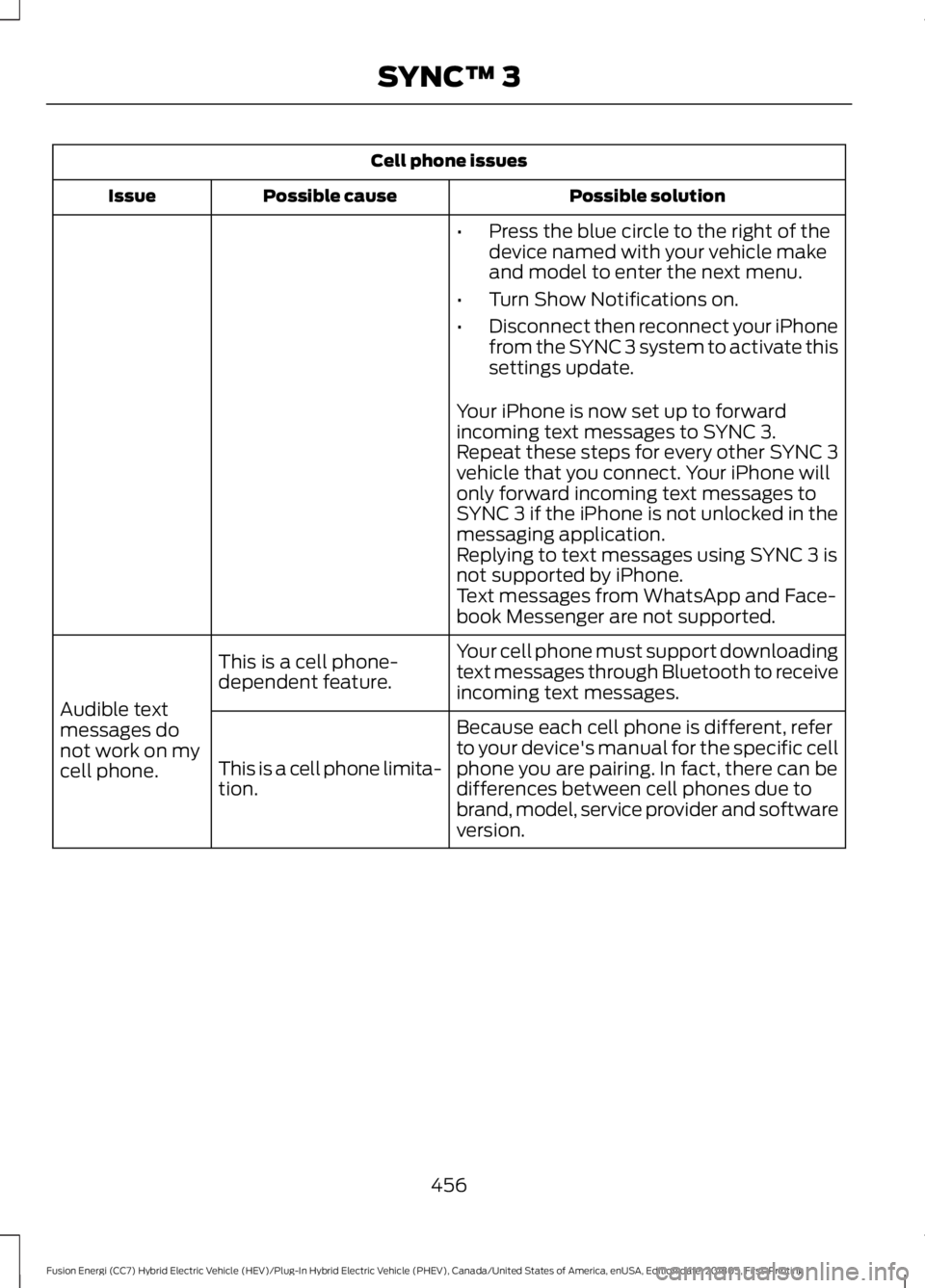
Cell phone issues
Possible solution
Possible cause
Issue
•Press the blue circle to the right of the
device named with your vehicle make
and model to enter the next menu.
• Turn Show Notifications on.
• Disconnect then reconnect your iPhone
from the SYNC 3 system to activate this
settings update.
Your iPhone is now set up to forward
incoming text messages to SYNC 3.
Repeat these steps for every other SYNC 3
vehicle that you connect. Your iPhone will
only forward incoming text messages to
SYNC 3 if the iPhone is not unlocked in the
messaging application.
Replying to text messages using SYNC 3 is
not supported by iPhone.
Text messages from WhatsApp and Face-
book Messenger are not supported.
Your cell phone must support downloading
text messages through Bluetooth to receive
incoming text messages.
This is a cell phone-
dependent feature.
Audible text
messages do
not work on my
cell phone. Because each cell phone is different, refer
to your device's manual for the specific cell
phone you are pairing. In fact, there can be
differences between cell phones due to
brand, model, service provider and software
version.
This is a cell phone limita-
tion.
456
Fusion Energi (CC7) Hybrid Electric Vehicle (HEV)/Plug-In Hybrid Electric Vehicle (PHEV), Canada/United States of America, enUSA, Edition date: 201805, First-Printing SYNC™ 3
Page 460 of 541
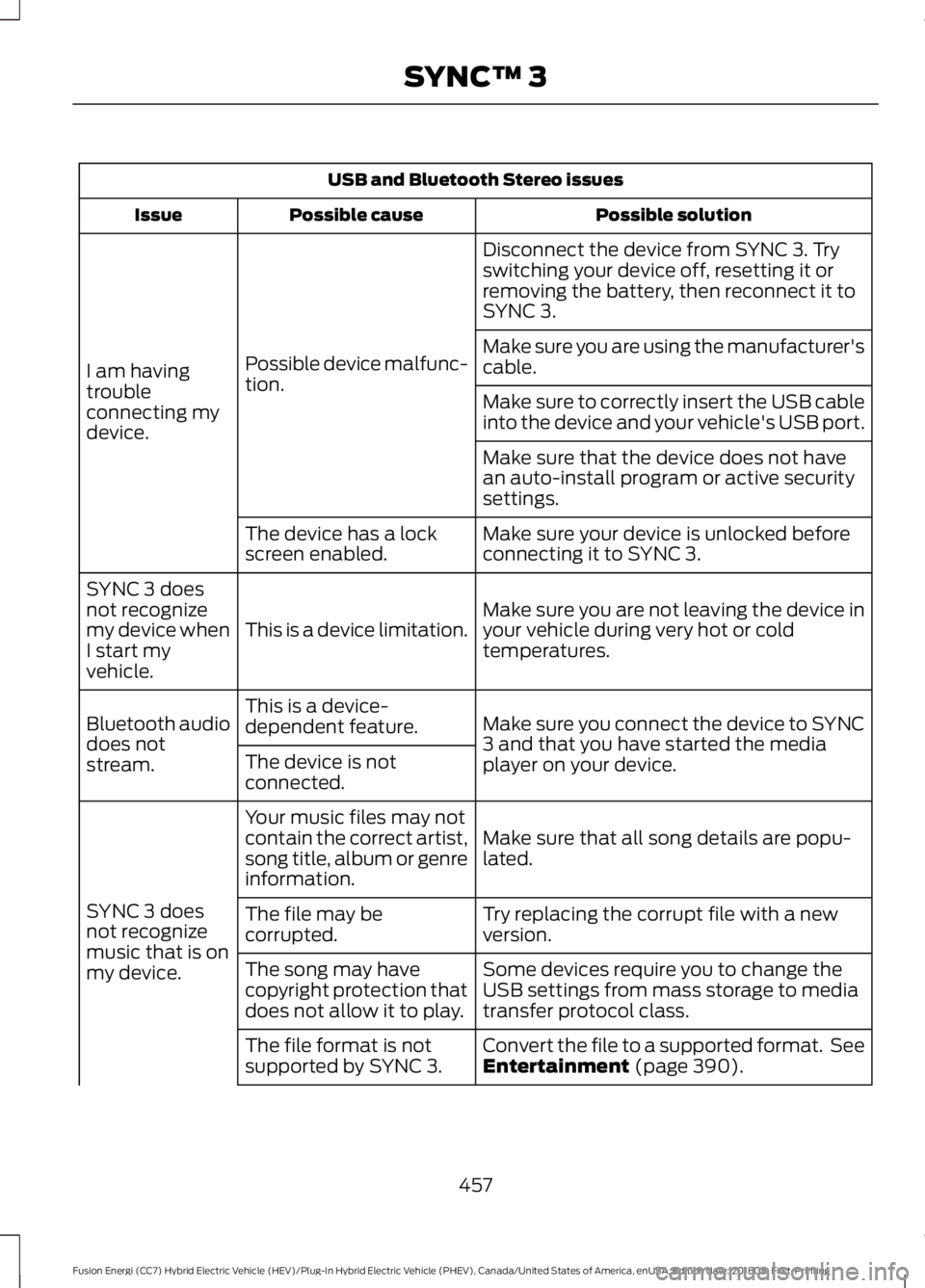
USB and Bluetooth Stereo issues
Possible solution
Possible cause
Issue
Disconnect the device from SYNC 3. Try
switching your device off, resetting it or
removing the battery, then reconnect it to
SYNC 3.
Possible device malfunc-
tion.
I am having
trouble
connecting my
device. Make sure you are using the manufacturer's
cable.
Make sure to correctly insert the USB cable
into the device and your vehicle's USB port.
Make sure that the device does not have
an auto-install program or active security
settings.
Make sure your device is unlocked before
connecting it to SYNC 3.
The device has a lock
screen enabled.
Make sure you are not leaving the device in
your vehicle during very hot or cold
temperatures.
This is a device limitation.
SYNC 3 does
not recognize
my device when
I start my
vehicle.
Make sure you connect the device to SYNC
3 and that you have started the media
player on your device.
This is a device-
dependent feature.
Bluetooth audio
does not
stream. The device is not
connected.
Make sure that all song details are popu-
lated.
Your music files may not
contain the correct artist,
song title, album or genre
information.
SYNC 3 does
not recognize
music that is on
my device. Try replacing the corrupt file with a new
version.
The file may be
corrupted.
Some devices require you to change the
USB settings from mass storage to media
transfer protocol class.
The song may have
copyright protection that
does not allow it to play.
Convert the file to a supported format. See
Entertainment (page 390).
The file format is not
supported by SYNC 3.
457
Fusion Energi (CC7) Hybrid Electric Vehicle (HEV)/Plug-In Hybrid Electric Vehicle (PHEV), Canada/United States of America, enUSA, Edition date: 201805, First-Printing SYNC™ 3
Page 461 of 541
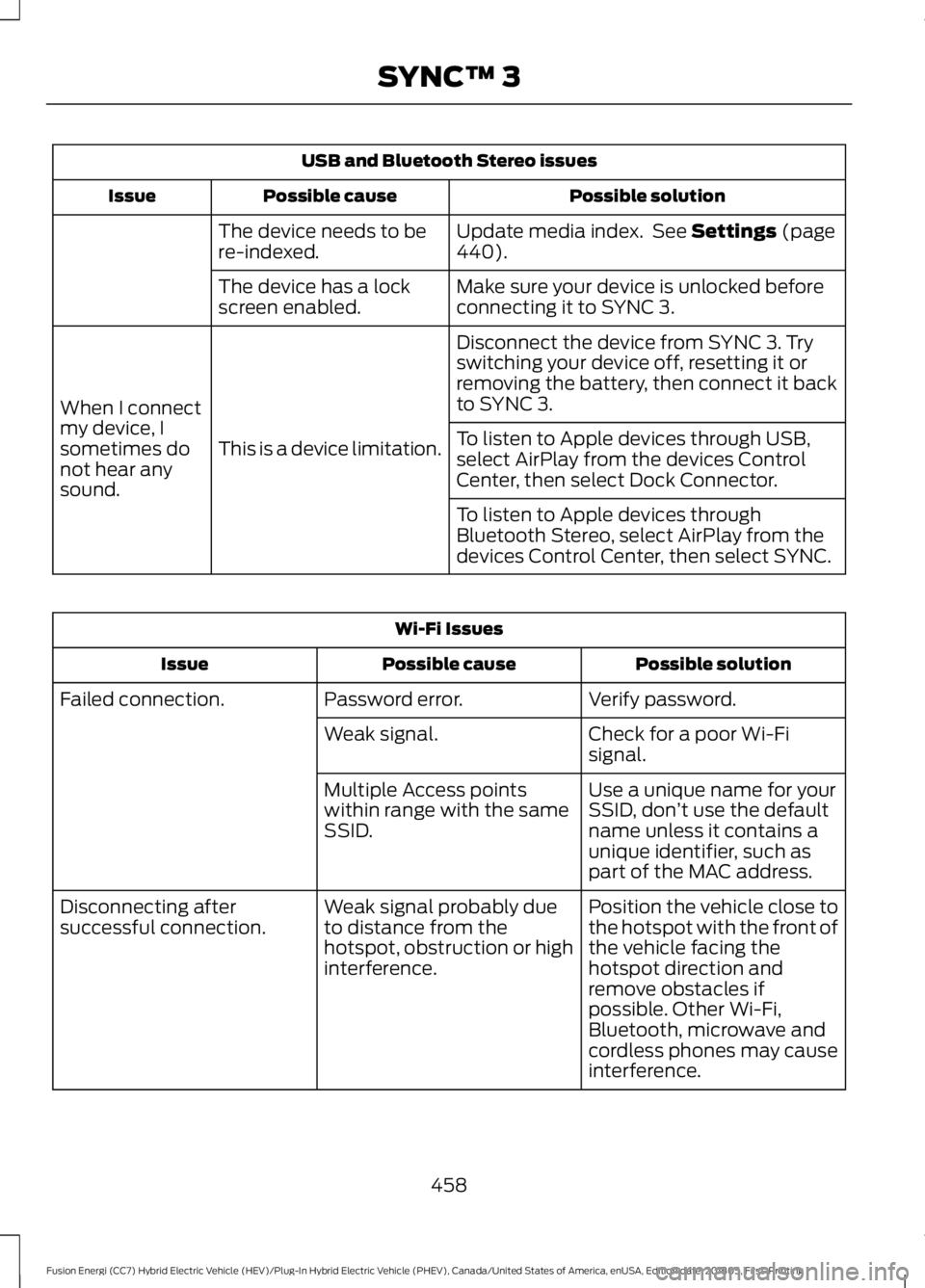
USB and Bluetooth Stereo issues
Possible solution
Possible cause
Issue
Update media index. See Settings (page
440).
The device needs to be
re-indexed.
Make sure your device is unlocked before
connecting it to SYNC 3.
The device has a lock
screen enabled.
Disconnect the device from SYNC 3. Try
switching your device off, resetting it or
removing the battery, then connect it back
to SYNC 3.
This is a device limitation.
When I connect
my device, I
sometimes do
not hear any
sound. To listen to Apple devices through USB,
select AirPlay from the devices Control
Center, then select Dock Connector.
To listen to Apple devices through
Bluetooth Stereo, select AirPlay from the
devices Control Center, then select SYNC.Wi-Fi Issues
Possible solution
Possible cause
Issue
Verify password.
Password error.
Failed connection.
Check for a poor Wi-Fi
signal.
Weak signal.
Use a unique name for your
SSID, don’t use the default
name unless it contains a
unique identifier, such as
part of the MAC address.
Multiple Access points
within range with the same
SSID.
Position the vehicle close to
the hotspot with the front of
the vehicle facing the
hotspot direction and
remove obstacles if
possible. Other Wi-Fi,
Bluetooth, microwave and
cordless phones may cause
interference.
Weak signal probably due
to distance from the
hotspot, obstruction or high
interference.
Disconnecting after
successful connection.
458
Fusion Energi (CC7) Hybrid Electric Vehicle (HEV)/Plug-In Hybrid Electric Vehicle (PHEV), Canada/United States of America, enUSA, Edition date: 201805, First-Printing SYNC™ 3
Page 469 of 541
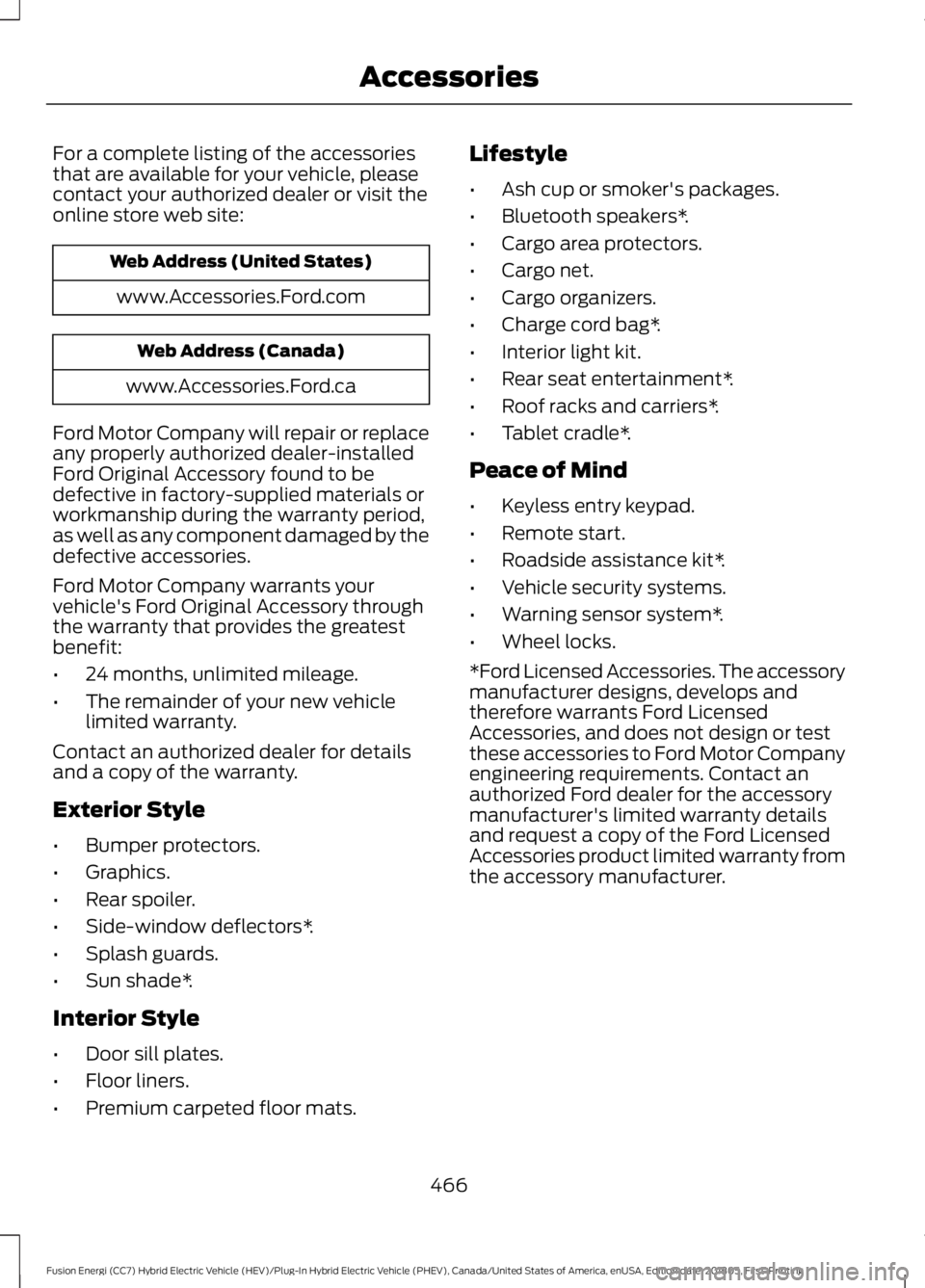
For a complete listing of the accessories
that are available for your vehicle, please
contact your authorized dealer or visit the
online store web site:
Web Address (United States)
www.Accessories.Ford.com Web Address (Canada)
www.Accessories.Ford.ca
Ford Motor Company will repair or replace
any properly authorized dealer-installed
Ford Original Accessory found to be
defective in factory-supplied materials or
workmanship during the warranty period,
as well as any component damaged by the
defective accessories.
Ford Motor Company warrants your
vehicle's Ford Original Accessory through
the warranty that provides the greatest
benefit:
• 24 months, unlimited mileage.
• The remainder of your new vehicle
limited warranty.
Contact an authorized dealer for details
and a copy of the warranty.
Exterior Style
• Bumper protectors.
• Graphics.
• Rear spoiler.
• Side-window deflectors*.
• Splash guards.
• Sun shade*.
Interior Style
• Door sill plates.
• Floor liners.
• Premium carpeted floor mats. Lifestyle
•
Ash cup or smoker's packages.
• Bluetooth speakers*.
• Cargo area protectors.
• Cargo net.
• Cargo organizers.
• Charge cord bag*.
• Interior light kit.
• Rear seat entertainment*.
• Roof racks and carriers*.
• Tablet cradle*.
Peace of Mind
• Keyless entry keypad.
• Remote start.
• Roadside assistance kit*.
• Vehicle security systems.
• Warning sensor system*.
• Wheel locks.
*Ford Licensed Accessories. The accessory
manufacturer designs, develops and
therefore warrants Ford Licensed
Accessories, and does not design or test
these accessories to Ford Motor Company
engineering requirements. Contact an
authorized Ford dealer for the accessory
manufacturer's limited warranty details
and request a copy of the Ford Licensed
Accessories product limited warranty from
the accessory manufacturer.
466
Fusion Energi (CC7) Hybrid Electric Vehicle (HEV)/Plug-In Hybrid Electric Vehicle (PHEV), Canada/United States of America, enUSA, Edition date: 201805, First-Printing Accessories
Page 471 of 541
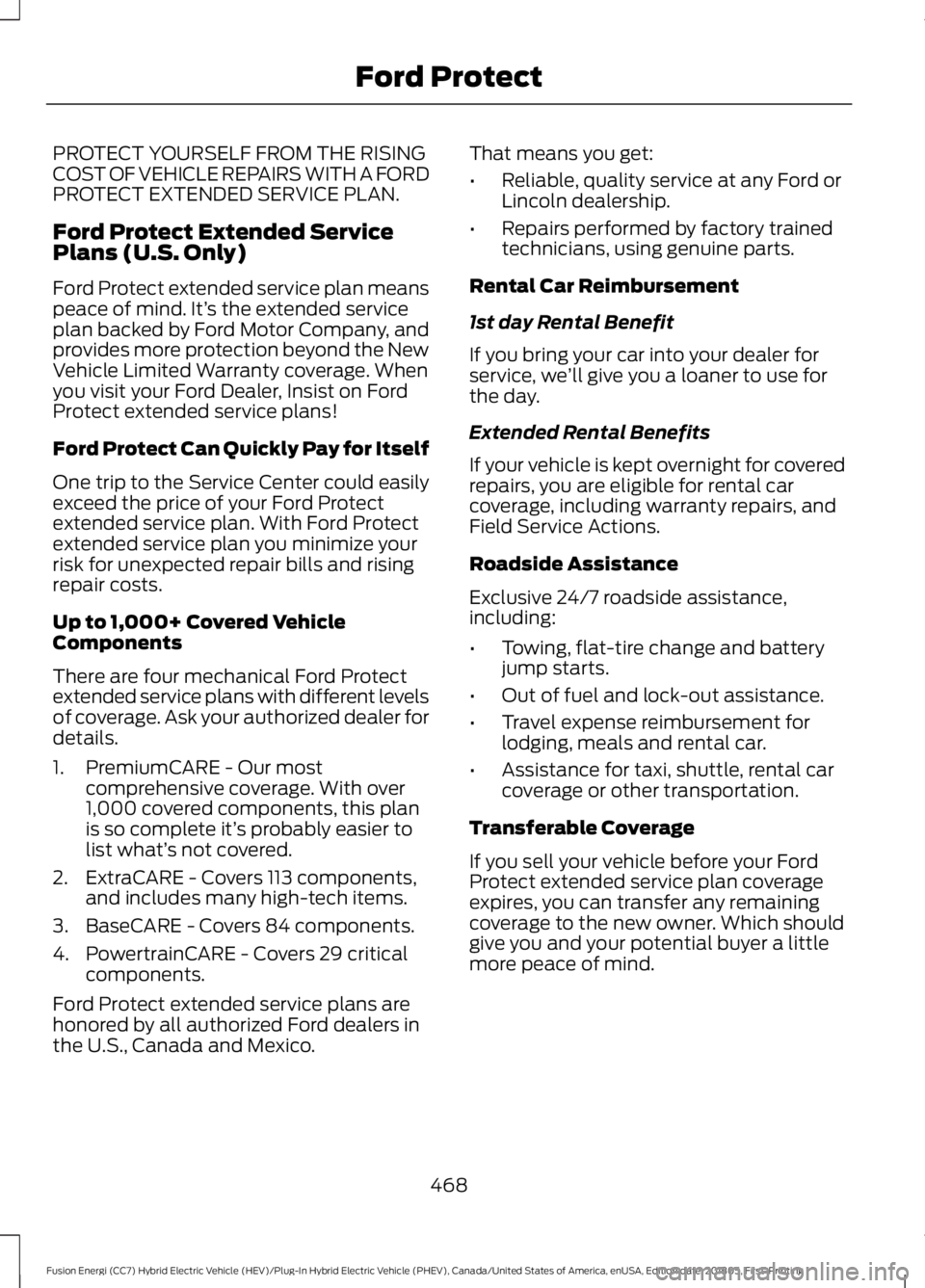
PROTECT YOURSELF FROM THE RISING
COST OF VEHICLE REPAIRS WITH A FORD
PROTECT EXTENDED SERVICE PLAN.
Ford Protect Extended Service
Plans (U.S. Only)
Ford Protect extended service plan means
peace of mind. It’
s the extended service
plan backed by Ford Motor Company, and
provides more protection beyond the New
Vehicle Limited Warranty coverage. When
you visit your Ford Dealer, Insist on Ford
Protect extended service plans!
Ford Protect Can Quickly Pay for Itself
One trip to the Service Center could easily
exceed the price of your Ford Protect
extended service plan. With Ford Protect
extended service plan you minimize your
risk for unexpected repair bills and rising
repair costs.
Up to 1,000+ Covered Vehicle
Components
There are four mechanical Ford Protect
extended service plans with different levels
of coverage. Ask your authorized dealer for
details.
1. PremiumCARE - Our most comprehensive coverage. With over
1,000 covered components, this plan
is so complete it’ s probably easier to
list what’ s not covered.
2. ExtraCARE - Covers 113 components, and includes many high-tech items.
3. BaseCARE - Covers 84 components.
4. PowertrainCARE - Covers 29 critical components.
Ford Protect extended service plans are
honored by all authorized Ford dealers in
the U.S., Canada and Mexico. That means you get:
•
Reliable, quality service at any Ford or
Lincoln dealership.
• Repairs performed by factory trained
technicians, using genuine parts.
Rental Car Reimbursement
1st day Rental Benefit
If you bring your car into your dealer for
service, we ’ll give you a loaner to use for
the day.
Extended Rental Benefits
If your vehicle is kept overnight for covered
repairs, you are eligible for rental car
coverage, including warranty repairs, and
Field Service Actions.
Roadside Assistance
Exclusive 24/7 roadside assistance,
including:
• Towing, flat-tire change and battery
jump starts.
• Out of fuel and lock-out assistance.
• Travel expense reimbursement for
lodging, meals and rental car.
• Assistance for taxi, shuttle, rental car
coverage or other transportation.
Transferable Coverage
If you sell your vehicle before your Ford
Protect extended service plan coverage
expires, you can transfer any remaining
coverage to the new owner. Which should
give you and your potential buyer a little
more peace of mind.
468
Fusion Energi (CC7) Hybrid Electric Vehicle (HEV)/Plug-In Hybrid Electric Vehicle (PHEV), Canada/United States of America, enUSA, Edition date: 201805, First-Printing Ford Protect
Page 475 of 541
Make sure to change your vehicle
’s oils and
fluids at the specified intervals or in
conjunction with a repair. Flushing is a
viable way to change fluid for many vehicle
sub-systems during scheduled
maintenance. It is critical that systems are
flushed only with new fluid that is the same
as that required to fill and operate the system or using a Ford-approved flushing
chemical.
Owner Checks and Services
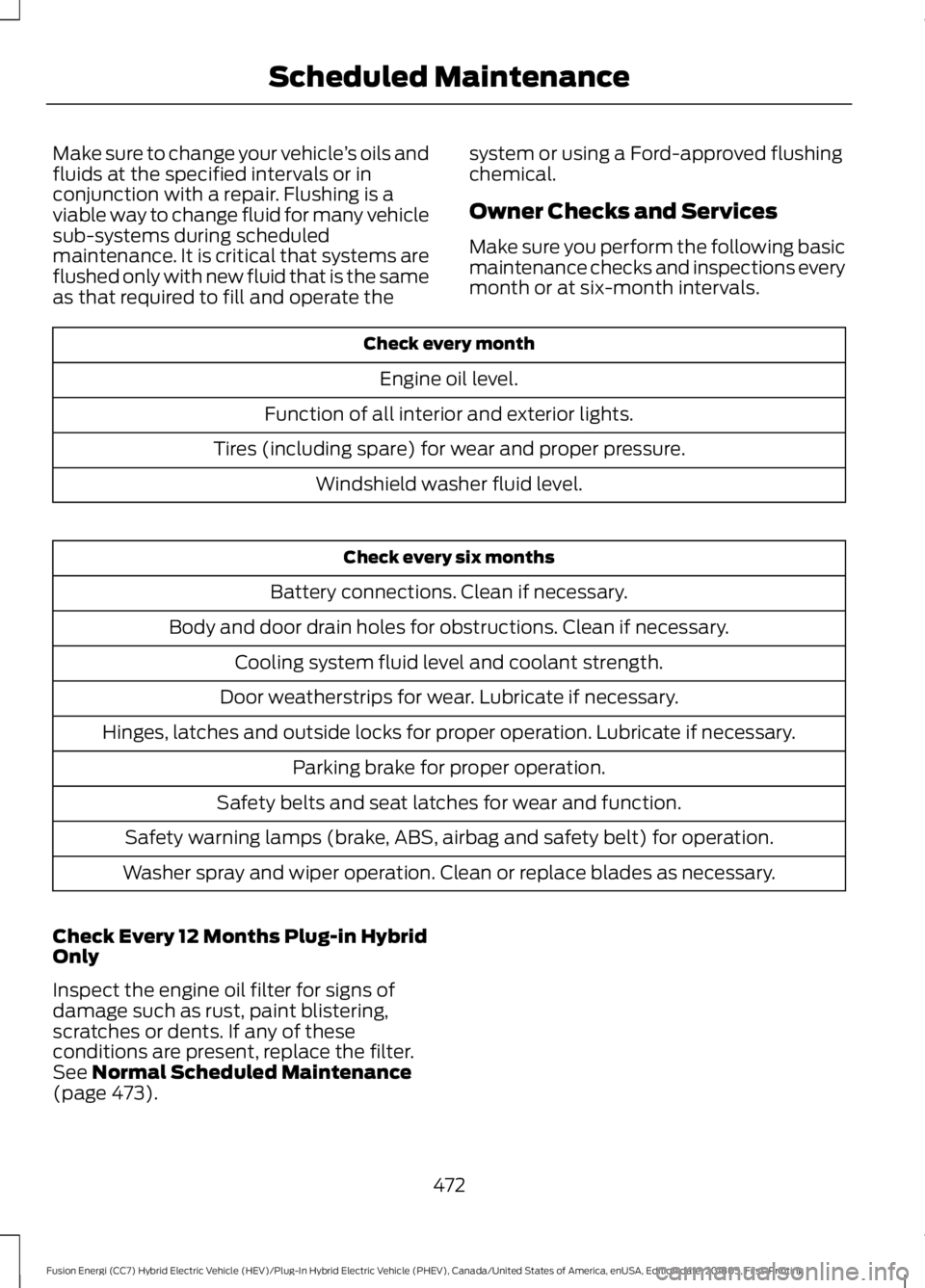
Make sure you perform the following basic
maintenance checks and inspections every
month or at six-month intervals.Check every month
Engine oil level.
Function of all interior and exterior lights.
Tires (including spare) for wear and proper pressure. Windshield washer fluid level. Check every six months
Battery connections. Clean if necessary.
Body and door drain holes for obstructions. Clean if necessary. Cooling system fluid level and coolant strength.
Door weatherstrips for wear. Lubricate if necessary.
Hinges, latches and outside locks for proper operation. Lubricate if necessary. Parking brake for proper operation.
Safety belts and seat latches for wear and function.
Safety warning lamps (brake, ABS, airbag and safety belt) for operation.
Washer spray and wiper operation. Clean or replace blades as necessary.
Check Every 12 Months Plug-in Hybrid
Only
Inspect the engine oil filter for signs of
damage such as rust, paint blistering,
scratches or dents. If any of these
conditions are present, replace the filter.
See Normal Scheduled Maintenance
(page 473).
472
Fusion Energi (CC7) Hybrid Electric Vehicle (HEV)/Plug-In Hybrid Electric Vehicle (PHEV), Canada/United States of America, enUSA, Edition date: 201805, First-Printing Scheduled Maintenance
Page 530 of 541
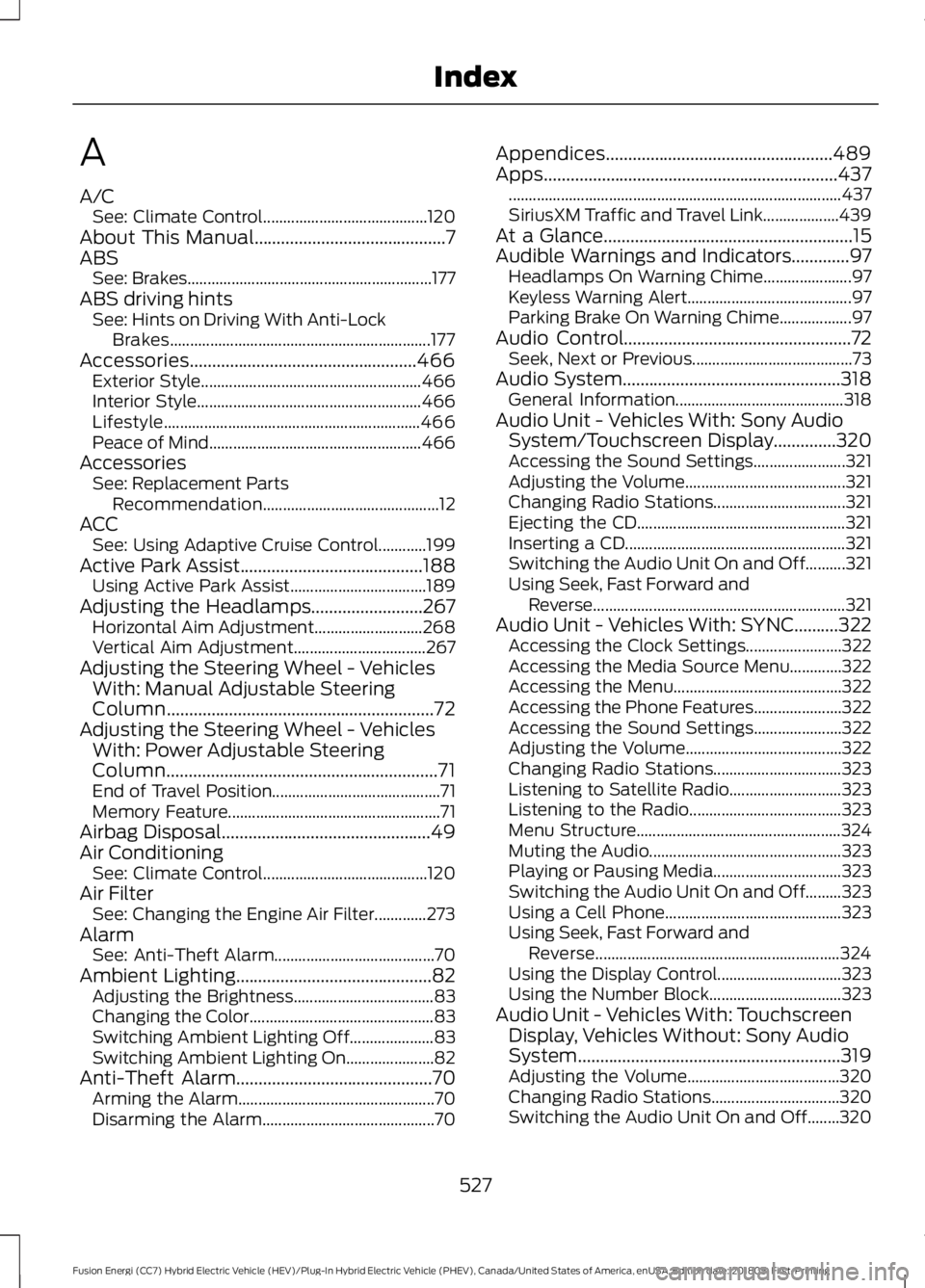
A
A/C
See: Climate Control......................................... 120
About This Manual...........................................7
ABS See: Brakes............................................................. 177
ABS driving hints See: Hints on Driving With Anti-Lock
Brakes................................................................. 177
Accessories...................................................466 Exterior Style....................................................... 466
Interior Style........................................................ 466
Lifestyle................................................................ 466
Peace of Mind..................................................... 466
Accessories See: Replacement Parts
Recommendation............................................ 12
ACC See: Using Adaptive Cruise Control............199
Active Park Assist.........................................188 Using Active Park Assist.................................. 189
Adjusting the Headlamps.........................267 Horizontal Aim Adjustment........................... 268
Vertical Aim Adjustment................................. 267
Adjusting the Steering Wheel - Vehicles With: Manual Adjustable Steering
Column
............................................................72
Adjusting the Steering Wheel - Vehicles With: Power Adjustable Steering
Column.............................................................71
End of Travel Position.......................................... 71
Memory Feature..................................................... 71
Airbag Disposal
...............................................49
Air Conditioning See: Climate Control......................................... 120
Air Filter See: Changing the Engine Air Filter.............273
Alarm See: Anti-Theft Alarm........................................ 70
Ambient Lighting
............................................82
Adjusting the Brightness................................... 83
Changing the Color.............................................. 83
Switching Ambient Lighting Off..................... 83
Switching Ambient Lighting On...................... 82
Anti-Theft Alarm............................................70 Arming the Alarm................................................. 70
Disarming the Alarm........................................... 70Appendices...................................................489
Apps..................................................................437
........................................................................\
........... 437
SiriusXM Traffic and Travel Link................... 439
At a Glance........................................................15
Audible Warnings and Indicators.............97 Headlamps On Warning Chime...................... 97
Keyless Warning Alert......................................... 97
Parking Brake On Warning Chime.................. 97
Audio Control
...................................................72
Seek, Next or Previous........................................ 73
Audio System
.................................................318
General Information.......................................... 318
Audio Unit - Vehicles With: Sony Audio System/Touchscreen Display..............320
Accessing the Sound Settings....................... 321
Adjusting the Volume........................................ 321
Changing Radio Stations................................. 321
Ejecting the CD.................................................... 321
Inserting a CD....................................................... 321
Switching the Audio Unit On and Off..........321
Using Seek, Fast Forward and Reverse............................................................... 321
Audio Unit - Vehicles With: SYNC..........322 Accessing the Clock Settings........................ 322
Accessing the Media Source Menu.............322
Accessing the Menu.......................................... 322
Accessing the Phone Features...................... 322
Accessing the Sound Settings...................... 322
Adjusting the Volume....................................... 322
Changing Radio Stations................................ 323
Listening to Satellite Radio............................ 323
Listening to the Radio...................................... 323
Menu Structure................................................... 324
Muting the Audio................................................ 323
Playing or Pausing Media................................ 323
Switching the Audio Unit On and Off.........323
Using a Cell Phone............................................ 323
Using Seek, Fast Forward and Reverse............................................................. 324
Using the Display Control............................... 323
Using the Number Block................................. 323
Audio Unit - Vehicles With: Touchscreen Display, Vehicles Without: Sony Audio
System...........................................................319
Adjusting the Volume...................................... 320
Changing Radio Stations................................ 320
Switching the Audio Unit On and Off........320
527
Fusion Energi (CC7) Hybrid Electric Vehicle (HEV)/Plug-In Hybrid Electric Vehicle (PHEV), Canada/United States of America, enUSA, Edition date: 201805, First-Printing Index
Page 531 of 541
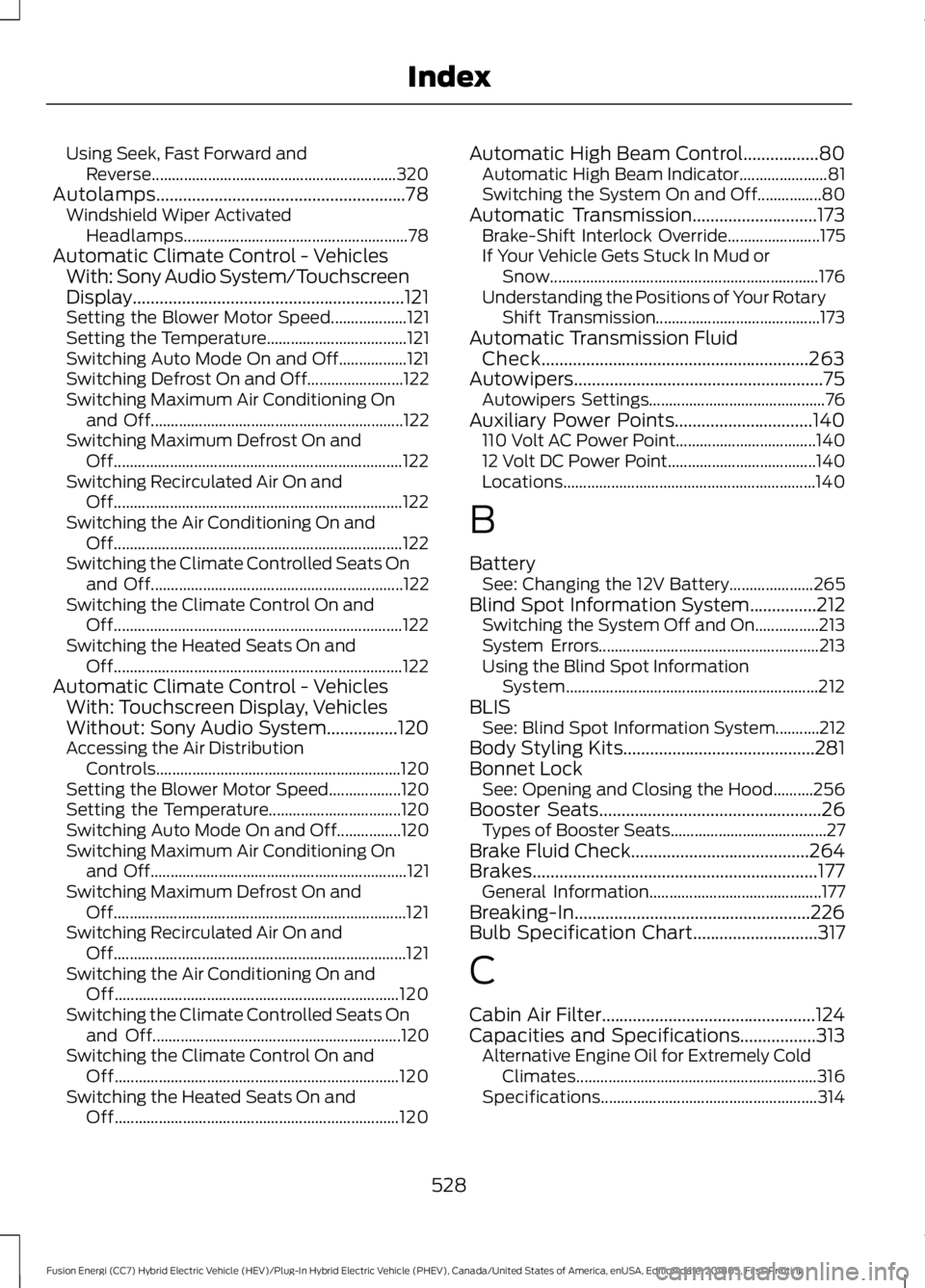
Using Seek, Fast Forward and
Reverse............................................................. 320
Autolamps........................................................78 Windshield Wiper Activated
Headlamps........................................................ 78
Automatic Climate Control - Vehicles With: Sony Audio System/Touchscreen
Display.............................................................121
Setting the Blower Motor Speed................... 121
Setting the Temperature................................... 121
Switching Auto Mode On and Off.................121
Switching Defrost On and Off........................ 122
Switching Maximum Air Conditioning On and Off............................................................... 122
Switching Maximum Defrost On and Off........................................................................\
122
Switching Recirculated Air On and Off........................................................................\
122
Switching the Air Conditioning On and Off........................................................................\
122
Switching the Climate Controlled Seats On and Off............................................................... 122
Switching the Climate Control On and Off........................................................................\
122
Switching the Heated Seats On and Off........................................................................\
122
Automatic Climate Control - Vehicles With: Touchscreen Display, Vehicles
Without: Sony Audio System................120
Accessing the Air Distribution Controls............................................................. 120
Setting the Blower Motor Speed.................. 120
Setting the Temperature................................. 120
Switching Auto Mode On and Off................120
Switching Maximum Air Conditioning On and Off................................................................ 121
Switching Maximum Defrost On and Off........................................................................\
. 121
Switching Recirculated Air On and Off........................................................................\
. 121
Switching the Air Conditioning On and Off....................................................................... 120
Switching the Climate Controlled Seats On and Off.............................................................. 120
Switching the Climate Control On and Off....................................................................... 120
Switching the Heated Seats On and Off....................................................................... 120Automatic High Beam Control.................80
Automatic High Beam Indicator...................... 81
Switching the System On and Off................80
Automatic Transmission............................173 Brake-Shift Interlock Override....................... 175
If Your Vehicle Gets Stuck In Mud or Snow................................................................... 176
Understanding the Positions of Your Rotary Shift Transmission......................................... 173
Automatic Transmission Fluid Check............................................................263
Autowipers........................................................75 Autowipers Settings............................................ 76
Auxiliary Power Points...............................140 110 Volt AC Power Point................................... 140
12 Volt DC Power Point..................................... 140
Locations............................................................... 140
B
Battery See: Changing the 12V Battery..................... 265
Blind Spot Information System...............212 Switching the System Off and On................213
System Errors....................................................... 213
Using the Blind Spot Information System............................................................... 212
BLIS See: Blind Spot Information System...........212
Body Styling Kits...........................................281
Bonnet Lock See: Opening and Closing the Hood..........256
Booster Seats..................................................26 Types of Booster Seats....................................... 27
Brake Fluid Check........................................264
Brakes................................................................177 General Information........................................... 177
Breaking-In.....................................................226
Bulb Specification Chart............................317
C
Cabin Air Filter................................................124
Capacities and Specifications
.................313
Alternative Engine Oil for Extremely Cold
Climates............................................................ 316
Specifications...................................................... 314
528
Fusion Energi (CC7) Hybrid Electric Vehicle (HEV)/Plug-In Hybrid Electric Vehicle (PHEV), Canada/United States of America, enUSA, Edition date: 201805, First-Printing Index