charging FORD FUSION ENERGI 2019 User Guide
[x] Cancel search | Manufacturer: FORD, Model Year: 2019, Model line: FUSION ENERGI, Model: FORD FUSION ENERGI 2019Pages: 541, PDF Size: 7.19 MB
Page 175 of 541
Note:
If the system detects a vehicle
charging system fault at any point in a
charge cycle, the entire light ring will flash
continuously for one minute and then turn
off. If this happens, unplug the charging
coupler and then plug it back into the charge
port receptacle. If the problem persists,
contact an authorized dealer.
You can modify the lighting ring. Refer to
the Charge Port Light Ring Settings. See
SYNC™ 3 (page 370).
Disconnecting the Charging Coupler
Note: Do not pull the wall plug from the
wall while your vehicle is charging. Doing so
may damage the outlet and the cord.
1. Remove the lock from the charging coupler button.
2. Press the button on the charging coupler.
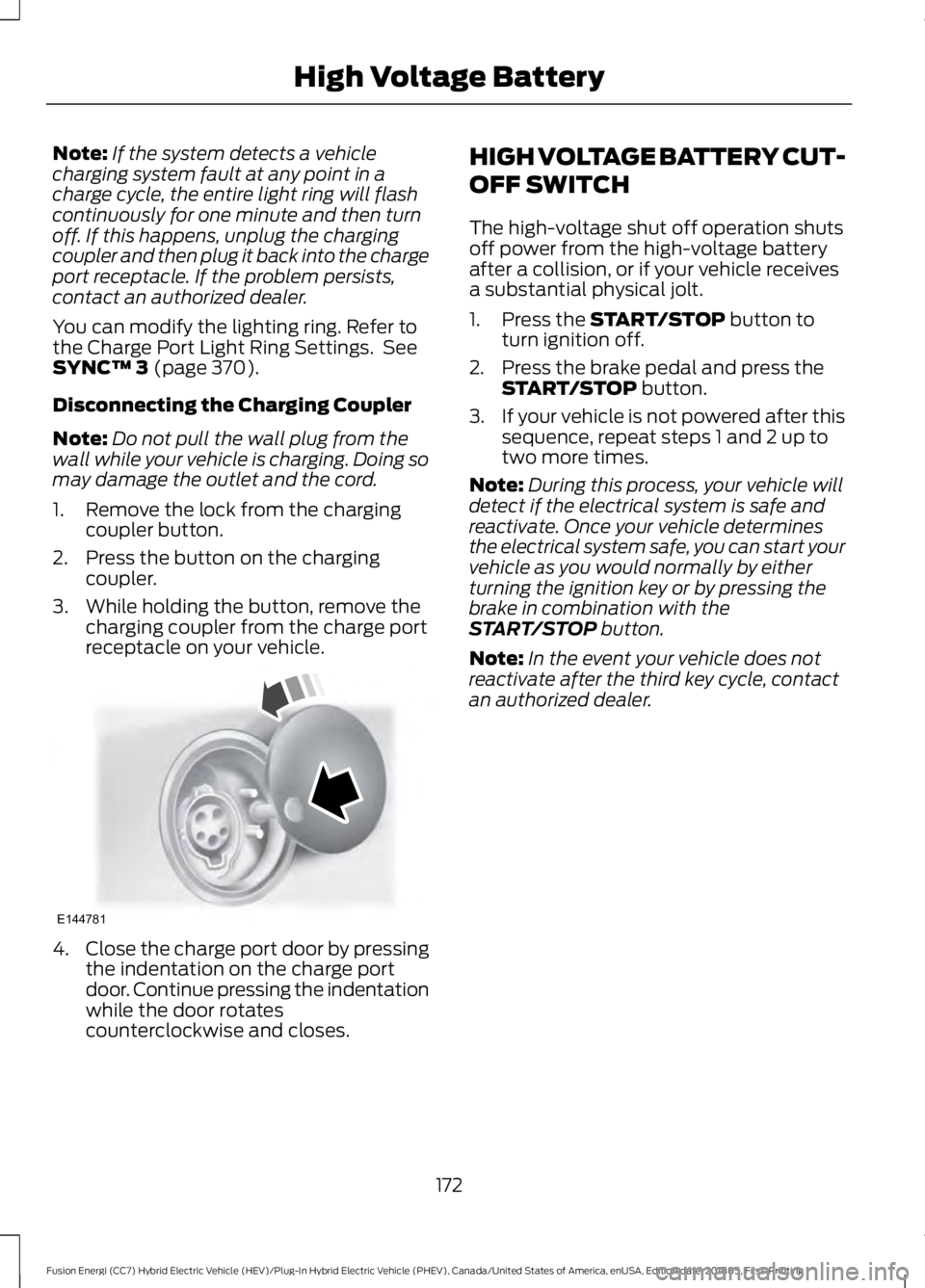
3. While holding the button, remove the charging coupler from the charge port
receptacle on your vehicle. 4.
Close the charge port door by pressing
the indentation on the charge port
door. Continue pressing the indentation
while the door rotates
counterclockwise and closes. HIGH VOLTAGE BATTERY CUT-
OFF SWITCH
The high-voltage shut off operation shuts
off power from the high-voltage battery
after a collision, or if your vehicle receives
a substantial physical jolt.
1. Press the
START/STOP button to
turn ignition off.
2. Press the brake pedal and press the START/STOP
button.
3. If your vehicle is not powered after this
sequence, repeat steps 1 and 2 up to
two more times.
Note: During this process, your vehicle will
detect if the electrical system is safe and
reactivate. Once your vehicle determines
the electrical system safe, you can start your
vehicle as you would normally by either
turning the ignition key or by pressing the
brake in combination with the
START/STOP
button.
Note: In the event your vehicle does not
reactivate after the third key cycle, contact
an authorized dealer.
172
Fusion Energi (CC7) Hybrid Electric Vehicle (HEV)/Plug-In Hybrid Electric Vehicle (PHEV), Canada/United States of America, enUSA, Edition date: 201805, First-Printing High Voltage BatteryE144781
Page 178 of 541
Grade assist:
•
Provides additional grade braking with
a combination of engine motoring and
high-voltage battery charging to help
maintain vehicle speed when
descending a grade.
• As your vehicle determines the amount
of engine motoring and high-voltage
battery charging, you may notice the
engine speed increasing and
decreasing to help maintain your
vehicle speed when descending a
grade.
• The grade assist lamp in the instrument
cluster is illuminated.
Low (L)
• Provides maximum engine braking.
• The transmission may be shifted into
low (L) at any vehicle speed.
• Is not intended for use under extended
or normal driving conditions and results
in lower fuel economy.
Brake-Shift Interlock Override WARNING: When doing this
procedure, you need to take the
transmission out of park (P) which means
your vehicle can roll freely. To avoid
unwanted vehicle movement, always fully
apply the parking brake prior to doing this
procedure. Use wheels chocks if
appropriate. WARNING:
If the parking brake is
fully released, but the brake warning lamp
remains illuminated, the brakes may not
be working properly. Have your vehicle
checked as soon as possible.
Note: Do not drive your vehicle until you
verify that the brake lamps are working. Note:
See your authorized dealer as soon
as possible if this procedure is used.
Note: For some markets this feature is
disabled.
Note: This feature only functions if your
12-volt battery has power. If vehicle battery
voltage is not sufficient, an external 12-volt
power source (for example, jumper cables,
battery charger or jump pack) may be
required to function the interlock override
switch.
Use the brake-shift interlock override to
move your transmission from the park
position in the event of an electrical
malfunction. If your vehicle has a dead
battery, an external power source is
required.
1. Apply the parking brake and turn your ignition off before performing this
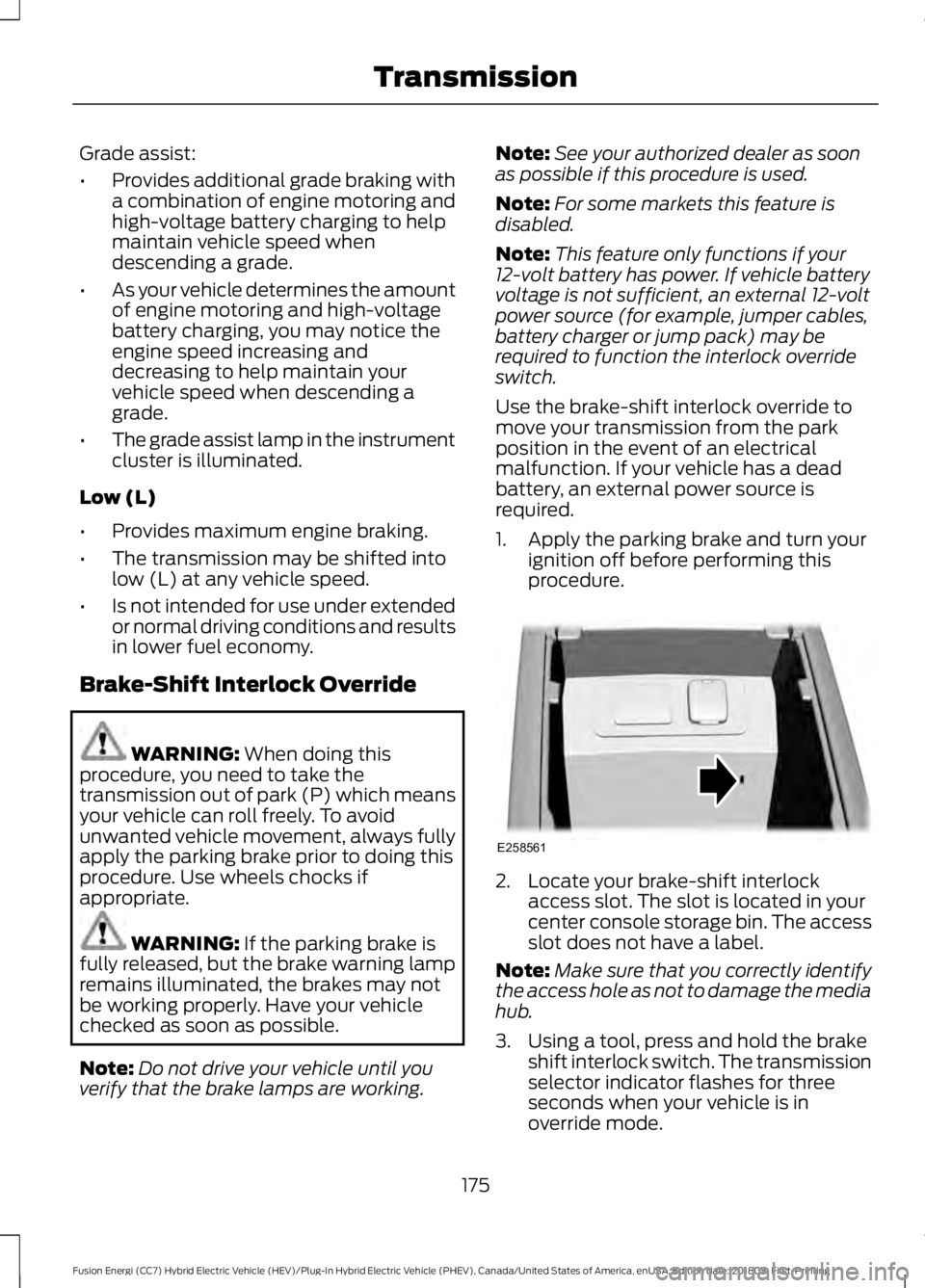
procedure. 2. Locate your brake-shift interlock
access slot. The slot is located in your
center console storage bin. The access
slot does not have a label.
Note: Make sure that you correctly identify
the access hole as not to damage the media
hub.
3. Using a tool, press and hold the brake shift interlock switch. The transmission
selector indicator flashes for three
seconds when your vehicle is in
override mode.
175
Fusion Energi (CC7) Hybrid Electric Vehicle (HEV)/Plug-In Hybrid Electric Vehicle (PHEV), Canada/United States of America, enUSA, Edition date: 201805, First-Printing TransmissionE258561
Page 269 of 541
When a battery replacement is required,
you must use a recommended
replacement battery that matches the
electrical requirements of the vehicle.
Note:
Contact an authorized dealer for low
voltage battery access, testing or
replacement.
To make sure the battery management
system works correctly, do not connect an
electrical device ground connection
directly to the low voltage battery negative
post. This can cause inaccurate
measurements of the battery condition
and potential incorrect system operation.
Note: If you add electrical accessories or
components to the vehicle, it may adversely
affect the low voltage battery performance
and durability. This may also affect the
performance of other electrical systems in
the vehicle.
For longer, trouble-free operation, keep the
top of the battery clean and dry.
If you see any corrosion on the battery or
terminals, remove the cables from the
terminals and clean with a wire brush. You
can neutralize the acid with a solution of
baking soda and water.
Because your vehicle ’s engine is
electronically-controlled by a computer,
some engine control settings are
maintained by power from the low-voltage
battery. Some engine computer settings,
like the idle trim and fuel trim strategy,
optimize the driveability and performance
of the engine. The clock and radio station
presets are also maintained in memory by
power from the low-voltage battery. These
settings are erased when a technician
disconnects and connects the low-voltage
battery.
To restore the settings, do the following:
1. Apply the parking brake.
2. Shift the transmission into park (P) or neutral (N). 3. Switch off all accessories.
4. Press the brake pedal and start your
vehicle.
5. Run the engine until it reaches normal operating temperature. While the
engine is warming up, complete the
following: Reset the clock. See Audio
System (page 318). Reset the power
windows bounce-back feature. See
Windows and Mirrors
(page 84).
Reset the radio station presets. See
Audio System
(page 318).
6. Allow the engine to idle for at least one
minute.
7. Drive the vehicle at least 10 mi (16 km)
to completely relearn the idle trim and
fuel trim strategy.
Note: If you do not allow the engine to
relearn the idle and fuel trim strategy, the
idle quality of your vehicle may be adversely
affected until the engine computer
eventually relearns the idle trim and fuel
trim strategy.
Make sure that you dispose of old batteries
in an environmentally friendly way. Seek
advice from your local authority about
recycling old batteries.
If storing your vehicle for more than 30
days without recharging the battery, we
recommend that you disconnect the
battery cables to maintain battery charge
for quick starting.
266
Fusion Energi (CC7) Hybrid Electric Vehicle (HEV)/Plug-In Hybrid Electric Vehicle (PHEV), Canada/United States of America, enUSA, Edition date: 201805, First-Printing Maintenance
Page 283 of 541
•
Cover interior trim to prevent fading.
• Keep all rubber parts free from oil and
solvents.
Engine
• Change the engine oil and filter prior to
storage because used engine oil
contains contaminates which may
cause engine damage.
• Start the engine every 15 days for a
minimum of 15 minutes. Run at fast idle
with the climate controls set to defrost
until the engine reaches normal
operating temperature.
• With your foot on the brake, shift
through all the gears while the engine
is running.
• We recommend that you change the
engine oil before you use your vehicle
again.
Fuel System
• Fill the fuel tank with high-quality fuel
until the first automatic shutoff of the
fuel pump nozzle.
Cooling System
• Protect against freezing temperatures.
• When removing your vehicle from
storage, check coolant fluid level.
Confirm that there are no cooling
system leaks and that fluid is at the
recommended level.
12V Battery
• Check and recharge as necessary. Keep
connections clean.
• If storing your vehicle for more than 30
days without recharging the battery,
we recommend that you disconnect
the battery cables to maintain battery
charge for quick starting. Note:
It is necessary to reset memory
features if you disconnect the battery
cables.
We recommend the following options for
your plug-in vehicle:
• Leave your vehicle plugged in. The 12V
battery maintains power if left plugged
in. However, this periodically uses
electricity from the household outlet.
• Connect a battery charger to your 12V
battery and leave it on a continuous,
slow charge.
• Disconnect the 12V battery. If your 12V
battery is located in the luggage
compartment, do not fully shut the
luggage compartment after
disconnecting the 12V battery. Only
leave the luggage compartment open
if your vehicle is stored in a locked
location.
Brakes
• Make sure the brakes and parking brake
release fully.
Tires
• Maintain recommended air pressure.
Miscellaneous
• Make sure you cover all linkages,
cables, levers and pins under your
vehicle with grease to prevent rust.
• Move vehicles at least 25 ft (7.5 m)
every 15 days to lubricate working parts
and prevent corrosion.
280
Fusion Energi (CC7) Hybrid Electric Vehicle (HEV)/Plug-In Hybrid Electric Vehicle (PHEV), Canada/United States of America, enUSA, Edition date: 201805, First-Printing Vehicle Care
Page 414 of 541
Button
Start
Range Rings and Charge Points (Energi
Only)
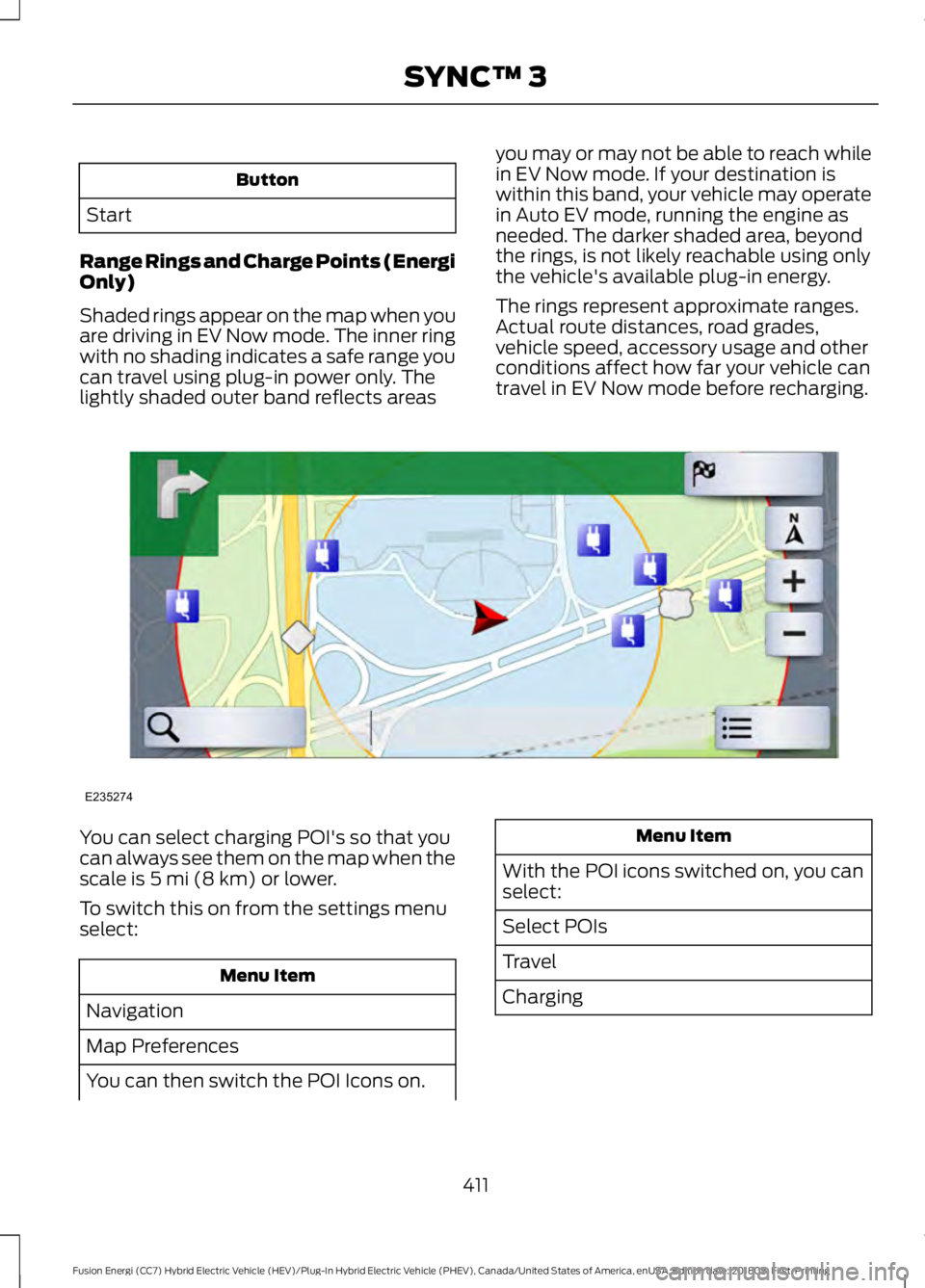
Shaded rings appear on the map when you
are driving in EV Now mode. The inner ring
with no shading indicates a safe range you
can travel using plug-in power only. The
lightly shaded outer band reflects areas you may or may not be able to reach while
in EV Now mode. If your destination is
within this band, your vehicle may operate
in Auto EV mode, running the engine as
needed. The darker shaded area, beyond
the rings, is not likely reachable using only
the vehicle's available plug-in energy.
The rings represent approximate ranges.
Actual route distances, road grades,
vehicle speed, accessory usage and other
conditions affect how far your vehicle can
travel in EV Now mode before recharging.You can select charging POI's so that you
can always see them on the map when the
scale is 5 mi (8 km) or lower.
To switch this on from the settings menu
select: Menu Item
Navigation
Map Preferences
You can then switch the POI Icons on. Menu Item
With the POI icons switched on, you can
select:
Select POIs
Travel
Charging
411
Fusion Energi (CC7) Hybrid Electric Vehicle (HEV)/Plug-In Hybrid Electric Vehicle (PHEV), Canada/United States of America, enUSA, Edition date: 201805, First-Printing SYNC™ 3E235274
Page 422 of 541
Website
www.here.com/mapcreator
ELECTRIC VEHICLE
INFORMATION
Power Flow The power flow information for
your Hybrid vehicle is available
through the Apps section of the
touch screen.
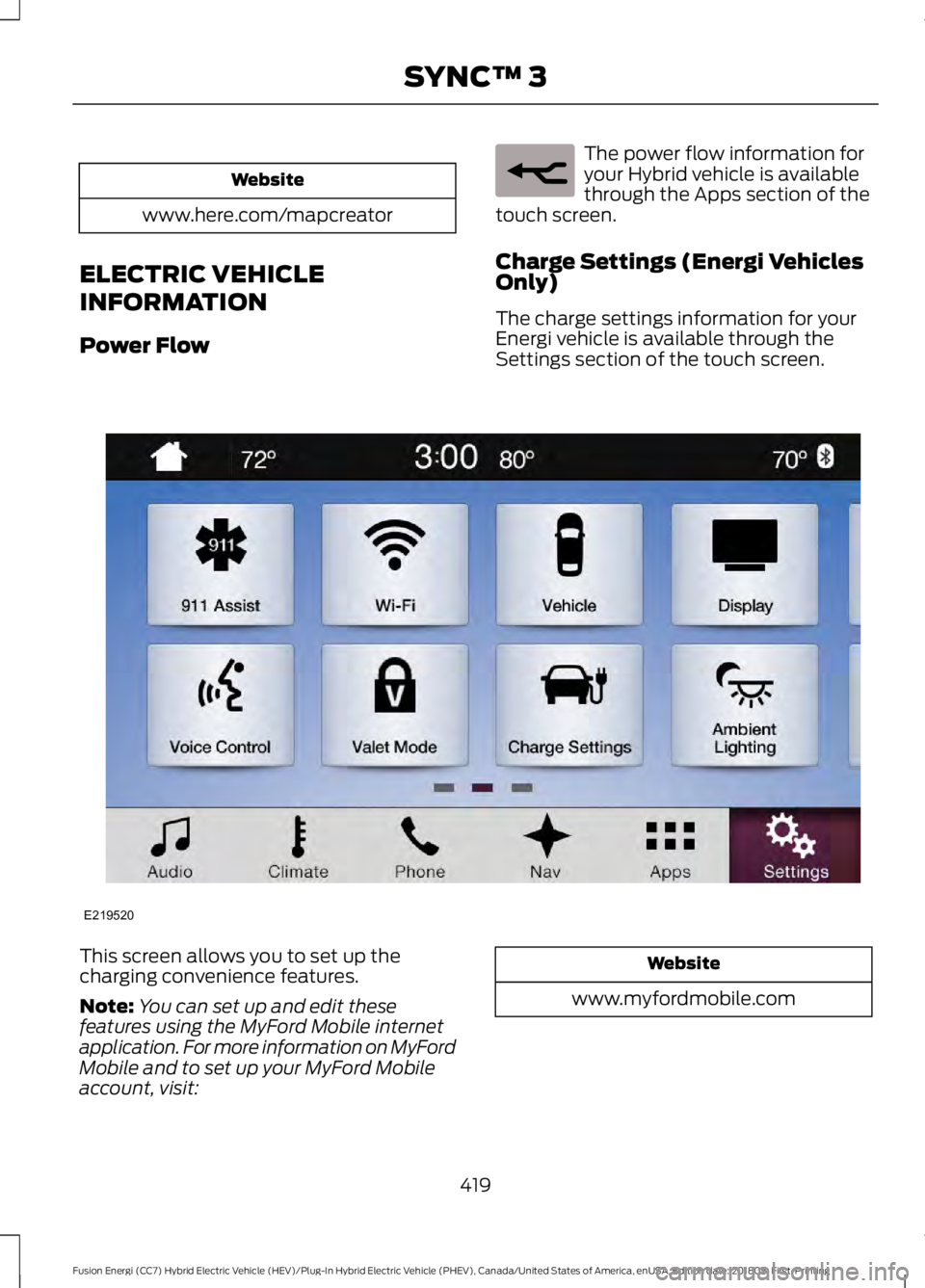
Charge Settings (Energi Vehicles
Only)
The charge settings information for your
Energi vehicle is available through the
Settings section of the touch screen. This screen allows you to set up the
charging convenience features.
Note:
You can set up and edit these
features using the MyFord Mobile internet
application. For more information on MyFord
Mobile and to set up your MyFord Mobile
account, visit: Website
www.myfordmobile.com
419
Fusion Energi (CC7) Hybrid Electric Vehicle (HEV)/Plug-In Hybrid Electric Vehicle (PHEV), Canada/United States of America, enUSA, Edition date: 201805, First-Printing SYNC™ 3E260071 E219520
Page 423 of 541
To improve the charging experience, your vehicle has the following convenience
features:
Description
Feature
Your vehicle schedules its charging time for when the utility rates
are lowest. Contact your utility company to see what rates are
available.
Value Charge
Your vehicle starts charging immediately after you connect the
charging plug.
Charge Now
Get the most miles out of every charge by conditioning your
plugged in vehicle. Set the cabin temperature when you set your
GO Time in order to use energy from your home, or charging
station, instead of your vehicle battery.
Cabin Conditioning
Setting GO Times allows you to control charging schedules and
cabin conditioning settings so your vehicle is ready to drive when
you are. By setting a GO Time, your vehicle can use your value
charge settings to minimize your electricity costs but still prioritize
getting a full charge before your GO Time. A calendar view allows
you to program two GO Times per day for each day of the week.
My GO Times
Note: Remember, you must plug in your vehicle for My GO Time
to work.
Note: Charging to 100% by your next GO
Time will always be the priority. When Value
Charge is selected, charging outside of
off-peak times may be necessary in order
to be fully charged by your GO Time. Charge Settings Screen
Each of the four areas highlighted below
show a different feature of the charge
settings screen.
420
Fusion Energi (CC7) Hybrid Electric Vehicle (HEV)/Plug-In Hybrid Electric Vehicle (PHEV), Canada/United States of America, enUSA, Edition date: 201805, First-Printing SYNC™ 3
Page 424 of 541
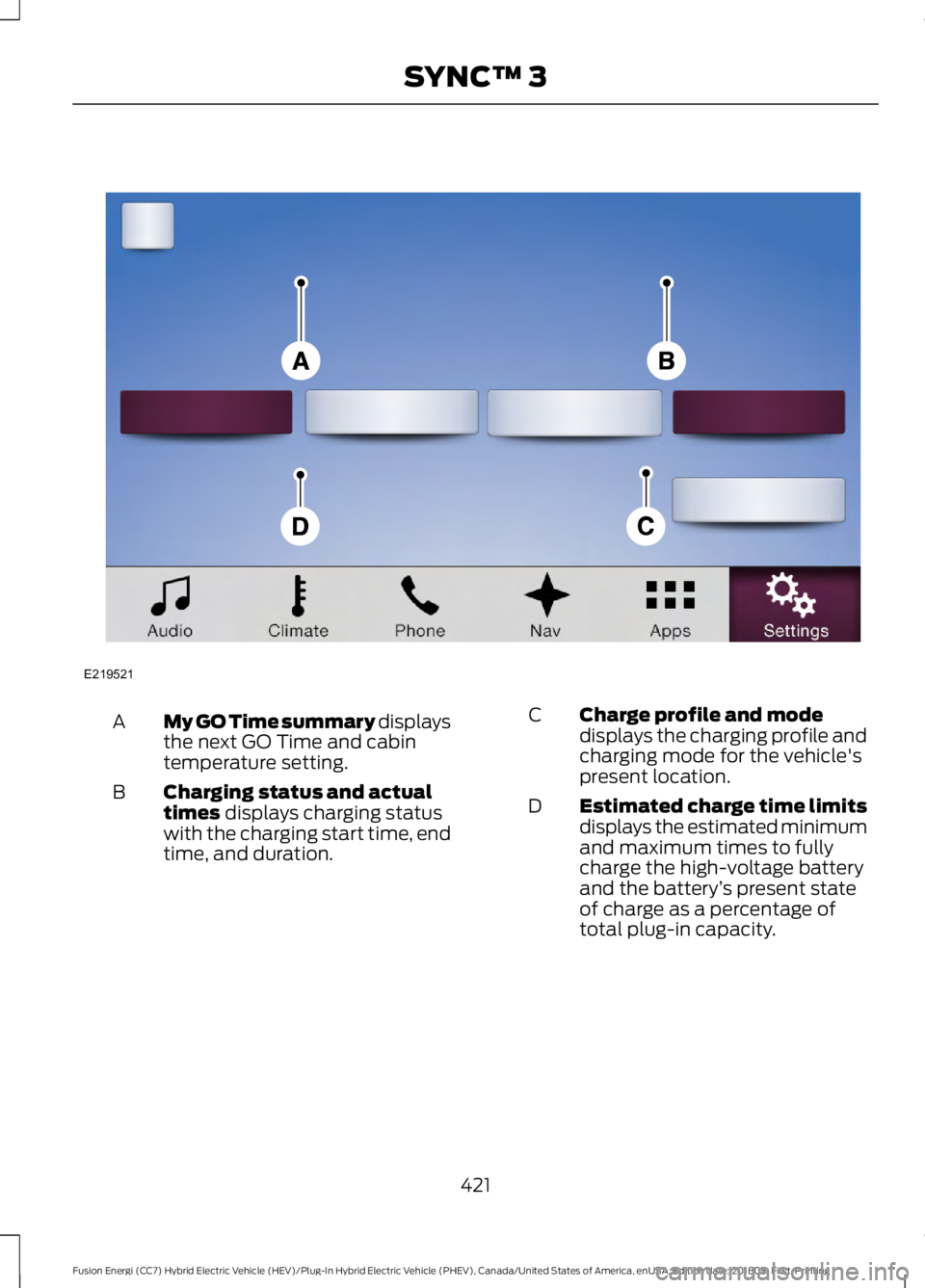
My GO Time summary displays
the next GO Time and cabin
temperature setting.
A
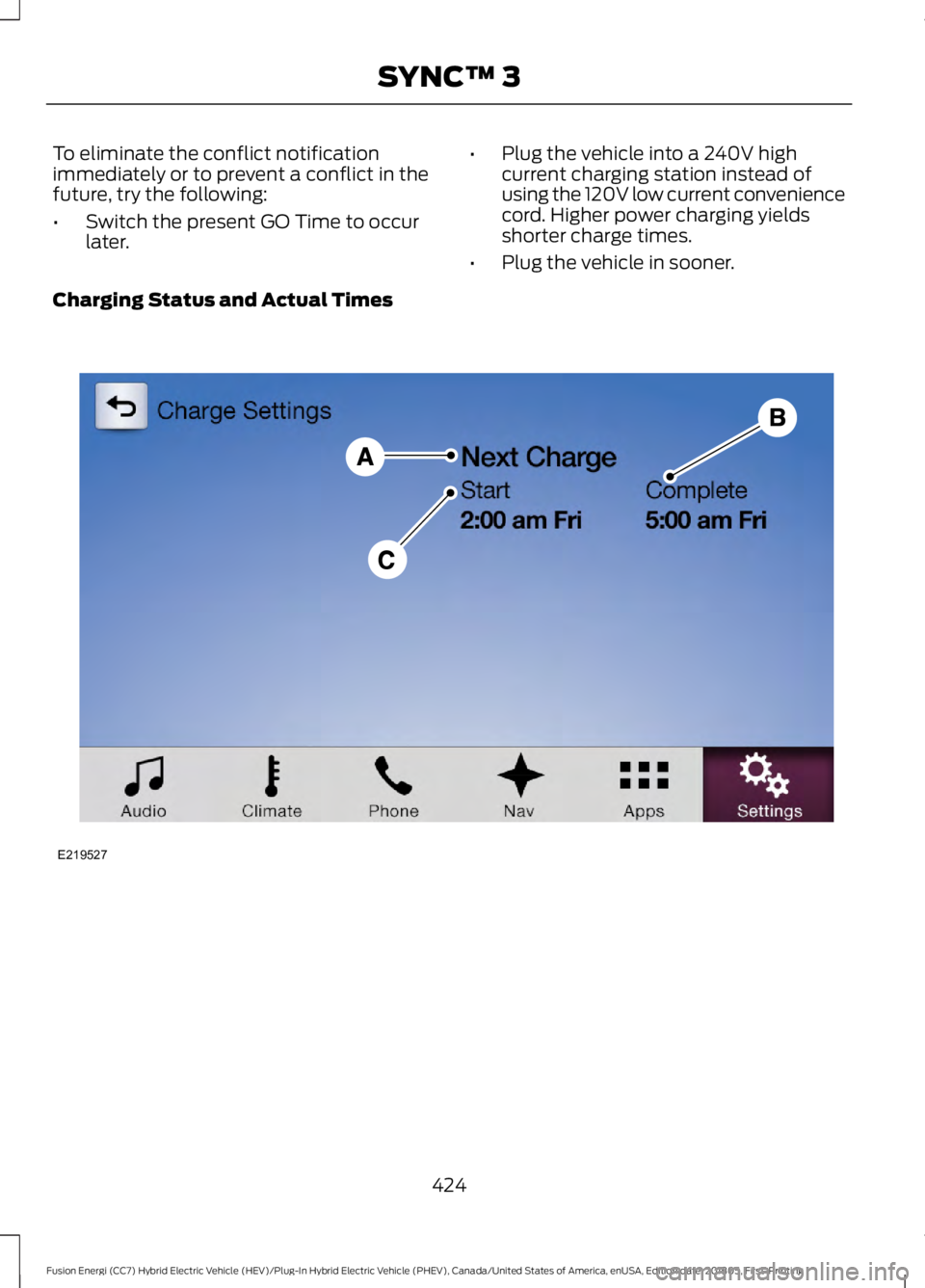
Charging status and actual
times displays charging status
with the charging start time, end
time, and duration.
B Charge profile and mode
displays the charging profile and
charging mode for the vehicle's
present location.
C
Estimated charge time limits
displays the estimated minimum
and maximum times to fully
charge the high-voltage battery
and the battery ’s present state
of charge as a percentage of
total plug-in capacity.
D
421
Fusion Energi (CC7) Hybrid Electric Vehicle (HEV)/Plug-In Hybrid Electric Vehicle (PHEV), Canada/United States of America, enUSA, Edition date: 201805, First-Printing SYNC™ 3E219521
Page 426 of 541
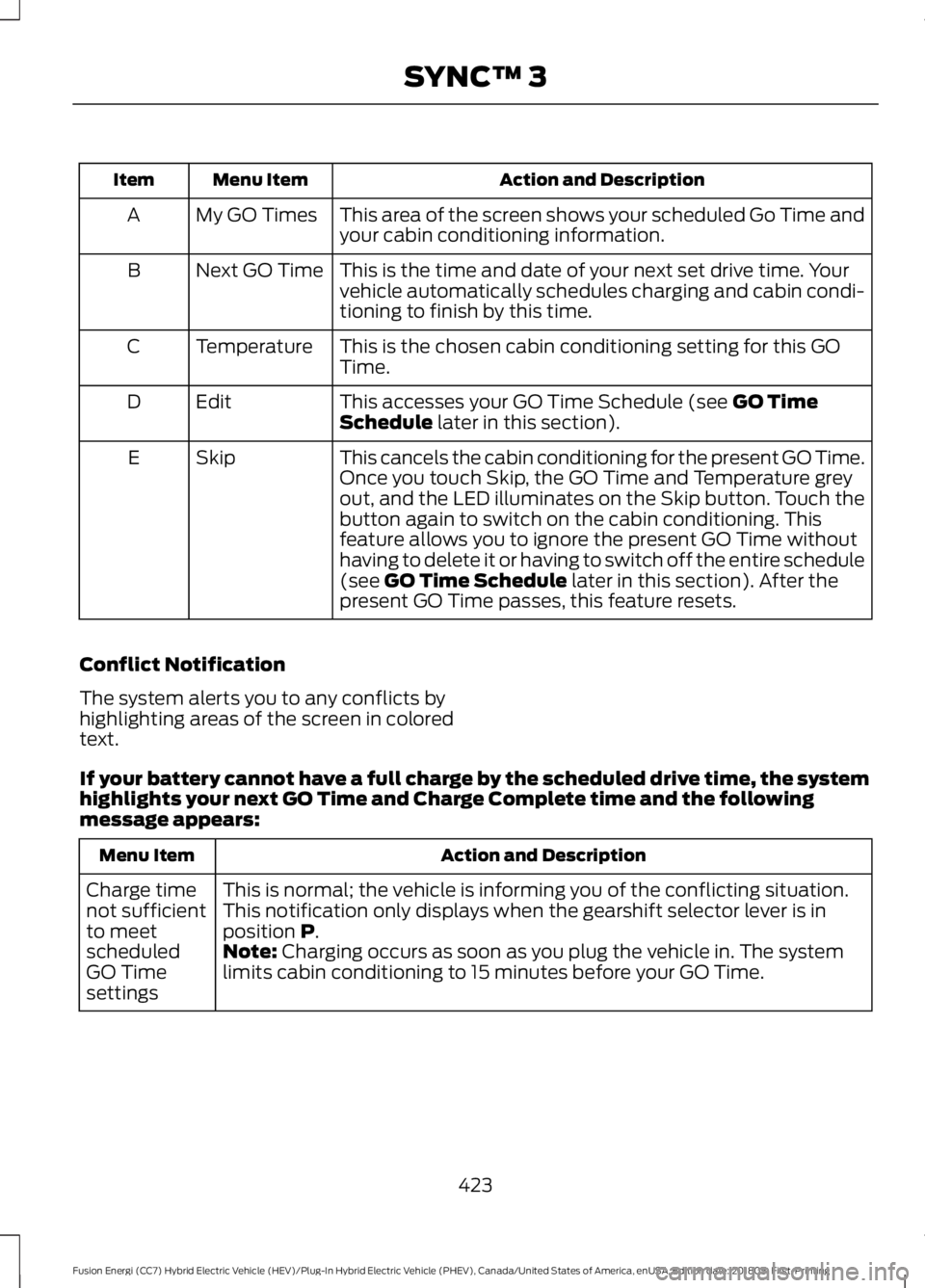
Action and Description
Menu Item
Item
This area of the screen shows your scheduled Go Time and
your cabin conditioning information.
My GO Times
A
This is the time and date of your next set drive time. Your
vehicle automatically schedules charging and cabin condi-
tioning to finish by this time.
Next GO Time
B
This is the chosen cabin conditioning setting for this GO
Time.
Temperature
C
This accesses your GO Time Schedule (see GO Time
Schedule later in this section).
Edit
D
This cancels the cabin conditioning for the present GO Time.
Once you touch Skip, the GO Time and Temperature grey
out, and the LED illuminates on the Skip button. Touch the
button again to switch on the cabin conditioning. This
feature allows you to ignore the present GO Time without
having to delete it or having to switch off the entire schedule
(see
GO Time Schedule later in this section). After the
present GO Time passes, this feature resets.
Skip
E
Conflict Notification
The system alerts you to any conflicts by
highlighting areas of the screen in colored
text.
If your battery cannot have a full charge by the scheduled drive time, the system
highlights your next GO Time and Charge Complete time and the following
message appears: Action and Description
Menu Item
This is normal; the vehicle is informing you of the conflicting situation.
This notification only displays when the gearshift selector lever is in
position
P.
Charge time
not sufficient
to meet
scheduled
GO Time
settings Note: Charging occurs as soon as you plug the vehicle in. The system
limits cabin conditioning to 15 minutes before your GO Time.
423
Fusion Energi (CC7) Hybrid Electric Vehicle (HEV)/Plug-In Hybrid Electric Vehicle (PHEV), Canada/United States of America, enUSA, Edition date: 201805, First-Printing SYNC™ 3
Page 427 of 541
To eliminate the conflict notification
immediately or to prevent a conflict in the
future, try the following:
•
Switch the present GO Time to occur
later. •
Plug the vehicle into a 240V high
current charging station instead of
using the 120V low current convenience
cord. Higher power charging yields
shorter charge times.
• Plug the vehicle in sooner.
Charging Status and Actual Times 424
Fusion Energi (CC7) Hybrid Electric Vehicle (HEV)/Plug-In Hybrid Electric Vehicle (PHEV), Canada/United States of America, enUSA, Edition date: 201805, First-Printing SYNC™ 3E219527