climate settings FORD FUSION ENERGI 2019 User Guide
[x] Cancel search | Manufacturer: FORD, Model Year: 2019, Model line: FUSION ENERGI, Model: FORD FUSION ENERGI 2019Pages: 541, PDF Size: 7.19 MB
Page 154 of 541
3. Press the EV button. This will change
the mode to EV Later and permit
engine operation.
Your vehicle may automatically enter
Engine Enabled mode if system conditions
require it. A engine enabled message will
display if this occurs. This is normal
function, and your vehicle will return to EV
Now when possible.
Your vehicle may enter Enable Engine
mode if the climate control is in a defrost
mode and the outside temperature is cold.
A engine enabled message will display if
this occurs. If defrost is not needed, select
a different climate control mode to permit
EV Now.
When you enable EV Now, a blue EV icon
displays in the left-hand information
display. If your vehicle is in the Engine
Enabled mode, the EV icon will be yellow.
EV Now will automatically exit when the
Plug in power has been depleted.
EV Later This mode saves most of the
high voltage battery plug in
power for future use (for
example, your initial drive is at high speeds
on open roads, but later your drive will be
at low speeds in an urban area where
plug-in power usage is most efficient).
Your vehicle will run the engine as needed
and keep most of the high voltage battery
plug in power for later use in Auto Mode or
EV Now mode.
When you enable EV Later, a white EV
Later icon appears on the left-hand
information display.
The EV Later mode will automatically reset
to EV Auto mode when you power your
vehicle off. You may press the EV button
twice during the next drive to return to EV
Later mode, if desired. ECO Cruise
Note:
ECO Cruise is available as a separate
feature on Energi vehicles only. On non
plug-in vehicles it is included in EcoSelect.
This feature saves vehicle energy by
relaxing acceleration compared to
standard cruise control. For example, your
vehicle may temporarily lose speed when
going uphill. When set to on, ECO appears
in the information display when cruise
control is on.
You can switch it on or off in through the
information display. See General
Information (page 98). Settings
ECO Cruise
Driver Assist
Low Engine Use
The low engine use mode is equipped on
Energi models only. The Low Engine Use
mode maintains proper engine lubrication
at sufficient temperature, and will activate
automatically when you drive your vehicle
with limited engine operation. When your
vehicle is in low engine use mode, your
vehicle will automatically run the engine
as necessary.
Note: If your vehicle is in low engine use
mode when you start your vehicle, a
message will appear in the information
display. See
Information Messages (page
107).
If you select the EV Now mode while the
vehicle is in the low engine use mode, EV
Now mode will be suspended for as long
as you are in low engine use mode. The low
engine use mode will resume the next time
you start your vehicle and will
automatically stop when no longer needed.
Note: Cold temperatures will affect the
engine warm up time and the low engine
use mode may operate more frequently.
151
Fusion Energi (CC7) Hybrid Electric Vehicle (HEV)/Plug-In Hybrid Electric Vehicle (PHEV), Canada/United States of America, enUSA, Edition date: 201805, First-Printing Unique Driving CharacteristicsE151263
Page 339 of 541
To adjust this setting press the voice button, when prompted say:
Action and Description
Voice Command
voice settings
Then any of the following: When enabled, this feature will prompt you
to confirm any voice initiated call command
prior to the call being placed.
phone confirmation on
The system will make a best guess; you
may still occasionally be asked to confirm
settings.
phone confirmation off
Changing the Voice Settings
In addition to using voice commands to
change the voice settings, you can also use
the menu in the audio display.
To change the voice settings press the
Menu button then select: Menu Item
SYNC-Settings
Voice settings
Note: Depending on the current climate
control settings, the fan speed may
automatically go down while issuing voice
commands or while making and receiving
phone calls via SYNC to reduce the amount
of background noise in the vehicle. The fan
speed will automatically return to normal
operation once the voice session ends. Fan
speed can also be adjusted normally during
a voice session, simply press fan buttons (or
turn fan knob) to increase or decrease fan
speed to desired setting. To disable this automatic fan speed
reduction feature during voice sessions,
press and hold the climate control AC and
Recirculated air buttons simultaneously,
release and then increase fan speed within
2 seconds. To re-enable this feature, repeat
the above sequence.
USING SYNC™ WITH YOUR
PHONE
Hands-free calling is one of the main
features of SYNC. While the system
supports a variety of features, many are
dependent on your cellular phone's
functionality. At a minimum, most cellular
phones with Bluetooth wireless technology
support the following functions:
•
Answering an incoming call.
• Ending a call.
• Using privacy mode.
• Dialing a number.
• Redialing.
• Call waiting notification.
• Caller ID.
336
Fusion Energi (CC7) Hybrid Electric Vehicle (HEV)/Plug-In Hybrid Electric Vehicle (PHEV), Canada/United States of America, enUSA, Edition date: 201805, First-Printing SYNC™
Page 374 of 541
Action and Description
Menu Item
Item
This bar displays icons and messages pertaining to current
system activities including climate settings, voice
commands and phone functions such as text messages.
Status Bar
A
This button is available on the main screens. Pressing it
takes you to the home screen view.
Home
B
This shows the current time. You can set the clock manually
or have it controlled by the vehicle's GPS location. See
Settings (page 440).
Clock
C
This displays the current outside temperature.
Outside
Temperature
D
You can touch any of the buttons on this bar to select a
feature.
Feature Bar
E
The touchscreen allows you quick access
to all of your comfort, navigation,
communication and entertainment
options. Using the status and feature bar
you can quickly select the feature you want
to use.
Note: Your system is equipped with a
feature that allows you to access and
control audio features for 10 minutes after
you switch the ignition off (and no doors
open). The Status Bar
Additional icons also display in the status
bar depending on market, vehicle options
and current operation. If a feature is not
active, the icon does not display. Certain
icons may move to the left or right
depending on what options are active.
371
Fusion Energi (CC7) Hybrid Electric Vehicle (HEV)/Plug-In Hybrid Electric Vehicle (PHEV), Canada/United States of America, enUSA, Edition date: 201805, First-Printing SYNC™ 3
Page 375 of 541
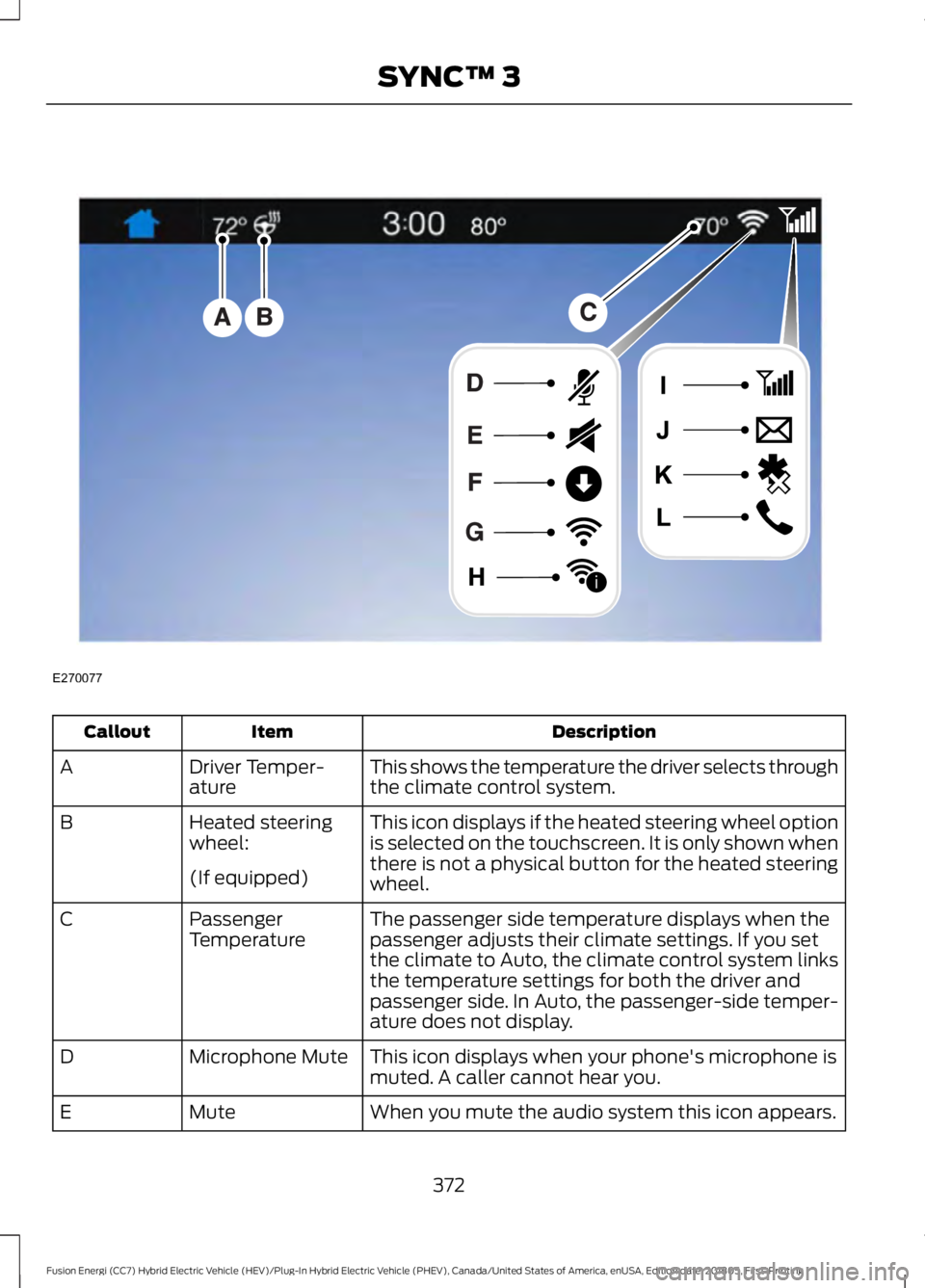
Description
Item
Callout
This shows the temperature the driver selects through
the climate control system.
Driver Temper-
ature
A
This icon displays if the heated steering wheel option
is selected on the touchscreen. It is only shown when
there is not a physical button for the heated steering
wheel.
Heated steering
wheel:
B
(If equipped) The passenger side temperature displays when the
passenger adjusts their climate settings. If you set
the climate to Auto, the climate control system links
the temperature settings for both the driver and
passenger side. In Auto, the passenger-side temper-
ature does not display.
Passenger
Temperature
C
This icon displays when your phone's microphone is
muted. A caller cannot hear you.
Microphone Mute
D
When you mute the audio system this icon appears.
Mute
E
372
Fusion Energi (CC7) Hybrid Electric Vehicle (HEV)/Plug-In Hybrid Electric Vehicle (PHEV), Canada/United States of America, enUSA, Edition date: 201805, First-Printing SYNC™ 3E270077
i
Page 380 of 541
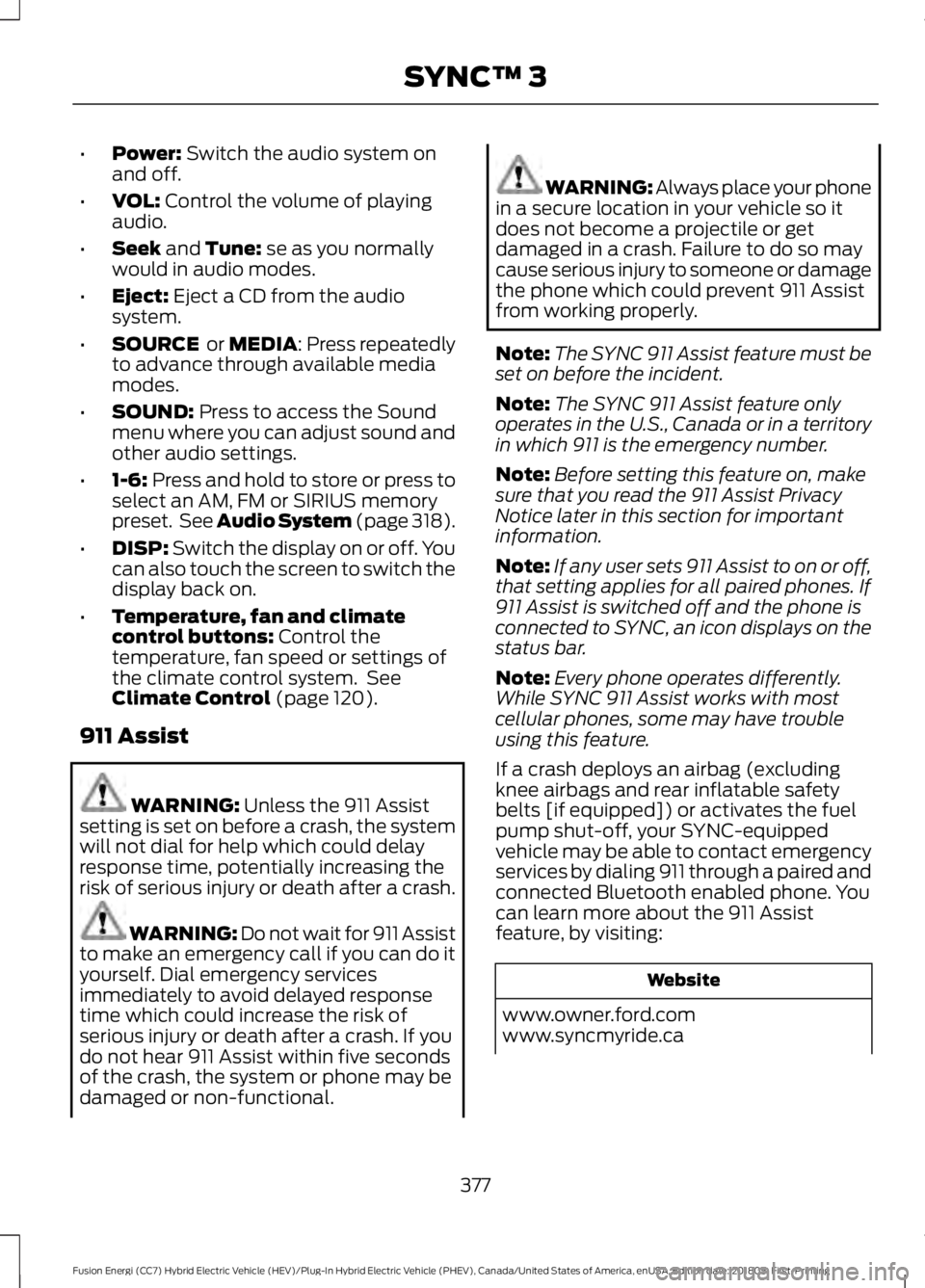
•
Power: Switch the audio system on
and off.
• VOL:
Control the volume of playing
audio.
• Seek
and Tune: se as you normally
would in audio modes.
• Eject:
Eject a CD from the audio
system.
• SOURCE
or MEDIA: Press repeatedly
to advance through available media
modes.
• SOUND:
Press to access the Sound
menu where you can adjust sound and
other audio settings.
• 1-6:
Press and hold to store or press to
select an AM, FM or SIRIUS memory
preset. See Audio System (page 318).
• DISP:
Switch the display on or off. You
can also touch the screen to switch the
display back on.
• Temperature, fan and climate
control buttons:
Control the
temperature, fan speed or settings of
the climate control system. See
Climate Control
(page 120).
911 Assist WARNING:
Unless the 911 Assist
setting is set on before a crash, the system
will not dial for help which could delay
response time, potentially increasing the
risk of serious injury or death after a crash. WARNING: Do not wait for 911 Assist
to make an emergency call if you can do it
yourself. Dial emergency services
immediately to avoid delayed response
time which could increase the risk of
serious injury or death after a crash. If you
do not hear 911 Assist within five seconds
of the crash, the system or phone may be
damaged or non-functional. WARNING: Always place your phone
in a secure location in your vehicle so it
does not become a projectile or get
damaged in a crash. Failure to do so may
cause serious injury to someone or damage
the phone which could prevent 911 Assist
from working properly.
Note: The SYNC 911 Assist feature must be
set on before the incident.
Note: The SYNC 911 Assist feature only
operates in the U.S., Canada or in a territory
in which 911 is the emergency number.
Note: Before setting this feature on, make
sure that you read the 911 Assist Privacy
Notice later in this section for important
information.
Note: If any user sets 911 Assist to on or off,
that setting applies for all paired phones. If
911 Assist is switched off and the phone is
connected to SYNC, an icon displays on the
status bar.
Note: Every phone operates differently.
While SYNC 911 Assist works with most
cellular phones, some may have trouble
using this feature.
If a crash deploys an airbag (excluding
knee airbags and rear inflatable safety
belts [if equipped]) or activates the fuel
pump shut-off, your SYNC-equipped
vehicle may be able to contact emergency
services by dialing 911 through a paired and
connected Bluetooth enabled phone. You
can learn more about the 911 Assist
feature, by visiting: Website
www.owner.ford.com
www.syncmyride.ca
377
Fusion Energi (CC7) Hybrid Electric Vehicle (HEV)/Plug-In Hybrid Electric Vehicle (PHEV), Canada/United States of America, enUSA, Edition date: 201805, First-Printing SYNC™ 3
Page 389 of 541
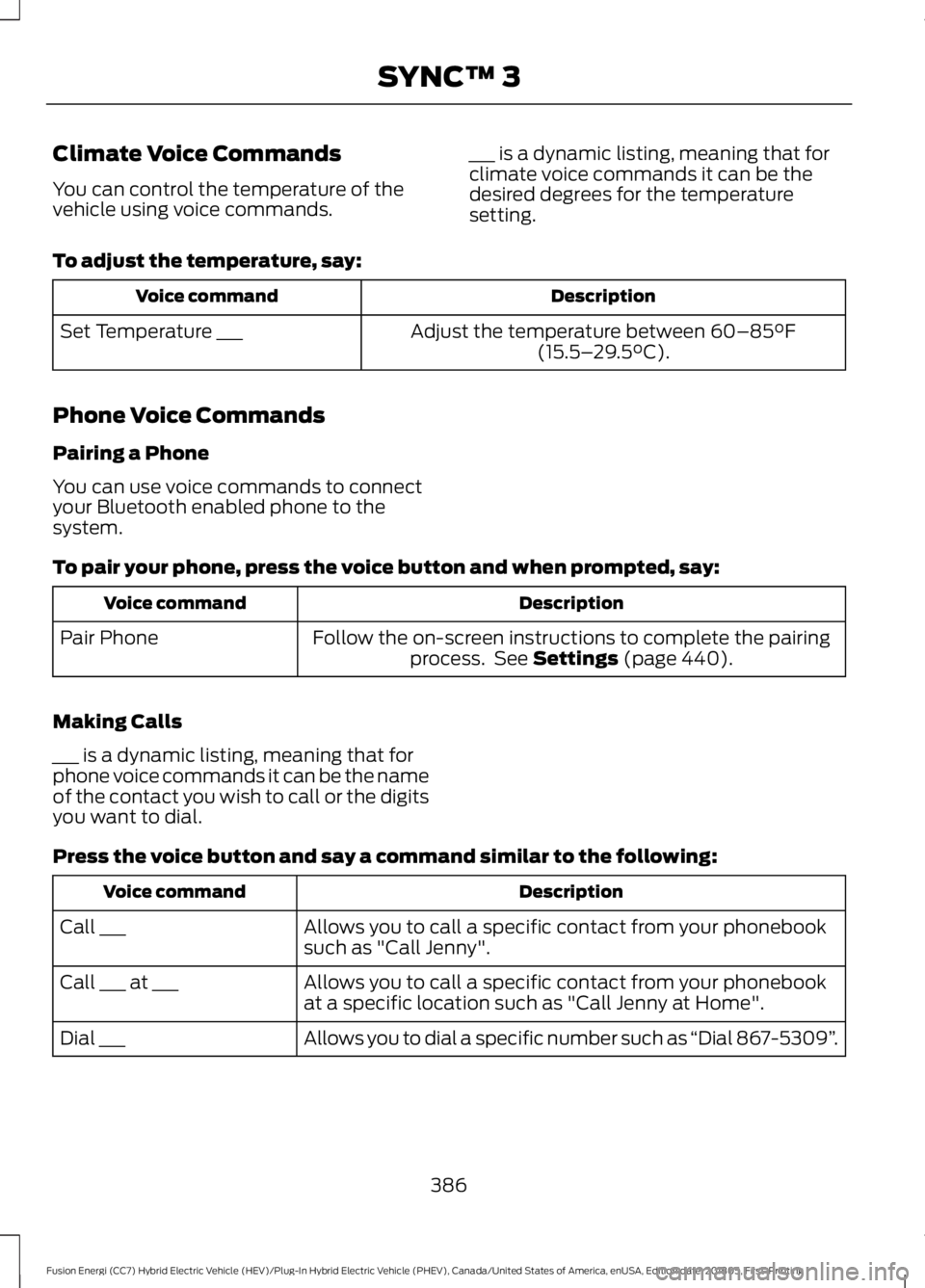
Climate Voice Commands
You can control the temperature of the
vehicle using voice commands.
___ is a dynamic listing, meaning that for
climate voice commands it can be the
desired degrees for the temperature
setting.
To adjust the temperature, say: Description
Voice command
Adjust the temperature between 60–85°F
(15.5– 29.5°C).
Set Temperature ___
Phone Voice Commands
Pairing a Phone
You can use voice commands to connect
your Bluetooth enabled phone to the
system.
To pair your phone, press the voice button and when prompted, say: Description
Voice command
Follow the on-screen instructions to complete the pairingprocess. See
Settings (page 440).
Pair Phone
Making Calls
___ is a dynamic listing, meaning that for
phone voice commands it can be the name
of the contact you wish to call or the digits
you want to dial.
Press the voice button and say a command similar to the following: Description
Voice command
Allows you to call a specific contact from your phonebook
such as "Call Jenny".
Call ___
Allows you to call a specific contact from your phonebook
at a specific location such as "Call Jenny at Home".
Call ___ at ___
Allows you to dial a specific number such as “Dial 867-5309”.
Dial ___
386
Fusion Energi (CC7) Hybrid Electric Vehicle (HEV)/Plug-In Hybrid Electric Vehicle (PHEV), Canada/United States of America, enUSA, Edition date: 201805, First-Printing SYNC™ 3
Page 393 of 541
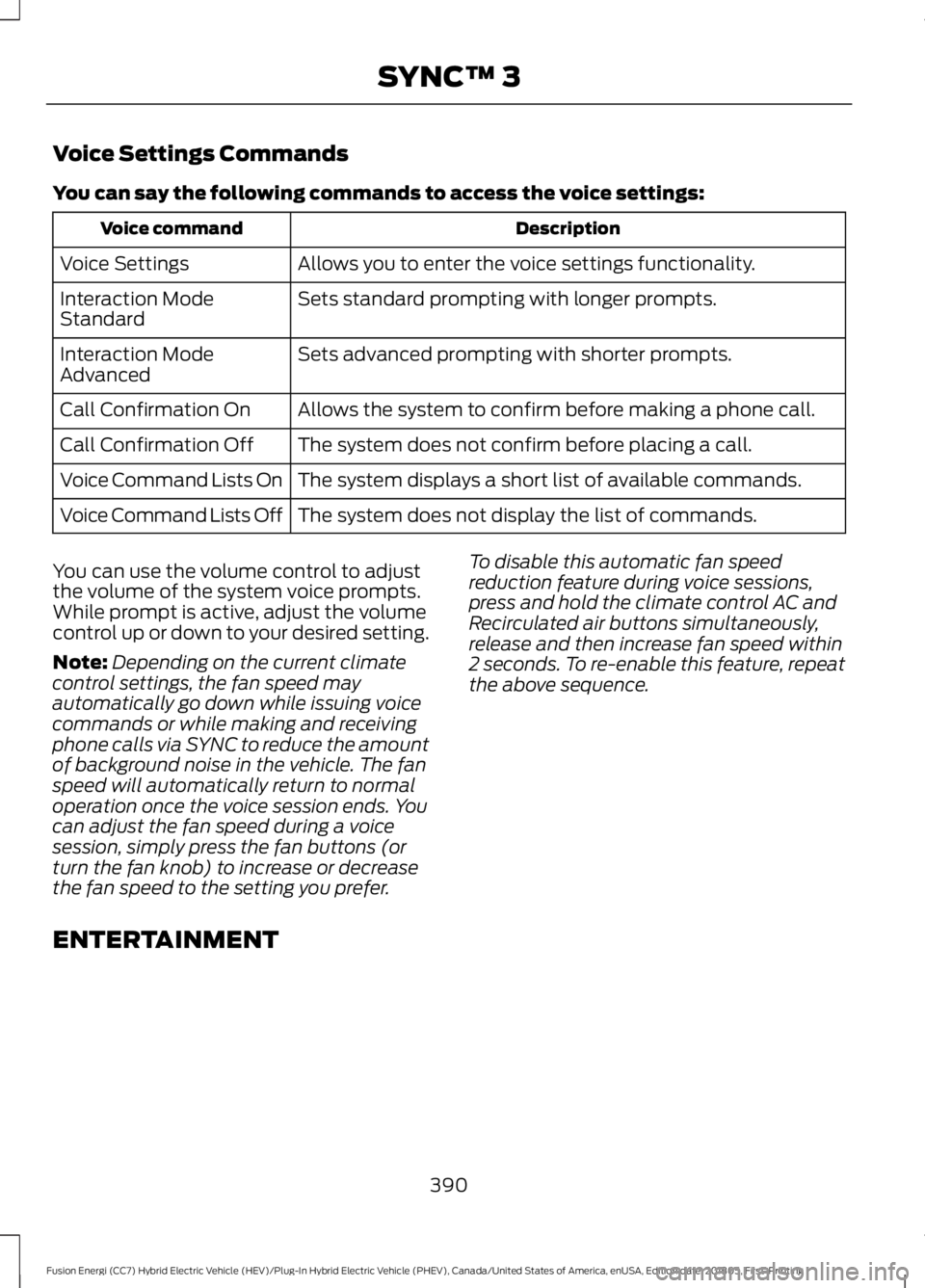
Voice Settings Commands
You can say the following commands to access the voice settings:
Description
Voice command
Allows you to enter the voice settings functionality.
Voice Settings
Sets standard prompting with longer prompts.
Interaction Mode
Standard
Sets advanced prompting with shorter prompts.
Interaction Mode
Advanced
Allows the system to confirm before making a phone call.
Call Confirmation On
The system does not confirm before placing a call.
Call Confirmation Off
The system displays a short list of available commands.
Voice Command Lists On
The system does not display the list of commands.
Voice Command Lists Off
You can use the volume control to adjust
the volume of the system voice prompts.
While prompt is active, adjust the volume
control up or down to your desired setting.
Note: Depending on the current climate
control settings, the fan speed may
automatically go down while issuing voice
commands or while making and receiving
phone calls via SYNC to reduce the amount
of background noise in the vehicle. The fan
speed will automatically return to normal
operation once the voice session ends. You
can adjust the fan speed during a voice
session, simply press the fan buttons (or
turn the fan knob) to increase or decrease
the fan speed to the setting you prefer. To disable this automatic fan speed
reduction feature during voice sessions,
press and hold the climate control AC and
Recirculated air buttons simultaneously,
release and then increase fan speed within
2 seconds. To re-enable this feature, repeat
the above sequence.
ENTERTAINMENT 390
Fusion Energi (CC7) Hybrid Electric Vehicle (HEV)/Plug-In Hybrid Electric Vehicle (PHEV), Canada/United States of America, enUSA, Edition date: 201805, First-Printing SYNC™ 3
Page 404 of 541
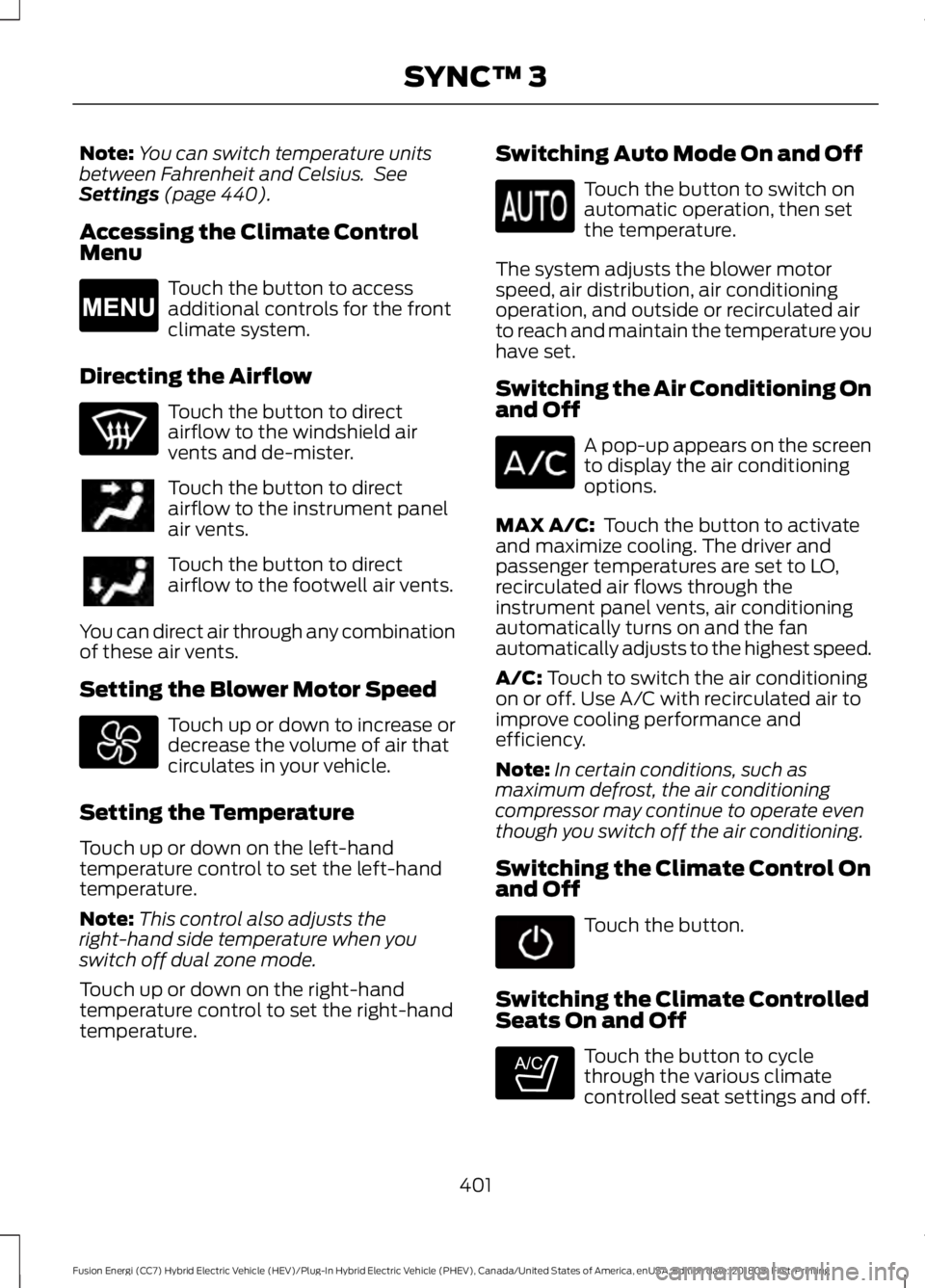
Note:
You can switch temperature units
between Fahrenheit and Celsius. See
Settings (page 440).
Accessing the Climate Control
Menu Touch the button to access
additional controls for the front
climate system.
Directing the Airflow Touch the button to direct
airflow to the windshield air
vents and de-mister.
Touch the button to direct
airflow to the instrument panel
air vents.
Touch the button to direct
airflow to the footwell air vents.
You can direct air through any combination
of these air vents.
Setting the Blower Motor Speed Touch up or down to increase or
decrease the volume of air that
circulates in your vehicle.
Setting the Temperature
Touch up or down on the left-hand
temperature control to set the left-hand
temperature.
Note: This control also adjusts the
right-hand side temperature when you
switch off dual zone mode.
Touch up or down on the right-hand
temperature control to set the right-hand
temperature. Switching Auto Mode On and Off Touch the button to switch on
automatic operation, then set
the temperature.
The system adjusts the blower motor
speed, air distribution, air conditioning
operation, and outside or recirculated air
to reach and maintain the temperature you
have set.
Switching the Air Conditioning On
and Off A pop-up appears on the screen
to display the air conditioning
options.
MAX A/C:
Touch the button to activate
and maximize cooling. The driver and
passenger temperatures are set to LO,
recirculated air flows through the
instrument panel vents, air conditioning
automatically turns on and the fan
automatically adjusts to the highest speed.
A/C:
Touch to switch the air conditioning
on or off. Use A/C with recirculated air to
improve cooling performance and
efficiency.
Note: In certain conditions, such as
maximum defrost, the air conditioning
compressor may continue to operate even
though you switch off the air conditioning.
Switching the Climate Control On
and Off Touch the button.
Switching the Climate Controlled
Seats On and Off Touch the button to cycle
through the various climate
controlled seat settings and off.
401
Fusion Energi (CC7) Hybrid Electric Vehicle (HEV)/Plug-In Hybrid Electric Vehicle (PHEV), Canada/United States of America, enUSA, Edition date: 201805, First-Printing SYNC™ 3E265038 E265282
Page 406 of 541

Accessing Rear Climate Controls
Touch the button to access
additional controls for the rear
climate system.
Rear Climate Control Lock
Indicator Touch the button.
When on, you can only operate
the rear passenger settings
through the front controls.
Switching Rear Auto Mode On and
Off Touch the button to switch on
rear automatic operation, then
set the temperature.
Switching the Rear Climate
Controlled Seats On and Off Touch the button to cycle
through the various climate
controlled seat settings and off.
Switching the Rear Heated Seats
On and Off Touch the button to cycle
through the various heat settings
and off.
Switching the Rear Ventilated
Seats On and Off Touch the button to cycle
through the various ventilated
seat settings and off. PHONE WARNING: Driving while distracted
can result in loss of vehicle control, crash
and injury. We strongly recommend that
you use extreme caution when using any
device that may take your focus off the
road. Your primary responsibility is the safe
operation of your vehicle. We recommend
against the use of any hand-held device
while driving and encourage the use of
voice-operated systems when possible.
Make sure you are aware of all applicable
local laws that may affect the use of
electronic devices while driving.
Hands-free calling is one of the main
features of the system. Once you pair your
cell phone, you can access many options
using the touchscreen or voice commands.
While the system supports a variety of
features, many are dependent on your cell
phone ’s functionality.
Pairing Your Cell Phone for the
First Time
Pair your Bluetooth enabled phone with
the system before using the functions in
hands-free mode.
Switch on Bluetooth on your device to
begin pairing. See your phone ’s manual if
necessary.
To add a phone, select: Menu Item
Add a Bluetooth Device
1. Follow the on-screen instructions.
2. A prompt alerts you to search for the system on your phone.
3. Select your vehicle on your phone.
403
Fusion Energi (CC7) Hybrid Electric Vehicle (HEV)/Plug-In Hybrid Electric Vehicle (PHEV), Canada/United States of America, enUSA, Edition date: 201805, First-Printing SYNC™ 3E270447 E265289 E265282 E268558
Page 530 of 541
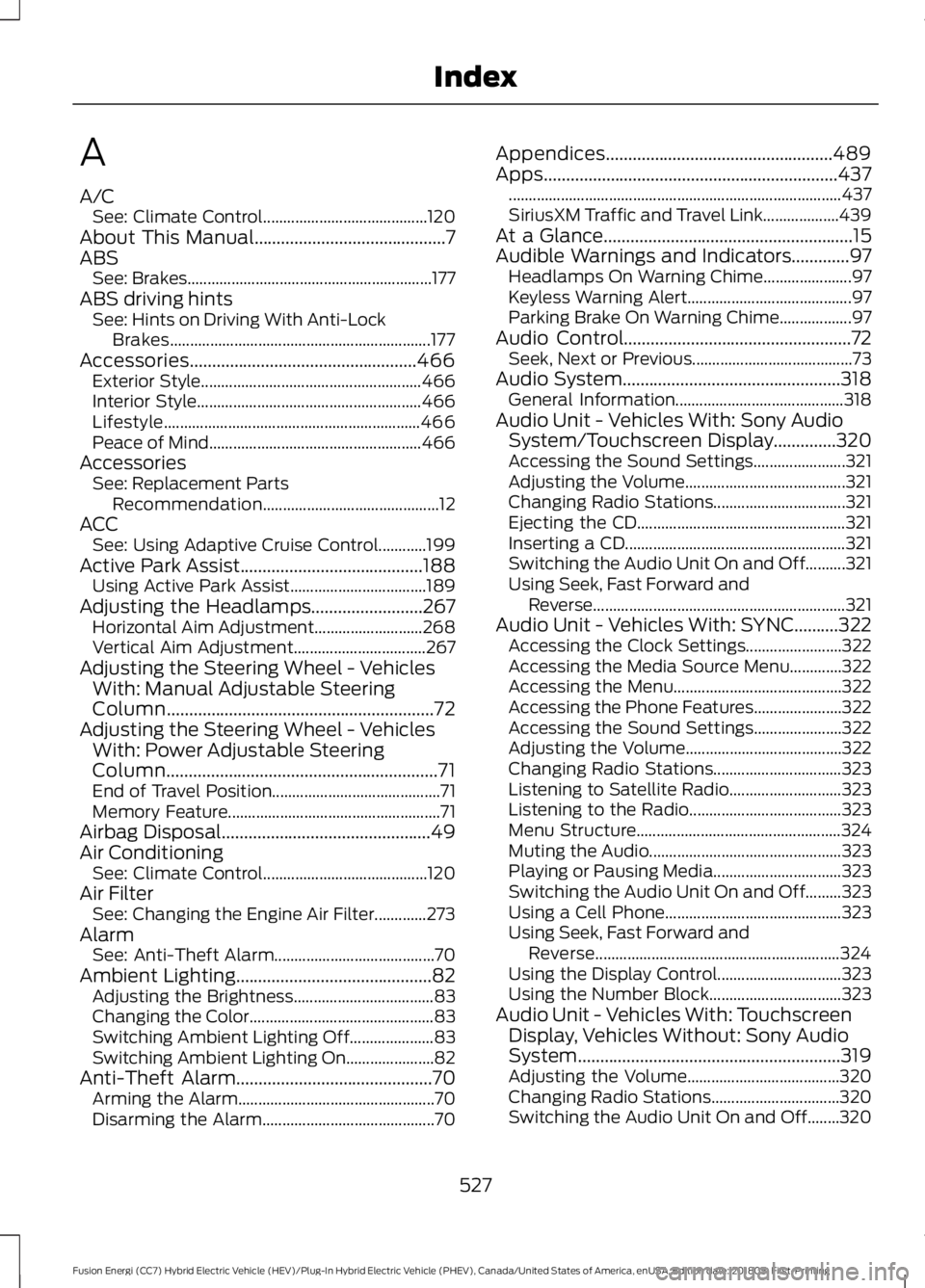
A
A/C
See: Climate Control......................................... 120
About This Manual...........................................7
ABS See: Brakes............................................................. 177
ABS driving hints See: Hints on Driving With Anti-Lock
Brakes................................................................. 177
Accessories...................................................466 Exterior Style....................................................... 466
Interior Style........................................................ 466
Lifestyle................................................................ 466
Peace of Mind..................................................... 466
Accessories See: Replacement Parts
Recommendation............................................ 12
ACC See: Using Adaptive Cruise Control............199
Active Park Assist.........................................188 Using Active Park Assist.................................. 189
Adjusting the Headlamps.........................267 Horizontal Aim Adjustment........................... 268
Vertical Aim Adjustment................................. 267
Adjusting the Steering Wheel - Vehicles With: Manual Adjustable Steering
Column
............................................................72
Adjusting the Steering Wheel - Vehicles With: Power Adjustable Steering
Column.............................................................71
End of Travel Position.......................................... 71
Memory Feature..................................................... 71
Airbag Disposal
...............................................49
Air Conditioning See: Climate Control......................................... 120
Air Filter See: Changing the Engine Air Filter.............273
Alarm See: Anti-Theft Alarm........................................ 70
Ambient Lighting
............................................82
Adjusting the Brightness................................... 83
Changing the Color.............................................. 83
Switching Ambient Lighting Off..................... 83
Switching Ambient Lighting On...................... 82
Anti-Theft Alarm............................................70 Arming the Alarm................................................. 70
Disarming the Alarm........................................... 70Appendices...................................................489
Apps..................................................................437
........................................................................\
........... 437
SiriusXM Traffic and Travel Link................... 439
At a Glance........................................................15
Audible Warnings and Indicators.............97 Headlamps On Warning Chime...................... 97
Keyless Warning Alert......................................... 97
Parking Brake On Warning Chime.................. 97
Audio Control
...................................................72
Seek, Next or Previous........................................ 73
Audio System
.................................................318
General Information.......................................... 318
Audio Unit - Vehicles With: Sony Audio System/Touchscreen Display..............320
Accessing the Sound Settings....................... 321
Adjusting the Volume........................................ 321
Changing Radio Stations................................. 321
Ejecting the CD.................................................... 321
Inserting a CD....................................................... 321
Switching the Audio Unit On and Off..........321
Using Seek, Fast Forward and Reverse............................................................... 321
Audio Unit - Vehicles With: SYNC..........322 Accessing the Clock Settings........................ 322
Accessing the Media Source Menu.............322
Accessing the Menu.......................................... 322
Accessing the Phone Features...................... 322
Accessing the Sound Settings...................... 322
Adjusting the Volume....................................... 322
Changing Radio Stations................................ 323
Listening to Satellite Radio............................ 323
Listening to the Radio...................................... 323
Menu Structure................................................... 324
Muting the Audio................................................ 323
Playing or Pausing Media................................ 323
Switching the Audio Unit On and Off.........323
Using a Cell Phone............................................ 323
Using Seek, Fast Forward and Reverse............................................................. 324
Using the Display Control............................... 323
Using the Number Block................................. 323
Audio Unit - Vehicles With: Touchscreen Display, Vehicles Without: Sony Audio
System...........................................................319
Adjusting the Volume...................................... 320
Changing Radio Stations................................ 320
Switching the Audio Unit On and Off........320
527
Fusion Energi (CC7) Hybrid Electric Vehicle (HEV)/Plug-In Hybrid Electric Vehicle (PHEV), Canada/United States of America, enUSA, Edition date: 201805, First-Printing Index