steering wheel FORD FUSION HYBRID 2014 User Guide
[x] Cancel search | Manufacturer: FORD, Model Year: 2014, Model line: FUSION HYBRID, Model: FORD FUSION HYBRID 2014Pages: 473, PDF Size: 5.93 MB
Page 97 of 473
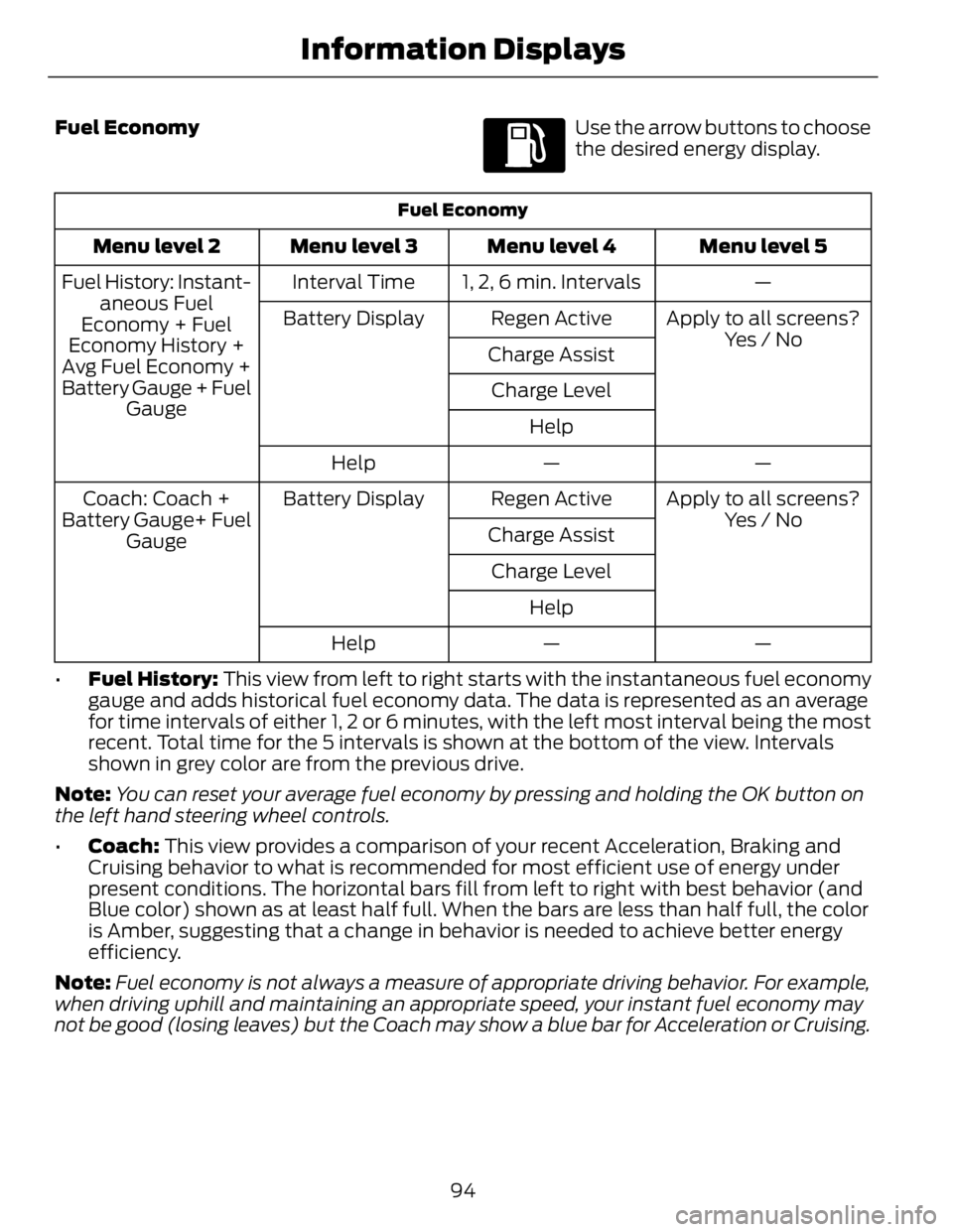
Fuel Economy E144640
Use the arrow buttons to choose
the desired energy display.Fuel Economy
Menu level 5Menu level 4Menu level 3Menu level 2
—1, 2, 6 min. IntervalsInterval TimeFuel History: Instant-
aneous Fuel
Economy + Fuel
Economy History +
Avg Fuel Economy +
Battery Gauge + Fuel
Gauge Apply to all screens?
Yes / NoRegen ActiveBattery Display
Charge Assist
Charge Level
Help
——Help
Apply to all screens?Regen ActiveBattery DisplayCoach: Coach +
Battery Gauge+ Fuel
Gauge Yes / No
Charge Assist
Charge Level
Help
——Help
• Fuel History: This view from left to right starts with the instantaneous fuel economy
gauge and adds historical fuel economy data. The data is represented as an average
for time intervals of either 1, 2 or 6 minutes, with the left most interval being the most
recent. Total time for the 5 intervals is shown at the bottom of the view. Intervals
shown in grey color are from the previous drive.
Note: You can reset your average fuel economy by pressing and holding the OK button on
the left hand steering wheel controls.
• Coach: This view provides a comparison of your recent Acceleration, Braking and
Cruising behavior to what is recommended for most efficient use of energy under
present conditions. The horizontal bars fill from left to right with best behavior (and
Blue color) shown as at least half full. When the bars are less than half full, the color
is Amber, suggesting that a change in behavior is needed to achieve better energy
efficiency.
Note: Fuel economy is not always a measure of appropriate driving behavior. For example,
when driving uphill and maintaining an appropriate speed, your instant fuel economy may
not be good (losing leaves) but the Coach may show a blue bar for Acceleration or Cruising.
94Information Displays
Page 99 of 473
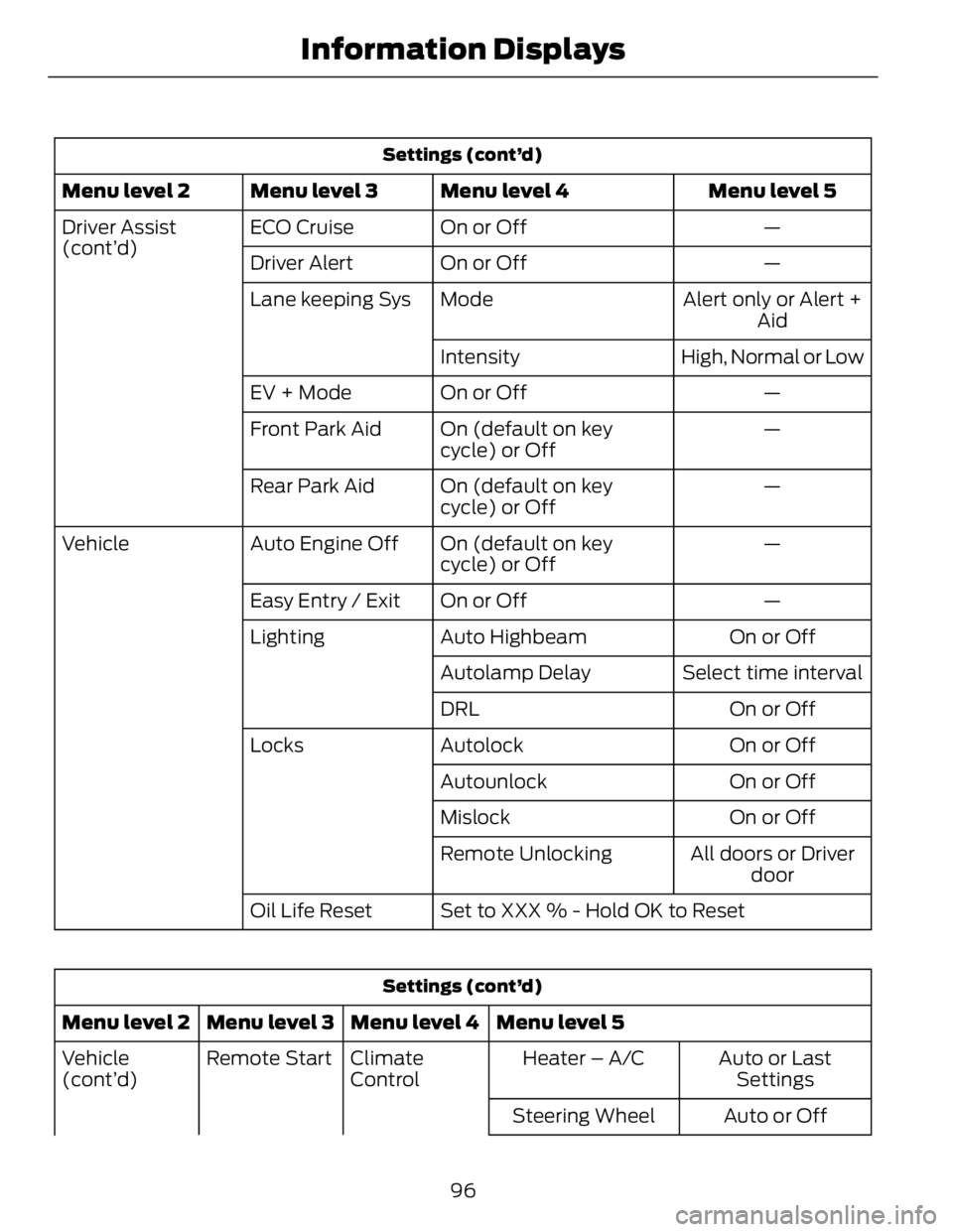
Settings (cont’d)
Menu level 5Menu level 4Menu level 3Menu level 2
—On or OffECO CruiseDriver Assist
(cont’d)
—On or OffDriver Alert
Alert only or Alert +
AidModeLane keeping Sys
High, Normal or LowIntensity
—On or OffEV + Mode
—On (default on key
cycle) or OffFront Park Aid
—On (default on key
cycle) or OffRear Park Aid
—On (default on key
cycle) or OffAuto Engine OffVehicle
—On or OffEasy Entry / Exit
On or OffAuto HighbeamLighting
Select time intervalAutolamp Delay
On or OffDRL
On or OffAutolockLocks
On or OffAutounlock
On or OffMislock
All doors or Driver
doorRemote Unlocking
Set to XXX % - Hold OK to ResetOil Life Reset
Settings (cont’d)
Menu level 5Menu level 4Menu level 3Menu level 2
Auto or Last
SettingsHeater – A/CClimate
ControlRemote StartVehicle
(cont’d)
Auto or OffSteering Wheel
96Information Displays
Page 103 of 473
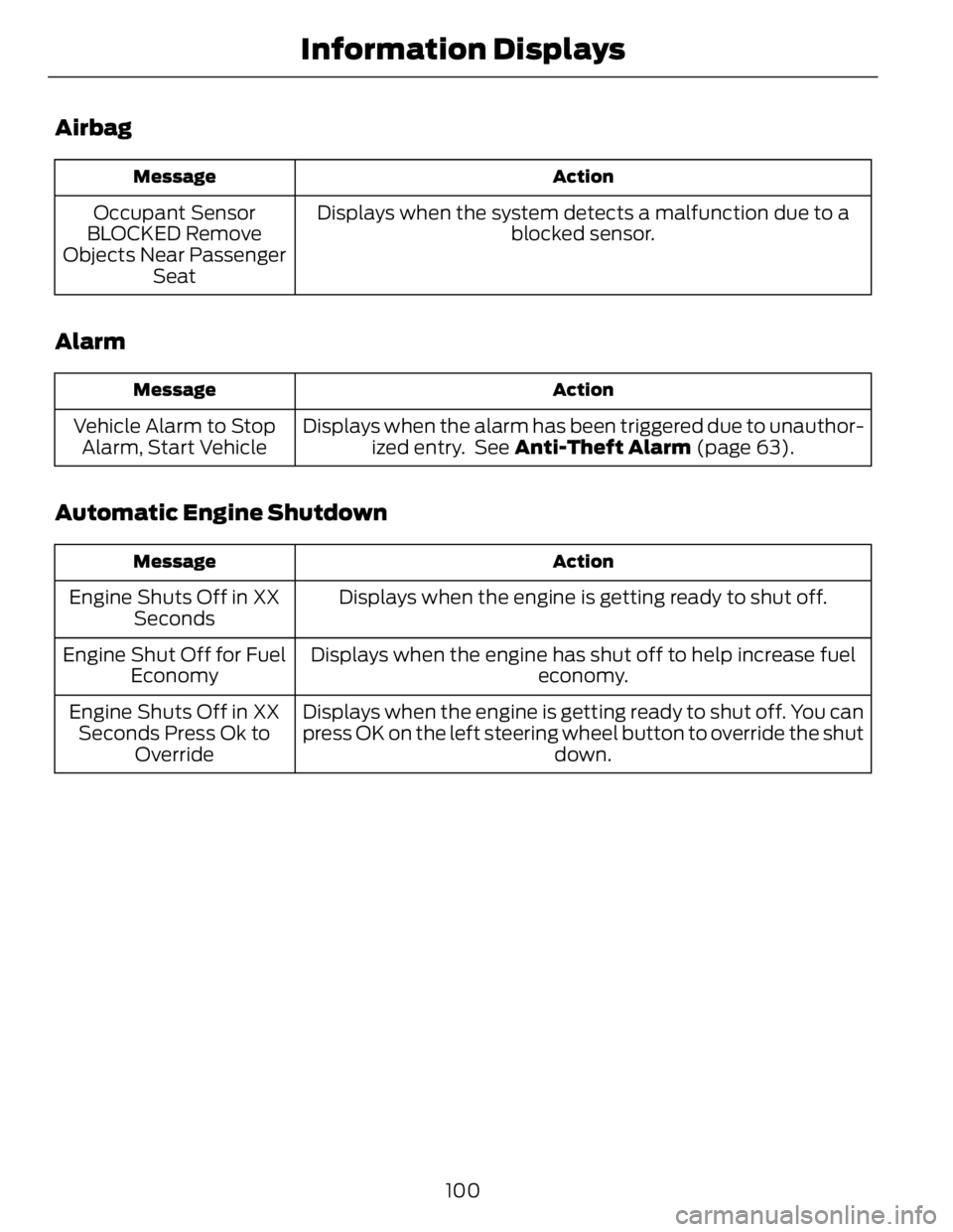
Airbag ActionMessage
Displays when the system detects a malfunction due to a
blocked sensor.Occupant Sensor
BLOCKED Remove
Objects Near Passenger
Seat
Alarm ActionMessage
Displays when the alarm has been triggered due to unauthor-
ized entry. See Anti-Theft Alarm (page 63).Vehicle Alarm to Stop
Alarm, Start Vehicle
Automatic Engine Shutdown ActionMessage
Displays when the engine is getting ready to shut off.Engine Shuts Off in XX
Seconds
Displays when the engine has shut off to help increase fuel
economy.Engine Shut Off for Fuel
Economy
Displays when the engine is getting ready to shut off. You can
press OK on the left steering wheel button to override the shut
down.Engine Shuts Off in XX
Seconds Press Ok to
Override
100Information Displays
Page 109 of 473

Lane Keeping System ActionMessage
The system has malfunctioned. Contact your authorized
dealer as soon as possible.Lane Keeping Sys.
Malfunction Service
Required
The system has detected a condition that has caused the
system to be temporarily unavailable.Front Camera Tempor-
arily Not Available
The system has detected a condition that requires the wind-
shield to be cleaned to operate properly.Front Camera Low Visib-
ility Clean Screen
The system has malfunctioned. Contact your authorized
dealer as soon as possible.Front Camera Malfunc-
tion Service Required
Displayed when the system requests the driver to keep their
hands on the steering wheel.Keep Hands on Steering
Wheel
Maintenance ActionMessage
Stop the vehicle as soon as safely possible, turn off the engine.
Check the oil level. If the warning stays on or continues to
come on with your engine running, contact your authorized
dealer as soon as possible.LOW Engine Oil Pressure
Displayed when the engine oil life remaining is 10% or less.
See Engine Oil Check (page 244).Change Engine Oil Soon
Displayed when the oil life left reaches 0%. See Engine Oil
Check (page 244).Oil Change Required
Indicates the brake fluid level is low and the brake system
should be inspected immediately. See Brake Fluid Check
(page 249).Brake Fluid Level LOW
Displays when the brake system needs servicing. Stop the
vehicle in a safe place. Contact your authorized dealer.Check Brake System
Displays when the engine temperature is too high. Stop the
vehicle in a safe place and allow to engine to cool. If the
problem persists, contact your authorized dealer. See Engine
Coolant Check (page 245).Engine Coolant Overtem-
perature
106Information Displays
Page 124 of 473
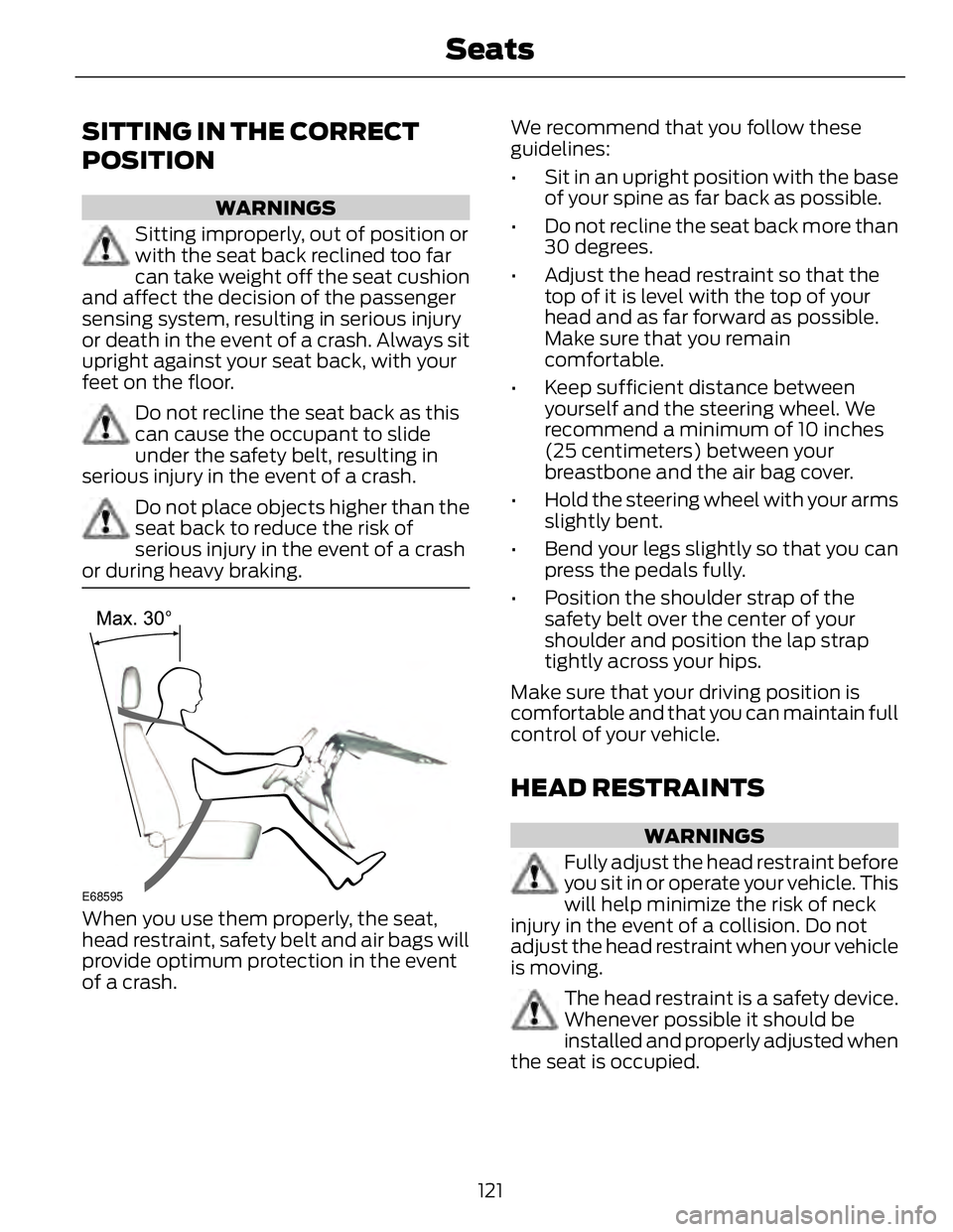
SITTING IN THE CORRECT
POSITION WARNINGS
Sitting improperly, out of position or
with the seat back reclined too far
can take weight off the seat cushion
and affect the decision of the passenger
sensing system, resulting in serious injury
or death in the event of a crash. Always sit
upright against your seat back, with your
feet on the floor.
Do not recline the seat back as this
can cause the occupant to slide
under the safety belt, resulting in
serious injury in the event of a crash.
Do not place objects higher than the
seat back to reduce the risk of
serious injury in the event of a crash
or during heavy braking.
E68595
When you use them properly, the seat,
head restraint, safety belt and air bags will
provide optimum protection in the event
of a crash. We recommend that you follow these
guidelines:
• Sit in an upright position with the base
of your spine as far back as possible.
• Do not recline the seat back more than
30 degrees.
• Adjust the head restraint so that the
top of it is level with the top of your
head and as far forward as possible.
Make sure that you remain
comfortable.
• Keep sufficient distance between
yourself and the steering wheel. We
recommend a minimum of 10 inches
(25 centimeters) between your
breastbone and the air bag cover.
• Hold the steering wheel with your arms
slightly bent.
• Bend your legs slightly so that you can
press the pedals fully.
• Position the shoulder strap of the
safety belt over the center of your
shoulder and position the lap strap
tightly across your hips.
Make sure that your driving position is
comfortable and that you can maintain full
control of your vehicle.
HEAD RESTRAINTS WARNINGS
Fully adjust the head restraint before
you sit in or operate your vehicle. This
will help minimize the risk of neck
injury in the event of a collision. Do not
adjust the head restraint when your vehicle
is moving.
The head restraint is a safety device.
Whenever possible it should be
installed and properly adjusted when
the seat is occupied.
121Seats
Page 145 of 473
HYBRID ELECTRIC VEHICLE Plug-in Power Mode and Hybrid
Mode (Fusion Energi Only) You must plug in your Fusion Energi vehicle
regularly for optimal use of the high
voltage battery's extended range
capability. When you charge your vehicle,
you add electrical energy that is then used
to propel the vehicle in plug-in power
mode. You can view your estimated
electric range in this mode from the
enhanced battery gauge on the instrument
panel display. The system maximizes the
use of electric-only operation in plug-in
power mode. System conditions may
require engine operation; however, the
system uses plug-in power whenever
possible.
When your plug-in power has been
depleted, the powertrain system will
automatically switch to hybrid mode. Your
battery gauge will show an electric range
of zero before transitioning to a simple
battery graphic upon entering hybrid mode.
Hybrid mode uses both the gasoline engine
and electric motor to power your vehicle
and maximize fuel economy as with Fusion
Hybrid.
EV Modes (Fusion Energi Only) E144814
Your vehicle contains selectable
EV modes through the EV button
on the center console.
These modes are available when the
vehicle can run under high voltage battery
power. With the vehicle in driving mode,
you can change EV modes with each press
of the EV button. The current mode
displays in the left hand instrument cluster
screen. Auto EV E155152
This mode provides an
automatic use of high voltage
battery power during the drive,
staying in electric mode when possible and
running the engine when needed. This
mode will be the only one available if the
plug-in power has been depleted.
EV Now E144814
This mode provides an electric
only driving experience using
plug-in power. The left-hand
information display will change to an
Energy Use screen that supplies EV specific
tools and functions. The vehicle may
accelerate more slowly and the top speed
may be lower than in Auto mode. Your
engine may be enabled at any time by
using one of the following methods:
1. Press the OK button on the left 5–way
steering wheel control while viewing
the EV screen. The vehicle will enable
the engine as needed, and will
automatically return to EV Now after
eight seconds or when the engine is no
longer needed.
2. Press the accelerator pedal fully. A pop
up message stating Press OK to
Enable Engine will appear. Press OK
on the left steering wheel button to
activate as needed. The message will
disappear if you release the accelerator
pedal.
3. Press the EV button. This will change
the mode to EV Later and permit
engine operation.
The vehicle may automatically enter
Engine Enabled mode if system conditions
require it. A message Engine Enabled for
System Performance will display if this
occurs. This is normal function, and your
vehicle will return to EV Now when
possible.
142Unique Driving Characteristics
Page 172 of 473
GENERAL INFORMATION Note: Occasional brake noise is normal. If
a metal-to-metal, continuous grinding or
continuous squeal sound is present, the
brake linings may be worn-out. Have the
system checked by an authorized dealer. If
the vehicle has continuous vibration or
shudder in the steering wheel while braking,
have it checked by an authorized dealer.
Note: Brake dust may accumulate on the
wheels, even under normal driving
conditions. Some dust is inevitable as the
brakes wear and does not contribute to
brake noise. See Cleaning the Alloy
Wheels (page 264).E144522
See Warning Lamps and
Indicators (page 81).
Wet brakes result in reduced braking
efficiency. Gently press the brake pedal a
few times when driving from a car wash or
standing water to dry the brakes.
Brake Over Accelerator In the event the accelerator pedal
becomes stuck or entrapped, apply steady
and firm pressure to the brake pedal to
slow the vehicle and reduce engine power.
If you experience this condition, apply the
brakes and bring your vehicle to a safe
stop. Move the transmission selector lever
to position P, switch the engine off and
apply the parking brake. Inspect the
accelerator pedal for any interference. If
none are found and the condition persists,
have your vehicle towed to the nearest
authorized dealer. Brake Assist Brake assist detects when you brake
heavily by measuring the rate at which you
press the brake pedal. It provides
maximum braking efficiency as long as you
press the pedal. Brake assist can reduce
stopping distances in critical situations.
Anti-lock Brake System This system helps you maintain steering
control during emergency stops by keeping
the brakes from locking.
This lamp momentarily
illuminates when you turn the
ignition on. If the light does not
illuminate during start up, remains on or
flashes, the anti-lock braking system may
be disabled. Have the system checked by
an authorized dealer. E144522
If the system is disabled, normal
braking is still effective. If the
brake warning lamp illuminates
when you release the parking brake, have
your system checked by an authorized
dealer.
Regenerative Braking System This feature is used to simulate the engine
braking of an internal combustion engine
and assist the standard brake system while
recovering some of the energy of motion
and storing it in the battery to improve fuel
economy. The standard brake system is
designed to fully stop the car if
regenerative braking is not available.
During regenerative braking, the motor is
spun as a generator to create electrical
current. This recharges the battery and
slows the vehicle. In effect, once the
accelerator pedal is released, the motor
changes from an energy user to an energy
producer.
169Brakes
Page 178 of 473
PRINCIPLE OF OPERATION WARNINGS
Vehicle modifications involving
braking system, aftermarket roof
racks, suspension, steering system,
tire construction and wheel and tire size
may change the handling characteristics
of the vehicle and may adversely affect
the performance of the AdvanceTrac
system. In addition, installing any stereo
loudspeakers may interfere with and
adversely affect the AdvanceTrac system.
Install any aftermarket stereo loudspeaker
as far as possible from the front center
console, the tunnel, and the front seats in
order to minimize the risk of interfering with
the AdvanceTrac sensors. Reducing the
effectiveness of the AdvanceTrac system
could lead to an increased risk of loss of
vehicle control, vehicle rollover, personal
injury and death.
Remember that even advanced
technology cannot defy the laws of
physics. It’s always possible to lose
control of a vehicle due to inappropriate
driver input for the conditions. Aggressive
driving on any road condition can cause
you to lose control of your vehicle
increasing the risk of personal injury or
property damage. Activation of the
AdvanceTrac system is an indication that
at least some of the tires have exceeded
their ability to grip the road; this could
reduce the operator’s ability to control the
vehicle potentially resulting in a loss of
vehicle control, vehicle rollover, personal
injury and death. If your AdvanceTrac
system activates, SLOW DOWN. The AdvanceTrac Control system helps
you keep control of your vehicle when on
a slippery surface. The electronic stability
control portion of the system helps avoid
skids and lateral slides. The traction
control system helps avoid drive wheel
spin and loss of traction. See Using
Traction Control (page 174).
E72903
A
A AB
B BB
Vehicle without AdvanceTrac
skidding off its intended route.A
Vehicle with AdvanceTrac
maintaining control on a slippery
surface.B
USING STABILITY CONTROL
AdvanceTrac®
The system automatically activates when
you start your vehicle. The AdvanceTrac
system cannot be completely turned off,
but the electronic stability control system
is disabled when the transmission selector
lever is in position R . You can turn off the
traction control portion of the system
independently. See Using Traction
Control (page 174).
175Stability Control
Page 182 of 473
When a suitable space is found, the touch
screen displays a message and a chime
sounds. Slow down and stop when the
touch screen displays a message and a
chime sounds (at approximately position
A), then follow the instructions on the
touch screen.
Note: You must observe that the selected
space remains clear of obstructions at all
times in the maneuver.
Note: Vehicles with overhanging loads (e.g.
a bus or a truck), street furniture and other
items may not be detected by active park
assist. You must make sure the selected
space is suitable for parking.
Note: The vehicle should be driven as
parallel to other vehicles as possible while
passing a parking space.
Note: The system always offers the last
detected parking space (i.e. if the vehicle
detects multiple spaces while you are
driving, it offers the last one). Note: If driven above approximately 20
mph (35 km/h), the touch screen shows a
message to alert you to reduce vehicle
speed.
Automatic Steering into Parking
Space Note: If vehicle speed exceeds 6 mph (10
km/h), the system switches off and you
need to take full control of the vehicle.
Note: If a maneuver is interrupted before
completion, the system switches off. The
steering wheel position will not indicate the
actual position of the steering and you have
to full take control of the vehicle.
When you shift the transmission into R
(Reverse), with your hands off the wheel
(and nothing obstructing its movement),
the vehicle steers itself into the space.
Instructions to safely move the vehicle
back and forward in the space are
displayed in the touch screen and indicated
by chimes.
E130108
When you think the vehicle has enough
space in front and behind it, or you hear a
chime followed by a solid tone from the
parking aid, bring the vehicle to a complete
stop. When automatic steering is finished, the
touch screen displays a message and a
chime sounds, indicating that the active
park assist process is done. The driver is
responsible for checking the parking job
and making any necessary corrections
before putting the transmission in P (Park).
179Parking Aids
Page 183 of 473
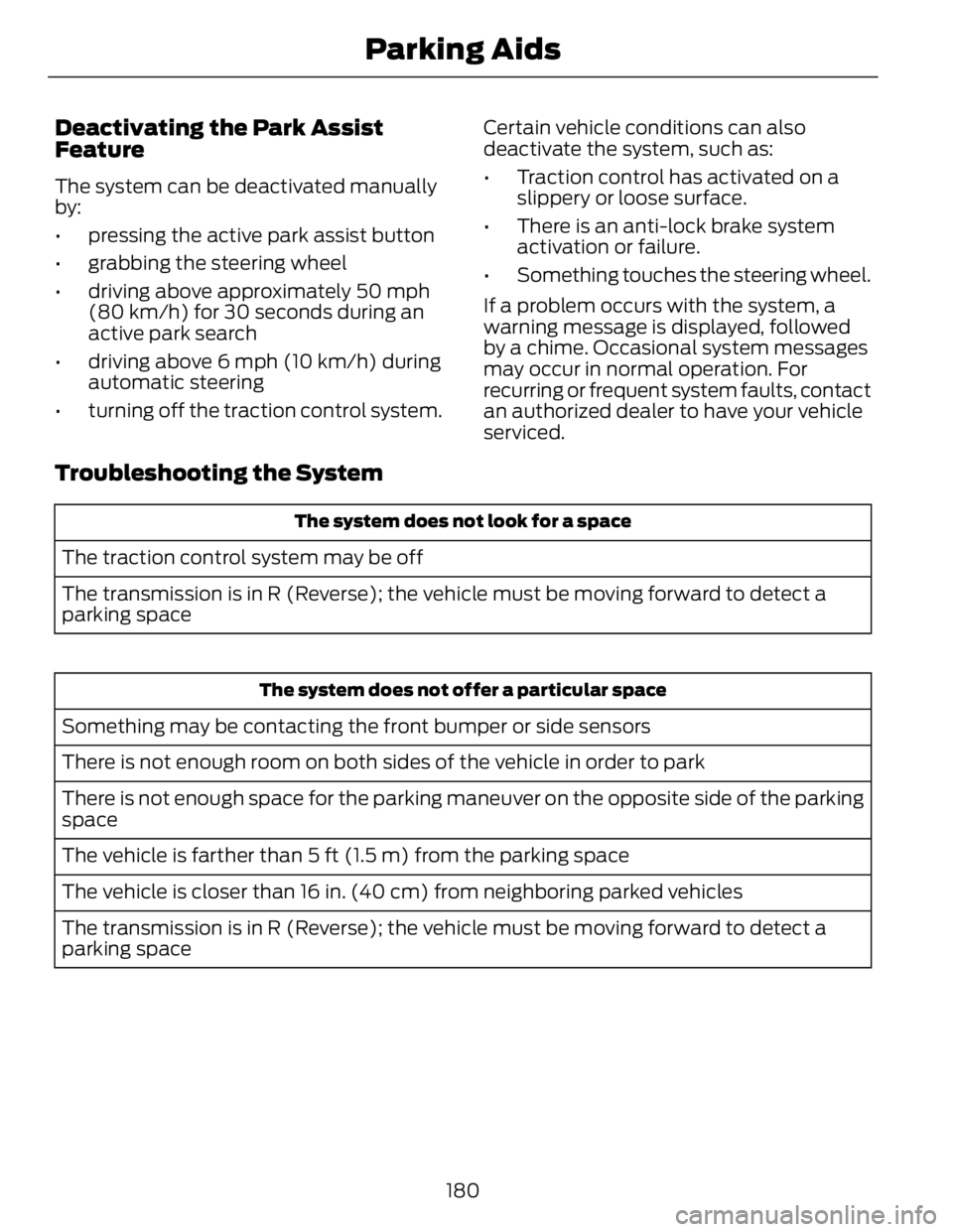
Deactivating the Park Assist
Feature The system can be deactivated manually
by:
• pressing the active park assist button
• grabbing the steering wheel
• driving above approximately 50 mph
(80 km/h) for 30 seconds during an
active park search
• driving above 6 mph (10 km/h) during
automatic steering
• turning off the traction control system. Certain vehicle conditions can also
deactivate the system, such as:
• Traction control has activated on a
slippery or loose surface.
• There is an anti-lock brake system
activation or failure.
• Something touches the steering wheel.
If a problem occurs with the system, a
warning message is displayed, followed
by a chime. Occasional system messages
may occur in normal operation. For
recurring or frequent system faults, contact
an authorized dealer to have your vehicle
serviced.
Troubleshooting the System The system does not look for a space
The traction control system may be off
The transmission is in R (Reverse); the vehicle must be moving forward to detect a
parking space
The system does not offer a particular space
Something may be contacting the front bumper or side sensors
There is not enough room on both sides of the vehicle in order to park
There is not enough space for the parking maneuver on the opposite side of the parking
space
The vehicle is farther than 5 ft (1.5 m) from the parking space
The vehicle is closer than 16 in. (40 cm) from neighboring parked vehicles
The transmission is in R (Reverse); the vehicle must be moving forward to detect a
parking space
180Parking Aids