start stop button FORD FUSION HYBRID 2017 User Guide
[x] Cancel search | Manufacturer: FORD, Model Year: 2017, Model line: FUSION HYBRID, Model: FORD FUSION HYBRID 2017Pages: 516, PDF Size: 7.53 MB
Page 147 of 516
1.Shift into neutral and use the brakes tobring your vehicle to a safe stop.
2. When your vehicle has stopped, shiftinto park (P).
3. Apply the parking brake.
4.Press and hold the push button ignitionswitch, or press it three times withintwo seconds.
Guarding Against Exhaust Fumes
WARNING
If you smell exhaust fumes insideyour vehicle, have your vehiclechecked by your authorized dealerimmediately. Do not drive your vehicle ifyou smell exhaust fumes. Carbonmonoxide is present in exhaust fumes.Take precautions to avoid its dangerouseffects.
Important Ventilating Information
If you stop your vehicle and then leave theengine idling for long periods, werecommend that you do one of thefollowing:
•Open the windows at least 1 in (3 cm).
•Set your climate control to outside air.
ENGINE BLOCK HEATER (If
Equipped)
WARNINGS
Failure to follow engine block heaterinstructions could result in propertydamage or serious personal injury.
Do not use your heater withungrounded electrical systems ortwo-pronged adapters. There is a riskof electrical shock.
Note:The heater is most effective whenoutdoor temperatures are below 0°F(-18°C).
The heater acts as a starting aid bywarming the engine coolant. This allowsthe climate control system to respondquickly. The equipment includes a heaterelement (installed in the engine block) anda wire harness. You can connect thesystem to a grounded 120-volt ACelectrical source.
We recommend that you do the followingfor a safe and correct operation:
•Use a 16-gauge outdoor extension cordthat is product certified byUnderwriter’s Laboratory (UL) orCanadian Standards Association(CSA). This extension cord must besuitable for use outdoors, in coldtemperatures, and be clearly markedSuitable for Use with OutdoorAppliances. Do not use an indoorextension cord outdoors. This couldresult in an electric shock or become afire hazard.
•Use as short an extension cord aspossible.
•Do not use multiple extension cords.
•Make sure that when in operation, theextension cord plug and heater cordplug connections are free and clear ofwater. This could cause an electricshock or fire.
•Make sure your vehicle is parked in aclean area, clear of combustibles.
•Make sure the heater, heater cord andextension cord are firmly connected.
•Check for heat anywhere in theelectrical hookup once the system hasbeen operating for approximately 30minutes.
•Make sure the heater system ischecked for proper operation beforewinter.
144
Fusion Energi / Fusion Hybrid (CC7) Hybrid Electric Vehicle (HEV)/Plug-In Hybrid Electric Vehicle (PHEV), Canada/United States of America, enUSA, First Printing
Starting and Stopping the Engine
Page 153 of 516
ECO Cruise
Note:ECO Cruise is available as a separatefeature on Energi vehicles only. On nonplug-in vehicles it is included in EcoSelect.
This feature saves vehicle energy byrelaxing acceleration compared tostandard cruise control. For example, yourvehicle may temporarily lose speed whengoing uphill. When set to on, ECO appearsin the information display when cruisecontrol is on.
You can switch it on or off in through theinformation display. See GeneralInformation (page 94).
Settings
ECO CruiseDriver Assist
Low Engine Use
The low engine use mode is equipped onEnergi models only. The Low Engine Usemode maintains proper engine lubricationat sufficient temperature, and will activateautomatically when you drive your vehiclewith limited engine operation. When yourvehicle is in low engine use mode, yourvehicle will automatically run the engineas necessary.
Note:If your vehicle is in low engine usemode when you start your vehicle, amessage will appear in the informationdisplay. See Information Messages (page103).
If you select the EV Now mode while thevehicle is in the low engine use mode, EVNow mode will be suspended for as longas you are in low engine use mode. The lowengine use mode will resume the next timeyou start your vehicle and willautomatically stop when no longer needed.
Note:Cold temperatures will affect theengine warm up time and the low engineuse mode may operate more frequently.
Note:An oil change is not required but givesyou the option of not running a low engineuse cycle. Resetting the oil life monitoringsystem will suspend the low engine usemode.
Fuel Freshness
See Fuel Quality (page 154).
ECOSELECT (If Equipped)
EcoSelect is a drive mode for non plug-invehicles designed to offer the best possiblefuel economy with tradeoffs in vehicleperformance and comfort.
To switch EcoSelect on, pressthe ECO button.
A graphic displays on your informationdisplay when EcoSelect is on.
Your vehicle will remember the lastselected mode whenever you start yourvehicle.
EcoSelect allows your vehicle to operatemore efficiently. You will notice:
•Less aggressive cooling.
•Softer acceleration.
•Increased deceleration when coasting.
•Changes in engine behavior.
•ECO cruise control activation.
150
Fusion Energi / Fusion Hybrid (CC7) Hybrid Electric Vehicle (HEV)/Plug-In Hybrid Electric Vehicle (PHEV), Canada/United States of America, enUSA, First Printing
Unique Driving CharacteristicsE198654
Page 172 of 516
You can modify the lighting ring. See Charge Port Light Ring Settings in the SYNC™ 3 section.
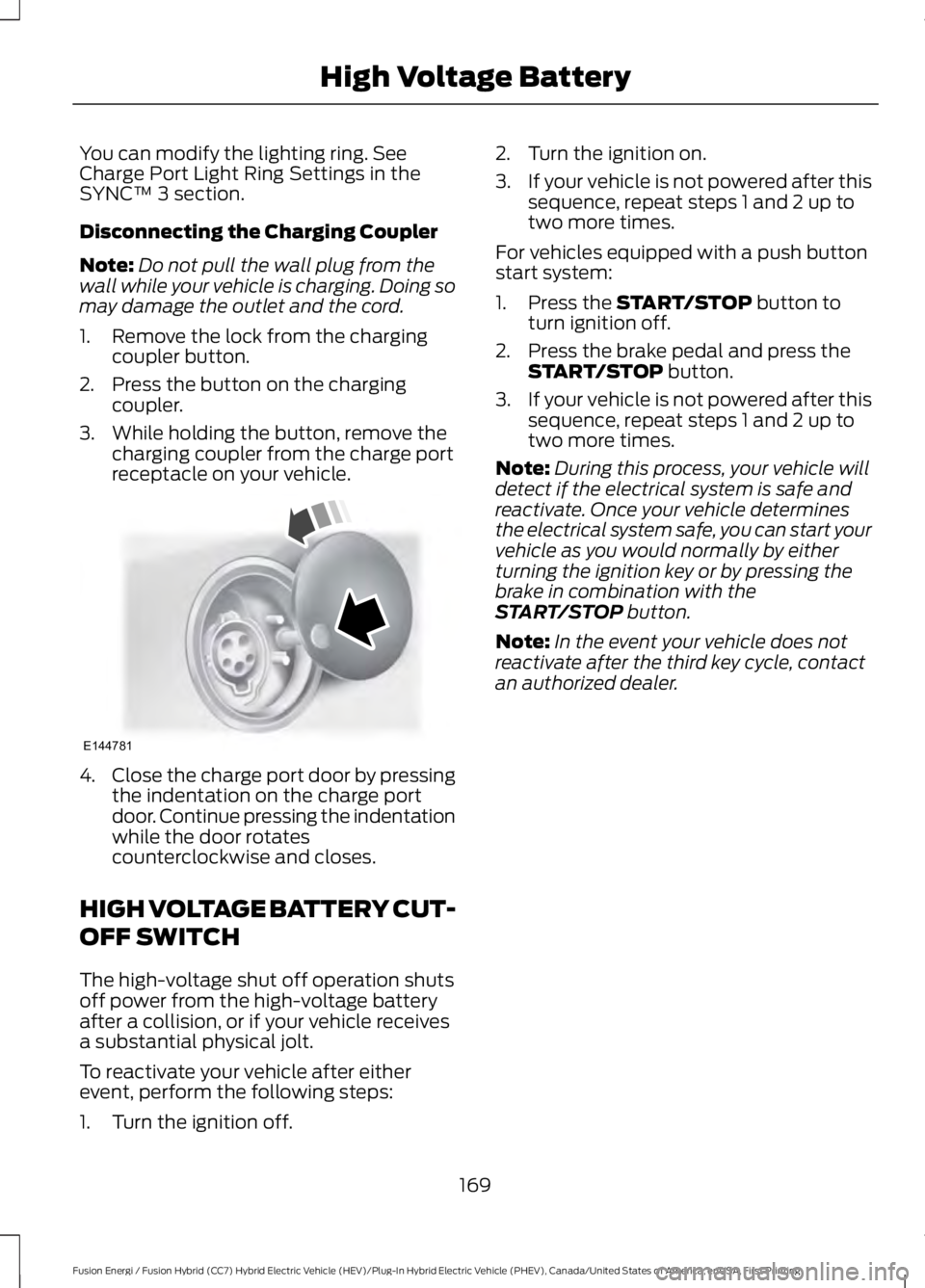
Disconnecting the Charging Coupler
Note:Do not pull the wall plug from thewall while your vehicle is charging. Doing somay damage the outlet and the cord.
1. Remove the lock from the chargingcoupler button.
2. Press the button on the chargingcoupler.
3. While holding the button, remove thecharging coupler from the charge portreceptacle on your vehicle.
4.Close the charge port door by pressingthe indentation on the charge portdoor. Continue pressing the indentationwhile the door rotatescounterclockwise and closes.
HIGH VOLTAGE BATTERY CUT-
OFF SWITCH
The high-voltage shut off operation shutsoff power from the high-voltage batteryafter a collision, or if your vehicle receivesa substantial physical jolt.
To reactivate your vehicle after eitherevent, perform the following steps:
1. Turn the ignition off.
2. Turn the ignition on.
3.If your vehicle is not powered after thissequence, repeat steps 1 and 2 up totwo more times.
For vehicles equipped with a push buttonstart system:
1. Press the START/STOP button toturn ignition off.
2. Press the brake pedal and press theSTART/STOP button.
3.If your vehicle is not powered after thissequence, repeat steps 1 and 2 up totwo more times.
Note:During this process, your vehicle willdetect if the electrical system is safe andreactivate. Once your vehicle determinesthe electrical system safe, you can start yourvehicle as you would normally by eitherturning the ignition key or by pressing thebrake in combination with theSTART/STOP button.
Note:In the event your vehicle does notreactivate after the third key cycle, contactan authorized dealer.
169
Fusion Energi / Fusion Hybrid (CC7) Hybrid Electric Vehicle (HEV)/Plug-In Hybrid Electric Vehicle (PHEV), Canada/United States of America, enUSA, First Printing
High Voltage BatteryE144781
Page 174 of 516
Reverse (R)
With the selector in reverse (R), yourvehicle moves backward. Always come toa complete stop before shifting into andout of reverse (R).
Neutral (N)
With the selector in neutral (N), yourvehicle can be started and is free to roll.Hold the brake pedal down while in thisposition.
Stay in Neutral Mode
Note:Always put your vehicle in Stay inNeutral mode when entering an automaticcar wash. Failure to do this could result invehicle damage not covered by warranty.
Stay in Neutral mode allows your vehicleto stay in neutral when you exit yourvehicle. Your vehicle must be stationary toenter this mode.
To enter Stay in Neutral mode:
•Move the transmission selector toneutral (N).
•A message will appear in yourinformation display screen promptingyou to press the low (L) button.
•Press the low (L) button again to enterStay in Neutral mode.
To exit Stay in Neutral mode, select a gearother than low (L).
A message will appear in your informationdisplay screen when your vehicle hasentered Stay in Neutral mode.
Drive (D)
Drive (D) is the normal driving position forthe best fuel economy.
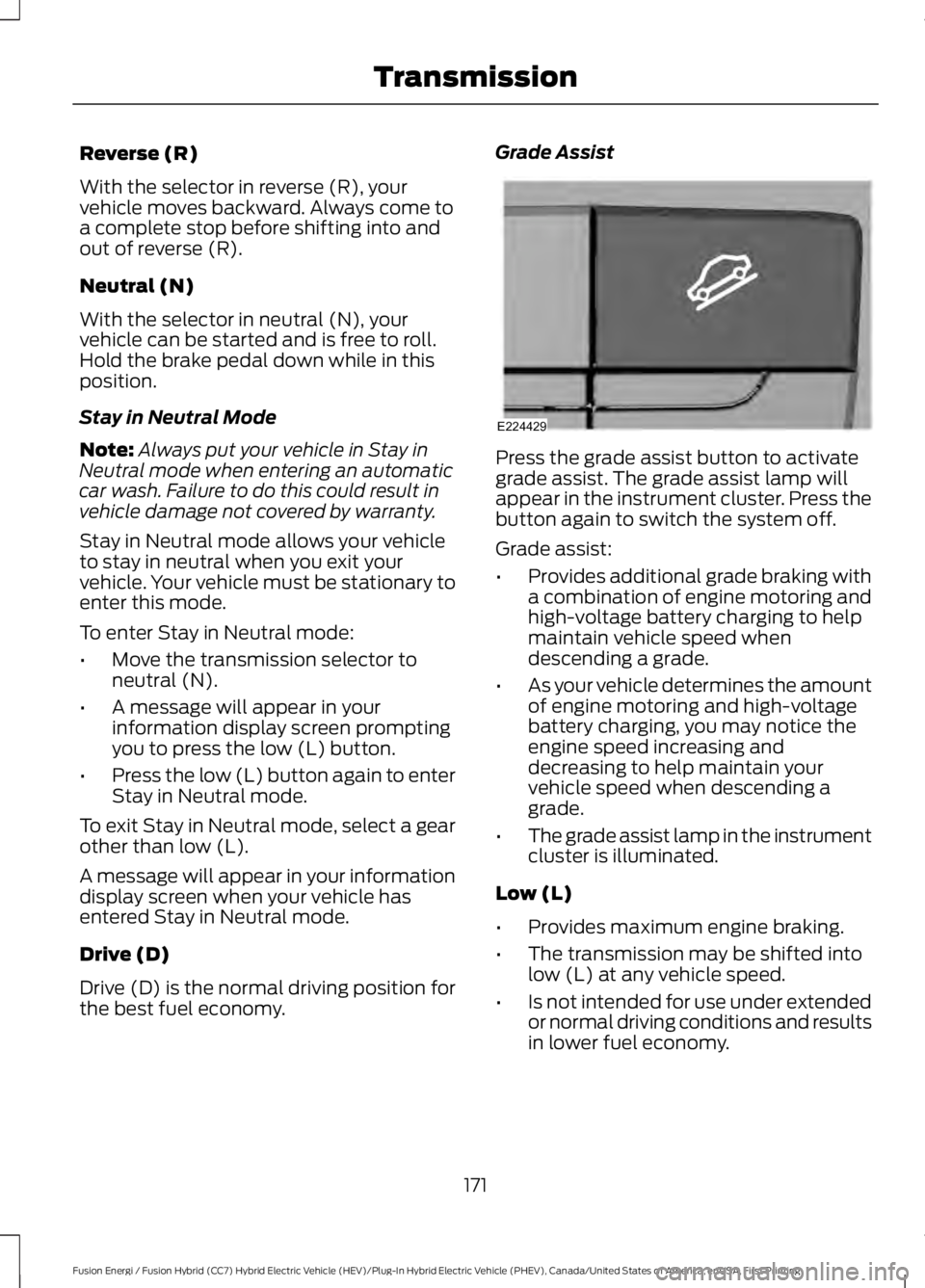
Grade Assist
Press the grade assist button to activategrade assist. The grade assist lamp willappear in the instrument cluster. Press thebutton again to switch the system off.
Grade assist:
•Provides additional grade braking witha combination of engine motoring andhigh-voltage battery charging to helpmaintain vehicle speed whendescending a grade.
•As your vehicle determines the amountof engine motoring and high-voltagebattery charging, you may notice theengine speed increasing anddecreasing to help maintain yourvehicle speed when descending agrade.
•The grade assist lamp in the instrumentcluster is illuminated.
Low (L)
•Provides maximum engine braking.
•The transmission may be shifted intolow (L) at any vehicle speed.
•Is not intended for use under extendedor normal driving conditions and resultsin lower fuel economy.
171
Fusion Energi / Fusion Hybrid (CC7) Hybrid Electric Vehicle (HEV)/Plug-In Hybrid Electric Vehicle (PHEV), Canada/United States of America, enUSA, First Printing
TransmissionE224429
Page 231 of 516
This program is separate from the NewVehicle Limited Warranty, but the coverageis concurrent with the powertrain coverageperiod of your vehicle.
Canadian customers who require roadsideassistance, call 1-800-665-2006.
Vehicles Sold in Canada: UsingRoadside Assistance
Complete the roadside assistanceidentification card and place it in yourwallet for quick reference.
In Canada, this card is found in theWarranty Guide in the glove compartmentof your vehicle.
Vehicles Sold in Canada: RoadsideAssistance Program Coverage
The service is available 24 hours a day,seven days a week.
Canadian roadside coverage and benefitsmay differ from the U.S. coverage.
For complete program coverage detailsyou may contact your dealer, you can callus in Canada at 1-800-665-2006, or visitour website at www.ford.ca.
HAZARD WARNING FLASHERS
Note:If used when the vehicle is notrunning, the battery will lose charge. Theremay be insufficient power to restart yourvehicle.
The hazard warning button islocated on the instrument panel.Use it when your vehicle iscreating a safety hazard for othermotorists.
•Press the button to turn on the hazardwarning function, and the front andrear direction indicators will flash.
•Press the button again to turn themoff.
FUEL SHUTOFF
WARNING
Failure to inspect and, if necessary,repair fuel leaks after a collision mayincrease the risk of fire and seriousinjury. Ford Motor Company recommendsthat the fuel system be inspected by anauthorized dealer after any collision.
In the event of a moderate to severecollision, this vehicle has a fuel pumpshut-off feature that stops the flow of fuelto the engine. Not every impact will causea shut-off.
Should your vehicle shut off after acollision, you may restart your vehicle.
For vehicles equipped with a key system:
1. Switch off the ignition.
2. Switch on the ignition.
3. Check the information display for theReady to Drive light as the gasolineengine may not start, but the electricmotor may be running. If you do not seethe Ready to Drive light, repeat Steps1 and 2 up to two more times.
For vehicles equipped with a push buttonstart system:
1. Press the push button start to switchoff the ignition.
2. Press the brake pedal and press thepush button start to switch on theignition.
3. Check the information display for theReady to Drive light as the gasolineengine may not start, but the electricmotor may be running. If you do not seethe Ready to Drive light, repeat Steps1 and 2 up to two more times.
228
Fusion Energi / Fusion Hybrid (CC7) Hybrid Electric Vehicle (HEV)/Plug-In Hybrid Electric Vehicle (PHEV), Canada/United States of America, enUSA, First Printing
Roadside Emergencies
Page 253 of 516
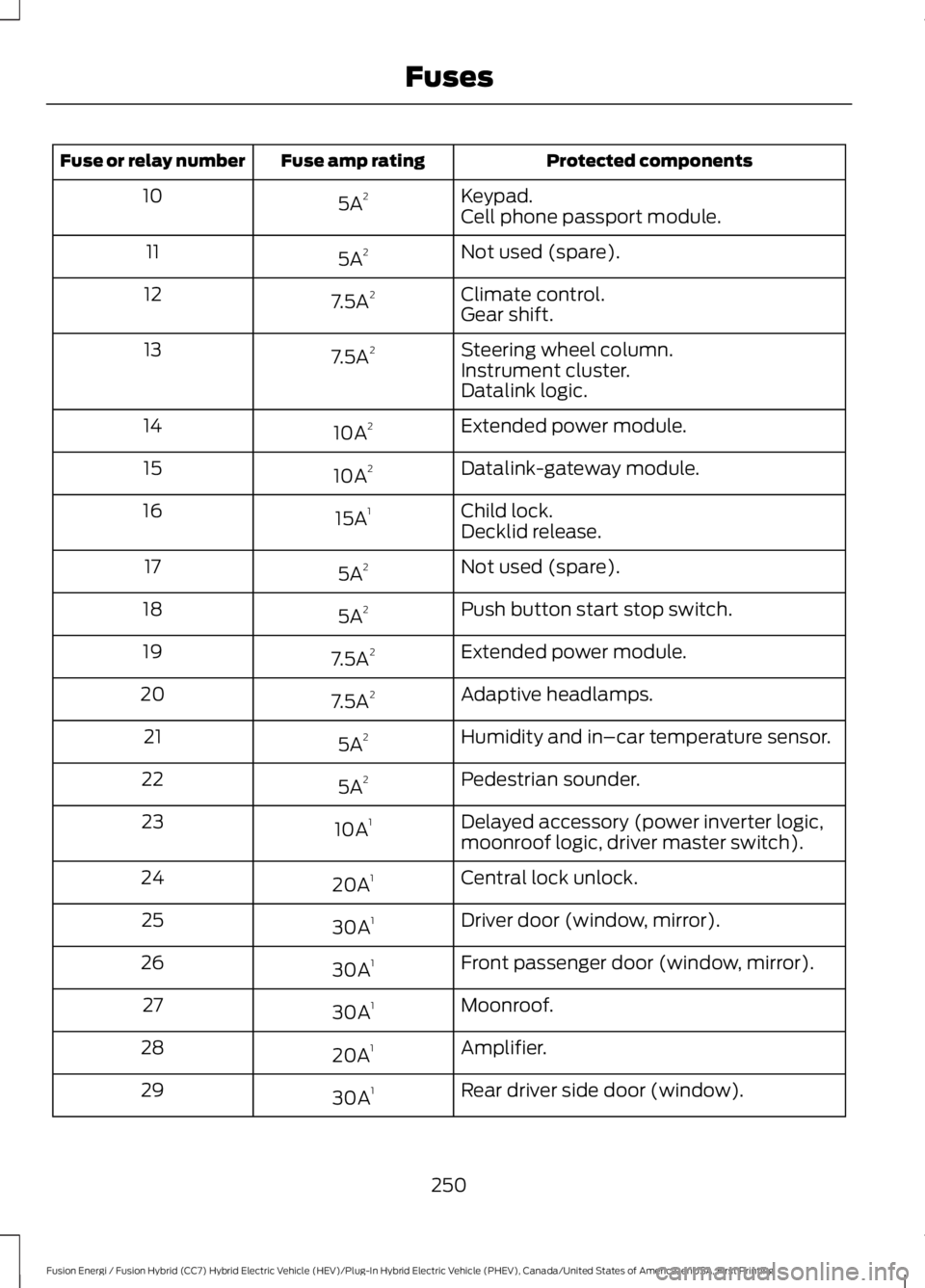
Protected componentsFuse amp ratingFuse or relay number
Keypad.5A210Cell phone passport module.
Not used (spare).5A211
Climate control.7.5A212Gear shift.
Steering wheel column.7.5A213Instrument cluster.Datalink logic.
Extended power module.10A214
Datalink-gateway module.10A215
Child lock.15A116Decklid release.
Not used (spare).5A217
Push button start stop switch.5A218
Extended power module.7.5A219
Adaptive headlamps.7.5A220
Humidity and in–car temperature sensor.5A221
Pedestrian sounder.5A222
Delayed accessory (power inverter logic,moonroof logic, driver master switch).10A123
Central lock unlock.20A124
Driver door (window, mirror).30A125
Front passenger door (window, mirror).30A126
Moonroof.30A127
Amplifier.20A128
Rear driver side door (window).30A129
250
Fusion Energi / Fusion Hybrid (CC7) Hybrid Electric Vehicle (HEV)/Plug-In Hybrid Electric Vehicle (PHEV), Canada/United States of America, enUSA, First Printing
Fuses
Page 285 of 516
5. Remove the warning sticker found onthe casing/housing and place it on thetop of the instrument panel or thecenter of the dash.
6. Start the vehicle leave the enginerunning so the compressor does notdrain the vehicle’s battery.
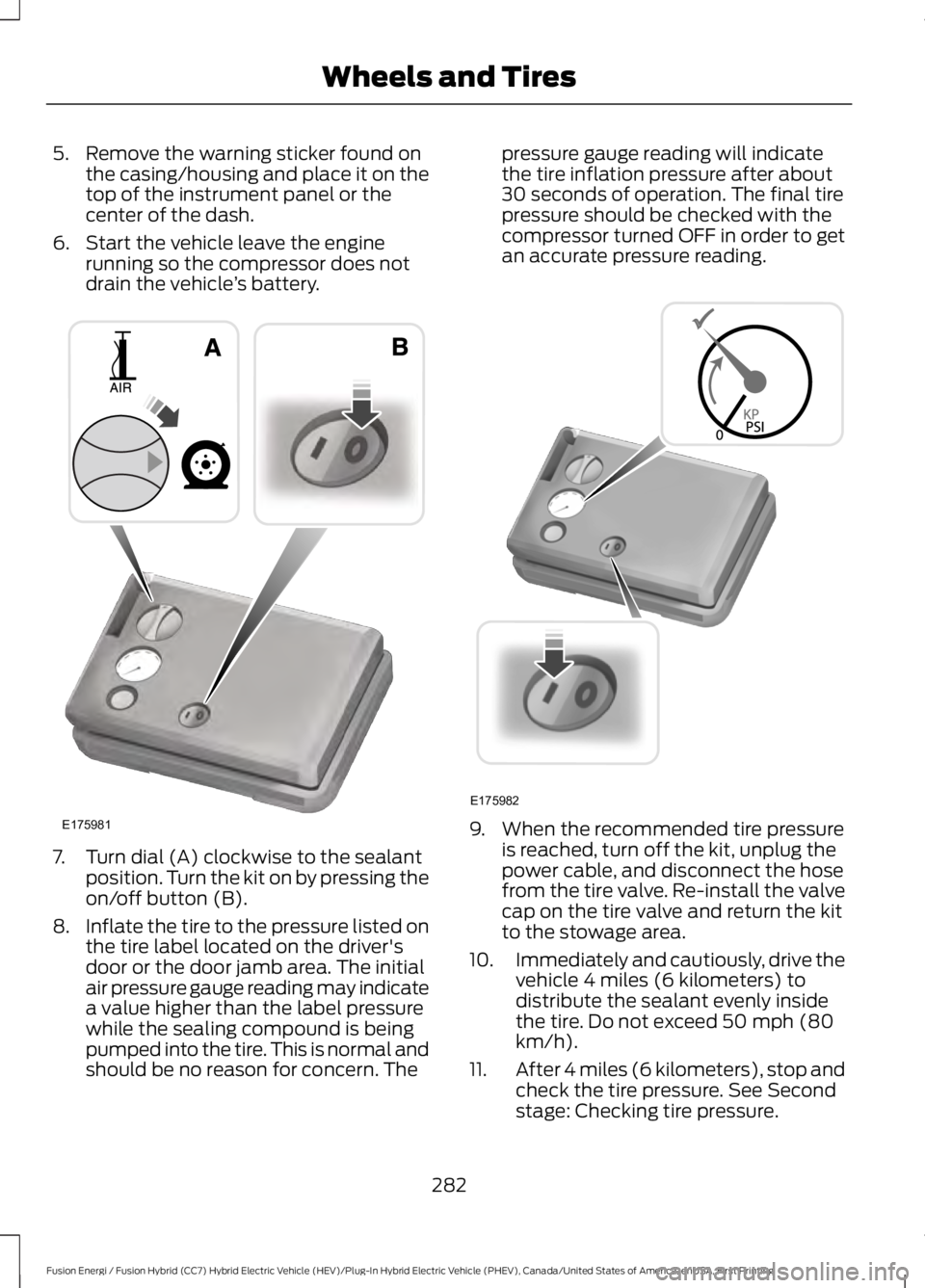
7. Turn dial (A) clockwise to the sealantposition. Turn the kit on by pressing theon/off button (B).
8.Inflate the tire to the pressure listed onthe tire label located on the driver'sdoor or the door jamb area. The initialair pressure gauge reading may indicatea value higher than the label pressurewhile the sealing compound is beingpumped into the tire. This is normal andshould be no reason for concern. The
pressure gauge reading will indicatethe tire inflation pressure after about30 seconds of operation. The final tirepressure should be checked with thecompressor turned OFF in order to getan accurate pressure reading.
9. When the recommended tire pressureis reached, turn off the kit, unplug thepower cable, and disconnect the hosefrom the tire valve. Re-install the valvecap on the tire valve and return the kitto the stowage area.
10.Immediately and cautiously, drive thevehicle 4 miles (6 kilometers) todistribute the sealant evenly insidethe tire. Do not exceed 50 mph (80km/h).
11.After 4 miles (6 kilometers), stop andcheck the tire pressure. See Secondstage: Checking tire pressure.
282
Fusion Energi / Fusion Hybrid (CC7) Hybrid Electric Vehicle (HEV)/Plug-In Hybrid Electric Vehicle (PHEV), Canada/United States of America, enUSA, First Printing
Wheels and TiresE175981 E175982
Page 368 of 516
AppLink issues
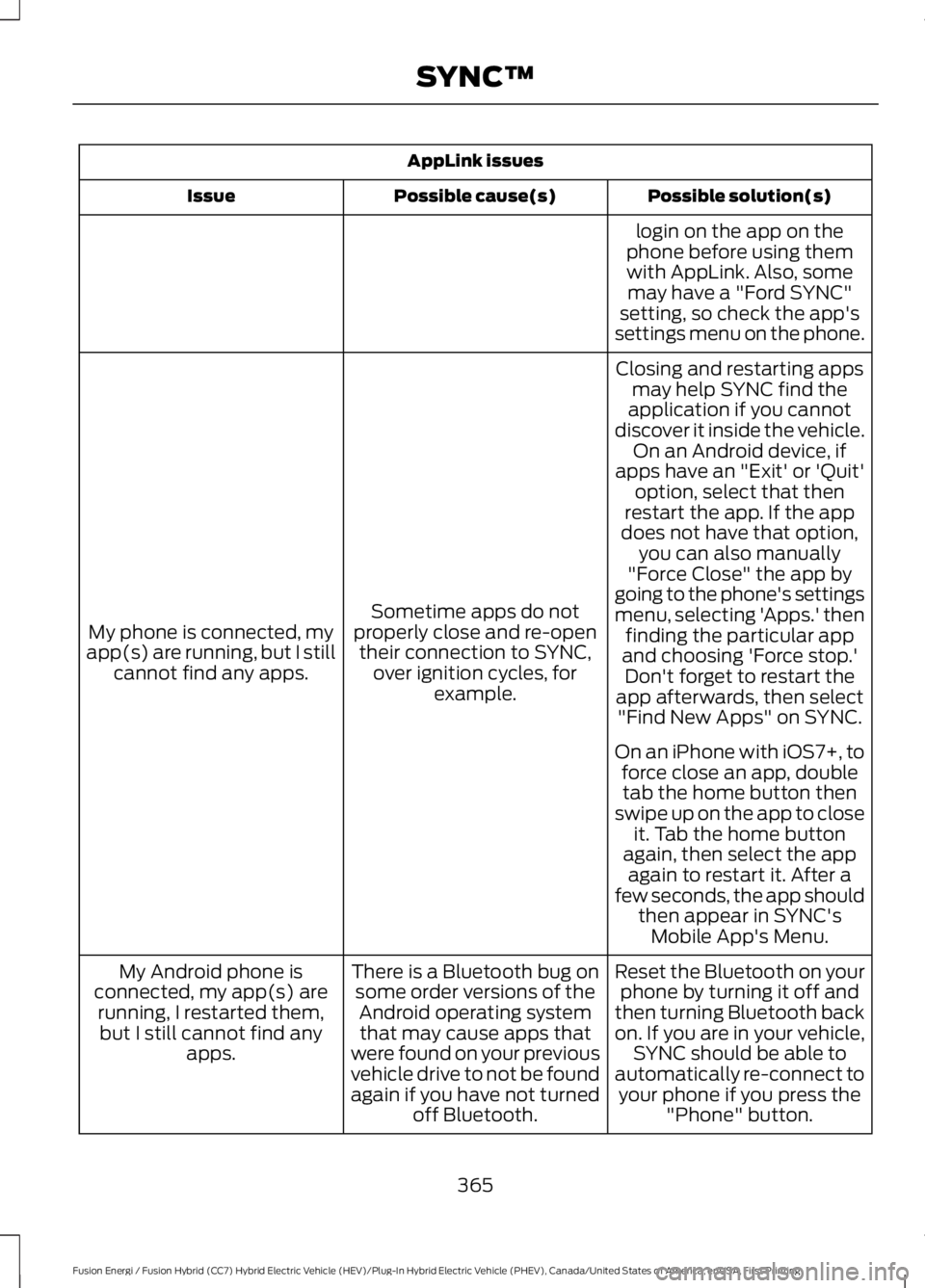
Possible solution(s)Possible cause(s)Issue
login on the app on thephone before using themwith AppLink. Also, somemay have a "Ford SYNC"setting, so check the app'ssettings menu on the phone.
Closing and restarting appsmay help SYNC find theapplication if you cannotdiscover it inside the vehicle.On an Android device, ifapps have an "Exit' or 'Quit'
Sometime apps do notproperly close and re-opentheir connection to SYNC,over ignition cycles, forexample.
My phone is connected, myapp(s) are running, but I stillcannot find any apps.
option, select that thenrestart the app. If the appdoes not have that option,you can also manually"Force Close" the app bygoing to the phone's settingsmenu, selecting 'Apps.' thenfinding the particular appand choosing 'Force stop.'Don't forget to restart theapp afterwards, then select"Find New Apps" on SYNC.
On an iPhone with iOS7+, toforce close an app, doubletab the home button thenswipe up on the app to closeit. Tab the home buttonagain, then select the appagain to restart it. After afew seconds, the app shouldthen appear in SYNC'sMobile App's Menu.
Reset the Bluetooth on yourphone by turning it off andthen turning Bluetooth backon. If you are in your vehicle,SYNC should be able toautomatically re-connect toyour phone if you press the"Phone" button.
There is a Bluetooth bug onsome order versions of theAndroid operating systemthat may cause apps thatwere found on your previousvehicle drive to not be foundagain if you have not turnedoff Bluetooth.
My Android phone isconnected, my app(s) arerunning, I restarted them,but I still cannot find anyapps.
365
Fusion Energi / Fusion Hybrid (CC7) Hybrid Electric Vehicle (HEV)/Plug-In Hybrid Electric Vehicle (PHEV), Canada/United States of America, enUSA, First Printing
SYNC™
Page 376 of 516
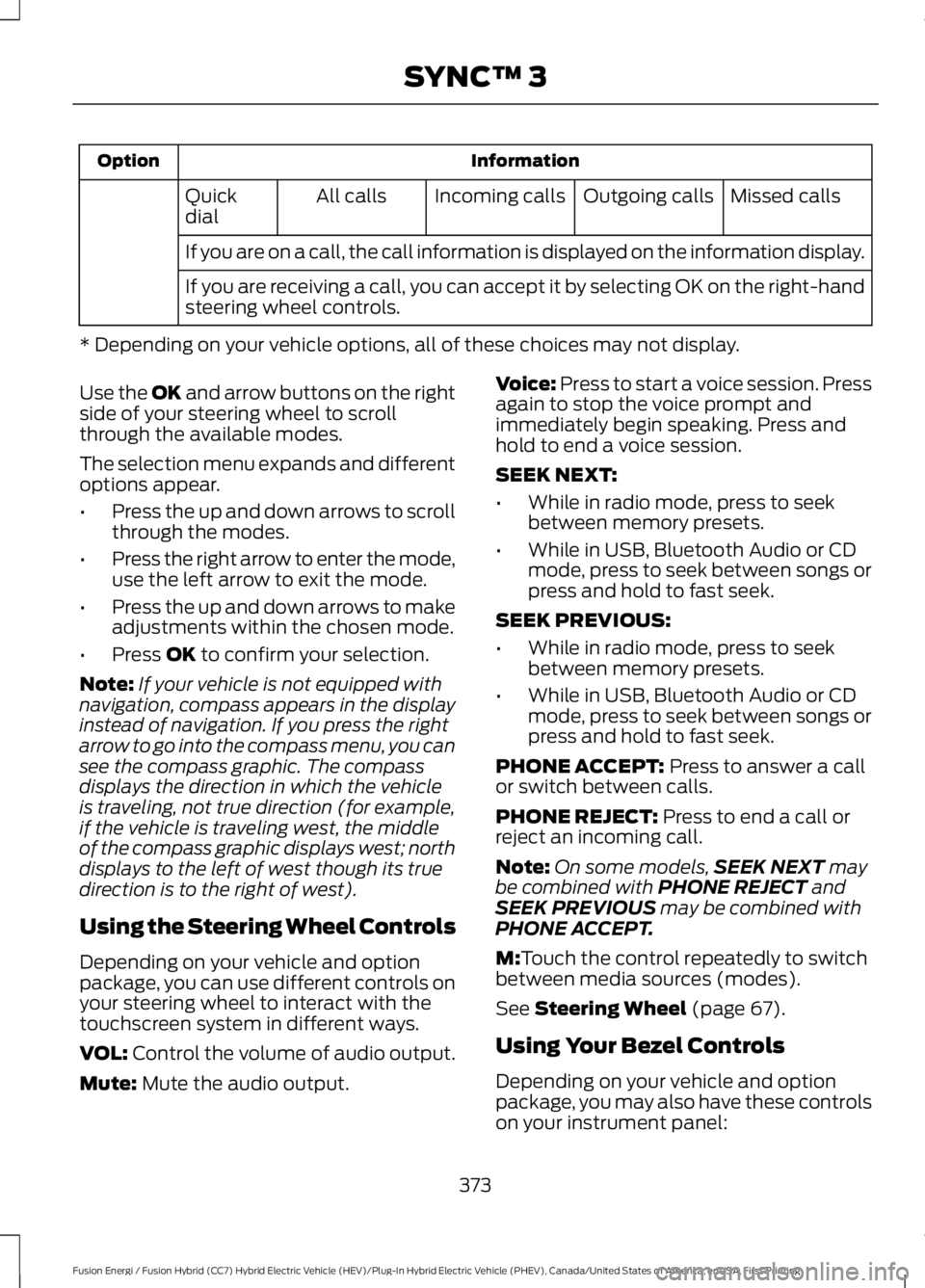
InformationOption
Missed callsOutgoing callsIncoming callsAll callsQuickdial
If you are on a call, the call information is displayed on the information display.
If you are receiving a call, you can accept it by selecting OK on the right-handsteering wheel controls.
* Depending on your vehicle options, all of these choices may not display.
Use the OK and arrow buttons on the rightside of your steering wheel to scrollthrough the available modes.
The selection menu expands and differentoptions appear.
•Press the up and down arrows to scrollthrough the modes.
•Press the right arrow to enter the mode,use the left arrow to exit the mode.
•Press the up and down arrows to makeadjustments within the chosen mode.
•Press OK to confirm your selection.
Note:If your vehicle is not equipped withnavigation, compass appears in the displayinstead of navigation. If you press the rightarrow to go into the compass menu, you cansee the compass graphic. The compassdisplays the direction in which the vehicleis traveling, not true direction (for example,if the vehicle is traveling west, the middleof the compass graphic displays west; northdisplays to the left of west though its truedirection is to the right of west).
Using the Steering Wheel Controls
Depending on your vehicle and optionpackage, you can use different controls onyour steering wheel to interact with thetouchscreen system in different ways.
VOL: Control the volume of audio output.
Mute: Mute the audio output.
Voice: Press to start a voice session. Pressagain to stop the voice prompt andimmediately begin speaking. Press andhold to end a voice session.
SEEK NEXT:
•While in radio mode, press to seekbetween memory presets.
•While in USB, Bluetooth Audio or CDmode, press to seek between songs orpress and hold to fast seek.
SEEK PREVIOUS:
•While in radio mode, press to seekbetween memory presets.
•While in USB, Bluetooth Audio or CDmode, press to seek between songs orpress and hold to fast seek.
PHONE ACCEPT: Press to answer a callor switch between calls.
PHONE REJECT: Press to end a call orreject an incoming call.
Note:On some models,SEEK NEXT maybe combined with PHONE REJECT andSEEK PREVIOUS may be combined withPHONE ACCEPT.
M:Touch the control repeatedly to switchbetween media sources (modes).
See Steering Wheel (page 67).
Using Your Bezel Controls
Depending on your vehicle and optionpackage, you may also have these controlson your instrument panel:
373
Fusion Energi / Fusion Hybrid (CC7) Hybrid Electric Vehicle (HEV)/Plug-In Hybrid Electric Vehicle (PHEV), Canada/United States of America, enUSA, First Printing
SYNC™ 3
Page 410 of 516
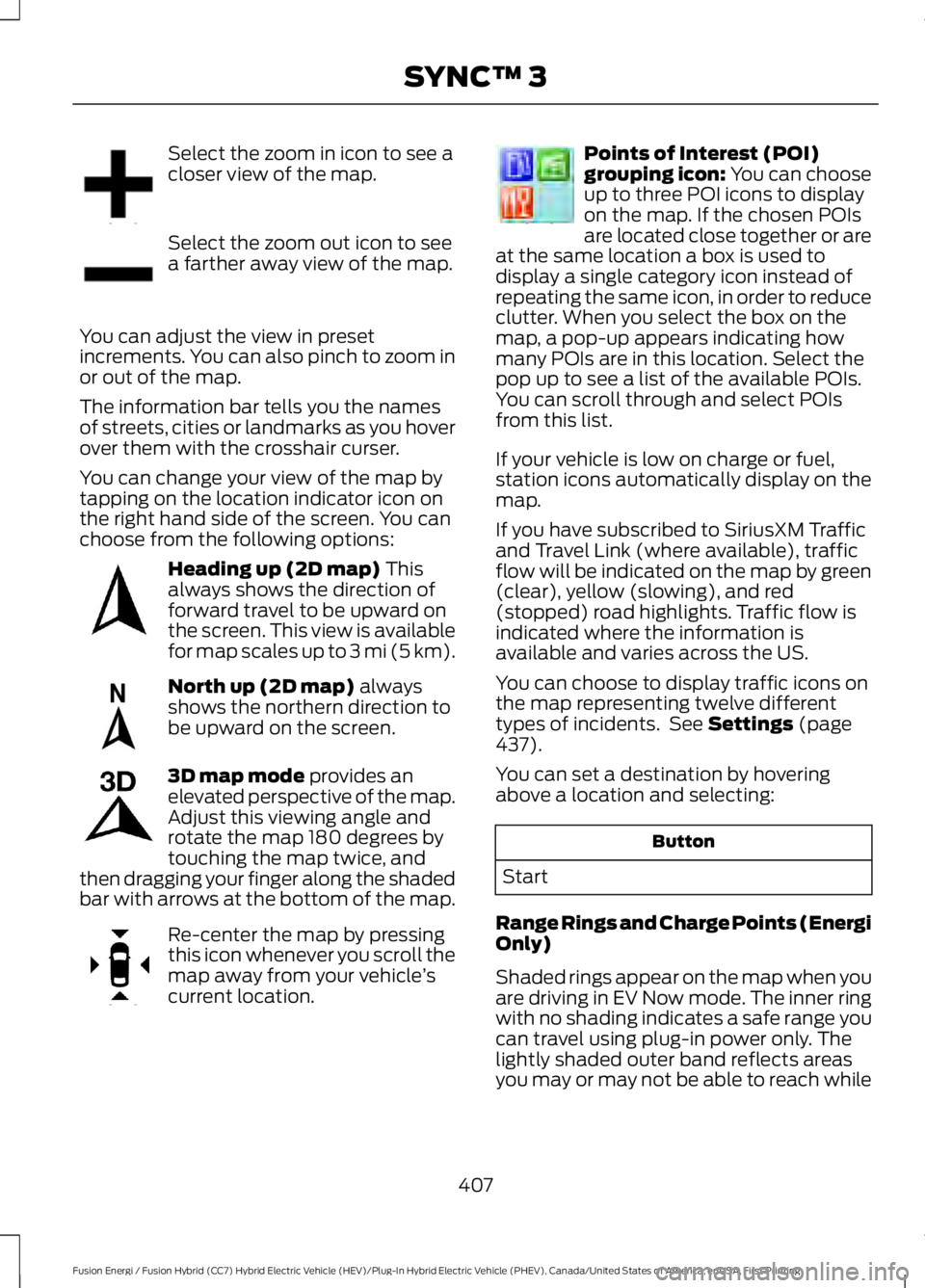
Select the zoom in icon to see acloser view of the map.
Select the zoom out icon to seea farther away view of the map.
You can adjust the view in presetincrements. You can also pinch to zoom inor out of the map.
The information bar tells you the namesof streets, cities or landmarks as you hoverover them with the crosshair curser.
You can change your view of the map bytapping on the location indicator icon onthe right hand side of the screen. You canchoose from the following options:
Heading up (2D map) Thisalways shows the direction offorward travel to be upward onthe screen. This view is availablefor map scales up to 3 mi (5 km).
North up (2D map) alwaysshows the northern direction tobe upward on the screen.
3D map mode provides anelevated perspective of the map.Adjust this viewing angle androtate the map 180 degrees bytouching the map twice, andthen dragging your finger along the shadedbar with arrows at the bottom of the map.
Re-center the map by pressingthis icon whenever you scroll themap away from your vehicle’scurrent location.
Points of Interest (POI)grouping icon: You can chooseup to three POI icons to displayon the map. If the chosen POIsare located close together or areat the same location a box is used todisplay a single category icon instead ofrepeating the same icon, in order to reduceclutter. When you select the box on themap, a pop-up appears indicating howmany POIs are in this location. Select thepop up to see a list of the available POIs.You can scroll through and select POIsfrom this list.
If your vehicle is low on charge or fuel,station icons automatically display on themap.
If you have subscribed to SiriusXM Trafficand Travel Link (where available), trafficflow will be indicated on the map by green(clear), yellow (slowing), and red(stopped) road highlights. Traffic flow isindicated where the information isavailable and varies across the US.
You can choose to display traffic icons onthe map representing twelve differenttypes of incidents. See Settings (page437).
You can set a destination by hoveringabove a location and selecting:
Button
Start
Range Rings and Charge Points (EnergiOnly)
Shaded rings appear on the map when youare driving in EV Now mode. The inner ringwith no shading indicates a safe range youcan travel using plug-in power only. Thelightly shaded outer band reflects areasyou may or may not be able to reach while
407
Fusion Energi / Fusion Hybrid (CC7) Hybrid Electric Vehicle (HEV)/Plug-In Hybrid Electric Vehicle (PHEV), Canada/United States of America, enUSA, First Printing
SYNC™ 3E207752 E207753 E207750 E207749 E207748 E207751 E207754