change time FORD FUSION HYBRID 2017 Owner's Manual
[x] Cancel search | Manufacturer: FORD, Model Year: 2017, Model line: FUSION HYBRID, Model: FORD FUSION HYBRID 2017Pages: 516, PDF Size: 7.53 MB
Page 196 of 516
The camera may not operate correctlyunder the following conditions:
•Nighttime or dark areas if one or bothreverse lamps are not operating.
•Mud, water or debris obstructs thecamera's view. Clean the lens with asoft, lint-free cloth and non-abrasivecleaner.
•The rear of your vehicle is hit ordamaged, causing the camera tobecome misaligned.
Camera System Settings
You can access the rear view camerasystem settings through the display screen.See General Information (page 94).
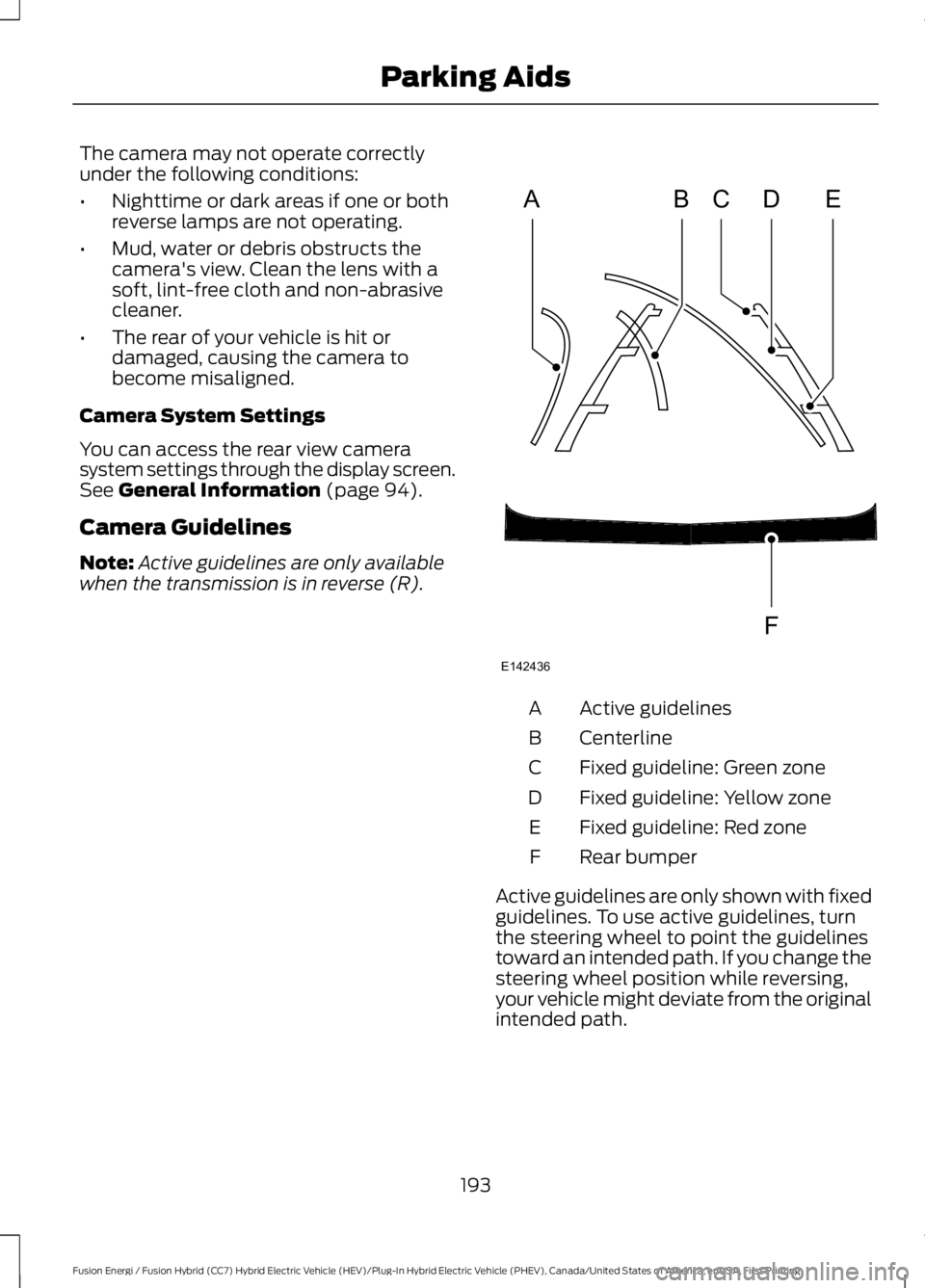
Camera Guidelines
Note:Active guidelines are only availablewhen the transmission is in reverse (R).
Active guidelinesA
CenterlineB
Fixed guideline: Green zoneC
Fixed guideline: Yellow zoneD
Fixed guideline: Red zoneE
Rear bumperF
Active guidelines are only shown with fixedguidelines. To use active guidelines, turnthe steering wheel to point the guidelinestoward an intended path. If you change thesteering wheel position while reversing,your vehicle might deviate from the originalintended path.
193
Fusion Energi / Fusion Hybrid (CC7) Hybrid Electric Vehicle (HEV)/Plug-In Hybrid Electric Vehicle (PHEV), Canada/United States of America, enUSA, First Printing
Parking AidsABCD
F
E
E142436
Page 202 of 516
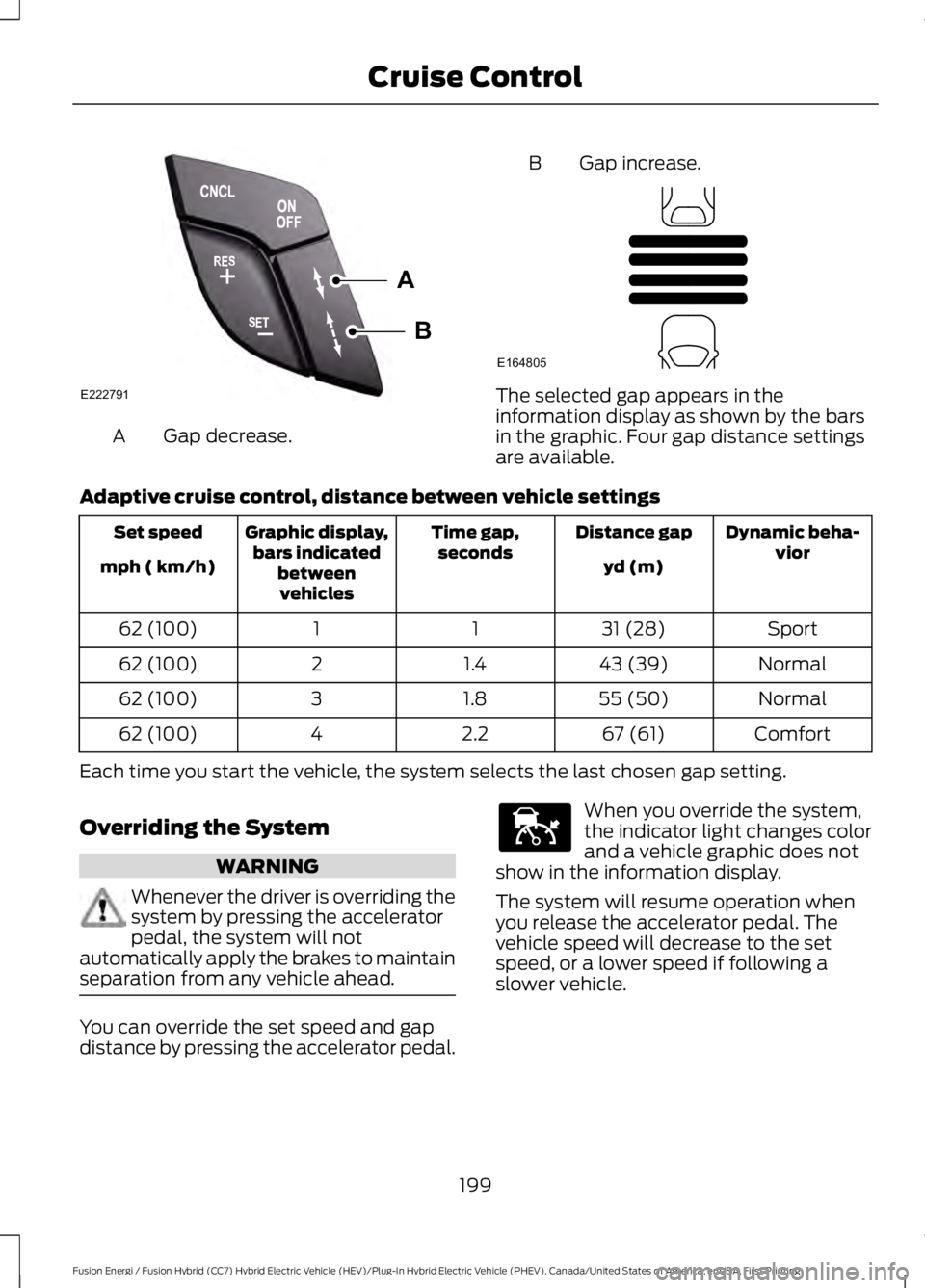
Gap decrease.A
B Gap increase.
The selected gap appears in theinformation display as shown by the barsin the graphic. Four gap distance settingsare available.
Adaptive cruise control, distance between vehicle settings
Dynamic beha-viorDistance gapTime gap,secondsGraphic display,bars indicatedbetweenvehicles
Set speed
yd (m)mph ( km/h)
Sport31 (28)1162 (100)
Normal43 (39)1.4262 (100)
Normal55 (50)1.8362 (100)
Comfort67 (61)2.2462 (100)
Each time you start the vehicle, the system selects the last chosen gap setting.
Overriding the System
WARNING
Whenever the driver is overriding thesystem by pressing the acceleratorpedal, the system will notautomatically apply the brakes to maintainseparation from any vehicle ahead.
You can override the set speed and gapdistance by pressing the accelerator pedal.
When you override the system,the indicator light changes colorand a vehicle graphic does notshow in the information display.
The system will resume operation whenyou release the accelerator pedal. Thevehicle speed will decrease to the setspeed, or a lower speed if following aslower vehicle.
199
Fusion Energi / Fusion Hybrid (CC7) Hybrid Electric Vehicle (HEV)/Plug-In Hybrid Electric Vehicle (PHEV), Canada/United States of America, enUSA, First Printing
Cruise ControlA
B
E222791 E164805 E144529
Page 203 of 516
Changing the Set Speed
•Press and release RES+ or SET-. Whenyou select km/h as the displaymeasurement in the informationdisplay the set speed changes inapproximately 2 km/h increments.When you select mph as the displaymeasurement in the informationdisplay the set speed changes inapproximately 1 mph increments.
•Press the accelerator or brake pedaluntil you reach the desired speed. Pressand release SET-.
•Press and hold RES+ or SET-. Releasethe control when you reach the desiredspeed. The set speed changes inapproximately 5 mph/10 km/hincrements.
•Press the RES+ or SET- button tochange the set speed in increments ofapproximately 1 mph or 2 km/h.
•Hold the RES+ or SET- button tochange the set speed in increments ofapproximately 5 mph or 10 km/h.
The system may apply the brakes to slowthe vehicle to the new set speed. The setspeed displays continuously in theinformation display when the system isactive.
Canceling the Set Speed
Press and release CNCL or tap the brakepedal. The set speed does not erase.
Resuming the Set Speed
Press and release RES+. The vehiclereturns to the previously set speed. The setspeed displays continuously in theinformation display while the system isactive.
Note:Only use resume if you are aware ofthe set speed and intend to return to it.
Automatic Cancellation
Automatic cancellation occurs if:
•The tires lose traction.
•The engine speed is too low.
•You apply the parking brake.
Note:If the engine speed drops too low,the information display indicates low enginespeed. Shift to a lower gear (manualtransmission only) to avoid automaticcancellation.
Hilly Condition Usage
Note:An audible alarm sounds and thesystem shuts down when it applies brakesfor an extended period of time. This allowsthe brakes to cool. The system functionsnormally after the brakes have cooled.
You should select a lower gear positionwhen the system is active in situationssuch as prolonged downhill driving onsteep grades, for example in mountainousareas. The system needs additional enginebraking in these situations to reduce theload on the vehicle’s regular brake systemto prevent them from overheating.
Switching Adaptive Cruise ControlOff
Press and release OFF when the systemis in stand by mode or switch the ignitionoff.
Note:You erase the set speed when youswitch the system off.
200
Fusion Energi / Fusion Hybrid (CC7) Hybrid Electric Vehicle (HEV)/Plug-In Hybrid Electric Vehicle (PHEV), Canada/United States of America, enUSA, First Printing
Cruise Control
Page 204 of 516
Detection Issues
WARNING
On rare occasions, detection issuescan occur due to the roadinfrastructures, for example bridges,tunnels and safety barriers. In these cases,the system may brake late orunexpectedly. At all times, you areresponsible for controlling your vehicle,supervising the system and intervening, ifrequired.
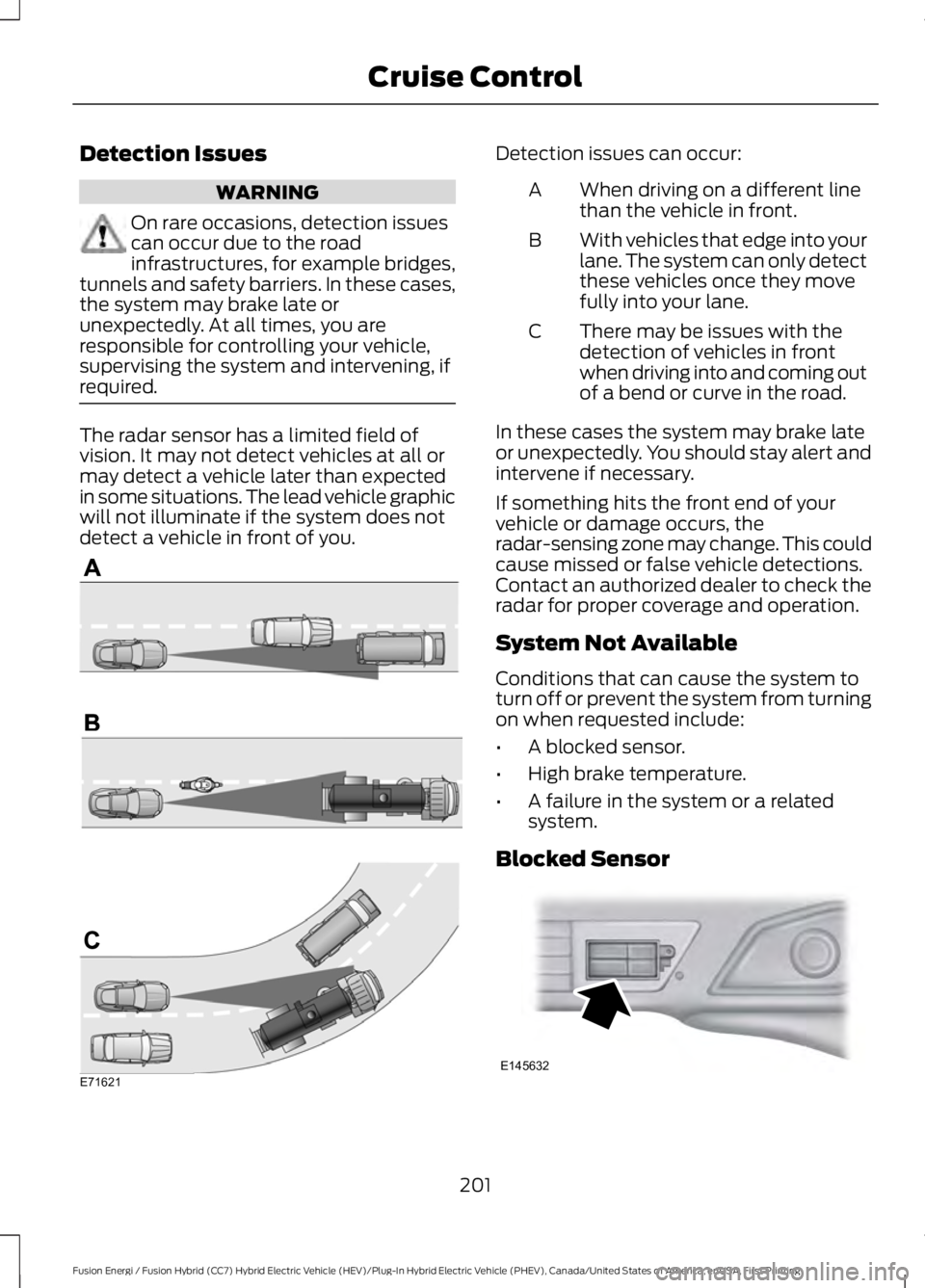
The radar sensor has a limited field ofvision. It may not detect vehicles at all ormay detect a vehicle later than expectedin some situations. The lead vehicle graphicwill not illuminate if the system does notdetect a vehicle in front of you.
Detection issues can occur:
When driving on a different linethan the vehicle in front.A
With vehicles that edge into yourlane. The system can only detectthese vehicles once they movefully into your lane.
B
There may be issues with thedetection of vehicles in frontwhen driving into and coming outof a bend or curve in the road.
C
In these cases the system may brake lateor unexpectedly. You should stay alert andintervene if necessary.
If something hits the front end of yourvehicle or damage occurs, theradar-sensing zone may change. This couldcause missed or false vehicle detections.Contact an authorized dealer to check theradar for proper coverage and operation.
System Not Available
Conditions that can cause the system toturn off or prevent the system from turningon when requested include:
•A blocked sensor.
•High brake temperature.
•A failure in the system or a relatedsystem.
Blocked Sensor
201
Fusion Energi / Fusion Hybrid (CC7) Hybrid Electric Vehicle (HEV)/Plug-In Hybrid Electric Vehicle (PHEV), Canada/United States of America, enUSA, First Printing
Cruise ControlE71621 E145632
Page 205 of 516
A message appears if something obstructsthe sensor's radar signals. The sensor islocated behind a cover near the driver sideof the lower grille. The system cannotdetect a vehicle ahead and does notfunction when something obstructs the
radar signal.
Note:You cannot see the sensor, it isbehind a fascia panel.
The following table lists possible causesand actions for this message displaying.
ActionCause
Clean the grille surface in front of the radaror remove the object obstructing it.The surface of the radar in the grille is dirtyor obstructed in some way.
Wait a short time. It may take severalminutes for the radar to detect that it is freefrom obstruction.
The surface of the radar in the grille is cleanbut the message remains in the display.
Do not use the system in these conditionsbecause it may not detect any vehiclesahead.
Heavy rain or snow is interfering with theradar signals.
Do not use the system in these conditionsbecause it may not detect any vehiclesahead.
Swirling water, or snow or ice on the surfaceof the road may interfere with the radarsignals.
Wait a short time or switch to normal cruisecontrol.You are in a desert or remote area with noother vehicles and no roadside objects.
Due to the nature of radar technology, it ispossible to get a blockage warning and notbe blocked. This can happen, for example,when driving in sparse rural or desertenvironments. A false blocked conditionwill either self clear or clear after a keycycle.
Switching to Normal CruiseControl
WARNING
Normal cruise control will not brakedue to slower vehicles. Always beaware of which mode you haveselected and apply the brakes whennecessary.
You can manually change from adaptivecruise control to normal cruise controlthrough the information display. SeeInformation Displays (page 94).
The cruise control indicator lightreplaces the adaptive cruisecontrol indicator light if youselect normal cruise control. The gapsetting will not display, the system will notautomatically respond to lead vehicles andautomatic braking will not activate.
202
Fusion Energi / Fusion Hybrid (CC7) Hybrid Electric Vehicle (HEV)/Plug-In Hybrid Electric Vehicle (PHEV), Canada/United States of America, enUSA, First Printing
Cruise ControlE71340
Page 207 of 516
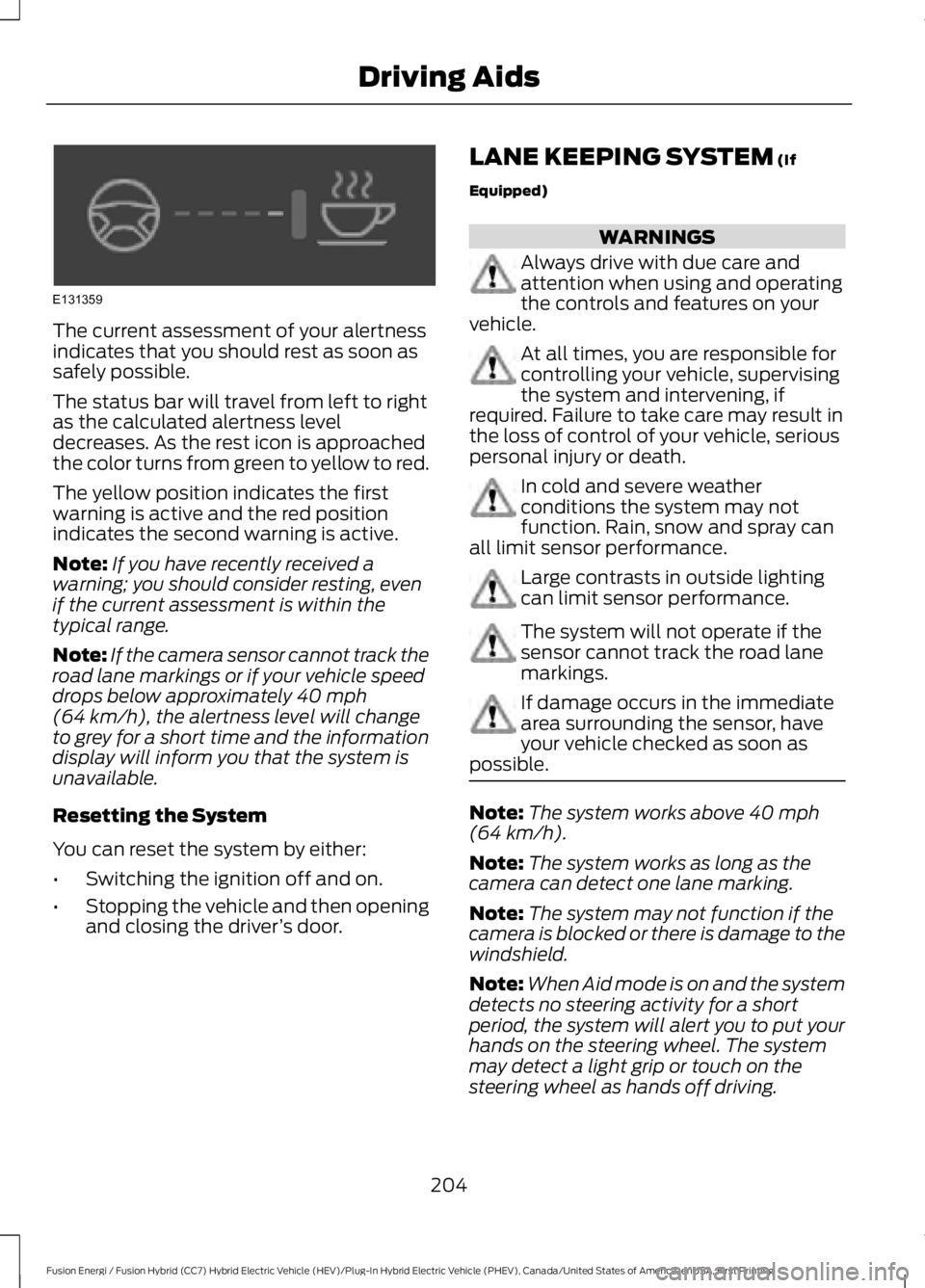
The current assessment of your alertnessindicates that you should rest as soon assafely possible.
The status bar will travel from left to rightas the calculated alertness leveldecreases. As the rest icon is approachedthe color turns from green to yellow to red.
The yellow position indicates the firstwarning is active and the red positionindicates the second warning is active.
Note:If you have recently received awarning; you should consider resting, evenif the current assessment is within thetypical range.
Note:If the camera sensor cannot track theroad lane markings or if your vehicle speeddrops below approximately 40 mph(64 km/h), the alertness level will changeto grey for a short time and the informationdisplay will inform you that the system isunavailable.
Resetting the System
You can reset the system by either:
•Switching the ignition off and on.
•Stopping the vehicle and then openingand closing the driver’s door.
LANE KEEPING SYSTEM (If
Equipped)
WARNINGS
Always drive with due care andattention when using and operatingthe controls and features on yourvehicle.
At all times, you are responsible forcontrolling your vehicle, supervisingthe system and intervening, ifrequired. Failure to take care may result inthe loss of control of your vehicle, seriouspersonal injury or death.
In cold and severe weatherconditions the system may notfunction. Rain, snow and spray canall limit sensor performance.
Large contrasts in outside lightingcan limit sensor performance.
The system will not operate if thesensor cannot track the road lanemarkings.
If damage occurs in the immediatearea surrounding the sensor, haveyour vehicle checked as soon aspossible.
Note:The system works above 40 mph(64 km/h).
Note:The system works as long as thecamera can detect one lane marking.
Note:The system may not function if thecamera is blocked or there is damage to thewindshield.
Note:When Aid mode is on and the systemdetects no steering activity for a shortperiod, the system will alert you to put yourhands on the steering wheel. The systemmay detect a light grip or touch on thesteering wheel as hands off driving.
204
Fusion Energi / Fusion Hybrid (CC7) Hybrid Electric Vehicle (HEV)/Plug-In Hybrid Electric Vehicle (PHEV), Canada/United States of America, enUSA, First Printing
Driving AidsE131359
Page 208 of 516
The system notifies you to stay in your lanethrough the steering system and theinstrument cluster display when the frontcamera detects an unintentional drift outof your lane is likely to occur. The systemautomatically detects and tracks the roadlane markings using a camera mountedbehind the interior rear view mirror.
Switching the System On and Off
Note:The system on or off setting is storeduntil it is manually changed, unless a MyKeyis detected. If the system detects a MyKeyit defaults to on and the mode is set to Alert.
Note:If a MyKey is detected, pressing thebutton will not affect the on or off status ofthe system.
Press the button on the steeringwheel stalk to switch the systemon or off.
System Settings
The system has optional setting menusavailable. The system stores thelast-known selection for each of thesesettings. You do not need to readjust yoursettings each time you turn on the system.
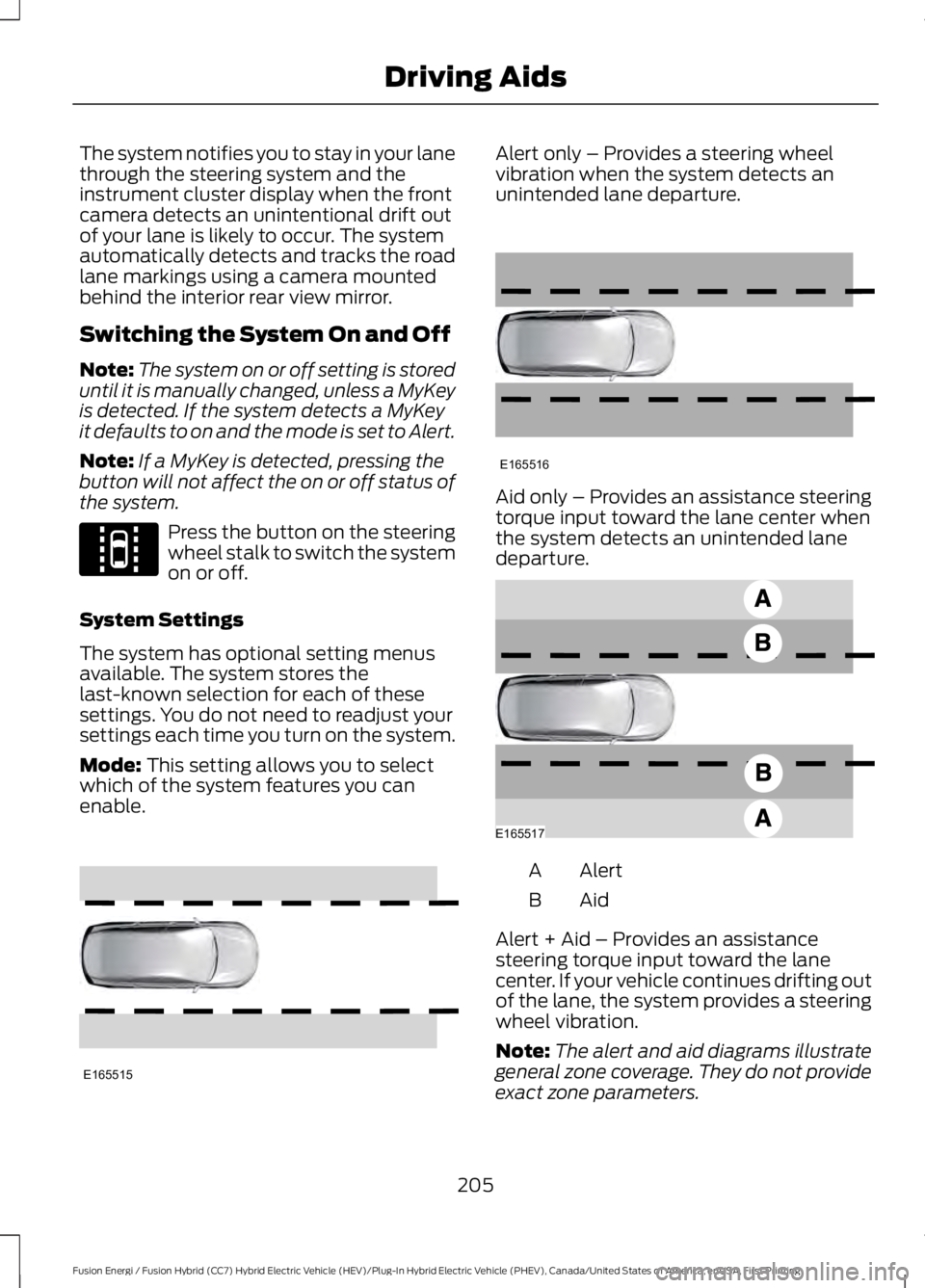
Mode: This setting allows you to selectwhich of the system features you canenable.
Alert only – Provides a steering wheelvibration when the system detects anunintended lane departure.
Aid only – Provides an assistance steeringtorque input toward the lane center whenthe system detects an unintended lanedeparture.
AlertA
AidB
Alert + Aid – Provides an assistancesteering torque input toward the lanecenter. If your vehicle continues drifting outof the lane, the system provides a steeringwheel vibration.
Note:The alert and aid diagrams illustrategeneral zone coverage. They do not provideexact zone parameters.
205
Fusion Energi / Fusion Hybrid (CC7) Hybrid Electric Vehicle (HEV)/Plug-In Hybrid Electric Vehicle (PHEV), Canada/United States of America, enUSA, First Printing
Driving AidsE144813 E165515 E165516 E165517
Page 209 of 516
Intensity: This setting affects the intensityof the steering wheel vibration used for thealert and alert + aid modes. This settingdoes not affect the aid mode.
•Low
•Normal
•High
System Display
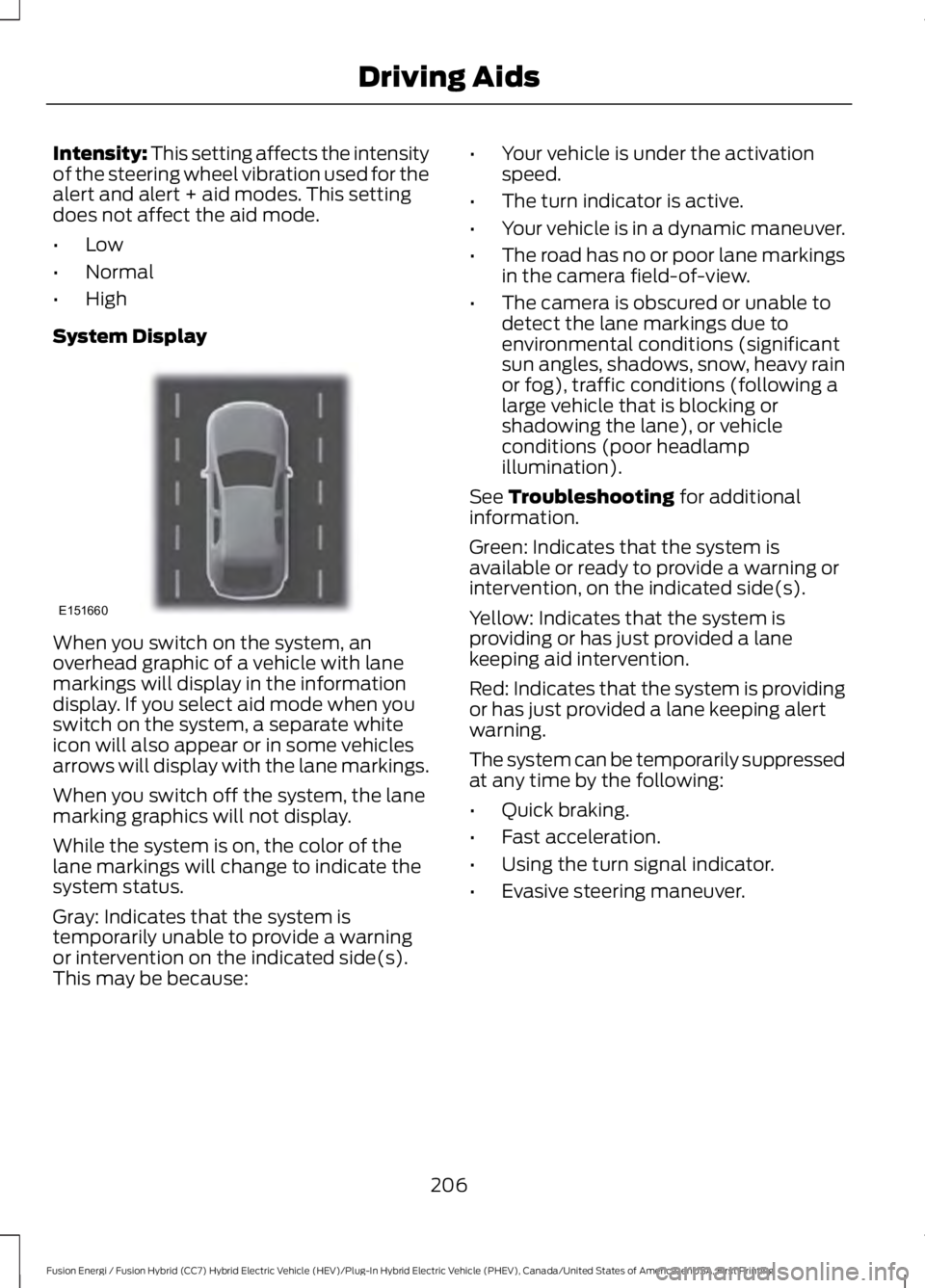
When you switch on the system, anoverhead graphic of a vehicle with lanemarkings will display in the informationdisplay. If you select aid mode when youswitch on the system, a separate whiteicon will also appear or in some vehiclesarrows will display with the lane markings.
When you switch off the system, the lanemarking graphics will not display.
While the system is on, the color of thelane markings will change to indicate thesystem status.
Gray: Indicates that the system istemporarily unable to provide a warningor intervention on the indicated side(s).This may be because:
•Your vehicle is under the activationspeed.
•The turn indicator is active.
•Your vehicle is in a dynamic maneuver.
•The road has no or poor lane markingsin the camera field-of-view.
•The camera is obscured or unable todetect the lane markings due toenvironmental conditions (significantsun angles, shadows, snow, heavy rainor fog), traffic conditions (following alarge vehicle that is blocking orshadowing the lane), or vehicleconditions (poor headlampillumination).
See Troubleshooting for additionalinformation.
Green: Indicates that the system isavailable or ready to provide a warning orintervention, on the indicated side(s).
Yellow: Indicates that the system isproviding or has just provided a lanekeeping aid intervention.
Red: Indicates that the system is providingor has just provided a lane keeping alertwarning.
The system can be temporarily suppressedat any time by the following:
•Quick braking.
•Fast acceleration.
•Using the turn signal indicator.
•Evasive steering maneuver.
206
Fusion Energi / Fusion Hybrid (CC7) Hybrid Electric Vehicle (HEV)/Plug-In Hybrid Electric Vehicle (PHEV), Canada/United States of America, enUSA, First Printing
Driving AidsE151660
Page 210 of 516
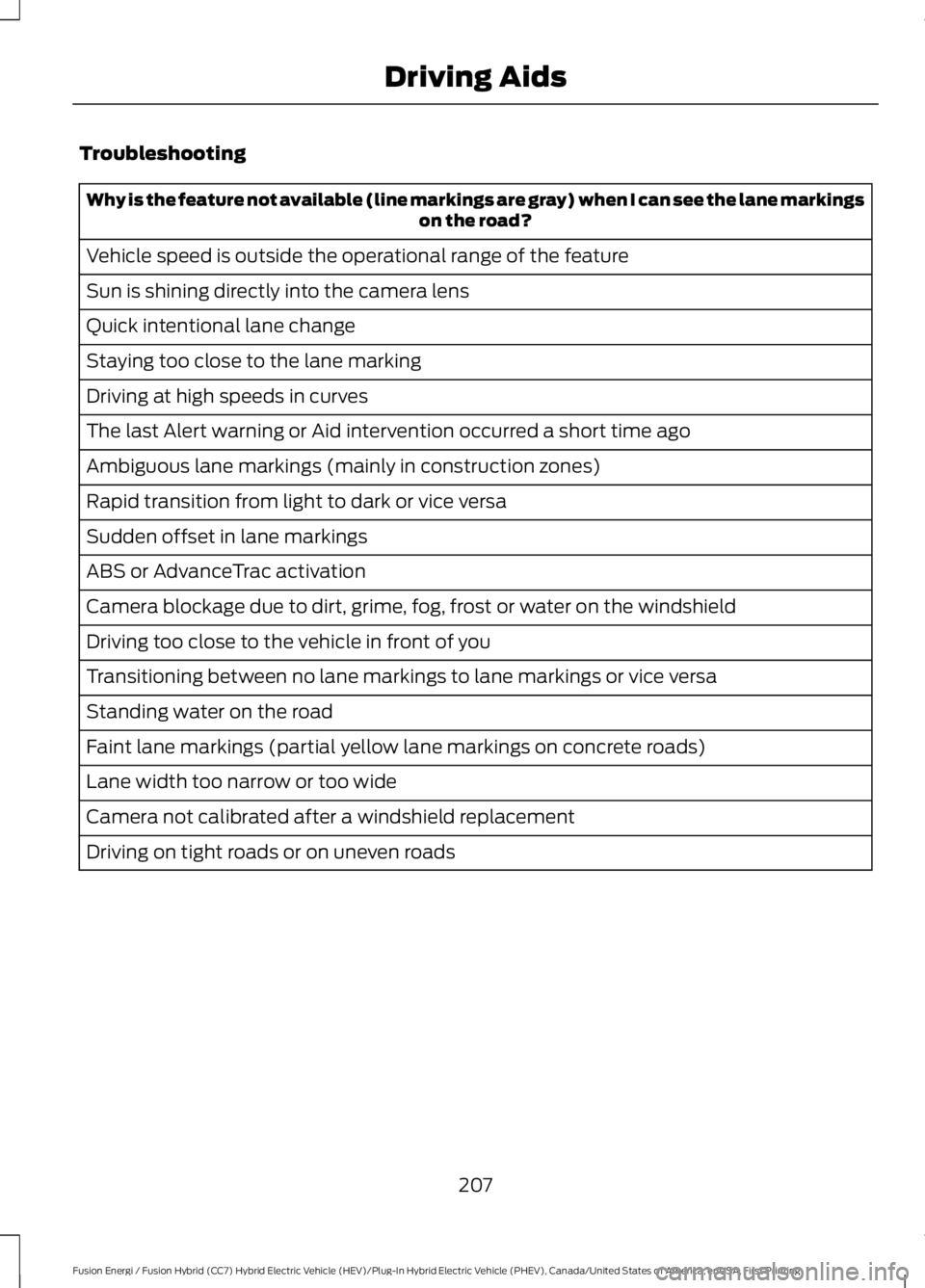
Troubleshooting
Why is the feature not available (line markings are gray) when I can see the lane markingson the road?
Vehicle speed is outside the operational range of the feature
Sun is shining directly into the camera lens
Quick intentional lane change
Staying too close to the lane marking
Driving at high speeds in curves
The last Alert warning or Aid intervention occurred a short time ago
Ambiguous lane markings (mainly in construction zones)
Rapid transition from light to dark or vice versa
Sudden offset in lane markings
ABS or AdvanceTrac activation
Camera blockage due to dirt, grime, fog, frost or water on the windshield
Driving too close to the vehicle in front of you
Transitioning between no lane markings to lane markings or vice versa
Standing water on the road
Faint lane markings (partial yellow lane markings on concrete roads)
Lane width too narrow or too wide
Camera not calibrated after a windshield replacement
Driving on tight roads or on uneven roads
207
Fusion Energi / Fusion Hybrid (CC7) Hybrid Electric Vehicle (HEV)/Plug-In Hybrid Electric Vehicle (PHEV), Canada/United States of America, enUSA, First Printing
Driving Aids
Page 219 of 516
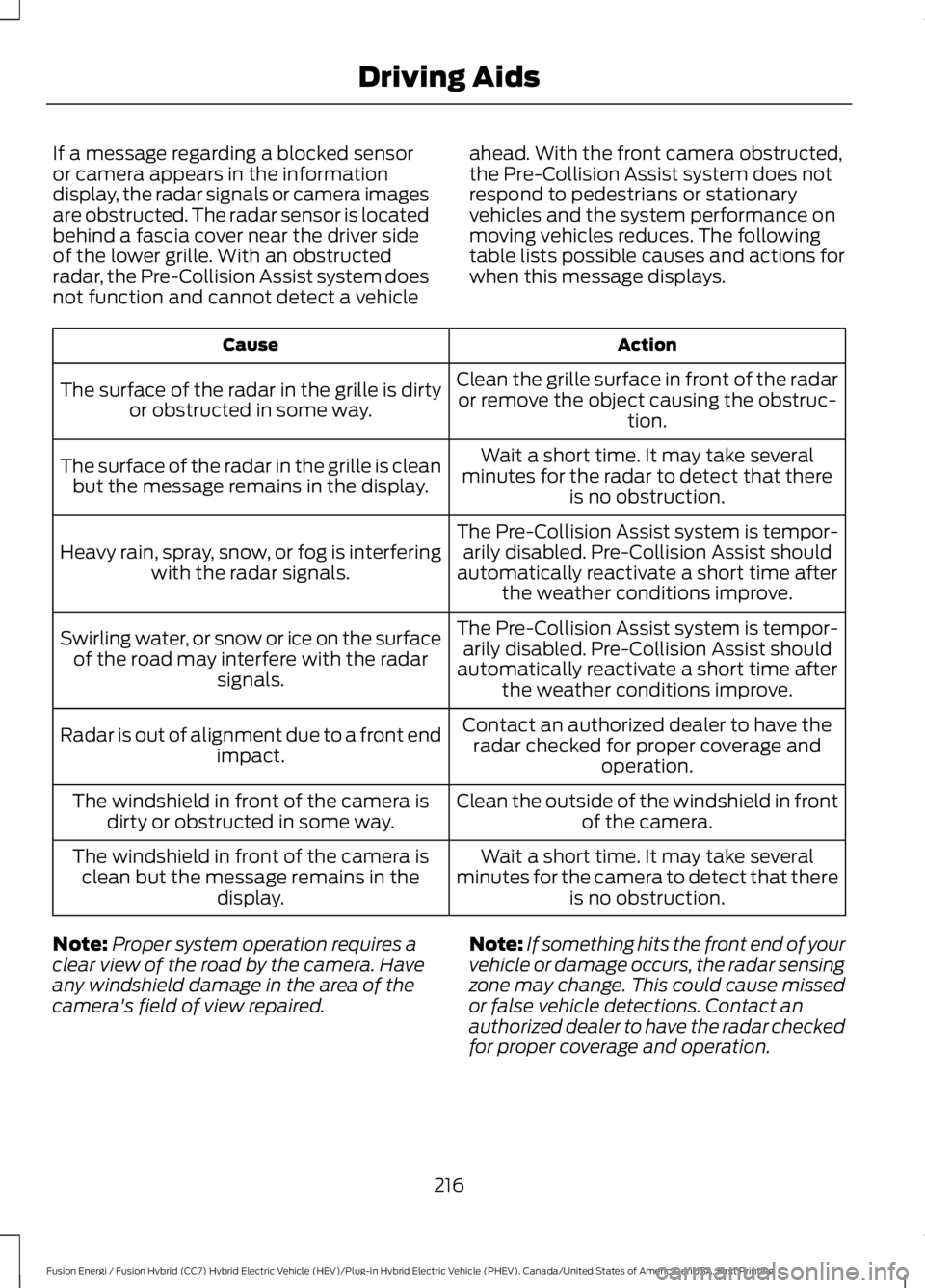
If a message regarding a blocked sensoror camera appears in the informationdisplay, the radar signals or camera imagesare obstructed. The radar sensor is locatedbehind a fascia cover near the driver sideof the lower grille. With an obstructedradar, the Pre-Collision Assist system doesnot function and cannot detect a vehicle
ahead. With the front camera obstructed,the Pre-Collision Assist system does notrespond to pedestrians or stationaryvehicles and the system performance onmoving vehicles reduces. The followingtable lists possible causes and actions forwhen this message displays.
ActionCause
Clean the grille surface in front of the radaror remove the object causing the obstruc-tion.
The surface of the radar in the grille is dirtyor obstructed in some way.
Wait a short time. It may take severalminutes for the radar to detect that thereis no obstruction.
The surface of the radar in the grille is cleanbut the message remains in the display.
The Pre-Collision Assist system is tempor-arily disabled. Pre-Collision Assist shouldautomatically reactivate a short time afterthe weather conditions improve.
Heavy rain, spray, snow, or fog is interferingwith the radar signals.
The Pre-Collision Assist system is tempor-arily disabled. Pre-Collision Assist shouldautomatically reactivate a short time afterthe weather conditions improve.
Swirling water, or snow or ice on the surfaceof the road may interfere with the radarsignals.
Contact an authorized dealer to have theradar checked for proper coverage andoperation.
Radar is out of alignment due to a front endimpact.
Clean the outside of the windshield in frontof the camera.The windshield in front of the camera isdirty or obstructed in some way.
Wait a short time. It may take severalminutes for the camera to detect that thereis no obstruction.
The windshield in front of the camera isclean but the message remains in thedisplay.
Note:Proper system operation requires aclear view of the road by the camera. Haveany windshield damage in the area of thecamera's field of view repaired.
Note:If something hits the front end of yourvehicle or damage occurs, the radar sensingzone may change. This could cause missedor false vehicle detections. Contact anauthorized dealer to have the radar checkedfor proper coverage and operation.
216
Fusion Energi / Fusion Hybrid (CC7) Hybrid Electric Vehicle (HEV)/Plug-In Hybrid Electric Vehicle (PHEV), Canada/United States of America, enUSA, First Printing
Driving Aids