mirror FORD FUSION HYBRID 2017 Owner's Manual
[x] Cancel search | Manufacturer: FORD, Model Year: 2017, Model line: FUSION HYBRID, Model: FORD FUSION HYBRID 2017Pages: 516, PDF Size: 7.53 MB
Page 253 of 516
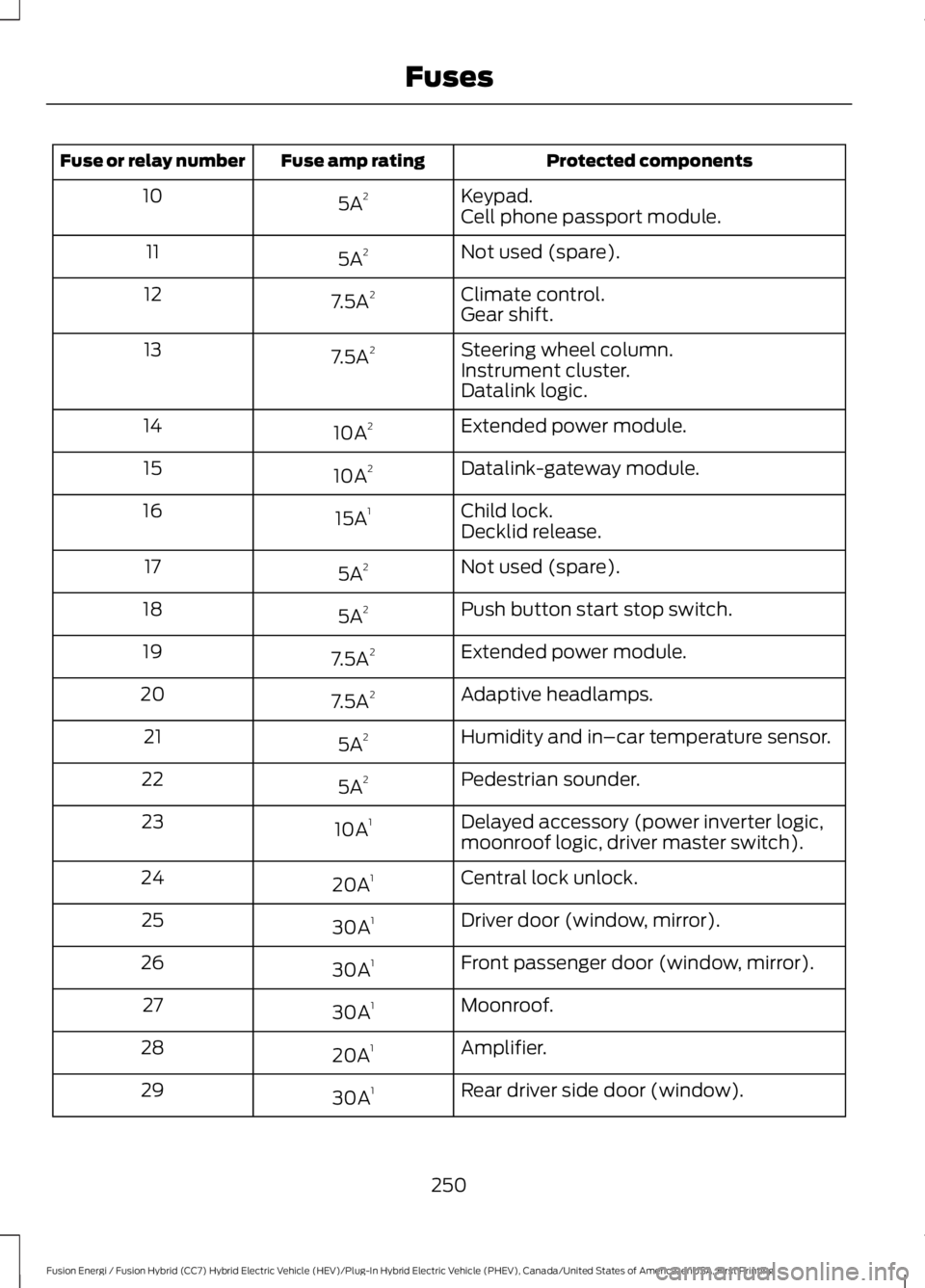
Protected componentsFuse amp ratingFuse or relay number
Keypad.5A210Cell phone passport module.
Not used (spare).5A211
Climate control.7.5A212Gear shift.
Steering wheel column.7.5A213Instrument cluster.Datalink logic.
Extended power module.10A214
Datalink-gateway module.10A215
Child lock.15A116Decklid release.
Not used (spare).5A217
Push button start stop switch.5A218
Extended power module.7.5A219
Adaptive headlamps.7.5A220
Humidity and in–car temperature sensor.5A221
Pedestrian sounder.5A222
Delayed accessory (power inverter logic,moonroof logic, driver master switch).10A123
Central lock unlock.20A124
Driver door (window, mirror).30A125
Front passenger door (window, mirror).30A126
Moonroof.30A127
Amplifier.20A128
Rear driver side door (window).30A129
250
Fusion Energi / Fusion Hybrid (CC7) Hybrid Electric Vehicle (HEV)/Plug-In Hybrid Electric Vehicle (PHEV), Canada/United States of America, enUSA, First Printing
Fuses
Page 254 of 516
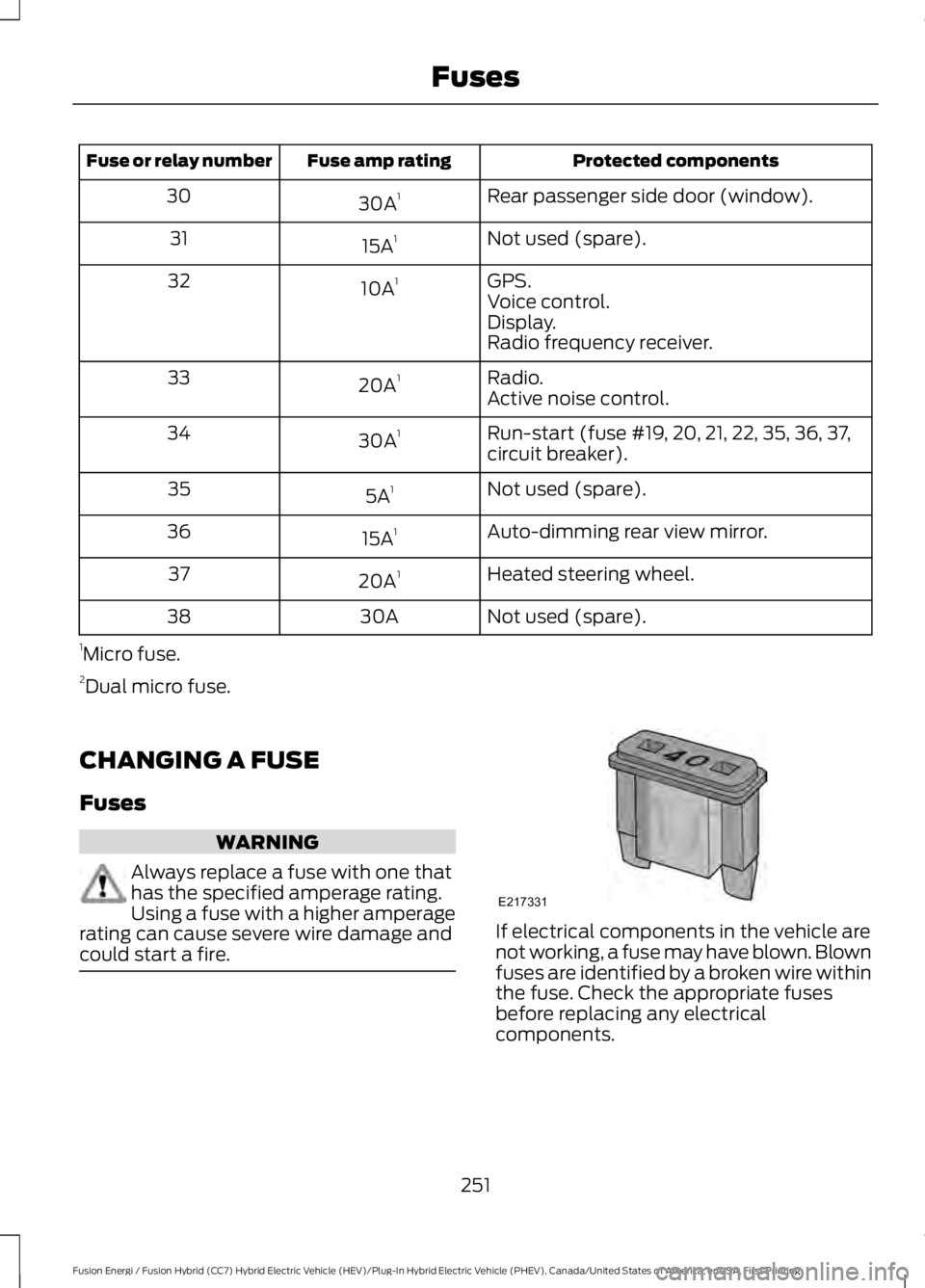
Protected componentsFuse amp ratingFuse or relay number
Rear passenger side door (window).30A130
Not used (spare).15A131
GPS.10A132Voice control.Display.Radio frequency receiver.
Radio.20A133Active noise control.
Run-start (fuse #19, 20, 21, 22, 35, 36, 37,circuit breaker).30A134
Not used (spare).5A135
Auto-dimming rear view mirror.15A136
Heated steering wheel.20A137
Not used (spare).30A38
1Micro fuse.2Dual micro fuse.
CHANGING A FUSE
Fuses
WARNING
Always replace a fuse with one thathas the specified amperage rating.Using a fuse with a higher amperagerating can cause severe wire damage andcould start a fire.If electrical components in the vehicle arenot working, a fuse may have blown. Blownfuses are identified by a broken wire withinthe fuse. Check the appropriate fusesbefore replacing any electricalcomponents.
251
Fusion Energi / Fusion Hybrid (CC7) Hybrid Electric Vehicle (HEV)/Plug-In Hybrid Electric Vehicle (PHEV), Canada/United States of America, enUSA, First Printing
FusesE217331
Page 265 of 516
WARNINGS
Battery posts, terminals and relatedaccessories contain lead and leadcompounds. Wash hands afterhandling.
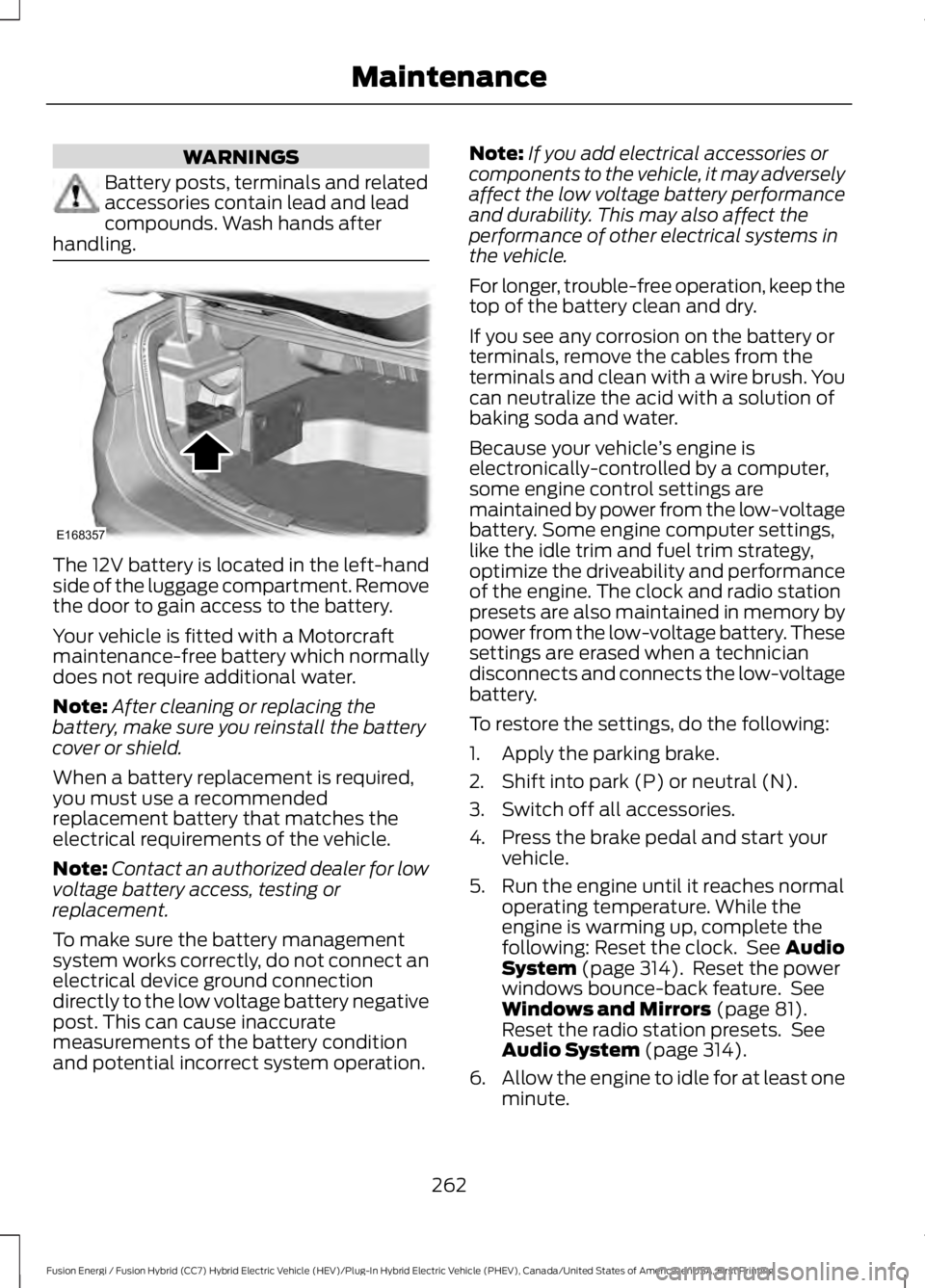
The 12V battery is located in the left-handside of the luggage compartment. Removethe door to gain access to the battery.
Your vehicle is fitted with a Motorcraftmaintenance-free battery which normallydoes not require additional water.
Note:After cleaning or replacing thebattery, make sure you reinstall the batterycover or shield.
When a battery replacement is required,you must use a recommendedreplacement battery that matches theelectrical requirements of the vehicle.
Note:Contact an authorized dealer for lowvoltage battery access, testing orreplacement.
To make sure the battery managementsystem works correctly, do not connect anelectrical device ground connectiondirectly to the low voltage battery negativepost. This can cause inaccuratemeasurements of the battery conditionand potential incorrect system operation.
Note:If you add electrical accessories orcomponents to the vehicle, it may adverselyaffect the low voltage battery performanceand durability. This may also affect theperformance of other electrical systems inthe vehicle.
For longer, trouble-free operation, keep thetop of the battery clean and dry.
If you see any corrosion on the battery orterminals, remove the cables from theterminals and clean with a wire brush. Youcan neutralize the acid with a solution ofbaking soda and water.
Because your vehicle’s engine iselectronically-controlled by a computer,some engine control settings aremaintained by power from the low-voltagebattery. Some engine computer settings,like the idle trim and fuel trim strategy,optimize the driveability and performanceof the engine. The clock and radio stationpresets are also maintained in memory bypower from the low-voltage battery. Thesesettings are erased when a techniciandisconnects and connects the low-voltagebattery.
To restore the settings, do the following:
1. Apply the parking brake.
2. Shift into park (P) or neutral (N).
3. Switch off all accessories.
4. Press the brake pedal and start yourvehicle.
5. Run the engine until it reaches normaloperating temperature. While theengine is warming up, complete thefollowing: Reset the clock. See AudioSystem (page 314). Reset the powerwindows bounce-back feature. SeeWindows and Mirrors (page 81).Reset the radio station presets. SeeAudio System (page 314).
6.Allow the engine to idle for at least oneminute.
262
Fusion Energi / Fusion Hybrid (CC7) Hybrid Electric Vehicle (HEV)/Plug-In Hybrid Electric Vehicle (PHEV), Canada/United States of America, enUSA, First Printing
MaintenanceE168357
Page 276 of 516
•Do not allow wax to come in contactwith any non-body (low-gloss black)colored trim. The wax will discolor orstain the parts over time.
•Roof racks.
•Bumpers.
•Grained door handles.
•Side moldings.
•Mirror housings.
•Windshield cowl area.
•Do not apply wax to glass areas.
•After waxing, your car's paint shouldfeel smooth, and be free of streaks andsmudges.
CLEANING THE ENGINE
Engines are more efficient when they areclean because grease and dirt buildup keepthe engine warmer than normal.
When washing:
•Take care when using a power washerto clean the engine. The high-pressurefluid could penetrate the sealed partsand cause damage.
•Do not spray a hot engine with coldwater to avoid cracking the engineblock or other engine components.
•Spray Motorcraft Engine Shampoo andDegreaser on all parts that requirecleaning and pressure rinse clean. InCanada, use Motorcraft EngineShampoo.
•Never wash or rinse the engine while itis hot or running; water in the runningengine may cause internal damage.
•Never wash or rinse any ignition coil,spark plug wire or spark plug well, orthe area in and around these locations.
•Cover the battery, power distributionbox, and air filter assembly to preventwater damage when cleaning theengine.
CLEANING THE WINDOWS AND
WIPER BLADES
Car wash chemicals and environmentalfallout can result in windshield and wiperblade contamination. Dirty windshield andwipers will result in poor windshield wiperoperation. Keep the windshield and wiperblades clean to maintain windshield wiperperformance.
To clean the windshield and wiper blades:
•Clean the windshield with anon-abrasive glass cleaner. Whencleaning the interior of the windshield,avoid getting any glass cleaner on theinstrument panel or door panels. Wipeany glass cleaner off these surfacesimmediately.
•For windshields contaminated withtree sap, chemicals, wax or bugs, cleanthe entire windshield using steel wool(no greater than 0000 grade) in acircular motion and rinse with water.
•Clean the wiper blades with isopropylrubbing alcohol or windshield washerconcentrate.
Note: Do not use razor blades or othersharp objects to clean or remove decalsfrom the inside of the heated rear window.The vehicle warranty does not coverdamage caused to the heated rear windowgrid lines.
273
Fusion Energi / Fusion Hybrid (CC7) Hybrid Electric Vehicle (HEV)/Plug-In Hybrid Electric Vehicle (PHEV), Canada/United States of America, enUSA, First Printing
Vehicle Care
Page 402 of 516
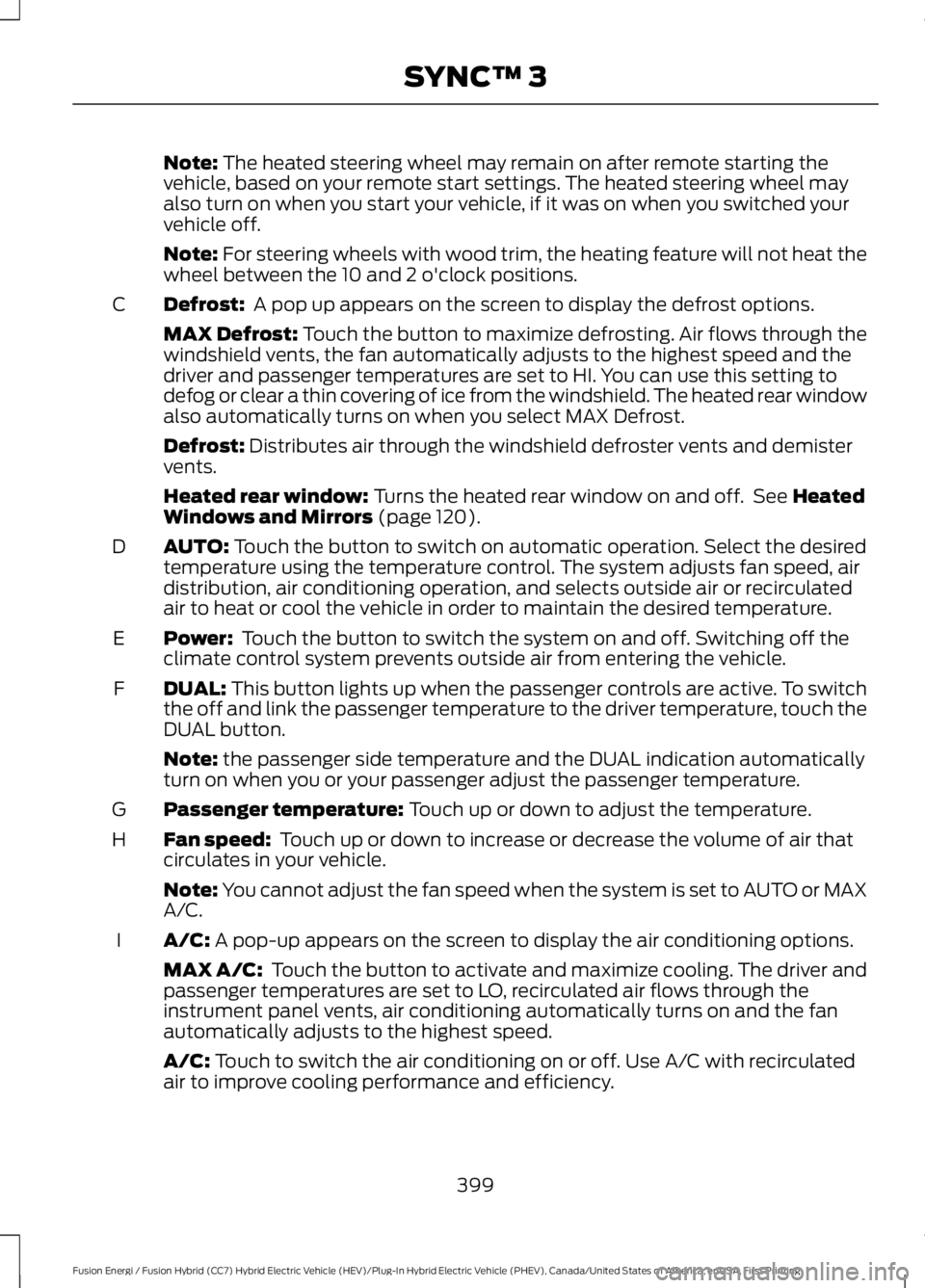
Note: The heated steering wheel may remain on after remote starting thevehicle, based on your remote start settings. The heated steering wheel mayalso turn on when you start your vehicle, if it was on when you switched yourvehicle off.
Note: For steering wheels with wood trim, the heating feature will not heat thewheel between the 10 and 2 o'clock positions.
Defrost: A pop up appears on the screen to display the defrost options.C
MAX Defrost: Touch the button to maximize defrosting. Air flows through thewindshield vents, the fan automatically adjusts to the highest speed and thedriver and passenger temperatures are set to HI. You can use this setting todefog or clear a thin covering of ice from the windshield. The heated rear windowalso automatically turns on when you select MAX Defrost.
Defrost: Distributes air through the windshield defroster vents and demistervents.
Heated rear window: Turns the heated rear window on and off. See HeatedWindows and Mirrors (page 120).
AUTO: Touch the button to switch on automatic operation. Select the desiredtemperature using the temperature control. The system adjusts fan speed, airdistribution, air conditioning operation, and selects outside air or recirculatedair to heat or cool the vehicle in order to maintain the desired temperature.
D
Power: Touch the button to switch the system on and off. Switching off theclimate control system prevents outside air from entering the vehicle.E
DUAL: This button lights up when the passenger controls are active. To switchthe off and link the passenger temperature to the driver temperature, touch theDUAL button.
F
Note: the passenger side temperature and the DUAL indication automaticallyturn on when you or your passenger adjust the passenger temperature.
Passenger temperature: Touch up or down to adjust the temperature.G
Fan speed: Touch up or down to increase or decrease the volume of air thatcirculates in your vehicle.H
Note: You cannot adjust the fan speed when the system is set to AUTO or MAXA/C.
A/C: A pop-up appears on the screen to display the air conditioning options.I
MAX A/C: Touch the button to activate and maximize cooling. The driver andpassenger temperatures are set to LO, recirculated air flows through theinstrument panel vents, air conditioning automatically turns on and the fanautomatically adjusts to the highest speed.
A/C: Touch to switch the air conditioning on or off. Use A/C with recirculatedair to improve cooling performance and efficiency.
399
Fusion Energi / Fusion Hybrid (CC7) Hybrid Electric Vehicle (HEV)/Plug-In Hybrid Electric Vehicle (PHEV), Canada/United States of America, enUSA, First Printing
SYNC™ 3
Page 465 of 516
For a complete listing of the accessoriesthat are available for your vehicle, pleasecontact your authorized dealer or visit theonline store web site:
Web Address (United States)
www.Accessories.Ford.com
Web Address (Canada)
www.Accessories.Ford.ca
Ford Motor Company will repair or replaceany properly authorized dealer-installedFord Original Accessory found to bedefective in factory-supplied materials orworkmanship during the warranty period,as well as any component damaged by thedefective accessories.
Ford Motor Company warrants yourvehicle's accessory through the warrantythat provides the greatest benefit:
•24 months, unlimited mileage.
•The remainder of your new vehiclelimited warranty.
Contact an authorized dealer for detailsand a copy of the warranty.
Exterior Style
•Bumper protectors.
•Graphics.
•Rear spoiler.
•Side-window deflectors.
•Splash guards.
•Wheels.
Interior Style
•All-weather floor mats.
•Door sill plates.
•Electrochromaticcompass/temperature interior mirrors.
•Premium carpeted floor mats.
Lifestyle
•Ash cup or smoker's packages.
•Cargo area protectors.
•Cargo net.
•Cargo organizers.
•Charge cord bag*.
•Interior light kit.
•Roof racks and carriers*.
•Tablet cradle*.
Peace of Mind
•Bumper-mounted parking sensor*.
•Keyless entry keypad.
•Remote start.
•Roadside assistance kit*.
•Vehicle security systems.
•Wheel locks.
*Ford Licensed Accessories. The accessorymanufacturer designs, develops andtherefore warrants Ford LicensedAccessories, and does not design or testthese accessories to Ford Motor Companyengineering requirements. Contact anauthorized Ford dealer for the accessorymanufacturer's limited warranty detailsand request a copy of the Ford LicensedAccessories product limited warranty fromthe accessory manufacturer.
462
Fusion Energi / Fusion Hybrid (CC7) Hybrid Electric Vehicle (HEV)/Plug-In Hybrid Electric Vehicle (PHEV), Canada/United States of America, enUSA, First Printing
Accessories
Page 508 of 516
Service Data Recording........................................9Daytime Running Lamps.............................76Type 1 - Conventional(Non-Configurable)........................................76Type 2 - Configurable..........................................76Digital Radio..................................................323HD Radio Reception and StationTroubleshooting............................................324Direction Indicators........................................78Driver Alert.....................................................203PRINCIPLE OF OPERATION..........................203USING DRIVER ALERT....................................203Driver and Passenger Airbags...................40Children and Airbags..........................................40Proper Driver and Front Passenger SeatingAdjustment.......................................................40Driver and Passenger Knee Airbags........44Driving Aids....................................................203Driving Hints...................................................224Driving Through Water...............................225DRLSee: Daytime Running Lamps.........................76
E
Economical Driving.....................................224EcoSelect........................................................150Electric Parking Brake..................................175Applying the Electric Parking brake.............175Battery With No Charge....................................177Parking On a Hill (Vehicles With a ManualTransmission) .................................................175Releasing the Electric Parking Brake...........176Electric Vehicle Information.....................414Charge Settings (Energi VehiclesOnly)...................................................................416Power.....................................................................430Emission Control System..........................159On-Board Diagnostics (OBD-II)...................160Readiness for Inspection and Maintenance(I/M) Testing...................................................160End User License Agreement.................484VEHICLE SOFTWARE END USER LICENSEAGREEMENT (EULA) ................................484Engine Block Heater....................................144Using the Engine Block Heater......................145Engine Coolant Check...............................256Adding Coolant...................................................257
Coolant Change.................................................259Engine Coolant TemperatureManagement.................................................260Fail-Safe Cooling...............................................259Recycled Coolant..............................................258Severe Climates.................................................258Engine ImmobilizerSee: Passive Anti-Theft System.....................65Engine Oil Check..........................................255Adding Engine Oil..............................................255Engine Oil Dipstick......................................255Engine Specifications................................306Entertainment..............................................388AM/FM Radio......................................................389Apps........................................................................397Bluetooth Stereo or USB................................396CD (If equipped)................................................395HD Radio™ Information (IfAvailable).........................................................392SIRIUS® Satellite Radio (IfActivated).......................................................389Sources.................................................................388Supported Media Players, Formats andMetadata Information.................................397USB Port................................................................397Environment......................................................15EPBSee: Electric Parking Brake..............................175Event Data RecordingSee: Data Recording..............................................9Export Unique Options..................................13Extended Service Plan (ESP).................464EXTENDED SERVICE PLAN (CANADAONLY)...............................................................465Ford Protect (U.S. Only).................................464Exterior Mirrors................................................82Auto-Dimming Feature......................................82Blind Spot Monitor..............................................83Fold-Away Exterior Mirrors...............................82Heated Exterior Mirrors......................................82Integrated Blind Spot Mirrors..........................83Memory Mirrors.....................................................82Power Exterior Mirrors........................................82Puddle Lamps ......................................................83Signal Indicator Mirrors......................................83
505
Fusion Energi / Fusion Hybrid (CC7) Hybrid Electric Vehicle (HEV)/Plug-In Hybrid Electric Vehicle (PHEV), Canada/United States of America, enUSA, First Printing
Index
Page 509 of 516
F
Fastening the Seatbelts................................31Rear Inflatable Seatbelt.....................................33Seatbelt Locking Modes....................................32Using Seatbelts During Pregnancy.................31Flat Tire InflationSee: Tire Sealant and Inflator Kit.................279Floor Mats.......................................................225Fog Lamps - FrontSee: Front Fog Lamps.........................................78Ford Credit..........................................................11US Only......................................................................11Front Fog Lamps............................................78Front Parking Aid..........................................183Obstacle Distance Indicator...........................184Front Passenger Sensing System.............41Fuel and Refueling.......................................153Fuel Consumption.......................................158Calculating Fuel Economy..............................159Filling the Tank....................................................158Fuel Filler Funnel Location........................155Fuel Quality....................................................154Choosing the Right Fuel...................................154Fuel Freshness Mode........................................154Fuel Shutoff...................................................228Fuses................................................................242Fuse Specification Chart...........................242Passenger Compartment FusePanel.................................................................249Power Distribution Box....................................242
G
Garage Door OpenerSee: Universal Garage Door Opener............132Gauges...............................................................86Left Information Display...................................86Right Information Display.................................88General Information on RadioFrequencies...................................................48Intelligent Access.................................................48General Maintenance Information.......466Multi-point Inspection.....................................469Owner Checks and Services.........................468Protecting Your Investment..........................466Why Maintain Your Vehicle?.........................466
Why Maintain Your Vehicle at YourDealership?....................................................466Getting Assistance Outside the U.S. andCanada.........................................................238Getting the Services You Need...............235Away From Home..............................................235Global Opening and Closing......................82Closing the Windows..........................................82Opening the Windows........................................82
H
Hazard Warning Flashers..........................228Headlamp AdjustingSee: Adjusting the Headlamps.....................264Headlamp Exit Delay.....................................75Headlamp RemovalSee: Removing a Headlamp..........................265Head Restraints.............................................122Adjusting the Head Restraint.........................123Tilting Head Restraints ....................................123Heated Seats..................................................129Heated Steering Wheel................................70Heated Windows and Mirrors..................120Heated Exterior Mirror.......................................120Heated Rear Window........................................120HeatingSee: Climate Control..........................................116High Voltage Battery Cut-OffSwitch............................................................169High Voltage Battery...................................162General Information..........................................162Hill Start Assist...............................................177Switching the System On and Off................178Using Hill Start Assist........................................178Hints on Controlling the InteriorClimate...........................................................119Cooling the Interior Quickly............................120General Hints........................................................119Heating the Interior Quickly............................120Recommended Settings for Cooling ..........120Recommended Settings for Heating..........120Side Window Defogging in ColdWeather.............................................................120Hints on Driving With Anti-LockBrakes.............................................................175Home Screen................................................380
506
Fusion Energi / Fusion Hybrid (CC7) Hybrid Electric Vehicle (HEV)/Plug-In Hybrid Electric Vehicle (PHEV), Canada/United States of America, enUSA, First Printing
Index
Page 510 of 516
Hood LockSee: Opening and Closing the Hood..........253Hybrid Vehicle Frequently AskedQuestions......................................................151Hybrid Vehicle Operation..........................146Battery:....................................................................147Braking:...................................................................147Driving:....................................................................146Driving to Optimize Fuel Economy...............147Engine:.....................................................................147EV+ Mode..............................................................148Starting:.................................................................146Stopping:...............................................................146Transmission Operation:.................................146
I
In California (U.S. Only)............................236Information Display Control.......................70Information Display Control Features..........70Information Displays....................................94General Information............................................94Information Messages................................103Active Park............................................................103Adaptive Cruise Control...................................104AdvanceTrac™....................................................104Airbag......................................................................105Alarm......................................................................105Automatic Engine Shutdown........................105Battery and Charging System (12volt)....................................................................106Battery and Charging System (HighVoltage)............................................................106Blind Spot Information and Cross TrafficAlert System....................................................107Doors and Locks..................................................107Driver Alert............................................................108Fuel..........................................................................108Hill Start Assist...................................................109Keys and Intelligent Access............................109Lane Keeping System........................................110Maintenance.........................................................110MyKey........................................................................111Park Aid....................................................................112Park Brake...............................................................112Power Steering.....................................................113Pre-Collision Assist.............................................113Remote Start.........................................................113
Seats.........................................................................113Starting System ...................................................114Tire Pressure Monitoring System...................114Traction Control...................................................114Transmission.........................................................115Installing Child Restraints.............................17Child Seats...............................................................17Using Lap and Shoulder Belts..........................18Using Lower Anchors and Tethers forCHildren (LATCH)............................................22Using Tether Straps.............................................24Instrument Cluster........................................86Instrument Lighting Dimmer......................75Vehicles With Front Fog Lamps......................75Vehicles Without Front Fog Lamps...............75Interior Lamps.................................................78Front Interior Lamp..............................................78Rear Interior Lamp..............................................80Interior Luggage CompartmentRelease............................................................63Interior Mirror...................................................84Auto-Dimming Mirror.........................................84Introduction.........................................................7
J
Jump Starting the Vehicle........................229Connecting the Jumper Cables....................229Jump Starting......................................................230Preparing Your Vehicle.....................................229Removing the Jumper Cables.......................230
K
Keyless Entry.....................................................61SECURICODE™ Keyless Entry Keypad.........61Keyless Starting.............................................141Ignition Modes......................................................141Keys and Remote Controls........................48
L
Lane Keeping System................................204Switching the System On and Off..............205Lighting Control...............................................73Headlamp Flasher................................................74High Beams.............................................................73
507
Fusion Energi / Fusion Hybrid (CC7) Hybrid Electric Vehicle (HEV)/Plug-In Hybrid Electric Vehicle (PHEV), Canada/United States of America, enUSA, First Printing
Index
Page 511 of 516
Lighting...............................................................73General Information............................................73Load Carrying.................................................218Load Limit........................................................218Special Loading Instructions for Owners ofPick-up Trucks and Utility-typeVehicles.............................................................222Vehicle Loading - with and without aTrailer..................................................................218Locking and Unlocking.................................58Activating Intelligent Access............................59Autolock..................................................................60Autounlock..............................................................61Battery Saver..........................................................61Illuminated Entry...................................................61Illuminated Exit......................................................61Power Door Locks................................................58Remote Control....................................................58Smart Unlocks for Intelligent AccessKeys......................................................................60Locks...................................................................58
M
Maintenance..................................................253General Information.........................................253Manual Seats.................................................124Media Hub......................................................328Memory Function.........................................126Easy Entry and Exit Feature............................128Linking a PreSet Position to your RemoteControl or Intelligent Access KeyFob.......................................................................127Saving a PreSet Position..................................127Message CenterSee: Information Displays.................................94MirrorsSee: Heated Windows and Mirrors..............120See: Windows and Mirrors.................................81Mobile Communications Equipment.......13Moonroof..........................................................84Bounce-Back.........................................................85Opening and Closing the Moonroof..............85Venting the Moonroof........................................85Motorcraft Parts...........................................307MyKey Troubleshooting................................57MyKey™.............................................................54Principle of Operation........................................54
N
Navigation.....................................................406cityseeker...............................................................413Destination Mode.............................................408Map Mode............................................................406Navigation Map Updates.................................414Navigation Menu..................................................411SiriusXM Traffic and Travel Link....................414Waypoints..............................................................412Normal Scheduled Maintenance..........469Intelligent Oil-Life Monitor............................469Normal Maintenance Intervals.....................470
O
Oil Change Indicator Reset......................256Oil CheckSee: Engine Oil Check......................................255Opening and Closing the Hood..............253Closing the Hood...............................................254Opening the Hood.............................................253Ordering Additional Owner'sLiterature......................................................239Obtaining a French Owner’s Manual.........240Overhead Console.......................................140
P
Parking Aids....................................................182Principle of Operation.......................................182Passive Anti-Theft System.........................65SecuriLock®...........................................................65PATSSee: Passive Anti-Theft System.....................65Perchlorate.........................................................11Personal Safety System™..........................38How Does the Personal Safety SystemWork?..................................................................38Phone..............................................................400During a Phone Call.........................................404Making Calls........................................................403Pairing Your Cell Phone for the FirstTime..................................................................400Phone Menu.........................................................401Receiving Calls...................................................404Smartphone Connectivity.............................405Text Messaging..................................................405
508
Fusion Energi / Fusion Hybrid (CC7) Hybrid Electric Vehicle (HEV)/Plug-In Hybrid Electric Vehicle (PHEV), Canada/United States of America, enUSA, First Printing
Index